
cmek-aws-kms changedmanage-claude/cmek-aws-kms
Nearest release: v2.1.312, published under an hour before this site recorded the change. Shown because the two are within 24 hours of each other. Nothing here says the release caused the edit.
Recorded here
Lines+12added
Lines−12removed
From line
18
where the diff opens
First seen
14 Aug 2026
this site's first read of the page
Recorded edits22to this page, all time
The whole hunk
from line 18, old and new numbered
/
from line 18
1818
1919* Customer-managed encryption keys (CMEK) are [turned on for your organization](https://platform.claude.com/docs/en/manage-claude/cmek#availability).
2020* You have your Anthropic organization ID, the UUID without the `org_` prefix. Copy it from [Organization](https://platform.claude.com/settings/organization) in the Claude Console, or from **Organization settings > Organization and access** on claude.ai. Whoever creates the key needs it.
21* You're an Organization Admin on Claude Platform, or an Owner or Primary Owner on Claude Enterprise.
22* On Claude Platform, you have a workspace that [retains data](https://platform.claude.com/docs/en/manage-claude/cmek-data-retention#data-retention), ideally a new one, because [existing data stays under Anthropic's key](https://platform.claude.com/docs/en/manage-claude/cmek-how-it-works#when-your-key-takes-effect).
21* You’re an Organization Admin on Claude Platform, or an Owner or Primary Owner on Claude Enterprise.
22* On Claude Platform, you have a workspace that [retains data](https://platform.claude.com/docs/en/manage-claude/cmek-data-retention#data-retention), ideally a new one, because [existing data stays under Anthropic’s key](https://platform.claude.com/docs/en/manage-claude/cmek-how-it-works#when-your-key-takes-effect).
2323* On Claude Enterprise, you know [which features turn off or change](https://platform.claude.com/docs/en/manage-claude/cmek-coverage-claude-enterprise#turned-off-or-changed).
2424
2525In AWS:
2626
2727* You can create AWS KMS keys and set their key policies (`kms:CreateKey` and `kms:PutKeyPolicy`).
28* Any IP restriction on AWS KMS access allows [Anthropic's outbound IP addresses](https://platform.claude.com/docs/en/api/ip-addresses#outbound-ip-addresses).
28* Any IP restriction on AWS KMS access allows [Anthropic’s outbound IP addresses](https://platform.claude.com/docs/en/api/ip-addresses#outbound-ip-addresses).
2929
3030## In AWS: create the key
3131
from line 33
3333
3434### Write the key policy
3535
36This policy gives Anthropic's IAM role access to your key. Use only the role ARN published on this page, never one sent by email or chat. Copy the policy into a text editor:
36This policy gives Anthropic’s IAM role access to your key. Use only the role ARN published on this page, never one sent by email or chat. Copy the policy into a text editor:
3737
3838```json key-policy.json
3939{
from line 77
7777
7878Replace `<AWS_ACCOUNT_ID>` with your [AWS account ID](https://docs.aws.amazon.com/IAM/latest/UserGuide/console-account-id.html) and `<ORGANIZATION_UUID>` with your [Anthropic organization ID](https://platform.claude.com/docs/en/manage-claude/cmek-aws-kms#prerequisites). Keep the `kms:EncryptionContext:anthropic:org_uuid` condition, or verification fails.
7979
80You can also [limit the key to specific workspaces](https://platform.claude.com/docs/en/manage-claude/cmek-aws-kms-workspaces) by listing their compartment IDs. If you're replacing the policy on a key that already protects Claude data, [add one more statement](https://platform.claude.com/docs/en/manage-claude/cmek-troubleshooting#existing-data).
80You can also [limit the key to specific workspaces](https://platform.claude.com/docs/en/manage-claude/cmek-aws-kms-workspaces) by listing their compartment IDs. If you’re replacing the policy on a key that already protects Claude data, [add one more statement](https://platform.claude.com/docs/en/manage-claude/cmek-troubleshooting#existing-data).
8181
8282### Create the key
8383
from line 116
116116 </Step>
117117
118118 <Step title="Define key administrative permissions">
119 Don't select any key administrators. Your key policy already gives your AWS account full admin control. Click **Next**.
119 Don’t select any key administrators. Your key policy already gives your AWS account full admin control. Click **Next**.
120120
121121 <Frame caption="Leave key administrators empty.">
122122 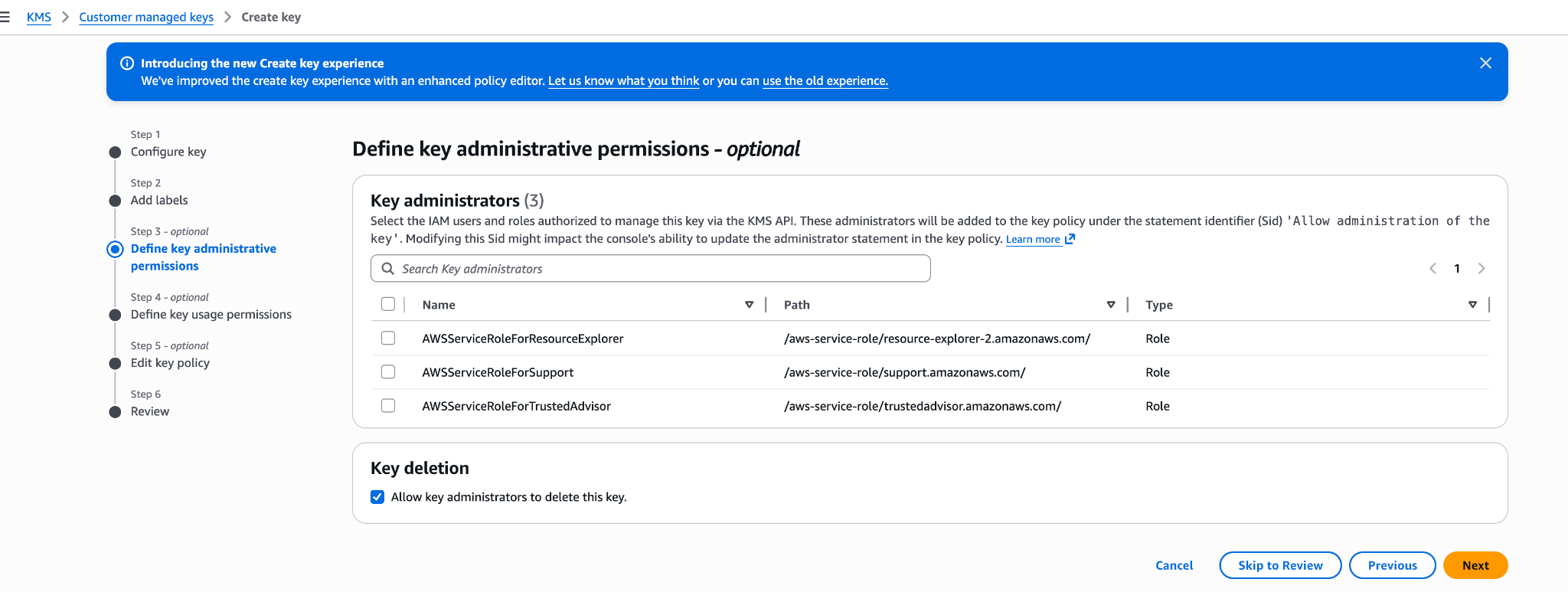
from line 124
124124 </Step>
125125
126126 <Step title="Define key usage permissions">
127 Don't select any key users, and don't add anything under **Other AWS accounts**. Your key policy already grants the access that's needed. Click **Next**.
127 Don’t select any key users, and don’t add anything under **Other AWS accounts**. Your key policy already grants the access that’s needed. Click **Next**.
128128 </Step>
129129
130130 <Step title="Edit key policy">
from line 142
142142 </Tab>
143143
144144 <Tab title="AWS CLI">
145 Save your key policy as `key-policy.json`, then create the key. Replace `<REGION>` with the key's region.
145 Save your key policy as `key-policy.json`, then create the key. Replace `<REGION>` with the key’s region.
146146
147147 ```bash
148148 aws kms create-key \
from line 166
166166 <Tab title="Claude Platform">
167167 <Steps>
168168 <Step title="Open the encryption key settings">
169 In the Claude Console, open [Encryption keys](https://platform.claude.com/settings/privacy#encryption-keys) on the Data retention page. If the section isn't there, select **Organization** from the dropdown menu at the top.
169 In the Claude Console, open [Encryption keys](https://platform.claude.com/settings/privacy#encryption-keys) on the Data retention page. If the section isn’t there, select **Organization** from the dropdown menu at the top.
170170 </Step>
171171
172172 <Step title="Add the key">
from line 183
183183
184184 <Step title="Attach the key to a workspace">
185185 <Warning>
186 Attaching a key [can't be undone](https://platform.claude.com/docs/en/manage-claude/cmek-key-lifecycle#what-each-action-does). You can't remove it from the workspace or replace it. If the key is deleted, Anthropic can't recover the data it protects.
186 Attaching a key [can’t be undone](https://platform.claude.com/docs/en/manage-claude/cmek-key-lifecycle#what-each-action-does). You can’t remove it from the workspace or replace it. If the key is deleted, Anthropic can’t recover the data it protects.
187187 </Warning>
188188
189189 1. At the top of the Data retention page, select the workspace from the dropdown menu.
from line 190
190190 2. Under **Encryption key**, select the key and click **Save**.
191191 3. Select the checkbox to confirm that you have read the CMEK documentation, then click **Confirm**.
192192
193 You see **Workspace settings updated.** Once the key [takes effect](https://platform.claude.com/docs/en/manage-claude/cmek-how-it-works#when-your-key-takes-effect), your cloud provider's audit log shows Anthropic's calls to the key.
193 You see **Workspace settings updated.** Once the key [takes effect](https://platform.claude.com/docs/en/manage-claude/cmek-how-it-works#when-your-key-takes-effect), your cloud provider’s audit log shows Anthropic’s calls to the key.
194194
195195 In a [ZDR organization](https://platform.claude.com/docs/en/manage-claude/cmek-data-retention#zdr-organizations), after you select the workspace, select **Standard data retention** so that **Encryption key** appears. After you click **Save**, click **Accept** on the data retention terms.
196196 </Step>
from line 201
201201 On Claude Enterprise, CMEK applies to the whole organization, and you can add only one key.
202202
203203 <Warning>
204 Adding a key [can't be undone](https://platform.claude.com/docs/en/manage-claude/cmek-key-lifecycle#what-each-action-does). You can't remove it from the organization or replace it. If the key is deleted, Anthropic can't recover the data it protects.
204 Adding a key [can’t be undone](https://platform.claude.com/docs/en/manage-claude/cmek-key-lifecycle#what-each-action-does). You can’t remove it from the organization or replace it. If the key is deleted, Anthropic can’t recover the data it protects.
205205 </Warning>
206206
207207 Adding the key [turns off or changes some features](https://platform.claude.com/docs/en/manage-claude/cmek-coverage-claude-enterprise#turned-off-or-changed) for every user. To try CMEK first, use a separate organization.
No line in this hunk matches that.