
cmek-google-cloud-kms changedmanage-claude/cmek-google-cloud-kms
Nearest release: v2.1.312, published under an hour before this site recorded the change. Shown because the two are within 24 hours of each other. Nothing here says the release caused the edit.
Recorded here
Lines+19added
Lines−19removed
From line
16
where the diff opens
First seen
14 Aug 2026
this site's first read of the page
Recorded edits16to this page, all time
The whole hunk
from line 16, old and new numbered
/
from line 16
1616
1717* Customer-managed encryption keys (CMEK) are [turned on for your organization](https://platform.claude.com/docs/en/manage-claude/cmek#availability).
1818* You have your Anthropic organization ID, the UUID without the `org_` prefix. Copy it from [Organization](https://platform.claude.com/settings/organization) in the Claude Console, or from **Organization settings > Organization and access** on claude.ai. Whoever creates the key needs it.
19* You're an Organization Admin on Claude Platform, or an Owner or Primary Owner on Claude Enterprise.
20* On Claude Platform, you have a workspace that [retains data](https://platform.claude.com/docs/en/manage-claude/cmek-data-retention#data-retention), ideally a new one, because [existing data stays under Anthropic's key](https://platform.claude.com/docs/en/manage-claude/cmek-how-it-works#when-your-key-takes-effect).
19* You’re an Organization Admin on Claude Platform, or an Owner or Primary Owner on Claude Enterprise.
20* On Claude Platform, you have a workspace that [retains data](https://platform.claude.com/docs/en/manage-claude/cmek-data-retention#data-retention), ideally a new one, because [existing data stays under Anthropic’s key](https://platform.claude.com/docs/en/manage-claude/cmek-how-it-works#when-your-key-takes-effect).
2121* On Claude Enterprise, you know [which features turn off or change](https://platform.claude.com/docs/en/manage-claude/cmek-coverage-claude-enterprise#turned-off-or-changed).
2222
2323In Google Cloud:
from line 24
2424
2525* The Cloud KMS API is turned on.
2626* You can create key rings and keys, and set IAM policy on them (`roles/cloudkms.admin` or equivalent).
27* Cloud KMS [Data Access audit logs](https://docs.cloud.google.com/logging/docs/audit/configure-data-access) (Data Read and Data Write) are on, so Cloud Logging records Anthropic's use of your key. They're off by default.
28* If your Google Cloud organization enforces domain restricted sharing (`constraints/iam.allowedPolicyMemberDomains`), it blocks the grant to Anthropic's service account. Add a project-level exception, or allow Anthropic's Cloud Identity customer ID. Contact Anthropic for the ID.
27* Cloud KMS [Data Access audit logs](https://docs.cloud.google.com/logging/docs/audit/configure-data-access) (Data Read and Data Write) are on, so Cloud Logging records Anthropic’s use of your key. They’re off by default.
28* If your Google Cloud organization enforces domain restricted sharing (`constraints/iam.allowedPolicyMemberDomains`), it blocks the grant to Anthropic’s service account. Add a project-level exception, or allow Anthropic’s Cloud Identity customer ID. Contact Anthropic for the ID.
2929
3030## In Google Cloud: create the key
3131
3232After a failed **Verify** or **Add**, see the [fixes for Google Cloud KMS](https://platform.claude.com/docs/en/manage-claude/cmek-troubleshooting#google-cloud-kms).
3333
34These steps label the key with your Anthropic organization ID in lowercase (`<ORGANIZATION_UUID>`) and grant access to Anthropic's service account:
34These steps label the key with your Anthropic organization ID in lowercase (`<ORGANIZATION_UUID>`) and grant access to Anthropic’s service account:
3535
3636```text wrap
3737anthropic-cmek-client-us@gcp-anthropic-cmek-clients.iam.gserviceaccount.com
from line 72
7272 </Frame>
7373 </Step>
7474
75 <Step title="Open the key's permissions">
75 <Step title="Open the key’s permissions">
7676 On the key ring details page, select the checkbox next to the key. Open the **Permissions** panel and click **Grant access**.
7777 </Step>
7878
79 <Step title="Grant Anthropic's service account access to the key">
79 <Step title="Grant Anthropic’s service account access to the key">
8080 Check that **Resource** shows the key, not the key ring or project. Enter these values:
8181
8282 * **New principals:** `anthropic-cmek-client-us@gcp-anthropic-cmek-clients.iam.gserviceaccount.com`
from line 90
9090 </Step>
9191
9292 <Step title="Copy the full key resource name">
93 On the key ring details page, open the key's **Actions** menu and click **Copy resource name**.
93 On the key ring details page, open the key’s **Actions** menu and click **Copy resource name**.
9494
9595 <Frame caption="Copy the key's full resource name from the actions menu.">
9696 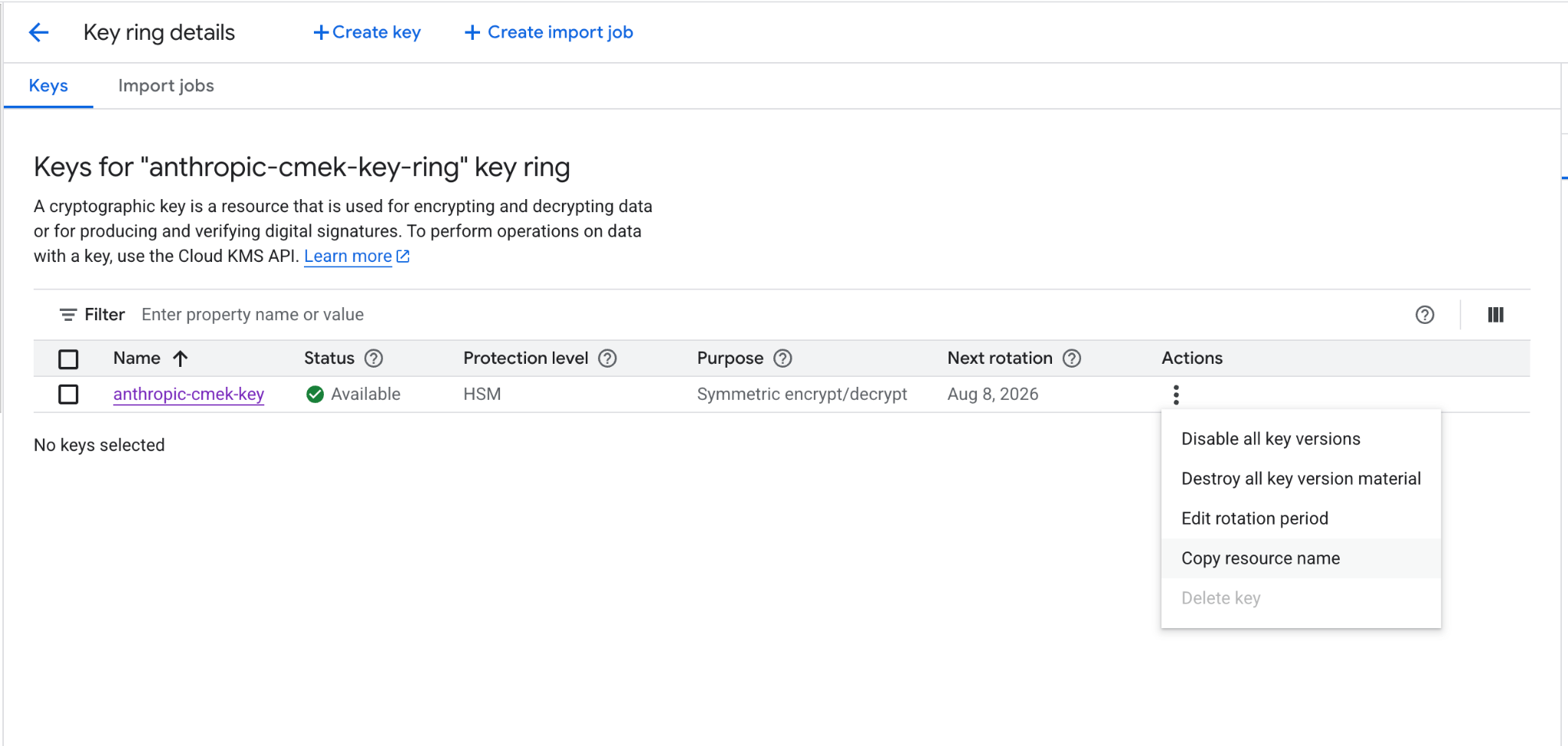
from line 103
103103 In each command, replace these placeholders:
104104
105105 * **`<your-project-id>`:** your Google Cloud project ID
106 * **`<region>`:** the key's location, such as `us-east5`
107 * **`<your-keyring-name>`:** the key ring's name
108 * **`<your-key-name>`:** the key's name
106 * **`<region>`:** the key’s location, such as `us-east5`
107 * **`<your-keyring-name>`:** the key ring’s name
108 * **`<your-key-name>`:** the key’s name
109109 * **`<ORGANIZATION_UUID>`:** your Anthropic organization ID in lowercase
110110
111111 <Steps>
from line 133
133133 For software protection, omit `--protection-level=hsm`.
134134 </Step>
135135
136 <Step title="Grant Anthropic's service account access to the key">
136 <Step title="Grant Anthropic’s service account access to the key">
137137 Run both commands:
138138
139139 ```bash
from line 186
186186 --update-labels=anthropic-org-<ORGANIZATION_UUID>=true
187187```
188188
189The other values are in the key's full resource name, and the command keeps existing labels. Then skip to [the steps that grant access](https://platform.claude.com/docs/en/manage-claude/cmek-google-cloud-kms#encryption-key-setup).
189The other values are in the key’s full resource name, and the command keeps existing labels. Then skip to [the steps that grant access](https://platform.claude.com/docs/en/manage-claude/cmek-google-cloud-kms#encryption-key-setup).
190190
191191## In Claude: add and attach the key
192192
from line 196
196196 <Tab title="Claude Platform">
197197 <Steps>
198198 <Step title="Open the encryption key settings">
199 In the Claude Console, open [Encryption keys](https://platform.claude.com/settings/privacy#encryption-keys) on the Data retention page. If the section isn't there, select **Organization** from the dropdown menu at the top.
199 In the Claude Console, open [Encryption keys](https://platform.claude.com/settings/privacy#encryption-keys) on the Data retention page. If the section isn’t there, select **Organization** from the dropdown menu at the top.
200200 </Step>
201201
202202 <Step title="Add the key">
from line 204
204204 </Step>
205205
206206 <Step title="Enter the key resource name">
207 Check that your key has the **Organization label** shown in the dialog box. Paste the key's full resource name into **Key resource name** and click **Add**.
207 Check that your key has the **Organization label** shown in the dialog box. Paste the key’s full resource name into **Key resource name** and click **Add**.
208208 </Step>
209209
210210 <Step title="Verify the key">
from line 213
213213
214214 <Step title="Attach the key to a workspace">
215215 <Warning>
216 Attaching a key [can't be undone](https://platform.claude.com/docs/en/manage-claude/cmek-key-lifecycle#what-each-action-does). You can't remove it from the workspace or replace it. If the key is deleted, Anthropic can't recover the data it protects.
216 Attaching a key [can’t be undone](https://platform.claude.com/docs/en/manage-claude/cmek-key-lifecycle#what-each-action-does). You can’t remove it from the workspace or replace it. If the key is deleted, Anthropic can’t recover the data it protects.
217217 </Warning>
218218
219219 1. At the top of the Data retention page, select the workspace from the dropdown menu.
from line 220
220220 2. Under **Encryption key**, select the key and click **Save**.
221221 3. Select the checkbox to confirm that you have read the CMEK documentation, then click **Confirm**.
222222
223 You see **Workspace settings updated.** Once the key [takes effect](https://platform.claude.com/docs/en/manage-claude/cmek-how-it-works#when-your-key-takes-effect), your cloud provider's audit log shows Anthropic's calls to the key.
223 You see **Workspace settings updated.** Once the key [takes effect](https://platform.claude.com/docs/en/manage-claude/cmek-how-it-works#when-your-key-takes-effect), your cloud provider’s audit log shows Anthropic’s calls to the key.
224224
225225 In a [ZDR organization](https://platform.claude.com/docs/en/manage-claude/cmek-data-retention#zdr-organizations), after you select the workspace, select **Standard data retention** so that **Encryption key** appears. After you click **Save**, click **Accept** on the data retention terms.
226226 </Step>
from line 231
231231 On Claude Enterprise, CMEK applies to the whole organization, and you can add only one key.
232232
233233 <Warning>
234 Adding a key [can't be undone](https://platform.claude.com/docs/en/manage-claude/cmek-key-lifecycle#what-each-action-does). You can't remove it from the organization or replace it. If the key is deleted, Anthropic can't recover the data it protects.
234 Adding a key [can’t be undone](https://platform.claude.com/docs/en/manage-claude/cmek-key-lifecycle#what-each-action-does). You can’t remove it from the organization or replace it. If the key is deleted, Anthropic can’t recover the data it protects.
235235 </Warning>
236236
237237 Adding the key [turns off or changes some features](https://platform.claude.com/docs/en/manage-claude/cmek-coverage-claude-enterprise#turned-off-or-changed) for every user. To try CMEK first, use a separate organization.
from line 246
246246 </Step>
247247
248248 <Step title="Enter the key resource name">
249 Check that your key has the **Organization label** shown in the dialog box. Paste the key's full resource name into **Key resource name** and click **Add**.
249 Check that your key has the **Organization label** shown in the dialog box. Paste the key’s full resource name into **Key resource name** and click **Add**.
250250 </Step>
251251
252252 <Step title="Confirm that the key was added">
No line in this hunk matches that.