
One read of Claude Developer Platformapi-20260814T043121Z
565 pages moved out of 565 read.
What this read moved
451-475 of 565, page 19 of 23This capture is too large to show at once. Changes 451-475 of 565 are below, significant first; the rest are on the following screens.
build-with-claude/prompt-engineering/prompting-claude-fable-5 First recorded · 176 lines, first recorded
## Capability improvements ## Longer turns by default ## Consider all effort levels ## Strong instruction following ## Ground progress claims during long runs ## State the boundaries ## Parallel subagents ## Construct a memory system ## Rare cases of early stopping ## Rare cases of context-budget concern ## Give the reason, not only the request ## Readability when communicating with the user ## Create a send-to-user tool ## Recommended scaffolding changes
The first capture of this source. The page was already there, and this is what it said.
---
title: Prompting Claude Fable 5
url: https://platform.claude.com/docs/en/build-with-claude/prompt-engineering/prompting-claude-fable-5
description: Behavioral differences and prompting patterns for Claude Fable 5 and Claude Mythos 5, covering effort, instruction following, long runs, memory, and scaffolding changes.
---

This guide covers the prompting and scaffolding patterns specific to Claude Fable 5 and Claude Mythos 5. For the model's capabilities, API changes, pricing, and availability, see [Introducing Claude Fable 5 and Claude Mythos 5](https://platform.claude.com/docs/en/about-claude/models/introducing-claude-fable-5-and-claude-mythos-5). For techniques that apply across all current Claude models, see [Prompting best practices](https://platform.claude.com/docs/en/build-with-claude/prompt-engineering/claude-prompting-best-practices).

Claude Fable 5 takes on problems that were previously too complex, long-running, or ambiguous for prior models, and is particularly effective at end-to-end work that takes a person hours, days, or weeks to complete. The teams seeing the best outcomes apply Claude Fable 5 to their hardest unsolved problems; testing it only on simpler workloads tends to undersell its capability range. It also performs reliably on more straightforward tasks.

Claude Fable 5 has several behavioral differences from Claude Opus 4.8 that may require prompt or scaffolding updates. Capability improvements at this level are also a good prompt to re-evaluate which instructions, tools, and guardrails are still needed. The patterns below cover the behaviors that most often require tuning.

<Note>
  For API parameter changes specific to Claude Fable 5 and Claude Mythos 5 (adaptive thinking only, summarized-only thinking output, no extended thinking budgets, the `refusal` stop reason and fallback handling), see [Introducing Claude Fable 5 and Claude Mythos 5](https://platform.claude.com/docs/en/about-claude/models/introducing-claude-fable-5-and-claude-mythos-5).

  Claude Fable 5 runs safety classifiers that target offensive cybersecurity techniques (such as building exploits, malware, or attack tooling), biology and life sciences content (such as lab methods or molecular mechanisms), and extraction of the model's summarized thinking. Benign cybersecurity work and beneficial life sciences tasks may also trigger these safeguards. To re-route declined requests automatically, configure [server-side or client-side fallback](https://platform.claude.com/docs/en/build-with-claude/refusals-and-fallback) to Claude Opus 4.8.
</Note>

## Capability improvements

Compared with Claude Opus 4.8, Claude Fable 5 shows improvement in:

* **Long-horizon autonomy.** Claude Fable 5 sustains productive output over extended periods, completing multiday, goal-directed runs with strong instruction retention across long, complex tasks.
* **First-shot correctness on complex, well-specified problems.** Early testers reported single-pass implementations of systems that previously took days of iteration.
* **Vision.** Claude Fable 5 interprets dense technical images, web applications, and detailed screenshots with substantially higher accuracy, often while using fewer output tokens, and is trained to use bash and crop tools to handle flipped, blurry, or noisy images.
* **Enterprise workflows.** Claude Fable 5 follows instructions, stays in scope, and produces professional-grade output on financial analysis, spreadsheets, slides, and documents.
* **Code review and debugging.** Bug-finding recall (outside the cybersecurity domains the safety classifiers cover) is noticeably higher than Claude Opus 4.8, including search across codebases and repository history.
* **Navigating ambiguity.** Claude Fable 5 performs well when given complex, multithreaded requests and asked to determine next steps.
* **Delegation and collaboration.** Claude Fable 5 is significantly more dependable at dispatching and sustaining parallel subagents, and reliably manages ongoing communication with long-running subagents and peer agents.

Beyond these specific improvements, Claude Fable 5 is generally more capable than prior models on almost all tasks. Claude Fable 5 is not intended for offensive cybersecurity or biology and life sciences work; requests in those domains can return [`stop_reason: "refusal"`](https://platform.claude.com/docs/en/build-with-claude/refusals-and-fallback).

## Longer turns by default

Individual requests on hard tasks can run for many minutes at higher [effort](https://platform.claude.com/docs/en/build-with-claude/effort) settings, especially when the task requires gathering context, building, and self-verifying, and autonomous runs can extend for hours. This is one of the largest shifts teams encounter when adjusting to Claude Fable 5. Adjust client timeouts, streaming, and user-facing progress indicators before migrating, and consider restructuring harnesses to check on runs asynchronously, for example through scheduled jobs, rather than blocking. To keep Claude Fable 5 from overplanning when a task is ambiguous:

```text wrap
When you have enough information to act, act. Do not re-derive facts already established in the conversation, re-litigate a decision the user has already made, or narrate options you will not pursue in user-facing messages. If you are weighing a choice, give a recommendation, not an exhaustive survey. This does not apply to thinking blocks.
```

## Consider all effort levels

[Effort](https://platform.claude.com/docs/en/build-with-claude/effort) is the primary control for the trade-off between intelligence, latency, and cost on Claude Fable 5. Use `high` as the default for most tasks, with `xhigh` for the most capability-sensitive workloads and `medium` or `low` for routine work. Lower effort settings on Claude Fable 5 still perform well and often exceed `xhigh` performance on prior models. Reduce effort if a task completes but takes longer than necessary, or if you want a quicker, more interactive working style.

On routine work at higher effort, Claude Fable 5 can gather context and deliberate beyond what the task needs. At the same time, higher effort often produces excellent verification behavior, sophisticated reasoning, and the most rigorous output. To prevent unrequested tidying or refactoring at higher effort:

```text wrap
Don't add features, refactor, or introduce abstractions beyond what the task requires. A bug fix doesn't need surrounding cleanup and a one-shot operation usually doesn't need a helper. Don't design for hypothetical future requirements: do the simplest thing that works well. Avoid premature abstraction and half-finished implementations. Don't add error handling, fallbacks, or validation for scenarios that cannot happen. Trust internal code and framework guarantees. Only validate at system boundaries (user input, external APIs). Don't use feature flags or backwards-compatibility shims when you can just change the code.
```

## Strong instruction following

Instruction-following is improved enough that you can steer most behaviors with a brief instruction rather than enumerating each behavior by name. For example, when un-steered, Claude Fable 5 can elaborate beyond what the task needs, especially at higher effort settings: surveying options it won't pursue, explaining root causes at length, producing heavily-structured PR descriptions, or writing comments that narrate what the next line does. A short brevity instruction is as effective as listing each pattern:

```text wrap
Lead with the outcome. Your first sentence after finishing should answer "what happened" or "what did you find": the thing the user would ask for if they said "just give me the TLDR." Supporting detail and reasoning come after. Being readable and being concise are different things, and readability matters more.

The way to keep output short is to be selective about what you include (drop details that don't change what the reader would do next), not to compress the writing into fragments, abbreviations, arrow chains like A → B → fails, or jargon.
```

The same applies to checkpoint behavior in long-running workflows. To have Claude Fable 5 stop only where it genuinely needs you, there is no need to enumerate every case:

```text wrap
Pause for the user only when the work genuinely requires them: a destructive or irreversible action, a real scope change, or input that only they can provide. If you hit one of these, ask and end the turn, rather than ending on a promise.
```

## Ground progress claims during long runs

On long autonomous runs, instruct Claude Fable 5 to audit progress against actual tool results. In Anthropic's testing, this nearly eliminated fabricated status reports even on tasks designed to elicit them:

```text wrap
Before reporting progress, audit each claim against a tool result from this session. Only report work you can point to evidence for; if something is not yet verified, say so explicitly. Report outcomes faithfully: if tests fail, say so with the output; if a step was skipped, say that; when something is done and verified, state it plainly without hedging.
```

## State the boundaries

Claude Fable 5 can occasionally take unrequested actions (drafting an email when none was asked for, creating defensive git-branch backups). Define explicit constraints on what Claude Fable 5 should and should not do:

```text wrap
When the user is describing a problem, asking a question, or thinking out loud rather than requesting a change, the deliverable is your assessment. Report your findings and stop. Don't apply a fix until they ask for one. Before running a command that changes system state (restarts, deletes, config edits), check that the evidence actually supports that specific action. A signal that pattern-matches to a known failure may have a different cause.
```

## Parallel subagents

Claude Fable 5 dispatches parallel subagents more readily than prior models. Use subagents frequently, provide explicit guidance about when delegation is appropriate, and prefer asynchronous communication between orchestrator and subagents over blocking until each subagent returns. Long-lived subagents that keep their context across subtasks save time and cost through cache reads and avoid bottlenecking on the slowest subagent.

```text wrap
Delegate independent subtasks to subagents and keep working while they run. Intervene if a subagent goes off track or is missing relevant context.
```

## Construct a memory system

Claude Fable 5 performs particularly well when it can record lessons from previous runs and reference them. Provide a place to write notes, as simple as a Markdown file:

```text wrap
Store one lesson per file with a one-line summary at the top. Record corrections and confirmed approaches alike, including why they mattered. Don't save what the repo or chat history already records; update an existing note rather than creating a duplicate; delete notes that turn out to be wrong.
```

To bootstrap the memory system from existing history, have Claude Fable 5 review past sessions:

```text wrap
Reflect on the previous sessions we've had together. Use subagents to identify core themes and lessons, and store them in [X]. Make sure you know to reference [X] for future use.
```

## Rare cases of early stopping

Deep into a long session, Claude Fable 5 can occasionally end a turn with a text-only statement of intent ("I'll now run X") without issuing the corresponding tool call, or pause to ask permission when it already has enough to proceed. A "continue" or "go ahead and do it end to end" suffices. To define when pausing is appropriate, pair this with the checkpoint instruction in [Strong instruction following](https://platform.claude.com/docs/en/build-with-claude/prompt-engineering/prompting-claude-fable-5#strong-instruction-following). For autonomous pipelines, add a system reminder:

```text wrap
You are operating autonomously. The user is not watching in real time and cannot answer questions mid-task, so asking "Want me to…?" or "Shall I…?" will block the work. For reversible actions that follow from the original request, proceed without asking. Offering follow-ups after the task is done is fine; asking permission after already discussing with the user before doing the work is not. Before ending your turn, check your last paragraph. If it is a plan, an analysis, a question, a list of next steps, or a promise about work you have not done ("I'll…", "let me know when…"), do that work now with tool calls. End your turn only when the task is complete or you are blocked on input only the user can provide.
```

## Rare cases of context-budget concern

In very long sessions, Claude Fable 5 can occasionally suggest a new session, offer to summarize and hand off, or trim its own work. This is most often triggered when the harness shows a remaining-token countdown to the model. Avoid surfacing explicit context-budget counts where possible. If the harness must show them, a reassurance helps:

```text wrap
You have ample context remaining. Do not stop, summarize, or suggest a new session on account of context limits. Continue the work.
```

## Give the reason, not only the request

Claude Fable 5 tends to perform better when it understands the intent behind a request: context lets it connect the task to relevant information rather than inferring intent on its own. Provide context about why you're asking, especially for long-running agents drawing on multiple workstreams:

```text wrap
I'm working on [the larger task] for [who it's for]. They need [what the output enables]. With that in mind: [request].
```

## Readability when communicating with the user

In extended or agentic conversations (many tool calls, large working context), Claude Fable 5 can produce text that's hard to follow: dense arrow-chain shorthand, deep implementation detail, references to thinking the user never saw, or overly technical phrasing. A communication-style addendum mitigates this:

```text wrap
Terse shorthand is fine between tool calls (that's you thinking out loud, and brevity there is good). Your final summary is different: it's for a reader who didn't see any of that.

If you've been working for a while without the user watching (overnight, across many tool calls, since they last spoke), your final message is their first look at any of it. Write it as a re-grounding, not a continuation of your working thread: the outcome first, then the one or two things you need from them, each explained as if new. The vocabulary you built up while working is yours, not theirs; leave it behind unless you re-introduce it.

When you write the summary at the end, drop the working shorthand. Write complete sentences. Spell out terms. Don't use arrow chains, hyphen-stacked compounds, or labels you made up earlier. When you mention files, commits, flags, or other identifiers, give each one its own plain-language clause. Open with the outcome: one sentence on what happened or what you found. Then the supporting detail. If you have to choose between short and clear, choose clear.
```

## Create a send-to-user tool

When running long, asynchronous agents, give the agent a way to surface a message the user must see exactly as written, without ending its turn: a deliverable (a generated code snippet or a drafted message), a progress update with specific numbers, or a direct reply to a question the user asked mid-loop. The tool's input is the message to display; when Claude calls it, render the input directly in your UI and return a simple acknowledgement as the tool result. Tool inputs are never summarized, so the content arrives intact.

```json
{
  "name": "send_to_user",
  "description": "Display a message directly to the user. Use this for progress updates, partial results, or content the user must see exactly as written before the task finishes.",
  "input_schema": {
    "type": "object",
    "properties": {
      "message": {
        "type": "string",
        "description": "The content to display to the user."
      }
    },
    "required": ["message"]
  }
}
```

Add this tool whenever your UX depends on delivering content or direct user interactions verbatim mid-task. For agents that only narrate routine progress, the model's own summaries are typically adequate. Defining the tool is not sufficient on its own; without an instruction in the system prompt, Claude Fable 5 rarely calls it. Pair the tool with elicitation language such as:

```text wrap
Between tool calls, when you have content the user must read verbatim (a partial deliverable, a direct answer to their question), call the send_to_user tool with that content. Use send_to_user only for user-facing content, not for narration or reasoning.
```

Do not route narration or internal reasoning through `send_to_user`; over-calling it for non-user-facing content defeats the purpose.

## Recommended scaffolding changes

* **Start at the top of your difficulty range.** Pick a task harder than what you'd assign to prior models, and have Claude Fable 5 scope it, ask clarifying questions, and execute.
* **Make self-verification explicit in long-run prompts.** Separate, fresh-context verifier subagents tend to outperform self-critique. For long-running tasks, instruct: `Establish a method for checking your own work at an interval of [X] as you build. Run this every [X interval], verifying your work with subagents against the specification.`
* **Refactor existing prompts and skills.** Skills developed for prior models are often too prescriptive for Claude Fable 5 and can degrade output quality. Review and consider removing older instructions if default performance is better. Claude Fable 5 also does a good job of updating skills on the fly based on what it learns from the task at hand.
* **Don't instruct Claude to reproduce its reasoning in the response.** Prompts, skills, or harness instructions that tell the model to echo, transcribe, or explain its internal reasoning as response text can trigger the [`reasoning_extraction` refusal category](https://platform.claude.com/docs/en/build-with-claude/refusals-and-fallback#refusal-response) on Claude Fable 5, causing elevated fallbacks to Claude Opus 4.8. Audit existing skills and system prompts for reflection or show-your-thinking instructions when migrating. If your application needs reasoning visibility, read the structured `thinking` blocks from [adaptive thinking](https://platform.claude.com/docs/en/build-with-claude/thinking) instead, and use a [send-to-user tool](https://platform.claude.com/docs/en/build-with-claude/prompt-engineering/prompting-claude-fable-5#create-a-send-to-user-tool) to surface progress during long runs.
* **Create a send-to-user tool.** For long, asynchronous agents, a client-side tool delivers messages to the user verbatim without ending the turn. See [Create a send-to-user tool](https://platform.claude.com/docs/en/build-with-claude/prompt-engineering/prompting-claude-fable-5#create-a-send-to-user-tool).
build-with-claude/prompt-engineering/prompting-claude-opus-4-8 First recorded · 162 lines, first recorded
## Response length and verbosity ## Calibrating effort and thinking depth ## Tool use triggering ## User-facing progress updates ## More literal instruction following ## Tone and writing style ## Controlling subagent spawning ## Design and frontend defaults ## Interactive coding products ## Code review harnesses ## Computer use
The first capture of this source. The page was already there, and this is what it said.
---
title: Prompting Claude Opus 4.8
url: https://platform.claude.com/docs/en/build-with-claude/prompt-engineering/prompting-claude-opus-4-8
description: Behavioral differences and prompting patterns for Claude Opus 4.8, covering verbosity, effort calibration, tool use, subagents, and frontend defaults.
---

This guide covers the prompting patterns specific to Claude Opus 4.8. For the API changes involved in moving from Claude Opus 4.8 to the latest Opus model, see [Migrating to Claude Opus 5 from Claude Opus 4.8](https://platform.claude.com/docs/en/about-claude/models/migration-guide#migrating-from-claude-opus-4-8-to-claude-opus-5). For techniques that apply across all current Claude models, see [Prompting best practices](https://platform.claude.com/docs/en/build-with-claude/prompt-engineering/claude-prompting-best-practices).

Claude Opus 4.8 has particular strengths in long-horizon agentic work, knowledge work, vision, and memory tasks. It performs well out of the box on existing Claude Opus 4.7 prompts. The following patterns cover the behaviors that most often require tuning.

<Note>
  For the API parameter changes since Claude Opus 4.7 (sampling parameters, effort default, 1M context window default, mid-conversation system messages, and refusal stop details), see [Migrating to Claude Opus 5 from Claude Opus 4.7](https://platform.claude.com/docs/en/about-claude/models/migration-guide#migrating-from-claude-opus-47), which covers the same changes on the way to the latest Opus model; Claude Opus 4.8 shares these behaviors.
</Note>

## Response length and verbosity

Claude Opus 4.8 calibrates response length to how complex it judges the task to be, rather than defaulting to a fixed verbosity. This usually means shorter answers on simple lookups and much longer ones on open-ended analysis.

If your product depends on a certain style or verbosity of output, you may need to tune your prompts. As an example, to decrease verbosity, you might add:

```text wrap
Provide concise, focused responses. Skip non-essential context, and keep examples minimal.
```

If you see specific examples of kinds of verbosity (such as over-explaining), you can add additional instructions in your prompt to prevent them. Positive examples showing how Claude can communicate with the appropriate level of concision tend to be more effective than negative examples or instructions that tell the model what not to do.

## Calibrating effort and thinking depth

The [effort parameter](https://platform.claude.com/docs/en/build-with-claude/effort) allows you to tune Claude's intelligence versus token spend, trading off capability for faster speed and lower costs. Start with the `xhigh` effort level for coding and agentic use cases, and use a minimum of `high` effort for most intelligence-sensitive use cases. Experiment with other effort levels to further tune token usage and intelligence:

* **`max`:** Max effort can deliver performance gains in some use cases, but may show diminishing returns from increased token usage. This setting can also sometimes be prone to overthinking. Test max effort for intelligence-demanding tasks.
* **`xhigh`:** Extra high effort is the best setting for most coding and agentic use cases.
* **`high`:** This setting balances token usage and intelligence. For most intelligence-sensitive use cases, use a minimum of `high` effort.
* **`medium`:** Good for cost-sensitive use cases that need to reduce token usage while trading off intelligence.
* **`low`:** Reserve for short, scoped tasks and latency-sensitive workloads that are not intelligence-sensitive.

Claude Opus 4.8 respects effort levels strictly, especially at the low end. At `low` and `medium`, the model scopes its work to what was asked rather than going above and beyond. This is good for latency and cost, but on moderately complex tasks running at `low` effort there is some risk of under-thinking.

If you observe shallow reasoning on complex problems, raise effort to `high` or `xhigh` rather than prompting around it. If you need to keep effort at `low` for latency, add targeted guidance:

```text wrap
This task involves multistep reasoning. Think carefully through the problem before responding.
```

Effort is likely to be more important for this model than for any prior Opus, so experiment with it actively when you upgrade.

On Claude Opus 4.8, thinking is off unless you explicitly set `thinking: {type: "adaptive"}`. The triggering behavior for [adaptive thinking](https://platform.claude.com/docs/en/build-with-claude/thinking) is steerable. If you find the model thinking more often than you'd like, which can happen with large or complex system prompts, add guidance to steer it. As always, measure the effect of any prompting changes on performance. Example:

```text wrap
Thinking adds latency and should only be used when it will meaningfully improve answer quality — typically for problems that require multistep reasoning. When in doubt, respond directly.
```

Conversely, if you're running hard workloads at `medium` and seeing under-thinking, the first lever is to raise effort. If you need finer control, prompt for it directly.

<Note>
  If you are running Claude Opus 4.8 at `max` or `xhigh` effort, set a large max output token budget so the model has room to think and act across its subagents and tool calls. Start at 64k tokens and tune from there.
</Note>

## Tool use triggering

Claude Opus 4.8 has a tendency to favor reasoning over tool calls. This produces better results in most cases. However, increasing the effort setting is a useful lever to increase the level of tool usage, especially in knowledge work. `high` or `xhigh` effort settings show substantially more tool usage in agentic search and coding. For scenarios where you want more tool use, you can also adjust your prompt to explicitly instruct the model about when and how to properly use its tools. For instance, if you find that the model is not using your web search tools, clearly describe why and how it should.

## User-facing progress updates

Claude Opus 4.8 provides more regular, higher-quality updates to the user throughout long agentic traces. If you've added scaffolding to force interim status messages ("After every 3 tool calls, summarize progress"), try removing it. If you find that the length or contents of Claude Opus 4.8's user-facing updates are not well-calibrated to your use case, explicitly describe what these updates should look like in the prompt and provide examples.

## More literal instruction following

Claude Opus 4.8 interprets prompts literally and explicitly, particularly at lower effort levels. It does not silently generalize an instruction from one item to another, and it does not infer requests you didn't make. The upside of this literalism is precision and less thrash, and it generally performs better for API use cases with carefully tuned prompts, structured extraction, and pipelines where you want predictable behavior. If you need Claude to apply an instruction broadly, state the scope explicitly (for example, "Apply this formatting to every section, not just the first one").

## Tone and writing style

As with any new model, prose style on long-form writing may shift. Claude Opus 4.8 tends toward a direct, opinionated style with minimal validation-forward phrasing and sparing emoji use. If your product relies on a specific voice, re-evaluate style prompts against the new baseline.

For instance, if your product voice is warmer or more conversational, add:

```text wrap
Use a warm, collaborative tone. Acknowledge the user's framing before answering.
```

## Controlling subagent spawning

Claude Opus 4.8 tends to spawn fewer subagents by default. However, this behavior is steerable through prompting; give Claude Opus 4.8 explicit guidance around when subagents are desirable. A toy example for a coding use case:

```text wrap
Do not spawn a subagent for work you can complete directly in a single response (e.g. refactoring a function you can already see).

Spawn multiple subagents in the same turn when fanning out across items or reading multiple files.
```

## Design and frontend defaults

Claude Opus 4.8 has strong design instincts, with a consistent default house style: warm cream/off-white backgrounds (\~`#F4F1EA`), serif display type (Georgia, Fraunces, Playfair), italic word-accents, and a terracotta/amber accent. This reads well for editorial, hospitality, and portfolio briefs, but will feel off for dashboards, dev tools, fintech, healthcare, or enterprise apps. The default appears in slide decks and web UIs.

This default is persistent. Generic instructions ("don't use cream," "make it clean and minimal") tend to shift the model to a different fixed palette rather than producing variety. Two approaches work reliably:

**1. Specify a concrete alternative.** The model follows explicit specs precisely:

```text wrap
Design a desktop landing page for a supplement brand called AEFRM.

The visual direction should come from a cold monochrome atmosphere using pale silver-gray tones that gradually deepen into blue-gray and near-black, similar to a misted metallic surface.

The page should feel sharp and controlled, with a strong sense of structure and restraint.

Use this tonal system across the full page instead of introducing bright accent colors.

Use the uploaded image on the hero design in black and white.

The layout should be built with clear horizontal sections and a centered max-width container. Use 4px corner radius consistently across cards, buttons, inputs, and media frames. Margins should feel generous, with enough empty space around each section so the page breathes.

Typography should use a square, angular sans-serif with wider letter spacing than usual, especially in headings and navigation, so the text feels more engineered and less compressed. Headline text can be large and uppercase, while supporting copy remains short and sparse. The sub texts should be written with Alumni Sans SC in 4-6px like tiny little texts on corners bottom centre like that.

For the structure, start with a hero section containing a strong product statement, one short supporting paragraph, and a clean product placeholder or packshot frame. Below that, add a benefit grid with three or four blocks, then a formulation or ingredients section, and finally a cta.

Buttons should be flat and precise, with subtle hover changes using transition: all 160ms ease out where brightness and border contrast shift slightly rather than using dramatic motion.

Color palette should stay within this range:
#E9ECEC, #C9D2D4, #8C9A9E, #44545B, #11171B.
```

**2. Have the model propose options before building.** This breaks the default and gives users control. If you previously relied on `temperature` for design variety, use this approach; it produces meaningfully different directions across runs. Example prompt:

```text wrap
Before building, propose 4 distinct visual directions tailored to this brief (each as: bg hex / accent hex / typeface — one-line rationale). Ask the user to pick one, then implement only that direction.
```

Additionally, Claude Opus 4.8 requires less frontend design prompting than previous models to avoid generic patterns that users call the "AI slop" aesthetic. With earlier models, Anthropic recommended a lengthier prompt snippet in the [frontend-design skill](https://github.com/anthropics/claude-code/blob/main/plugins/frontend-design/skills/frontend-design/SKILL.md). However, Claude Opus 4.8 generates distinctive, creative frontends with more minimal prompting guidance. This prompt snippet works well with the preceding prompting advice for variety:

```text wrap
<frontend_aesthetics>
NEVER use generic AI-generated aesthetics like overused font families (Inter, Roboto, Arial, system fonts), cliched color schemes (particularly purple gradients on white or dark backgrounds), predictable layouts and component patterns, and cookie-cutter design that lacks context-specific character. Use unique fonts, cohesive colors and themes, and animations for effects and micro-interactions.
</frontend_aesthetics>
```

## Interactive coding products

Claude Opus 4.8's token usage and behavior can differ between autonomous, asynchronous coding agents with a single user turn and interactive, synchronous coding agents with multiple user turns. Specifically, it tends to use more tokens in interactive settings, primarily because it reasons more after user turns. This can improve long-horizon coherence, instruction following, and coding capabilities in long, interactive coding sessions, but also comes with more token usage. To maximize both performance and token efficiency in coding products, use `xhigh` or `high` effort, add autonomous features like an auto mode, and reduce the number of human interactions required from your users.

Of course, when limiting the number of required user interactions, it's important to specify the task, intent, and relevant constraints upfront in the first human turn. Providing well-specified, clear, and accurate task descriptions upfront can help maximize autonomy and intelligence while minimizing extra token usage after user turns. Because Claude Opus 4.8 is more autonomous than prior models, this usage pattern helps to maximize performance. In contrast, ambiguous or underspecified prompts conveyed progressively over multiple user turns tend to relatively reduce token efficiency and sometimes performance.

## Code review harnesses

Claude Opus 4.8 is meaningfully better at finding bugs than prior models, and has both higher recall and precision in internal evals. However, if your code-review harness was tuned for an earlier model, you may initially see lower recall. This is likely a harness effect, not a capability regression. When a review prompt says things like "only report high-severity issues," "be conservative," or "don't nitpick," Claude Opus 4.8 may follow that instruction more faithfully than earlier models did: it may investigate the code just as thoroughly, identify the bugs, and then not report findings it judges to be below your stated bar. This can show up as the model doing the same depth of investigation but converting fewer investigations into reported findings, especially on lower-severity bugs. Precision typically rises, but measured recall can fall even though the model's underlying bug-finding ability has improved.

Some recommended prompt language:

```text wrap
Report every issue you find, including ones you are uncertain about or consider low-severity. Do not filter for importance or confidence at this stage - a separate verification step will do that. Your goal here is coverage: it is better to surface a finding that later gets filtered out than to silently drop a real bug. For each finding, include your confidence level and an estimated severity so a downstream filter can rank them.
```

This prompt can be used without having an actual second step, but moving confidence filtering out of the finding step often helps. If your harness has a separate verification, deduplication, or ranking stage, tell the model explicitly that its job at the finding stage is coverage rather than filtering.

If you do want the model to self-filter in a single pass, be concrete about where the bar is rather than using qualitative terms like "important": for example, "report any bugs that could cause incorrect behavior, a test failure, or a misleading result; only omit nits like pure style or naming preferences."

Iterate on prompts against a subset of your evals or test cases to validate recall or F1 score gains.

## Computer use

[Computer use](https://platform.claude.com/docs/en/agents-and-tools/tool-use/computer-use-tool) capability works across resolutions, up to a maximum resolution of 2576px / 3.75MP. Internal computer use testing shows that sending images at 1080p provides a good balance of performance and cost.

For particularly cost-sensitive workloads, 720p or 1366×768 are lower-cost options with strong performance. Conduct your own testing to find the ideal settings for your use case; experimenting with effort settings can also help tune the model's behavior.
build-with-claude/prompt-engineering/prompting-claude-opus-5 First recorded · 105 lines, first recorded
## Capability improvements ## Response length and verbosity ## User-facing progress updates ## Written deliverable length ## Task scope and over-verification ## Controlling subagent spawning ## Self-correction ## Running with thinking disabled
The first capture of this source. The page was already there, and this is what it said.
---
title: Prompting Claude Opus 5
url: https://platform.claude.com/docs/en/build-with-claude/prompt-engineering/prompting-claude-opus-5
description: Behavioral differences and prompting patterns for Claude Opus 5, covering response verbosity, agentic narration, task scoping, subagent delegation, self-correction, and output artifacts when thinking is disabled.
---

This guide covers the prompting patterns specific to Claude Opus 5. For the model's capabilities and API changes, see [What's new in Claude Opus 5](https://platform.claude.com/docs/en/about-claude/models/whats-new-opus-5). For techniques that apply across all current Claude models, see [Prompting best practices](https://platform.claude.com/docs/en/build-with-claude/prompt-engineering/claude-prompting-best-practices).

Claude Opus 5 is built for complex agentic coding and enterprise work, with particular strengths in long-horizon agentic tasks. It performs well out of the box on existing Claude Opus 4.8 prompts. The following patterns cover the behaviors that most often require tuning.

<Note>
  For API changes when migrating from Claude Opus 4.8 (thinking on by default, and disabling thinking capped at `high` effort), see the [migration guide](https://platform.claude.com/docs/en/about-claude/models/migration-guide#migrating-from-claude-opus-4-8-to-claude-opus-5).
</Note>

## Capability improvements

Compared with Claude Opus 4.8, the improvements most relevant to prompting are:

* **Agentic coding:** Claude Opus 5 is strongest on difficult coding tasks: multi-file features, larger refactors, and end-to-end feature work. It completes full tasks rather than leaving stubs or placeholders, and it performs best when given the complete task specification up front and left to run. It also performs well on easier tasks like single-turn edits, where the difference from prior models is smaller.
* **Code review and bug-finding:** Claude Opus 5 reviews code with high precision and recall: it finds real bugs at a high rate per pass, and its additional findings are mostly real issues rather than false positives. Accuracy holds at lower effort settings, which supports a fast pass at review time and a more thorough pass later. If your review prompt says "only report high-severity issues" or "be conservative," the model may follow that instruction literally and report less; ask it to report everything and filter in a separate pass instead.
* **Efficiency at lower effort:** `low` and `medium` [effort](https://platform.claude.com/docs/en/build-with-claude/effort) produce strong quality at a fraction of the tokens and latency of higher settings. Start with the default (`high`) and adjust based on your evals: use `low` and `medium` liberally as your primary control for token cost and response time wherever quality holds, and step up to `xhigh` for demanding coding and agentic work. If you carried effort defaults over from a prior model, re-run an effort sweep on your own evals. See [Effort](https://platform.claude.com/docs/en/build-with-claude/effort#recommended-effort-levels-for-claude-opus-5) for the full recommendations.
* **Vision:** Claude Opus 5 is strong on chart, document, and diagram understanding, and on UI and frontend visual replication. Re-validate any prompt-side vision workarounds you tuned for prior models; they may no longer be needed. Vision performance is strongest when the model has tools to iteratively analyze, crop, and visually verify its work, and tool use is a more cost-effective lever than thinking alone.
* **Long-context work:** Claude Opus 5 has a [1M token context window](https://platform.claude.com/docs/en/build-with-claude/context-windows) as both the default and the maximum, and its instruction following, tool calling, and reasoning stay consistent throughout the window.
* **Office and document tasks:** Claude Opus 5 generates and works with complex, multi-sheet spreadsheets with non-trivial formulas, and it produces well-structured slide decks. Prompt it with any specific styles or templates it needs to follow.
* **Multi-agent coordination:** Claude Opus 5 coordinates teams of subagents well, with effective writer-verifier patterns and few cases of agents overwriting each other's work. For cost-sensitive workloads, cap delegation; see [Controlling subagent spawning](https://platform.claude.com/docs/en/build-with-claude/prompt-engineering/prompting-claude-opus-5#controlling-subagent-spawning).

## Response length and verbosity

Claude Opus 5's default user-facing responses run longer than prior Opus models'. The [effort parameter](https://platform.claude.com/docs/en/build-with-claude/effort) controls how much the model [thinks](https://platform.claude.com/docs/en/build-with-claude/thinking-steering-and-cost) rather than how much it says: lowering effort can reduce thinking volume without reliably shortening the visible response. To control response length, prompt for it explicitly.

A short conciseness instruction is effective. For example, for a user-facing multi-turn product:

```text wrap
Keep responses focused, brief, and concise. Keep disclaimers and caveats short, and spend most of the response on the main answer. When asked to explain something, give a high-level summary unless an in-depth explanation is specifically requested.
```

In a long system prompt, pair the instruction with a short reminder near the end of the prompt:

```text wrap
<tone_preference>
Keep outputs reasonably concise.
</tone_preference>
```

## User-facing progress updates

Claude Opus 5 narrates readily during agentic work: it tends to announce what it is about to do, and its per-message output in agentic sessions is often longer than prior models'. It benefits from explicit guidance on how to communicate with the user during a task. To tune narration down, describe the cadence and shape you want:

```text wrap
Before your first tool call, say in one sentence what you're about to do. While working, give a brief update only when you find something important or change direction. When you finish, lead with the outcome: your first sentence should answer "what happened" or "what did you find," with supporting detail after it for readers who want it.
```

To tune narration up, or change its style, the same lever applies in the other direction: explicitly describe what updates should look like and provide examples. Positive examples of the communication style you want tend to be more effective than instructions about what not to do.

## Written deliverable length

Separate from conversational verbosity, files that Claude Opus 5 writes to disk (reports, Markdown documents, summaries) are often longer than on prior models. If your product includes Claude-authored documents, add explicit length calibration:

```text wrap
Match the length of written documents to what the task needs: cover the substance, but do not pad with filler sections, redundant summaries, or boilerplate.
```

## Task scope and over-verification

Claude Opus 5 verifies its own work without being told to. If your prompt contains explicit verification instructions ("include a final verification step for any non-trivial task," "use a subagent to verify"), remove them: instructions like these cause over-verification on Claude Opus 5, and removing them reduces wasted tokens with no loss in quality. The same applies to legacy harness scaffolding that adds separate verification steps.

Claude Opus 5 can also expand the scope of a task, adding steps that weren't requested or applying its own judgment about what the task should be. For narrow tasks, constrain scope explicitly:

```text wrap
Deliver what was asked, at the scope intended. Make routine judgment calls yourself, and check in only when different readings of the request would lead to materially different work. If the request seems mistaken or a better approach exists, say so in a sentence and continue with the task as asked rather than quietly narrowing, widening, or transforming it. Finish the whole task, and stop short of actions that are clearly beyond what was asked.
```

## Controlling subagent spawning

Claude Opus 5 delegates to subagents more readily than prior models. Delegation pays off on genuinely independent, sizeable tracks of work, but it multiplies cost and time when applied to small tasks. If your harness supports subagents, give explicit guidance on which scenarios warrant delegation, or set deterministic caps on how many agents can be launched. For example:

```text wrap
Delegate to a subagent only for large tasks that are genuinely independent and parallelizable, such as a wide multi-file investigation. Do not delegate work you can finish yourself in a handful of tool calls, and do not use subagents to verify or double-check your own work. If one subagent can complete the task, use one rather than several, and keep spawn counts low.
```

## Self-correction

Claude Opus 5 catches and fixes its own mistakes well without prompting. Avoid instructing re-checks it already performs ("double-check your answer," "re-verify before responding"); like verification instructions, these compound with the model's own behavior and add cost without improving results.

The model also narrates corrections to its earlier statements more than prior models do, which can be undesirable in user-facing products. To limit correction narration to corrections that matter:

```text wrap
Only correct an earlier statement when the error would change the user's code, conclusions, or decisions. State corrections plainly and briefly, then continue the task. For slips that change nothing for the user, make the fix and move on without noting it.
```

## Running with thinking disabled

Claude Opus 5 runs with [thinking](https://platform.claude.com/docs/en/build-with-claude/thinking) on by default, and thinking can be disabled only at [effort](https://platform.claude.com/docs/en/build-with-claude/effort) `high` or below; see the [migration guide](https://platform.claude.com/docs/en/about-claude/models/migration-guide#migrating-from-claude-opus-4-8-to-claude-opus-5). With thinking disabled, two artifacts can occasionally appear in the model's visible output. The primary mitigation for both is to keep thinking enabled and control token cost with lower effort levels instead of disabling thinking: for most tasks, thinking enabled at `low` effort performs better than thinking disabled at similar cost.

**Tool calls as text.** With thinking disabled, the model occasionally writes a tool call into its user-facing text instead of emitting a structured `tool_use` block. The turn completes normally and the call never runs, and in agentic loops the leaked text stays in the conversation history, so later turns are affected as well. This is most common on tool-heavy workloads such as search.

**Internal XML tags in output.** With thinking disabled, the model can emit `<thinking>` tags or other internal XML tags into its visible response. If your system prompt contains a rule instructing the model not to think or not to reason, remove it; that kind of instruction increases tag leakage.

For integrations that must keep thinking disabled, a single combined instruction mitigates both artifacts: it gives the model explicit permission to speak before a tool call, an alternative to forcing a call when no tool fits, and a general rule against internal tags:

```text wrap
When you use a tool, you may say a brief sentence first. If no tool can express what the user asked for, say so instead of guessing. Do not include internal or system XML tags in your response.
```

Instructions that call out thinking tags by name are less effective than the general form, so avoid naming them specifically.
build-with-claude/prompt-engineering/prompting-claude-sonnet-5 First recorded · 158 lines, first recorded
## Response length and verbosity ## Calibrating effort and thinking depth ## Tool use triggering ## User-facing progress updates ## More literal instruction following ## Tone and writing style ## Design and frontend defaults ## Interactive coding products ## Code review harnesses ## Computer use
The first capture of this source. The page was already there, and this is what it said.
---
title: Prompting Claude Sonnet 5
url: https://platform.claude.com/docs/en/build-with-claude/prompt-engineering/prompting-claude-sonnet-5
description: Behavioral differences and prompting patterns for Claude Sonnet 5, covering effort, adaptive thinking defaults, tool use, and migration from Claude Sonnet 4.6.
---

This guide covers the prompting patterns specific to Claude Sonnet 5. For the model's capabilities and API changes, see [What's new in Claude Sonnet 5](https://platform.claude.com/docs/en/about-claude/models/whats-new-sonnet-5). For techniques that apply across all current Claude models, see [Prompting best practices](https://platform.claude.com/docs/en/build-with-claude/prompt-engineering/claude-prompting-best-practices).

Claude Sonnet 5 has particular strengths in coding and agentic tasks. It performs well out of the box on existing Claude Sonnet 4.6 prompts. The patterns in this guide cover the behaviors that most often require tuning.

<Note>
  For API parameter changes when migrating from Claude Sonnet 4.6 (adaptive thinking on by default, sampling parameters not accepted, manual extended thinking removed, and the new tokenizer), see the [migration guide](https://platform.claude.com/docs/en/about-claude/models/migration-guide#migrating-from-claude-sonnet-4-6-to-claude-sonnet-5).
</Note>

## Response length and verbosity

Claude Sonnet 5 calibrates response length to the complexity of the task rather than defaulting to a fixed verbosity. This usually means shorter answers on simple lookups and longer ones on open-ended analysis.

If your product depends on a certain style or verbosity of output, you may need to tune your prompts. As an example, to decrease verbosity, you might add:

```text wrap
Provide concise, focused responses. Skip non-essential context, and keep examples minimal.
```

If you see specific kinds of verbosity (such as over-explaining), you can add additional instructions in your prompt to prevent them. Positive examples showing how Claude can communicate with the appropriate level of concision tend to be more effective than negative examples or instructions that tell the model what not to do.

## Calibrating effort and thinking depth

The [effort parameter](https://platform.claude.com/docs/en/build-with-claude/effort) allows you to tune Claude's intelligence versus token spend, trading off capability for faster speed and lower costs. On Claude Sonnet 5, effort defaults to `high`, the same as on Claude Sonnet 4.6. For the hardest coding and agentic tasks, raise effort to `xhigh`. Experiment with other effort levels to further tune token usage and intelligence:

* **`max`:** Absolute maximum capability with no constraints on token spending.
* **`xhigh`:** Extra high effort is the recommended setting for the hardest coding and agentic use cases.
* **`high`:** The default. This setting balances token usage and intelligence for most use cases.
* **`medium`:** Good for cost-sensitive use cases that need to reduce token usage while trading off intelligence.
* **`low`:** Reserve for short, scoped tasks and latency-sensitive workloads that are not intelligence-sensitive.

As a rough cross-model mapping when migrating: Claude Sonnet 5 at medium is comparable in intelligence to Claude Sonnet 4.6 at high, and Claude Sonnet 5 at high is comparable to Claude Sonnet 4.6 at max. When benchmarking, match by observed thinking length rather than effort name.

Claude Sonnet 5 respects effort levels strictly, especially at the low end. At `low` and `medium`, the model scopes its work to what was asked rather than going above and beyond. This is good for latency and cost, but on moderately complex tasks running at `low` effort there is some risk of under-thinking.

If you observe shallow reasoning on complex problems, raise effort to `high` or `xhigh` rather than prompting around it. If you need to keep effort at `low` for latency, add targeted guidance:

```text wrap
This task involves multistep reasoning. Think carefully through the problem before responding.
```

On Claude Sonnet 5, [adaptive thinking](https://platform.claude.com/docs/en/build-with-claude/thinking) is on by default. Requests without a `thinking` field run with adaptive thinking. This is a change from Claude Sonnet 4.6, where the same requests ran without thinking. To turn thinking off entirely, pass `thinking: {type: "disabled"}`. Because `max_tokens` is a hard limit on total output (thinking plus response text), revisit it for workloads that ran without thinking on Claude Sonnet 4.6. If you were previously using thinking off with Claude Sonnet 4.6, try thinking on with lower effort levels for Claude Sonnet 5.

The triggering behavior for adaptive thinking is steerable. If you find the model emitting thinking blocks more often than you'd like, which can happen with large or complex system prompts, add guidance to steer it. As always, measure the effect of any prompting changes on performance. Example:

```text wrap
Thinking adds latency and should only be used when it will meaningfully improve answer quality, typically for problems that require multistep reasoning. When in doubt, respond directly.
```

Conversely, if you're running hard workloads at `medium` and seeing under-thinking, the first lever is to raise effort. If you need finer control, prompt for it directly.

Manual extended thinking (`thinking: {type: "enabled", budget_tokens: N}`) is not supported on Claude Sonnet 5 and returns a 400 error. It was deprecated on Claude Sonnet 4.6 and is now removed. Use adaptive thinking with the effort parameter instead.

<Note>
  If you are running Claude Sonnet 5 at `high`, `xhigh`, or `max` effort, leave headroom in `max_tokens` so the model has room for thinking and tool calls. On long tasks, adaptive thinking can use a large share of the budget; if the budget is tight, you may see a response that is almost entirely thinking followed by a truncated answer and `stop_reason: "max_tokens"`. Raising `max_tokens` or dropping to `medium` effort resolves this. Because Claude Sonnet 5 uses a [new tokenizer](https://platform.claude.com/docs/en/about-claude/models/whats-new-sonnet-5#new-tokenizer) that produces approximately 30% more tokens for the same text, `max_tokens` limits tuned for Claude Sonnet 4.6 may truncate equivalent output. The exact increase depends on the content and workload shape.
</Note>

## Tool use triggering

Claude Sonnet 5 is more agentic than Claude Sonnet 4.6 by default and will reach for tools and run self-verification loops more readily. With thinking disabled, the model is less likely to reach for tools or consider searching; if you rely on tool calls with thinking off, add an explicit nudge in the system prompt. Effort is also a lever for tool usage: `high` or `xhigh` effort settings show substantially more tool usage in agentic search and coding. For scenarios where you want more tool use, you can also adjust your prompt to explicitly instruct the model about when and how to properly use its tools. For instance, if you find that the model is not using your web search tools, clearly describe why and how it should.

## User-facing progress updates

Claude Sonnet 5 provides regular, higher-quality updates to the user throughout long agentic traces. If you've added scaffolding to force interim status messages ("After every 3 tool calls, summarize progress"), try removing it. If you find that the length or contents of Claude Sonnet 5's user-facing updates are not well-calibrated to your use case, explicitly describe what these updates should look like in the prompt and provide examples.

## More literal instruction following

Claude Sonnet 5 interprets prompts literally and explicitly, particularly at lower effort levels. It does not silently generalize an instruction from one item to another, and it does not infer requests you didn't make. The upside of this literalism is precision, and it generally performs better for API use cases with carefully tuned prompts, structured extraction, and pipelines where you want predictable behavior. If you need Claude to apply an instruction broadly, state the scope explicitly (for example, "Apply this formatting to every section, not just the first one").

## Tone and writing style

As with any new model, prose style on long-form writing may shift. If your product relies on a specific voice, re-evaluate style prompts against the new baseline.

For instance, if your product voice is warmer or more conversational, add:

```text wrap
Use a warm, collaborative tone. Acknowledge the user's framing before answering.
```

If you previously relied on `temperature` for stylistic variety, note that setting `temperature`, `top_p`, or `top_k` to a non-default value returns a 400 error on Claude Sonnet 5. This constraint is new for Sonnet-class models. Remove these parameters when migrating, and use system-prompt instructions to guide tone and variety instead.

## Design and frontend defaults

Claude Sonnet 5 may settle into a consistent default visual style on open-ended frontend and design briefs. A default house style can read well for some briefs but feel off for dashboards, dev tools, fintech, healthcare, or enterprise apps.

Generic instructions ("don't use that color," "make it clean and minimal") tend to shift the model to a different fixed palette rather than producing variety. Two approaches work reliably:

**1. Specify a concrete alternative.** The model follows explicit specs precisely:

```text wrap
Design a desktop landing page for a supplement brand called AEFRM.

The visual direction should come from a cold monochrome atmosphere using pale silver-gray tones that gradually deepen into blue-gray and near-black, similar to a misted metallic surface.

The page should feel sharp and controlled, with a strong sense of structure and restraint.

Use this tonal system across the full page instead of introducing bright accent colors.

Use the uploaded image on the hero design in black and white.

The layout should be built with clear horizontal sections and a centered max-width container. Use 4px corner radius consistently across cards, buttons, inputs, and media frames. Margins should feel generous, with enough empty space around each section so the page breathes.

Typography should use a square, angular sans-serif with wider letter spacing than usual, especially in headings and navigation, so the text feels more engineered and less compressed. Headline text can be large and uppercase, while supporting copy remains short and sparse. The sub texts should be written with Alumni Sans SC in 4-6px like tiny little texts on corners bottom centre like that.

For the structure, start with a hero section containing a strong product statement, one short supporting paragraph, and a clean product placeholder or packshot frame. Below that, add a benefit grid with three or four blocks, then a formulation or ingredients section, and finally a cta.

Buttons should be flat and precise, with subtle hover changes using transition: all 160ms ease out where brightness and border contrast shift slightly rather than using dramatic motion.

Color palette should stay within this range:
#E9ECEC, #C9D2D4, #8C9A9E, #44545B, #11171B.
```

**2. Have the model propose options before building.** This breaks the default and gives users control. Because `temperature` is not accepted on Claude Sonnet 5, this approach is the recommended way to produce meaningfully different design directions across runs. Example prompt:

```text wrap
Before building, propose 4 distinct visual directions tailored to this brief (each as: bg hex / accent hex / typeface, plus a one-line rationale). Ask the user to pick one, then implement only that direction.
```

To steer away from generic patterns that users call the "AI slop" aesthetic, you can include a short directive in your system prompt. The [frontend-design skill](https://github.com/anthropics/claude-code/blob/main/plugins/frontend-design/skills/frontend-design/SKILL.md) provides a fuller treatment, but this snippet works well alongside the preceding variety approaches:

```text wrap
<frontend_aesthetics>
NEVER use generic AI-generated aesthetics like overused font families (Inter, Roboto, Arial, system fonts), cliched color schemes (particularly purple gradients on white or dark backgrounds), predictable layouts and component patterns, and cookie-cutter design that lacks context-specific character. Use unique fonts, cohesive colors and themes, and animations for effects and micro-interactions.
</frontend_aesthetics>
```

## Interactive coding products

Token usage and behavior can differ between autonomous, asynchronous coding agents with a single user turn and interactive, synchronous coding agents with multiple user turns. To maximize both performance and token efficiency in coding products, use `xhigh` or `high` effort, add autonomous features like an auto mode, and reduce the number of human interactions required from your users.

When limiting the number of required user interactions, it's important to specify the task, intent, and relevant constraints upfront in the first human turn. Providing well-specified, clear, and accurate task descriptions upfront can help maximize autonomy and intelligence while minimizing extra token usage after user turns. In contrast, ambiguous or underspecified prompts conveyed progressively over multiple user turns tend to relatively reduce token efficiency and sometimes performance.

## Code review harnesses

If your code-review harness was tuned for an earlier model, you may initially see lower recall on Claude Sonnet 5. This is likely a harness effect, not a capability regression. When a review prompt says things like "only report high-severity issues," "be conservative," or "don't nitpick," Claude Sonnet 5 may follow that instruction more faithfully than earlier models did: it may investigate the code just as thoroughly, identify the bugs, and then not report findings it judges to be below your stated bar. This can show up as the model doing the same depth of investigation but converting fewer investigations into reported findings, especially on lower-severity bugs. Precision typically rises, but measured recall can fall even though the model's underlying bug-finding ability has improved.

Some recommended prompt language:

```text wrap
Report every issue you find, including ones you are uncertain about or consider low-severity. Do not filter for importance or confidence at this stage - a separate verification step will do that. Your goal here is coverage: it is better to surface a finding that later gets filtered out than to silently drop a real bug. For each finding, include your confidence level and an estimated severity so a downstream filter can rank them.
```

This prompt can be used without having an actual second step, but moving confidence filtering out of the finding step often helps. If your harness has a separate verification, deduplication, or ranking stage, tell the model explicitly that its job at the finding stage is coverage rather than filtering.

If you do want the model to self-filter in a single pass, be concrete about where the bar is rather than using qualitative terms like "important": for example, "report any bugs that could cause incorrect behavior, a test failure, or a misleading result; only omit nits like pure style or naming preferences."

Iterate on prompts against a subset of your evals or test cases to validate recall or F1 score gains.

## Computer use

Claude Sonnet 5 supports the `computer_20251124` tool version. [Computer use](https://platform.claude.com/docs/en/agents-and-tools/tool-use/computer-use-tool) capability works across resolutions, up to a maximum resolution of 2576px / 3.75MP. Internal computer use testing shows that sending images at 1080p provides a good balance of performance and cost.

For particularly cost-sensitive workloads, 720p or 1366×768 are lower-cost options with strong performance. Conduct your own testing to find the ideal settings for your use case; experimenting with effort settings can also help tune the model's behavior.
build-with-claude/refusals-and-fallback First recorded · 1179 lines, first recorded
## What a refusal looks like ## Picking a fallback approach ## Server-side fallback ### Making the request ### Naming your own fallback models ### What the response contains ### Continuing the conversation ### Streaming ### Non-streaming responses ## Client-side fallback with the SDK middleware ### Setting it up ### How it behaves ## Refusals in Message Batches ## Common pitfalls ## Next steps
The first capture of this source. The page was already there, and this is what it said.
---
title: Refusals and fallback
url: https://platform.claude.com/docs/en/build-with-claude/refusals-and-fallback
description: How Claude Fable 5 and Claude Opus 5 return classifier refusals and how to retry refused requests on a fallback model.
---

Claude Fable 5 and Claude Opus 5 include safety classifiers that can decline a request. When that happens, you receive a normal response, not an error, with `stop_reason: "refusal"`. You can usually still get an answer by sending the same request to another Claude model. This page shows you how to recognize a refusal and how to set up that retry.

Read this page when you build on Claude Fable 5 or Claude Opus 5 and want declined requests to fall through to another model automatically. It also applies when you have just seen `"refusal"` in a response and want to know what to do next.

Related pages:

* [Stop reasons and fallback](https://platform.claude.com/docs/en/build-with-claude/handling-stop-reasons): the full list of `stop_reason` values.
* [Fallback credit](https://platform.claude.com/docs/en/build-with-claude/fallback-credit): how refused requests are billed, and how to avoid paying twice for prompt caching on a retry.
* [SDK middleware](https://platform.claude.com/docs/en/cli-sdks-libraries/middleware): the SDK helper that wraps all of this.
* [Fallback and billing cookbook](https://platform.claude.com/cookbook/fable-5-fallback-billing-guide): a worked end-to-end example.

The simplest setup, in beta on the Claude API: set `fallbacks` to `"default"`, and the API retries a declined request on the fallback model Anthropic recommends for its refusal category. For categories with no recommended fallback, the refusal stands.

<CodeGroup>
  ```bash cURL
  curl --fail-with-body -sS https://api.anthropic.com/v1/messages \
    -H "x-api-key: $ANTHROPIC_API_KEY" \
    -H "anthropic-version: 2023-06-01" \
    -H "anthropic-beta: server-side-fallback-2026-07-01" \
    -H "content-type: application/json" \
    -d '{
      "model": "claude-fable-5",
      "max_tokens": 1024,
      "fallbacks": "default",
      "messages": [{"role": "user", "content": "Hello, Claude"}]
    }' | jq -r '.model'
  ```

  ```bash CLI
  ant beta:messages create \
    --model claude-fable-5 \
    --max-tokens 1024 \
    --message '{"role":"user","content":"Hello, Claude"}' \
    --fallbacks default \
    --beta server-side-fallback-2026-07-01 \
    --transform model --raw-output
  ```

  ```python Python
  client = Anthropic()

  response = client.beta.messages.create(
      model="claude-fable-5",
      max_tokens=1024,
      messages=[{"role": "user", "content": "Hello, Claude"}],
      fallbacks="default",
      betas=["server-side-fallback-2026-07-01"],
  )
  print(response.model)
  ```

  ```typescript TypeScript
  const client = new Anthropic();

  const response = await client.beta.messages.create({
    model: "claude-fable-5",
    max_tokens: 1024,
    messages: [{ role: "user", content: "Hello, Claude" }],
    fallbacks: "default",
    betas: ["server-side-fallback-2026-07-01"]
  });
  console.log(response.model);
  ```

  ```csharp C#
  AnthropicClient client = new();

  BetaMessage response = await client.Beta.Messages.Create(
      new()
      {
          Model = Messages::Model.ClaudeFable5,
          MaxTokens = 1024,
          Messages = [new() { Content = "Hello, Claude", Role = Role.User }],
          Fallbacks = new Default(),
          Betas = [AnthropicBeta.ServerSideFallback2026_07_01],
      }
  );

  Console.WriteLine(response.Model.Raw());
  ```

  ```go Go
  client := anthropic.NewClient()

  response, err := client.Beta.Messages.New(context.Background(), anthropic.BetaMessageNewParams{
  	Model:     anthropic.ModelClaudeFable5,
  	MaxTokens: 1024,
  	Messages: []anthropic.BetaMessageParam{
  		anthropic.NewBetaUserMessage(anthropic.NewBetaTextBlock("Hello, Claude")),
  	},
  	Fallbacks: anthropic.BetaFallbacksParamOfDefault(),
  	Betas:     []anthropic.AnthropicBeta{anthropic.AnthropicBetaServerSideFallback2026_07_01},
  })
  if err != nil {
  	panic(err)
  }

  fmt.Println(response.Model)
  ```

  ```java Java
  AnthropicClient client = AnthropicOkHttpClient.fromEnv();

  BetaMessage response = client.beta().messages().create(MessageCreateParams.builder()
      .model(Model.CLAUDE_FABLE_5)
      .maxTokens(1024L)
      .addUserMessage("Hello, Claude")
      .fallbacksDefault()
      .addBeta(AnthropicBeta.SERVER_SIDE_FALLBACK_2026_07_01)
      .build());

  IO.println(response.model().asString());
  ```

  ```php PHP
  $client = new Client();

  $response = $client->beta->messages->create(
      model: 'claude-fable-5',
      maxTokens: 1024,
      messages: [['role' => 'user', 'content' => 'Hello, Claude']],
      fallbacks: 'default',
      betas: ['server-side-fallback-2026-07-01'],
  );

  echo $response->model, PHP_EOL;
  ```

  ```ruby Ruby
  client = Anthropic::Client.new

  response = client.beta.messages.create(
    model: "claude-fable-5",
    max_tokens: 1024,
    messages: [{role: "user", content: "Hello, Claude"}],
    fallbacks: :default,
    betas: ["server-side-fallback-2026-07-01"]
  )

  puts response.model
  ```
</CodeGroup>

The following sections cover what a refusal response contains, when to use server-side or client-side fallback, and how each is billed.

## What a refusal looks like

A refusal is a successful HTTP 200 response with `stop_reason: "refusal"`:

```json
{
  "id": "msg_01XFUDYJgAACzvnptvVoYEL",
  "type": "message",
  "role": "assistant",
  "model": "claude-fable-5",
  "content": [],
  "stop_reason": "refusal",
  "stop_details": {
    "type": "refusal",
    "category": "cyber",
    "explanation": "This request was declined because it could enable cyber harm."
  },
  "usage": {
    "input_tokens": 412,
    "output_tokens": 0
  }
}
```

The `stop_details` object explains the decline:

* **`category`:** names the policy area that triggered the classifier.
* **`explanation`:** a human-readable description. The text is not stable, so display it rather than parse it.
* Both fields are `null` when the refusal does not map to a named category. That `null` is a normal, permanent value, not a placeholder.
* `stop_details` itself is `null` for every stop reason other than `refusal`.

| `category`               | What it means                                                                                                                                                                                                                             |
| ------------------------ | ----------------------------------------------------------------------------------------------------------------------------------------------------------------------------------------------------------------------------------------- |
| `"cyber"`                | The request could enable cyber harm, such as malware or exploit development. Benign cybersecurity work can also trigger this category.                                                                                                    |
| `"bio"`                  | The request could enable biological harm, such as dangerous lab methods. Beneficial life sciences work can also trigger this category.                                                                                                    |
| `"frontier_llm"`         | The request could assist the development of competing AI models, which is restricted under [Anthropic's commercial terms](https://www.anthropic.com/legal/commercial-terms). Benign machine learning work can also trigger this category. |
| `"reasoning_extraction"` | The request asks the model to reproduce its internal reasoning in the response text. To get reasoning in a structured form instead, use [adaptive thinking](https://platform.claude.com/docs/en/build-with-claude/thinking).              |
| `"general_harms"`        | The request could be related to an area that was determined as harmful. Benign work might sometimes trigger this category.                                                                                                                |

A refusal can arrive before any output, or mid-stream after partial output. In either case, treat any partial output as incomplete and discard it.

<Note>
  **How refusals are billed:** You are not billed for a refusal that arrives before any output. `content` is empty, and token counts appear in `usage` but are not charged. The request still counts against your rate limits. A mid-stream refusal bills the input tokens and the output already streamed at normal rates.
</Note>

## Picking a fallback approach

There are three ways to retry a refused request on another model. The right one depends on where you are running and how much control you need.

| Your situation                       | Use                                                                                                                      | Why                                                         |
| ------------------------------------ | ------------------------------------------------------------------------------------------------------------------------ | ----------------------------------------------------------- |
| Claude API, simplest setup           | [Server-side fallback](https://platform.claude.com/docs/en/build-with-claude/refusals-and-fallback#server-side-fallback) | One request, one response. The API handles the retry.       |
| Any platform, using an Anthropic SDK | [The SDK middleware](https://platform.claude.com/docs/en/build-with-claude/refusals-and-fallback#client-side-fallback)   | Configure once on the client. Retries happen automatically. |
| Raw HTTP or custom retry logic       | Manual retry with [fallback credit](https://platform.claude.com/docs/en/build-with-claude/fallback-credit)               | Full control. Fallback credit keeps the cost down.          |

Server-side fallback and the SDK middleware apply fallback credit for you. You only need the [Fallback credit](https://platform.claude.com/docs/en/build-with-claude/fallback-credit) page when you build the retry yourself.

## Server-side fallback

Server-side fallback retries a refused request inside a single API call. In the default mode, when the primary model declines and the refusal category has a recommended fallback, the API runs the same request on the model Anthropic recommends for that category. You can instead name up to three fallback models of your own (below). Either way, you get back one response that names the model that answered, so your user gets an answer in one round trip.

<Note>
  Server-side fallback is in beta on the Claude API. The `fallbacks` parameter is not supported on the [Message Batches API](https://platform.claude.com/docs/en/build-with-claude/batch-processing) (a batch item that includes it comes back as an errored result) and is not available on Amazon Bedrock, Google Cloud, or Microsoft Foundry. On those platforms, use [client-side fallback with the SDK middleware](https://platform.claude.com/docs/en/build-with-claude/refusals-and-fallback#client-side-fallback) instead.
</Note>

### Making the request

Set the `fallbacks` parameter to the string `"default"` and send the `server-side-fallback-2026-07-01` beta header. The API then applies the requested model's server-defined default routing, which selects a recommended fallback model based on the refusal category the classifier reports, so refused requests are served without you maintaining a model list as recommendations change.

<CodeGroup>
  ```bash cURL
  curl --fail-with-body -sS https://api.anthropic.com/v1/messages \
    -H "x-api-key: $ANTHROPIC_API_KEY" \
    -H "anthropic-version: 2023-06-01" \
    -H "anthropic-beta: server-side-fallback-2026-07-01" \
    -H "content-type: application/json" \
    -d '{
      "model": "claude-fable-5",
      "max_tokens": 1024,
      "fallbacks": "default",
      "messages": [{"role": "user", "content": "Hello, Claude"}]
    }' |
    jq -c '{
      stop_reason,
      model,
      # A fallback_message entry in usage.iterations means a fallback model ran;
      # pair it with stop_reason to confirm the fallback served the response.
      served_by_fallback: (
        any(.usage.iterations[]?; .type == "fallback_message")
        and .stop_reason != "refusal"
      )
    }'
  ```

  ```bash CLI
  ant beta:messages create \
    --model claude-fable-5 \
    --max-tokens 1024 \
    --message '{"role":"user","content":"Hello, Claude"}' \
    --fallbacks default \
    --beta server-side-fallback-2026-07-01 \
    --format json |
    jq -c '{
      stop_reason,
      model,
      # A fallback_message entry in usage.iterations means a fallback model ran;
      # pair it with stop_reason to confirm the fallback served the response.
      served_by_fallback: (
        any(.usage.iterations[]?; .type == "fallback_message")
        and .stop_reason != "refusal"
      )
    }'
  ```

  ```python Python
  client = Anthropic()

  response = client.beta.messages.create(
      model="claude-fable-5",
      max_tokens=1024,
      messages=[{"role": "user", "content": "Hello, Claude"}],
      fallbacks="default",
      betas=["server-side-fallback-2026-07-01"],
  )

  # A fallback_message entry in usage.iterations means a fallback model ran;
  # pair it with stop_reason to confirm the fallback served the response.
  fallback_ran = any(
      iteration.type == "fallback_message"
      for iteration in response.usage.iterations or []
  )
  served_by_fallback = fallback_ran and response.stop_reason != "refusal"

  print(
      json.dumps(
          {
              "stop_reason": response.stop_reason,
              "model": response.model,
              "served_by_fallback": served_by_fallback,
          }
      )
  )
  ```

  ```typescript TypeScript
  const client = new Anthropic();

  const response = await client.beta.messages.create({
    model: "claude-fable-5",
Cut at 300 lines. The page has the rest.
build-with-claude/search-results First recorded · 2173 lines, first recorded
## How it works ### Search result schema ### Required fields ### Optional fields ## Method 1: Search results from tool calls ### Example: Knowledge base tool ## Method 2: Search results as top-level content ### Example: Direct search results ## Claude's response with citations ### Citation fields ## Multiple content blocks ## Advanced usage ### Combining both methods ### Mixing with other content types ### Cache control ### Citation control ## Best practices ### For tool-based search (Method 1) ### For top-level search (Method 2) ### General best practices ## Limitations ## Next steps
The first capture of this source. The page was already there, and this is what it said.
---
title: Search results
url: https://platform.claude.com/docs/en/build-with-claude/search-results
description: Enable natural citations for RAG applications by providing search results with source attribution
---

<Note>
  For how zero data retention (ZDR) applies to this feature, see [API and data retention](https://platform.claude.com/docs/en/manage-claude/api-and-data-retention).
</Note>

Search result content blocks let Claude cite your own content the same way it cites web search results: each citation carries the source and title you provided. Use them in RAG (Retrieval-Augmented Generation) applications where Claude needs to attribute answers to your documents.

All [active models](https://platform.claude.com/docs/en/about-claude/models/overview) support search results with citations, with the exception of Claude Haiku 3. No beta header is required: search results are part of the standard Messages API.

## How it works

Search results can be provided in two ways:

1. **From tool calls:** Your custom tools return search results, enabling dynamic RAG applications
2. **As top-level content:** You provide search results directly in user messages for pre-fetched or cached content

In both cases, Claude cites the search results automatically when citations are enabled. No special prompting is needed: ask your question, and citations appear on the text blocks that draw on your content.

### Search result schema

Search results use the following structure:

```json
{
  "type": "search_result",
  "source": "https://example.com/article", // Required: Source URL or identifier
  "title": "Article Title", // Required: Title of the result
  "content": [
    // Required: Array of text blocks
    {
      "type": "text",
      "text": "The actual content of the search result..."
    }
  ],
  "citations": {
    // Optional: Citation configuration
    "enabled": true // Enable/disable citations for this result
  }
}
```

### Required fields

| Field     | Type   | Description                                                                                                      |
| --------- | ------ | ---------------------------------------------------------------------------------------------------------------- |
| `type`    | string | Must be `"search_result"`                                                                                        |
| `source`  | string | The source of the content. Any stable string works: a URL, or an internal identifier such as `kb://article-1234` |
| `title`   | string | A descriptive title for the search result                                                                        |
| `content` | array  | An array of text blocks containing the actual content                                                            |

### Optional fields

| Field           | Type   | Description                                                                                                                                                                                                                                                                                                                     |
| --------------- | ------ | ------------------------------------------------------------------------------------------------------------------------------------------------------------------------------------------------------------------------------------------------------------------------------------------------------------------------------- |
| `citations`     | object | Citation configuration with `enabled` Boolean field. Citations are disabled by default; every example on this page sets `"enabled": true` explicitly. All search results in a request must use the same setting (see [Citation control](https://platform.claude.com/docs/en/build-with-claude/search-results#citation-control)) |
| `cache_control` | object | Cache control settings (for example, `{"type": "ephemeral"}`)                                                                                                                                                                                                                                                                   |

Each item in the `content` array must be a text block with:

* `type`: Must be `"text"`
* `text`: The actual text content (non-empty string)

Search results hold text only. Images and other media are not supported inside the `content` array.

## Method 1: Search results from tool calls

Returning search results from your custom tools enables dynamic RAG applications: tools fetch content at runtime, and Claude cites it in the response. The following example forces the tool call with [`tool_choice`](https://platform.claude.com/docs/en/agents-and-tools/tool-use/define-tools#forcing-tool-use), so the retrieval step runs every time.

### Example: Knowledge base tool

<CodeGroup>
  ```bash cURL
  # The tool-calling flow needs application-side search logic that doesn't
  # translate to a one-off shell command. See the SDK tabs for the full flow.
  # The raw shape of a tool conversation with search results is shown in the
  # Combining both methods cURL tab; Method 2 shows the top-level shape.
  ```

  ```bash CLI
  # The tool-calling flow needs application-side search logic that doesn't
  # translate to a one-off shell command. See the SDK tabs for the full flow.
  # The raw shape of a tool conversation with search results is shown in the
  # Combining both methods cURL tab; Method 2 shows the top-level shape.
  ```

  ```python Python
  from anthropic.types import (
      MessageParam,
      TextBlockParam,
      SearchResultBlockParam,
      ToolResultBlockParam,
  )

  client = Anthropic()

  # Define a knowledge base search tool
  knowledge_base_tool = {
      "name": "search_knowledge_base",
      "description": "Search the company knowledge base for information",
      "input_schema": {
          "type": "object",
          "properties": {"query": {"type": "string", "description": "The search query"}},
          "required": ["query"],
      },
  }


  # Function to handle the tool call
  def search_knowledge_base(query):
      # Your search logic here
      # Returns search results in the correct format
      return [
          SearchResultBlockParam(
              type="search_result",
              source="https://docs.company.com/product-guide",
              title="Product Configuration Guide",
              content=[
                  TextBlockParam(
                      type="text",
                      text="To configure the product, navigate to Settings > Configuration. The default timeout is 30 seconds, but can be adjusted between 10-120 seconds based on your needs.",
                  )
              ],
              citations={"enabled": True},
          ),
          SearchResultBlockParam(
              type="search_result",
              source="https://docs.company.com/troubleshooting",
              title="Troubleshooting Guide",
              content=[
                  TextBlockParam(
                      type="text",
                      text="If you encounter timeout errors, first check the configuration settings. Common causes include network latency and incorrect timeout values.",
                  )
              ],
              citations={"enabled": True},
          ),
      ]


  # Build up the conversation in a list, starting with the user's question
  messages = [
      MessageParam(role="user", content="How do I configure the timeout settings?")
  ]

  # Create a message with the tool
  response = client.messages.create(
      model="claude-opus-5",
      max_tokens=1024,
      tools=[knowledge_base_tool],
      tool_choice={"type": "tool", "name": "search_knowledge_base"},
      messages=messages,
  )

  # When Claude calls the tool, provide the search results.
  # The tool_use block is not always first: iterate to find it.
  tool_use = next((block for block in response.content if block.type == "tool_use"), None)
  if tool_use is not None:
      tool_result = search_knowledge_base(tool_use.input["query"])

      # Append Claude's turn, then the tool result, to the running conversation
      messages.append(MessageParam(role="assistant", content=response.content))
      messages.append(
          MessageParam(
              role="user",
              content=[
                  ToolResultBlockParam(
                      type="tool_result",
                      tool_use_id=tool_use.id,
                      content=tool_result,  # Search results go here
                  )
              ],
          )
      )

      # Send the tool result back
      final_response = client.messages.create(
          model="claude-opus-5",
          max_tokens=1024,
          messages=messages,
      )
      print(final_response)
  ```

  ```typescript TypeScript
  const client = new Anthropic();

  // Define a knowledge base search tool
  const knowledgeBaseTool: Anthropic.Tool = {
    name: "search_knowledge_base",
    description: "Search the company knowledge base for information",
    input_schema: {
      type: "object" as const,
      properties: {
        query: {
          type: "string",
          description: "The search query"
        }
      },
      required: ["query"]
    }
  };

  // Function to handle the tool call
  function searchKnowledgeBase(query: string) {
    // Your search logic here
    // Returns search results in the correct format
    return [
      {
        type: "search_result" as const,
        source: "https://docs.company.com/product-guide",
        title: "Product Configuration Guide",
        content: [
          {
            type: "text" as const,
            text: "To configure the product, navigate to Settings > Configuration. The default timeout is 30 seconds, but can be adjusted between 10-120 seconds based on your needs."
          }
        ],
        citations: { enabled: true }
      },
      {
        type: "search_result" as const,
        source: "https://docs.company.com/troubleshooting",
        title: "Troubleshooting Guide",
        content: [
          {
            type: "text" as const,
            text: "If you encounter timeout errors, first check the configuration settings. Common causes include network latency and incorrect timeout values."
          }
        ],
        citations: { enabled: true }
      }
    ];
  }

  // Build up the conversation in a list, starting with the user's question
  const messages: Anthropic.MessageParam[] = [
    { role: "user", content: "How do I configure the timeout settings?" }
  ];

  // Create a message with the tool
  const response = await client.messages.create({
    model: "claude-opus-5",
    max_tokens: 1024,
    tools: [knowledgeBaseTool],
    tool_choice: { type: "tool", name: "search_knowledge_base" },
    messages
  });

  // Handle tool use and provide results.
  // The tool_use block is not always first: find it in the content array.
  const toolUse = response.content.find(
    (block): block is Anthropic.ToolUseBlock => block.type === "tool_use"
  );
  if (toolUse) {
    const input = toolUse.input as { query: string };
    const toolResult = searchKnowledgeBase(input.query);

    // Append Claude's turn, then the tool result, to the running conversation
    messages.push({ role: "assistant", content: response.content });
    messages.push({
      role: "user",
      content: [
        {
          type: "tool_result" as const,
          tool_use_id: toolUse.id,
          content: toolResult // Search results go here
        }
      ]
    });

    // Send the tool result back
    const finalResponse = await client.messages.create({
      model: "claude-opus-5",
      max_tokens: 1024,
      messages
    });
    console.log(finalResponse);
  }
  ```

  ```csharp C#
  AnthropicClient client = new();

  var tools = new List<ToolUnion>
  {
      new ToolUnion(new Tool()
      {
          Name = "search_knowledge_base",
          Description = "Search the company knowledge base for information",
          InputSchema = new InputSchema()
          {
              Properties = new Dictionary<string, JsonElement>
              {
                  ["query"] = JsonSerializer.SerializeToElement(new { type = "string", description = "The search query" }),
              },
Cut at 300 lines. The page has the rest.
build-with-claude/skills-guide First recorded · 4966 lines, first recorded
## Quick links ## Overview ### Using Skills ### Prerequisites ## Using Skills in Messages ### Container parameter ### Downloading generated files ### Multi-turn conversations ### Long-running operations ### Using multiple Skills ## Managing custom Skills ### Creating a Skill ### Listing Skills ### Retrieving a Skill ### Deleting a Skill ### Versioning ## How Skills are loaded ## Use cases ### Example: financial modeling ## Limits and constraints ### Request limits ### Environment constraints ## Best practices ### When to use multiple Skills ### Version management strategy ### Prompt caching considerations ### Error handling ## Data retention ## Next steps
The first capture of this source. The page was already there, and this is what it said.
---
title: Using Agent Skills with the API
url: https://platform.claude.com/docs/en/build-with-claude/skills-guide
description: Learn how to use Agent Skills to extend Claude's capabilities through the API.
---

Agent Skills extend Claude's capabilities through organized folders of instructions, scripts, and resources. This guide shows you how to use both pre-built and custom Skills with the Claude API.

<Note>
  For complete API reference including request/response schemas and all parameters, see:

  * [Skill Management API Reference](https://platform.claude.com/docs/en/api/beta/skills/list) - CRUD operations for Skills
  * [Skill Versions API Reference](https://platform.claude.com/docs/en/api/beta/skills/versions/list) - Version management
</Note>

<Note>
  For how zero data retention (ZDR) applies to this feature, see [API and data retention](https://platform.claude.com/docs/en/manage-claude/api-and-data-retention).
</Note>

## Quick links

<CardGroup cols={2}>
  <Card title="Get started with Agent Skills in the API" icon="rocket" href="https://platform.claude.com/docs/en/agents-and-tools/agent-skills/quickstart">
    Learn how to use Agent Skills to create documents with the Claude API in under 10 minutes.
  </Card>

  <Card title="Skill authoring best practices" icon="hammer" href="https://platform.claude.com/docs/en/agents-and-tools/agent-skills/best-practices">
    Learn how to write effective Skills that Claude can discover and use successfully.
  </Card>
</CardGroup>

## Overview

<Note>
  For a detailed look at the architecture and real-world applications of Agent Skills, read the engineering blog post: [Equipping agents for the real world with Agent Skills](https://www.anthropic.com/engineering/equipping-agents-for-the-real-world-with-agent-skills).
</Note>

Skills integrate with the Messages API through the [code execution tool](https://platform.claude.com/docs/en/agents-and-tools/tool-use/code-execution-tool). Whether using pre-built Skills managed by Anthropic or custom Skills you've uploaded, the integration shape is identical: both require code execution and use the same `container` structure.

### Using Skills

Skills integrate identically in the Messages API regardless of source. You specify Skills in the `container` parameter with a `skill_id`, `type`, and optional `version`, and they run in the code execution environment.

You can use Skills from two sources:

| Aspect             | Anthropic Skills                           | Custom Skills                                                                                          |
| ------------------ | ------------------------------------------ | ------------------------------------------------------------------------------------------------------ |
| **Type value**     | `anthropic`                                | `custom`                                                                                               |
| **Skill IDs**      | Short names: `pptx`, `xlsx`, `docx`, `pdf` | Generated: `skill_01AbCdEfGhIjKlMnOpQrStUv`                                                            |
| **Version format** | Date-based: `20251013` or `latest`         | Epoch timestamp: `1759178010641129` or `latest`                                                        |
| **Management**     | Pre-built and maintained by Anthropic      | Upload and manage through the [Skills API](https://platform.claude.com/docs/en/api/beta/skills/create) |
| **Availability**   | Available to all users                     | Private to your workspace                                                                              |

Both skill sources are returned by the [List Skills endpoint](https://platform.claude.com/docs/en/api/beta/skills/list) (use the `source` parameter to filter). The integration shape and execution environment are identical. The only difference is where the Skills come from and how they're managed.

### Prerequisites

To use Skills, you need:

1. **Claude API key** from the [Claude Console](https://platform.claude.com/settings/keys)

2. **Beta headers:**

   * `code-execution-2025-08-25` - Enables code execution (required for Skills)
   * `skills-2025-10-02` - Enables Skills API
   * `files-api-2025-04-14` - Required only when you use the [Files API](https://platform.claude.com/docs/en/build-with-claude/files) to upload input files or download files a Skill produces

3. **[Code execution tool](https://platform.claude.com/docs/en/agents-and-tools/tool-use/code-execution-tool)** enabled in your requests

Skills require the code execution tool, so use a model from its [model compatibility list](https://platform.claude.com/docs/en/agents-and-tools/tool-use/code-execution-tool#model-compatibility).

***

## Using Skills in Messages

### Container parameter

Skills are specified using the `container` parameter in the Messages API. You can include up to 8 Skills for each request.

The structure is identical for both Anthropic and custom Skills. Specify the required `type` and `skill_id`, and optionally include `version` to pin to a specific version:

<CodeGroup>
  ```bash cURL
  curl https://api.anthropic.com/v1/messages \
    -H "x-api-key: $ANTHROPIC_API_KEY" \
    -H "anthropic-version: 2023-06-01" \
    -H "anthropic-beta: code-execution-2025-08-25,skills-2025-10-02" \
    -H "content-type: application/json" \
    -d '{
      "model": "claude-opus-5",
      "max_tokens": 4096,
      "container": {
        "skills": [
          {
            "type": "anthropic",
            "skill_id": "pptx",
            "version": "latest"
          }
        ]
      },
      "messages": [{
        "role": "user",
        "content": "Create a presentation about renewable energy"
      }],
      "tools": [{
        "type": "code_execution_20250825",
        "name": "code_execution"
      }]
    }'
  ```

  ```bash CLI
  ant beta:messages create \
    --beta code-execution-2025-08-25,skills-2025-10-02 <<'YAML'
  model: claude-opus-5
  max_tokens: 4096
  container:
    skills:
      - type: anthropic
        skill_id: pptx
        version: latest
  messages:
    - role: user
      content: Create a presentation about renewable energy
  tools:
    - type: code_execution_20250825
      name: code_execution
  YAML
  ```

  ```python Python
  client = anthropic.Anthropic()

  response = client.beta.messages.create(
      model="claude-opus-5",
      max_tokens=4096,
      betas=["code-execution-2025-08-25", "skills-2025-10-02"],
      container={
          "skills": [{"type": "anthropic", "skill_id": "pptx", "version": "latest"}]
      },
      messages=[
          {"role": "user", "content": "Create a presentation about renewable energy"}
      ],
      tools=[{"type": "code_execution_20250825", "name": "code_execution"}],
  )
  ```

  ```typescript TypeScript
  const client = new Anthropic();

  const response = await client.beta.messages.create({
    model: "claude-opus-5",
    max_tokens: 4096,
    betas: ["code-execution-2025-08-25", "skills-2025-10-02"],
    container: {
      skills: [
        {
          type: "anthropic",
          skill_id: "pptx",
          version: "latest"
        }
      ]
    },
    messages: [
      {
        role: "user",
        content: "Create a presentation about renewable energy"
      }
    ],
    tools: [
      {
        type: "code_execution_20250825",
        name: "code_execution"
      }
    ]
  });
  ```

  ```csharp C#
  AnthropicClient client = new();

  var parameters = new MessageCreateParams
  {
      Model = "claude-opus-5",
      MaxTokens = 4096,
      Betas = ["code-execution-2025-08-25", "skills-2025-10-02"],
      Container = new BetaContainerParams
      {
          Skills =
          [
              new BetaSkillParams
              {
                  Type = BetaSkillParamsType.Anthropic,
                  SkillID = "pptx",
                  Version = "latest",
              },
          ],
      },
      Messages = [new() { Role = Role.User, Content = "Create a presentation about renewable energy" }],
      Tools = [new BetaCodeExecutionTool20250825()],
  };

  var message = await client.Beta.Messages.Create(parameters);
  Console.WriteLine(message);
  ```

  ```go Go
  client := anthropic.NewClient()

  response, err := client.Beta.Messages.New(context.TODO(), anthropic.BetaMessageNewParams{
  	Model:     "claude-opus-5",
  	MaxTokens: 4096,
  	Betas: []anthropic.AnthropicBeta{
  		"code-execution-2025-08-25",
  		anthropic.AnthropicBetaSkills2025_10_02,
  	},
  	Container: anthropic.BetaMessageNewParamsContainerUnion{
  		OfContainers: &anthropic.BetaContainerParams{
  			Skills: []anthropic.BetaSkillParams{
  				{
  					Type:    anthropic.BetaSkillParamsTypeAnthropic,
  					SkillID: "pptx",
  					Version: anthropic.String("latest"),
  				},
  			},
  		},
  	},
  	Messages: []anthropic.BetaMessageParam{
  		anthropic.NewBetaUserMessage(anthropic.NewBetaTextBlock("Create a presentation about renewable energy")),
  	},
  	Tools: []anthropic.BetaToolUnionParam{
  		{OfCodeExecutionTool20250825: &anthropic.BetaCodeExecutionTool20250825Param{}},
  	},
  })
  if err != nil {
  	log.Fatal(err)
  }
  fmt.Println(response)
  ```

  ```java Java
  import com.anthropic.models.beta.messages.BetaContainerParams;
  import com.anthropic.models.beta.messages.BetaSkillParams;
  import com.anthropic.models.beta.messages.BetaCodeExecutionTool20250825;
  // ...
  void main() {
      AnthropicClient client = AnthropicOkHttpClient.fromEnv();

      MessageCreateParams params = MessageCreateParams.builder()
          .model(Model.CLAUDE_OPUS_5)
          .maxTokens(4096L)
          .addBeta("code-execution-2025-08-25")
          .addBeta("skills-2025-10-02")
          .container(BetaContainerParams.builder()
              .addSkill(BetaSkillParams.builder()
                  .type(BetaSkillParams.Type.ANTHROPIC)
                  .skillId("pptx")
                  .version("latest")
                  .build())
              .build())
          .addUserMessage("Create a presentation about renewable energy")
          .addTool(BetaCodeExecutionTool20250825.builder().build())
          .build();

      BetaMessage response = client.beta().messages().create(params);
      System.out.println(response);
  }
  ```

  ```php PHP
  $client = new Client();

  $message = $client->beta->messages->create(
      maxTokens: 4096,
      messages: [
          ['role' => 'user', 'content' => 'Create a presentation about renewable energy']
      ],
      model: 'claude-opus-5',
      betas: ['code-execution-2025-08-25', 'skills-2025-10-02'],
      container: [
          'skills' => [
              [
                  'type' => 'anthropic',
                  'skill_id' => 'pptx',
                  'version' => 'latest'
              ]
          ]
      ],
      tools: [
          ['type' => 'code_execution_20250825', 'name' => 'code_execution']
      ]
  );

  echo $message;
  ```

  ```ruby Ruby
  client = Anthropic::Client.new

  message = client.beta.messages.create(
Cut at 300 lines. The page has the rest.
build-with-claude/streaming First recorded · 1531 lines, first recorded
## Streaming with SDKs ## Get the final message without handling events ## Event types ### Ping events ### Error events ### Other events ## Content block delta types ### Text delta ### Input JSON delta ### Thinking delta ## Full HTTP stream response ### Basic streaming request ### Streaming request with tool use ### Streaming request with thinking ### Streaming request with web search tool use ## Error recovery ### Claude 4.5 and earlier ### Claude 4.6 and later ### Error recovery best practices ## Next steps
The first capture of this source. The page was already there, and this is what it said.
---
title: Streaming messages
url: https://platform.claude.com/docs/en/build-with-claude/streaming
description: Stream Messages API responses incrementally with server-sent events, including text, tool use, and extended thinking deltas.
---

When creating a Message, you can set `"stream": true` to incrementally stream the response using [server-sent events](https://developer.mozilla.org/en-US/Web/API/Server-sent%5Fevents/Using%5Fserver-sent%5Fevents) (SSE).

## Streaming with SDKs

The [Python SDK](https://github.com/anthropics/anthropic-sdk-python) and [TypeScript SDK](https://github.com/anthropics/anthropic-sdk-typescript) offer multiple ways of streaming. The [PHP SDK](https://github.com/anthropics/anthropic-sdk-php) provides streaming through `createStream()`. The Python SDK allows both sync and async streams. See the documentation in each SDK for details.

<CodeGroup>
  ```bash CLI
  ant messages create --stream --format jsonl \
    --model claude-opus-5 \
    --max-tokens 1024 \
    --message '{role: user, content: "Hello"}' \
    | jq -rj 'select(.delta.type? == "text_delta") | .delta.text'
  ```

  ```python Python
  client = anthropic.Anthropic()

  with client.messages.stream(
      max_tokens=1024,
      messages=[{"role": "user", "content": "Hello"}],
      model="claude-opus-5",
  ) as stream:
      for text in stream.text_stream:
          print(text, end="", flush=True)
  ```

  ```typescript TypeScript
  const client = new Anthropic();

  await client.messages
    .stream({
      messages: [{ role: "user", content: "Hello" }],
      model: "claude-opus-5",
      max_tokens: 1024
    })
    .on("text", (text) => {
      console.log(text);
    });
  ```

  ```csharp C#
  AnthropicClient client = new();

  var parameters = new MessageCreateParams
  {
      Model = Model.ClaudeOpus5,
      MaxTokens = 1024,
      Messages = [new() { Role = Role.User, Content = "Hello" }]
  };

  await foreach (var msg in client.Messages.CreateStreaming(parameters))
  {
      Console.Write(msg);
  }
  ```

  ```go Go
  client := anthropic.NewClient()

  stream := client.Messages.NewStreaming(context.TODO(), anthropic.MessageNewParams{
  	Model:     anthropic.ModelClaudeOpus5,
  	MaxTokens: 1024,
  	Messages: []anthropic.MessageParam{
  		anthropic.NewUserMessage(anthropic.NewTextBlock("Hello")),
  	},
  })

  for stream.Next() {
  	event := stream.Current()
  	switch eventVariant := event.AsAny().(type) {
  	case anthropic.ContentBlockDeltaEvent:
  		switch deltaVariant := eventVariant.Delta.AsAny().(type) {
  		case anthropic.TextDelta:
  			fmt.Print(deltaVariant.Text)
  		}
  	}
  }
  if err := stream.Err(); err != nil {
  	log.Fatal(err)
  }
  ```

  ```java Java
  AnthropicClient client = AnthropicOkHttpClient.fromEnv();

  MessageCreateParams params = MessageCreateParams.builder()
      .model(Model.CLAUDE_OPUS_5)
      .maxTokens(1024L)
      .addUserMessage("Hello")
      .build();

  try (var streamResponse = client.messages().createStreaming(params)) {
      streamResponse.stream().forEach(event -> {
          event.contentBlockDelta().ifPresent(deltaEvent ->
              deltaEvent.delta().text().ifPresent(td ->
                  System.out.print(td.text())
              )
          );
      });
  }
  ```

  ```php PHP
  $client = new Client();

  $stream = $client->messages->createStream(
      maxTokens: 1024,
      messages: [
          ['role' => 'user', 'content' => 'Hello']
      ],
      model: 'claude-opus-5',
  );

  foreach ($stream as $message) {
      echo $message;
  }
  ```

  ```ruby Ruby
  client = Anthropic::Client.new

  stream = client.messages.stream(
    model: "claude-opus-5",
    max_tokens: 1024,
    messages: [{ role: "user", content: "Hello" }]
  )

  stream.text.each { |text| print(text) }
  ```
</CodeGroup>

## Get the final message without handling events

If you don't need to process text as it arrives, the SDKs provide a way to use streaming internally while returning the complete `Message` object, identical to what `.create()` returns. This is especially useful for requests with large `max_tokens` values, where the SDKs require streaming to avoid HTTP timeouts.

<CodeGroup>
  ```bash CLI
  # The ant CLI's --stream flag emits one event per line and does not
  # accumulate into a final Message. For long generations, stream the
  # raw events:
  ant messages create --stream --format jsonl <<'YAML'
  model: claude-opus-5
  max_tokens: 128000
  messages:
    - role: user
      content: Write a detailed analysis...
  YAML
  ```

  ```python Python
  client = anthropic.Anthropic()

  with client.messages.stream(
      max_tokens=128000,
      messages=[{"role": "user", "content": "Write a detailed analysis..."}],
      model="claude-opus-5",
  ) as stream:
      message = stream.get_final_message()

  for block in message.content:
      if block.type == "text":
          print(block.text)
  ```

  ```typescript TypeScript
  const client = new Anthropic();

  const stream = client.messages.stream({
    max_tokens: 128000,
    messages: [{ role: "user", content: "Write a detailed analysis..." }],
    model: "claude-opus-5"
  });

  const message = await stream.finalMessage();
  const textBlock = message.content.find((block) => block.type === "text");
  if (textBlock && textBlock.type === "text") {
    console.log(textBlock.text);
  }
  ```

  ```csharp C#
  AnthropicClient client = new();

  var parameters = new MessageCreateParams
  {
      Model = Model.ClaudeOpus5,
      MaxTokens = 128000,
      Messages = [new() { Role = Role.User, Content = "Write a detailed analysis..." }]
  };

  var fullText = "";
  await foreach (var msg in client.Messages.CreateStreaming(parameters))
  {
      fullText += msg;
  }

  Console.WriteLine(fullText);
  ```

  ```go Go
  client := anthropic.NewClient()

  stream := client.Messages.NewStreaming(context.TODO(), anthropic.MessageNewParams{
  	Model:     anthropic.ModelClaudeOpus5,
  	MaxTokens: 128000,
  	Messages: []anthropic.MessageParam{
  		anthropic.NewUserMessage(anthropic.NewTextBlock("Write a detailed analysis...")),
  	},
  })

  message := anthropic.Message{}
  for stream.Next() {
  	event := stream.Current()
  	if err := message.Accumulate(event); err != nil {
  		log.Fatal(err)
  	}
  }
  if err := stream.Err(); err != nil {
  	log.Fatal(err)
  }

  for _, block := range message.Content {
  	if textBlock, ok := block.AsAny().(anthropic.TextBlock); ok {
  		fmt.Println(textBlock.Text)
  	}
  }
  ```

  ```java Java
  AnthropicClient client = AnthropicOkHttpClient.fromEnv();

  MessageCreateParams params = MessageCreateParams.builder()
      .model(Model.CLAUDE_OPUS_5)
      .maxTokens(128000L)
      .addUserMessage("Write a detailed analysis...")
      .build();

  MessageAccumulator accumulator = MessageAccumulator.create();
  try (var streamResponse = client.messages().createStreaming(params)) {
      streamResponse.stream().forEach(accumulator::accumulate);
  }

  Message message = accumulator.message();
  message.content().stream()
      .flatMap(block -> block.text().stream())
      .forEach(textBlock -> System.out.println(textBlock.text()));
  ```

  ```php PHP
  $client = new Client();

  $stream = $client->messages->createStream(
      maxTokens: 128000,
      messages: [
          ['role' => 'user', 'content' => 'Write a detailed analysis...']
      ],
      model: 'claude-opus-5',
  );

  $fullText = '';
  foreach ($stream as $event) {
      if ($event->type === 'content_block_delta' && $event->delta->type === 'text_delta') {
          $fullText .= $event->delta->text;
      }
  }

  echo $fullText;
  ```

  ```ruby Ruby
  client = Anthropic::Client.new

  message = client.messages.stream(
    model: "claude-opus-5",
    max_tokens: 128000,
    messages: [{ role: "user", content: "Write a detailed analysis..." }]
  ).accumulated_message

  message.content.each do |block|
    puts block.text if block.type == :text
  end
  ```
</CodeGroup>

The `.stream()` call keeps the HTTP connection alive with server-sent events, then `.get_final_message()` (Python) or `.finalMessage()` (TypeScript) accumulates all events and returns the complete `Message` object. In Go, you call `message.Accumulate(event)` inside the stream loop to build the same complete `Message`. In Java, use `MessageAccumulator.create()` and call `accumulator.accumulate(event)` on each event. In C#, await the stream's `.Aggregate()` extension method to get the complete `Message`, or pass a `MessageContentAggregator` to `.CollectAsync()` to aggregate while handling events. In Ruby, call `.accumulated_message` on the stream. In the PHP SDK, you iterate over stream events manually to accumulate the response.

## Event types

Each server-sent event includes a named event type and associated JSON data. Each event uses an SSE event name (for example, `event: message_stop`), and includes the matching event `type` in its data.

Each stream uses the following event flow:

1. `message_start`: contains a `Message` object with empty `content`.
Cut at 300 lines. The page has the rest.
build-with-claude/structured-outputs First recorded · 3021 lines, first recorded
## Compatibility ## Why use structured outputs ## JSON outputs ### Quick start ### How it works ### Working with JSON outputs in SDKs #### Using native schema definitions #### SDK-specific methods #### How SDK transformation works ### Common use cases ## Strict tool use ## Using both features together ## Important considerations ### Grammar compilation and caching ### Prompt modification and token costs ### JSON Schema limitations ### Property ordering ### Invalid outputs ### Schema complexity limits #### Explicit limits #### Additional internal limits #### Tips for reducing schema complexity ## Data retention ## Feature compatibility ## Next steps
The first capture of this source. The page was already there, and this is what it said.
---
title: Structured outputs
url: https://platform.claude.com/docs/en/build-with-claude/structured-outputs
description: Get validated JSON results from agent workflows
---

## Compatibility
- [ZDR](https://platform.claude.com/docs/en/manage-claude/api-and-data-retention): eligible (excludes [Covered Models](https://platform.claude.com/docs/en/manage-claude/api-and-data-retention#model-specific-data-retention-requirements))
- Supported models: `claude-fable-5`, `claude-mythos-5`, `claude-mythos-preview`, `claude-opus-5`, `claude-opus-4-8`, `claude-opus-4-7`, `claude-opus-4-6`, `claude-sonnet-5`, `claude-sonnet-4-6`, `claude-sonnet-4-5-20250929`, `claude-opus-4-5-20251101`, `claude-haiku-4-5-20251001`
- Platforms: Claude API, Claude Platform on AWS, Amazon Bedrock [1], Google Cloud, Microsoft Foundry [2]
1. On Amazon Bedrock, structured outputs are available for Claude Opus 4.6, Claude Sonnet 4.6, Claude Sonnet 4.5, Claude Opus 4.5, and Claude Haiku 4.5.
2. On [Microsoft Foundry](https://platform.claude.com/docs/en/build-with-claude/claude-in-microsoft-foundry), structured outputs require a [Hosted on Anthropic deployment](https://platform.claude.com/docs/en/build-with-claude/claude-in-microsoft-foundry#additional-features-not-supported-when-hosted-on-azure).

Structured outputs constrain Claude's responses to follow a specific schema, ensuring valid, parseable output for downstream processing. Structured outputs provide two complementary features:

* **JSON outputs** (`output_config.format`): Get Claude's response in a specific JSON format
* **Strict tool use** (`strict: true`): Guarantee schema validation on tool names and inputs

You can use these features independently or together in the same request.

<Tip>
  **Migrating from beta?** The `output_format` parameter has moved to `output_config.format`, and beta headers are no longer required. The old beta header (`structured-outputs-2025-11-13`) and `output_format` parameter will continue working for a transition period. See the following code examples for the updated API shape.
</Tip>

## Why use structured outputs

Without structured outputs, Claude can generate malformed JSON responses or invalid tool inputs that break your applications. Even with careful prompting, you may encounter:

* Parsing errors from invalid JSON syntax
* Missing required fields
* Inconsistent data types
* Schema violations requiring error handling and retries

Structured outputs guarantee schema-compliant responses through constrained decoding:

* **Always valid:** No more `JSON.parse()` errors
* **Type safe:** Guaranteed field types and required fields
* **Reliable:** No retries needed for schema violations

## JSON outputs

JSON outputs control Claude's response format, ensuring Claude returns valid JSON matching your schema. Use JSON outputs when you need to:

* Control Claude's response format
* Extract data from images or text
* Generate structured reports
* Format API responses

### Quick start

<CodeGroup>
  ```bash cURL
  curl https://api.anthropic.com/v1/messages \
    -H "content-type: application/json" \
    -H "x-api-key: $ANTHROPIC_API_KEY" \
    -H "anthropic-version: 2023-06-01" \
    -d '{
      "model": "claude-opus-5",
      "max_tokens": 1024,
      "messages": [
        {
          "role": "user",
          "content": "Extract the key information from this email: John Smith ([email protected]) is interested in our Enterprise plan and wants to schedule a demo for next Tuesday at 2pm."
        }
      ],
      "output_config": {
        "format": {
          "type": "json_schema",
          "schema": {
            "type": "object",
            "properties": {
              "name": {"type": "string"},
              "email": {"type": "string"},
              "plan_interest": {"type": "string"},
              "demo_requested": {"type": "boolean"}
            },
            "required": ["name", "email", "plan_interest", "demo_requested"],
            "additionalProperties": false
          }
        }
      }
    }'
  ```

  ```bash CLI
  ant messages create \
    --transform 'content.#(type=="text").text|@fromstr' \
    --format jsonl <<'YAML'
  model: claude-opus-5
  max_tokens: 1024
  messages:
    - role: user
      content: >-
        Extract the key information from this email: John Smith
        ([email protected]) is interested in our Enterprise plan and wants
        to schedule a demo for next Tuesday at 2pm.
  output_config:
    format:
      type: json_schema
      schema:
        type: object
        properties:
          name: {type: string}
          email: {type: string}
          plan_interest: {type: string}
          demo_requested: {type: boolean}
        required: [name, email, plan_interest, demo_requested]
        additionalProperties: false
  YAML
  ```

  ```python Python
  client = anthropic.Anthropic()

  response = client.messages.create(
      model="claude-opus-5",
      max_tokens=1024,
      messages=[
          {
              "role": "user",
              "content": "Extract the key information from this email: John Smith ([email protected]) is interested in our Enterprise plan and wants to schedule a demo for next Tuesday at 2pm.",
          }
      ],
      output_config={
          "format": {
              "type": "json_schema",
              "schema": {
                  "type": "object",
                  "properties": {
                      "name": {"type": "string"},
                      "email": {"type": "string"},
                      "plan_interest": {"type": "string"},
                      "demo_requested": {"type": "boolean"},
                  },
                  "required": ["name", "email", "plan_interest", "demo_requested"],
                  "additionalProperties": False,
              },
          }
      },
  )
  print(next(block.text for block in response.content if block.type == "text"))
  ```

  ```typescript TypeScript
  const client = new Anthropic();

  const response = await client.messages.create({
    model: "claude-opus-5",
    max_tokens: 1024,
    messages: [
      {
        role: "user",
        content:
          "Extract the key information from this email: John Smith ([email protected]) is interested in our Enterprise plan and wants to schedule a demo for next Tuesday at 2pm."
      }
    ],
    output_config: {
      format: {
        type: "json_schema",
        schema: {
          type: "object",
          properties: {
            name: { type: "string" },
            email: { type: "string" },
            plan_interest: { type: "string" },
            demo_requested: { type: "boolean" }
          },
          required: ["name", "email", "plan_interest", "demo_requested"],
          additionalProperties: false
        }
      }
    }
  });

  for (const block of response.content) {
    if (block.type === "text") {
      console.log(block.text);
    }
  }
  ```

  ```csharp C#
  using System.Text.Json;
  using Anthropic;
  using Anthropic.Models.Messages;

  AnthropicClient client = new();

  var parameters = new MessageCreateParams
  {
      Model = Model.ClaudeOpus5,
      MaxTokens = 1024,
      Messages = [new() { Role = Role.User, Content = "Extract the key information from this email: John Smith ([email protected]) is interested in our Enterprise plan." }],
      OutputConfig = new OutputConfig
      {
          Format = new JsonOutputFormat
          {
              Schema = new Dictionary<string, JsonElement>
              {
                  ["type"] = JsonSerializer.SerializeToElement("object"),
                  ["properties"] = JsonSerializer.SerializeToElement(new
                  {
                      name = new { type = "string" },
                      email = new { type = "string" },
                      plan_interest = new { type = "string" },
                      demo_requested = new { type = "boolean" },
                  }),
                  ["required"] = JsonSerializer.SerializeToElement(new[] { "name", "email", "plan_interest", "demo_requested" }),
                  ["additionalProperties"] = JsonSerializer.SerializeToElement(false),
              },
          },
      },
  };

  var message = await client.Messages.Create(parameters);
  Console.WriteLine(message);
  ```

  ```go Go
  client := anthropic.NewClient()

  response, _ := client.Messages.New(context.Background(),
  	anthropic.MessageNewParams{
  		Model:     anthropic.ModelClaudeOpus5,
  		MaxTokens: 1024,
  		Messages: []anthropic.MessageParam{
  			anthropic.NewUserMessage(
  				anthropic.NewTextBlock("Extract the key information from this email: John Smith ([email protected]) is interested in our Enterprise plan."),
  			),
  		},
  		OutputConfig: anthropic.OutputConfigParam{
  			Format: anthropic.JSONOutputFormatParam{
  				Schema: map[string]any{
  					"type": "object",
  					"properties": map[string]any{
  						"name":           map[string]string{"type": "string"},
  						"email":          map[string]string{"type": "string"},
  						"plan_interest":  map[string]string{"type": "string"},
  						"demo_requested": map[string]string{"type": "boolean"},
  					},
  					"required":             []string{"name", "email", "plan_interest", "demo_requested"},
  					"additionalProperties": false,
  				},
  			},
  		},
  	})

  for _, block := range response.Content {
  	if textBlock, ok := block.AsAny().(anthropic.TextBlock); ok {
  		fmt.Println(textBlock.Text)
  		break
  	}
  }
  ```

  ```java Java
  static class ContactInfo {
      public String name;
      public String email;
      public String plan_interest;
      public boolean demo_requested;
  }

  void main() {
      AnthropicClient client = AnthropicOkHttpClient.fromEnv();

      StructuredMessageCreateParams<ContactInfo> params = MessageCreateParams.builder()
          .model(Model.CLAUDE_OPUS_5)
          .maxTokens(1024)
          .addUserMessage("Extract the key information from this email: John Smith ([email protected]) is interested in our Enterprise plan.")
          .outputConfig(ContactInfo.class)
          .build();

      StructuredMessage<ContactInfo> response = client.messages().create(params);
      ContactInfo contact = response.content().stream()
          .flatMap(block -> block.text().stream())
          .findFirst().orElseThrow().text();
      IO.println(contact.name + " (" + contact.email + ")");
  }
  ```

  ```php PHP
  $client = new Client();

  $response = $client->messages->create(
      maxTokens: 1024,
      messages: [
          [
              'role' => 'user',
              'content' => 'Extract the key information from this email: John Smith ([email protected]) is interested in our Enterprise plan.'
          ]
      ],
      model: 'claude-opus-5',
      outputConfig: [
          'format' => [
              'type' => 'json_schema',
              'schema' => [
                  'type' => 'object',
                  'properties' => [
                      'name' => ['type' => 'string'],
Cut at 300 lines. The page has the rest.
build-with-claude/task-budgets First recorded · 633 lines, first recorded
## Compatibility ## When to use task budgets ## Setting a task budget ## How the budget countdown works ### Worked example: budget counting across turns ### Carrying a budget across compaction with `remaining` ## Changing the budget mid-conversation ## Task budgets are advisory, not enforced ## Choosing a budget ### Measure your current usage ## Interaction with other parameters ## Feature support ## Next steps
The first capture of this source. The page was already there, and this is what it said.
---
title: Task budgets
url: https://platform.claude.com/docs/en/build-with-claude/task-budgets
description: Give Claude an advisory token budget for the full agentic loop to help the model self-regulate on long agentic tasks.
---

## Compatibility
- Status: Beta
- [Beta header](https://platform.claude.com/docs/en/api/beta-headers): `task-budgets-2026-03-13`
- Supported models: `claude-fable-5`, `claude-mythos-5`, `claude-opus-5`, `claude-opus-4-8`, `claude-opus-4-7`

Task budgets let you tell Claude how many tokens it has for a full agentic loop, including thinking, tool calls, tool results, and output. The model sees a running countdown and uses it to prioritize work and finish gracefully as the budget is consumed.

## When to use task budgets

Task budgets work best for agentic workflows where Claude makes multiple tool calls and decisions before finalizing its output to await the next human response. Use them when:

* You want Claude to self-regulate token spend on long-horizon tasks.
* You have a predictable per-task cost or latency ceiling to enforce.
* You want the model to finish gracefully (summarize findings, report progress) as it approaches the budget rather than cutting off mid-action.

Task budgets complement the [effort parameter](https://platform.claude.com/docs/en/build-with-claude/effort): effort controls how thoroughly Claude reasons about each step, while task budgets cap the total work Claude can do across an agentic loop.

## Setting a task budget

Add `task_budget` to `output_config` and include the beta header:

<CodeGroup>
  ```bash cURL
  curl https://api.anthropic.com/v1/messages \
    -N \
    -H "x-api-key: $ANTHROPIC_API_KEY" \
    -H "anthropic-version: 2023-06-01" \
    -H "anthropic-beta: task-budgets-2026-03-13" \
    -H "content-type: application/json" \
    -d '{
      "model": "claude-opus-5",
      "max_tokens": 128000,
      "stream": true,
      "messages": [{
        "role": "user",
        "content": "Review the codebase and propose a refactor plan."
      }],
      "output_config": {
        "effort": "high",
        "task_budget": {"type": "tokens", "total": 64000}
      }
    }'
  ```

  ```bash CLI
  ant beta:messages create --beta task-budgets-2026-03-13 \
    --stream --format jsonl <<'YAML' | jq 'select(.type == "message_delta").usage'
  model: claude-opus-5
  max_tokens: 128000
  messages:
    - role: user
      content: Review the codebase and propose a refactor plan.
  output_config:
    effort: high
    task_budget:
      type: tokens
      total: 64000
  YAML
  ```

  ```python Python
  client = anthropic.Anthropic()

  with client.beta.messages.stream(
      model="claude-opus-5",
      max_tokens=128000,
      output_config={
          "effort": "high",
          "task_budget": {"type": "tokens", "total": 64000},
      },
      messages=[
          {"role": "user", "content": "Review the codebase and propose a refactor plan."}
      ],
      betas=["task-budgets-2026-03-13"],
  ) as stream:
      response = stream.get_final_message()

  print(response.usage)
  ```

  ```typescript TypeScript
  const client = new Anthropic();

  const stream = client.beta.messages.stream({
    model: "claude-opus-5",
    max_tokens: 128000,
    output_config: {
      effort: "high",
      task_budget: { type: "tokens", total: 64000 }
    },
    messages: [{ role: "user", content: "Review the codebase and propose a refactor plan." }],
    betas: ["task-budgets-2026-03-13"]
  });

  const response = await stream.finalMessage();
  console.log(response.usage);
  ```

  ```csharp C#

  var client = new AnthropicClient();

  var responseUpdates = client.Beta.Messages.CreateStreaming(new MessageCreateParams
  {
      Model = Messages::Model.ClaudeOpus5,
      MaxTokens = 128000,
      Messages = [new() { Role = Role.User, Content = "Review the codebase and propose a refactor plan." }],
      OutputConfig = new BetaOutputConfig
      {
          Effort = Effort.High,
          TaskBudget = new BetaTokenTaskBudget { Total = 64000 },
      },
      Betas = ["task-budgets-2026-03-13"],
  });

  var response = await responseUpdates.Aggregate();
  Console.WriteLine(response.Usage);
  ```

  ```go Go
  client := anthropic.NewClient()

  stream := client.Beta.Messages.NewStreaming(context.TODO(), anthropic.BetaMessageNewParams{
  	Model:     anthropic.ModelClaudeOpus5,
  	MaxTokens: 128000,
  	Betas:     []anthropic.AnthropicBeta{"task-budgets-2026-03-13"},
  	Messages: []anthropic.BetaMessageParam{{
  		Role: anthropic.BetaMessageParamRoleUser,
  		Content: []anthropic.BetaContentBlockParamUnion{{
  			OfText: &anthropic.BetaTextBlockParam{Text: "Review the codebase and propose a refactor plan."},
  		}},
  	}},
  	OutputConfig: anthropic.BetaOutputConfigParam{
  		Effort: anthropic.BetaOutputConfigEffortHigh,
  		TaskBudget: anthropic.BetaTokenTaskBudgetParam{
  			Total: 64000,
  		},
  	},
  })

  message := anthropic.BetaMessage{}
  for stream.Next() {
  	event := stream.Current()
  	if err := message.Accumulate(event); err != nil {
  		panic(err)
  	}
  }
  if stream.Err() != nil {
  	panic(stream.Err())
  }

  fmt.Printf("Usage: input_tokens=%d, output_tokens=%d\n", message.Usage.InputTokens, message.Usage.OutputTokens)
  ```

  ```java Java
  AnthropicClient client = AnthropicOkHttpClient.fromEnv();

  MessageCreateParams params = MessageCreateParams.builder()
      .model(Model.CLAUDE_OPUS_5)
      .maxTokens(128000L)
      .addUserMessage("Review the codebase and propose a refactor plan.")
      .outputConfig(BetaOutputConfig.builder()
          .effort(BetaOutputConfig.Effort.HIGH)
          .taskBudget(BetaTokenTaskBudget.builder().total(64000L).build())
          .build())
      .addBeta("task-budgets-2026-03-13")
      .build();

  BetaMessageAccumulator accumulator = BetaMessageAccumulator.create();
  try (StreamResponse<BetaRawMessageStreamEvent> stream =
          client.beta().messages().createStreaming(params)) {
      stream.stream().forEach(accumulator::accumulate);
  }

  BetaMessage response = accumulator.message();
  IO.println(response.usage());
  ```

  ```php PHP
  use Anthropic\Beta\Messages\BetaRawMessageDeltaEvent;

  $client = new Client();

  $stream = $client->beta->messages->createStream(
      model: 'claude-opus-5',
      maxTokens: 128000,
      messages: [
          ['role' => 'user', 'content' => 'Review the codebase and propose a refactor plan.'],
      ],
      outputConfig: [
          'effort' => 'high',
          'taskBudget' => ['type' => 'tokens', 'total' => 64000],
      ],
      betas: ['task-budgets-2026-03-13'],
  );

  // The final message_delta event carries the cumulative token usage for the request.
  $usage = null;
  foreach ($stream as $event) {
      if ($event instanceof BetaRawMessageDeltaEvent) {
          $usage = $event->usage;
      }
  }

  echo $usage;
  ```

  ```ruby Ruby
  client = Anthropic::Client.new

  stream = client.beta.messages.stream(
    model: "claude-opus-5",
    max_tokens: 128_000,
    messages: [
      { role: "user", content: "Review the codebase and propose a refactor plan." }
    ],
    output_config: {
      effort: :high,
      task_budget: { type: :tokens, total: 64_000 }
    },
    betas: ["task-budgets-2026-03-13"]
  )

  response = stream.accumulated_message

  puts response.usage
  ```
</CodeGroup>

The `task_budget` object has three fields:

* `type`: always `"tokens"`.
* `total`: the number of tokens Claude can spend across the agentic loop, including thinking, tool calls, tool results, and output.
* `remaining` (optional): the budget remainder carried over from a prior request. Defaults to `total` when omitted.

## How the budget countdown works

Claude sees a budget-countdown marker injected server-side throughout the conversation. The marker shows how many tokens remain in the current agentic loop and updates as the model generates thinking, tool calls, and output, and as it processes tool results. Claude uses this signal to pace itself and finish gracefully as the budget is consumed.

<Note>
  **The countdown is visible only to the model.** API responses do not include a remaining-budget field: there is no `task_budget` information in the response `usage` object, and SDKs have no accessor for it. To track spend client-side, sum token usage across the requests in your loop as shown in [Measure your current usage](https://platform.claude.com/docs/en/build-with-claude/task-budgets#measure-your-current-usage), or pass your own figure forward with `remaining` when [carrying a budget across compaction](https://platform.claude.com/docs/en/build-with-claude/task-budgets#carrying-a-budget-across-compaction-with-remaining).
</Note>

<Warning>
  **The countdown reflects tokens Claude has processed in the current agentic loop, not tokens you resend between turns.** If your client sends the full conversation history on every follow-up request, your client-side token count may differ from the budget Claude is tracking. If you also decrement `remaining` while resending full history, the model sees an under-reported budget and the countdown drops faster than it should, causing Claude to wrap up earlier than the budget actually allows. Set a generous budget and let the model self-regulate against the countdown rather than trying to mirror it client-side.
</Warning>

### Worked example: budget counting across turns

The task budget counts what Claude **sees** (thinking, tool calls and results, and text), not what's in your request payload. In an agentic loop your client resends the full conversation on every request, so the payload grows turn over turn, but the budget only decrements by the tokens Claude sees this turn.

Consider a loop with `task_budget: {type: "tokens", total: 100000}` and a single `bash` tool.

**Turn 1.** You send the initial request:

```json
{
  "messages": [
    { "role": "user", "content": "Audit this repo for security issues and report findings." }
  ]
}
```

Claude thinks, then emits a tool call and stops with `stop_reason: "tool_use"`:

```json
{
  "role": "assistant",
  "content": [
    {
      "type": "thinking",
      "thinking": "I'll start by listing dependencies to look for known-vulnerable packages..."
    },
    {
      "type": "tool_use",
      "id": "toolu_01",
      "name": "bash",
      "input": { "command": "cat package.json && npm audit --json" }
    }
  ]
}
```

Suppose this assistant turn (thinking plus the tool call) totals 5,000 generated tokens. The countdown Claude saw during generation ended near `remaining` ≈ 95,000.

**Turn 2.** Your client runs the tool, then resends the full history with the tool result appended:

```json
{
  "messages": [
    { "role": "user", "content": "Audit this repo for security issues and report findings." },
    {
      "role": "assistant",
      "content": [
Cut at 300 lines. The page has the rest.
build-with-claude/thinking First recorded · 1044 lines, first recorded
## How thinking works ## Configuring thinking ### Turning thinking off ## Reading thinking output ### Controlling thinking display ### Summarized thinking ### Streaming thinking ## Thinking and effort ## Thinking with tool use ### Preserving thinking blocks ### Interleaved thinking ### Thinking block preservation by model ## Thinking and prompt caching ## Thinking and the context window ## Thinking encryption ## Redacted thinking blocks ## Thinking output on Claude Fable 5 and Claude Mythos 5 ## Limits and feature compatibility ## Next steps
The first capture of this source. The page was already there, and this is what it said.
---
title: Thinking
url: https://platform.claude.com/docs/en/build-with-claude/thinking
description: "Understand how Claude's thinking works: turn it on, read thinking output, steer thinking depth with effort, and use thinking with tools, caching, and streaming."
---
<Note>
For how zero data retention (ZDR) applies to this feature, see [API and data retention](https://platform.claude.com/docs/en/manage-claude/api-and-data-retention).
</Note>
A model that answers in a single pass has to get everything right on the first try: no scratch work, no checking, no changing course halfway through. For a proof, a tricky bug, or a long agentic task, the first approach is often not the best one.
Thinking removes that constraint. When thinking is active, Claude works through the problem in its own words before answering: it restates what is being asked, tries approaches, checks intermediate results, and abandons paths that do not hold up. That reasoning arrives in `thinking` content blocks ahead of the response, and Claude draws on it to produce the final answer. This is why thinking improves performance on complex tasks like math, coding, analysis, and long-running agentic work, where the quality of the answer depends on intermediate work that would otherwise be compressed into the response itself or skipped.
Thinking has a cost: the tokens Claude spends reasoning are billed as output tokens, even when the thinking text isn't returned to you, and they count toward `max_tokens` alongside the response text. This page covers how thinking behaves across the API surface: turning it on, reading its output, and managing its interactions with tools, streaming, caching, and the context window.
## How thinking works
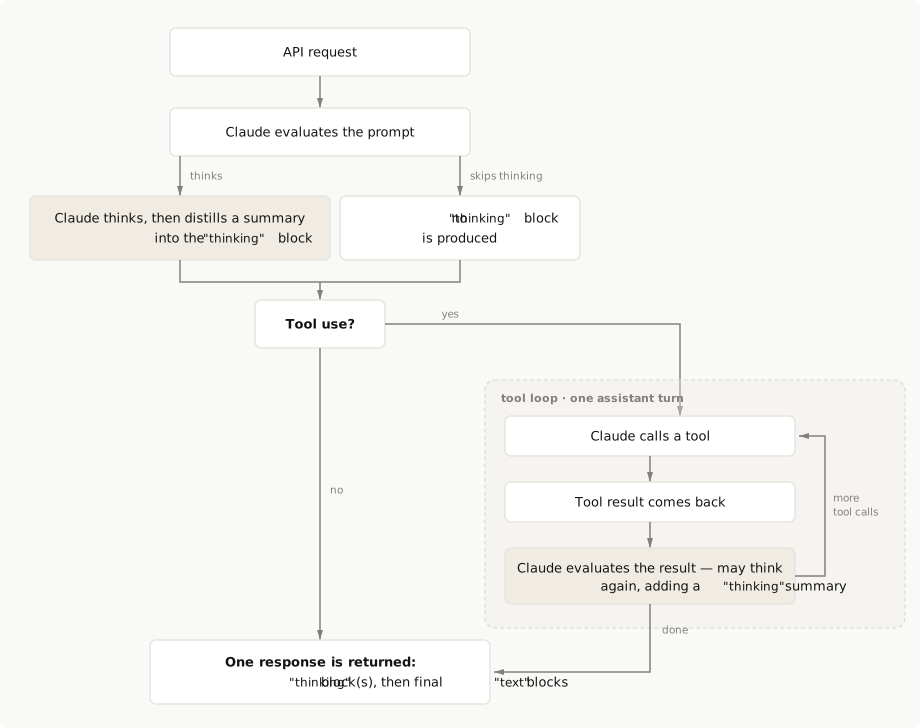
Whether Claude thinks on a given request, and how deeply, depends on your thinking configuration and the complexity of the request.
Here is what thinking looks like in a response: one or more `thinking` content blocks arrive before the `text` blocks. The thinking block is still generated content, like the `text` block that follows it, but it is separated from the canonical response. Each thinking block also carries a `signature` field, an encrypted copy of the full reasoning that you pass back unchanged in multi-turn and tool-use conversations (see [Thinking encryption](https://platform.claude.com/docs/en/build-with-claude/thinking#thinking-encryption)):
```json
{
"content": [
{
"type": "thinking",
"thinking": "Let me break this down. The question has two parts, so I'll start with the simpler one and use its result to constrain the second...",
"signature": "WaUjzkypQ2mUEVM36O2Txu...."
},
{
"type": "text",
"text": "Based on my analysis..."
}
]
}
```
You don't always see this text, and what you see is never the raw chain of thought: the text in a thinking block is a [summary of Claude's reasoning](https://platform.claude.com/docs/en/build-with-claude/thinking#summarized-thinking). The `display` field on the thinking configuration controls whether that summary is returned at all: `"summarized"` returns it, while `"omitted"`, the default on the newest models, returns thinking blocks with an empty `thinking` field. Either way the block is billed the same and passed back the same in multi-turn conversations. See [Controlling thinking display](https://platform.claude.com/docs/en/build-with-claude/thinking#controlling-thinking-display) for per-model defaults and details.
If Claude uses tools, thinking can also appear between tool calls. See [Thinking with tool use](https://platform.claude.com/docs/en/build-with-claude/thinking#thinking-with-tool-use). For the full response format, see the [Messages API reference](https://platform.claude.com/docs/en/api/messages/create).
## Configuring thinking
On current models, thinking is on by default or one parameter away. Which configuration each model accepts, and what it defaults to, is listed in the [per-model configuration table](https://platform.claude.com/docs/en/build-with-claude/thinking-troubleshooting#supported-models) on the Troubleshooting page.
On Claude Opus 5, Claude Sonnet 5, Claude Fable 5, Claude Mythos 5, and Claude Mythos Preview, thinking is already on: no configuration needed. The first thing most developers need on these models is to see the thinking text, because `display` defaults to `"omitted"` there. Opt in with `thinking: {"type": "adaptive", "display": "summarized"}`, which is exactly the following request with the [model string](https://platform.claude.com/docs/en/about-claude/models/overview) swapped.
On Claude Opus 4.8, Claude Opus 4.7, Claude Opus 4.6, and Claude Sonnet 4.6, thinking is off until you set `thinking: {type: "adaptive"}`, which lets Claude decide when and how deeply to think based on the request. The following examples do that, set `display: "summarized"` so the thinking text is visible, and use a roomy `max_tokens`:
<CodeGroup>
```bash cURL
curl https://api.anthropic.com/v1/messages \
-H "x-api-key: $ANTHROPIC_API_KEY" \
-H "anthropic-version: 2023-06-01" \
-H "content-type: application/json" \
-d '{
"model": "claude-opus-4-8",
"max_tokens": 16000,
"thinking": {
"type": "adaptive",
"display": "summarized"
},
"messages": [
{
"role": "user",
"content": "What is the greatest common divisor of 1071 and 462?"
}
]
}'
```
```bash CLI
ant messages create \
--model claude-opus-4-8 \
--max-tokens 16000 \
--thinking '{type: adaptive, display: summarized}' \
--message '{role: user, content: "What is the greatest common divisor of 1071 and 462?"}' \
--transform content \
--format yaml
```
```python Python
client = anthropic.Anthropic()
response = client.messages.create(
model="claude-opus-4-8",
max_tokens=16000,
thinking={"type": "adaptive", "display": "summarized"},
messages=[
{
"role": "user",
"content": "What is the greatest common divisor of 1071 and 462?",
}
],
)
for block in response.content:
if block.type == "thinking":
print(f"\nThinking: {block.thinking}")
elif block.type == "text":
print(f"\nResponse: {block.text}")
```
```typescript TypeScript
const client = new Anthropic();
const response = await client.messages.create({
model: "claude-opus-4-8",
max_tokens: 16000,
thinking: {
type: "adaptive",
display: "summarized"
},
messages: [
{
role: "user",
content: "What is the greatest common divisor of 1071 and 462?"
}
]
});
for (const block of response.content) {
if (block.type === "thinking") {
console.log(`\nThinking: ${block.thinking}`);
} else if (block.type === "text") {
console.log(`\nResponse: ${block.text}`);
}
}
```
```csharp C#
AnthropicClient client = new();
var parameters = new MessageCreateParams
{
Model = Model.ClaudeOpus4_8,
MaxTokens = 16000,
Thinking = new ThinkingConfigAdaptive { Display = Display.Summarized },
Messages = [
new() {
Role = Role.User,
Content = "What is the greatest common divisor of 1071 and 462?"
}
]
};
var message = await client.Messages.Create(parameters);
foreach (var block in message.Content)
{
if (block.TryPickThinking(out ThinkingBlock? thinking))
{
Console.WriteLine($"\nThinking: {thinking.Thinking}");
}
else if (block.TryPickText(out TextBlock? text))
{
Console.WriteLine($"\nResponse: {text.Text}");
}
}
```
```go Go
client := anthropic.NewClient()
response, err := client.Messages.New(context.TODO(), anthropic.MessageNewParams{
Model: anthropic.ModelClaudeOpus4_8,
MaxTokens: 16000,
Thinking: anthropic.ThinkingConfigParamUnion{
OfAdaptive: &anthropic.ThinkingConfigAdaptiveParam{
Display: anthropic.ThinkingConfigAdaptiveDisplaySummarized,
},
},
Messages: []anthropic.MessageParam{
anthropic.NewUserMessage(anthropic.NewTextBlock("What is the greatest common divisor of 1071 and 462?")),
},
})
if err != nil {
log.Fatal(err)
}
for _, block := range response.Content {
switch v := block.AsAny().(type) {
case anthropic.ThinkingBlock:
fmt.Printf("\nThinking: %s", v.Thinking)
case anthropic.TextBlock:
fmt.Printf("\nResponse: %s", v.Text)
}
}
```
```java Java
import com.anthropic.models.messages.ThinkingConfigAdaptive;
void main() {
AnthropicClient client = AnthropicOkHttpClient.fromEnv();
MessageCreateParams params = MessageCreateParams.builder()
.model(Model.CLAUDE_OPUS_4_8)
.maxTokens(16000L)
.thinking(ThinkingConfigAdaptive.builder()
.display(ThinkingConfigAdaptive.Display.SUMMARIZED)
.build())
.addUserMessage("What is the greatest common divisor of 1071 and 462?")
.build();
Message response = client.messages().create(params);
response.content().forEach(block -> {
block.thinking().ifPresent(thinkingBlock ->
IO.println("\nThinking: " + thinkingBlock.thinking())
);
block.text().ifPresent(textBlock ->
IO.println("\nResponse: " + textBlock.text())
);
});
}
```
```php PHP
$client = new Client();
$message = $client->messages->create(
maxTokens: 16000,
messages: [
[
'role' => 'user',
'content' => 'What is the greatest common divisor of 1071 and 462?'
]
],
model: 'claude-opus-4-8',
thinking: ['type' => 'adaptive', 'display' => 'summarized'],
);
foreach ($message->content as $block) {
if ($block->type === 'thinking') {
echo "\nThinking: " . $block->thinking;
} elseif ($block->type === 'text') {
echo "\nResponse: " . $block->text;
}
}
```
```ruby Ruby
client = Anthropic::Client.new
message = client.messages.create(
model: "claude-opus-4-8",
max_tokens: 16000,
thinking: {
type: "adaptive",
display: "summarized"
},
messages: [
{
role: "user",
content: "What is the greatest common divisor of 1071 and 462?"
}
]
)
message.content.each do |block|
case block.type
when :thinking
puts "\nThinking: #{block.thinking}"
when :text
puts "\nResponse: #{block.text}"
end
end
```
</CodeGroup>
Running the example prints the summarized thinking, then the answer:
```text Output wrap
Thinking: Use Euclidean algorithm.
1071 = 2*462 + 147
462 = 3*147 + 21
147 = 7*21 + 0
GCD = 21
Response: ## Finding GCD of 1071 and 462
I'll use the **Euclidean algorithm**, repeatedly dividing and taking remainders...
```
Thinking tokens count toward `max_tokens`, so set it high enough to leave room for both the thinking and the response text. See [Cost control](https://platform.claude.com/docs/en/build-with-claude/thinking-steering-and-cost#cost-control) on the steering page and [Thinking and the context window](https://platform.claude.com/docs/en/build-with-claude/thinking#thinking-and-the-context-window).
### Turning thinking off
On Claude Sonnet 5, where thinking is on by default, you can turn it off:
<CodeGroup>
```bash cURL
curl https://api.anthropic.com/v1/messages \
-H "x-api-key: $ANTHROPIC_API_KEY" \
-H "anthropic-version: 2023-06-01" \
-H "content-type: application/json" \
Cut at 300 lines. The page has the rest.
build-with-claude/thinking-steering-and-cost First recorded · 947 lines, first recorded
## How Claude decides when to think ## Steering how often Claude thinks ### Effort levels ### System prompt guidance ### Per-message steering ### Verify steering on your workload ## Mechanics ### Turn validation ### Prompt caching ### Cost control ## Pricing ## Next steps
The first capture of this source. The page was already there, and this is what it said.
---
title: Steering thinking
url: https://platform.claude.com/docs/en/build-with-claude/thinking-steering-and-cost
description: Steer how often and how deeply Claude thinks with effort levels, system prompt guidance, and per-message steering, and understand thinking's cost and pricing.
---

<Note>
  For how zero data retention (ZDR) applies to this feature, see [API and data retention](https://platform.claude.com/docs/en/manage-claude/api-and-data-retention).
</Note>

Claude's thinking is adaptive: the model evaluates each request and decides for itself whether to think and how much. You set an intent, optionally specify the effort, and the model allocates reasoning where it judges reasoning will help.

This makes thinking a strong fit for workloads that mix trivial and complex requests, and for long-horizon agentic workflows where the right amount of reasoning varies from step to step.

For how to turn thinking on, how to read thinking output, and [thinking output on Claude Fable 5 and Claude Mythos 5](https://platform.claude.com/docs/en/build-with-claude/thinking#thinking-output-on-claude-fable-5-and-claude-mythos-5), see the [Thinking](https://platform.claude.com/docs/en/build-with-claude/thinking) overview. This page covers how Claude decides when to think, how to steer that decision, and the caching, cost, and pricing mechanics that follow from it.

## How Claude decides when to think

Thinking is optional for the model. On each request, Claude weighs the complexity of the input and decides whether deeper reasoning would improve the answer. A simple factual question may get a direct response with no thinking block at all; a multistep math problem or a tricky debugging task triggers deeper reasoning.

The decision happens per request. The same conversation can contain turns with and without thinking, and a turn where Claude chose not to think contains no thinking block. Don't build application logic that assumes every assistant turn starts with one.

The primary control over this decision is the [effort](https://platform.claude.com/docs/en/build-with-claude/effort) parameter, which acts as soft guidance for how willing Claude should be to think and how deeply; see [Effort levels](https://platform.claude.com/docs/en/build-with-claude/thinking-steering-and-cost#effort-levels) on this page for what each level does.

If you want Claude to think less often, lower the effort level before reaching for prompt-based steering.

Thinking also interleaves with tool use automatically: Claude can think between tool calls, reflecting on each tool result before deciding what to do next ([interleaved thinking](https://platform.claude.com/docs/en/build-with-claude/thinking#interleaved-thinking)). You don't need a beta header or any additional configuration for this.

For the full picture of how the thinking configuration and the effort parameter interact, see [Thinking and effort](https://platform.claude.com/docs/en/build-with-claude/thinking#thinking-and-effort).

## Steering how often Claude thinks

Whether Claude thinks on a given turn is promptable. Effort sets the overall posture, but you can also shape the decision directly with natural-language guidance, either globally in the system prompt or per message from the user turn.

Use the two levers together in this order:

1. Set the effort level that matches your workload's default balance of quality and latency.
2. Add prompt guidance only if Claude's triggering still doesn't match your needs at that level.

For broader prompting guidance with thinking, see [leverage thinking and interleaved thinking capabilities](https://platform.claude.com/docs/en/build-with-claude/prompt-engineering/claude-prompting-best-practices#leverage-thinking-and-interleaved-thinking-capabilities).

### Effort levels

Effort is the primary steering lever for thinking. Each level sets a different default for how often Claude thinks and how deeply:

| Effort level     | Thinking behavior                                                                    |
| ---------------- | ------------------------------------------------------------------------------------ |
| `max`            | Claude always thinks with no constraints on thinking depth.                          |
| `xhigh`          | Claude always thinks deeply with extended exploration.                               |
| `high` (default) | Claude almost always thinks. Provides deep reasoning on complex tasks.               |
| `medium`         | Claude uses moderate thinking. May skip thinking for simple queries.                 |
| `low`            | Claude minimizes thinking. Skips thinking for simple tasks where speed matters most. |

This table describes how each level changes thinking behavior. For guidance on which level to choose for a given workload, including per-model recommendations, see [When to adjust the effort parameter](https://platform.claude.com/docs/en/build-with-claude/effort#when-to-adjust-the-effort-parameter) on the effort page.

Effort is set at `output_config.effort`, not inside the `thinking` object; for full per-language examples, see [Effort](https://platform.claude.com/docs/en/build-with-claude/effort#basic-usage).

```json
{
  "model": "claude-opus-4-8",
  "max_tokens": 4096,
  "output_config": { "effort": "medium" },
  "messages": [{ "role": "user", "content": "..." }]
}
```

Level availability varies by model; the [effort availability table](https://platform.claude.com/docs/en/build-with-claude/effort#effort-levels) on the effort page is the authority for which levels each model supports.

### System prompt guidance

System prompt guidance shifts Claude's thinking threshold for every request in the conversation. If Claude is thinking more often than your workload needs, add guidance like this to your system prompt:

```text wrap
Extended thinking adds latency and should only be used when it
will meaningfully improve answer quality, typically for problems
that require multistep reasoning. When in doubt, respond directly.
```

To encourage thinking instead, use a phrase like:

```text wrap
This task involves multistep reasoning. Think carefully before responding.
```

Steering effectiveness can be sensitive to exact wording. If one phrasing doesn't produce the behavior you want, try a more direct variant.

### Per-message steering

You can also steer thinking on a per-message basis from the user turn, independently of the system prompt. Appending `"Please think hard before responding."` to a user message encourages Claude to think on that turn; `"Answer directly without deliberating."` suppresses it.

Per-message steering is useful when only some requests in a conversation warrant extended reasoning. An agent harness, for example, can append the encouraging phrase on planning steps and the suppressing phrase on routine confirmations, without touching the system prompt or changing any request parameters between turns.

### Verify steering on your workload

Prompt-based steering changes model behavior, so treat it like any other prompt change: measure before you ship. Run a representative sample of your traffic with and without the guidance, and compare how often thinking triggers (the presence of thinking blocks in responses), output token usage, latency, and answer quality on the cases that matter to you.

<Warning>
  Steering Claude to think less often may reduce quality on tasks that benefit from reasoning. Lowering the [effort](https://platform.claude.com/docs/en/build-with-claude/effort) level is usually the better first lever, since it is a calibrated control rather than a wording-sensitive instruction. Measure the impact on your specific workloads before deploying prompt-based tuning to production.
</Warning>

## Mechanics

Three mechanics follow from Claude managing its own thinking: turn validation, prompt caching, and how you bound cost.

### Turn validation

Assistant turns don't need to start with a thinking block. (Models using a legacy manual thinking budget enforce that the final assistant turn of a thinking-enabled request begins with one; see [Turn structure in manual mode](https://platform.claude.com/docs/en/build-with-claude/extended-thinking#turn-structure-in-manual-mode).)

For multi-turn applications, this means you can pass back conversation history in whatever shape you have it:

* Assistant turns where Claude chose not to think are valid history as-is.
* You can resume a conversation that began without thinking, or that used a different thinking configuration, without rewriting its history.
* History assembled from mixed sources doesn't need thinking blocks reinserted at the start of each assistant turn to pass validation.

The relaxation is about validation, not about what you should send. When you have thinking blocks, pass them back unmodified, particularly during tool use, where they carry the reasoning behind Claude's tool calls. See the [Thinking](https://platform.claude.com/docs/en/build-with-claude/thinking) overview for the full rules.

### Prompt caching

Consecutive requests that keep the same thinking configuration and effort level preserve prompt caching; see [Thinking and prompt caching](https://platform.claude.com/docs/en/build-with-claude/thinking#thinking-and-prompt-caching) for the full rules. The resolved effort value is rendered into the prompt, so changing it between requests invalidates cache breakpoints, just as changing the legacy [`budget_tokens`](https://platform.claude.com/docs/en/build-with-claude/extended-thinking#extended-thinking-with-prompt-caching) parameter does on models that use it. Setting `effort` explicitly to the model's default is equivalent to omitting it and does not break the cache.

The practical consequence: pick a thinking configuration and an effort level per conversation and keep them. If some turns need more or less thinking, steer with [per-message prompting](https://platform.claude.com/docs/en/build-with-claude/thinking-steering-and-cost#tuning-thinking-behavior): guidance appended to the newest user message leaves earlier cache breakpoints intact, where a configuration or effort change does not.

The following example demonstrates the invalidation with a multi-turn script you can run yourself:

<Accordion title="Effort changes invalidate the prompt cache">
  <Tabs>
    <Tab title="cURL">
      <Note>
        This workflow doesn't translate well to a one-off shell command. See the SDK tabs for the multi-turn pattern; per-turn HTTP requests follow the examples on the [Prompt caching](https://platform.claude.com/docs/en/build-with-claude/prompt-caching) page.
      </Note>
    </Tab>

    <Tab title="CLI">
      <Note>
        This workflow doesn't translate well to a one-off shell command. See the SDK tabs for the multi-turn pattern; per-turn CLI invocations follow the examples on the [Prompt caching](https://platform.claude.com/docs/en/build-with-claude/prompt-caching) page.
      </Note>
    </Tab>

    <Tab title="Python">
      ```python
      import requests

      client = Anthropic()


      def fetch_article_content(url):
          text = requests.get(url).text
          lines = (line.strip() for line in text.splitlines())
          return "\n".join(line for line in lines if line)


      # Fetch the content of the article
      book_url = "https://www.gutenberg.org/cache/epub/1342/pg1342.txt"
      book_content = fetch_article_content(book_url)
      # Use just enough text for caching (first few chapters)
      LARGE_TEXT = book_content[:10000]

      # No system prompt - caching in messages instead
      MESSAGES = [
          {
              "role": "user",
              "content": [
                  {
                      "type": "text",
                      "text": LARGE_TEXT,
                      "cache_control": {"type": "ephemeral"},
                  },
                  {"type": "text", "text": "Analyze the tone of this passage."},
              ],
          }
      ]

      # First request - establish cache
      print("First request - establishing cache")
      response1 = client.messages.create(
          model="claude-opus-4-8",
          max_tokens=16000,
          thinking={"type": "adaptive"},
          messages=MESSAGES,
      )

      print(f"First response usage: {response1.usage}")

      MESSAGES.append({"role": "assistant", "content": response1.content})
      MESSAGES.append({"role": "user", "content": "Analyze the characters in this passage."})

      # Second request - same configuration (cache hit expected)
      print("\nSecond request - same configuration (cache hit expected)")
      response2 = client.messages.create(
          model="claude-opus-4-8",
          max_tokens=16000,
          thinking={"type": "adaptive"},
          messages=MESSAGES,
      )

      print(f"Second response usage: {response2.usage}")

      MESSAGES.append({"role": "assistant", "content": response2.content})
      MESSAGES.append({"role": "user", "content": "Analyze the setting in this passage."})

      # Third request - different effort level (cache miss expected)
      print("\nThird request - different effort level (cache miss expected)")
      response3 = client.messages.create(
          model="claude-opus-4-8",
          max_tokens=16000,
          thinking={"type": "adaptive"},
          output_config={"effort": "medium"},
          messages=MESSAGES,
      )

      print(f"Third response usage: {response3.usage}")
      ```
    </Tab>

    <Tab title="TypeScript">
      ```typescript

      const client = new Anthropic();

      async function fetchArticleContent(url: string): Promise<string> {
        const response = await fetch(url);
        const text = await response.text();
        const lines = text.split("\n").map((line) => line.trim());
        return lines.filter((line) => line).join("\n");
      }

      const bookUrl = "https://www.gutenberg.org/cache/epub/1342/pg1342.txt";
      const bookContent = await fetchArticleContent(bookUrl);
      const LARGE_TEXT = bookContent.substring(0, 10000);

      // No system prompt - caching in messages instead
      const messages: Anthropic.MessageParam[] = [
        {
          role: "user",
          content: [
            {
              type: "text",
              text: LARGE_TEXT,
              cache_control: { type: "ephemeral" }
            },
            {
              type: "text",
              text: "Analyze the tone of this passage."
            }
          ]
        }
      ];

      // First request - establish cache
      console.log("First request - establishing cache");
      const response1 = await client.messages.create({
        model: "claude-opus-4-8",
        max_tokens: 16000,
        thinking: { type: "adaptive" },
        messages
      });

      console.log("First response usage: ", response1.usage);

      messages.push(
        { role: "assistant", content: response1.content },
        { role: "user", content: "Analyze the characters in this passage." }
      );

      // Second request - same configuration (cache hit expected)
      console.log("\nSecond request - same configuration (cache hit expected)");
      const response2 = await client.messages.create({
        model: "claude-opus-4-8",
        max_tokens: 16000,
        thinking: { type: "adaptive" },
        messages
      });

      console.log("Second response usage: ", response2.usage);

      messages.push(
        { role: "assistant", content: response2.content },
        { role: "user", content: "Analyze the setting in this passage." }
      );

      // Third request - different effort level (cache miss expected)
      console.log("\nThird request - different effort level (cache miss expected)");
      const response3 = await client.messages.create({
        model: "claude-opus-4-8",
        max_tokens: 16000,
        thinking: { type: "adaptive" },
        output_config: { effort: "medium" },
        messages
      });

      console.log("Third response usage: ", response3.usage);
      ```
    </Tab>

    <Tab title="C#">
      ```csharp
      AnthropicClient client = new();

      string bookUrl = "https://www.gutenberg.org/cache/epub/1342/pg1342.txt";
      string bookContent = await FetchArticleContent(bookUrl);
Cut at 300 lines. The page has the rest.
build-with-claude/thinking-tool-workflows First recorded · 868 lines, first recorded
## The rules this walkthrough applies ## Walk through a two-turn tool-use round trip ## How interleaved thinking changes the flow ## Next steps
The first capture of this source. The page was already there, and this is what it said.
---
title: Thinking in tool and multi-turn workflows
url: https://platform.claude.com/docs/en/build-with-claude/thinking-tool-workflows
description: Walk through a complete two-turn tool-use round trip that preserves thinking blocks correctly, and see how interleaved thinking changes the flow.
---

<Note>
  For how zero data retention (ZDR) applies to this feature, see [API and data retention](https://platform.claude.com/docs/en/manage-claude/api-and-data-retention).
</Note>

This page walks through a complete two-turn tool-use round trip with thinking enabled: Claude thinks, requests a tool call, receives the result, and finishes its answer, with the thinking blocks handled correctly at every step. The full rules live on the [Thinking](https://platform.claude.com/docs/en/build-with-claude/thinking) page, in [Thinking with tool use](https://platform.claude.com/docs/en/build-with-claude/thinking#thinking-with-tool-use) and [Preserving thinking blocks](https://platform.claude.com/docs/en/build-with-claude/thinking#preserving-thinking-blocks); this page shows those rules applied in runnable code.

## The rules this walkthrough applies

Each link leads to the full statement on the Thinking page:

* [Limit tool choice to `auto` or `none` in manual mode](https://platform.claude.com/docs/en/build-with-claude/thinking#thinking-with-tool-use): `tool_choice` options that force tool use return an error with manual extended thinking (`thinking: {type: "enabled"}`); adaptive thinking supports forced tool use.
* [Keep one thinking configuration per assistant turn](https://platform.claude.com/docs/en/build-with-claude/thinking#thinking-with-tool-use): a tool-use loop is one assistant turn, so change the configuration only between turns.
* [Pass thinking blocks back complete and unmodified](https://platform.claude.com/docs/en/build-with-claude/thinking#preserving-thinking-blocks): when you return a tool result, the thinking blocks from the assistant message must come back with it.
* [Echo the assistant message exactly as received](https://platform.claude.com/docs/en/build-with-claude/thinking#preserving-thinking-blocks): rebuilding the message or filtering out `redacted_thinking` blocks triggers a 400 error.

The samples use adaptive thinking; on models that support only extended thinking, substitute `thinking: {type: "enabled", budget_tokens: N}`. The round-trip rules are identical.

## Walk through a two-turn tool-use round trip

The example defines a `get_weather` tool, lets Claude think and request a tool call, then returns the tool result along with the assistant turn echoed exactly as received, thinking block included.

<Steps>
  <Step title="Make the first request with a tool available">
    Send a request with adaptive thinking enabled and the tool defined. Apart from the `thinking` parameter, this is a standard [tool use](https://platform.claude.com/docs/en/agents-and-tools/tool-use/overview) request:

    <CodeGroup>
      ```bash CLI
      ant messages create --transform content <<'YAML'
      model: claude-opus-4-8
      max_tokens: 16000
      thinking:
        type: adaptive
      tools:
        - name: get_weather
          description: Get current weather for a location
          input_schema:
            type: object
            properties:
              location:
                type: string
                description: City name
            required:
              - location
      messages:
        - role: user
          content: "What's the weather in Paris?"
      YAML
      ```

      ```python Python

      client = anthropic.Anthropic()

      weather_tool = {
          "name": "get_weather",
          "description": "Get current weather for a location",
          "input_schema": {
              "type": "object",
              "properties": {"location": {"type": "string", "description": "City name"}},
              "required": ["location"],
          },
      }

      # First request - Claude responds with thinking and tool request
      response = client.messages.create(
          model="claude-opus-4-8",
          max_tokens=16000,
          thinking={"type": "adaptive"},
          tools=[weather_tool],
          messages=[{"role": "user", "content": "What's the weather in Paris?"}],
      )
      print(response)
      ```

      ```typescript TypeScript
      const client = new Anthropic();

      const weatherTool: Anthropic.Tool = {
        name: "get_weather",
        description: "Get current weather for a location",
        input_schema: {
          type: "object",
          properties: {
            location: { type: "string", description: "City name" }
          },
          required: ["location"]
        }
      };

      // First request - Claude responds with thinking and tool request
      const response = await client.messages.create({
        model: "claude-opus-4-8",
        max_tokens: 16000,
        thinking: {
          type: "adaptive"
        },
        tools: [weatherTool],
        messages: [{ role: "user", content: "What's the weather in Paris?" }]
      });
      console.log(response);
      ```

      ```csharp C#
      AnthropicClient client = new();

      var weatherTool = new ToolUnion(new Tool()
      {
          Name = "get_weather",
          Description = "Get current weather for a location",
          InputSchema = new InputSchema()
          {
              Properties = new Dictionary<string, JsonElement>
              {
                  ["location"] = JsonSerializer.SerializeToElement(new { type = "string", description = "City name" }),
              },
              Required = ["location"],
          },
      });

      var parameters = new MessageCreateParams
      {
          Model = Model.ClaudeOpus4_8,
          MaxTokens = 16000,
          Thinking = new ThinkingConfigAdaptive(),
          Tools = [weatherTool],
          Messages = [new() { Role = Role.User, Content = "What's the weather in Paris?" }]
      };

      var message = await client.Messages.Create(parameters);
      Console.WriteLine(message);
      ```

      ```go Go
      client := anthropic.NewClient()

      weatherTool := anthropic.ToolUnionParam{
      	OfTool: &anthropic.ToolParam{
      		Name:        "get_weather",
      		Description: anthropic.String("Get current weather for a location"),
      		InputSchema: anthropic.ToolInputSchemaParam{
      			Properties: map[string]any{
      				"location": map[string]any{
      					"type":        "string",
      					"description": "City name",
      				},
      			},
      			Required: []string{"location"},
      		},
      	},
      }

      response, err := client.Messages.New(context.TODO(), anthropic.MessageNewParams{
      	Model:     anthropic.ModelClaudeOpus4_8,
      	MaxTokens: 16000,
      	Thinking: anthropic.ThinkingConfigParamUnion{
      		OfAdaptive: &anthropic.ThinkingConfigAdaptiveParam{},
      	},
      	Tools: []anthropic.ToolUnionParam{weatherTool},
      	Messages: []anthropic.MessageParam{
      		anthropic.NewUserMessage(anthropic.NewTextBlock("What's the weather in Paris?")),
      	},
      })
      if err != nil {
      	log.Fatal(err)
      }
      fmt.Println(response)
      ```

      ```java Java
      import com.anthropic.models.messages.ThinkingConfigAdaptive;
      // ...
          AnthropicClient client = AnthropicOkHttpClient.fromEnv();

          MessageCreateParams params = MessageCreateParams.builder()
              .model(Model.CLAUDE_OPUS_4_8)
              .maxTokens(16000L)
              .thinking(ThinkingConfigAdaptive.builder().build())
              .addTool(Tool.builder()
                  .name("get_weather")
                  .description("Get current weather for a location")
                  .inputSchema(Tool.InputSchema.builder()
                      .properties(JsonValue.from(Map.of(
                          "location", Map.of("type", "string", "description", "City name")
                      )))
                      .required(List.of("location"))
                      .build())
                  .build())
              .addUserMessage("What's the weather in Paris?")
              .build();

          Message response = client.messages().create(params);
          IO.println(response);
      ```

      ```php PHP
      $client = new Client();

      $weatherTool = [
          'name' => 'get_weather',
          'description' => 'Get current weather for a location',
          'input_schema' => [
              'type' => 'object',
              'properties' => [
                  'location' => ['type' => 'string', 'description' => 'City name']
              ],
              'required' => ['location']
          ]
      ];

      $message = $client->messages->create(
          maxTokens: 16000,
          messages: [
              ['role' => 'user', 'content' => "What's the weather in Paris?"]
          ],
          model: 'claude-opus-4-8',
          thinking: ['type' => 'adaptive'],
          tools: [$weatherTool],
      );
      echo $message;
      ```

      ```ruby Ruby
      client = Anthropic::Client.new

      weather_tool = {
        name: "get_weather",
        description: "Get current weather for a location",
        input_schema: {
          type: "object",
          properties: {
            location: { type: "string", description: "City name" }
          },
          required: ["location"]
        }
      }

      message = client.messages.create(
        model: "claude-opus-4-8",
        max_tokens: 16000,
        thinking: {
          type: "adaptive"
        },
        tools: [weather_tool],
        messages: [
          { role: "user", content: "What's the weather in Paris?" }
        ]
      )
      puts message
      ```
    </CodeGroup>
  </Step>

  <Step title="Capture the content array to echo back">
    You should see `thinking`, `text`, and `tool_use` blocks in the response content on a run where Claude chose to think (on simpler requests, adaptive mode may skip the thinking block). Keep this content array intact: the next step sends it back verbatim.

    <Note>
      To see thinking text like this output, add `display: "summarized"` to the request. On models where display defaults to omitted, including claude-opus-4-8, the `thinking` field otherwise comes back as an empty string with only the `signature` populated. Either way, echo the content array back unchanged; see [Controlling thinking display](https://platform.claude.com/docs/en/build-with-claude/thinking#controlling-thinking-display).
    </Note>

    ```json Output
    {
      "content": [
        {
          "type": "thinking",
          "thinking": "The user wants to know the current weather in Paris. I have access to a function `get_weather`...",
          "signature": "BDaL4VrbR2Oj0hO4XpJxT28J5T...."
        },
        {
          "type": "text",
          "text": "I can help you get the current weather information for Paris. Let me check that for you"
        },
        {
          "type": "tool_use",
          "id": "toolu_01CswdEQBMshySk6Y9DFKrfq",
          "name": "get_weather",
          "input": {
            "location": "Paris"
          }
        }
      ]
    }
    ```
  </Step>

  <Step title="Return the tool result, echoing the assistant turn verbatim">
    Run the tool on your side, then send a second request that appends two messages to the conversation. The first is the assistant content echoed back exactly as received, so the thinking block stays unchanged alongside the `tool_use` block. The second is a user message carrying the `tool_result`.

    Each sample is a self-contained script: it repeats the first request, then immediately sends the follow-up using the response it just received.

    <CodeGroup>
      ```bash CLI
      # First turn: write the assistant content array (thinking and tool_use
      # blocks, signatures intact) to a file. Routing model-generated text
      # through a file keeps it out of shell-expansion position later.
Cut at 300 lines. The page has the rest.
build-with-claude/thinking-troubleshooting First recorded · 155 lines, first recorded
## Configurations each model rejects ## A 400 error says `"thinking.type.enabled"` is not supported ## A 400 error says `"thinking.type.disabled"` is not supported ## A 400 error says adaptive thinking is not supported ## A 400 error says thinking blocks cannot be modified ## The thinking field is empty in the response ## No thinking block appears on some turns ## Tool calls or XML tags appear in the text output ## The response stops with `stop_reason: "max_tokens"` ## Cache hits drop after changing thinking settings ## Setting effort does not change thinking ## Next steps
The first capture of this source. The page was already there, and this is what it said.
---
title: Troubleshooting thinking
url: https://platform.claude.com/docs/en/build-with-claude/thinking-troubleshooting
description: "Diagnose and fix the most common thinking failures: configuration 400 errors, empty or missing thinking blocks, max_tokens stops, and cache misses."
---

<Note>
  For how zero data retention (ZDR) applies to this feature, see [API and data retention](https://platform.claude.com/docs/en/manage-claude/api-and-data-retention).
</Note>

This page covers the most common failures when configuring thinking or round-tripping thinking blocks (sending returned thinking blocks back in later requests). The first section maps each model to its supported thinking configurations and the ones it rejects; the sections after it each start from a symptom you observe, so you can match an error message or unexpected response directly to its cause and fix. For how thinking works, see the [Thinking](https://platform.claude.com/docs/en/build-with-claude/thinking) overview.

## Configurations each model rejects

Most thinking configuration errors are a mismatch between the `thinking.type` value in the request and what the model supports. On current models, thinking runs as `thinking: {type: "adaptive"}`, and on the newest it is on by default. Some earlier models instead use [extended thinking](https://platform.claude.com/docs/en/build-with-claude/extended-thinking), a legacy manual mode configured as `thinking: {type: "enabled", budget_tokens: N}`.

Extended thinking (`thinking.type: "enabled"` with `budget_tokens`) is deprecated on the Claude 4.6 models (requests using it still succeed). Claude 4.7 and later models do not support it and reject requests that use it, returning a 400 error. On Claude 4.5 and earlier models that support thinking, extended thinking is the only available thinking mode. Claude Mythos Preview supports both modes. Where both modes are available, use [adaptive thinking](https://platform.claude.com/docs/en/build-with-claude/thinking) instead.

The table lists what each model supports, what it defaults to, and which `thinking.type` values it rejects with a 400 error; any value not listed as rejected is accepted.

| Model                 | Thinking types                   | Default   | Rejected with 400          |
| --------------------- | -------------------------------- | --------- | -------------------------- |
| Claude Fable 5        | Adaptive only                    | Always on | `"enabled"`, `"disabled"`  |
| Claude Mythos 5       | Adaptive only                    | Always on | `"enabled"`, `"disabled"`  |
| Claude Mythos Preview | Adaptive, extended               | Always on | `"disabled"`               |
| Claude Opus 5         | Adaptive only                    | On        | `"enabled"`, `"disabled"`2 |
| Claude Opus 4.8       | Adaptive only                    | Off       | `"enabled"`                |
| Claude Opus 4.7       | Adaptive only                    | Off       | `"enabled"`                |
| Claude Sonnet 5       | Adaptive only                    | On        | `"enabled"`                |
| Claude Opus 4.6       | Adaptive, extended (deprecated)1 | Off       | None                       |
| Claude Sonnet 4.6     | Adaptive, extended (deprecated)1 | Off       | None                       |
| Claude Opus 4.5       | Extended only                    | Off       | `"adaptive"`               |
| Claude Haiku 4.5      | Extended only                    | Off       | `"adaptive"`               |
| Claude Sonnet 4.5     | Extended only                    | Off       | `"adaptive"`               |

*1 `enabled` and `budget_tokens` still work on these models but are deprecated; use adaptive thinking instead.*\
*2 Claude Opus 5 accepts `"disabled"` at [effort](https://platform.claude.com/docs/en/build-with-claude/effort) `high` or below; combining it with effort `xhigh` or `max` returns a 400 error. This restriction applies to Claude Opus 5 and later models and is enforced on each request.*

Models marked `Always on` cannot turn thinking off. Models marked `On` default to thinking but accept `thinking: {type: "disabled"}`.

Earlier Claude 4 models (Claude Opus 4.1, Claude Sonnet 4, and Claude Opus 4) support extended thinking only; see [Model deprecations](https://platform.claude.com/docs/en/about-claude/model-deprecations) for their availability. Claude Fable 5 and Claude Mythos 5 are not available under [zero data retention](https://platform.claude.com/docs/en/manage-claude/api-and-data-retention#model-specific-data-retention-requirements).

## A 400 error says `"thinking.type.enabled"` is not supported

The request fails with a 400 error whose message reads:

```text wrap
"thinking.type.enabled" is not supported for this model. Use "thinking.type.adaptive" and "output_config.effort" to control thinking behavior.
```

This happens because the model you requested has removed extended thinking (see [Configurations each model rejects](https://platform.claude.com/docs/en/build-with-claude/thinking-troubleshooting#rejected-configurations)).

Switch the request to `thinking: {type: "adaptive"}` and steer thinking depth with `effort` instead of `budget_tokens`. [Migrating to adaptive thinking](https://platform.claude.com/docs/en/build-with-claude/extended-thinking#migrating-to-adaptive-thinking) walks through the conversion.

## A 400 error says `"thinking.type.disabled"` is not supported

The request fails with a 400 error whose message reads:

```text wrap
"thinking.type.disabled" is not supported for this model. Thinking defaults to adaptive mode when not specified; use "thinking.type.enabled" with "budget_tokens" for extended thinking.
```

This happens on models where thinking is always on: Claude Fable 5, Claude Mythos 5, and Claude Mythos Preview reject `"disabled"`. On Claude Fable 5 and Claude Mythos 5, the error text's suggestion of `"thinking.type.enabled"` does not apply either: those models reject it too.

Omit the `thinking` parameter; these models think without any configuration. If your goal was to keep thinking text out of responses, use `display: "omitted"` instead of disabling thinking; see [Controlling thinking display](https://platform.claude.com/docs/en/build-with-claude/thinking#controlling-thinking-display).

A 400 error on `"disabled"` can also occur on Claude Opus 5, which accepts `thinking: {type: "disabled"}` only at [effort](https://platform.claude.com/docs/en/build-with-claude/effort) `high` or below: combining it with effort `xhigh` or `max` is rejected. Lower the effort level, or leave thinking on.

## A 400 error says adaptive thinking is not supported

The request fails with a 400 error whose message reads:

```text wrap
adaptive thinking is not supported on this model
```

This happens because the model supports only extended thinking (see [Configurations each model rejects](https://platform.claude.com/docs/en/build-with-claude/thinking-troubleshooting#rejected-configurations)).

Use `thinking: {type: "enabled", budget_tokens: N}` instead; see [Extended thinking](https://platform.claude.com/docs/en/build-with-claude/extended-thinking) for the configuration.

## A 400 error says thinking blocks cannot be modified

A request that returns tool results fails with a 400 `invalid_request_error` whose message contains:

```text wrap
`thinking` or `redacted_thinking` blocks in the latest assistant message cannot be modified
```

In multi-turn and tool-use conversations you send previous assistant messages, including their `thinking` and `redacted_thinking` blocks, back to the API, and the API verifies they arrive unmodified. This error happens when the assistant message you send back differs from the one the API returned, most often because your code filters content blocks by type and drops `redacted_thinking` blocks, or rebuilds the assistant message instead of echoing it.

Echo the assistant turn back verbatim, thinking blocks included. See [Preserving thinking blocks](https://platform.claude.com/docs/en/build-with-claude/thinking#preserving-thinking-blocks) for the rules, and the worked round trip in [Thinking in tool and multi-turn workflows](https://platform.claude.com/docs/en/build-with-claude/thinking-tool-workflows#two-turn-tool-use-round-trip) for correct code in every SDK.

## The thinking field is empty in the response

The response contains `thinking` blocks, but their `thinking` field is an empty string and only the `signature` field is populated.

This happens because `display` defaults to `"omitted"` on newer models, which returns thinking blocks without their text.

Set `display: "summarized"` in your thinking configuration to receive the summarized thinking text; see [Controlling thinking display](https://platform.claude.com/docs/en/build-with-claude/thinking#controlling-thinking-display) for the defaults per model.

## No thinking block appears on some turns

Some responses contain no `thinking` block at all, even though thinking is configured.

This is normal in adaptive mode: Claude skips thinking on requests it judges simple enough to answer directly.

If you want thinking more often or more deeply, raise `effort` or steer with prompting; see [Steering how often Claude thinks](https://platform.claude.com/docs/en/build-with-claude/thinking-steering-and-cost#tuning-thinking-behavior).

## Tool calls or XML tags appear in the text output

A response occasionally writes a tool call into its text instead of emitting a `tool_use` block, or includes `<thinking>` or other internal XML tags in its visible text. A leaked tool call never runs, and in agentic loops the leaked text stays in the conversation history, so later turns are affected as well.

This happens on Claude Opus 5 when thinking is disabled, most commonly on tool-heavy workloads such as search. System-prompt rules instructing the model not to think or not to reason increase the tag leakage.

Re-enable thinking (the default) and use lower `effort` levels to control token cost instead. If your integration must keep thinking disabled, apply the prompting mitigations in [Running with thinking disabled](https://platform.claude.com/docs/en/build-with-claude/prompt-engineering/prompting-claude-opus-5#running-with-thinking-disabled).

## The response stops with `stop_reason: "max_tokens"`

The response ends with `stop_reason: "max_tokens"`, often with a truncated or missing text block.

This happens because thinking tokens count toward `max_tokens`, so a long thinking pass can consume the budget before the text response completes.

Raise `max_tokens` to leave room for both thinking and text, or lower `effort` so Claude spends less on thinking; see [Cost control](https://platform.claude.com/docs/en/build-with-claude/thinking-steering-and-cost#cost-control) and [Thinking and the context window](https://platform.claude.com/docs/en/build-with-claude/thinking#thinking-and-the-context-window).

## Cache hits drop after changing thinking settings

`cache_read_input_tokens` falls to zero on requests that previously hit the cache.

This happens because the thinking configuration and the effort level (or its default) are part of the cached prompt prefix, so changing any of them starts a new prefix: switching thinking modes, changing the effort value, and changing `budget_tokens` all invalidate message cache breakpoints, and can invalidate tool and system-prompt breakpoints too, depending on where the model renders the configuration.

Keep the thinking configuration and effort level constant across requests that share a conversation; setting a parameter explicitly to its default is equivalent to omitting it and does not invalidate. See [Thinking and prompt caching](https://platform.claude.com/docs/en/build-with-claude/thinking#thinking-and-prompt-caching).

## Setting effort does not change thinking

You change `effort` but thinking frequency or depth stays the same.

This happens because effort is the primary thinking lever only in adaptive mode. On extended-thinking-only models, thinking depth is set by `budget_tokens` instead.

Adjust `budget_tokens` on those models, or check which mode your model runs in; see [Thinking and effort](https://platform.claude.com/docs/en/build-with-claude/thinking#thinking-and-effort). On Claude Opus 4.5, the one extended-thinking-only model that supports effort, effort composes with the budget; see [Budget rules and tuning](https://platform.claude.com/docs/en/build-with-claude/extended-thinking#budget-rules-and-tuning).

## Next steps

<CardGroup cols={3}>
  <Card title="Thinking" icon="brain" href="https://platform.claude.com/docs/en/build-with-claude/thinking">
    The overview: what thinking is, how to configure it, and how it interacts with tools, caching, and streaming.
  </Card>

  <Card title="Errors" icon="book" href="https://platform.claude.com/docs/en/api/errors">
    The full error reference, including the thinking configuration 400s with their exact server messages.
  </Card>

  <Card title="Migrating to adaptive thinking" icon="arrow-right" href="https://platform.claude.com/docs/en/build-with-claude/extended-thinking#migrating-to-adaptive-thinking">
    Convert `budget_tokens` requests to adaptive thinking with effort.
  </Card>
</CardGroup>
build-with-claude/token-counting First recorded · 1449 lines, first recorded
## Compatibility ## How to count message tokens ### Supported models ### Count tokens in basic messages ### Count tokens in messages with tools ### Count tokens in messages with images ### Count tokens in messages with thinking ### Count tokens in messages with PDFs ## Token counts on Claude Fable 5 and Claude Mythos 5 ## Pricing and rate limits ## FAQ ## Next steps
The first capture of this source. The page was already there, and this is what it said.
---
title: Token counting
url: https://platform.claude.com/docs/en/build-with-claude/token-counting
description: Count the tokens in a message before you send it to Claude. Use token counts to manage rate limits and costs, make model routing decisions, and fit prompts to a target length.
---

## Compatibility
- [ZDR](https://platform.claude.com/docs/en/manage-claude/api-and-data-retention): eligible (excludes [Covered Models](https://platform.claude.com/docs/en/manage-claude/api-and-data-retention#model-specific-data-retention-requirements))
- Platforms: Claude API, Claude Platform on AWS, Amazon Bedrock, Google Cloud, Microsoft Foundry

Token counting lets you determine the number of tokens in a message before you send it to Claude. This helps you make informed decisions about your prompts and usage. With token counting, you can:

* Proactively manage rate limits and costs
* Make smart model routing decisions
* Optimize prompts to a specific length

***

## How to count message tokens

The [token counting](https://platform.claude.com/docs/en/api/messages-count-tokens) endpoint accepts the same structured list of inputs for creating a message, including support for system prompts, [tools](https://platform.claude.com/docs/en/agents-and-tools/tool-use/overview), [images](https://platform.claude.com/docs/en/build-with-claude/vision), and [PDFs](https://platform.claude.com/docs/en/build-with-claude/pdf-support). The response contains the total number of input tokens.

<Note>
  The token count is an **estimate**. In some cases, the actual number of input tokens used when creating a message might differ by a small amount.

  Token counts may include tokens added automatically by Anthropic for system optimizations. **You are not billed for system-added tokens**. Billing reflects only your content.
</Note>

### Supported models

All [active models](https://platform.claude.com/docs/en/about-claude/models/overview) support token counting, including Claude Opus 5 and Claude Sonnet 5.

<Note>
  Claude 4.7 and later models and Claude Mythos Preview use a newer tokenizer. The same input text produces approximately 30 percent more tokens than on earlier models. The exact increase depends on the content and workload shape. Recount prompts against the model you plan to use rather than reusing counts measured against earlier models.
</Note>

### Count tokens in basic messages

<CodeGroup>
  ```bash cURL
  curl https://api.anthropic.com/v1/messages/count_tokens \
    -H "x-api-key: $ANTHROPIC_API_KEY" \
    -H "content-type: application/json" \
    -H "anthropic-version: 2023-06-01" \
    -d '{
      "model": "claude-opus-5",
      "system": "You are a scientist",
      "messages": [{
        "role": "user",
        "content": "Hello, Claude"
      }]
    }'
  ```

  ```bash CLI
  ant messages count-tokens \
    --model claude-opus-5 \
    --system "You are a scientist" \
    --message '{role: user, content: "Hello, Claude"}'
  ```

  ```python Python
  client = anthropic.Anthropic()

  response = client.messages.count_tokens(
      model="claude-opus-5",
      system="You are a scientist",
      messages=[{"role": "user", "content": "Hello, Claude"}],
  )

  print(response.json())
  ```

  ```typescript TypeScript
  const client = new Anthropic();

  const response = await client.messages.countTokens({
    model: "claude-opus-5",
    system: "You are a scientist",
    messages: [
      {
        role: "user",
        content: "Hello, Claude"
      }
    ]
  });

  console.log(response);
  ```

  ```csharp C#
  using System;
  using System.Threading.Tasks;
  using Anthropic;
  using Anthropic.Models.Messages;

  AnthropicClient client = new();

  var parameters = new MessageCountTokensParams
  {
      Model = Model.ClaudeOpus5,
      System = "You are a scientist",
      Messages = [new() { Role = Role.User, Content = "Hello, Claude" }]
  };

  var response = await client.Messages.CountTokens(parameters);
  Console.WriteLine(response);
  ```

  ```go Go
  client := anthropic.NewClient()

  response, err := client.Messages.CountTokens(context.TODO(), anthropic.MessageCountTokensParams{
  	Model: anthropic.ModelClaudeOpus5,
  	System: anthropic.MessageCountTokensParamsSystemUnion{
  		OfString: anthropic.String("You are a scientist"),
  	},
  	Messages: []anthropic.MessageParam{
  		anthropic.NewUserMessage(anthropic.NewTextBlock("Hello, Claude")),
  	},
  })
  if err != nil {
  	log.Fatal(err)
  }

  fmt.Println(response)
  ```

  ```java Java
  import com.anthropic.models.messages.MessageCountTokensParams;
  import com.anthropic.models.messages.MessageTokensCount;
  // ...

  public class CountTokensExample {

    public static void main(String[] args) {
      AnthropicClient client = AnthropicOkHttpClient.fromEnv();

      MessageCountTokensParams params = MessageCountTokensParams.builder()
        .model(Model.CLAUDE_OPUS_5)
        .system("You are a scientist")
        .addUserMessage("Hello, Claude")
        .build();

      MessageTokensCount count = client.messages().countTokens(params);
      System.out.println(count);
    }
  }
  ```

  ```php PHP
  $client = new Client();

  $response = $client->messages->countTokens(
      messages: [
          ['role' => 'user', 'content' => 'Hello, Claude']
      ],
      model: 'claude-opus-5',
      system: 'You are a scientist',
  );

  echo json_encode($response);
  ```

  ```ruby Ruby
  client = Anthropic::Client.new

  response = client.messages.count_tokens(
    model: "claude-opus-5",
    system: "You are a scientist",
    messages: [
      { role: "user", content: "Hello, Claude" }
    ]
  )

  puts response
  ```
</CodeGroup>

```json Output
{ "input_tokens": 14 }
```

### Count tokens in messages with tools

<Note>
  [Server tool](https://platform.claude.com/docs/en/agents-and-tools/tool-use/server-tools) token counts only apply to the first sampling call.
</Note>

<CodeGroup>
  ```bash cURL
  curl https://api.anthropic.com/v1/messages/count_tokens \
    -H "x-api-key: $ANTHROPIC_API_KEY" \
    -H "content-type: application/json" \
    -H "anthropic-version: 2023-06-01" \
    -d '{
      "model": "claude-opus-5",
      "tools": [
        {
          "name": "get_weather",
          "description": "Get the current weather in a given location",
          "input_schema": {
            "type": "object",
            "properties": {
              "location": {
                "type": "string",
                "description": "The city and state, e.g. San Francisco, CA"
              }
            },
            "required": ["location"]
          }
        }
      ],
      "messages": [
        {
          "role": "user",
          "content": "What'\''s the weather like in San Francisco?"
        }
      ]
    }'
  ```

  ```bash CLI
  ant messages count-tokens <<'YAML'
  model: claude-opus-5
  tools:
    - name: get_weather
      description: Get the current weather in a given location
      input_schema:
        type: object
        properties:
          location:
            type: string
            description: The city and state, e.g. San Francisco, CA
        required:
          - location
  messages:
    - role: user
      content: What's the weather like in San Francisco?
  YAML
  ```

  ```python Python
  client = anthropic.Anthropic()

  response = client.messages.count_tokens(
      model="claude-opus-5",
      tools=[
          {
              "name": "get_weather",
              "description": "Get the current weather in a given location",
              "input_schema": {
                  "type": "object",
                  "properties": {
                      "location": {
                          "type": "string",
                          "description": "The city and state, e.g. San Francisco, CA",
                      }
                  },
                  "required": ["location"],
              },
          }
      ],
      messages=[{"role": "user", "content": "What's the weather like in San Francisco?"}],
  )

  print(response.json())
  ```

  ```typescript TypeScript
  const client = new Anthropic();

  const response = await client.messages.countTokens({
    model: "claude-opus-5",
    tools: [
      {
        name: "get_weather",
        description: "Get the current weather in a given location",
        input_schema: {
          type: "object",
          properties: {
            location: {
              type: "string",
              description: "The city and state, e.g. San Francisco, CA"
            }
          },
          required: ["location"]
        }
      }
    ],
    messages: [{ role: "user", content: "What's the weather like in San Francisco?" }]
  });

  console.log(response);
  ```

  ```csharp C#
  using System;
  using System.Collections.Generic;
  using System.Text.Json;
Cut at 300 lines. The page has the rest.
build-with-claude/vision First recorded · 1369 lines, first recorded
## Send images to Claude ### Base64-encoded image example ### URL-based image example ### Files API image example ### Multiple images ## Image limits and costs ### Request limits ### Supported formats ### Resolution and token cost ### Image quality guidance ## Coordinates and bounding boxes ## Limitations ## FAQ ## Next steps
The first capture of this source. The page was already there, and this is what it said.
---
title: Vision
url: https://platform.claude.com/docs/en/build-with-claude/vision
description: Claude's vision capabilities allow it to understand and analyze images, opening up exciting possibilities for multimodal interaction.
---

This guide describes how to send images to Claude, the limits and costs that apply, and where to find guidance for [coordinate-based workflows](https://platform.claude.com/docs/en/build-with-claude/vision-coordinates).

***

## Send images to Claude

Use Claude's vision capabilities through:

* [claude.ai](https://claude.ai/). Upload an image like you would a file, or drag and drop an image directly into the chat window.
* The [Workbench](https://platform.claude.com/playground) in the Claude Console. Add images directly to any User message block.
* API request. See the following examples.

On the API, provide images to Claude as `image` content blocks using one of three source types:

1. A base64-encoded image embedded in the request body
2. A URL reference to an image hosted online
3. A `file_id` returned by the [Files API](https://platform.claude.com/docs/en/build-with-claude/files) (upload once, reference many times)

<Note>
  On Amazon Bedrock and Google Cloud, only base64-encoded sources are currently available.
</Note>

<Tip>
  Just as [placing long documents before your query](https://platform.claude.com/docs/en/build-with-claude/prompt-engineering/claude-prompting-best-practices#long-context-prompting) improves results in text prompts, Claude works best when images come before text. Images placed after text or interpolated with text still perform well, but if your use case allows it, prefer an image-then-text structure.
</Tip>

### Base64-encoded image example

<CodeGroup>
  ```bash cURL
  curl https://api.anthropic.com/v1/messages \
    -H "x-api-key: $ANTHROPIC_API_KEY" \
    -H "anthropic-version: 2023-06-01" \
    -H "content-type: application/json" \
    -d @- <<EOF
  {
    "model": "claude-opus-5",
    "max_tokens": 1024,
    "messages": [
      {
        "role": "user",
        "content": [
          {
            "type": "image",
            "source": {
              "type": "base64",
              "media_type": "image/jpeg",
              "data": "$BASE64_IMAGE_DATA"
            }
          },
          {
            "type": "text",
            "text": "Describe this image."
          }
        ]
      }
    ]
  }
  EOF
  ```

  ```bash CLI
  curl -sSo ./vision-example.jpg \
    https://platform.claude.com/docs/images/vision-example.jpg

  ant messages create <<'YAML'
  model: claude-opus-5
  max_tokens: 1024
  messages:
    - role: user
      content:
        - type: image
          source:
            type: base64
            media_type: image/jpeg
            data: "@./vision-example.jpg"
        - type: text
          text: Describe this image.
  YAML
  ```

  ```python Python
  image1_data = "iVBORw0KGgoAAAANSUhEUgAAAAEAAAABCAIAAACQd1PeAAAADElEQVR4nGP4z8AAAAMBAQDJ/pLvAAAAAElFTkSuQmCC"
  image1_media_type = "image/png"

  client = anthropic.Anthropic()
  message = client.messages.create(
      model="claude-opus-5",
      max_tokens=1024,
      messages=[
          {
              "role": "user",
              "content": [
                  {
                      "type": "image",
                      "source": {
                          "type": "base64",
                          "media_type": image1_media_type,
                          "data": image1_data,
                      },
                  },
                  {"type": "text", "text": "Describe this image."},
              ],
          }
      ],
  )
  print(message)
  ```

  ```typescript TypeScript
  const anthropic = new Anthropic();

  const message = await anthropic.messages.create({
    model: "claude-opus-5",
    max_tokens: 1024,
    messages: [
      {
        role: "user",
        content: [
          {
            type: "image",
            source: {
              type: "base64",
              media_type: "image/jpeg",
              data: imageData // Base64-encoded image data as string
            }
          },
          {
            type: "text",
            text: "Describe this image."
          }
        ]
      }
    ]
  });

  console.log(message);
  ```

  ```csharp C#
  using System.Collections.Generic;
  using Anthropic;
  using Anthropic.Models.Messages;

  AnthropicClient client = new();

  string imageData = "iVBORw0KGgoAAAANSUhEUgAAAAEAAAABCAIAAACQd1PeAAAADElEQVR4nGP4z8AAAAMBAQDJ/pLvAAAAAElFTkSuQmCC";

  var message = await client.Messages.Create(new MessageCreateParams
  {
      Model = Model.ClaudeOpus5,
      MaxTokens = 1024,
      Messages =
      [
          new()
          {
              Role = Role.User,
              Content = new MessageParamContent(new List<ContentBlockParam>
              {
                  new ContentBlockParam(new ImageBlockParam(
                      new ImageBlockParamSource(new Base64ImageSource()
                      {
                          Data = imageData,
                          MediaType = MediaType.ImagePng,
                      })
                  )),
                  new ContentBlockParam(new TextBlockParam("Describe this image.")),
              }),
          }
      ]
  });

  Console.WriteLine(message);
  ```

  ```go Go
  client := anthropic.NewClient()

  imageData := "iVBORw0KGgoAAAANSUhEUgAAAAEAAAABCAIAAACQd1PeAAAADElEQVR4nGP4z8AAAAMBAQDJ/pLvAAAAAElFTkSuQmCC"

  message, err := client.Messages.New(context.TODO(), anthropic.MessageNewParams{
  	Model:     anthropic.ModelClaudeOpus5,
  	MaxTokens: 1024,
  	Messages: []anthropic.MessageParam{
  		anthropic.NewUserMessage(
  			anthropic.NewImageBlockBase64("image/png", imageData),
  			anthropic.NewTextBlock("Describe this image."),
  		),
  	},
  })
  if err != nil {
  	log.Fatal(err)
  }

  fmt.Println(message)
  ```

  ```java Java
  AnthropicClient client = AnthropicOkHttpClient.fromEnv();
  String imageData =
    "iVBORw0KGgoAAAANSUhEUgAAAAEAAAABCAIAAACQd1PeAAAADElEQVR4nGP4z8AAAAMBAQDJ/pLvAAAAAElFTkSuQmCC";

  List<ContentBlockParam> contentBlockParams = List.of(
    ContentBlockParam.ofImage(
      ImageBlockParam.builder()
        .source(
          Base64ImageSource.builder()
            .mediaType(Base64ImageSource.MediaType.IMAGE_PNG)
            .data(imageData)
            .build()
        )
        .build()
    ),
    ContentBlockParam.ofText(TextBlockParam.builder().text("Describe this image.").build())
  );
  Message message = client
    .messages()
    .create(
      MessageCreateParams.builder()
        .model(Model.CLAUDE_OPUS_5)
        .maxTokens(1024)
        .addUserMessageOfBlockParams(contentBlockParams)
        .build()
    );

  IO.println(message);
  ```

  ```php PHP
  $client = new Client();

  $imageData = "iVBORw0KGgoAAAANSUhEUgAAAAEAAAABCAIAAACQd1PeAAAADElEQVR4nGP4z8AAAAMBAQDJ/pLvAAAAAElFTkSuQmCC";

  $message = $client->messages->create(
      maxTokens: 1024,
      messages: [
          [
              'role' => 'user',
              'content' => [
                  [
                      'type' => 'image',
                      'source' => [
                          'type' => 'base64',
                          'media_type' => 'image/png',
                          'data' => $imageData,
                      ],
                  ],
                  ['type' => 'text', 'text' => 'Describe this image.'],
              ],
          ],
      ],
      model: 'claude-opus-5',
  );

  echo json_encode($message, JSON_PRETTY_PRINT), PHP_EOL;
  ```

  ```ruby Ruby
  client = Anthropic::Client.new

  image_data = "iVBORw0KGgoAAAANSUhEUgAAAAEAAAABCAIAAACQd1PeAAAADElEQVR4nGP4z8AAAAMBAQDJ/pLvAAAAAElFTkSuQmCC"

  message = client.messages.create(
    model: "claude-opus-5",
    max_tokens: 1024,
    messages: [
      {
        role: "user",
        content: [
          {
            type: "image",
            source: {
              type: "base64",
              media_type: "image/png",
              data: image_data
            }
          },
          { type: "text", text: "Describe this image." }
        ]
      }
    ]
  )

  puts message
  ```
</CodeGroup>

### URL-based image example

<CodeGroup>
  ```bash cURL
  curl https://api.anthropic.com/v1/messages \
    -H "x-api-key: $ANTHROPIC_API_KEY" \
    -H "anthropic-version: 2023-06-01" \
Cut at 300 lines. The page has the rest.
build-with-claude/vision-coordinates First recorded · 648 lines, first recorded
## How Claude resizes and pads images ## Resize your image before uploading ## Rescale coordinates when you cannot pre-resize ## Next steps
The first capture of this source. The page was already there, and this is what it said.
---
title: Coordinates and bounding boxes
url: https://platform.claude.com/docs/en/build-with-claude/vision-coordinates
description: How Claude resizes images, and how to work with the pixel coordinates it returns for bounding boxes, points, and UI elements.
---

Claude can locate and label regions of an image (for example, returning bounding boxes for tables, form fields, chart elements, or UI components). This guide covers how Claude resizes images before processing them and how to work with the pixel coordinates it returns, so that boxes and points line up with your original image.

You'll need this for OCR pipelines, form extraction, chart parsing, UI element location, and any task where you act on a specific region of an image. For sending images, supported formats, and per-model resolution limits, see [Vision](https://platform.claude.com/docs/en/build-with-claude/vision).

<Note>
  **Claude works best with absolute pixel coordinates.** Ask for them explicitly in your prompt. For example: *"Return the bounding box of each table as `[x1, y1, x2, y2]` (top-left and bottom-right corners) in pixel coordinates."* Claude does not work well when you ask for normalized coordinates, for example: *"Return bounding box coordinates between `0` and `1000`."* Always ask for pixel coordinates and normalize in your own code if you need to. To get coordinates as machine-readable JSON instead of prose, define a schema with [structured outputs](https://platform.claude.com/docs/en/build-with-claude/structured-outputs), for example an object with an `[x1, y1, x2, y2]` array per detected element.
</Note>

Coordinates follow the standard image convention: the origin `(0, 0)` is the top-left corner of the image, with x increasing to the right and y increasing downward. The coordinates Claude returns are pixel positions in the image Claude sees: your image after Claude resizes it to fit the model's native resolution (see [How Claude resizes and pads images](https://platform.claude.com/docs/en/build-with-claude/vision-coordinates#how-claude-resizes-and-pads-images)). To get coordinates you can use directly, either pre-resize your image so the coordinates map one-to-one onto the image you have (see [Resize your image before uploading](https://platform.claude.com/docs/en/build-with-claude/vision-coordinates#resize-your-image-before-uploading)), or rescale the coordinates Claude returns (see [Rescale coordinates when you cannot pre-resize](https://platform.claude.com/docs/en/build-with-claude/vision-coordinates#rescale-coordinates-when-you-cannot-pre-resize)).

<Note>
  Claude's spatial reasoning has limits (see [Limitations](https://platform.claude.com/docs/en/build-with-claude/vision#limitations)). Coordinate accuracy is best when you state the expected coordinate format in your prompt and spot-check results visually before processing at scale. Small elements lose precision when an image is downscaled: for fine targets, crop the region of interest and send the crop (offset returned coordinates by the crop origin), or use a high-resolution-tier model. For [PDF support](https://platform.claude.com/docs/en/build-with-claude/pdf-support), pages are rasterized to images server-side at dimensions you don't control, so the returned coordinates can't be reliably mapped back onto the page. To work with coordinates on PDF content, rasterize the pages to images yourself and use the pre-resize approach.
</Note>

## How Claude resizes and pads images

Claude finds the largest aspect-preserving size that satisfies both of the model's image limits:

1. **Edge limit:** neither side exceeds the maximum edge length (1568 px on the standard tier, 2576 px on the high-resolution tier).
2. **Visual token limit:** the image's token cost `⌈width / 28⌉ × ⌈height / 28⌉` does not exceed the model's visual token budget (1568 tokens on the standard tier, 4784 on the high-resolution tier).

See [Resolution and token cost](https://platform.claude.com/docs/en/build-with-claude/vision#evaluate-image-size) for which models are in which tier.

For nearly all photos and screenshots, the visual token limit is what determines the final size. The edge limit takes over only for elongated images such as panoramas or tall phone screenshots. Compute the size with the [reference implementation](https://platform.claude.com/docs/en/build-with-claude/vision-coordinates#resize-your-image-before-uploading) rather than scaling to the edge length by hand: a 1920×1080 screenshot resizes to 1456×819, not 1568×882, and assuming the edge limit puts every coordinate noticeably off target.

The token limit can also trigger a resize when neither side exceeds the edge limit. Overlooking this is the most common cause of misaligned coordinates. For example, an A4 page scanned at 130 DPI is 1075×1520 pixels: both sides are under 1568 px, but it costs `39 × 55 = 2145` visual tokens, so Claude resizes it to 924×1307.

<Note>
  This example assumes a model on the standard resolution tier. A high-resolution-tier model doesn't resize the same scan: 2145 tokens is within its 4784-token budget, so the coordinates it returns map directly onto the 1075×1520 original. Model tiers are listed in [Resolution and token cost](https://platform.claude.com/docs/en/build-with-claude/vision#evaluate-image-size).
</Note>

Claude then pads every image, resized or not, up to the next multiple of 28 pixels on the bottom and right edges (924×1307 becomes 924×1316 in the example). The padding contains no content: Claude perceives the padded image, but the page content only ever occupies the un-padded resized region. **Always normalize or rescale by the resized dimensions, not the padded dimensions**; dividing by the padded dimensions scales every coordinate by a small amount.

## Resize your image before uploading

The most reliable approach is to resize your image yourself before uploading, so the image you have is exactly the image Claude sees and the coordinates Claude returns need no conversion.

First check which resolution tier your model is on (see [Resolution and token cost](https://platform.claude.com/docs/en/build-with-claude/vision#evaluate-image-size)) and pass the matching edge and token limits. The following reference implementation computes the exact size Claude resizes an image to:

<CodeGroup>
  ```bash cURL
  # This reference implementation is local math that makes no API request, so
  # there's nothing to show for cURL. See the SDK tabs.
  ```

  ```bash CLI
  # This reference implementation is local math that makes no API request, so
  # there's nothing to show for the CLI. See the SDK tabs.
  ```

  ```python Python
  import math


  def count_image_tokens(width: int, height: int) -> int:
      """Visual tokens consumed by an image: one token per 28x28 pixel patch."""
      return math.ceil(width / 28) * math.ceil(height / 28)


  def resized_size(
      width: int,
      height: int,
      max_edge: int = 1568,
      max_tokens: int = 1568,
  ) -> tuple[int, int]:
      """The size Claude resizes an image to before padding.

      Defaults are for the standard resolution tier. For high-resolution-tier
      models, use max_edge=2576 and max_tokens=4784. Returns (width, height).
      Images that already fit within the limits are returned unchanged.
      """

      def fits(w: int, h: int) -> bool:
          return (
              math.ceil(w / 28) * 28 <= max_edge
              and math.ceil(h / 28) * 28 <= max_edge
              and count_image_tokens(w, h) <= max_tokens
          )

      if fits(width, height):
          return (width, height)
      if height > width:
          resized_h, resized_w = resized_size(height, width, max_edge, max_tokens)
          return (resized_w, resized_h)

      # Binary search along the long edge for the largest aspect-preserving
      # size that fits.
      aspect_ratio = width / height
      lo, hi = 1, width  # lo always fits; hi never fits
      while lo + 1 < hi:
          mid = (lo + hi) // 2
          if fits(mid, max(round(mid / aspect_ratio), 1)):
              lo = mid
          else:
              hi = mid
      return (lo, max(round(lo / aspect_ratio), 1))


  # The A4 example from "How Claude resizes and pads images":
  print(resized_size(1075, 1520))  # (924, 1307)

  # To apply the resize, use your image library, for example Pillow:
  # image.resize(resized_size(*image.size))
  ```

  ```typescript TypeScript
  /** Visual tokens consumed by an image: one token per 28x28 pixel patch. */
  function countImageTokens(width: number, height: number): number {
    return Math.ceil(width / 28) * Math.ceil(height / 28);
  }

  /**
   * Round half to even (banker's rounding), matching Python's round(). The
   * live API resolves exact .5 ties toward the even neighbor, so Math.round
   * (which rounds halves up) would compute a different size for some images.
   */
  function roundTiesToEven(value: number): number {
    const floor = Math.floor(value);
    if (value - floor !== 0.5) return Math.round(value);
    return floor % 2 === 0 ? floor : floor + 1;
  }

  /**
   * The size Claude resizes an image to before padding.
   *
   * Defaults are for the standard resolution tier. For high-resolution-tier
   * models, use maxEdge = 2576 and maxTokens = 4784. Returns [width, height].
   * Images that already fit within the limits are returned unchanged.
   */
  function resizedSize(
    width: number,
    height: number,
    maxEdge = 1568,
    maxTokens = 1568
  ): [number, number] {
    const fits = (w: number, h: number): boolean =>
      Math.ceil(w / 28) * 28 <= maxEdge &&
      Math.ceil(h / 28) * 28 <= maxEdge &&
      countImageTokens(w, h) <= maxTokens;

    if (fits(width, height)) return [width, height];
    if (height > width) {
      const [resizedH, resizedW] = resizedSize(height, width, maxEdge, maxTokens);
      return [resizedW, resizedH];
    }

    // Binary search along the long edge for the largest aspect-preserving
    // size that fits.
    const aspectRatio = width / height;
    let lo = 1; // lo always fits
    let hi = width; // hi never fits
    while (lo + 1 < hi) {
      const mid = Math.floor((lo + hi) / 2);
      if (fits(mid, Math.max(roundTiesToEven(mid / aspectRatio), 1))) {
        lo = mid;
      } else {
        hi = mid;
      }
    }
    return [lo, Math.max(roundTiesToEven(lo / aspectRatio), 1)];
  }

  // The A4 example from "How Claude resizes and pads images":
  console.log(resizedSize(1075, 1520)); // [ 924, 1307 ]

  // To apply the resize, use your image library, for example sharp:
  // await sharp(input).resize(width, height).toBuffer()
  ```

  ```csharp C#
  // Visual tokens consumed by an image: one token per 28x28 pixel patch.
  static int CountImageTokens(int width, int height)
  {
      return (width + 27) / 28 * ((height + 27) / 28); // ceil(w/28) * ceil(h/28)
  }

  // The size Claude resizes an image to before padding. Defaults are for the
  // standard resolution tier; for high-resolution-tier models, pass
  // maxEdge: 2576, maxTokens: 4784. Images that already fit within the limits
  // are returned unchanged.
  static (int Width, int Height) ResizedSize(
      int width, int height, int maxEdge = 1568, int maxTokens = 1568)
  {
      bool Fits(int w, int h) =>
          (w + 27) / 28 * 28 <= maxEdge
          && (h + 27) / 28 * 28 <= maxEdge
          && CountImageTokens(w, h) <= maxTokens;

      if (Fits(width, height))
      {
          return (width, height);
      }
      if (height > width)
      {
          (int resizedH, int resizedW) = ResizedSize(height, width, maxEdge, maxTokens);
          return (resizedW, resizedH);
      }

      // Binary search along the long edge for the largest aspect-preserving
      // size that fits. The short edge rounds half to even, matching the live
      // API at exact .5 ties (MidpointRounding.ToEven, Math.Round's default).
      double aspectRatio = (double)width / height;
      int lo = 1; // lo always fits
      int hi = width; // hi never fits
      while (lo + 1 < hi)
      {
          int mid = (lo + hi) / 2;
          if (Fits(mid, ShortEdge(mid)))
          {
              lo = mid;
          }
          else
          {
              hi = mid;
          }
      }
      return (lo, ShortEdge(lo));

      int ShortEdge(int longEdge) =>
          Math.Max((int)Math.Round(longEdge / aspectRatio, MidpointRounding.ToEven), 1);
  }

  // The A4 example from "How Claude resizes and pads images":
  Console.WriteLine(ResizedSize(1075, 1520)); // (924, 1307)
  ```

  ```go Go
  // countImageTokens is the visual tokens consumed by an image: one token per
  // 28x28 pixel patch.
  func countImageTokens(width, height int) int {
  	return ((width + 27) / 28) * ((height + 27) / 28) // ceil(w/28) * ceil(h/28)
  }

  // resizedSize is the size Claude resizes an image to before padding, as
  // (width, height). Pass maxEdge 1568 and maxTokens 1568 for the standard
  // resolution tier, or 2576 and 4784 for the high-resolution tier. Images
  // that already fit within the limits are returned unchanged.
  // The A4 example from "How Claude resizes and pads images":
  // resizedSize(1075, 1520, 1568, 1568) returns (924, 1307).
  func resizedSize(width, height, maxEdge, maxTokens int) (int, int) {
  	fits := func(w, h int) bool {
  		return ((w+27)/28)*28 <= maxEdge &&
  			((h+27)/28)*28 <= maxEdge &&
  			countImageTokens(w, h) <= maxTokens
  	}

  	if fits(width, height) {
  		return width, height
  	}
  	if height > width {
  		resizedH, resizedW := resizedSize(height, width, maxEdge, maxTokens)
  		return resizedW, resizedH
  	}

  	// Binary search along the long edge for the largest aspect-preserving
  	// size that fits. The short edge rounds half to even (math.RoundToEven),
  	// matching the live API at exact .5 ties; math.Round would round them up.
  	aspectRatio := float64(width) / float64(height)
  	lo, hi := 1, width // lo always fits; hi never fits
  	for lo+1 < hi {
  		mid := (lo + hi) / 2
  		short := max(int(math.RoundToEven(float64(mid)/aspectRatio)), 1)
  		if fits(mid, short) {
  			lo = mid
  		} else {
  			hi = mid
  		}
  	}
  	return lo, max(int(math.RoundToEven(float64(lo)/aspectRatio)), 1)
  }

  ```

  ```java Java
  /** A resized image size, as returned by resizedSize. */
  record Size(int width, int height) {}

  /** Visual tokens consumed by an image: one token per 28x28 pixel patch. */
  static int countImageTokens(int width, int height) {
      return Math.ceilDiv(width, 28) * Math.ceilDiv(height, 28);
  }

  /**
   * The size Claude resizes an image to before padding.
   *
   * <p>Pass maxEdge 1568 and maxTokens 1568 for the standard resolution tier,
   * or 2576 and 4784 for the high-resolution tier. Images that already fit
   * within the limits are returned unchanged.
   *
   * <p>The A4 example from "How Claude resizes and pads images":
   * resizedSize(1075, 1520, 1568, 1568) returns new Size(924, 1307).
   */
  static Size resizedSize(int width, int height, int maxEdge, int maxTokens) {
      if (fits(width, height, maxEdge, maxTokens)) {
Cut at 300 lines. The page has the rest.
build-with-claude/working-with-messages First recorded · 1056 lines, first recorded
## Basic request and response ## Multiple conversational turns ### System role in messages ## Prefilling Claude's response ## Vision ## Next steps
The first capture of this source. The page was already there, and this is what it said.
---
title: Using the Messages API
url: https://platform.claude.com/docs/en/build-with-claude/working-with-messages
description: Practical patterns and examples for using the Messages API effectively
---

Anthropic offers two ways to build with Claude, each suited to different use cases:

|                | Messages API                                | Claude Managed Agents                                                     |
| -------------- | ------------------------------------------- | ------------------------------------------------------------------------- |
| **What it is** | Direct model prompting access               | Pre-built, configurable agent harness that runs in managed infrastructure |
| **Best for**   | Custom agent loops and fine-grained control | Long-running tasks and asynchronous work                                  |

This guide covers common patterns for working with the Messages API, including basic requests, multi-turn conversations, prefill techniques, and vision capabilities. For complete API specifications, see the [Messages API reference](https://platform.claude.com/docs/en/api/messages/create). For the managed agent harness instead, see the [Claude Managed Agents overview](https://platform.claude.com/docs/en/managed-agents/overview).

<Note>
  For how zero data retention (ZDR) applies to this feature, see [API and data retention](https://platform.claude.com/docs/en/manage-claude/api-and-data-retention).
</Note>

## Basic request and response

<Note>
  The `temperature`, `top_p`, and `top_k` sampling parameters are not supported on Claude 4.7 and later models and Claude Mythos Preview. Setting them to a non-default value returns a 400 error. Omit them from request payloads and use prompting to guide the model's behavior instead. See the [migration guide](https://platform.claude.com/docs/en/about-claude/models/migration-guide#migrating-from-claude-opus-47).
</Note>

<CodeGroup>
  ```bash cURL
  #!/bin/sh
  curl https://api.anthropic.com/v1/messages \
    -H "x-api-key: $ANTHROPIC_API_KEY" \
    -H "anthropic-version: 2023-06-01" \
    -H "content-type: application/json" \
    -d '{
      "model": "claude-opus-5",
      "max_tokens": 1024,
      "messages": [
        {"role": "user", "content": "Hello, Claude"}
      ]
    }'
  ```

  ```bash CLI
  ant messages create \
    --model claude-opus-5 \
    --max-tokens 1024 \
    --message '{role: user, content: "Hello, Claude"}'
  ```

  ```python Python
  message = anthropic.Anthropic().messages.create(
      model="claude-opus-5",
      max_tokens=1024,
      messages=[{"role": "user", "content": "Hello, Claude"}],
  )
  print(message)
  ```

  ```typescript TypeScript
  const anthropic = new Anthropic();

  const message = await anthropic.messages.create({
    model: "claude-opus-5",
    max_tokens: 1024,
    messages: [{ role: "user", content: "Hello, Claude" }]
  });
  console.log(message);
  ```

  ```csharp C#
  AnthropicClient client = new();

  var parameters = new MessageCreateParams
  {
      Model = Model.ClaudeOpus5,
      MaxTokens = 1024,
      Messages = [new() { Role = Role.User, Content = "Hello, Claude" }]
  };
  var message = await client.Messages.Create(parameters);
  Console.WriteLine(message);
  ```

  ```go Go
  client := anthropic.NewClient()

  response, err := client.Messages.New(context.TODO(), anthropic.MessageNewParams{
  	Model:     anthropic.ModelClaudeOpus5,
  	MaxTokens: 1024,
  	Messages: []anthropic.MessageParam{
  		anthropic.NewUserMessage(anthropic.NewTextBlock("Hello, Claude")),
  	},
  })
  if err != nil {
  	log.Fatal(err)
  }
  fmt.Println(response)
  ```

  ```java Java
  AnthropicClient client = AnthropicOkHttpClient.fromEnv();

  MessageCreateParams params = MessageCreateParams.builder()
      .model(Model.CLAUDE_OPUS_5)
      .maxTokens(1024L)
      .addUserMessage("Hello, Claude")
      .build();

  Message response = client.messages().create(params);
  System.out.println(response);
  ```

  ```php PHP
  $client = new Client();

  $message = $client->messages->create(
      maxTokens: 1024,
      messages: [['role' => 'user', 'content' => 'Hello, Claude']],
      model: 'claude-opus-5',
  );
  echo json_encode($message, JSON_PRETTY_PRINT), PHP_EOL;
  ```

  ```ruby Ruby
  client = Anthropic::Client.new

  message = client.messages.create(
    model: "claude-opus-5",
    max_tokens: 1024,
    messages: [
      { role: "user", content: "Hello, Claude" }
    ]
  )
  puts message
  ```
</CodeGroup>

```json Output
{
  "id": "msg_01XFDUDYJgAACzvnptvVoYEL",
  "type": "message",
  "role": "assistant",
  "content": [
    {
      "type": "text",
      "text": "Hello!"
    }
  ],
  "model": "claude-opus-5",
  "stop_reason": "end_turn",
  "stop_sequence": null,
  "usage": {
    "input_tokens": 12,
    "output_tokens": 6
  }
}
```

Refusal responses (`stop_reason: "refusal"`) also include a `stop_details` object identifying the policy category that triggered the refusal, on every model. See [Handling stop reasons](https://platform.claude.com/docs/en/build-with-claude/refusals-and-fallback#refusal-response) for the field reference and example handling code.

## Multiple conversational turns

The Messages API is stateless, which means that you always send the full conversational history to the API. You can use this pattern to build up a conversation over time. Earlier conversational turns don't necessarily need to actually originate from Claude. You can use synthetic `assistant` messages.

<CodeGroup>
  ```bash cURL
  #!/bin/sh
  curl https://api.anthropic.com/v1/messages \
    -H "x-api-key: $ANTHROPIC_API_KEY" \
    -H "anthropic-version: 2023-06-01" \
    -H "content-type: application/json" \
    -d '{
      "model": "claude-opus-5",
      "max_tokens": 1024,
      "messages": [
        {"role": "user", "content": "Hello, Claude"},
        {"role": "assistant", "content": "Hello!"},
        {"role": "user", "content": "Can you describe LLMs to me?"}

      ]
    }'
  ```

  ```bash CLI
  ant messages create \
    --model claude-opus-5 \
    --max-tokens 1024 \
    --message '{role: user, content: "Hello, Claude"}' \
    --message '{role: assistant, content: "Hello!"}' \
    --message '{role: user, content: "Can you describe LLMs to me?"}'
  ```

  ```python Python
  message = anthropic.Anthropic().messages.create(
      model="claude-opus-5",
      max_tokens=1024,
      messages=[
          {"role": "user", "content": "Hello, Claude"},
          {"role": "assistant", "content": "Hello!"},
          {"role": "user", "content": "Can you describe LLMs to me?"},
      ],
  )
  print(message)
  ```

  ```typescript TypeScript
  const anthropic = new Anthropic();

  const message = await anthropic.messages.create({
    model: "claude-opus-5",
    max_tokens: 1024,
    messages: [
      { role: "user", content: "Hello, Claude" },
      { role: "assistant", content: "Hello!" },
      { role: "user", content: "Can you describe LLMs to me?" }
    ]
  });
  console.log(message);
  ```

  ```csharp C#
  AnthropicClient client = new();

  var parameters = new MessageCreateParams
  {
      Model = Model.ClaudeOpus5,
      MaxTokens = 1024,
      Messages =
      [
          new() { Role = Role.User, Content = "Hello, Claude" },
          new() { Role = Role.Assistant, Content = "Hello!" },
          new() { Role = Role.User, Content = "Can you describe LLMs to me?" }
      ]
  };

  var message = await client.Messages.Create(parameters);
  Console.WriteLine(message);
  ```

  ```go Go
  client := anthropic.NewClient()

  response, err := client.Messages.New(context.TODO(), anthropic.MessageNewParams{
  	Model:     anthropic.ModelClaudeOpus5,
  	MaxTokens: 1024,
  	Messages: []anthropic.MessageParam{
  		anthropic.NewUserMessage(anthropic.NewTextBlock("Hello, Claude")),
  		anthropic.NewAssistantMessage(anthropic.NewTextBlock("Hello!")),
  		anthropic.NewUserMessage(anthropic.NewTextBlock("Can you describe LLMs to me?")),
  	},
  })
  if err != nil {
  	log.Fatal(err)
  }
  fmt.Println(response)
  ```

  ```java Java
  AnthropicClient client = AnthropicOkHttpClient.fromEnv();

  MessageCreateParams params = MessageCreateParams.builder()
      .model(Model.CLAUDE_OPUS_5)
      .maxTokens(1024L)
      .addUserMessage("Hello, Claude")
      .addAssistantMessage("Hello!")
      .addUserMessage("Can you describe LLMs to me?")
      .build();

  Message response = client.messages().create(params);
  System.out.println(response);
  ```

  ```php PHP
  $client = new Client();

  $message = $client->messages->create(
      maxTokens: 1024,
      messages: [
          ['role' => 'user', 'content' => 'Hello, Claude'],
          ['role' => 'assistant', 'content' => 'Hello!'],
          ['role' => 'user', 'content' => 'Can you describe LLMs to me?'],
      ],
      model: 'claude-opus-5',
  );

  echo json_encode($message, JSON_PRETTY_PRINT), PHP_EOL;
  ```

  ```ruby Ruby
  client = Anthropic::Client.new

  message = client.messages.create(
    model: "claude-opus-5",
    max_tokens: 1024,
    messages: [
      { role: "user", content: "Hello, Claude" },
      { role: "assistant", content: "Hello!" },
      { role: "user", content: "Can you describe LLMs to me?" }
    ]
  )
  puts message
  ```
Cut at 300 lines. The page has the rest.
claude_api_primer First recorded · 815 lines, first recorded
# API usage primer for Claude ## Models ## Calling the API ### Basic request and response ### Multiple conversational turns ### Prefilling Claude's response ### Vision ## Thinking ### How thinking works ## Thinking with tool use ### Preserving thinking blocks ### Interleaved thinking ## Tool use ### Specifying client tools ### Best practices for tool definitions ## Controlling Claude's output ### Forcing tool use ### JSON output ### Chain of thought ### Parallel tool use ## Handling tool use and tool result content blocks ### Handling results from client tools ### Handling the `max_tokens` stop reason ### Handling the `pause_turn` stop reason ## Troubleshooting errors ### Tool execution error ### Invalid tool name ## Streaming messages ### Streaming with SDKs ### Event types ### Content block delta types #### Text delta #### Input JSON delta #### Thinking delta ### Basic streaming request example
The first capture of this source. The page was already there, and this is what it said.
---
title: API usage primer for Claude
url: https://platform.claude.com/docs/en/claude_api_primer
description: This guide is designed to give Claude the basics of using the Claude API. It gives explanation and examples of model IDs/the basic messages API, tool use, streaming, thinking, and nothing else.
---

# API usage primer for Claude

> This guide is designed to give Claude the basics of using the Claude API. It gives explanation and examples of model IDs/the basic messages API, tool use, streaming, thinking, and nothing else.

## Models

```text wrap
For complex agentic coding and enterprise work: Claude Opus 5: claude-opus-5
Previous Opus model: Claude Opus 4.8: claude-opus-4-8
Smart model: Claude Sonnet 5: claude-sonnet-5
For fast, cost-effective tasks: Claude Haiku 4.5: claude-haiku-4-5-20251001
```

## Calling the API

### Basic request and response

<CodeGroup>
  ```bash CLI
  ant messages create \
    --model claude-opus-5 \
    --max-tokens 1024 \
    --message '{"role": "user", "content": "Hello, Claude"}'
  ```

  ```python Python
  import anthropic

  message = anthropic.Anthropic().messages.create(
      model="claude-opus-5",
      max_tokens=1024,
      messages=[{"role": "user", "content": "Hello, Claude"}],
  )
  print(message)
  ```
</CodeGroup>

```json Output
{
  "id": "msg_01XFDUDYJgAACzvnptvVoYEL",
  "type": "message",
  "role": "assistant",
  "content": [
    {
      "type": "text",
      "text": "Hello!"
    }
  ],
  "model": "claude-opus-5",
  "stop_reason": "end_turn",
  "stop_sequence": null,
  "usage": {
    "input_tokens": 12,
    "output_tokens": 6
  }
}
```

### Multiple conversational turns

The Messages API is stateless, which means that you always send the full conversational history to the API. You can use this pattern to build up a conversation over time. Earlier conversational turns don't necessarily need to actually originate from Claude. You can use synthetic `assistant` messages.

<CodeGroup>
  ```bash CLI
  ant messages create <<'YAML'
  model: claude-opus-5
  max_tokens: 1024
  messages:
    - role: user
      content: Hello, Claude
    - role: assistant
      content: Hello!
    - role: user
      content: Can you describe LLMs to me?
  YAML
  ```

  ```python Python
  import anthropic

  message = anthropic.Anthropic().messages.create(
      model="claude-opus-5",
      max_tokens=1024,
      messages=[
          {"role": "user", "content": "Hello, Claude"},
          {"role": "assistant", "content": "Hello!"},
          {"role": "user", "content": "Can you describe LLMs to me?"},
      ],
  )
  print(message)
  ```
</CodeGroup>

### Prefilling Claude's response

You can prefill part of Claude's response in the last position of the input messages list. Use this technique to shape Claude's response. The following example uses `"max_tokens": 1` to get a single multiple choice answer from Claude.

<Note>
  Claude 4.6 and later models and Claude Mythos Preview do not support assistant message prefill; requests to those models must end with a user message. The examples below use a model that supports prefill.
</Note>

<CodeGroup>
  ```bash CLI
  ant messages create <<'YAML'
  model: claude-sonnet-4-5
  max_tokens: 1
  messages:
    - role: user
      content: "What is latin for Ant? (A) Apoidea, (B) Rhopalocera, (C) Formicidae"
    - role: assistant
      content: "The answer is ("
  YAML
  ```

  ```python Python
  import anthropic

  message = anthropic.Anthropic().messages.create(
      model="claude-sonnet-4-5",
      max_tokens=1,
      messages=[
          {
              "role": "user",
              "content": "What is latin for Ant? (A) Apoidea, (B) Rhopalocera, (C) Formicidae",
          },
          {"role": "assistant", "content": "The answer is ("},
      ],
  )
  print(message.content[0].text)
  ```
</CodeGroup>

### Vision

Claude can read both text and images in requests. Both `base64` and `url` source types are supported for images, along with the `image/jpeg`, `image/png`, `image/gif`, and `image/webp` media types.

<CodeGroup>
  ```bash CLI
  IMAGE_URL="https://platform.claude.com/docs/images/vision-example.jpg"

  # Option 1: Base64-encoded image (@ prefix auto-encodes binary files as base64)
  curl -sSo vision-example.jpg "$IMAGE_URL"

  ant messages create <<'YAML'
  model: claude-opus-5
  max_tokens: 1024
  messages:
    - role: user
      content:
        - type: image
          source:
            type: base64
            media_type: image/jpeg
            data: "@./vision-example.jpg"
        - type: text
          text: What is in the above image?
  YAML

  # Option 2: URL-referenced image
  ant messages create <<YAML
  model: claude-opus-5
  max_tokens: 1024
  messages:
    - role: user
      content:
        - type: image
          source:
            type: url
            url: $IMAGE_URL
        - type: text
          text: What is in the above image?
  YAML
  ```

  ```python Python
  import anthropic
  import base64
  import httpx

  # Option 1: Base64-encoded image
  image_url = "https://platform.claude.com/docs/images/vision-example.jpg"
  image_media_type = "image/jpeg"
  image_data = base64.standard_b64encode(httpx.get(image_url).content).decode("utf-8")

  message = anthropic.Anthropic().messages.create(
      model="claude-opus-5",
      max_tokens=1024,
      messages=[
          {
              "role": "user",
              "content": [
                  {
                      "type": "image",
                      "source": {
                          "type": "base64",
                          "media_type": image_media_type,
                          "data": image_data,
                      },
                  },
                  {"type": "text", "text": "What is in the above image?"},
              ],
          }
      ],
  )
  print(next(block.text for block in message.content if block.type == "text"))

  # Option 2: URL-referenced image
  message_from_url = anthropic.Anthropic().messages.create(
      model="claude-opus-5",
      max_tokens=1024,
      messages=[
          {
              "role": "user",
              "content": [
                  {
                      "type": "image",
                      "source": {
                          "type": "url",
                          "url": "https://platform.claude.com/docs/images/vision-example.jpg",
                      },
                  },
                  {"type": "text", "text": "What is in the above image?"},
              ],
          }
      ],
  )
  print(next(block.text for block in message_from_url.content if block.type == "text"))
  ```
</CodeGroup>

## Thinking

Thinking can sometimes help Claude with very hard tasks. The current mechanism is [adaptive thinking](https://platform.claude.com/docs/en/build-with-claude/thinking) (`thinking: {"type": "adaptive"}`): Claude decides when and how much to think, and you steer thinking depth with the [`effort`](https://platform.claude.com/docs/en/build-with-claude/effort) parameter rather than a token budget. Adaptive thinking is supported on Claude 4.6 and later models and Claude Mythos Preview. On Claude 5 models and Claude Mythos Preview, thinking is on by default when the `thinking` parameter is omitted.

Temperature must be set to 1 (or left unset) whenever thinking is enabled, on all models. On Claude 4.7 and later models and Claude Mythos Preview, `temperature` is deprecated and only its default value is accepted, even when thinking is off.

Thinking is supported in the following models:

* Claude Opus 5 (claude-opus-5, adaptive thinking only, on by default)
* Claude Sonnet 5 (`claude-sonnet-5`, adaptive thinking only, on by default)
* Claude Opus 4.8 (claude-opus-4-8, adaptive thinking only)
* Claude Opus 4.7 (`claude-opus-4-7`, adaptive thinking only)
* Claude Opus 4.6 (`claude-opus-4-6`, adaptive or legacy manual thinking)
* Claude Sonnet 4.6 (`claude-sonnet-4-6`, adaptive or legacy manual thinking)
* Claude Opus 4.5 (`claude-opus-4-5-20251101`, legacy manual thinking only)
* Claude Sonnet 4.5 (`claude-sonnet-4-5-20250929`, legacy manual thinking only)
* Claude Haiku 4.5 (`claude-haiku-4-5-20251001`, legacy manual thinking only)

<Note>
  On Claude 4.7 and later models, manual extended thinking (`type: enabled` with a `budget_tokens` value) is not supported and returns a 400 error. Use [adaptive thinking](https://platform.claude.com/docs/en/build-with-claude/thinking) (`type: adaptive`) instead.
</Note>

### How thinking works

When thinking is on, Claude creates `thinking` content blocks where it outputs its internal reasoning. The API response includes `thinking` content blocks, followed by `text` content blocks.

<CodeGroup>
  ```bash CLI
  ant messages create \
    --transform content --format yaml <<'YAML'
  model: claude-opus-5
  max_tokens: 16000
  thinking:
    type: adaptive
    display: summarized
  messages:
    - role: user
      content: Are there an infinite number of prime numbers such that n mod 4 == 3?
  YAML
  ```

  ```python Python
  import anthropic

  client = anthropic.Anthropic()

  response = client.messages.create(
      model="claude-opus-5",
      max_tokens=16000,
      thinking={"type": "adaptive", "display": "summarized"},
      messages=[
          {
              "role": "user",
              "content": "Are there an infinite number of prime numbers such that n mod 4 == 3?",
          }
      ],
  )

  # The response contains summarized thinking blocks and text blocks
  for block in response.content:
      if block.type == "thinking":
          print(f"\nThinking summary: {block.thinking}")
      elif block.type == "text":
          print(f"\nResponse: {block.text}")
Cut at 300 lines. The page has the rest.
cli-sdks-libraries/cli/authentication First recorded · 151 lines, first recorded
## Interactive login ## Admin access ## API key ## Check authentication status ## Switch between workspaces ## Manage profiles ## Next steps
The first capture of this source. The page was already there, and this is what it said.
---
title: CLI authentication options
url: https://platform.claude.com/docs/en/cli-sdks-libraries/cli/authentication
description: Authenticate the ant CLI with interactive login, API keys, named profiles, and Workload Identity Federation.
---

The `ant` CLI supports several credential sources. The [Quickstart](https://platform.claude.com/docs/en/cli-sdks-libraries/cli/quickstart#authentication) covers the one-command happy path (`ant auth login`). This page covers every option in full.

## Interactive login

`ant auth login` lets you call the API without creating or managing an API key. It opens a browser-based OAuth flow against the Claude Console and stores the resulting credentials under `$ANTHROPIC_CONFIG_DIR` (see [Configuration directory](https://platform.claude.com/docs/en/manage-claude/wif-reference#configuration-directory) for the OS-specific default). On a remote host or in any environment without a local browser, pass `--no-browser` to print the authorize URL and paste the returned code back into the terminal.

```bash CLI
ant auth login

# On a remote host without a browser:
ant auth login --no-browser

# Bind to a specific workspace and skip the browser picker:
ant auth login --workspace-id wrkspc_01...

# If the named profile you pass with --profile doesn't exist,
# a new named profile will be created with that name.
ant auth login --profile <profile-name>
```

During the browser flow, you select an organization and then a [workspace](https://platform.claude.com/docs/en/manage-claude/workspaces). The issued token is [scoped to that workspace](https://platform.claude.com/docs/en/manage-claude/workspaces#api-keys-and-resource-scoping), so the CLI can only see resources that belong to it. Pass `--workspace-id` to bind directly and skip the picker. To work in more than one workspace, see [Switch between workspaces](https://platform.claude.com/docs/en/cli-sdks-libraries/cli/authentication#switch-between-workspaces).

Interactive login is intended for local development and scripting on your own machine. For non-interactive workloads such as CI, servers, and containers, use [Workload Identity Federation](https://platform.claude.com/docs/en/manage-claude/workload-identity-federation) instead.

Login writes credentials to `credentials/<profile>.json`. The first login for a profile also creates `configs/<profile>.json` and sets it as the active profile. To remove stored credentials, run `ant auth logout`, or `ant auth logout --all` to clear every profile.

## Admin access

By default, `ant auth login` requests a workspace-scoped token. To manage the resources documented on the [Admin API](https://platform.claude.com/docs/en/manage-claude/admin-api) page, request the `org:admin` scope under a dedicated profile:

```bash CLI
ant auth login --profile admin --scope "org:admin"

# Print a bearer token for Authorization headers:
ant auth print-credentials --profile admin --access-token
```

The `org:admin` scope is granted only to organization members with the admin, owner, or primary owner role. The issued token has organization-wide access, and any workspace binding on the profile does not constrain it. Keep the admin profile separate from your day-to-day profile so routine commands never run with elevated access.

## API key

The CLI also reads your API key from the `ANTHROPIC_API_KEY` environment variable. Get a key from the [Claude Console](https://platform.claude.com/settings/keys).

<Tabs>
  <Tab title="zsh">
    ```bash
    echo 'export ANTHROPIC_API_KEY=sk-ant-api03-...' >> ~/.zshrc
    source ~/.zshrc
    ```
  </Tab>

  <Tab title="bash">
    ```bash
    echo 'export ANTHROPIC_API_KEY=sk-ant-api03-...' >> ~/.bashrc
    source ~/.bashrc
    ```
  </Tab>

  <Tab title="Windows">
    ```powershell
    setx ANTHROPIC_API_KEY "sk-ant-api03-..."
    ```

    Open a new terminal for the change to take effect.
  </Tab>
</Tabs>

To override the key for a single invocation, pass `--api-key`. To point at a different API host, set `ANTHROPIC_BASE_URL` or pass `--base-url`.

## Check authentication status

`ant auth status` prints the credential source the CLI selected (API key environment variable, OAuth login, federation, or profile), the active profile, the workspace the active token is bound to, and the configuration directory paths. Use it to diagnose why a workload picked the wrong credential or workspace.

```bash CLI
ant auth status
```

```text
Active profile:  default
Config dir:      ~/.config/anthropic
Profile config:  ~/.config/anthropic/configs/default.json
Credentials:     ~/.config/anthropic/credentials/default.json

Credentials
  (active) * Profile (user_oauth) [via active_config]       sk-ant-oat01-EXA...
...

Workspace
  (active) * Workspace                                      wrkspc_01... (Engineering)
```

Read the `(active)` rows to see which credential source and workspace won. The command reports status rather than performing a health check, so don't script against the exit status. For the full ordering of credential sources, see [Credential precedence](https://platform.claude.com/docs/en/manage-claude/wif-reference#credential-precedence).

## Switch between workspaces

An interactive-login token is bound to a single workspace. To use the CLI against more than one workspace, log in to each under its own named profile, then switch between them:

```bash CLI
# 1. Create the profile (interactive; pick the other workspace in the
#    browser, or pass --workspace-id to skip the picker):
# ant auth login --profile other-ws

# 2. Make it the default for subsequent commands:
ant profile activate other-ws

# 3. Or select it for a single command without changing the default:
ant --profile other-ws models list
ANTHROPIC_PROFILE=other-ws ant models list
```

Run [`ant auth status`](https://platform.claude.com/docs/en/cli-sdks-libraries/cli/authentication#check-authentication-status) to confirm which profile and workspace are active.

<Note>
  Profiles are only consulted when no API key is set. If `ANTHROPIC_API_KEY` is present in your environment, it overrides every profile and these commands all use whatever workspace that key is scoped to. Unset it before switching profiles.
</Note>

## Manage profiles

The `ant profile` subcommands inspect and edit profile state directly:

```bash CLI
ant profile list
ant profile get --profile other-ws
ant profile set workspace_id wrkspc_01... --profile other-ws
```

The writable keys for `ant profile set` are `workspace_id`, `base_url`, `organization_id`, `scope`, `client_id`, and `console_url`. Setting `workspace_id` records the target workspace in the profile config but does not rebind credentials that were already issued; run `ant auth login` again under that profile to mint a token for the new workspace.

For the profile file schema and the federation block, see [Profile configuration file](https://platform.claude.com/docs/en/manage-claude/wif-reference#profile-configuration-file). For Workload Identity Federation, see the [Authentication overview](https://platform.claude.com/docs/en/manage-claude/authentication) and the [WIF reference](https://platform.claude.com/docs/en/manage-claude/wif-reference).

## Next steps

<CardGroup cols={3}>
  <Card title="Using the CLI" icon="terminal" href="https://platform.claude.com/docs/en/cli-sdks-libraries/cli/using">
    Command structure, output formats, GJSON transforms, and request bodies
  </Card>

  <Card title="CLI scripting and automation" icon="code" href="https://platform.claude.com/docs/en/cli-sdks-libraries/cli/scripting">
    Version-control API resources, scripting patterns, and use from Claude Code
  </Card>

  <Card title="Workload Identity Federation" icon="cloud" href="https://platform.claude.com/docs/en/manage-claude/workload-identity-federation">
    Non-interactive authentication for CI, servers, and containers
  </Card>
</CardGroup>
cli-sdks-libraries/cli/quickstart First recorded · 155 lines, first recorded
## Installation ## Authentication ## Send your first request ## Shell completion ## Next steps
The first capture of this source. The page was already there, and this is what it said.
---
title: CLI quickstart
url: https://platform.claude.com/docs/en/cli-sdks-libraries/cli/quickstart
description: Install the ant command-line tool, authenticate, and send your first request to the Claude API.
---

The `ant` CLI provides access to the Claude API from your terminal. Every API resource is exposed as a subcommand, with output formatting, response filtering, and YAML or JSON file input.

<Frame caption="The ant CLI in action.">
  [](https://platform.claude.com/docs/videos/ant-cli-demo.webm)
</Frame>

Compared to `curl`, `ant` builds request bodies from typed flags or piped YAML instead of hand-written JSON, and inlines file contents into string fields with an `@path` reference. It extracts response fields with a built-in `--transform` query, so you don't need a separate tool such as `jq`, and it paginates list endpoints automatically.

<Info>
  For endpoint-specific parameters and response schemas, see the [API reference](https://platform.claude.com/docs/en/api/cli/messages/create). This page gets you to a working command. For everything else the CLI does, see [Using the CLI](https://platform.claude.com/docs/en/cli-sdks-libraries/cli/using) and [CLI scripting and automation](https://platform.claude.com/docs/en/cli-sdks-libraries/cli/scripting).
</Info>

## Installation

<Tabs>
  <Tab title="Homebrew (macOS)">
    ```bash
    brew install anthropics/tap/ant
    ```
  </Tab>

  <Tab title="curl (Linux/WSL)">
    For Linux environments, download the release binary directly.

    ```bash
    VERSION=1.22.1
    OS=$(uname -s | tr '[:upper:]' '[:lower:]')
    case $(uname -m) in
      x86_64) ARCH=amd64 ;;
      aarch64) ARCH=arm64 ;;
    esac
    curl -fsSL "https://github.com/anthropics/anthropic-cli/releases/download/v${VERSION}/ant_${VERSION}_${OS}_${ARCH}.tar.gz" \
      | sudo tar -xz -C /usr/local/bin ant
    ```

    You can find all releases on the [GitHub releases page](https://github.com/anthropics/anthropic-cli/releases).
  </Tab>

  <Tab title="Go">
    You can also install the CLI from source using `go install`. Requires Go 1.22 or later.

    ```bash
    go install github.com/anthropics/anthropic-cli/cmd/ant@latest
    ```

    The binary is placed in `$(go env GOPATH)/bin`. Add it to your `PATH` if it isn't already:

    ```bash
    export PATH="$PATH:$(go env GOPATH)/bin"
    ```
  </Tab>
</Tabs>

Check the installation:

```bash
ant --version
```

## Authentication

`ant auth login` opens a browser-based OAuth flow against the Claude Console and stores the resulting credentials locally, so you can call the API without creating or managing an API key.

```bash CLI
ant auth login
```

<Note>
  For other ways to authenticate (API key environment variable, headless hosts, multiple workspaces, named profiles, and Workload Identity Federation), see [CLI authentication options](https://platform.claude.com/docs/en/cli-sdks-libraries/cli/authentication).
</Note>

## Send your first request

With the binary installed and authenticated, call the [Messages API](https://platform.claude.com/docs/en/api/cli/messages/create):

```bash
ant messages create \
  --model claude-opus-5 \
  --max-tokens 1024 \
  --message '{role: user, content: "Hello, Claude"}'
```

```text Output wrap
{
  "model": "claude-opus-5",
  "id": "msg_01YMmR5XodC5nTqMxLZMKaq6",
  "type": "message",
  "role": "assistant",
  "content": [
    {
      "type": "text",
      "text": "Hello! How are you doing today? Is there something I can help you with?"
    }
  ],
  "stop_reason": "end_turn",
  "usage": { "input_tokens": 27, "output_tokens": 20 /*, ... */ }
}
```

The response is the full API object, pretty-printed because stdout is a terminal.

## Shell completion

The CLI ships completion scripts for bash, zsh, fish, and PowerShell. Generate and install one for your shell:

<Tabs>
  <Tab title="zsh">
    ```bash
    ant @completion zsh > "${fpath[1]}/_ant"
    # Restart your shell or run: autoload -U compinit && compinit
    ```
  </Tab>

  <Tab title="bash">
    ```bash
    ant @completion bash > /etc/bash_completion.d/ant
    ```
  </Tab>

  <Tab title="fish">
    ```bash
    ant @completion fish > ~/.config/fish/completions/ant.fish
    ```
  </Tab>

  <Tab title="PowerShell">
    ```powershell
    ant @completion powershell | Out-String | Invoke-Expression
    # To persist across sessions:
    # ant @completion powershell >> $PROFILE
    ```
  </Tab>
</Tabs>

## Next steps

<CardGroup cols={3}>
  <Card title="CLI authentication options" icon="lock" href="https://platform.claude.com/docs/en/cli-sdks-libraries/cli/authentication">
    API keys, headless hosts, multiple workspaces, and named profiles
  </Card>

  <Card title="Using the CLI" icon="terminal" href="https://platform.claude.com/docs/en/cli-sdks-libraries/cli/using">
    Command structure, output formats, GJSON transforms, and request bodies
  </Card>

  <Card title="CLI scripting and automation" icon="code" href="https://platform.claude.com/docs/en/cli-sdks-libraries/cli/scripting">
    Version-control API resources, scripting patterns, and use from Claude Code
  </Card>
</CardGroup>
cli-sdks-libraries/cli/scripting First recorded · 205 lines, first recorded
## Version-controlling API resources ## Scripting patterns ### Chain list output into a second command ### Inspect errors ## Use the CLI from Claude Code ## Authenticate curl requests with CLI credentials
The first capture of this source. The page was already there, and this is what it said.
---
title: CLI scripting and automation
url: https://platform.claude.com/docs/en/cli-sdks-libraries/cli/scripting
description: Version-control API resources as YAML, chain ant CLI commands in scripts, operate on resources from Claude Code, and authenticate curl calls with CLI credentials.
---

This page covers task-oriented workflows built on the `ant` CLI. For the underlying flags and output options, see [Using the CLI](https://platform.claude.com/docs/en/cli-sdks-libraries/cli/using).

## Version-controlling API resources

You can use the CLI to version control API resources such as skills, agents, environments, or deployments as YAML files in your repository and keep them in sync with the Claude API.

<Note>
  For more information on these resources, see [Managed Agents](https://platform.claude.com/docs/en/managed-agents/overview).
</Note>

<Steps>
  <Step title="Define your agent">
    Write the agent definition to `summarizer.agent.yaml`:

    ```yaml summarizer.agent.yaml
    name: Summarizer
    model: claude-opus-5
    system: |
      You are a helpful assistant that writes concise summaries.
    tools:
      - type: agent_toolset_20260401
    ```
  </Step>

  <Step title="Create the agent">
    ```bash
    ant beta:agents create < summarizer.agent.yaml
    ```

    ```json Output
    {
      "id": "agent_011CYm1BLqPXpQRk5khsSXrs",
      "version": 1,
      "name": "Summarizer",
      "model": "claude-opus-5"
      /* ... */
    }
    ```

    Note the `id` from the response. You'll pass it to the session create command in a later step.

    <Tip>
      Check `summarizer.agent.yaml` into your repository and keep it in sync with the API in your CI pipeline. The update command needs the agent ID and current version as flags:

      ```bash CLI
      ant beta:agents update --agent-id agent_011CYm1BLqPXpQRk5khsSXrs --version 1 < summarizer.agent.yaml
      ```
    </Tip>
  </Step>

  <Step title="Define the environment">
    A session runs in an [environment](https://platform.claude.com/docs/en/api/cli/beta/environments), which defines the sandbox it executes in. Write the environment definition to `summarizer.environment.yaml`:

    ```yaml summarizer.environment.yaml
    name: summarizer-env
    config:
      type: cloud
      networking:
        type: unrestricted
    ```
  </Step>

  <Step title="Create the environment">
    ```bash
    ant beta:environments create < summarizer.environment.yaml
    ```

    ```json Output
    {
      "id": "env_01595EKxaaTTGwwY3kyXdtbs",
      "name": "summarizer-env"
      /* ... */
    }
    ```

    Note the `id` from the response. You'll pass it to the session create command in a later step.

    <Tip>
      Check `summarizer.environment.yaml` into your repository and keep it in sync with the API in your CI pipeline. The update command needs the environment ID as a flag:

      ```bash CLI
      ant beta:environments update --environment-id env_01595EKxaaTTGwwY3kyXdtbs < summarizer.environment.yaml
      ```
    </Tip>
  </Step>

  <Step title="Start a session">
    Paste the agent `id` and environment `id` from the previous outputs into the session create command:

    ```bash
    ant beta:sessions create \
      --agent agent_011CYm1BLqPXpQRk5khsSXrs \
      --environment-id env_01595EKxaaTTGwwY3kyXdtbs \
      --title "Summarization task"
    ```

    ```json Output
    {
      "id": "session_01JZCh78XvmxJjiXVy3oSi7K",
      "status": "running"
      /* ... */
    }
    ```
  </Step>

  <Step title="Send a user message">
    Copy the session `id` from the previous output into `--session-id`:

    ```bash
    ant beta:sessions:events send \
      --session-id session_01JZCh78XvmxJjiXVy3oSi7K \
      --event '{type: user.message, content: [{type: text, text: "Summarize the benefits of type safety in one sentence."}]}'
    ```
  </Step>

  <Step title="Read the conversation">
    `--transform` runs against each listed event, so this prints the text of every message in order. `--format auto` overrides the interactive explorer that list commands open by default in a terminal:

    ```bash
    ant beta:sessions:events list \
      --session-id session_01JZCh78XvmxJjiXVy3oSi7K \
      --transform 'content.0.text' --format auto --raw-output
    ```

    ```text Output wrap
    Summarize the benefits of type safety in one sentence.
    Type safety catches errors at compile time rather than runtime, reducing bugs, improving code clarity, enabling better tooling support, and making codebases easier to maintain and refactor with confidence.
    ```

    <Tip>
      To watch a session as it runs, use `ant beta:sessions:events stream --session-id session_01JZCh78XvmxJjiXVy3oSi7K`. Events are written to stdout as they arrive.
    </Tip>
  </Step>
</Steps>

## Scripting patterns

The CLI is designed to compose with standard shell tooling.

### Chain list output into a second command

`--transform id --raw-output` on a list endpoint emits one bare ID per line, so standard tools such as `head` and `xargs` apply directly. Capture the first result, then pass it to a follow-up command:

```bash
FIRST_AGENT=$(ant beta:agents list \
  --transform id --raw-output | head -1)

ant beta:agents:versions list \
  --agent-id "$FIRST_AGENT" \
  --transform "{version,created_at}" --format jsonl
```

### Inspect errors

The `--transform-error` and `--format-error` flags apply the same filtering to error responses. `--raw-output` does not apply to errors, so use `--format-error yaml` for an unquoted scalar. Extract only the error message:

```bash
ant beta:agents retrieve --agent-id bogus \
  --transform-error error.message --format-error yaml 2>&1
```

```text Output wrap
GET "https://api.anthropic.com/v1/agents/bogus?beta=true": 404 Not Found
Agent not found.
```

## Use the CLI from Claude Code

[Claude Code](https://code.claude.com/docs/en/overview) can use the `ant` CLI out of the box. With the CLI installed and authenticated, you can ask Claude Code to operate on your API resources directly. For example:

* "List my recent agent sessions and summarize which ones errored."
* "Upload every PDF in `./reports` to the Files API and print the resulting IDs."
* "Pull the events for session `session_01...` and tell me where the agent got stuck."

Claude Code shells out to `ant`, parses the structured output, and reasons over the results (no custom integration code required).

## Authenticate curl requests with CLI credentials

Scripts that call the API with `curl` or another HTTP client can use the credentials stored by [`ant auth login`](https://platform.claude.com/docs/en/cli-sdks-libraries/cli/quickstart#authentication) instead of a static API key. The OAuth access token goes in the `Authorization` header as a bearer token; the `x-api-key` header is only for static API keys.

`ant auth print-credentials --access-token` prints the active profile's access token, refreshing it first if it is expired or near expiry:

```bash cURL
curl https://api.anthropic.com/v1/messages \
  -H "Authorization: Bearer $(ant auth print-credentials --access-token)" \
  -H "anthropic-version: 2023-06-01" \
  -H "content-type: application/json" \
  -d '{
    "model": "claude-opus-5",
    "max_tokens": 256,
    "messages": [{"role": "user", "content": "hi"}]
  }'
```

<Note>
  Keep `ANTHROPIC_API_KEY` and `ANTHROPIC_AUTH_TOKEN` unset when working from a CLI login. Either variable takes precedence over the login for `ant` commands (see [Credential precedence](https://platform.claude.com/docs/en/manage-claude/wif-reference#credential-precedence)) and can silently route them to a different organization or workspace.
</Note>

Run [`ant auth status`](https://platform.claude.com/docs/en/cli-sdks-libraries/cli/authentication#check-authentication-status) to confirm which organization and workspace you are logged in to; it warns when an environment variable is overriding your login.
cli-sdks-libraries/cli/using First recorded · 216 lines, first recorded
## Command structure ### Global flags ## Output formats ### Interactive explorer ## Transform output with GJSON ### Extract a scalar ## Passing request bodies ### Flags ### Stdin ### File references ## Debugging ## Available resources ## Next steps
The first capture of this source. The page was already there, and this is what it said.
---
title: Using the CLI
url: https://platform.claude.com/docs/en/cli-sdks-libraries/cli/using
description: Command structure, output formats, GJSON transforms, request bodies, and debugging for the ant CLI.
---

This page covers the `ant` CLI's input and output mechanics that apply across every endpoint. For installing and authenticating, see the [Quickstart](https://platform.claude.com/docs/en/cli-sdks-libraries/cli/quickstart). For chaining commands and version-controlling resources, see [CLI scripting and automation](https://platform.claude.com/docs/en/cli-sdks-libraries/cli/scripting).

## Command structure

Commands follow a `resource action` pattern. Nested resources use colons:

```text wrap
ant <resource>[:<subresource>] <action> [flags]
```

Run `ant --help` for the full resource list, or append `--help` to any subcommand for its flags.

Resources in beta (including agents, sessions, deployments, environments, and skills) live under the `beta:` prefix. Commands in this namespace automatically send the appropriate `anthropic-beta` header for that resource, so you don't need to pass it yourself. Use `--beta <header>` only to override the default (for example, to opt into a different schema version).

```bash
ant models list
ant messages create --model claude-opus-5 --max-tokens 1024 ...
ant beta:agents retrieve --agent-id agent_01...
ant beta:sessions:events list --session-id session_01...
```

### Global flags

| Flag                                  | Description                                                                                                                                                                                                                 |
| ------------------------------------- | --------------------------------------------------------------------------------------------------------------------------------------------------------------------------------------------------------------------------- |
| `--profile`                           | Named profile to use for this invocation (equivalent to setting `ANTHROPIC_PROFILE`). See [Switch between workspaces](https://platform.claude.com/docs/en/cli-sdks-libraries/cli/authentication#switch-between-workspaces). |
| `--format`                            | Output format: `auto`, `json`, `jsonl`, `yaml`, `pretty`, `raw`, `explore`                                                                                                                                                  |
| `--transform`                         | Filter or reshape the response with a [GJSON path](https://platform.claude.com/docs/en/cli-sdks-libraries/cli/using#transform-output-with-gjson)                                                                            |
| `-r`, `--raw-output`                  | Print string results without surrounding quotes, like `jq -r`                                                                                                                                                               |
| `--base-url`                          | Override the API base URL                                                                                                                                                                                                   |
| `--debug`                             | Print full HTTP request and response to stderr                                                                                                                                                                              |
| `--format-error`, `--transform-error` | Same as `--format` and `--transform` but applied to [error responses](https://platform.claude.com/docs/en/cli-sdks-libraries/cli/scripting#inspect-errors)                                                                  |

## Output formats

`auto` pretty-prints JSON and is the default for commands that create or modify resources. List and retrieve commands default to the [interactive explorer](https://platform.claude.com/docs/en/cli-sdks-libraries/cli/using#interactive-explorer) when writing to a terminal, and to pretty-printed JSON when piped. Override either default with `--format`:

```bash
ant models retrieve --model-id claude-opus-5 --format yaml
```

```yaml Output
type: model
id: claude-opus-5
display_name: Claude Opus 5
created_at: "2026-07-24T00:00:00Z"
...
```

List endpoints auto-paginate. In the default formats each item is written separately (one compact JSON object per line in `jsonl` mode, a stream of YAML documents in `yaml` mode), which streams cleanly into `head`, `grep`, and `--transform` filters.

### Interactive explorer

The explorer is a fold-and-search TUI for browsing large responses. Arrow keys expand and collapse nodes, `/` searches, `q` exits. List and retrieve commands open it by default when connected to a terminal. Pass `--format explore` to open it explicitly:

```bash
ant models list --format explore
```

## Transform output with GJSON

Use `--transform` to reshape responses before printing. The expression is a [GJSON path](https://github.com/tidwall/gjson/blob/master/SYNTAX.md). For list endpoints the transform runs against each item individually, not the envelope:

```bash
ant beta:agents list \
  --transform "{id,name,model}" \
  --format jsonl
```

```jsonl Output
{"id": "agent_011CYm1BLqPX...", "name": "Docs CLI Test Agent", "model": "claude-opus-5"}
{"id": "agent_011CYkVwfaEt...", "name": "Coffee Making Assistant", "model": "claude-opus-5"}
{"id": "agent_011CYixHhtUP...", "name": "Coding Assistant", "model": "claude-opus-5"}
```

### Extract a scalar

To capture a single field as an unquoted string (for example, the ID of a newly created resource), pair `--transform` with `--raw-output`. The result prints without JSON quotes and is ready to assign to a shell variable:

```bash
AGENT_ID=$(ant beta:agents create \
  --name "My Agent" \
  --model '{id: claude-opus-5}' \
  --transform id --raw-output)

printf '%s\n' "$AGENT_ID"
```

```text Output wrap
agent_011CYm1BLqPXpQRk5khsSXrs
```

<Note>
  `--raw-output` is distinct from `--format raw`. `--raw-output` strips JSON quotes from string results, like `jq -r`. `--format raw` prints the response body's raw JSON bytes without auto-paginating; on list endpoints it applies `--transform` to the pagination envelope rather than to each item.
</Note>

## Passing request bodies

The right input mechanism depends on the shape of the data: use **flags** for scalar fields and short structured values, pipe a **stdin** document for nested or multiline bodies, and use **`@file` references** to pull file contents into any string or binary field.

### Flags

Scalar fields map directly to flags. Structured fields accept a relaxed YAML-like syntax (unquoted keys, optional quotes around strings) or strict JSON:

```bash
ant beta:sessions create \
  --agent '{type: agent, id: agent_011CYm1BLqPXpQRk5khsSXrs, version: 1}' \
  --environment-id env_01595EKxaaTTGwwY3kyXdtbs \
  --title "CLI docs test session"
```

Repeatable flags build arrays. Each `--tool` or `--event` appends one element:

```bash
ant beta:agents create \
  --name "Research Agent" \
  --model '{id: claude-opus-5}' \
  --tool '{type: agent_toolset_20260401}' \
  --tool '{type: custom, name: search_docs, input_schema: {type: object, properties: {query: {type: string}}}}'
```

### Stdin

Pipe a JSON or YAML document to stdin to supply the full request body. Fields from stdin are merged with flags, with flags taking precedence. Here `version` is the optimistic-locking token returned by an earlier `retrieve`, and `$AGENT_ID` was captured as in [Extract a scalar](https://platform.claude.com/docs/en/cli-sdks-libraries/cli/using#extract-a-scalar):

```bash
echo '{"description": "Updated test agent.", "version": 1}' | \
  ant beta:agents update --agent-id "$AGENT_ID"
```

Heredocs work the same way and are convenient for multiline YAML. Quote the delimiter (as in `<<'YAML'`) to disable variable expansion inside the body.

```bash
ant beta:agents create <<'YAML'
name: Research Agent
model: claude-opus-5
system: |
  You are a research assistant. Cite sources for every claim.
tools:
  - type: agent_toolset_20260401
YAML
```

### File references

Flags that take a file path, such as `--file` on the upload command, accept a bare path:

```bash
ant beta:files upload --file ./report.pdf
```

To inline a file's contents into a string-valued field, prefix the path with `@`:

```bash
ant beta:agents create \
  --name "Researcher" --model '{id: claude-opus-5}' \
  --system @./prompts/researcher.txt
```

Inside structured flag values, wrap the path in quotes. To send a PDF to the Messages API:

```bash
ant messages create \
  --model claude-opus-5 \
  --max-tokens 1024 \
  --message '{role: user, content: [
    {type: document, source: {type: base64, media_type: application/pdf, data: "@./scan.pdf"}},
    {type: text, text: "Extract the text from this scanned document."}
  ]}' \
  --transform 'content.#(type=="text").text' --raw-output
```

The CLI detects the file type and encodes binary files as base64 automatically. To force a specific encoding use `@file://` for plain text or `@data://` for base64. Escape a literal leading `@` with a backslash (`\@username`).

## Debugging

Add `--debug` to any command to print the exact HTTP request and response (headers and body) to stderr. API keys are redacted.

```bash
ant --debug beta:agents list
```

```text Output wrap
GET /v1/agents?beta=true HTTP/1.1
Host: api.anthropic.com
Anthropic-Beta: managed-agents-2026-04-01
Anthropic-Version: 2023-06-01
X-Api-Key: <REDACTED>
...
```

## Available resources

Every API resource the CLI exposes is documented in the [API reference](https://platform.claude.com/docs/en/api/cli/messages/create). For a local listing, run `ant --help`, and append `--help` to any subcommand for its flags and parameters.

## Next steps

<CardGroup cols={3}>
  <Card title="CLI scripting and automation" icon="code" href="https://platform.claude.com/docs/en/cli-sdks-libraries/cli/scripting">
    Version-control API resources, scripting patterns, and use from Claude Code
  </Card>

  <Card title="API reference" icon="book" href="https://platform.claude.com/docs/en/api/cli/messages/create">
    Endpoint-specific parameters, request fields, and response schemas
  </Card>

  <Card title="CLI authentication options" icon="lock" href="https://platform.claude.com/docs/en/cli-sdks-libraries/cli/authentication">
    API keys, headless hosts, multiple workspaces, and named profiles
  </Card>
</CardGroup>
cli-sdks-libraries/libraries/apple-foundation-models First recorded · 265 lines, first recorded
## Requirements ## Install the package ## Quick start ## Choosing a model ### Capabilities ### Effort ### When to use Claude versus the on-device model ## Authentication ### App Attest ### Proxy (production) ### API key (development) ## Streaming ## Structured output ## Tool use ### Client-side tools ### Server-side tools ## Images ## Error handling ## Feature support ## Additional resources
The first capture of this source. The page was already there, and this is what it said.
---
title: Apple Foundation Models
url: https://platform.claude.com/docs/en/cli-sdks-libraries/libraries/apple-foundation-models
description: Use Claude on Apple platforms through the Foundation Models framework with the Claude for Foundation Models Swift package.
---

[Claude for Foundation Models](https://github.com/anthropics/ClaudeForFoundationModels) is a Swift package that makes Claude available as a server-side language model in Apple's [Foundation Models](https://developer.apple.com/documentation/foundationmodels) framework. The package conforms Claude to the framework's `LanguageModel` protocol, so you drive it with the same `LanguageModelSession` API you use for Apple's on-device model: `respond(to:)`, streaming, guided generation, and tool calling all work the same way.

Requests go directly from your app to the Claude API; Apple is not in the request path and does not see prompts or responses. Usage is billed to your Anthropic account at [standard API pricing](https://platform.claude.com/docs/en/about-claude/pricing), so your organization needs an available credit balance or an active billing method. Your app decides when to use Claude and when to use Apple's on-device model: pass whichever model you want to each session.

<Note>
  **Beta.** This package targets the Foundation Models server-side language model API introduced in the OS 27 betas. APIs might change before general availability.
</Note>

<Info>
  Claude for Foundation Models is **not** a general-purpose Messages API client. Its public surface is the Foundation Models provider conformance plus the configuration types that reach it (`ClaudeLanguageModel`, `ClaudeModel`, `AuthMode`, `ClaudeServerTool`). For direct access to the Messages API in another language, see the [Client SDKs](https://platform.claude.com/docs/en/cli-sdks-libraries/overview#client-sdks).
</Info>

## Requirements

* iOS 27, macOS 27, visionOS 27, or watchOS 27 (all in beta): the OS releases whose Foundation Models framework supports server-side language models
* Xcode 27 (beta)
* A Claude API key from the [Claude Console](https://platform.claude.com/) for development. See [Authentication](https://platform.claude.com/docs/en/cli-sdks-libraries/libraries/apple-foundation-models#authentication) for production options.

## Install the package

Add the package to your `Package.swift`:

```swift
dependencies: [
  .package(url: "https://github.com/anthropics/ClaudeForFoundationModels.git", from: "0.1.0")
]
```

Or in Xcode: **File** > **Add Package Dependencies…** and enter the repository URL.

Then add `ClaudeForFoundationModels` to your target's dependencies and import it alongside `FoundationModels`:

```swift
import FoundationModels
import ClaudeForFoundationModels
```

## Quick start

`ClaudeLanguageModel` is the entry point. Pass it to `LanguageModelSession` and use the session exactly as you would with any Foundation Models provider:

```swift
import FoundationModels
import ClaudeForFoundationModels

let model = ClaudeLanguageModel(
  name: .sonnet5,
  auth: .apiKey(ProcessInfo.processInfo.environment["ANTHROPIC_API_KEY"] ?? "")
)

let session = LanguageModelSession(model: model)
let response = try await session.respond(to: "Plan a 4-day trip to Buenos Aires.")
print(response.content)
```

The initializer also accepts `baseURL` (default `https://api.anthropic.com`), `timeout`, and `serverTools` (see [Server-side tools](https://platform.claude.com/docs/en/cli-sdks-libraries/libraries/apple-foundation-models#server-side-tools)).

For a complete working program, the repository includes [`Examples/ClaudeExample`](https://github.com/anthropics/ClaudeForFoundationModels/tree/main/Examples/ClaudeExample), a runnable command-line target that streams a chat turn to the terminal, with a `--search` flag that enables server-side web search for the turn. Running it requires a macOS 27 host.

## Choosing a model

Model identifiers are values of `ClaudeModel`. Use a compiled-in constant, or construct one with explicit capabilities for an ID that isn't compiled in yet (see [Capabilities](https://platform.claude.com/docs/en/cli-sdks-libraries/libraries/apple-foundation-models#capabilities)):

```swift
ClaudeLanguageModel(name: .opus5, auth: auth)
```

Constants mirror API model IDs (`.opus5` is `claude-opus-5`) and carry each model's capabilities. New models ship as new constants in package releases; check `ClaudeModel` in Xcode for the current list, and the [Models overview](https://platform.claude.com/docs/en/about-claude/models/overview) to compare models.

### Capabilities

Each `ClaudeModel` declares what it accepts: sampling parameters, effort levels, adaptive thinking, structured output, and image input. The package uses this to determine which request fields to send, because sending a field a model rejects is a hard error. The constants carry the right capabilities. For an ID that isn't compiled in, declare what the model accepts (there is deliberately no shorthand that guesses):

```swift
let model = ClaudeModel(
  id: "claude-experimental-x",
  capabilities: .init(samplingParams: false, effortLevels: [.low, .high])
)
ClaudeLanguageModel(name: model, auth: auth)
```

### Effort

Pin a Claude [effort level](https://platform.claude.com/docs/en/build-with-claude/effort) for every request with `fixedEffort:`. It takes precedence over the framework's per-request reasoning hints. The framework's named reasoning levels stop at high; to request more effort for a single request instead, pass a custom reasoning level naming the Claude effort (`.custom("xhigh")` or `.custom("max")`), which maps directly. The API defaults to `high` when no effort is sent:

```swift
ClaudeLanguageModel(name: .opus5, auth: auth, fixedEffort: .xhigh)
```

The level must be one the model accepts. Each `ClaudeModel` declares which of the five levels (`low`, `medium`, `high`, `xhigh`, `max`) its model takes, if any: some models don't accept effort at all.

### When to use Claude versus the on-device model

Apple's on-device model is fast, private, and available offline, but it is sized for lightweight tasks. Escalate to Claude when you need larger context, frontier reasoning, or server-side tools such as web search and code execution. Because both use the same `LanguageModelSession` API, you can switch by swapping the `model:` argument.

## Authentication

Set the credential with the `auth:` parameter. Use `.appAttest` to ship without a back end, `.proxied` to route requests through your own back end, or `.apiKey` to iterate during development.

### App Attest

Each installation of your app uses Apple's [App Attest](https://developer.apple.com/documentation/devicecheck/establishing-your-app-s-integrity) service to prove that it is a genuine, unmodified build of the app you registered. Anthropic then issues the device a short-lived access token that bills usage to your workspace. The app ships no API key, and there is no proxy for you to operate.

App Attest authentication is available only when your app calls the Claude API directly. It is not available through Amazon Bedrock, Google Cloud, or Microsoft Foundry.

To ship without running a back end, use `.appAttest`:

```swift
ClaudeLanguageModel(
  name: .sonnet5,
  auth: .appAttest(clientID: "clid_...")
)
```

<Note>
  App Attest requires a physical device. The Simulator, and hardware without a Secure Enclave, cannot perform App Attest. Use `.apiKey` while iterating in the Simulator, and `.appAttest` when running on a device.
</Note>

To set up App Attest, you need your Apple Developer Team ID and the admin, owner, or primary owner role in your organization. Configure your Xcode project and register your app in the [Claude Console](https://platform.claude.com/):

1. In Xcode, add the **App Attest** capability to your app target under **Signing & Capabilities**.
2. In your workspace's settings in the Claude Console, open **App integrations**.
3. Click **Create app integration** and enter a name, your Apple Developer Team ID, and one or more bundle IDs (up to 32).
4. Copy the client ID (`clid_...`) from the integration's **Overview** tab and pass it to your app's Claude configuration.

The first time your app uses Claude on a device, the app requests a challenge from Anthropic, attests the device with Apple's `DCAppAttestService`, and exchanges the verified attestation for an access token. The Claude for Foundation Models package runs this flow automatically and requests new tokens as they expire; there is no attestation code for you to write.

Tokens are scoped to your workspace, expire after one hour, and authorize only [Messages API](https://platform.claude.com/docs/en/api/messages/create) calls. They carry no end-user identity: App Attest identifies your app, not the person using it, so handle any per-user logic in your app.

To stop a compromised or retired app, revoke its integration: in your workspace's settings in the Claude Console, open **App integrations**, select the integration, and click **Revoke**, then confirm. Revoking an integration revokes its outstanding tokens, and its registered devices can no longer request new ones. Revocation is permanent, so create a new app integration to restore access.

### Proxy (production)

For production, route requests through your own back end with `.proxied`. The relay at `baseURL` adds the Claude API credential server-side, so the app ships no key. The `headers` you provide are sent on every request so your proxy can authorize the caller. Pass `[:]` if it needs none:

```swift
ClaudeLanguageModel(
  name: .sonnet5,
  auth: .proxied(headers: ["X-App-Token": "..."]),
  baseURL: URL(string: "https://api.yourapp.com/claude")!
)
```

Your proxy receives standard [Messages API](https://platform.claude.com/docs/en/api/messages/create) requests, attaches the `x-api-key` header, and forwards them to `https://api.anthropic.com`.

### API key (development)

Pass an API key directly while developing:

```swift
ClaudeLanguageModel(name: .sonnet5, auth: .apiKey("YOUR_API_KEY"))
```

<Warning>
  A key bundled into an app is extractable from the shipping binary, and anyone who extracts it can make requests billed to your account. Use `.apiKey` for development only, and switch to App Attest or a proxy before release.
</Warning>

## Streaming

`streamResponse(to:)` returns the response incrementally. Each element is a cumulative snapshot of the response so far, not a delta:

```swift
let stream = session.streamResponse(to: "Summarize today's top science stories.")
for try await partial in stream {
  print(partial.content)
}
```

## Structured output

Annotate a type with `@Generable` and request it with `generating:`. The model returns a value of that type through [structured outputs](https://platform.claude.com/docs/en/build-with-claude/structured-outputs):

```swift
@Generable
struct Trip {
  @Guide(description: "Destination city") var destination: String
  @Guide(description: "Length in days") var days: Int
}

let response = try await session.respond(to: "Plan a trip to Tokyo.", generating: Trip.self)
print(response.content.destination)
```

Structured output requires a model whose capabilities include it (all compiled-in constants do). If the chosen model does not, the package throws `LanguageModelError.unsupportedGenerationGuide` rather than silently degrading.

## Tool use

### Client-side tools

The framework's `tools:` array works unchanged. Conform your types to `Tool`, pass them to `LanguageModelSession`, and the framework invokes them on the device when Claude calls them. See [Tool use with Claude](https://platform.claude.com/docs/en/agents-and-tools/tool-use/overview).

```swift
let session = LanguageModelSession(model: model, tools: [FindRestaurantsTool()])
```

### Server-side tools

[Server tools](https://platform.claude.com/docs/en/agents-and-tools/tool-use/server-tools) (web search, web fetch, and code execution) run on Anthropic's infrastructure within a single round trip, with nothing for the framework to invoke on the device. Configure them for each model with `serverTools:`:

```swift
let model = ClaudeLanguageModel(
  name: .sonnet5,
  auth: auth,
  serverTools: [
    .webSearch(maxUses: 5),
    .codeExecution,
  ]
)
```

`.webSearch` and `.webFetch` accept optional `allowedDomains`, `blockedDomains`, and `maxUses`. Server tool activity surfaces in the transcript as `ClaudeServerToolSegment` custom segments.

<Note>
  `serverTools` is configured on `ClaudeLanguageModel` rather than on `LanguageModelSession` because the session type is Apple's. To use different server-tool sets for each conversation, construct multiple `ClaudeLanguageModel` instances.
</Note>

## Images

Models whose capabilities include image input declare the framework's vision capability. Pass image content through the framework's standard session API; the package converts it to the Claude API's image format. See [Vision](https://platform.claude.com/docs/en/build-with-claude/vision) for image requirements.

## Error handling

The package maps Claude API errors onto Apple's `LanguageModelError` cases where one fits: context-window overflow surfaces as `.contextSizeExceeded`, HTTP 429 as `.rateLimited`, a request past the configured timeout as `.timeout`. Provider errors with no framework equivalent surface as `ClaudeError`. Pattern-match to drive product flows:

```swift
do {
  let response = try await session.respond(to: prompt)
  print(response.content)
} catch ClaudeError.missingCredential {
  // Prompt for an API key.
} catch let error as LanguageModelError {
  // Framework-shaped errors (rate limits, guardrails, context length, decoding).
} catch {
  // Transport errors.
}
```

A common pattern is to catch `.rateLimited` and fall back to `SystemLanguageModel` for that turn, queue the request, or surface a retry affordance.

## Feature support

The package surfaces the Messages API capabilities that the Foundation Models provider protocol can express. Features with no representation in Apple's protocol are not available through it, including:

* Prompt caching controls (the package applies prompt caching automatically; cache TTL and breakpoint placement are not configurable)
* Stop sequences
* Batch processing
* Files API
* Token counting
* Beta headers

## Additional resources

| Reference                                                                                           | Covers                                                                                            |
| --------------------------------------------------------------------------------------------------- | ------------------------------------------------------------------------------------------------- |
| [Apple Foundation Models documentation](https://developer.apple.com/documentation/foundationmodels) | `LanguageModelSession`, `@Generable`, `Transcript`, `Tool`, and the rest of the framework surface |
| [`ClaudeForFoundationModels` on GitHub](https://github.com/anthropics/ClaudeForFoundationModels)    | Source, the runnable example, and the issue tracker                                               |
| [Claude API reference](https://platform.claude.com/docs/en/api/overview)                            | The underlying Messages API                                                                       |

The package is licensed under Apache 2.0. Bug reports are welcome through GitHub issues. External pull requests are not being accepted during the beta period.
cli-sdks-libraries/libraries/openai-sdk First recorded · 318 lines, first recorded
## Getting started with the OpenAI SDK ### Quick start example ## Important OpenAI compatibility limitations ### API behavior ### Output quality considerations ### System / developer message hoisting ### Thinking support ## Rate limits ## Detailed OpenAI compatible API support ### Request fields #### Simple fields #### `tools` / `functions` fields #### `messages` array fields ### Response fields ### Error message compatibility ### Header compatibility
The first capture of this source. The page was already there, and this is what it said.
---
title: OpenAI SDK compatibility
url: https://platform.claude.com/docs/en/cli-sdks-libraries/libraries/openai-sdk
description: Anthropic provides a compatibility layer that enables you to use the OpenAI SDK to test the Claude API. With a few code changes, you can quickly evaluate Anthropic model capabilities.
---
<Note>
This compatibility layer is primarily intended to test and compare model capabilities, and is not considered a long-term or production-ready solution for most use cases. While it is intended to remain fully functional and not have breaking changes, the priority is the reliability and effectiveness of the [Claude API](https://platform.claude.com/docs/en/api/overview).
For more information on known compatibility limitations, see [Important OpenAI compatibility limitations](https://platform.claude.com/docs/en/cli-sdks-libraries/libraries/openai-sdk#important-openai-compatibility-limitations).
If you encounter any issues with the OpenAI SDK compatibility feature, please share your feedback via this [compatibility feedback form](https://forms.gle/oQV4McQNiuuNbz9n8).
</Note>
<Tip>
For the best experience and access to Claude API full feature set ([PDF processing](https://platform.claude.com/docs/en/build-with-claude/pdf-support), [citations](https://platform.claude.com/docs/en/build-with-claude/citations), [thinking](https://platform.claude.com/docs/en/build-with-claude/thinking), and [prompt caching](https://platform.claude.com/docs/en/build-with-claude/prompt-caching)), use the native [Claude API](https://platform.claude.com/docs/en/api/overview).
</Tip>
## Getting started with the OpenAI SDK
To use the OpenAI SDK compatibility feature, you'll need to:
1. Use an official OpenAI SDK
2. Change the following
* Update your base URL to point to the Claude API
* Replace your API key with a [Claude API key](https://platform.claude.com/settings/keys)
* Update your model name to use a [Claude model](https://platform.claude.com/docs/en/about-claude/models/overview)
3. Review the following sections for what features are supported
### Quick start example
<CodeGroup>
```python Python
import os
from openai import OpenAI
client = OpenAI(
api_key=os.environ.get("ANTHROPIC_API_KEY"), # Your Claude API key
base_url="https://api.anthropic.com/v1/", # the Claude API endpoint
)
response = client.chat.completions.create(
model="claude-opus-5", # Claude model name
messages=[
{"role": "system", "content": "You are a helpful assistant."},
{"role": "user", "content": "Who are you?"},
],
)
print(response.choices[0].message.content)
```
```typescript TypeScript
import OpenAI from "openai";
const openai = new OpenAI({
apiKey: "ANTHROPIC_API_KEY", // Your Claude API key
baseURL: "https://api.anthropic.com/v1/" // Claude API endpoint
});
const response = await openai.chat.completions.create({
messages: [{ role: "user", content: "Who are you?" }],
model: "claude-opus-5" // Claude model name
});
console.log(response.choices[0].message.content);
```
</CodeGroup>
## Important OpenAI compatibility limitations
### API behavior
Here are the most substantial differences from using OpenAI:
* The `strict` parameter for function calling is ignored, which means the tool use JSON is not guaranteed to follow the supplied schema. For guaranteed schema conformance, use the native [Claude API with Structured Outputs](https://platform.claude.com/docs/en/build-with-claude/structured-outputs).
* Audio input is not supported; it will be ignored and stripped from input
* Prompt caching is not supported, but it is supported in the [Anthropic SDKs](https://platform.claude.com/docs/en/cli-sdks-libraries/overview)
* System/developer messages are hoisted and concatenated to the beginning of the conversation, as Anthropic only supports a single initial system message.
Most unsupported fields are silently ignored rather than producing errors. These are all documented in the following sections.
### Output quality considerations
If you’ve done lots of tweaking to your prompt, it’s likely to be well-tuned to OpenAI specifically. Consider reworking it for Claude using the [prompting best practices guide](https://platform.claude.com/docs/en/build-with-claude/prompt-engineering/claude-prompting-best-practices).
### System / developer message hoisting
Most of the inputs to the OpenAI SDK clearly map directly to Anthropic’s API parameters, but one distinct difference is the handling of system / developer prompts. These two prompts can be put throughout a chat conversation via OpenAI. Since Anthropic only supports an initial system message, the API takes all system/developer messages and concatenates them together with a single newline (`\n`) in between them. This full string is then supplied as a single system message at the start of the messages.
### Thinking support
You can enable [thinking](https://platform.claude.com/docs/en/build-with-claude/thinking) by adding the `thinking` parameter. On current models thinking is adaptive, with Claude deciding when and how deeply to think, and on Claude 5 models it is on by default; manually configured extended thinking is a legacy mode. While thinking improves Claude's reasoning for complex tasks, the OpenAI SDK doesn't return Claude's detailed thought process. For full thinking features, including access to Claude's step-by-step reasoning output, use the native Claude API.
<CodeGroup>
```python Python
response = client.chat.completions.create(
model="claude-sonnet-4-6",
messages=[{"role": "user", "content": "Who are you?"}],
extra_body={"thinking": {"type": "enabled", "budget_tokens": 2000}},
)
```
```typescript TypeScript
const response = await openai.chat.completions.create({
messages: [{ role: "user", content: "Who are you?" }],
model: "claude-sonnet-4-6",
// @ts-expect-error
thinking: { type: "enabled", budget_tokens: 2000 }
});
```
</CodeGroup>
## Rate limits
Rate limits follow Anthropic's [standard limits](https://platform.claude.com/docs/en/api/rate-limits) for the `/v1/messages` endpoint.
## Detailed OpenAI compatible API support
### Request fields
#### Simple fields
| Field | Support status |
| ----------------------- | ------------------------------------------------------------------------------------------------------------------------------------------------------- |
| `model` | Use Claude model names |
| `max_tokens` | Fully supported |
| `max_completion_tokens` | Fully supported |
| `stream` | Fully supported |
| `stream_options` | Fully supported |
| `top_p` | Fully supported |
| `parallel_tool_calls` | Fully supported |
| `stop` | All non-whitespace stop sequences work |
| `temperature` | Between 0 and 1 (inclusive). Values greater than 1 are capped at 1. |
| `n` | Must be exactly 1 |
| `logprobs` | Ignored |
| `metadata` | Ignored |
| `response_format` | Ignored. For JSON output, use [Structured Outputs](https://platform.claude.com/docs/en/build-with-claude/structured-outputs) with the native Claude API |
| `prediction` | Ignored |
| `presence_penalty` | Ignored |
| `frequency_penalty` | Ignored |
| `seed` | Ignored |
| `service_tier` | Ignored |
| `audio` | Ignored |
| `logit_bias` | Ignored |
| `store` | Ignored |
| `user` | Ignored |
| `modalities` | Ignored |
| `top_logprobs` | Ignored |
| `reasoning_effort` | Ignored |
#### `tools` / `functions` fields
<Accordion title="Show fields">
<Tabs>
<Tab title="Tools">
`tools[n].function` fields
| Field | Support status |
| ------------- | --------------------------------------------------------------------------------------------------------------------------------------------------------------- |
| `name` | Fully supported |
| `description` | Fully supported |
| `parameters` | Fully supported |
| `strict` | Ignored. Use [Structured Outputs](https://platform.claude.com/docs/en/build-with-claude/structured-outputs) with native Claude API for strict schema validation |
</Tab>
<Tab title="Functions">
`functions[n]` fields
<Info>
OpenAI has deprecated the `functions` field and suggests using `tools` instead.
</Info>
| Field | Support status |
| ------------- | --------------------------------------------------------------------------------------------------------------------------------------------------------------- |
| `name` | Fully supported |
| `description` | Fully supported |
| `parameters` | Fully supported |
| `strict` | Ignored. Use [Structured Outputs](https://platform.claude.com/docs/en/build-with-claude/structured-outputs) with native Claude API for strict schema validation |
</Tab>
</Tabs>
</Accordion>
#### `messages` array fields
<Accordion title="Show fields">
<Tabs>
<Tab title="Developer role">
Fields for `messages[n].role == "developer"`
<Info>
Developer messages are hoisted to beginning of conversation as part of the initial system message
</Info>
| Field | Support status |
| --------- | ---------------------------- |
| `content` | Fully supported, but hoisted |
| `name` | Ignored |
</Tab>
<Tab title="System role">
Fields for `messages[n].role == "system"`
<Info>
System messages are hoisted to beginning of conversation as part of the initial system message
</Info>
| Field | Support status |
| --------- | ---------------------------- |
| `content` | Fully supported, but hoisted |
| `name` | Ignored |
</Tab>
<Tab title="User role">
Fields for `messages[n].role == "user"`
| Field | Variant | Sub-field | Support status |
| --------- | -------------------------------- | --------- | --------------- |
| `content` | `string` | | Fully supported |
| | `array`, `type == "text"` | | Fully supported |
| | `array`, `type == "image_url"` | `url` | Fully supported |
| | | `detail` | Ignored |
| | `array`, `type == "input_audio"` | | Ignored |
| | `array`, `type == "file"` | | Ignored |
| `name` | | | Ignored |
</Tab>
<Tab title="Assistant role">
Fields for `messages[n].role == "assistant"`
| Field | Variant | Support status |
| --------------- | ---------------------------- | --------------- |
| `content` | `string` | Fully supported |
| | `array`, `type == "text"` | Fully supported |
| | `array`, `type == "refusal"` | Ignored |
| `tool_calls` | | Fully supported |
| `function_call` | | Fully supported |
| `audio` | | Ignored |
| `refusal` | | Ignored |
</Tab>
<Tab title="Tool role">
Fields for `messages[n].role == "tool"`
| Field | Variant | Support status |
| -------------- | ------------------------- | --------------- |
| `content` | `string` | Fully supported |
| | `array`, `type == "text"` | Fully supported |
| `tool_call_id` | | Fully supported |
| `tool_choice` | | Fully supported |
| `name` | | Ignored |
</Tab>
<Tab title="Function role">
Fields for `messages[n].role == "function"`
| Field | Variant | Support status |
| ------------- | ------------------------- | --------------- |
| `content` | `string` | Fully supported |
| | `array`, `type == "text"` | Fully supported |
| `tool_choice` | | Fully supported |
| `name` | | Ignored |
</Tab>
</Tabs>
</Accordion>
### Response fields
| Field | Support status |
| --------------------------------- | ------------------------------ |
| `id` | Fully supported |
| `choices[]` | Will always have a length of 1 |
| `choices[].finish_reason` | Fully supported |
| `choices[].index` | Fully supported |
| `choices[].message.role` | Fully supported |
| `choices[].message.content` | Fully supported |
| `choices[].message.tool_calls` | Fully supported |
| `object` | Fully supported |
| `created` | Fully supported |
| `model` | Fully supported |
| `finish_reason` | Fully supported |
| `content` | Fully supported |
| `usage.completion_tokens` | Fully supported |
| `usage.prompt_tokens` | Fully supported |
| `usage.total_tokens` | Fully supported |
| `usage.completion_tokens_details` | Always empty |
| `usage.prompt_tokens_details` | Always empty |
| `choices[].message.refusal` | Always empty |
| `choices[].message.audio` | Always empty |
| `logprobs` | Always empty |
| `service_tier` | Always empty |
| `system_fingerprint` | Always empty |
### Error message compatibility
The compatibility layer maintains consistent error formats with the OpenAI API. However, the detailed error messages will not be equivalent. Only use the error messages for logging and debugging.
Cut at 300 lines. The page has the rest.