
One read of Claude Developer Platformapi-20260814T043121Z
565 pages moved out of 565 read.
What this read moved
426-450 of 565, page 18 of 23This capture is too large to show at once. Changes 426-450 of 565 are below, significant first; the rest are on the following screens.
build-with-claude/cache-diagnostics First recorded · 1100 lines, first recorded
## Compatibility ## How cache diagnostics works ## Basic usage ## Streaming ## Threading diagnostics through a conversation loop ## Response format ## Cache miss reason types ## Reading diagnostics alongside usage ## Limitations ## Data retention ## See also
The first capture of this source. The page was already there, and this is what it said.
---
title: Cache diagnostics
url: https://platform.claude.com/docs/en/build-with-claude/cache-diagnostics
description: Diagnose unexpected prompt cache misses by comparing consecutive requests and identifying exactly where the prompt prefix diverged.
---

## Compatibility
- Status: Beta
- [Beta header](https://platform.claude.com/docs/en/api/beta-headers): `cache-diagnosis-2026-04-07`
- [ZDR](https://platform.claude.com/docs/en/manage-claude/api-and-data-retention): eligible (excludes [Covered Models](https://platform.claude.com/docs/en/manage-claude/api-and-data-retention#model-specific-data-retention-requirements))
- Platforms: Claude API (beta); not available on Claude Platform on AWS, Amazon Bedrock, Google Cloud, Microsoft Foundry

[Prompt caching](https://platform.claude.com/docs/en/build-with-claude/prompt-caching) cuts latency and cost significantly, but only when the beginning of your prompt is byte-for-byte identical to a recent request. A reordered tool, a timestamp interpolated into your system prompt, or an edit to an earlier message can silently invalidate the cache. Without cache diagnostics, the only signal is `usage.cache_read_input_tokens` dropping to zero, with no indication of what changed.

Cache diagnostics closes that gap. Pass the `id` of your previous response, and the API compares the two requests and tells you where they diverged (the model, the system prompt, the tools, or the message history) so you can fix the root cause instead of guessing.

## How cache diagnostics works

When the beta header is present, the API stores a lightweight fingerprint of each request, keyed by the response `id`. On your next request, include that `id` as `diagnostics.previous_message_id`. The API rebuilds the fingerprint for the new request, compares it against the stored one, and attaches a `diagnostics` object to the response describing the first point of divergence.

The comparison is about request structure, independent of whether the cache actually hit. See [Reading diagnostics alongside usage](https://platform.claude.com/docs/en/build-with-claude/cache-diagnostics#reading-diagnostics-alongside-usage) for how to combine the `diagnostics` result with `usage.cache_read_input_tokens`.

Fingerprints contain only hashes and token-count estimates (never raw prompt content), are retained for a limited time, are scoped to your organization and workspace, and are not used for any other purpose.

## Basic usage

Send the beta header on every turn. On the first turn, pass `"previous_message_id": null` to opt in without a prior message to compare against. On subsequent turns, pass the `id` from the previous response.

<CodeGroup>
  ```bash cURL
  # Turn 1: establish the cache and opt in to diagnostics
  response=$(curl -sS --fail-with-body https://api.anthropic.com/v1/messages \
    --header "x-api-key: $ANTHROPIC_API_KEY" \
    --header "anthropic-version: 2023-06-01" \
    --header "anthropic-beta: cache-diagnosis-2026-04-07" \
    --header "content-type: application/json" \
    --data '{
      "model": "claude-opus-5",
      "max_tokens": 1024,
      "cache_control": {"type": "ephemeral"},
      "system": "You are an AI assistant analyzing a large document. <document>...</document>",
      "messages": [{"role": "user", "content": "Summarize section 1."}],
      "diagnostics": {"previous_message_id": null}
    }')
  jq '{id, diagnostics}' <<< "$response"
  message_id=$(jq -r '.id' <<< "$response")

  # Turn 2: reference the previous turn so the API can compare prefixes
  curl -sS --fail-with-body https://api.anthropic.com/v1/messages \
    --header "x-api-key: $ANTHROPIC_API_KEY" \
    --header "anthropic-version: 2023-06-01" \
    --header "anthropic-beta: cache-diagnosis-2026-04-07" \
    --header "content-type: application/json" \
    --data @- <<EOF | jq '{id, diagnostics}'  # diagnostics: null means no divergence was found
  {
    "model": "claude-opus-5",
    "max_tokens": 1024,
    "cache_control": {"type": "ephemeral"},
    "system": "You are an AI assistant analyzing a large document. <document>...</document>",
    "messages": [
      {"role": "user", "content": "Summarize section 1."},
      {"role": "assistant", "content": "Section 1 covers..."},
      {"role": "user", "content": "Now summarize section 2."}
    ],
    "diagnostics": {"previous_message_id": "$message_id"}
  }
  EOF
  ```

  ```bash CLI
  # Turn 1
  turn1=$(ant beta:messages create \
    --beta cache-diagnosis-2026-04-07 \
    --transform '{id,usage,diagnostics}' <<'YAML'
  model: claude-opus-5
  max_tokens: 1024
  cache_control:
    type: ephemeral
  system: "You are an AI assistant analyzing a large document. <document>...</document>"
  messages:
    - role: user
      content: Summarize section 1.
  diagnostics:
    previous_message_id: null
  YAML
  )
  printf '%s\n' "$turn1"

  # Turn 2: pass the id from turn 1 as previous_message_id
  message_id=$(jq -r '.id' <<<"$turn1")
  ant beta:messages create \
    --beta cache-diagnosis-2026-04-07 \
    --transform '{id,usage,diagnostics}' <<YAML
  model: claude-opus-5
  max_tokens: 1024
  cache_control:
    type: ephemeral
  system: "You are an AI assistant analyzing a large document. <document>...</document>"
  messages:
    - role: user
      content: Summarize section 1.
    - role: assistant
      content: Section 1 covers...
    - role: user
      content: Now summarize section 2.
  diagnostics:
    previous_message_id: $message_id
  YAML
  ```

  ```python Python
  client = anthropic.Anthropic()

  SYSTEM = "You are an AI assistant analyzing a large document. <document>...</document>"

  # Turn 1: opt in with previous_message_id=None
  r1 = client.beta.messages.create(
      model="claude-opus-5",
      max_tokens=1024,
      cache_control={"type": "ephemeral"},
      system=SYSTEM,
      messages=[{"role": "user", "content": "Summarize section 1."}],
      diagnostics={"previous_message_id": None},
      betas=["cache-diagnosis-2026-04-07"],
  )

  # Turn 2: reference the previous response id
  r2 = client.beta.messages.create(
      model="claude-opus-5",
      max_tokens=1024,
      cache_control={"type": "ephemeral"},
      system=SYSTEM,
      messages=[
          {"role": "user", "content": "Summarize section 1."},
          {"role": "assistant", "content": r1.content},
          {"role": "user", "content": "Now summarize section 2."},
      ],
      diagnostics={"previous_message_id": r1.id},
      betas=["cache-diagnosis-2026-04-07"],
  )

  diagnostics = r2.diagnostics
  if diagnostics is None:
      print("No divergence detected.")
  elif diagnostics.cache_miss_reason is None:
      print("Comparison still pending.")
  else:
      print(f"cache_miss_reason: {diagnostics.cache_miss_reason.type}")
  ```

  ```typescript TypeScript
  const client = new Anthropic();

  const SYSTEM = "You are an AI assistant analyzing a large document. <document>...</document>";

  // Turn 1: opt in with previous_message_id: null
  const r1 = await client.beta.messages.create({
    model: "claude-opus-5",
    max_tokens: 1024,
    cache_control: { type: "ephemeral" },
    system: SYSTEM,
    messages: [{ role: "user", content: "Summarize section 1." }],
    diagnostics: { previous_message_id: null },
    betas: ["cache-diagnosis-2026-04-07"]
  });

  // Turn 2: reference the previous response id
  const r2 = await client.beta.messages.create({
    model: "claude-opus-5",
    max_tokens: 1024,
    cache_control: { type: "ephemeral" },
    system: SYSTEM,
    messages: [
      { role: "user", content: "Summarize section 1." },
      { role: "assistant", content: r1.content },
      { role: "user", content: "Now summarize section 2." }
    ],
    diagnostics: { previous_message_id: r1.id },
    betas: ["cache-diagnosis-2026-04-07"]
  });

  if (r2.diagnostics === null) {
    console.log("No divergence detected.");
  } else if (r2.diagnostics.cache_miss_reason === null) {
    console.log("Comparison still pending.");
  } else {
    console.log(`cache_miss_reason: ${r2.diagnostics.cache_miss_reason.type}`);
  }
  ```

  ```csharp C#
  AnthropicClient client = new();

  var system = "You are an AI assistant analyzing a large document. <document>...</document>";

  var r1 = await client.Beta.Messages.Create(
      new()
      {
          Model = Messages::Model.ClaudeOpus5,
          MaxTokens = 1024,
          CacheControl = new(),
          System = system,
          Messages =
          [
              new() { Role = Role.User, Content = "Summarize section 1." },
          ],
          Diagnostics = new() { PreviousMessageID = null },
          Betas = [AnthropicBeta.CacheDiagnosis2026_04_07],
      }
  );

  var r2 = await client.Beta.Messages.Create(
      new()
      {
          Model = Messages::Model.ClaudeOpus5,
          MaxTokens = 1024,
          CacheControl = new(),
          System = system,
          Messages =
          [
              new() { Role = Role.User, Content = "Summarize section 1." },
              new()
              {
                  Role = Role.Assistant,
                  Content = r1.Content.Select(block => new BetaContentBlockParam(block.Json)).ToList(),
              },
              new() { Role = Role.User, Content = "Now summarize section 2." },
          ],
          Diagnostics = new() { PreviousMessageID = r1.ID },
          Betas = [AnthropicBeta.CacheDiagnosis2026_04_07],
      }
  );

  Console.WriteLine(r2.Diagnostics switch
  {
      null => "No divergence detected.",
      { CacheMissReason: null } => "Comparison still pending.",
      { CacheMissReason.Type: var type } => $"cache_miss_reason: {type.GetString()}",
  });
  ```

  ```go Go
  client := anthropic.NewClient()
  ctx := context.Background()

  system := []anthropic.BetaTextBlockParam{
  	{Text: "You are an AI assistant analyzing a large document. <document>...</document>"},
  }

  r1, err := client.Beta.Messages.New(ctx, anthropic.BetaMessageNewParams{
  	Model:        anthropic.ModelClaudeOpus5,
  	MaxTokens:    1024,
  	CacheControl: anthropic.BetaCacheControlEphemeralParam{},
  	System:       system,
  	Messages: []anthropic.BetaMessageParam{
  		anthropic.NewBetaUserMessage(anthropic.NewBetaTextBlock("Summarize section 1.")),
  	},
  	Diagnostics: anthropic.BetaDiagnosticsParam{
  		PreviousMessageID: param.Null[string](),
  	},
  	Betas: []anthropic.AnthropicBeta{anthropic.AnthropicBetaCacheDiagnosis2026_04_07},
  })
  if err != nil {
  	panic(err)
  }

  r2, err := client.Beta.Messages.New(ctx, anthropic.BetaMessageNewParams{
  	Model:        anthropic.ModelClaudeOpus5,
  	MaxTokens:    1024,
  	CacheControl: anthropic.BetaCacheControlEphemeralParam{},
  	System:       system,
  	Messages: []anthropic.BetaMessageParam{
  		anthropic.NewBetaUserMessage(anthropic.NewBetaTextBlock("Summarize section 1.")),
  		r1.ToParam(),
  		anthropic.NewBetaUserMessage(anthropic.NewBetaTextBlock("Now summarize section 2.")),
  	},
  	Diagnostics: anthropic.BetaDiagnosticsParam{
  		PreviousMessageID: anthropic.String(r1.ID),
  	},
  	Betas: []anthropic.AnthropicBeta{anthropic.AnthropicBetaCacheDiagnosis2026_04_07},
  })
  if err != nil {
  	panic(err)
  }

  switch {
  case !r2.JSON.Diagnostics.Valid():
  	fmt.Println("No divergence detected.")
  case !r2.Diagnostics.JSON.CacheMissReason.Valid():
  	fmt.Println("Comparison still pending.")
  default:
  	fmt.Printf("cache_miss_reason: %s\n", r2.Diagnostics.CacheMissReason.Type)
  }
  ```

  ```java Java
  var client = AnthropicOkHttpClient.fromEnv();

  var system = "You are an AI assistant analyzing a large document. <document>...</document>";
Cut at 300 lines. The page has the rest.
build-with-claude/citations First recorded · 2283 lines, first recorded
## Compatibility ## How citations work ### Citable versus non-citable content ### Citation indices ### Token costs ### Feature compatibility #### Using prompt caching with citations ## Document types ### Choosing a document type ### Plain text documents ### PDF documents ### Custom content documents ## Response structure ### Streaming support ## Next steps
The first capture of this source. The page was already there, and this is what it said.
---
title: Citations
url: https://platform.claude.com/docs/en/build-with-claude/citations
description: Ground Claude's responses in your source documents. Citations return the exact passages that support each claim, so you can verify answers and surface sources to your users.
---

## Compatibility
- [ZDR](https://platform.claude.com/docs/en/manage-claude/api-and-data-retention): eligible (excludes [Covered Models](https://platform.claude.com/docs/en/manage-claude/api-and-data-retention#model-specific-data-retention-requirements))
- Platforms: Claude API, Claude Platform on AWS, Amazon Bedrock, Google Cloud, Microsoft Foundry

Claude can provide detailed citations when answering questions about documents, helping you track and verify the sources behind each response.

All [active models](https://platform.claude.com/docs/en/about-claude/models/overview) support citations.

<Tip>
  Share your feedback and suggestions about the citations feature using the [citations feedback form](https://forms.gle/9n9hSrKnKe3rpowH9).
</Tip>

The following example shows how to enable citations on a plain text document with the Messages API:

<CodeGroup>
  ```bash cURL
  curl https://api.anthropic.com/v1/messages \
    -H "content-type: application/json" \
    -H "x-api-key: $ANTHROPIC_API_KEY" \
    -H "anthropic-version: 2023-06-01" \
    -d '{
      "model": "claude-opus-5",
      "max_tokens": 1024,
      "messages": [
        {
          "role": "user",
          "content": [
            {
              "type": "document",
              "source": {
                "type": "text",
                "media_type": "text/plain",
                "data": "The grass is green. The sky is blue."
              },
              "title": "My Document",
              "context": "This is a trustworthy document.",
              "citations": {"enabled": true}
            },
            {
              "type": "text",
              "text": "What color is the grass and sky?"
            }
          ]
        }
      ]
    }'
  ```

  ```bash CLI
  ant messages create <<'YAML'
  model: claude-opus-5
  max_tokens: 1024
  messages:
    - role: user
      content:
        - type: document
          source:
            type: text
            media_type: text/plain
            data: The grass is green. The sky is blue.
          title: My Document
          context: This is a trustworthy document.
          citations:
            enabled: true
        - type: text
          text: What color is the grass and sky?
  YAML
  ```

  ```python Python
  client = anthropic.Anthropic()

  response = client.messages.create(
      model="claude-opus-5",
      max_tokens=1024,
      messages=[
          {
              "role": "user",
              "content": [
                  {
                      "type": "document",
                      "source": {
                          "type": "text",
                          "media_type": "text/plain",
                          "data": "The grass is green. The sky is blue.",
                      },
                      "title": "My Document",
                      "context": "This is a trustworthy document.",
                      "citations": {"enabled": True},
                  },
                  {"type": "text", "text": "What color is the grass and sky?"},
              ],
          }
      ],
  )
  print(response)
  ```

  ```typescript TypeScript
  const client = new Anthropic();

  const response = await client.messages.create({
    model: "claude-opus-5",
    max_tokens: 1024,
    messages: [
      {
        role: "user",
        content: [
          {
            type: "document",
            source: {
              type: "text",
              media_type: "text/plain",
              data: "The grass is green. The sky is blue."
            },
            title: "My Document",
            context: "This is a trustworthy document.",
            citations: { enabled: true }
          },
          {
            type: "text",
            text: "What color is the grass and sky?"
          }
        ]
      }
    ]
  });
  console.log(response);
  ```

  ```csharp C#
  var client = new AnthropicClient();

  var response = await client.Messages.Create(
      new()
      {
          Model = Model.ClaudeOpus5,
          MaxTokens = 1024,
          Messages =
          [
              new()
              {
                  Role = Role.User,
                  Content = new MessageParamContent(new List<ContentBlockParam>
                  {
                      new ContentBlockParam(new DocumentBlockParam(
                          new DocumentBlockParamSource(new PlainTextSource()
                          {
                              Data = "The grass is green. The sky is blue.",
                          })
                      )
                      {
                          Title = "My Document",
                          Context = "This is a trustworthy document.",
                          Citations = new CitationsConfigParam { Enabled = true },
                      }),
                      new ContentBlockParam(new TextBlockParam("What color is the grass and sky?")),
                  }),
              },
          ],
      }
  );

  Console.WriteLine(response);
  ```

  ```go Go
  client := anthropic.NewClient()

  response, err := client.Messages.New(context.TODO(), anthropic.MessageNewParams{
  	Model:     anthropic.ModelClaudeOpus5,
  	MaxTokens: 1024,
  	Messages: []anthropic.MessageParam{
  		anthropic.NewUserMessage(
  			anthropic.ContentBlockParamUnion{
  				OfDocument: &anthropic.DocumentBlockParam{
  					Source: anthropic.DocumentBlockParamSourceUnion{
  						OfText: &anthropic.PlainTextSourceParam{
  							Data: "The grass is green. The sky is blue.",
  						},
  					},
  					Title:     anthropic.String("My Document"),
  					Context:   anthropic.String("This is a trustworthy document."),
  					Citations: anthropic.CitationsConfigParam{Enabled: anthropic.Bool(true)},
  				},
  			},
  			anthropic.NewTextBlock("What color is the grass and sky?"),
  		),
  	},
  })
  if err != nil {
  	log.Fatal(err)
  }
  fmt.Println(response)
  ```

  ```java Java
  AnthropicClient client = AnthropicOkHttpClient.fromEnv();

  PlainTextSource source = PlainTextSource.builder()
      .data("The grass is green. The sky is blue.")
      .build();

  DocumentBlockParam documentParam = DocumentBlockParam.builder()
      .source(source)
      .title("My Document")
      .context("This is a trustworthy document.")
      .citations(CitationsConfigParam.builder().enabled(true).build())
      .build();

  TextBlockParam textBlockParam = TextBlockParam.builder()
      .text("What color is the grass and sky?")
      .build();

  MessageCreateParams params = MessageCreateParams.builder()
      .model(Model.CLAUDE_OPUS_5)
      .maxTokens(1024)
      .addUserMessageOfBlockParams(
          List.of(
              ContentBlockParam.ofDocument(documentParam),
              ContentBlockParam.ofText(textBlockParam)
          )
      )
      .build();

  Message message = client.messages().create(params);
  System.out.println(message);
  ```

  ```php PHP
  $client = new Client();

  $response = $client->messages->create(
      maxTokens: 1024,
      messages: [
          [
              'role' => 'user',
              'content' => [
                  [
                      'type' => 'document',
                      'source' => [
                          'type' => 'text',
                          'media_type' => 'text/plain',
                          'data' => 'The grass is green. The sky is blue.',
                      ],
                      'title' => 'My Document',
                      'context' => 'This is a trustworthy document.',
                      'citations' => ['enabled' => true],
                  ],
                  [
                      'type' => 'text',
                      'text' => 'What color is the grass and sky?',
                  ],
              ],
          ],
      ],
      model: 'claude-opus-5',
  );

  echo json_encode($response, JSON_PRETTY_PRINT);
  ```

  ```ruby Ruby
  client = Anthropic::Client.new

  response = client.messages.create(
    model: "claude-opus-5",
    max_tokens: 1024,
    messages: [
      {
        role: "user",
        content: [
          {
            type: "document",
            source: {
              type: "text",
              media_type: "text/plain",
              data: "The grass is green. The sky is blue."
            },
            title: "My Document",
            context: "This is a trustworthy document.",
            citations: { enabled: true }
          },
          {
            type: "text",
            text: "What color is the grass and sky?"
          }
        ]
      }
    ]
  )

  puts response
  ```
Cut at 300 lines. The page has the rest.
build-with-claude/claude-in-amazon-bedrock First recorded · 422 lines, first recorded
## Access ## Prerequisites ## Authentication ### Bedrock service role (recommended) ### IAM assumed roles ### Bearer tokens ## Install an SDK ## Making your first request ## Supported models ## Feature support ### Supported feature highlights ### Features not supported ## Regions ## Quotas ## Data retention ## Monitoring and logging ## Support
The first capture of this source. The page was already there, and this is what it said.
---
title: Claude in Amazon Bedrock (Opus 4.7 and later)
url: https://platform.claude.com/docs/en/build-with-claude/claude-in-amazon-bedrock
description: Access Claude models through Amazon Bedrock with AWS-native authentication, billing, and security boundaries.
---

This guide walks you through setting up and making API calls to Claude in Amazon Bedrock. Claude in Amazon Bedrock runs on AWS-managed infrastructure with zero operator access (Anthropic personnel have no access to the inference infrastructure), letting you build sensitive applications entirely inside the AWS security boundary while using the same Messages API shape you use with Anthropic's first-party API.

<Note>
  This page covers Claude in Amazon Bedrock, which serves Claude through the Messages API at `/anthropic/v1/messages` on AWS-managed infrastructure. The previous Amazon Bedrock integration (the `InvokeModel` and `Converse` APIs with ARN-versioned model identifiers) remains available and is documented at [Claude on Amazon Bedrock (Opus 4.6 and earlier)](https://platform.claude.com/docs/en/build-with-claude/claude-on-amazon-bedrock-legacy). For an Anthropic-operated alternative on AWS with AWS Marketplace billing and typically same-day feature access, see [Claude Platform on AWS](https://platform.claude.com/docs/en/build-with-claude/claude-platform-on-aws).
</Note>

## Access

Amazon Bedrock sets access criteria for each Claude model individually. Claude Fable 5, Claude Opus 4.8, Claude Sonnet 5, Claude Opus 4.7, and Claude Haiku 4.5 are open to all Amazon Bedrock customers; for any other model's current criteria, check [Amazon Bedrock model access](https://console.aws.amazon.com/bedrock/home#/modelaccess) in the AWS console. Claude Mythos Preview requires an invitation; see [Project Glasswing](https://anthropic.com/glasswing). For region availability, see [Regions](https://platform.claude.com/docs/en/build-with-claude/claude-in-amazon-bedrock#regions).

## Prerequisites

Before you begin, ensure you have:

* An AWS account with [Amazon Bedrock model access](https://console.aws.amazon.com/bedrock/home#/modelaccess) enabled for the Claude models you intend to use.
* The [AWS CLI](https://docs.aws.amazon.com/cli/latest/userguide/getting-started-install.html) installed and configured (optional, for credential management).

Claude Mythos Preview additionally requires a dedicated AWS account that has been allowlisted by the Bedrock Marketplace team. Your Anthropic account executive can submit your account ID for allowlisting (typically processed within 24 hours), and AWS sends a welcome email once it's complete.

## Authentication

Claude in Amazon Bedrock supports three authentication paths. Choose the one that best fits your security requirements.

### Bedrock service role (recommended)

Use a Bedrock service role with AWS-managed keys for the most secure, long-lived access:

<Steps>
  <Step title="Admin: provision the service role">
    An AWS administrator provisions a Bedrock service role and grants developers `iam:PassRole` permission on the service role ARN.
  </Step>

  <Step title="Developer: pass the role">
    When calling the API, Bedrock assumes the service role on your behalf. See the [Amazon Bedrock documentation](https://docs.aws.amazon.com/bedrock/latest/userguide/bedrock-mantle.html) for how to associate the role with your requests.
  </Step>
</Steps>

### IAM assumed roles

For identity-federated access with a 12-hour maximum session:

<Steps>
  <Step title="Admin: configure the IAM role">
    Create an IAM role scoped to your Claude models. The trust policy names your identity provider (SAML, OIDC, or AWS Identity Center). The permissions policy grants `bedrock-mantle:CreateInference` only on the allowed model ARNs.
  </Step>

  <Step title="Developer: authenticate and assume">
    Authenticate through your corporate identity provider, then assume the IAM role. AWS STS issues temporary credentials that the SDK or CLI uses to sign requests.
  </Step>
</Steps>

### Bearer tokens

For short-term access without IAM roles (12-hour maximum, least preferred):

<Steps>
  <Step title="Admin: restrict token types">
    Block long-term keys by attaching a policy that denies `bedrock:CallWithBearerToken` unless the `bedrock:BearerTokenType` condition matches a short-term token.
  </Step>

  <Step title="Developer: mint a token">
    Use the `aws-bedrock-token-generator` CLI to mint a bearer token. Pass it in the `x-api-key` header on each request.
  </Step>
</Steps>

## Install an SDK

Anthropic's [client SDKs](https://platform.claude.com/docs/en/cli-sdks-libraries/overview) support Claude in Amazon Bedrock through a Bedrock-specific package or module.

<Tabs>
  <Tab title="Python">
    ```bash
    pip install -U "anthropic[bedrock]"
    ```
  </Tab>

  <Tab title="TypeScript">
    ```bash
    npm install @anthropic-ai/bedrock-sdk
    ```
  </Tab>

  <Tab title="C#">
    ```bash
    dotnet add package Anthropic.Bedrock
    ```
  </Tab>

  <Tab title="Go">
    ```bash
    go get github.com/anthropics/anthropic-sdk-go/bedrock
    ```
  </Tab>

  <Tab title="Java">
    <Tabs>
      <Tab title="Gradle">
        ```kotlin
        implementation("com.anthropic:anthropic-java-bedrock:2.53.0")
        ```
      </Tab>

      <Tab title="Maven">
        ```xml
        <dependency>
            <groupId>com.anthropic</groupId>
            <artifactId>anthropic-java-bedrock</artifactId>
            <version>2.53.0</version>
        </dependency>
        ```
      </Tab>
    </Tabs>
  </Tab>

  <Tab title="PHP">
    ```bash
    composer require anthropic-ai/sdk aws/aws-sdk-php
    ```
  </Tab>

  <Tab title="Ruby">
    ```bash
    # Gemfile
    gem "anthropic"
    gem "aws-sdk-core"
    ```
  </Tab>
</Tabs>

## Making your first request

The endpoint follows the pattern `https://bedrock-mantle.{region}.api.aws/anthropic/v1/messages`. Unlike the `InvokeModel`-based integration, this endpoint uses standard SSE streaming and the same request body shape as Anthropic's first-party API.

The SDK resolves credentials and region using the standard AWS precedence: constructor arguments, then environment variables (`AWS_ACCESS_KEY_ID`, `AWS_SECRET_ACCESS_KEY`, `AWS_SESSION_TOKEN`, `AWS_REGION`), then the AWS config file and credential chain (SSO, assumed roles, ECS task role, IMDS).

<Tabs>
  <Tab title="cURL">
    ```bash
    curl https://bedrock-mantle.us-east-1.api.aws/anthropic/v1/messages \
      --aws-sigv4 "aws:amz:us-east-1:bedrock-mantle" \
      --user "$AWS_ACCESS_KEY_ID:$AWS_SECRET_ACCESS_KEY" \
      -H "x-amz-security-token: $AWS_SESSION_TOKEN" \
      -H "content-type: application/json" \
      -H "anthropic-version: 2023-06-01" \
      -d '{
        "model": "anthropic.claude-opus-5",
        "max_tokens": 1024,
        "messages": [
          {"role": "user", "content": "Hello, Claude"}
        ]
      }'
    ```
  </Tab>

  <Tab title="CLI">
    The `ant` CLI does not support Amazon Bedrock. Use either cURL or an SDK.
  </Tab>

  <Tab title="Python">
    ```python
    from anthropic import AnthropicBedrockMantle

    client = AnthropicBedrockMantle(aws_region="us-east-1")

    message = client.messages.create(
        model="anthropic.claude-opus-5",
        max_tokens=1024,
        messages=[{"role": "user", "content": "Hello, Claude"}],
    )

    print(next(block.text for block in message.content if block.type == "text"))
    ```
  </Tab>

  <Tab title="TypeScript">
    ```typescript
    import { AnthropicBedrockMantle } from "@anthropic-ai/bedrock-sdk";

    const client = new AnthropicBedrockMantle({
      awsRegion: "us-east-1"
    });

    const message = await client.messages.create({
      model: "anthropic.claude-opus-5",
      max_tokens: 1024,
      messages: [{ role: "user", content: "Hello, Claude" }]
    });

    const textBlock = message.content.find((block) => block.type === "text");
    if (textBlock) {
      console.log(textBlock.text);
    }
    ```
  </Tab>

  <Tab title="C#">
    ```csharp
    using Anthropic.Bedrock;
    using Anthropic.Models.Messages;

    var client = new AnthropicBedrockMantleClient(new() { AwsRegion = "us-east-1" });

    var message = await client.Messages.Create(new()
    {
        Model = "anthropic.claude-opus-5",
        MaxTokens = 1024,
        Messages = [new() { Role = Role.User, Content = "Hello, Claude" }],
    });

    foreach (var item in message.Content)
    {
        if (item.Value is TextBlock block)
        {
            Console.WriteLine(block.Text);
            break;
        }
    }
    ```
  </Tab>

  <Tab title="Go">
    ```go
    client, err := bedrock.NewMantleClient(context.Background(), bedrock.MantleClientConfig{
    	AWSRegion: "us-east-1",
    })
    if err != nil {
    	panic(err)
    }

    message, err := client.Messages.New(context.Background(), anthropic.MessageNewParams{
    	Model:     "anthropic.claude-opus-5",
    	MaxTokens: 1024,
    	Messages: []anthropic.MessageParam{
    		anthropic.NewUserMessage(anthropic.NewTextBlock("Hello, Claude")),
    	},
    })
    if err != nil {
    	panic(err)
    }

    for _, block := range message.Content {
    	if textBlock, ok := block.AsAny().(anthropic.TextBlock); ok {
    		fmt.Println(textBlock.Text)
    		break
    	}
    }
    ```
  </Tab>

  <Tab title="Java">
    ```java
    import com.anthropic.bedrock.backends.BedrockMantleBackend;
    import com.anthropic.client.AnthropicClient;
    import com.anthropic.client.okhttp.AnthropicOkHttpClient;
    import com.anthropic.models.messages.ContentBlock;
    import com.anthropic.models.messages.Message;
    import com.anthropic.models.messages.MessageCreateParams;

    void main() {
        AnthropicClient client = AnthropicOkHttpClient.builder()
            .backend(BedrockMantleBackend.fromEnv())
            .build();

        Message message = client.messages().create(
            MessageCreateParams.builder()
                .model("anthropic.claude-opus-5")
                .maxTokens(1024)
                .addUserMessage("Hello, Claude")
                .build()
        );

        message.content().stream()
                .filter(ContentBlock::isText)
                .findFirst()
                .ifPresent(block -> IO.println(block.asText().text()));
    }
    ```
  </Tab>

  <Tab title="PHP">
    ```php
    use Anthropic\Bedrock\MantleClient;

    $client = new MantleClient(awsRegion: 'us-east-1');

    $message = $client->messages->create(
        model: 'anthropic.claude-opus-5',
        maxTokens: 1024,
        messages: [
            ['role' => 'user', 'content' => 'Hello, Claude'],
        ],
    );

    echo array_find($message->content, fn ($block) => $block->type === 'text')->text;
Cut at 300 lines. The page has the rest.
build-with-claude/claude-in-microsoft-foundry First recorded · 794 lines, first recorded
## Hosting options ## Prerequisites ## Install an SDK ## Provisioning ### Provisioning Foundry resources ### Creating Foundry deployments ## Authentication ### API key authentication ### Microsoft Entra authentication ## Correlation request IDs ## Feature support ### Context window ### Claude features not supported for Claude in Microsoft Foundry ### Additional features not supported when hosted on Azure ## API responses ## API model IDs and deployments ## Billing ## Migrating between hosting options ## Monitoring and logging ## Troubleshooting ### Authentication errors ### Rate limiting #### Rate limit headers ### Model and deployment errors ## Next steps ## Additional resources
The first capture of this source. The page was already there, and this is what it said.
---
title: Claude in Microsoft Foundry
url: https://platform.claude.com/docs/en/build-with-claude/claude-in-microsoft-foundry
description: Access Claude models through Microsoft Foundry with Azure-native endpoints and authentication.
---

This guide shows you how to set up and make API calls to Claude in Microsoft Foundry using one of Anthropic's client SDKs or direct HTTP requests. When you access Claude in Microsoft Foundry, you are billed for Claude usage in the Azure Marketplace. You can use the latest Claude models, including Claude Opus 5, Claude Opus 4.8, and Claude Sonnet 5, and features such as the [1M-token context window](https://platform.claude.com/docs/en/build-with-claude/context-windows), while managing costs through your Azure subscription.

Claude is available in Global Standard and US Data Zone Standard deployment types in Foundry resources, billed in Claude Consumption Units through the Azure Marketplace. Visit [Claude in Microsoft Foundry pricing](https://platform.claude.com/docs/en/about-claude/pricing#claude-in-microsoft-foundry-pricing) for details.

## Hosting options

Claude models in Microsoft Foundry are available in two hosting options. You choose the hosting option when you configure the deployment.

|                      | Hosted on Azure                                            | Hosted on Anthropic                                                                                                                                                                              |
| -------------------- | ---------------------------------------------------------- | ------------------------------------------------------------------------------------------------------------------------------------------------------------------------------------------------ |
| Where inference runs | Anthropic-operated service running on Azure infrastructure | Anthropic-operated service running on Anthropic infrastructure                                                                                                                                   |
| Model availability   | The latest models in the Opus, Sonnet, and Haiku families  | All Claude models available on Microsoft Foundry                                                                                                                                                 |
| Deployment types     | Global Standard, US Data Zone Standard                     | Global Standard                                                                                                                                                                                  |
| Recommended for      | Most workloads                                             | [Access to features or models not yet hosted on Azure](https://platform.claude.com/docs/en/build-with-claude/claude-in-microsoft-foundry#additional-features-not-supported-when-hosted-on-azure) |

<Note>
  Anthropic acts as an independent processor for Microsoft. Customers using Claude through Microsoft Foundry are subject to Anthropic's data use terms. For deployments hosted on Azure, prompts and completions remain within Azure. Only usage metadata and content flagged by Anthropic's safety systems egress to Anthropic. Anthropic continues to provide its safety and data commitments.
</Note>

## Prerequisites

Before you begin, ensure you have:

* An active Azure subscription
* Access to the [Foundry portal](https://ai.azure.com/)
* The [Azure CLI](https://learn.microsoft.com/en-us/cli/azure/install-azure-cli) installed (required for the Entra ID cURL example, optional otherwise)
* An Azure RBAC role that allows you to use the resource, such as **Foundry User** (formerly Azure AI User) or **Cognitive Services User**

## Install an SDK

Anthropic's [client SDKs](https://platform.claude.com/docs/en/cli-sdks-libraries/overview) support Foundry through a platform-specific package or client class. The examples on this page also show requests with cURL and the ant CLI. To set up the CLI, see [CLI quickstart](https://platform.claude.com/docs/en/cli-sdks-libraries/cli/quickstart).

<Note>
  Foundry is supported by the C#, Java, PHP, Python, and TypeScript SDKs. Foundry is not currently available in the Go and Ruby SDKs.
</Note>

<Tabs>
  <Tab title="Python">
    ```bash
    pip install -U "anthropic"

    # For Entra ID authentication, also install the Azure Identity library
    pip install azure-identity
    ```
  </Tab>

  <Tab title="TypeScript">
    ```bash
    npm install @anthropic-ai/foundry-sdk

    # For Entra ID authentication, also install the Azure Identity library
    npm install @azure/identity
    ```
  </Tab>

  <Tab title="C#">
    ```bash
    dotnet add package Anthropic.Foundry
    ```
  </Tab>

  <Tab title="Go">
    ```bash
    # The Go SDK does not yet support Foundry natively (see the Authentication
    # examples for using the standard Go SDK as a workaround)
    go get github.com/anthropics/anthropic-sdk-go
    ```
  </Tab>

  <Tab title="Java">
    <Tabs>
      <Tab title="Gradle">
        ```kotlin
        implementation("com.anthropic:anthropic-java-foundry:2.53.0")

        // For Entra ID authentication, also add the Azure Identity library
        implementation("com.azure:azure-identity:1.18.3")
        ```
      </Tab>

      <Tab title="Maven">
        ```xml
        <dependency>
            <groupId>com.anthropic</groupId>
            <artifactId>anthropic-java-foundry</artifactId>
            <version>2.53.0</version>
        </dependency>
        <!-- For Entra ID authentication, also add the Azure Identity library -->
        <dependency>
            <groupId>com.azure</groupId>
            <artifactId>azure-identity</artifactId>
            <version>1.18.3</version>
        </dependency>
        ```
      </Tab>
    </Tabs>
  </Tab>

  <Tab title="PHP">
    ```bash
    composer require "anthropic-ai/sdk" "guzzlehttp/guzzle:^7"
    ```
  </Tab>

  <Tab title="Ruby">
    ```bash
    # The Ruby SDK does not yet support Foundry natively (see the Authentication
    # examples for using the standard Ruby SDK as a workaround)
    # Gemfile
    gem "anthropic"
    ```
  </Tab>
</Tabs>

## Provisioning

Foundry uses a two-level hierarchy: **resources** contain your security and billing configuration, while **deployments** are the model instances you call through the API. You'll first create a Foundry resource, then create one or more Claude deployments within it.

### Provisioning Foundry resources

Create a Foundry resource, which is required to use and manage services in Azure. You can follow these instructions to create a [Foundry resource](https://learn.microsoft.com/en-us/azure/ai-services/multi-service-resource?pivots=azportal#create-a-new-azure-ai-foundry-resource). Alternatively, you can start by creating a [Foundry project](https://learn.microsoft.com/en-us/azure/foundry/how-to/create-projects), which involves creating a Foundry resource.

To provision your resource:

1. Navigate to the [Foundry portal](https://ai.azure.com/).
2. Create a new Foundry resource or select an existing one.
3. Configure access management using Azure-issued API keys or Entra ID (formerly Azure Active Directory) for role-based access control.
4. Optionally configure the resource to be part of a private network (Azure Virtual Network) to restrict network access to your resource.
5. Note your resource name. You'll use this as `{resource}` in API endpoints (for example, `https://{resource}.services.ai.azure.com/anthropic/v1/*`).

### Creating Foundry deployments

After creating your resource, deploy a Claude model to make it available for API calls. These steps describe the new Foundry portal (the **New Foundry** toggle is on):

1. Sign in to the Foundry portal. From the portal homepage, select **Discover** in the upper-right navigation, then **Models** in the left pane to open the model catalog.

2. Search for and select a Claude model (for example, claude-opus-5). Each model appears once in the catalog regardless of how many hosting options it supports.

3. On the model card, select **Deploy**, then **Custom settings** to open the deployment settings pane. If you choose **Default settings** instead, the deployment is automatically configured as Hosted on Azure for models available in both hosting options.

4. On your first Claude deployment, review the Azure Marketplace terms, select an industry, and select **Agree and Proceed** to accept the terms and subscribe to the Azure Marketplace offer.

5. Configure the deployment:

   * **Deployment name:** Defaults to the model ID, but you can customize it (for example, `my-claude-deployment`). The deployment name cannot be changed after creation.
   * **Region scope:** Select Global, or for models hosted on Azure, Data Zone. Selecting Data Zone creates a US Data Zone Standard deployment, which keeps inference within the United States and is equivalent to setting [`inference_geo: "us"`](https://platform.claude.com/docs/en/manage-claude/data-residency#inference-geo) on the Claude API.
   * **Model version:** Expand **Model version settings** and select a version from the **Model version** dropdown menu. Each [hosting option](https://platform.claude.com/docs/en/build-with-claude/claude-in-microsoft-foundry#hosting-options) is listed as a separate model version, labeled with its hosting option (for example, version 1 for Hosted on Anthropic, version 2 for Hosted on Azure).

6. Select **Deploy** and wait for provisioning to complete.

7. Once deployed, select **Build** in the upper-right navigation, then **Models** in the left pane, and open your deployment. The **Details** tab shows the **Target URI** (your endpoint URL) and **Key** (your API key).

If the **New Foundry** toggle is off, you are in the classic portal layout. There, open **Model catalog** in the left pane to find and deploy a model, and open **Models + endpoints** (under **My assets**) to view your deployments and their endpoint details.

<Note>
  The deployment name you choose becomes the value you pass in the `model` parameter of your API requests. You can create multiple deployments of the same model with different names to manage separate configurations or rate limits.
</Note>

## Authentication

Claude in Microsoft Foundry supports two authentication methods: API keys and Entra ID tokens. Both methods use Azure-hosted endpoints in the format `https://{resource}.services.ai.azure.com/anthropic/v1/*`.

### API key authentication

After provisioning your Foundry Claude resource, you can obtain an API key from the Foundry portal:

1. In the Foundry portal, select **Build** in the upper-right navigation, then **Models** in the left pane.
2. Open your Claude deployment and select the **Details** tab.
3. Copy the **Key** value (and note the **Target URI** for your endpoint).
4. Use either the `api-key` or `x-api-key` header in your requests, or provide it to the SDK.

The Foundry SDKs require an API key and either a resource name or base URL. The C#, Java, PHP, Python, and TypeScript SDKs automatically read these from the following environment variables if they are defined:

* `ANTHROPIC_FOUNDRY_API_KEY` - Your API key
* `ANTHROPIC_FOUNDRY_RESOURCE` - Your resource name (for example, `example-resource`)
* `ANTHROPIC_FOUNDRY_BASE_URL` - Alternative to resource name: the full base URL (for example, `https://example-resource.services.ai.azure.com/anthropic/`). The C# SDK does not read this variable: it always constructs the base URL from the resource name.

<Note>
  The `resource` and `base_url` parameters are mutually exclusive. Provide either the resource name (which the SDK uses to construct the URL as `https://{resource}.services.ai.azure.com/anthropic/`) or the full base URL directly.
</Note>

**Example using API key:**

<CodeGroup>
  ```bash cURL
  curl https://{resource}.services.ai.azure.com/anthropic/v1/messages \
    -H "content-type: application/json" \
    -H "api-key: YOUR_AZURE_API_KEY" \
    -H "anthropic-version: 2023-06-01" \
    -d '{
      "model": "claude-opus-5",
      "max_tokens": 1024,
      "messages": [
        {"role": "user", "content": "Hello!"}
      ]
    }'
  ```

  ```bash CLI
  # ant reads ANTHROPIC_API_KEY and sends it as x-api-key, which Foundry accepts
  export ANTHROPIC_API_KEY="YOUR_AZURE_API_KEY"

  ant messages create \
    --base-url https://example-resource.services.ai.azure.com/anthropic \
    --model claude-opus-5 \
    --max-tokens 1024 \
    --message '{role: user, content: "Hello!"}' \
    --transform content
  ```

  ```python Python
  import os
  from anthropic import AnthropicFoundry

  client = AnthropicFoundry(
      api_key=os.environ.get("ANTHROPIC_FOUNDRY_API_KEY"),
      resource="example-resource",  # your resource name
  )

  message = client.messages.create(
      model="claude-opus-5",
      max_tokens=1024,
      messages=[{"role": "user", "content": "Hello!"}],
  )
  print(message.content)
  ```

  ```typescript TypeScript
  import AnthropicFoundry from "@anthropic-ai/foundry-sdk";

  const client = new AnthropicFoundry({
    apiKey: process.env.ANTHROPIC_FOUNDRY_API_KEY,
    resource: "example-resource" // your resource name
  });

  const message = await client.messages.create({
    model: "claude-opus-5",
    max_tokens: 1024,
    messages: [{ role: "user", content: "Hello!" }]
  });
  console.log(message.content);
  ```

  ```csharp C#
  using Anthropic.Foundry;
  using Anthropic.Models.Messages;

  var client = new AnthropicFoundryClient(
      new AnthropicFoundryApiKeyCredentials(
          Environment.GetEnvironmentVariable("ANTHROPIC_FOUNDRY_API_KEY")!,
          "example-resource"
      )
  );

  var response = await client.Messages.Create(new MessageCreateParams
  {
      Model = "claude-opus-5",
      MaxTokens = 1024,
      Messages = [new() { Role = Role.User, Content = "Hello!" }],
  });

  Console.WriteLine(
      string.Join("", response.Content
          .Select(block => block.Value)
          .OfType<TextBlock>()
          .Select(textBlock => textBlock.Text)));
  ```

  ```go Go
  // The Go SDK does not yet support Foundry natively. This example uses the
  // standard Go SDK as a workaround. WithoutEnvironmentDefaults keeps the
  // client from also reading ANTHROPIC_API_KEY or ANTHROPIC_AUTH_TOKEN from
  // the environment and sending a Claude API credential to your Foundry
  // endpoint. Features that Foundry does not support fail server-side rather
  // than client-side. For full Foundry support, use the C#, Java, PHP,
  // Python, or TypeScript SDKs.
  package main

  import (
  	"context"
  	"fmt"
  	"os"

  	"github.com/anthropics/anthropic-sdk-go"
  	"github.com/anthropics/anthropic-sdk-go/option"
  )

  func main() {
  	client := anthropic.NewClient(
  		option.WithoutEnvironmentDefaults(),
  		option.WithBaseURL("https://example-resource.services.ai.azure.com/anthropic"),
  		option.WithAPIKey(os.Getenv("ANTHROPIC_FOUNDRY_API_KEY")),
  	)
Cut at 300 lines. The page has the rest.
build-with-claude/claude-on-amazon-bedrock-legacy First recorded · 1106 lines, first recorded
## Install and configure the AWS CLI ## Install an SDK for accessing Bedrock ## Accessing Bedrock ### Subscribe to Anthropic models #### API model IDs ### List available models ### Making requests ### Bearer token authentication ## Activity logging ## Feature support ### Supported feature highlights ### Features not supported ### PDF support on Bedrock ### Mid-conversation system messages on Bedrock ### Context window ## Global versus regional endpoints ### When to use each option ### Implementation ## Additional resources
The first capture of this source. The page was already there, and this is what it said.
---
title: Claude on Amazon Bedrock (Opus 4.6 and earlier)
url: https://platform.claude.com/docs/en/build-with-claude/claude-on-amazon-bedrock-legacy
description: The legacy Amazon Bedrock integration for Claude models, using InvokeModel and Converse APIs with ARN-versioned model identifiers.
---

<Note>
  This page covers the legacy Amazon Bedrock integration: the `InvokeModel` and `Converse` APIs with ARN-versioned model identifiers and AWS event-stream encoding. For models available on the Messages-API Bedrock endpoint, see [Claude in Amazon Bedrock](https://platform.claude.com/docs/en/build-with-claude/claude-in-amazon-bedrock), which uses the Messages API at `/anthropic/v1/messages` with SSE streaming. For an Anthropic-operated alternative with AWS Marketplace billing and typically same-day feature access, see [Claude Platform on AWS](https://platform.claude.com/docs/en/build-with-claude/claude-platform-on-aws). Existing Bedrock users can follow the [migration guide](https://platform.claude.com/docs/en/build-with-claude/claude-platform-on-aws#migrating-from-amazon-bedrock).
</Note>

Calling Claude through Bedrock slightly differs from how you would call Claude on the Claude API directly. This guide walks you through completing an API call to Claude on Bedrock using one of Anthropic's [client SDKs](https://platform.claude.com/docs/en/cli-sdks-libraries/overview).

Note that this guide assumes you have already signed up for an [AWS account](https://portal.aws.amazon.com/billing/signup) and configured programmatic access.

## Install and configure the AWS CLI

1. [Install a version of the AWS CLI](https://docs.aws.amazon.com/cli/latest/userguide/cli-chap-welcome.html) at or newer than version `2.13.23`.
2. Configure your AWS credentials using the AWS configure command (see [Configure the AWS CLI](https://docs.aws.amazon.com/cli/latest/userguide/cli-chap-configure.html)) or find your credentials by navigating to "Command line or programmatic access" within your AWS dashboard and following the directions in the modal window.
3. Verify that your credentials are working:

```bash AWS CLI
aws sts get-caller-identity
```

## Install an SDK for accessing Bedrock

Anthropic's [client SDKs](https://platform.claude.com/docs/en/cli-sdks-libraries/overview) support Bedrock. You can also use an AWS SDK like `boto3` directly.

<Tabs>
  <Tab title="Python">
    ```bash
    pip install -U "anthropic[bedrock]"
    ```
  </Tab>

  <Tab title="TypeScript">
    ```bash
    npm install @anthropic-ai/bedrock-sdk
    ```
  </Tab>

  <Tab title="C#">
    ```bash
    dotnet add package Anthropic.Bedrock
    ```
  </Tab>

  <Tab title="Go">
    ```bash
    go get github.com/anthropics/anthropic-sdk-go/bedrock
    ```
  </Tab>

  <Tab title="Java">
    <CodeGroup>
      ```groovy Gradle
      implementation("com.anthropic:anthropic-java-bedrock:2.53.0")
      ```

      ```xml Maven
      <dependency>
          <groupId>com.anthropic</groupId>
          <artifactId>anthropic-java-bedrock</artifactId>
          <version>2.53.0</version>
      </dependency>
      ```

      ```java Java
      import com.anthropic.client.AnthropicClient;
      import com.anthropic.client.okhttp.AnthropicOkHttpClient;
      import com.anthropic.bedrock.backends.BedrockBackend;
      import com.anthropic.models.messages.MessageCreateParams;
      import com.anthropic.models.messages.Message;
      import com.anthropic.models.messages.Model;

      public class BasicMessage {
          public static void main(String[] args) {
              AnthropicClient client = AnthropicOkHttpClient.builder()
                  .backend(BedrockBackend.fromEnv())
                  .build();

              MessageCreateParams params = MessageCreateParams.builder()
                  .model(Model.CLAUDE_OPUS_4_6)
                  .maxTokens(1024L)
                  .addUserMessage("What is the capital of France?")
                  .build();

              Message response = client.messages().create(params);
              response.content().stream()
                  .flatMap(block -> block.text().stream())
                  .forEach(textBlock -> System.out.println(textBlock.text()));
          }
      }
      ```
    </CodeGroup>
  </Tab>

  <Tab title="PHP">
    ```bash
    composer require anthropic-ai/sdk aws/aws-sdk-php
    ```
  </Tab>

  <Tab title="Ruby">
    ```bash
    # Gemfile
    gem "anthropic"
    gem "aws-sdk-bedrockruntime"
    ```
  </Tab>

  <Tab title="Boto3 (Python)">
    ```bash
    pip install "boto3>=1.28.59"
    ```
  </Tab>
</Tabs>

## Accessing Bedrock

### Subscribe to Anthropic models

Go to the [AWS Console > Bedrock > Model Access](https://console.aws.amazon.com/bedrock/home?region=us-west-2#/modelaccess) and request access to Anthropic models. Note that Anthropic model availability varies by region. See [AWS documentation](https://docs.aws.amazon.com/bedrock/latest/userguide/models-regions.html) for latest information.

#### API model IDs

<Note>
  Claude Opus 5, Claude Sonnet 5, Claude Fable 5, Claude Opus 4.8, and Claude Opus 4.7 are reachable through `InvokeModel` on `bedrock-runtime`. These requests are served by the same infrastructure as the [Claude in Amazon Bedrock](https://platform.claude.com/docs/en/build-with-claude/claude-in-amazon-bedrock) endpoint. For the native Messages API request shape and full feature parity, use that page. These models are omitted from the model table on this page because they do not have ARN-versioned model IDs.
</Note>

Lifecycle terms (Deprecated, Retired) are defined in [Model deprecations](https://platform.claude.com/docs/en/about-claude/model-deprecations). Lifecycle dates on partner-operated platforms are set by the partner and can differ from the Claude API schedule. For the current retirement date of any model on Amazon Bedrock, see [Amazon Bedrock's model lifecycle page](https://docs.aws.amazon.com/bedrock/latest/userguide/model-lifecycle.html).

AWS offers newer Claude models through [cross-region inference](https://docs.aws.amazon.com/bedrock/latest/userguide/cross-region-inference.html) rather than on-demand throughput. For these models, a request that passes the base model ID fails with an HTTP 400 error like the following:

```text wrap
Invocation of model ID anthropic.claude-sonnet-4-5-20250929-v1:0 with on-demand throughput isn't supported. Retry your request with the ID or ARN of an inference profile that contains this model.
```

To invoke these models, pass an inference profile instead of the base model ID. The inference profile ID is the base model ID with a prefix from a column marked "Yes" in the following table, for example us.anthropic.claude-sonnet-4-5-20250929-v1:0. You can also pass the full inference profile ARN, in the form `arn:aws:bedrock:{region}:{account-id}:inference-profile/{inference-profile-id}`. For AWS's authoritative list of available inference profiles, see [Supported Regions and models for inference profiles](https://docs.aws.amazon.com/bedrock/latest/userguide/inference-profiles-support.html). For how the prefixes affect routing and pricing, see the [Global versus regional endpoints](https://platform.claude.com/docs/en/build-with-claude/claude-on-amazon-bedrock-legacy#global-vs-regional-endpoints) section.

| Model                        | Base Bedrock model ID                     | `global` | `us` | `eu` | `jp` | `apac` |
| ---------------------------- | ----------------------------------------- | -------- | ---- | ---- | ---- | ------ |
| Claude Opus 4.6              | anthropic.claude-opus-4-6-v1              | Yes      | Yes  | Yes  | Yes  | Yes    |
| Claude Sonnet 4.6            | anthropic.claude-sonnet-4-6               | Yes      | Yes  | Yes  | Yes  | No     |
| Claude Sonnet 4.5            | anthropic.claude-sonnet-4-5-20250929-v1:0 | Yes      | Yes  | Yes  | Yes  | No     |
| Claude Sonnet 4 Deprecated.  | anthropic.claude-sonnet-4-20250514-v1:0   | Yes      | Yes  | Yes  | No   | Yes    |
| Claude Sonnet 3.7 Retired.   | anthropic.claude-3-7-sonnet-20250219-v1:0 | No       | No   | No   | No   | No     |
| Claude Opus 4.5              | anthropic.claude-opus-4-5-20251101-v1:0   | Yes      | Yes  | Yes  | No   | No     |
| Claude Opus 4.1 Deprecated.  | anthropic.claude-opus-4-1-20250805-v1:0   | No       | Yes  | No   | No   | No     |
| Claude Opus 4 Retired.       | anthropic.claude-opus-4-20250514-v1:0     | No       | No   | No   | No   | No     |
| Claude Haiku 4.5             | anthropic.claude-haiku-4-5-20251001-v1:0  | Yes      | Yes  | Yes  | No   | No     |
| Claude Haiku 3.5 Deprecated. | anthropic.claude-3-5-haiku-20241022-v1:0  | No       | Yes  | No   | No   | No     |

### List available models

The following examples show how to print a list of all the Claude models available through Bedrock:

<CodeGroup>
  ```bash AWS CLI
  aws bedrock list-foundation-models --region=us-west-2 --by-provider anthropic --query "modelSummaries[*].modelId"
  ```

  ```python Boto3 (Python)
  import boto3

  bedrock = boto3.client(service_name="bedrock")
  response = bedrock.list_foundation_models(byProvider="anthropic")

  for summary in response["modelSummaries"]:
      print(summary["modelId"])
  ```

  ```typescript TypeScript
  import { BedrockClient, ListFoundationModelsCommand } from "@aws-sdk/client-bedrock";

  const client = new BedrockClient({ region: "us-west-2" });

  const command = new ListFoundationModelsCommand({ byProvider: "anthropic" });
  const response = await client.send(command);

  if (response.modelSummaries) {
    for (const summary of response.modelSummaries) {
      console.log(summary.modelId);
    }
  }
  ```

  ```csharp C#
  using Amazon;
  using Amazon.Bedrock;
  using Amazon.Bedrock.Model;

  var client = new AmazonBedrockClient(RegionEndpoint.USWest2);

  var request = new ListFoundationModelsRequest
  {
      ByProvider = "anthropic"
  };

  var response = await client.ListFoundationModelsAsync(request);

  foreach (var summary in response.ModelSummaries)
  {
      Console.WriteLine(summary.ModelId);
  }
  ```

  ```go Go
  import (
  	"context"
  	"fmt"
  	"log"

  	"github.com/aws/aws-sdk-go-v2/config"
  	"github.com/aws/aws-sdk-go-v2/service/bedrock"
  )
  // ...
  	cfg, err := config.LoadDefaultConfig(context.TODO(), config.WithRegion("us-west-2"))
  	if err != nil {
  		log.Fatal(err)
  	}

  	client := bedrock.NewFromConfig(cfg)

  	byProvider := "anthropic"
  	response, err := client.ListFoundationModels(context.TODO(), &bedrock.ListFoundationModelsInput{
  		ByProvider: &byProvider,
  	})
  	if err != nil {
  		log.Fatal(err)
  	}

  	for _, summary := range response.ModelSummaries {
  		fmt.Println(*summary.ModelId)
  	}
  ```

  ```java Java
  import software.amazon.awssdk.regions.Region;
  import software.amazon.awssdk.services.bedrock.BedrockClient;
  import software.amazon.awssdk.services.bedrock.model.ListFoundationModelsRequest;
  import software.amazon.awssdk.services.bedrock.model.ListFoundationModelsResponse;
  import software.amazon.awssdk.services.bedrock.model.FoundationModelSummary;

  public class ListAnthropicModels {
      public static void main(String[] args) {
          BedrockClient client = BedrockClient.builder()
              .region(Region.US_WEST_2)
              .build();

          ListFoundationModelsRequest request = ListFoundationModelsRequest.builder()
              .byProvider("anthropic")
              .build();

          ListFoundationModelsResponse response = client.listFoundationModels(request);

          for (FoundationModelSummary summary : response.modelSummaries()) {
              System.out.println(summary.modelId());
          }

          client.close();
      }
  }
  ```

  ```php PHP
  <?php

  use Aws\Bedrock\BedrockClient;

  $client = new BedrockClient([
      'region' => 'us-west-2',
      'version' => 'latest'
  ]);

  $result = $client->listFoundationModels([
      'byProvider' => 'anthropic'
  ]);

  foreach ($result['modelSummaries'] as $summary) {
      echo $summary['modelId'] . PHP_EOL;
  }
  ```

  ```ruby Ruby
  require "aws-sdk-bedrock"

  client = Aws::Bedrock::Client.new(region: "us-west-2")

  response = client.list_foundation_models({
    by_provider: "anthropic"
  })

  response.model_summaries.each do |summary|
    puts summary.model_id
  end
  ```
</CodeGroup>

### Making requests
Cut at 300 lines. The page has the rest.
build-with-claude/claude-on-vertex-ai First recorded · 995 lines, first recorded
## Install an SDK for accessing Agent Platform ## Accessing Agent Platform ### Model availability #### API model IDs ### Making requests ## Data retention ## Activity logging ## Feature support ### Supported feature highlights ### Features not supported ### Context window ## Global, multi-region, and regional endpoints ### When to use each option ### Implementation ## Additional resources
The first capture of this source. The page was already there, and this is what it said.
---
title: Claude on Google Cloud
url: https://platform.claude.com/docs/en/build-with-claude/claude-on-vertex-ai
description: Anthropic's Claude models are available through [Google Cloud's Agent Platform](https://cloud.google.com/vertex-ai).
---

The API for accessing Claude on Google Cloud's Agent Platform is nearly identical to the [Messages API](https://platform.claude.com/docs/en/api/messages/create), with two key differences in request format:

* On Agent Platform, `model` is not passed in the request body. Instead, it is specified in the Google Cloud endpoint URL.
* On Agent Platform, `anthropic_version` is passed in the request body (rather than as a header), and must be set to the value `vertex-2023-10-16`.

Agent Platform is also supported by Anthropic's official [client SDKs](https://platform.claude.com/docs/en/cli-sdks-libraries/overview). This guide walks you through making a request to Claude on Agent Platform using one of Anthropic's client SDKs.

Note that this guide assumes you already have a Google Cloud project that is able to use Agent Platform. See [Anthropic Claude models on Agent Platform](https://docs.cloud.google.com/gemini-enterprise-agent-platform/models/partner-models/claude) for more information on the setup required and a full walkthrough.

## Install an SDK for accessing Agent Platform

First, install Anthropic's [client SDK](https://platform.claude.com/docs/en/cli-sdks-libraries/overview) for your language of choice.

<Tabs>
  <Tab title="Python">
    ```bash
    pip install -U "anthropic[vertex]"
    ```
  </Tab>

  <Tab title="TypeScript">
    ```bash
    npm install @anthropic-ai/vertex-sdk
    ```
  </Tab>

  <Tab title="C#">
    ```bash
    dotnet add package Anthropic.Vertex
    ```
  </Tab>

  <Tab title="Go">
    ```bash
    go get github.com/anthropics/anthropic-sdk-go
    ```
  </Tab>

  <Tab title="Java">
    <CodeGroup exclude="shell, python, typescript, csharp, go, php, ruby">
      ```groovy Gradle
      implementation("com.anthropic:anthropic-java:2.53.0")
      implementation("com.anthropic:anthropic-java-vertex:2.53.0")
      ```

      ```xml Maven
      <dependency>
          <groupId>com.anthropic</groupId>
          <artifactId>anthropic-java</artifactId>
          <version>2.53.0</version>
      </dependency>
      <dependency>
          <groupId>com.anthropic</groupId>
          <artifactId>anthropic-java-vertex</artifactId>
          <version>2.53.0</version>
      </dependency>
      ```

      ```java Java
      import com.anthropic.client.AnthropicClient;
      import com.anthropic.client.okhttp.AnthropicOkHttpClient;
      import com.anthropic.models.messages.Message;
      import com.anthropic.models.messages.MessageCreateParams;
      import com.anthropic.models.messages.Model;
      import com.anthropic.vertex.backends.VertexBackend;

      void main() {
          AnthropicClient client = AnthropicOkHttpClient.builder()
              .backend(VertexBackend.fromEnv())
              .build();

          MessageCreateParams params = MessageCreateParams.builder()
              .model(Model.CLAUDE_OPUS_5)
              .maxTokens(1024L)
              .addUserMessage("What is the capital of France?")
              .build();

          Message response = client.messages().create(params);
          response.content().stream()
              .flatMap(block -> block.text().stream())
              .forEach(textBlock -> IO.println(textBlock.text()));
      }
      ```
    </CodeGroup>
  </Tab>

  <Tab title="PHP">
    ```bash
    composer require anthropic-ai/sdk google/auth
    ```
  </Tab>

  <Tab title="Ruby">
    ```bash
    # Gemfile
    gem "anthropic"
    gem "googleauth"
    ```
  </Tab>
</Tabs>

## Accessing Agent Platform

### Model availability

Note that Anthropic model availability varies by region. Search for "Claude" in the [Model Garden](https://cloud.google.com/model-garden) or go to [Anthropic Claude models](https://docs.cloud.google.com/gemini-enterprise-agent-platform/models/partner-models/claude) for the latest information.

#### API model IDs

Lifecycle terms (Deprecated, Retired) are defined in [Model deprecations](https://platform.claude.com/docs/en/about-claude/model-deprecations). Lifecycle dates on partner-operated platforms are set by the partner and can differ from the Claude API schedule. For the current retirement date of any model on Agent Platform, see [Google Cloud's documentation for Claude models on Agent Platform](https://docs.cloud.google.com/gemini-enterprise-agent-platform/models/partner-models/claude).

| Model                        | Agent Platform API model ID |
| ---------------------------- | --------------------------- |
| Claude Fable 5               | claude-fable-5              |
| Claude Opus 5                | claude-opus-5               |
| Claude Opus 4.8              | claude-opus-4-8             |
| Claude Opus 4.7              | claude-opus-4-7             |
| Claude Opus 4.6              | claude-opus-4-6             |
| Claude Sonnet 5              | `claude-sonnet-5`           |
| Claude Sonnet 4.6            | claude-sonnet-4-6           |
| Claude Sonnet 4.5            | claude-sonnet-4-5\@20250929 |
| Claude Sonnet 4 Deprecated.  | claude-sonnet-4\@20250514   |
| Claude Sonnet 3.7 Retired.   | claude-3-7-sonnet\@20250219 |
| Claude Opus 4.5              | claude-opus-4-5\@20251101   |
| Claude Opus 4.1 Deprecated.  | claude-opus-4-1\@20250805   |
| Claude Opus 4 Deprecated.    | claude-opus-4\@20250514     |
| Claude Haiku 4.5             | claude-haiku-4-5\@20251001  |
| Claude Haiku 3.5 Deprecated. | claude-3-5-haiku\@20241022  |

<Tip>
  Upgrading to a newer Claude model? In Claude Code, run `/claude-api migrate` to apply model ID swaps and breaking parameter changes across your codebase. The skill detects which cloud platform your code targets and adjusts model ID formats and feature changes for that platform. See [Migrating to a newer Claude model](https://platform.claude.com/docs/en/agents-and-tools/agent-skills/claude-api-skill#migrating-to-a-newer-claude-model).
</Tip>

### Making requests

Before running requests you might need to run `gcloud auth application-default login` to authenticate with Google Cloud.

The following examples show how to generate text from Claude on Agent Platform:

<CodeGroup>
  ```bash cURL
  MODEL_ID=claude-opus-5
  PROJECT_ID=MY_PROJECT_ID

  curl https://aiplatform.googleapis.com/v1/projects/${PROJECT_ID}/locations/global/publishers/anthropic/models/${MODEL_ID}:rawPredict \
    -H "Authorization: Bearer $(gcloud auth print-access-token)" \
    -H "Content-Type: application/json" \
    -d '{
      "anthropic_version": "vertex-2023-10-16",
      "messages": [{"role": "user", "content": "Hey Claude!"}],
      "max_tokens": 100
    }'
  ```

  ```bash CLI
  # The ant CLI does not support Agent Platform.
  ```

  ```python Python
  from anthropic import AnthropicVertex

  project_id = "MY_PROJECT_ID"
  region = "global"

  client = AnthropicVertex(project_id=project_id, region=region)

  message = client.messages.create(
      model="claude-opus-5",
      max_tokens=100,
      messages=[
          {
              "role": "user",
              "content": "Hey Claude!",
          }
      ],
  )
  print(message)
  ```

  ```typescript TypeScript
  import { AnthropicVertex } from "@anthropic-ai/vertex-sdk";

  const projectId = "MY_PROJECT_ID";
  const region = "global";

  // Goes through the standard `google-auth-library` flow.
  const client = new AnthropicVertex({
    projectId,
    region
  });

  const result = await client.messages.create({
    model: "claude-opus-5",
    max_tokens: 100,
    messages: [
      {
        role: "user",
        content: "Hey Claude!"
      }
    ]
  });
  console.log(JSON.stringify(result, null, 2));
  ```

  ```csharp C#
  using Anthropic.Models.Messages;
  using Anthropic.Vertex;

  var projectId = "MY_PROJECT_ID";
  var region = "global";

  var client = new AnthropicVertexClient(new AnthropicVertexCredentials(region, projectId));

  var parameters = new MessageCreateParams
  {
      Model = Model.ClaudeOpus5,
      MaxTokens = 100,
      Messages = [new() { Role = Role.User, Content = "Hey Claude!" }]
  };

  var message = await client.Messages.Create(parameters);
  Console.WriteLine(message);
  ```

  ```go Go
  import (
  	"context"
  	"fmt"

  	"github.com/anthropics/anthropic-sdk-go"
  	"github.com/anthropics/anthropic-sdk-go/vertex"
  )
  // ...
  	// Uses default Google Cloud credentials
  	client := anthropic.NewClient(
  		vertex.WithGoogleAuth(context.Background(), "global", "MY_PROJECT_ID"),
  	)

  	message, err := client.Messages.New(context.Background(), anthropic.MessageNewParams{
  		Model:     anthropic.ModelClaudeOpus5,
  		MaxTokens: 100,
  		Messages: []anthropic.MessageParam{
  			anthropic.NewUserMessage(anthropic.NewTextBlock("Hey Claude!")),
  		},
  	})
  	if err != nil {
  		panic(err)
  	}
  	fmt.Printf("%+v\n", message)
  ```

  ```java Java
  import com.anthropic.client.AnthropicClient;
  import com.anthropic.client.okhttp.AnthropicOkHttpClient;
  import com.anthropic.models.messages.Message;
  import com.anthropic.models.messages.MessageCreateParams;
  import com.anthropic.models.messages.Model;
  import com.anthropic.vertex.backends.VertexBackend;

  void main() {
      // Uses default Google Cloud credentials
      AnthropicClient client = AnthropicOkHttpClient.builder()
          .backend(VertexBackend.fromEnv())
          .build();

      Message message = client
          .messages()
          .create(
              MessageCreateParams.builder()
                  .model(Model.CLAUDE_OPUS_5)
                  .maxTokens(100)
                  .addUserMessage("Hey Claude!")
                  .build()
          );

      IO.println(message);
  }
  ```

  ```php PHP
  <?php

  use Anthropic\Vertex;

  $client = Vertex\Client::fromEnvironment(
      location: 'global',
      projectId: 'MY_PROJECT_ID',
  );

  $message = $client->messages->create(
      maxTokens: 100,
      messages: [
          ['role' => 'user', 'content' => 'Hey Claude!']
      ],
Cut at 300 lines. The page has the rest.
build-with-claude/claude-platform-on-aws First recorded · 1162 lines, first recorded
## How the platform integration works ## Claude Platform on AWS vs Amazon Bedrock ## Set up your account ### Moving from an existing Anthropic organization ### Troubleshooting account setup ## Before making API calls ### Enable outbound web identity federation ### Obtain your workspace ID ## Authentication ### SigV4 authentication ### API key authentication #### Short-term API keys ### Credential precedence ### Region resolution ## Install an SDK ## Available models ## Making requests ### Context window ## Feature support ### Claude Managed Agents ### Features not supported ## Data residency ## Workspaces ### Workspace scoping ### Managing workspaces ## Using the Claude Console ### Signing in ### Available pages ### Switching organizations ## Rate limits and quotas ## Billing ### Spend limits ## Monitoring and logging ### Request IDs ## Migrating from Amazon Bedrock ### What changes ### What you gain ### What stays the same ### Migration pitfalls ### Commercial considerations ## IAM policies ### Example: deny batch inference ### Managed policies ## Next steps ## Additional resources
The first capture of this source. The page was already there, and this is what it said.
---
title: Claude Platform on AWS
url: https://platform.claude.com/docs/en/build-with-claude/claude-platform-on-aws
description: Access Claude's full platform capabilities through AWS with Anthropic-managed infrastructure.
---

Claude Platform on AWS gives you the full Anthropic platform experience, including the Messages API, Agent Skills, code execution, and beta features, accessible through your AWS account. Unlike [Amazon Bedrock](https://platform.claude.com/docs/en/build-with-claude/claude-in-amazon-bedrock), where AWS operates the inference stack, Anthropic operates Claude Platform on AWS. AWS provides the authentication layer (SigV4 or API key), IAM-based access control, and billing integration through AWS Marketplace.

<Note>
  The Anthropic SDKs support Claude Platform on AWS.
</Note>

## How the platform integration works

Claude models run on Anthropic-managed infrastructure. This is a commercial integration for billing and access through AWS. Anthropic is the data processor for inference inputs and outputs. AWS processes billing and identity metadata under the marketplace model. Customers using Claude through Claude Platform on AWS are subject to Anthropic's [data use terms](https://www.anthropic.com/legal).

Claude Platform on AWS has the following operational characteristics: data may not reside in AWS, inference may route to Anthropic's primary cloud, and subservices may change without notice. Set the [`inference_geo`](https://platform.claude.com/docs/en/build-with-claude/claude-platform-on-aws#data-residency) parameter per request to pin inference to a specific geography.

Claude Platform on AWS follows the same data retention policy as the first-party Claude API. Zero Data Retention (ZDR) is available on request. Contact your Anthropic account representative to enable it for your organization.

## Claude Platform on AWS vs Amazon Bedrock

Both offerings let you use Claude through AWS, but they differ in architecture, API surface, and feature availability.

| Aspect                       | Claude Platform on AWS                                                                                                                                                      | [Claude in Amazon Bedrock](https://platform.claude.com/docs/en/build-with-claude/claude-in-amazon-bedrock) | [Amazon Bedrock (Opus 4.6 and earlier)](https://platform.claude.com/docs/en/build-with-claude/claude-on-amazon-bedrock-legacy) |
| ---------------------------- | --------------------------------------------------------------------------------------------------------------------------------------------------------------------------- | ---------------------------------------------------------------------------------------------------------- | ------------------------------------------------------------------------------------------------------------------------------ |
| **Who operates the stack**   | Anthropic                                                                                                                                                                   | AWS                                                                                                        | AWS                                                                                                                            |
| **API surface**              | Claude API (`/v1/{endpoint}`)                                                                                                                                               | Messages API at `/anthropic/v1/messages`                                                                   | Bedrock Converse / InvokeModel                                                                                                 |
| **Feature availability**     | Typically same-day as Claude API (see [feature limitations](https://platform.claude.com/docs/en/build-with-claude/claude-platform-on-aws#features-not-supported))           | Per Amazon Bedrock release schedule                                                                        | Per Amazon Bedrock release schedule                                                                                            |
| **Agent Skills**             | Available (beta)                                                                                                                                                            | Not available (requires code execution)                                                                    | Not available                                                                                                                  |
| **Beta features**            | Pass through with `anthropic-beta` headers (see [feature limitations](https://platform.claude.com/docs/en/build-with-claude/claude-platform-on-aws#features-not-supported)) | `anthropic-beta` header not supported                                                                      | `anthropic-beta` header not supported                                                                                          |
| **Authentication**           | AWS IAM / SigV4 or API key                                                                                                                                                  | AWS IAM / SigV4                                                                                            | AWS IAM / SigV4 or bearer token                                                                                                |
| **Billing**                  | AWS Marketplace                                                                                                                                                             | AWS (native service)                                                                                       | AWS (native service)                                                                                                           |
| **Base URL**                 | `aws-external-anthropic.{region}.api.aws`                                                                                                                                   | `bedrock-mantle.{region}.api.aws`                                                                          | `bedrock-runtime.{region}.amazonaws.com`                                                                                       |
| **SDK client**               | Platform-specific client class (for example, `AnthropicAWS` in Python), in beta                                                                                             | `AnthropicBedrockMantle`                                                                                   | `AnthropicBedrock` / Bedrock SDK                                                                                               |
| **Console**                  | Claude Console (`platform.claude.com`, access through the AWS Console)                                                                                                      | Bedrock Console                                                                                            | Bedrock Console                                                                                                                |
| **Rate limits and quotas**   | Managed by Anthropic                                                                                                                                                        | Managed by AWS                                                                                             | Managed by AWS                                                                                                                 |
| **Inference data processor** | Anthropic                                                                                                                                                                   | AWS                                                                                                        | AWS                                                                                                                            |

If you need AWS-operated Claude, see [Claude in Amazon Bedrock](https://platform.claude.com/docs/en/build-with-claude/claude-in-amazon-bedrock). Claude Platform on AWS uses a separate capacity pool from both the first-party Claude API and Amazon Bedrock. You can run workloads on more than one platform and fail over between them.

[AWS PrivateLink](https://docs.aws.amazon.com/vpc/latest/privatelink/what-is-privatelink.html) is supported for connecting your VPC to the Claude Platform on AWS endpoint.

**When to choose Bedrock:** Organizations in regulated industries that require FedRAMP High, IL4, IL5, or HIPAA-ready compliance, or that need AWS to be the sole data processor, should use [Claude in Amazon Bedrock](https://platform.claude.com/docs/en/build-with-claude/claude-in-amazon-bedrock). Bedrock runs entirely on AWS-controlled infrastructure with AWS as the operating party.

**Which offering are you using?** Claude is available through several distinct products:

* **Claude Platform on AWS** (this page): The Claude API platform billed through AWS Marketplace. Managed in the [Claude Console](https://platform.claude.com/docs/en/build-with-claude/claude-platform-on-aws#using-the-claude-console) and the AWS Console.
* **[Claude in Amazon Bedrock](https://platform.claude.com/docs/en/build-with-claude/claude-in-amazon-bedrock):** An AWS-native service. Managed in the Amazon Bedrock console and billed as AWS service usage.
* **Claude Enterprise procured through AWS Marketplace:** A [claude.ai](https://claude.ai) plan (the Claude chat product), not an API platform. Managed at claude.ai, and its account and migration behavior differ from what this page describes. See the [Claude Help Center](https://support.claude.com).
* **Direct Anthropic accounts:** The first-party Claude API and claude.ai plans billed by Anthropic. Managed in the Claude Console and at claude.ai.

## Set up your account

Setting up Claude Platform on AWS happens in four phases: sign up on the AWS Console service page, complete your Anthropic organization setup, note your workspace ID, and sign in to the Claude Console.

<Note>
  Signing up through the AWS Console provisions a new Anthropic organization tied to your AWS account. This organization is separate from any existing organizations your company has with Anthropic, including Claude Enterprise organizations procured through AWS Marketplace. API keys, workspaces, and Claude Console settings from a first-party Anthropic organization don't carry over.

  If you have an existing Amazon Bedrock private offer, contact your Anthropic or AWS account representative before signing up so your discount applies from your first request. Discounts cannot be applied retroactively to usage incurred before your private offer is accepted. See [Private offers](https://platform.claude.com/docs/en/about-claude/pricing#private-offers).
</Note>

<Steps>
  <Step title="Sign up in the AWS Console">
    1. Open the [AWS Console](https://console.aws.amazon.com/) and navigate to the **Claude Platform on AWS** service page.
    2. Choose **Sign up**.
    3. On the Sign-up page, review the terms (Anthropic's End User License Agreement, the AWS Privacy Notice, and the AWS Customer Agreement) and select the agreement checkbox.
    4. Choose **Continue**.

    The page shows a **Sign-up in progress** banner. Stay on the page. Sign-up takes a few minutes while AWS handles the AWS Marketplace subscription for you, then redirects you automatically.

    If your organization has a private offer from Anthropic, the Console looks it up and prompts you to accept it in AWS Marketplace. See [Private offers](https://platform.claude.com/docs/en/about-claude/pricing#private-offers) for details.

    <Note>
      If you use Claude Platform on AWS, your content (such as prompts and completions) is processed by Anthropic outside of AWS. See Anthropic's [data use policies](https://www.anthropic.com/legal) for details on how content and metadata are processed and stored.
    </Note>
  </Step>

  <Step title="Set up your Anthropic organization">
    After sign-up completes, you're redirected to `platform.claude.com/partner-signup`.

    1. Enter the email address of your organization's owner and choose **Get started**.
    2. Check that email inbox for a setup link and follow it. If your browser shows a **Signed in as a different account** page, choose **Log out and continue**.
    3. Complete the organization details form (organization name, entity type, country, intended use) and choose **Complete setup**.

    Completing setup creates your Anthropic organization and accepts Anthropic's Commercial Terms of Service and Usage Policy. The AWS Console service page now shows a left navigation with **Home**, **API keys**, **Quickstart**, and **Workspaces**.
  </Step>

  <Step title="Create your workspace and note its ID">
    After you complete setup, the AWS Console prompts you to create a workspace. See [Workspaces](https://platform.claude.com/docs/en/build-with-claude/claude-platform-on-aws#workspaces) for details on region binding, IAM resource scoping, and creating additional workspaces.

    Find the workspace ID under **Workspaces** on the AWS Console **Claude Platform on AWS** service page or in the [Claude Console](https://platform.claude.com/docs/en/build-with-claude/claude-platform-on-aws#using-the-claude-console). Workspace IDs use the format `wrkspc_` followed by an alphanumeric identifier.
  </Step>

  <Step title="Sign in to the Claude Console">
    Access to the Claude Console is federated through AWS IAM:

    1. Assume an IAM role with the `aws-external-anthropic:AssumeConsole` permission. See [IAM actions for Claude Platform on AWS](https://platform.claude.com/docs/en/api/claude-platform-on-aws-iam-actions#console-access).
    2. From the **Claude Platform on AWS** service page, choose **Open Claude Console**. The AWS Console issues a JWT and redirects you to `platform.claude.com`.
    3. On first sign-in, you're prompted for an email address. Enter your work email. The platform provisions your Claude Console user just-in-time.

    When you're signed in through the AWS Console, the Claude Console scopes to your Claude Platform on AWS organization. An **Account managed by AWS** indicator appears in the bottom-left of the Claude Console sidebar.
  </Step>
</Steps>

### Moving from an existing Anthropic organization

Signing up for Claude Platform on AWS always provisions a new Anthropic organization tied to your AWS account. There is no in-place conversion: an existing organization, such as a first-party Claude API organization, can't become a Claude Platform on AWS organization.

Plan a move from an existing organization as a cutover to a new one:

* **Create the new organization first.** Sign up through the AWS Console (see [Set up your account](https://platform.claude.com/docs/en/build-with-claude/claude-platform-on-aws#set-up-your-account)). If your move involves a private offer, complete sign-up before the offer is accepted: discounts apply from acceptance, not retroactively. See [Private offers](https://platform.claude.com/docs/en/about-claude/pricing#private-offers).
* **Recreate access and configuration.** API keys, workspaces, and Claude Console settings don't carry over from an existing organization. Create workspaces in the new organization and switch your applications to [Claude Platform on AWS authentication](https://platform.claude.com/docs/en/build-with-claude/claude-platform-on-aws#authentication).
* **Update your integration.** Claude Platform on AWS serves the Claude API (`/v1/{endpoint}`), so request and response shapes are unchanged from the first-party Claude API. What changes is the base URL, the authentication method, and the required `anthropic-workspace-id` header; see [Making requests](https://platform.claude.com/docs/en/build-with-claude/claude-platform-on-aws#making-requests). Some platform features differ; see [Features not supported](https://platform.claude.com/docs/en/build-with-claude/claude-platform-on-aws#features-not-supported).
* **Cut over on your own schedule.** The new organization is independent of your existing one, and both can serve traffic in parallel. There's no need for a hard cutover: shift workloads gradually until all of your traffic is on the new organization.

Once the new organization is running, the differences are concentrated in billing and authentication, which are handled through AWS:

* **Billing** moves to AWS Marketplace: usage is billed in Claude Consumption Units rather than prepaid credits (see [Billing](https://platform.claude.com/docs/en/build-with-claude/claude-platform-on-aws#billing)), and spend limits are managed on the Billing page rather than the Limits page (see [Spend limits](https://platform.claude.com/docs/en/build-with-claude/claude-platform-on-aws#spend-limits)). During the transition, billing stays separate: the existing organization continues to be billed as it is today.
* **Authentication and access** move to AWS: requests authenticate with AWS credentials or with API keys generated in the AWS Console, not the Claude Console (see [Authentication](https://platform.claude.com/docs/en/build-with-claude/claude-platform-on-aws#authentication)). Organization membership is managed through AWS IAM rather than the Claude Console (see [Available pages](https://platform.claude.com/docs/en/build-with-claude/claude-platform-on-aws#available-pages)), and Anthropic's client SDKs provide platform-specific client classes (see [Install an SDK](https://platform.claude.com/docs/en/build-with-claude/claude-platform-on-aws#install-an-sdk)).
* **Day-to-day API usage** works the way it does on the first-party Claude API, except where noted in the [feature limitations](https://platform.claude.com/docs/en/build-with-claude/claude-platform-on-aws#features-not-supported). Before shifting production traffic, check your rate limits: new organizations are placed on the Start tier, and limit increases go through your Anthropic account representative (see [Rate limits and quotas](https://platform.claude.com/docs/en/build-with-claude/claude-platform-on-aws#rate-limits-and-quotas)).

For Claude Enterprise (claude.ai) organizations, which behave differently, see the [offering comparison](https://platform.claude.com/docs/en/build-with-claude/claude-platform-on-aws#claude-platform-on-aws-vs-amazon-bedrock).

### Troubleshooting account setup

* **"Sign-up failed: Failed to enable OutboundWebIdentityFederation":** If you see this banner on first submit, choose **Continue** again. The IAM enablement can take a moment to take effect.
* **No progress indicator during sign-up:** Sign-up takes a few minutes. The page shows a static **Sign-up in progress** banner without a progress bar while AWS provisions your account.
* **"Signed in as a different account" after following the setup link:** Choose **Log out and continue**. The page reauthenticates you with the email address you entered.
* **"Not found" message during sign-in:** This message might appear briefly during redirect. You can dismiss it.
* **Usage page shows no data after your first API call:** Usage data can take a few minutes to appear in the Claude Console.
* **"Outbound web identity federation is disabled" on your first API call:** Enable federation once per account. See [Enable outbound web identity federation](https://platform.claude.com/docs/en/build-with-claude/claude-platform-on-aws#enable-outbound-web-identity-federation).

## Before making API calls

Ensure you have:

1. An active AWS account with a subscription to Claude Platform on AWS (see [Set up your account](https://platform.claude.com/docs/en/build-with-claude/claude-platform-on-aws#set-up-your-account))
2. The [AWS CLI](https://docs.aws.amazon.com/cli/latest/userguide/cli-chap-welcome.html) installed and configured
3. **Outbound web identity federation enabled** on your AWS account, a one-time setup step (see [Enable outbound web identity federation](https://platform.claude.com/docs/en/build-with-claude/claude-platform-on-aws#enable-outbound-web-identity-federation))
4. Your workspace ID (see [Obtain your workspace ID](https://platform.claude.com/docs/en/build-with-claude/claude-platform-on-aws#obtain-your-workspace-id))
5. IAM permission to call the API: the `aws-external-anthropic:CreateInference` action on your workspace, plus `aws-external-anthropic:CallWithBearerToken` if you authenticate with an API key (see [IAM policies](https://platform.claude.com/docs/en/build-with-claude/claude-platform-on-aws#iam-policies))

### Enable outbound web identity federation

The Claude Platform on AWS gateway calls `sts:GetWebIdentityToken` server-side to mint a JWT it forwards to Anthropic. This STS capability is **disabled by default** on every AWS account. Enable it once per account:

```bash CLI
aws iam enable-outbound-web-identity-federation
```

If the response is `[ERROR] (FeatureEnabled) ... already enabled`, the setting is already on for your account and you can move on. Verify and retrieve your account's issuer URL:

```bash CLI
aws iam get-outbound-web-identity-federation-info
```

<Warning>
  Without this step, every request returns `"Outbound web identity federation is disabled for your account"`. This is the most common setup error.
</Warning>

### Obtain your workspace ID

You create a workspace from the AWS Console after completing account setup (see [Set up your account](https://platform.claude.com/docs/en/build-with-claude/claude-platform-on-aws#set-up-your-account)). Workspaces are bound to a single AWS region. You can find the workspace ID in the [Claude Console](https://platform.claude.com/docs/en/build-with-claude/claude-platform-on-aws#using-the-claude-console) under **Workspaces** or in the **Workspaces** section of the AWS Console service page.

Set the `ANTHROPIC_AWS_WORKSPACE_ID` and `AWS_REGION` environment variables so the SDK clients read them automatically:

```bash CLI
export ANTHROPIC_AWS_WORKSPACE_ID='wrkspc_01AbCdEf23GhIj'
export AWS_REGION='us-west-2'  # Your workspace's AWS region
```

The region is required. The SDK client raises an error if no region is set. Pass `aws_region`/`awsRegion` to the constructor, or set `AWS_REGION` (or `AWS_DEFAULT_REGION`). All AWS commercial regions are supported.

## Authentication

Claude Platform on AWS supports two authentication methods: AWS IAM with Signature Version 4 (SigV4) request signing (primary) and API key authentication. Both use the same base URL and request format.

### SigV4 authentication

SigV4 is the enterprise-native path and integrates with your existing AWS IAM policies, roles, and auditing. Configure AWS credentials using any method supported by the [AWS default credential provider chain](https://docs.aws.amazon.com/sdkref/latest/guide/standardized-credentials.html):

* Environment variables (`AWS_ACCESS_KEY_ID`, `AWS_SECRET_ACCESS_KEY`, `AWS_SESSION_TOKEN`)
* Shared credentials file (`~/.aws/credentials`)
* Shared config file (`~/.aws/config`) including SSO and `credential_process`
* Web identity (`AWS_WEB_IDENTITY_TOKEN_FILE` and `AWS_ROLE_ARN`) for IRSA and GitHub Actions
* ECS container credentials
* EC2 instance metadata service (IMDS)

Verify that your credentials are working:

```bash CLI
aws sts get-caller-identity
```

### API key authentication

For simpler integration paths (local development and scripts), you can authenticate with an API key instead of SigV4. Set the `ANTHROPIC_AWS_API_KEY` environment variable or pass `apiKey` to the SDK constructor.

Generate API keys in the **AWS Console** under **Claude Platform on AWS → API keys**. Choose **Generate a key**, then copy the key value. Grant the `aws-external-anthropic:CallWithBearerToken` IAM action to the principals that should be allowed to use API key authentication.

<Note>
  API keys for Claude Platform on AWS are managed in the AWS Console, not the Claude Console. Keys created in the standard [Claude Console](https://platform.claude.com/) (for first-party API access) don't work with the Claude Platform on AWS endpoint.
</Note>

#### Short-term API keys

For workloads that need to hand a credential to a separate process (such as an LLM gateway, a serverless function, or a tool that supports bearer-token authentication but not SigV4), generate a short-term API key from your AWS credentials instead of provisioning a long-lived key in the AWS Console.

AWS publishes token-generator libraries for [JavaScript](https://github.com/aws/token-generator-for-aws-external-anthropic-js), [Python](https://github.com/aws/token-generator-for-aws-external-anthropic-python), and [Java](https://github.com/aws/token-generator-for-aws-external-anthropic-java). Each library reads your AWS credentials through the standard provider chain and returns a time-limited token that works with the `x-api-key` header. Token lifetime defaults to 12 hours and is capped at the lesser of your requested duration, your AWS credentials' expiry, and 12 hours. See the linked repository READMEs for installation and full configuration options.

Pass the generated token to the SDK the same way you'd pass an AWS Console-generated API key:

<CodeGroup exclude="shell, csharp, go, php, ruby">
  ```python Python
  from token_generator_for_aws_external_anthropic import TokenGenerator
  from anthropic import AnthropicAWS

  token = TokenGenerator(region="us-west-2").get_token()

  client = AnthropicAWS(api_key=token, aws_region="us-west-2")
  ```

  ```typescript TypeScript
  import { getTokenProvider } from "@aws/token-generator-for-aws-external-anthropic";
  import AnthropicAws from "@anthropic-ai/aws-sdk";

  const tokenProvider = getTokenProvider({ region: "us-west-2" });
  const token = await tokenProvider();

  const client = new AnthropicAws({ apiKey: token, awsRegion: "us-west-2" });
  ```

  ```java Java
  import software.amazon.awsexternalanthropic.TokenGenerator;
  import software.amazon.awssdk.regions.Region;
  import com.anthropic.aws.backends.AwsBackend;
  import com.anthropic.client.AnthropicClient;
  import com.anthropic.client.okhttp.AnthropicOkHttpClient;

  void main() {
      String token = TokenGenerator.builder().region(Region.US_WEST_2).build().getToken();

      AnthropicClient client = AnthropicOkHttpClient.builder()
          .backend(AwsBackend.builder()
              .apiKey(token)
              .region(Region.US_WEST_2)
              .workspaceId(System.getenv("ANTHROPIC_AWS_WORKSPACE_ID"))
              .build())
          .build();
  }
  ```
</CodeGroup>

If you can generate the token locally, your process already has SigV4 credentials, and SigV4 authentication is usually the simpler choice. Use short-term keys when the process making API calls is separate from the process that holds AWS credentials.

The SDK does not refresh short-term keys automatically. When a token expires, generate a new one and construct a new client. The principal that uses the token still needs the `aws-external-anthropic:CallWithBearerToken` IAM action.

### Credential precedence

The platform-specific client resolves authentication in the following order. Argument names vary by language convention: TypeScript and PHP use camelCase as shown, Python and Ruby use snake\_case, Go uses PascalCase with capitalized acronyms, and C# and Java use the language's property or builder idioms.

1. `apiKey` constructor argument → `x-api-key` header
2. `awsAccessKey` + `awsSecretAccessKey` constructor arguments → AWS SigV4
3. `awsProfile` constructor argument → AWS SigV4 with named profile
4. `ANTHROPIC_AWS_API_KEY` environment variable → `x-api-key` header
5. Default AWS credential provider chain → AWS SigV4

### Region resolution

The client reads `AWS_REGION` from the environment if `aws_region`/`awsRegion` is not passed to the constructor, falling back to `AWS_DEFAULT_REGION` for compatibility with the standard AWS SDKs. Region is required. There is no fallback default. Unlike `AnthropicBedrock`, which falls back to `us-east-1`, the `AnthropicAWS`/`AnthropicAws` client raises an error if neither the constructor argument nor the environment variable is set.

## Install an SDK

Anthropic's [client SDKs](https://platform.claude.com/docs/en/cli-sdks-libraries/overview) support Claude Platform on AWS. Each SDK provides a platform-specific client class that handles SigV4 signing, region-based base URL construction, and the `anthropic-workspace-id` header.

<Tabs>
  <Tab title="Python">
    ```bash
    pip install -U "anthropic[aws]"
    ```

    <Tip>
      On macOS with Homebrew Python or other externally managed Python environments, `pip install` can fail with a PEP 668 `externally-managed-environment` error. Create and activate a virtual environment first: `python3 -m venv .venv && source .venv/bin/activate`.
    </Tip>
  </Tab>

  <Tab title="TypeScript">
    ```bash
    npm install @anthropic-ai/aws-sdk
    ```
  </Tab>

  <Tab title="C#">
    ```bash
    dotnet add package Anthropic.Aws
    ```
  </Tab>

  <Tab title="Go">
Cut at 300 lines. The page has the rest.
build-with-claude/compaction First recorded · 3422 lines, first recorded
## Compatibility ## How compaction works ## Basic usage ## Parameters ### Trigger configuration ### Custom summarization instructions ### Pausing after compaction #### Enforcing a total token budget ## Working with compaction blocks ### Passing compaction blocks back ### Streaming ### Prompt caching #### Maximizing cache hits with system prompts ## Understanding usage ## Combining with other features ### Server tools ### Token counting ## Examples ## Current limitations ## Next steps
The first capture of this source. The page was already there, and this is what it said.
---
title: Compaction
url: https://platform.claude.com/docs/en/build-with-claude/compaction
description: Server-side context compaction for managing long conversations that approach context window limits.
---
## Compatibility
- Status: Beta
- [Beta header](https://platform.claude.com/docs/en/api/beta-headers): `compact-2026-01-12`
- [ZDR](https://platform.claude.com/docs/en/manage-claude/api-and-data-retention): eligible (excludes [Covered Models](https://platform.claude.com/docs/en/manage-claude/api-and-data-retention#model-specific-data-retention-requirements))
- Supported models: `claude-fable-5`, `claude-mythos-5`, `claude-mythos-preview`, `claude-opus-5`, `claude-opus-4-8`, `claude-opus-4-7`, `claude-opus-4-6`, `claude-sonnet-5`, `claude-sonnet-4-6`
- Platforms: Claude API (beta), Claude Platform on AWS (beta), Amazon Bedrock (beta), Google Cloud (beta), Microsoft Foundry (beta)
<Tip>
Server-side compaction is the recommended strategy for managing context in long-running conversations and agentic workflows. It handles context management automatically, without client-side summarization code.
</Tip>
Compaction extends the effective context length for long-running conversations and tasks by automatically summarizing older context when approaching the context window limit. It also keeps the active context small: as a conversation grows, response quality degrades, so compaction replaces older content with a concise summary.
<Tip>
For a deeper look at why long contexts degrade and how compaction helps, see [Effective context engineering](https://www.anthropic.com/engineering/effective-context-engineering-for-ai-agents).
</Tip>
This is ideal for:
* Chat-based, multi-turn conversations where you want users to use one chat for a long period of time
* Task-oriented prompts that require a lot of follow-up work (often tool use) that might exceed the context window
## How compaction works
When compaction is enabled, Claude automatically summarizes your conversation when it reaches the configured token threshold. The API:
1. Detects when input tokens reach your specified trigger threshold.
2. Generates a summary of the current conversation.
3. Creates a `compaction` block containing the summary.
4. Continues the response with the compacted context.
On subsequent requests, append the response to your messages. The API automatically drops all content blocks prior to the `compaction` block, continuing the conversation from the summary.
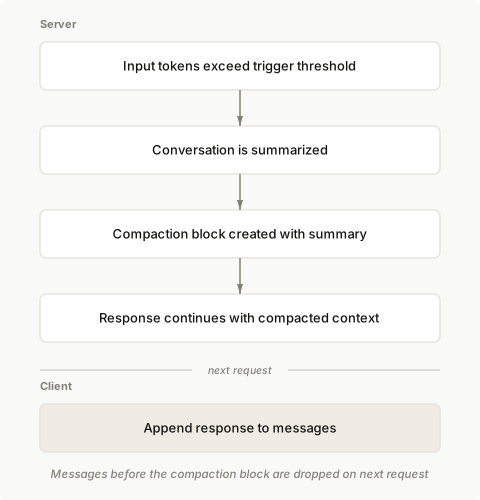
## Basic usage
Enable compaction by adding the `compact_20260112` strategy to `context_management.edits` in your Messages API request.
<CodeGroup>
```bash cURL
curl https://api.anthropic.com/v1/messages \
-H "x-api-key: $ANTHROPIC_API_KEY" \
-H "anthropic-version: 2023-06-01" \
-H "anthropic-beta: compact-2026-01-12" \
-H "content-type: application/json" \
-d '{
"model": "claude-opus-5",
"max_tokens": 4096,
"messages": [
{
"role": "user",
"content": "Help me build a website"
}
],
"context_management": {
"edits": [
{
"type": "compact_20260112"
}
]
}
}'
```
```bash CLI
ant beta:messages create --beta compact-2026-01-12 <<'YAML'
model: claude-opus-5
max_tokens: 4096
messages:
- role: user
content: Help me build a website
context_management:
edits:
- type: compact_20260112
YAML
```
```python Python
client = anthropic.Anthropic()
messages = [{"role": "user", "content": "Help me build a website"}]
response = client.beta.messages.create(
betas=["compact-2026-01-12"],
model="claude-opus-5",
max_tokens=4096,
messages=messages,
context_management={"edits": [{"type": "compact_20260112"}]},
)
# Append the response (including any compaction block) to continue the conversation
messages.append({"role": "assistant", "content": response.content})
```
```typescript TypeScript
const client = new Anthropic();
const messages: Anthropic.Beta.Messages.BetaMessageParam[] = [
{ role: "user", content: "Help me build a website" }
];
const response = await client.beta.messages.create({
betas: ["compact-2026-01-12"],
model: "claude-opus-5",
max_tokens: 4096,
messages,
context_management: {
edits: [
{
type: "compact_20260112"
}
]
}
});
// Append the response (including any compaction block) to continue the conversation
messages.push({
role: "assistant",
content: response.content
});
```
```csharp C#
AnthropicClient client = new();
var messages = new List<BetaMessageParam>
{
new() { Role = Role.User, Content = "Help me build a website" }
};
var parameters = new MessageCreateParams
{
Betas = ["compact-2026-01-12"],
Model = "claude-opus-5",
MaxTokens = 4096,
Messages = messages,
ContextManagement = new BetaContextManagementConfig
{
Edits = [new BetaCompact20260112Edit()]
}
};
var response = await client.Beta.Messages.Create(parameters);
// Append the response (including any compaction block) to continue the conversation
messages.Add(new BetaMessageParam
{
Role = Role.Assistant,
Content = response.Content.Select(block => new BetaContentBlockParam(block.Json)).ToList()
});
Console.WriteLine(response);
```
```go Go
client := anthropic.NewClient()
messages := []anthropic.BetaMessageParam{
anthropic.NewBetaUserMessage(anthropic.NewBetaTextBlock("Help me build a website")),
}
response, err := client.Beta.Messages.New(context.TODO(), anthropic.BetaMessageNewParams{
Model: anthropic.ModelClaudeOpus5,
MaxTokens: 4096,
Messages: messages,
ContextManagement: anthropic.BetaContextManagementConfigParam{
Edits: []anthropic.BetaContextManagementConfigEditUnionParam{
{OfCompact20260112: &anthropic.BetaCompact20260112EditParam{}},
},
},
Betas: []anthropic.AnthropicBeta{"compact-2026-01-12"},
})
if err != nil {
log.Fatal(err)
}
// Append the response (including any compaction block) to continue the conversation
messages = append(messages, response.ToParam())
fmt.Println(response)
```
```java Java
import com.anthropic.models.beta.messages.BetaContextManagementConfig;
import com.anthropic.models.beta.messages.BetaCompact20260112Edit;
// ...
AnthropicClient client = AnthropicOkHttpClient.fromEnv();
MessageCreateParams params = MessageCreateParams.builder()
.addBeta("compact-2026-01-12")
.model("claude-opus-5")
.maxTokens(4096L)
.addUserMessage("Help me build a website")
.contextManagement(BetaContextManagementConfig.builder()
.addEdit(BetaCompact20260112Edit.builder().build())
.build())
.build();
BetaMessage response = client.beta().messages().create(params);
// Append the response (including any compaction block) to continue the conversation
// by including it in the next request's messages
System.out.println(response);
```
```php PHP
$client = new Client();
$messages = [
['role' => 'user', 'content' => 'Help me build a website']
];
$response = $client->beta->messages->create(
maxTokens: 4096,
messages: $messages,
model: 'claude-opus-5',
betas: ['compact-2026-01-12'],
contextManagement: [
'edits' => [
['type' => 'compact_20260112']
]
]
);
// Append the response (including any compaction block) to continue the conversation
$messages[] = ['role' => 'assistant', 'content' => $response->content];
echo json_encode($response, JSON_PRETTY_PRINT), PHP_EOL;
```
```ruby Ruby
client = Anthropic::Client.new
messages = [
{ role: "user", content: "Help me build a website" }
]
response = client.beta.messages.create(
betas: ["compact-2026-01-12"],
model: "claude-opus-5",
max_tokens: 4096,
messages: messages,
context_management: {
edits: [{ type: "compact_20260112" }]
}
)
# Append the response (including any compaction block) to continue the conversation
messages << { role: "assistant", content: response.content }
puts response
```
</CodeGroup>
## Parameters
| Parameter | Type | Default | Description |
| ------------------------ | ------- | ------------------------------------------- | ---------------------------------------------------------------------------------------------------------------------- |
| `type` | string | Required | Must be `"compact_20260112"` |
| `trigger` | object | `{"type": "input_tokens", "value": 150000}` | When to trigger compaction. `input_tokens` is the only supported trigger type. `value` must be at least 50,000 tokens. |
| `pause_after_compaction` | boolean | `false` | Whether to pause after generating the compaction summary |
| `instructions` | string | `null` | Custom summarization prompt. Completely replaces the default prompt when provided. |
### Trigger configuration
Configure when compaction triggers using the `trigger` parameter:
<CodeGroup>
```bash cURL
curl https://api.anthropic.com/v1/messages \
-H "x-api-key: $ANTHROPIC_API_KEY" \
-H "anthropic-version: 2023-06-01" \
-H "anthropic-beta: compact-2026-01-12" \
-H "content-type: application/json" \
-d '{
"model": "claude-opus-5",
"max_tokens": 4096,
"messages": [
{
"role": "user",
"content": "Hello, Claude"
}
],
"context_management": {
"edits": [
{
"type": "compact_20260112",
"trigger": {
"type": "input_tokens",
"value": 150000
}
}
]
Cut at 300 lines. The page has the rest.
build-with-claude/context-editing First recorded · 3023 lines, first recorded
## Overview ## Server-side strategies ### Tool result clearing ### Thinking block clearing ### Context editing happens server-side ### Context editing and prompt caching ## Supported models ## Tool result clearing usage ### Advanced configuration ## Thinking block clearing usage ### Configuration options for thinking block clearing ### Combining strategies ## Configuration options for tool result clearing ## Context editing response ## Token counting ## Using with the memory tool ## Client-side compaction (SDK) ### How compaction works ### Using compaction #### What occurs during compaction ### Configuration options #### Choosing a token threshold #### Using a different model for summaries #### Custom summary prompts ### Default summary prompt ### Limitations #### Server-side tools #### Tool use edge cases ### Monitoring compaction ### When to use compaction ## Next steps
The first capture of this source. The page was already there, and this is what it said.
---
title: Context editing
url: https://platform.claude.com/docs/en/build-with-claude/context-editing
description: Automatically manage conversation context as it grows with context editing.
---

<Note>
  For how zero data retention (ZDR) applies to this feature, see [API and data retention](https://platform.claude.com/docs/en/manage-claude/api-and-data-retention).
</Note>

## Overview

<Note>
  For most use cases, [server-side compaction](https://platform.claude.com/docs/en/build-with-claude/compaction) is the primary strategy for managing context in long-running conversations. The strategies on this page are useful for specific scenarios where you need more fine-grained control over what content is cleared.
</Note>

Context editing allows you to selectively clear specific content from conversation history as it grows. Beyond optimizing costs and staying within limits, this is about actively curating what Claude sees: context is a finite resource with diminishing returns, and irrelevant content degrades model focus. Context editing gives you fine-grained runtime control over that curation. For the broader principles behind context management, see [Effective context engineering](https://www.anthropic.com/engineering/effective-context-engineering-for-ai-agents). This page covers:

* **Tool result clearing** - Best for agentic workflows with heavy tool use where old tool results are no longer needed
* **Thinking block clearing** - For managing thinking blocks when using extended thinking, with options to preserve recent thinking for context continuity
* **Client-side SDK compaction** - An SDK-based alternative for summary-based context management (server-side compaction is generally preferred)

| Approach        | Where it runs | Strategies                                                                                            | How it works                                                                                                                                                                                                                                                                                                                                                                                                         |
| --------------- | ------------- | ----------------------------------------------------------------------------------------------------- | -------------------------------------------------------------------------------------------------------------------------------------------------------------------------------------------------------------------------------------------------------------------------------------------------------------------------------------------------------------------------------------------------------------------- |
| **Server-side** | API           | Tool result clearing (`clear_tool_uses_20250919`) Thinking block clearing (`clear_thinking_20251015`) | Applied before the prompt reaches Claude. Clears specific content from conversation history. Each strategy can be configured independently.                                                                                                                                                                                                                                                                          |
| **Client-side** | SDK           | Compaction                                                                                            | Available in [Python, TypeScript, and Ruby SDKs](https://platform.claude.com/docs/en/cli-sdks-libraries/overview) when using [`tool_runner`](https://platform.claude.com/docs/en/agents-and-tools/tool-use/tool-runner). Generates a summary and replaces full conversation history. See [Client-side compaction](https://platform.claude.com/docs/en/build-with-claude/context-editing#client-side-compaction-sdk). |

## Server-side strategies

<Note>
  Context editing is in beta with support for tool result clearing and thinking block clearing. To enable it, use the beta header `context-management-2025-06-27` in your API requests.

  Share feedback on this feature through the [feedback form](https://forms.gle/YXC2EKGMhjN1c4L88).
</Note>

### Tool result clearing

The `clear_tool_uses_20250919` strategy clears tool results when conversation context grows beyond your configured threshold. This is particularly useful for agentic workflows with heavy tool use. Older tool results (like file contents or search results) are no longer needed once Claude has processed them.

When activated, the API automatically clears the oldest tool results in chronological order. The API replaces each cleared result with placeholder text indicating to Claude that it was removed. By default, only tool results are cleared. You can optionally clear both tool results and tool calls (the tool use parameters) by setting `clear_tool_inputs` to true.

### Thinking block clearing

The `clear_thinking_20251015` strategy manages `thinking` blocks in conversations when extended thinking is enabled. This strategy gives you control over thinking preservation: you can choose to keep more thinking blocks to maintain reasoning continuity, or clear them more aggressively to save context space.

<Tip>
  **Default behavior:** The default varies by model class.

  | Model class | Keep all prior thinking     | Keep only the last turn's thinking  |
  | ----------- | --------------------------- | ----------------------------------- |
  | Opus        | Claude Opus 4.5 and later   | Claude Opus 4.1 and earlier         |
  | Sonnet      | Claude Sonnet 4.6 and later | Claude Sonnet 4.5 and earlier       |
  | Haiku       | (none)                      | All models through Claude Haiku 4.5 |

  Use this strategy to override the default. If your code runs across multiple model tiers, set `keep` explicitly rather than relying on the per-model default.
</Tip>

An assistant conversation turn may include multiple content blocks (for example, when using tools) and multiple thinking blocks (for example, with [interleaved thinking](https://platform.claude.com/docs/en/build-with-claude/thinking#interleaved-thinking)).

### Context editing happens server-side

Context editing is applied server-side before the prompt reaches Claude. Your client application maintains the full, unmodified conversation history. You do not need to sync your client state with the edited version. Continue managing your full conversation history locally as you normally would.

### Context editing and prompt caching

Context editing's interaction with [prompt caching](https://platform.claude.com/docs/en/build-with-claude/prompt-caching) varies by strategy:

* **Tool result clearing:** Invalidates cached prompt prefixes when content is cleared. To account for this, clear enough tokens to make the cache invalidation worthwhile. Use the `clear_at_least` parameter to ensure a minimum number of tokens is cleared each time. You'll incur cache write costs each time content is cleared, but subsequent requests can reuse the newly cached prefix.

* **Thinking block clearing:** When thinking blocks are **kept** in context (not cleared), the prompt cache is preserved, enabling cache hits and reducing input token costs. When thinking blocks are **cleared**, the cache is invalidated at the point where clearing occurs. Configure the `keep` parameter based on whether you want to prioritize cache performance or context window availability.

## Supported models

Context editing is available on all supported Claude models.

## Tool result clearing usage

The simplest way to enable tool result clearing is to specify only the strategy type. All other [configuration options](https://platform.claude.com/docs/en/build-with-claude/context-editing#configuration-options-for-tool-result-clearing) use their default values:

<CodeGroup>
  ```bash cURL
  curl https://api.anthropic.com/v1/messages \
      --header "x-api-key: $ANTHROPIC_API_KEY" \
      --header "anthropic-version: 2023-06-01" \
      --header "content-type: application/json" \
      --header "anthropic-beta: context-management-2025-06-27" \
      --data '{
          "model": "claude-opus-5",
          "max_tokens": 4096,
          "messages": [
              {
                  "role": "user",
                  "content": "Search for recent developments in AI"
              }
          ],
          "tools": [
              {
                  "type": "web_search_20250305",
                  "name": "web_search"
              }
          ],
          "context_management": {
              "edits": [
                  {"type": "clear_tool_uses_20250919"}
              ]
          }
      }'
  ```

  ```bash CLI
  ant beta:messages create --beta context-management-2025-06-27 <<'YAML'
  model: claude-opus-5
  max_tokens: 4096
  messages:
    - role: user
      content: Search for recent developments in AI
  tools:
    - type: web_search_20250305
      name: web_search
  context_management:
    edits:
      - type: clear_tool_uses_20250919
  YAML
  ```

  ```python Python
  response = client.beta.messages.create(
      model="claude-opus-5",
      max_tokens=4096,
      messages=[{"role": "user", "content": "Search for recent developments in AI"}],
      tools=[{"type": "web_search_20250305", "name": "web_search"}],
      betas=["context-management-2025-06-27"],
      context_management={"edits": [{"type": "clear_tool_uses_20250919"}]},
  )
  ```

  ```typescript TypeScript
  const anthropic = new Anthropic({
    apiKey: process.env.ANTHROPIC_API_KEY
  });

  const response = await anthropic.beta.messages.create({
    model: "claude-opus-5",
    max_tokens: 4096,
    messages: [
      {
        role: "user",
        content: "Search for recent developments in AI"
      }
    ],
    tools: [
      {
        type: "web_search_20250305",
        name: "web_search"
      }
    ],
    context_management: {
      edits: [{ type: "clear_tool_uses_20250919" }]
    },
    betas: ["context-management-2025-06-27"]
  });
  ```

  ```csharp C#
  using Anthropic;
  using Anthropic.Models.Beta;
  using Anthropic.Models.Beta.Messages;
  using Messages = Anthropic.Models.Messages;

  AnthropicClient client = new();

  var parameters = new MessageCreateParams
  {
      Model = Messages::Model.ClaudeOpus5,
      MaxTokens = 4096,
      Messages = [
          new() { Role = Role.User, Content = "Search for recent developments in AI" }
      ],
      Tools = [
          new BetaWebSearchTool20250305()
      ],
      ContextManagement = new BetaContextManagementConfig
      {
          Edits = [new BetaClearToolUses20250919Edit()]
      },
      Betas = [AnthropicBeta.ContextManagement2025_06_27]
  };

  var response = await client.Beta.Messages.Create(parameters);
  Console.WriteLine(response);
  ```

  ```go Go
  client := anthropic.NewClient()

  response, err := client.Beta.Messages.New(context.TODO(), anthropic.BetaMessageNewParams{
  	Model:     anthropic.ModelClaudeOpus5,
  	MaxTokens: 4096,
  	Messages: []anthropic.BetaMessageParam{
  		anthropic.NewBetaUserMessage(anthropic.NewBetaTextBlock("Search for recent developments in AI")),
  	},
  	Tools: []anthropic.BetaToolUnionParam{
  		{OfWebSearchTool20250305: &anthropic.BetaWebSearchTool20250305Param{}},
  	},
  	ContextManagement: anthropic.BetaContextManagementConfigParam{
  		Edits: []anthropic.BetaContextManagementConfigEditUnionParam{
  			{OfClearToolUses20250919: &anthropic.BetaClearToolUses20250919EditParam{}},
  		},
  	},
  	Betas: []anthropic.AnthropicBeta{
  		anthropic.AnthropicBetaContextManagement2025_06_27,
  	},
  })
  if err != nil {
  	log.Fatal(err)
  }
  fmt.Println(response)
  ```

  ```java Java
  import com.anthropic.models.beta.messages.BetaWebSearchTool20250305;
  import com.anthropic.models.beta.messages.BetaContextManagementConfig;
  import com.anthropic.models.beta.messages.BetaClearToolUses20250919Edit;
  import com.anthropic.models.beta.AnthropicBeta;
  // ...
  void main() {
      AnthropicClient client = AnthropicOkHttpClient.fromEnv();

      MessageCreateParams params = MessageCreateParams.builder()
          .model(Model.CLAUDE_OPUS_5)
          .maxTokens(4096L)
          .addUserMessage("Search for recent developments in AI")
          .addTool(BetaWebSearchTool20250305.builder().build())
          .contextManagement(BetaContextManagementConfig.builder()
              .addEdit(BetaClearToolUses20250919Edit.builder().build())
              .build())
          .addBeta(AnthropicBeta.CONTEXT_MANAGEMENT_2025_06_27)
          .build();

      BetaMessage response = client.beta().messages().create(params);
      IO.println(response);
  }
  ```

  ```php PHP
  $client = new Client();

  $response = $client->beta->messages->create(
      maxTokens: 4096,
      messages: [
          ['role' => 'user', 'content' => 'Search for recent developments in AI']
      ],
      model: 'claude-opus-5',
      betas: ['context-management-2025-06-27'],
      tools: [
          ['type' => 'web_search_20250305', 'name' => 'web_search']
      ],
      contextManagement: [
          'edits' => [
              ['type' => 'clear_tool_uses_20250919']
          ]
      ],
  );

  echo $response;
  ```

  ```ruby Ruby
  client = Anthropic::Client.new

  response = client.beta.messages.create(
    model: "claude-opus-5",
    max_tokens: 4096,
    messages: [
      { role: "user", content: "Search for recent developments in AI" }
    ],
    tools: [
      { type: "web_search_20250305", name: "web_search" }
    ],
    context_management: {
      edits: [
        { type: "clear_tool_uses_20250919" }
      ]
    },
    betas: ["context-management-2025-06-27"]
  )
  puts response
  ```
</CodeGroup>

### Advanced configuration

You can customize the tool result clearing behavior with additional parameters:

<CodeGroup>
  ```bash cURL
  curl https://api.anthropic.com/v1/messages \
      --header "x-api-key: $ANTHROPIC_API_KEY" \
      --header "anthropic-version: 2023-06-01" \
      --header "content-type: application/json" \
Cut at 300 lines. The page has the rest.
build-with-claude/context-windows First recorded · 171 lines, first recorded
## How the context window works ## Context window sizes by model ## The context window with thinking ## The context window with thinking and tool use ## Context awareness ### How it works ## Manage context with compaction ## Context window overflow behavior ## Next steps
The first capture of this source. The page was already there, and this is what it said.
---
title: Context windows
url: https://platform.claude.com/docs/en/build-with-claude/context-windows
description: Understand how the context window works, how extended thinking and tool use count toward it, and how to manage context as conversations grow.
---
As conversations grow, you'll eventually approach context window limits. For long-running conversations and agentic workflows, [server-side compaction](https://platform.claude.com/docs/en/build-with-claude/compaction) is the primary strategy for context management.
## How the context window works
The "context window" refers to all the text a language model can reference when generating a response, including the response itself. This is different from the large corpus of data the language model was trained on, and instead represents a "working memory" for the model. A larger context window allows the model to handle more complex and lengthy prompts, but more context isn't automatically better. As token count grows, accuracy and recall degrade, a phenomenon known as *context rot*. This makes curating what's in context just as important as how much space is available.
<Tip>
For more on why long contexts degrade and how to engineer around it, see [Effective context engineering](https://www.anthropic.com/engineering/effective-context-engineering-for-ai-agents).
</Tip>
The following diagram illustrates the standard context window behavior for API requests1:
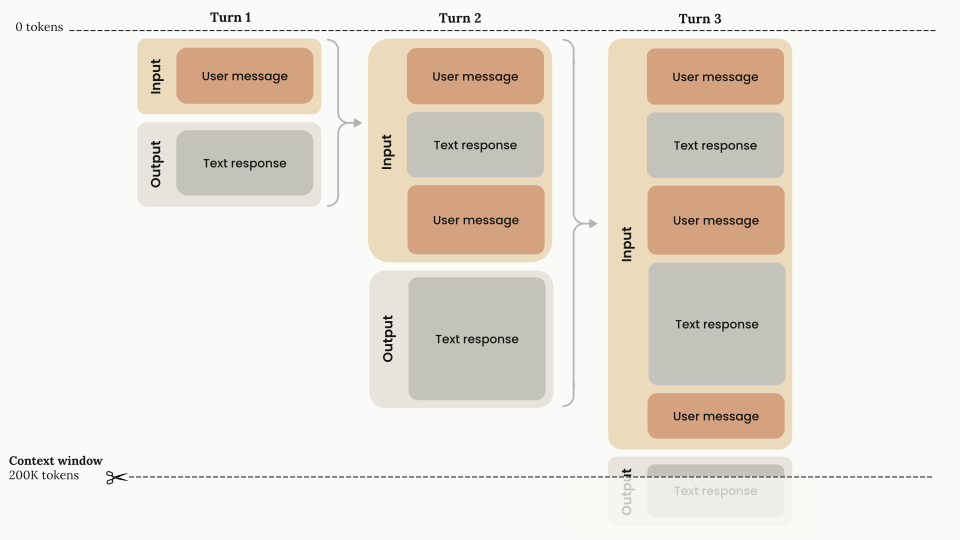
*1 Chat interfaces such as [claude.ai](https://claude.ai/) can also manage the context window on a rolling "first in, first out" basis.*
* **Progressive token accumulation:** As the conversation advances through turns, each user message and assistant response accumulates within the context window, and previous turns are preserved completely.
* **Context window capacity:** The context window ([up to 1M tokens, depending on the model](https://platform.claude.com/docs/en/build-with-claude/context-windows#context-window-sizes-by-model)) holds the conversation history plus the new output Claude generates.
* **Input-output flow:** Each turn consists of:
* **Input phase:** Contains all previous conversation history plus the current user message
* **Output phase:** Generates a text response that becomes part of the input for the next turn
Everything in the request counts toward the context window: the system prompt, every message in `messages` (including tool results, images, and documents), and your tool definitions. The output Claude generates for the turn, including its extended thinking, counts too. Every response reports what the request consumed in its `usage` field. If you use [prompt caching](https://platform.claude.com/docs/en/build-with-claude/prompt-caching), the input count is split across `input_tokens`, `cache_read_input_tokens`, and `cache_creation_input_tokens`, and all three count toward the window. To estimate a request before you send it, use the [token counting API](https://platform.claude.com/docs/en/build-with-claude/token-counting).
## Context window sizes by model
Claude Opus 5, Claude Opus 4.8, Claude Opus 4.7, Claude Opus 4.6, Claude Sonnet 5, and Claude Sonnet 4.6 have a 1M-token context window on the Claude API, Amazon Bedrock, Google Cloud, and Microsoft Foundry. [Claude Mythos Preview](https://anthropic.com/glasswing) also has a 1M-token context window.
Claude Fable 5 and Claude Mythos 5 (claude-fable-5 and claude-mythos-5) also have a 1M-token context window. A single request to any model with a 1M-token context window can generate up to 128k output tokens (`max_tokens`). Other Claude models, including Claude Sonnet 4.5, have a 200k-token context window.
For every model with a 1M-token context window, 1M is the default: you don't need a beta header, and long-context requests are billed at [standard pricing](https://platform.claude.com/docs/en/about-claude/pricing#long-context-pricing).
A single request can include up to 600 images or PDF pages (100 for models with a 200k-token context window). If you send many images or large documents, you might reach [request size limits](https://platform.claude.com/docs/en/api/overview#request-size-limits) before the token limit.
See the [model comparison](https://platform.claude.com/docs/en/about-claude/models/overview#latest-models-comparison) table for a list of context window sizes by model.
## The context window with thinking
With [thinking](https://platform.claude.com/docs/en/build-with-claude/thinking), all input and output tokens, including thinking tokens, count toward the context window limit, with a few nuances in multi-turn situations.
Thinking tokens are a subset of your `max_tokens` parameter, are billed as output tokens, and count toward rate limits. With [adaptive thinking](https://platform.claude.com/docs/en/build-with-claude/thinking), Claude determines its thinking allocation dynamically, so thinking token usage varies from request to request.
Whether thinking blocks from previous assistant turns stay in the context window depends on the model. On Claude Opus 4.5 and later Opus models, Claude Sonnet 4.6 and later Sonnet models, Claude Fable 5, Claude Mythos 5, and Claude Mythos Preview, the API keeps previous thinking blocks by default, and they count toward the context window like any other input tokens. On earlier Opus and Sonnet models and all Haiku models, the API automatically strips previous thinking blocks from the conversation history when you pass them back, which preserves token capacity for conversation content. For the per-model defaults, see [thinking block preservation by model](https://platform.claude.com/docs/en/build-with-claude/thinking#thinking-block-preservation-by-model). To override the default in either direction, use [thinking block clearing](https://platform.claude.com/docs/en/build-with-claude/context-editing#thinking-block-clearing).
The following diagram shows how tokens are managed when thinking is enabled on a model that strips previous thinking blocks:
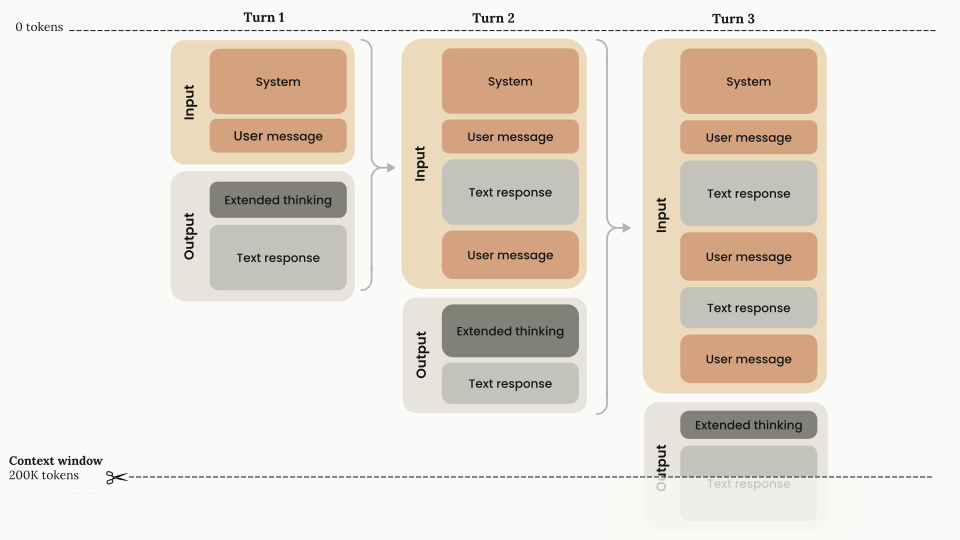
* **Stripping thinking blocks:** On models that strip previous thinking blocks, thinking blocks (shown in dark gray) are generated during each turn's output phase but are not carried forward as input tokens for subsequent turns. You do not need to strip the thinking blocks yourself: if you pass them back, the Claude API strips them automatically.
* **Billing:** Thinking tokens are billed as output tokens once, when they are generated. On models that keep previous thinking blocks, the kept blocks are then part of later requests' input and are billed as input tokens, like the rest of the conversation history.
<Note>
You can read more about the context window and thinking in the [Thinking](https://platform.claude.com/docs/en/build-with-claude/thinking) guide.
</Note>
## The context window with thinking and tool use
The following diagram illustrates how tokens are managed when you combine thinking with tool use on a model that strips previous thinking blocks:
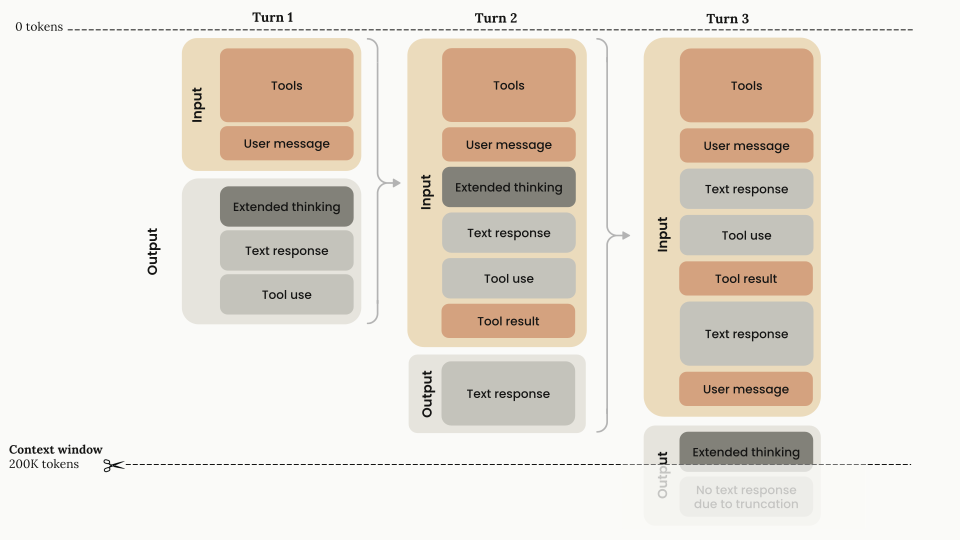
<Steps>
<Step title="First turn architecture">
* **Input components:** Tools configuration and user message
* **Output components:** Thinking + text response + tool use request
* **Token calculation:** All input and output components count toward the context window, and all output components are billed as output tokens.
</Step>
<Step title="Tool result handling (turn 2)">
* **Input components:** Every block in the first turn and the `tool_result`. You must return the thinking block with the corresponding tool results. This is the only case where you have to return thinking blocks.
* **Output components:** After tool results have been passed back to Claude, Claude responds with only text (no additional thinking until the next `user` message, unless [interleaved thinking](https://platform.claude.com/docs/en/build-with-claude/thinking#interleaved-thinking) is enabled).
* **Token calculation:** All input and output components count toward the context window, and all output components are billed as output tokens.
</Step>
<Step title="New user turn (turn 3)">
* **Input components:** All inputs and the output from the previous turn are carried forward. The thinking block from the completed tool use cycle no longer has to stay in context: on models that strip previous thinking blocks, the API drops it automatically when you pass it back, and on models that keep previous thinking blocks, you can strip it yourself at this stage. This is also where you add the next `user` turn.
* **Output components:** Because there is a new `user` turn outside the tool use cycle, Claude generates a new thinking block and continues from there.
* **Token calculation:** On models that strip previous thinking blocks, the previous thinking tokens no longer count toward the context window. All other previous blocks still count toward the context window, as does the thinking block in the current `assistant` turn.
</Step>
</Steps>
* **Considerations for tool use with thinking:**
* When you post tool results, you must include the entire unmodified thinking block that accompanies that tool request, including its signature.
* The API uses cryptographic signatures to verify thinking block authenticity. If you modify a thinking block, the API returns an error.
<Note>
Most current Claude models support [interleaved thinking](https://platform.claude.com/docs/en/build-with-claude/thinking#interleaved-thinking), which lets Claude think between tool calls, including after it receives tool results. It is automatic on models with adaptive thinking; Claude Opus 4.5, Claude Sonnet 4.5, and earlier Claude 4 models require the `interleaved-thinking-2025-05-14` beta header, and Claude Haiku 4.5 does not support it.
For more information about using tools with thinking, see [Thinking with tool use](https://platform.claude.com/docs/en/build-with-claude/thinking#thinking-with-tool-use).
</Note>
To reduce the context consumed by the tool definitions themselves, see [Manage tool context](https://platform.claude.com/docs/en/agents-and-tools/tool-use/manage-tool-context), or defer tool definitions with the [tool search tool](https://platform.claude.com/docs/en/agents-and-tools/tool-use/tool-search-tool).
## Context awareness
Claude Sonnet 5, Claude Sonnet 4.6, Claude Sonnet 4.5, and Claude Haiku 4.5 have **context awareness:** these models track their remaining context window (their "token budget") throughout a conversation. This lets the model manage long-running tasks against the space that remains rather than guess how many tokens are left. Context awareness is automatic: there is nothing for you to enable, and you never send the tags shown in this section yourself. The API injects them.
### How it works
In the system prompt of every request, the API gives Claude its total context window:
```xml
<budget:token_budget>200000</budget:token_budget>
```
The budget matches the context window available to your request: 1M tokens for Claude Sonnet 5 and Claude Sonnet 4.6, and 200k tokens for Claude Sonnet 4.5 and Claude Haiku 4.5. The examples in this section show a model with a 200k-token context window.
After each tool call, the API gives Claude an update on its remaining capacity:
```xml
<system_warning>Token usage: 35000/200000; 165000 remaining</system_warning>
```
Image tokens are included in these budgets.
Claude Opus 4.7 and later Opus models, Claude Fable 5, and Claude Mythos 5 don't receive these injected tags. On Claude Opus 4.7 and later Opus models, Claude Fable 5, and Claude Mythos 5, you can give the model an explicit budget with [task budgets](https://platform.claude.com/docs/en/build-with-claude/task-budgets), which are in beta.
<Tip>
For agents that span multiple sessions, design your state artifacts so that context recovery is fast when a new session starts. The [memory tool's multisession pattern](https://platform.claude.com/docs/en/agents-and-tools/tool-use/memory-tool#multisession-software-development-pattern) walks through a concrete approach. See also [Effective harnesses for long-running agents](https://www.anthropic.com/engineering/effective-harnesses-for-long-running-agents).
</Tip>
For prompting guidance on using context awareness, see [Prompting best practices](https://platform.claude.com/docs/en/build-with-claude/prompt-engineering/claude-prompting-best-practices#context-awareness-and-multiwindow-workflows).
## Manage context with compaction
If your conversations regularly approach context window limits, use [server-side compaction](https://platform.claude.com/docs/en/build-with-claude/compaction). Compaction automatically summarizes earlier parts of the conversation on the server, so the conversation can continue past the context window limit. It is available in beta for Claude 4.6 and later models and [Claude Mythos Preview](https://anthropic.com/glasswing).
For more specialized needs, [context editing](https://platform.claude.com/docs/en/build-with-claude/context-editing) offers additional strategies:
* **Tool result clearing:** Clear old tool results in agentic workflows
* **Thinking block clearing:** Manage thinking blocks when you use extended thinking
Cached prompt prefixes still occupy the context window: [prompt caching](https://platform.claude.com/docs/en/build-with-claude/prompt-caching) changes what you pay for those tokens, not whether they count.
## Context window overflow behavior
If the input alone already exceeds the model's context window, the API returns a 400 `invalid_request_error` ("prompt is too long") on every model.
On Claude 4.5 models and newer, if input tokens plus `max_tokens` exceeds the context window size, the API accepts the request. If generation then reaches the context window limit, it stops with `stop_reason: "model_context_window_exceeded"`. On earlier models, the API returns a [validation error](https://platform.claude.com/docs/en/api/errors) instead. To opt in to the `model_context_window_exceeded` behavior on those models, use the `model-context-window-exceeded-2025-08-26` beta header. See [Stop reasons and fallback](https://platform.claude.com/docs/en/build-with-claude/handling-stop-reasons) for details.
To stay within context window limits, use the [token counting API](https://platform.claude.com/docs/en/build-with-claude/token-counting) to estimate token usage before sending messages to Claude.
## Next steps
<CardGroup cols={2}>
<Card title="Compaction" icon="stack" href="https://platform.claude.com/docs/en/build-with-claude/compaction">
Server-side context compaction for managing long conversations that approach context window limits.
</Card>
<Card title="Context editing" icon="edit" href="https://platform.claude.com/docs/en/build-with-claude/context-editing">
Automatically manage conversation context as it grows with context editing.
</Card>
<Card title="Model comparison table" icon="scales" href="https://platform.claude.com/docs/en/about-claude/models/overview#latest-models-comparison">
See the model comparison table for a list of context window sizes and input/output token pricing by model.
</Card>
<Card title="Thinking" icon="settings" href="https://platform.claude.com/docs/en/build-with-claude/thinking">
Give Claude enhanced reasoning for complex tasks and control how thinking content is returned.
</Card>
</CardGroup>
build-with-claude/effort First recorded · 357 lines, first recorded
## Compatibility ## How effort works ### Effort levels ### Recommended effort levels for Claude Sonnet 5 ### Recommended effort levels for Claude Sonnet 4.6 ### Recommended effort levels for Claude Opus 4.7 ### Recommended effort levels for Claude Opus 4.8 ### Recommended effort levels for Claude Opus 5 ### Recommended effort levels for Claude Fable 5 ## Basic usage ## When to adjust the effort parameter ## Effort with tool use ## Effort with thinking ## Changing effort mid-conversation ## Best practices ## Next steps
The first capture of this source. The page was already there, and this is what it said.
---
title: Effort
url: https://platform.claude.com/docs/en/build-with-claude/effort
description: Control how many tokens Claude uses when responding with the effort parameter, trading off between response thoroughness and token efficiency.
---

## Compatibility
- [ZDR](https://platform.claude.com/docs/en/manage-claude/api-and-data-retention): eligible (excludes [Covered Models](https://platform.claude.com/docs/en/manage-claude/api-and-data-retention#model-specific-data-retention-requirements))
- Supported models: `claude-fable-5`, `claude-mythos-5`, `claude-mythos-preview`, `claude-opus-5`, `claude-opus-4-8`, `claude-opus-4-7`, `claude-opus-4-6`, `claude-sonnet-5`, `claude-sonnet-4-6`, `claude-opus-4-5-20251101`
- Platforms: Claude API, Claude Platform on AWS, Amazon Bedrock, Google Cloud, Microsoft Foundry

The effort parameter lets you control how many tokens Claude spends when responding to requests. You can trade off between response thoroughness and token efficiency with a single model. The effort parameter is available on all supported models with no beta header required.

<Tip>
  For how effort interacts with thinking and which control to reach for, see [Thinking and effort](https://platform.claude.com/docs/en/build-with-claude/thinking#thinking-and-effort). Where adaptive thinking is available, effort is the recommended way to control thinking depth.
</Tip>

## How effort works

By default, Claude uses high effort, spending as many tokens as needed for excellent results. You can raise the effort level to `max` for the absolute highest capability, or lower it to be more conservative with token usage, optimizing for speed and cost while accepting some reduction in capability.

<Tip>
  Setting `effort` to `"high"` produces exactly the same behavior as omitting the `effort` parameter entirely.
</Tip>

The effort parameter affects **all tokens** in the response, including:

* Text responses and explanations
* Tool calls and function arguments
* Thinking (when active)

This approach has two major advantages:

1. It doesn't require thinking to be enabled.
2. It can affect all token spend including tool calls. For example, lower effort would mean Claude makes fewer tool calls. This gives a much greater degree of control over efficiency.

### Effort levels

| Level    | Description                                                                                                                                                                                                                                       | Typical use case                                                                           |
| -------- | ------------------------------------------------------------------------------------------------------------------------------------------------------------------------------------------------------------------------------------------------- | ------------------------------------------------------------------------------------------ |
| `max`    | Absolute maximum capability with no constraints on token spending. Available on Claude Fable 5, Claude Mythos 5, Claude Opus 5, Claude Opus 4.8, Claude Mythos Preview, Claude Opus 4.7, Claude Opus 4.6, Claude Sonnet 5, and Claude Sonnet 4.6. | Tasks requiring the deepest possible reasoning and most thorough analysis                  |
| `xhigh`  | Extended capability for long-horizon work. Available on Claude Fable 5, Claude Mythos 5, Claude Opus 5, Claude Opus 4.8, Claude Opus 4.7, and Claude Sonnet 5.                                                                                    | Long-running agentic and coding tasks (over 30 minutes) with token budgets in the millions |
| `high`   | High capability. Equivalent to not setting the parameter.                                                                                                                                                                                         | Complex reasoning, difficult coding problems, agentic tasks                                |
| `medium` | Balanced approach with moderate token savings.                                                                                                                                                                                                    | Agentic tasks that require a balance of speed, cost, and performance                       |
| `low`    | Most efficient. Significant token savings with some capability reduction.                                                                                                                                                                         | Simpler tasks that need the best speed and lowest costs, such as subagents                 |

`xhigh` is a newer level; some models that support `max` don't support `xhigh`.

<Note>
  Effort is a behavioral signal, not a strict token budget. At lower effort levels, Claude will still think on sufficiently difficult problems, but it will think less than it would at higher effort levels for the same problem.
</Note>

### Recommended effort levels for Claude Sonnet 5

Claude Sonnet 5 defaults to `high` effort on the Claude API and Claude Code.

* **High effort (default):** Suitable for complex reasoning, coding, and agentic tasks where quality matters more than speed or cost.
* **Xhigh effort:** For the hardest coding and agentic tasks. See [Prompting Claude Sonnet 5](https://platform.claude.com/docs/en/build-with-claude/prompt-engineering/prompting-claude-sonnet-5#calibrating-effort-and-thinking-depth).
* **Medium effort:** Cost-saving step-down from the default. Comparable to Claude Sonnet 4.6 at high effort.
* **Low effort:** For high-volume or latency-sensitive workloads. Suitable for chat and non-coding use cases where faster turnaround is prioritized.
* **Max effort:** For tasks requiring the absolute highest capability with no constraints on token spending.

### Recommended effort levels for Claude Sonnet 4.6

Sonnet 4.6 defaults to `high` effort. Explicitly set effort when using Sonnet 4.6 to avoid unexpected latency:

* **Medium effort** (recommended default): Best balance of speed, cost, and performance for most applications. Suitable for agentic coding, tool-heavy workflows, and code generation.
* **Low effort:** For high-volume or latency-sensitive workloads. Suitable for chat and non-coding use cases where faster turnaround is prioritized.
* **High effort:** For complex reasoning and tasks where quality matters more than speed or cost.
* **Max effort:** For tasks requiring the absolute highest capability with no constraints on token spending.

### Recommended effort levels for Claude Opus 4.7

**Start with `xhigh` for coding and agentic use cases**, and use `high` as the minimum for most intelligence-sensitive workloads. Step down to `medium` for cost-sensitive workloads, or up to `max` only when your evals show measurable headroom at `xhigh`.

The API default is `high`. To use `xhigh`, set `effort` explicitly; the value you pass overrides the default.

| Effort   | Guidance for Claude Opus 4.7                                                                                                                                                                                               |
| -------- | -------------------------------------------------------------------------------------------------------------------------------------------------------------------------------------------------------------------------- |
| `low`    | Efficient, but best for short, scoped tasks. Pair `low` with explicit checklists if your task has multiple sections.                                                                                                       |
| `medium` | The drop-in for the average workflow where you want good results while reducing costs.                                                                                                                                     |
| `high`   | Advanced use cases that still need a balance of intelligence and token consumption. This is often the best balance of quality and token efficiency.                                                                        |
| `xhigh`  | The recommended starting point for coding and agentic work, and for exploratory tasks such as repeated tool calling, detailed web search, and knowledge-base search. Expect meaningfully higher token usage than `high`.   |
| `max`    | Reserve for genuinely frontier problems. On most workloads `max` adds significant cost for relatively small quality gains, and on some structured-output or less intelligence-sensitive tasks it can lead to overthinking. |

Claude Opus 4.7 also respects effort levels more strictly than Claude Opus 4.6, especially at `low` and `medium`. At lower effort levels, the model scopes its work to what was asked rather than doing more than requested. If you observe shallow reasoning on complex problems with Claude Opus 4.7, raise effort rather than prompting around it. If you must keep effort low for latency, add targeted guidance like "This task involves multistep reasoning. Think carefully before responding."

When running Claude Opus 4.7 at `xhigh` or `max` effort, set a large `max_tokens` so the model has room to think and act across subagents and tool calls. Starting at 64k tokens and tuning from there is a reasonable default.

### Recommended effort levels for Claude Opus 4.8

The guidance for Claude Opus 4.7 also applies to Claude Opus 4.8. **Start with `xhigh` for coding and agentic use cases**, use `high` for most other intelligence-sensitive workloads, and step down to `medium` or `low` only when you've measured that the lower level holds quality on your evals.

The API default is `high`. Set `effort` explicitly to use a different level; the value you pass overrides the default.

When running Claude Opus 4.8 at `xhigh` or `max` effort, set a large `max_tokens` so the model has room to think and act across subagents and tool calls. Starting at 64k tokens and tuning from there is a reasonable default.

### Recommended effort levels for Claude Opus 5

Claude Opus 5 supports all five effort levels. **Start with `high`, the default**, and adjust based on your evals: step up to `xhigh` for demanding coding and agentic work, or to `max` when a task justifies unconstrained token spending, and use `low` and `medium` liberally as your primary control for token cost and response time wherever your evals show quality holds. If you carried effort settings over from an earlier model, run a fresh effort sweep on your evals rather than reusing them.

Effort controls thinking volume, not visible response length: on Claude Opus 5, changing effort does not reliably shorten responses, so [prompt for length](https://platform.claude.com/docs/en/build-with-claude/prompt-engineering/prompting-claude-opus-5#response-length-and-verbosity) instead.

The API default is `high`. Set `effort` explicitly to use a different level; the value you pass overrides the default.

On Claude Opus 5, thinking cannot be disabled at `xhigh` or `max` effort: requests that set `thinking: {"type": "disabled"}` at those levels return a 400 error. See [Effort with thinking](https://platform.claude.com/docs/en/build-with-claude/effort#effort-with-thinking).

When running Claude Opus 5 at `xhigh` or `max` effort, set a large `max_tokens` so the model has room to think and act across subagents and tool calls. Starting at 64k tokens and tuning from there is a reasonable default.

### Recommended effort levels for Claude Fable 5

Effort is the primary control for trading off intelligence, latency, and cost on Claude Fable 5. **Start with `high`, the default, for most tasks**, use `xhigh` for the most capability-sensitive workloads, and step down to `medium` or `low` for routine work. Lower effort settings on Claude Fable 5 still perform well and often exceed `xhigh` performance on prior models. At `high` and `xhigh`, set a large `max_tokens`: it is a hard limit on total output, thinking plus response text. See [Cost control](https://platform.claude.com/docs/en/build-with-claude/thinking-steering-and-cost#cost-control).

Reduce effort if a task completes but takes longer than necessary, or if you want a faster, more interactive working style. The same recommendations apply to Claude Mythos 5. For fuller guidance, see [Prompting Claude Fable 5](https://platform.claude.com/docs/en/build-with-claude/prompt-engineering/prompting-claude-fable-5).

## Basic usage

<CodeGroup>
  ```bash cURL
  curl https://api.anthropic.com/v1/messages \
    -H "x-api-key: $ANTHROPIC_API_KEY" \
    -H "anthropic-version: 2023-06-01" \
    -H "content-type: application/json" \
    -d '{
      "model": "claude-opus-5",
      "max_tokens": 4096,
      "messages": [{
        "role": "user",
        "content": "Analyze the trade-offs between microservices and monolithic architectures"
      }],
      "output_config": {
        "effort": "medium"
      }
    }'
  ```

  ```bash CLI
  ant messages create \
    --model claude-opus-5 \
    --max-tokens 4096 \
    --output-config '{effort: medium}' \
    --message '{role: user, content: "Analyze the trade-offs between microservices and monolithic architectures"}' \
    --transform 'content.#(type=="text").text' \
    --raw-output
  ```

  ```python Python
  client = anthropic.Anthropic()

  response = client.messages.create(
      model="claude-opus-5",
      max_tokens=4096,
      messages=[
          {
              "role": "user",
              "content": "Analyze the trade-offs between microservices and monolithic architectures",
          }
      ],
      output_config={"effort": "medium"},
  )

  for block in response.content:
      if block.type == "text":
          print(block.text)
  ```

  ```typescript TypeScript
  const client = new Anthropic();

  const response = await client.messages.create({
    model: "claude-opus-5",
    max_tokens: 4096,
    messages: [
      {
        role: "user",
        content: "Analyze the trade-offs between microservices and monolithic architectures"
      }
    ],
    output_config: {
      effort: "medium"
    }
  });

  const textBlock = response.content.find(
    (block): block is Anthropic.TextBlock => block.type === "text"
  );
  console.log(textBlock?.text);
  ```

  ```csharp C#
  AnthropicClient client = new();

  var parameters = new MessageCreateParams
  {
      Model = Model.ClaudeOpus5,
      MaxTokens = 4096,
      Messages = [
          new() {
              Role = Role.User,
              Content = "Analyze the trade-offs between microservices and monolithic architectures"
          }
      ],
      OutputConfig = new OutputConfig
      {
          Effort = Effort.Medium
      }
  };

  var message = await client.Messages.Create(parameters);
  Console.WriteLine(message);
  ```

  ```go Go
  client := anthropic.NewClient()

  response, err := client.Messages.New(context.TODO(), anthropic.MessageNewParams{
  	Model:     anthropic.ModelClaudeOpus5,
  	MaxTokens: 4096,
  	Messages: []anthropic.MessageParam{
  		anthropic.NewUserMessage(anthropic.NewTextBlock("Analyze the trade-offs between microservices and monolithic architectures")),
  	},
  	OutputConfig: anthropic.OutputConfigParam{
  		Effort: anthropic.OutputConfigEffortMedium,
  	},
  })
  if err != nil {
  	log.Fatal(err)
  }
  for _, block := range response.Content {
  	if textBlock, ok := block.AsAny().(anthropic.TextBlock); ok {
  		fmt.Println(textBlock.Text)
  	}
  }
  ```

  ```java Java
  import com.anthropic.models.messages.OutputConfig;

  void main() {
      AnthropicClient client = AnthropicOkHttpClient.fromEnv();

      MessageCreateParams params = MessageCreateParams.builder()
          .model(Model.CLAUDE_OPUS_5)
          .maxTokens(4096L)
          .addUserMessage("Analyze the trade-offs between microservices and monolithic architectures")
          .outputConfig(OutputConfig.builder()
              .effort(OutputConfig.Effort.MEDIUM)
              .build())
          .build();

      Message response = client.messages().create(params);
      response.content().stream()
          .flatMap(block -> block.text().stream())
          .forEach(textBlock -> IO.println(textBlock.text()));
  }
  ```

  ```php PHP
  $client = new Client();

  $message = $client->messages->create(
      maxTokens: 4096,
      messages: [
          ['role' => 'user', 'content' => 'Analyze the trade-offs between microservices and monolithic architectures']
      ],
      model: 'claude-opus-5',
      outputConfig: ['effort' => 'medium'],
  );

  foreach ($message->content as $block) {
      if ($block->type === 'text') {
          echo $block->text, PHP_EOL;
      }
  }
  ```

  ```ruby Ruby
  client = Anthropic::Client.new

  message = client.messages.create(
    model: "claude-opus-5",
    max_tokens: 4096,
    messages: [
      { role: "user", content: "Analyze the trade-offs between microservices and monolithic architectures" }
    ],
    output_config: {
      effort: "medium"
    }
  )

  message.content.each do |block|
    puts block.text if block.type == :text
  end
  ```
</CodeGroup>

## When to adjust the effort parameter

* Use **max effort** when you need the absolute highest capability with no constraints: the most thorough reasoning and deepest analysis. Available on Claude 4.6 and later models and Claude Mythos Preview.
* Use **xhigh effort** for advanced coding and complex agentic work requiring extended exploration, such as repeated tool calling and detailed search. Available on Claude Fable 5, Claude Mythos 5, Claude Opus 5, Claude Opus 4.8, Claude Opus 4.7, and Claude Sonnet 5.
Cut at 300 lines. The page has the rest.
build-with-claude/embeddings First recorded · 337 lines, first recorded
## Before implementing embeddings ## How to get embeddings with Anthropic ## Available models ## Getting started with Voyage AI ### Voyage Python library ### Voyage HTTP API ### AWS Marketplace ## Quickstart example ## FAQ ## Pricing
The first capture of this source. The page was already there, and this is what it said.
---
title: Embeddings
url: https://platform.claude.com/docs/en/build-with-claude/embeddings
description: Text embeddings are numerical representations of text that enable measuring semantic similarity. This guide introduces embeddings, their applications, and how to use embedding models for tasks like search, recommendations, and anomaly detection.
---

## Before implementing embeddings

When selecting an embeddings provider, there are several factors you can consider depending on your needs and preferences:

* Dataset size & domain specificity: size of the model training dataset and its relevance to the domain you want to embed. Larger or more domain-specific data generally produces better in-domain embeddings
* Inference performance: embedding lookup speed and end-to-end latency. This is a particularly important consideration for large scale production deployments
* Customization: options for continued training on private data, or specialization of models for very specific domains. This can improve performance on unique vocabularies

## How to get embeddings with Anthropic

Anthropic does not offer its own embedding model. One embeddings provider that has a wide variety of options and capabilities encompassing all of the preceding considerations is Voyage AI.

Voyage AI makes state-of-the-art embedding models and offers customized models for specific industry domains such as finance and healthcare, or bespoke fine-tuned models for individual customers.

The rest of this guide is for Voyage AI, but you should assess a variety of embeddings vendors to find the best fit for your specific use case.

## Available models

Voyage recommends using the following text embedding models:

**Voyage 4 (latest generation)**

| Model            | Context length | Embedding dimension            | Description                                                                                                                                                                                  |
| ---------------- | -------------- | ------------------------------ | -------------------------------------------------------------------------------------------------------------------------------------------------------------------------------------------- |
| `voyage-4-large` | 32,000         | 1024 (default), 256, 512, 2048 | The best general-purpose and multilingual retrieval quality. See the [Voyage 4 blog post](https://blog.voyageai.com/2026/01/15/voyage-4/) for details.                                       |
| `voyage-4`       | 32,000         | 1024 (default), 256, 512, 2048 | Optimized for general-purpose and multilingual retrieval quality. Balances quality and efficiency. See the [Voyage 4 blog post](https://blog.voyageai.com/2026/01/15/voyage-4/) for details. |
| `voyage-4-lite`  | 32,000         | 1024 (default), 256, 512, 2048 | Optimized for latency and cost. See the [Voyage 4 blog post](https://blog.voyageai.com/2026/01/15/voyage-4/) for details.                                                                    |
| `voyage-4-nano`  | 32,000         | 1024 (default), 256, 512, 2048 | Open-weight model (Apache 2.0 license) available on Hugging Face. See the [Voyage 4 blog post](https://blog.voyageai.com/2026/01/15/voyage-4/) for details.                                  |

**Previous generation**

| Model              | Context length | Embedding dimension            | Description                                                                                                                                                                                                                                                            |
| ------------------ | -------------- | ------------------------------ | ---------------------------------------------------------------------------------------------------------------------------------------------------------------------------------------------------------------------------------------------------------------------- |
| `voyage-3-large`   | 32,000         | 1024 (default), 256, 512, 2048 | The best general-purpose and multilingual retrieval quality. See the [voyage-3-large blog post](https://blog.voyageai.com/2025/01/07/voyage-3-large/) for details.                                                                                                     |
| `voyage-3.5`       | 32,000         | 1024 (default), 256, 512, 2048 | Optimized for general-purpose and multilingual retrieval quality. See the [voyage-3.5 blog post](https://blog.voyageai.com/2025/05/20/voyage-3-5/) for details.                                                                                                        |
| `voyage-3.5-lite`  | 32,000         | 1024 (default), 256, 512, 2048 | Optimized for latency and cost. See the [voyage-3.5 blog post](https://blog.voyageai.com/2025/05/20/voyage-3-5/) for details.                                                                                                                                          |
| `voyage-code-3`    | 32,000         | 1024 (default), 256, 512, 2048 | Optimized for **code** retrieval. See the [voyage-code-3 blog post](https://blog.voyageai.com/2024/12/04/voyage-code-3/) for details.                                                                                                                                  |
| `voyage-finance-2` | 32,000         | 1024                           | Optimized for **finance** retrieval and RAG. See the [voyage-finance-2 blog post](https://blog.voyageai.com/2024/06/03/domain-specific-embeddings-finance-edition-voyage-finance-2/) for details.                                                                      |
| `voyage-law-2`     | 16,000         | 1024                           | Optimized for **legal** and **long-context** retrieval and RAG. Also improved performance across all domains. See the [voyage-law-2 blog post](https://blog.voyageai.com/2024/04/15/domain-specific-embeddings-and-retrieval-legal-edition-voyage-law-2/) for details. |

Additionally, Voyage recommends the following multimodal embedding models:

| Model                   | Context length | Embedding dimension            | Description                                                                                                                                                                                                                                                                              |
| ----------------------- | -------------- | ------------------------------ | ---------------------------------------------------------------------------------------------------------------------------------------------------------------------------------------------------------------------------------------------------------------------------------------- |
| `voyage-multimodal-3.5` | 32,000         | 1024 (default), 256, 512, 2048 | Rich multimodal embedding model that can vectorize interleaved text, images, and videos. Includes video support as the first production-grade video embedding model. See the [voyage-multimodal-3.5 blog post](https://blog.voyageai.com/2026/01/15/voyage-multimodal-3-5/) for details. |
| `voyage-multimodal-3`   | 32,000         | 1024                           | Rich multimodal embedding model that can vectorize interleaved text and content-rich images, such as screenshots of PDFs, slides, tables, figures, and more. See the [voyage-multimodal-3 blog post](https://blog.voyageai.com/2024/11/12/voyage-multimodal-3/) for details.             |

The following contextualized chunk embedding models produce chunk-level vectors that capture full document context without manual metadata augmentation. Call these models with `contextualized_embed()` instead of `embed()`:

| Model              | Context length | Embedding dimension            | Description                                                                                                                                                                                                 |
| ------------------ | -------------- | ------------------------------ | ----------------------------------------------------------------------------------------------------------------------------------------------------------------------------------------------------------- |
| `voyage-context-4` | 120,000        | 1024 (default), 256, 512, 2048 | Contextualized chunk embeddings optimized for general-purpose and multilingual retrieval quality. See the [voyage-context-4 blog post](https://blog.voyageai.com/2026/06/29/voyage-context-4/) for details. |
| `voyage-context-3` | 120,000        | 1024 (default), 256, 512, 2048 | Contextualized chunk embeddings optimized for general-purpose and multilingual retrieval quality. See the [voyage-context-3 blog post](https://blog.voyageai.com/2025/07/23/voyage-context-3/) for details. |

Voyage AI also offers rerankers, which take a query and a list of documents and return them ranked by relevance to the query. Call these models with `rerank()`:

| Model             | Context length | Description                                                                                                                                        |
| ----------------- | -------------- | -------------------------------------------------------------------------------------------------------------------------------------------------- |
| `rerank-2.5`      | 32,000         | Highest accuracy. Recommended for most applications. See the [rerank-2.5 blog post](https://blog.voyageai.com/2025/08/11/rerank-2-5/) for details. |
| `rerank-2.5-lite` | 32,000         | Optimized for latency and cost. See the [rerank-2.5 blog post](https://blog.voyageai.com/2025/08/11/rerank-2-5/) for details.                      |

Need help deciding which text embedding model to use? Check out the [Voyage AI FAQ](https://docs.voyageai.com/docs/faq#what-embedding-models-are-available-and-which-one-should-i-use\&ref=anthropic).

## Getting started with Voyage AI

To access Voyage embeddings:

1. Sign up on Voyage AI's website.
2. Obtain an API key.
3. Set the API key as an environment variable for convenience:

```bash
export VOYAGE_API_KEY="<your secret key>"
```

You can obtain the embeddings by either using the official [`voyageai` Python package](https://github.com/voyage-ai/voyageai-python) or HTTP requests, as described in the following sections.

### Voyage Python library

Install the `voyageai` package using the following command:

```bash
pip install -U voyageai
```

Then, you can create a client object and start using it to embed your texts:

```python
import voyageai

vo = voyageai.Client()
# This will automatically use the environment variable VOYAGE_API_KEY.
# Alternatively, you can use vo = voyageai.Client(api_key="<your secret key>")

texts = ["Sample text 1", "Sample text 2"]

result = vo.embed(texts, model="voyage-4", input_type="document")
print(result.embeddings[0])
print(result.embeddings[1])
```

`result.embeddings` is a list of two embedding vectors, each containing 1024 floating-point numbers. After running the preceding code, the two embeddings are printed on the screen:

```text
[-0.013131560757756233, 0.019828535616397858, ...]   # embedding for "Sample text 1"
[-0.0069352793507277966, 0.020878976210951805, ...]  # embedding for "Sample text 2"
```

When creating the embeddings, you can specify a few other arguments to the `embed()` function.

For more information on the Voyage Python package, see the [Voyage Python package documentation](https://docs.voyageai.com/docs/embeddings#python-api).

### Voyage HTTP API

You can also get embeddings by requesting Voyage HTTP API. For example, you can send an HTTP request through the `curl` command in a terminal:

```bash cURL
curl https://api.voyageai.com/v1/embeddings \
  -H "Content-Type: application/json" \
  -H "Authorization: Bearer $VOYAGE_API_KEY" \
  -d '{
    "input": ["Sample text 1", "Sample text 2"],
    "model": "voyage-4"
  }'
```

The response you would get is a JSON object containing the embeddings and the token usage:

```json
{
  "object": "list",
  "data": [
    {
      "embedding": [-0.013131560757756233, 0.019828535616397858 /* ... */],
      "index": 0
    },
    {
      "embedding": [-0.0069352793507277966, 0.020878976210951805 /* ... */],
      "index": 1
    }
  ],
  "model": "voyage-4",
  "usage": {
    "total_tokens": 10
  }
}
```

For more information on the Voyage HTTP API, see the [Voyage HTTP API documentation](https://docs.voyageai.com/reference/embeddings-api).

### AWS Marketplace

Voyage embeddings are available on [AWS Marketplace](https://aws.amazon.com/marketplace/seller-profile?id=c9032c7b-70dd-459f-834f-c1e23cf3d092). Instructions for accessing Voyage on AWS are available in the [Voyage AWS Marketplace documentation](https://docs.voyageai.com/docs/aws-marketplace-mongodb-voyage?ref=anthropic).

## Quickstart example

The following brief example shows how to use embeddings.

Suppose you have a small corpus of six documents to retrieve from

```python
documents = [
    "The Mediterranean diet emphasizes fish, olive oil, and vegetables, believed to reduce chronic diseases.",
    "Photosynthesis in plants converts light energy into glucose and produces essential oxygen.",
    "20th-century innovations, from radios to smartphones, centered on electronic advancements.",
    "Rivers provide water, irrigation, and habitat for aquatic species, vital for ecosystems.",
    "Apple's conference call to discuss fourth fiscal quarter results and business updates is scheduled for Thursday, November 2, 2023 at 2:00 p.m. PT / 5:00 p.m. ET.",
    "Shakespeare's works, like 'Hamlet' and 'A Midsummer Night's Dream,' endure in literature.",
]
```

First, use Voyage to convert each document into an embedding vector.

```python
import voyageai

vo = voyageai.Client()

# Embed the documents
doc_embds = vo.embed(documents, model="voyage-4", input_type="document").embeddings
```

The embeddings allow you to do semantic search / retrieval in the vector space. Given an example query,

```python
query = "When is Apple's conference call scheduled?"
```

Next, convert it into an embedding and conduct a nearest neighbor search to find the most relevant document based on the distance in the embedding space.

```python
import numpy as np

# Embed the query
query_embd = vo.embed([query], model="voyage-4", input_type="query").embeddings[0]

# Compute the similarity
# Voyage embeddings are normalized to length 1, therefore dot-product
# and cosine similarity are the same.
similarities = np.dot(doc_embds, query_embd)

retrieved_id = np.argmax(similarities)
print(documents[retrieved_id])
```

Note that `input_type="document"` and `input_type="query"` are used for embedding the document and query, respectively. More specification can be found in [Voyage Python library](https://platform.claude.com/docs/en/build-with-claude/embeddings#voyage-python-library).

The output is the fifth document, which is indeed the most relevant to the query:

```text wrap
Apple's conference call to discuss fourth fiscal quarter results and business updates is scheduled for Thursday, November 2, 2023 at 2:00 p.m. PT / 5:00 p.m. ET.
```

If you are looking for a detailed set of recipes on how to do RAG with embeddings, including vector databases, check out the [RAG recipe](https://platform.claude.com/cookbook/third-party-pinecone-rag-using-pinecone).

## FAQ

<AccordionGroup>
  <Accordion title="Why do Voyage embeddings have superior quality?">
    Embedding models rely on powerful neural networks to capture and compress semantic context, similar to generative models. Voyage's team of experienced AI researchers optimizes every component of the embedding process, including:

    * Model architecture
    * Data collection
    * Loss functions
    * Optimizer selection

    Learn more about Voyage's technical approach on the [Voyage AI blog](https://blog.voyageai.com/).
  </Accordion>

  <Accordion title="What embedding models are available and which should I use?">
    For general-purpose embedding, the recommended models are:

    * `voyage-4-large`: Best quality
    * `voyage-4-lite`: Lowest latency and cost
    * `voyage-4`: Balanced performance

    For retrieval, use the `input_type` parameter to specify whether the text is a query or document type.

    Domain-specific models:

    * Legal tasks: `voyage-law-2`
    * Code and programming documentation: `voyage-code-3`
    * Finance-related tasks: `voyage-finance-2`

    For chunk-level and document-level retrieval: `voyage-context-4`
  </Accordion>

  <Accordion title="Which similarity function should I use?">
    You can use Voyage embeddings with either dot-product similarity, cosine similarity, or Euclidean distance. For an explanation of embedding similarity, see this [vector similarity guide](https://www.pinecone.io/learn/vector-similarity/).

    Voyage AI embeddings are normalized to length 1, which means that:

    * Cosine similarity is equivalent to dot-product similarity, while the latter can be computed more quickly.
    * Cosine similarity and Euclidean distance result in identical rankings.
  </Accordion>

  <Accordion title="What is the relationship between characters, words, and tokens?">
    See the [Voyage tokenization guide](https://docs.voyageai.com/docs/tokenization?ref=anthropic).
  </Accordion>

  <Accordion title="When and how should I use the input_type parameter?">
    For all retrieval tasks and use cases (for example, RAG), use the `input_type` parameter to specify whether the input text is a query or document. Do not omit `input_type` or set `input_type=None`. Specifying whether input text is a query or document can create better dense vector representations for retrieval, which can lead to better retrieval quality.

    When using the `input_type` parameter, special prompts are prepended to the input text prior to embedding. Specifically:

    > 📘 **Prompts associated with `input_type`**
    >
    > * For a query, the prompt is “Represent the query for retrieving supporting documents: “.
    >
    > * For a document, the prompt is “Represent the document for retrieval: “.
    >
    > * Example
    >
    >   * When `input_type="query"`, a query like "When is Apple's conference call scheduled?" will become "**Represent the query for retrieving supporting documents:** When is Apple's conference call scheduled?"
    >
    >   * When `input_type="document"`, a query like "Apple's conference call to discuss fourth fiscal quarter results and business updates is scheduled for Thursday, November 2, 2023 at 2p.m. PT / 5p.m. ET." will become "**Represent the document for retrieval:** Apple's conference call to discuss fourth fiscal quarter results and business updates is scheduled for Thursday, November 2, 2023 at 2p.m. PT / 5p.m. ET."

    `voyage-large-2-instruct`, as the name suggests, is trained to be responsive to additional instructions that are prepended to the input text. For classification, clustering, or other [MTEB](https://huggingface.co/mteb) subtasks, use the [voyage-large-2-instruct instructions](https://github.com/voyage-ai/voyage-large-2-instruct).
  </Accordion>

  <Accordion title="What quantization options are available?">
    Quantization in embeddings converts high-precision values, such as 32-bit single-precision floating-point numbers, to lower-precision formats such as 8-bit integers or 1-bit binary values, reducing storage, memory, and costs by 4x and 32x, respectively. Supported Voyage models enable quantization by specifying the output data type with the `output_dtype` parameter:

    * `float`: Each returned embedding is a list of 32-bit (4-byte) single-precision floating-point numbers. This is the default and provides the highest precision / retrieval accuracy.
    * `int8` and `uint8`: Each returned embedding is a list of 8-bit (1-byte) integers ranging from -128 to 127 and 0 to 255, respectively.
    * `binary` and `ubinary`: Each returned embedding is a list of 8-bit integers that represent bit-packed, quantized single-bit embedding values: `int8` for `binary` and `uint8` for `ubinary`. The length of the returned list of integers is 1/8 of the actual dimension of the embedding. The binary type uses the offset binary method, which you can learn more about in the [embeddings FAQ](https://platform.claude.com/docs/en/build-with-claude/embeddings#faq).

    > **Binary quantization example**
    >
    > Consider the following eight embedding values: -0.03955078, 0.006214142, -0.07446289, -0.039001465, 0.0046463013, 0.00030612946, -0.08496094, and 0.03994751. With binary quantization, values less than or equal to zero will be quantized to a binary zero, and positive values to a binary one, resulting in the following binary sequence: 0, 1, 0, 0, 1, 1, 0, 1. These eight bits are then packed into a single 8-bit integer, 01001101 (with the leftmost bit as the most significant bit).
    >
    > * `ubinary`: The binary sequence is directly converted and represented as the unsigned integer (`uint8`) 77.
    > * `binary`: The binary sequence is represented as the signed integer (`int8`) -51, calculated using the offset binary method (77 - 128 = -51).
  </Accordion>
Cut at 300 lines. The page has the rest.
build-with-claude/extended-thinking First recorded · 407 lines, first recorded
## Supported models ## How to use extended thinking ## Budget rules and tuning ## Interleaved thinking in manual mode ## Turn structure in manual mode ## Prompt caching in manual mode ## Shared mechanics ## Migrating to adaptive thinking ## Next steps
The first capture of this source. The page was already there, and this is what it said.
---
title: Extended thinking
url: https://platform.claude.com/docs/en/build-with-claude/extended-thinking
description: Configure manual extended thinking with a fixed budget_tokens budget on Claude models that support it, and migrate to adaptive thinking.
---

<Note>
  For how zero data retention (ZDR) applies to this feature, see [API and data retention](https://platform.claude.com/docs/en/manage-claude/api-and-data-retention).
</Note>

<Warning>
  Extended thinking (`thinking.type: "enabled"` with `budget_tokens`) is deprecated on the Claude 4.6 models (requests using it still succeed). Claude 4.7 and later models do not support it and reject requests that use it, returning a 400 error. On Claude 4.5 and earlier models that support thinking, extended thinking is the only available thinking mode. Claude Mythos Preview supports both modes. Where both modes are available, use [adaptive thinking](https://platform.claude.com/docs/en/build-with-claude/thinking) instead.

  See [Migrating to adaptive thinking](https://platform.claude.com/docs/en/build-with-claude/extended-thinking#migrating-to-adaptive-thinking) to move to adaptive thinking. If your model supports only extended thinking, this page describes the supported configuration; no change is needed until you move to a newer model.
</Warning>

<Note>
  If a request fails with a 400 error whose message starts with `"thinking.type.enabled" is not supported`, your model uses adaptive thinking instead. See [Troubleshooting thinking](https://platform.claude.com/docs/en/build-with-claude/thinking-troubleshooting#error-thinking-type-enabled), or jump to [Migrating to adaptive thinking](https://platform.claude.com/docs/en/build-with-claude/extended-thinking#migrating-to-adaptive-thinking).
</Note>

Extended thinking in manual mode gives you direct control over how much Claude thinks. You set a thinking token budget on each request with `thinking: {type: "enabled", budget_tokens: N}`, and Claude thinks against that budget before it starts its final answer. Manual mode remains useful when your workload requires predictable latency or precise control over thinking costs. This page covers how to set and tune the budget, how manual mode interacts with interleaved thinking and prompt caching, and how to migrate to adaptive thinking.

For how thinking itself works, including thinking blocks and the response shape, the `display` parameter, streaming, thinking with tool use, and encryption, see the [thinking overview](https://platform.claude.com/docs/en/build-with-claude/thinking).

## Supported models

Extended thinking availability per model, including the models where extended thinking is the only mode, is listed in the [per-model configuration table](https://platform.claude.com/docs/en/build-with-claude/thinking-troubleshooting#supported-models).

## How to use extended thinking

Here is an example of using extended thinking in the Messages API:

<CodeGroup>
  ```bash cURL
  curl https://api.anthropic.com/v1/messages \
    -H "x-api-key: $ANTHROPIC_API_KEY" \
    -H "anthropic-version: 2023-06-01" \
    -H "content-type: application/json" \
    -d '{
      "model": "claude-sonnet-4-6",
      "max_tokens": 16000,
      "thinking": {
        "type": "enabled",
        "budget_tokens": 10000
      },
      "messages": [
        {
          "role": "user",
          "content": "Are there an infinite number of prime numbers such that n mod 4 == 3?"
        }
      ]
    }'
  ```

  ```bash CLI
  ant messages create \
    --transform content --format yaml <<'YAML'
  model: claude-sonnet-4-6
  max_tokens: 16000
  thinking:
    type: enabled
    budget_tokens: 10000
  messages:
    - role: user
      content: Are there an infinite number of prime numbers such that n mod 4 == 3?
  YAML
  ```

  ```python Python
  client = anthropic.Anthropic()

  response = client.messages.create(
      model="claude-sonnet-4-6",
      max_tokens=16000,
      thinking={"type": "enabled", "budget_tokens": 10000},
      messages=[
          {
              "role": "user",
              "content": "Are there an infinite number of prime numbers such that n mod 4 == 3?",
          }
      ],
  )

  # The response contains summarized thinking blocks and text blocks
  for block in response.content:
      match block.type:
          case "thinking":
              print(f"\nThinking summary: {block.thinking}")
          case "text":
              print(f"\nResponse: {block.text}")
  ```

  ```typescript TypeScript
  const client = new Anthropic();

  const response = await client.messages.create({
    model: "claude-sonnet-4-6",
    max_tokens: 16000,
    thinking: {
      type: "enabled",
      budget_tokens: 10000,
    },
    messages: [
      {
        role: "user",
        content: "Are there an infinite number of prime numbers such that n mod 4 == 3?",
      },
    ],
  });

  // The response contains summarized thinking blocks and text blocks
  for (const block of response.content) {
    if (block.type === "thinking") {
      console.log(`\nThinking summary: ${block.thinking}`);
    } else if (block.type === "text") {
      console.log(`\nResponse: ${block.text}`);
    }
  }
  ```

  ```csharp C#
  AnthropicClient client = new();

  var response = await client.Messages.Create(new()
  {
      Model = Model.ClaudeSonnet4_6,
      MaxTokens = 16000,
      Thinking = new ThinkingConfigEnabled(budgetTokens: 10000),
      Messages =
      [
          new()
          {
              Role = Role.User,
              Content = "Are there an infinite number of prime numbers such that n mod 4 == 3?",
          },
      ],
  });

  // The response contains summarized thinking blocks and text blocks
  foreach (var block in response.Content)
  {
      if (block.TryPickThinking(out var thinking))
      {
          Console.WriteLine($"\nThinking summary: {thinking.Thinking}");
      }
      else if (block.TryPickText(out var text))
      {
          Console.WriteLine($"\nResponse: {text.Text}");
      }
  }
  ```

  ```go Go
  client := anthropic.NewClient()

  response, err := client.Messages.New(context.Background(), anthropic.MessageNewParams{
  	Model:     anthropic.ModelClaudeSonnet4_6,
  	MaxTokens: 16000,
  	Thinking:  anthropic.ThinkingConfigParamOfEnabled(10000),
  	Messages: []anthropic.MessageParam{
  		anthropic.NewUserMessage(anthropic.NewTextBlock("Are there an infinite number of prime numbers such that n mod 4 == 3?")),
  	},
  })
  if err != nil {
  	log.Fatal(err)
  }

  // The response contains summarized thinking blocks and text blocks
  for _, block := range response.Content {
  	switch block := block.AsAny().(type) {
  	case anthropic.ThinkingBlock:
  		fmt.Printf("\nThinking summary: %s", block.Thinking)
  	case anthropic.TextBlock:
  		fmt.Printf("\nResponse: %s", block.Text)
  	}
  }
  ```

  ```java Java
  import com.anthropic.client.okhttp.AnthropicOkHttpClient;
  import com.anthropic.models.messages.MessageCreateParams;
  import com.anthropic.models.messages.Model;

  void main() {
      var client = AnthropicOkHttpClient.fromEnv();

      var params = MessageCreateParams.builder()
          .model(Model.CLAUDE_SONNET_4_6)
          .maxTokens(16_000)
          .enabledThinking(10_000)
          .addUserMessage("Are there an infinite number of prime numbers such that n mod 4 == 3?")
          .build();

      var response = client.messages().create(params);

      // The response contains summarized thinking blocks and text blocks
      for (var block : response.content()) {
          block.thinking().ifPresent(thinkingBlock ->
              IO.println("\nThinking summary: " + thinkingBlock.thinking())
          );
          block.text().ifPresent(textBlock ->
              IO.println("\nResponse: " + textBlock.text())
          );
      }
  }
  ```

  ```php PHP
  $client = new Client();

  $response = $client->messages->create(
      model: 'claude-sonnet-4-6',
      maxTokens: 16000,
      thinking: ['type' => 'enabled', 'budget_tokens' => 10000],
      messages: [
          [
              'role' => 'user',
              'content' => 'Are there an infinite number of prime numbers such that n mod 4 == 3?',
          ],
      ],
  );

  // The response contains summarized thinking blocks and text blocks
  foreach ($response->content as $block) {
      echo match ($block->type) {
          'thinking' => "\nThinking summary: {$block->thinking}",
          'text' => "\nResponse: {$block->text}",
          default => '',
      };
  }
  ```

  ```ruby Ruby
  client = Anthropic::Client.new

  response = client.messages.create(
    model: "claude-sonnet-4-6",
    max_tokens: 16_000,
    thinking: {
      type: :enabled,
      budget_tokens: 10_000
    },
    messages: [
      {
        role: :user,
        content: "Are there an infinite number of prime numbers such that n mod 4 == 3?"
      }
    ]
  )

  # The response contains summarized thinking blocks and text blocks
  response.content.each do |block|
    case block
    in {type: :thinking, thinking:}
      puts "\nThinking summary: #{thinking}"
    in {type: :text, text:}
      puts "\nResponse: #{text}"
    else
    end
  end
  ```
</CodeGroup>

To turn on manual extended thinking, add a `thinking` object with `type` set to `enabled` and a `budget_tokens` value.

The `budget_tokens` parameter sets a target for how many tokens Claude can use for its internal reasoning process. Larger budgets can improve response quality by enabling more thorough analysis for complex problems.

## Budget rules and tuning

`budget_tokens` must satisfy these constraints:

* **Minimum of 1,024 tokens.** The API rejects smaller values.
* **Less than `max_tokens`.** Thinking tokens count toward the `max_tokens` limit for the turn, so the budget must leave room for the final response. The one exception is [interleaved thinking](https://platform.claude.com/docs/en/build-with-claude/extended-thinking#interleaved-thinking), where `budget_tokens` can exceed `max_tokens` because the budget spans all thinking blocks within one assistant turn.
* **No cache pre-warming.** Because `budget_tokens` must be less than `max_tokens`, extended thinking cannot be combined with `max_tokens: 0` ([cache pre-warming](https://platform.claude.com/docs/en/build-with-claude/prompt-caching#pre-warming-the-cache)).

The budget is a target rather than a strict cap. Actual token usage varies with the task, and Claude may stop reasoning well before the budget is exhausted; `max_tokens` remains the hard ceiling on total output.

On Claude Opus 4.5, the only extended-thinking-only model that supports [effort](https://platform.claude.com/docs/en/build-with-claude/effort), effort shapes the overall response while `budget_tokens` sets thinking depth; set both.

To tune the budget:

* Match the starting point to the task. For simple tasks, start near the 1,024-token minimum and increase incrementally to find the optimal range for your use case. For complex tasks, start with a larger budget of 16,000 tokens or more and adjust to your latency and quality needs. Higher budgets enable more comprehensive reasoning, with diminishing returns that depend on the task, and at the cost of increased latency. For critical tasks, test different settings to find the right balance.
* For thinking budgets above 32k, use [batch processing](https://platform.claude.com/docs/en/build-with-claude/batch-processing) to avoid networking issues. Pushing the model to think beyond 32k tokens produces long-running requests that can hit system timeouts and open-connection limits.

To track what a budget actually costs you, monitor the `usage.output_tokens_details.thinking_tokens` field in the response, which reports how many of the billed output tokens were internal reasoning. When streaming, this breakdown appears only on the final `message_delta` event.

When you are ready to move off manual budgets, see [Migrating to adaptive thinking](https://platform.claude.com/docs/en/build-with-claude/extended-thinking#migrating-to-adaptive-thinking).

## Interleaved thinking in manual mode

Interleaved thinking lets Claude think between tool calls within a single assistant turn, reasoning about each tool result before deciding what to do next. For the concept, the turn structure, and how it behaves on adaptive-thinking models, see [interleaved thinking](https://platform.claude.com/docs/en/build-with-claude/thinking#interleaved-thinking) in the thinking overview. This section covers how to enable it when you use manual `type: "enabled"` thinking.

On Claude Opus 4.5, Claude Sonnet 4.5, and earlier Claude 4 models (Claude Opus 4.1, Claude Opus 4, and Claude Sonnet 4), add the `interleaved-thinking-2025-05-14` [beta header](https://platform.claude.com/docs/en/api/beta-headers) to your API request.

The 4.6 generation splits in manual mode:

* **Claude Sonnet 4.6**: the beta header with manual `type: "enabled"` is still functional but deprecated. Prefer [adaptive thinking](https://platform.claude.com/docs/en/build-with-claude/thinking), which interleaves automatically with no header.
* **Claude Opus 4.6**: manual mode has no interleaved thinking at all. Only its adaptive mode interleaves, so switch to `thinking: {type: "adaptive"}` if you need reasoning between tool calls on this model.

Claude Haiku 4.5 does not support interleaved thinking. On the Claude API, the beta header is accepted but ignored.
Cut at 300 lines. The page has the rest.
build-with-claude/fallback-credit First recorded · 679 lines, first recorded
## The basic flow ## Example ## Where it works ## Checking that the credit applied ## When a retry is rejected ## Reference ## Next steps
The first capture of this source. The page was already there, and this is what it said.
---
title: Fallback credit
url: https://platform.claude.com/docs/en/build-with-claude/fallback-credit
description: Avoid paying the prompt-cache cost twice when you retry a refused Claude Fable 5 request on another model.
---

Prompt caches are per-model. When Claude Fable 5 declines a request and you retry on another model, the conversation prefix that was already cached for Claude Fable 5 must be written into the new model's cache from scratch. Cache writes cost more than cache reads. Fallback credit removes that extra cost. The refusal carries a credit token, you echo the token on the retry, and the retry is billed as though the conversation had been on the new model all along.

You need this page only when you build the retry yourself: over raw HTTP or with custom retry logic. [Server-side fallback](https://platform.claude.com/docs/en/build-with-claude/refusals-and-fallback#server-side-fallback) and the [SDK middleware](https://platform.claude.com/docs/en/build-with-claude/refusals-and-fallback#client-side-fallback) apply fallback credit automatically. If you use either, skip this page.

[Refusals and fallback](https://platform.claude.com/docs/en/build-with-claude/refusals-and-fallback) covers detecting refusals and choosing a fallback approach. [Prompt caching](https://platform.claude.com/docs/en/build-with-claude/prompt-caching) explains cache reads and cache writes if those terms are new.

## The basic flow

<Steps>
  <Step title="Opt in with the beta header">
    Send the request that may be refused with the `anthropic-beta: fallback-credit-2026-07-01` header. The `server-side-fallback-2026-07-01` header also grants the same fields, and the earlier `fallback-credit-2026-06-01` header remains accepted and grants the same fields.
  </Step>

  <Step title="Read two fields from the refusal">
    On a refusal, `stop_details` includes two fields:

    * **`fallback_credit_token`:** an opaque string that represents the credit.
    * **`fallback_has_prefill_claim`:** a Boolean that tells you which retry body shape to use.

    Both are `null` when no credit is available for the refusal.
  </Step>

  <Step title="Build the retry">
    Start from the refused request body. Set `model` to the fallback model and add the token as the top-level `fallback_credit_token` parameter. Pick the body shape from the table below.
  </Step>

  <Step title="Send the retry with the same header">
    Send the retry with the same `fallback-credit-2026-07-01` beta header. The retry needs the header to redeem the token.
  </Step>
</Steps>

The `fallback_has_prefill_claim` field tells you whether the retry can continue the refused model's partial output instead of starting over:

| `fallback_has_prefill_claim` | Retry body                                                                                                                                                                                                                                                          |
| ---------------------------- | ------------------------------------------------------------------------------------------------------------------------------------------------------------------------------------------------------------------------------------------------------------------- |
| `true`                       | The refused request body, unchanged, plus one appended assistant message whose `content` echoes the refused response's `content`. The retry model continues the response from where the refused model stopped, and completed server tool calls are not re-executed. |
| `false`                      | The refused request body, unchanged.                                                                                                                                                                                                                                |

## Example

The following example makes a request that may be refused and redeems the credit token on a retry against Claude Opus 4.8. When a retry attempt is rejected, the example degrades through the rejection ladder: the sequence of progressively simpler retry shapes covered in [When a retry is rejected](https://platform.claude.com/docs/en/build-with-claude/fallback-credit#when-a-retry-is-rejected).

<CodeGroup>
  ```bash cURL
  # Initial request (may be refused)
  response=$(curl --fail-with-body -sS https://api.anthropic.com/v1/messages \
    -H "x-api-key: $ANTHROPIC_API_KEY" \
    -H "anthropic-version: 2023-06-01" \
    -H "anthropic-beta: fallback-credit-2026-07-01" \
    -H "content-type: application/json" \
    -d '{
      "model": "claude-fable-5",
      "max_tokens": 1024,
      "messages": [{"role": "user", "content": "Hello, Claude"}]
    }')

  # A refusal carries a one-time credit token in stop_details
  token=$(jq -r '.stop_details.fallback_credit_token // empty' <<<"${response}")

  if [[ -n "${token}" ]]; then
    # Retry on the fallback model with the credit token (same body)
    response=$(curl --fail-with-body -sS https://api.anthropic.com/v1/messages \
      -H "x-api-key: $ANTHROPIC_API_KEY" \
      -H "anthropic-version: 2023-06-01" \
      -H "anthropic-beta: fallback-credit-2026-07-01" \
      -H "content-type: application/json" \
      -d "$(jq -n --arg token "${token}" '{
        model: "claude-opus-4-8",
        max_tokens: 1024,
        messages: [{"role": "user", "content": "Hello, Claude"}],
        fallback_credit_token: $token
      }')")
  fi

  # See the SDK examples for the full rejection-handling ladder.
  jq -c '{stop_reason, model}' <<<"${response}"
  ```

  ```bash CLI
  # Initial request (may be refused)
  response=$(ant beta:messages create \
    --model claude-fable-5 \
    --max-tokens 1024 \
    --message '{"role":"user","content":"Hello, Claude"}' \
    --beta fallback-credit-2026-07-01 \
    --format json)

  # A refusal carries a one-time credit token in stop_details
  token=$(jq -r '.stop_details.fallback_credit_token // empty' <<<"${response}")

  if [[ -n "${token}" ]]; then
    # Retry on the fallback model with the credit token
    response=$(ant beta:messages create \
      --model claude-opus-4-8 \
      --max-tokens 1024 \
      --message '{"role":"user","content":"Hello, Claude"}' \
      --fallback-credit-token "${token}" \
      --beta fallback-credit-2026-07-01 \
      --format json)
  fi

  # See the SDK examples for the full rejection-handling ladder.
  jq -c '{stop_reason, model}' <<<"${response}"
  ```

  ```python Python
  client = Anthropic()

  request = {
      "max_tokens": 1024,
      "messages": [{"role": "user", "content": "Hello, Claude"}],
  }


  def send(model: str, body: dict[str, object]) -> BetaMessage:
      return client.beta.messages.create(
          model=model, betas=["fallback-credit-2026-07-01"], **body
      )


  response = send("claude-fable-5", request)

  if (
      response.stop_reason == "refusal"
      and (details := response.stop_details)
      and (token := details.fallback_credit_token)
  ):
      exact_body = request | {"fallback_credit_token": token}
      # Prefer the continuation shape unless the claim is False
      if details.fallback_has_prefill_claim is not False:
          echoed = [block.model_dump() for block in response.content]
          match echoed:
              case [*_, {"type": "text"} as final_block]:
                  final_block["text"] = final_block["text"].rstrip()
          attempt = exact_body | {
              "messages": [
                  *request["messages"],
                  {"role": "assistant", "content": echoed},
              ]
          }
      else:
          attempt = exact_body

      try:
          response = send("claude-opus-4-8", attempt)
      except BadRequestError as error:
          if "redemption temporarily unavailable" in error.message:
              raise  # Transient: retry with the token within its five-minute window
          try:
              # Fall back to the unchanged body, still with the token
              response = send("claude-opus-4-8", exact_body)
          except BadRequestError as retry_error:
              if "redemption temporarily unavailable" in retry_error.message:
                  raise  # Transient: retry with the token within its five-minute window
              # The token itself was rejected: forfeit it and retry without.
              response = send("claude-opus-4-8", request)

  print(json.dumps({"stop_reason": response.stop_reason, "model": response.model}))
  ```

  ```typescript TypeScript
  const client = new Anthropic();

  const request: Anthropic.Beta.MessageCreateParamsNonStreaming = {
    model: "claude-fable-5",
    max_tokens: 1024,
    messages: [{ role: "user", content: "Hello, Claude" }],
    betas: ["fallback-credit-2026-07-01"]
  };

  let response = await client.beta.messages.create(request);

  if (
    response.stop_reason === "refusal" &&
    response.stop_details?.type === "refusal" &&
    response.stop_details.fallback_credit_token
  ) {
    const { fallback_credit_token, fallback_has_prefill_claim } = response.stop_details;
    const fallbackModel = "claude-opus-4-8";

    const exactRetry: Anthropic.Beta.MessageCreateParamsNonStreaming = {
      ...request,
      model: fallbackModel,
      fallback_credit_token
    };

    // Richest shape first, degrading on each rejection: the continuation
    // shape (unless the claim is false), the unchanged body still carrying
    // the token, and finally forfeiting the token.
    let attempt = exactRetry;
    if (fallback_has_prefill_claim !== false) {
      const finalBlock = response.content.at(-1);
      const echoed: Anthropic.Beta.BetaContentBlockParam[] =
        finalBlock?.type === "text"
          ? [
              ...response.content.slice(0, -1),
              { ...finalBlock, text: finalBlock.text.trimEnd() }
            ]
          : response.content;
      attempt = {
        ...exactRetry,
        messages: [...request.messages, { role: "assistant", content: echoed }]
      };
    }

    try {
      response = await client.beta.messages.create(attempt);
    } catch (error) {
      // Degrade only on a shape-related 400. "redemption temporarily
      // unavailable" is transient: retry the same way within the token's
      // five-minute window instead.
      if (
        !(error instanceof Anthropic.BadRequestError) ||
        error.message.includes("redemption temporarily unavailable")
      ) {
        throw error;
      }
      try {
        response = await client.beta.messages.create(exactRetry);
      } catch (retryError) {
        if (
          !(retryError instanceof Anthropic.BadRequestError) ||
          retryError.message.includes("redemption temporarily unavailable")
        ) {
          throw retryError;
        }
        response = await client.beta.messages.create({ ...request, model: fallbackModel });
      }
    }
  }

  const { stop_reason, model } = response;
  console.log(JSON.stringify({ stop_reason, model }));
  ```

  ```csharp C#
  var client = new AnthropicClient();
  const string beta = "fallback-credit-2026-07-01";

  List<BetaMessageParam> requestMessages =
  [
      new() { Role = Role.User, Content = "Hello, Claude" },
  ];
  MessageCreateParams Request(string model) => new()
  {
      Model = model,
      MaxTokens = 1024,
      Messages = requestMessages,
      Betas = [beta],
  };
  var response = await client.Beta.Messages.Create(Request("claude-fable-5"));

  if (
      response.StopReason == BetaStopReason.Refusal
      && response.StopDetails is { FallbackCreditToken: string token } details
  )
  {
      var exactBody = Request("claude-opus-4-8") with { FallbackCreditToken = token };
      var attempt = exactBody;
      // Prefer the continuation shape unless the claim is false
      if (details.FallbackHasPrefillClaim is not false)
      {
          var echoed = JsonArray.Create(response.RawData["content"])!;
          if (
              echoed is [.., JsonObject lastBlock]
              && lastBlock["type"]?.GetValue<string>() is "text"
              && lastBlock["text"]?.GetValue<string>() is string text
          )
          {
              lastBlock["text"] = text.TrimEnd();
          }
          attempt = exactBody with
          {
              Messages =
              [
                  .. requestMessages,
                  new()
                  {
                      Role = Role.Assistant,
                      Content = new BetaMessageParamContent(
                          JsonSerializer.SerializeToElement(echoed)
                      ),
                  },
              ],
          };
      }
      // A transient "redemption temporarily unavailable" rejection propagates out of
      // each of the following catch filters: retry with the token within its five-minute window.
      try
      {
          response = await client.Beta.Messages.Create(attempt);
      }
      catch (AnthropicBadRequestException e)
          when (!e.Message.Contains("redemption temporarily unavailable"))
Cut at 300 lines. The page has the rest.
build-with-claude/fast-mode First recorded · 781 lines, first recorded
## Supported models ## How fast mode works ## Basic usage ## Pricing ## Rate limits ## Checking which speed was used ## Retries and fallback ### Automatic retries ### Falling back to standard speed ## Considerations ## Next steps
The first capture of this source. The page was already there, and this is what it said.
---
title: Fast mode (research preview)
url: https://platform.claude.com/docs/en/build-with-claude/fast-mode
description: Get up to 2.5x higher output tokens per second from supported Claude Opus models.
---

Fast mode delivers up to 2.5x higher output tokens per second from Claude Opus 5 and Claude Opus 4.8 at premium pricing. Set `speed: "fast"` with the `fast-mode-2026-02-01` beta header on your request to opt in.

<Note>
  Fast mode is in research preview. Contact your account manager to request access. If you do not have an account manager, [join the waitlist](https://claude.com/fast-mode) for fast mode.
</Note>

<Note>
  For how zero data retention (ZDR) applies to this feature, see [API and data retention](https://platform.claude.com/docs/en/manage-claude/api-and-data-retention).
</Note>

## Supported models

Fast mode is supported on the following models:

* Claude Opus 5 (claude-opus-5)
* Claude Opus 4.8 (claude-opus-4-8)

<Note>
  Fast mode for Claude Opus 5 and Claude Opus 4.8 is available as a research preview on the Claude API, including [Claude Managed Agents](https://platform.claude.com/docs/en/managed-agents/overview), only. It is not available on Amazon Bedrock, Google Cloud, or Microsoft Foundry.
</Note>

<Note>
  Fast mode is not available on Claude Opus 4.7. Requests to `claude-opus-4-7` with `speed: "fast"` return an error; unlike Claude Opus 4.6 (see the following note), requests do not fall back to standard speed. The model itself remains available at standard speed. To continue using fast mode, migrate to [Claude Opus 5](https://platform.claude.com/docs/en/about-claude/models/migration-guide#migrating-from-claude-opus-47) or Claude Opus 4.8.
</Note>

<Note>
  Fast mode is not available on Claude Opus 4.6. Requests to `claude-opus-4-6` with `speed: "fast"` do not return an error: they run at standard speed and are billed at [standard rates](https://platform.claude.com/docs/en/about-claude/pricing) rather than fast mode's premium rates, and the response reports [`usage.speed: "standard"`](https://platform.claude.com/docs/en/build-with-claude/fast-mode#checking-which-speed-was-used). To continue using fast mode, migrate to [Claude Opus 5](https://platform.claude.com/docs/en/about-claude/models/migration-guide#migrating-from-claude-opus-46) or Claude Opus 4.8.
</Note>

## How fast mode works

Fast mode runs the same model with a faster inference configuration. There is no change to intelligence or capabilities.

* Up to 2.5x higher output tokens per second compared to standard speed
* Speed benefits are focused on output tokens per second (OTPS), not time to first token (TTFT)
* Same model weights and behavior (not a different model)
* Compatible with [streaming](https://platform.claude.com/docs/en/build-with-claude/streaming), where the OTPS gain is most visible

## Basic usage

<CodeGroup>
  ```bash cURL
  curl https://api.anthropic.com/v1/messages \
    -H "x-api-key: $ANTHROPIC_API_KEY" \
    -H "anthropic-version: 2023-06-01" \
    -H "anthropic-beta: fast-mode-2026-02-01" \
    -H "content-type: application/json" \
    -d '{
      "model": "claude-opus-5",
      "max_tokens": 4096,
      "speed": "fast",
      "messages": [{
        "role": "user",
        "content": "Refactor this module to use dependency injection"
      }]
    }'
  ```

  ```bash CLI
  ant beta:messages create \
    --beta fast-mode-2026-02-01 \
    --transform 'content.#(type=="text").text' \
    --raw-output <<'YAML'
  model: claude-opus-5
  max_tokens: 4096
  speed: fast
  messages:
    - role: user
      content: Refactor this module to use dependency injection
  YAML
  ```

  ```python Python
  client = anthropic.Anthropic()

  response = client.beta.messages.create(
      model="claude-opus-5",
      max_tokens=4096,
      speed="fast",
      betas=["fast-mode-2026-02-01"],
      messages=[
          {"role": "user", "content": "Refactor this module to use dependency injection"}
      ],
  )

  for block in response.content:
      if block.type == "text":
          print(block.text)
  ```

  ```typescript TypeScript
  const client = new Anthropic();

  const response = await client.beta.messages.create({
    model: "claude-opus-5",
    max_tokens: 4096,
    speed: "fast",
    betas: ["fast-mode-2026-02-01"],
    messages: [
      {
        role: "user",
        content: "Refactor this module to use dependency injection"
      }
    ]
  });

  const textBlock = response.content.find(
    (block): block is Anthropic.Beta.Messages.BetaTextBlock => block.type === "text"
  );
  console.log(textBlock?.text);
  ```

  ```csharp C#
  AnthropicClient client = new();

  var response = await client.Beta.Messages.Create(new MessageCreateParams
  {
      Model = "claude-opus-5",
      MaxTokens = 4096,
      Speed = Speed.Fast,
      Betas = ["fast-mode-2026-02-01"],
      Messages = [
          new() { Role = Role.User, Content = "Refactor this module to use dependency injection" }
      ],
  });

  foreach (var block in response.Content)
  {
      if (block.TryPickText(out var textBlock))
      {
          Console.WriteLine(textBlock.Text);
      }
  }
  ```

  ```go Go
  client := anthropic.NewClient()

  response, err := client.Beta.Messages.New(context.TODO(), anthropic.BetaMessageNewParams{
  	Model:     anthropic.ModelClaudeOpus5,
  	MaxTokens: 4096,
  	Speed:     anthropic.BetaMessageNewParamsSpeedFast,
  	Betas:     []anthropic.AnthropicBeta{anthropic.AnthropicBetaFastMode2026_02_01},
  	Messages: []anthropic.BetaMessageParam{
  		anthropic.NewBetaUserMessage(anthropic.NewBetaTextBlock("Refactor this module to use dependency injection")),
  	},
  })
  if err != nil {
  	log.Fatal(err)
  }
  for _, block := range response.Content {
  	if textBlock, ok := block.AsAny().(anthropic.BetaTextBlock); ok {
  		fmt.Println(textBlock.Text)
  	}
  }
  ```

  ```java Java
  AnthropicClient client = AnthropicOkHttpClient.fromEnv();

  BetaMessage response = client.beta().messages().create(
          MessageCreateParams.builder()
                  .model(Model.CLAUDE_OPUS_5)
                  .maxTokens(4096L)
                  .speed(MessageCreateParams.Speed.FAST)
                  .addBeta(AnthropicBeta.FAST_MODE_2026_02_01)
                  .addUserMessage("Refactor this module to use dependency injection")
                  .build());

  response.content().stream()
          .flatMap(block -> block.text().stream())
          .forEach(textBlock -> IO.println(textBlock.text()));
  ```

  ```php PHP
  $client = new Client();

  $response = $client->beta->messages->create(
      model: 'claude-opus-5',
      maxTokens: 4096,
      speed: 'fast',
      betas: ['fast-mode-2026-02-01'],
      messages: [
          ['role' => 'user', 'content' => 'Refactor this module to use dependency injection'],
      ],
  );

  foreach ($response->content as $block) {
      if ($block->type === 'text') {
          echo $block->text, PHP_EOL;
      }
  }
  ```

  ```ruby Ruby
  client = Anthropic::Client.new

  response = client.beta.messages.create(
    model: "claude-opus-5",
    max_tokens: 4096,
    speed: "fast",
    betas: ["fast-mode-2026-02-01"],
    messages: [{role: "user", content: "Refactor this module to use dependency injection"}]
  )

  response.content.each do |block|
    puts block.text if block.type == :text
  end
  ```
</CodeGroup>

## Pricing

Fast mode is priced at a multiplier on standard rates across the full context window, including requests over 200k input tokens. The following table shows fast mode pricing for the supported models:

| Model                           | Input          | Output         |
| ------------------------------- | -------------- | -------------- |
| Claude Opus 5 / Claude Opus 4.8 | $10 USD / MTok | $50 USD / MTok |

Fast mode pricing stacks with other pricing modifiers:

* [Prompt caching multipliers](https://platform.claude.com/docs/en/about-claude/pricing#prompt-caching) apply on top of fast mode pricing
* [Data residency](https://platform.claude.com/docs/en/manage-claude/data-residency) multipliers apply on top of fast mode pricing

For complete pricing details, see the [Pricing](https://platform.claude.com/docs/en/about-claude/pricing#fast-mode-pricing) page.

## Rate limits

Fast mode has a dedicated rate limit that is separate from standard Opus rate limits. When your fast mode rate limit is exceeded, the API returns a `429` error with a `retry-after` header indicating when capacity will be available.

The response includes headers that indicate your fast mode rate limit status:

| Header                                   | Description                                       |
| ---------------------------------------- | ------------------------------------------------- |
| `anthropic-fast-input-tokens-limit`      | Maximum fast mode input tokens per minute         |
| `anthropic-fast-input-tokens-remaining`  | Remaining fast mode input tokens                  |
| `anthropic-fast-input-tokens-reset`      | Time when the fast mode input token limit resets  |
| `anthropic-fast-output-tokens-limit`     | Maximum fast mode output tokens per minute        |
| `anthropic-fast-output-tokens-remaining` | Remaining fast mode output tokens                 |
| `anthropic-fast-output-tokens-reset`     | Time when the fast mode output token limit resets |

For tier-specific rate limits, see the [Rate limits](https://platform.claude.com/docs/en/api/rate-limits) page.

## Checking which speed was used

The response `usage` object includes a `speed` field that indicates which speed was used, either `"fast"` or `"standard"`. Requesting `speed: "fast"` on a [model that doesn't support fast mode](https://platform.claude.com/docs/en/build-with-claude/fast-mode#supported-models) returns an error, and so does exceeding fast mode's rate limits or capacity (a `429` or `529`). When a request with `speed: "fast"` succeeds, `usage.speed` is `"fast"`. If you are using Claude Opus 4.6 and request fast mode, its behavior is unique. Instead of returning an error like other models that don't support fast mode, it silently switches to standard speed. Though there is no error with Opus 4.6, the `speed` field accurately shows `"standard"`.

<CodeGroup>
  ```bash cURL
  curl https://api.anthropic.com/v1/messages \
    -H "x-api-key: $ANTHROPIC_API_KEY" \
    -H "anthropic-version: 2023-06-01" \
    -H "anthropic-beta: fast-mode-2026-02-01" \
    -H "content-type: application/json" \
    -d '{
      "model": "claude-opus-5",
      "max_tokens": 1024,
      "speed": "fast",
      "messages": [{"role": "user", "content": "Hello"}]
    }'
  ```

  ```bash CLI
  ant beta:messages create \
    --beta fast-mode-2026-02-01 \
    --transform usage.speed \
    --raw-output <<'YAML'
  model: claude-opus-5
  max_tokens: 1024
  speed: fast
  messages:
    - role: user
      content: Hello
  YAML
  ```

  ```python Python
  client = anthropic.Anthropic()

  response = client.beta.messages.create(
      model="claude-opus-5",
      max_tokens=1024,
      speed="fast",
      betas=["fast-mode-2026-02-01"],
      messages=[{"role": "user", "content": "Hello"}],
  )

  print(response.usage.speed)  # "fast" or "standard"
  ```

  ```typescript TypeScript
  const client = new Anthropic();

  const response = await client.beta.messages.create({
Cut at 300 lines. The page has the rest.
build-with-claude/files First recorded · 1048 lines, first recorded
## Compatibility ## File type support ## How the Files API works ## How to use the Files API ### Uploading a file ### Using a file in messages ### File types and content blocks #### Document blocks #### Image blocks #### Container upload blocks ### Working with other file formats ### Managing files #### List files #### Get file metadata #### Delete a file ### Downloading a file ## File storage and limits ### Storage limits ### File lifecycle ## Error handling ## Usage and billing ### Rate limits ## Next steps
The first capture of this source. The page was already there, and this is what it said.
---
title: Files API
url: https://platform.claude.com/docs/en/build-with-claude/files
description: Upload files once, reference them by file_id in Messages requests, and download outputs created by skills or the code execution tool.
---

## Compatibility
- Status: Beta
- [Beta header](https://platform.claude.com/docs/en/api/beta-headers): `files-api-2025-04-14`
- [ZDR](https://platform.claude.com/docs/en/manage-claude/api-and-data-retention): not eligible
- Platforms: Claude API (beta), Claude Platform on AWS (beta), Microsoft Foundry (beta) [1]; not available on Amazon Bedrock, Google Cloud
1. On [Microsoft Foundry](https://platform.claude.com/docs/en/build-with-claude/claude-in-microsoft-foundry), the Files API requires a [Hosted on Anthropic deployment](https://platform.claude.com/docs/en/build-with-claude/claude-in-microsoft-foundry#additional-features-not-supported-when-hosted-on-azure).

The Files API lets you upload and manage files to use with the Claude API without re-uploading content with each request. This is particularly useful when using the [code execution tool](https://platform.claude.com/docs/en/agents-and-tools/tool-use/code-execution-tool) to provide inputs (for example, datasets and documents) and then download outputs (for example, charts). You can [explore the API reference directly](https://platform.claude.com/docs/en/api/beta/files/upload), in addition to this guide.

<Note>
  Reach out through the [feedback form](https://forms.gle/tisHyierGwgN4DUE9) to share your experience with the Files API.
</Note>

## File type support

Referencing a `file_id` in a Messages request is supported on all models that support the given file type. [Images](https://platform.claude.com/docs/en/build-with-claude/vision) are supported on all current Claude models. For [PDFs](https://platform.claude.com/docs/en/build-with-claude/pdf-support) and [other file types with the code execution tool](https://platform.claude.com/docs/en/agents-and-tools/tool-use/code-execution-tool#model-compatibility), see the linked pages for model support.

## How the Files API works

The Files API provides a create-once, use-many-times approach for working with files:

* **Upload files** to Anthropic's secure storage and receive a unique `file_id`
* **Download files** that are created by skills or the code execution tool
* **Reference files** in [Messages](https://platform.claude.com/docs/en/api/messages/create) requests using the `file_id` instead of re-uploading content
* **Manage your files** with list, retrieve, and delete operations

<Warning id="workspace-scoped-access">
  **Uploaded files are accessible to your entire workspace, not scoped to an end user, conversation, or session.** Any API key in the same workspace can access any file uploaded there, and all of your keys share your organization's Default Workspace unless you have assigned them to separate [workspaces](https://platform.claude.com/docs/en/manage-claude/workspaces#api-keys-and-resource-scoping). Never accept `file_id` values from end users or other untrusted sources: a user-supplied file ID would let one user of your application read content that another user uploaded. Treat file IDs as server-side references, and keep the mapping between your users and their files in your application.
</Warning>

## How to use the Files API

<Note>
  To use the Files API, you'll need to include the beta feature header: `anthropic-beta: files-api-2025-04-14`. The SDKs add this header automatically when you call methods on the `beta.files` namespace, so the SDK examples on this page don't pass it explicitly for file operations. Messages requests that reference a file do need it, which the SDK examples pass through their `betas` parameter.
</Note>

### Uploading a file

Upload a file to be referenced in future API calls:

<CodeGroup>
  ```bash cURL
  FILE_ID=$(curl -X POST https://api.anthropic.com/v1/files \
    -H "x-api-key: $ANTHROPIC_API_KEY" \
    -H "anthropic-version: 2023-06-01" \
    -H "anthropic-beta: files-api-2025-04-14" \
    -F "file=@/path/to/document.pdf" | jq -r '.id')
  echo "$FILE_ID"
  ```

  ```bash CLI
  FILE_ID=$(ant beta:files upload \
    --file /path/to/document.pdf \
    --transform id \
    --raw-output)
  echo "$FILE_ID"
  ```

  ```python Python
  uploaded = client.beta.files.upload(
      file=("document.pdf", open("/path/to/document.pdf", "rb"), "application/pdf"),
  )
  file_id = uploaded.id
  print(file_id)
  ```

  ```typescript TypeScript
  const uploaded = await client.beta.files.upload({
    file: await toFile(
      fs.createReadStream("/path/to/document.pdf"),
      undefined,
      { type: "application/pdf" },
    ),
  });
  console.log(uploaded.id);
  ```

  ```csharp C#
  var uploaded = await client.Beta.Files.Upload(
      new FileUploadParams
      {
          File = new BinaryContent
          {
              Stream = File.OpenRead("/path/to/document.pdf"),
              FileName = "document.pdf",
              ContentType = new("application/pdf")
          }
      });

  var fileId = uploaded.ID;
  Console.WriteLine(fileId);
  ```

  ```go Go
  f, err := os.Open("/path/to/document.pdf")
  if err != nil {
  	log.Fatal(err)
  }
  defer f.Close()

  response, err := client.Beta.Files.Upload(context.Background(),
  	anthropic.BetaFileUploadParams{
  		File: anthropic.File(f, "document.pdf", "application/pdf"),
  	})
  if err != nil {
  	log.Fatal(err)
  }

  fileID := response.ID
  fmt.Println(fileID)
  ```

  ```java Java
  FileMetadata file = client.beta().files().upload(
      FileUploadParams.builder()
          .file(MultipartField.<InputStream>builder()
              .value(Files.newInputStream(Path.of("/path/to/document.pdf")))
              .filename("document.pdf")
              .contentType("application/pdf")
              .build())
          .build()
  );

  String fileId = file.id();
  System.out.println(fileId);
  ```

  ```php PHP
  $file = $client->beta->files->upload(
      FileParam::fromResource(fopen('/path/to/document.pdf', 'rb'), contentType: 'application/pdf'),
  );

  $fileId = $file->id;
  echo $fileId;
  ```

  ```ruby Ruby
  file = client.beta.files.upload(
    file: Anthropic::FilePart.new(
      Pathname("/path/to/document.pdf"),
      content_type: "application/pdf"
    )
  )

  file_id = file.id
  puts file_id
  ```
</CodeGroup>

The response from uploading a file includes:

```json Response
{
  "id": "file_011CNha8iCJcU1wXNR6q4V8w",
  "type": "file",
  "filename": "document.pdf",
  "mime_type": "application/pdf",
  "size_bytes": 1024000,
  "created_at": "2025-01-01T00:00:00Z",
  "downloadable": false
}
```

`downloadable` is `false` for files you upload. Only files created by [skills](https://platform.claude.com/docs/en/build-with-claude/skills-guide) or the [code execution tool](https://platform.claude.com/docs/en/agents-and-tools/tool-use/code-execution-tool) can be downloaded. See [Downloading a file](https://platform.claude.com/docs/en/build-with-claude/files#downloading-a-file).

### Using a file in messages

Once uploaded, reference the file by passing the `id` from the upload response as `file_id`:

<CodeGroup>
  ```bash cURL
  curl -X POST https://api.anthropic.com/v1/messages \
    -H "x-api-key: $ANTHROPIC_API_KEY" \
    -H "anthropic-version: 2023-06-01" \
    -H "anthropic-beta: files-api-2025-04-14" \
    -H "content-type: application/json" \
    -d @- <<EOF
  {
    "model": "claude-opus-5",
    "max_tokens": 1024,
    "messages": [
      {
        "role": "user",
        "content": [
          {
            "type": "text",
            "text": "Please summarize this document for me."
          },
          {
            "type": "document",
            "source": {
              "type": "file",
              "file_id": "$FILE_ID"
            }
          }
        ]
      }
    ]
  }
  EOF
  ```

  ```bash CLI
  ant beta:messages create --beta files-api-2025-04-14 <<YAML
  model: claude-opus-5
  max_tokens: 1024
  messages:
    - role: user
      content:
        - type: text
          text: Please summarize this document for me.
        - type: document
          source:
            type: file
            file_id: $FILE_ID
  YAML
  ```

  ```python Python
  response = client.beta.messages.create(
      model="claude-opus-5",
      max_tokens=1024,
      messages=[
          {
              "role": "user",
              "content": [
                  {"type": "text", "text": "Please summarize this document for me."},
                  {
                      "type": "document",
                      "source": {
                          "type": "file",
                          "file_id": file_id,
                      },
                  },
              ],
          }
      ],
      betas=["files-api-2025-04-14"],
  )
  print(response)
  ```

  ```typescript TypeScript
  const response = await client.beta.messages.create({
    model: "claude-opus-5",
    max_tokens: 1024,
    messages: [
      {
        role: "user",
        content: [
          {
            type: "text",
            text: "Please summarize this document for me.",
          },
          {
            type: "document",
            source: {
              type: "file",
              file_id: uploaded.id,
            },
          },
        ],
      },
    ],
    betas: ["files-api-2025-04-14"],
  });

  console.log(response);
  ```

  ```csharp C#
  var response = await client.Beta.Messages.Create(
      new MessageCreateParams
      {
          Model = Messages::Model.ClaudeOpus5,
          MaxTokens = 1024,
          Betas = [AnthropicBeta.FilesApi2025_04_14],
          Messages =
          [
              new BetaMessageParam
              {
                  Role = Role.User,
                  Content = new List<BetaContentBlockParam>
                  {
                      new BetaTextBlockParam { Text = "Please summarize this document for me." },
                      new BetaRequestDocumentBlock
                      {
                          Source = new BetaFileDocumentSource { FileID = fileId }
                      }
                  }
              }
          ]
      });
Cut at 300 lines. The page has the rest.
build-with-claude/handling-stop-reasons First recorded · 3677 lines, first recorded
## Quick reference ## The stop\_reason field ## Stop reason values ### end\_turn ### max\_tokens ### stop\_sequence ### tool\_use ### pause\_turn ### refusal ### model\_context\_window\_exceeded ## Best practices for handling stop reasons ### Always check stop\_reason ### Handle truncated responses gracefully ### Implement retry logic for pause\_turn ## Stop reasons vs. errors ### Stop reasons (successful responses) ### Errors (failed requests) ## Streaming considerations ## Common patterns ### Handling tool use workflows ### Ensuring complete responses ### Getting maximum tokens without knowing input size ## Next steps
The first capture of this source. The page was already there, and this is what it said.
---
title: Stop reasons and fallback
url: https://platform.claude.com/docs/en/build-with-claude/handling-stop-reasons
description: Learn what each stop_reason value means and how to handle truncation, tool use, paused turns, and refusals in your application.
---

Every Messages API response includes a `stop_reason` field that tells you why Claude stopped generating. Check this field to decide whether to use the response as-is, continue the conversation, retry, or fall back to another model.

For the full response schema, see the [Messages API reference](https://platform.claude.com/docs/en/api/messages/create).

## Quick reference

| Value                                                                                                                                        | When it occurs                                  | What to do                                                                                                                                              |
| -------------------------------------------------------------------------------------------------------------------------------------------- | ----------------------------------------------- | ------------------------------------------------------------------------------------------------------------------------------------------------------- |
| [`end_turn`](https://platform.claude.com/docs/en/build-with-claude/handling-stop-reasons#end-turn)                                           | Claude finished its response naturally.         | Use the response.                                                                                                                                       |
| [`max_tokens`](https://platform.claude.com/docs/en/build-with-claude/handling-stop-reasons#max-tokens)                                       | The response reached your `max_tokens` limit.   | Raise `max_tokens` or [continue the response](https://platform.claude.com/docs/en/build-with-claude/handling-stop-reasons#ensuring-complete-responses). |
| [`stop_sequence`](https://platform.claude.com/docs/en/build-with-claude/handling-stop-reasons#stop-sequence)                                 | Claude emitted one of your `stop_sequences`.    | Read `stop_sequence` to see which one fired.                                                                                                            |
| [`tool_use`](https://platform.claude.com/docs/en/build-with-claude/handling-stop-reasons#tool-use)                                           | Claude is calling a tool.                       | Run the tool and return the result. A server tool call still missing its result block completes in a later response.                                    |
| [`pause_turn`](https://platform.claude.com/docs/en/build-with-claude/handling-stop-reasons#pause-turn)                                       | A server-tool loop reached its iteration limit. | Send the assistant content back to continue.                                                                                                            |
| [`refusal`](https://platform.claude.com/docs/en/build-with-claude/handling-stop-reasons#refusal)                                             | Claude declined to respond.                     | Read `stop_details` and [retry on a fallback model](https://platform.claude.com/docs/en/build-with-claude/refusals-and-fallback).                       |
| [`model_context_window_exceeded`](https://platform.claude.com/docs/en/build-with-claude/handling-stop-reasons#model-context-window-exceeded) | The response filled the model's context window. | Treat the response as truncated.                                                                                                                        |

## The stop\_reason field

The `stop_reason` field is part of every successful Messages API response. Unlike errors, which indicate failures in processing your request, `stop_reason` tells you why Claude completed its response generation.

```json Example response
{
  "id": "msg_01234",
  "type": "message",
  "role": "assistant",
  "content": [
    {
      "type": "text",
      "text": "Here's the answer to your question..."
    }
  ],
  "stop_reason": "end_turn",
  "stop_sequence": null,
  "stop_details": null,
  "usage": {
    "input_tokens": 100,
    "output_tokens": 50
  }
}
```

## Stop reason values

### end\_turn

The most common stop reason. Indicates Claude finished its response naturally.

<CodeGroup>
  ```bash cURL
  curl https://api.anthropic.com/v1/messages \
    -H "x-api-key: $ANTHROPIC_API_KEY" \
    -H "anthropic-version: 2023-06-01" \
    -H "content-type: application/json" \
    -d '{
      "model": "claude-opus-5",
      "max_tokens": 1024,
      "messages": [{"role": "user", "content": "Hello!"}]
    }' | jq 'if .stop_reason == "end_turn" then (.content[] | select(.type == "text") | .text) else . end'
  ```

  ```bash CLI
  ant messages create \
    --model claude-opus-5 \
    --max-tokens 1024 \
    --message '{role: user, content: "Hello!"}' \
    --format json | jq 'if .stop_reason == "end_turn" then (.content[] | select(.type == "text") | .text) else . end'
  ```

  ```python Python
  client = anthropic.Anthropic()

  response = client.messages.create(
      model="claude-opus-5",
      max_tokens=1024,
      messages=[{"role": "user", "content": "Hello!"}],
  )
  if response.stop_reason == "end_turn":
      # Process the complete response
      for block in response.content:
          if block.type == "text":
              print(block.text)
  ```

  ```typescript TypeScript
  const client = new Anthropic();

  const response = await client.messages.create({
    model: "claude-opus-5",
    max_tokens: 1024,
    messages: [{ role: "user", content: "Hello!" }]
  });

  if (response.stop_reason === "end_turn") {
    // Process the complete response
    const textBlock = response.content.find(
      (block): block is Anthropic.TextBlock => block.type === "text"
    );
    console.log(textBlock?.text);
  }
  ```

  ```csharp C#
  AnthropicClient client = new();

  var response = await client.Messages.Create(new MessageCreateParams
  {
      Model = Model.ClaudeOpus5,
      MaxTokens = 1024,
      Messages = [new() { Role = Role.User, Content = "Hello!" }]
  });

  if (response.StopReason == "end_turn")
  {
      // Process the complete response
      foreach (var block in response.Content)
      {
          if (block.TryPickText(out var textBlock))
          {
              Console.WriteLine(textBlock.Text);
          }
      }
  }
  ```

  ```go Go
  client := anthropic.NewClient()

  response, err := client.Messages.New(context.TODO(), anthropic.MessageNewParams{
  	Model:     anthropic.ModelClaudeOpus5,
  	MaxTokens: 1024,
  	Messages: []anthropic.MessageParam{
  		anthropic.NewUserMessage(anthropic.NewTextBlock("Hello!")),
  	},
  })
  if err != nil {
  	log.Fatal(err)
  }

  if response.StopReason == "end_turn" {
  	// Process the complete response
  	for _, block := range response.Content {
  		if textBlock, ok := block.AsAny().(anthropic.TextBlock); ok {
  			fmt.Println(textBlock.Text)
  		}
  	}
  }
  ```

  ```java Java
  AnthropicClient client = AnthropicOkHttpClient.fromEnv();

  Message response = client.messages().create(
      MessageCreateParams.builder()
          .model(Model.CLAUDE_OPUS_5)
          .maxTokens(1024L)
          .addUserMessage("Hello!")
          .build()
  );

  if (response.stopReason().map(StopReason.END_TURN::equals).orElse(false)) {
      // Process the complete response
      response.content().stream()
          .flatMap(block -> block.text().stream())
          .forEach(textBlock -> IO.println(textBlock.text()));
  }
  ```

  ```php PHP
  $client = new Client();

  $response = $client->messages->create(
      maxTokens: 1024,
      messages: [['role' => 'user', 'content' => 'Hello!']],
      model: 'claude-opus-5',
  );

  if ($response->stopReason === 'end_turn') {
      // Process the complete response
      foreach ($response->content as $block) {
          if ($block->type === 'text') {
              echo $block->text, PHP_EOL;
          }
      }
  }
  ```

  ```ruby Ruby
  client = Anthropic::Client.new

  response = client.messages.create(
    model: "claude-opus-5",
    max_tokens: 1024,
    messages: [{ role: "user", content: "Hello!" }]
  )

  if response.stop_reason == :end_turn
    # Process the complete response
    response.content.each do |block|
      puts block.text if block.type == :text
    end
  end
  ```
</CodeGroup>

<Accordion title="Empty responses with end_turn">
  Sometimes Claude returns an empty response (exactly 2–3 tokens with no content) with `stop_reason: "end_turn"`. This typically occurs when Claude interprets that the assistant turn is complete, particularly after tool results.

  **Common causes:**

  * Adding text blocks immediately after tool results (Claude learns to expect the user to always insert text after tool results, so it ends its turn to follow the pattern)
  * Sending Claude's completed response back without adding anything (Claude already determined it's done, so it will remain done)

  **How to prevent empty responses:**

  <CodeGroup exclude="shell">
    ```python Python
    # INCORRECT: Adding text immediately after tool_result
    messages = [
        {"role": "user", "content": "Calculate the sum of 1234 and 5678"},
        {
            "role": "assistant",
            "content": [
                {
                    "type": "tool_use",
                    "id": "toolu_123",
                    "name": "calculator",
                    "input": {"operation": "add", "a": 1234, "b": 5678},
                }
            ],
        },
        {
            "role": "user",
            "content": [
                {"type": "tool_result", "tool_use_id": "toolu_123", "content": "6912"},
                {
                    "type": "text",
                    "text": "Here's the result",  # Don't add text after tool_result
                },
            ],
        },
    ]

    # CORRECT: Send tool results directly without additional text
    messages = [
        {"role": "user", "content": "Calculate the sum of 1234 and 5678"},
        {
            "role": "assistant",
            "content": [
                {
                    "type": "tool_use",
                    "id": "toolu_123",
                    "name": "calculator",
                    "input": {"operation": "add", "a": 1234, "b": 5678},
                }
            ],
        },
        {
            "role": "user",
            "content": [
                {"type": "tool_result", "tool_use_id": "toolu_123", "content": "6912"}
            ],
        },  # Just the tool_result, no additional text
    ]
    ```

    ```typescript TypeScript
    // INCORRECT: Adding text immediately after tool_result
    let messages: Anthropic.MessageParam[] = [
      { role: "user", content: "Calculate the sum of 1234 and 5678" },
      {
        role: "assistant",
        content: [
          {
            type: "tool_use",
            id: "toolu_123",
            name: "calculator",
            input: { operation: "add", a: 1234, b: 5678 }
          }
        ]
      },
      {
        role: "user",
        content: [
          { type: "tool_result", tool_use_id: "toolu_123", content: "6912" },
          { type: "text", text: "Here's the result" } // Don't add text after tool_result
        ]
      }
    ];

    // CORRECT: Send tool results directly without additional text
    messages = [
      { role: "user", content: "Calculate the sum of 1234 and 5678" },
      {
        role: "assistant",
Cut at 300 lines. The page has the rest.
build-with-claude/mid-conversation-effort-example First recorded · 3963 lines, first recorded
## Set up the loop ## Define the mode reminders ## Grant standing consent in the tool description ## Run the bash tool locally ## Run one subagent ## Journal results so reruns resume ## Fan out, then verify ## Toggle the mode with mid-conversation system messages ## Run it ## Toward a production harness ## Related
The first capture of this source. The page was already there, and this is what it said.
---
title: Build an orchestration mode
url: https://platform.claude.com/docs/en/build-with-claude/mid-conversation-effort-example
description: Build a session-level mode that grants standing consent for multiagent fan-out, switched on and off with mid-conversation system messages.
---

An orchestration mode is a session-level switch: when it is on, the model puts maximum thoroughness behind every substantive request, scouting the task itself and then fanning work out to parallel subagents by default. When it is off, the same orchestration tool goes back to per-request opt-in.

The mode is not an API parameter. It is built entirely from documented pieces:

1. **An effort level:** requests run at a documented [Effort](https://platform.claude.com/docs/en/build-with-claude/effort) value such as `xhigh`. There is no hidden level above the ones on that page. This example sets effort at the top level of each request, which needs no beta header.
2. **A mode reminder:** a [mid-conversation system message](https://platform.claude.com/docs/en/build-with-claude/mid-conversation-system-messages) tells the model the mode is active, with a one-line refresher every several turns and an exit notice when the mode is turned off. The top-level `system` field never changes, so the cached prefix stays intact.
3. **Standing consent in the tool description:** the orchestration tool's description states that while the mode is on, the model should author and run a workflow for every substantive task without asking first.

<Note>
  This example uses mid-conversation system messages; for the models and platforms that support them, see [Mid-conversation system messages](https://platform.claude.com/docs/en/build-with-claude/mid-conversation-system-messages). The fan-out itself multiplies token usage: a single request can spawn many subagent conversations, so reserve the mode for work that justifies the cost.
</Note>

## Set up the loop

The example is a single file. The constants control the effort level, the fan-out shape, and how often the mode refresher is re-sent. `MAX_CONCURRENT` caps how many subagents run at the same time (the PHP port is sequential and ignores it); `MAX_TOTAL_SUBTASKS` caps how many the model may queue in a single Workflow call. Splitting the two lets the model plan a large backlog without launching it all at once. The `DOC_TEST_MODE` check caps the loops to a single turn when that environment variable is set, so the automated docs harness can validate that the file compiles and finishes quickly without running the full orchestration; leave it unset when running the example yourself.

<CodeGroup>
  ```python Python
  import atexit
  import concurrent.futures
  import hashlib
  import json
  import os
  import shutil
  import subprocess
  import sys
  import tempfile
  import threading

  import anthropic

  client = anthropic.Anthropic()

  MODEL = "claude-opus-5"
  EFFORT = "xhigh"

  SYSTEM_PROMPT = "You are a helpful general-purpose agent. Answer the user's request directly."

  REQUEST_TIMEOUT_SECONDS = 600
  BASH_TIMEOUT_SECONDS = 60
  TOOL_RESULT_MAX_CHARS = 8000
  MAX_CONCURRENT = 10
  DOC_TEST_MODE = bool(os.environ.get("DOC_TEST_MODE"))
  MAX_TOTAL_SUBTASKS = 2 if DOC_TEST_MODE else 200
  MAX_SUBAGENT_TURNS = 1 if DOC_TEST_MODE else 15
  MAX_MAIN_TURNS = 1 if DOC_TEST_MODE else 30
  TURNS_BETWEEN_REFRESHERS = 10
  JOURNAL_PATH = os.environ.get("ORCH_JOURNAL") or "orchestration_journal.json"
  ```

  ```typescript TypeScript
  import { exec } from "node:child_process";
  import { createHash } from "node:crypto";
  import { rmSync } from "node:fs";
  import { mkdtemp, readFile, rename, writeFile } from "node:fs/promises";
  import { tmpdir } from "node:os";
  import { join } from "node:path";
  import { promisify } from "node:util";

  import Anthropic from "@anthropic-ai/sdk";

  const client = new Anthropic();

  const MODEL = "claude-opus-5";
  const EFFORT = "xhigh";

  const SYSTEM_PROMPT =
    "You are a helpful general-purpose agent. Answer the user's request directly.";

  const REQUEST_TIMEOUT_SECONDS = 600;
  const BASH_TIMEOUT_SECONDS = 60;
  const TOOL_RESULT_MAX_CHARS = 8000;
  const MAX_CONCURRENT = 10;
  const DOC_TEST_MODE = Boolean(process.env.DOC_TEST_MODE);
  const MAX_TOTAL_SUBTASKS = DOC_TEST_MODE ? 2 : 200;
  const MAX_SUBAGENT_TURNS = DOC_TEST_MODE ? 1 : 15;
  const MAX_MAIN_TURNS = DOC_TEST_MODE ? 1 : 30;
  const TURNS_BETWEEN_REFRESHERS = 10;
  const JOURNAL_PATH = process.env.ORCH_JOURNAL || "orchestration_journal.json";
  ```

  ```csharp C#
  using System.Diagnostics;
  using System.Security.Cryptography;
  using System.Text;
  using System.Text.Json;
  using Anthropic;
  using Anthropic.Models.Messages;

  AnthropicClient client = new();

  const Model model = Model.ClaudeOpus5;
  var effort = Effort.Xhigh;

  const string systemPrompt = "You are a helpful general-purpose agent. Answer the user's request directly.";

  const int requestTimeoutSeconds = 600;
  // The other ports stream with max_tokens 64000. This port uses non-streaming
  // Messages.Create, and the API rejects non-streaming requests at that size.
  // 8192 is the non-streaming ceiling for Opus 4.0 and 4.1 and a conservative
  // choice for newer Opus models.
  const int requestMaxTokens = 8192;
  const int bashTimeoutSeconds = 60;
  const int toolResultMaxChars = 8000;
  const int maxConcurrent = 10;
  var docTestMode = Environment.GetEnvironmentVariable("DOC_TEST_MODE") is { Length: > 0 };
  int maxTotalSubtasks = docTestMode ? 2 : 200;
  int maxSubagentTurns = docTestMode ? 1 : 15;
  int maxMainTurns = docTestMode ? 1 : 30;
  const int turnsBetweenRefreshers = 10;
  var journalPath = Environment.GetEnvironmentVariable("ORCH_JOURNAL") is { Length: > 0 } p ? p : "orchestration_journal.json";
  ```

  ```go Go
  import (
  	"bytes"
  	"cmp"
  	"context"
  	"crypto/sha256"
  	"encoding/hex"
  	"encoding/json"
  	"errors"
  	"fmt"
  	"log"
  	"os"
  	"os/exec"
  	"path/filepath"
  	"strings"
  	"sync"
  	"time"

  	"github.com/anthropics/anthropic-sdk-go"
  )

  var client = anthropic.NewClient()

  const (
  	modelID = anthropic.ModelClaudeOpus5
  	effort  = anthropic.OutputConfigEffortXhigh

  	systemPrompt = "You are a helpful general-purpose agent. Answer the user's request directly."

  	requestTimeoutSeconds  = 600
  	bashTimeoutSeconds     = 60
  	toolResultMaxChars     = 8000
  	maxConcurrent          = 10
  	turnsBetweenRefreshers = 10
  )

  var (
  	docTestMode      = os.Getenv("DOC_TEST_MODE") != ""
  	maxTotalSubtasks = ifTest(2, 200)
  	maxSubagentTurns = ifTest(1, 15)
  	maxMainTurns     = ifTest(1, 30)
  	journalPath      = cmp.Or(os.Getenv("ORCH_JOURNAL"), "orchestration_journal.json")
  )

  func ifTest(test, normal int) int {
  	if docTestMode {
  		return test
  	}
  	return normal
  }

  ```

  ```java Java
  import com.anthropic.client.AnthropicClient;
  import com.anthropic.client.okhttp.AnthropicOkHttpClient;
  import com.anthropic.core.JsonValue;
  import com.anthropic.core.RequestOptions;
  import com.anthropic.helpers.MessageAccumulator;
  import com.anthropic.models.messages.ContentBlock;
  import com.anthropic.models.messages.ContentBlockParam;
  import com.anthropic.models.messages.Message;
  import com.anthropic.models.messages.MessageCreateParams;
  import com.anthropic.models.messages.MessageParam;
  import com.anthropic.models.messages.Model;
  import com.anthropic.models.messages.OutputConfig;
  import com.anthropic.models.messages.StopReason;
  import com.anthropic.models.messages.TextBlock;
  import com.anthropic.models.messages.Tool;
  import com.anthropic.models.messages.ToolBash20250124;
  import com.anthropic.models.messages.ToolResultBlockParam;
  import com.anthropic.models.messages.ToolUseBlock;
  import com.fasterxml.jackson.core.JsonProcessingException;
  import com.fasterxml.jackson.core.type.TypeReference;
  import com.fasterxml.jackson.databind.JsonNode;
  import com.fasterxml.jackson.databind.ObjectMapper;
  import java.io.IOException;
  import java.io.UncheckedIOException;
  import java.nio.charset.StandardCharsets;
  import java.nio.file.Files;
  import java.nio.file.Path;
  import java.nio.file.StandardCopyOption;
  import java.security.MessageDigest;
  import java.time.Duration;
  import java.util.ArrayList;
  import java.util.Comparator;
  import java.util.HashMap;
  import java.util.HexFormat;
  import java.util.List;
  import java.util.Map;
  import java.util.Objects;
  import java.util.Optional;
  import java.util.concurrent.Callable;
  import java.util.concurrent.CancellationException;
  import java.util.concurrent.CompletableFuture;
  import java.util.concurrent.ExecutionException;
  import java.util.concurrent.ExecutorService;
  import java.util.concurrent.Executors;
  import java.util.concurrent.Future;
  import java.util.concurrent.TimeUnit;
  import java.util.concurrent.locks.ReentrantLock;
  import java.util.stream.Collectors;
  import java.util.stream.IntStream;

  AnthropicClient client = AnthropicOkHttpClient.fromEnv();

  static final Model MODEL = Model.CLAUDE_OPUS_5;
  static final boolean DOC_TEST_MODE =
          !Objects.requireNonNullElse(System.getenv("DOC_TEST_MODE"), "").isEmpty();
  static final OutputConfig.Effort EFFORT = OutputConfig.Effort.XHIGH;

  static final String SYSTEM_PROMPT =
          "You are a helpful general-purpose agent. Answer the user's request directly.";

  static final int REQUEST_TIMEOUT_SECONDS = 600;
  static final RequestOptions REQUEST_OPTIONS =
          RequestOptions.builder().timeout(Duration.ofSeconds(REQUEST_TIMEOUT_SECONDS)).build();
  static final int BASH_TIMEOUT_SECONDS = 60;
  static final int TOOL_RESULT_MAX_CHARS = 8000;
  static final int MAX_CONCURRENT = 10;
  static final int MAX_TOTAL_SUBTASKS = DOC_TEST_MODE ? 2 : 200;
  static final int MAX_SUBAGENT_TURNS = DOC_TEST_MODE ? 1 : 15;
  static final int MAX_MAIN_TURNS = DOC_TEST_MODE ? 1 : 30;
  static final int TURNS_BETWEEN_REFRESHERS = 10;
  static final Path JOURNAL_PATH = Path.of(Optional.ofNullable(System.getenv("ORCH_JOURNAL"))
          .filter(s -> !s.isEmpty()).orElse("orchestration_journal.json"));
  ```

  ```php PHP
  use Anthropic\Client;
  use Anthropic\Messages\TextBlock;
  use Anthropic\Messages\ToolUseBlock;

  $client = new Client();

  const MODEL = 'claude-opus-5';
  define('DOC_TEST_MODE', (string) getenv('DOC_TEST_MODE') !== '');
  const EFFORT = 'xhigh';

  const SYSTEM_PROMPT = 'You are a helpful general-purpose agent. Answer the user\'s request directly.';

  const REQUEST_TIMEOUT_SECONDS = 600;
  const BASH_TIMEOUT_SECONDS = 60;
  const TOOL_RESULT_MAX_CHARS = 8000;
  const MAX_CONCURRENT = 10;
  define('MAX_TOTAL_SUBTASKS', DOC_TEST_MODE ? 2 : 200);
  define('MAX_SUBAGENT_TURNS', DOC_TEST_MODE ? 1 : 15);
  define('MAX_MAIN_TURNS', DOC_TEST_MODE ? 1 : 30);
  const TURNS_BETWEEN_REFRESHERS = 10;
  define('JOURNAL_PATH', getenv('ORCH_JOURNAL') ?: 'orchestration_journal.json');
  ```

  ```ruby Ruby
  require "anthropic"
  require "digest"
  require "fileutils"
  require "json"
  require "open3"
  require "tmpdir"

  CLIENT = Anthropic::Client.new

  MODEL = "claude-opus-5"
  EFFORT = :xhigh

  SYSTEM_PROMPT = "You are a helpful general-purpose agent. Answer the user's request directly."

  REQUEST_TIMEOUT_SECONDS = 600
  BASH_TIMEOUT_SECONDS = 60
  TOOL_RESULT_MAX_CHARS = 8000
  MAX_CONCURRENT = 10
  DOC_TEST_MODE = !ENV["DOC_TEST_MODE"].to_s.empty?
  MAX_TOTAL_SUBTASKS = DOC_TEST_MODE ? 2 : 200
  MAX_SUBAGENT_TURNS = DOC_TEST_MODE ? 1 : 15
  MAX_MAIN_TURNS = DOC_TEST_MODE ? 1 : 30
  TURNS_BETWEEN_REFRESHERS = 10
  JOURNAL_PATH = ENV["ORCH_JOURNAL"].to_s.empty? ? "orchestration_journal.json" : ENV["ORCH_JOURNAL"]
  ```
</CodeGroup>

## Define the mode reminders
Cut at 300 lines. The page has the rest.
build-with-claude/mid-conversation-system-messages First recorded · 853 lines, first recorded
## Mid-conversation tool changes ## When to use a mid-conversation system message ## How it works ### Placement after tool results ## Combining with prompt caching ## Limitations ## Related
The first capture of this source. The page was already there, and this is what it said.
---
title: Mid-conversation system messages and tool changes
url: https://platform.claude.com/docs/en/build-with-claude/mid-conversation-system-messages
description: Change system instructions or tool availability partway through a conversation without invalidating the cached prefix that came before them.
---

<Note>
  For how zero data retention (ZDR) applies to this feature, see [API and data retention](https://platform.claude.com/docs/en/manage-claude/api-and-data-retention).
</Note>

System instructions normally live in the top-level `system` field, ahead of every message in the conversation. That position is great for [prompt caching](https://platform.claude.com/docs/en/build-with-claude/prompt-caching): the system prompt is part of the stable prefix, so subsequent turns hit the cache. It is a poor position for instructions you only discover you need partway through a session, because editing the top-level `system` field changes the very beginning of the prompt and invalidates the cache for everything that follows.

Mid-conversation system messages close that gap. You append a `{"role": "system"}` message at the point in the conversation where the new instruction becomes relevant, instead of editing the top-level `system` field. The cached prefix stays the same, so the next request still reads it from cache, and the new instruction is still applied as a system instruction rather than as ordinary user text.

This page covers two features: mid-conversation system messages, which are generally available, and [mid-conversation tool changes](https://platform.claude.com/docs/en/build-with-claude/mid-conversation-system-messages#mid-conversation-tool-changes), a beta introduced with Claude Opus 5 that applies the same approach to the `tools` array.

<Note>
  Mid-conversation system messages are available on the Claude API, [Claude in Amazon Bedrock](https://platform.claude.com/docs/en/build-with-claude/claude-in-amazon-bedrock), and [Google Cloud](https://platform.claude.com/docs/en/build-with-claude/claude-on-vertex-ai).

  This feature is available on Claude Fable 5, [Claude Mythos 5](https://anthropic.com/glasswing), Claude Opus 4.8, Claude Opus 5, and Claude Sonnet 5. No beta header is required for mid-conversation system messages.

  Mid-conversation tool changes are in beta and require the `mid-conversation-tool-changes-2026-07-01` beta header. They are available on Claude Fable 5, Claude Mythos 5, Claude Opus 4.8, and Claude Opus 5, on the Claude API, Amazon Bedrock, and Google Cloud. They are not available on Claude Sonnet 5.
</Note>

## Mid-conversation tool changes

The `tools` array sits even earlier in the hashed request prefix than the top-level `system` field, so editing it invalidates the [prompt cache](https://platform.claude.com/docs/en/build-with-claude/prompt-caching) for the entire conversation. Mid-conversation tool changes, a beta introduced with Claude Opus 5, are the tools counterpart to mid-conversation system messages. Instead of fixing the tool list for the lifetime of the conversation, you change which tools are offered to the model between turns: declare the full tool set in `tools` up front, then use `tool_addition` and `tool_removal` blocks to offer a tool to the model, or withdraw it, from a specific point in the conversation onward. The `tools` array itself never changes, so the cached prefix stays intact.

`tool_addition` and `tool_removal` are content blocks in the `content` array of a `role: "system"` message, and they can be mixed with `text` blocks in the same message. The message follows the same placement rules as any mid-conversation system message (see [Limitations](https://platform.claude.com/docs/en/build-with-claude/mid-conversation-system-messages#limitations)), and the change applies from that point in the conversation onward. Each block's `tool` field references a tool rather than defining one: `{"type": "tool_reference", "name": "..."}` names a tool declared in the request's `tools` array, and [MCP connector](https://platform.claude.com/docs/en/agents-and-tools/mcp-connector) tools can be referenced individually with `mcp_tool_reference` (`server_name` and `name`) or as a whole toolset with `mcp_toolset_reference` (`server_name`). Referencing a name that is not declared in `tools` returns a 400 error.

Every tool declared in `tools` is offered to the model from the start of the conversation unless it is declared with `defer_loading: true`, which keeps it withheld until a `tool_addition` block surfaces it. `tool_addition` also re-offers a tool that an earlier `tool_removal` withdrew.

<CodeGroup>
  ```bash cURL
  curl https://api.anthropic.com/v1/messages \
    -H "content-type: application/json" \
    -H "x-api-key: $ANTHROPIC_API_KEY" \
    -H "anthropic-version: 2023-06-01" \
    -H "anthropic-beta: mid-conversation-tool-changes-2026-07-01" \
    -d '{
      "model": "claude-opus-5",
      "max_tokens": 1024,
      "tools": [
        {
          "name": "get_weather",
          "description": "Get the current weather for a location.",
          "input_schema": {
            "type": "object",
            "properties": {
              "location": {"type": "string", "description": "City name"}
            },
            "required": ["location"]
          }
        }
      ],
      "messages": [
        {
          "role": "user",
          "content": "Say OK."
        },
        {
          "role": "system",
          "content": [
            {
              "type": "tool_removal",
              "tool": {"type": "tool_reference", "name": "get_weather"}
            }
          ]
        }
      ]
    }'
  ```

  ```bash CLI
  ant beta:messages create --beta mid-conversation-tool-changes-2026-07-01 \
    --transform 'content.#(type=="text").text' --raw-output <<'YAML'
  model: claude-opus-5
  max_tokens: 1024
  tools:
    - name: get_weather
      description: Get the current weather for a location.
      input_schema:
        type: object
        properties:
          location:
            type: string
            description: City name
        required:
          - location
  messages:
    - role: user
      content: Say OK.
    - role: system
      content:
        - type: tool_removal
          tool:
            type: tool_reference
            name: get_weather
  YAML
  ```

  ```python Python
  client = anthropic.Anthropic()

  response = client.beta.messages.create(
      model="claude-opus-5",
      max_tokens=1024,
      betas=["mid-conversation-tool-changes-2026-07-01"],
      # The full tool set is declared up front and never changes, so the
      # cached prefix stays intact.
      tools=[
          {
              "name": "get_weather",
              "description": "Get the current weather for a location.",
              "input_schema": {
                  "type": "object",
                  "properties": {
                      "location": {"type": "string", "description": "City name"},
                  },
                  "required": ["location"],
              },
          },
      ],
      messages=[
          {
              "role": "user",
              "content": "Say OK.",
          },
          # Withdraw get_weather from this point onward. The block references
          # the tool by name instead of editing `tools`, so earlier turns stay
          # byte-identical and the cache still hits.
          {
              "role": "system",
              "content": [
                  {
                      "type": "tool_removal",
                      "tool": {"type": "tool_reference", "name": "get_weather"},
                  },
              ],
          },
      ],
  )

  for block in response.content:
      if block.type == "text":
          print(block.text)
  ```

  ```typescript TypeScript
  const client = new Anthropic();

  const response = await client.beta.messages.create({
    model: "claude-opus-5",
    max_tokens: 1024,
    betas: ["mid-conversation-tool-changes-2026-07-01"],
    // The full tool set is declared up front and never changes, so the
    // cached prefix stays intact.
    tools: [
      {
        name: "get_weather",
        description: "Get the current weather for a location.",
        input_schema: {
          type: "object",
          properties: {
            location: {
              type: "string",
              description: "City name"
            }
          },
          required: ["location"]
        }
      }
    ],
    messages: [
      { role: "user", content: "Say OK." },
      // Withdraw get_weather from this point onward. The block references the
      // tool by name instead of editing `tools`, so earlier turns stay
      // byte-identical and the cache still hits.
      {
        role: "system",
        content: [
          {
            type: "tool_removal",
            tool: { type: "tool_reference", name: "get_weather" }
          }
        ]
      }
    ]
  });

  for (const block of response.content) {
    if (block.type === "text") {
      console.log(block.text);
    }
  }
  ```

  ```csharp C#
  using Anthropic.Models.Beta.Messages;
  using Messages = Anthropic.Models.Messages;

  AnthropicClient client = new();

  var response = await client.Beta.Messages.Create(new MessageCreateParams
  {
      Model = Messages::Model.ClaudeOpus5,
      MaxTokens = 1024,
      Betas = ["mid-conversation-tool-changes-2026-07-01"],
      // The full tool set is declared up front and never changes, so the
      // cached prefix stays intact.
      Tools =
      [
          new BetaTool
          {
              Name = "get_weather",
              Description = "Get the current weather for a location.",
              InputSchema = new InputSchema
              {
                  Properties = new Dictionary<string, JsonElement>
                  {
                      ["location"] = JsonSerializer.SerializeToElement(new { type = "string", description = "City name" }),
                  },
                  Required = ["location"],
              },
          },
      ],
      Messages =
      [
          new() { Role = Role.User, Content = "Say OK." },
          // Withdraw get_weather from this point onward. The block references
          // the tool by name instead of editing `Tools`, so earlier turns stay
          // byte-identical and the cache still hits.
          new()
          {
              Role = Role.System,
              Content = new(
              [
                  new BetaRequestToolRemovalBlock
                  {
                      Tool = new BetaToolChangeToolReference { Name = "get_weather" },
                  },
              ]),
          },
      ],
  });

  foreach (var block in response.Content)
  {
      if (block.TryPickText(out var text))
      {
          Console.WriteLine(text.Text);
      }
  }
  ```

  ```go Go
  client := anthropic.NewClient()

  response, err := client.Beta.Messages.New(context.TODO(), anthropic.BetaMessageNewParams{
  	Model:     anthropic.ModelClaudeOpus5,
  	MaxTokens: 1024,
  	Betas:     []anthropic.AnthropicBeta{"mid-conversation-tool-changes-2026-07-01"},
  	// The full tool set is declared up front and never changes, so the
  	// cached prefix stays intact.
  	Tools: []anthropic.BetaToolUnionParam{
  		{OfTool: &anthropic.BetaToolParam{
  			Name:        "get_weather",
  			Description: anthropic.String("Get the current weather for a location."),
  			InputSchema: anthropic.BetaToolInputSchemaParam{
  				Properties: map[string]any{
  					"location": map[string]any{
  						"type":        "string",
  						"description": "City name",
  					},
  				},
  				Required: []string{"location"},
  			},
  		}},
  	},
  	Messages: []anthropic.BetaMessageParam{
  		anthropic.NewBetaUserMessage(anthropic.NewBetaTextBlock("Say OK.")),
  		// Withdraw get_weather from this point onward. The block references
  		// the tool by name instead of editing Tools, so earlier turns stay
  		// byte-identical and the cache still hits.
  		{
  			Role: anthropic.BetaMessageParamRoleSystem,
  			Content: []anthropic.BetaContentBlockParamUnion{
  				anthropic.NewBetaToolRemovalBlock(anthropic.BetaToolChangeToolReferenceParam{
  					Name: "get_weather",
  				}),
  			},
  		},
  	},
  })
  if err != nil {
  	log.Fatal(err)
  }

  for _, block := range response.Content {
  	if textBlock, ok := block.AsAny().(anthropic.BetaTextBlock); ok {
Cut at 300 lines. The page has the rest.
build-with-claude/multilingual-support First recorded · 219 lines, first recorded
## Overview ## Performance data ## Set the response language ## Best practices ## Language support considerations ## Next steps
The first capture of this source. The page was already there, and this is what it said.
---
title: Multilingual support
url: https://platform.claude.com/docs/en/build-with-claude/multilingual-support
description: Claude excels at tasks across multiple languages, maintaining strong cross-lingual performance relative to English.
---

## Overview

Claude demonstrates robust multilingual capabilities, with particularly strong performance in zero-shot tasks across languages. The model maintains consistent relative performance across both widely spoken and lower-resource languages, making it a reliable choice for multilingual applications.

Claude is capable in many languages beyond those benchmarked in the following table. Test with any languages relevant to your specific use cases.

## Performance data

The following table shows zero-shot chain-of-thought evaluation scores for Claude models across languages, expressed as a percentage relative to English performance (100%):

| Language                          | Claude Sonnet 4.51 | Claude Haiku 4.51 |
| --------------------------------- | ------------------ | ----------------- |
| English (baseline, fixed to 100%) | 100%               | 100%              |
| Spanish                           | 98.2%              | 96.4%             |
| Portuguese (Brazil)               | 97.8%              | 96.1%             |
| Italian                           | 97.9%              | 96.0%             |
| French                            | 97.5%              | 95.7%             |
| Indonesian                        | 97.3%              | 94.2%             |
| German                            | 97.0%              | 94.3%             |
| Arabic                            | 97.2%              | 92.5%             |
| Chinese (Simplified)              | 96.9%              | 94.2%             |
| Korean                            | 96.7%              | 93.3%             |
| Japanese                          | 96.8%              | 93.5%             |
| Hindi                             | 96.7%              | 92.4%             |
| Bengali                           | 95.4%              | 90.4%             |
| Swahili                           | 91.1%              | 78.3%             |
| Yoruba                            | 79.7%              | 52.7%             |

1 With [extended thinking](https://platform.claude.com/docs/en/build-with-claude/extended-thinking).

<Note>
  These metrics are based on [MMLU (Massive Multitask Language Understanding)](https://en.wikipedia.org/wiki/MMLU) English test sets that were translated into 14 additional languages by professional human translators, as documented in [OpenAI's simple-evals repository](https://github.com/openai/simple-evals/blob/main/multilingual_mmlu_benchmark_results.md). The use of human translators for this evaluation ensures high-quality translations, particularly important for languages with fewer digital resources.
</Note>

***

## Set the response language

Claude infers the response language from the conversation, but for production applications you should state the target language explicitly. The most reliable place to do this is the system prompt, which keeps the instruction stable across every turn of a conversation.

<CodeGroup>
  ```bash cURL
  curl https://api.anthropic.com/v1/messages \
    -H "content-type: application/json" \
    -H "x-api-key: $ANTHROPIC_API_KEY" \
    -H "anthropic-version: 2023-06-01" \
    -d '{
      "model": "claude-opus-5",
      "max_tokens": 1024,
      "system": "Always respond in French, regardless of the language the user writes in.",
      "messages": [
        {"role": "user", "content": "How do I reset my password?"}
      ]
    }'
  ```

  ```bash CLI
  ant messages create \
    --model claude-opus-5 \
    --max-tokens 1024 \
    --system "Always respond in French, regardless of the language the user writes in." \
    --message '{role: user, content: "How do I reset my password?"}'
  ```

  ```python Python
  client = anthropic.Anthropic()

  message = client.messages.create(
      model="claude-opus-5",
      max_tokens=1024,
      system="Always respond in French, regardless of the language the user writes in.",
      messages=[{"role": "user", "content": "How do I reset my password?"}],
  )

  print(message.content)
  ```

  ```typescript TypeScript
  const client = new Anthropic();

  const message = await client.messages.create({
    model: "claude-opus-5",
    max_tokens: 1024,
    system: "Always respond in French, regardless of the language the user writes in.",
    messages: [{ role: "user", content: "How do I reset my password?" }]
  });

  console.log(message.content);
  ```

  ```csharp C#
  AnthropicClient client = new();

  var parameters = new MessageCreateParams
  {
      Model = Model.ClaudeOpus5,
      MaxTokens = 1024,
      System = "Always respond in French, regardless of the language the user writes in.",
      Messages =
      [
          new() { Role = Role.User, Content = "How do I reset my password?" }
      ]
  };

  var message = await client.Messages.Create(parameters);
  Console.WriteLine(message);
  ```

  ```go Go
  client := anthropic.NewClient()

  message, err := client.Messages.New(context.TODO(), anthropic.MessageNewParams{
  	Model:     anthropic.ModelClaudeOpus5,
  	MaxTokens: 1024,
  	System: []anthropic.TextBlockParam{
  		{Text: "Always respond in French, regardless of the language the user writes in."},
  	},
  	Messages: []anthropic.MessageParam{
  		anthropic.NewUserMessage(anthropic.NewTextBlock("How do I reset my password?")),
  	},
  })
  if err != nil {
  	log.Fatal(err)
  }
  fmt.Println(message.Content)
  ```

  ```java Java
  AnthropicClient client = AnthropicOkHttpClient.fromEnv();

  MessageCreateParams params = MessageCreateParams.builder()
      .model(Model.CLAUDE_OPUS_5)
      .maxTokens(1024)
      .system("Always respond in French, regardless of the language the user writes in.")
      .addUserMessage("How do I reset my password?")
      .build();

  Message message = client.messages().create(params);
  System.out.println(message.content());
  ```

  ```php PHP
  $client = new Client();

  $message = $client->messages->create(
      maxTokens: 1024,
      messages: [
          ['role' => 'user', 'content' => 'How do I reset my password?']
      ],
      model: 'claude-opus-5',
      system: 'Always respond in French, regardless of the language the user writes in.',
  );

  echo json_encode($message->content, JSON_PRETTY_PRINT), PHP_EOL;
  ```

  ```ruby Ruby
  client = Anthropic::Client.new

  message = client.messages.create(
    model: "claude-opus-5",
    max_tokens: 1024,
    system: "Always respond in French, regardless of the language the user writes in.",
    messages: [
      { role: "user", content: "How do I reset my password?" }
    ]
  )

  puts message.content
  ```
</CodeGroup>

If your application lets users pick a language at runtime, interpolate that choice into the system prompt rather than relying on Claude to infer it from the user's message. To translate between two specific languages, name both: `Translate the user's message from German to Korean. Respond with only the translation.`

***

## Best practices

When working with multilingual content:

1. **Provide clear language context:** Although Claude can detect the target language automatically, explicitly stating the desired input and output languages improves reliability. For enhanced fluency, you can prompt Claude to use "idiomatic speech as if it were a native speaker."
2. **Use native scripts:** Submit text in its native script rather than transliteration for optimal results.
3. **Consider cultural context:** Effective communication often requires cultural and regional awareness beyond pure translation.

Also follow the general guidance in [Prompt engineering overview](https://platform.claude.com/docs/en/build-with-claude/prompt-engineering/overview) to further improve output quality.

***

## Language support considerations

* Claude processes input and generates output in most world languages that use standard Unicode characters.
* Performance varies by language, with particularly strong capabilities in widely spoken languages.
* Even in languages with fewer digital resources, Claude maintains meaningful capabilities.

## Next steps

<CardGroup cols={2}>
  <Card title="Prompt engineering overview" icon="edit" href="https://platform.claude.com/docs/en/build-with-claude/prompt-engineering/overview">
    Apply general prompting techniques to improve multilingual output quality.
  </Card>

  <Card title="Customer support agent" icon="headset" href="https://platform.claude.com/docs/en/about-claude/use-case-guides/customer-support-chat">
    Build a localized support chatbot using a language-constrained system prompt.
  </Card>

  <Card title="Models overview" icon="table" href="https://platform.claude.com/docs/en/about-claude/models/overview">
    Compare model tiers to balance multilingual quality against cost and latency.
  </Card>

  <Card title="Define success criteria and build evaluations" icon="scales" href="https://platform.claude.com/docs/en/test-and-evaluate/develop-tests">
    Evaluate translation and localization quality before you ship.
  </Card>
</CardGroup>
build-with-claude/overview First recorded · 114 lines, first recorded
## Feature availability ## Model capabilities ## Tools ### Server-side tools ### Client-side tools ## Tool infrastructure ## Context management ## Files and assets
The first capture of this source. The page was already there, and this is what it said.
--- title: Features overview url: https://platform.claude.com/docs/en/build-with-claude/overview description: Explore Claude's advanced features and capabilities. --- Claude's API surface is organized into five areas: * **Model capabilities:** Control how Claude reasons and formats responses. * **Tools:** Let Claude take actions on the web or in your environment. * **Tool infrastructure:** Handles discovery and orchestration at scale. * **Context management:** Keeps long-running sessions efficient. * **Files and assets:** Manage the documents and data you provide to Claude. If you're new, start with [model capabilities](https://platform.claude.com/docs/en/build-with-claude/overview#model-capabilities) and [tools](https://platform.claude.com/docs/en/build-with-claude/overview#tools). Return to the other sections when you're ready to optimize cost, latency, or scale. For administration and governance, see the [Admin API](https://platform.claude.com/docs/en/manage-claude/admin-api), the [Usage and Cost API](https://platform.claude.com/docs/en/manage-claude/usage-cost-api), and the [Compliance API](https://platform.claude.com/docs/en/manage-claude/compliance-api). ## Feature availability Features on the Claude Platform are assigned one of the following availability classifications per platform (shown in the Availability column of each following table). Not all features pass through every stage. A feature may enter at any classification and may skip stages. | Classification | Description | | ---------------------------- | ------------------------------------------------------------------------------------------------------------------------------------------------------------------------------------------------------------------------------------------------------------------------------------------------------------------------------------------------------------------------------------------------------------------------------------------------------------------------------------------------------------------------------------------------------------------------------------------------------------------------------------------------- | | **Beta** | Preview features used for gathering feedback and iterating on a less mature use case. Availability may be limited, including through sign-up requirements or waitlists, and may not be publicly announced. Features may change significantly or be discontinued based on feedback. Not guaranteed for ongoing production use. Breaking changes are possible with notice, and some platform-specific limitations may apply. Beta features on the Claude API and [Claude Platform on AWS](https://platform.claude.com/docs/en/build-with-claude/claude-platform-on-aws) have a [beta header](https://platform.claude.com/docs/en/api/beta-headers). | | **Generally available (GA)** | Feature is stable, fully supported, and recommended for production use. Should not have a beta header or other indicator that the feature is in a preview state. Covered by standard API [versioning](https://platform.claude.com/docs/en/api/versioning) guarantees. | | **Deprecated** | Feature is still functional but no longer recommended. A migration path and removal timeline are provided. | | **Retired** | Feature is no longer available. | **Platform labels:** Claude API (Anthropic first-party) · [Bedrock](https://platform.claude.com/docs/en/build-with-claude/claude-in-amazon-bedrock) (AWS-operated) · [Claude Platform on AWS](https://platform.claude.com/docs/en/build-with-claude/claude-platform-on-aws) (Anthropic-operated on AWS) · [Google Cloud](https://platform.claude.com/docs/en/build-with-claude/claude-on-vertex-ai) (Google-operated) · [Microsoft Foundry](https://platform.claude.com/docs/en/build-with-claude/claude-in-microsoft-foundry) (Anthropic-operated on Azure) ## Model capabilities Ways to steer Claude and Claude's direct outputs, including response format, reasoning depth, and input modalities. <Tip> You can discover which capabilities a model supports programmatically. The [Models API](https://platform.claude.com/docs/en/api/models/list) returns `max_input_tokens`, `max_tokens`, and a `capabilities` object for every available model. </Tip> The ZDR column indicates whether a feature is available under a Zero Data Retention arrangement. For most features this depends only on what the feature mechanism retains; for features tied to specific models, model-level ZDR availability also applies. See [Model-specific data retention requirements](https://platform.claude.com/docs/en/manage-claude/api-and-data-retention#model-specific-data-retention-requirements). | Feature | Description | Zero Data Retention (ZDR) | Availability | | --------------------------------------------------------------------------------------------------- | -------------------------------------------------------------------------------------------------------------------------------------------------------------------------------------------------------------------------------------------------------------------------------------------------------------------------------------------- | --------------------------------------------------------------------------------------------------------------------- | ------------------------------------------------------------------------------------------------- | | [Context windows](https://platform.claude.com/docs/en/build-with-claude/context-windows) | Up to 1M tokens for processing large documents, extensive code bases, and long conversations. | ZDR eligible | <PlatformAvailability claudeApi claudePlatformAws bedrock vertexAi azureAi /> | | [Adaptive thinking](https://platform.claude.com/docs/en/build-with-claude/thinking) | Let Claude dynamically decide when and how much to think. The only thinking mode on Claude 4.7 and later models. Use the effort parameter to control thinking depth. | ZDR eligible | <PlatformAvailability claudeApi claudePlatformAws bedrock vertexAi azureAi /> | | [Batch processing](https://platform.claude.com/docs/en/build-with-claude/batch-processing) | Process large volumes of requests asynchronously for cost savings. Send batches with a large number of queries per batch. Batch API calls cost 50% less than standard API calls. | Not ZDR eligible | <PlatformAvailability claudeApi claudePlatformAws /> | | [Citations](https://platform.claude.com/docs/en/build-with-claude/citations) | Ground Claude's responses in source documents. With Citations, Claude can provide detailed references to the exact sentences and passages it uses to generate responses, leading to more verifiable, trustworthy outputs. | ZDR eligible | <PlatformAvailability claudeApi claudePlatformAws bedrock vertexAi azureAi /> | | [Data residency](https://platform.claude.com/docs/en/manage-claude/data-residency) | Control where model inference runs using geographic controls. Specify `"global"` or `"us"` routing per request through the `inference_geo` parameter. | ZDR eligible | <PlatformAvailability claudeApi claudePlatformAws /> | | [Effort](https://platform.claude.com/docs/en/build-with-claude/effort) | Control how many tokens Claude uses when responding with the effort parameter, trading off between response thoroughness and token efficiency. | ZDR eligible | <PlatformAvailability claudeApi claudePlatformAws bedrock vertexAi azureAi /> | | [Fallback credit](https://platform.claude.com/docs/en/build-with-claude/fallback-credit) | Avoid paying the prompt-cache cost twice when you retry a refused request on another model. The refusal carries a credit token, and echoing it on the retry bills the retry as though the conversation had been on the new model all along. Message Batches results do not include fallback credit tokens. | Not ZDR eligible\* | <PlatformAvailability claudeApiBeta claudePlatformAwsBeta bedrockBeta vertexAiBeta azureAiBeta /> | | [PDF support](https://platform.claude.com/docs/en/build-with-claude/pdf-support) | Process and analyze text and visual content from PDF documents. | ZDR eligible | <PlatformAvailability claudeApi claudePlatformAws bedrock vertexAi azureAi /> | | [Search results](https://platform.claude.com/docs/en/build-with-claude/search-results) | Enable natural citations for RAG applications by providing search results with proper source attribution. Achieve web search-quality citations for custom knowledge bases and tools. | ZDR eligible | <PlatformAvailability claudeApi claudePlatformAws bedrock vertexAi azureAi /> | | [Server-side fallback](https://platform.claude.com/docs/en/build-with-claude/refusals-and-fallback) | Retry a refused request inside a single API call. Use the `"default"` mode to apply Anthropic's recommended fallback models, or name up to three models of your own; when the requested model declines, the API runs the next model in the chain on the same request. The `fallbacks` parameter is not available in the Message Batches API. | Not ZDR eligible\* | <PlatformAvailability claudeApiBeta /> | | [Structured outputs](https://platform.claude.com/docs/en/build-with-claude/structured-outputs) | Guarantee schema conformance with two approaches: JSON outputs for structured data responses, and strict tool use for validated tool inputs. | [ZDR eligible (qualified)](https://platform.claude.com/docs/en/build-with-claude/structured-outputs#data-retention)\* | <PlatformAvailability claudeApi claudePlatformAws bedrock vertexAi azureAi />† | | [Thinking](https://platform.claude.com/docs/en/build-with-claude/thinking) | Enhanced reasoning capabilities for complex tasks, providing transparency into Claude's step-by-step thought process before delivering its final answer. | ZDR eligible | <PlatformAvailability claudeApi claudePlatformAws bedrock vertexAi azureAi /> | ## Tools Built-in tools that Claude invokes through `tool_use`. Server-side tools are run by the platform; client-side tools are implemented and executed by you. ### Server-side tools | Feature | Description | ZDR | Availability | | --------------------------------------------------------------------------------------------------- | --------------------------------------------------------------------------------------------------------------------------------------------------------- | ---------------- | ---------------------------------------------------------------------- | | [Advisor tool](https://platform.claude.com/docs/en/agents-and-tools/tool-use/advisor-tool) | Pair a faster executor model with a higher-intelligence advisor model that provides strategic guidance mid-generation for long-horizon agentic workloads. | ZDR eligible | <PlatformAvailability claudeApiBeta claudePlatformAwsBeta /> | | [Code execution](https://platform.claude.com/docs/en/agents-and-tools/tool-use/code-execution-tool) | Run code in a sandboxed environment for advanced data analysis, calculations, and file processing. Free when used with web search or web fetch. | Not ZDR eligible | <PlatformAvailability claudeApi claudePlatformAws azureAi />† | | [Web fetch](https://platform.claude.com/docs/en/agents-and-tools/tool-use/web-fetch-tool) | Retrieve full content from specified web pages and PDF documents for in-depth analysis. | ZDR eligible\* | <PlatformAvailability claudeApi claudePlatformAws azureAi />† | | [Web search](https://platform.claude.com/docs/en/agents-and-tools/tool-use/web-search-tool) | Augment Claude's comprehensive knowledge with current, real-world data from across the web. | ZDR eligible\* | <PlatformAvailability claudeApi claudePlatformAws vertexAi azureAi />† | ### Client-side tools | Feature | Description | ZDR | Availability | | ----------------------------------------------------------------------------------------------- | ------------------------------------------------------------------------------------------------------------------------------------------------------------------ | ------------ | ------------------------------------------------------------------------------------------------- | | [Bash](https://platform.claude.com/docs/en/agents-and-tools/tool-use/bash-tool) | Execute bash commands and scripts to interact with the system shell and perform command-line operations. | ZDR eligible | <PlatformAvailability claudeApi claudePlatformAws bedrock vertexAi azureAi /> | | [Computer use](https://platform.claude.com/docs/en/agents-and-tools/tool-use/computer-use-tool) | Control computer interfaces by taking screenshots and issuing mouse and keyboard commands. | ZDR eligible | <PlatformAvailability claudeApiBeta claudePlatformAwsBeta bedrockBeta vertexAiBeta azureAiBeta /> | | [Memory](https://platform.claude.com/docs/en/agents-and-tools/tool-use/memory-tool) | Enable Claude to store and retrieve information across conversations. Build knowledge bases over time, maintain project context, and learn from past interactions. | ZDR eligible | <PlatformAvailability claudeApi claudePlatformAws bedrock vertexAi azureAi /> | | [Text editor](https://platform.claude.com/docs/en/agents-and-tools/tool-use/text-editor-tool) | Create and edit text files with a built-in text editor interface for file manipulation tasks. | ZDR eligible | <PlatformAvailability claudeApi claudePlatformAws bedrock vertexAi azureAi /> | ## Tool infrastructure Infrastructure that supports discovering, orchestrating, and scaling tool use. | Feature | Description | ZDR | Availability | | ------------------------------------------------------------------------------------------------------------------------ | --------------------------------------------------------------------------------------------------------------------------------------------------------------------------------------------------------------------- | ---------------- | ------------------------------------------------------------------------------ | | [Agent Skills](https://platform.claude.com/docs/en/agents-and-tools/agent-skills/overview) | Extend Claude's capabilities with Skills. Use pre-built Skills (PowerPoint, Excel, Word, PDF) or create custom Skills with instructions and scripts. Skills use progressive disclosure to efficiently manage context. | Not ZDR eligible | <PlatformAvailability claudeApiBeta claudePlatformAwsBeta azureAiBeta />† | | [Fine-grained tool streaming](https://platform.claude.com/docs/en/agents-and-tools/tool-use/fine-grained-tool-streaming) | Stream tool use parameters without buffering/JSON validation, reducing latency for receiving large parameters. | ZDR eligible | <PlatformAvailability claudeApi claudePlatformAws bedrock vertexAi azureAi /> | | [MCP connector](https://platform.claude.com/docs/en/agents-and-tools/mcp-connector) | Connect to remote [MCP](https://platform.claude.com/docs/en/mcp) servers directly from the Messages API without a separate MCP client. | Not ZDR eligible | <PlatformAvailability claudeApiBeta claudePlatformAwsBeta azureAiBeta />† | | [Programmatic tool calling](https://platform.claude.com/docs/en/agents-and-tools/tool-use/programmatic-tool-calling) | Enable Claude to call your tools programmatically from within code execution containers, reducing latency and token consumption for multi-tool workflows. | Not ZDR eligible | <PlatformAvailability claudeApi claudePlatformAws azureAi />† | | [Tool search](https://platform.claude.com/docs/en/agents-and-tools/tool-use/tool-search-tool) | Scale to thousands of tools by dynamically discovering and loading tools on-demand using regex- and BM25-based search, optimizing context usage and improving tool selection accuracy. | ZDR eligible | <PlatformAvailability claudeApi claudePlatformAws bedrock vertexAi azureAi />† | ## Context management Infrastructure for controlling and optimizing Claude's context window. | Feature | Description | ZDR | Availability | | ------------------------------------------------------------------------------------------------------------------ | ----------------------------------------------------------------------------------------------------------------------------------------------------------------------------------------------------- | ------------ | ------------------------------------------------------------------------------------------------- | | [Compaction](https://platform.claude.com/docs/en/build-with-claude/compaction) | Server-side context summarization for long-running conversations. When context approaches the window limit, the API automatically summarizes earlier parts of the conversation. | ZDR eligible | <PlatformAvailability claudeApiBeta claudePlatformAwsBeta bedrockBeta vertexAiBeta azureAiBeta /> | | [Context editing](https://platform.claude.com/docs/en/build-with-claude/context-editing) | Automatically manage conversation context with configurable strategies. Supports clearing tool results when approaching token limits and managing thinking blocks in extended thinking conversations. | ZDR eligible | <PlatformAvailability claudeApiBeta claudePlatformAwsBeta bedrockBeta vertexAiBeta azureAiBeta /> | | [Automatic prompt caching](https://platform.claude.com/docs/en/build-with-claude/prompt-caching#automatic-caching) | Simplify prompt caching to a single API parameter. The system automatically caches the last cacheable block in your request, moving the cache point forward as conversations grow. | ZDR eligible | <PlatformAvailability claudeApi claudePlatformAws bedrock vertexAi azureAi /> | | [Prompt caching (5m)](https://platform.claude.com/docs/en/build-with-claude/prompt-caching) | Provide Claude with more background knowledge and example outputs to reduce costs and latency. | ZDR eligible | <PlatformAvailability claudeApi claudePlatformAws bedrock vertexAi azureAi /> | | [Prompt caching (1hr)](https://platform.claude.com/docs/en/build-with-claude/prompt-caching#1-hour-cache-duration) | Extended 1-hour cache duration for less frequently accessed but important context, complementing the standard 5-minute cache. | ZDR eligible | <PlatformAvailability claudeApi claudePlatformAws bedrock vertexAi azureAi /> | | [Token counting](https://platform.claude.com/docs/en/build-with-claude/token-counting) | Token counting enables you to determine the number of tokens in a message before sending it to Claude, helping you make informed decisions about your prompts and usage. | ZDR eligible | <PlatformAvailability claudeApi claudePlatformAws bedrock vertexAi azureAi /> | ## Files and assets Manage files and assets for use with Claude. | Feature | Description | ZDR | Availability | | ------------------------------------------------------------------------ | --------------------------------------------------------------------------------------------------------------------------------- | ---------------- | ------------------------------------------------------------------------- | | [Files API](https://platform.claude.com/docs/en/build-with-claude/files) | Upload and manage files to use with Claude without re-uploading content with each request. Supports PDFs, images, and text files. | Not ZDR eligible | <PlatformAvailability claudeApiBeta claudePlatformAwsBeta azureAiBeta />† | \* **Structured outputs:** Your prompts and Claude's outputs are not stored. Only JSON schemas are cached, for up to 24 hours since last use. **Web search and web fetch:** ZDR-eligible except when [dynamic filtering](https://platform.claude.com/docs/en/agents-and-tools/tool-use/web-search-tool#dynamic-filtering) is enabled. **Fallback credit and server-side fallback:** The features retain no message content, but both handle refusals from Claude Fable 5, which [is not available under ZDR](https://platform.claude.com/docs/en/manage-claude/api-and-data-retention#model-specific-data-retention-requirements). See [ZDR details](https://platform.claude.com/docs/en/manage-claude/api-and-data-retention#feature-eligibility). † On Microsoft Foundry, feature availability differs by [hosting option](https://platform.claude.com/docs/en/build-with-claude/claude-in-microsoft-foundry#hosting-options). These features are available on Hosted on Anthropic deployments, and not on Hosted on Azure deployments.
build-with-claude/pdf-support First recorded · 2001 lines, first recorded
## Compatibility ## Before you begin ### Check PDF requirements ### Supported platforms and models ### Amazon Bedrock PDF support #### Document processing modes #### Key limitations #### Common issues ## Process PDFs with Claude ### Send your first PDF request #### Option 1: URL-based PDF document #### Option 2: Base64-encoded PDF document #### Option 3: Files API ### How PDF support works ### Estimate your costs ## Optimize PDF processing ### Improve performance ### Scale your implementation #### Use prompt caching #### Process document batches ## Next steps
The first capture of this source. The page was already there, and this is what it said.
---
title: PDF support
url: https://platform.claude.com/docs/en/build-with-claude/pdf-support
description: "Process PDFs with Claude: extract text, analyze charts, and understand visual content from your documents."
---

## Compatibility
- [ZDR](https://platform.claude.com/docs/en/manage-claude/api-and-data-retention): eligible (excludes [Covered Models](https://platform.claude.com/docs/en/manage-claude/api-and-data-retention#model-specific-data-retention-requirements))
- Platforms: Claude API, Claude Platform on AWS, Amazon Bedrock, Google Cloud, Microsoft Foundry

You can ask Claude about any text, pictures, charts, and tables in PDFs you provide. Some sample use cases:

* Analyzing financial reports and understanding charts/tables
* Extracting key information from legal documents
* Assisting with document translation
* Converting document information into structured formats

## Before you begin

### Check PDF requirements

Claude works with any standard PDF. Ensure your request size meets these requirements:

| Requirement               | Limit                                                                                              |
| ------------------------- | -------------------------------------------------------------------------------------------------- |
| Maximum request size      | 32 MB ([varies by platform](https://platform.claude.com/docs/en/api/overview#request-size-limits)) |
| Maximum pages per request | 600 (100 when the request's context window is under 1M tokens)                                     |
| Format                    | Standard PDF (no passwords/encryption)                                                             |

Both limits are on the entire request payload, including any other content sent alongside PDFs. For large PDFs, consider uploading with the [Files API](https://platform.claude.com/docs/en/build-with-claude/files) and referencing by `file_id` to keep request payloads small.

<Tip>
  Dense PDFs (many small-font pages, complex tables, or heavy graphics) can fill the context window before reaching the page limit. Requests with large PDFs can also fail before reaching the page limit, even when using the Files API. Try splitting the document into sections; for large files, because each page is processed as an image, downsampling embedded images can also help.
</Tip>

Because PDF support relies on Claude's vision capabilities, it is subject to the same [limitations and considerations](https://platform.claude.com/docs/en/build-with-claude/vision#limitations) as other vision tasks.

### Supported platforms and models

All [active models](https://platform.claude.com/docs/en/about-claude/models/overview) support PDF processing. For PDF support through Amazon Bedrock's Converse API, see [Amazon Bedrock PDF support](https://platform.claude.com/docs/en/build-with-claude/pdf-support#amazon-bedrock-pdf-support).

### Amazon Bedrock PDF support

When using PDF support through the Converse API, part of [Claude on Amazon Bedrock (Opus 4.6 and earlier)](https://platform.claude.com/docs/en/build-with-claude/claude-on-amazon-bedrock-legacy), there are two distinct document processing modes:

<Note>
  **Important:** To access Claude's full visual PDF understanding capabilities in the Converse API, you must enable citations. Without citations enabled, the API falls back to basic text extraction only. Learn more about [working with citations](https://platform.claude.com/docs/en/build-with-claude/citations).
</Note>

#### Document processing modes

1. **Converse Document Chat** (Original mode - Text extraction only)

   * Provides basic text extraction from PDFs
   * Cannot analyze images, charts, or visual layouts within PDFs
   * Uses approximately 1,000 tokens for a 3-page PDF
   * Automatically used when citations are not enabled

2. **Claude PDF Chat** (New mode - Full visual understanding)

   * Provides complete visual analysis of PDFs
   * Can understand and analyze charts, graphs, images, and visual layouts
   * Processes each page as both text and image for comprehensive understanding
   * Uses approximately 7,000 tokens for a 3-page PDF
   * **Requires citations to be enabled** in the Converse API

#### Key limitations

* **Converse API:** Visual PDF analysis requires citations to be enabled. There is currently no option to use visual analysis without citations (unlike the InvokeModel API).
* **InvokeModel API:** Provides full control over PDF processing without forced citations.

#### Common issues

If Claude isn't seeing images or charts in your PDFs when using the Converse API, you likely need to enable the citations flag. Without it, Converse falls back to basic text extraction only.

<Note>
  This is a known constraint with the Converse API. For applications that require visual PDF analysis without citations, consider using the InvokeModel API instead.
</Note>

<Note>
  Plain text files such as .txt, .csv, or .md can be used directly in document blocks: upload them to the Files API with MIME type `text/plain` and reference them by `file_id`. Binary formats such as .xlsx or .docx are not supported in document blocks and must be converted to text or PDF first. See [Working with other file formats](https://platform.claude.com/docs/en/build-with-claude/files#working-with-other-file-formats).
</Note>

## Process PDFs with Claude

### Send your first PDF request

Start with a simple example using the Messages API. You can provide PDFs to Claude in three ways:

1. As a URL reference to a PDF hosted online
2. As a base64-encoded PDF in `document` content blocks
3. By a `file_id` from the [Files API](https://platform.claude.com/docs/en/build-with-claude/files)

<Note>
  On Amazon Bedrock and Google Cloud, only base64-encoded sources are currently available. On Microsoft Foundry, the Files API is not supported for deployments hosted on Azure.
</Note>

#### Option 1: URL-based PDF document

The simplest approach is to reference a PDF directly from a URL:

<CodeGroup>
  ```bash cURL
  curl https://api.anthropic.com/v1/messages \
    -H "content-type: application/json" \
    -H "x-api-key: $ANTHROPIC_API_KEY" \
    -H "anthropic-version: 2023-06-01" \
    -d '{
      "model": "claude-opus-5",
      "max_tokens": 1024,
      "messages": [{
          "role": "user",
          "content": [{
              "type": "document",
              "source": {
                  "type": "url",
                  "url": "https://assets.anthropic.com/m/1cd9d098ac3e6467/original/Claude-3-Model-Card-October-Addendum.pdf"
              }
          },
          {
              "type": "text",
              "text": "What are the key findings in this document?"
          }]
      }]
  }'
  ```

  ```bash CLI
  ant messages create --transform content --format yaml <<'YAML'
  model: claude-opus-5
  max_tokens: 1024
  messages:
    - role: user
      content:
        - type: document
          source:
            type: url
            url: https://assets.anthropic.com/m/1cd9d098ac3e6467/original/Claude-3-Model-Card-October-Addendum.pdf
        - type: text
          text: What are the key findings in this document?
  YAML
  ```

  ```python Python
  client = anthropic.Anthropic()
  message = client.messages.create(
      model="claude-opus-5",
      max_tokens=1024,
      messages=[
          {
              "role": "user",
              "content": [
                  {
                      "type": "document",
                      "source": {
                          "type": "url",
                          "url": "https://assets.anthropic.com/m/1cd9d098ac3e6467/original/Claude-3-Model-Card-October-Addendum.pdf",
                      },
                  },
                  {"type": "text", "text": "What are the key findings in this document?"},
              ],
          }
      ],
  )

  print(message.content)
  ```

  ```typescript TypeScript
  const anthropic = new Anthropic();

  const response = await anthropic.messages.create({
    model: "claude-opus-5",
    max_tokens: 1024,
    messages: [
      {
        role: "user",
        content: [
          {
            type: "document",
            source: {
              type: "url",
              url: "https://assets.anthropic.com/m/1cd9d098ac3e6467/original/Claude-3-Model-Card-October-Addendum.pdf"
            }
          },
          {
            type: "text",
            text: "What are the key findings in this document?"
          }
        ]
      }
    ]
  });

  console.log(response);
  ```

  ```csharp C#
  var client = new AnthropicClient();

  // Create document block with URL
  var documentParam = new DocumentBlockParam
  {
      Source = new UrlPdfSource
      {
          Url = "https://assets.anthropic.com/m/1cd9d098ac3e6467/original/Claude-3-Model-Card-October-Addendum.pdf",
      },
  };

  // Create a message with document and text content blocks
  var message = await client.Messages.Create(new MessageCreateParams
  {
      Model = Model.ClaudeOpus5,
      MaxTokens = 1024,
      Messages =
      [
          new()
          {
              Role = Role.User,
              Content = new List<ContentBlockParam>
              {
                  documentParam,
                  new TextBlockParam("What are the key findings in this document?"),
              },
          },
      ],
  });

  Console.WriteLine(string.Join("\n", message.Content));
  ```

  ```go Go
  client := anthropic.NewClient()

  message, err := client.Messages.New(context.TODO(), anthropic.MessageNewParams{
  	Model:     anthropic.ModelClaudeOpus5,
  	MaxTokens: 1024,
  	Messages: []anthropic.MessageParam{
  		anthropic.NewUserMessage(
  			anthropic.NewDocumentBlock(anthropic.URLPDFSourceParam{
  				URL: "https://assets.anthropic.com/m/1cd9d098ac3e6467/original/Claude-3-Model-Card-October-Addendum.pdf",
  			}),
  			anthropic.NewTextBlock("What are the key findings in this document?"),
  		),
  	},
  })
  if err != nil {
  	panic(err)
  }

  fmt.Printf("%+v\n", message.Content)
  ```

  ```java Java
  AnthropicClient client = AnthropicOkHttpClient.fromEnv();

  // Create document block with URL
  DocumentBlockParam documentParam = DocumentBlockParam.builder()
    .source(
      UrlPdfSource.builder()
        .url(
          "https://assets.anthropic.com/m/1cd9d098ac3e6467/original/Claude-3-Model-Card-October-Addendum.pdf"
        )
        .build()
    )
    .build();

  // Create a message with document and text content blocks
  MessageCreateParams params = MessageCreateParams.builder()
    .model(Model.CLAUDE_OPUS_5)
    .maxTokens(1024)
    .addUserMessageOfBlockParams(
      List.of(
        ContentBlockParam.ofDocument(documentParam),
        ContentBlockParam.ofText(
          TextBlockParam.builder()
            .text("What are the key findings in this document?")
            .build()
        )
      )
    )
    .build();

  Message message = client.messages().create(params);
  System.out.println(message.content());
  ```

  ```php PHP
  $client = new Client();

  $message = $client->messages->create(
      maxTokens: 1024,
      messages: [
          [
              'role' => 'user',
              'content' => [
                  [
                      'type' => 'document',
                      'source' => [
                          'type' => 'url',
Cut at 300 lines. The page has the rest.
build-with-claude/prompt-caching First recorded · 3457 lines, first recorded
## How prompt caching works ## Pricing ## Supported models ## Automatic caching ### How automatic caching works in multi-turn conversations ### TTL support ### Combining with block-level caching ### What stays the same ### Edge cases ## Explicit cache breakpoints ### Structuring your prompt #### How automatic prefix checking works #### When to use multiple breakpoints ### Understanding cache breakpoint costs ## Caching strategies and considerations ### Cache limitations ### What can be cached ### What cannot be cached ### What invalidates the cache ### Tracking cache performance ### Caching with thinking blocks ### Cache storage and sharing ### Best practices for effective caching ### Optimizing for different use cases ### Troubleshooting common issues ## 1-hour cache duration ### When to use the 1-hour cache ### Mixing different TTLs ## Pre-warming the cache ### How it works ### Typical usage pattern ### Limitations ### Replacing the max\_tokens=1 workaround ## Prompt caching examples ## Data retention ## FAQ
The first capture of this source. The page was already there, and this is what it said.
---
title: Prompt caching
url: https://platform.claude.com/docs/en/build-with-claude/prompt-caching
description: Cache prompt prefixes with `cache_control` to cut costs and latency, using automatic caching or explicit breakpoints with 5-minute or 1-hour TTLs.
---

Prompt caching optimizes your API usage by allowing resuming from specific prefixes in your prompts. This significantly reduces processing time and costs for repetitive tasks or prompts with consistent elements.

<Note>
  For how zero data retention (ZDR) applies to this feature, see [API and data retention](https://platform.claude.com/docs/en/manage-claude/api-and-data-retention).
</Note>

There are two ways to enable prompt caching:

* **[Automatic caching](https://platform.claude.com/docs/en/build-with-claude/prompt-caching#automatic-caching)**: Add a single `cache_control` field at the top level of your request. The system automatically applies the cache breakpoint to the last cacheable block and moves it forward as conversations grow. Best for multi-turn conversations where the growing message history should be cached automatically.
* **[Explicit cache breakpoints](https://platform.claude.com/docs/en/build-with-claude/prompt-caching#explicit-cache-breakpoints)**: Place `cache_control` directly on individual content blocks for fine-grained control over exactly what gets cached.

The simplest way to start is with automatic caching:

<CodeGroup>
  ```bash cURL
  curl https://api.anthropic.com/v1/messages \
    -H "content-type: application/json" \
    -H "x-api-key: $ANTHROPIC_API_KEY" \
    -H "anthropic-version: 2023-06-01" \
    -d '{
      "model": "claude-opus-5",
      "max_tokens": 1024,
      "cache_control": {"type": "ephemeral"},
      "system": "You are an AI assistant tasked with analyzing literary works. Your goal is to provide insightful commentary on themes, characters, and writing style.",
      "messages": [
        {
          "role": "user",
          "content": "Analyze the major themes in Pride and Prejudice."
        }
      ]
    }'
  ```

  ```bash CLI
  ant messages create --transform usage <<'YAML'
  model: claude-opus-5
  max_tokens: 1024
  cache_control:
    type: ephemeral
  system: >-
    You are an AI assistant tasked with analyzing literary works. Your goal is
    to provide insightful commentary on themes, characters, and writing style.
  messages:
    - role: user
      content: Analyze the major themes in Pride and Prejudice.
  YAML
  ```

  ```python Python
  client = anthropic.Anthropic()

  response = client.messages.create(
      model="claude-opus-5",
      max_tokens=1024,
      cache_control={"type": "ephemeral"},
      system="You are an AI assistant tasked with analyzing literary works. Your goal is to provide insightful commentary on themes, characters, and writing style.",
      messages=[
          {
              "role": "user",
              "content": "Analyze the major themes in 'Pride and Prejudice'.",
          }
      ],
  )
  print(response.usage.model_dump_json())
  ```

  ```typescript TypeScript
  const client = new Anthropic();

  const response = await client.messages.create({
    model: "claude-opus-5",
    max_tokens: 1024,
    cache_control: { type: "ephemeral" },
    system:
      "You are an AI assistant tasked with analyzing literary works. Your goal is to provide insightful commentary on themes, characters, and writing style.",
    messages: [
      {
        role: "user",
        content: "Analyze the major themes in 'Pride and Prejudice'."
      }
    ]
  });
  console.log(response.usage);
  ```

  ```csharp C#
  AnthropicClient client = new();

  var parameters = new MessageCreateParams
  {
      Model = Model.ClaudeOpus5,
      MaxTokens = 1024,
      CacheControl = new CacheControlEphemeral(),
      System = "You are an AI assistant tasked with analyzing literary works. Your goal is to provide insightful commentary on themes, characters, and writing style.",
      Messages =
      [
          new()
          {
              Role = Role.User,
              Content = "Analyze the major themes in 'Pride and Prejudice'."
          }
      ]
  };

  var message = await client.Messages.Create(parameters);
  Console.WriteLine(message.Usage);
  ```

  ```go Go
  client := anthropic.NewClient()

  response, err := client.Messages.New(context.TODO(), anthropic.MessageNewParams{
  	Model:        anthropic.ModelClaudeOpus5,
  	MaxTokens:    1024,
  	CacheControl: anthropic.NewCacheControlEphemeralParam(),
  	System: []anthropic.TextBlockParam{
  		{Text: "You are an AI assistant tasked with analyzing literary works. Your goal is to provide insightful commentary on themes, characters, and writing style."},
  	},
  	Messages: []anthropic.MessageParam{
  		anthropic.NewUserMessage(anthropic.NewTextBlock("Analyze the major themes in 'Pride and Prejudice'.")),
  	},
  })
  if err != nil {
  	log.Fatal(err)
  }
  fmt.Println(response.Usage.RawJSON())
  ```

  ```java Java
  import com.anthropic.models.messages.CacheControlEphemeral;
  // ...
  public class PromptCachingExample {

    public static void main(String[] args) {
      AnthropicClient client = AnthropicOkHttpClient.fromEnv();

      MessageCreateParams params = MessageCreateParams.builder()
          .model(Model.CLAUDE_OPUS_5)
          .maxTokens(1024)
          .cacheControl(CacheControlEphemeral.builder().build())
          .system("You are an AI assistant tasked with analyzing literary works. Your goal is to provide insightful commentary on themes, characters, and writing style.")
          .addUserMessage("Analyze the major themes in 'Pride and Prejudice'.")
          .build();

      Message message = client.messages().create(params);
      System.out.println(message.usage());
    }
  }
  ```

  ```php PHP
  use Anthropic\Messages\CacheControlEphemeral;
  // ...
  $client = new Client();

  $response = $client->messages->create(
      maxTokens: 1024,
      messages: [
          ['role' => 'user', 'content' => "Analyze the major themes in 'Pride and Prejudice'."]
      ],
      model: 'claude-opus-5',
      cacheControl: CacheControlEphemeral::with(),
      system: "You are an AI assistant tasked with analyzing literary works. Your goal is to provide insightful commentary on themes, characters, and writing style.",
  );
  echo json_encode($response->usage);
  ```

  ```ruby Ruby
  client = Anthropic::Client.new

  response = client.messages.create(
    model: "claude-opus-5",
    max_tokens: 1024,
    cache_control: {type: "ephemeral"},
    system: "You are an AI assistant tasked with analyzing literary works. Your goal is to provide insightful commentary on themes, characters, and writing style.",
    messages: [
      {
        role: "user",
        content: "Analyze the major themes in 'Pride and Prejudice'."
      }
    ]
  )
  puts response.usage
  ```
</CodeGroup>

With automatic caching, the system caches all content up to and including the last cacheable block. On subsequent requests with the same prefix, cached content is reused automatically.

***

## How prompt caching works

When you send a request with prompt caching enabled:

1. The system checks if a prompt prefix, up to a specified cache breakpoint, is already cached from a recent query.
2. If found, it uses the cached version, reducing processing time and costs.
3. Otherwise, it processes the full prompt and caches the prefix once the response begins.

This is especially useful for:

* Prompts with many examples
* Large amounts of context or background information
* Repetitive tasks with consistent instructions
* Long multi-turn conversations

By default, the cache has a 5-minute lifetime. The cache is refreshed for no additional cost each time the cached content is used.

The lifetime is measured from the start of the request that writes or reads the cache entry, not from the end of its response. Time spent generating a response counts against the lifetime: if a response takes 4 minutes to stream, a follow-up request that reuses the same cached prefix must start within about 1 minute of that response completing.

<Note>
  If you find that 5 minutes is too short, Anthropic also offers a 1-hour cache duration [at additional cost](https://platform.claude.com/docs/en/build-with-claude/prompt-caching#pricing).

  For more information, see [1-hour cache duration](https://platform.claude.com/docs/en/build-with-claude/prompt-caching#1-hour-cache-duration).
</Note>

<Tip>
  **Prompt caching caches the full prefix**

  Prompt caching references the entire prompt - `tools`, `system`, and `messages` (in that order) up to and including the block designated with `cache_control`.
</Tip>

***

## Pricing

Prompt caching introduces a new pricing structure. The following table shows the price per million tokens for each supported model:

| Model                                                                                                                                 | Base Input Tokens | 5m Cache Writes | 1h Cache Writes | Cache Hits & Refreshes | Output Tokens |
| ------------------------------------------------------------------------------------------------------------------------------------- | ----------------- | --------------- | --------------- | ---------------------- | ------------- |
| Claude Fable 5                                                                                                                        | $10 / MTok        | $12.50 / MTok   | $20 / MTok      | $1 / MTok              | $50 / MTok    |
| Claude Mythos 5 ([limited availability](https://anthropic.com/glasswing))                                                             | $10 / MTok        | $12.50 / MTok   | $20 / MTok      | $1 / MTok              | $50 / MTok    |
| Claude Opus 5                                                                                                                         | $5 / MTok         | $6.25 / MTok    | $10 / MTok      | $0.50 / MTok           | $25 / MTok    |
| Claude Opus 4.8                                                                                                                       | $5 / MTok         | $6.25 / MTok    | $10 / MTok      | $0.50 / MTok           | $25 / MTok    |
| Claude Opus 4.7                                                                                                                       | $5 / MTok         | $6.25 / MTok    | $10 / MTok      | $0.50 / MTok           | $25 / MTok    |
| Claude Opus 4.6                                                                                                                       | $5 / MTok         | $6.25 / MTok    | $10 / MTok      | $0.50 / MTok           | $25 / MTok    |
| Claude Opus 4.5                                                                                                                       | $5 / MTok         | $6.25 / MTok    | $10 / MTok      | $0.50 / MTok           | $25 / MTok    |
| Claude Opus 4.1 ([retired, except on Bedrock and Google Cloud](https://platform.claude.com/docs/en/about-claude/model-deprecations))  | $15 / MTok        | $18.75 / MTok   | $30 / MTok      | $1.50 / MTok           | $75 / MTok    |
| Claude Opus 4 ([retired, except on Google Cloud](https://platform.claude.com/docs/en/about-claude/model-deprecations))                | $15 / MTok        | $18.75 / MTok   | $30 / MTok      | $1.50 / MTok           | $75 / MTok    |
| Claude Sonnet 5                                                                                                                       | $2 / MTok         | $2.50 / MTok    | $4 / MTok       | $0.20 / MTok           | $10 / MTok    |
| Claude Sonnet 4.6                                                                                                                     | $3 / MTok         | $3.75 / MTok    | $6 / MTok       | $0.30 / MTok           | $15 / MTok    |
| Claude Sonnet 4.5                                                                                                                     | $3 / MTok         | $3.75 / MTok    | $6 / MTok       | $0.30 / MTok           | $15 / MTok    |
| Claude Sonnet 4 ([retired, except on Bedrock and Google Cloud](https://platform.claude.com/docs/en/about-claude/model-deprecations))  | $3 / MTok         | $3.75 / MTok    | $6 / MTok       | $0.30 / MTok           | $15 / MTok    |
| Claude Haiku 4.5                                                                                                                      | $1 / MTok         | $1.25 / MTok    | $2 / MTok       | $0.10 / MTok           | $5 / MTok     |
| Claude Haiku 3.5 ([retired, except on Bedrock and Google Cloud](https://platform.claude.com/docs/en/about-claude/model-deprecations)) | $0.80 / MTok      | $1 / MTok       | $1.60 / MTok    | $0.08 / MTok           | $4 / MTok     |

<Note>
  The previous table reflects the following pricing multipliers for prompt caching:

  * 5-minute cache write tokens are 1.25 times the base input tokens price
  * 1-hour cache write tokens are 2 times the base input tokens price
  * Cache read tokens are 0.1 times the base input tokens price

  These multipliers stack with other pricing modifiers such as the Batch API discount and data residency. See [pricing](https://platform.claude.com/docs/en/about-claude/pricing) for full details.
</Note>

***

## Supported models

Prompt caching (both automatic and explicit) is supported on all [active Claude models](https://platform.claude.com/docs/en/about-claude/models/overview).

***

## Automatic caching

Automatic caching is the simplest way to enable prompt caching. Instead of placing `cache_control` on individual content blocks, add a single `cache_control` field at the top level of your request body. The system automatically applies the cache breakpoint to the last cacheable block.

<CodeGroup>
  ```bash cURL
  curl https://api.anthropic.com/v1/messages \
    -H "content-type: application/json" \
    -H "x-api-key: $ANTHROPIC_API_KEY" \
    -H "anthropic-version: 2023-06-01" \
    -d '{
      "model": "claude-opus-5",
      "max_tokens": 1024,
      "cache_control": {"type": "ephemeral"},
      "system": "You are a helpful assistant that remembers our conversation.",
      "messages": [
        {"role": "user", "content": "My name is Alex. I work on machine learning."},
        {"role": "assistant", "content": "Nice to meet you, Alex! How can I help with your ML work today?"},
        {"role": "user", "content": "What did I say I work on?"}
      ]
    }'
  ```

  ```bash CLI
  ant messages create --transform usage <<'YAML'
  model: claude-opus-5
  max_tokens: 1024
  cache_control:
    type: ephemeral
  system: You are a helpful assistant that remembers our conversation.
  messages:
Cut at 300 lines. The page has the rest.
build-with-claude/prompt-engineering/claude-prompting-best-practices First recorded · 1107 lines, first recorded
## Claude Fable 5 ## Claude Sonnet 5 ## Prompting Claude Opus 5 ## Prompting Claude Opus 4.8 ## General principles ### Be clear and direct ### Add context to improve performance ### Use examples effectively ### Structure prompts with XML tags ### Give Claude a role ### Long context prompting ### Model self-knowledge ## Output and formatting ### Communication style and verbosity ### Control the format of responses ### LaTeX output ### Document creation ### Migrating away from prefilled responses ## Tool use ### Tool usage ### Optimize parallel tool calling ## Thinking and reasoning ### Overthinking and excessive thoroughness ### Leverage thinking & interleaved thinking capabilities ## Agentic systems ### Long-horizon reasoning and state tracking #### Context awareness and multiwindow workflows #### Workflows across multiple context windows #### State management best practices ### Balancing autonomy and safety ### Research and information gathering ### Subagent orchestration ### Chain complex prompts ### Reduce file creation in agentic coding ### Overeagerness ### Avoid focusing on passing tests and hardcoding ### Minimizing hallucinations in agentic coding ## Capability-specific tips ### Improved vision capabilities ### Frontend design ## Migration considerations ### Migrating to Claude Sonnet 5 from Claude Sonnet 4.5 or earlier ## Next steps
The first capture of this source. The page was already there, and this is what it said.
---
title: Prompting best practices
url: https://platform.claude.com/docs/en/build-with-claude/prompt-engineering/claude-prompting-best-practices
description: Comprehensive guide to prompt engineering techniques for Claude's latest models, covering clarity, examples, XML structuring, thinking, and agentic systems.
---

This is the reference for prompt engineering with Claude's latest models, including Claude Fable 5, Claude Mythos 5, Claude Opus 5, Claude Opus 4.8, Claude Opus 4.7, Claude Opus 4.6, Claude Sonnet 5, Claude Sonnet 4.6, and Claude Haiku 4.5. The page is organized in three parts:

* **Model-specific guidance** first: where [Claude Fable 5](https://platform.claude.com/docs/en/build-with-claude/prompt-engineering/prompting-claude-fable-5), [Claude Sonnet 5](https://platform.claude.com/docs/en/build-with-claude/prompt-engineering/prompting-claude-sonnet-5), [Claude Opus 5](https://platform.claude.com/docs/en/build-with-claude/prompt-engineering/prompting-claude-opus-5), and [Claude Opus 4.8](https://platform.claude.com/docs/en/build-with-claude/prompt-engineering/prompting-claude-opus-4-8) behave differently and what to change.
* **Techniques for all current models** after that: general principles, output and formatting, tool use, thinking, and agentic systems.
* **Migration considerations** last, for prompts moving from earlier generations.

<Tip>
  For an overview of model capabilities, see the [models overview](https://platform.claude.com/docs/en/about-claude/models/overview). For Claude Fable 5 capabilities and API changes, see [Introducing Claude Fable 5 and Claude Mythos 5](https://platform.claude.com/docs/en/about-claude/models/introducing-claude-fable-5-and-claude-mythos-5). For details on what's new in Claude Sonnet 5, see [What's new in Claude Sonnet 5](https://platform.claude.com/docs/en/about-claude/models/whats-new-sonnet-5). For details on what's new in Claude Opus 5, see [What's new in Claude Opus 5](https://platform.claude.com/docs/en/about-claude/models/whats-new-opus-5). For migration guidance, see the [Migration guide](https://platform.claude.com/docs/en/about-claude/models/migration-guide).
</Tip>

## Claude Fable 5

Prompting guidance for Claude Fable 5 and Claude Mythos 5 has its own page: [Prompting Claude Fable 5](https://platform.claude.com/docs/en/build-with-claude/prompt-engineering/prompting-claude-fable-5). It covers the behavioral differences from Claude Opus 4.8 and the prompt and scaffolding changes worth making, including effort levels, instruction following, long-run progress claims, memory systems, and the `reasoning_extraction` refusal category.

## Claude Sonnet 5

Prompting guidance for Claude Sonnet 5 has its own page: [Prompting Claude Sonnet 5](https://platform.claude.com/docs/en/build-with-claude/prompt-engineering/prompting-claude-sonnet-5). It covers the behavioral differences from Claude Sonnet 4.6 and the prompt changes worth making, including response length, effort and thinking-depth calibration, tool use triggering, literal instruction following, and design and frontend defaults.

## Prompting Claude Opus 5

Prompting guidance for Claude Opus 5 has its own page: [Prompting Claude Opus 5](https://platform.claude.com/docs/en/build-with-claude/prompt-engineering/prompting-claude-opus-5). It covers the behavioral differences from prior Opus models and the prompt changes worth making, including response length and verbosity, user-facing progress updates, written deliverable length, task scope and over-verification, subagent control, and self-correction.

## Prompting Claude Opus 4.8

Prompting guidance for Claude Opus 4.8 has its own page: [Prompting Claude Opus 4.8](https://platform.claude.com/docs/en/build-with-claude/prompt-engineering/prompting-claude-opus-4-8). It covers response length, effort and thinking-depth calibration, tool use triggering, literal instruction following, subagent control, and design and frontend defaults.

## General principles

The techniques in this section and the sections that follow apply to all current Claude models, including Claude Fable 5 and Claude Mythos 5.

### Be clear and direct

Claude responds well to clear, explicit instructions. Being specific about your desired output can help enhance results. If you want "above and beyond" behavior, explicitly request it rather than relying on the model to infer this from vague prompts.

Think of Claude as a brilliant but new employee who lacks context on your norms and workflows. The more precisely you explain what you want, the better the result.

**Golden rule:** Show your prompt to a colleague with minimal context on the task and ask them to follow it. If they'd be confused, Claude will be too.

* Be specific about the desired output format and constraints.
* Provide instructions as sequential steps using numbered lists or bullet points when the order or completeness of steps matters.

<Accordion title="Example: Creating an analytics dashboard">
  **Less effective:**

  ```text wrap
  Create an analytics dashboard
  ```

  **More effective:**

  ```text wrap
  Create an analytics dashboard. Include as many relevant features and interactions as possible. Go beyond the basics to create a fully-featured implementation.
  ```
</Accordion>

### Add context to improve performance

Providing context or motivation behind your instructions, such as explaining to Claude why such behavior is important, can help Claude better understand your goals and deliver more targeted responses.

<Accordion title="Example: Formatting preferences">
  **Less effective:**

  ```text wrap
  NEVER use ellipses
  ```

  **More effective:**

  ```text wrap
  Your response will be read aloud by a text-to-speech engine, so never use ellipses since the text-to-speech engine will not know how to pronounce them.
  ```
</Accordion>

Claude is smart enough to generalize from the explanation.

### Use examples effectively

Examples are one of the most reliable ways to steer Claude's output format, tone, and structure. A few well-crafted examples (known as few-shot or multishot prompting) improve accuracy and consistency.

When adding examples, make them:

* **Relevant:** Mirror your actual use case closely.
* **Diverse:** Cover edge cases and vary enough that Claude doesn't pick up unintended patterns.
* **Structured:** Wrap examples in `<example>` tags (multiple examples in `<examples>` tags) so Claude can distinguish them from instructions.

<Tip>
  Include 3–5 examples for best results. You can also ask Claude to evaluate your examples for relevance and diversity, or to generate additional ones based on your initial set.
</Tip>

### Structure prompts with XML tags

XML tags help Claude parse complex prompts unambiguously, especially when your prompt mixes instructions, context, examples, and variable inputs. Wrapping each type of content in its own tag (for example, `<instructions>`, `<context>`, `<input>`) reduces misinterpretation.

Best practices:

* Use consistent, descriptive tag names across your prompts.
* Nest tags when content has a natural hierarchy (documents inside `<documents>`, each inside `<document index="n">`).

### Give Claude a role

Setting a role in the system prompt focuses Claude's behavior and tone for your use case. Even a single sentence makes a difference:

<CodeGroup>
  ```bash cURL
  curl https://api.anthropic.com/v1/messages \
    -H "content-type: application/json" \
    -H "x-api-key: $ANTHROPIC_API_KEY" \
    -H "anthropic-version: 2023-06-01" \
    -d '{
      "model": "claude-opus-5",
      "max_tokens": 1024,
      "system": "You are a helpful coding assistant specializing in Python.",
      "messages": [
        {"role": "user", "content": "How do I sort a list of dictionaries by key?"}
      ]
    }'
  ```

  ```bash CLI
  ant messages create \
    --model claude-opus-5 \
    --max-tokens 1024 \
    --system "You are a helpful coding assistant specializing in Python." \
    --message '{role: user, content: "How do I sort a list of dictionaries by key?"}'
  ```

  ```python Python
  client = anthropic.Anthropic()

  message = client.messages.create(
      model="claude-opus-5",
      max_tokens=1024,
      system="You are a helpful coding assistant specializing in Python.",
      messages=[
          {"role": "user", "content": "How do I sort a list of dictionaries by key?"}
      ],
  )

  print(message.content)
  ```

  ```typescript TypeScript
  const client = new Anthropic();

  const message = await client.messages.create({
    model: "claude-opus-5",
    max_tokens: 1024,
    system: "You are a helpful coding assistant specializing in Python.",
    messages: [{ role: "user", content: "How do I sort a list of dictionaries by key?" }]
  });

  console.log(message.content);
  ```

  ```csharp C#
  AnthropicClient client = new();

  var parameters = new MessageCreateParams
  {
      Model = Model.ClaudeOpus5,
      MaxTokens = 1024,
      System = "You are a helpful coding assistant specializing in Python.",
      Messages =
      [
          new() { Role = Role.User, Content = "How do I sort a list of dictionaries by key?" }
      ]
  };

  var message = await client.Messages.Create(parameters);
  Console.WriteLine(message);
  ```

  ```go Go
  client := anthropic.NewClient()

  message, err := client.Messages.New(context.TODO(), anthropic.MessageNewParams{
  	Model:     anthropic.ModelClaudeOpus5,
  	MaxTokens: 1024,
  	System: []anthropic.TextBlockParam{
  		{Text: "You are a helpful coding assistant specializing in Python."},
  	},
  	Messages: []anthropic.MessageParam{
  		anthropic.NewUserMessage(anthropic.NewTextBlock("How do I sort a list of dictionaries by key?")),
  	},
  })
  if err != nil {
  	log.Fatal(err)
  }
  fmt.Println(message.Content)
  ```

  ```java Java
  AnthropicClient client = AnthropicOkHttpClient.fromEnv();

  MessageCreateParams params = MessageCreateParams.builder()
      .model(Model.CLAUDE_OPUS_5)
      .maxTokens(1024)
      .system("You are a helpful coding assistant specializing in Python.")
      .addUserMessage("How do I sort a list of dictionaries by key?")
      .build();

  Message message = client.messages().create(params);
  System.out.println(message.content());
  ```

  ```php PHP
  $client = new Client();

  $message = $client->messages->create(
      maxTokens: 1024,
      messages: [
          ['role' => 'user', 'content' => 'How do I sort a list of dictionaries by key?']
      ],
      model: 'claude-opus-5',
      system: 'You are a helpful coding assistant specializing in Python.',
  );

  echo json_encode($message->content, JSON_PRETTY_PRINT), PHP_EOL;
  ```

  ```ruby Ruby
  client = Anthropic::Client.new

  message = client.messages.create(
    model: "claude-opus-5",
    max_tokens: 1024,
    system: "You are a helpful coding assistant specializing in Python.",
    messages: [
      { role: "user", content: "How do I sort a list of dictionaries by key?" }
    ]
  )

  puts message.content
  ```
</CodeGroup>

### Long context prompting

When working with large documents or data-rich inputs (20k+ tokens), structure your prompt carefully to get the best results:

* **Put longform data at the top:** Place your long documents and inputs near the top of your prompt, above your query, instructions, and examples. This improves performance across all models.

  <Note>
    Queries at the end can improve response quality by up to 30 percent in tests, especially with complex, multidocument inputs.
  </Note>

* **Structure document content and metadata with XML tags:** When using multiple documents, wrap each document in `<document>` tags with `<document_content>` and `<source>` (and other metadata) subtags for clarity.

  <Accordion title="Example multidocument structure">
    ```xml
    <documents>
      <document index="1">
        <source>annual_report_2023.pdf</source>
        <document_content>
          {{ANNUAL_REPORT}}
        </document_content>
      </document>
      <document index="2">
        <source>competitor_analysis_q2.xlsx</source>
        <document_content>
          {{COMPETITOR_ANALYSIS}}
        </document_content>
      </document>
    </documents>

    Analyze the annual report and competitor analysis. Identify strategic advantages and recommend Q3 focus areas.
    ```
  </Accordion>

* **Ground responses in quotes:** For long document tasks, ask Claude to quote relevant parts of the documents first before carrying out its task. This helps Claude focus on the relevant content and ignore the rest of the document.

  <Accordion title="Example quote extraction">
    ```xml
    You are an AI physician's assistant. Your task is to help doctors diagnose possible patient illnesses.

    <documents>
      <document index="1">
        <source>patient_symptoms.txt</source>
        <document_content>
          {{PATIENT_SYMPTOMS}}
        </document_content>
      </document>
      <document index="2">
        <source>patient_records.txt</source>
        <document_content>
          {{PATIENT_RECORDS}}
        </document_content>
      </document>
      <document index="3">
        <source>patient01_appt_history.txt</source>
        <document_content>
          {{PATIENT01_APPOINTMENT_HISTORY}}
        </document_content>
      </document>
Cut at 300 lines. The page has the rest.
build-with-claude/prompt-engineering/overview First recorded · 55 lines, first recorded
## Before prompt engineering ## When to prompt engineer ## How to prompt engineer ## Prompt engineering tutorial
The first capture of this source. The page was already there, and this is what it said.
---
title: Prompt engineering overview
url: https://platform.claude.com/docs/en/build-with-claude/prompt-engineering/overview
description: Learn when prompt engineering is the right solution, and find Claude prompting techniques and interactive tutorials.
---

## Before prompt engineering

This guide assumes that you have:

1. A clear definition of the success criteria for your use case
2. Some ways to empirically test against those criteria
3. A first draft prompt you want to improve

If not, spend time establishing that first. Check out [Define success criteria and build evaluations](https://platform.claude.com/docs/en/test-and-evaluate/develop-tests) for tips and guidance.

<CardGroup cols={2}>
  <Card title="Prompt generator notebook" icon="link" href="https://colab.research.google.com/github/anthropics/claude-cookbooks/blob/main/misc/metaprompt.ipynb">
    Don't have a first draft prompt? Generate one with the metaprompt recipe from the Claude Cookbook.
  </Card>

  <Card title="Prompting best practices" icon="link" href="https://platform.claude.com/docs/en/build-with-claude/prompt-engineering/claude-prompting-best-practices">
    For model-specific tuning guidance for Claude's latest models, start here.
  </Card>
</CardGroup>

***

## When to prompt engineer

This guide focuses on success criteria that are controllable through prompt engineering. Not every success criteria or failing eval is best solved by prompt engineering. For example, you can sometimes improve latency and cost more easily by selecting a different model.

***

## How to prompt engineer

All prompting techniques (from clarity and examples to XML structuring, role prompting, thinking, and prompt chaining) are covered in [Prompting best practices](https://platform.claude.com/docs/en/build-with-claude/prompt-engineering/claude-prompting-best-practices). That's the living reference; start there.

For general prompt engineering craft beyond Claude-specific techniques, see the blog post on [best practices for prompt engineering](https://claude.com/blog/best-practices-for-prompt-engineering).

***

## Prompt engineering tutorial

If you're an interactive learner, you can start with the interactive tutorials instead!

<CardGroup cols={2}>
  <Card title="GitHub prompting tutorial" icon="link" href="https://github.com/anthropics/prompt-eng-interactive-tutorial">
    An example-filled tutorial that covers the prompt engineering concepts found in the docs.
  </Card>

  <Card title="Google Sheets prompting tutorial" icon="link" href="https://docs.google.com/spreadsheets/d/19jzLgRruG9kjUQNKtCg1ZjdD6l6weA6qRXG5zLIAhC8">
    A lighter-weight version of the prompt engineering tutorial, as an interactive spreadsheet.
  </Card>
</CardGroup>