
user-profiles-verification-portal changedmanage-claude/user-profiles-verification-portal
Nearest release: v2.1.312, published under an hour before this site recorded the change. Shown because the two are within 24 hours of each other. Nothing here says the release caused the edit.
Recorded here
Lines+18added
Lines−18removed
From line
4
where the diff opens
First seen
21 Oct 2026
this site's first read of the page
Recorded edits6to this page, all time
The whole hunk
from line 4, old and new numbered
/
from line 4
44description: Create an enrollment link for a user profile, see what your end customer does in the Verification Portal, and check which programs apply to the profile afterward.
55---
66
7Anthropic runs programs that an organization can apply to in the Verification Portal. For an end customer's approvals to apply when they use Claude through your platform, the end customer links their user profile to their own Anthropic organization in the portal. You start the process: create an enrollment link for the profile and give it to the end customer.
7Anthropic runs programs that an organization can apply to in the Verification Portal. For an end customer’s approvals to apply when they use Claude through your platform, the end customer links their user profile to their own Anthropic organization in the portal. You start the process: create an enrollment link for the profile and give it to the end customer.
88
99A user profile tells Anthropic which of your end customers each API request is for. You create one for each end customer and send its `uprof_` ID on every request you make for them. The profile must exist before you can create a link for it. To create one, see [User profiles for end-customer attribution](https://platform.claude.com/docs/en/manage-claude/user-profiles).
1010
11You can skip this page if you need only attribution, or if creating enrollment links isn't enabled for your organization.
11You can skip this page if you need only attribution, or if creating enrollment links isn’t enabled for your organization.
1212
1313## Create the link
1414
15To create an enrollment link for a profile, call [`POST /v1/user_profiles/{id}/action_urls`](https://platform.claude.com/docs/en/api/user_profiles/action_urls/create) with the profile's ID in the path. In the request body, set `action.type` to `enroll_end_user`.
15To create an enrollment link for a profile, call [`POST /v1/user_profiles/{id}/action_urls`](https://platform.claude.com/docs/en/api/user_profiles/action_urls/create) with the profile’s ID in the path. In the request body, set `action.type` to `enroll_end_user`.
1616
17The call returns a `404` if creating enrollment links isn't enabled for your organization. That's the same status as for a profile ID it can't find, so check the ID first.
17The call returns a `404` if creating enrollment links isn’t enabled for your organization. That’s the same status as for a profile ID it can’t find, so check the ID first.
1818
1919<CodeGroup>
2020 ```bash cURL
from line 135
135135}
136136```
137137
138The link works until the time in `expires_at`, about an hour after you create it. Create it when the end customer asks for it, for example when they click a button in your product, not ahead of time in an email they might read later. They can open the link more than once until it expires. If it has expired, create a new one: each call returns a fresh link. Creating a new link doesn't cancel earlier ones.
138The link works until the time in `expires_at`, about an hour after you create it. Create it when the end customer asks for it, for example when they click a button in your product, not ahead of time in an email they might read later. They can open the link more than once until it expires. If it has expired, create a new one: each call returns a fresh link. Creating a new link doesn’t cancel earlier ones.
139139
140Anyone who has the link can use it until it expires, so give it only to the end customer it's for. Send it to an admin or owner of the end customer's Anthropic organization, because only an admin or owner can link a profile. Don't parse the URL or build one yourself. Its format can change.
140Anyone who has the link can use it until it expires, so give it only to the end customer it’s for. Send it to an admin or owner of the end customer’s Anthropic organization, because only an admin or owner can link a profile. Don’t parse the URL or build one yourself. Its format can change.
141141
142If you're using Claude Platform on AWS, create the link with `POST /v1/user_profiles/{id}/enrollment_url` instead, and send the `anthropic-beta: user-profiles-2026-08-18` header. That request takes no body, and the response has the same `url` and `expires_at` fields. In the SDK and the CLI, that call is in the beta namespace: `client.beta.user_profiles.create_enrollment_url()` (typescript: `client.beta.userProfiles.createEnrollmentURL()`; csharp: `client.Beta.UserProfiles.CreateEnrollmentUrl()`; go: `client.Beta.UserProfiles.NewEnrollmentURL()`; java: `client.beta().userProfiles().createEnrollmentUrl()`; php: `$client->beta->userProfiles->createEnrollmentURL()`; cli: `ant beta:user-profiles create-enrollment-url`).
142If you’re using Claude Platform on AWS, create the link with `POST /v1/user_profiles/{id}/enrollment_url` instead, and send the `anthropic-beta: user-profiles-2026-08-18` header. That request takes no body, and the response has the same `url` and `expires_at` fields. In the SDK and the CLI, that call is in the beta namespace: `client.beta.user_profiles.create_enrollment_url()` (typescript: `client.beta.userProfiles.createEnrollmentURL()`; csharp: `client.Beta.UserProfiles.CreateEnrollmentUrl()`; go: `client.Beta.UserProfiles.NewEnrollmentURL()`; java: `client.beta().userProfiles().createEnrollmentUrl()`; php: `$client->beta->userProfiles->createEnrollmentURL()`; cli: `ant beta:user-profiles create-enrollment-url`).
143143
144144`POST /v1/user_profiles/{id}/action_urls` is not available on Microsoft Foundry.
145145
146146## What the end customer sees
147147
148The link opens Anthropic's Verification Portal at `portal.anthropic.com`. After the end customer logs in, the portal shows them the name of your Anthropic organization and the profile's ID.
148The link opens Anthropic’s Verification Portal at `portal.anthropic.com`. After the end customer logs in, the portal shows them the name of your Anthropic organization and the profile’s ID.
149149
150150<Steps>
151151 <Step title="Log in">
from line 157
157157 </Step>
158158
159159 <Step title="Link the profile">
160 The portal shows a card titled **Link your partner profile**. It names your platform, the profile's ID, the end customer's organization, and when the invitation expires. The end customer selects **Link profile** to accept or **Skip for now** to continue to the portal without linking.
160 The portal shows a card titled **Link your partner profile**. It names your platform, the profile’s ID, the end customer’s organization, and when the invitation expires. The end customer selects **Link profile** to accept or **Skip for now** to continue to the portal without linking.
161161
162162 <Frame caption="The end customer confirms which organization the profile links to.">
163163 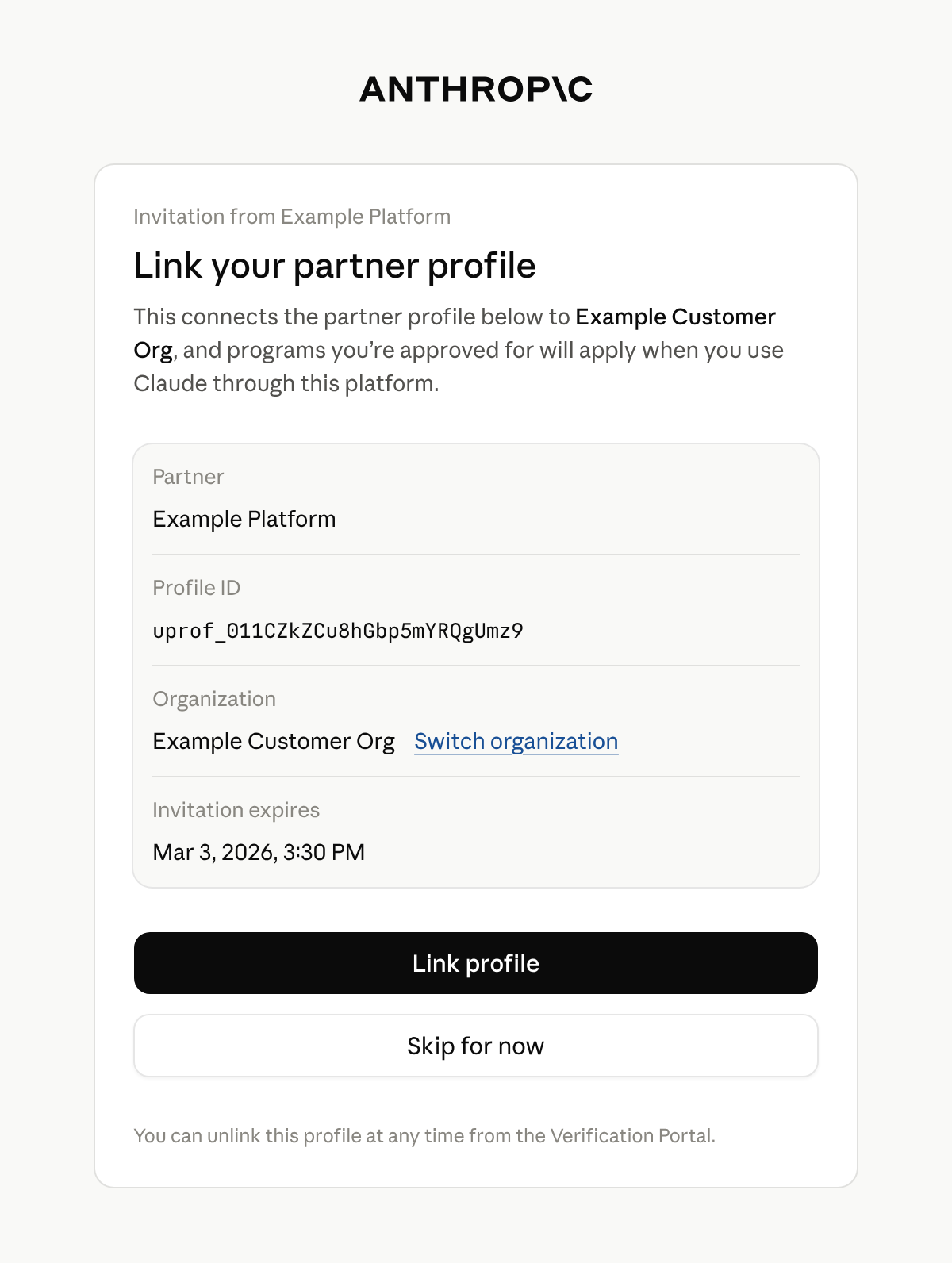
164164 </Frame>
165165
166 Only an admin or owner of the organization can link a profile. Anyone else sees **Admin access needed** and can't link the profile. They can switch to an organization where they are an admin or owner. Otherwise, tell the end customer that an admin or owner of their Anthropic organization has to open the link.
166 Only an admin or owner of the organization can link a profile. Anyone else sees **Admin access needed** and can’t link the profile. They can switch to an organization where they are an admin or owner. Otherwise, tell the end customer that an admin or owner of their Anthropic organization has to open the link.
167167 </Step>
168168
169169 <Step title="See the confirmation">
from line 177
177177
178178If the link has expired by the time an admin or owner opens it and logs in, the portal shows **This invitation has expired** and tells them to ask you for a new one.
179179
180A profile links to one organization. If it's already linked to a different one, the portal says **This partner profile is already linked to a different organization** and doesn't link it. An admin or owner of the organization it's linked to can unlink it under **Linked accounts** in the portal. After that, create a new link and send it to the end customer.
180A profile links to one organization. If it’s already linked to a different one, the portal says **This partner profile is already linked to a different organization** and doesn’t link it. An admin or owner of the organization it’s linked to can unlink it under **Linked accounts** in the portal. After that, create a new link and send it to the end customer.
181181
182182## After the end customer links the profile
183183
184The portal doesn't send the end customer back to your product, and Anthropic doesn't notify you. Tell the end customer in your own interface to return when they have finished.
184The portal doesn’t send the end customer back to your product, and Anthropic doesn’t notify you. Tell the end customer in your own interface to return when they have finished.
185185
186Linking doesn't approve anything by itself. It connects the profile to the end customer's organization, so that programs the organization is approved for apply to requests that carry the profile's ID, except Cyber Verification Program access levels, which the end customer turns on for each linked profile in the portal. The profile has no field that says it is linked.
186Linking doesn’t approve anything by itself. It connects the profile to the end customer’s organization, so that programs the organization is approved for apply to requests that carry the profile’s ID, except Cyber Verification Program access levels, which the end customer turns on for each linked profile in the portal. The profile has no field that says it is linked.
187187
188188To see which programs apply to a profile, [retrieve the profile](https://platform.claude.com/docs/en/api/user_profiles/retrieve) and read `programs`. It has a key for each program, such as `cyber` and `efs`, and every profile has every key. Each key is one of the following:
189189
190* `null`: Anthropic has no status to report for that program. Every key is `null` if Anthropic hasn't enabled programs for your organization.
190* `null`: Anthropic has no status to report for that program. Every key is `null` if Anthropic hasn’t enabled programs for your organization.
191191* An object: Its `status` is `active` when the program applies to the profile, otherwise `pending` or `rejected`.
192192
193193The end customer can see the linked profile under **Linked accounts** in the portal.
No line in this hunk matches that.