Follow Discord
Sweep 27 Oct 2026 · 19:04Z Build v2.1.312 531 read Stable v2.1.308 Latest v2.1.312 Next v2.1.312 Feeds RSS JSON llms.txt llms-full.txt Unofficial
One capture · api

One read of Claude Developer Platformapi-20261027T185806Z

260 pages moved out of 821 read.

Pages moved 260 significant first
Pages read 821 in this capture
Captured 18:58 UTC
Corpus hash 23cb04cc4921 corpus-hash

What this read moved

101-125 of 260, page 5 of 11

This capture is too large to show at once. Changes 101-125 of 260 are below, significant first; the rest are on the following screens.

build-with-claude/skills-guide Changed · +18 / -18 lines

from line 4
44description: Learn how to use Agent Skills to extend Claude's capabilities through the API.
55---
66 
7Agent Skills extend Claude's capabilities through organized folders of instructions, scripts, and resources. This guide shows you how to use both pre-built and custom Skills with the Claude API.
7Agent Skills extend Claude’s capabilities through organized folders of instructions, scripts, and resources. This guide shows you how to use both pre-built and custom Skills with the Claude API.
88 
99<Note>
1010 For complete API reference including request/response schemas and all parameters, see:
from line 35
3535 For a detailed look at the architecture and real-world applications of Agent Skills, read the engineering blog post: [Equipping agents for the real world with Agent Skills](https://www.anthropic.com/engineering/equipping-agents-for-the-real-world-with-agent-skills).
3636</Note>
3737 
38Skills integrate with the Messages API through the [code execution tool](https://platform.claude.com/docs/en/agents-and-tools/tool-use/code-execution-tool). Whether using pre-built Skills managed by Anthropic or custom Skills you've uploaded, the integration shape is identical: both require code execution and use the same `container` structure.
38Skills integrate with the Messages API through the [code execution tool](https://platform.claude.com/docs/en/agents-and-tools/tool-use/code-execution-tool). Whether using pre-built Skills managed by Anthropic or custom Skills you’ve uploaded, the integration shape is identical: both require code execution and use the same `container` structure.
3939 
4040### Using Skills
4141 
from line 51
5151| **Management** | Pre-built and maintained by Anthropic | Upload and manage through the [Skills API](https://platform.claude.com/docs/en/api/skills/create) |
5252| **Availability** | Available to all users | Private to your workspace |
5353 
54Both skill sources are returned by the [List Skills endpoint](https://platform.claude.com/docs/en/api/skills/list) (use the `source` parameter to filter). The integration shape and execution environment are identical. The only difference is where the Skills come from and how they're managed.
54Both skill sources are returned by the [List Skills endpoint](https://platform.claude.com/docs/en/api/skills/list) (use the `source` parameter to filter). The integration shape and execution environment are identical. The only difference is where the Skills come from and how they’re managed.
5555 
5656### Prerequisites
5757 
from line 865
865865 
866866### Multi-turn conversations
867867 
868The response's `container` object carries the container's `id` and `expires_at` timestamp (see [Container reuse](https://platform.claude.com/docs/en/agents-and-tools/tool-use/code-execution-tool#container-reuse) for lifetime details). Reuse the same container across multiple messages by specifying the container ID:
868The response’s `container` object carries the container’s `id` and `expires_at` timestamp (see [Container reuse](https://platform.claude.com/docs/en/agents-and-tools/tool-use/code-execution-tool#container-reuse) for lifetime details). Reuse the same container across multiple messages by specifying the container ID:
869869 
870870<CodeGroup exclude="shell:cURL, shell:CLI">
871871 <CodeGroupItem language="cURL">
from line 1951
19511951<Warning id="workspace-scoped-access">
19521952 **Custom Skills are accessible to your entire workspace, not scoped to an end user, conversation, or session.** Any API key with access to a workspace can read, use, and delete every custom Skill uploaded to that workspace. Every service account, and every user whose organization role allows API access, can use the Default Workspace in addition to any workspace you add them to. For that reason, keep Skills that must stay separate in their own workspace and access them only with [keys scoped to that workspace](https://platform.claude.com/docs/en/manage-claude/workspaces#api-keys-and-resource-scoping).
19531953 
1954 If you are building a multitenant platform on the Skills API, create a separate [workspace](https://platform.claude.com/docs/en/manage-claude/workspaces) for each tenant. The workspace is the isolation boundary for custom Skills, so a workspace for each tenant gives that tenant's Skills hard isolation from every other tenant. Each organization can have up to 100 workspaces by default (see [How workspaces work](https://platform.claude.com/docs/en/manage-claude/workspaces#how-workspaces-work)); if you need more for tenant isolation, contact your account team.
1954 If you are building a multitenant platform on the Skills API, create a separate [workspace](https://platform.claude.com/docs/en/manage-claude/workspaces) for each tenant. The workspace is the isolation boundary for custom Skills, so a workspace for each tenant gives that tenant’s Skills hard isolation from every other tenant. Each organization can have up to 100 workspaces by default (see [How workspaces work](https://platform.claude.com/docs/en/manage-claude/workspaces#how-workspaces-work)); if you need more for tenant isolation, contact your account team.
19551955</Warning>
19561956 
19571957### Creating a Skill
from line 1958
19581958 
19591959A Skill bundle is a directory containing a `SKILL.md` file at the top level with `name` and `description` YAML frontmatter, plus any supporting scripts or resources. See [Get started with Agent Skills in the API](https://platform.claude.com/docs/en/agents-and-tools/agent-skills/quickstart) to author one, and the **Requirements** list following the examples for the full constraints.
19601960 
1961Upload your custom Skill to make it available in your workspace. You can upload a zip archive or individual file objects. The Python SDK also provides a `files_from_dir` helper that accepts a directory path, and the CLI's `ant apply` uploads the directory itself.
1961Upload your custom Skill to make it available in your workspace. You can upload a zip archive or individual file objects. The Python SDK also provides a `files_from_dir` helper that accepts a directory path, and the CLI’s `ant apply` uploads the directory itself.
19621962 
1963Files are identified by the file name you attach (the `;filename=` suffix in the cURL example and the file name arguments in the SDK examples). For the walkthrough's skill, create a zip with `zip -r financial_skill.zip financial_skill/` and substitute it for the `example_skill.zip` placeholder in the zip-upload options.
1963Files are identified by the file name you attach (the `;filename=` suffix in the cURL example and the file name arguments in the SDK examples). For the walkthrough’s skill, create a zip with `zip -r financial_skill.zip financial_skill/` and substitute it for the `example_skill.zip` placeholder in the zip-upload options.
19641964 
19651965<CodeGroup defaultLanguage="CLI">
19661966 ```bash cURL
from line 2257
22572257 
22582258* YAML frontmatter requirements:
22592259 
2260 * `name`: Maximum 64 characters, lowercase letters/numbers/hyphens only, no XML tags, no reserved words ("anthropic", "claude")
2260 * `name`: Maximum 64 characters, lowercase letters/numbers/hyphens only, no XML tags, no reserved words (`anthropic`, `claude`)
22612261 * `description`: Maximum 1,024 characters, non-empty, no XML tags
22622262 
22632263For complete request/response schemas, see the [Create Skill](https://platform.claude.com/docs/en/api/skills/create) API reference.
from line 2588
25882588* Use `"latest"` to always get the most recent version
25892589* Create new versions when updating Skill files
25902590 
2591A new version is a complete snapshot, not a delta: upload the Skill's full file set each time. Files you omit are not carried over, and the `name` in the new version's `SKILL.md` must match the Skill's existing name. The following examples re-upload the complete `financial_skill/` bundle from [Creating a Skill](https://platform.claude.com/docs/en/build-with-claude/skills-guide#creating-a-skill).
2591A new version is a complete snapshot, not a delta: upload the Skill’s full file set each time. Files you omit are not carried over, and the `name` in the new version’s `SKILL.md` must match the Skill’s existing name. The following examples re-upload the complete `financial_skill/` bundle from [Creating a Skill](https://platform.claude.com/docs/en/build-with-claude/skills-guide#creating-a-skill).
25922592 
25932593<CodeGroup>
25942594 ```bash cURL
from line 3114
31143114When you specify Skills in a container:
31153115 
311631161. **Metadata discovery:** Claude receives metadata for each Skill (name, description) in the system prompt.
31172. **File loading:** Skill files are copied into the container at `/skills/{skill-name}/`. The directory is the Skill's name (`pptx` for an Anthropic Skill, the `SKILL.md` `name` for a custom Skill), not its `skill_01...` ID.
31172. **File loading:** Skill files are copied into the container at `/skills/{skill-name}/`. The directory is the Skill’s name (`pptx` for an Anthropic Skill, the `SKILL.md` `name` for a custom Skill), not its `skill_01...` ID.
311831183. **Automatic use:** Claude automatically loads and uses Skills when relevant to your request.
311931194. **Composition:** Multiple Skills compose together for complex workflows.
31203120 
from line 3258
32583258 ```
32593259</CodeGroup>
32603260 
3261Then use it with the Excel Skill to create a financial model. Pass the ID of the Skill you created as the custom Skill's `skill_id`:
3261Then use it with the Excel Skill to create a financial model. Pass the ID of the Skill you created as the custom Skill’s `skill_id`:
32623262 
32633263<CodeGroup>
32643264 ```bash cURL
from line 3546
35463546 
35473547* **YAML frontmatter requirements:**
35483548 
3549 * `name`: Maximum 64 characters, lowercase letters/numbers/hyphens only, no XML tags, no reserved words ("anthropic", "claude")
3549 * `name`: Maximum 64 characters, lowercase letters/numbers/hyphens only, no XML tags, no reserved words (`anthropic`, `claude`)
35503550 * `description`: Maximum 1,024 characters, non-empty, no XML tags
35513551 
35523552### Environment constraints
from line 4255
42554255 ```
42564256</CodeGroup>
42574257 
4258For best caching performance, keep your Skills list, including its order, consistent across requests. Pinning custom Skill versions also helps: with `"latest"`, publishing a new version can invalidate the cached prefix if it changes the Skill's description.
4258For best caching performance, keep your Skills list, including its order, consistent across requests. Pinning custom Skill versions also helps: with `"latest"`, publishing a new version can invalidate the cached prefix if it changes the Skill’s description.
42594259 
42604260### Error handling
42614261 
from line 4513
45134513| List responses | `{ data, has_more, next_page }` | `{ data, next_page }`; `limit` from 1 to 1,000 (default 20) |
45144514| Versions list order | Oldest first | Newest first, default `limit` 20. Page cursors from one shape are not valid on the other. |
45154515| Deleting a Skill | Returns a 400 error while any version exists | Deletes the Skill and all of its versions |
4516| Deleting a Skill's only version | Allowed, leaving a Skill with no versions | Returns a 400 error; upload a replacement version first, or delete the Skill |
4516| Deleting a Skill’s only version | Allowed, leaving a Skill with no versions | Returns a 400 error; upload a replacement version first, or delete the Skill |
45174517| Upload layout | Files must sit inside a top-level directory whose name matches the Skill `name` | `SKILL.md` may sit at the root of the upload; stored paths are the same either way |
45184518| Response types | `CreateSkillResponse`, `GetSkillResponse`, and one type per operation | `Skill`, `SkillVersion`, `DeletedSkill`, `DeletedSkillVersion` |
45194519 
from line 4521
45214521 
452245221. **Remove the beta header.** Drop `anthropic-beta: skills-2025-10-02` from your requests. With the SDK, call `client.skills` (csharp, go: `client.Skills`; java: `client.skills()`; php: `$client->skills`) instead of `client.beta.skills` (csharp, go: `client.Beta.Skills`; java: `client.beta().skills()`; php: `$client->beta->skills`); keeping `client.beta.skills` (csharp, go: `client.Beta.Skills`; java: `client.beta().skills()`; php: `$client->beta->skills`) works only on the [SDK releases that no longer send the header](https://platform.claude.com/docs/en/build-with-claude/skills-guide#sdk-beta-namespace). Earlier releases send it from `client.beta.skills` (csharp, go: `client.Beta.Skills`; java: `client.beta().skills()`; php: `$client->beta->skills`) even when you pass no beta names.
452345232. **Rename fields** in your code: `display_title` to `display_name` and `latest_version` to `latest_version_id`. Read `source.type` instead of comparing `source` to a string.
45243. **Use version IDs.** Wherever you stored an epoch-microsecond version, store the version's `id` instead, or use `latest`. Skill references in Messages requests accept a version ID, `latest`, or (for Anthropic Skills) the catalog version.
45254. **Review delete calls.** `DELETE /v1/skills/{skill_id}` now deletes every version with the Skill. If you relied on the beta's refusal as a safeguard, add your own check.
45243. **Use version IDs.** Wherever you stored an epoch-microsecond version, store the version’s `id` instead, or use `latest`. Skill references in Messages requests accept a version ID, `latest`, or (for Anthropic Skills) the catalog version.
45254. **Review delete calls.** `DELETE /v1/skills/{skill_id}` now deletes every version with the Skill. If you relied on the beta’s refusal as a safeguard, add your own check.
45264526 
45274527<Warning>
45284528 After migrating, deleting a Skill through `client.skills` (csharp, go: `client.Skills`; java: `client.skills()`; php: `$client->skills`) or `client.beta.skills` (csharp, go: `client.Beta.Skills`; java: `client.beta().skills()`; php: `$client->beta->skills`) also deletes all of its versions in one call.
from line 4536
45364536 
45374537## Data retention
45384538 
4539Agent Skills are not covered by ZDR arrangements. Skill definitions and execution data are retained according to Anthropic's standard data retention policy.
4539Agent Skills are not covered by ZDR arrangements. Skill definitions and execution data are retained according to Anthropic’s standard data retention policy.
45404540 
45414541For ZDR eligibility across all features, see [API and data retention](https://platform.claude.com/docs/en/manage-claude/api-and-data-retention).
45424542 

build-with-claude/streaming Changed · +8 / -8 lines

from line 137
137137 
138138## Get the final message without handling events
139139 
140If you don't need to process text as it arrives, the SDK provides a way to use streaming internally while returning the complete `Message` object, identical to what `client.messages.create()` (go: `client.Messages.New()`; java: `client.messages().create()`; csharp: `client.Messages.Create()`; php: `$client->messages->create()`) returns. This is especially useful for requests with large `max_tokens` values, where the SDK requires streaming to avoid HTTP timeouts.
140If you don’t need to process text as it arrives, the SDK provides a way to use streaming internally while returning the complete `Message` object, identical to what `client.messages.create()` (go: `client.Messages.New()`; java: `client.messages().create()`; csharp: `client.Messages.Create()`; php: `$client->messages->create()`) returns. This is especially useful for requests with large `max_tokens` values, where the SDK requires streaming to avoid HTTP timeouts.
141141 
142142<CodeGroup exclude="shell:cURL">
143143 ```bash CLI
from line 285
285285 ```
286286</CodeGroup>
287287 
288The `.stream()` (java: `.createStreaming()`; csharp: `.CreateStreaming()`; go: `.NewStreaming()`; php: `->createStream()`) call keeps the HTTP connection alive with server-sent events, and then the SDK's message-accumulation helper, `stream.get_final_message()` (typescript: `stream.finalMessage()`; ruby: `stream.accumulated_message`; csharp: `.Aggregate()`; go: `message.Accumulate(event)`; java, php: `MessageAccumulator`), collects all events into the complete `Message` object.
288The `.stream()` (java: `.createStreaming()`; csharp: `.CreateStreaming()`; go: `.NewStreaming()`; php: `->createStream()`) call keeps the HTTP connection alive with server-sent events, and then the SDK’s message-accumulation helper, `stream.get_final_message()` (typescript: `stream.finalMessage()`; ruby: `stream.accumulated_message`; csharp: `.Aggregate()`; go: `message.Accumulate(event)`; java, php: `MessageAccumulator`), collects all events into the complete `Message` object.
289289 
290290## Event types
291291 
from line 293
293293 
294294Each stream uses the following event flow:
295295 
2961. `message_start`: contains a `Message` object with empty `content`. Under the [`thinking-binding-controls-2026-08-01`](https://platform.claude.com/docs/en/build-with-claude/thinking#preserved-thinking-controls) beta header, this `Message` object also carries the `input_transformations` array. After a mid-stream [server-side fallback](https://platform.claude.com/docs/en/build-with-claude/refusals-and-fallback#server-side-fallback), the final `message_delta` event carries the array again with the serving model's entries.
2961. `message_start`: contains a `Message` object with empty `content`. Under the [`thinking-binding-controls-2026-08-01`](https://platform.claude.com/docs/en/build-with-claude/thinking#preserved-thinking-controls) beta header, this `Message` object also carries the `input_transformations` array. After a mid-stream [server-side fallback](https://platform.claude.com/docs/en/build-with-claude/refusals-and-fallback#server-side-fallback), the final `message_delta` event carries the array again with the serving model’s entries.
2972972. A series of content blocks, each of which has a `content_block_start`, one or more `content_block_delta` events, and a `content_block_stop` event. Each content block has an `index` that corresponds to its index in the final Message `content` array. One exception: during [server-side fallback](https://platform.claude.com/docs/en/build-with-claude/refusals-and-fallback#server-side-fallback) responses, a `fallback` content block arrives at each model boundary as a `content_block_start` and `content_block_stop` pair with no deltas in between.
2982983. One or more `message_delta` events, indicating top-level changes to the final `Message` object.
2992994. A final `message_stop` event.
from line 336
336336 
337337The deltas for `tool_use` content blocks correspond to updates for the `input` field of the block. To support maximum granularity, the deltas are *partial JSON strings*, whereas the final `tool_use.input` is always an *object*.
338338 
339You can accumulate the string deltas and parse the JSON once you receive a `content_block_stop` event, by using a library such as [Pydantic](https://docs.pydantic.dev/latest/concepts/json/#partial-json-parsing) to do partial JSON parsing, or by using the SDK's [streaming helpers](https://platform.claude.com/docs/en/build-with-claude/streaming#streaming-with-sdks). In the Python and TypeScript SDKs, these helpers also give you access to the parsed `input` incrementally, as it streams.
339You can accumulate the string deltas and parse the JSON once you receive a `content_block_stop` event, by using a library such as [Pydantic](https://docs.pydantic.dev/latest/concepts/json/#partial-json-parsing) to do partial JSON parsing, or by using the SDK’s [streaming helpers](https://platform.claude.com/docs/en/build-with-claude/streaming#streaming-with-sdks). In the Python and TypeScript SDKs, these helpers also give you access to the parsed `input` incrementally, as it streams.
340340 
341341A `tool_use` content block delta looks like:
342342 
from line 349
349349 
350350### Thinking delta
351351 
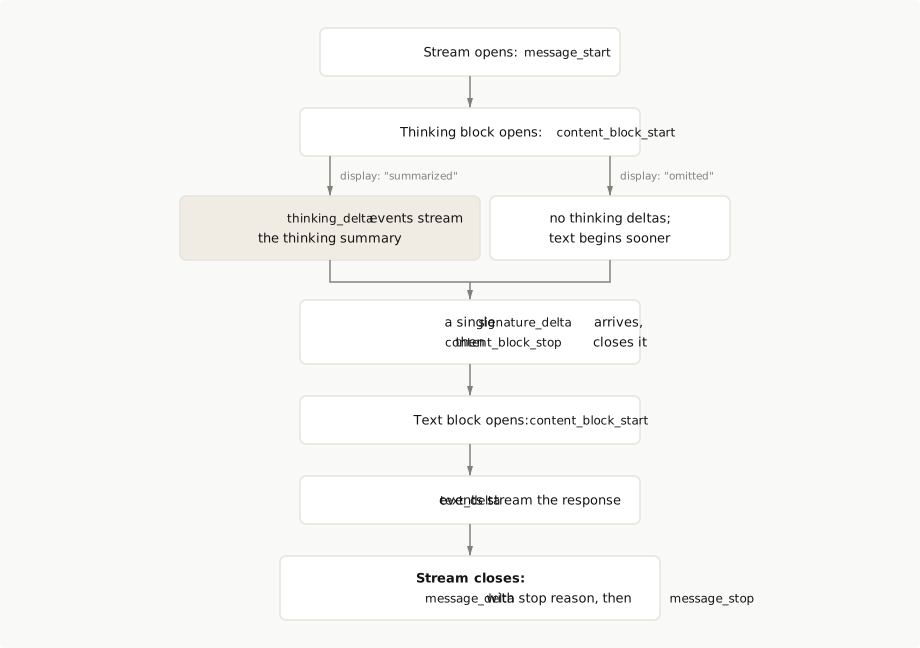
352When using [thinking with streaming enabled](https://platform.claude.com/docs/en/build-with-claude/thinking#streaming-thinking), you'll receive thinking content through `thinking_delta` events. These deltas correspond to the `thinking` field of the `thinking` content blocks.
352When using [thinking with streaming enabled](https://platform.claude.com/docs/en/build-with-claude/thinking#streaming-thinking), you’ll receive thinking content through `thinking_delta` events. These deltas correspond to the `thinking` field of the `thinking` content blocks.
353353 
354354For thinking content, a special `signature_delta` event is sent just before the `content_block_stop` event. This signature is used to verify the integrity of the thinking block.
355355 
from line 958
958958 
959959### Streaming request with thinking
960960 
961This request enables thinking with streaming. The `display: "summarized"` setting streams a condensed summary of Claude's reasoning rather than the full chain of thought.
961This request enables thinking with streaming. The `display: "summarized"` setting streams a condensed summary of Claude’s reasoning rather than the full chain of thought.
962962 
963963<CodeGroup>
964964 ```bash cURL
from line 1504
15041504 
15051505### Error recovery best practices
15061506 
15071. **Use SDK features:** Rely on the SDK's built-in message accumulation and error handling capabilities.
15071. **Use SDK features:** Rely on the SDK’s built-in message accumulation and error handling capabilities.
150815082. **Handle content types:** Be aware that messages can contain multiple content blocks (`text`, `tool_use`, `thinking`). Tool use and thinking blocks cannot be partially recovered. You can resume streaming from the most recent text block.
15091509 
15101510## Next steps
from line 1527
15271527 </Card>
15281528 
15291529 <Card title="Batch processing" icon="stack" href="https://platform.claude.com/docs/en/build-with-claude/batch-processing">
1530 Process large volumes of requests asynchronously when you don't need real-time responses.
1530 Process large volumes of requests asynchronously when you don’t need real-time responses.
15311531 </Card>
15321532</CardGroup>
15331533 

build-with-claude/structured-outputs Changed · +38 / -38 lines

from line 33
3333 Microsoft Foundry: ga
3434---
3535 
36Structured outputs constrain Claude's responses to follow a specific schema, ensuring valid, parseable output for downstream processing. Structured outputs provide two complementary features:
36Structured outputs constrain Claude’s responses to follow a specific schema, ensuring valid, parseable output for downstream processing. Structured outputs provide two complementary features:
3737 
38* **JSON outputs** (`output_config.format`): Get Claude's response in a specific JSON format, for example to extract data from images or text, generate structured reports, or format API responses. This page covers JSON outputs.
38* **JSON outputs** (`output_config.format`): Get Claude’s response in a specific JSON format, for example to extract data from images or text, generate structured reports, or format API responses. This page covers JSON outputs.
3939* **Strict tool use** (`strict: true`): Guarantee schema validation on tool names and inputs. See [Strict tool use](https://platform.claude.com/docs/en/agents-and-tools/tool-use/strict-tool-use).
4040 
4141You can use these features independently or [together in the same request](https://platform.claude.com/docs/en/build-with-claude/structured-outputs#using-both-features-together).
from line 67
6767 </Step>
6868 
6969 <Step title="Read the response">
70 Claude returns valid JSON that matches your schema in the response's text content block. SDK helpers parse it into your type.
70 Claude returns valid JSON that matches your schema in the response’s text content block. SDK helpers parse it into your type.
7171 </Step>
7272</Steps>
7373 
from line 108
108108 }'
109109 ```
110110 
111 Claude returns JSON like this in the response's text content block:
111 Claude returns JSON like this in the response’s text content block:
112112 
113113 ```json Output
114114 {
from line 146
146146 YAML
147147 ```
148148 
149 Claude returns JSON like this in the response's text content block:
149 Claude returns JSON like this in the response’s text content block:
150150 
151151 ```json Output
152152 {
from line 192
192192 print(response.parsed_output)
193193 ```
194194 
195 Pass a [Pydantic](https://docs.pydantic.dev/) model to `client.messages.parse()`, the recommended method, as `output_format`. The SDK transforms the model's schema, sends it as `output_config.format`, validates the response, and returns the parsed model in `parsed_output`.
195 Pass a [Pydantic](https://docs.pydantic.dev/) model to `client.messages.parse()`, the recommended method, as `output_format`. The SDK transforms the model’s schema, sends it as `output_config.format`, validates the response, and returns the parsed model in `parsed_output`.
196196 
197197 The previous example outputs:
198198 
from line 370
370370 }
371371 ```
372372 
373 When you pass a Java class to `outputConfig()`, the SDK derives a JSON schema from it and validates the schema. The builder then produces a `StructuredMessageCreateParams<T>`. Rather than transforming the schema, the SDK's local validation rejects [constraints not supported by the API](https://platform.claude.com/docs/en/build-with-claude/structured-outputs#json-schema-limitations). Read the parsed result with `response.content().stream().flatMap(block -> block.text().stream()).findFirst().orElseThrow().text()`.
373 When you pass a Java class to `outputConfig()`, the SDK derives a JSON schema from it and validates the schema. The builder then produces a `StructuredMessageCreateParams<T>`. Rather than transforming the schema, the SDK’s local validation rejects [constraints not supported by the API](https://platform.claude.com/docs/en/build-with-claude/structured-outputs#json-schema-limitations). Read the parsed result with `response.content().stream().flatMap(block -> block.text().stream()).findFirst().orElseThrow().text()`.
374374 
375375 The previous example outputs:
376376 
from line 383
383383 </Note>
384384 
385385 <Accordion title="Generic type erasure">
386 Java retains generic type information for fields in the class's metadata, but generic type erasure applies in other scopes. Although a JSON schema can be derived from a `BookList.books` field with type `List<Book>`, a valid JSON schema cannot be derived from a local variable of that same type.
386 Java retains generic type information for fields in the class’s metadata, but generic type erasure applies in other scopes. Although a JSON schema can be derived from a `BookList.books` field with type `List<Book>`, a valid JSON schema cannot be derived from a local variable of that same type.
387387 
388388 If an error occurs while converting a JSON response to a Java class instance, the error message includes the JSON response to help with diagnosis. If your JSON response might contain sensitive information, avoid logging it directly, or ensure that you redact any sensitive details from the error message.
389389 </Accordion>
from line 558
558558 }
559559 ```
560560 
561 Local validation checks that you haven't used any unsupported constraint keywords, but constraint values aren't validated locally. For example, an unsupported `"format"` value might pass local validation but cause a remote error.
561 Local validation checks that you haven’t used any unsupported constraint keywords, but constraint values aren’t validated locally. For example, an unsupported `"format"` value might pass local validation but cause a remote error.
562562 
563563 If you use both Jackson and Swagger annotations to set the same schema field, the Jackson annotation takes precedence.
564564 </Accordion>
from line 601
601601 }
602602 ```
603603 
604 Define a class that implements `StructuredOutputModel` and uses `StructuredOutputModelTrait`, and pass its name in `outputConfig: ['format' => MyClass::class]`. The SDK derives a JSON schema from the class's PHP 8 property types, transforms it, and returns a typed instance from `$message->parsedOutput()`.
604 Define a class that implements `StructuredOutputModel` and uses `StructuredOutputModelTrait`, and pass its name in `outputConfig: ['format' => MyClass::class]`. The SDK derives a JSON schema from the class’s PHP 8 property types, transforms it, and returns a typed instance from `$message->parsedOutput()`.
605605 
606606 `parsedOutput()` returns your model instance on success, or `null` (or an error array) if parsing fails. Use `instanceof` to narrow the type before accessing fields.
607607 
from line 696
696696 puts contact
697697 ```
698698 
699 Define a class that extends `Anthropic::BaseModel` and pass it to `messages.create()` as `output_config: {format: Model}`. The SDK derives a JSON schema from the class, transforms it, and assigns the parsed result to the response's `parsed_output` attribute as a typed Ruby object.
699 Define a class that extends `Anthropic::BaseModel` and pass it to `messages.create()` as `output_config: {format: Model}`. The SDK derives a JSON schema from the class, transforms it, and assigns the parsed result to the response’s `parsed_output` attribute as a typed Ruby object.
700700 
701701 The previous example outputs:
702702 
from line 741
741741Most SDK helpers transform schemas that use unsupported features. The transformation steps:
742742 
7437431. **Remove unsupported constraints** (for example, `minimum`, `maximum`, `minLength`, `maxLength`)
7442. **Update descriptions** by adding each unsupported constraint to the field's description (for example, `{minimum: 100}`)
7442. **Update descriptions** by adding each unsupported constraint to the field’s description (for example, `{minimum: 100}`)
7457453. **Add `additionalProperties: false`** to all objects
7467464. **Filter string formats** to the supported list only
7477475. **Validate responses** against your original schema and all its constraints, if the helper validates responses
from line 748
748748 
749749Claude receives a simplified schema, but a helper that validates responses still enforces every constraint in your code.
750750 
751**Example:** A field with `minimum: 100` becomes a plain integer in the sent schema, and the SDK adds `{minimum: 100}` to the field's description. A helper that validates responses still checks the response against `minimum: 100`.
751**Example:** A field with `minimum: 100` becomes a plain integer in the sent schema, and the SDK adds `{minimum: 100}` to the field’s description. A helper that validates responses still checks the response against `minimum: 100`.
752752 
753753## Using a raw JSON schema
754754 
from line 789
789789 }'
790790 ```
791791 
792 Claude returns JSON like this in the response's text content block:
792 Claude returns JSON like this in the response’s text content block:
793793 
794794 ```json Output
795795 {
from line 827
827827 YAML
828828 ```
829829 
830 Claude returns JSON like this in the response's text content block:
830 Claude returns JSON like this in the response’s text content block:
831831 
832832 ```json Output
833833 {
from line 922
922922 
923923 Use `jsonSchemaOutputFormat()` to pass a plain JSON schema to `parse()`, without installing Zod. The API returns a response that conforms to the schema, and if you declare the schema with `as const`, TypeScript automatically infers the type for `parsed_output` according to your schema. For an imported or generated schema, `parsed_output` is typed as `unknown`.
924924 
925 By default, the helper [transforms the schema](https://platform.claude.com/docs/en/build-with-claude/structured-outputs#how-sdk-transformation-works) the same way `zodOutputFormat()` does. Pass `{ transform: false }` as the second argument to send it unchanged. Unlike `zodOutputFormat()`, it doesn't validate the response, so it doesn't catch violations of [constraints not supported by the API](https://platform.claude.com/docs/en/build-with-claude/structured-outputs#json-schema-limitations), such as `minimum`.
925 By default, the helper [transforms the schema](https://platform.claude.com/docs/en/build-with-claude/structured-outputs#how-sdk-transformation-works) the same way `zodOutputFormat()` does. Pass `{ transform: false }` as the second argument to send it unchanged. Unlike `zodOutputFormat()`, it doesn’t validate the response, so it doesn’t catch violations of [constraints not supported by the API](https://platform.claude.com/docs/en/build-with-claude/structured-outputs#json-schema-limitations), such as `minimum`.
926926 
927927 The previous example outputs:
928928 
from line 2168
21682168 
21692169JSON outputs and strict tool use solve different problems and work together:
21702170 
2171* **JSON outputs** control Claude's response format (what Claude says).
2171* **JSON outputs** control Claude’s response format (what Claude says).
21722172* **Strict tool use** validates tool parameters (how Claude calls your functions).
21732173 
21742174When combined, Claude can call tools with guaranteed-valid parameters AND return structured JSON responses. This is useful for agentic workflows where you need both reliable tool calls and structured final outputs.
from line 2640
26402640 * Array constraints beyond `minItems` of 0 or 1
26412641 * `additionalProperties` set to anything other than `false`
26422642 
2643 If you use an unsupported feature, you'll receive a 400 error with details.
2643 If you use an unsupported feature, you’ll receive a 400 error with details.
26442644</Accordion>
26452645 
26462646<Accordion title="Pattern support (regex)">
from line 2714
27142714Claude maintains its safety and helpfulness properties even when using structured outputs. If Claude refuses a request for safety reasons:
27152715 
27162716* The response has `stop_reason: "refusal"`.
2717* You'll receive a 200 status code.
2718* You'll be billed for the tokens generated.
2717* You’ll receive a 200 status code.
2718* You’ll be billed for the tokens generated.
27192719* The output might not match your schema because the refusal message takes precedence over schema constraints.
27202720 
2721A property that asks for the model's thinking or step-by-step reasoning might lead to a `reasoning_extraction` refusal. Ask for a short explanation instead. See [Keep reasoning in thinking blocks](https://platform.claude.com/docs/en/build-with-claude/refusals-and-fallback#keep-reasoning-in-thinking-blocks).
2721A property that asks for the model’s thinking or step-by-step reasoning might lead to a `reasoning_extraction` refusal. Ask for a short explanation instead. See [Keep reasoning in thinking blocks](https://platform.claude.com/docs/en/build-with-claude/refusals-and-fallback#keep-reasoning-in-thinking-blocks).
27222722 
27232723**Token limit reached** (`stop_reason: "max_tokens"`)
27242724 
from line 2730
27302730 
27312731**Enum value casing**
27322732 
2733Structured outputs don't guarantee the capitalization of string `enum` and `const` values: Claude might return a value that differs from your schema only in capitalization, typically in the first letter of a word following a space. For example, given this schema:
2733Structured outputs don’t guarantee the capitalization of string `enum` and `const` values: Claude might return a value that differs from your schema only in capitalization, typically in the first letter of a word following a space. For example, given this schema:
27342734 
27352735```json
27362736{
from line 2739
27392739}
27402740```
27412741 
2742The output might contain `"Conversation Topic 3"` (capital "T") even though that exact value isn't in the enum. The response completes normally, with no error and no special `stop_reason`. This applies to both JSON outputs and strict tool use. Compare enum values case-insensitively, and avoid enum values that differ only in capitalization.
2742The output might contain `"Conversation Topic 3"` (capital “T”) even though that exact value isn’t in the enum. The response completes normally, with no error and no special `stop_reason`. This applies to both JSON outputs and strict tool use. Compare enum values case-insensitively, and avoid enum values that differ only in capitalization.
27432743 
27442744### Schema complexity limits
27452745 
2746Structured outputs work by compiling your JSON schemas into a grammar that constrains Claude's output. More complex schemas produce larger grammars that take longer to compile. To protect against excessive compilation times, the API enforces several complexity limits.
2746Structured outputs work by compiling your JSON schemas into a grammar that constrains Claude’s output. More complex schemas produce larger grammars that take longer to compile. To protect against excessive compilation times, the API enforces several complexity limits.
27472747 
27482748#### Explicit limits
27492749 
from line 2751
27512751 
27522752| Limit | Value | Description |
27532753| --------------------------- | ----- | -------------------------------------------------------------------------------------------------------------------------------------------------------------------------------------------------------- |
2754| Strict tools per request | 20 | Maximum number of tools with `strict: true`. Non-strict tools don't count toward this limit. |
2754| Strict tools per request | 20 | Maximum number of tools with `strict: true`. Non-strict tools don’t count toward this limit. |
27552755| Optional parameters | 24 | Total optional parameters across all strict tool schemas and JSON output schemas. Each parameter not listed in `required` counts toward this limit. |
27562756| Parameters with union types | 16 | Total parameters that use `anyOf` or type arrays (for example, `"type": ["string", "null"]`) across all strict schemas. These are especially expensive because they create exponential compilation cost. |
27572757 
27582758<Note>
2759 These limits apply to the combined total across all strict schemas in a single request. For example, if you have 4 strict tools with 6 optional parameters each, you'll reach the 24-parameter limit even though no single tool seems complex.
2759 These limits apply to the combined total across all strict schemas in a single request. For example, if you have 4 strict tools with 6 optional parameters each, you’ll reach the 24-parameter limit even though no single tool seems complex.
27602760</Note>
27612761 
27622762#### Additional internal limits
27632763 
2764Beyond the explicit limits in the preceding table, there are additional internal limits on the compiled grammar size. These limits exist because schema complexity doesn't reduce to a single dimension: features such as optional parameters, union types, nested objects, and number of tools interact with each other in ways that can make the compiled grammar disproportionately large.
2764Beyond the explicit limits in the preceding table, there are additional internal limits on the compiled grammar size. These limits exist because schema complexity doesn’t reduce to a single dimension: features such as optional parameters, union types, nested objects, and number of tools interact with each other in ways that can make the compiled grammar disproportionately large.
27652765 
2766When these limits are exceeded, you'll receive a 400 error with the message "Schema is too complex for compilation." These errors mean the combined complexity of your schemas exceeds what can be efficiently compiled, even if each individual limit in the preceding table is satisfied. As a final stop-gap, the API also enforces a **compilation timeout of 180 seconds**. Schemas that pass all explicit checks but produce very large compiled grammars might hit this timeout.
2766When these limits are exceeded, you’ll receive a 400 error with the message “Schema is too complex for compilation.” These errors mean the combined complexity of your schemas exceeds what can be efficiently compiled, even if each individual limit in the preceding table is satisfied. As a final stop-gap, the API also enforces a **compilation timeout of 180 seconds**. Schemas that pass all explicit checks but produce very large compiled grammars might hit this timeout.
27672767 
27682768#### Tips for reducing schema complexity
27692769 
2770If you're hitting complexity limits, try these strategies in order:
2770If you’re hitting complexity limits, try these strategies in order:
27712771 
27721. **Mark only critical tools as strict.** If you have many tools, reserve strict tool use for those where schema violations cause real problems, and rely on Claude's natural adherence for simpler tools.
27721. **Mark only critical tools as strict.** If you have many tools, reserve strict tool use for those where schema violations cause real problems, and rely on Claude’s natural adherence for simpler tools.
27732773 
27742. **Reduce optional parameters.** Make parameters `required` where possible. Each optional parameter roughly doubles a portion of the grammar's state space. If a parameter always has a reasonable default, consider making it required and having Claude provide that default explicitly.
27742. **Reduce optional parameters.** Make parameters `required` where possible. Each optional parameter roughly doubles a portion of the grammar’s state space. If a parameter always has a reasonable default, consider making it required and having Claude provide that default explicitly.
27752775 
277627763. **Simplify nested structures.** Deeply nested objects with optional fields compound the complexity. Flatten structures where possible.
27772777 
from line 2808
28082808* **Message prefilling:** Prefilling is incompatible with JSON outputs.
28092809 
28102810<Tip>
2811 **Grammar scope:** Grammars apply only to Claude's direct output, not to tool use calls, tool results, or thinking tags (when using [thinking](https://platform.claude.com/docs/en/build-with-claude/thinking)). Grammar state resets between sections, allowing Claude to think freely while still producing structured output in the final response.
2811 **Grammar scope:** Grammars apply only to Claude’s direct output, not to tool use calls, tool results, or thinking tags (when using [thinking](https://platform.claude.com/docs/en/build-with-claude/thinking)). Grammar state resets between sections, allowing Claude to think freely while still producing structured output in the final response.
28122812</Tip>
28132813 
28142814## Next steps
from line 2819
28192819 </Card>
28202820 
28212821 <Card title="Strict tool use" icon="check" href="https://platform.claude.com/docs/en/agents-and-tools/tool-use/strict-tool-use">
2822 Enforce JSON Schema compliance on Claude's tool inputs with grammar-constrained sampling.
2822 Enforce JSON Schema compliance on Claude’s tool inputs with grammar-constrained sampling.
28232823 </Card>
28242824 
28252825 <Card title="Tool use with Claude" icon="wrench" href="https://platform.claude.com/docs/en/agents-and-tools/tool-use/overview">
from line 2827
28272827 </Card>
28282828 
28292829 <Card title="Pricing" icon="calculator" href="https://platform.claude.com/docs/en/about-claude/pricing">
2830 Learn about Anthropic's pricing structure for models and features.
2830 Learn about Anthropic’s pricing structure for models and features.
28312831 </Card>
28322832</CardGroup>
28332833 

build-with-claude/task-budgets Changed · +5 / -5 lines

from line 263
263263 
264264The budget covers one agentic turn, also called an agentic loop: everything Claude does in response to one user message that carries no tool results. A turn can span several requests.
265265 
266A user message that carries no tool results starts a new turn with a fresh budget. Today, the countdown still counts earlier turns' history while it remains in the context. A common case is a follow-up after Claude has ended its turn, for example because the budget ran out:
266A user message that carries no tool results starts a new turn with a fresh budget. Today, the countdown still counts earlier turns’ history while it remains in the context. A common case is a follow-up after Claude has ended its turn, for example because the budget ran out:
267267 
268268```json
269269{ "role": "user", "content": "Continue." }
from line 292
292292}
293293```
294294 
295Server-side [compaction](https://platform.claude.com/docs/en/build-with-claude/compaction-threshold) during a turn does not reset the budget: tokens the turn consumed before the compaction still count against it. Tokens from before the turn do not count, even when a compaction at the start of a turn summarizes them. Today, that exclusion applies only to the budget carried across a server-side compaction; earlier turns' history still counts while it remains in the context.
295Server-side [compaction](https://platform.claude.com/docs/en/build-with-claude/compaction-threshold) during a turn does not reset the budget: tokens the turn consumed before the compaction still count against it. Tokens from before the turn do not count, even when a compaction at the start of a turn summarizes them. Today, that exclusion applies only to the budget carried across a server-side compaction; earlier turns’ history still counts while it remains in the context.
296296 
297297### Worked example: budget counting across requests
298298 
299The task budget counts what Claude **sees** (thinking, tool calls and results, and text), not what's in your request payload. In an agentic loop your client resends the full conversation on every request, so the payload keeps growing, but the budget only decrements by what is new: the tokens Claude generates and the content it has not seen before. The following example is one [agentic turn](https://platform.claude.com/docs/en/build-with-claude/task-budgets#what-counts-as-a-turn) made of three requests: the first carries the user message, and the next two each resend the history with a tool result appended.
299The task budget counts what Claude **sees** (thinking, tool calls and results, and text), not what’s in your request payload. In an agentic loop your client resends the full conversation on every request, so the payload keeps growing, but the budget only decrements by what is new: the tokens Claude generates and the content it has not seen before. The following example is one [agentic turn](https://platform.claude.com/docs/en/build-with-claude/task-budgets#what-counts-as-a-turn) made of three requests: the first carries the user message, and the next two each resend the history with a tool result appended.
300300 
301301Consider a loop with `task_budget: {type: "tokens", total: 100000}` and a single `bash` tool.
302302 
from line 482
482482 ```
483483</CodeGroup>
484484 
485In this example, the tokens spent before compaction are the usage of all the messages you have removed from the history so far, measured as in [Measure your current usage](https://platform.claude.com/docs/en/build-with-claude/task-budgets#measure-your-current-usage). Leave out anything still present in the messages you send, including any summary you added, because the server counts those tokens itself. Update this figure only when you replace the history this way; don't decrement it on each request. Pass the resulting `remaining` on every request, not only the one that compacts.
485In this example, the tokens spent before compaction are the usage of all the messages you have removed from the history so far, measured as in [Measure your current usage](https://platform.claude.com/docs/en/build-with-claude/task-budgets#measure-your-current-usage). Leave out anything still present in the messages you send, including any summary you added, because the server counts those tokens itself. Update this figure only when you replace the history this way; don’t decrement it on each request. Pass the resulting `remaining` on every request, not only the one that compacts.
486486 
487487For loops that resend the full uncompacted history on every request, omit `remaining` and let the server track the countdown.
488488 
from line 645
645645 ```
646646</CodeGroup>
647647 
648Run this across a representative set of tasks and record the distribution. Start with the p99 of your per-task token spend to understand how providing the model with a task budget might modify the model's behavior, then test up or down as needed.
648Run this across a representative set of tasks and record the distribution. Start with the p99 of your per-task token spend to understand how providing the model with a task budget might modify the model’s behavior, then test up or down as needed.
649649 
650650The minimum accepted `task_budget.total` is **20,000 tokens** on every model that supports task budgets (see [Feature support](https://platform.claude.com/docs/en/build-with-claude/task-budgets#feature-support)). Smaller values return a 400 error.
651651 

build-with-claude/thinking Changed · +48 / -48 lines

from line 12
1212 
1313Thinking removes that constraint. When thinking is active, Claude works through the problem in its own words before answering: it restates what is being asked, tries approaches, checks intermediate results, and abandons paths that do not hold up. That up-front thinking arrives in `thinking` content blocks ahead of the response, and Claude draws on it to produce the final answer. This is why thinking improves performance on complex tasks such as math, coding, analysis, and long-running agentic work, where the quality of the answer depends on intermediate work that would otherwise be compressed into the response itself or skipped.
1414 
15Thinking has a cost: the tokens Claude spends reasoning are billed as output tokens, even when the thinking text isn't returned to you, and they count toward `max_tokens` alongside the response text. This page covers how thinking behaves across the API surface: turning it on, reading its output, and managing its interactions with tools, streaming, caching, and the context window.
15Thinking has a cost: the tokens Claude spends reasoning are billed as output tokens, even when the thinking text isn’t returned to you, and they count toward `max_tokens` alongside the response text. This page covers how thinking behaves across the API surface: turning it on, reading its output, and managing its interactions with tools, streaming, caching, and the context window.
1616 
1717## How thinking works
1818 
from line 40
4040}
4141```
4242 
43You don't always see this text, and what you see is never the raw chain of thought: the text in a thinking block is a [summary of Claude's reasoning](https://platform.claude.com/docs/en/build-with-claude/thinking#summarized-thinking). The `display` field on the thinking configuration controls whether that summary is returned at all: `"summarized"` returns it, whereas `"omitted"`, the default on many models, returns thinking blocks with an empty `thinking` field. Either way the block is billed the same and passed back the same in multi-turn conversations. See [Controlling thinking display](https://platform.claude.com/docs/en/build-with-claude/thinking#controlling-thinking-display) for per-model defaults and details.
43You don’t always see this text, and what you see is never the raw chain of thought: the text in a thinking block is a [summary of Claude’s reasoning](https://platform.claude.com/docs/en/build-with-claude/thinking#summarized-thinking). The `display` field on the thinking configuration controls whether that summary is returned at all: `"summarized"` returns it, whereas `"omitted"`, the default on many models, returns thinking blocks with an empty `thinking` field. Either way the block is billed the same and passed back the same in multi-turn conversations. See [Controlling thinking display](https://platform.claude.com/docs/en/build-with-claude/thinking#controlling-thinking-display) for per-model defaults and details.
4444 
4545If Claude uses tools, thinking can also appear between tool calls. See [Thinking with tool use](https://platform.claude.com/docs/en/build-with-claude/thinking#thinking-with-tool-use). For the full response format, see the [Messages API reference](https://platform.claude.com/docs/en/api/messages/create).
4646 
from line 68
6868| Claude Sonnet 4.5 | Thinking off | 400 error | Extended thinking | 400 error | Thinking off |
6969| Claude Haiku 4.5 | Thinking off | 400 error | Extended thinking | 400 error | Thinking off |
7070 
71In the table, "at `high` effort or below" means the request works at `low`, `medium`, and `high` effort and returns a 400 error at `xhigh` or `max`.
71In the table, “at `high` effort or below” means the request works at `low`, `medium`, and `high` effort and returns a 400 error at `xhigh` or `max`.
7272 
7373On Claude Opus 5.5, Claude Opus 5, Claude Sonnet 5.5, Claude Sonnet 5, Claude Fable 5.1, Claude Mythos 5.1, Claude Fable 5, Claude Mythos 5, Claude Mythos Preview, and Claude Haiku 5.5, thinking is already on and needs no configuration. `display` defaults to `"omitted"` on these models, so the thinking text is hidden until you opt in. Opt in with `thinking: {"type": "adaptive", "display": "summarized"}`, as the following examples do.
7474 
from line 458
458458 
459459Claude Opus 5 also has thinking on by default and accepts `thinking: {type: "disabled"}` at [effort](https://platform.claude.com/docs/en/build-with-claude/effort) `high` or below. At `xhigh` or `max` effort, thinking cannot be turned off: requests that combine `thinking: {type: "disabled"}` with those effort levels return a 400 error. This restriction is enforced on each request. With thinking disabled, Claude Opus 5 can occasionally emit tool calls as plain text or include internal XML tags in its visible output. See [Running with thinking disabled](https://platform.claude.com/docs/en/build-with-claude/prompt-engineering/prompting-claude-opus-5#running-with-thinking-disabled) for prompting mitigations.
460460 
461Claude Sonnet 5.5 also has thinking on by default, and it rejects `thinking: {type: "disabled"}` with a 400 error. To turn off up-front thinking, send `thinking: {type: "between_tools"}` instead. It's the lowest thinking setting on Claude Sonnet 5.5, and it's accepted at [effort](https://platform.claude.com/docs/en/build-with-claude/effort) `high` or below. The model still returns its [progress updates between tool calls](https://platform.claude.com/docs/en/build-with-claude/thinking#progress-updates). Without tools, the response contains only text, as with `disabled` on Claude Sonnet 5. See [Running without up-front thinking](https://platform.claude.com/docs/en/build-with-claude/prompt-engineering/prompting-claude-sonnet-5-5#running-without-up-front-thinking) for prompting guidance.
461Claude Sonnet 5.5 also has thinking on by default, and it rejects `thinking: {type: "disabled"}` with a 400 error. To turn off up-front thinking, send `thinking: {type: "between_tools"}` instead. It’s the lowest thinking setting on Claude Sonnet 5.5, and it’s accepted at [effort](https://platform.claude.com/docs/en/build-with-claude/effort) `high` or below. The model still returns its [progress updates between tool calls](https://platform.claude.com/docs/en/build-with-claude/thinking#progress-updates). Without tools, the response contains only text, as with `disabled` on Claude Sonnet 5. See [Running without up-front thinking](https://platform.claude.com/docs/en/build-with-claude/prompt-engineering/prompting-claude-sonnet-5-5#running-without-up-front-thinking) for prompting guidance.
462462 
463463Claude Haiku 5.5 also has thinking on by default and accepts `thinking: {type: "disabled"}` at [effort](https://platform.claude.com/docs/en/build-with-claude/effort) `high` or below. At `xhigh` or `max` effort, that combination returns a 400 error. To get less thinking, lower the effort level first. With thinking off, the model can skip a tool call it needs when you also request JSON output. A [per-message `output_config.effort`](https://platform.claude.com/docs/en/build-with-claude/effort#change-effort-mid-conversation-beta) that differs from the level in effect also returns a 400 error while thinking is off. See [Use effort to control thinking](https://platform.claude.com/docs/en/build-with-claude/prompt-engineering/prompting-claude-haiku-5-5#use-effort-to-control-thinking) and [Use adaptive thinking with JSON output and your own tools](https://platform.claude.com/docs/en/build-with-claude/prompt-engineering/prompting-claude-haiku-5-5#json-output-with-your-own-tools).
464464 
465Claude Fable 5.1, Claude Mythos 5.1, Claude Fable 5, Claude Mythos 5, Claude Opus 5.5, and Claude Mythos Preview reject `thinking: {type: "disabled"}`. Thinking can't be turned off on these models.
465Claude Fable 5.1, Claude Mythos 5.1, Claude Fable 5, Claude Mythos 5, Claude Opus 5.5, and Claude Mythos Preview reject `thinking: {type: "disabled"}`. Thinking can’t be turned off on these models.
466466 
467467To check whether a model accepts `"disabled"` or `"between_tools"` before you send a request, read its `capabilities.thinking.types.disabled.supported` or `capabilities.thinking.types.between_tools.supported` value from the Models API. [Using the Models API](https://platform.claude.com/docs/en/models/overview#using-the-models-api) describes both fields.
468468 
from line 474
474474 
475475The `display` field on the thinking configuration controls how thinking content is returned in API responses. `display` works in both modes: set it alongside `type: "adaptive"` or `type: "enabled"`. It accepts these values:
476476 
477* `"summarized"`: thinking blocks contain [summarized thinking](https://platform.claude.com/docs/en/build-with-claude/thinking#summarized-thinking) text, a readable summary of Claude's reasoning. This is the default on Claude Opus 4.6, Claude Sonnet 4.6, and earlier models.
477* `"summarized"`: thinking blocks contain [summarized thinking](https://platform.claude.com/docs/en/build-with-claude/thinking#summarized-thinking) text, a readable summary of Claude’s reasoning. This is the default on Claude Opus 4.6, Claude Sonnet 4.6, and earlier models.
478478* `"omitted"`: thinking blocks are returned with an empty `thinking` field. The `signature` field still carries the encrypted full thinking for multi-turn continuity (see [Thinking encryption](https://platform.claude.com/docs/en/build-with-claude/thinking#thinking-encryption)). This is the default on Claude Fable 5.1, Claude Mythos 5.1, Claude Fable 5, Claude Mythos 5, Claude Opus 5.5, Claude Opus 5, Claude Sonnet 5.5, Claude Sonnet 5, Claude Opus 4.8, Claude Opus 4.7, [Claude Mythos Preview](https://anthropic.com/glasswing), and Claude Haiku 5.5.
479479* `"updates"` (beta): reasoning blocks are returned with an empty `thinking` field, as with `"omitted"`, and the short [progress updates](https://platform.claude.com/docs/en/build-with-claude/thinking#progress-updates) some models write between tool calls come back as readable text. Requires the beta header `thinking-display-updates-2026-08-18`.
480480 
481Set `display: "omitted"` when your application doesn't surface thinking content to users. The primary benefit is faster time-to-first-text-token when streaming: the server skips streaming thinking tokens entirely and delivers only the signature, so the final text response starts streaming sooner.
481Set `display: "omitted"` when your application doesn’t surface thinking content to users. The primary benefit is faster time-to-first-text-token when streaming: the server skips streaming thinking tokens entirely and delivers only the signature, so the final text response starts streaming sooner.
482482 
483483With `display: "omitted"`, the response contains `thinking` blocks with an empty `thinking` field:
484484 
from line 500
500500 
501501Keep the following in mind when working with omitted thinking:
502502 
503* You're still charged for the full thinking tokens. Omitting reduces latency, not cost.
503* You’re still charged for the full thinking tokens. Omitting reduces latency, not cost.
504504* If you pass thinking blocks back in multi-turn conversations, pass them unchanged. The server decrypts the `signature` to reconstruct the original thinking for prompt construction (see [Preserving thinking blocks](https://platform.claude.com/docs/en/build-with-claude/thinking#preserving-thinking-blocks)). Any text you place in the `thinking` field of a round-tripped omitted block is ignored.
505505* `display` is invalid with `thinking.type: "disabled"` (there is nothing to display) and with `thinking.type: "between_tools"` (Claude Sonnet 5.5 only), which accepts no other field. With `between_tools`, progress updates still come back with summary text, as they do under `display: "updates"` (see [Progress updates](https://platform.claude.com/docs/en/build-with-claude/thinking#progress-updates)).
506506* When you use `thinking.type: "adaptive"` and the model skips thinking for a simple request, no thinking block is produced regardless of `display`.
from line 512
512512 
513513### Summarized thinking
514514 
515When `display` is `"summarized"`, the thinking text you receive is a summary of Claude's full thinking process rather than the raw chain of thought. Summarized thinking provides the full intelligence benefits of thinking while preventing misuse. No `display` setting returns the raw chain of thought.
515When `display` is `"summarized"`, the thinking text you receive is a summary of Claude’s full thinking process rather than the raw chain of thought. Summarized thinking provides the full intelligence benefits of thinking while preventing misuse. No `display` setting returns the raw chain of thought.
516516 
517517Keep the following in mind when working with summarized thinking:
518518 
519* You're charged for the full thinking tokens generated by the original request, not the summary tokens. The billed output token count does not match the count of tokens you see in the response.
520* On Claude Opus 4.6, Claude Sonnet 4.6, and earlier models, the first few lines of thinking output are more verbose, providing detailed reasoning that's particularly helpful for prompt engineering purposes. [Claude Mythos Preview](https://anthropic.com/glasswing) summarizes from the first token, so its thinking blocks do not show this verbose preamble.
521* Summarization preserves the key ideas of Claude's thinking process with minimal added latency, so summaries can stream as they arrive.
519* You’re charged for the full thinking tokens generated by the original request, not the summary tokens. The billed output token count does not match the count of tokens you see in the response.
520* On Claude Opus 4.6, Claude Sonnet 4.6, and earlier models, the first few lines of thinking output are more verbose, providing detailed reasoning that’s particularly helpful for prompt engineering purposes. [Claude Mythos Preview](https://anthropic.com/glasswing) summarizes from the first token, so its thinking blocks do not show this verbose preamble.
521* Summarization preserves the key ideas of Claude’s thinking process with minimal added latency, so summaries can stream as they arrive.
522522* Summarization is processed by a different model from the one you target in your requests. The thinking model does not receive the summarized output.
523523* As Anthropic seeks to improve the thinking feature, summarization behavior is subject to change.
524524 
from line 526
526526 In rare cases where you need access to full thinking output, [contact Anthropic sales](mailto:[email protected]).
527527</Note>
528528 
529To see the model's reasoning, read the `thinking` blocks rather than prompting for reasoning in the response text. On Claude Fable 5.1, Claude Opus 5.5, Claude Opus 5, Claude Sonnet 5.5, and Claude Fable 5, a request that attempts to elicit the model's internal reasoning as part of the response text may be refused with `stop_details.category: "reasoning_extraction"`. See [Refusal categories](https://platform.claude.com/docs/en/build-with-claude/refusals-and-fallback#refusal-response) for the field reference and [Keep reasoning in thinking blocks](https://platform.claude.com/docs/en/build-with-claude/refusals-and-fallback#keep-reasoning-in-thinking-blocks) for what to ask for instead.
529To see the model’s reasoning, read the `thinking` blocks rather than prompting for reasoning in the response text. On Claude Fable 5.1, Claude Opus 5.5, Claude Opus 5, Claude Sonnet 5.5, and Claude Fable 5, a request that attempts to elicit the model’s internal reasoning as part of the response text may be refused with `stop_details.category: "reasoning_extraction"`. See [Refusal categories](https://platform.claude.com/docs/en/build-with-claude/refusals-and-fallback#refusal-response) for the field reference and [Keep reasoning in thinking blocks](https://platform.claude.com/docs/en/build-with-claude/refusals-and-fallback#keep-reasoning-in-thinking-blocks) for what to ask for instead.
530530 
531531### Streaming thinking
532532 
533Thinking works with [streaming](https://platform.claude.com/docs/en/build-with-claude/streaming). Thinking blocks stream as `thinking_delta` events inside `content_block_delta` events, followed by a single `signature_delta` event just before the block's `content_block_stop`. Text blocks stream afterward as usual.
533Thinking works with [streaming](https://platform.claude.com/docs/en/build-with-claude/streaming). Thinking blocks stream as `thinking_delta` events inside `content_block_delta` events, followed by a single `signature_delta` event just before the block’s `content_block_stop`. Text blocks stream afterward as usual.
534534 
535535<Frame>
536536 ![Thinking stream: the block opens, deltas carry text only if display returns text, one signature delta closes it, then text](https://platform.claude.com/docs/images/how-thinking-streams.svg)
from line 797
797797 ```
798798</CodeGroup>
799799 
800To reassemble complete thinking blocks with their signatures after streaming, use your SDK's message-accumulation helper, `stream.get_final_message()` (typescript: `stream.finalMessage()`; ruby: `stream.accumulated_message`; csharp: `.Aggregate()`; go: `message.Accumulate(event)`; java, php: `MessageAccumulator`), instead of concatenating deltas yourself.
800To reassemble complete thinking blocks with their signatures after streaming, use your SDK’s message-accumulation helper, `stream.get_final_message()` (typescript: `stream.finalMessage()`; ruby: `stream.accumulated_message`; csharp: `.Aggregate()`; go: `message.Accumulate(event)`; java, php: `MessageAccumulator`), instead of concatenating deltas yourself.
801801 
802802<Accordion title="Full streaming event trace">
803803 ```sse Output
from line 883
883883<Note>
884884 When using streaming with thinking enabled, you might notice that text sometimes arrives in larger chunks alternating with smaller, token-by-token delivery. This is expected behavior, especially for thinking content.
885885 
886 The streaming system processes content in batches, which can delay and group streaming events into this "chunky" delivery pattern.
886 The streaming system processes content in batches, which can delay and group streaming events into this “chunky” delivery pattern.
887887</Note>
888888 
889889For general streaming mechanics, see [Streaming messages](https://platform.claude.com/docs/en/build-with-claude/streaming).
from line 890
890890 
891891## Thinking and effort
892892 
893The `thinking` parameter controls whether Claude thinks in [thinking blocks](https://platform.claude.com/docs/en/build-with-claude/thinking) before answering; the `effort` parameter controls how much work Claude puts into the whole response, which in adaptive mode includes how often and how deeply it thinks. Don't pass `adaptive` as an `effort` value: `adaptive` is a thinking mode, not an effort level.
893The `thinking` parameter controls whether Claude thinks in [thinking blocks](https://platform.claude.com/docs/en/build-with-claude/thinking) before answering; the `effort` parameter controls how much work Claude puts into the whole response, which in adaptive mode includes how often and how deeply it thinks. Don’t pass `adaptive` as an `effort` value: `adaptive` is a thinking mode, not an effort level.
894894 
895895To learn what each effort level does to thinking behavior, see the [per-level thinking behavior table](https://platform.claude.com/docs/en/build-with-claude/thinking-steering-and-cost#effort-levels) on the [Steering thinking](https://platform.claude.com/docs/en/build-with-claude/thinking-steering-and-cost) page. The [Effort](https://platform.claude.com/docs/en/build-with-claude/effort) page documents the parameter itself, including which levels each model supports. On Claude Opus 4.5, the only extended-thinking-only model that supports effort, effort composes with `budget_tokens`. See [Budget rules and tuning](https://platform.claude.com/docs/en/build-with-claude/extended-thinking#budget-rules-and-tuning).
896896 
from line 908
9089081. **Tool choice limitation (manual mode):** tool use with manual extended thinking (`thinking: {type: "enabled"}`) only supports `tool_choice: {"type": "auto"}` (the default) or `tool_choice: {"type": "none"}`. Using `tool_choice: {"type": "any"}` or `tool_choice: {"type": "tool", "name": "..."}` results in an error because these options force tool use, which is incompatible with manual extended thinking. Adaptive thinking, including on models where thinking is on by default, supports forced tool use, except on Claude Opus 5.5, Claude Sonnet 5.5, Claude Fable 5.1, and Claude Mythos 5.1 (see [Response prefill and forced tool use](https://platform.claude.com/docs/en/build-with-claude/thinking#limits-and-feature-compatibility)). Where forced tool use is accepted, the response starts with the tool call and has no `thinking` block.
9099092. **Preserving thinking blocks:** when you return tool results, you must pass the thinking blocks from the assistant message back to the API, complete and unmodified. See [Preserving thinking blocks](https://platform.claude.com/docs/en/build-with-claude/thinking#preserving-thinking-blocks).
910910 
911**A tool-use loop is one assistant turn.** From the model's perspective, an assistant turn ends only when Claude completes its full response, which might include multiple tool calls and results. This whole sequence is a single assistant turn:
911**A tool-use loop is one assistant turn.** From the model’s perspective, an assistant turn ends only when Claude completes its full response, which might include multiple tool calls and results. This whole sequence is a single assistant turn:
912912 
913913```text wrap
914914User: "What's the weather in Paris?"
from line 917
917917Assistant: [text: "The weather in Paris is 20°C and sunny"]
918918```
919919 
920The entire turn runs in a single thinking mode: you can't toggle thinking in the middle of a turn, including during the tool-use loop. In extended (manual) mode, the API additionally enforces that the final assistant turn of a thinking-enabled request starts with a thinking block. Adaptive mode relaxes this: no assistant turn needs to start with one.
920The entire turn runs in a single thinking mode: you can’t toggle thinking in the middle of a turn, including during the tool-use loop. In extended (manual) mode, the API additionally enforces that the final assistant turn of a thinking-enabled request starts with a thinking block. Adaptive mode relaxes this: no assistant turn needs to start with one.
921921 
922**Mid-turn conflicts degrade gracefully.** If you toggle thinking mid-turn (for example, between sending a tool call and returning its result), the API doesn't error. Instead, it silently disables thinking for that request. To preserve model quality, the API might strip thinking blocks that would create an invalid turn structure, or disable thinking when the conversation history is incompatible with thinking being enabled. To confirm whether thinking was active, check for the presence of `thinking` blocks in the response.
922**Mid-turn conflicts degrade gracefully.** If you toggle thinking mid-turn (for example, between sending a tool call and returning its result), the API doesn’t error. Instead, it silently disables thinking for that request. To preserve model quality, the API might strip thinking blocks that would create an invalid turn structure, or disable thinking when the conversation history is incompatible with thinking being enabled. To confirm whether thinking was active, check for the presence of `thinking` blocks in the response.
923923 
924924**Toggle between turns, not within them.** Plan your thinking strategy at the start of each turn. Complete the assistant turn, then change the thinking configuration for the next one:
925925 
from line 939
939939When Claude calls a tool, it pauses construction of its response to await external information. When you return the tool result, Claude continues building that same response, so its earlier reasoning must still be present. Pass every `thinking` block back to the API complete and unmodified, alongside the `tool_use` block it accompanied. This matters for two reasons:
940940 
9419411. **Reasoning continuity:** the thinking blocks capture the step-by-step reasoning that led to the tool requests. Including them lets Claude continue reasoning from where it left off.
9422. **Context maintenance:** tool results appear as user messages in the API structure, but they're part of one continuous reasoning flow. Preserving thinking blocks maintains that flow across API calls.
9422. **Context maintenance:** tool results appear as user messages in the API structure, but they’re part of one continuous reasoning flow. Preserving thinking blocks maintains that flow across API calls.
943943 
944944In short:
945945 
946946* **Required:** within a tool-use turn, pass thinking blocks back.
947947* **Recommended:** across turns, pass everything back.
948* **Allowed:** outside tool use, omit prior turns' thinking.
948* **Allowed:** outside tool use, omit prior turns’ thinking.
949949 
950You don't need to prune old thinking yourself. Pass all thinking blocks back in multi-turn conversations, and the API automatically filters them, keeps the blocks needed to preserve the model's reasoning, and bills input tokens only for the blocks actually shown to Claude. Which prior-turn blocks are kept is per-model. See [Thinking block preservation by model](https://platform.claude.com/docs/en/build-with-claude/thinking#thinking-block-preservation-by-model). To override the default, use the [`clear_thinking_20251015` context-editing strategy](https://platform.claude.com/docs/en/build-with-claude/context-editing#thinking-block-clearing).
950You don’t need to prune old thinking yourself. Pass all thinking blocks back in multi-turn conversations, and the API automatically filters them, keeps the blocks needed to preserve the model’s reasoning, and bills input tokens only for the blocks actually shown to Claude. Which prior-turn blocks are kept is per-model. See [Thinking block preservation by model](https://platform.claude.com/docs/en/build-with-claude/thinking#thinking-block-preservation-by-model). To override the default, use the [`clear_thinking_20251015` context-editing strategy](https://platform.claude.com/docs/en/build-with-claude/context-editing#thinking-block-clearing).
951951 
952Within the latest assistant message, the sequence of consecutive `thinking` blocks must match what the model generated in the original request: you can't rearrange, edit, or partially drop them. This includes [`redacted_thinking` blocks](https://platform.claude.com/docs/en/build-with-claude/thinking#redacted-thinking-blocks).
952Within the latest assistant message, the sequence of consecutive `thinking` blocks must match what the model generated in the original request: you can’t rearrange, edit, or partially drop them. This includes [`redacted_thinking` blocks](https://platform.claude.com/docs/en/build-with-claude/thinking#redacted-thinking-blocks).
953953 
954954<Note>
955955 Modified thinking blocks are rejected with a 400 error. See [A 400 error says thinking blocks cannot be modified](https://platform.claude.com/docs/en/build-with-claude/thinking-troubleshooting#error-thinking-blocks-modified) for the exact message, the common causes, and the fix. The one exception: text placed in the empty `thinking` field of an [omitted](https://platform.claude.com/docs/en/build-with-claude/thinking#controlling-thinking-display) block is ignored rather than rejected.
from line 977
977977 
978978### Progress updates between tool calls
979979 
980On Claude Fable 5.1, Claude Mythos 5.1, Claude Opus 5.5, Claude Sonnet 5.5, and Claude Fable 5, the model can write a progress update between tool calls. A progress update is a note on what the model just found and what it's about to do next, written for the person watching the agent rather than as reasoning. Each one comes back as its own `thinking` block with its own `signature`, separate from any reasoning block at the same point. It sits immediately before the `tool_use` or `server_tool_use` block it introduces. At most one progress update precedes each tool call, and the model can skip any of them. Progress updates aren't [interleaved thinking](https://platform.claude.com/docs/en/build-with-claude/thinking#interleaved-thinking): they appear whether or not reasoning blocks appear between tool calls, and a response can contain both.
980On Claude Fable 5.1, Claude Mythos 5.1, Claude Opus 5.5, Claude Sonnet 5.5, and Claude Fable 5, the model can write a progress update between tool calls. A progress update is a note on what the model just found and what it’s about to do next, written for the person watching the agent rather than as reasoning. Each one comes back as its own `thinking` block with its own `signature`, separate from any reasoning block at the same point. It sits immediately before the `tool_use` or `server_tool_use` block it introduces. At most one progress update precedes each tool call, and the model can skip any of them. Progress updates aren’t [interleaved thinking](https://platform.claude.com/docs/en/build-with-claude/thinking#interleaved-thinking): they appear whether or not reasoning blocks appear between tool calls, and a response can contain both.
981981 
982982What a progress-update block contains depends on [`display`](https://platform.claude.com/docs/en/build-with-claude/thinking#controlling-thinking-display):
983983 
from line 989
989989 
990990On Claude Sonnet 5.5, the lowest thinking setting is `thinking: {type: "between_tools"}`. It turns off up-front thinking, and each progress update comes back with its summary text, as it would under `display: "updates"`. `between_tools` is accepted only at [effort](https://platform.claude.com/docs/en/build-with-claude/effort) `high` or below. At `xhigh` or `max`, a request with it returns a 400 error. `between_tools` takes no other field: `display`, `budget_tokens`, or `block_binding` sent with it returns a 400 error. The setting needs no beta header and works on every platform that offers Claude Sonnet 5.5. Pass the blocks back unchanged: a progress-update block you send back gives the model the full note it wrote, not the summary.
991991 
992Use `display: "updates"` for an agent interface that keeps reasoning hidden and shows the user a status line at each step. Under it, any `thinking` block with non-empty text is a progress update, so render those and nothing else. It's in beta and requires the beta header `thinking-display-updates-2026-08-18` (to send it on Amazon Bedrock, Claude Models on Google Cloud (Google managed), or Microsoft Foundry, see [Beta features on other platforms](https://platform.claude.com/docs/en/api/beta-headers#beta-features-on-other-platforms)). Without it, the value is rejected with the same 400 `invalid_request_error` as an unknown `display` value.
992Use `display: "updates"` for an agent interface that keeps reasoning hidden and shows the user a status line at each step. Under it, any `thinking` block with non-empty text is a progress update, so render those and nothing else. It’s in beta and requires the beta header `thinking-display-updates-2026-08-18` (to send it on Amazon Bedrock, Claude Models on Google Cloud (Google managed), or Microsoft Foundry, see [Beta features on other platforms](https://platform.claude.com/docs/en/api/beta-headers#beta-features-on-other-platforms)). Without it, the value is rejected with the same 400 `invalid_request_error` as an unknown `display` value.
993993 
994994```json
995995{
from line 1019
10191019}
10201020```
10211021 
1022Under `"updates"`, the start of the response that follows a `tool_result` looks like this. The first block is reasoning and stays empty, as it would under `"omitted"`. The second carries text, so it's a progress update. Under `"summarized"` both blocks carry text, and under `"omitted"` both are empty.
1022Under `"updates"`, the start of the response that follows a `tool_result` looks like this. The first block is reasoning and stays empty, as it would under `"omitted"`. The second carries text, so it’s a progress update. Under `"summarized"` both blocks carry text, and under `"omitted"` both are empty.
10231023 
10241024```json Output
10251025{
from line 1047
10471047Keep the following in mind when working with progress updates:
10481048 
10491049* Pass progress-update blocks back unchanged with the rest of the assistant turn, like any other `thinking` block.
1050* The text you receive is a summary of the progress update, normally a sentence or two. Don't rely on its length. The progress update counts toward `usage.output_tokens` at its full length, not the summary's.
1050* The text you receive is a summary of the progress update, normally a sentence or two. Don’t rely on its length. The progress update counts toward `usage.output_tokens` at its full length, not the summary’s.
10511051* A progress-update block can come back with an empty `thinking` field under any `display` value. Render nothing for an empty block. Under `"updates"` it looks the same as an empty reasoning block and needs no separate handling.
1052* When a response stops on `max_tokens`, `model_context_window_exceeded`, or `stop_sequence` soon after a tool call or tool result, its last block can be a progress-update block standing in for the work the model hadn't completed. Under `"updates"` and `"summarized"` its text is exactly `This part of the response was interrupted before it finished.` and you can show it like any other update. Under `"omitted"` it's empty. To continue, pass the assistant turn back unchanged and append a new `user` message (with a `tool_result` for each `tool_use` block in that turn).
1052* When a response stops on `max_tokens`, `model_context_window_exceeded`, or `stop_sequence` soon after a tool call or tool result, its last block can be a progress-update block standing in for the work the model hadn’t completed. Under `"updates"` and `"summarized"` its text is exactly `This part of the response was interrupted before it finished.` and you can show it like any other update. Under `"omitted"` it’s empty. To continue, pass the assistant turn back unchanged and append a new `user` message (with a `tool_result` for each `tool_use` block in that turn).
10531053* When [streaming](https://platform.claude.com/docs/en/build-with-claude/thinking#streaming-thinking), expect a pause of several seconds before a progress-update block opens. See the `"updates"` trace in [Streaming thinking](https://platform.claude.com/docs/en/build-with-claude/thinking#streaming-thinking).
10541054* These models write fewer progress updates at higher [effort](https://platform.claude.com/docs/en/build-with-claude/effort) and in long tool chains. If your interface depends on them, see [Ask for user-facing progress updates](https://platform.claude.com/docs/en/build-with-claude/prompt-engineering/prompting-claude-fable-5-1#ask-for-user-facing-progress-updates) or, for Claude Opus 5.5, [User-facing progress updates](https://platform.claude.com/docs/en/build-with-claude/prompt-engineering/prompting-claude-opus-5-5#user-facing-progress-updates). For Claude Sonnet 5.5, see [User-facing progress updates](https://platform.claude.com/docs/en/build-with-claude/prompt-engineering/prompting-claude-sonnet-5-5#user-facing-progress-updates).
10551055 
from line 1058
10581058Whether thinking blocks from previous assistant turns stay in context by default depends on the model:
10591059 
10601060* **Keep all prior turns:** Claude Opus 4.5 and later Opus models, Claude Sonnet 4.6 and later Sonnet models, Claude Haiku 5.5, Claude Fable 5.1, Claude Mythos 5.1, Claude Fable 5, Claude Mythos 5, and Claude Mythos Preview.
1061* **Keep the last turn only:** earlier Opus and Sonnet models, and all Haiku models through Claude Haiku 4.5. When you pass older thinking blocks back, the API strips them automatically. You don't need to remove them yourself.
1061* **Keep the last turn only:** earlier Opus and Sonnet models, and all Haiku models through Claude Haiku 4.5. When you pass older thinking blocks back, the API strips them automatically. You don’t need to remove them yourself.
10621062 
10631063Preservation brings two benefits:
10641064 
from line 1067
10671067 
10681068The tradeoff is context usage: long conversations consume more context space on keep-all models, because retained thinking blocks count as input like any other conversation history (see [Thinking and the context window](https://platform.claude.com/docs/en/build-with-claude/thinking#thinking-and-the-context-window)). The behavior is automatic in both regimes. No code changes or beta headers are required, and you should keep passing complete, unmodified thinking blocks back as described in [Preserving thinking blocks](https://platform.claude.com/docs/en/build-with-claude/thinking#preserving-thinking-blocks). To override the default in either direction, use [thinking block clearing](https://platform.claude.com/docs/en/build-with-claude/context-editing#thinking-block-clearing).
10691069 
1070**Switching models mid-conversation.** Keep passing thinking blocks back unchanged when you switch models, for example after a [classifier refusal fallback](https://platform.claude.com/docs/en/build-with-claude/refusals-and-fallback). A thinking block is readable only by the model that produced it and certain other models, and the API ignores or drops the blocks the target model can't read. On Claude Fable 5.1 and Claude Mythos 5.1 the direction matters: they read earlier models' thinking blocks, and only the two of them read each other's, so switching to them keeps the conversation's reasoning and switching from them to any other model drops it (see [how dropped blocks are billed and reported](https://platform.claude.com/docs/en/build-with-claude/preserved-thinking#switching-models)). Claude Opus 5.5 reads Claude Opus 5's thinking blocks and those of earlier Opus, Sonnet, and Haiku models, and, on the Claude API and Claude Models on Google Cloud (Google managed), of Claude Haiku 5.5, but not those of the Claude Fable and Claude Mythos models; on the Claude API, Claude Fable 5.1 and Claude Mythos 5.1 read Claude Opus 5.5's blocks. A switch from Claude Opus 5.5 up to Claude Fable 5.1 on the Claude API keeps the earlier turns' reasoning; a switch from Claude Fable 5.1 to Claude Opus 5.5 drops it. Claude Sonnet 5.5 reads thinking blocks from Claude Sonnet 5, Claude Opus 4.8, Claude Haiku 4.5, and earlier models, and, on the Claude API and Claude Models on Google Cloud (Google managed), from Claude Haiku 5.5, but not from Claude Opus 5, Claude Opus 5.5, or any Claude Fable or Claude Mythos model. On those two platforms, Claude Opus 5.5 reads Claude Sonnet 5.5's blocks and no other model does: a switch from Claude Sonnet 5.5 up to Claude Opus 5.5 there keeps the earlier turns' reasoning, and any other switch away from Claude Sonnet 5.5 drops it. Claude Haiku 5.5 reads thinking blocks from Claude Sonnet 5, Claude Opus 4.8, Claude Haiku 4.5, and earlier models, but not from Claude Opus 5, Claude Opus 5.5, Claude Sonnet 5.5, or any Claude Fable or Claude Mythos model. On the Claude API and Claude Models on Google Cloud (Google managed), Claude Opus 5.5 and Claude Sonnet 5.5 read Claude Haiku 5.5's blocks and no other model does. Strip prior `thinking` and `redacted_thinking` blocks yourself only to save input tokens on models that ignore rather than drop them, and never when redeeming a [fallback credit](https://platform.claude.com/docs/en/build-with-claude/fallback-credit), which requires the body unchanged.
1070**Switching models mid-conversation.** Keep passing thinking blocks back unchanged when you switch models, for example after a [classifier refusal fallback](https://platform.claude.com/docs/en/build-with-claude/refusals-and-fallback). A thinking block is readable only by the model that produced it and certain other models, and the API ignores or drops the blocks the target model can’t read. On Claude Fable 5.1 and Claude Mythos 5.1 the direction matters: they read earlier models’ thinking blocks, and only the two of them read each other’s, so switching to them keeps the conversation’s reasoning and switching from them to any other model drops it (see [how dropped blocks are billed and reported](https://platform.claude.com/docs/en/build-with-claude/preserved-thinking#switching-models)). Claude Opus 5.5 reads Claude Opus 5’s thinking blocks and those of earlier Opus, Sonnet, and Haiku models, and, on the Claude API and Claude Models on Google Cloud (Google managed), of Claude Haiku 5.5, but not those of the Claude Fable and Claude Mythos models; on the Claude API, Claude Fable 5.1 and Claude Mythos 5.1 read Claude Opus 5.5’s blocks. A switch from Claude Opus 5.5 up to Claude Fable 5.1 on the Claude API keeps the earlier turns’ reasoning; a switch from Claude Fable 5.1 to Claude Opus 5.5 drops it. Claude Sonnet 5.5 reads thinking blocks from Claude Sonnet 5, Claude Opus 4.8, Claude Haiku 4.5, and earlier models, and, on the Claude API and Claude Models on Google Cloud (Google managed), from Claude Haiku 5.5, but not from Claude Opus 5, Claude Opus 5.5, or any Claude Fable or Claude Mythos model. On those two platforms, Claude Opus 5.5 reads Claude Sonnet 5.5’s blocks and no other model does: a switch from Claude Sonnet 5.5 up to Claude Opus 5.5 there keeps the earlier turns’ reasoning, and any other switch away from Claude Sonnet 5.5 drops it. Claude Haiku 5.5 reads thinking blocks from Claude Sonnet 5, Claude Opus 4.8, Claude Haiku 4.5, and earlier models, but not from Claude Opus 5, Claude Opus 5.5, Claude Sonnet 5.5, or any Claude Fable or Claude Mythos model. On the Claude API and Claude Models on Google Cloud (Google managed), Claude Opus 5.5 and Claude Sonnet 5.5 read Claude Haiku 5.5’s blocks and no other model does. Strip prior `thinking` and `redacted_thinking` blocks yourself only to save input tokens on models that ignore rather than drop them, and never when redeeming a [fallback credit](https://platform.claude.com/docs/en/build-with-claude/fallback-credit), which requires the body unchanged.
10711071 
10721072## Preserved thinking
10731073 
10741074[Preserved thinking](https://platform.claude.com/docs/en/build-with-claude/preserved-thinking) determines whether the model can use a thinking block that you send back from an earlier turn. Starting with Claude Fable 5.1, the API checks the `signature` of every `thinking` or `redacted_thinking` block in a request for two things:
10751075 
1076* **The model that produced it.** Each model reads its own thinking blocks and those of a fixed set of other models. Claude Fable 5.1 reads blocks from Claude Opus 5 and, on the Claude API, from Claude Opus 5.5; neither Claude Opus 5 nor Claude Opus 5.5 reads blocks from Claude Fable 5.1. The API drops a block the current model can't read, without an error and without billing it. See [Switching models mid-conversation](https://platform.claude.com/docs/en/build-with-claude/preserved-thinking#switching-models).
1076* **The model that produced it.** Each model reads its own thinking blocks and those of a fixed set of other models. Claude Fable 5.1 reads blocks from Claude Opus 5 and, on the Claude API, from Claude Opus 5.5; neither Claude Opus 5 nor Claude Opus 5.5 reads blocks from Claude Fable 5.1. The API drops a block the current model can’t read, without an error and without billing it. See [Switching models mid-conversation](https://platform.claude.com/docs/en/build-with-claude/preserved-thinking#switching-models).
10771077* **Everything sent before it.** A block stays valid only while the top-level `system` prompt, the `tools`, and the messages before it are unchanged. If any of them changes, that block and every later thinking block are invalid, and the API rejects the request with a 400 error or drops the invalid blocks, whichever you choose. See [Keeping the prefix unchanged](https://platform.claude.com/docs/en/build-with-claude/preserved-thinking#prefix-check).
10781078 
10791079Thinking blocks from Claude Sonnet 5.5 and Claude Haiku 5.5 are also tied to the account that produced them. See [Thinking blocks stay with the account that produced them](https://platform.claude.com/docs/en/build-with-claude/preserved-thinking#account-bound-thinking) for where the API enforces this.
10801080 
1081The model check applies to every account. The API enforces the prefix check by default for accounts created on or after August 31, 2026, 00:00 UTC. On older accounts it enforces the check only on requests that set `thinking.block_binding.prefix_mismatch_behavior`. Make your integration append-only regardless of your account's age, so the same code works on every account, including newer accounts enforced by default.
1081The model check applies to every account. The API enforces the prefix check by default for accounts created on or after August 31, 2026, 00:00 UTC. On older accounts it enforces the check only on requests that set `thinking.block_binding.prefix_mismatch_behavior`. Make your integration append-only regardless of your account’s age, so the same code works on every account, including newer accounts enforced by default.
10821082 
10831083To keep thinking valid, send every assistant turn back exactly as you received it and add new messages only at the end of `messages`. If your code builds the `messages` array itself, the Preserved thinking page covers:
10841084 
10851085* [What counts as an edit](https://platform.claude.com/docs/en/build-with-claude/preserved-thinking#what-counts-as-an-edit), and [how to check whether your code makes an edit](https://platform.claude.com/docs/en/build-with-claude/preserved-thinking#how-to-tell-whether-your-integration-is-impacted).
10861086* The [API feature that replaces each common edit](https://platform.claude.com/docs/en/build-with-claude/preserved-thinking#replace-prefix-edits): mid-conversation system messages for new instructions and per-turn reminders, `tool_addition` and `tool_removal` blocks for tool changes, per-message `output_config` for effort changes, and server-side compaction and context editing for trimming.
1087* [Client-side compaction](https://platform.claude.com/docs/en/build-with-claude/preserved-thinking#custom-compaction-on-the-client): which patterns keep thinking valid and which don't.
1087* [Client-side compaction](https://platform.claude.com/docs/en/build-with-claude/preserved-thinking#custom-compaction-on-the-client): which patterns keep thinking valid and which don’t.
10881088* The [`thinking-binding-controls-2026-08-01` beta header](https://platform.claude.com/docs/en/build-with-claude/preserved-thinking#preserved-thinking-controls). It adds a `block_binding.prefix_mismatch_behavior` field (`"error"` or `"drop_block"`) to the thinking configuration and an `input_transformations` array to every response. The array lists each thinking block that the API dropped, or that failed the prefix check and was let through.
10891089 
10901090## Thinking and prompt caching
from line 1091
10911091 
10921092[Prompt caching](https://platform.claude.com/docs/en/build-with-claude/prompt-caching) interacts with thinking in a few specific ways. The following rules apply in both thinking modes.
10931093 
1094**Configuration changes invalidate caching.** The thinking configuration and the resolved [`effort`](https://platform.claude.com/docs/en/build-with-claude/effort) level are rendered into the prompt itself, so changing any of them starts a new cache prefix. Switching between `adaptive`, `enabled`, and `disabled`, changing `budget_tokens`, and changing the effort value all invalidate cache breakpoints: message-level breakpoints always miss, and tool and system-prompt breakpoints can miss too, depending on where the model renders the configuration. Treat any thinking or top-level effort change as starting the cache over. On models that support [per-message effort](https://platform.claude.com/docs/en/build-with-claude/effort#change-effort-mid-conversation-beta), an effort change carried in a `role: "system"` message inside `messages` leaves the cached prefix intact. Consecutive requests that keep the same configuration preserve the cache, and setting a parameter explicitly to its default value is equivalent to omitting it. A thinking block the API drops under any [preserved-thinking condition](https://platform.claude.com/docs/en/build-with-claude/thinking#preserved-thinking) changes the cached prefix from that block's position onward. Blocks passed back unchanged keep the cache intact. A worked demonstration with usage output is on the [Steering thinking](https://platform.claude.com/docs/en/build-with-claude/thinking-steering-and-cost#prompt-caching) page.
1094**Configuration changes invalidate caching.** The thinking configuration and the resolved [`effort`](https://platform.claude.com/docs/en/build-with-claude/effort) level are rendered into the prompt itself, so changing any of them starts a new cache prefix. Switching between `adaptive`, `enabled`, and `disabled`, changing `budget_tokens`, and changing the effort value all invalidate cache breakpoints: message-level breakpoints always miss, and tool and system-prompt breakpoints can miss too, depending on where the model renders the configuration. Treat any thinking or top-level effort change as starting the cache over. On models that support [per-message effort](https://platform.claude.com/docs/en/build-with-claude/effort#change-effort-mid-conversation-beta), an effort change carried in a `role: "system"` message inside `messages` leaves the cached prefix intact. Consecutive requests that keep the same configuration preserve the cache, and setting a parameter explicitly to its default value is equivalent to omitting it. A thinking block the API drops under any [preserved-thinking condition](https://platform.claude.com/docs/en/build-with-claude/thinking#preserved-thinking) changes the cached prefix from that block’s position onward. Blocks passed back unchanged keep the cache intact. A worked demonstration with usage output is on the [Steering thinking](https://platform.claude.com/docs/en/build-with-claude/thinking-steering-and-cost#prompt-caching) page.
10951095 
10961096**Thinking blocks are cached with tool results.** During a tool-use loop, caching occurs when you make a follow-up request that includes tool results. At that point the previous conversation history, including its thinking blocks, can be cached, and those cached thinking blocks count as input tokens in your usage metrics when read from the cache. This occurs automatically, even without explicit `cache_control` markers, and behaves the same for regular and interleaved thinking. The tradeoff: thinking blocks you never see again in responses still contribute to input token usage when read from cache.
10971097 
1098**Whether prior blocks are in context at all is per-model.** The [preservation default](https://platform.claude.com/docs/en/build-with-claude/thinking#thinking-block-preservation-by-model) governs this. On keep-all models, previous turns' thinking blocks stay cached and in context. On last-turn-only models, once you send a user message that isn't a tool result, all previous thinking blocks are stripped from context. On those models, a conversation like this:
1098**Whether prior blocks are in context at all is per-model.** The [preservation default](https://platform.claude.com/docs/en/build-with-claude/thinking#thinking-block-preservation-by-model) governs this. On keep-all models, previous turns’ thinking blocks stay cached and in context. On last-turn-only models, once you send a user message that isn’t a tool result, all previous thinking blocks are stripped from context. On those models, a conversation like this:
10991099 
11001100```text wrap
11011101User: ["What's the weather in Paris?"],
from line 1130
11301130How thinking counts against the window depends on when it was generated:
11311131 
11321132* **Current-turn thinking** always counts toward `max_tokens`, is billed as output tokens, and occupies context window space for the turn that generated it.
1133* **Prior-turn thinking** depends on the [preservation default](https://platform.claude.com/docs/en/build-with-claude/thinking#thinking-block-preservation-by-model). On [models that keep all prior turns](https://platform.claude.com/docs/en/build-with-claude/thinking#thinking-block-preservation-by-model), previous thinking blocks remain in context, count toward the window, and are billed as input tokens like the rest of the conversation history. On models that keep only the last turn, the API strips older thinking blocks automatically when you pass them back, so they don't consume window space or input tokens.
1133* **Prior-turn thinking** depends on the [preservation default](https://platform.claude.com/docs/en/build-with-claude/thinking#thinking-block-preservation-by-model). On [models that keep all prior turns](https://platform.claude.com/docs/en/build-with-claude/thinking#thinking-block-preservation-by-model), previous thinking blocks remain in context, count toward the window, and are billed as input tokens like the rest of the conversation history. On models that keep only the last turn, the API strips older thinking blocks automatically when you pass them back, so they don’t consume window space or input tokens.
11341134 
11351135In practice:
11361136 
11371137* On keep-all models, budget your context window as if thinking were ordinary conversation history, because it is. Long agentic sessions accumulate thinking in context. Use [thinking block clearing](https://platform.claude.com/docs/en/build-with-claude/context-editing#thinking-block-clearing) if you need to reclaim space.
1138* On last-turn-only models, thinking is a per-turn cost only: each turn's thinking counts against that turn's `max_tokens` and then drops out of the window.
1138* On last-turn-only models, thinking is a per-turn cost only: each turn’s thinking counts against that turn’s `max_tokens` and then drops out of the window.
11391139 
1140The following diagrams illustrate the last-turn-only (stripping) regime. The first shows a multi-turn conversation: each turn's thinking block is generated in the output but not carried into later turns' input.
1140The following diagrams illustrate the last-turn-only (stripping) regime. The first shows a multi-turn conversation: each turn’s thinking block is generated in the output but not carried into later turns’ input.
11411141 
11421142<Frame>
11431143 ![Thinking on a model that strips previous thinking: each turn's thinking is generated but not carried into later turns' input](https://platform.claude.com/docs/images/context-window-thinking.svg)
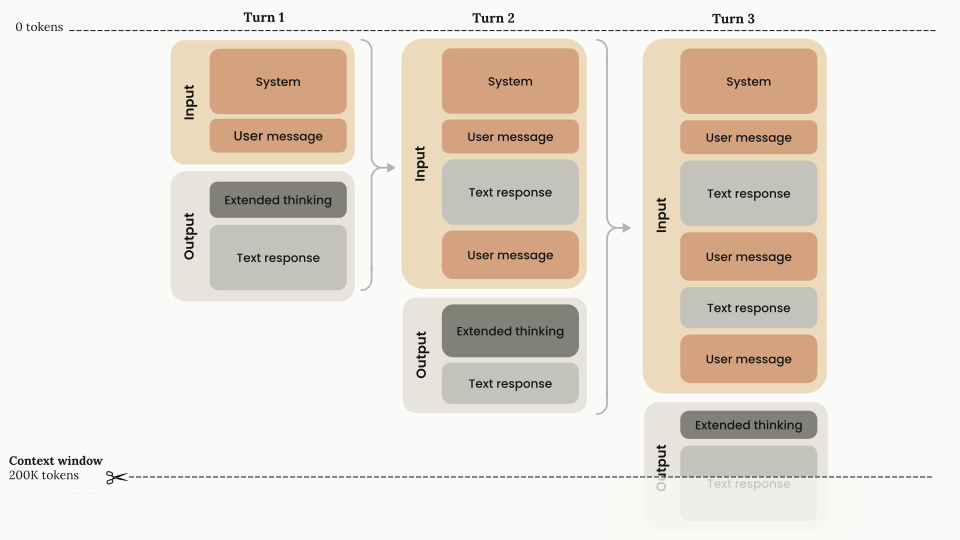
from line 1161
11611161* When sending back thinking blocks, pass everything back exactly as you received it, for consistency and to avoid potential issues.
11621162* When [streaming responses](https://platform.claude.com/docs/en/build-with-claude/thinking#streaming-thinking), the signature arrives as a `signature_delta` inside a `content_block_delta` event just before the `content_block_stop` event.
11631163* `signature` values are significantly longer in Claude 4 and later models than in previous models.
1164* The `signature` field is opaque: don't interpret or parse it.
1164* The `signature` field is opaque: don’t interpret or parse it.
11651165* `signature` values are compatible across platforms, including the Claude API, [Amazon Bedrock](https://platform.claude.com/docs/en/build-with-claude/claude-in-amazon-bedrock), and [Claude Models on Google Cloud (Google managed)](https://platform.claude.com/docs/en/build-with-claude/claude-models-on-google-cloud/google-managed). Values generated on one platform work on another, except that thinking blocks from Claude Sonnet 5.5 and Claude Haiku 5.5 work only in the account that produced them or in an account linked to it. See [Thinking blocks stay with the account that produced them](https://platform.claude.com/docs/en/build-with-claude/preserved-thinking#account-bound-thinking).
11661166 
11671167## Redacted thinking blocks
11681168 
1169In addition to regular `thinking` blocks, the API might return `redacted_thinking` blocks when portions of Claude's reasoning are safety-redacted. A `redacted_thinking` block contains encrypted thinking content in a `data` field, with no readable text:
1169In addition to regular `thinking` blocks, the API might return `redacted_thinking` blocks when portions of Claude’s reasoning are safety-redacted. A `redacted_thinking` block contains encrypted thinking content in a `data` field, with no readable text:
11701170 
11711171```json
11721172{
from line 1193
11931193 
11941194### Response prefill and forced tool use
11951195 
1196Claude 4.6 and later models and Claude Mythos Preview reject a prefilled final assistant turn with a 400 error, whether or not thinking is on (see [Prefill not supported](https://platform.claude.com/docs/en/api/errors#prefill-not-supported)). On earlier models, you can't prefill the assistant response while thinking is on. Forced tool use (`tool_choice: {"type": "any"}` or `{"type": "tool", ...}`) is incompatible with manual extended thinking but works with adaptive thinking. The exceptions are Claude Opus 5.5, Claude Sonnet 5.5, Claude Fable 5.1, and Claude Mythos 5.1, which reject forced tool use on every request with a 400 error. On those models, use `tool_choice: {"type": "auto"}` with [strict tool use](https://platform.claude.com/docs/en/agents-and-tools/tool-use/strict-tool-use) or [structured outputs](https://platform.claude.com/docs/en/build-with-claude/structured-outputs) instead. Where forced tool use is accepted, the response starts with the tool call and has no `thinking` block. To let the model think before it calls a tool, use `tool_choice: {"type": "auto"}` and say in the prompt when to use the tool. See [Thinking with tool use](https://platform.claude.com/docs/en/build-with-claude/thinking#thinking-with-tool-use).
1196Claude 4.6 and later models and Claude Mythos Preview reject a prefilled final assistant turn with a 400 error, whether or not thinking is on (see [Prefill not supported](https://platform.claude.com/docs/en/api/errors#prefill-not-supported)). On earlier models, you can’t prefill the assistant response while thinking is on. Forced tool use (`tool_choice: {"type": "any"}` or `{"type": "tool", ...}`) is incompatible with manual extended thinking but works with adaptive thinking. The exceptions are Claude Opus 5.5, Claude Sonnet 5.5, Claude Fable 5.1, and Claude Mythos 5.1, which reject forced tool use on every request with a 400 error. On those models, use `tool_choice: {"type": "auto"}` with [strict tool use](https://platform.claude.com/docs/en/agents-and-tools/tool-use/strict-tool-use) or [structured outputs](https://platform.claude.com/docs/en/build-with-claude/structured-outputs) instead. Where forced tool use is accepted, the response starts with the tool call and has no `thinking` block. To let the model think before it calls a tool, use `tool_choice: {"type": "auto"}` and say in the prompt when to use the tool. See [Thinking with tool use](https://platform.claude.com/docs/en/build-with-claude/thinking#thinking-with-tool-use).
11971197 
11981198### Output limits
11991199 
from line 1223
12231223 
12241224### Long requests
12251225 
1226The SDK requires streaming when `max_tokens` is greater than 21,333, to avoid HTTP timeouts on long-running requests. This is a client-side validation, not an API restriction. If you don't need to process events incrementally, use `.stream()` (java: `.createStreaming()`; csharp: `.CreateStreaming()`; go: `.NewStreaming()`; php: `->createStream()`) with `.get_final_message()` (typescript: `.finalMessage()`; ruby: `.accumulated_message`; csharp: `.Aggregate()`; go: `message.Accumulate(event)`; java, php: `MessageAccumulator`) to get the complete `Message` object without assembling it from individual events yourself. See [Get the final message without handling events](https://platform.claude.com/docs/en/build-with-claude/streaming#get-the-final-message-without-handling-events). Expect longer response times when thinking is active, because generating thinking blocks adds processing time. For workloads that push thinking above roughly 32k tokens per request, use [batch processing](https://platform.claude.com/docs/en/build-with-claude/batch-processing) to avoid networking issues: such requests can run long enough to hit system timeouts and open connection limits.
1226The SDK requires streaming when `max_tokens` is greater than 21,333, to avoid HTTP timeouts on long-running requests. This is a client-side validation, not an API restriction. If you don’t need to process events incrementally, use `.stream()` (java: `.createStreaming()`; csharp: `.CreateStreaming()`; go: `.NewStreaming()`; php: `->createStream()`) with `.get_final_message()` (typescript: `.finalMessage()`; ruby: `.accumulated_message`; csharp: `.Aggregate()`; go: `message.Accumulate(event)`; java, php: `MessageAccumulator`) to get the complete `Message` object without assembling it from individual events yourself. See [Get the final message without handling events](https://platform.claude.com/docs/en/build-with-claude/streaming#get-the-final-message-without-handling-events). Expect longer response times when thinking is active, because generating thinking blocks adds processing time. For workloads that push thinking above roughly 32k tokens per request, use [batch processing](https://platform.claude.com/docs/en/build-with-claude/batch-processing) to avoid networking issues: such requests can run long enough to hit system timeouts and open connection limits.
12271227 
12281228## Next steps
12291229 
12301230<CardGroup cols={2}>
12311231 <Card title="Steering thinking" icon="compass" href="https://platform.claude.com/docs/en/build-with-claude/thinking-steering-and-cost">
1232 Steer how often and how deeply Claude thinks with effort levels, system prompt guidance, and per-message steering, and understand thinking's cost and pricing.
1232 Steer how often and how deeply Claude thinks with effort levels, system prompt guidance, and per-message steering, and understand thinking’s cost and pricing.
12331233 </Card>
12341234 
12351235 <Card title="Thinking in tool and multi-turn workflows" icon="wrench" href="https://platform.claude.com/docs/en/build-with-claude/thinking-tool-workflows">

build-with-claude/thinking-steering-and-cost Changed · +19 / -19 lines

from line 8
88 To learn how zero data retention (ZDR) applies to this feature, see [API and data retention](https://platform.claude.com/docs/en/manage-claude/api-and-data-retention).
99</Note>
1010 
11Claude's thinking is adaptive: the model evaluates each request and determines whether to think and how much. You set an intent, optionally specify the effort, and the model allocates reasoning where reasoning is likely to help.
11Claude’s thinking is adaptive: the model evaluates each request and determines whether to think and how much. You set an intent, optionally specify the effort, and the model allocates reasoning where reasoning is likely to help.
1212 
1313This makes thinking a strong fit for workloads that mix trivial and complex requests, and for long-horizon agentic workflows where the right amount of reasoning varies from step to step.
1414 
from line 18
1818 
1919Thinking is optional for the model. On each request, Claude evaluates the complexity of the input and determines whether deeper reasoning would improve the answer. A simple factual question might get a direct response with no thinking block at all; a multistep math problem or a tricky debugging task triggers deeper reasoning.
2020 
21This determination occurs for each request. The same conversation can contain turns with and without thinking, and a turn where Claude skips thinking contains no thinking block. Don't build application logic that assumes every assistant turn starts with one.
21This determination occurs for each request. The same conversation can contain turns with and without thinking, and a turn where Claude skips thinking contains no thinking block. Don’t build application logic that assumes every assistant turn starts with one.
2222 
2323The primary control over this determination is the [effort](https://platform.claude.com/docs/en/build-with-claude/effort) parameter, which acts as soft guidance for how often and how deeply Claude uses thinking; see [Effort levels](https://platform.claude.com/docs/en/build-with-claude/thinking-steering-and-cost#effort-levels) on this page for what each level does.
2424 
2525If you want Claude to think less often, lower the effort level before reaching for prompt-based steering.
2626 
27Thinking also interleaves with tool use automatically: Claude can think between tool calls, evaluating each tool result before determining what to do next ([interleaved thinking](https://platform.claude.com/docs/en/build-with-claude/thinking#interleaved-thinking)). You don't need a beta header or any additional configuration for this.
27Thinking also interleaves with tool use automatically: Claude can think between tool calls, evaluating each tool result before determining what to do next ([interleaved thinking](https://platform.claude.com/docs/en/build-with-claude/thinking#interleaved-thinking)). You don’t need a beta header or any additional configuration for this.
2828 
2929For full details on how the thinking configuration and the effort parameter interact, see [Thinking and effort](https://platform.claude.com/docs/en/build-with-claude/thinking#thinking-and-effort).
3030 
from line 34
3434 
3535Use the two levers together in this order:
3636 
371. Set the effort level that matches your workload's default balance of quality and latency.
382. Add prompt guidance only if Claude's triggering still doesn't match your needs at that level.
371. Set the effort level that matches your workload’s default balance of quality and latency.
382. Add prompt guidance only if Claude’s triggering still doesn’t match your needs at that level.
3939 
4040<Note>
41 To get less thinking on Claude Sonnet 5.5 and Claude Haiku 5.5, lower the effort level. Asking Claude Sonnet 5.5 in the system prompt to think less doesn't reliably reduce its thinking, and in Anthropic's testing, telling Claude Haiku 5.5 in the prompt to answer directly didn't stop it from thinking. See [Prompting Claude Sonnet 5.5](https://platform.claude.com/docs/en/build-with-claude/prompt-engineering/prompting-claude-sonnet-5-5#calibrate-effort) and [Prompting Claude Haiku 5.5](https://platform.claude.com/docs/en/build-with-claude/prompt-engineering/prompting-claude-haiku-5-5#use-effort-to-control-thinking).
41 To get less thinking on Claude Sonnet 5.5 and Claude Haiku 5.5, lower the effort level. Asking Claude Sonnet 5.5 in the system prompt to think less doesn’t reliably reduce its thinking, and in Anthropic’s testing, telling Claude Haiku 5.5 in the prompt to answer directly didn’t stop it from thinking. See [Prompting Claude Sonnet 5.5](https://platform.claude.com/docs/en/build-with-claude/prompt-engineering/prompting-claude-sonnet-5-5#calibrate-effort) and [Prompting Claude Haiku 5.5](https://platform.claude.com/docs/en/build-with-claude/prompt-engineering/prompting-claude-haiku-5-5#use-effort-to-control-thinking).
4242</Note>
4343 
4444For broader prompting guidance with thinking, see [leverage thinking and interleaved thinking capabilities](https://platform.claude.com/docs/en/build-with-claude/prompt-engineering/claude-prompting-best-practices#leverage-thinking-and-interleaved-thinking-capabilities).
from line 74
7474 
7575### System prompt guidance
7676 
77System prompt guidance shifts Claude's thinking threshold for every request in the conversation. If Claude is thinking more often than your workload needs, add guidance such as the following to your system prompt:
77System prompt guidance shifts Claude’s thinking threshold for every request in the conversation. If Claude is thinking more often than your workload needs, add guidance such as the following to your system prompt:
7878 
7979```text wrap
8080Extended thinking adds latency and should only be used when it
from line 88
8888This task involves multistep reasoning. Think carefully before responding.
8989```
9090 
91Steering effectiveness can be sensitive to exact wording. If one phrasing doesn't produce the behavior you want, try a more direct variant.
91Steering effectiveness can be sensitive to exact wording. If one phrasing doesn’t produce the behavior you want, try a more direct variant.
9292 
9393### Per-message steering
9494 
from line 96
9696 
9797Per-message steering is useful when only some requests in a conversation warrant extended reasoning. An agent harness, for example, can append the encouraging phrase on planning steps and the discouraging phrase on routine confirmations, without touching the system prompt or changing any request parameters between turns.
9898 
99On Claude Haiku 5.5, the discouraging phrase doesn't reliably reduce thinking. On the Claude API and Claude Models on Google Cloud (Google managed), run routine turns on that model with less thinking by using a [per-message effort change](https://platform.claude.com/docs/en/build-with-claude/effort#change-effort-mid-conversation-beta) (beta) instead, which also keeps the prompt cache.
99On Claude Haiku 5.5, the discouraging phrase doesn’t reliably reduce thinking. On the Claude API and Claude Models on Google Cloud (Google managed), run routine turns on that model with less thinking by using a [per-message effort change](https://platform.claude.com/docs/en/build-with-claude/effort#change-effort-mid-conversation-beta) (beta) instead, which also keeps the prompt cache.
100100 
101101### Verify steering on your workload
102102 
from line 112
112112 
113113### Turn validation
114114 
115Assistant turns don't need to start with a thinking block. (Models using a legacy manual thinking budget enforce that the final assistant turn of a thinking-enabled request starts with one; see [Turn structure in manual mode](https://platform.claude.com/docs/en/build-with-claude/extended-thinking#turn-structure-in-manual-mode).)
115Assistant turns don’t need to start with a thinking block. (Models using a legacy manual thinking budget enforce that the final assistant turn of a thinking-enabled request starts with one; see [Turn structure in manual mode](https://platform.claude.com/docs/en/build-with-claude/extended-thinking#turn-structure-in-manual-mode).)
116116 
117117For multi-turn applications, this means you can pass back conversation history in whatever shape you have it:
118118 
119119* Assistant turns that Claude produced without thinking are valid history as-is.
120120* You can resume a conversation that started without thinking, or that used a different thinking configuration, without rewriting its history.
121* History assembled from mixed sources doesn't need thinking blocks reinserted at the start of each assistant turn to pass validation.
121* History assembled from mixed sources doesn’t need thinking blocks reinserted at the start of each assistant turn to pass validation.
122122 
123The relaxation is about validation, not about what you should send. When you have thinking blocks, pass them back unmodified, particularly during tool use, where they carry the reasoning behind Claude's tool calls. See the [Thinking](https://platform.claude.com/docs/en/build-with-claude/thinking) overview for the full rules.
123The relaxation is about validation, not about what you should send. When you have thinking blocks, pass them back unmodified, particularly during tool use, where they carry the reasoning behind Claude’s tool calls. See the [Thinking](https://platform.claude.com/docs/en/build-with-claude/thinking) overview for the full rules.
124124 
125125### Prompt caching
126126 
127Consecutive requests that keep the same thinking configuration and effort level preserve prompt caching; see [Thinking and prompt caching](https://platform.claude.com/docs/en/build-with-claude/thinking#thinking-and-prompt-caching) for the full rules. The resolved effort value is rendered into the prompt, so changing it between requests invalidates cache breakpoints, just as changing the legacy [`budget_tokens`](https://platform.claude.com/docs/en/build-with-claude/extended-thinking#extended-thinking-with-prompt-caching) parameter does on models that use it. Setting `effort` explicitly to the model's default is equivalent to omitting it and does not break the cache.
127Consecutive requests that keep the same thinking configuration and effort level preserve prompt caching; see [Thinking and prompt caching](https://platform.claude.com/docs/en/build-with-claude/thinking#thinking-and-prompt-caching) for the full rules. The resolved effort value is rendered into the prompt, so changing it between requests invalidates cache breakpoints, just as changing the legacy [`budget_tokens`](https://platform.claude.com/docs/en/build-with-claude/extended-thinking#extended-thinking-with-prompt-caching) parameter does on models that use it. Setting `effort` explicitly to the model’s default is equivalent to omitting it and does not break the cache.
128128 
129129The practical consequence: pick a thinking configuration and a top-level effort level for each conversation and keep them. If some turns need more or less thinking, use a [per-message effort change](https://platform.claude.com/docs/en/build-with-claude/effort#change-effort-mid-conversation-beta) (beta) on models that support it, or steer with [per-message prompting](https://platform.claude.com/docs/en/build-with-claude/thinking-steering-and-cost#tuning-thinking-behavior). Both leave earlier cache breakpoints intact, where a change to the thinking configuration or the top-level effort level does not.
130130 
from line 848
848848 
849849### Cost control
850850 
851You don't set a thinking token budget. Two controls bound cost:
851You don’t set a thinking token budget. Two controls bound cost:
852852 
853* `max_tokens` is a hard cap on total output for the request, thinking and response text combined. Claude never generates past it. In a tool-use loop, each request in the turn has its own `max_tokens`, so it doesn't bound the whole turn's spend.
854* `effort` is soft guidance on how much of that output Claude allocates to thinking. It shapes behavior but doesn't guarantee a token count.
853* `max_tokens` is a hard cap on total output for the request, thinking and response text combined. Claude never generates past it. In a tool-use loop, each request in the turn has its own `max_tokens`, so it doesn’t bound the whole turn’s spend.
854* `effort` is soft guidance on how much of that output Claude allocates to thinking. It shapes behavior but doesn’t guarantee a token count.
855855 
856856Because thinking counts toward `max_tokens`, set it high enough to leave room for both the reasoning and the answer. A `max_tokens` sized for a response with no thinking is often too small once Claude starts thinking on hard requests.
857857 
from line 874
874874 When thinking is active, a specialized system prompt is automatically included to support this feature.
875875</Note>
876876 
877What you're billed for is the same regardless of the `display` setting; only what you see changes:
877What you’re billed for is the same regardless of the `display` setting; only what you see changes:
878878 
879879| | `display: "summarized"` | `display: "omitted"` |
880880| --------------------------- | ---------------------------------------------------- | ---------------------------------------------------- |

build-with-claude/thinking-troubleshooting Changed · +16 / -16 lines

from line 96
9696 
9797This occurs because only Claude Sonnet 5.5 accepts `thinking: {type: "between_tools"}` (see the [per-model configuration table](https://platform.claude.com/docs/en/build-with-claude/thinking-troubleshooting#rejected-configurations)).
9898 
99Send `between_tools` only to Claude Sonnet 5.5. On other models, omit `thinking` or use a `thinking.type` value the table doesn't list as rejected.
99Send `between_tools` only to Claude Sonnet 5.5. On other models, omit `thinking` or use a `thinking.type` value the table doesn’t list as rejected.
100100 
101101## A 400 error says an effort level is not supported when thinking is disabled
102102 
from line 106
106106output_config.effort 'xhigh' is not supported when thinking is disabled on this model. Use effort 'high' or below, or enable thinking.
107107```
108108 
109This occurs because Claude Sonnet 5.5 accepts `between_tools` only at [effort](https://platform.claude.com/docs/en/build-with-claude/effort) `high` or below. The message says thinking is disabled because `between_tools` has no up-front thinking, even though the request didn't send `"disabled"`. The message names the level the request sent.
109This occurs because Claude Sonnet 5.5 accepts `between_tools` only at [effort](https://platform.claude.com/docs/en/build-with-claude/effort) `high` or below. The message says thinking is disabled because `between_tools` has no up-front thinking, even though the request didn’t send `"disabled"`. The message names the level the request sent.
110110 
111Lower the effort to `high` or below. To run at `xhigh` or `max`, use adaptive thinking: omit the `thinking` field or send `thinking: {"type": "adaptive"}`. That's what the message means by "enable thinking." Claude Sonnet 5.5 rejects `"enabled"` with a 400 error.
111Lower the effort to `high` or below. To run at `xhigh` or `max`, use adaptive thinking: omit the `thinking` field or send `thinking: {"type": "adaptive"}`. That’s what the message means by “enable thinking.” Claude Sonnet 5.5 rejects `"enabled"` with a 400 error.
112112 
113113Claude Haiku 5.5 returns the same message when a request sends `thinking: {type: "disabled"}` at effort `xhigh` or `max`. It accepts `"disabled"` only at `high` or below. Lower the effort, or set `thinking` to `{"type": "adaptive"}`.
114114 
from line 120
120120messages.N: output_config.effort 'low' differs from the 'high' in effect before it; effort cannot change when thinking is disabled on this model. Use effort 'high', or enable thinking.
121121```
122122 
123The message says thinking is disabled because `between_tools` has no up-front thinking. With `between_tools`, effort can't change mid-conversation: a per-message `output_config.effort` that differs from the level in effect returns a 400 error. `messages.N` is the position of the message that set the new level.
123The message says thinking is disabled because `between_tools` has no up-front thinking. With `between_tools`, effort can’t change mid-conversation: a per-message `output_config.effort` that differs from the level in effect returns a 400 error. `messages.N` is the position of the message that set the new level.
124124 
125Remove that per-message effort, or set it to the level in effect. To vary effort for each turn, use adaptive thinking: omit the `thinking` field or send `thinking: {"type": "adaptive"}`. That's what the message means by "enable thinking."
125Remove that per-message effort, or set it to the level in effect. To vary effort for each turn, use adaptive thinking: omit the `thinking` field or send `thinking: {"type": "adaptive"}`. That’s what the message means by “enable thinking.”
126126 
127127Claude Haiku 5.5 returns the same message when a request with `thinking: {type: "disabled"}` sets a per-message effort that differs from the level in effect. Remove that per-message effort, or set `thinking` to `{"type": "adaptive"}` to vary effort for each turn.
128128 
from line 158
158158messages.{i}.content.{j}: Invalid `signature` in `thinking` block. The block is bound to a different conversation. Remove the block, or set `thinking.block_binding.prefix_mismatch_behavior` to "drop_block".
159159```
160160 
161If the request didn't send the `thinking-binding-controls-2026-08-01` beta header, the message adds ``That setting requires the `thinking-binding-controls-2026-08-01` value in the `anthropic-beta` header.``
161If the request didn’t send the `thinking-binding-controls-2026-08-01` beta header, the message adds ``That setting requires the `thinking-binding-controls-2026-08-01` value in the `anthropic-beta` header.``
162162 
163The message usually ends with a sentence naming what changed: the `system` prompt, the `tools` list, the first message or block that differs, content that is missing or new, or an earlier thinking block that is missing or out of order. That sentence is for people and logs. Its wording can change, so don't match on it in code.
163The message usually ends with a sentence naming what changed: the `system` prompt, the `tools` list, the first message or block that differs, content that is missing or new, or an earlier thinking block that is missing or out of order. That sentence is for people and logs. Its wording can change, so don’t match on it in code.
164164 
165If the message stops after ``Invalid `signature` in `thinking` block``, the signature itself didn't verify: it was truncated, altered, or sent back empty, and `prefix_mismatch_behavior` doesn't apply. Edited thinking text returns a different error. See [A 400 error says thinking blocks cannot be modified](https://platform.claude.com/docs/en/build-with-claude/thinking-troubleshooting#error-thinking-blocks-modified).
165If the message stops after ``Invalid `signature` in `thinking` block``, the signature itself didn’t verify: it was truncated, altered, or sent back empty, and `prefix_mismatch_behavior` doesn’t apply. Edited thinking text returns a different error. See [A 400 error says thinking blocks cannot be modified](https://platform.claude.com/docs/en/build-with-claude/thinking-troubleshooting#error-thinking-blocks-modified).
166166 
167167On Claude Fable 5.1, Claude Opus 5.5, Claude Sonnet 5.5, and Claude Haiku 5.5, the API accepts a replayed thinking block only while the `system` prompt, `tools`, and messages that preceded it are unchanged. See [Keeping the prefix unchanged](https://platform.claude.com/docs/en/build-with-claude/preserved-thinking#prefix-check). The error means something earlier in the conversation changed between requests: an edited, reordered, or removed turn, a per-turn reminder that was injected and later removed, a rebuilt `system` prompt or `tools` array, or client-side compaction that kept recent turns and their thinking verbatim. The check is enforced for new accounts created on or after August 31, 2026, and for any request that sets `thinking.block_binding.prefix_mismatch_behavior`. Server-side [compaction](https://platform.claude.com/docs/en/build-with-claude/compaction) and [context editing](https://platform.claude.com/docs/en/build-with-claude/context-editing) never trigger it.
168168 
169To fix it, keep the history append-only: pass earlier turns back exactly as sent and received, add instructions with a [mid-conversation system message](https://platform.claude.com/docs/en/build-with-claude/mid-conversation-system-messages) instead of editing `system` or `tools`, and let server-side [context editing](https://platform.claude.com/docs/en/build-with-claude/context-editing) or [compaction](https://platform.claude.com/docs/en/build-with-claude/compaction) do any trimming. Retrying the same request body doesn't clear the error. To continue this request without the invalidated reasoning, send the `thinking-binding-controls-2026-08-01` beta header and set `thinking.block_binding.prefix_mismatch_behavior` to `"drop_block"`. Alternatively, strip every `thinking` and `redacted_thinking` block from the history (at minimum the named block and every one after it, in that turn and all later turns), leave each turn's other blocks in place, and retry once. On Claude Sonnet 5.5 and Claude Haiku 5.5, `block_binding` works only with `thinking: {"type": "adaptive"}`. With `between_tools` on Claude Sonnet 5.5, or `thinking: {"type": "disabled"}` on Claude Haiku 5.5, keep the history append-only, or strip the thinking blocks from the edited turn on.
169To fix it, keep the history append-only: pass earlier turns back exactly as sent and received, add instructions with a [mid-conversation system message](https://platform.claude.com/docs/en/build-with-claude/mid-conversation-system-messages) instead of editing `system` or `tools`, and let server-side [context editing](https://platform.claude.com/docs/en/build-with-claude/context-editing) or [compaction](https://platform.claude.com/docs/en/build-with-claude/compaction) do any trimming. Retrying the same request body doesn’t clear the error. To continue this request without the invalidated reasoning, send the `thinking-binding-controls-2026-08-01` beta header and set `thinking.block_binding.prefix_mismatch_behavior` to `"drop_block"`. Alternatively, strip every `thinking` and `redacted_thinking` block from the history (at minimum the named block and every one after it, in that turn and all later turns), leave each turn’s other blocks in place, and retry once. On Claude Sonnet 5.5 and Claude Haiku 5.5, `block_binding` works only with `thinking: {"type": "adaptive"}`. With `between_tools` on Claude Sonnet 5.5, or `thinking: {"type": "disabled"}` on Claude Haiku 5.5, keep the history append-only, or strip the thinking blocks from the edited turn on.
170170 
171A block from a model the target model can't read never produces this error: the API drops it and, under the beta header, reports it in `input_transformations`.
171A block from a model the target model can’t read never produces this error: the API drops it and, under the beta header, reports it in `input_transformations`.
172172 
173173## The thinking field is empty in the response
174174 
from line 176
176176 
177177This occurs because `display` defaults to `"omitted"` on newer models, which returns thinking blocks without their text.
178178 
179Set `display: "summarized"` in your thinking configuration to receive the summarized thinking text. See [Controlling thinking display](https://platform.claude.com/docs/en/build-with-claude/thinking#controlling-thinking-display) for each model's default. If you only want the short status lines some models write between tool calls, and not the reasoning, set `display: "updates"` (beta) instead. See [Progress updates between tool calls](https://platform.claude.com/docs/en/build-with-claude/thinking#progress-updates).
179Set `display: "summarized"` in your thinking configuration to receive the summarized thinking text. See [Controlling thinking display](https://platform.claude.com/docs/en/build-with-claude/thinking#controlling-thinking-display) for each model’s default. If you only want the short status lines some models write between tool calls, and not the reasoning, set `display: "updates"` (beta) instead. See [Progress updates between tool calls](https://platform.claude.com/docs/en/build-with-claude/thinking#progress-updates).
180180 
181181A block whose `thinking` field is empty is still complete: the `signature` holds the reasoning. Send it back with the turn like any other. See [Send assistant turns back exactly as returned](https://platform.claude.com/docs/en/build-with-claude/preserved-thinking#append-assistant-turns-exactly-as-returned).
182182 

build-with-claude/token-counting Changed · +8 / -6 lines

from line 25
2525 
2626## How to count message tokens
2727 
28The [token counting](https://platform.claude.com/docs/en/api/messages/count_tokens) endpoint accepts the same structured list of inputs for creating a message, including support for system prompts, [tools](https://platform.claude.com/docs/en/agents-and-tools/tool-use/overview), [images](https://platform.claude.com/docs/en/build-with-claude/vision), and [PDFs](https://platform.claude.com/docs/en/build-with-claude/pdf-support). The response contains the total number of input tokens.
28The [token counting](https://platform.claude.com/docs/en/api/messages/count_tokens) endpoint accepts the same structured list of inputs for creating a message, including support for system prompts, [tools](https://platform.claude.com/docs/en/agents-and-tools/tool-use/overview), [images](https://platform.claude.com/docs/en/build-with-claude/vision), and [PDFs](https://platform.claude.com/docs/en/build-with-claude/pdf-support). The response contains the total number of [input tokens](https://platform.claude.com/docs/en/api/messages/count_tokens#message_tokens_count.input_tokens).
2929 
30(See the `messages/count_tokens` method in [the API reference](https://platform.claude.com/docs/en/api/messages/count_tokens).)
31 
3032This endpoint returns an `invalid_request_error` for a few inputs that the Messages API accepts:
3133 
3234* [Server tools](https://platform.claude.com/docs/en/agents-and-tools/tool-use/server-tools) such as web search, web fetch, code execution, and tool search (every server tool except the [advisor tool](https://platform.claude.com/docs/en/agents-and-tools/tool-use/advisor-tool))
from line 35
3335* The [MCP connector](https://platform.claude.com/docs/en/agents-and-tools/mcp-connector)
3436* `image` or `document` blocks with a `url` or `file` source
3537 
36Send images and PDFs as base64 to count them. For requests that use server tools or MCP servers, the Messages API response reports the tokens used in its `usage` object.
38Send images and PDFs as base64 to count them. For requests that use server tools or MCP servers, the Messages API response reports the tokens used in its [`usage`](https://platform.claude.com/docs/en/api/messages/create#message.usage) object.
3739 
3840<Note>
3941 The token count is an **estimate**. In some cases, the actual number of input tokens used when creating a message might differ by a small amount.
from line 201
199201### Count tokens in messages with tools
200202 
201203<Note>
202 Token counting supports client tools and the [advisor tool](https://platform.claude.com/docs/en/agents-and-tools/tool-use/advisor-tool). Requests that include other [server tools](https://platform.claude.com/docs/en/agents-and-tools/tool-use/server-tools) return an error. For the advisor tool, the count covers the executor's first sampling call only.
204 Token counting supports client tools and the [advisor tool](https://platform.claude.com/docs/en/agents-and-tools/tool-use/advisor-tool). Requests that include other [server tools](https://platform.claude.com/docs/en/agents-and-tools/tool-use/server-tools) return an error. For the advisor tool, the count covers the executor’s first sampling call only.
203205</Note>
204206 
205207<CodeGroup>
from line 1118
11161118### Count tokens in messages with PDFs
11171119 
11181120<Note>
1119 Token counting supports base64-encoded PDFs with the same [PDF requirements](https://platform.claude.com/docs/en/build-with-claude/pdf-support#check-pdf-requirements) as the Messages API. This endpoint doesn't support `url` or `file` document sources.
1121 Token counting supports base64-encoded PDFs with the same [PDF requirements](https://platform.claude.com/docs/en/build-with-claude/pdf-support#check-pdf-requirements) as the Messages API. This endpoint doesn’t support `url` or `file` document sources.
11201122</Note>
11211123 
11221124<CodeGroup>
from line 1408
14061408Claude Fable 5.1, Claude Mythos 5.1, Claude Fable 5, and Claude Mythos 5 share the tokenizer introduced with Claude Opus 4.7. A prompt counts the same on all four, and roughly 30 percent higher than on models before Claude Opus 4.7 (the exact increase depends on the content). The token counting endpoint counts under the tokenizer of the `model` you pass. To measure the difference for your workload, count the same request twice, once with your current model and once with the model you plan to move to, and compare the two `input_tokens` values.
14071409 
14081410<Note>
1409 **Billing and migration:** Usage and billing on these models reflect this tokenizer's counts. When migrating from a model before Claude Opus 4.7, don't reuse token counts measured on the older model to estimate costs or context window fit. Count your prompts with the `model` ID you plan to use (for example, `"claude-fable-5-1"`).
1411 **Billing and migration:** Usage and billing on these models reflect this tokenizer’s counts. When migrating from a model before Claude Opus 4.7, don’t reuse token counts measured on the older model to estimate costs or context window fit. Count your prompts with the `model` ID you plan to use (for example, `"claude-fable-5-1"`).
14101412</Note>
14111413 
14121414***
from line 1447
14451447 </Card>
14461448 
14471449 <Card title="Context windows" icon="arrows-maximize" href="https://platform.claude.com/docs/en/build-with-claude/context-windows">
1448 Use token counts to keep prompts within a model's context window.
1450 Use token counts to keep prompts within a model’s context window.
14491451 </Card>
14501452 
14511453 <Card title="Rate limits" icon="gauge" href="https://platform.claude.com/docs/en/api/rate-limits">

build-with-claude/vision Changed · +19 / -19 lines

from line 10
1010 
1111## Send images to Claude
1212 
13Use Claude's vision capabilities through:
13Use Claude’s vision capabilities through:
1414 
1515* [claude.ai](https://claude.ai/). Upload an image like you would a file, or drag and drop an image directly into the chat window.
1616* [Playground](https://platform.claude.com/playground) in the Claude Console. Add images directly to any **User** message block.
from line 531
531531 
532532### Files API image example
533533 
534For images you'll use repeatedly or when you want to avoid encoding overhead, use the [Files API](https://platform.claude.com/docs/en/build-with-claude/files). Upload the image once, then reference the returned `file_id` in subsequent messages instead of resending base64 data.
534For images you’ll use repeatedly or when you want to avoid encoding overhead, use the [Files API](https://platform.claude.com/docs/en/build-with-claude/files). Upload the image once, then reference the returned `file_id` in subsequent messages instead of resending base64 data.
535535 
536536<Tip>
537537 In multi-turn conversations and agentic workflows, each request resends the full conversation history. If images are base64-encoded, the full image bytes are included in the payload on every turn, which can significantly increase request size and latency as the conversation grows. Uploading images to the Files API and referencing them by `file_id` keeps request payloads small regardless of how many images accumulate in the conversation history.
from line 1224
12241224 ```
12251225</CodeGroup>
12261226 
1227In a multi-turn conversation, add new images in later `user` turns the same way. Claude has access to every image from earlier turns, so follow-up questions such as "Are these similar to the first two?" work without including the earlier images again in the new turn's content.
1227In a multi-turn conversation, add new images in later `user` turns the same way. Claude has access to every image from earlier turns, so follow-up questions such as “Are these similar to the first two?” work without including the earlier images again in the new turn’s content.
12281228 
12291229***
12301230 
from line 1240
12401240 
12411241The maximum dimensions for each image are 8000x8000 px.
12421242 
1243If a single API request contains more than 20 images, a stricter per-image dimension limit applies to every image in that request. All `image` blocks in the request count toward this threshold, including images from earlier conversation turns that you resend and images nested inside `tool_result` content (for example, screenshots returned to the computer use tool). On Amazon Bedrock and Claude Models on Google Cloud (Google managed), document blocks such as PDFs also count toward this threshold. Images exceeding the stricter limit are rejected with an `invalid_request_error` whose message references "many-image requests" and states the current limit in pixels. To stay under the limit on all platforms, either resize each image so that neither dimension exceeds 2000 px, or keep the request to 20 or fewer image and document blocks.
1243If a single API request contains more than 20 images, a stricter per-image dimension limit applies to every image in that request. All `image` blocks in the request count toward this threshold, including images from earlier conversation turns that you resend and images nested inside `tool_result` content (for example, screenshots returned to the computer use tool). On Amazon Bedrock and Claude Models on Google Cloud (Google managed), document blocks such as PDFs also count toward this threshold. Images exceeding the stricter limit are rejected with an `invalid_request_error` whose message references “many-image requests” and states the current limit in pixels. To stay under the limit on all platforms, either resize each image so that neither dimension exceeds 2000 px, or keep the request to 20 or fewer image and document blocks.
12441244 
12451245The maximum size per image is:
12461246 
from line 1262
12621262 
12631263Claude processes images in patches instead of pixels. Each patch is a 28×28-pixel block of the image, referred to as a visual token. An image, therefore, costs `⌈width / 28⌉ × ⌈height / 28⌉` visual tokens.
12641264 
1265Each model has a maximum native image resolution, expressed as a long-edge limit and a visual-token limit. Images larger than either limit are downscaled before processing; see [How Claude resizes and pads images](https://platform.claude.com/docs/en/build-with-claude/vision-coordinates#how-claude-resizes-and-pads-images) for the exact rule. The exception is screenshots and zoom images that you return to the [computer use](https://platform.claude.com/docs/en/agents-and-tools/tool-use/computer-use-tool#handle-coordinate-scaling-for-higher-resolutions) and [browser use](https://platform.claude.com/docs/en/agents-and-tools/tool-use/browser-use-tool#targets-and-coordinates) toolsets: the API rejects a `tool_result` image that exceeds the model's limits with a validation error instead of downscaling it, so resize those images in your application before returning them. To have any other oversized image rejected with an error instead of downscaled, set the image block's [`transformations` field](https://platform.claude.com/docs/en/build-with-claude/vision-coordinates#oversized-image-error).
1265Each model has a maximum native image resolution, expressed as a long-edge limit and a visual-token limit. Images larger than either limit are downscaled before processing; see [How Claude resizes and pads images](https://platform.claude.com/docs/en/build-with-claude/vision-coordinates#how-claude-resizes-and-pads-images) for the exact rule. The exception is screenshots and zoom images that you return to the [computer use](https://platform.claude.com/docs/en/agents-and-tools/tool-use/computer-use-tool#handle-coordinate-scaling-for-higher-resolutions) and [browser use](https://platform.claude.com/docs/en/agents-and-tools/tool-use/browser-use-tool#targets-and-coordinates) toolsets: the API rejects a `tool_result` image that exceeds the model’s limits with a validation error instead of downscaling it, so resize those images in your application before returning them. To have any other oversized image rejected with an error instead of downscaled, set the image block’s [`transformations` field](https://platform.claude.com/docs/en/build-with-claude/vision-coordinates#oversized-image-error).
12661266 
12671267| Resolution tier | Models | Max long edge | Max visual tokens |
12681268| --------------- | --------------------------- | ------------- | ----------------- |
from line 1282
12821282| 2000x1500 px (3 megapixels) | 1269x952 px | 1,564 | Not resized | 3,888 |
12831283| 3840x2160 px (8.29 megapixels) | 1456x819 px | 1,560 | 2576x1449 px | 4,784 |
12841284 
1285When an image is downsized, Claude scales it to the largest size that fits the tier's limits while preserving its aspect ratio. This caps the token cost. For the precise rule and a reference implementation, see [How Claude resizes and pads images](https://platform.claude.com/docs/en/build-with-claude/vision-coordinates#how-claude-resizes-and-pads-images).
1285When an image is downsized, Claude scales it to the largest size that fits the tier’s limits while preserving its aspect ratio. This caps the token cost. For the precise rule and a reference implementation, see [How Claude resizes and pads images](https://platform.claude.com/docs/en/build-with-claude/vision-coordinates#how-claude-resizes-and-pads-images).
12861286 
1287To estimate cost, multiply the token count by the [per-token price of the model](https://claude.com/pricing) you're using. For example, at Claude Haiku 4.5's $1 USD per million input tokens (standard tier), the 1000×1000 image costs about $1.30 USD per thousand images. At Claude Opus 5.5's $4 USD per million (high-resolution tier), the same image costs about $5.18 USD per thousand and the 4K image about $19.14 USD per thousand.
1287To estimate cost, multiply the token count by the [per-token price of the model](https://claude.com/pricing) you’re using. For example, at Claude Haiku 4.5’s $1 USD per million input tokens (standard tier), the 1000×1000 image costs about $1.30 USD per thousand images. At Claude Opus 5.5’s $4 USD per million (high-resolution tier), the same image costs about $5.18 USD per thousand and the 4K image about $19.14 USD per thousand.
12881288 
1289High-resolution images can use up to roughly three times more visual tokens than the same image on a standard-tier model. If you don't need the additional fidelity that high resolution provides for computer use, screenshot understanding, and dense documents, downsample images before sending to control token costs. To minimize latency and to simplify [coordinate-based workflows](https://platform.claude.com/docs/en/build-with-claude/vision-coordinates), prefer resizing images before uploading them.
1289High-resolution images can use up to roughly three times more visual tokens than the same image on a standard-tier model. If you don’t need the additional fidelity that high resolution provides for computer use, screenshot understanding, and dense documents, downsample images before sending to control token costs. To minimize latency and to simplify [coordinate-based workflows](https://platform.claude.com/docs/en/build-with-claude/vision-coordinates), prefer resizing images before uploading them.
12901290 
12911291### Image quality guidance
12921292 
from line 1293
12931293When providing images to Claude, keep the following in mind for best results:
12941294 
12951295* **Image clarity:** Ensure images are clear and not too blurry or pixelated.
1296* **Text:** If the image contains important text, make sure it's legible and not too small. Avoid cropping out key visual context solely to enlarge the text.
1296* **Text:** If the image contains important text, make sure it’s legible and not too small. Avoid cropping out key visual context solely to enlarge the text.
12971297* **Resizing:** Take into account that your image might be resized if it is too large (see [Resolution and token cost](https://platform.claude.com/docs/en/build-with-claude/vision#evaluate-image-size)); this might, for example, make text less legible. Consider pre-resizing your images, cropping them, or both. To have an oversized image rejected with an error instead of resized (important for [coordinate workflows](https://platform.claude.com/docs/en/build-with-claude/vision-coordinates)), mark the image block with [`"oversized_image": "error"`](https://platform.claude.com/docs/en/build-with-claude/vision-coordinates#oversized-image-error).
12981298* **Image compression:** Compressing images before sending them, using a lossy format such as JPEG or WebP (lossy mode), can reduce latency by reducing the size of requests. However, this can introduce artifacts that are detrimental to model performance, especially when multiple compression passes are applied. For example, heavy JPEG compression can make text difficult to read. Confirm your compression settings are appropriate for the task by inspecting the actual images sent to the API.
12991299 
from line 1307
13071307 
13081308## Limitations
13091309 
1310Although Claude's image understanding capabilities are advanced, there are some limitations to be aware of:
1310Although Claude’s image understanding capabilities are advanced, there are some limitations to be aware of:
13111311 
13121312* **People identification:** Claude cannot be used to name people in images and refuses to do so (see the [Usage Policy](https://www.anthropic.com/legal/aup)).
13131313* **Accuracy:** Claude might hallucinate or make mistakes when interpreting low-quality, rotated, or very small images under 200 pixels.
1314* **Spatial reasoning:** Claude's coordinate and localization outputs are approximate. Follow the guidance in [Coordinates and bounding boxes](https://platform.claude.com/docs/en/build-with-claude/vision-coordinates) and verify outputs before relying on them.
1314* **Spatial reasoning:** Claude’s coordinate and localization outputs are approximate. Follow the guidance in [Coordinates and bounding boxes](https://platform.claude.com/docs/en/build-with-claude/vision-coordinates) and verify outputs before relying on them.
13151315* **Counting:** Claude can give approximate counts of objects in an image but might not always be precisely accurate, especially with large numbers of small objects.
13161316* **AI-generated images:** Claude cannot determine whether an image is AI-generated and might be incorrect if asked. Do not rely on it to detect fake or synthetic images.
13171317* **Inappropriate content:** Claude does not process inappropriate or explicit images that violate the [Usage Policy](https://www.anthropic.com/legal/aup).
1318* **Healthcare applications:** Although Claude can analyze general medical images, it is not designed to interpret complex diagnostic scans such as CTs or MRIs. Claude's outputs should not be considered a substitute for professional medical advice or diagnosis.
1318* **Healthcare applications:** Although Claude can analyze general medical images, it is not designed to interpret complex diagnostic scans such as CTs or MRIs. Claude’s outputs should not be considered a substitute for professional medical advice or diagnosis.
13191319 
1320Always carefully review and verify Claude's image interpretations, especially for high-stakes use cases. Do not use Claude for tasks requiring perfect precision or sensitive image analysis without human oversight.
1320Always carefully review and verify Claude’s image interpretations, especially for high-stakes use cases. Do not use Claude for tasks requiring perfect precision or sensitive image analysis without human oversight.
13211321 
13221322***
13231323 
from line 1344
13441344 No, Claude does not parse or receive any metadata from images passed to it.
13451345 </Accordion>
13461346 
1347 <Accordion title="Can I delete images I've uploaded?">
1347 <Accordion title="Can I delete images I’ve uploaded?">
13481348 No. Image uploads are ephemeral and not stored beyond the duration of the API request. Uploaded images are automatically deleted after they have been processed.
13491349 </Accordion>
13501350 
from line 1352
13521352 Refer to the Anthropic privacy policy page for information on how uploaded images and other data are handled. Anthropic does not use uploaded images to train models.
13531353 </Accordion>
13541354 
1355 <Accordion title="What if Claude's image interpretation seems wrong?">
1356 If Claude's image interpretation seems incorrect:
1355 <Accordion title="What if Claude’s image interpretation seems wrong?">
1356 If Claude’s image interpretation seems incorrect:
13571357 
13581358 1. Ensure the image is clear, high-quality, and correctly oriented.
13591359 2. Try prompt engineering techniques to improve results.

build-with-claude/vision-coordinates Changed · +26 / -26 lines

from line 6
66 
77Claude can locate and label regions of an image (for example, returning bounding boxes for tables, form fields, chart elements, or UI components). This guide covers how Claude resizes images before processing them and how to work with the pixel coordinates it returns, so that boxes and points line up with your original image.
88 
9You'll need this for OCR pipelines, form extraction, chart parsing, UI element location, and any task where you act on a specific region of an image. For sending images, supported formats, and per-model resolution limits, see [Vision](https://platform.claude.com/docs/en/build-with-claude/vision).
9You’ll need this for OCR pipelines, form extraction, chart parsing, UI element location, and any task where you act on a specific region of an image. For sending images, supported formats, and per-model resolution limits, see [Vision](https://platform.claude.com/docs/en/build-with-claude/vision).
1010 
1111<Note>
12 **Claude works best with absolute pixel coordinates.** Ask for them explicitly in your prompt. For example: *"Return the bounding box of each table as `[x1, y1, x2, y2]` (top-left and bottom-right corners) in pixel coordinates."* Claude does not work well when you ask for normalized coordinates, for example: *"Return bounding box coordinates between `0` and `1000`."* Always ask for pixel coordinates and normalize in your own code if you need to. To get coordinates as machine-readable JSON instead of prose, define a schema with [structured outputs](https://platform.claude.com/docs/en/build-with-claude/structured-outputs), for example an object with an `[x1, y1, x2, y2]` array for each detected element.
12 **Claude works best with absolute pixel coordinates.** Ask for them explicitly in your prompt. For example: *“Return the bounding box of each table as `[x1, y1, x2, y2]` (top-left and bottom-right corners) in pixel coordinates.”* Claude does not work well when you ask for normalized coordinates, for example: *“Return bounding box coordinates between `0` and `1000`.”* Always ask for pixel coordinates and normalize in your own code if you need to. To get coordinates as machine-readable JSON instead of prose, define a schema with [structured outputs](https://platform.claude.com/docs/en/build-with-claude/structured-outputs), for example an object with an `[x1, y1, x2, y2]` array for each detected element.
1313</Note>
1414 
15Coordinates follow the standard image convention: the origin `(0, 0)` is the top-left corner of the image, with x increasing to the right and y increasing downward. The coordinates Claude returns are pixel positions in the image Claude processes: your image after Claude resizes it to fit the model's native resolution (see [How Claude resizes and pads images](https://platform.claude.com/docs/en/build-with-claude/vision-coordinates#how-claude-resizes-and-pads-images)). To get coordinates you can use directly, either pre-resize your image so the coordinates map one-to-one onto the image you have (see [Resize your image before uploading](https://platform.claude.com/docs/en/build-with-claude/vision-coordinates#resize-your-image-before-uploading)), or rescale the coordinates Claude returns (see [Rescale coordinates when you cannot pre-resize](https://platform.claude.com/docs/en/build-with-claude/vision-coordinates#rescale-coordinates-when-you-cannot-pre-resize)).
15Coordinates follow the standard image convention: the origin `(0, 0)` is the top-left corner of the image, with x increasing to the right and y increasing downward. The coordinates Claude returns are pixel positions in the image Claude processes: your image after Claude resizes it to fit the model’s native resolution (see [How Claude resizes and pads images](https://platform.claude.com/docs/en/build-with-claude/vision-coordinates#how-claude-resizes-and-pads-images)). To get coordinates you can use directly, either pre-resize your image so the coordinates map one-to-one onto the image you have (see [Resize your image before uploading](https://platform.claude.com/docs/en/build-with-claude/vision-coordinates#resize-your-image-before-uploading)), or rescale the coordinates Claude returns (see [Rescale coordinates when you cannot pre-resize](https://platform.claude.com/docs/en/build-with-claude/vision-coordinates#rescale-coordinates-when-you-cannot-pre-resize)).
1616 
1717<Note>
18 Claude's spatial reasoning has limits (see [Limitations](https://platform.claude.com/docs/en/build-with-claude/vision#limitations)). Coordinate accuracy is best when you state the expected coordinate format in your prompt and spot-check results visually before processing at scale. Small elements lose precision when an image is downscaled: for fine targets, crop the region of interest and send the crop (offset returned coordinates by the crop origin), or use a high-resolution-tier model. For [PDF support](https://platform.claude.com/docs/en/build-with-claude/pdf-support), pages are rasterized to images server-side at dimensions you don't control, so the returned coordinates can't be reliably mapped back onto the page. To work with coordinates on PDF content, rasterize the pages to images yourself and use the pre-resize approach.
18 Claude’s spatial reasoning has limits (see [Limitations](https://platform.claude.com/docs/en/build-with-claude/vision#limitations)). Coordinate accuracy is best when you state the expected coordinate format in your prompt and spot-check results visually before processing at scale. Small elements lose precision when an image is downscaled: for fine targets, crop the region of interest and send the crop (offset returned coordinates by the crop origin), or use a high-resolution-tier model. For [PDF support](https://platform.claude.com/docs/en/build-with-claude/pdf-support), pages are rasterized to images server-side at dimensions you don’t control, so the returned coordinates can’t be reliably mapped back onto the page. To work with coordinates on PDF content, rasterize the pages to images yourself and use the pre-resize approach.
1919</Note>
2020 
2121## How Claude resizes and pads images
2222 
23Claude finds the largest aspect-preserving size that satisfies both of the model's image limits:
23Claude finds the largest aspect-preserving size that satisfies both of the model’s image limits:
2424 
25251. **Edge limit:** neither side exceeds the maximum edge length (1,568 px on the standard tier, 2,576 px on the high-resolution tier).
262. **Visual token limit:** the image's token cost `⌈width / 28⌉ × ⌈height / 28⌉` does not exceed the model's visual token budget (1,568 tokens on the standard tier, 4,784 on the high-resolution tier).
262. **Visual token limit:** the image’s token cost `⌈width / 28⌉ × ⌈height / 28⌉` does not exceed the model’s visual token budget (1,568 tokens on the standard tier, 4,784 on the high-resolution tier).
2727 
2828See [Resolution and token cost](https://platform.claude.com/docs/en/build-with-claude/vision#evaluate-image-size) for which models are in which tier.
2929 
from line 32
3232The token limit can also trigger a resize when neither side exceeds the edge limit. Overlooking this is the most common cause of misaligned coordinates. For example, an A4 page scanned at 130 DPI is 1075×1520 pixels: both sides are under 1,568 px, but it costs `39 × 55 = 2145` visual tokens, so Claude resizes it to 924×1307.
3333 
3434<Note>
35 This example assumes a model on the standard resolution tier. A high-resolution-tier model doesn't resize the same scan: 2,145 tokens is within its 4,784-token budget, so the coordinates it returns map directly onto the 1075×1520 original. Model tiers are listed in [Resolution and token cost](https://platform.claude.com/docs/en/build-with-claude/vision#evaluate-image-size).
35 This example assumes a model on the standard resolution tier. A high-resolution-tier model doesn’t resize the same scan: 2,145 tokens is within its 4,784-token budget, so the coordinates it returns map directly onto the 1075×1520 original. Model tiers are listed in [Resolution and token cost](https://platform.claude.com/docs/en/build-with-claude/vision#evaluate-image-size).
3636</Note>
3737 
3838Claude then pads every image, resized or not, up to the next multiple of 28 pixels on the bottom and right edges (924×1307 becomes 924×1316 in the example). The padding contains no content: Claude perceives the padded image, but the page content only ever occupies the un-padded resized region. **Always normalize or rescale by the resized dimensions, not the padded dimensions**; dividing by the padded dimensions scales every coordinate by a small amount.
from line 436
436436 ```
437437</CodeGroup>
438438 
4391. Resize the image to the dimensions returned by the resize helper. If the image already fits within the model's limits, the helper returns its dimensions unchanged and no resize is needed.
4402. [Send the resized image](https://platform.claude.com/docs/en/build-with-claude/vision#send-images-to-claude) to the API. Don't pad it yourself. Claude handles padding, and padding doesn't shift the coordinate origin.
4413. In your prompt, ask explicitly for pixel coordinates. For example: *"Return the click point for the Submit button as `[x, y]` in pixel coordinates."*
4424. Use the returned coordinates directly against the image you sent. If you need normalized coordinates, divide by the dimensions of the image you sent, not by the original image's dimensions and not by the padded dimensions.
4391. Resize the image to the dimensions returned by the resize helper. If the image already fits within the model’s limits, the helper returns its dimensions unchanged and no resize is needed.
4402. [Send the resized image](https://platform.claude.com/docs/en/build-with-claude/vision#send-images-to-claude) to the API. Don’t pad it yourself. Claude handles padding, and padding doesn’t shift the coordinate origin.
4413. In your prompt, ask explicitly for pixel coordinates. For example: *“Return the click point for the Submit button as `[x, y]` in pixel coordinates.”*
4424. Use the returned coordinates directly against the image you sent. If you need normalized coordinates, divide by the dimensions of the image you sent, not by the original image’s dimensions and not by the padded dimensions.
443443 
444444<Note>
445 The [Token counting](https://platform.claude.com/docs/en/build-with-claude/token-counting) endpoint estimates an image's token cost from its dimensions without fully processing it, so a successful count doesn't mean the image is within the Messages API's [request limits](https://platform.claude.com/docs/en/build-with-claude/vision#request-limits). An image can count successfully and still be rejected when you send it.
445 The [Token counting](https://platform.claude.com/docs/en/build-with-claude/token-counting) endpoint estimates an image’s token cost from its dimensions without fully processing it, so a successful count doesn’t mean the image is within the Messages API’s [request limits](https://platform.claude.com/docs/en/build-with-claude/vision#request-limits). An image can count successfully and still be rejected when you send it.
446446</Note>
447447 
448448## Turn resizing into an error with `transformations`
from line 457
457457}
458458```
459459 
460A request whose marked image (any block that sets `"oversized_image": "error"`) would be resized is rejected with a 400 `invalid_request_error` naming the image's dimensions and the largest dimensions that fit. Whether an image triggers the rejection depends on the [limits of every model the request names](https://platform.claude.com/docs/en/build-with-claude/vision-coordinates#how-claude-resizes-and-pads-images): the following 1920×1080 example is rejected by a standard-tier model but fits within the high-resolution tier:
460A request whose marked image (any block that sets `"oversized_image": "error"`) would be resized is rejected with a 400 `invalid_request_error` naming the image’s dimensions and the largest dimensions that fit. Whether an image triggers the rejection depends on the [limits of every model the request names](https://platform.claude.com/docs/en/build-with-claude/vision-coordinates#how-claude-resizes-and-pads-images): the following 1920×1080 example is rejected by a standard-tier model but fits within the high-resolution tier:
461461 
462462```text wrap
463463messages.0.content.0: image dimensions 1920x1080 exceed the maximum image size of a model named on this request and would be downsized to 1456x819; scale the image to at most 1456x819 or set the image's oversized_image setting to "downsize"
464464```
465465 
466Rescale to the reported target and resend: the target is the largest size, at your image's aspect ratio, that every model named on the request accepts. How marked images interact with the [server-side fallback beta](https://platform.claude.com/docs/en/build-with-claude/refusals-and-fallback#server-side-fallback) is described with that feature; in every mode, a marked image is never served resized.
466Rescale to the reported target and resend: the target is the largest size, at your image’s aspect ratio, that every model named on the request accepts. How marked images interact with the [server-side fallback beta](https://platform.claude.com/docs/en/build-with-claude/refusals-and-fallback#server-side-fallback) is described with that feature; in every mode, a marked image is never served resized.
467467 
468Each image has its own setting. `"oversized_image": "downsize"` (the default when the field is omitted) keeps automatic resizing as described on this page. Each image block is checked only against its own setting, so one request can mix images whose dimensions matter (a screenshot you'll click) with images where resizing is harmless (a logo). What the setting does and does not change:
468Each image has its own setting. `"oversized_image": "downsize"` (the default when the field is omitted) keeps automatic resizing as described on this page. Each image block is checked only against its own setting, so one request can mix images whose dimensions matter (a screenshot you’ll click) with images where resizing is harmless (a logo). What the setting does and does not change:
469469 
470470* [Padding](https://platform.claude.com/docs/en/build-with-claude/vision-coordinates#how-claude-resizes-and-pads-images) (which never discards content), format conversion, and orientation correction proceed as usual.
471471* The hard limits (8,000 px on the longest side, and the stricter per-image limit on [many-image requests](https://platform.claude.com/docs/en/build-with-claude/vision#request-limits)) are separate rejections; this setting never lets an image past them.
472* Images supplied by URL or file ID are checked once their bytes have been fetched; those rejections carry the same message without the leading position, so they don't identify which image failed; only embedded base64 images are named by position in the error.
473* [PDF pages](https://platform.claude.com/docs/en/build-with-claude/pdf-support) are rasterized server-side at dimensions you don't control; the `document` block does not accept the field (an image block nested inside a document's content accepts it like any other).
474* A marked image whose dimensions cannot be determined is rejected rather than passed through: that rejection reports that the image's source dimensions could not be determined, not the resize message quoted earlier. No image that sets `"error"` reaches the model resized.
472* Images supplied by URL or file ID are checked once their bytes have been fetched; those rejections carry the same message without the leading position, so they don’t identify which image failed; only embedded base64 images are named by position in the error.
473* [PDF pages](https://platform.claude.com/docs/en/build-with-claude/pdf-support) are rasterized server-side at dimensions you don’t control; the `document` block does not accept the field (an image block nested inside a document’s content accepts it like any other).
474* A marked image whose dimensions cannot be determined is rejected rather than passed through: that rejection reports that the image’s source dimensions could not be determined, not the resize message quoted earlier. No image that sets `"error"` reaches the model resized.
475475 
476476The [Token counting](https://platform.claude.com/docs/en/build-with-claude/token-counting) endpoint honors `transformations` too, rejecting an embedded image exactly as the Messages API would, so you can check whether an embedded image fits without being resized, before running inference. Counting rejects images supplied by URL or file ID rather than fetching them, so a marked image from those sources is checked only at Messages time.
477477 
478478## Rescale coordinates when you cannot pre-resize
479479 
480If you cannot pre-resize (for example, when the image comes from an upstream system you can't modify), use the resize helper from [Resize your image before uploading](https://platform.claude.com/docs/en/build-with-claude/vision-coordinates#resize-your-image-before-uploading) to recover the dimensions of the image Claude processed, then map the coordinates Claude returns into normalized coordinates or back onto your original image. Unless an image opts into an [oversized-image error](https://platform.claude.com/docs/en/build-with-claude/vision-coordinates#oversized-image-error) instead, Claude resizes oversized images rather than rejecting them, up to the API's [request limits](https://platform.claude.com/docs/en/build-with-claude/vision#request-limits). Beyond those limits the request fails with a validation error instead. Pass the tier limits that match the model you called: the wrong tier's limits recover the wrong resized dimensions and silently shift every coordinate. This approach requires knowing the pixel dimensions of the image you uploaded, so it does not apply to PDF uploads.
480If you cannot pre-resize (for example, when the image comes from an upstream system you can’t modify), use the resize helper from [Resize your image before uploading](https://platform.claude.com/docs/en/build-with-claude/vision-coordinates#resize-your-image-before-uploading) to recover the dimensions of the image Claude processed, then map the coordinates Claude returns into normalized coordinates or back onto your original image. Unless an image opts into an [oversized-image error](https://platform.claude.com/docs/en/build-with-claude/vision-coordinates#oversized-image-error) instead, Claude resizes oversized images rather than rejecting them, up to the API’s [request limits](https://platform.claude.com/docs/en/build-with-claude/vision#request-limits). Beyond those limits the request fails with a validation error instead. Pass the tier limits that match the model you called: the wrong tier’s limits recover the wrong resized dimensions and silently shift every coordinate. This approach requires knowing the pixel dimensions of the image you uploaded, so it does not apply to PDF uploads.
481481 
482Screenshots and zoom images that you return to the [computer use](https://platform.claude.com/docs/en/agents-and-tools/tool-use/computer-use-tool#handle-coordinate-scaling-for-higher-resolutions) and [browser use](https://platform.claude.com/docs/en/agents-and-tools/tool-use/browser-use-tool#targets-and-coordinates) toolsets are an exception to automatic resizing. The API rejects a `tool_result` image that exceeds the model's limits with a validation error instead of resizing it. Resize those images in your application before returning them, then scale the coordinates Claude returns back to your screen's dimensions.
482Screenshots and zoom images that you return to the [computer use](https://platform.claude.com/docs/en/agents-and-tools/tool-use/computer-use-tool#handle-coordinate-scaling-for-higher-resolutions) and [browser use](https://platform.claude.com/docs/en/agents-and-tools/tool-use/browser-use-tool#targets-and-coordinates) toolsets are an exception to automatic resizing. The API rejects a `tool_result` image that exceeds the model’s limits with a validation error instead of resizing it. Resize those images in your application before returning them, then scale the coordinates Claude returns back to your screen’s dimensions.
483483 
484484<CodeGroup exclude="shell">
485485 <CodeGroupItem language="cURL">
from line 649
649649 ```
650650</CodeGroup>
651651 
652Padding is applied only to the bottom and right edges, so the origin doesn't shift and a per-axis linear rescale is sufficient. Clamp returned coordinates to the resized dimensions before rescaling, so a point slightly outside the image can't map outside your original.
652Padding is applied only to the bottom and right edges, so the origin doesn’t shift and a per-axis linear rescale is sufficient. Clamp returned coordinates to the resized dimensions before rescaling, so a point slightly outside the image can’t map outside your original.
653653 
654The relative coordinates multiply against whatever surface you act on: the original image, a full-resolution scan, or a screen. When you act on a screen and screenshot pixels differ from logical coordinates (HiDPI displays), also divide by the display scale factor. The [Computer use tool's scaling guidance](https://platform.claude.com/docs/en/agents-and-tools/tool-use/computer-use-tool#handle-coordinate-scaling-for-higher-resolutions) covers that pattern.
654The relative coordinates multiply against whatever surface you act on: the original image, a full-resolution scan, or a screen. When you act on a screen and screenshot pixels differ from logical coordinates (HiDPI displays), also divide by the display scale factor. The [Computer use tool’s scaling guidance](https://platform.claude.com/docs/en/agents-and-tools/tool-use/computer-use-tool#handle-coordinate-scaling-for-higher-resolutions) covers that pattern.
655655 
656656## Next steps
657657 
658658<CardGroup cols={2}>
659659 <Card title="Agent Skills" icon="stack" href="https://platform.claude.com/docs/en/agents-and-tools/agent-skills/overview">
660 Agent Skills are modular capabilities that extend Claude's functionality. Each Skill packages instructions, metadata, and optional resources (scripts, templates) that Claude uses automatically when relevant.
660 Agent Skills are modular capabilities that extend Claude’s functionality. Each Skill packages instructions, metadata, and optional resources (scripts, templates) that Claude uses automatically when relevant.
661661 </Card>
662662 
663663 <Card title="Computer use tool" icon="computer" href="https://platform.claude.com/docs/en/agents-and-tools/tool-use/computer-use-tool">

build-with-claude/working-with-messages Changed · +5 / -5 lines

## Prefilling Claude’s response ## Prefilling Claude's response

from line 20
2020## Basic request and response
2121 
2222<Note>
23 The `temperature`, `top_p`, and `top_k` sampling parameters are not supported on Claude 4.7 and later models and Claude Mythos Preview, or on any model starting with [API version `2026-10-21`](https://platform.claude.com/docs/en/api/migration-2026-10-21#sampling-parameters). Setting them to a non-default value returns a 400 error, and starting with `2026-10-21` any value does. Omit them from request payloads and use prompting to guide the model's behavior instead. See the [breaking changes in the migration guide](https://platform.claude.com/docs/en/models/opus-5-5/migration-guide#opus-46-breaking-changes).
23 The `temperature`, `top_p`, and `top_k` sampling parameters are not supported on Claude 4.7 and later models and Claude Mythos Preview, or on any model starting with [API version `2026-10-21`](https://platform.claude.com/docs/en/api/migration-2026-10-21#sampling-parameters). Setting them to a non-default value returns a 400 error, and starting with `2026-10-21` any value does. Omit them from request payloads and use prompting to guide the model’s behavior instead. See the [breaking changes in the migration guide](https://platform.claude.com/docs/en/models/opus-5-5/migration-guide#opus-46-breaking-changes).
2424</Note>
2525 
2626<CodeGroup>
from line 158
158158 
159159## Multiple conversational turns
160160 
161The Messages API is stateless, which means that you always send the full conversational history to the API. You can use this pattern to build up a conversation over time. Earlier conversational turns don't necessarily need to actually originate from Claude. You can use synthetic `assistant` messages.
161The Messages API is stateless, which means that you always send the full conversational history to the API. You can use this pattern to build up a conversation over time. Earlier conversational turns don’t necessarily need to actually originate from Claude. You can use synthetic `assistant` messages.
162162 
163163<CodeGroup>
164164 ```bash cURL
from line 329
329329 
330330See [Mid-conversation system messages](https://platform.claude.com/docs/en/build-with-claude/mid-conversation-system-messages) for the complete guide, including how to combine it with [prompt caching](https://platform.claude.com/docs/en/build-with-claude/prompt-caching).
331331 
332## Prefilling Claude's response
332## Prefilling Claude’s response
333333 
334You can prefill part of Claude's response in the last position of the input messages list. Use this technique to shape Claude's response. The following example uses `"max_tokens": 1` to get a single multiple choice answer from Claude.
334You can prefill part of Claude’s response in the last position of the input messages list. Use this technique to shape Claude’s response. The following example uses `"max_tokens": 1` to get a single multiple choice answer from Claude.
335335 
336336<Warning>
337337 Prefilling is not supported on Claude 4.6 and later models and [Claude Mythos Preview](https://anthropic.com/glasswing). Requests using prefill with these models return a 400 error. Use [structured outputs](https://platform.claude.com/docs/en/build-with-claude/structured-outputs) on models that support it, or system prompt instructions, instead. See the [migration guide](https://platform.claude.com/docs/en/about-claude/models/migration-guide) for migration patterns.

claude_api_primer Changed · +11 / -11 lines

### Prefilling Claude’s response ## Controlling Claude’s output ### Prefilling Claude's response ## Controlling Claude's output

from line 67
6767 
6868### Multiple conversational turns
6969 
70The Messages API is stateless, which means that you always send the full conversational history to the API. You can use this pattern to build up a conversation over time. Earlier conversational turns don't necessarily need to actually originate from Claude. You can use synthetic `assistant` messages.
70The Messages API is stateless, which means that you always send the full conversational history to the API. You can use this pattern to build up a conversation over time. Earlier conversational turns don’t necessarily need to actually originate from Claude. You can use synthetic `assistant` messages.
7171 
7272<CodeGroup exclude="shell:cURL, typescript, csharp, go, java, php, ruby">
7373 ```bash CLI
from line 100
100100 ```
101101</CodeGroup>
102102 
103### Prefilling Claude's response
103### Prefilling Claude’s response
104104 
105You can prefill part of Claude's response in the last position of the input messages list. Use this technique to shape Claude's response. The following example uses `"max_tokens": 1` to get a single multiple choice answer from Claude.
105You can prefill part of Claude’s response in the last position of the input messages list. Use this technique to shape Claude’s response. The following example uses `"max_tokens": 1` to get a single multiple choice answer from Claude.
106106 
107107<Note>
108108 Claude 4.6 and later models and Claude Mythos Preview do not support assistant message prefill; requests to those models must end with a user message. The following examples use a model that supports prefill.
from line 316
316316 
317317Important limitations:
318318 
3191. **Tool choice limitation:** With manual extended thinking (`thinking: {"type": "enabled"}`), only `tool_choice: {"type": "auto"}` (default) or `tool_choice: {"type": "none"}` is supported. Adaptive thinking accepts forced tool use, except on the models listed under [Forcing tool use](https://platform.claude.com/docs/en/claude_api_primer#forcing-tool-use). Where it's accepted, a forced tool call skips thinking: the response starts with the tool call and has no `thinking` block.
3191. **Tool choice limitation:** With manual extended thinking (`thinking: {"type": "enabled"}`), only `tool_choice: {"type": "auto"}` (default) or `tool_choice: {"type": "none"}` is supported. Adaptive thinking accepts forced tool use, except on the models listed under [Forcing tool use](https://platform.claude.com/docs/en/claude_api_primer#forcing-tool-use). Where it’s accepted, a forced tool call skips thinking: the response starts with the tool call and has no `thinking` block.
3203202. **Preserving thinking blocks:** During tool use, you must pass `thinking` blocks back to the API for the last assistant message.
321321 
322322### Preserving thinking blocks
from line 528
528528**Provide extremely detailed descriptions.** This is by far the most important factor in tool performance. Your descriptions should explain every detail about the tool, including:
529529 
530530* What the tool does
531* When it should be used (and when it shouldn't)
532* What each parameter means and how it affects the tool's behavior
531* When it should be used (and when it shouldn’t)
532* What each parameter means and how it affects the tool’s behavior
533533* Any important caveats or limitations
534534 
535535**Consider using `input_examples` for complex tools.** For tools with nested objects, optional parameters, or format-sensitive inputs, you can provide concrete examples using the `input_examples` field (beta). This shows Claude the expected input patterns. See [Providing tool use examples](https://platform.claude.com/docs/en/agents-and-tools/tool-use/define-tools#providing-tool-use-examples) for details.
from line 553
553553}
554554```
555555 
556## Controlling Claude's output
556## Controlling Claude’s output
557557 
558558### Forcing tool use
559559 
from line 570
570570* `tool` forces Claude to always use a particular tool.
571571* `none` prevents Claude from using any tools.
572572 
573On Claude Opus 5.5, Claude Sonnet 5.5, Claude Fable 5.1, and Claude Mythos 5.1, `any` and `tool` return a 400 error. Leave `tool_choice` at `auto` and set `"strict": true` on the tool definition to guarantee that any call Claude makes matches the tool's `input_schema`. See [Strict tool use](https://platform.claude.com/docs/en/agents-and-tools/tool-use/strict-tool-use).
573On Claude Opus 5.5, Claude Sonnet 5.5, Claude Fable 5.1, and Claude Mythos 5.1, `any` and `tool` return a 400 error. Leave `tool_choice` at `auto` and set `"strict": true` on the tool definition to guarantee that any call Claude makes matches the tool’s `input_schema`. See [Strict tool use](https://platform.claude.com/docs/en/agents-and-tools/tool-use/strict-tool-use).
574574 
575575### JSON output
576576 
from line 625
625625 
626626### Handling the `max_tokens` stop reason
627627 
628If Claude's response is cut off because it hits the `max_tokens` limit during tool use, retry the request with a higher `max_tokens` value.
628If Claude’s response is cut off because it hits the `max_tokens` limit during tool use, retry the request with a higher `max_tokens` value.
629629 
630630### Handling the `pause_turn` stop reason
631631 
from line 653
653653 
654654### Invalid tool name
655655 
656If Claude's attempted use of a tool is invalid (for example, missing required parameters), try the request again with more-detailed `description` values in your tool definitions.
656If Claude’s attempted use of a tool is invalid (for example, missing required parameters), try the request again with more-detailed `description` values in your tool definitions.
657657 
658658## Streaming messages
659659 

cli-sdks-libraries/cli/apply Changed · +20 / -20 lines

### How ant apply infers a file’s kind ### How ant apply infers a file's kind

from line 33
3333 </CodeGroupItem>
3434</CodeGroup>
3535 
36The frontmatter holds the agent's configuration (the fields from [Define your agent](https://platform.claude.com/docs/en/managed-agents/agent-setup)) and the body is its system prompt. `ant apply` [infers](https://platform.claude.com/docs/en/cli-sdks-libraries/cli/apply#kind-inference) that the file is an agent from its path, here the `agents/` directory.
36The frontmatter holds the agent’s configuration (the fields from [Define your agent](https://platform.claude.com/docs/en/managed-agents/agent-setup)) and the body is its system prompt. `ant apply` [infers](https://platform.claude.com/docs/en/cli-sdks-libraries/cli/apply#kind-inference) that the file is an agent from its path, here the `agents/` directory.
3737 
3838In an interactive terminal, `ant apply` prints the plan and waits for your approval:
3939 
from line 93
9393}
9494```
9595 
96Commit it with your files. It's how the next run, on your machine or in CI, finds these resources instead of creating them again, and it's where you read an agent's ID to [start a session](https://platform.claude.com/docs/en/managed-agents/sessions). The two hashes fingerprint what was last sent and what the API returned. That's how a later run detects an edited file, or a resource changed outside these files.
96Commit it with your files. It’s how the next run, on your machine or in CI, finds these resources instead of creating them again, and it’s where you read an agent’s ID to [start a session](https://platform.claude.com/docs/en/managed-agents/sessions). The two hashes fingerprint what was last sent and what the API returned. That’s how a later run detects an edited file, or a resource changed outside these files.
9797 
9898## Grow it into a project
9999 
100You can declaratively define the other resources as files as well. A file holds the request body you would send to that kind's create endpoint:
100You can declaratively define the other resources as files as well. A file holds the request body you would send to that kind’s create endpoint:
101101 
102102* An [environment](https://platform.claude.com/docs/en/managed-agents/environments) is a YAML file in `environments/`.
103103* A [memory store](https://platform.claude.com/docs/en/managed-agents/memory) is a YAML file in `memory_stores/`.
from line 105
105105* A [skill](https://platform.claude.com/docs/en/managed-agents/skills) is a directory with a `SKILL.md` at its root, conventionally under `skills/`, uploaded as one bundle.
106106* A [vault](https://platform.claude.com/docs/en/managed-agents/vaults) is a YAML file in `vaults/` whose only fields are `display_name` and, optionally, `metadata`. Vault files need CLI version 1.34.0 or later.
107107 
108Any resource except a skill can be written as YAML, JSON, or Markdown. In Markdown, the frontmatter is the body and the prose fills the kind's text field: an agent's `system`, an environment's or memory store's `description`, a deployment's first message. A vault has no text field, so `ant apply` refuses a vault Markdown file that has prose.
108Any resource except a skill can be written as YAML, JSON, or Markdown. In Markdown, the frontmatter is the body and the prose fills the kind’s text field: an agent’s `system`, an environment’s or memory store’s `description`, a deployment’s first message. A vault has no text field, so `ant apply` refuses a vault Markdown file that has prose.
109109 
110Resources refer to each other by path. Wherever the API expects another resource's ID, write the relative path to that resource's file instead. In this project, the reviewer agent lists `../skills/pr-summary` under `skills`, the agent in `agents/lead.md` lists `./reviewer.md` under `multiagent.subagents.predefined_agents`, and the deployment names its agent, environment, and memory store by path. `ant apply` creates them in dependency order and fills in the real IDs. A path under `multiagent.subagents.predefined_agents` or `multiagent.workflows.predefined_agents` needs CLI version 1.40.0 or later. The project has six files:
110Resources refer to each other by path. Wherever the API expects another resource’s ID, write the relative path to that resource’s file instead. In this project, the reviewer agent lists `../skills/pr-summary` under `skills`, the agent in `agents/lead.md` lists `./reviewer.md` under `multiagent.subagents.predefined_agents`, and the deployment names its agent, environment, and memory store by path. `ant apply` creates them in dependency order and fills in the real IDs. A path under `multiagent.subagents.predefined_agents` or `multiagent.workflows.predefined_agents` needs CLI version 1.40.0 or later. The project has six files:
111111 
112112<FileExplorer>
113113 <File filename="agents/reviewer.md">
from line 204
204204 
205205`claude-lock.json` then has an entry for every file in the project.
206206 
207Relative paths are how these files point at each other. `ant apply` pins agent and skill references to the version it just applied, so editing `reviewer.md` or the skill updates everything that references them in the same run. A path also works inside an object, as in the deployment's `resources` entry, where the other keys such as `access` are kept.
207Relative paths are how these files point at each other. `ant apply` pins agent and skill references to the version it just applied, so editing `reviewer.md` or the skill updates everything that references them in the same run. A path also works inside an object, as in the deployment’s `resources` entry, where the other keys such as `access` are kept.
208208 
209To point at a resource these files don't manage, write its ID (`agent_...`, `skill_...`) instead. Anything else, such as `{type: anthropic, skill_id: xlsx}`, is sent to the API as written. A skill reference can also be a GitHub URL of the form `https://github.com/<owner>/<repo>/tree/<branch>/<dir>`, for example a directory of Anthropic's open-source [skills repository](https://github.com/anthropics/skills): `ant apply` downloads and uploads that directory, pinned to the resolved commit until you run with `--upgrade` (set `GITHUB_TOKEN` for a private repository).
209To point at a resource these files don’t manage, write its ID (`agent_...`, `skill_...`) instead. Anything else, such as `{type: anthropic, skill_id: xlsx}`, is sent to the API as written. A skill reference can also be a GitHub URL of the form `https://github.com/<owner>/<repo>/tree/<branch>/<dir>`, for example a directory of Anthropic’s open-source [skills repository](https://github.com/anthropics/skills): `ant apply` downloads and uploads that directory, pinned to the resolved commit until you run with `--upgrade` (set `GITHUB_TOKEN` for a private repository).
210210 
211A path can also be a glob. Under `skills`, a glob references every skill it matches and skips anything else it matches, such as a README. Under an agent's `tools`, a path or glob names YAML or JSON files instead of resources: `ant apply` inserts each file's contents, one tool or a list of tools, into the list at that position. Put those files in a subdirectory such as `agents/tools/`, because `ant apply` refuses to insert a file that it would also read as an agent. A path or glob that matches nothing is an error.
211A path can also be a glob. Under `skills`, a glob references every skill it matches and skips anything else it matches, such as a README. Under an agent’s `tools`, a path or glob names YAML or JSON files instead of resources: `ant apply` inserts each file’s contents, one tool or a list of tools, into the list at that position. Put those files in a subdirectory such as `agents/tools/`, because `ant apply` refuses to insert a file that it would also read as an agent. A path or glob that matches nothing is an error.
212212 
213213```markdown agents/reviewer.md
214214---
from line 242
242242}
243243```
244244 
245### How ant apply infers a file's kind
245### How ant apply infers a file’s kind
246246 
247When `ant apply` walks a directory, it determines each file's kind from the first of these that matches:
247When `ant apply` walks a directory, it determines each file’s kind from the first of these that matches:
248248 
2492491. A top-level `type` field in the file.
2502502. The directory the file is directly in: `agents/`, `environments/`, `memory_stores/`, `deployments/`, or `vaults/`.
from line 255
255255 
256256## Edit and reapply
257257 
258Running `ant apply` with no arguments reconciles every file the lockfile tracks. At a terminal, it also lists untracked resource files under the lockfile's directory and offers to add them. Deleting a field from a file clears it on the resource if the API allows that field to be cleared. A field you never set, or one the API can't clear, keeps its current value.
258Running `ant apply` with no arguments reconciles every file the lockfile tracks. At a terminal, it also lists untracked resource files under the lockfile’s directory and offers to add them. Deleting a field from a file clears it on the resource if the API allows that field to be cleared. A field you never set, or one the API can’t clear, keeps its current value.
259259 
260260If a resource was edited, archived, or deleted outside these files (in the Claude Console, for example), the plan ends with `This plan cannot be applied:` and the reason. The command then exits with `refusing to apply`. Pass `--force` to overwrite the edit or create a replacement.
261261 
262262Deleting a file leaves its resource in place with a warning, and `--prune` removes it (archiving it, or deleting it for a skill). Renaming a file therefore declares a new resource and leaves the old one in place until you prune.
263263 
264`ant apply` can't adopt a resource you created in the Console or with `ant beta:agents create`. Only what's in the lockfile is managed, and applying a file that describes an existing agent creates a second one. If you downloaded your agent from the Console with **Export as code**, the download includes its own `claude-lock.json`, so applying it updates the resources you built there.
264`ant apply` can’t adopt a resource you created in the Console or with `ant beta:agents create`. Only what’s in the lockfile is managed, and applying a file that describes an existing agent creates a second one. If you downloaded your agent from the Console with **Export as code**, the download includes its own `claude-lock.json`, so applying it updates the resources you built there.
265265 
266266## Run ant apply in CI
267267 
from line 268
268268Without a terminal, `ant apply` prints the plan and stops with `cannot ask for confirmation without a terminal; re-run with --yes to apply, or --dry-run to see the plan only`. Set up CI as follows:
269269 
270270* Run `ant apply --yes .` on your default branch after merge, naming the project directory. A bare `ant apply --yes` reconciles only files the lockfile already tracks and skips a newly added one.
271* On pull requests, run `ant apply --dry-run .` to print the plan for reviewers. It's informational only and exits 0 even when the plan is blocked.
271* On pull requests, run `ant apply --dry-run .` to print the plan for reviewers. It’s informational only and exits 0 even when the plan is blocked.
272272* Commit the updated `claude-lock.json` at the end of the job, even when the apply step failed partway, because a partial apply still records what it created.
273273* Run one apply at a time, because nothing locks the lockfile.
274274* Authenticate with [Workload Identity Federation](https://platform.claude.com/docs/en/manage-claude/workload-identity-federation) rather than a stored API key, as an identity that reaches the organization and workspace recorded in `claude-lock.json`. `ant apply` refuses credentials that resolve to any other organization or workspace.
from line 320
320320 
321321Run the first `ant apply` on your machine and commit `claude-lock.json` before you turn the workflow on. The last step commits changes only to a lockfile that Git already tracks.
322322 
323To create the federation rule and service account that the `env` block names, see [Use WIF with GitHub Actions](https://platform.claude.com/docs/en/manage-claude/wif-providers/github-actions). Enable the rule for a single workspace, the one recorded in `claude-lock.json`, so that the token exchange doesn't need a workspace ID. Because the job names an environment, its identity token's `sub` claim is `repo:<owner>/<repo>:environment:agents-prod`, so that's the value the rule's `subject_prefix` must match.
323To create the federation rule and service account that the `env` block names, see [Use WIF with GitHub Actions](https://platform.claude.com/docs/en/manage-claude/wif-providers/github-actions). Enable the rule for a single workspace, the one recorded in `claude-lock.json`, so that the token exchange doesn’t need a workspace ID. Because the job names an environment, its identity token’s `sub` claim is `repo:<owner>/<repo>:environment:agents-prod`, so that’s the value the rule’s `subject_prefix` must match.
324324 
325325## Flags
326326 
from line 327
327327| Flag | Effect |
328328| -------------------- | --------------------------------------------------------------------------------------------------------------------------------------------------------------------------------------------------------------------- |
329329| `--dry-run` | Print the plan and exit without applying or writing the lockfile. Exits 0 even when the plan is blocked. |
330| `--yes` | Apply without asking for confirmation. Required when there's no terminal. |
330| `--yes` | Apply without asking for confirmation. Required when there’s no terminal. |
331331| `--force` | Apply even where a resource was changed, archived, or deleted outside these files. |
332332| `--prune` | Remove resources that are in the lockfile but no longer declared in a file. |
333333| `--upgrade` | Re-resolve skills referenced by GitHub URL, which otherwise stay pinned to the commit recorded in the lockfile. |
334| `--lock-file <path>` | Use this lockfile instead of searching upward from the current directory. Keep one for each organization or workspace: `ant apply` refuses a lockfile whose organization or workspace doesn't match your credentials. |
334| `--lock-file <path>` | Use this lockfile instead of searching upward from the current directory. Keep one for each organization or workspace: `ant apply` refuses a lockfile whose organization or workspace doesn’t match your credentials. |
335335| `--verbose`, `-v` | Show unchanged resources and full field values in the plan. |
336336 
337337## Next steps

cli-sdks-libraries/cli/quickstart Changed · +3 / -3 lines

from line 13
1313 </video>
1414</Frame>
1515 
16Compared to `curl`, `ant` builds request bodies from typed flags or piped YAML instead of hand-written JSON, and inlines file contents into string fields with an `@path` reference. It extracts response fields with a built-in `--transform` query, so you don't need a separate tool such as `jq`, and it paginates list endpoints automatically.
16Compared to `curl`, `ant` builds request bodies from typed flags or piped YAML instead of hand-written JSON, and inlines file contents into string fields with an `@path` reference. It extracts response fields with a built-in `--transform` query, so you don’t need a separate tool such as `jq`, and it paginates list endpoints automatically.
1717 
1818<Info>
1919 For endpoint-specific parameters and response schemas, see the [API reference](https://platform.claude.com/docs/en/api/cli/messages/create). This page gets you to a working command. For everything else the CLI does, see [Using the CLI](https://platform.claude.com/docs/en/cli-sdks-libraries/cli/using) and [CLI scripting and automation](https://platform.claude.com/docs/en/cli-sdks-libraries/cli/scripting).
from line 32
3232 For Linux environments, download the release binary directly.
3333 
3434 ```bash
35 VERSION=2.3.0
35 VERSION=2.4.0
3636 OS=$(uname -s | tr '[:upper:]' '[:lower:]')
3737 case $(uname -m) in
3838 x86_64) ARCH=amd64 ;;
from line 52
5252 go install github.com/anthropics/anthropic-cli/v2/cmd/ant@latest
5353 ```
5454 
55 The binary is placed in `$(go env GOPATH)/bin`. Add it to your `PATH` if it isn't already:
55 The binary is placed in `$(go env GOPATH)/bin`. Add it to your `PATH` if it isn’t already:
5656 
5757 ```bash
5858 export PATH="$PATH:$(go env GOPATH)/bin"

cli-sdks-libraries/cli/scripting Changed · +4 / -4 lines

from line 98
9898 
9999[Claude Code](https://code.claude.com/docs/en/overview) can use the `ant` CLI out of the box. With the CLI installed and authenticated, you can ask Claude Code to operate on your API resources directly. For example:
100100 
101* "List my recent agent sessions and summarize which ones errored."
102* "Upload every PDF in `./reports` to the Files API and print the resulting IDs."
103* "Pull the events for session `session_01...` and tell me where the agent got stuck."
101* “List my recent agent sessions and summarize which ones errored.”
102* “Upload every PDF in `./reports` to the Files API and print the resulting IDs.”
103* “Pull the events for session `session_01...` and tell me where the agent got stuck.”
104104 
105105Claude Code runs `ant` commands, parses the structured output, and reasons over the results (no custom integration code required).
106106 
from line 108
108108 
109109Scripts that call the API with `curl` or another HTTP client can use the credentials stored by [`ant auth login`](https://platform.claude.com/docs/en/cli-sdks-libraries/cli/quickstart#authentication) instead of a static API key. The OAuth access token goes in the `Authorization` header as a bearer token; the `x-api-key` header is only for static API keys.
110110 
111`ant auth print-credentials --access-token` prints the active profile's access token, refreshing it first if it is expired or near expiry:
111`ant auth print-credentials --access-token` prints the active profile’s access token, refreshing it first if it is expired or near expiry:
112112 
113113```bash cURL
114114curl https://api.anthropic.com/v1/messages \

cli-sdks-libraries/cli/sessions-connect Changed · +4 / -4 lines

from line 4
44description: Attach the ant CLI to a Claude Managed Agents session to follow its transcript live, send messages, allow or deny tool calls, or open the session viewer in your browser.
55---
66 
7`ant beta:sessions connect` attaches your terminal to an existing Claude Managed Agents [session](https://platform.claude.com/docs/en/managed-agents/sessions). It loads the session's transcript and follows it live as the agent works. You can also step in: send a message, interrupt the agent, or allow or deny a tool call that is waiting for approval. With `--web`, it opens the session in the Claude Console's session viewer in your browser instead.
7`ant beta:sessions connect` attaches your terminal to an existing Claude Managed Agents [session](https://platform.claude.com/docs/en/managed-agents/sessions). It loads the session’s transcript and follows it live as the agent works. You can also step in: send a message, interrupt the agent, or allow or deny a tool call that is waiting for approval. With `--web`, it opens the session in the Claude Console’s session viewer in your browser instead.
88 
99The command requires version 1.32.0 or later of the CLI. To install or update the CLI and authenticate, see the [CLI quickstart](https://platform.claude.com/docs/en/cli-sdks-libraries/cli/quickstart).
1010 
from line 22
2222 
2323## Follow and steer the session
2424 
25The terminal view shows the conversation live: messages and tool calls, with each call's duration and outcome. A status bar shows whether the session is running, idle, or waiting for your approval. In [multiagent](https://platform.claude.com/docs/en/managed-agents/multiagent-orchestration) sessions, the view follows the session's primary thread, which includes the messages exchanged between the agent that the session runs and the agents it delegates to.
25The terminal view shows the conversation live: messages and tool calls, with each call’s duration and outcome. A status bar shows whether the session is running, idle, or waiting for your approval. In [multiagent](https://platform.claude.com/docs/en/managed-agents/multiagent-orchestration) sessions, the view follows the session’s primary thread, which includes the messages exchanged between the agent that the session runs and the agents it delegates to.
2626 
2727| Key | Action |
2828| ------------------ | -------------------------------------------------------------------------------------------------------------------------- |
2929| Enter | Send your input as a `user.message` event. Alt+Enter or Ctrl+J starts a new line. |
30| Esc | Interrupt the agent while it's running (`user.interrupt`). |
30| Esc | Interrupt the agent while it’s running (`user.interrupt`). |
3131| Ctrl+O | Show or hide detail: tool inputs and results, token usage, and status events. `--verbose` (`-v`) starts with detail shown. |
3232| Page Up, Page Down | Scroll through the transcript. Scrolling up pauses following; End resumes it. |
3333| Ctrl+C | Detach. Ctrl+D on an empty input line also detaches. |
from line 42
4242ant beta:sessions connect sesn_011CZkZAtmR3yMPDzynEDxu7 --web
4343```
4444 
45`--web` serves the Console's session viewer from a local server on `127.0.0.1`, prints its URL, and opens it in your browser. Add `--no-browser` to skip opening the browser. You can also send messages, interrupt the agent, and allow or deny a tool call from the browser. Unlike the terminal view, the browser viewer follows every thread of a multiagent session.
45`--web` serves the Console’s session viewer from a local server on `127.0.0.1`, prints its URL, and opens it in your browser. Add `--no-browser` to skip opening the browser. You can also send messages, interrupt the agent, and allow or deny a tool call from the browser. Unlike the terminal view, the browser viewer follows every thread of a multiagent session.
4646 
4747The URL can be opened once, within 2 minutes of being printed. Reloading that tab works, but to open the viewer anywhere else, run the command again. Your credentials never leave the CLI: the page sends requests only to the local `ant` process, which makes the API requests. The server runs until you press Ctrl+C.
4848 

cli-sdks-libraries/cli/using Changed · +5 / -5 lines

from line 4
44description: Command structure, output formats, GJSON transforms, request bodies, and debugging for the ant CLI.
55---
66 
7This page covers the `ant` CLI's input and output mechanics that apply across every endpoint. To install and authenticate, see the [Quickstart](https://platform.claude.com/docs/en/cli-sdks-libraries/cli/quickstart). To chain commands and version-control resources, see [CLI scripting and automation](https://platform.claude.com/docs/en/cli-sdks-libraries/cli/scripting).
7This page covers the `ant` CLI’s input and output mechanics that apply across every endpoint. To install and authenticate, see the [Quickstart](https://platform.claude.com/docs/en/cli-sdks-libraries/cli/quickstart). To chain commands and version-control resources, see [CLI scripting and automation](https://platform.claude.com/docs/en/cli-sdks-libraries/cli/scripting).
88 
99## Command structure
1010 
from line 16
1616 
1717Run `ant --help` for the full resource list, or append `--help` to any subcommand for its flags.
1818 
19Resources in beta (including agents, sessions, deployments, and environments) live under the `beta:` prefix. Commands in this namespace automatically send the appropriate `anthropic-beta` header for that resource, so you don't need to pass it yourself. Use `--beta <header>` only to override the default (for example, to opt into a different schema version).
19Resources in beta (including agents, sessions, deployments, and environments) live under the `beta:` prefix. Commands in this namespace automatically send the appropriate `anthropic-beta` header for that resource, so you don’t need to pass it yourself. Use `--beta <header>` only to override the default (for example, to opt into a different schema version).
2020 
2121```bash
2222ant models list
from line 36
3636| `--transform` | Filter or reshape the response with a GJSON path. See [Transform output with GJSON](https://platform.claude.com/docs/en/cli-sdks-libraries/cli/using#transform-output-with-gjson). |
3737| `-r`, `--raw-output` | Print string results without surrounding quotes, like `jq -r` |
3838| `--base-url` | Override the API base URL |
39| `--workspace-id` | Optional. Workspace ID (`wrkspc_...`) to send as the `anthropic-workspace-id` header, for API keys that aren't scoped to a workspace (equivalent to setting `ANTHROPIC_WORKSPACE_ID`). See [Select a workspace](https://platform.claude.com/docs/en/manage-claude/authentication#select-a-workspace). [Admin API](https://platform.claude.com/docs/en/manage-claude/admin-api) commands take their own `--workspace-id`, which names the workspace they manage instead. |
39| `--workspace-id` | Optional. Workspace ID (`wrkspc_...`) to send as the `anthropic-workspace-id` header, for API keys that aren’t scoped to a workspace (equivalent to setting `ANTHROPIC_WORKSPACE_ID`). See [Select a workspace](https://platform.claude.com/docs/en/manage-claude/authentication#select-a-workspace). [Admin API](https://platform.claude.com/docs/en/manage-claude/admin-api) commands take their own `--workspace-id`, which names the workspace they manage instead. |
4040| `--debug` | Print full HTTP request and response to stderr |
4141| `--format-error`, `--transform-error` | Same as `--format` and `--transform` but applied to [error responses](https://platform.claude.com/docs/en/cli-sdks-libraries/cli/scripting#inspect-errors) |
4242 
from line 92
9292```
9393 
9494<Note>
95 `--raw-output` is distinct from `--format raw`. `--raw-output` strips JSON quotes from string results, like `jq -r`. `--format raw` prints the response body's raw JSON bytes without auto-paginating; on list endpoints it applies `--transform` to the pagination envelope rather than to each item.
95 `--raw-output` is distinct from `--format raw`. `--raw-output` strips JSON quotes from string results, like `jq -r`. `--format raw` prints the response body’s raw JSON bytes without auto-paginating; on list endpoints it applies `--transform` to the pagination envelope rather than to each item.
9696</Note>
9797 
9898## Passing request bodies
from line 150
150150ant files upload --file ./report.pdf
151151```
152152 
153To inline a file's contents into a string-valued field, prefix the path with `@`:
153To inline a file’s contents into a string-valued field, prefix the path with `@`:
154154 
155155```bash
156156ant beta:agents create \

cli-sdks-libraries/libraries/apple-foundation-models Changed · +20 / -20 lines

from line 4
44description: Use Claude on Apple platforms through the Foundation Models framework with the Claude for Foundation Models Swift package.
55---
66 
7[Claude for Foundation Models](https://github.com/anthropics/ClaudeForFoundationModels) is a Swift package that makes Claude available as a server-side language model in Apple's [Foundation Models](https://developer.apple.com/documentation/foundationmodels) framework. The package conforms Claude to the framework's `LanguageModel` protocol, so you drive it with the same `LanguageModelSession` API you use for Apple's on-device model: `respond(to:)`, streaming, guided generation, and tool calling all work the same way.
7[Claude for Foundation Models](https://github.com/anthropics/ClaudeForFoundationModels) is a Swift package that makes Claude available as a server-side language model in Apple’s [Foundation Models](https://developer.apple.com/documentation/foundationmodels) framework. The package conforms Claude to the framework’s `LanguageModel` protocol, so you drive it with the same `LanguageModelSession` API you use for Apple’s on-device model: `respond(to:)`, streaming, guided generation, and tool calling all work the same way.
88 
9Requests go directly from your app to the Claude API; Apple is not in the request path and does not see prompts or responses. Usage is billed to your Anthropic account at [standard API pricing](https://platform.claude.com/docs/en/about-claude/pricing), so your organization needs an available credit balance or an active billing method. Your app determines when to use Claude and when to use Apple's on-device model: pass whichever model you want to each session.
9Requests go directly from your app to the Claude API; Apple is not in the request path and does not see prompts or responses. Usage is billed to your Anthropic account at [standard API pricing](https://platform.claude.com/docs/en/about-claude/pricing), so your organization needs an available credit balance or an active billing method. Your app determines when to use Claude and when to use Apple’s on-device model: pass whichever model you want to each session.
1010 
1111<Note>
1212 **Beta.** This package targets the Foundation Models server-side language model API introduced in the OS 27 betas. APIs might change during the beta.
from line 34
3434 
3535Or in Xcode: **File** > **Add Package Dependencies…** and enter the repository URL.
3636 
37Then add `ClaudeForFoundationModels` to your target's dependencies and import it alongside `FoundationModels`:
37Then add `ClaudeForFoundationModels` to your target’s dependencies and import it alongside `FoundationModels`:
3838 
3939```swift
4040import FoundationModels
from line 65
6565 
6666## Choosing a model
6767 
68Model identifiers are values of `ClaudeModel`. Use a compiled-in constant, or construct one with explicit capabilities for an ID that isn't compiled in yet (see [Capabilities](https://platform.claude.com/docs/en/cli-sdks-libraries/libraries/apple-foundation-models#capabilities)):
68Model identifiers are values of `ClaudeModel`. Use a compiled-in constant, or construct one with explicit capabilities for an ID that isn’t compiled in yet (see [Capabilities](https://platform.claude.com/docs/en/cli-sdks-libraries/libraries/apple-foundation-models#capabilities)):
6969 
7070```swift
7171ClaudeLanguageModel(name: .opus5_5, auth: auth)
7272```
7373 
74Constants mirror API model IDs (`.opus5` is `claude-opus-5`) and carry each model's capabilities. New models ship as new constants in package releases; check `ClaudeModel` in Xcode for the current list, and the [Models overview](https://platform.claude.com/docs/en/models/overview) to compare models.
74Constants mirror API model IDs (`.opus5` is `claude-opus-5`) and carry each model’s capabilities. New models ship as new constants in package releases; check `ClaudeModel` in Xcode for the current list, and the [Models overview](https://platform.claude.com/docs/en/models/overview) to compare models.
7575 
7676### Capabilities
7777 
78Each `ClaudeModel` declares what it accepts: sampling parameters, effort levels, adaptive thinking, structured output, and image input. The package uses this to determine which request fields to send, because sending a field a model rejects is a hard error. The constants carry the right capabilities. For an ID that isn't compiled in, declare what the model accepts (there is deliberately no shorthand that guesses):
78Each `ClaudeModel` declares what it accepts: sampling parameters, effort levels, adaptive thinking, structured output, and image input. The package uses this to determine which request fields to send, because sending a field a model rejects is a hard error. The constants carry the right capabilities. For an ID that isn’t compiled in, declare what the model accepts (there is deliberately no shorthand that guesses):
7979 
8080```swift
8181let model = ClaudeModel(
from line 87
8787 
8888### Effort
8989 
90Pin a Claude [effort level](https://platform.claude.com/docs/en/build-with-claude/effort) for every request with `fixedEffort:`. It takes precedence over the framework's per-request reasoning hints. The framework's named reasoning levels stop at high; to request more effort for a single request instead, pass a custom reasoning level naming the Claude effort (`.custom("xhigh")` or `.custom("max")`), which maps directly. When no effort is sent, the API uses the model's default level, which differs by model (see [Effort levels](https://platform.claude.com/docs/en/build-with-claude/effort#effort-levels)):
90Pin a Claude [effort level](https://platform.claude.com/docs/en/build-with-claude/effort) for every request with `fixedEffort:`. It takes precedence over the framework’s per-request reasoning hints. The framework’s named reasoning levels stop at high; to request more effort for a single request instead, pass a custom reasoning level naming the Claude effort (`.custom("xhigh")` or `.custom("max")`), which maps directly. When no effort is sent, the API uses the model’s default level, which differs by model (see [Effort levels](https://platform.claude.com/docs/en/build-with-claude/effort#effort-levels)):
9191 
9292```swift
9393ClaudeLanguageModel(name: .opus5_5, auth: auth, fixedEffort: .xhigh)
9494```
9595 
96The level must be one the model accepts. Each `ClaudeModel` declares which of the five levels (`low`, `medium`, `high`, `xhigh`, `max`) its model takes, if any: some models don't accept effort at all.
96The level must be one the model accepts. Each `ClaudeModel` declares which of the five levels (`low`, `medium`, `high`, `xhigh`, `max`) its model takes, if any: some models don’t accept effort at all.
9797 
9898### When to use Claude versus the on-device model
9999 
100Apple's on-device model is fast, private, and available offline, but it is sized for lightweight tasks. Escalate to Claude when you need larger context, frontier reasoning, or server-side tools such as web search and code execution. Because both use the same `LanguageModelSession` API, you can switch by swapping the `model:` argument.
100Apple’s on-device model is fast, private, and available offline, but it is sized for lightweight tasks. Escalate to Claude when you need larger context, frontier reasoning, or server-side tools such as web search and code execution. Because both use the same `LanguageModelSession` API, you can switch by swapping the `model:` argument.
101101 
102102## Authentication
103103 
from line 105
105105 
106106### App Attest
107107 
108Each installation of your app uses Apple's [App Attest](https://developer.apple.com/documentation/devicecheck/establishing-your-app-s-integrity) service to prove that it is a genuine, unmodified build of the app you registered. Anthropic then issues the device a short-lived access token that bills usage to your workspace. The app ships no API key, and there is no proxy for you to operate.
108Each installation of your app uses Apple’s [App Attest](https://developer.apple.com/documentation/devicecheck/establishing-your-app-s-integrity) service to prove that it is a genuine, unmodified build of the app you registered. Anthropic then issues the device a short-lived access token that bills usage to your workspace. The app ships no API key, and there is no proxy for you to operate.
109109 
110110App Attest authentication is available only when your app calls the Claude API directly. It is not available through Amazon Bedrock, Google Cloud, or Microsoft Foundry.
111111 
from line 127
1271271. In Xcode, add the **App Attest** capability to your app target under **Signing & Capabilities**.
1281282. In the Claude Console, go to the [App integrations](https://platform.claude.com/settings/workspaces/default/app-integrations) page (`platform.claude.com/settings/workspaces/default/app-integrations`). Each app integration belongs to one workspace. Select the workspace you want in the workspace picker in the sidebar.
1291293. Click **Create app integration** and enter a name, your Apple Developer Team ID, and one or more bundle IDs (up to 32).
1304. Copy the client ID (`clid_...`) from the integration's **Overview** tab and pass it to your app's Claude configuration.
1304. Copy the client ID (`clid_...`) from the integration’s **Overview** tab and pass it to your app’s Claude configuration.
131131 
132The first time your app uses Claude on a device, the app requests a challenge from Anthropic, attests the device with Apple's `DCAppAttestService`, and exchanges the verified attestation for an access token. The Claude for Foundation Models package runs this flow automatically and requests new tokens as they expire; there is no attestation code for you to write.
132The first time your app uses Claude on a device, the app requests a challenge from Anthropic, attests the device with Apple’s `DCAppAttestService`, and exchanges the verified attestation for an access token. The Claude for Foundation Models package runs this flow automatically and requests new tokens as they expire; there is no attestation code for you to write.
133133 
134134Tokens are scoped to your workspace, expire after 1 hour, and authorize only [Messages API](https://platform.claude.com/docs/en/api/messages/create) calls. They carry no end-user identity: App Attest identifies your app, not the person using it, so handle any per-user logic in your app.
135135 
from line 193
193193 
194194### Client-side tools
195195 
196The framework's `tools:` array works unchanged. Conform your types to `Tool`, pass them to `LanguageModelSession`, and the framework runs them on the device when Claude calls them. See [Tool use with Claude](https://platform.claude.com/docs/en/agents-and-tools/tool-use/overview).
196The framework’s `tools:` array works unchanged. Conform your types to `Tool`, pass them to `LanguageModelSession`, and the framework runs them on the device when Claude calls them. See [Tool use with Claude](https://platform.claude.com/docs/en/agents-and-tools/tool-use/overview).
197197 
198198```swift
199199let session = LanguageModelSession(model: model, tools: [FindRestaurantsTool()])
from line 201
201201 
202202### Server-side tools
203203 
204[Server tools](https://platform.claude.com/docs/en/agents-and-tools/tool-use/server-tools) (web search, web fetch, and code execution) run on Anthropic's infrastructure within a single round trip, with nothing for the framework to call on the device. Configure them for each model with `serverTools:`:
204[Server tools](https://platform.claude.com/docs/en/agents-and-tools/tool-use/server-tools) (web search, web fetch, and code execution) run on Anthropic’s infrastructure within a single round trip, with nothing for the framework to call on the device. Configure them for each model with `serverTools:`:
205205 
206206```swift
207207let model = ClaudeLanguageModel(
from line 217
217217`.webSearch` and `.webFetch` accept optional `allowedDomains`, `blockedDomains`, and `maxUses`. Server tool activity surfaces in the transcript as `ClaudeServerToolSegment` custom segments.
218218 
219219<Note>
220 `serverTools` is configured on `ClaudeLanguageModel` rather than on `LanguageModelSession` because the session type is Apple's. To use different server-tool sets for each conversation, construct multiple `ClaudeLanguageModel` instances.
220 `serverTools` is configured on `ClaudeLanguageModel` rather than on `LanguageModelSession` because the session type is Apple’s. To use different server-tool sets for each conversation, construct multiple `ClaudeLanguageModel` instances.
221221</Note>
222222 
223223## Images
224224 
225Models whose capabilities include image input declare the framework's vision capability. Pass image content through the framework's standard session API; the package converts it to the Claude API's image format. See [Vision](https://platform.claude.com/docs/en/build-with-claude/vision) for image requirements.
225Models whose capabilities include image input declare the framework’s vision capability. Pass image content through the framework’s standard session API; the package converts it to the Claude API’s image format. See [Vision](https://platform.claude.com/docs/en/build-with-claude/vision) for image requirements.
226226 
227227## Error handling
228228 
229The package maps Claude API errors onto Apple's `LanguageModelError` cases where one fits: context-window overflow surfaces as `.contextSizeExceeded`, HTTP 429 as `.rateLimited`, a request past the configured timeout as `.timeout`. Provider errors with no framework equivalent surface as `ClaudeError`. Pattern-match to drive product flows:
229The package maps Claude API errors onto Apple’s `LanguageModelError` cases where one fits: context-window overflow surfaces as `.contextSizeExceeded`, HTTP 429 as `.rateLimited`, a request past the configured timeout as `.timeout`. Provider errors with no framework equivalent surface as `ClaudeError`. Pattern-match to drive product flows:
230230 
231231```swift
232232do {
from line 245
245245 
246246## Feature support
247247 
248The package surfaces the Messages API capabilities that the Foundation Models provider protocol can express. Features with no representation in Apple's protocol are not available through it, including:
248The package surfaces the Messages API capabilities that the Foundation Models provider protocol can express. Features with no representation in Apple’s protocol are not available through it, including:
249249 
250250* Prompt caching controls (the package applies prompt caching automatically; cache TTL and breakpoint placement are not configurable)
251251* Stop sequences

cli-sdks-libraries/libraries/openai-sdk Changed · +5 / -5 lines

from line 26
2626 
2727 * Update your base URL to point to the Claude API.
2828 * Replace your API key with a [Claude API key](https://platform.claude.com/settings/keys) from the Claude Console.
29 * If your key is a [personal or service account key](https://platform.claude.com/docs/en/manage-claude/authentication#key-types) that isn't scoped to a workspace, also send the `anthropic-workspace-id` header on every request (for example, `default_headers` in the Python SDK or `defaultHeaders` in TypeScript); see [Select a workspace](https://platform.claude.com/docs/en/manage-claude/authentication#select-a-workspace).
29 * If your key is a [personal or service account key](https://platform.claude.com/docs/en/manage-claude/authentication#key-types) that isn’t scoped to a workspace, also send the `anthropic-workspace-id` header on every request (for example, `default_headers` in the Python SDK or `defaultHeaders` in TypeScript); see [Select a workspace](https://platform.claude.com/docs/en/manage-claude/authentication#select-a-workspace).
3030 * Update your model name to use a [Claude model](https://platform.claude.com/docs/en/models/overview).
3131 
32323. Review the following sections for what features are supported.
from line 200
200200 
201201### Thinking support
202202 
203You can enable [thinking](https://platform.claude.com/docs/en/build-with-claude/thinking) by adding the `thinking` parameter. On current models thinking is adaptive, with Claude determining when and how deeply to think, and on Claude 5 models it is on by default; manually configured extended thinking is a legacy mode. Although thinking improves Claude's reasoning for complex tasks, the OpenAI SDK doesn't return Claude's thinking. For full thinking features, including [summarized thinking](https://platform.claude.com/docs/en/build-with-claude/thinking#summarized-thinking), use the native Claude API.
203You can enable [thinking](https://platform.claude.com/docs/en/build-with-claude/thinking) by adding the `thinking` parameter. On current models thinking is adaptive, with Claude determining when and how deeply to think, and on Claude 5 models it is on by default; manually configured extended thinking is a legacy mode. Although thinking improves Claude’s reasoning for complex tasks, the OpenAI SDK doesn’t return Claude’s thinking. For full thinking features, including [summarized thinking](https://platform.claude.com/docs/en/build-with-claude/thinking#summarized-thinking), use the native Claude API.
204204 
205205<CodeGroup exclude="shell, php">
206206 ```python Python
from line 275
275275 
276276## Rate limits
277277 
278Rate limits follow Anthropic's [standard limits](https://platform.claude.com/docs/en/api/rate-limits) for the `/v1/messages` endpoint.
278Rate limits follow Anthropic’s [standard limits](https://platform.claude.com/docs/en/api/rate-limits) for the `/v1/messages` endpoint.
279279 
280280## Detailed OpenAI compatible API support
281281 
from line 409
409409 | `content` | `string` | Fully supported |
410410 | | `array`, `type == "text"` | Fully supported |
411411 | `tool_call_id` | | Fully supported |
412 | `tool_choice` | | Supported. `"required"` and named-function values force a tool call; Claude Opus 5.5, Claude Sonnet 5.5, Claude Fable 5.1, and Claude Mythos 5.1 don't support forced tool use and return an error, so use `"auto"` on those models. See [Forcing tool use](https://platform.claude.com/docs/en/agents-and-tools/tool-use/define-tools#forcing-tool-use). |
412 | `tool_choice` | | Supported. `"required"` and named-function values force a tool call; Claude Opus 5.5, Claude Sonnet 5.5, Claude Fable 5.1, and Claude Mythos 5.1 don’t support forced tool use and return an error, so use `"auto"` on those models. See [Forcing tool use](https://platform.claude.com/docs/en/agents-and-tools/tool-use/define-tools#forcing-tool-use). |
413413 | `name` | | Ignored |
414414 </Tab>
415415 
from line 420
420420 | ------------- | ------------------------- | --------------------------------------------------------------------------------------------------------------------------------------------------------------------------------------------------------------------------------------------------------------------------------------------------------------------------------------------------------- |
421421 | `content` | `string` | Fully supported |
422422 | | `array`, `type == "text"` | Fully supported |
423 | `tool_choice` | | Supported. `"required"` and named-function values force a tool call; Claude Opus 5.5, Claude Sonnet 5.5, Claude Fable 5.1, and Claude Mythos 5.1 don't support forced tool use and return an error, so use `"auto"` on those models. See [Forcing tool use](https://platform.claude.com/docs/en/agents-and-tools/tool-use/define-tools#forcing-tool-use). |
423 | `tool_choice` | | Supported. `"required"` and named-function values force a tool call; Claude Opus 5.5, Claude Sonnet 5.5, Claude Fable 5.1, and Claude Mythos 5.1 don’t support forced tool use and return an error, so use `"auto"` on those models. See [Forcing tool use](https://platform.claude.com/docs/en/agents-and-tools/tool-use/define-tools#forcing-tool-use). |
424424 | `name` | | Ignored |
425425 </Tab>
426426 </Tabs>

cli-sdks-libraries/overview Changed · +5 / -5 lines

from line 8
88 
99* **CLI:** The `ant` command-line tool for shell scripting and interactive use.
1010* **Client SDKs:** General-purpose Messages API clients for Python, TypeScript, C#, Go, Java, PHP, and Ruby. Each SDK provides idiomatic interfaces, type safety, and built-in support for streaming, retries, error handling, and [OpenTelemetry tracing](https://platform.claude.com/docs/en/manage-claude/opentelemetry/sdk).
11* **Libraries and integrations:** Packages and compatibility layers that expose Claude inside another framework's API surface rather than the Messages API directly.
11* **Libraries and integrations:** Packages and compatibility layers that expose Claude inside another framework’s API surface rather than the Messages API directly.
1212 
1313<Info>
1414 For the full API specification, see the [API reference](https://platform.claude.com/docs/en/api/overview).
from line 60
6060 
6161| Tool | Latest version | Package |
6262| ---------- | -------------- | ----------------------------------------------------------------------------------------------------------- |
63| ant CLI | `2.3.0` | [`github.com/anthropics/anthropic-cli`](https://github.com/anthropics/anthropic-cli/releases) |
63| ant CLI | `2.4.0` | [`github.com/anthropics/anthropic-cli`](https://github.com/anthropics/anthropic-cli/releases) |
6464| Python | `2.3.0` | [`anthropic` on PyPI](https://pypi.org/project/anthropic/) |
6565| TypeScript | `1.3.0` | [`@anthropic-ai/sdk`](https://www.npmjs.com/package/@anthropic-ai/sdk) |
6666| C# | `13.3.0` | [`Anthropic`](https://www.nuget.org/packages/Anthropic) |
from line 73
7373 
7474## Libraries and integrations
7575 
76Libraries and integrations expose Claude through another framework's API surface. They are not general-purpose Messages API clients.
76Libraries and integrations expose Claude through another framework’s API surface. They are not general-purpose Messages API clients.
7777 
7878<CardGroup cols={3}>
7979 <Card title="Apple Foundation Models" href="https://platform.claude.com/docs/en/cli-sdks-libraries/libraries/apple-foundation-models">
80 Swift package for Apple's `LanguageModelSession` API
80 Swift package for Apple’s `LanguageModelSession` API
8181 </Card>
8282 
8383 <Card title="OpenAI SDK compatibility" href="https://platform.claude.com/docs/en/cli-sdks-libraries/libraries/openai-sdk">
from line 99
9999 </Card>
100100 
101101 <Card title="Claude Managed Agents" href="https://platform.claude.com/docs/en/managed-agents/overview">
102 Run agents in Anthropic's managed infrastructure
102 Run agents in Anthropic’s managed infrastructure
103103 </Card>
104104</CardGroup>
105105 

cli-sdks-libraries/sdks/csharp Changed · +10 / -10 lines

from line 53
5353}
5454```
5555 
56For authentication options including Workload Identity Federation, see [Authentication](https://platform.claude.com/docs/en/manage-claude/authentication). If your API key is a [personal or service account key](https://platform.claude.com/docs/en/manage-claude/authentication#key-types) that isn't scoped to a workspace, set the workspace ID in the `anthropic-workspace-id` request header; [Select a workspace](https://platform.claude.com/docs/en/manage-claude/authentication#select-a-workspace) shows the per-request option for this SDK.
56For authentication options including Workload Identity Federation, see [Authentication](https://platform.claude.com/docs/en/manage-claude/authentication). If your API key is a [personal or service account key](https://platform.claude.com/docs/en/manage-claude/authentication#key-types) that isn’t scoped to a workspace, set the workspace ID in the `anthropic-workspace-id` request header; [Select a workspace](https://platform.claude.com/docs/en/manage-claude/authentication#select-a-workspace) shows the per-request option for this SDK.
5757 
5858## Client configuration
5959 
from line 110
110110 
111111## Streaming
112112 
113The SDK defines methods that return response "chunk" streams, where each chunk can be individually processed as soon as it arrives instead of waiting on the full response. Streaming methods generally correspond to [SSE](https://developer.mozilla.org/en-US/docs/Web/API/Server-sent_events) or [JSONL](https://jsonlines.org) responses.
113The SDK defines methods that return response “chunk” streams, where each chunk can be individually processed as soon as it arrives instead of waiting on the full response. Streaming methods generally correspond to [SSE](https://developer.mozilla.org/en-US/docs/Web/API/Server-sent_events) or [JSONL](https://jsonlines.org) responses.
114114 
115A streaming method always has a `Streaming` suffix in its name, even if it doesn't have a non-streaming variant.
115A streaming method always has a `Streaming` suffix in its name, even if it doesn’t have a non-streaming variant.
116116 
117117These streaming methods return [`IAsyncEnumerable`](https://learn.microsoft.com/en-us/dotnet/api/system.collections.generic.iasyncenumerable-1):
118118 
from line 156
156156 
157157* `AnthropicIOException`: I/O networking errors.
158158 
159* `AnthropicInvalidDataException`: Failure to interpret successfully parsed data. For example, when accessing a property that's supposed to be required, but the API unexpectedly omitted it from the response.
159* `AnthropicInvalidDataException`: Failure to interpret successfully parsed data. For example, when accessing a property that’s supposed to be required, but the API unexpectedly omitted it from the response.
160160 
161161* `AnthropicException`: Base class for all exceptions.
162162 
from line 263
263263 
264264## Response validation
265265 
266In rare cases, the API might return a response that doesn't match the expected type. By default, the SDK does not throw an exception in this case. It throws `AnthropicInvalidDataException` only if you directly access the property.
266In rare cases, the API might return a response that doesn’t match the expected type. By default, the SDK does not throw an exception in this case. It throws `AnthropicInvalidDataException` only if you directly access the property.
267267 
268268If you would prefer to check that the response is completely well-typed upfront, then either call `Validate`:
269269 
from line 322
322322 
323323## Requests and responses
324324 
325To send a request to the Claude API, build an instance of a `Params` class and pass it to the corresponding client method. When the response is received, it's deserialized into an instance of a C# class.
325To send a request to the Claude API, build an instance of a `Params` class and pass it to the corresponding client method. When the response is received, it’s deserialized into an instance of a C# class.
326326 
327327For example, `client.Messages.Create` takes an instance of `MessageCreateParams` and returns an instance of `Task<Message>`.
328328 
from line 330
330330 
331331### Binary responses
332332 
333The SDK defines methods that return binary responses, which are used for API responses that shouldn't necessarily be parsed, such as non-JSON data.
333The SDK defines methods that return binary responses, which are used for API responses that shouldn’t necessarily be parsed, such as non-JSON data.
334334 
335335These methods return `HttpResponse`:
336336 
from line 405
405405 
406406### OpenTelemetry tracing
407407 
408When your application adds the SDK's sources to its OpenTelemetry tracer provider with `AddSource("com.anthropic.sdk.csharp*")`, the SDK emits a span for each request that it sends. To send the spans to your observability platform, see [Set up OpenTelemetry with the Claude SDK](https://platform.claude.com/docs/en/manage-claude/opentelemetry/sdk).
408When your application adds the SDK’s sources to its OpenTelemetry tracer provider with `AddSource("com.anthropic.sdk.csharp*")`, the SDK emits a span for each request that it sends. To send the spans to your observability platform, see [Set up OpenTelemetry with the Claude SDK](https://platform.claude.com/docs/en/manage-claude/opentelemetry/sdk).
409409 
410410### Undocumented API functionality
411411 
from line 443
443443This package generally follows [SemVer](https://semver.org/spec/v2.0.0.html) conventions, though certain backward-incompatible changes may be released as minor versions:
444444 
4454451. Changes to library internals that are technically public but not intended or documented for external use.
4462. Changes that aren't expected to impact the vast majority of users in practice.
4462. Changes that aren’t expected to impact the vast majority of users in practice.
447447 
448448Backward compatibility is taken seriously to ensure you can rely on a smooth upgrade experience.
449449 

cli-sdks-libraries/sdks/go Changed · +5 / -5 lines

from line 63
6363}
6464```
6565 
66For authentication options including Workload Identity Federation, see [Authentication](https://platform.claude.com/docs/en/manage-claude/authentication). If your API key is a [personal or service account key](https://platform.claude.com/docs/en/manage-claude/authentication#key-types) that isn't scoped to a workspace, set the workspace ID in the `anthropic-workspace-id` request header; [Select a workspace](https://platform.claude.com/docs/en/manage-claude/authentication#select-a-workspace) shows the per-request option for this SDK.
66For authentication options including Workload Identity Federation, see [Authentication](https://platform.claude.com/docs/en/manage-claude/authentication). If your API key is a [personal or service account key](https://platform.claude.com/docs/en/manage-claude/authentication#key-types) that isn’t scoped to a workspace, set the workspace ID in the `anthropic-workspace-id` request header; [Select a workspace](https://platform.claude.com/docs/en/manage-claude/authentication#select-a-workspace) shows the per-request option for this SDK.
6767 
6868<AccordionGroup>
6969 <Accordion title="Conversations">
from line 298
298298 
299299### Request unions
300300 
301Unions are represented as a struct with fields prefixed by "Of" for each of its variants. Only one field can be non-zero. The non-zero field is serialized.
301Unions are represented as a struct with fields prefixed by “Of” for each of its variants. Only one field can be non-zero. The non-zero field is serialized.
302302 
303303Subproperties of the union can be accessed through methods on the union struct. These methods return a pointer to the value, if present.
304304 
from line 356
356356fmt.Println(string(b) == string(b2)) // true
357357```
358358 
359For this use case, `param.SetJSON` (available since v1.20.0) is preferred over the more general `param.Override[T](any)` because it doesn't require spelling out the type parameter and makes the round-trip intent explicit.
359For this use case, `param.SetJSON` (available since v1.20.0) is preferred over the more general `param.Override[T](any)` because it doesn’t require spelling out the type parameter and makes the round-trip intent explicit.
360360 
361361## Response objects
362362 
from line 637
637637The Go SDK supports the following platforms:
638638 
639639* **Claude Models on Google Cloud (Google managed):** `import "github.com/anthropics/anthropic-sdk-go/v2/vertex"`. Use `vertex.WithGoogleAuth(ctx, region, projectID)` or `vertex.WithCredentials(ctx, region, projectID, creds)`.
640* **Bedrock:** `import "github.com/anthropics/anthropic-sdk-go/v2/bedrock"`. Use `bedrock.NewMantleClient` for the Messages-API Bedrock endpoint (streams over SSE), or `bedrock.WithLoadDefaultConfig(ctx)` / `bedrock.WithConfig(cfg)` (`bedrock-runtime` path). Importing the `bedrock` package globally registers a decoder for `application/vnd.amazon.eventstream` with the SDK's streaming layer (through package `init()`). This applies whether you use the `bedrock-runtime` `WithConfig`/`WithLoadDefaultConfig` path or `NewMantleClient`.
640* **Bedrock:** `import "github.com/anthropics/anthropic-sdk-go/v2/bedrock"`. Use `bedrock.NewMantleClient` for the Messages-API Bedrock endpoint (streams over SSE), or `bedrock.WithLoadDefaultConfig(ctx)` / `bedrock.WithConfig(cfg)` (`bedrock-runtime` path). Importing the `bedrock` package globally registers a decoder for `application/vnd.amazon.eventstream` with the SDK’s streaming layer (through package `init()`). This applies whether you use the `bedrock-runtime` `WithConfig`/`WithLoadDefaultConfig` path or `NewMantleClient`.
641641* **Claude Platform on AWS:** `import anthropicaws "github.com/anthropics/anthropic-sdk-go/v2/aws"`. Use `anthropicaws.NewClient(ctx, cfg)` with an `anthropicaws.ClientConfig` value to construct a client; set `WorkspaceID` on the config or the `ANTHROPIC_AWS_WORKSPACE_ID` environment variable. The `anthropicaws` import alias avoids a name collision with `github.com/aws/aws-sdk-go-v2/aws` when both are imported. Available in beta.
642642* **Foundry:** `import "github.com/anthropics/anthropic-sdk-go/v2/foundry"`. Use `foundry.NewClient(cfg)` with a `foundry.ClientConfig` value to construct a client; set `APIKey` (or `AzureADTokenProvider` for Microsoft Entra ID) and `Resource` on the config, or the `ANTHROPIC_FOUNDRY_API_KEY` and `ANTHROPIC_FOUNDRY_RESOURCE` environment variables.
643643 
from line 729
729729This package generally follows [SemVer](https://semver.org/spec/v2.0.0.html) conventions, though certain backward-incompatible changes may be released as minor versions:
730730 
7317311. Changes to library internals that are technically public but not intended or documented for external use.
7322. Changes that aren't expected to impact the vast majority of users in practice.
7322. Changes that aren’t expected to impact the vast majority of users in practice.
733733 
734734Backward compatibility is taken seriously to ensure you can rely on a smooth upgrade experience.
735735 

cli-sdks-libraries/sdks/java Changed · +30 / -30 lines

from line 99
9999 .build();
100100```
101101 
102For authentication options including Workload Identity Federation, see [Authentication](https://platform.claude.com/docs/en/manage-claude/authentication). If your API key is a [personal or service account key](https://platform.claude.com/docs/en/manage-claude/authentication#key-types) that isn't scoped to a workspace, set the workspace ID in the `anthropic-workspace-id` request header; [Select a workspace](https://platform.claude.com/docs/en/manage-claude/authentication#select-a-workspace) shows the per-request option for this SDK.
102For authentication options including Workload Identity Federation, see [Authentication](https://platform.claude.com/docs/en/manage-claude/authentication). If your API key is a [personal or service account key](https://platform.claude.com/docs/en/manage-claude/authentication#key-types) that isn’t scoped to a workspace, set the workspace ID in the `anthropic-workspace-id` request header; [Select a workspace](https://platform.claude.com/docs/en/manage-claude/authentication#select-a-workspace) shows the per-request option for this SDK.
103103 
104104### Configuration options
105105 
from line 112
112112System properties take precedence over environment variables.
113113 
114114<Tip>
115 Don't create more than one client in the same application. Each client has a connection pool and thread pools, which are more efficient to share between requests.
115 Don’t create more than one client in the same application. Each client has a connection pool and thread pools, which are more efficient to share between requests.
116116</Tip>
117117 
118118### Modifying configuration
from line 176
176176 
177177## Streaming
178178 
179The SDK defines methods that return response "chunk" streams, where each chunk can be individually processed as soon as it arrives instead of waiting on the full response.
179The SDK defines methods that return response “chunk” streams, where each chunk can be individually processed as soon as it arrives instead of waiting on the full response.
180180 
181181### Synchronous streaming
182182 
from line 314
314314 
315315## Tool use
316316 
317[Tool use with Claude](https://platform.claude.com/docs/en/agents-and-tools/tool-use/overview) lets you integrate external tools and functions directly into the AI model's responses. Instead of producing plain text, the model can output instructions (with parameters) for calling a tool or function when appropriate. You define JSON schemas for tools, and the model uses the schemas to determine when and how to use these tools.
317[Tool use with Claude](https://platform.claude.com/docs/en/agents-and-tools/tool-use/overview) lets you integrate external tools and functions directly into the AI model’s responses. Instead of producing plain text, the model can output instructions (with parameters) for calling a tool or function when appropriate. You define JSON schemas for tools, and the model uses the schemas to determine when and how to use these tools.
318318 
319The tool use feature supports a "strict" mode that guarantees that the JSON output from the AI model conforms to the JSON schema you provide in the input parameters.
319The tool use feature supports a “strict” mode that guarantees that the JSON output from the AI model conforms to the JSON schema you provide in the input parameters.
320320 
321The SDK can derive a tool and its parameters automatically from the structure of an arbitrary Java class: the class's name (converted to snake case) provides the tool name, and the class's fields define the tool's parameters.
321The SDK can derive a tool and its parameters automatically from the structure of an arbitrary Java class: the class’s name (converted to snake case) provides the tool name, and the class’s fields define the tool’s parameters.
322322 
323323<Note>
324324 Declare your tool classes as top-level classes or `static` nested classes. This requirement comes from the Jackson Databind library (`com.fasterxml.jackson.databind`), which the SDK uses to deserialize tool inputs into your class instances and cannot instantiate non-static inner classes.
from line 381
381381 
382382### Calling tools
383383 
384After you define your tool classes, add them to the message parameters using `MessageCreateParams.Builder.addTool(Class<T>)` and then call them if requested to do so in the AI model's response. `BetaToolUseBlock.input(Class<T>)` can be used to parse a tool's parameters in JSON form to an instance of your tool-defining class.
384After you define your tool classes, add them to the message parameters using `MessageCreateParams.Builder.addTool(Class<T>)` and then call them if requested to do so in the AI model’s response. `BetaToolUseBlock.input(Class<T>)` can be used to parse a tool’s parameters in JSON form to an instance of your tool-defining class.
385385 
386After calling the tool, use `BetaToolResultBlockParam.Builder.contentAsJson(Object)` to pass the tool's result back to the AI model:
386After calling the tool, use `BetaToolResultBlockParam.Builder.contentAsJson(Object)` to pass the tool’s result back to the AI model:
387387 
388388```java
389389import com.anthropic.client.AnthropicClient;
from line 436
436436 
437437### Local tool JSON schema validation
438438 
439You can perform local validation to check that the JSON schema derived from your tool class respects Anthropic's restrictions. Local validation is enabled by default, but it can be disabled:
439You can perform local validation to check that the JSON schema derived from your tool class respects Anthropic’s restrictions. Local validation is enabled by default, but it can be disabled:
440440 
441441```java
442442MessageCreateParams.Builder createParamsBuilder = MessageCreateParams.builder()
from line 453
453453* `@JsonClassDescription` - Add a description to a tool class detailing when and how to use that tool.
454454* `@JsonTypeName` - Set the tool name to something other than the simple name of the class converted to snake case.
455455* `@JsonPropertyDescription` - Add a detailed description to a tool parameter.
456* `@JsonIgnore` - Exclude a `public` field or getter method from the generated JSON schema for a tool's parameters.
457* `@JsonProperty` - Include a non-`public` field or getter method in the generated JSON schema for a tool's parameters.
456* `@JsonIgnore` - Exclude a `public` field or getter method from the generated JSON schema for a tool’s parameters.
457* `@JsonProperty` - Include a non-`public` field or getter method in the generated JSON schema for a tool’s parameters.
458458 
459459## Message batches
460460 
from line 523
523523 
524524### Binary responses
525525 
526The SDK defines methods that return binary responses for API responses that aren't necessarily parsed as JSON:
526The SDK defines methods that return binary responses for API responses that aren’t necessarily parsed as JSON:
527527 
528528```java
529529import com.anthropic.core.http.HttpResponse;
from line 568
568568* `AnthropicServiceException` - Base class for HTTP errors
569569* `AnthropicIoException` - I/O networking errors
570570* `AnthropicRetryableException` - Generic error indicating a failure that could be retried
571* `AnthropicInvalidDataException` - Failure to interpret successfully parsed data (for example, when accessing a property that's supposed to be required, but the API unexpectedly omitted it)
571* `AnthropicInvalidDataException` - Failure to interpret successfully parsed data (for example, when accessing a property that’s supposed to be required, but the API unexpectedly omitted it)
572572* `AnthropicException` - Base class for all exceptions
573573 
574574### Status code mapping
from line 903
903903 
904904### Forcibly omitting required parameters
905905 
906Normally a `Builder` class's `build` method will throw `IllegalStateException` if any required parameter or property is unset. To forcibly omit a required parameter or property, pass `JsonMissing`:
906Normally a `Builder` class’s `build` method will throw `IllegalStateException` if any required parameter or property is unset. To forcibly omit a required parameter or property, pass `JsonMissing`:
907907 
908908```java
909909import com.anthropic.core.JsonMissing;
from line 953
953953});
954954```
955955 
956To access a property's raw JSON value, call its `_` prefixed method:
956To access a property’s raw JSON value, call its `_` prefixed method:
957957 
958958```java
959959import com.anthropic.core.JsonField;
from line 977
977977 
978978### Response validation
979979 
980By default, the SDK does not throw an exception when the API returns a response that doesn't match the expected type. It throws `AnthropicInvalidDataException` only if you directly access the property.
980By default, the SDK does not throw an exception when the API returns a response that doesn’t match the expected type. It throws `AnthropicInvalidDataException` only if you directly access the property.
981981 
982982To check that the response is completely well-typed upfront, call `validate()`:
983983 
from line 1052
10521052* `anthropic-java-client-okhttp` - Depends on OkHttp. Exposes `AnthropicOkHttpClient` and `AnthropicOkHttpClientAsync`.
10531053* `anthropic-java` - Depends on and exposes the APIs of both `anthropic-java-core` and `anthropic-java-client-okhttp`. Does not have its own logic.
10541054 
1055This structure allows replacing the SDK's default HTTP client without pulling in unnecessary dependencies.
1055This structure allows replacing the SDK’s default HTTP client without pulling in unnecessary dependencies.
10561056 
10571057#### Customized OkHttpClient
10581058 
from line 1063
10631063To use a customized `OkHttpClient`:
10641064 
106510651. Replace your `anthropic-java` dependency with `anthropic-java-core`.
10662. Copy `anthropic-java-client-okhttp`'s `OkHttpClient` class into your code and customize it.
10662. Copy `anthropic-java-client-okhttp`’s `OkHttpClient` class into your code and customize it.
106710673. Construct `AnthropicClientImpl` or `AnthropicClientAsyncImpl` using your customized client.
10681068 
10691069#### Completely custom HTTP client
from line 1156
11561156 
11571157 The SDK throws an exception if it detects an incompatible Jackson version at runtime (for example, if the default version was overridden in your Maven or Gradle config).
11581158 
1159 If the SDK threw an exception, but you're certain the version is compatible, then disable the version check using `checkJacksonVersionCompatibility` on `AnthropicOkHttpClient` or `AnthropicOkHttpClientAsync`.
1159 If the SDK threw an exception, but you’re certain the version is compatible, then disable the version check using `checkJacksonVersionCompatibility` on `AnthropicOkHttpClient` or `AnthropicOkHttpClientAsync`.
11601160 
11611161 <Warning>
11621162 There is no guarantee that the SDK works correctly when the Jackson version check is disabled.
11631163 </Warning>
11641164 
1165 There are also bugs in older Jackson versions that can affect the SDK. The SDK doesn't work around all Jackson bugs and expects users to upgrade Jackson for those instead.
1165 There are also bugs in older Jackson versions that can affect the SDK. The SDK doesn’t work around all Jackson bugs and expects users to upgrade Jackson for those instead.
11661166</Accordion>
11671167 
11681168<Accordion title="ProGuard/R8 configuration">
from line 1215
12151215 
12161216## Beta features
12171217 
1218Beta features are available before general release to get early feedback and test new functionality. You can check the availability of all of Claude's capabilities and tools in the [Features overview](https://platform.claude.com/docs/en/build-with-claude/overview).
1218Beta features are available before general release to get early feedback and test new functionality. You can check the availability of all of Claude’s capabilities and tools in the [Features overview](https://platform.claude.com/docs/en/build-with-claude/overview).
12191219 
12201220You can access most beta API features through the `beta()` method on the client. To enable a particular beta feature, add the appropriate [beta header](https://platform.claude.com/docs/en/api/beta-headers) with `.addBeta()` when building the message parameters.
12211221 
from line 1242
12421242## Frequently asked questions
12431243 
12441244<AccordionGroup>
1245 <Accordion title="Why doesn't the SDK use plain enum classes?">
1245 <Accordion title="Why doesn’t the SDK use plain enum classes?">
12461246 Java `enum` classes are not trivially forward compatible. Using them in the SDK could cause runtime exceptions if the API is updated to respond with a new enum value.
12471247 
1248 Because these classes are open, you can also construct them with any string value through their `of(String)` factory method. See [New or unreleased enum values](https://platform.claude.com/docs/en/cli-sdks-libraries/sdks/java#new-or-unreleased-enum-values) if you need to use a value that isn't in your SDK version yet.
1248 Because these classes are open, you can also construct them with any string value through their `of(String)` factory method. See [New or unreleased enum values](https://platform.claude.com/docs/en/cli-sdks-libraries/sdks/java#new-or-unreleased-enum-values) if you need to use a value that isn’t in your SDK version yet.
12491249 </Accordion>
12501250 
12511251 <Accordion title="Why are fields represented using JsonField<T> instead of just plain T?">
from line 1256
12561256 * Representing absent versus explicitly null values
12571257 </Accordion>
12581258 
1259 <Accordion title="Why doesn't the SDK use data classes?">
1259 <Accordion title="Why doesn’t the SDK use data classes?">
12601260 It is not backwards compatible to add new fields to a data class, and the SDK avoids introducing a breaking change every time a field is added to a class.
12611261 </Accordion>
12621262 
1263 <Accordion title="Why doesn't the SDK use checked exceptions?">
1263 <Accordion title="Why doesn’t the SDK use checked exceptions?">
12641264 Checked exceptions are widely considered a mistake in the Java programming language. In fact, they were omitted from Kotlin for this reason.
12651265 
12661266 Checked exceptions:
from line 1268
12681268 * Are verbose to handle
12691269 * Encourage error handling at the wrong level of abstraction, where nothing can be done about the error
12701270 * Are tedious to propagate because of the function coloring problem
1271 * Don't work well with lambdas (also because of the function coloring problem)
1271 * Don’t work well with lambdas (also because of the function coloring problem)
12721272 </Accordion>
12731273</AccordionGroup>
12741274 
from line 1279
12791279This package generally follows [SemVer](https://semver.org/spec/v2.0.0.html) conventions, though certain backward-incompatible changes may be released as minor versions:
12801280 
128112811. Changes to library internals that are technically public but not intended or documented for external use.
12822. Changes that aren't expected to impact the vast majority of users in practice.
12822. Changes that aren’t expected to impact the vast majority of users in practice.
12831283 
12841284## Additional resources
12851285 

cli-sdks-libraries/sdks/php Changed · +4 / -4 lines

from line 39
3939echo $textBlock->text;
4040```
4141 
42For authentication options including Workload Identity Federation, see [Authentication](https://platform.claude.com/docs/en/manage-claude/authentication). If your API key is a [personal or service account key](https://platform.claude.com/docs/en/manage-claude/authentication#key-types) that isn't scoped to a workspace, set the workspace ID in the `anthropic-workspace-id` request header; [Select a workspace](https://platform.claude.com/docs/en/manage-claude/authentication#select-a-workspace) shows the per-request option for this SDK.
42For authentication options including Workload Identity Federation, see [Authentication](https://platform.claude.com/docs/en/manage-claude/authentication). If your API key is a [personal or service account key](https://platform.claude.com/docs/en/manage-claude/authentication#key-types) that isn’t scoped to a workspace, set the workspace ID in the `anthropic-workspace-id` request header; [Select a workspace](https://platform.claude.com/docs/en/manage-claude/authentication#select-a-workspace) shows the per-request option for this SDK.
4343 
4444## Value objects
4545 
from line 240
240240 
241241`$next` runs the rest of the chain and sends the request. Call it once to forward the request, skip the call to return your own response (such as a cached one), or call it several times to send follow-up requests (such as a custom retry).
242242 
243The SDK also passes every middleware a third argument: the request's `Anthropic\RequestOptions`, which merges the client's options with the options of the call. To read an option such as `fallbackState`, declare an optional third parameter, `?RequestOptions $options = null`. Treat the object as read-only, because every middleware and every retry of the request shares it. If your callable already has a third parameter with another purpose, rewrite it, because the SDK fills that parameter on every call.
243The SDK also passes every middleware a third argument: the request’s `Anthropic\RequestOptions`, which merges the client’s options with the options of the call. To read an option such as `fallbackState`, declare an optional third parameter, `?RequestOptions $options = null`. Treat the object as read-only, because every middleware and every retry of the request shares it. If your callable already has a third parameter with another purpose, rewrite it, because the SDK fills that parameter on every call.
244244 
245245At runtime:
246246 
247* **Retries:** Middleware runs once for each HTTP attempt, inside the SDK's retry loop, so it runs again on each retry.
247* **Retries:** Middleware runs once for each HTTP attempt, inside the SDK’s retry loop, so it runs again on each retry.
248248* **Error responses:** `$next` returns a response for every HTTP status. The SDK throws its [typed exceptions](https://platform.claude.com/docs/en/cli-sdks-libraries/sdks/php#error-handling) only after the whole chain returns, so a middleware can inspect or replace a 4xx or 5xx response.
249249* **Exceptions:** An exception that a middleware throws reaches your code unchanged, except in two cases. The SDK handles a PSR-18 `ClientExceptionInterface` as a connection error, which surfaces as `APIConnectionException`. It retries the attempt after an `Anthropic\Core\Exceptions\RetryableException`, and throws that exception unchanged when no retries are left.
250250* **Authentication:** The SDK refreshes OAuth tokens, and signs or authorizes Amazon Bedrock and Google Cloud requests, inside the innermost `$next`. A request that your middleware changes is therefore signed after the change, and again each time you call `$next`.
251* **Response bodies:** A middleware that reads the response body must rewind it, or return `$response->withBody(...)` with a new body, so that the SDK can still decode it. A streaming body can't be rewound, so pass it through unread.
251* **Response bodies:** A middleware that reads the response body must rewind it, or return `$response->withBody(...)` with a new body, so that the SDK can still decode it. A streaming body can’t be rewound, so pass it through unread.
252252 
253253## Platform integrations
254254 

cli-sdks-libraries/sdks/python Changed · +10 / -10 lines

from line 68
6868```
6969 
7070<Tip>
71 Consider using [python-dotenv](https://pypi.org/project/python-dotenv/) to add `ANTHROPIC_API_KEY="my-anthropic-api-key"` to your `.env` file so that your API key isn't stored in source control.
71 Consider using [python-dotenv](https://pypi.org/project/python-dotenv/) to add `ANTHROPIC_API_KEY="my-anthropic-api-key"` to your `.env` file so that your API key isn’t stored in source control.
7272</Tip>
7373 
74For authentication options including Workload Identity Federation, see [Authentication](https://platform.claude.com/docs/en/manage-claude/authentication). If your API key is a [personal or service account key](https://platform.claude.com/docs/en/manage-claude/authentication#key-types) that isn't scoped to a workspace, set the workspace ID in the `anthropic-workspace-id` request header; [Select a workspace](https://platform.claude.com/docs/en/manage-claude/authentication#select-a-workspace) shows the per-request option for this SDK.
74For authentication options including Workload Identity Federation, see [Authentication](https://platform.claude.com/docs/en/manage-claude/authentication). If your API key is a [personal or service account key](https://platform.claude.com/docs/en/manage-claude/authentication#key-types) that isn’t scoped to a workspace, set the workspace ID in the `anthropic-workspace-id` request header; [Select a workspace](https://platform.claude.com/docs/en/manage-claude/authentication#select-a-workspace) shows the per-request option for this SDK.
7575 
7676## Async usage
7777 
from line 204
204204 
205205Streaming with `client.messages.stream(...)` exposes various helpers including accumulation and SDK-specific events.
206206 
207Alternatively, you can use `client.messages.create(..., stream=True)`, which only returns an iterable of the events in the stream and uses less memory (it doesn't build up a final message object for you).
207Alternatively, you can use `client.messages.create(..., stream=True)`, which only returns an iterable of the events in the stream and uses less memory (it doesn’t build up a final message object for you).
208208 
209209## Token counting
210210 
from line 556
556556 
557557Nested request parameters are [TypedDicts](https://docs.python.org/3/library/typing.html#typing.TypedDict). Responses are [Pydantic models](https://docs.pydantic.dev), which also have helper methods for things such as serializing back into JSON ([Pydantic `v1`](https://docs.pydantic.dev/1.10/usage/models/), [Pydantic `v2`](https://docs.pydantic.dev/latest/concepts/serialization/)).
558558 
559Typed requests and responses provide auto-complete and documentation within your editor. If you'd like to see type errors in VS Code to help catch bugs earlier, set `python.analysis.typeCheckingMode` to `basic`.
559Typed requests and responses provide auto-complete and documentation within your editor. If you’d like to see type errors in VS Code to help catch bugs earlier, set `python.analysis.typeCheckingMode` to `basic`.
560560 
561561### Response models
562562 
from line 593
593593 
594594### Accessing raw response data (for example, headers)
595595 
596The "raw" `Response` returned by `httpx2` can be accessed through the `.with_raw_response` property on the client. This is useful for accessing response headers or other metadata:
596The “raw” `Response` returned by `httpx2` can be accessed through the `.with_raw_response` property on the client. This is useful for accessing response headers or other metadata:
597597 
598598```python
599599client = Anthropic()
from line 702
702702```
703703 
704704<Note>
705 Use `DefaultHttpxClient` and `DefaultAsyncHttpxClient` instead of raw `httpx2.Client` and `httpx2.AsyncClient` to ensure the SDK's default configuration (such as timeouts and connection limits) is preserved. The `http_client` argument must be an `httpx2` client. Passing a client from the separate `httpx` package raises a `TypeError`.
705 Use `DefaultHttpxClient` and `DefaultAsyncHttpxClient` instead of raw `httpx2.Client` and `httpx2.AsyncClient` to ensure the SDK’s default configuration (such as timeouts and connection limits) is preserved. The `http_client` argument must be an `httpx2` client. Passing a client from the separate `httpx` package raises a `TypeError`.
706706</Note>
707707 
708Tracing and mocking tools that patch `httpx` itself, such as OpenTelemetry's `HTTPXClientInstrumentor`, Sentry's `httpx` integration, `respx`, or `pytest-httpx`, do not see the SDK's requests by default. To use them, call `httpx2.alias_httpx()` once at startup, before anything imports `httpx`. This makes `import httpx` resolve to `httpx2` for the whole process.
708Tracing and mocking tools that patch `httpx` itself, such as OpenTelemetry’s `HTTPXClientInstrumentor`, Sentry’s `httpx` integration, `respx`, or `pytest-httpx`, do not see the SDK’s requests by default. To use them, call `httpx2.alias_httpx()` once at startup, before anything imports `httpx`. This makes `import httpx` resolve to `httpx2` for the whole process.
709709 
710710### Managing HTTP resources
711711 
from line 720
720720 
721721## Beta features
722722 
723Beta features are available before general release to get early feedback and test new functionality. You can check the availability of all of Claude's capabilities and tools in the [Features overview](https://platform.claude.com/docs/en/build-with-claude/overview).
723Beta features are available before general release to get early feedback and test new functionality. You can check the availability of all of Claude’s capabilities and tools in the [Features overview](https://platform.claude.com/docs/en/build-with-claude/overview).
724724 
725725You can access most beta API features through the `beta` property of the client. To enable a particular beta feature, you need to add the appropriate [beta header](https://platform.claude.com/docs/en/api/beta-headers) to the `betas` field when creating a message.
726726 
from line 774
774774 
7757751. Changes that only affect static types, without breaking runtime behavior.
7767762. Changes to library internals that are technically public but not intended or documented for external use.
7773. Changes that aren't expected to impact the vast majority of users in practice.
7773. Changes that aren’t expected to impact the vast majority of users in practice.
778778 
779779### Determining the installed version
780780 
781If you've upgraded to the latest version but aren't seeing new features you were expecting, your Python environment is likely still using an older version. You can determine the version being used at runtime with:
781If you’ve upgraded to the latest version but aren’t seeing new features you were expecting, your Python environment is likely still using an older version. You can determine the version being used at runtime with:
782782 
783783```python
784784print(anthropic.__version__)
Feedback