
One read of Claude Developer Platformapi-20261027T185806Z
260 pages moved out of 821 read.
Pages moved
260
significant first
Pages read
821
in this capture
Captured
18:58 UTC
Corpus hash
23cb04cc4921
corpus-hash
What this read moved
51-75 of 260, page 3 of 11This capture is too large to show at once. Changes 51-75 of 260 are below, significant first; the rest are on the following screens.
api/beta-headers Changed · +9 / -9 lines
from line 22
2222content-type: application/json
2323```
2424
25Each feature's documentation states the exact beta name to send. The [API overview](https://platform.claude.com/docs/en/api/overview) lists the APIs in beta.
25Each feature’s documentation states the exact beta name to send. The [API overview](https://platform.claude.com/docs/en/api/overview) lists the APIs in beta.
2626
2727The following example sends a request with the [context editing](https://platform.claude.com/docs/en/build-with-claude/context-editing) beta. The SDK takes beta names through `betas` (csharp, go: `Betas`; java: `.addBeta()`) and sends the `anthropic-beta` header for you:
2828
from line 180
180180
181181### Beta features on other platforms
182182
183Beta names are the same on every platform that accepts them, but not every platform accepts every beta. [Claude Platform on AWS](https://platform.claude.com/docs/en/build-with-claude/claude-platform-on-aws), [Claude Models on Google Cloud (Anthropic managed)](https://platform.claude.com/docs/en/build-with-claude/claude-models-on-google-cloud/anthropic-managed), [Microsoft Foundry](https://platform.claude.com/docs/en/build-with-claude/claude-in-microsoft-foundry), and [Claude Models on Google Cloud (Google managed)](https://platform.claude.com/docs/en/build-with-claude/claude-models-on-google-cloud/google-managed) take beta names in the `anthropic-beta` header, as the Claude API does. To send several betas, put their names in one header, separated by commas: Claude Models on Google Cloud (Google managed) reads only one `anthropic-beta` header and ignores the rest, so betas in the others don't take effect.
183Beta names are the same on every platform that accepts them, but not every platform accepts every beta. [Claude Platform on AWS](https://platform.claude.com/docs/en/build-with-claude/claude-platform-on-aws), [Claude Models on Google Cloud (Anthropic managed)](https://platform.claude.com/docs/en/build-with-claude/claude-models-on-google-cloud/anthropic-managed), [Microsoft Foundry](https://platform.claude.com/docs/en/build-with-claude/claude-in-microsoft-foundry), and [Claude Models on Google Cloud (Google managed)](https://platform.claude.com/docs/en/build-with-claude/claude-models-on-google-cloud/google-managed) take beta names in the `anthropic-beta` header, as the Claude API does. To send several betas, put their names in one header, separated by commas: Claude Models on Google Cloud (Google managed) reads only one `anthropic-beta` header and ignores the rest, so betas in the others don’t take effect.
184184
185185On Amazon Bedrock, where beta names go depends on the API you call:
186186
187187* [Claude in Amazon Bedrock](https://platform.claude.com/docs/en/build-with-claude/claude-in-amazon-bedrock) (`bedrock-mantle` endpoints) takes them in the `anthropic-beta` header.
188* The [InvokeModel API](https://platform.claude.com/docs/en/build-with-claude/claude-on-amazon-bedrock-legacy) reads them from the request body, not from a header. List them in the body's `anthropic_beta` array, one name for each element, for example `"anthropic_beta": ["feature1", "feature2"]`.
188* The [InvokeModel API](https://platform.claude.com/docs/en/build-with-claude/claude-on-amazon-bedrock-legacy) reads them from the request body, not from a header. List them in the body’s `anthropic_beta` array, one name for each element, for example `"anthropic_beta": ["feature1", "feature2"]`.
189189
190190### Endpoint-specific headers
191191
from line 197
197197| `/v1/tunnels` | `mcp-tunnels-2026-06-22` |
198198| `/v1/memory_stores` and sub-resources | `agent-memory-2026-07-22` |
199199
200The SDK's `client.beta` (csharp, go: `client.Beta`; java: `client.beta()`; php: `$client->beta`) namespace adds these headers automatically. Add them yourself only when making raw HTTP requests. See the [Managed Agents overview](https://platform.claude.com/docs/en/managed-agents/overview), [Using agent memory](https://platform.claude.com/docs/en/managed-agents/memory), and the [MCP tunnels reference](https://platform.claude.com/docs/en/agents-and-tools/mcp-tunnels/reference#tunnels-api) for details.
200The SDK’s `client.beta` (csharp, go: `client.Beta`; java: `client.beta()`; php: `$client->beta`) namespace adds these headers automatically. Add them yourself only when making raw HTTP requests. See the [Managed Agents overview](https://platform.claude.com/docs/en/managed-agents/overview), [Using agent memory](https://platform.claude.com/docs/en/managed-agents/memory), and the [MCP tunnels reference](https://platform.claude.com/docs/en/agents-and-tools/mcp-tunnels/reference#tunnels-api) for details.
201201
202Endpoint-specific headers that apply to the same endpoint aren't always combinable. On memory store endpoints, `agent-memory-2026-07-22` replaces `managed-agents-2026-04-01`: sending both on the same request returns a `400` error. The SDK sends the correct header for each endpoint automatically.
202Endpoint-specific headers that apply to the same endpoint aren’t always combinable. On memory store endpoints, `agent-memory-2026-07-22` replaces `managed-agents-2026-04-01`: sending both on the same request returns a `400` error. The SDK sends the correct header for each endpoint automatically.
203203
204204### Version naming conventions
205205
from line 207
207207
208208## Error handling
209209
210If you use an invalid beta name, or a beta your organization doesn't have access to, you'll receive a `400` error response:
210If you use an invalid beta name, or a beta your organization doesn’t have access to, you’ll receive a `400` error response:
211211
212212```json Output
213213{
from line 228
228228
229229<CardGroup cols={2}>
230230 <Card title="Errors" icon="info" href="https://platform.claude.com/docs/en/api/errors">
231 Understand the HTTP status codes, error response shape, and request IDs the Claude API returns, and handle errors with the SDK's typed exceptions.
231 Understand the HTTP status codes, error response shape, and request IDs the Claude API returns, and handle errors with the SDK’s typed exceptions.
232232 </Card>
233233
234234 <Card title="API overview" icon="compass" href="https://platform.claude.com/docs/en/api/overview">
235 Explore the Claude API's features, including the APIs in beta.
235 Explore the Claude API’s features, including the APIs in beta.
236236 </Card>
237237</CardGroup>
238238
api/claude-code/routines-fire Changed · +3 / -3 lines
from line 8
88 This is an experimental API. Request and response shapes, rate limits, and token semantics might change.
99</Warning>
1010
11[Claude Code](https://code.claude.com/docs) is Anthropic's agentic coding tool. [Claude Code on the web](https://code.claude.com/docs/en/claude-code-on-the-web) runs Claude Code sessions on Anthropic-managed cloud infrastructure at claude.ai/code, and a [routine](https://code.claude.com/docs/en/routines) is a saved configuration there: a prompt, one or more repositories, and connectors, packaged so it can run unattended on a schedule, in response to GitHub events, or when called over HTTP.
11[Claude Code](https://code.claude.com/docs) is Anthropic’s agentic coding tool. [Claude Code on the web](https://code.claude.com/docs/en/claude-code-on-the-web) runs Claude Code sessions on Anthropic-managed cloud infrastructure at claude.ai/code, and a [routine](https://code.claude.com/docs/en/routines) is a saved configuration there: a prompt, one or more repositories, and connectors, packaged so it can run unattended on a schedule, in response to GitHub events, or when called over HTTP.
1212
1313This endpoint is the HTTP entry point. POSTing to it starts a new run of an existing routine and returns the resulting session ID and URL. Typical callers are alerting systems, CI pipelines, and internal tools that need to start a Claude Code session programmatically.
1414
from line 81
8181
8282| Name | Type | Description |
8383| ------------ | ------ | ----------------------------------------------------------------------------------------------------------------------------------------------------------------------------------- |
84| `routine_id` | string | The routine's identifier. Despite the parameter name, the value is prefixed `trig_` rather than `routine_`. Included in the URL the modal window shows when you add an API trigger. |
84| `routine_id` | string | The routine’s identifier. Despite the parameter name, the value is prefixed `trig_` rather than `routine_`. Included in the URL the modal window shows when you add an API trigger. |
8585
8686### Request body
8787
from line 137
137137
138138The bearer token is scoped to a single routine. A compromised token can only trigger that routine; it grants no read access, no access to other routines, and no access to account data.
139139
140Generate and revoke tokens from the routine's API trigger settings at [claude.ai/code/routines](https://claude.ai/code/routines). There is no public API for token management. Generating a new token revokes the previous one.
140Generate and revoke tokens from the routine’s API trigger settings at [claude.ai/code/routines](https://claude.ai/code/routines). There is no public API for token management. Generating a new token revokes the previous one.
141141
142142## Idempotency
143143
api/claude-models-on-google-cloud-anthropic-managed-iam-permissions Changed · +10 / -10 lines
from line 4
44description: Look up Google Cloud IAM permissions, predefined roles, and audit log types for Claude Models on Google Cloud (Anthropic managed).
55---
66
7Claude Models on Google Cloud (Anthropic managed) uses Google Cloud IAM for access control. Every API route needs one permission from the `claude.googleapis.com` service. If the caller doesn't hold that permission, Google Cloud returns an HTTP 403 error. Three predefined roles bundle the permissions. For setup and authentication, see [Claude Models on Google Cloud (Anthropic managed)](https://platform.claude.com/docs/en/build-with-claude/claude-models-on-google-cloud/anthropic-managed).
7Claude Models on Google Cloud (Anthropic managed) uses Google Cloud IAM for access control. Every API route needs one permission from the `claude.googleapis.com` service. If the caller doesn’t hold that permission, Google Cloud returns an HTTP 403 error. Three predefined roles bundle the permissions. For setup and authentication, see [Claude Models on Google Cloud (Anthropic managed)](https://platform.claude.com/docs/en/build-with-claude/claude-models-on-google-cloud/anthropic-managed).
88
99## Service details
1010
from line 38
3838
3939The `get` and `list` permissions are the read-only ones.
4040
41Unless a section says otherwise, each route's audit log type is Data Access.
41Unless a section says otherwise, each route’s audit log type is Data Access.
4242
43`roles/claude.viewer` can't send messages or count tokens. Sending a message needs `messages.create`. Counting tokens needs `messages.countTokens`.
43`roles/claude.viewer` can’t send messages or count tokens. Sending a message needs `messages.create`. Counting tokens needs `messages.countTokens`.
4444
4545Some routes in the following tables might not be available to your organization. To check which features are available, see [Feature support](https://platform.claude.com/docs/en/build-with-claude/claude-models-on-google-cloud/anthropic-managed#feature-support).
4646
from line 61
6161| `messageBatches.delete` | Admin, User | `DELETE /v1/messages/batches/{message_batch_id}` |
6262| `messageBatches.cancel` | Admin, User | `POST /v1/messages/batches/{message_batch_id}/cancel` |
6363
64`roles/claude.viewer` can read batch results. `messageBatches.get` authorizes both reading a batch's metadata and downloading its results.
64`roles/claude.viewer` can read batch results. `messageBatches.get` authorizes both reading a batch’s metadata and downloading its results.
6565
6666### Models
6767
from line 79
7979| `files.list` | Admin, User, Viewer | `GET /v1/files` |
8080| `files.delete` | Admin, User | `DELETE /v1/files/{file_id}` |
8181
82`roles/claude.viewer` can download files. `files.get` authorizes both reading a file's metadata and downloading its content.
82`roles/claude.viewer` can download files. `files.get` authorizes both reading a file’s metadata and downloading its content.
8383
8484### Skills
8585
from line 116
116116| `sessions.archive` | Admin, User | `POST /v1/sessions/{session_id}/archive`<br />`POST /v1/sessions/{session_id}/threads/{thread_id}/archive` |
117117| `sessions.delete` | Admin, User | `DELETE /v1/sessions/{session_id}` |
118118
119`sessions.get` authorizes reading the session, its event history and event stream, its resources, and its threads. As a result, `roles/claude.viewer` can read every session's full event history.
119`sessions.get` authorizes reading the session, its event history and event stream, its resources, and its threads. As a result, `roles/claude.viewer` can read every session’s full event history.
120120
121121Other session operations need the following permissions:
122122
from line 146
146146
147147This permission is separate from `environments.update`. Reading the work queue and its statistics needs only `environments.get`.
148148
149Besides `environments.processWork`, a worker needs other permissions to run a session, such as `sessions.get` to read the session and its events, `sessions.update` to send tool results, and `skills.get` to download the agent's skills.
149Besides `environments.processWork`, a worker needs other permissions to run a session, such as `sessions.get` to read the session and its events, `sessions.update` to send tool results, and `skills.get` to download the agent’s skills.
150150
151151### Vaults
152152
from line 169
169169* Reading a credential: `vaults.get`
170170* Checking a stored MCP OAuth credential: `vaults.verify`
171171
172With `vaults.get`, `roles/claude.viewer` can list a vault's credentials. Claude Models on Google Cloud (Anthropic managed) never returns a credential's secret fields. To learn more, see [Authenticate with vaults](https://platform.claude.com/docs/en/managed-agents/vaults).
172With `vaults.get`, `roles/claude.viewer` can list a vault’s credentials. Claude Models on Google Cloud (Anthropic managed) never returns a credential’s secret fields. To learn more, see [Authenticate with vaults](https://platform.claude.com/docs/en/managed-agents/vaults).
173173
174174### Memory stores
175175
from line 227
227227| `externalKeys.update` | Admin | `POST /v1/organizations/external_keys/{external_key_id}` |
228228| `externalKeys.delete` | Admin | `DELETE /v1/organizations/external_keys/{external_key_id}` |
229229
230These permissions manage your organization's encryption key registrations. Of the three predefined roles, only `roles/claude.admin` includes them.
230These permissions manage your organization’s encryption key registrations. Of the three predefined roles, only `roles/claude.admin` includes them.
231231
232232### Usage reports
233233
api/claude-platform-on-aws-iam-actions Changed · +11 / -9 lines
from line 43
4343| `DeleteBatchInference` | `DELETE /v1/messages/batches/{id}` |
4444
4545<Note>
46 `GetBatchInference` authorizes both reading batch metadata and downloading batch results. The `AnthropicReadOnlyAccess`, `AnthropicInferenceAccess`, and `AnthropicLimitedAccess` policies' `Get*` wildcards include this action.
46 `GetBatchInference` authorizes both reading batch metadata and downloading batch results. The `AnthropicReadOnlyAccess`, `AnthropicInferenceAccess`, and `AnthropicLimitedAccess` policies’ `Get*` wildcards include this action.
4747</Note>
4848
4949### Models
from line 110
110110| `DeleteSession` | `DELETE /v1/sessions/{id}` |
111111
112112<Note>
113 `GetSession` authorizes reading session metadata, the full event stream (conversation history), and session resources. The `AnthropicReadOnlyAccess`, `AnthropicInferenceAccess`, and `AnthropicLimitedAccess` policies' `Get*` wildcards include this action.
113 `GetSession` authorizes reading session metadata, the full event stream (conversation history), and session resources. The `AnthropicReadOnlyAccess`, `AnthropicInferenceAccess`, and `AnthropicLimitedAccess` policies’ `Get*` wildcards include this action.
114114</Note>
115115
116116<Note>
from line 164
164164| `DeleteMemoryStore` | `DELETE /v1/memory_stores/{id}` |
165165
166166<Note>
167 `GetMemoryStore` authorizes reading store metadata, all memories, and memory version history. The `AnthropicReadOnlyAccess`, `AnthropicInferenceAccess`, and `AnthropicLimitedAccess` policies' `Get*` wildcards include this action.
167 `GetMemoryStore` authorizes reading store metadata, all memories, and memory version history. The `AnthropicReadOnlyAccess`, `AnthropicInferenceAccess`, and `AnthropicLimitedAccess` policies’ `Get*` wildcards include this action.
168168</Note>
169169
170170<Note>
from line 198
198198| `GetUserProfile` | `GET /v1/user_profiles/{id}` |
199199| `ListUserProfiles` | `GET /v1/user_profiles` |
200200| `UpdateUserProfile` | `POST /v1/user_profiles/{id}` |
201| `DeleteUserProfile` | `DELETE /v1/user_profiles/{id}` |
201202| `CreateUserProfileEnrollmentUrl` | `POST /v1/user_profiles/{id}/enrollment_url` |
202203
203204<Note>
from line 206
205206</Note>
206207
207208<Warning>
208 IAM action matching is case-insensitive. The wildcard `aws-external-anthropic:*File` matches `CreateFile`, `GetFile`, and `DeleteFile`, but does not match `ListFiles` (which ends in "files", not "file"). It also over-matches `CreateUserProfile`, `GetUserProfile`, and `UpdateUserProfile` because "Profile" ends in "file". If you intend to grant or deny only Files API actions, enumerate them explicitly (`CreateFile`, `GetFile`, `ListFiles`, `DeleteFile`) rather than using a `*File` suffix pattern.
209 IAM action matching is case-insensitive. The wildcard `aws-external-anthropic:*File` matches `CreateFile`, `GetFile`, and `DeleteFile`, but does not match `ListFiles` (which ends in “files”, not “file”). It also over-matches `CreateUserProfile`, `GetUserProfile`, `UpdateUserProfile`, and `DeleteUserProfile` because “Profile” ends in “file”. If you intend to grant or deny only Files API actions, enumerate them explicitly (`CreateFile`, `GetFile`, `ListFiles`, `DeleteFile`) rather than using a `*File` suffix pattern.
209210</Warning>
210211
211212### Workspaces
from line 234
233234| `DisableKey` | `DELETE /v1/organizations/external_keys/{id}` |
234235
235236<Note>
236 These actions manage your organization's [customer-managed encryption key (CMEK)](https://platform.claude.com/docs/en/manage-claude/cmek-claude-platform-on-aws) registrations, the record of which AWS KMS key ARNs are registered. They do not create, change, or disable the keys in AWS KMS. `DisableKey` removes a registration and is rejected while any workspace still uses the key. `RegisterKey` and `DisableKey` are not matched by `Create*`, `Update*`, or `Delete*` wildcards; deny `RegisterKey`, `UpdateKey`, and `DisableKey` if you need to prevent any change to key registrations. In these routes, `{id}` is the URL-encoded KMS key ARN. Attaching a registered key to a workspace is a workspace operation, authorized by `CreateWorkspace` or `UpdateWorkspace`; the principal that attaches a key also needs `kms:DescribeKey`, `kms:Encrypt`, and `kms:Decrypt` on that key (see the [prerequisites](https://platform.claude.com/docs/en/manage-claude/cmek-claude-platform-on-aws#prerequisites)). External key actions are account-scoped: specifying a workspace ARN on them has no effect; use `Resource: "*"`.
237 These actions manage your organization’s [customer-managed encryption key (CMEK)](https://platform.claude.com/docs/en/manage-claude/cmek-claude-platform-on-aws) registrations, the record of which AWS KMS key ARNs are registered. They do not create, change, or disable the keys in AWS KMS. `DisableKey` removes a registration and is rejected while any workspace still uses the key. `RegisterKey` and `DisableKey` are not matched by `Create*`, `Update*`, or `Delete*` wildcards; deny `RegisterKey`, `UpdateKey`, and `DisableKey` if you need to prevent any change to key registrations. In these routes, `{id}` is the URL-encoded KMS key ARN. Attaching a registered key to a workspace is a workspace operation, authorized by `CreateWorkspace` or `UpdateWorkspace`; the principal that attaches a key also needs `kms:DescribeKey`, `kms:Encrypt`, and `kms:Decrypt` on that key (see the [prerequisites](https://platform.claude.com/docs/en/manage-claude/cmek-claude-platform-on-aws#prerequisites)). External key actions are account-scoped: specifying a workspace ARN on them has no effect; use `Resource: "*"`.
237238</Note>
238239
239240### Compliance
from line 244
243244| `ListComplianceActivities` | `GET /v1/compliance/activities` |
244245
245246<Note>
246 `ListComplianceActivities` authorizes reading the [Compliance API](https://platform.claude.com/docs/en/manage-claude/compliance-api) [Activity Feed](https://platform.claude.com/docs/en/manage-claude/compliance-activity-feed), the organization-wide audit log that includes access transparency events. The route returns an error until the Compliance API is [enabled for your organization](https://platform.claude.com/docs/en/manage-claude/compliance-api-access); enablement is on request through your Anthropic account team. The `AnthropicReadOnlyAccess`, `AnthropicInferenceAccess`, and `AnthropicLimitedAccess` policies' `List*` wildcards include this action.
247 `ListComplianceActivities` authorizes reading the [Compliance API](https://platform.claude.com/docs/en/manage-claude/compliance-api) [Activity Feed](https://platform.claude.com/docs/en/manage-claude/compliance-activity-feed), the organization-wide audit log that includes access transparency events. The route returns an error until the Compliance API is [enabled for your organization](https://platform.claude.com/docs/en/manage-claude/compliance-api-access); enablement is on request through your Anthropic account team. The `AnthropicReadOnlyAccess`, `AnthropicInferenceAccess`, and `AnthropicLimitedAccess` policies’ `List*` wildcards include this action.
247248</Note>
248249
249250<Note>
from line 287
286287| --------------- | ----------------- |
287288| `AssumeConsole` | (none) |
288289
289`AssumeConsole` authorizes a principal to open the Claude Console for a Claude Platform on AWS workspace through the AWS Console federation flow. It does not map to a route. Grant it to principals who should be able to click **Open Claude Console** on the Claude Platform on AWS service page in the AWS Console. The Claude Console role (Admin or Developer) is assigned separately by your Anthropic account representative; it is not derived from the principal's IAM permissions. See [Using the Claude Console](https://platform.claude.com/docs/en/build-with-claude/claude-platform-on-aws#using-the-claude-console) for the sign-in flow and role descriptions.
290`AssumeConsole` authorizes a principal to open the Claude Console for a Claude Platform on AWS workspace through the AWS Console federation flow. It does not map to a route. Grant it to principals who should be able to click **Open Claude Console** on the Claude Platform on AWS service page in the AWS Console. The Claude Console role (Admin or Developer) is assigned separately by your Anthropic account representative; it is not derived from the principal’s IAM permissions. See [Using the Claude Console](https://platform.claude.com/docs/en/build-with-claude/claude-platform-on-aws#using-the-claude-console) for the sign-in flow and role descriptions.
290291
291292## Route-to-action mapping
292293
from line 323
322323| `GET` | `/v1/user_profiles` | `ListUserProfiles` | Data |
323324| `GET` | `/v1/user_profiles/{id}` | `GetUserProfile` | Data |
324325| `POST` | `/v1/user_profiles/{id}` | `UpdateUserProfile` | Data |
326| `DELETE` | `/v1/user_profiles/{id}` | `DeleteUserProfile` | Data |
325327| `POST` | `/v1/user_profiles/{id}/enrollment_url` | `CreateUserProfileEnrollmentUrl` | Data |
326328| `POST` | `/v1/organizations/workspaces` | `CreateWorkspace` | Management |
327329| `GET` | `/v1/organizations/workspaces` | `ListWorkspaces` | Management |
from line 433
431433`AnthropicInferenceAccess` is the narrowest managed policy sufficient to run inference. It covers both synchronous and batch inference and, through the `Get*` and `List*` wildcards, grants read access to every API resource in the namespace, including Claude Managed Agents (CMA) resources (agents, sessions, environments, vaults, memory stores, and webhooks). This includes file content download through `GetFile` (see the [Files](https://platform.claude.com/docs/en/api/claude-platform-on-aws-iam-actions#files) note), skill content download through `GetSkill` (see the [Skills](https://platform.claude.com/docs/en/api/claude-platform-on-aws-iam-actions#skills) note), and memory contents through `GetMemoryStore`. Vault credential secrets and webhook signing secrets are not exposed: those fields are write-only and are never returned by `GetVault` or `GetWebhook` (see [Authenticate with vaults](https://platform.claude.com/docs/en/managed-agents/vaults)). `AnthropicInferenceAccess` does not grant file creation or deletion, skill management, user profile management, workspace mutation, encryption key management, telemetry destination management, or any Claude Managed Agents write action (create, update, archive, delete, process, or rotate). To exclude CMA reads, replace `AnthropicInferenceAccess` with a custom policy that enumerates only the specific non-CMA actions you need.
432434
433435<Note>
434 `AnthropicReadOnlyAccess`, `AnthropicInferenceAccess`, and `AnthropicLimitedAccess` all carry the `Get*` and `List*` wildcards, which grant read access to all content in the workspace: file bytes, skill content, batch results, session conversation history, and memory contents. The wildcards also grant `GetKey` and `ListKeys`, which read the organization's registered encryption key configurations (key ARNs and metadata, never key material). They also grant the account-scoped `GetUserProfile` and `ListUserProfiles`, which read user profiles. The `List*` wildcard also grants `ListComplianceActivities`, which reads the organization's compliance [Activity Feed](https://platform.claude.com/docs/en/manage-claude/compliance-activity-feed) once the Compliance API is enabled for the organization (see [Compliance](https://platform.claude.com/docs/en/api/claude-platform-on-aws-iam-actions#compliance)). The wildcards also grant `GetAccountTelemetryDestination`, `ListAccountTelemetryDestinations`, and `ListAccountTelemetryDestinationWorkspaces`, which read the organization's telemetry destinations but never their header values. Vault credential secrets and webhook signing secrets are not exposed; those fields are write-only and are never returned by `GetVault` or `GetWebhook`. If your principal should not read existing content, use a custom policy that enumerates only the actions you need.
436 `AnthropicReadOnlyAccess`, `AnthropicInferenceAccess`, and `AnthropicLimitedAccess` all carry the `Get*` and `List*` wildcards, which grant read access to all content in the workspace: file bytes, skill content, batch results, session conversation history, and memory contents. The wildcards also grant `GetKey` and `ListKeys`, which read the organization’s registered encryption key configurations (key ARNs and metadata, never key material). They also grant the account-scoped `GetUserProfile` and `ListUserProfiles`, which read user profiles. The `List*` wildcard also grants `ListComplianceActivities`, which reads the organization’s compliance [Activity Feed](https://platform.claude.com/docs/en/manage-claude/compliance-activity-feed) once the Compliance API is enabled for the organization (see [Compliance](https://platform.claude.com/docs/en/api/claude-platform-on-aws-iam-actions#compliance)). The wildcards also grant `GetAccountTelemetryDestination`, `ListAccountTelemetryDestinations`, and `ListAccountTelemetryDestinationWorkspaces`, which read the organization’s telemetry destinations but never their header values. Vault credential secrets and webhook signing secrets are not exposed; those fields are write-only and are never returned by `GetVault` or `GetWebhook`. If your principal should not read existing content, use a custom policy that enumerates only the actions you need.
435437</Note>
436438
437439`AnthropicLimitedAccess` includes all Claude Managed Agents actions in addition to inference actions.
from line 503
501503```
502504
503505<Note>
504 The `aws-external-anthropic:*` wildcard in the first statement includes account-scoped actions (`CreateWorkspace`, `ListWorkspaces`, `ListComplianceActivities`, the external key actions, the account-scoped telemetry destination actions, and the user profile actions) that the workspace ARN constraint silently filters out. This is consistent with the "isolation" intent (the role cannot create workspaces, enumerate workspaces, manage encryption key registrations, read the compliance Activity Feed, or read or manage user profiles, and it cannot create, read, or change telemetry destinations; it can still attach an already-registered key to its own workspace through `UpdateWorkspace`, and add its own workspace to a destination, or remove it from one, given the destination's ID), but the policy contains permissions that have no effect. If the role needs user profiles, add a separate `Allow` statement for the user profile actions with `Resource: "*"`. See [Provisioning automation](https://platform.claude.com/docs/en/api/claude-platform-on-aws-iam-actions#provisioning-automation) for the account-scoped pattern.
506 The `aws-external-anthropic:*` wildcard in the first statement includes account-scoped actions (`CreateWorkspace`, `ListWorkspaces`, `ListComplianceActivities`, the external key actions, the account-scoped telemetry destination actions, and the user profile actions) that the workspace ARN constraint silently filters out. This is consistent with the “isolation” intent (the role cannot create workspaces, enumerate workspaces, manage encryption key registrations, read the compliance Activity Feed, or read or manage user profiles, and it cannot create, read, or change telemetry destinations; it can still attach an already-registered key to its own workspace through `UpdateWorkspace`, and add its own workspace to a destination, or remove it from one, given the destination’s ID), but the policy contains permissions that have no effect. If the role needs user profiles, add a separate `Allow` statement for the user profile actions with `Resource: "*"`. See [Provisioning automation](https://platform.claude.com/docs/en/api/claude-platform-on-aws-iam-actions#provisioning-automation) for the account-scoped pattern.
505507
506508 `CallWithBearerToken` and `AssumeConsole` are route-less actions that do not bind to a workspace ARN. The second statement grants them on `Resource: "*"` so the role can authenticate with an API key and open the Claude Console. Omit this statement if the role uses SigV4 only and does not need Claude Console access.
507509</Note>
api/errors Changed · +20 / -20 lines
from line 10
1010
1111* 400 - `invalid_request_error`: There was an issue with the format or content of your request. This error type may also be used for other 4XX status codes not listed in this section. The API also returns a 400 when usage reaches an organization or workspace [spend limit you set](https://platform.claude.com/docs/en/api/rate-limits#setting-your-own-spend-limit), except limits on the [Claude Code workspace](https://platform.claude.com/docs/en/manage-claude/workspaces#claude-code-workspace), which can return a 429 instead.
1212
13* 401 - `authentication_error`: There's an issue with your [API key](https://platform.claude.com/docs/en/get-api-key) (for example, it's malformed, revoked, or expired; see [Key expiration](https://platform.claude.com/docs/en/manage-claude/authentication#key-expiration)). On Claude Platform on AWS, this can also indicate a problem with your AWS credentials or SigV4 signature.
13* 401 - `authentication_error`: There’s an issue with your [API key](https://platform.claude.com/docs/en/get-api-key) (for example, it’s malformed, revoked, or expired; see [Key expiration](https://platform.claude.com/docs/en/manage-claude/authentication#key-expiration)). On Claude Platform on AWS, this can also indicate a problem with your AWS credentials or SigV4 signature.
1414
15* 402 - `billing_error`: There's an issue with your billing or payment information. Check your payment details in the [Claude Console](https://platform.claude.com), or in AWS Marketplace if you're using Claude Platform on AWS.
15* 402 - `billing_error`: There’s an issue with your billing or payment information. Check your payment details in the [Claude Console](https://platform.claude.com), or in AWS Marketplace if you’re using Claude Platform on AWS.
1616
17* 403 - `permission_error`: Your API key does not have permission to use the specified resource. Check your organization's access and workspace settings in the [Claude Console](https://platform.claude.com).
17* 403 - `permission_error`: Your API key does not have permission to use the specified resource. Check your organization’s access and workspace settings in the [Claude Console](https://platform.claude.com).
1818
1919* 404 - `not_found_error`: The requested resource was not found. Check the endpoint path and any resource IDs in the request URL.
2020
from line 22
2222
2323* 413 - `request_too_large`: Request exceeds the maximum allowed number of bytes. See [Request size limits](https://platform.claude.com/docs/en/api/errors#request-size-limits) for per-endpoint maximums.
2424
25* 429 - `rate_limit_error`: Your organization has hit a [rate limit](https://platform.claude.com/docs/en/api/rate-limits), reached its usage tier's monthly spend cap, or reached a spend limit on the Claude Code workspace. A tier spend-cap 429 has no `retry-after` header and keeps failing until access resumes; see [Reaching your spend cap](https://platform.claude.com/docs/en/api/rate-limits#reaching-your-spend-cap) for how to recognize it.
25* 429 - `rate_limit_error`: Your organization has hit a [rate limit](https://platform.claude.com/docs/en/api/rate-limits), reached its usage tier’s monthly spend cap, or reached a spend limit on the Claude Code workspace. A tier spend-cap 429 has no `retry-after` header and keeps failing until access resumes; see [Reaching your spend cap](https://platform.claude.com/docs/en/api/rate-limits#reaching-your-spend-cap) for how to recognize it.
2626
27* 500 - `api_error`: An unexpected error has occurred internal to Anthropic's systems. Retry the request with exponential backoff; if the error persists, contact support with the [request ID](https://platform.claude.com/docs/en/api/errors#request-id).
27* 500 - `api_error`: An unexpected error has occurred internal to Anthropic’s systems. Retry the request with exponential backoff; if the error persists, contact support with the [request ID](https://platform.claude.com/docs/en/api/errors#request-id).
2828
2929* 504 - `timeout_error`: The request timed out while processing. Consider using the [streaming Messages API](https://platform.claude.com/docs/en/build-with-claude/streaming) for long-running requests. See [Long requests](https://platform.claude.com/docs/en/api/errors#long-requests) for more options.
3030
from line 38
3838
3939The official SDK automatically retries transient failures (such as connection errors, rate limits, and 5xx server errors) with exponential backoff, twice by default, honoring the `retry-after` header when present. The SDK client accepts `max_retries` (typescript, php: `maxRetries`; java: `.maxRetries()`; csharp: `MaxRetries`; go: `option.WithMaxRetries()`) to configure or disable this behavior.
4040
41When receiving a [streaming](https://platform.claude.com/docs/en/build-with-claude/streaming) response over server-sent events (SSE), an error can occur after the API returns a 200 response. In that case, error handling doesn't follow these standard mechanisms. See [Error events](https://platform.claude.com/docs/en/build-with-claude/streaming#error-events) for the shape of mid-stream errors.
41When receiving a [streaming](https://platform.claude.com/docs/en/build-with-claude/streaming) response over server-sent events (SSE), an error can occur after the API returns a 200 response. In that case, error handling doesn’t follow these standard mechanisms. See [Error events](https://platform.claude.com/docs/en/build-with-claude/streaming#error-events) for the shape of mid-stream errors.
4242
4343## Request size limits
4444
from line 51
5151| [Batch API](https://platform.claude.com/docs/en/build-with-claude/batch-processing) | 256 MB |
5252| [Files API](https://platform.claude.com/docs/en/build-with-claude/files) | 500 MB |
5353
54If you exceed these limits, you'll receive a 413 `request_too_large` error. On the direct Claude API, Cloudflare returns this error before the request reaches the API servers.
54If you exceed these limits, you’ll receive a 413 `request_too_large` error. On the direct Claude API, Cloudflare returns this error before the request reaches the API servers.
5555
5656## Error shapes
5757
from line 72
7272
7373## SDK error types
7474
75The official SDK raises typed exceptions for these errors instead of returning raw JSON. For example, a 404 surfaces as `anthropic.NotFoundError` (typescript: `Anthropic.NotFoundError`; ruby: `Anthropic::Errors::NotFoundError`; java: `com.anthropic.errors.NotFoundException`; csharp: `AnthropicNotFoundException`; php: `Anthropic\Core\Exceptions\NotFoundException`; go: `*anthropic.Error`). The Go SDK has one error type for every status, `*anthropic.Error`: branch on `StatusCode`. Catch the SDK's typed classes rather than string-matching error messages, handling the most specific classes first. Your SDK's page documents the full exception hierarchy:
75The official SDK raises typed exceptions for these errors instead of returning raw JSON. For example, a 404 surfaces as `anthropic.NotFoundError` (typescript: `Anthropic.NotFoundError`; ruby: `Anthropic::Errors::NotFoundError`; java: `com.anthropic.errors.NotFoundException`; csharp: `AnthropicNotFoundException`; php: `Anthropic\Core\Exceptions\NotFoundException`; go: `*anthropic.Error`). The Go SDK has one error type for every status, `*anthropic.Error`: branch on `StatusCode`. Catch the SDK’s typed classes rather than string-matching error messages, handling the most specific classes first. Your SDK’s page documents the full exception hierarchy:
7676
7777* [Python](https://platform.claude.com/docs/en/cli-sdks-libraries/sdks/python#handling-errors) · [TypeScript](https://platform.claude.com/docs/en/cli-sdks-libraries/sdks/typescript#handling-errors) · [C#](https://platform.claude.com/docs/en/cli-sdks-libraries/sdks/csharp#error-handling) · [Go](https://platform.claude.com/docs/en/cli-sdks-libraries/sdks/go#error-handling) · [Java](https://platform.claude.com/docs/en/cli-sdks-libraries/sdks/java#error-handling) · [PHP](https://platform.claude.com/docs/en/cli-sdks-libraries/sdks/php#error-handling) · [Ruby](https://platform.claude.com/docs/en/cli-sdks-libraries/sdks/ruby#handling-errors)
7878
from line 267
267267
268268The [Claude SDK](https://platform.claude.com/docs/en/cli-sdks-libraries/overview) validates that your non-streaming Messages API requests are not expected to exceed a 10-minute timeout. It also sets a socket option for TCP keep-alive.
269269
270If you don't need to process events incrementally, the SDK can consume the stream for you and return the complete `Message` object, identical to what a non-streaming call returns:
270If you don’t need to process events incrementally, the SDK can consume the stream for you and return the complete `Message` object, identical to what a non-streaming call returns:
271271
272272<CodeGroup exclude="shell:cURL">
273273 <CodeGroupItem language="cURL">
274 A curl request prints the raw stream events and can't combine them into the final message. To get the complete `Message` object from a stream, use the [Claude SDK](https://platform.claude.com/docs/en/cli-sdks-libraries/overview).
274 A curl request prints the raw stream events and can’t combine them into the final message. To get the complete `Message` object from a stream, use the [Claude SDK](https://platform.claude.com/docs/en/cli-sdks-libraries/overview).
275275 </CodeGroupItem>
276276
277277 ```bash CLI
from line 486
486486"thinking.type.disabled" is not supported for this model. Thinking defaults to adaptive mode when not specified; use "thinking.type.enabled" with "budget_tokens" for extended thinking.
487487```
488488
489On Claude Sonnet 5.5, thinking can't be set to `disabled`. Use `thinking: {"type": "between_tools"}` for the lowest thinking setting, which turns off up-front thinking. Sending `thinking: {"type": "disabled"}` returns a 400 `invalid_request_error` with this message:
489On Claude Sonnet 5.5, thinking can’t be set to `disabled`. Use `thinking: {"type": "between_tools"}` for the lowest thinking setting, which turns off up-front thinking. Sending `thinking: {"type": "disabled"}` returns a 400 `invalid_request_error` with this message:
490490
491491```text wrap
492492To turn thinking off on this model, send "thinking": {"type": "between_tools"} instead of {"type": "disabled"}. The model does not think before responding. The short updates it writes between tool calls come back as thinking blocks.
from line 498
498498output_config.effort 'xhigh' is not supported when thinking is disabled on this model. Use effort 'high' or below, or enable thinking.
499499```
500500
501With `between_tools`, effort can't change mid-conversation: a per-message `output_config.effort` that differs from the level in effect returns a 400 error. The error names the position of the message that set the new level:
501With `between_tools`, effort can’t change mid-conversation: a per-message `output_config.effort` that differs from the level in effect returns a 400 error. The error names the position of the message that set the new level:
502502
503503```text wrap
504504messages.N: output_config.effort 'low' differs from the 'high' in effect before it; effort cannot change when thinking is disabled on this model. Use effort 'high', or enable thinking.
from line 506
506506
507507Claude Haiku 5.5 accepts `thinking: {"type": "disabled"}` and holds it to the same two effort limits that apply to `between_tools`: at `xhigh` or `max` effort, or with a per-message `output_config.effort` that differs from the level in effect, the request returns a 400 `invalid_request_error` with the matching message shown earlier.
508508
509In both messages, "enable thinking" means adaptive thinking: omit the `thinking` field or send `thinking: {"type": "adaptive"}`. Claude Sonnet 5.5 and Claude Haiku 5.5 reject `"enabled"` with a 400 error. To vary effort for each turn, use adaptive thinking.
509In both messages, “enable thinking” means adaptive thinking: omit the `thinking` field or send `thinking: {"type": "adaptive"}`. Claude Sonnet 5.5 and Claude Haiku 5.5 reject `"enabled"` with a 400 error. To vary effort for each turn, use adaptive thinking.
510510
511511Sending `thinking: {"type": "between_tools"}` to any model other than Claude Sonnet 5.5 returns a 400 `invalid_request_error`:
512512
from line 520
520520
521521### Forced tool use not supported
522522
523Claude Opus 5.5, Claude Sonnet 5.5, Claude Fable 5.1, and [Claude Mythos 5.1](https://platform.claude.com/docs/en/models/mythos-5-1/overview) don't support forced tool use. Sending `tool_choice: {"type": "any"}` or `tool_choice: {"type": "tool", "name": "..."}` to any of these models, including on the [token counting endpoint](https://platform.claude.com/docs/en/build-with-claude/token-counting), returns a 400 `invalid_request_error`:
523Claude Opus 5.5, Claude Sonnet 5.5, Claude Fable 5.1, and [Claude Mythos 5.1](https://platform.claude.com/docs/en/models/mythos-5-1/overview) don’t support forced tool use. Sending `tool_choice: {"type": "any"}` or `tool_choice: {"type": "tool", "name": "..."}` to any of these models, including on the [token counting endpoint](https://platform.claude.com/docs/en/build-with-claude/token-counting), returns a 400 `invalid_request_error`:
524524
525525```text wrap
526526tool_choice: type "tool" and "any" are not supported for this model.
from line 530
530530
531531### Computer use tool version not supported
532532
533On the Claude API and Claude Models on Google Cloud (Google managed), Claude Opus 5.5, Claude Sonnet 5.5, and Claude Haiku 5.5 support [computer use](https://platform.claude.com/docs/en/agents-and-tools/tool-use/computer-use-tool) only as the `computer_toolset_20260801` toolset. On those platforms, sending any of these models a `tools` entry of the earlier `computer_20251124` or `computer_20250124` type, with that tool's beta header, returns a 400 `invalid_request_error`. The message names the rejected type, then lists the tool types the model does accept after `Did you mean one of`. For Claude Opus 5.5, it begins:
533On the Claude API and Claude Models on Google Cloud (Google managed), Claude Opus 5.5, Claude Sonnet 5.5, and Claude Haiku 5.5 support [computer use](https://platform.claude.com/docs/en/agents-and-tools/tool-use/computer-use-tool) only as the `computer_toolset_20260801` toolset. On those platforms, sending any of these models a `tools` entry of the earlier `computer_20251124` or `computer_20250124` type, with that tool’s beta header, returns a 400 `invalid_request_error`. The message names the rejected type, then lists the tool types the model does accept after `Did you mean one of`. For Claude Opus 5.5, it begins:
534534
535535```text wrap
536536'claude-opus-5-5' does not support tool types: computer_20251124.
537537```
538538
539The API returns the same message for any Anthropic-defined tool type that the requested model doesn't support. Declare `{"type": "computer_toolset_20260801"}` without the beta header and update your agent loop as described in [Migrate from `computer_20251124`](https://platform.claude.com/docs/en/agents-and-tools/tool-use/computer-use-tool#migrate-from-computer-20251124). To move from `computer_20250124`, see [Move computer use to the toolset](https://platform.claude.com/docs/en/models/haiku-5-5/migration-guide#computer-use-toolset) in the Claude Haiku 5.5 migration guide. Earlier models that support the toolset keep accepting `computer_20251124`, as do Claude Opus 5.5, Claude Sonnet 5.5, and Claude Haiku 5.5 on Amazon Bedrock.
539The API returns the same message for any Anthropic-defined tool type that the requested model doesn’t support. Declare `{"type": "computer_toolset_20260801"}` without the beta header and update your agent loop as described in [Migrate from `computer_20251124`](https://platform.claude.com/docs/en/agents-and-tools/tool-use/computer-use-tool#migrate-from-computer-20251124). To move from `computer_20250124`, see [Move computer use to the toolset](https://platform.claude.com/docs/en/models/haiku-5-5/migration-guide#computer-use-toolset) in the Claude Haiku 5.5 migration guide. Earlier models that support the toolset keep accepting `computer_20251124`, as do Claude Opus 5.5, Claude Sonnet 5.5, and Claude Haiku 5.5 on Amazon Bedrock.
540540
541541### Thinking block no longer matches the conversation
542542
from line 546
546546messages.{i}.content.{j}: Invalid `signature` in `thinking` block. The block is bound to a different conversation. Remove the block, or set `thinking.block_binding.prefix_mismatch_behavior` to "drop_block".
547547```
548548
549Without the `thinking-binding-controls-2026-08-01` beta header, the message also names that header. Keep the conversation history append-only, or send the beta header with `prefix_mismatch_behavior: "drop_block"` to drop the block and continue. On Claude Sonnet 5.5 and Claude Haiku 5.5, `block_binding` works only with `thinking: {"type": "adaptive"}`. With `between_tools` on Claude Sonnet 5.5, or `thinking: {"type": "disabled"}` on Claude Haiku 5.5, keep the history append-only, or strip the thinking blocks from the edited turn on. A block from a model the target model can't read is dropped rather than rejected. See [Keeping the prefix unchanged](https://platform.claude.com/docs/en/build-with-claude/preserved-thinking#prefix-check) and the [fix for an invalid thinking block signature](https://platform.claude.com/docs/en/build-with-claude/thinking-troubleshooting#error-thinking-block-signature) in Troubleshooting thinking.
549Without the `thinking-binding-controls-2026-08-01` beta header, the message also names that header. Keep the conversation history append-only, or send the beta header with `prefix_mismatch_behavior: "drop_block"` to drop the block and continue. On Claude Sonnet 5.5 and Claude Haiku 5.5, `block_binding` works only with `thinking: {"type": "adaptive"}`. With `between_tools` on Claude Sonnet 5.5, or `thinking: {"type": "disabled"}` on Claude Haiku 5.5, keep the history append-only, or strip the thinking blocks from the edited turn on. A block from a model the target model can’t read is dropped rather than rejected. See [Keeping the prefix unchanged](https://platform.claude.com/docs/en/build-with-claude/preserved-thinking#prefix-check) and the [fix for an invalid thinking block signature](https://platform.claude.com/docs/en/build-with-claude/thinking-troubleshooting#error-thinking-block-signature) in Troubleshooting thinking.
550550
551551Sending `thinking.block_binding` without the `thinking-binding-controls-2026-08-01` [beta header](https://platform.claude.com/docs/en/api/beta-headers) returns a 400 `invalid_request_error` whose message ends in:
552552
api/migration-2026-10-21 Changed · +57 / -57 lines
from line 10
1010
1111<Steps>
1212 <Step title="Switch to 2026-10-21">
13 If you use an SDK, your requests use the API version that was current when your SDK's major version was released. The versions shown for your language are the first to use `2026-10-21`, so upgrade to them. If you call the API without an SDK, set the `anthropic-version` header to `2026-10-21`.
13 If you use an SDK, your requests use the API version that was current when your SDK’s major version was released. The versions shown for your language are the first to use `2026-10-21`, so upgrade to them. If you call the API without an SDK, set the `anthropic-version` header to `2026-10-21`.
1414
1515 <Tabs>
1616 <Tab title="cURL">
from line 32
3232 <Tab title="CLI">
3333 Upgrade the `ant` CLI to version 2.0.0. The Homebrew command and the release downloads stay the same.
3434
35 Go requires the path of a module at major version 2 or later to end in that version, so the CLI's module path is now `github.com/anthropics/anthropic-cli/v2`. If you install with `go install`, add `/v2` to the path:
35 Go requires the path of a module at major version 2 or later to end in that version, so the CLI’s module path is now `github.com/anthropics/anthropic-cli/v2`. If you install with `go install`, add `/v2` to the path:
3636
3737 ```bash
3838 # Before
from line 108
108108
109109Affects you if you send `citations` on `text` blocks in `user` messages, including inside `search_result` blocks.
110110
111In `2026-10-21`, a request that sends a `text` block with a non-empty `citations` array in a `user` message returns a 400 error. Remove `citations` from those blocks. Citations on `text` blocks in `assistant` messages, such as Claude's earlier replies that you send back, are still accepted, and so is the `"citations": {"enabled": true}` setting on documents and search results.
111In `2026-10-21`, a request that sends a `text` block with a non-empty `citations` array in a `user` message returns a 400 error. Remove `citations` from those blocks. Citations on `text` blocks in `assistant` messages, such as Claude’s earlier replies that you send back, are still accepted, and so is the `"citations": {"enabled": true}` setting on documents and search results.
112112
113113#### Sampling parameters are removed
114114
115115Affects you if you send `temperature`, `top_p`, or `top_k` in Messages requests or Message Batch requests.
116116
117In `2026-10-21`, a request that sends `temperature`, `top_p`, or `top_k` returns a 400 error, even at the parameter's default value.
117In `2026-10-21`, a request that sends `temperature`, `top_p`, or `top_k` returns a 400 error, even at the parameter’s default value.
118118
119119Remove the three parameters from your requests.
120120
from line 135
135135| [RBAC groups](https://platform.claude.com/docs/en/api/beta/organization/rbac_groups/list): create, list, retrieve, and update | `roles` | `role_ids` |
136136| [RBAC group members](https://platform.claude.com/docs/en/api/beta/organization/rbac_groups/members/list): list and add, and the response to [removing a member](https://platform.claude.com/docs/en/api/beta/organization/rbac_groups/members/remove) | `group_id` | `rbac_group_id` |
137137| [RBAC roles](https://platform.claude.com/docs/en/api/beta/organization/rbac_roles/list): list and retrieve | `name` | `display_name` |
138| [Organization](https://platform.claude.com/docs/en/api/organization/rate_limits/list) and [workspace](https://platform.claude.com/docs/en/api/organization/workspaces/rate_limits/list) rate limits: list, and the response to setting a workspace's rate limits | `group_type` | `group.type` |
138| [Organization](https://platform.claude.com/docs/en/api/organization/rate_limits/list) and [workspace](https://platform.claude.com/docs/en/api/organization/workspaces/rate_limits/list) rate limits: list, and the response to setting a workspace’s rate limits | `group_type` | `group.type` |
139139| [API keys](https://platform.claude.com/docs/en/api/organization/api_keys/list): list, retrieve, and update | `workspace_id` | `scope` (different values; see [`workspace_id` on API keys](https://platform.claude.com/docs/en/api/migration-2026-10-21#api-key-workspace-id)) |
140140
141141Claude Enterprise Analytics API:
from line 151
151151
152152Affects you if your code reads `workspace_id` on API keys.
153153
154In `2023-06-01`, an API key's `workspace_id` is the ID of the workspace the key is bound to, or `null` for a key bound to the Default Workspace and for a key that isn't bound to one workspace (an all-workspaces key).
154In `2023-06-01`, an API key’s `workspace_id` is the ID of the workspace the key is bound to, or `null` for a key bound to the Default Workspace and for a key that isn’t bound to one workspace (an all-workspaces key).
155155
156In `2026-10-21`, `workspace_id` is removed. Read `scope` instead: for a key bound to a workspace, including the Default Workspace, `scope.workspace_id` is that workspace's real ID, and an all-workspaces key has a `scope` of `{"type": "organization"}`, with no `workspace_id`.
156In `2026-10-21`, `workspace_id` is removed. Read `scope` instead: for a key bound to a workspace, including the Default Workspace, `scope.workspace_id` is that workspace’s real ID, and an all-workspaces key has a `scope` of `{"type": "organization"}`, with no `workspace_id`.
157157
158If your code treated a `null` `workspace_id` as the Default Workspace, compare `scope.workspace_id` with your Default Workspace's ID instead. To find that ID, call [List Workspaces](https://platform.claude.com/docs/en/api/organization/workspaces/list) with `include_default=true` and take the workspace named `"Default"`.
158If your code treated a `null` `workspace_id` as the Default Workspace, compare `scope.workspace_id` with your Default Workspace’s ID instead. To find that ID, call [List Workspaces](https://platform.claude.com/docs/en/api/organization/workspaces/list) with `include_default=true` and take the workspace named `"Default"`.
159159
160160## SDK and CLI changes
161161
162Earlier SDK and CLI versions sent `anthropic-version: 2023-06-01` with every request. The versions under [Switch to 2026-10-21](https://platform.claude.com/docs/en/api/migration-2026-10-21#upgrade) send `2026-10-21`, including their Amazon Bedrock and Google Cloud clients. The changes in [Breaking changes](https://platform.claude.com/docs/en/api/migration-2026-10-21#breaking-changes) apply to them too: the removed parameters and the old field names are also gone from the SDK's types and from the CLI's flags and output.
162Earlier SDK and CLI versions sent `anthropic-version: 2023-06-01` with every request. The versions under [Switch to 2026-10-21](https://platform.claude.com/docs/en/api/migration-2026-10-21#upgrade) send `2026-10-21`, including their Amazon Bedrock and Google Cloud clients. The changes in [Breaking changes](https://platform.claude.com/docs/en/api/migration-2026-10-21#breaking-changes) apply to them too: the removed parameters and the old field names are also gone from the SDK’s types and from the CLI’s flags and output.
163163
164164### `MessageParam` is a union with one type for each role
165165
from line 200
200200
201201 Two more apply to `BetaMessageParam` only:
202202
203 * `clear_at` and `output_config` are keys of `BetaSystemMessageParam`, so a user or assistant message can't have them.
203 * `clear_at` and `output_config` are keys of `BetaSystemMessageParam`, so a user or assistant message can’t have them.
204204 * `content` is optional in `BetaSystemMessageParam`, so pyright reports `message["content"]`. Read it with `message.get("content")`, or check first that `message["role"]` is not `"system"`.
205205 </Tab>
206206
from line 233
233233
234234 The type `BetaMessageParam["content"]` includes `undefined` too. For the content of a user or assistant message, use `BetaMessageContentParam`.
235235
236 An interface can't extend a union, and a class can't implement one. Use a type alias, or name the type of one role instead.
236 An interface can’t extend a union, and a class can’t implement one. Use a type alias, or name the type of one role instead.
237237
238238 ```typescript
239239 // Before
from line 267
267267 * A system message has a content class of its own. A `SystemMessageParamContent` holds a string or a list of `TextBlockParam`, and a `BetaSystemMessageParamContent` holds a string or a list of `SystemMessageContentBlock`. A `List<ContentBlockParam>` or a `List<BetaContentBlockParam>` no longer converts to it.
268268 * `ClearAt` and `OutputConfig` are on `BetaSystemMessageParam` only.
269269
270 When you read a message, the union still has `Role` and `Content`, but you can't set them, so a `with` expression goes on the class for the role. `Role` now holds a `MessageParamRole` or a `BetaMessageParamRole`. `BetaMessageParam.Content` can be `null`, because `Content` is optional on `BetaSystemMessageParam`.
270 When you read a message, the union still has `Role` and `Content`, but you can’t set them, so a `with` expression goes on the class for the role. `Role` now holds a `MessageParamRole` or a `BetaMessageParamRole`. `BetaMessageParam.Content` can be `null`, because `Content` is optional on `BetaSystemMessageParam`.
271271
272272 ```csharp
273273 // Before
from line 324
324324 <Tab title="Java">
325325 In v2, `MessageParam` was a single class with a `role` and a `content`. In v3 it is a union of the three classes, and `MessageParam.Content` is now the top-level `MessageContentParam`. `BetaMessageParam` changes the same way, and its classes have the same names with a `Beta` prefix. The JSON that the SDK sends is the same, except that a beta system message now has `role` before `content`.
326326
327 `addUserMessage`, `addAssistantMessage`, and `addSystemMessage` with a `String`, `addMessage` with a `Message` or a `MessageParam`, and `Message.toParam()` don't change.
327 `addUserMessage`, `addAssistantMessage`, and `addSystemMessage` with a `String`, `addMessage` with a `Message` or a `MessageParam`, and `Message.toParam()` don’t change.
328328
329329 `MessageParam.builder()` and `toBuilder()` are gone. Call the factory method for the role, which is `ofUser`, `ofAssistant`, or `ofSystem`:
330330
from line 347
347347 | `addAssistantMessageOfBlockParams` | `addAssistantMessageOfBetaContentBlockParams` | `addAssistantMessageOfContentBlockParams` |
348348 | `addSystemMessageOfBlockParams` | `addSystemMessageOfBetaContentBlockParams` | `addSystemMessageOfBlocks` |
349349
350 On the content class, `BlockParams` (`BetaContentBlockParams` in beta) becomes `ContentBlockParams` in `ofBlockParams`, `blockParams()`, `isBlockParams()`, `asBlockParams()`, and the visitor's `visitBlockParams`.
350 On the content class, `BlockParams` (`BetaContentBlockParams` in beta) becomes `ContentBlockParams` in `ofBlockParams`, `blockParams()`, `isBlockParams()`, `asBlockParams()`, and the visitor’s `visitBlockParams`.
351351
352352 A system message has its own content class, `SystemMessageParam.Content`, which `addSystemMessage` now takes. Its blocks are `TextBlockParam`, not `ContentBlockParam`. In beta they are `BetaSystemMessageParam.Content.SystemMessageContentBlock`, which has `ofText`, `ofToolAddition`, and `ofToolRemoval`.
353353
from line 359
359359 builder.addSystemMessageOfBlocks(List.of(textBlock));
360360 ```
361361
362 When you read a message, `role()` doesn't change. `content()` returns a `MessageContentParam`, or an `Optional<BetaMessageContentParam>` in beta, where a system message can have no content. `_role()`, `_content()`, and `_additionalProperties()` are now on the class for the role, which `asUser()`, `asAssistant()`, or `asSystem()` returns.
362 When you read a message, `role()` doesn’t change. `content()` returns a `MessageContentParam`, or an `Optional<BetaMessageContentParam>` in beta, where a system message can have no content. `_role()`, `_content()`, and `_additionalProperties()` are now on the class for the role, which `asUser()`, `asAssistant()`, or `asSystem()` returns.
363363 </Tab>
364364
365365 <Tab title="PHP">
366 The classes are in `Anthropic\Messages`, and the beta classes in `Anthropic\Beta\Messages`. Messages you write as arrays don't change, and still need their `'role'`.
366 The classes are in `Anthropic\Messages`, and the beta classes in `Anthropic\Beta\Messages`. Messages you write as arrays don’t change, and still need their `'role'`.
367367
368 `MessageParam::with()` and `BetaMessageParam::with()` remain, and return the class that goes with `role`. A call with named arguments needs no change. `role` is now the first parameter, so in a positional call swap `content` and `role`, or call `with()` on the role's class, which takes no `role`. For arguments in the old order PHP throws `UnhandledMatchError`, which PHPStan does not warn about, or a `TypeError` if `content` is a list or `role` is an enum case.
368 `MessageParam::with()` and `BetaMessageParam::with()` remain, and return the class that goes with `role`. A call with named arguments needs no change. `role` is now the first parameter, so in a positional call swap `content` and `role`, or call `with()` on the role’s class, which takes no `role`. For arguments in the old order PHP throws `UnhandledMatchError`, which PHPStan does not warn about, or a `TypeError` if `content` is a list or `role` is an enum case.
369369
370370 ```php
371371 // Before
from line 385
385385 function send(UserMessageParam|AssistantMessageParam|SystemMessageParam $message): void {}
386386 ```
387387
388 * `MessageParam::fromArray()` and `(new MessageParam())->withContent()` throw "Call to undefined method". Call them on the role's class, which sets `role` itself.
389 * `withRole()` takes only the string now: PHP throws a `TypeError` for a `Role` case. To give a message another role, build that role's class.
388 * `MessageParam::fromArray()` and `(new MessageParam())->withContent()` throw “Call to undefined method”. Call them on the role’s class, which sets `role` itself.
389 * `withRole()` takes only the string now: PHP throws a `TypeError` for a `Role` case. To give a message another role, build that role’s class.
390390 * `clearAt` and `outputConfig` exist only on `BetaSystemMessageParam`, and `BetaMessageParam::with()` drops them for the other two roles. The `BetaMessageParam\ClearAt` enum is now `BetaSystemMessageParam\ClearAt`.
391391 * `MessageParam\Content` is now `MessageContentParam`, and `BetaMessageParam\Content` is now `BetaMessageContentParam`. Their PHPStan types take the new name too: `ContentShape` is now `MessageContentParamShape`.
392392 * An array whose `'role'` is a `Role` case still works, but PHPStan now reports it. Write the string.
from line 393
393393 </Tab>
394394
395395 <Tab title="Ruby">
396 Messages you write as hashes don't change.
396 Messages you write as hashes don’t change.
397397
398398 In v2, `Anthropic::MessageParam` is a union of `Anthropic::UserMessageParam`, `Anthropic::AssistantMessageParam`, and `Anthropic::SystemMessageParam`. In the same way, `Anthropic::Beta::BetaMessageParam` is a union of its three classes.
399399
400400 `Anthropic::MessageParam.new(role: :user, content: "Hello, Claude")` still works, and returns an instance of the class for that role. You can also build that class yourself, with no `role:`, as `Anthropic::UserMessageParam.new(content: "Hello, Claude")`. Four things change for code that builds or inspects these instances:
401401
402 * `MessageParam.new` takes keywords only, so pass a hash as `MessageParam.new(**hash)`. It raises an `ArgumentError` when `role:` is missing or isn't one of the three roles.
402 * `MessageParam.new` takes keywords only, so pass a hash as `MessageParam.new(**hash)`. It raises an `ArgumentError` when `role:` is missing or isn’t one of the three roles.
403403 * `message.is_a?(Anthropic::MessageParam)` is `false`. A `when Anthropic::MessageParam` branch and `messages.grep(Anthropic::MessageParam)` still match.
404404 * An instance built with `.new` has no `:role` in its `to_h`, and `message[:role]` is `nil`. `message.role` still returns the role.
405405 * Only `BetaSystemMessageParam` has `clear_at` and `output_config`. On a user or assistant message they returned `nil`, and now raise a `NoMethodError`.
from line 471
471471 if (message.Type.GetString() == "agent.message") { }
472472 ```
473473
474 To tell the variants of a union apart, keep using its `TryPick*`, `Switch`, and `Match` methods, which don't change.
474 To tell the variants of a union apart, keep using its `TryPick*`, `Switch`, and `Match` methods, which don’t change.
475475 </Tab>
476476
477477 <Tab title="Go">
from line 518
518518 * `BetaManagedAgentsMultiagentRosterEntryParamsOfBetaManagedAgentsAgents`
519519 * `BetaManagedAgentsMultiagentRosterEntryParamsOfBetaManagedAgentsAdvisors`
520520
521 These four took no other argument, so they are gone. Set the union's field to a pointer to the empty struct, such as `BetaManagedAgentsEventParamsUnion{OfUserInterrupt: &anthropic.BetaManagedAgentsUserInterruptEventParams{}}`:
521 These four took no other argument, so they are gone. Set the union’s field to a pointer to the empty struct, such as `BetaManagedAgentsEventParamsUnion{OfUserInterrupt: &anthropic.BetaManagedAgentsUserInterruptEventParams{}}`:
522522
523523 * `BetaManagedAgentsEventParamsOfUserInterrupt`
524524 * `BetaManagedAgentsMultiagentRosterEntryParamsOfBetaManagedAgentsMultiagentSelfs`
from line 527
527527 </Tab>
528528
529529 <Tab title="Java">
530 An example of such an enum is the nested class `BetaManagedAgentsTextBlock.Type`, with its one member `TEXT`. Nearly all of them are the `type` of a class under `com.anthropic.models.beta`: `agents`, `deploymentruns`, `deployments`, `dreams`, `environments`, `memorystores`, `sessions`, `userprofiles`, and `vaults`. In v3 these fields are a `JsonValue` that the builder fills in, as `TextBlockParam`'s already was. An optional field, such as the `type` of `BetaManagedAgentsBashToolConfigParams`, keeps its enum.
530 An example of such an enum is the nested class `BetaManagedAgentsTextBlock.Type`, with its one member `TEXT`. Nearly all of them are the `type` of a class under `com.anthropic.models.beta`: `agents`, `deploymentruns`, `deployments`, `dreams`, `environments`, `memorystores`, `sessions`, `userprofiles`, and `vaults`. In v3 these fields are a `JsonValue` that the builder fills in, as `TextBlockParam`’s already was. An optional field, such as the `type` of `BetaManagedAgentsBashToolConfigParams`, keeps its enum.
531531
532532 When you build an object, delete the call:
533533
from line 556
556556 if (message._type().equals(JsonValue.from("agent.message"))) {}
557557 ```
558558
559 To tell the variants of a union apart, keep using its `is*()` and `as*()` methods and its visitor, which don't change.
559 To tell the variants of a union apart, keep using its `is*()` and `as*()` methods and its visitor, which don’t change.
560560 </Tab>
561561
562562 <Tab title="PHP">
563563 An example of such an enum case is `Anthropic\Beta\Sessions\Events\ManagedAgentsTextBlock\Type::TEXT`. Nearly all of them are the `type` of a Managed Agents class under `Anthropic\Beta`. These properties are now a string with that one value as their default, as the `type` of `Anthropic\Messages\TextBlockParam` already was. An optional property, such as the `type` of `Anthropic\Beta\Environments\BetaPackages`, keeps its enum.
564564
565 `with()` no longer takes `type`. Remove it: PHP throws "Unknown named parameter" for a leftover `type:`, and in a positional call the arguments after it move up by one.
565 `with()` no longer takes `type`. Remove it: PHP throws “Unknown named parameter” for a leftover `type:`, and in a positional call the arguments after it move up by one.
566566
567567 ```php
568568 // Before
from line 583
583583 ```
584584
585585 * `withType()` and the `type` argument of `$client->beta->sessions->resources->add()` take only the string now. In `add()` it defaults to `'file'`, so you can leave it out.
586 * Requests you write as arrays don't change, and still need their `'type'`.
586 * Requests you write as arrays don’t change, and still need their `'type'`.
587587 </Tab>
588588
589589 <Tab title="Ruby">
from line 599
599599 event.type == :"agent.message"
600600 ```
601601
602 Requests you write as hashes don't change, and still need their `type`:
602 Requests you write as hashes don’t change, and still need their `type`:
603603
604604 ```ruby
605605 client.beta.sessions.events.send_(
from line 620
620620
621621<Tabs exclude="shell, python, csharp, go, java, php">
622622 <Tab title="TypeScript">
623 The `compactionControl` option and the `@anthropic-ai/sdk/lib/tools/CompactionControl` module are gone. The option stopped working in v0.129.0, where passing it threw an `AnthropicError`. It isn't in the tool runner's parameters type, so TypeScript reports it as an unknown property.
623 The `compactionControl` option and the `@anthropic-ai/sdk/lib/tools/CompactionControl` module are gone. The option stopped working in v0.129.0, where passing it threw an `AnthropicError`. It isn’t in the tool runner’s parameters type, so TypeScript reports it as an unknown property.
624624
625625 To keep compacting automatically at a token threshold:
626626
from line 674
674674
675675### Text Completions is removed
676676
677The legacy Text Completions API is removed from the TypeScript, Go, Java, and Ruby SDKs and from the CLI. Newer models and features don't support it. Use the [Messages API](https://platform.claude.com/docs/en/build-with-claude/working-with-messages) instead.
677The legacy Text Completions API is removed from the TypeScript, Go, Java, and Ruby SDKs and from the CLI. Newer models and features don’t support it. Use the [Messages API](https://platform.claude.com/docs/en/build-with-claude/working-with-messages) instead.
678678
679679### `betas` is removed from the non-beta Models methods
680680
from line 864
864864
865865<Tabs exclude="shell:cURL">
866866 <Tab title="CLI">
867 If `--base-url` or `ANTHROPIC_BASE_URL` points `ant` at a proxy or gateway that reads `X-Api-Key`, change it to read the key from `Authorization`. `ant` has no flag or environment variable for adding a header of your own, so it can't send `X-Api-Key`.
867 If `--base-url` or `ANTHROPIC_BASE_URL` points `ant` at a proxy or gateway that reads `X-Api-Key`, change it to read the key from `Authorization`. `ant` has no flag or environment variable for adding a header of your own, so it can’t send `X-Api-Key`.
868868 </Tab>
869869
870870 <Tab title="Python">
from line 956
956956 $client = new Client(apiKey: $apiKey, requestOptions: ['middleware' => [$sendXApiKey]]);
957957 ```
958958
959 Do not use the client's `extraHeaders` for this. A request that has `extraHeaders` of its own replaces the client's, and every endpoint under `$client->beta` that needs a beta header has them.
959 Do not use the client’s `extraHeaders` for this. A request that has `extraHeaders` of its own replaces the client’s, and every endpoint under `$client->beta` that needs a beta header has them.
960960 </Tab>
961961
962962 <Tab title="Ruby">
from line 971
971971 client = Anthropic::Client.new(api_key: api_key, middleware: send_x_api_key)
972972 ```
973973
974 The first line leaves a request alone when it doesn't carry the key, such as one that was redirected to another origin.
974 The first line leaves a request alone when it doesn’t carry the key, such as one that was redirected to another origin.
975975
976976 `Anthropic::AWSClient` takes no `middleware:` argument. Pass the middleware with each request instead, as `request_options: {middleware: send_x_api_key}`.
977977 </Tab>
from line 981
981981
982982This affects the Python, TypeScript, Go, PHP, and Ruby SDKs.
983983
984If you removed `X-Api-Key` so that a request sent only an authentication token, delete that code instead of changing it, because removing `Authorization` would remove the token. [A client holds one credential](https://platform.claude.com/docs/en/api/migration-2026-10-21#sdk-one-credential), so make sure that it's the token: with none passed in code and both `ANTHROPIC_API_KEY` and `ANTHROPIC_AUTH_TOKEN` set, the client uses the key.
984If you removed `X-Api-Key` so that a request sent only an authentication token, delete that code instead of changing it, because removing `Authorization` would remove the token. [A client holds one credential](https://platform.claude.com/docs/en/api/migration-2026-10-21#sdk-one-credential), so make sure that it’s the token: with none passed in code and both `ANTHROPIC_API_KEY` and `ANTHROPIC_AUTH_TOKEN` set, the client uses the key.
985985
986986<Tabs exclude="shell, csharp, java">
987987 <Tab title="Python">
988988 Code that passes `extra_headers={"X-Api-Key": omit}` to keep the key off a request no longer does that. Pass `extra_headers={"Authorization": omit}` instead.
989989
990 `extra_headers={"X-Api-Key": other_key}` no longer replaces the client's key: both keys go out. To send another key with one request, pass `extra_headers={"Authorization": f"Bearer {other_key}"}`.
990 `extra_headers={"X-Api-Key": other_key}` no longer replaces the client’s key: both keys go out. To send another key with one request, pass `extra_headers={"Authorization": f"Bearer {other_key}"}`.
991991 </Tab>
992992
993993 <Tab title="TypeScript">
994 `headers: { "X-Api-Key": otherKey }` in a request's options no longer replaces the client's key: both keys go out. To send another key with one request, pass ``headers: { Authorization: `Bearer $\{otherKey}` }``.
994 `headers: { "X-Api-Key": otherKey }` in a request’s options no longer replaces the client’s key: both keys go out. To send another key with one request, pass ``headers: { Authorization: `Bearer $\{otherKey}` }``.
995995 </Tab>
996996
997997 <Tab title="Go">
from line 1005
10051005 client.Messages.New(ctx, params, option.WithHeaderDel("Authorization"))
10061006 ```
10071007
1008 `option.WithHeader("X-Api-Key", otherKey)` no longer replaces the client's key: both keys go out. To send another key with one request, pass `option.WithAPIKey(otherKey)`.
1008 `option.WithHeader("X-Api-Key", otherKey)` no longer replaces the client’s key: both keys go out. To send another key with one request, pass `option.WithAPIKey(otherKey)`.
10091009 </Tab>
10101010
10111011 <Tab title="PHP">
10121012 `'extraHeaders' => ['X-Api-Key' => null]` no longer keeps the key off a request. To send a request with no credential, set `Authorization` to `null` instead, or remove it in a middleware if you did this for the whole client.
10131013
1014 `'extraHeaders' => ['X-Api-Key' => $otherKey]` no longer replaces the client's key: both keys go out. To send another key with one request, set `Authorization` to `"Bearer {$otherKey}"`.
1014 `'extraHeaders' => ['X-Api-Key' => $otherKey]` no longer replaces the client’s key: both keys go out. To send another key with one request, set `Authorization` to `"Bearer {$otherKey}"`.
10151015 </Tab>
10161016
10171017 <Tab title="Ruby">
from line 1027
10271027 <Tab title="Python">
10281028 v1 sent both an API key and an authentication token when the client had both, each in its own header. The credential is one of `api_key`, `auth_token`, `credentials`, `config`, or `profile`.
10291029
1030 * **Pass at most one.** Two or more in the constructor, or in one `copy()` or `with_options()` call, raise `ValueError`. `None` doesn't count. v1 raised `TypeError`, and only for two of `credentials`, `config`, and `profile`.
1030 * **Pass at most one.** Two or more in the constructor, or in one `copy()` or `with_options()` call, raise `ValueError`. `None` doesn’t count. v1 raised `TypeError`, and only for two of `credentials`, `config`, and `profile`.
10311031 * **The one you pass is the only one.** As in v1, the client does not look for another in the environment or on disk.
10321032 * **With none passed, only the first of these that is set is used:** `ANTHROPIC_API_KEY`, `ANTHROPIC_AUTH_TOKEN`, the profile that `ANTHROPIC_PROFILE` names, the workload identity federation variables, the active profile on disk (the one the `active_config` file names, otherwise `default`). When both of the first two are set, the client logs a warning once. v1 used the active profile ahead of the federation variables when `ANTHROPIC_CONFIG_DIR` was set or an `active_config` file existed; set `ANTHROPIC_PROFILE` to keep using it.
1033 * **`copy()` and `with_options()` replace.** A credential you pass replaces the client's own, whichever kind either one is. A base URL and headers that came from the old credential's config or profile go with it, and the new credential's are used. A base URL you passed stays.
1033 * **`copy()` and `with_options()` replace.** A credential you pass replaces the client’s own, whichever kind either one is. A base URL and headers that came from the old credential’s config or profile go with it, and the new credential’s are used. A base URL you passed stays.
10341034
10351035 ```python
10361036 client = Anthropic(api_key=key, auth_token=token)
from line 1049
10491049 <Tab title="TypeScript">
10501050 In v0 a client that had both an API key and an authentication token sent both, each in its own header. The credential is one of `apiKey`, `authToken`, `credentials`, `config`, or `profile`.
10511051
1052 * **Pass at most one.** Two or more in `new Anthropic()`, or in one `withOptions()` call, throw a `TypeError`. `null` and `undefined` don't count.
1052 * **Pass at most one.** Two or more in `new Anthropic()`, or in one `withOptions()` call, throw a `TypeError`. `null` and `undefined` don’t count.
10531053 * **The one you pass is the only one.** The client does not look for another in the environment or on disk.
10541054 * **With none passed, the first of these is used:** `ANTHROPIC_API_KEY`, `ANTHROPIC_AUTH_TOKEN`, the profile that `ANTHROPIC_PROFILE` names, the workload identity federation variables, the active profile on disk (the one the `active_config` file names, otherwise `default`). When both of the first two are set, the client logs a warning once. In v0 the active profile came before the federation variables. An `ANTHROPIC_PROFILE` that names a missing profile was skipped in v0, and now the first request throws an `AnthropicError`. `loadConfig()` with no argument follows the same order and throws the same error.
10551055 * **`withOptions` replaces.** A credential you pass replaces the one of the client you copy, so `client.withOptions({ authToken })` no longer needs `apiKey: null` next to it.
1056 * **A platform client takes only its platform's credentials.** The AWS, Bedrock, and Foundry clients and `AnthropicVertex` throw an `AnthropicError` for a credential option they don't authenticate with, as `AnthropicGoogleCloud` already did. On the AWS and Bedrock clients `apiKey: null` now clears the key, so the client signs with AWS credentials. `AnthropicBedrock` keeps its key in `client.apiKey`, where v0 kept it in `client.authToken`.
1056 * **A platform client takes only its platform’s credentials.** The AWS, Bedrock, and Foundry clients and `AnthropicVertex` throw an `AnthropicError` for a credential option they don’t authenticate with, as `AnthropicGoogleCloud` already did. On the AWS and Bedrock clients `apiKey: null` now clears the key, so the client signs with AWS credentials. `AnthropicBedrock` keeps its key in `client.apiKey`, where v0 kept it in `client.authToken`.
10571057
10581058 ```typescript
10591059 // Before: sent the API key and ignored `credentials`
from line 1063
10631063 const client = new Anthropic({ credentials });
10641064 ```
10651065
1066 The doc comments on `ClientOptions` in [`client.ts`](https://github.com/anthropics/anthropic-sdk-typescript/blob/main/src/client.ts) say how each option behaves, and the doc comment on each of those platform clients' constructors lists the options it rejects.
1066 The doc comments on `ClientOptions` in [`client.ts`](https://github.com/anthropics/anthropic-sdk-typescript/blob/main/src/client.ts) say how each option behaves, and the doc comment on each of those platform clients’ constructors lists the options it rejects.
10671067
10681068 If you relied on sending both, for example a token for a gateway and a key for the API behind it, set `X-Api-Key` in `defaultHeaders` and keep `authToken`. Have the gateway remove its `Authorization` header before it forwards the request. The Claude API expects one credential for each request.
10691069 </Tab>
from line 1071
10711071 <Tab title="C#">
10721072 In v12 a client that had both an API key and an authentication token sent both, each in its own header. The credential is one of `ApiKey`, `AuthToken`, or `ClientOptions.Credentials`.
10731073
1074 * **Passing two is an error.** Setting a second one throws an `ArgumentException`. `null` doesn't count, so to swap the credential in `ClientOptions` that you built yourself, set the old one to `null` first.
1075 * **Passing one uses it and ignores the environment.** No credential environment variable or profile on disk is read. In the same way, `AnthropicCredentials.Resolve(profile: "name")` now returns that profile's credentials when `ANTHROPIC_API_KEY` or `ANTHROPIC_AUTH_TOKEN` is set.
1076 * **Passing none uses the first match in the environment:** `ANTHROPIC_API_KEY`, `ANTHROPIC_AUTH_TOKEN`, `ANTHROPIC_PROFILE`, the workload identity federation variables, then the active profile on disk. An empty `ANTHROPIC_API_KEY` or `ANTHROPIC_AUTH_TOKEN` counts as unset. When both of the first two are set, a warning goes to stderr once. The client looks when it is first used, so an `ANTHROPIC_PROFILE` that doesn't exist now throws from the first request instead of the constructor.
1077 * **`WithOptions` replaces.** A credential you pass in the modifier replaces the client's, whichever kind that was, so `AuthToken = token` no longer needs `ApiKey = null` next to it. With none passed, the copy keeps the client's credential, `BaseUrl`, and `ExtraHeaders`, even when the modifier returns new `ClientOptions`.
1074 * **Passing two is an error.** Setting a second one throws an `ArgumentException`. `null` doesn’t count, so to swap the credential in `ClientOptions` that you built yourself, set the old one to `null` first.
1075 * **Passing one uses it and ignores the environment.** No credential environment variable or profile on disk is read. In the same way, `AnthropicCredentials.Resolve(profile: "name")` now returns that profile’s credentials when `ANTHROPIC_API_KEY` or `ANTHROPIC_AUTH_TOKEN` is set.
1076 * **Passing none uses the first match in the environment:** `ANTHROPIC_API_KEY`, `ANTHROPIC_AUTH_TOKEN`, `ANTHROPIC_PROFILE`, the workload identity federation variables, then the active profile on disk. An empty `ANTHROPIC_API_KEY` or `ANTHROPIC_AUTH_TOKEN` counts as unset. When both of the first two are set, a warning goes to stderr once. The client looks when it is first used, so an `ANTHROPIC_PROFILE` that doesn’t exist now throws from the first request instead of the constructor.
1077 * **`WithOptions` replaces.** A credential you pass in the modifier replaces the client’s, whichever kind that was, so `AuthToken = token` no longer needs `ApiKey = null` next to it. With none passed, the copy keeps the client’s credential, `BaseUrl`, and `ExtraHeaders`, even when the modifier returns new `ClientOptions`.
10781078
10791079 ```csharp
10801080 // Before: sent both, each in its own header
from line 1094
10941094 <Tab title="Go">
10951095 In v1 a client that had both an API key and an authentication token sent both, each in its own header. The credential comes from `option.WithAPIKey`, `option.WithAuthToken`, `option.WithConfig`, `option.WithProfile`, or `option.WithFederationTokenProvider`.
10961096
1097 * **Two of them passed to `anthropic.NewClient` are an error.** `NewClient` returns no error, so every request the client makes fails with it. `NewClient` already applies `anthropic.DefaultClientOptions()`, so don't pass its result as well: the credential it finds in the environment then counts as one you passed.
1097 * **Two of them passed to `anthropic.NewClient` are an error.** `NewClient` returns no error, so every request the client makes fails with it. `NewClient` already applies `anthropic.DefaultClientOptions()`, so don’t pass its result as well: the credential it finds in the environment then counts as one you passed.
10981098 * **One of them is used as it is.** No credential is read from the environment or from a profile on disk. In v1 `ANTHROPIC_API_KEY` and `ANTHROPIC_AUTH_TOKEN` won over the last three.
10991099 * **With none of them, the first of these that is set is used,** in the same order as v1: `ANTHROPIC_API_KEY`, `ANTHROPIC_AUTH_TOKEN`, `ANTHROPIC_PROFILE`, the workload identity federation variables, the active profile on disk. When both of the first two are set, the SDK logs a warning once.
1100 * **One of them on a request replaces the client's credential for that request,** so `option.WithAuthToken` no longer needs `option.WithHeaderDel("X-Api-Key")` next to it.
1100 * **One of them on a request replaces the client’s credential for that request,** so `option.WithAuthToken` no longer needs `option.WithHeaderDel("X-Api-Key")` next to it.
11011101
11021102 ```go
11031103 // Before: the API key was sent and a warning was logged
from line 1157
11571157 Earlier versions sent both an API key and an authentication token when the client had both, each in its own header. `Anthropic\Client` takes one credential, from `apiKey`, `authToken`, or `credentials`:
11581158
11591159 * Passing more than one of them throws `\InvalidArgumentException`. Only `null` counts as not passed. An empty string counts as passed, so `new Client(apiKey: '')` sends no credential.
1160 * Passing one uses it, and no credential is read from the environment or from a profile on disk. With `ANTHROPIC_API_KEY` set, `new Client(authToken: $token)` sends the token. Earlier versions sent the environment's key with it.
1161 * Passing none uses the first of these that is set: `ANTHROPIC_API_KEY`, `ANTHROPIC_AUTH_TOKEN`, the profile named by `ANTHROPIC_PROFILE`, the workload identity federation variables, the active profile on disk (the one the `active_config` file names, otherwise `default`). Earlier versions used the active profile before the federation variables, and used no profile when there was no `active_config` file. They also skipped an `ANTHROPIC_PROFILE` that named a missing or invalid profile. For that, `new Client()` now throws `Anthropic\Core\Exceptions\AnthropicException`. With both `ANTHROPIC_API_KEY` and `ANTHROPIC_AUTH_TOKEN` set, the client sends the key and its `authToken` property is empty. The first client built that way also writes a warning with `error_log()`, once for each process, which on a web server means once for each request: `Anthropic: ANTHROPIC_API_KEY and ANTHROPIC_AUTH_TOKEN are both set. Using ANTHROPIC_API_KEY.` To stop it, unset the variable you don't use.
1160 * Passing one uses it, and no credential is read from the environment or from a profile on disk. With `ANTHROPIC_API_KEY` set, `new Client(authToken: $token)` sends the token. Earlier versions sent the environment’s key with it.
1161 * Passing none uses the first of these that is set: `ANTHROPIC_API_KEY`, `ANTHROPIC_AUTH_TOKEN`, the profile named by `ANTHROPIC_PROFILE`, the workload identity federation variables, the active profile on disk (the one the `active_config` file names, otherwise `default`). Earlier versions used the active profile before the federation variables, and used no profile when there was no `active_config` file. They also skipped an `ANTHROPIC_PROFILE` that named a missing or invalid profile. For that, `new Client()` now throws `Anthropic\Core\Exceptions\AnthropicException`. With both `ANTHROPIC_API_KEY` and `ANTHROPIC_AUTH_TOKEN` set, the client sends the key and its `authToken` property is empty. The first client built that way also writes a warning with `error_log()`, once for each process, which on a web server means once for each request: `Anthropic: ANTHROPIC_API_KEY and ANTHROPIC_AUTH_TOKEN are both set. Using ANTHROPIC_API_KEY.` To stop it, unset the variable you don’t use.
11621162
11631163 ```php
11641164 // Before: sent the key as X-Api-Key and the token as Authorization.
from line 1176
11761176 * **One passed:** The client uses it, and does not fall back to a credential from the environment or from a profile on disk.
11771177 * **None passed:** The client uses the first of these it finds: `ANTHROPIC_API_KEY`, `ANTHROPIC_AUTH_TOKEN`, `ANTHROPIC_PROFILE`, the workload identity federation variables, the active profile on disk. The order has not changed, but with both `ANTHROPIC_API_KEY` and `ANTHROPIC_AUTH_TOKEN` set, `client.auth_token` is now `nil`. An empty `ANTHROPIC_API_KEY` or `ANTHROPIC_AUTH_TOKEN` now counts as unset, where earlier versions let an empty `ANTHROPIC_API_KEY` hide the token and everything after it.
11781178
1179 When no credential is passed and both `ANTHROPIC_API_KEY` and `ANTHROPIC_AUTH_TOKEN` are set, the SDK also warns once for each process, on standard error through `Kernel#warn`: `Anthropic: ANTHROPIC_API_KEY and ANTHROPIC_AUTH_TOKEN are both set. Using ANTHROPIC_API_KEY.` Unset the variable you don't use to silence it.
1179 When no credential is passed and both `ANTHROPIC_API_KEY` and `ANTHROPIC_AUTH_TOKEN` are set, the SDK also warns once for each process, on standard error through `Kernel#warn`: `Anthropic: ANTHROPIC_API_KEY and ANTHROPIC_AUTH_TOKEN are both set. Using ANTHROPIC_API_KEY.` Unset the variable you don’t use to silence it.
11801180
11811181 ```ruby
11821182 # Before: sent the key and ignored the token.
from line 1220
12201220 </Tab>
12211221
12221222 <Tab title="C#">
1223 **A union's `Type` is an enum.** In v12, the `Type` property of a union class, such as `ContentBlock.Type` or `RawMessageStreamEvent.Type`, was a `JsonElement`. In v13 it is an `ApiEnum<string, T>`, where `T` is a new enum with one member for each variant, such as `ContentBlockType`. A few unions are told apart by `Name` or `Command` instead, such as `BetaMemoryTool20250818Command.Command`, and those properties change in the same way. The `Type` of a variant class, such as `TextBlock.Type`, is still a `JsonElement`.
1223 **A union’s `Type` is an enum.** In v12, the `Type` property of a union class, such as `ContentBlock.Type` or `RawMessageStreamEvent.Type`, was a `JsonElement`. In v13 it is an `ApiEnum<string, T>`, where `T` is a new enum with one member for each variant, such as `ContentBlockType`. A few unions are told apart by `Name` or `Command` instead, such as `BetaMemoryTool20250818Command.Command`, and those properties change in the same way. The `Type` of a variant class, such as `TextBlock.Type`, is still a `JsonElement`.
12241224
12251225 ```csharp
12261226 // Before
from line 1312
13121312 </Tab>
13131313
13141314 <Tab title="PHP">
1315 **Enum cases you pass are read back as their values.** `with()` and setters such as `withAllowedCallers()` still take an enum case or its value. Earlier versions kept a case as you passed it. v1 keeps the case's value, which is what the property types already declare. Objects that the SDK builds from a response don't change, and the JSON that the SDK sends is the same. If you read a property back and compare it with a case, the comparison is now false and nothing throws, so compare it with the case's value:
1315 **Enum cases you pass are read back as their values.** `with()` and setters such as `withAllowedCallers()` still take an enum case or its value. Earlier versions kept a case as you passed it. v1 keeps the case’s value, which is what the property types already declare. Objects that the SDK builds from a response don’t change, and the JSON that the SDK sends is the same. If you read a property back and compare it with a case, the comparison is now false and nothing throws, so compare it with the case’s value:
13161316
13171317 ```php
13181318 $tool = CodeExecutionTool20250825::with(allowedCallers: [AllowedCaller::DIRECT]);
api/opentelemetry/spans Changed · +104 / -104 lines
from line 10
1010---
1111
1212<Note>
13 OpenTelemetry export is in beta. It's provided under your agreement with Anthropic, including the Beta Services section of the [Service Specific Terms](https://www.anthropic.com/legal/service-specific-terms). Span names and attributes can change during the beta.
13 OpenTelemetry export is in beta. It’s provided under your agreement with Anthropic, including the Beta Services section of the [Service Specific Terms](https://www.anthropic.com/legal/service-specific-terms). Span names and attributes can change during the beta.
1414</Note>
1515
1616To get spans, see [Set up OpenTelemetry with the Claude SDK](https://platform.claude.com/docs/en/manage-claude/opentelemetry/sdk) and [Set up OpenTelemetry with the Claude API](https://platform.claude.com/docs/en/manage-claude/opentelemetry/api).
from line 19
1919
2020| Property | SDK spans | API spans |
2121| --------------------- | -------------------------------------------------------------------------------------------------------------------------------------- | -------------------------------------------------------- |
22| `service.name` | The application's `service.name` | `claude-platform` |
23| Instrumentation scope | `com.anthropic.sdk.<language>` or `com.anthropic.sdk.cli`, plus `.<platform>` on a cloud platform's client, with the package's version | `com.anthropic.claude-platform` |
22| `service.name` | The application’s `service.name` | `claude-platform` |
23| Instrumentation scope | `com.anthropic.sdk.<language>` or `com.anthropic.sdk.cli`, plus `.<platform>` on a cloud platform’s client, with the package’s version | `com.anthropic.claude-platform` |
2424| Span kind | `CLIENT` on the span for a request, `INTERNAL` otherwise | `SERVER` on the span for a request, `INTERNAL` otherwise |
2525
26* **Spans for requests** have the name of the request's API method: `anthropic.` followed by the method's path in the API reference, with dots instead of slashes and without `beta`. For example, `client.beta.sessions.events.send()` (csharp, go: `client.Beta.Sessions.Events.Send()`; java: `client.beta().sessions().events().send()`; php: `$client->beta->sessions->events->send()`; ruby: `client.beta.sessions.events.send_()`) sends a request to [send session events](https://platform.claude.com/docs/en/api/beta/sessions/events/send), and its spans have the name [`anthropic.sessions.events.send`](https://platform.claude.com/docs/en/api/opentelemetry/spans#anthropic-sessions-events-send).
26* **Spans for requests** have the name of the request’s API method: `anthropic.` followed by the method’s path in the API reference, with dots instead of slashes and without `beta`. For example, `client.beta.sessions.events.send()` (csharp, go: `client.Beta.Sessions.Events.Send()`; java: `client.beta().sessions().events().send()`; php: `$client->beta->sessions->events->send()`; ruby: `client.beta.sessions.events.send_()`) sends a request to [send session events](https://platform.claude.com/docs/en/api/beta/sessions/events/send), and its spans have the name [`anthropic.sessions.events.send`](https://platform.claude.com/docs/en/api/opentelemetry/spans#anthropic-sessions-events-send).
2727* **Tool spans** have a fixed name, a space, and the tool name, for example [`anthropic.tool_use bash`](https://platform.claude.com/docs/en/api/opentelemetry/spans#anthropic-tool-use-anthropic-mcp-tool-use-and-anthropic-custom-tool-use).
2828
2929## Span status
from line 32
3232* **`ERROR`:** The step failed.
3333* **Unset:** The application canceled the step, for example when it sent a [`user.interrupt`](https://platform.claude.com/docs/en/api/beta/sessions/events#beta_managed_agents_user_interrupt_event) event.
3434
35A stream's span ends when the stream ends. If the application closes the stream early, the SDK span has the status unset, so the SDK span for a stream that never completes, such as [`anthropic.sessions.events.stream`](https://platform.claude.com/docs/en/api/opentelemetry/spans#anthropic-sessions-method), has the status unset or `ERROR`.
35A stream’s span ends when the stream ends. If the application closes the stream early, the SDK span has the status unset, so the SDK span for a stream that never completes, such as [`anthropic.sessions.events.stream`](https://platform.claude.com/docs/en/api/opentelemetry/spans#anthropic-sessions-method), has the status unset or `ERROR`.
3636
3737## Attributes
3838
from line 44
4444
4545| Attribute | Type | Description |
4646| --------------------------- | -------- | ----------------------------------------------------------------------------------------------------------------------------------------------------------------------------- |
47| `gen_ai.provider.name` | `string` | `anthropic`. On every span.<br />**SDK:** `aws.bedrock` on the Amazon Bedrock clients (Mantle included), and `gcp.vertex_ai` on the client for Google Cloud's Agent Platform. |
47| `gen_ai.provider.name` | `string` | `anthropic`. On every span.<br />**SDK:** `aws.bedrock` on the Amazon Bedrock clients (Mantle included), and `gcp.vertex_ai` on the client for Google Cloud’s Agent Platform. |
4848| `anthropic.organization.id` | `string` | The organization ID. |
4949| `anthropic.workspace.id` | `string` | The ID of the workspace that the work runs in. |
5050| `anthropic.request.id` | `string` | The value of the `request-id` response header. |
51| `http.request.method` | `string` | The request's HTTP method, for example `POST`. |
52| `http.route` | `string` | The endpoint's path, with placeholders for its path parameters, for example `/v1/sessions/{session_id}`. |
53| `http.response.status_code` | `int` | The final response's HTTP status code. For a stream, the status code sent with the headers. Absent when there was no response. |
51| `http.request.method` | `string` | The request’s HTTP method, for example `POST`. |
52| `http.route` | `string` | The endpoint’s path, with placeholders for its path parameters, for example `/v1/sessions/{session_id}`. |
53| `http.response.status_code` | `int` | The final response’s HTTP status code. For a stream, the status code sent with the headers. Absent when there was no response. |
5454| `server.address` | `string` | The host that the request was sent to, for example `api.anthropic.com`. |
55| `server.port` | `int` | The request URL's port, or the default port of its scheme when the URL doesn't have one. |
56| `url.scheme` | `string` | The URL's scheme, for example `https`. |
57| `url.path` | `string` | The URL's path, for example `/v1/messages`. |
58| `url.query` | `string` | The URL's query string, with only the query parameters that the endpoint defines. Absent when there are none. |
59| `url.full` | `string` | The request's URL. |
55| `server.port` | `int` | The request URL’s port, or the default port of its scheme when the URL doesn’t have one. |
56| `url.scheme` | `string` | The URL’s scheme, for example `https`. |
57| `url.path` | `string` | The URL’s path, for example `/v1/messages`. |
58| `url.query` | `string` | The URL’s query string, with only the query parameters that the endpoint defines. Absent when there are none. |
59| `url.full` | `string` | The request’s URL. |
6060
61On Claude Platform on AWS, API spans don't have `server.address`, `server.port`, or `url.full`.
61On Claude Platform on AWS, API spans don’t have `server.address`, `server.port`, or `url.full`.
6262
6363### Session attributes
6464
65In a Managed Agents session, spans have the following attributes. A session's spans can be in more than one trace, so to assemble a view of the session, such as a transcript, [group its spans by these IDs](https://platform.claude.com/docs/en/manage-claude/opentelemetry#a-managed-agents-session).
65In a Managed Agents session, spans have the following attributes. A session’s spans can be in more than one trace, so to assemble a view of the session, such as a transcript, [group its spans by these IDs](https://platform.claude.com/docs/en/manage-claude/opentelemetry#a-managed-agents-session).
6666
6767| Attribute | Type | Description |
6868| ------------------------ | -------- | --------------------------------------------------------------------------------------------------------------------------------------------------------------------------------------------------------------------------------------------------------------------------------------------------------------------------------------------------------------------------------------------------------------------------------------------------------------------------------------------- |
69| `anthropic.session.id` | `string` | The session ID. Absent on the spans for methods that don't act on one session, such as [`anthropic.sessions.list`](https://platform.claude.com/docs/en/api/opentelemetry/spans#anthropic-sessions-method). |
70| `gen_ai.conversation.id` | `string` | The ID of the session thread that the span belongs to. The SDK's [`conversation_id` (typescript, java, php: `conversationId`; csharp: `ConversationId`; go: `option.WithOpenTelemetryConversationID()`) option](https://platform.claude.com/docs/en/manage-claude/opentelemetry/sdk#configure-the-sdk) replaces it with your own conversation ID. Absent on SDK spans with no thread unless you set the option, and on API spans for Sessions API requests other than requests to one thread. |
69| `anthropic.session.id` | `string` | The session ID. Absent on the spans for methods that don’t act on one session, such as [`anthropic.sessions.list`](https://platform.claude.com/docs/en/api/opentelemetry/spans#anthropic-sessions-method). |
70| `gen_ai.conversation.id` | `string` | The ID of the session thread that the span belongs to. The SDK’s [`conversation_id` (typescript, java, php: `conversationId`; csharp: `ConversationId`; go: `option.WithOpenTelemetryConversationID()`) option](https://platform.claude.com/docs/en/manage-claude/opentelemetry/sdk#configure-the-sdk) replaces it with your own conversation ID. Absent on SDK spans with no thread unless you set the option, and on API spans for Sessions API requests other than requests to one thread. |
7171
7272### Content attributes
7373
74Attributes tagged with <Badge>Content</Badge> are only on spans in content mode, from the SDK and the API alike. See [how the content modes differ in the guide](https://platform.claude.com/docs/en/manage-claude/opentelemetry#choose-a-content-mode). When this content is too large, the SDK and the API shorten it to fit the [content limits](https://platform.claude.com/docs/en/manage-claude/opentelemetry#content-limits) and set `anthropic.content.truncated` to `true`. If Anthropic's safeguards withhold content from a response, the API's spans don't include that content either.
74Attributes tagged with <Badge>Content</Badge> are only on spans in content mode, from the SDK and the API alike. See [how the content modes differ in the guide](https://platform.claude.com/docs/en/manage-claude/opentelemetry#choose-a-content-mode). When this content is too large, the SDK and the API shorten it to fit the [content limits](https://platform.claude.com/docs/en/manage-claude/opentelemetry#content-limits) and set `anthropic.content.truncated` to `true`. If Anthropic’s safeguards withhold content from a response, the API’s spans don’t include that content either.
7575
7676The message attributes are JSON strings in the message format of the OpenTelemetry GenAI conventions. Each Anthropic content block becomes one GenAI conventions message part, on the Messages API and in Managed Agents message events such as `agent.message`:
7777
from line 80
8080| `text` | `text` |
8181| `tool_use`, `server_tool_use` | `tool_call`, with `anthropic_toolset_name` for a `tool_use` block that has a `toolset_name`, such as `computer` |
8282| `mcp_tool_use` | `tool_call` with `anthropic_mcp_server_name` |
83| `tool_result`, `mcp_tool_result`, a server tool's result block such as `web_search_tool_result` | `tool_call_response` |
84| `thinking` | `reasoning`, without the `thinking` block's signature. Not in Managed Agents spans, because the `agent.thinking` event doesn't include the thinking content. |
85| Any other block, such as `image` | The block's `type` with the prefix `anthropic_`, such as `anthropic_image`. The part has no other fields. |
83| `tool_result`, `mcp_tool_result`, a server tool’s result block such as `web_search_tool_result` | `tool_call_response` |
84| `thinking` | `reasoning`, without the `thinking` block’s signature. Not in Managed Agents spans, because the `agent.thinking` event doesn’t include the thinking content. |
85| Any other block, such as `image` | The block’s `type` with the prefix `anthropic_`, such as `anthropic_image`. The part has no other fields. |
8686
8787Each Managed Agents tool use or tool result event also becomes one GenAI conventions message part:
8888
from line 94
9494
9595### Token usage
9696
97The following spans have token usage attributes: [`anthropic.messages.create`](https://platform.claude.com/docs/en/api/opentelemetry/spans#anthropic-messages-create), [`anthropic.model_request`](https://platform.claude.com/docs/en/api/opentelemetry/spans#anthropic-model-request), [`anthropic.compaction`](https://platform.claude.com/docs/en/api/opentelemetry/spans#anthropic-compaction), and [`anthropic.session.outcome_evaluation`](https://platform.claude.com/docs/en/api/opentelemetry/spans#anthropic-session-outcome-evaluation). The values are for each span's step, for example the request, the model request, or the compaction. To count each token once, see [how to count tokens in the guide](https://platform.claude.com/docs/en/manage-claude/opentelemetry#count-tokens).
97The following spans have token usage attributes: [`anthropic.messages.create`](https://platform.claude.com/docs/en/api/opentelemetry/spans#anthropic-messages-create), [`anthropic.model_request`](https://platform.claude.com/docs/en/api/opentelemetry/spans#anthropic-model-request), [`anthropic.compaction`](https://platform.claude.com/docs/en/api/opentelemetry/spans#anthropic-compaction), and [`anthropic.session.outcome_evaluation`](https://platform.claude.com/docs/en/api/opentelemetry/spans#anthropic-session-outcome-evaluation). The values are for each span’s step, for example the request, the model request, or the compaction. To count each token once, see [how to count tokens in the guide](https://platform.claude.com/docs/en/manage-claude/opentelemetry#count-tokens).
9898
9999| Attribute | Type | Description |
100100| ---------------------------------------------------------- | ----- | --------------------------------------------------------------------------------------------------------------------------------------------------------------------------------------------------- |
from line 101
101101| `gen_ai.usage.input_tokens` | `int` | The input tokens, cache reads and writes included. |
102102| `gen_ai.usage.output_tokens` | `int` | The output tokens. |
103103| `gen_ai.usage.cache_write.input_tokens` | `int` | The tokens written to the prompt cache. Absent on [`anthropic.session.outcome_evaluation`](https://platform.claude.com/docs/en/api/opentelemetry/spans#anthropic-session-outcome-evaluation) spans. |
104| `anthropic.usage.cache_creation.ephemeral_5m_input_tokens` | `int` | The tokens written to the 5-minute cache. Only on the spans for Messages API requests. On a streaming response's SDK span, only the tokens written before the first output token. |
105| `anthropic.usage.cache_creation.ephemeral_1h_input_tokens` | `int` | The tokens written to the 1-hour cache. Only on the spans for Messages API requests. On a streaming response's SDK span, only the tokens written before the first output token. |
104| `anthropic.usage.cache_creation.ephemeral_5m_input_tokens` | `int` | The tokens written to the 5-minute cache. Only on the spans for Messages API requests. On a streaming response’s SDK span, only the tokens written before the first output token. |
105| `anthropic.usage.cache_creation.ephemeral_1h_input_tokens` | `int` | The tokens written to the 1-hour cache. Only on the spans for Messages API requests. On a streaming response’s SDK span, only the tokens written before the first output token. |
106106| `gen_ai.usage.cache_read.input_tokens` | `int` | The tokens read from the prompt cache. Absent on [`anthropic.session.outcome_evaluation`](https://platform.claude.com/docs/en/api/opentelemetry/spans#anthropic-session-outcome-evaluation) spans. |
107107
108108## Spans
109109
110A span can come from the SDK in the application or from the API, so each span in this reference lists its sources. Descriptions that start with **Messages API:** or **Managed Agents:** are for that product's spans. Attribute descriptions that start with a source, such as **SDK:** or **API:**, are for that source's spans.
110A span can come from the SDK in the application or from the API, so each span in this reference lists its sources. Descriptions that start with **Messages API:** or **Managed Agents:** are for that product’s spans. Attribute descriptions that start with a source, such as **SDK:** or **API:**, are for that source’s spans.
111111
112112### `anthropic.messages.create`
113113
114114* **Source:** The SDK and the API.
115115* **Kind:** `CLIENT` from the SDK, `SERVER` from the API.
116* **Parent of the SDK span:** The span that is current in the application when it calls the method. If no span is current, there's no parent.
117* **Parent of the API span:** The span in the request's `traceparent` header, which is the SDK span when the request comes from the SDK. Without the header, the API span has no parent. See [how to send the `traceparent` header](https://platform.claude.com/docs/en/manage-claude/opentelemetry/api#connect-api-spans-to-your-own-traces).
116* **Parent of the SDK span:** The span that is current in the application when it calls the method. If no span is current, there’s no parent.
117* **Parent of the API span:** The span in the request’s `traceparent` header, which is the SDK span when the request comes from the SDK. Without the header, the API span has no parent. See [how to send the `traceparent` header](https://platform.claude.com/docs/en/manage-claude/opentelemetry/api#connect-api-spans-to-your-own-traces).
118118* **Children of the SDK span:** The API span for that request.
119119* **Children of the API span:** An [`anthropic.model_request`](https://platform.claude.com/docs/en/api/opentelemetry/spans#anthropic-model-request) span for each model request, a [tool span](https://platform.claude.com/docs/en/api/opentelemetry/spans#anthropic-tool-use-anthropic-mcp-tool-use-and-anthropic-custom-tool-use) for each use of a server tool or an MCP connector tool that the API runs in the request, and an [`anthropic.compaction`](https://platform.claude.com/docs/en/api/opentelemetry/spans#anthropic-compaction) span for each compaction.
120120
121121The SDK emits this span for each Messages request, streamed or not.
122122
123The API emits this span for each [`POST /v1/messages`](https://platform.claude.com/docs/en/api/messages/create) request that it authenticates. It doesn't emit the span for a request to the [OpenAI-compatible endpoint](https://platform.claude.com/docs/en/cli-sdks-libraries/libraries/openai-sdk), `POST /v1/chat/completions`.
123The API emits this span for each [`POST /v1/messages`](https://platform.claude.com/docs/en/api/messages/create) request that it authenticates. It doesn’t emit the span for a request to the [OpenAI-compatible endpoint](https://platform.claude.com/docs/en/cli-sdks-libraries/libraries/openai-sdk), `POST /v1/chat/completions`.
124124
125125The API emits one span for a request, even when a [fallback model](https://platform.claude.com/docs/en/build-with-claude/refusals-and-fallback) serves it.
126126
from line 129
129129| Attribute | Type | Description |
130130| ------------------------------------------ | ---------- | ----------------------------------------------------------------------------------------------------------------------------------------------------------------------------------------------------------------------------------------------------------------------------------------------------------------------------------------------------------------------------------------------------------------------------------------------------------------------------------------------------------------------------------------------------------------------- |
131131| `gen_ai.operation.name` | `string` | `chat` |
132| `gen_ai.request.model` | `string` | The request's [`model`](https://platform.claude.com/docs/en/api/messages/create#create.model). |
133| `gen_ai.response.id` | `string` | The response's [`id`](https://platform.claude.com/docs/en/api/messages/create#message). |
132| `gen_ai.request.model` | `string` | The request’s [`model`](https://platform.claude.com/docs/en/api/messages/create#create.model). |
133| `gen_ai.response.id` | `string` | The response’s [`id`](https://platform.claude.com/docs/en/api/messages/create#message). |
134134| `gen_ai.response.model` | `string` | The model that served the request. It differs from the requested model when the request uses a model alias, or when a [fallback model](https://platform.claude.com/docs/en/build-with-claude/refusals-and-fallback) served the request. |
135| `anthropic.message.stop_reason` | `string` | The response's [`stop_reason`](https://platform.claude.com/docs/en/api/messages#stop_reason), for example `end_turn`. |
136| `anthropic.response.service_tier` | `string` | The service tier that served the request: the response's [`usage.service_tier`](https://platform.claude.com/docs/en/api/messages#usage). See [how requests get assigned tiers](https://platform.claude.com/docs/en/api/service-tiers#how-requests-get-assigned-tiers). |
137| `error.type` | `string` | A failed request's [error type](https://platform.claude.com/docs/en/api/errors#http-errors), for example `rate_limit_error`.<br />**SDK:** Also the other values in [SDK spans for requests](https://platform.claude.com/docs/en/api/opentelemetry/spans#anthropic-resources-method).<br />**API:** `api_error` when the API ends the request without an error response. |
138| `gen_ai.response.time_to_first_chunk` | `double` | Only on a streaming response's spans. The seconds to the stream's first `content_block_delta` event, if it has one. |
139| `gen_ai.usage.reasoning.output_tokens` | `int` | The response's thinking tokens. They are part of the output tokens. Absent when the response's usage doesn't have details for the output tokens. |
140| `anthropic.usage.compaction.input_tokens` | `int` | Input tokens of the request's [compactions](https://platform.claude.com/docs/en/build-with-claude/compaction), including cache reads and writes. Not part of `gen_ai.usage.input_tokens`. Absent when the response has no compaction. |
141| `anthropic.usage.compaction.output_tokens` | `int` | Output tokens of the request's compactions. Not part of `gen_ai.usage.output_tokens`. Absent when the response has no compaction. |
142| `gen_ai.request.max_tokens` | `int` | The request's [`max_tokens`](https://platform.claude.com/docs/en/api/messages/create#create.max_tokens). |
143| `gen_ai.request.temperature` | `double` | The request's [`temperature`](https://platform.claude.com/docs/en/api/messages/create?version=2023-06-01#create.temperature). Absent when the request doesn't set it. |
144| `gen_ai.request.top_p` | `double` | The request's [`top_p`](https://platform.claude.com/docs/en/api/messages/create?version=2023-06-01#create.top_p). Absent when the request doesn't set it. |
145| `gen_ai.request.top_k` | `int` | The request's [`top_k`](https://platform.claude.com/docs/en/api/messages/create?version=2023-06-01#create.top_k). Absent when the request doesn't set it. |
135| `anthropic.message.stop_reason` | `string` | The response’s [`stop_reason`](https://platform.claude.com/docs/en/api/messages#stop_reason), for example `end_turn`. |
136| `anthropic.response.service_tier` | `string` | The service tier that served the request: the response’s [`usage.service_tier`](https://platform.claude.com/docs/en/api/messages#usage). See [how requests get assigned tiers](https://platform.claude.com/docs/en/api/service-tiers#how-requests-get-assigned-tiers). |
137| `error.type` | `string` | A failed request’s [error type](https://platform.claude.com/docs/en/api/errors#http-errors), for example `rate_limit_error`.<br />**SDK:** Also the other values in [SDK spans for requests](https://platform.claude.com/docs/en/api/opentelemetry/spans#anthropic-resources-method).<br />**API:** `api_error` when the API ends the request without an error response. |
138| `gen_ai.response.time_to_first_chunk` | `double` | Only on a streaming response’s spans. The seconds to the stream’s first `content_block_delta` event, if it has one. |
139| `gen_ai.usage.reasoning.output_tokens` | `int` | The response’s thinking tokens. They are part of the output tokens. Absent when the response’s usage doesn’t have details for the output tokens. |
140| `anthropic.usage.compaction.input_tokens` | `int` | Input tokens of the request’s [compactions](https://platform.claude.com/docs/en/build-with-claude/compaction), including cache reads and writes. Not part of `gen_ai.usage.input_tokens`. Absent when the response has no compaction. |
141| `anthropic.usage.compaction.output_tokens` | `int` | Output tokens of the request’s compactions. Not part of `gen_ai.usage.output_tokens`. Absent when the response has no compaction. |
142| `gen_ai.request.max_tokens` | `int` | The request’s [`max_tokens`](https://platform.claude.com/docs/en/api/messages/create#create.max_tokens). |
143| `gen_ai.request.temperature` | `double` | The request’s [`temperature`](https://platform.claude.com/docs/en/api/messages/create?version=2023-06-01#create.temperature). Absent when the request doesn’t set it. |
144| `gen_ai.request.top_p` | `double` | The request’s [`top_p`](https://platform.claude.com/docs/en/api/messages/create?version=2023-06-01#create.top_p). Absent when the request doesn’t set it. |
145| `gen_ai.request.top_k` | `int` | The request’s [`top_k`](https://platform.claude.com/docs/en/api/messages/create?version=2023-06-01#create.top_k). Absent when the request doesn’t set it. |
146146| `gen_ai.request.stream` | `boolean` | `true` when the request sets [`stream: true`](https://platform.claude.com/docs/en/api/messages/create#create.stream). Absent otherwise. |
147| `gen_ai.request.reasoning.level` | `string` | The [`effort`](https://platform.claude.com/docs/en/api/messages/create#create.output_config.effort) in the request's [`output_config`](https://platform.claude.com/docs/en/api/messages/create#create.output_config). Absent when the request doesn't set it. |
147| `gen_ai.request.reasoning.level` | `string` | The [`effort`](https://platform.claude.com/docs/en/api/messages/create#create.output_config.effort) in the request’s [`output_config`](https://platform.claude.com/docs/en/api/messages/create#create.output_config). Absent when the request doesn’t set it. |
148148| `gen_ai.output.type` | `string` | `json` when the request sets the output format to JSON. Absent otherwise. |
149| `anthropic.request.service_tier` | `string` | The request's [`service_tier`](https://platform.claude.com/docs/en/api/messages/create#create.service_tier). Absent when the request doesn't set it. |
150| `anthropic.thinking.type` | `string` | The request's [`thinking.type`](https://platform.claude.com/docs/en/api/messages/create#create.thinking). Absent when the request doesn't set it. |
151| `anthropic.thinking.budget_tokens` | `int` | The [`budget_tokens`](https://platform.claude.com/docs/en/api/messages#thinking_config_enabled.budget_tokens) in the request's [`thinking`](https://platform.claude.com/docs/en/api/messages/create#create.thinking) object. Absent when the request doesn't set it. |
152| `anthropic.beta` | `string[]` | The beta names in the request's [`anthropic-beta`](https://platform.claude.com/docs/en/api/beta/messages/create#create.betas) header. |
153| `gen_ai.system_instructions` | `string` | <Badge>Content</Badge> A JSON string that follows the OpenTelemetry [`SystemInstructions`](https://github.com/open-telemetry/semantic-conventions-genai/blob/e57c543b4889619eb2a05702471937db5119165d/model/gen-ai/gen-ai-system-instructions.json) schema. The request's [`system`](https://platform.claude.com/docs/en/api/messages/create#create.system) prompt. |
154| `gen_ai.input.messages` | `string` | <Badge>Content</Badge> A JSON string that follows the OpenTelemetry [`InputMessages`](https://github.com/open-telemetry/semantic-conventions-genai/blob/e57c543b4889619eb2a05702471937db5119165d/model/gen-ai/gen-ai-input-messages.json) schema. The request's [`messages`](https://platform.claude.com/docs/en/api/messages/create#create.messages). |
155| `gen_ai.output.messages` | `string` | <Badge>Content</Badge> A JSON string that follows the OpenTelemetry [`OutputMessages`](https://github.com/open-telemetry/semantic-conventions-genai/blob/e57c543b4889619eb2a05702471937db5119165d/model/gen-ai/gen-ai-output-messages.json) schema. The response's [`content`](https://platform.claude.com/docs/en/api/messages/create#message), as one `assistant` message.<br />**SDK:** On a stream, only when the application reads the stream as [Tracing a stream](https://platform.claude.com/docs/en/manage-claude/opentelemetry/sdk#trace-a-stream) describes. |
156| `gen_ai.request.stop_sequences` | `string[]` | <Badge>Content</Badge> The request's [`stop_sequences`](https://platform.claude.com/docs/en/api/messages/create#create.stop_sequences). |
149| `anthropic.request.service_tier` | `string` | The request’s [`service_tier`](https://platform.claude.com/docs/en/api/messages/create#create.service_tier). Absent when the request doesn’t set it. |
150| `anthropic.thinking.type` | `string` | The request’s [`thinking.type`](https://platform.claude.com/docs/en/api/messages/create#create.thinking). Absent when the request doesn’t set it. |
151| `anthropic.thinking.budget_tokens` | `int` | The [`budget_tokens`](https://platform.claude.com/docs/en/api/messages#thinking_config_enabled.budget_tokens) in the request’s [`thinking`](https://platform.claude.com/docs/en/api/messages/create#create.thinking) object. Absent when the request doesn’t set it. |
152| `anthropic.beta` | `string[]` | The beta names in the request’s [`anthropic-beta`](https://platform.claude.com/docs/en/api/beta/messages/create#create.betas) header. |
153| `gen_ai.system_instructions` | `string` | <Badge>Content</Badge> A JSON string that follows the OpenTelemetry [`SystemInstructions`](https://github.com/open-telemetry/semantic-conventions-genai/blob/e57c543b4889619eb2a05702471937db5119165d/model/gen-ai/gen-ai-system-instructions.json) schema. The request’s [`system`](https://platform.claude.com/docs/en/api/messages/create#create.system) prompt. |
154| `gen_ai.input.messages` | `string` | <Badge>Content</Badge> A JSON string that follows the OpenTelemetry [`InputMessages`](https://github.com/open-telemetry/semantic-conventions-genai/blob/e57c543b4889619eb2a05702471937db5119165d/model/gen-ai/gen-ai-input-messages.json) schema. The request’s [`messages`](https://platform.claude.com/docs/en/api/messages/create#create.messages). |
155| `gen_ai.output.messages` | `string` | <Badge>Content</Badge> A JSON string that follows the OpenTelemetry [`OutputMessages`](https://github.com/open-telemetry/semantic-conventions-genai/blob/e57c543b4889619eb2a05702471937db5119165d/model/gen-ai/gen-ai-output-messages.json) schema. The response’s [`content`](https://platform.claude.com/docs/en/api/messages/create#message), as one `assistant` message.<br />**SDK:** On a stream, only when the application reads the stream as [Tracing a stream](https://platform.claude.com/docs/en/manage-claude/opentelemetry/sdk#trace-a-stream) describes. |
156| `gen_ai.request.stop_sequences` | `string[]` | <Badge>Content</Badge> The request’s [`stop_sequences`](https://platform.claude.com/docs/en/api/messages/create#create.stop_sequences). |
157157
158A request's spans don't have the response's server tool usage counts, such as `web_search_requests`. Instead, the API emits a [tool span](https://platform.claude.com/docs/en/api/opentelemetry/spans#anthropic-tool-use-anthropic-mcp-tool-use-and-anthropic-custom-tool-use) for each use of a server tool.
158A request’s spans don’t have the response’s server tool usage counts, such as `web_search_requests`. Instead, the API emits a [tool span](https://platform.claude.com/docs/en/api/opentelemetry/spans#anthropic-tool-use-anthropic-mcp-tool-use-and-anthropic-custom-tool-use) for each use of a server tool.
159159
160160### `anthropic.messages.count_tokens`
161161
162* **Source:** The SDK. The API doesn't emit a span for [`POST /v1/messages/count_tokens`](https://platform.claude.com/docs/en/api/messages/count_tokens).
162* **Source:** The SDK. The API doesn’t emit a span for [`POST /v1/messages/count_tokens`](https://platform.claude.com/docs/en/api/messages/count_tokens).
163163* **Kind:** `CLIENT`.
164164* **Parent:** The span that is current in the application when it calls the method, or none if no span is current.
165165* **Children:** None.
from line 166
166166
167167| Attribute | Type | Description |
168168| --------------------------------------------- | -------- | --------------------------------------------------------------------------------------------------- |
169| `gen_ai.request.model` | `string` | The request's model. |
170| `anthropic.message.count_tokens.input_tokens` | `int` | The token count in the response. This count isn't usage. Don't include it when you sum token usage. |
169| `gen_ai.request.model` | `string` | The request’s model. |
170| `anthropic.message.count_tokens.input_tokens` | `int` | The token count in the response. This count isn’t usage. Don’t include it when you sum token usage. |
171171
172172### `anthropic.sessions.create`
173173
from line 174
174174The same as [`anthropic.sessions.<method>`](https://platform.claude.com/docs/en/api/opentelemetry/spans#anthropic-sessions-method), except for the following children and attributes:
175175
176176* **Children of the SDK span:** The API span for that request.
177* **Children of the API span:** The first turn's [`anthropic.session.turn`](https://platform.claude.com/docs/en/api/opentelemetry/spans#anthropic-session-turn) span, when the request has non-empty [`initial_events`](https://platform.claude.com/docs/en/api/beta/sessions/create#create.initial_events).
177* **Children of the API span:** The first turn’s [`anthropic.session.turn`](https://platform.claude.com/docs/en/api/opentelemetry/spans#anthropic-session-turn) span, when the request has non-empty [`initial_events`](https://platform.claude.com/docs/en/api/beta/sessions/create#create.initial_events).
178178
179179| Attribute | Type | Description |
180180| ---------------------------------- | -------- | ----------------------------------------------------------------------------------------------------- |
181181| `gen_ai.agent.id` | `string` | The ID of the agent that the session was created from. |
182| `gen_ai.agent.name` | `string` | That agent's name.<br />**SDK:** Absent when the request failed. |
182| `gen_ai.agent.name` | `string` | That agent’s name.<br />**SDK:** Absent when the request failed. |
183183| `gen_ai.request.model` | `string` | The model of that agent, which runs the primary thread.<br />**SDK:** Absent when the request failed. |
184| `anthropic.session.environment.id` | `string` | The ID of the session's environment. |
184| `anthropic.session.environment.id` | `string` | The ID of the session’s environment. |
185185
186186### `anthropic.sessions.events.send`
187187
188The same as [`anthropic.sessions.<method>`](https://platform.claude.com/docs/en/api/opentelemetry/spans#anthropic-sessions-method), except for the API span's children.
188The same as [`anthropic.sessions.<method>`](https://platform.claude.com/docs/en/api/opentelemetry/spans#anthropic-sessions-method), except for the API span’s children.
189189
190190* **Children of the SDK span:** The API span for that request.
191* **Children of the API span:** The [`anthropic.session.turn`](https://platform.claude.com/docs/en/api/opentelemetry/spans#anthropic-session-turn) span for each turn that starts because of the request's events.
191* **Children of the API span:** The [`anthropic.session.turn`](https://platform.claude.com/docs/en/api/opentelemetry/spans#anthropic-session-turn) span for each turn that starts because of the request’s events.
192192
193193### `anthropic.sessions.update`
194194
195The same as [`anthropic.sessions.<method>`](https://platform.claude.com/docs/en/api/opentelemetry/spans#anthropic-sessions-method), except for the API span's children.
195The same as [`anthropic.sessions.<method>`](https://platform.claude.com/docs/en/api/opentelemetry/spans#anthropic-sessions-method), except for the API span’s children.
196196
197197* **Children of the SDK span:** The API span for that request.
198198* **Children of the API span:** The [`anthropic.session.turn`](https://platform.claude.com/docs/en/api/opentelemetry/spans#anthropic-session-turn) span for each turn that resumes because the request raises or removes the [session budget](https://platform.claude.com/docs/en/managed-agents/budgets#resume-a-session-at-its-budget).
from line 216
216216
217217 * An [`anthropic.model_request`](https://platform.claude.com/docs/en/api/opentelemetry/spans#anthropic-model-request) span for each model request in the turn.
218218 * A tool span each time the API runs a tool in the turn, except in the [cases listed in the tool span section](https://platform.claude.com/docs/en/api/opentelemetry/spans#anthropic-tool-use-anthropic-mcp-tool-use-and-anthropic-custom-tool-use).
219 * An `anthropic.session.turn` span for each turn on another thread that was started during this turn by the agent that the session runs, or by this turn's reply.
219 * An `anthropic.session.turn` span for each turn on another thread that was started during this turn by the agent that the session runs, or by this turn’s reply.
220220 * An [`anthropic.session.outcome_evaluation`](https://platform.claude.com/docs/en/api/opentelemetry/spans#anthropic-session-outcome-evaluation) span for each iteration of an outcome evaluation that this turn starts.
221221
222222A turn starts when its thread enters the `running` state and ends when the thread leaves it.
from line 224
224224| Attribute | Type | Description |
225225| ------------------------------------ | -------- | ----------------------------------------------------------------------------------------------------------------------------------------------------------------------------------------------------------------------------------------------------------------------------------------------------------------------------------------------------------------------------------------------------------------------------------------------------------------------------------------------------------------- |
226226| `gen_ai.operation.name` | `string` | `invoke_agent` |
227| `gen_ai.agent.id` | `string` | The ID of the agent that runs the turn's thread. Absent on an [advisor](https://platform.claude.com/docs/en/managed-agents/multiagent-orchestration#advisor-threads) thread. |
228| `gen_ai.agent.name` | `string` | That agent's name. `anthropic.advisor` on an advisor thread. |
229| `gen_ai.request.model` | `string` | That agent's model. On an advisor thread, the advisor's model. |
230| `anthropic.session.turn.stop_reason` | `string` | Why the turn ended: the [`session.thread_status_idle`](https://platform.claude.com/docs/en/api/beta/sessions/events#beta_managed_agents_session_thread_status_idle_event) event's [`stop_reason.type`](https://platform.claude.com/docs/en/api/beta/sessions/events#beta_managed_agents_session_thread_status_idle_event), for example `requires_action`. Absent when the thread didn't go idle. |
227| `gen_ai.agent.id` | `string` | The ID of the agent that runs the turn’s thread. Absent on an [advisor](https://platform.claude.com/docs/en/managed-agents/multiagent-orchestration#advisor-threads) thread. |
228| `gen_ai.agent.name` | `string` | That agent’s name. `anthropic.advisor` on an advisor thread. |
229| `gen_ai.request.model` | `string` | That agent’s model. On an advisor thread, the advisor’s model. |
230| `anthropic.session.turn.stop_reason` | `string` | Why the turn ended: the [`session.thread_status_idle`](https://platform.claude.com/docs/en/api/beta/sessions/events#beta_managed_agents_session_thread_status_idle_event) event’s [`stop_reason.type`](https://platform.claude.com/docs/en/api/beta/sessions/events#beta_managed_agents_session_thread_status_idle_event), for example `requires_action`. Absent when the thread didn’t go idle. |
231231| `error.type` | `string` | The [`error.type`](https://platform.claude.com/docs/en/api/beta/sessions/events#beta_managed_agents_session_error_event) of the [`session.error`](https://platform.claude.com/docs/en/api/beta/sessions/events#beta_managed_agents_session_error_event) event that ended the turn, if the turn failed. |
232| `gen_ai.agent.description` | `string` | That agent's description. Absent on an advisor thread or when the agent doesn't have one. |
233| `gen_ai.system_instructions` | `string` | <Badge>Content</Badge> A JSON string that follows the OpenTelemetry [`SystemInstructions`](https://github.com/open-telemetry/semantic-conventions-genai/blob/e57c543b4889619eb2a05702471937db5119165d/model/gen-ai/gen-ai-system-instructions.json) schema. The system prompt in effect for the turn. Only on a thread's first turn. Absent on an advisor thread. |
234| `gen_ai.input.messages` | `string` | <Badge>Content</Badge> A JSON string that follows the OpenTelemetry [`InputMessages`](https://github.com/open-telemetry/semantic-conventions-genai/blob/e57c543b4889619eb2a05702471937db5119165d/model/gen-ai/gen-ai-input-messages.json) schema. The turn's input events: user messages and tool results, [`system.message`](https://platform.claude.com/docs/en/api/beta/sessions/events#beta_managed_agents_system_message_event_params) events, and messages from other threads. Absent on an advisor thread. |
235| `gen_ai.output.messages` | `string` | <Badge>Content</Badge> A JSON string that follows the OpenTelemetry [`OutputMessages`](https://github.com/open-telemetry/semantic-conventions-genai/blob/e57c543b4889619eb2a05702471937db5119165d/model/gen-ai/gen-ai-output-messages.json) schema. The turn's output events: the agent's messages, tool uses, and tool results. |
232| `gen_ai.agent.description` | `string` | That agent’s description. Absent on an advisor thread or when the agent doesn’t have one. |
233| `gen_ai.system_instructions` | `string` | <Badge>Content</Badge> A JSON string that follows the OpenTelemetry [`SystemInstructions`](https://github.com/open-telemetry/semantic-conventions-genai/blob/e57c543b4889619eb2a05702471937db5119165d/model/gen-ai/gen-ai-system-instructions.json) schema. The system prompt in effect for the turn. Only on a thread’s first turn. Absent on an advisor thread. |
234| `gen_ai.input.messages` | `string` | <Badge>Content</Badge> A JSON string that follows the OpenTelemetry [`InputMessages`](https://github.com/open-telemetry/semantic-conventions-genai/blob/e57c543b4889619eb2a05702471937db5119165d/model/gen-ai/gen-ai-input-messages.json) schema. The turn’s input events: user messages and tool results, [`system.message`](https://platform.claude.com/docs/en/api/beta/sessions/events#beta_managed_agents_system_message_event_params) events, and messages from other threads. Absent on an advisor thread. |
235| `gen_ai.output.messages` | `string` | <Badge>Content</Badge> A JSON string that follows the OpenTelemetry [`OutputMessages`](https://github.com/open-telemetry/semantic-conventions-genai/blob/e57c543b4889619eb2a05702471937db5119165d/model/gen-ai/gen-ai-output-messages.json) schema. The turn’s output events: the agent’s messages, tool uses, and tool results. |
236236
237237### `anthropic.model_request`
238238
from line 253
253253
254254| Attribute | Type | Description |
255255| ----------------------- | -------- | ------------------------------------------------------------------------------------------------------------------------------------------------------------------------------------------------------------------------------------------------------------------------------------------------------------------------------------------------------------------------------------------------------------------------------------------------ |
256| `gen_ai.operation.name` | `string` | Only on the spans for Managed Agents sessions, where it's `chat`. On the Messages API, the [`anthropic.messages.create`](https://platform.claude.com/docs/en/api/opentelemetry/spans#anthropic-messages-create) span for the request is the `chat` operation. |
257| `gen_ai.request.model` | `string` | The request's model. |
256| `gen_ai.operation.name` | `string` | Only on the spans for Managed Agents sessions, where it’s `chat`. On the Messages API, the [`anthropic.messages.create`](https://platform.claude.com/docs/en/api/opentelemetry/spans#anthropic-messages-create) span for the request is the `chat` operation. |
257| `gen_ai.request.model` | `string` | The request’s model. |
258258| `gen_ai.response.model` | `string` | Only on the spans for Messages API requests. The model that ran the model request. |
259| `error.type` | `string` | **Messages API:** The [`anthropic.messages.create`](https://platform.claude.com/docs/en/api/opentelemetry/spans#anthropic-messages-create) span's `error.type`, if the request failed during this model request.<br />**Managed Agents:** If the model request failed, its [error type](https://platform.claude.com/docs/en/api/errors#http-errors), for example `rate_limit_error`. `api_error` if the model request failed without a response. |
259| `error.type` | `string` | **Messages API:** The [`anthropic.messages.create`](https://platform.claude.com/docs/en/api/opentelemetry/spans#anthropic-messages-create) span’s `error.type`, if the request failed during this model request.<br />**Managed Agents:** If the model request failed, its [error type](https://platform.claude.com/docs/en/api/errors#http-errors), for example `rate_limit_error`. `api_error` if the model request failed without a response. |
260260
261261### `anthropic.tool_use`, `anthropic.mcp_tool_use`, and `anthropic.custom_tool_use`
262262
263263* **Source:** The SDK and the API.
264264
265* **Name:** `anthropic.tool_use <tool>`, `anthropic.mcp_tool_use <tool>`, or `anthropic.custom_tool_use <tool>`, where `<tool>` is the tool's name.
265* **Name:** `anthropic.tool_use <tool>`, `anthropic.mcp_tool_use <tool>`, or `anthropic.custom_tool_use <tool>`, where `<tool>` is the tool’s name.
266266
267267* **Kind:** `INTERNAL`.
268268
269* **Parent of the SDK span:** The span that is current in the application when the tool starts, which in the Messages tool runner is the [`anthropic.messages.tool_runner`](https://platform.claude.com/docs/en/api/opentelemetry/spans#anthropic-messages-tool-runner) span. If no span is current, there's no parent.
269* **Parent of the SDK span:** The span that is current in the application when the tool starts, which in the Messages tool runner is the [`anthropic.messages.tool_runner`](https://platform.claude.com/docs/en/api/opentelemetry/spans#anthropic-messages-tool-runner) span. If no span is current, there’s no parent.
270270
271271* **Parent of the API span:**
272272
from line 274
274274 * **Managed Agents:** The [`anthropic.session.turn`](https://platform.claude.com/docs/en/api/opentelemetry/spans#anthropic-session-turn) span for the turn in which the tool runs. For a tool use that waits for a [`user.tool_confirmation`](https://platform.claude.com/docs/en/api/beta/sessions/events#beta_managed_agents_user_tool_confirmation_event) event, that is the turn that starts because of the confirmation.
275275 * For a tool use from code that another tool runs, the tool span for that tool. On the Messages API, that tool is the [code execution tool](https://platform.claude.com/docs/en/agents-and-tools/tool-use/code-execution-tool).
276276
277* **Children of the SDK span:** The spans that the tool's code starts.
277* **Children of the SDK span:** The spans that the tool’s code starts.
278278
279279* **Children of the API span:** A tool span for each tool use from the code that this tool runs. For example, code that the code execution tool runs might use `web_search`.
280280
from line 281
281281The span name prefix depends on the type of tool:
282282
283283* `anthropic.tool_use <tool>` is the span for each use of a [server tool](https://platform.claude.com/docs/en/agents-and-tools/tool-use/server-tools) on the Messages API or of a tool from the agent toolset of Managed Agents. The API runs the agent toolset tools, except in a [self-hosted sandbox](https://platform.claude.com/docs/en/manage-claude/opentelemetry/sdk#trace-a-self-hosted-sandbox), where the environment worker runs them.
284* `anthropic.mcp_tool_use <tool>` is the span for each use of an MCP tool, in the SDK, on the Messages API, and on Managed Agents. In the SDK, it's a tool from an MCP helper that the [Messages tool runner](https://platform.claude.com/docs/en/agents-and-tools/tool-use/tool-runner) or the [session tool runner](https://platform.claude.com/docs/en/managed-agents/self-hosted-sandboxes-reference#session-tool-runner) runs. On the Messages API, the tool comes from the [MCP connector](https://platform.claude.com/docs/en/agents-and-tools/mcp-connector). On Managed Agents, if the [connection to the MCP server fails](https://platform.claude.com/docs/en/managed-agents/mcp-connector#handle-connection-and-authentication-failures), the span name doesn't include the tool name.
284* `anthropic.mcp_tool_use <tool>` is the span for each use of an MCP tool, in the SDK, on the Messages API, and on Managed Agents. In the SDK, it’s a tool from an MCP helper that the [Messages tool runner](https://platform.claude.com/docs/en/agents-and-tools/tool-use/tool-runner) or the [session tool runner](https://platform.claude.com/docs/en/managed-agents/self-hosted-sandboxes-reference#session-tool-runner) runs. On the Messages API, the tool comes from the [MCP connector](https://platform.claude.com/docs/en/agents-and-tools/mcp-connector). On Managed Agents, if the [connection to the MCP server fails](https://platform.claude.com/docs/en/managed-agents/mcp-connector#handle-connection-and-authentication-failures), the span name doesn’t include the tool name.
285285* `anthropic.custom_tool_use <tool>` is the span for each use of a tool that the application defines and a tool runner runs. Only the SDK emits this span.
286286
287The API doesn't emit a tool span in the following cases:
287The API doesn’t emit a tool span in the following cases:
288288
289289* The model asks to use a tool that the application runs, such as a [custom tool](https://platform.claude.com/docs/en/managed-agents/tools). If a tool runner in the SDK runs the tool, the tool runner emits its span.
290290* **Managed Agents:** The agent uses a tool that runs in a self-hosted sandbox. The worker in the SDK, which runs the tool, emits its span. See [how to trace a self-hosted sandbox](https://platform.claude.com/docs/en/manage-claude/opentelemetry/sdk#trace-a-self-hosted-sandbox).
from line 294
294294| Attribute | Type | Description |
295295| ------------------------------------- | -------- | ----------------------------------------------------------------------------------------------------------------------------------------------------------------------------------------------------------------------------------------------------------------------------------------------------------------------------------------------------------------------------------------------------------------------------------------------------------------------------------------------------------------------------------------------------------------------------------------------------------------------------------------------------------------------------------------------------------------------------------------------------------------------------------------------------------------------------------------------------------------------------------- |
296296| `gen_ai.operation.name` | `string` | `execute_tool` |
297| `gen_ai.tool.name` | `string` | The tool's name, for example `bash`. On API spans, an MCP tool's name doesn't have the server name. On Managed Agents, if the connection to the MCP server failed, it's the name that the model generated and is only on spans in content mode. |
297| `gen_ai.tool.name` | `string` | The tool’s name, for example `bash`. On API spans, an MCP tool’s name doesn’t have the server name. On Managed Agents, if the connection to the MCP server failed, it’s the name that the model generated and is only on spans in content mode. |
298298| `gen_ai.tool.call.id` | `string` | **Messages API:** The `id` of the block in which the model asked to use the tool: a [`tool_use`](https://platform.claude.com/docs/en/api/messages#tool_use_block), [`server_tool_use`](https://platform.claude.com/docs/en/api/messages#server_tool_use_block), or [`mcp_tool_use`](https://platform.claude.com/docs/en/api/beta/messages#beta_mcp_tool_use_block) block.<br />**Managed Agents:** The ID of the event in which the agent asked to use the tool: an [`agent.tool_use`](https://platform.claude.com/docs/en/api/beta/sessions/events#beta_managed_agents_agent_tool_use_event), [`agent.mcp_tool_use`](https://platform.claude.com/docs/en/api/beta/sessions/events#beta_managed_agents_agent_mcp_tool_use_event), or [`agent.custom_tool_use`](https://platform.claude.com/docs/en/api/beta/sessions/events#beta_managed_agents_agent_custom_tool_use_event) event. |
299| `anthropic.mcp.server.name` | `string` | Only on the API spans for MCP tools. The name of the tool's MCP server. On the Messages API, the [`mcp_tool_use`](https://platform.claude.com/docs/en/api/beta/messages#beta_mcp_tool_use_block) block's [`server_name`](https://platform.claude.com/docs/en/api/beta/messages#beta_mcp_tool_use_block.server_name). |
299| `anthropic.mcp.server.name` | `string` | Only on the API spans for MCP tools. The name of the tool’s MCP server. On the Messages API, the [`mcp_tool_use`](https://platform.claude.com/docs/en/api/beta/messages#beta_mcp_tool_use_block) block’s [`server_name`](https://platform.claude.com/docs/en/api/beta/messages#beta_mcp_tool_use_block.server_name). |
300300| `gen_ai.conversation.id` | `string` | The session thread ID, as [Session attributes](https://platform.claude.com/docs/en/api/opentelemetry/spans#session-attributes) describes. In the Messages tool runner, the conversation ID passed with the [`conversation_id` (typescript, java, php: `conversationId`; csharp: `ConversationId`; go: `option.WithOpenTelemetryConversationID()`) option](https://platform.claude.com/docs/en/manage-claude/opentelemetry/sdk#configure-the-sdk), and absent without one. Absent on the API spans for a Messages API request. |
301301| `anthropic.session.id` | `string` | The session ID. Absent for a tool use outside a Managed Agents session, such as on the Messages API or in the Messages tool runner. |
302| `anthropic.session.thread.id` | `string` | Only on the session tool runner's SDK spans. The session thread ID. Absent for a tool use on the primary thread. |
302| `anthropic.session.thread.id` | `string` | Only on the session tool runner’s SDK spans. The session thread ID. Absent for a tool use on the primary thread. |
303303| `anthropic.tool.evaluated_permission` | `string` | Only on the spans that the API emits in Managed Agents sessions. The result of evaluating the [permission policy](https://platform.claude.com/docs/en/managed-agents/permission-policies) for the tool use: `allow` or `ask`. |
304| `error.type` | `string` | The error type, if the tool use failed: `tool_error` when the tool's code raises an error or when the tool returns an error result.<br />**API:** On the Messages API, a server tool's error result instead has its [`error_code`](https://platform.claude.com/docs/en/api/messages#web_search_tool_result_error.error_code), for example `max_uses_exceeded`. On Managed Agents, if the connection to the MCP server failed, `mcp_authentication_failed_error` when authentication failed, otherwise `mcp_connection_failed_error`. If the request failed during the tool use, the request's [error type](https://platform.claude.com/docs/en/api/errors#http-errors). |
304| `error.type` | `string` | The error type, if the tool use failed: `tool_error` when the tool’s code raises an error or when the tool returns an error result.<br />**API:** On the Messages API, a server tool’s error result instead has its [`error_code`](https://platform.claude.com/docs/en/api/messages#web_search_tool_result_error.error_code), for example `max_uses_exceeded`. On Managed Agents, if the connection to the MCP server failed, `mcp_authentication_failed_error` when authentication failed, otherwise `mcp_connection_failed_error`. If the request failed during the tool use, the request’s [error type](https://platform.claude.com/docs/en/api/errors#http-errors). |
305305| `gen_ai.tool.description` | `string` | Only on SDK spans. The description in the tool definition. Absent when the description is empty. |
306306| `gen_ai.tool.type` | `string` | Only on SDK spans. `function` |
307| `gen_ai.tool.call.arguments` | `string` | <Badge>Content</Badge> A JSON string that follows the OpenTelemetry [`ToolCallArguments`](https://github.com/open-telemetry/semantic-conventions-genai/blob/e57c543b4889619eb2a05702471937db5119165d/model/gen-ai/gen-ai-tool-call-arguments.json) schema. The tool use's [`input`](https://platform.claude.com/docs/en/api/messages#tool_use_block). |
308| `anthropic.tool_result.content` | `string` | <Badge>Content</Badge> A JSON string with an array of content blocks. The `content` of the tool result that goes back to the model. Also for an error result, except on Managed Agents when the connection to the MCP server failed. A string `content` becomes an array with one [`text`](https://platform.claude.com/docs/en/api/messages#text_block) block.<br />**API:** On the Messages API, when a server tool's result `content` is one object, such as a `code_execution_result`, it becomes an array with that object. |
307| `gen_ai.tool.call.arguments` | `string` | <Badge>Content</Badge> A JSON string that follows the OpenTelemetry [`ToolCallArguments`](https://github.com/open-telemetry/semantic-conventions-genai/blob/e57c543b4889619eb2a05702471937db5119165d/model/gen-ai/gen-ai-tool-call-arguments.json) schema. The tool use’s [`input`](https://platform.claude.com/docs/en/api/messages#tool_use_block). |
308| `anthropic.tool_result.content` | `string` | <Badge>Content</Badge> A JSON string with an array of content blocks. The `content` of the tool result that goes back to the model. Also for an error result, except on Managed Agents when the connection to the MCP server failed. A string `content` becomes an array with one [`text`](https://platform.claude.com/docs/en/api/messages#text_block) block.<br />**API:** On the Messages API, when a server tool’s result `content` is one object, such as a `code_execution_result`, it becomes an array with that object. |
309309
310310### `anthropic.compaction`
311311
from line 314
314314* **Parent:** The [`anthropic.messages.create`](https://platform.claude.com/docs/en/api/opentelemetry/spans#anthropic-messages-create) span for the request.
315315* **Children:** None.
316316
317The span has the compaction's [token usage attributes](https://platform.claude.com/docs/en/api/opentelemetry/spans#token-usage). On [`anthropic.messages.create`](https://platform.claude.com/docs/en/api/opentelemetry/spans#anthropic-messages-create), a compaction's usage is in the `anthropic.usage.compaction.*` attributes instead of the `gen_ai.usage.*` totals.
317The span has the compaction’s [token usage attributes](https://platform.claude.com/docs/en/api/opentelemetry/spans#token-usage). On [`anthropic.messages.create`](https://platform.claude.com/docs/en/api/opentelemetry/spans#anthropic-messages-create), a compaction’s usage is in the `anthropic.usage.compaction.*` attributes instead of the `gen_ai.usage.*` totals.
318318
319319| Attribute | Type | Description |
320320| ------------ | -------- | ------------------------------------------------------------------------------------------------------------------------------------ |
321| `error.type` | `string` | The request's [error type](https://platform.claude.com/docs/en/api/errors#http-errors), if the request failed during the compaction. |
321| `error.type` | `string` | The request’s [error type](https://platform.claude.com/docs/en/api/errors#http-errors), if the request failed during the compaction. |
322322
323323### `anthropic.session.outcome_evaluation`
324324
from line 334
334334| Attribute | Type | Description |
335335| -------------------------------------------------- | -------- | ------------------------------------------------------------------------------------------------------------ |
336336| `anthropic.session.outcome.id` | `string` | The ID of the outcome that the iteration evaluates. |
337| `anthropic.session.outcome_evaluation.result` | `string` | The iteration's result: `satisfied`, `needs_revision`, `max_iterations_reached`, `failed`, or `interrupted`. |
337| `anthropic.session.outcome_evaluation.result` | `string` | The iteration’s result: `satisfied`, `needs_revision`, `max_iterations_reached`, `failed`, or `interrupted`. |
338338| `anthropic.session.outcome_evaluation.iteration` | `int` | The iteration number. |
339| `anthropic.session.outcome_evaluation.explanation` | `string` | <Badge>Content</Badge> The grader's explanation of the result, as plain text. |
339| `anthropic.session.outcome_evaluation.explanation` | `string` | <Badge>Content</Badge> The grader’s explanation of the result, as plain text. |
340340
341341### `anthropic.messages.tool_runner`
342342
from line 345
345345* **Parent:** The span that is current in the application when the loop starts, or none if no span is current.
346346* **Children:** The [`anthropic.messages.create`](https://platform.claude.com/docs/en/api/opentelemetry/spans#anthropic-messages-create) span for each request in the loop and the [tool span](https://platform.claude.com/docs/en/api/opentelemetry/spans#anthropic-tool-use-anthropic-mcp-tool-use-and-anthropic-custom-tool-use) for each tool use that the runner runs.
347347
348The span ends with the loop. If the application stops the runner, the status is unset. If a tool's code raises an error, its tool span has the status `ERROR` and the loop continues. The span doesn't have usage attributes, so read the usage from its [`anthropic.messages.create`](https://platform.claude.com/docs/en/api/opentelemetry/spans#anthropic-messages-create) children.
348The span ends with the loop. If the application stops the runner, the status is unset. If a tool’s code raises an error, its tool span has the status `ERROR` and the loop continues. The span doesn’t have usage attributes, so read the usage from its [`anthropic.messages.create`](https://platform.claude.com/docs/en/api/opentelemetry/spans#anthropic-messages-create) children.
349349
350350| Attribute | Type | Description |
351351| ------------------------ | -------- | ---------------------------------------------------------------------------------------------------------------------------------------------------------------------------------------------------------------------------------------------------------------------------------------------- |
352352| `gen_ai.operation.name` | `string` | `invoke_agent` |
353| `gen_ai.request.model` | `string` | The model of the loop's first request. |
353| `gen_ai.request.model` | `string` | The model of the loop’s first request. |
354354| `gen_ai.conversation.id` | `string` | The conversation ID passed with the [`conversation_id` (typescript, java, php: `conversationId`; csharp: `ConversationId`; go: `option.WithOpenTelemetryConversationID()`) option](https://platform.claude.com/docs/en/manage-claude/opentelemetry/sdk#configure-the-sdk). Absent without one. |
355355| `error.type` | `string` | The [error type](https://platform.claude.com/docs/en/api/errors#http-errors) of the request that ended the loop, if the loop failed. `client_error` when the runner itself failed. |
356356| `gen_ai.output.type` | `string` | `json` when the requests set the output format to JSON. Absent otherwise. |
from line 374
374374* **Source:** The SDK and the API.
375375* **Kind:** `CLIENT` from the SDK, `SERVER` from the API.
376376* **Parent of the SDK span:** The span that is current in the application when it calls the method, or none if no span is current.
377* **Parent of the API span:** The span in the request's [`traceparent` header](https://platform.claude.com/docs/en/manage-claude/opentelemetry/api#connect-api-spans-to-your-own-traces), which is the SDK span when the request comes from the SDK, or none without the header.
377* **Parent of the API span:** The span in the request’s [`traceparent` header](https://platform.claude.com/docs/en/manage-claude/opentelemetry/api#connect-api-spans-to-your-own-traces), which is the SDK span when the request comes from the SDK, or none without the header.
378378* **Children of the SDK span:** The API span for that request.
379379* **Children of the API span:** None.
380380
381The API emits an `anthropic.sessions.<method>` span for each authenticated request to an endpoint of the [Sessions API](https://platform.claude.com/docs/en/managed-agents/sessions). Requests that the platform sends on a user's behalf, such as a message sent in the Claude Console or a session that a [scheduled deployment](https://platform.claude.com/docs/en/managed-agents/scheduled-deployments) starts, also have one, each in a new trace.
381The API emits an `anthropic.sessions.<method>` span for each authenticated request to an endpoint of the [Sessions API](https://platform.claude.com/docs/en/managed-agents/sessions). Requests that the platform sends on a user’s behalf, such as a message sent in the Claude Console or a session that a [scheduled deployment](https://platform.claude.com/docs/en/managed-agents/scheduled-deployments) starts, also have one, each in a new trace.
382382
383383<Accordion title="Span names and endpoints">
384384 | Span | Endpoint |
from line 408
408408
409409| Attribute | Type | Description |
410410| ------------ | -------- | ------------------------------------------------------------------------------------------------------------------------------------------------------------------------------------------------------------------------------------------------------------------------------------------------------------------------------------------------------------------------------------------------------------------------------------- |
411| `error.type` | `string` | A failed request's [error type](https://platform.claude.com/docs/en/api/errors#http-errors), for example `rate_limit_error`.<br />**SDK:** Also the other values in [SDK spans for requests](https://platform.claude.com/docs/en/api/opentelemetry/spans#anthropic-resources-method).<br />**API:** `api_error` when the API closed the connection without an error response, or when a stream ended because of a failure in the API. |
411| `error.type` | `string` | A failed request’s [error type](https://platform.claude.com/docs/en/api/errors#http-errors), for example `rate_limit_error`.<br />**SDK:** Also the other values in [SDK spans for requests](https://platform.claude.com/docs/en/api/opentelemetry/spans#anthropic-resources-method).<br />**API:** `api_error` when the API closed the connection without an error response, or when a stream ended because of a failure in the API. |
412412
413413### `anthropic.environment.work`
414414
from line 433
433433* **Parent:** The span that is current in the application when it calls the method, or none if no span is current.
434434* **Children:** None.
435435
436Each SDK method that sends a request and doesn't have a section on this page emits an `anthropic.<resources>.<method>` span, for example `anthropic.models.list` or `anthropic.files.upload`. The request for each later page of a list has its own span.
436Each SDK method that sends a request and doesn’t have a section on this page emits an `anthropic.<resources>.<method>` span, for example `anthropic.models.list` or `anthropic.files.upload`. The request for each later page of a list has its own span.
437437
438438A span covers its whole request, retries included, and has each attribute of the same-named API span when the SDK has the value. The SDK sets `http.request.method` and `http.route` when it starts the span, so a sampler can use them.
439439
from line 442
442442| Attribute | Type | Description |
443443| --------------------------- | -------- | ---------------------------------------------------------------------------------------------------------------------------------------------------------------------------------------------------------------------------------------------------------------------------------------------------------------------------------------------------------------------------------------------------------------------------------------------------------------------------------------------- |
444444| `gen_ai.conversation.id` | `string` | The conversation ID passed with the [`conversation_id` (typescript, java, php: `conversationId`; csharp: `ConversationId`; go: `option.WithOpenTelemetryConversationID()`) option](https://platform.claude.com/docs/en/manage-claude/opentelemetry/sdk#configure-the-sdk). Without one, the ID of the session thread that the span belongs to, as in [Session attributes](https://platform.claude.com/docs/en/api/opentelemetry/spans#session-attributes), and absent on spans with no thread. |
445| `anthropic.<resource>.id` | `string` | One attribute for each ID in the request's path and one for the ID of an object that the method creates. The name comes from the path, in the singular, for example `anthropic.session.id` or `anthropic.session.thread.id`. |
445| `anthropic.<resource>.id` | `string` | One attribute for each ID in the request’s path and one for the ID of an object that the method creates. The name comes from the path, in the singular, for example `anthropic.session.id` or `anthropic.session.thread.id`. |
446446| `gen_ai.agent.id` | `string` | The agent ID, on the agent methods. |
447447| `gen_ai.memory.store.id` | `string` | The memory store ID, on the memory store methods. |
448448| `gen_ai.memory.record.id` | `string` | The memory ID, on the memory methods. |
449| `http.request.resend_count` | `int` | The number of times that the SDK resent the request, for any reason, such as a retry. Absent when the SDK didn't resend it. |
450| `error.type` | `string` | A failed call's [error type](https://platform.claude.com/docs/en/api/errors#http-errors), for example `rate_limit_error`. The HTTP status code, for example `502`, when the error response doesn't have an error type. `connection_error`, `client_timeout_error`, or `client_error` when the call failed in the SDK. `api_error` when the server ended a stream early. |
451| `server.address` | `string` | The host of the client's base URL, `api.anthropic.com` by default. On a cloud platform's client, that platform's host. |
452| `url.query` | `string` | The URL's query string, with only the query parameters that the endpoint defines. Absent when there are none. In metadata-only mode, absent when the query has a sensitive parameter, such as `email`. |
449| `http.request.resend_count` | `int` | The number of times that the SDK resent the request, for any reason, such as a retry. Absent when the SDK didn’t resend it. |
450| `error.type` | `string` | A failed call’s [error type](https://platform.claude.com/docs/en/api/errors#http-errors), for example `rate_limit_error`. The HTTP status code, for example `502`, when the error response doesn’t have an error type. `connection_error`, `client_timeout_error`, or `client_error` when the call failed in the SDK. `api_error` when the server ended a stream early. |
451| `server.address` | `string` | The host of the client’s base URL, `api.anthropic.com` by default. On a cloud platform’s client, that platform’s host. |
452| `url.query` | `string` | The URL’s query string, with only the query parameters that the endpoint defines. Absent when there are none. In metadata-only mode, absent when the query has a sensitive parameter, such as `email`. |
453453| `url.full` | `string` | The URL, made of `url.scheme`, `server.address`, the port when the base URL has one, `url.path`, and `url.query`. In metadata-only mode, absent whenever that mode leaves out `url.query`. |
454454
api/overview Changed · +9 / -9 lines
from line 46
4646| ------------------------ | ------------------------------------------------------------------------------------------------------------------------------------------------------------------------------------------------------------------------------------------------------------------------ | ---------------------------------------------------------------------------------------------------------------------------------------------------------------------------------------------------------------------------------------------------------------------------- |
4747| `Authorization` | `Bearer <token>`, where `<token>` is your API key or a short-lived access token obtained from `POST /v1/oauth/token` through [Workload Identity Federation](https://platform.claude.com/docs/en/manage-claude/workload-identity-federation) | Yes, unless `x-api-key` is set |
4848| `x-api-key` | Your API key from Console. Legacy fallback for `Authorization`, still supported | No |
49| `anthropic-workspace-id` | ID of the [workspace](https://platform.claude.com/docs/en/manage-claude/workspaces) the request runs in (for example, `wrkspc_01JwQvzr7rXLA5AGx3HKfFUJ`). See [Select a workspace](https://platform.claude.com/docs/en/manage-claude/authentication#select-a-workspace). | Required with an API key that isn't scoped to a workspace. Optional for other API keys. A key created for a single workspace runs in that workspace when you omit the header. Not used with Workload Identity Federation tokens, which select a workspace at token exchange. |
49| `anthropic-workspace-id` | ID of the [workspace](https://platform.claude.com/docs/en/manage-claude/workspaces) the request runs in (for example, `wrkspc_01JwQvzr7rXLA5AGx3HKfFUJ`). See [Select a workspace](https://platform.claude.com/docs/en/manage-claude/authentication#select-a-workspace). | Required with an API key that isn’t scoped to a workspace. Optional for other API keys. A key created for a single workspace runs in that workspace when you omit the header. Not used with Workload Identity Federation tokens, which select a workspace at token exchange. |
5050| `anthropic-version` | API version (for example, `2026-10-21`) | Yes |
5151| `content-type` | `application/json` | Yes |
5252
5353If you are using the [Client SDKs](https://platform.claude.com/docs/en/api/overview#client-sdks), the SDK sends the authentication, version, and content-type headers automatically; you pass `anthropic-workspace-id` yourself when your key needs it. For API versioning details, see [API versions](https://platform.claude.com/docs/en/api/versioning).
5454
55When accessing Claude through a [cloud platform](https://platform.claude.com/docs/en/api/overview#claude-api-vs-cloud-platforms), authentication is integrated with the cloud provider's IAM system. See the platform-specific documentation for supported credential types, required headers, and authentication options.
55When accessing Claude through a [cloud platform](https://platform.claude.com/docs/en/api/overview#claude-api-vs-cloud-platforms), authentication is integrated with the cloud provider’s IAM system. See the platform-specific documentation for supported credential types, required headers, and authentication options.
5656
5757### Getting API keys
5858
59The API is made available through the web [Console](https://platform.claude.com/). In the Console, you can use [playground](https://platform.claude.com/playground) (`platform.claude.com/playground`) to try out the API in the browser and then generate API keys on the [API keys](https://platform.claude.com/settings/keys) page (`platform.claude.com/settings/keys`). To learn how, see [Get your Claude API key](https://platform.claude.com/docs/en/get-api-key). You choose each key's type (see [Key types](https://platform.claude.com/docs/en/manage-claude/authentication#key-types)) and its [expiration](https://platform.claude.com/docs/en/manage-claude/authentication#key-expiration) when you create it. Use [workspaces](https://platform.claude.com/settings/workspaces) in the Console to separate environments and [control spend](https://platform.claude.com/docs/en/api/rate-limits) by use case.
59The API is made available through the web [Console](https://platform.claude.com/). In the Console, you can use [playground](https://platform.claude.com/playground) (`platform.claude.com/playground`) to try out the API in the browser and then generate API keys on the [API keys](https://platform.claude.com/settings/keys) page (`platform.claude.com/settings/keys`). To learn how, see [Get your Claude API key](https://platform.claude.com/docs/en/get-api-key). You choose each key’s type (see [Key types](https://platform.claude.com/docs/en/manage-claude/authentication#key-types)) and its [expiration](https://platform.claude.com/docs/en/manage-claude/authentication#key-expiration) when you create it. Use [workspaces](https://platform.claude.com/settings/workspaces) in the Console to separate environments and [control spend](https://platform.claude.com/docs/en/api/rate-limits) by use case.
6060
6161## Client SDKs
6262
from line 87
8787Access Claude through AWS, Google Cloud, or Microsoft Azure:
8888
8989* **Integrated** with cloud provider billing and IAM
90* **Feature availability varies by platform:** Anthropic-operated platforms include [Claude Platform on AWS](https://platform.claude.com/docs/en/build-with-claude/claude-platform-on-aws), [Claude Models on Google Cloud (Anthropic managed)](https://platform.claude.com/docs/en/build-with-claude/claude-models-on-google-cloud/anthropic-managed), and [Microsoft Foundry](https://platform.claude.com/docs/en/build-with-claude/claude-in-microsoft-foundry); partner-operated platforms include Amazon Bedrock and Claude Models on Google Cloud (Google managed). See each platform's page for feature availability and timing.
90* **Feature availability varies by platform:** Anthropic-operated platforms include [Claude Platform on AWS](https://platform.claude.com/docs/en/build-with-claude/claude-platform-on-aws), [Claude Models on Google Cloud (Anthropic managed)](https://platform.claude.com/docs/en/build-with-claude/claude-models-on-google-cloud/anthropic-managed), and [Microsoft Foundry](https://platform.claude.com/docs/en/build-with-claude/claude-in-microsoft-foundry); partner-operated platforms include Amazon Bedrock and Claude Models on Google Cloud (Google managed). See each platform’s page for feature availability and timing.
9191* **Best for:** Existing cloud commitments, specific compliance requirements, consolidated cloud billing
9292
9393| Platform | Provider | Documentation |
from line 113
113113| [Files API](https://platform.claude.com/docs/en/build-with-claude/files) | 500 MB |
114114| Sessions, Agents, Environments | 32 MB |
115115
116If you exceed these limits, you'll receive a 413 `request_too_large` error.
116If you exceed these limits, you’ll receive a 413 `request_too_large` error.
117117
118118<Note>
119 Partner-operated platforms have their own request size limits: Bedrock limits requests to 20 MB, and Claude Models on Google Cloud (Google managed) limits requests to 30 MB. Claude Platform on AWS uses the same limits as the direct Claude API. Consult your platform's documentation for current values.
119 Partner-operated platforms have their own request size limits: Bedrock limits requests to 20 MB, and Claude Models on Google Cloud (Google managed) limits requests to 30 MB. Claude Platform on AWS uses the same limits as the direct Claude API. Consult your platform’s documentation for current values.
120120</Note>
121121
122122### Response headers
from line 127
127127| --------------------------- | --------------------------------------------------------------------------------------------------------------------------------------------------------------------------------------------------------------------------------------------------------------------------------------------------------------------------------------------------------------------------------------------------------------------------------------------------------------------------------------------------------------------------------------------------------------------------------------- |
128128| `request-id` | A globally unique identifier for the request, such as `req_018EeWyXxfu5pfWkrYcMdjWG`. Include it when you contact support about a specific request. See [Request ID](https://platform.claude.com/docs/en/api/errors#request-id). |
129129| `anthropic-organization-id` | The ID of the organization that the API key or access token used in the request belongs to. |
130| `anthropic-workspace-id` | The `wrkspc_`-prefixed ID of the [workspace](https://platform.claude.com/docs/en/manage-claude/workspaces) that the API key or access token resolved to, such as `wrkspc_01JwQvzr7rXLA5AGx3HKfFUJ`, including when that is your organization's Default Workspace. Absent when the credential doesn't resolve to a workspace (for example, on Admin API requests) or the request fails before authentication completes. See [Identify the workspace behind an API response](https://platform.claude.com/docs/en/manage-claude/workspaces#identify-the-workspace-behind-an-api-response). |
130| `anthropic-workspace-id` | The `wrkspc_`-prefixed ID of the [workspace](https://platform.claude.com/docs/en/manage-claude/workspaces) that the API key or access token resolved to, such as `wrkspc_01JwQvzr7rXLA5AGx3HKfFUJ`, including when that is your organization’s Default Workspace. Absent when the credential doesn’t resolve to a workspace (for example, on Admin API requests) or the request fails before authentication completes. See [Identify the workspace behind an API response](https://platform.claude.com/docs/en/manage-claude/workspaces#identify-the-workspace-behind-an-api-response). |
131131
132132For the rate limit headers, see [Response headers](https://platform.claude.com/docs/en/api/rate-limits#response-headers) in Rate limits. For examples that read a response header by name with each SDK, see [Identify the workspace behind an API response](https://platform.claude.com/docs/en/manage-claude/workspaces#identify-the-workspace-behind-an-api-response).
133133
from line 147
147147| `next_page` | Response field | Cursor for the next page, or `null` if there are no more results. |
148148| `prev_page` | Response field | Cursor for the previous page on endpoints that support backward pagination (currently `GET /v1/sessions`), or `null` if you are on the first page. Other list endpoints omit the field. |
149149
150To go back a page, pass `prev_page` as the `page` parameter. `prev_page` is `null` when you're on the first page. Not all list endpoints support `prev_page`. Only `GET /v1/sessions` returns `prev_page`; on list endpoints that do not support backward pagination, the field is absent from the response rather than `null`. For a request walkthrough, see [Listing sessions](https://platform.claude.com/docs/en/managed-agents/session-operations#listing-sessions).
150To go back a page, pass `prev_page` as the `page` parameter. `prev_page` is `null` when you’re on the first page. Not all list endpoints support `prev_page`. Only `GET /v1/sessions` returns `prev_page`; on list endpoints that do not support backward pagination, the field is absent from the response rather than `null`. For a request walkthrough, see [Listing sessions](https://platform.claude.com/docs/en/managed-agents/session-operations#listing-sessions).
151151
152152The SDK provides an auto-paginating iterator that follows `next_page` for you. For example, `for session in client.beta.sessions.list()` (typescript: `for await (const session of client.beta.sessions.list())`; go: `client.Beta.Sessions.ListAutoPaging()`; java: `client.beta().sessions().list().autoPager()`; csharp: `(await client.Beta.Sessions.List()).Paginate()`; php: `$client->beta->sessions->list()->pagingEachItem()`; ruby: `client.beta.sessions.list.auto_paging_each`) walks through every session. SDK auto-pagination is forward-only; to go back a page, read `prev_page` from the response and pass it back as the `page` parameter yourself. See [SDKs, CLI, and libraries](https://platform.claude.com/docs/en/cli-sdks-libraries/overview) for details.
153153
from line 164
164164* **Spend limits:** Maximum monthly cost for API usage
165165* **Rate limits:** Maximum number of requests per minute (RPM) and tokens per minute (TPM)
166166
167You can view your rate limits under [Rate limits in the Claude Console](https://platform.claude.com/usage/limits) and your spend limits on the Console's [Billing](https://platform.claude.com/settings/billing) page. For higher rate limits or a higher monthly spend cap, use **Request tier increase** on the **Rate limits** page.
167You can view your rate limits under [Rate limits in the Claude Console](https://platform.claude.com/usage/limits) and your spend limits on the Console’s [Billing](https://platform.claude.com/settings/billing) page. For higher rate limits or a higher monthly spend cap, use **Request tier increase** on the **Rate limits** page.
168168
169169For detailed information about limits, tiers, and the token bucket algorithm used for rate limiting, see [Rate limits](https://platform.claude.com/docs/en/api/rate-limits).
170170
api/rate-limits Changed · +17 / -17 lines
from line 13
13131. **Spend limits** set a maximum monthly cost an organization can incur for API usage.
14142. **Rate limits** set the maximum number of API requests an organization can make over a defined period of time.
1515
16The API enforces service-configured limits at the organization level, but you can also set user-configurable limits for your organization's workspaces.
16The API enforces service-configured limits at the organization level, but you can also set user-configurable limits for your organization’s workspaces.
1717
1818## About rate limits
1919
from line 20
2020* Limits are designed to prevent API abuse, while minimizing impact on common customer usage patterns.
2121* Limits are defined by **usage tier**. Organizations are placed on a tier automatically based on usage history and account standing and can move to a higher tier over time as they use the API.
2222* New organizations and organizations with limited usage history may start in the Evaluation tier, with limits below the standard limits shown on this page while account history is established. These starting limits are part of how Anthropic prevents fraud and abuse, and they increase automatically as your organization builds usage history.
23* Limits are set at the organization level. You can see your organization's tier and current limits on the [Rate limits](https://platform.claude.com/usage/limits) page (`platform.claude.com/usage/limits`) in the [Claude Console](https://platform.claude.com/).
23* Limits are set at the organization level. You can see your organization’s tier and current limits on the [Rate limits](https://platform.claude.com/usage/limits) page (`platform.claude.com/usage/limits`) in the [Claude Console](https://platform.claude.com/).
2424* You might hit rate limits over shorter time intervals. For instance, a rate of 60 requests per minute (RPM) might be enforced as 1 request per second. Short bursts of requests can exceed the limit and trigger rate limit errors.
2525* The following limits are the standard limits for each tier. If you need higher limits, see [Requesting higher limits](https://platform.claude.com/docs/en/api/rate-limits#requesting-higher-limits).
2626* The API uses the [token bucket algorithm](https://en.wikipedia.org/wiki/Token_bucket) to do rate limiting. This means that your capacity is continuously replenished up to your maximum limit, rather than being reset at fixed intervals.
from line 32
3232 **[Claude Platform on AWS](https://platform.claude.com/docs/en/build-with-claude/claude-platform-on-aws):** The same monthly spend caps apply, and requests stop at the cap in the same way. Billing and tier increases work differently; see [Spend limits on Claude Platform on AWS](https://platform.claude.com/docs/en/build-with-claude/claude-platform-on-aws#spend-limits).
3333</Note>
3434
35Each of the Start, Build, and Scale tiers carries a monthly spend cap, which is the maximum your organization can spend on the API each calendar month. You can view your organization's monthly spend cap and set your own limit on the [Billing](https://platform.claude.com/settings/billing) page in the Claude Console.
35Each of the Start, Build, and Scale tiers carries a monthly spend cap, which is the maximum your organization can spend on the API each calendar month. You can view your organization’s monthly spend cap and set your own limit on the [Billing](https://platform.claude.com/settings/billing) page in the Claude Console.
3636
3737| Usage tier | Monthly spend cap |
3838| ---------- | ----------------- |
from line 44
4444
4545### Reaching your spend cap
4646
47Once you reach your tier's spend cap, API usage pauses until 00:00 UTC on the first day of the next month, unless you request a higher limit sooner. While usage is paused, API requests return HTTP 429:
47Once you reach your tier’s spend cap, API usage pauses until 00:00 UTC on the first day of the next month, unless you request a higher limit sooner. While usage is paused, API requests return HTTP 429:
4848
4949```json
5050{
from line 58
5858}
5959```
6060
61* The error type is `rate_limit_error`, the same as for a rate limit, but the response has no `retry-after` header. Retrying, including the SDK's automatic retries, fails until access resumes.
61* The error type is `rate_limit_error`, the same as for a rate limit, but the response has no `retry-after` header. Retrying, including the SDK’s automatic retries, fails until access resumes.
6262* On the Messages API, `error.details.error_code` is `enforced_spend_limit_reached`. Use it to tell this response apart from a rate limit.
6363* Moving to a higher tier restores access; see [Requesting higher limits](https://platform.claude.com/docs/en/api/rate-limits#requesting-higher-limits).
6464
6565### Setting your own spend limit
6666
67You can also set your own spend limit below your tier's cap to control costs:
67You can also set your own spend limit below your tier’s cap to control costs:
6868
6969<Steps>
7070 <Step title="Navigate to the Billing page">
from line 76
7676 </Step>
7777
7878 <Step title="Adjust your spend limit">
79 Enter a new value. Your spend limit cannot exceed your current tier's cap.
79 Enter a new value. Your spend limit cannot exceed your current tier’s cap.
8080 </Step>
8181</Steps>
8282
8383When usage reaches a spend limit you set, requests return HTTP 400 with error type `invalid_request_error`. The message starts with `You have reached your specified API usage limits`, or `You have reached your specified workspace API usage limits` for a workspace limit, and states when access resumes. Raise or remove the limit to restore access sooner.
8484
85Limits on the [Claude Code workspace](https://platform.claude.com/docs/en/manage-claude/workspaces#claude-code-workspace) are checked separately: Claude Code requests over that workspace's limit can instead receive a 429 that carries a `retry-after` header.
85Limits on the [Claude Code workspace](https://platform.claude.com/docs/en/manage-claude/workspaces#claude-code-workspace) are checked separately: Claude Code requests over that workspace’s limit can instead receive a 429 that carries a `retry-after` header.
8686
8787## Rate limits
8888
from line 94
9494
9595### Cache-aware ITPM
9696
97Many API providers use a combined "tokens per minute" (TPM) limit that might include all tokens, both cached and uncached, input and output. **For most Claude models, only uncached input tokens count toward your ITPM rate limits.** This is a key advantage that makes the rate limits effectively higher than they might initially appear.
97Many API providers use a combined “tokens per minute” (TPM) limit that might include all tokens, both cached and uncached, input and output. **For most Claude models, only uncached input tokens count toward your ITPM rate limits.** This is a key advantage that makes the rate limits effectively higher than they might initially appear.
9898
9999ITPM rate limits are estimated at the beginning of each request, and the estimate is adjusted during the request to reflect the actual number of input tokens used.
100100
101Here's what counts toward ITPM:
101Here’s what counts toward ITPM:
102102
103103* `input_tokens` (tokens after the last cache breakpoint) ✓ **Count toward ITPM**
104104* `cache_creation_input_tokens` (tokens being written to cache) ✓ **Count toward ITPM**
from line 111
111111 total_input_tokens = cache_read_input_tokens + cache_creation_input_tokens + input_tokens
112112 ```
113113
114 This means when you have cached content, `input_tokens` will typically be much smaller than your total input. For example, with a 200k-token cached document and a 50-token user question, you'd see `input_tokens: 50` even though the total input is 200,050 tokens.
114 This means when you have cached content, `input_tokens` will typically be much smaller than your total input. For example, with a 200k-token cached document and a 50-token user question, you’d see `input_tokens: 50` even though the total input is 200,050 tokens.
115115
116116 For rate limit purposes on most models, only `input_tokens` + `cache_creation_input_tokens` count toward your ITPM limit, making [prompt caching](https://platform.claude.com/docs/en/build-with-claude/prompt-caching) an effective way to increase your effective throughput.
117117</Note>
118118
119**Example:** With a 2,000,000 ITPM limit and an 80 percent cache hit rate, you could effectively process 10,000,000 total input tokens per minute (2M uncached + 8M cached), because cached tokens don't count toward your rate limit.
119**Example:** With a 2,000,000 ITPM limit and an 80 percent cache hit rate, you could effectively process 10,000,000 total input tokens per minute (2M uncached + 8M cached), because cached tokens don’t count toward your rate limit.
120120
121121<Note>
122122 Claude Haiku 3.5 (marked with footnote 4 in the following rate limit tables) also counts `cache_read_input_tokens` toward ITPM rate limits.
from line 195
195195
196196### Message Batches API
197197
198The Message Batches API has its own set of rate limits, which are shared across all models. These include a requests per minute (RPM) limit to all API endpoints and a limit on the number of batch requests that can be in the processing queue at the same time. A "batch request" here refers to part of a Message Batch. You can create a Message Batch containing thousands of batch requests, each of which counts toward this limit. A batch request is considered part of the processing queue when it has yet to be successfully processed by the model.
198The Message Batches API has its own set of rate limits, which are shared across all models. These include a requests per minute (RPM) limit to all API endpoints and a limit on the number of batch requests that can be in the processing queue at the same time. A “batch request” here refers to part of a Message Batch. You can create a Message Batch containing thousands of batch requests, each of which counts toward this limit. A batch request is considered part of the processing queue when it has yet to be successfully processed by the model.
199199
200200<Tabs>
201201 <Tab title="Start tier">
from line 236
236236
237237### Fast mode rate limits
238238
239When using [fast mode](https://platform.claude.com/docs/en/build-with-claude/fast-mode) with `speed: "fast"` on Claude Opus 5.5, Claude Opus 5, or Claude Opus 4.8, dedicated rate limits apply that are separate from standard Opus rate limits. Claude Opus 5.5 has a default fast mode rate limit in the Start, Build, and Scale tiers, so you don't need to request access to use fast mode with it. Organizations in the Evaluation tier can use fast mode with Claude Opus 5.5 once they move to the Start, Build, or Scale tier. Fast mode for Claude Opus 5 and Claude Opus 4.8 is in research preview. To see your fast mode rate limits, go to the [Rate limits](https://platform.claude.com/usage/limits) page in the Claude Console. When fast mode rate limits are exceeded, the API returns a `429` error with a `retry-after` header.
239When using [fast mode](https://platform.claude.com/docs/en/build-with-claude/fast-mode) with `speed: "fast"` on Claude Opus 5.5, Claude Opus 5, or Claude Opus 4.8, dedicated rate limits apply that are separate from standard Opus rate limits. Claude Opus 5.5 has a default fast mode rate limit in the Start, Build, and Scale tiers, so you don’t need to request access to use fast mode with it. Organizations in the Evaluation tier can use fast mode with Claude Opus 5.5 once they move to the Start, Build, or Scale tier. Fast mode for Claude Opus 5 and Claude Opus 4.8 is in research preview. To see your fast mode rate limits, go to the [Rate limits](https://platform.claude.com/usage/limits) page in the Claude Console. When fast mode rate limits are exceeded, the API returns a `429` error with a `retry-after` header.
240240
241241The response includes `anthropic-fast-*` headers that indicate your fast mode rate limit status. See [Fast mode rate limits](https://platform.claude.com/docs/en/build-with-claude/fast-mode#rate-limits) for details on these headers.
242242
from line 271
271271
272272To protect Workspaces in your Organization from potential overuse, you can set custom spend and rate limits for each Workspace.
273273
274Example: If your Organization's limit is 40,000 input tokens per minute and 8,000 output tokens per minute, you might limit one Workspace to 30,000 input tokens per minute. This protects other Workspaces from potential overuse and ensures a more equitable distribution of resources across your Organization. The remaining unused tokens per minute (or more, if that Workspace doesn't use the limit) are then available for other Workspaces to use.
274Example: If your Organization’s limit is 40,000 input tokens per minute and 8,000 output tokens per minute, you might limit one Workspace to 30,000 input tokens per minute. This protects other Workspaces from potential overuse and ensures a more equitable distribution of resources across your Organization. The remaining unused tokens per minute (or more, if that Workspace doesn’t use the limit) are then available for other Workspaces to use.
275275
276276Note:
277277
278* You can't set spend limits on the default Workspace.
279* If not set, Workspace limits match the Organization's limit.
278* You can’t set spend limits on the default Workspace.
279* If not set, Workspace limits match the Organization’s limit.
280280* Workspace limits are set for each limiter type (such as requests per minute, input tokens per minute, or output tokens per minute).
281281* Organization-wide limits always apply, even if Workspace limits add up to more.
282282
build-with-claude/batch-processing Changed · +27 / -23 lines
from line 9
99* You need to process large volumes of data
1010* Immediate responses are not required
1111* You want to optimize for cost efficiency
12* You're running large-scale evaluations or analyses
12* You’re running large-scale evaluations or analyses
1313
14The Message Batches API is Anthropic's first implementation of this pattern.
14The Message Batches API is Anthropic’s first implementation of this pattern.
1515
1616<Note>
1717 To learn how zero data retention (ZDR) applies to this feature, see [API and data retention](https://platform.claude.com/docs/en/manage-claude/api-and-data-retention).
from line 19
1919
2020# Message Batches API
2121
22The Message Batches API is a powerful, cost-effective way to asynchronously process large volumes of [Messages](https://platform.claude.com/docs/en/api/messages/create) requests. This approach is well-suited to tasks that do not require immediate responses, with most batches finishing in less than 1 hour while reducing costs by 50% and increasing throughput.
22The Message Batches API is a powerful, cost-effective way to asynchronously process large volumes of [Messages](https://platform.claude.com/docs/en/api/messages/create) requests. This approach is well-suited to tasks that do not require immediate responses, with most batches finishing in less than 1 hour while reducing costs by 50 percent and increasing throughput.
2323
2424You can [explore the API reference directly](https://platform.claude.com/docs/en/api/messages/batches/create), in addition to this guide.
2525
from line 31
31312. The batch is then processed asynchronously, with each request handled independently.
32323. You can poll for the status of the batch and retrieve results when processing has ended for all requests.
3333
34This is especially useful for bulk operations that don't require immediate results, such as:
34This is especially useful for bulk operations that don’t require immediate results, such as:
3535
3636* Large-scale evaluations: Process thousands of test cases efficiently.
3737* Content moderation: Analyze large volumes of user-generated content asynchronously.
from line 46
4646* Batches are scoped to a [Workspace](https://platform.claude.com/settings/workspaces) in the Claude Console. You may view all batches (and their results) that were created within the Workspace your request runs in.
4747* Rate limits apply to both Batches API HTTP requests and the number of requests within a batch waiting to be processed. See [Message Batches API rate limits](https://platform.claude.com/docs/en/api/rate-limits#message-batches-api). Additionally, processing might be slowed down based on current demand and your request volume. In that case, you might see more requests expiring after 24 hours.
4848* Because of high throughput and concurrent processing, batches may go slightly over the [spend limit](https://platform.claude.com/settings/billing) configured in the Claude Console for your Workspace.
49* Each batched request must have `max_tokens` of at least `1`. `max_tokens: 0` ([cache pre-warming](https://platform.claude.com/docs/en/build-with-claude/prompt-caching#pre-warming-the-cache)) is not supported inside a batch, because an ephemeral cache entry written during batch processing would likely expire before the follow-up request runs.
49* Each batched request must have [`max_tokens`](https://platform.claude.com/docs/en/api/messages/create#create.max_tokens) of at least `1`. `max_tokens: 0` ([cache pre-warming](https://platform.claude.com/docs/en/build-with-claude/prompt-caching#pre-warming-the-cache)) is not supported inside a batch, because an ephemeral cache entry written during batch processing would likely expire before the follow-up request runs.
5050
5151### Supported models
5252
from line 70
7070| Parameter | Why |
7171| -------------------------------------------------------------------------------------------------------------------------------------- | --------------------------------------------------------------------------------------------------------------------------------------------------------------------------------------------------------------------- |
7272| `stream: true` | Batch results come back as a single file, not a stream. |
73| `speed` ([Fast mode](https://platform.claude.com/docs/en/build-with-claude/fast-mode)) | Fast mode tunes synchronous latency, which doesn't apply to asynchronous batch processing. |
74| `fallbacks` ([Server-side fallback](https://platform.claude.com/docs/en/build-with-claude/refusals-and-fallback#server-side-fallback)) | Server-side fallback doesn't apply to batches. To retry refused requests, see [Refusals in Message Batches](https://platform.claude.com/docs/en/build-with-claude/refusals-and-fallback#refusals-in-message-batches). |
73| `speed` ([Fast mode](https://platform.claude.com/docs/en/build-with-claude/fast-mode)) | Fast mode tunes synchronous latency, which doesn’t apply to asynchronous batch processing. |
74| `fallbacks` ([Server-side fallback](https://platform.claude.com/docs/en/build-with-claude/refusals-and-fallback#server-side-fallback)) | Server-side fallback doesn’t apply to batches. To retry refused requests, see [Refusals in Message Batches](https://platform.claude.com/docs/en/build-with-claude/refusals-and-fallback#refusals-in-message-batches). |
7575| `max_tokens: 0` | See [Batch limitations](https://platform.claude.com/docs/en/build-with-claude/batch-processing#batch-limitations). |
7676
7777<Tip>
from line 116
116116
117117A Message Batch is composed of a list of requests to create a Message. The shape of an individual request comprises:
118118
119* A unique `custom_id` for identifying the Messages request. Must be 1 to 64 characters and contain only alphanumeric characters, hyphens, and underscores (matching `^[a-zA-Z0-9_-]{1,64}$`).
120* A `params` object with the standard [Messages API](https://platform.claude.com/docs/en/api/messages/create) parameters
119* A unique [`custom_id`](https://platform.claude.com/docs/en/api/messages/batches/create#create.requests.custom_id) for identifying the Messages request. Must be 1 to 64 characters and contain only alphanumeric characters, hyphens, and underscores (matching `^[a-zA-Z0-9_-]{1,64}$`).
120* A [`params`](https://platform.claude.com/docs/en/api/messages/batches/create#create.requests.params) object with the standard [Messages API](https://platform.claude.com/docs/en/api/messages/create) parameters
121121
122122You can [create a batch](https://platform.claude.com/docs/en/api/messages/batches/create) by passing this list into the `requests` parameter:
123123
from line 411
411411 ```
412412</CodeGroup>
413413
414In this example, two separate requests are batched together for asynchronous processing. Each request has a unique `custom_id` and contains the standard parameters you'd use for a Messages API call.
414In this example, two separate requests are batched together for asynchronous processing. Each request has a unique `custom_id` and contains the standard parameters you’d use for a Messages API call.
415415
416416<Tip>
417417 **Test your batch requests with the Messages API**
from line 443
443443
444444### Tracking your batch
445445
446The Message Batch's `processing_status` field indicates the stage of processing the batch is in. It starts as `in_progress`, then updates to `ended` once all the requests in the batch have finished processing, and results are ready. You can monitor the state of your batch by visiting the [Console](https://platform.claude.com/settings/workspaces/default/batches), or using the [retrieval endpoint](https://platform.claude.com/docs/en/api/messages/batches/retrieve).
446The Message Batch’s [`processing_status`](https://platform.claude.com/docs/en/api/messages/batches/retrieve#message_batch.processing_status) field indicates the stage of processing the batch is in. It starts as `in_progress`, then updates to `ended` once all the requests in the batch have finished processing, and results are ready. You can monitor the state of your batch by visiting the [Console](https://platform.claude.com/settings/workspaces/default/batches), or using the retrieval endpoint.
447447
448(See the `messages/batches/retrieve` method in [the API reference](https://platform.claude.com/docs/en/api/messages/batches/retrieve).)
449
448450#### Polling for Message Batch completion
449451
450To poll a Message Batch, you'll need its `id`, which is provided in the response when creating a batch or by listing batches. You can implement a polling loop that checks the batch status periodically until processing has ended:
452To poll a Message Batch, you’ll need its `id`, which is provided in the response when creating a batch or by listing batches. You can implement a polling loop that checks the batch status periodically until processing has ended:
451453
452454<CodeGroup>
453455 ```bash cURL
from line 711
709711| `canceled` | User canceled the batch before this request could be sent to the model. You will not be billed for these requests. |
710712| `expired` | Batch reached its 24-hour expiration before this request could be sent to the model. You will not be billed for these requests. |
711713
712The batch's `request_counts` shows an overview of your results, indicating how many requests reached each of these four states.
714The batch’s `request_counts` object counts the requests still processing and the requests with each result type.
713715
714Results of the batch are available for download at the `results_url` property on the Message Batch, and if the organization permission allows, in the Console. Because of the potentially large size of the results, it's recommended to [stream results](https://platform.claude.com/docs/en/api/messages/batches/results) back rather than download them all at once.
716(See `message_batch.request_counts` on `messages/batches/retrieve` in [the API reference](https://platform.claude.com/docs/en/api/messages/batches/retrieve#message_batch.request_counts).)
715717
718Results of the batch are available for download at the [`results_url`](https://platform.claude.com/docs/en/api/messages/batches/retrieve#message_batch.results_url) property on the Message Batch, and if the organization permission allows, in the Console. Because of the potentially large size of the results, it’s recommended to [stream results](https://platform.claude.com/docs/en/api/messages/batches/results) back rather than download them all at once.
719
716720<CodeGroup>
717721 ```bash cURL
718722 # Streams the batch's .jsonl results, one result on each line.
from line 939
935939
936940### Canceling a Message Batch
937941
938You can cancel a Message Batch that is currently processing using the [cancel endpoint](https://platform.claude.com/docs/en/api/messages/batches/cancel). Immediately after cancellation, a batch's `processing_status` will be `canceling`. You can use the same polling technique described earlier to wait until cancellation is finalized. Canceled batches end up with a status of `ended` and may contain partial results for requests that were processed before cancellation.
942You can cancel a Message Batch that is currently processing using the [cancel endpoint](https://platform.claude.com/docs/en/api/messages/batches/cancel). Immediately after cancellation, a batch’s `processing_status` will be `canceling`. You can use the same polling technique described earlier to wait until cancellation is finalized. Canceled batches end up with a status of `ended` and may contain partial results for requests that were processed before cancellation.
939943
940944<CodeGroup>
941945 ```bash cURL
from line 1549
15451549
15461550Because there is no open connection to maintain, the batch loop can run **more iterations in a turn** than a synchronous request before it returns `stop_reason: "pause_turn"`. If a batch result comes back with `pause_turn`, the turn did not complete; you can continue it by submitting the paused assistant content in a follow-up request (batch or synchronous) exactly as shown in the [pause\_turn continuation pattern](https://platform.claude.com/docs/en/agents-and-tools/tool-use/server-tools#the-server-side-loop-and-pause-turn).
15471551
1548The batch worker additionally throttles `web_search` for each organization so that highly concurrent batch processing does not exhaust your organization's web-search rate limit. The batch retries throttled requests automatically; you don't need to handle this yourself, but very large web-search batches might take longer to complete.
1552The batch worker additionally throttles `web_search` for each organization so that highly concurrent batch processing does not exhaust your organization’s web-search rate limit. The batch retries throttled requests automatically; you don’t need to handle this yourself, but very large web-search batches might take longer to complete.
15491553
15501554### Extended output (beta)
15511555
from line 1802
17981802
17991803If experiencing unexpected behavior:
18001804
1801* Verify that the total batch request size doesn't exceed 256 MB. If the request size is too large, you might get a 413 `request_too_large` error.
1802* Check that you're using [supported models](https://platform.claude.com/docs/en/build-with-claude/batch-processing#supported-models) for all requests in the batch.
1805* Verify that the total batch request size doesn’t exceed 256 MB. If the request size is too large, you might get a 413 `request_too_large` error.
1806* Check that you’re using [supported models](https://platform.claude.com/docs/en/build-with-claude/batch-processing#supported-models) for all requests in the batch.
18031807* Ensure each request in the batch has a unique `custom_id`.
18041808* Ensure that it has been less than 29 days since batch `created_at` (not processing `ended_at`) time. If over 29 days have passed, results will no longer be viewable.
18051809* Confirm that the batch has not been canceled.
from line 1818
18141818
18151819## Data retention
18161820
1817Batch processing stores request and response data for up to 29 days after batch creation. You can delete a message batch at any time after processing using the `DELETE /v1/messages/batches/{batch_id}` endpoint. To delete an in-progress batch, cancel it first. Asynchronous processing requires server-side storage of both inputs and outputs until batch completion and result retrieval.
1821Batch processing stores request and response data for up to 29 days after batch creation. You can delete a message batch at any time after processing using the [`DELETE /v1/messages/batches/{batch_id}`](https://platform.claude.com/docs/en/api/messages/batches/delete) endpoint. To delete an in-progress batch, cancel it first. Asynchronous processing requires server-side storage of both inputs and outputs until batch completion and result retrieval.
18181822
18191823For ZDR eligibility across all features, see [API and data retention](https://platform.claude.com/docs/en/manage-claude/api-and-data-retention).
18201824
from line 1841
18371841 The Message Batches API offers a 50 percent discount on all usage compared to standard API prices. This applies to input tokens, output tokens, and any special tokens. For more on pricing, visit [Pricing](https://claude.com/pricing#anthropic-api).
18381842 </Accordion>
18391843
1840 <Accordion title="Can I update a batch after it's been submitted?">
1844 <Accordion title="Can I update a batch after it’s been submitted?">
18411845 No, once a batch has been submitted, it cannot be modified. If you need to make changes, cancel the current batch and submit a new one. Note that cancellation might not take immediate effect.
18421846 </Accordion>
18431847
from line 1858
18541858
18551859 1. Batches and their results are isolated within the Workspace in which they were created. This means they can only be accessed by API requests in that same Workspace.
18561860 2. Each request within a batch is processed independently, with no data leakage between requests.
1857 3. Results are only available for a limited time (29 days), and follow Anthropic's [data retention policy](https://support.claude.com/en/articles/7996866-how-long-do-you-store-personal-data).
1861 3. Results are only available for a limited time (29 days), and follow Anthropic’s [data retention policy](https://support.claude.com/en/articles/7996866-how-long-do-you-store-personal-data).
18581862 4. Downloading batch results in the Console can be disabled on the organization level or on a per-workspace basis.
18591863 </Accordion>
18601864
build-with-claude/cache-diagnostics Changed · +5 / -5 lines
from line 17
1717
1818## How cache diagnostics works
1919
20For each request that includes the `diagnostics` object, the API stores a lightweight fingerprint keyed by the response `id`. It stores nothing for requests that omit the object. On your next request, include the previous response's `id` as `diagnostics.previous_message_id`. The API rebuilds the fingerprint for the new request, compares it against the stored one, and attaches a `diagnostics` object to the response describing the first point of divergence.
20For each request that includes the `diagnostics` object, the API stores a lightweight fingerprint keyed by the response `id`. It stores nothing for requests that omit the object. On your next request, include the previous response’s `id` as `diagnostics.previous_message_id`. The API rebuilds the fingerprint for the new request, compares it against the stored one, and attaches a `diagnostics` object to the response describing the first point of divergence.
2121
2222The comparison is about request structure, independent of whether the cache actually hit. See [Reading diagnostics alongside usage](https://platform.claude.com/docs/en/build-with-claude/cache-diagnostics#reading-diagnostics-alongside-usage) for how to combine the `diagnostics` result with `usage.cache_read_input_tokens`.
2323
from line 702
702702<Tabs>
703703 <Tab title="cURL">
704704 <Info>
705 This workflow doesn't translate well to a one-off shell command. Use the Claude SDK to run the loop; the per-turn HTTP request is identical to [Basic usage](https://platform.claude.com/docs/en/build-with-claude/cache-diagnostics#basic-usage).
705 This workflow doesn’t translate well to a one-off shell command. Use the Claude SDK to run the loop; the per-turn HTTP request is identical to [Basic usage](https://platform.claude.com/docs/en/build-with-claude/cache-diagnostics#basic-usage).
706706 </Info>
707707 </Tab>
708708
709709 <Tab title="CLI">
710710 <Info>
711 This workflow doesn't translate well to a one-off shell command. Use the Claude SDK to run the loop; the per-turn CLI command is identical to [Basic usage](https://platform.claude.com/docs/en/build-with-claude/cache-diagnostics#basic-usage).
711 This workflow doesn’t translate well to a one-off shell command. Use the Claude SDK to run the loop; the per-turn CLI command is identical to [Basic usage](https://platform.claude.com/docs/en/build-with-claude/cache-diagnostics#basic-usage).
712712 </Info>
713713 </Tab>
714714
from line 1013
10131013
10141014## Reading diagnostics alongside usage
10151015
1016`diagnostics` answers "did my request change?" whereas `usage.cache_read_input_tokens` answers "did the cache hit?" Combining them tells you where to look.
1016`diagnostics` answers “did my request change?” whereas `usage.cache_read_input_tokens` answers “did the cache hit?” Combining them tells you where to look.
10171017
10181018This matrix applies to turns where you passed a real `previous_message_id`. On the first turn (`previous_message_id: null`), `diagnostics` is always `null` and `cache_read_input_tokens` is normally zero because the cache is being written, not read; no troubleshooting is needed. The matrix also does not apply when `cache_miss_reason` is `null` (the comparison is still pending; check the next turn) or when its `type` is `previous_message_not_found` or `unavailable` (no comparison was produced).
10191019
from line 1034
10341034
10351035## Data retention
10361036
1037Cache diagnostics is ZDR eligible (qualified). Anthropic does not store the raw text of your prompts or Claude's outputs for this feature.
1037Cache diagnostics is ZDR eligible (qualified). Anthropic does not store the raw text of your prompts or Claude’s outputs for this feature.
10381038
10391039The API stores a fingerprint only for requests that include the `diagnostics` object. The fingerprint consists only of cryptographic hashes and token-count estimates, keyed by the response `id` and scoped to your organization and workspace. Fingerprints expire after a short period and are not used for any other purpose.
10401040
build-with-claude/citations Changed · +4 / -4 lines
from line 315
315315
316316 * **Cost savings:** If your prompt-based approach asks Claude to output direct quotes, you might see cost savings because `cited_text` does not count toward your output tokens.
317317 * **Better citation reliability:** Because the API parses citations into the response formats described in the following sections and extracts `cited_text` directly, citations are guaranteed to contain valid pointers to the provided documents.
318 * **Improved citation quality:** In Anthropic's evaluations, the citations feature is significantly more likely to cite the most relevant quotes from documents than purely prompt-based approaches.
318 * **Improved citation quality:** In Anthropic’s evaluations, the citations feature is significantly more likely to cite the most relevant quotes from documents than purely prompt-based approaches.
319319</Tip>
320320
321321***
from line 332
332332 </Step>
333333
334334 <Step title="Documents get processed">
335 * Document contents are "chunked" to define the minimum granularity of possible citations. For example, sentence chunking lets Claude cite a single sentence or chain together multiple consecutive sentences to cite a paragraph or longer passage.
335 * Document contents are “chunked” to define the minimum granularity of possible citations. For example, sentence chunking lets Claude cite a single sentence or chain together multiple consecutive sentences to cite a paragraph or longer passage.
336336
337337 * **For PDFs:** Text is extracted as described in [PDF support](https://platform.claude.com/docs/en/build-with-claude/pdf-support) and content is chunked into sentences. Citing images from PDFs is not currently supported.
338338 * **For plain text documents:** Content is chunked into sentences that can be cited from.
from line 362
362362
363363### Citable versus non-citable content
364364
365* Text found within a document's `source` content can be cited from.
365* Text found within a document’s `source` content can be cited from.
366366* `title` and `context` are optional fields that are passed to the model but not used toward cited content.
367367* `title` is limited in length, so the `context` field is useful for storing document metadata as text or stringified JSON.
368368
from line 721
721721| Custom content | Lists, transcripts, special formatting, more granular citations | No additional chunking | Block indices (0-indexed) |
722722
723723<Note>
724 For file types that the `document` block doesn't support (for example, .docx and .xlsx), convert the files to plain text and include the content directly in message content. Files that are already plain text, such as .csv and .md files, can also be uploaded with an explicit `text/plain` content type. See [Working with other file formats](https://platform.claude.com/docs/en/build-with-claude/files#working-with-other-file-formats).
724 For file types that the `document` block doesn’t support (for example, .docx and .xlsx), convert the files to plain text and include the content directly in message content. Files that are already plain text, such as .csv and .md files, can also be uploaded with an explicit `text/plain` content type. See [Working with other file formats](https://platform.claude.com/docs/en/build-with-claude/files#working-with-other-file-formats).
725725</Note>
726726
727727### Plain text documents
build-with-claude/claude-in-amazon-bedrock Changed · +5 / -5 lines
from line 4
44description: Access Claude models through Amazon Bedrock with AWS-native authentication, billing, and security boundaries.
55---
66
7This guide walks you through setting up and making API calls to Claude in Amazon Bedrock. Claude in Amazon Bedrock runs on AWS-managed infrastructure with zero operator access (Anthropic personnel have no access to the inference infrastructure), letting you build sensitive applications entirely inside the AWS security boundary while using the same Messages API shape you use with Anthropic's first-party API.
7This guide walks you through setting up and making API calls to Claude in Amazon Bedrock. Claude in Amazon Bedrock runs on AWS-managed infrastructure with zero operator access (Anthropic personnel have no access to the inference infrastructure), letting you build sensitive applications entirely inside the AWS security boundary while using the same Messages API shape you use with Anthropic’s first-party API.
88
99<Note>
1010 This page covers Claude in Amazon Bedrock, which serves Claude through the Messages API at `/anthropic/v1/messages` on AWS-managed infrastructure. The previous Amazon Bedrock integration (the `InvokeModel` and `Converse` APIs with ARN-versioned model identifiers) remains available and is documented at [Claude on Amazon Bedrock (Opus 4.6 and earlier)](https://platform.claude.com/docs/en/build-with-claude/claude-on-amazon-bedrock-legacy). For an Anthropic-operated alternative on AWS with AWS Marketplace billing and typically same-day feature access, see [Claude Platform on AWS](https://platform.claude.com/docs/en/build-with-claude/claude-platform-on-aws).
from line 12
1212
1313## Access
1414
15Amazon Bedrock sets access criteria for each Claude model individually. Claude Fable 5.1, Claude Fable 5, Claude Opus 4.8, Claude Sonnet 5, Claude Opus 4.7, and Claude Haiku 4.5 are open to all Amazon Bedrock customers. For any other model's current criteria, check [Amazon Bedrock model access](https://console.aws.amazon.com/bedrock/home#/modelaccess) in the AWS console. Claude Mythos Preview requires an invitation through [Project Glasswing](https://anthropic.com/glasswing). For region availability, see [Regions](https://platform.claude.com/docs/en/build-with-claude/claude-in-amazon-bedrock#regions).
15Amazon Bedrock sets access criteria for each Claude model individually. Claude Fable 5.1, Claude Fable 5, Claude Opus 4.8, Claude Sonnet 5, Claude Opus 4.7, and Claude Haiku 4.5 are open to all Amazon Bedrock customers. For any other model’s current criteria, check [Amazon Bedrock model access](https://console.aws.amazon.com/bedrock/home#/modelaccess) in the AWS console. Claude Mythos Preview requires an invitation through [Project Glasswing](https://anthropic.com/glasswing). For region availability, see [Regions](https://platform.claude.com/docs/en/build-with-claude/claude-in-amazon-bedrock#regions).
1616
1717## Prerequisites
1818
from line 21
2121* An AWS account with [Amazon Bedrock model access](https://console.aws.amazon.com/bedrock/home#/modelaccess) enabled for the Claude models you intend to use
2222* The [AWS CLI](https://docs.aws.amazon.com/cli/latest/userguide/getting-started-install.html) installed and configured (optional, for credential management)
2323
24Claude Mythos Preview additionally requires a dedicated AWS account that has been allowlisted by the Bedrock Marketplace team. Your Anthropic account executive can submit your account ID for allowlisting (typically processed within 24 hours), and AWS sends a welcome email once it's complete.
24Claude Mythos Preview additionally requires a dedicated AWS account that has been allowlisted by the Bedrock Marketplace team. Your Anthropic account executive can submit your account ID for allowlisting (typically processed within 24 hours), and AWS sends a welcome email once it’s complete.
2525
2626## Authentication
2727
from line 71
7171
7272## Install an SDK
7373
74Anthropic's [client SDKs](https://platform.claude.com/docs/en/cli-sdks-libraries/overview) support Claude in Amazon Bedrock through a Bedrock-specific package or module.
74Anthropic’s [client SDKs](https://platform.claude.com/docs/en/cli-sdks-libraries/overview) support Claude in Amazon Bedrock through a Bedrock-specific package or module.
7575
7676<Tabs>
7777 <Tab title="Python">
from line 141
141141
142142## Making your first request
143143
144The endpoint follows the pattern `https://bedrock-mantle.{region}.api.aws/anthropic/v1/messages`. Unlike the `InvokeModel`-based integration, this endpoint uses standard SSE streaming and the same request body shape as Anthropic's first-party API.
144The endpoint follows the pattern `https://bedrock-mantle.{region}.api.aws/anthropic/v1/messages`. Unlike the `InvokeModel`-based integration, this endpoint uses standard SSE streaming and the same request body shape as Anthropic’s first-party API.
145145
146146The SDK resolves credentials and region using the standard AWS precedence: constructor arguments, then environment variables (`AWS_ACCESS_KEY_ID`, `AWS_SECRET_ACCESS_KEY`, `AWS_SESSION_TOKEN`, `AWS_REGION`), then the AWS config file and credential chain (SSO, assumed roles, ECS task role, IMDS).
147147
build-with-claude/claude-in-microsoft-foundry Changed · +19 / -19 lines
from line 4
44description: Access Claude models through Microsoft Foundry with Azure-native endpoints and authentication.
55---
66
7This guide shows you how to set up and make API calls to Claude in Microsoft Foundry using one of Anthropic's client SDKs or direct HTTP requests. When you access Claude in Microsoft Foundry, you are billed for Claude usage in the Azure Marketplace. You can use Claude models including Claude Fable 5.1, Claude Opus 5.5, Claude Opus 5, Claude Opus 4.8, Claude Sonnet 5.5, Claude Sonnet 5, and Claude Haiku 5.5, and features such as the [1M-token context window](https://platform.claude.com/docs/en/build-with-claude/context-windows), while managing costs through your Azure subscription.
7This guide shows you how to set up and make API calls to Claude in Microsoft Foundry using one of Anthropic’s client SDKs or direct HTTP requests. When you access Claude in Microsoft Foundry, you are billed for Claude usage in the Azure Marketplace. You can use Claude models including Claude Fable 5.1, Claude Opus 5.5, Claude Opus 5, Claude Opus 4.8, Claude Sonnet 5.5, Claude Sonnet 5, and Claude Haiku 5.5, and features such as the [1M-token context window](https://platform.claude.com/docs/en/build-with-claude/context-windows), while managing costs through your Azure subscription.
88
99Claude is available in Global Standard and US Data Zone Standard deployment types in Foundry resources, billed in Claude Consumption Units through the Azure Marketplace. Visit [Claude in Microsoft Foundry pricing](https://platform.claude.com/docs/en/about-claude/pricing#claude-in-microsoft-foundry-pricing) for details.
1010
from line 22
2222Claude Sonnet 5.5 supports only Global Standard deployments.
2323
2424<Note>
25 Anthropic acts as an independent processor for Microsoft. Customers using Claude through Microsoft Foundry are subject to Anthropic's data use terms. For deployments hosted on Azure, prompts and completions remain within Azure. Only usage metadata and content flagged by Anthropic's safety systems egress to Anthropic. Anthropic continues to provide its safety and data commitments.
25 Anthropic acts as an independent processor for Microsoft. Customers using Claude through Microsoft Foundry are subject to Anthropic’s data use terms. For deployments hosted on Azure, prompts and completions remain within Azure. Only usage metadata and content flagged by Anthropic’s safety systems egress to Anthropic. Anthropic continues to provide its safety and data commitments.
2626</Note>
2727
2828## Prerequisites
from line 36
3636
3737## Install an SDK
3838
39Anthropic's [client SDKs](https://platform.claude.com/docs/en/cli-sdks-libraries/overview) support Foundry through a platform-specific package or client class. The examples on this page also show requests with cURL and the `ant` CLI. To set up the CLI, see [CLI quickstart](https://platform.claude.com/docs/en/cli-sdks-libraries/cli/quickstart).
39Anthropic’s [client SDKs](https://platform.claude.com/docs/en/cli-sdks-libraries/overview) support Foundry through a platform-specific package or client class. The examples on this page also show requests with cURL and the `ant` CLI. To set up the CLI, see [CLI quickstart](https://platform.claude.com/docs/en/cli-sdks-libraries/cli/quickstart).
4040
4141<Note>
4242 Foundry is supported by the C#, Go, Java, PHP, Python, and TypeScript SDKs. Foundry is not currently available in the Ruby SDK.
from line 129
129129
130130## Provisioning
131131
132Foundry uses a two-level hierarchy: **resources** contain your security and billing configuration, whereas **deployments** are the model instances you call through the API. You'll first create a Foundry resource, then create one or more Claude deployments within it.
132Foundry uses a two-level hierarchy: **resources** contain your security and billing configuration, whereas **deployments** are the model instances you call through the API. You’ll first create a Foundry resource, then create one or more Claude deployments within it.
133133
134134### Provisioning Foundry resources
135135
from line 141
1411412. Create a new Foundry resource or select an existing one.
1421423. Configure access management using Azure-issued API keys or Entra ID (formerly Azure Active Directory) for role-based access control.
1431434. Optionally configure the resource to be part of a private network (Azure Virtual Network) to restrict network access to your resource.
1445. Note your resource name. You'll use this as `{resource}` in API endpoints (for example, `https://{resource}.services.ai.azure.com/anthropic/v1/*`).
1445. Note your resource name. You’ll use this as `{resource}` in API endpoints (for example, `https://{resource}.services.ai.azure.com/anthropic/v1/*`).
145145
146146### Creating Foundry deployments
147147
from line 184
1841843. Copy the **Key** value (and note the **Target URI** for your endpoint).
1851854. Use either the `api-key` or `x-api-key` header in your requests, or provide it to the SDK.
186186
187The SDK's Foundry client requires an API key and either a resource name or base URL, and automatically reads them from the following environment variables if they are defined:
187The SDK’s Foundry client requires an API key and either a resource name or base URL, and automatically reads them from the following environment variables if they are defined:
188188
189189* `ANTHROPIC_FOUNDRY_API_KEY` - Your API key
190190* `ANTHROPIC_FOUNDRY_RESOURCE` - Your resource name (for example, `example-resource`)
from line 390
390390
391391### Microsoft Entra authentication
392392
393Entra ID authentication lets you manage access with Azure RBAC, integrate with your organization's identity management, and avoid handling API keys manually. To use Entra ID tokens:
393Entra ID authentication lets you manage access with Azure RBAC, integrate with your organization’s identity management, and avoid handling API keys manually. To use Entra ID tokens:
394394
3953951. Enable [Microsoft Entra ID authentication](https://learn.microsoft.com/en-us/azure/ai-foundry/model-inference/how-to/configure-entra-id) for your Foundry resource.
3963962. Obtain an access token from Entra ID.
from line 720
720720
721721To move an existing deployment from one hosting option to the other:
722722
7231. Create a new deployment of the model's other hosting version (Hosted on Azure or Hosted on Anthropic). This can be in the same Foundry resource, or a new one.
7231. Create a new deployment of the model’s other hosting version (Hosted on Azure or Hosted on Anthropic). This can be in the same Foundry resource, or a new one.
7247242. Update your application to pass the new deployment name in the `model` parameter.
7257253. Delete the old deployment once traffic has moved.
726726
727If the new deployment is in the same Foundry resource, your endpoint URL and authentication are unchanged. If you created a new resource, update your application's endpoint and credentials to point to it.
727If the new deployment is in the same Foundry resource, your endpoint URL and authentication are unchanged. If you created a new resource, update your application’s endpoint and credentials to point to it.
728728
729729## Monitoring and logging
730730
from line 737
737737Anthropic recommends logging your activity on at least a 30-day rolling basis to understand usage patterns and investigate any potential issues.
738738
739739<Note>
740 Azure's logging services are configured within your Azure subscription. Enabling logging does not provide Microsoft or Anthropic access to your content beyond what's necessary for billing and service operation.
740 Azure’s logging services are configured within your Azure subscription. Enabling logging does not provide Microsoft or Anthropic access to your content beyond what’s necessary for billing and service operation.
741741</Note>
742742
743743## Troubleshooting
from line 746
746746
747747**Error:** `401 Unauthorized` or `Invalid API key`
748748
749* **Solution:** Verify your API key is correct. You can find it in the Foundry portal on your deployment's **Details** tab (under **Build** > **Models**).
750* **Solution:** If using Microsoft Entra ID, ensure your access token is valid and hasn't expired. Tokens typically expire after 1 hour.
749* **Solution:** Verify your API key is correct. You can find it in the Foundry portal on your deployment’s **Details** tab (under **Build** > **Models**).
750* **Solution:** If using Microsoft Entra ID, ensure your access token is valid and hasn’t expired. Tokens typically expire after 1 hour.
751751
752752**Error:** `403 Forbidden`
753753
from line 757
757757
758758**Error:** `429 Too Many Requests`
759759
760* **Solution:** You've exceeded your rate limit. Implement exponential backoff and retry logic in your application.
760* **Solution:** You’ve exceeded your rate limit. Implement exponential backoff and retry logic in your application.
761761* **Solution:** Consider requesting rate limit increases through the Azure portal or Azure support.
762762
763763#### Rate limit headers
764764
765Foundry does not include Anthropic's standard rate limit headers (`anthropic-ratelimit-tokens-limit`, `anthropic-ratelimit-tokens-remaining`, `anthropic-ratelimit-tokens-reset`, `anthropic-ratelimit-input-tokens-limit`, `anthropic-ratelimit-input-tokens-remaining`, `anthropic-ratelimit-input-tokens-reset`, `anthropic-ratelimit-output-tokens-limit`, `anthropic-ratelimit-output-tokens-remaining`, and `anthropic-ratelimit-output-tokens-reset`) in responses. Manage rate limiting through Azure's monitoring tools instead.
765Foundry does not include Anthropic’s standard rate limit headers (`anthropic-ratelimit-tokens-limit`, `anthropic-ratelimit-tokens-remaining`, `anthropic-ratelimit-tokens-reset`, `anthropic-ratelimit-input-tokens-limit`, `anthropic-ratelimit-input-tokens-remaining`, `anthropic-ratelimit-input-tokens-reset`, `anthropic-ratelimit-output-tokens-limit`, `anthropic-ratelimit-output-tokens-remaining`, and `anthropic-ratelimit-output-tokens-reset`) in responses. Manage rate limiting through Azure’s monitoring tools instead.
766766
767767### Model and deployment errors
768768
769769**Error:** `Model not found` or `Deployment not found`
770770
771* **Solution:** Verify you're using the correct deployment name. If you haven't created a custom deployment, use the default model ID (for example, claude-opus-5-5).
771* **Solution:** Verify you’re using the correct deployment name. If you haven’t created a custom deployment, use the default model ID (for example, claude-opus-5-5).
772772* **Solution:** Ensure the model/deployment is available in your Azure region.
773773
774774**Error:** `Invalid model parameter`
from line 779
779779
780780<CardGroup cols={2}>
781781 <Card title="Features overview" icon="stack" href="https://platform.claude.com/docs/en/build-with-claude/overview">
782 Explore Claude's advanced features and capabilities.
782 Explore Claude’s advanced features and capabilities.
783783 </Card>
784784
785785 <Card title="Pricing" icon="chart" href="https://platform.claude.com/docs/en/about-claude/pricing#claude-in-microsoft-foundry-pricing">
786 Learn about Anthropic's pricing structure for models and features.
786 Learn about Anthropic’s pricing structure for models and features.
787787 </Card>
788788
789789 <Card title="Model deprecations" icon="arrow-clockwise" href="https://platform.claude.com/docs/en/about-claude/model-deprecations">
from line 799
799799 </Card>
800800
801801 <Card title="Azure AI Foundry pricing" icon="calculator" href="https://azure.microsoft.com/en-us/pricing/details/ai-foundry/#pricing">
802 View Microsoft's pricing details for Azure AI Foundry.
802 View Microsoft’s pricing details for Azure AI Foundry.
803803 </Card>
804804
805805 <Card title="Model pricing" icon="table" href="https://platform.claude.com/docs/en/about-claude/pricing#model-pricing">
806 View Anthropic's per-model pricing details.
806 View Anthropic’s per-model pricing details.
807807 </Card>
808808
809809 <Card title="Azure portal" icon="cloud" href="https://portal.azure.com/">
build-with-claude/claude-models-on-google-cloud/anthropic-managed Changed · +55 / -55 lines
from line 14
1414* Permission to enable services on the project
1515* An [IAM role that lets you open the Claude Console](https://platform.claude.com/docs/en/build-with-claude/claude-models-on-google-cloud/anthropic-managed#using-the-claude-console), which you need for step 4
1616
17These steps create a new Anthropic organization for your Google Cloud project. It's separate from any Anthropic organization your company already has. That includes a Claude Enterprise organization. To move from an existing organization, see [Moving from an existing Anthropic organization](https://platform.claude.com/docs/en/build-with-claude/claude-models-on-google-cloud/anthropic-managed#moving-from-an-existing-anthropic-organization).
17These steps create a new Anthropic organization for your Google Cloud project. It’s separate from any Anthropic organization your company already has. That includes a Claude Enterprise organization. To move from an existing organization, see [Moving from an existing Anthropic organization](https://platform.claude.com/docs/en/build-with-claude/claude-models-on-google-cloud/anthropic-managed#moving-from-an-existing-anthropic-organization).
1818
19If you have an existing discount, contact your Anthropic or Google Cloud account representative before you start these steps. Discounts can't be applied to past usage.
19If you have an existing discount, contact your Anthropic or Google Cloud account representative before you start these steps. Discounts can’t be applied to past usage.
2020
2121<Steps>
2222 <Step title="Subscribe in Marketplace">
from line 31
3131 Enable two services on every project that calls Claude Models on Google Cloud (Anthropic managed):
3232
3333 * `claude.googleapis.com` serves the API for Claude Models on Google Cloud (Anthropic managed). This service also defines the IAM permissions. Calls fail without it.
34 * `anthropic-managed-claude.cloudpartnerservices.goog` is the Marketplace service that attributes the project's usage to your subscription.
34 * `anthropic-managed-claude.cloudpartnerservices.goog` is the Marketplace service that attributes the project’s usage to your subscription.
3535
3636 ```bash CLI
3737 gcloud services enable claude.googleapis.com \
from line 48
4848 1. On the Claude page, click **Activate**.
4949 2. In the Anthropic setup flow, enter a contact email address.
5050 3. Open the setup link sent to that address.
51 4. Fill in the organization's name, entity type, country, and intended use.
52 5. Accept Anthropic's Commercial Terms of Service and Usage Policy.
51 4. Fill in the organization’s name, entity type, country, and intended use.
52 5. Accept Anthropic’s Commercial Terms of Service and Usage Policy.
5353
5454 The contact address is used only for setup and service notices. For how people open the Claude Console after setup, see [Using the Claude Console](https://platform.claude.com/docs/en/build-with-claude/claude-models-on-google-cloud/anthropic-managed#using-the-claude-console).
5555 </Step>
5656
5757 <Step title="Open the Claude Console">
58 When your Anthropic organization is active, the button on the Claude page changes to **Open Claude Console**. Click it. Google Cloud checks your IAM access. Then it redirects your browser to `platform.claude.com`. You're signed in to the new organization.
58 When your Anthropic organization is active, the button on the Claude page changes to **Open Claude Console**. Click it. Google Cloud checks your IAM access. Then it redirects your browser to `platform.claude.com`. You’re signed in to the new organization.
5959
60 While you're in the Claude Console, [find your workspace ID](https://platform.claude.com/docs/en/build-with-claude/claude-models-on-google-cloud/anthropic-managed#find-your-workspace-id) and copy it. Everyone who calls Claude Models on Google Cloud (Anthropic managed) needs it. Pass it on to your developers.
60 While you’re in the Claude Console, [find your workspace ID](https://platform.claude.com/docs/en/build-with-claude/claude-models-on-google-cloud/anthropic-managed#find-your-workspace-id) and copy it. Everyone who calls Claude Models on Google Cloud (Anthropic managed) needs it. Pass it on to your developers.
6161 </Step>
6262</Steps>
6363
from line 67
6767
6868If you run into one of the following problems while you set up Claude Models on Google Cloud (Anthropic managed), apply its fix:
6969
70* **`gcloud services enable` can't find `anthropic-managed-claude.cloudpartnerservices.goog`:** Run the command as the account that completed the Marketplace purchase, or contact your Anthropic account representative.
71* **A permission error on your first API call:** Check that `claude.googleapis.com` is enabled on the project you're calling. Check that the caller has `roles/claude.user` or `roles/claude.admin` on that project. For what each role allows, see [IAM roles](https://platform.claude.com/docs/en/build-with-claude/claude-models-on-google-cloud/anthropic-managed#iam-roles). A new grant or a newly enabled service can take a moment to apply.
72* **"Signed in as a different account" after following the setup link:** Click **Log out and continue**. Then use the email address you entered in step 3.
73* **The button says "Finish Setup" instead of "Open Claude Console":** Your Anthropic organization exists, but its setup isn't complete. An administrator has to finish the organization details form.
70* **`gcloud services enable` can’t find `anthropic-managed-claude.cloudpartnerservices.goog`:** Run the command as the account that completed the Marketplace purchase, or contact your Anthropic account representative.
71* **A permission error on your first API call:** Check that `claude.googleapis.com` is enabled on the project you’re calling. Check that the caller has `roles/claude.user` or `roles/claude.admin` on that project. For what each role allows, see [IAM roles](https://platform.claude.com/docs/en/build-with-claude/claude-models-on-google-cloud/anthropic-managed#iam-roles). A new grant or a newly enabled service can take a moment to apply.
72* **“Signed in as a different account” after following the setup link:** Click **Log out and continue**. Then use the email address you entered in step 3.
73* **The button says “Finish Setup” instead of “Open Claude Console”:** Your Anthropic organization exists, but its setup isn’t complete. An administrator has to finish the organization details form.
7474* **The Usage page shows no data after your first API call:** Usage data can take a few minutes to appear in the Claude Console.
7575
7676## Manage access
from line 95
9595
9696For permissions, predefined roles, and audit log types, see [IAM permissions for Claude Models on Google Cloud (Anthropic managed)](https://platform.claude.com/docs/en/api/claude-models-on-google-cloud-anthropic-managed-iam-permissions).
9797
98Enabling `claude.googleapis.com` creates a service agent for the project. Don't remove its role grants. Removing them stops Claude Models on Google Cloud (Anthropic managed) from working in the project.
98Enabling `claude.googleapis.com` creates a service agent for the project. Don’t remove its role grants. Removing them stops Claude Models on Google Cloud (Anthropic managed) from working in the project.
9999
100100### Using the Claude Console
101101
102With Claude Models on Google Cloud (Anthropic managed), you can't use an email address to sign in to your Anthropic organization. Instead, click **Open Claude Console** on the [Claude page](https://platform.claude.com/docs/en/build-with-claude/claude-models-on-google-cloud/anthropic-managed#set-up-your-account) in the Google Cloud console. Google Cloud IAM controls who can open the Claude Console. Of the three predefined [IAM roles](https://platform.claude.com/docs/en/build-with-claude/claude-models-on-google-cloud/anthropic-managed#iam-roles), only `roles/claude.admin` on the project lets you open the Claude Console.
102With Claude Models on Google Cloud (Anthropic managed), you can’t use an email address to sign in to your Anthropic organization. Instead, click **Open Claude Console** on the [Claude page](https://platform.claude.com/docs/en/build-with-claude/claude-models-on-google-cloud/anthropic-managed#set-up-your-account) in the Google Cloud console. Google Cloud IAM controls who can open the Claude Console. Of the three predefined [IAM roles](https://platform.claude.com/docs/en/build-with-claude/claude-models-on-google-cloud/anthropic-managed#iam-roles), only `roles/claude.admin` on the project lets you open the Claude Console.
103103
104104### Workspaces
105105
from line 117
1171174. Application Default Credentials for that identity. See [Authentication](https://platform.claude.com/docs/en/build-with-claude/claude-models-on-google-cloud/anthropic-managed#authentication).
1181185. Your project ID and your [workspace ID](https://platform.claude.com/docs/en/build-with-claude/claude-models-on-google-cloud/anthropic-managed#find-your-workspace-id).
119119
120To grant the role to your own account for local development, run the following command. You need permission to change the project's IAM policy.
120To grant the role to your own account for local development, run the following command. You need permission to change the project’s IAM policy.
121121
122122```bash CLI
123123gcloud projects add-iam-policy-binding my-project-id \
from line 125
125125 --role="roles/claude.user"
126126```
127127
128Replace `my-project-id` with your project ID. Replace `[email protected]` with your Google account's email address. To see the project gcloud is using, run `gcloud config get-value project`. For service accounts and the other roles, see [IAM roles](https://platform.claude.com/docs/en/build-with-claude/claude-models-on-google-cloud/anthropic-managed#iam-roles).
128Replace `my-project-id` with your project ID. Replace `[email protected]` with your Google account’s email address. To see the project gcloud is using, run `gcloud config get-value project`. For service accounts and the other roles, see [IAM roles](https://platform.claude.com/docs/en/build-with-claude/claude-models-on-google-cloud/anthropic-managed#iam-roles).
129129
130130### Find your workspace ID
131131
132To find your workspace ID for Claude Models on Google Cloud (Anthropic managed), [open the Claude Console](https://platform.claude.com/docs/en/build-with-claude/claude-models-on-google-cloud/anthropic-managed#using-the-claude-console) and go to **Settings > Workspaces**. The ID starts with `wrkspc_`. If you can't open the Claude Console, ask someone who can open it to send you the ID.
132To find your workspace ID for Claude Models on Google Cloud (Anthropic managed), [open the Claude Console](https://platform.claude.com/docs/en/build-with-claude/claude-models-on-google-cloud/anthropic-managed#using-the-claude-console) and go to **Settings > Workspaces**. The ID starts with `wrkspc_`. If you can’t open the Claude Console, ask someone who can open it to send you the ID.
133133
134134Set the project and workspace as environment variables so that the SDK client and the [`ant` CLI](https://platform.claude.com/docs/en/cli-sdks-libraries/cli/quickstart) pick them up:
135135
from line 208
208208
209209To use the `ant` CLI instead, [install or update the CLI](https://platform.claude.com/docs/en/cli-sdks-libraries/cli/quickstart#installation) to the latest version. A version without support for Claude Models on Google Cloud (Anthropic managed) ignores the `ANTHROPIC_GOOGLE_CLOUD_*` variables. It then does one of the following:
210210
211* Sends the request to the Claude API with any other credential you've set up
211* Sends the request to the Claude API with any other credential you’ve set up
212212* Fails with an authentication error
213213
214214## Making requests
from line 219
219219https://claude.googleapis.com/v1/projects/{project}/locations/global/workspaces/{workspace}/invoke
220220```
221221
222The [organization-level routes](https://platform.claude.com/docs/en/build-with-claude/claude-models-on-google-cloud/anthropic-managed#iam-roles), whose paths start with `/v1/organizations/`, use a base URL without the workspace:
222The [organization-level routes](https://platform.claude.com/docs/en/build-with-claude/claude-models-on-google-cloud/anthropic-managed#iam-roles), whose paths start with `/v1/organizations/`, and the [user profile](https://platform.claude.com/docs/en/manage-claude/user-profiles) routes under `/v1/user_profiles` use a base URL without the workspace:
223223
224224```text wrap
225225https://claude.googleapis.com/v1/projects/{project}/locations/global/claudeOrganization/invoke
226226```
227227
228If you don't [set the base URL](https://platform.claude.com/docs/en/build-with-claude/claude-models-on-google-cloud/anthropic-managed#project-location-and-workspace-resolution), the SDK client chooses between these two for each request.
228If you don’t [set the base URL](https://platform.claude.com/docs/en/build-with-claude/claude-models-on-google-cloud/anthropic-managed#project-location-and-workspace-resolution), the SDK client chooses between these two for each request.
229229
230230Append the Claude API path to the base URL. For example, the [Messages API](https://platform.claude.com/docs/en/api/messages/create) is at `.../invoke/v1/messages`. Three things differ from a Claude API request:
231231
232232* **Base URL:** The project-scoped URLs shown earlier, in place of `https://api.anthropic.com`.
233* **Authentication:** An `Authorization: Bearer` header with a Google access token. Don't send an `x-api-key` header.
234* **Workspace:** The workspace ID is part of the URL. Don't send an `anthropic-workspace-id` header.
233* **Authentication:** An `Authorization: Bearer` header with a Google access token. Don’t send an `x-api-key` header.
234* **Workspace:** The workspace ID is part of the URL. Don’t send an `anthropic-workspace-id` header.
235235
236236Everything else is the same as on the Claude API, including the following:
237237
from line 400
400400
401401Claude Models on Google Cloud (Anthropic managed) uses the same model IDs as the Claude API, for example `claude-opus-5-5`. For the models and their IDs, see [Models overview](https://platform.claude.com/docs/en/models/overview).
402402
403In Claude Models on Google Cloud (Anthropic managed), a request for a model that isn't available to your Anthropic organization returns an error. The error message reads `Model {model} is not available for this organization's inference configuration.`
403In Claude Models on Google Cloud (Anthropic managed), a request for a model that isn’t available to your Anthropic organization returns an error. The error message reads `Model {model} is not available for this organization's inference configuration.`
404404
405405## Project, location, and workspace resolution
406406
from line 409
409409| Setting | Environment variable | If unset |
410410| ------------ | ------------------------------------------------------------- | ------------------------------------------------------------------------------------------------------------------------------------------------------------------------------------------------------------------------------- |
411411| Project ID | `ANTHROPIC_GOOGLE_CLOUD_PROJECT`, then `GOOGLE_CLOUD_PROJECT` | The project that Application Default Credentials reports, when the credential type carries one |
412| Workspace ID | `ANTHROPIC_GOOGLE_CLOUD_WORKSPACE_ID` | The client raises an error unless you set the base URL. [Organization-level routes](https://platform.claude.com/docs/en/build-with-claude/claude-models-on-google-cloud/anthropic-managed#iam-roles) don't need a workspace ID. |
412| Workspace ID | `ANTHROPIC_GOOGLE_CLOUD_WORKSPACE_ID` | The client raises an error unless you set the base URL. [Organization-level routes](https://platform.claude.com/docs/en/build-with-claude/claude-models-on-google-cloud/anthropic-managed#iam-roles) don’t need a workspace ID. |
413413| Location | `ANTHROPIC_GOOGLE_CLOUD_LOCATION` | `global` |
414414| Base URL | `ANTHROPIC_GOOGLE_CLOUD_BASE_URL` | Derived from the project, location, and workspace ID |
415415
from line 422
422422* **Location:** `--google-cloud-location`
423423* **Base URL:** `--google-cloud-base-url`
424424
425The CLI uses Claude Models on Google Cloud (Anthropic managed) when the project, workspace ID, or location is set. Setting `GOOGLE_CLOUD_PROJECT`, the base URL, or both isn't enough.
425The CLI uses Claude Models on Google Cloud (Anthropic managed) when the project, workspace ID, or location is set. Setting `GOOGLE_CLOUD_PROJECT`, the base URL, or both isn’t enough.
426426
427427## Authentication
428428
from line 431
431431Google Cloud handles access. Its gateway at `claude.googleapis.com` does the following for each request:
432432
4334331. Checks your Google Cloud credentials.
4342. Checks that the caller holds the IAM permission that the request needs. If the caller doesn't, Google Cloud returns an HTTP 403 error.
4342. Checks that the caller holds the IAM permission that the request needs. If the caller doesn’t, Google Cloud returns an HTTP 403 error.
4354353. Forwards the request to Anthropic. Anthropic validates the request.
436436
437437To grant permissions, see [IAM roles](https://platform.claude.com/docs/en/build-with-claude/claude-models-on-google-cloud/anthropic-managed#iam-roles).
from line 449
449449gcloud auth application-default print-access-token
450450```
451451
452Claude Models on Google Cloud (Anthropic managed) doesn't use API keys. In the Claude Console, you can't create API keys for the Anthropic organization that setup creates. The SDK client for Claude Models on Google Cloud (Anthropic managed) ignores these environment variables:
452Claude Models on Google Cloud (Anthropic managed) doesn’t use API keys. In the Claude Console, you can’t create API keys for the Anthropic organization that setup creates. The SDK client for Claude Models on Google Cloud (Anthropic managed) ignores these environment variables:
453453
454454* `ANTHROPIC_API_KEY`
455455* `ANTHROPIC_AUTH_TOKEN`
from line 459
459459
460460The SDK client for Claude Models on Google Cloud (Anthropic managed) checks for credentials in the following order. The client uses the first one it finds:
461461
4621. A token provider that you pass as `token_provider` (typescript: `bearerTokenProvider`; csharp: `GoogleCloudClientOptions.TokenProvider`; go: `TokenSource`; java: `.bearerTokenSupplier()`; php: `tokenProvider`) when you create the client. It's a function or token source that returns an access token. The client asks it for a token on every request. Caching and refreshing the token are up to you.
4632. A Google credentials object that you pass as `credentials` (typescript: `googleAuth`; csharp: `GoogleCloudClientOptions.GoogleCredential`; java: `.googleCredentials()`; php: `googleCredentials`; ruby: `google_credentials`) when you create the client. The Go SDK doesn't have this option.
4621. A token provider that you pass as `token_provider` (typescript: `bearerTokenProvider`; csharp: `GoogleCloudClientOptions.TokenProvider`; go: `TokenSource`; java: `.bearerTokenSupplier()`; php: `tokenProvider`) when you create the client. It’s a function or token source that returns an access token. The client asks it for a token on every request. Caching and refreshing the token are up to you.
4632. A Google credentials object that you pass as `credentials` (typescript: `googleAuth`; csharp: `GoogleCloudClientOptions.GoogleCredential`; java: `.googleCredentials()`; php: `googleCredentials`; ruby: `google_credentials`) when you create the client. The Go SDK doesn’t have this option.
4644643. Application Default Credentials.
465465
466466Go and Java differ from the other SDKs:
from line 468
468468* **Go:** For option 1, the client takes an `oauth2.TokenSource`. It caches the token until the token expires.
469469* **Java:** Use `GoogleCloudBackend.fromEnv()` to read Application Default Credentials and the environment variables in [Project, location, and workspace resolution](https://platform.claude.com/docs/en/build-with-claude/claude-models-on-google-cloud/anthropic-managed#project-location-and-workspace-resolution).
470470
471The client has no environment variable of its own for the credential. Use ADC's `GOOGLE_APPLICATION_CREDENTIALS` instead.
471The client has no environment variable of its own for the credential. Use ADC’s `GOOGLE_APPLICATION_CREDENTIALS` instead.
472472
473If your requests go through a proxy that attaches the token for you, set `skip_auth` (typescript, php: `skipAuth`; go: `SkipAuth`; java: `.skipAuth()`; csharp: `GoogleCloudClientOptions.SkipAuth`). The client then sends no `Authorization` header. You can't combine this setting with the preceding credential options.
473If your requests go through a proxy that attaches the token for you, set `skip_auth` (typescript, php: `skipAuth`; go: `SkipAuth`; java: `.skipAuth()`; csharp: `GoogleCloudClientOptions.SkipAuth`). The client then sends no `Authorization` header. You can’t combine this setting with the preceding credential options.
474474
475475When the `ant` CLI uses Claude Models on Google Cloud (Anthropic managed), it always gets the token from Application Default Credentials. It takes no token provider, credentials object, or setting to skip authentication.
476476
from line 482
482482
483483* `--profile` or `ANTHROPIC_PROFILE`, if it names a [configuration profile](https://platform.claude.com/docs/en/manage-claude/wif-reference#profile-configuration-file) that the CLI can authenticate with
484484
485* Any of Anthropic's federation variables:
485* Any of Anthropic’s federation variables:
486486
487487 * `ANTHROPIC_FEDERATION_RULE_ID`
488488 * `ANTHROPIC_ORGANIZATION_ID`
from line 494
494494
495495Also leave `ANTHROPIC_WORKSPACE_ID` and the `--workspace-id` flag unset. The CLI still sends that value as an `anthropic-workspace-id` header. Requests to Claude Models on Google Cloud (Anthropic managed) must not carry that header. Set the workspace with `--google-cloud-workspace-id` or `ANTHROPIC_GOOGLE_CLOUD_WORKSPACE_ID` instead.
496496
497Like the SDK client, the CLI doesn't send requests for Claude Models on Google Cloud (Anthropic managed) to `--base-url` or `ANTHROPIC_BASE_URL`.
497Like the SDK client, the CLI doesn’t send requests for Claude Models on Google Cloud (Anthropic managed) to `--base-url` or `ANTHROPIC_BASE_URL`.
498498
499499## Feature support
500500
501This section lists features that work on Claude Models on Google Cloud (Anthropic managed) and features that aren't supported there. It doesn't list every Claude API feature, and it doesn't say whether an unlisted feature works.
501This section lists features that work on Claude Models on Google Cloud (Anthropic managed) and features that aren’t supported there. It doesn’t list every Claude API feature, and it doesn’t say whether an unlisted feature works.
502502
503503The following features work on Claude Models on Google Cloud (Anthropic managed) as they do on the Claude API:
504504
from line 530
530530
531531To turn the [Compliance API](https://platform.claude.com/docs/en/manage-claude/compliance-api) on or off for the Anthropic organization that setup creates, [open the Claude Console](https://platform.claude.com/docs/en/build-with-claude/claude-models-on-google-cloud/anthropic-managed#using-the-claude-console), go to **Settings > Compliance**, and use the **Compliance API** toggle.
532532
533Customer-managed encryption keys (CMEK) are available with Google Cloud KMS keys. To activate CMEK for the Anthropic organization that setup creates, see [Who can use CMEK](https://platform.claude.com/docs/en/manage-claude/cmek#availability). To set up a key, follow [Set up CMEK with Google Cloud KMS](https://platform.claude.com/docs/en/manage-claude/cmek-google-cloud-kms). Then register, verify, and attach the key in the [Claude Console](https://platform.claude.com/docs/en/build-with-claude/claude-models-on-google-cloud/anthropic-managed#using-the-claude-console), as the setup page's **Claude Platform** tab describes.
533Customer-managed encryption keys (CMEK) are available with Google Cloud KMS keys. To activate CMEK for the Anthropic organization that setup creates, see [Who can use CMEK](https://platform.claude.com/docs/en/manage-claude/cmek#availability). To set up a key, follow [Set up CMEK with Google Cloud KMS](https://platform.claude.com/docs/en/manage-claude/cmek-google-cloud-kms). Then register, verify, and attach the key in the [Claude Console](https://platform.claude.com/docs/en/build-with-claude/claude-models-on-google-cloud/anthropic-managed#using-the-claude-console), as the setup page’s **Claude Platform** tab describes.
534534
535535### Claude Managed Agents
536536
from line 546
546546
547547Access is checked when a session or a deployment is created, not while it runs:
548548
549* **Running sessions keep running.** If you revoke Google Cloud access from the identity that created a session, the session doesn't stop. To stop it, send it a [`user.interrupt` event](https://platform.claude.com/docs/en/managed-agents/events-and-streaming#integrating-events) by itself. After the session is `idle`, you can archive or delete it.
550* **Scheduled deployments keep running.** A deployment doesn't re-check its creator's access on each scheduled run. To stop it, pause, update, or archive it.
549* **Running sessions keep running.** If you revoke Google Cloud access from the identity that created a session, the session doesn’t stop. To stop it, send it a [`user.interrupt` event](https://platform.claude.com/docs/en/managed-agents/events-and-streaming#integrating-events) by itself. After the session is `idle`, you can archive or delete it.
550* **Scheduled deployments keep running.** A deployment doesn’t re-check its creator’s access on each scheduled run. To stop it, pause, update, or archive it.
551551
552552When you remove a user or rotate a service account, review the sessions and deployments that identity created.
553553
554554### Features not supported
555555
556The following aren't supported on Claude Models on Google Cloud (Anthropic managed):
556The following aren’t supported on Claude Models on Google Cloud (Anthropic managed):
557557
558558* **API keys:** Authentication is through Google Cloud credentials only.
559* **MCP tunnels:** [MCP tunnels](https://platform.claude.com/docs/en/agents-and-tools/mcp-tunnels/overview) aren't available on Claude Models on Google Cloud (Anthropic managed).
560* **[Memory stores on self-hosted environments](https://platform.claude.com/docs/en/managed-agents/self-hosted-sandboxes-memory):** Memory stores aren't supported for sessions on self-hosted environments.
561* **Pre-built self-hosted sandbox workers:** The [self-hosted workers](https://platform.claude.com/docs/en/managed-agents/self-hosted-sandboxes-workers) in the `ant` CLI and in the Python, TypeScript, and Go SDKs don't support Claude Models on Google Cloud (Anthropic managed). Instead, implement your own worker that calls the [Environments Work endpoints](https://platform.claude.com/docs/en/api/beta/environments/work) directly. For the roles and permissions your worker needs, see [IAM permissions for environments](https://platform.claude.com/docs/en/api/claude-models-on-google-cloud-anthropic-managed-iam-permissions#environments).
559* **MCP tunnels:** [MCP tunnels](https://platform.claude.com/docs/en/agents-and-tools/mcp-tunnels/overview) aren’t available on Claude Models on Google Cloud (Anthropic managed).
560* **[Memory stores on self-hosted environments](https://platform.claude.com/docs/en/managed-agents/self-hosted-sandboxes-memory):** Memory stores aren’t supported for sessions on self-hosted environments.
561* **Pre-built self-hosted sandbox workers:** The [self-hosted workers](https://platform.claude.com/docs/en/managed-agents/self-hosted-sandboxes-workers) in the `ant` CLI and in the Python, TypeScript, and Go SDKs don’t support Claude Models on Google Cloud (Anthropic managed). Instead, implement your own worker that calls the [Environments Work endpoints](https://platform.claude.com/docs/en/api/beta/environments/work) directly. For the roles and permissions your worker needs, see [IAM permissions for environments](https://platform.claude.com/docs/en/api/claude-models-on-google-cloud-anthropic-managed-iam-permissions#environments).
562562
563563### Context window
564564
565Context window sizes on Claude Models on Google Cloud (Anthropic managed) are the same as on the Claude API. For each model's limit, see [Context windows](https://platform.claude.com/docs/en/build-with-claude/context-windows).
565Context window sizes on Claude Models on Google Cloud (Anthropic managed) are the same as on the Claude API. For each model’s limit, see [Context windows](https://platform.claude.com/docs/en/build-with-claude/context-windows).
566566
567567## Billing, rate limits, and logging
568568
from line 572
572572
573573### Billing
574574
575Claude Models on Google Cloud (Anthropic managed) bills through Google Cloud Marketplace. Anthropic meters your usage. It reports the usage to Google Cloud in Claude Consumption Units. One Claude Consumption Unit is $0.01 USD. The charges appear on your Google Cloud bill. Anthropic doesn't send a separate invoice.
575Claude Models on Google Cloud (Anthropic managed) bills through Google Cloud Marketplace. Anthropic meters your usage. It reports the usage to Google Cloud in Claude Consumption Units. One Claude Consumption Unit is $0.01 USD. The charges appear on your Google Cloud bill. Anthropic doesn’t send a separate invoice.
576576
577577View usage and cost data on the **Usage** and **Cost** pages in the [Claude Console](https://platform.claude.com/docs/en/build-with-claude/claude-models-on-google-cloud/anthropic-managed#using-the-claude-console).
578578
from line 580
580580
581581### Data retention
582582
583Anthropic is the data processor for Claude Models on Google Cloud (Anthropic managed). Some supporting services, such as Anthropic's trust and safety systems, process data outside Google Cloud.
583Anthropic is the data processor for Claude Models on Google Cloud (Anthropic managed). Some supporting services, such as Anthropic’s trust and safety systems, process data outside Google Cloud.
584584
585585Claude Models on Google Cloud (Anthropic managed) follows the same data retention policy as the Claude API. See [API and data retention](https://platform.claude.com/docs/en/manage-claude/api-and-data-retention). Zero Data Retention (ZDR) is available on request. Contact your Anthropic account representative.
586586
587A ZDR arrangement on another Anthropic organization doesn't carry over to your organization for Claude Models on Google Cloud (Anthropic managed).
587A ZDR arrangement on another Anthropic organization doesn’t carry over to your organization for Claude Models on Google Cloud (Anthropic managed).
588588
589589### Monitoring and logging
590590
591591[Cloud Audit Logs](https://cloud.google.com/logging/docs/audit) records API activity for Claude Models on Google Cloud (Anthropic managed) in your project. The entries appear under the `claude.googleapis.com` service. Each API route belongs to one of two log types:
592592
593* **Data Access logs:** These cover most routes, including messages, batches, files, skills, models, and most Claude Managed Agents resources. They're off by default.
593* **Data Access logs:** These cover most routes, including messages, batches, files, skills, models, and most Claude Managed Agents resources. They’re off by default.
594594* **Admin Activity logs:** These cover the other routes, including the encryption key routes and most credential vault routes. The exception is the route for `vaults.verify`, which is Data Access. Admin Activity logs are always on.
595595
596To keep a record of requests, turn on Data Access logs for `claude.googleapis.com` in your project's audit log settings.
596To keep a record of requests, turn on Data Access logs for `claude.googleapis.com` in your project’s audit log settings.
597597
598598For audit log types by route, see [IAM permissions for Claude Models on Google Cloud (Anthropic managed)](https://platform.claude.com/docs/en/api/claude-models-on-google-cloud-anthropic-managed-iam-permissions).
599599
from line 603
603603
604604## Moving from an existing Anthropic organization
605605
606You can't convert an existing Anthropic organization into an organization for Claude Models on Google Cloud (Anthropic managed). That includes an organization you use with the Claude API directly.
606You can’t convert an existing Anthropic organization into an organization for Claude Models on Google Cloud (Anthropic managed). That includes an organization you use with the Claude API directly.
607607
608608Plan the move as a cutover to a new organization:
609609
610610* **Create the new organization first.** Follow [Set up your account](https://platform.claude.com/docs/en/build-with-claude/claude-models-on-google-cloud/anthropic-managed#set-up-your-account).
611* **Recreate access and configuration.** API keys, workspaces, and Claude Console settings don't carry over. Grant [IAM roles](https://platform.claude.com/docs/en/build-with-claude/claude-models-on-google-cloud/anthropic-managed#iam-roles) on the project instead of creating API keys. To recreate your workspaces, see [Workspaces](https://platform.claude.com/docs/en/build-with-claude/claude-models-on-google-cloud/anthropic-managed#workspaces). For ZDR arrangements, see [Data retention](https://platform.claude.com/docs/en/build-with-claude/claude-models-on-google-cloud/anthropic-managed#data-retention).
611* **Recreate access and configuration.** API keys, workspaces, and Claude Console settings don’t carry over. Grant [IAM roles](https://platform.claude.com/docs/en/build-with-claude/claude-models-on-google-cloud/anthropic-managed#iam-roles) on the project instead of creating API keys. To recreate your workspaces, see [Workspaces](https://platform.claude.com/docs/en/build-with-claude/claude-models-on-google-cloud/anthropic-managed#workspaces). For ZDR arrangements, see [Data retention](https://platform.claude.com/docs/en/build-with-claude/claude-models-on-google-cloud/anthropic-managed#data-retention).
612612* **Plan for stored resources.** Files, skills, batches, and Claude Managed Agents resources stay in the existing organization.
613* **Update your integration.** For what changes and what stays the same, see [Making requests](https://platform.claude.com/docs/en/build-with-claude/claude-models-on-google-cloud/anthropic-managed#making-requests). For features that aren't supported, see [Features not supported](https://platform.claude.com/docs/en/build-with-claude/claude-models-on-google-cloud/anthropic-managed#features-not-supported).
613* **Update your integration.** For what changes and what stays the same, see [Making requests](https://platform.claude.com/docs/en/build-with-claude/claude-models-on-google-cloud/anthropic-managed#making-requests). For features that aren’t supported, see [Features not supported](https://platform.claude.com/docs/en/build-with-claude/claude-models-on-google-cloud/anthropic-managed#features-not-supported).
614614* **Cut over on your own schedule.** The two organizations are independent and can serve traffic in parallel. You can move workloads gradually. The existing organization keeps its current billing. Before you shift production traffic, check the [rate limits for Claude Models on Google Cloud (Anthropic managed)](https://platform.claude.com/docs/en/build-with-claude/claude-models-on-google-cloud/anthropic-managed#rate-limits).
615615
616616## Migrating from Claude Models on Google Cloud (Google managed)
from line 646
646646 ```
647647
648648 <CodeGroupItem language="CLI">
649 The `ant` CLI doesn't support Claude Models on Google Cloud (Google managed).
649 The `ant` CLI doesn’t support Claude Models on Google Cloud (Google managed).
650650 </CodeGroupItem>
651651
652652 ```python Python
from line 812
812812 ```
813813 </CodeGroup>
814814
815 The new client reads your project and workspace ID from the environment variables you set in [Find your workspace ID](https://platform.claude.com/docs/en/build-with-claude/claude-models-on-google-cloud/anthropic-managed#find-your-workspace-id). You don't pass them when you create the client. Your Messages API calls stay as they are, except for the model IDs and features in the next step.
815 The new client reads your project and workspace ID from the environment variables you set in [Find your workspace ID](https://platform.claude.com/docs/en/build-with-claude/claude-models-on-google-cloud/anthropic-managed#find-your-workspace-id). You don’t pass them when you create the client. Your Messages API calls stay as they are, except for the model IDs and features in the next step.
816816 </Step>
817817
818818 <Step title="Check model IDs and features">
from line 830
830830
831831<CardGroup cols={2}>
832832 <Card title="Features overview" icon="stack" href="https://platform.claude.com/docs/en/build-with-claude/overview">
833 Explore Claude's features.
833 Explore Claude’s features.
834834 </Card>
835835
836836 <Card title="IAM permissions" icon="lock" href="https://platform.claude.com/docs/en/api/claude-models-on-google-cloud-anthropic-managed-iam-permissions">
build-with-claude/claude-models-on-google-cloud/google-managed Changed · +20 / -20 lines
from line 10
1010
1111To use Claude Models on Google Cloud (Google managed), you need:
1212
131. A Google Cloud project that can use Agent Platform. For setup steps, see Google Cloud's [Anthropic Claude models on Agent Platform](https://docs.cloud.google.com/gemini-enterprise-agent-platform/models/partner-models/claude) page.
131. A Google Cloud project that can use Agent Platform. For setup steps, see Google Cloud’s [Anthropic Claude models on Agent Platform](https://docs.cloud.google.com/gemini-enterprise-agent-platform/models/partner-models/claude) page.
14142. The [gcloud CLI](https://cloud.google.com/sdk/docs/install) installed, for local development.
153. For the identity making the calls, an IAM role that includes the `aiplatform.endpoints.predict` permission, such as Agent Platform User (`roles/aiplatform.user`). For details, see Google Cloud's [Agent Platform partner models](https://docs.cloud.google.com/gemini-enterprise-agent-platform/models/partner-models/use-partner-models) page.
164. Google Cloud credentials for that identity. For the SDK examples, you might need to run `gcloud auth application-default login` to authenticate with Google Cloud. The cURL examples for Claude Models on Google Cloud (Google managed) get their token with `gcloud auth print-access-token`. That command uses the gcloud CLI's own login, not Application Default Credentials. For those examples, run `gcloud auth login` or `gcloud init` first.
153. For the identity making the calls, an IAM role that includes the `aiplatform.endpoints.predict` permission, such as Agent Platform User (`roles/aiplatform.user`). For details, see Google Cloud’s [Agent Platform partner models](https://docs.cloud.google.com/gemini-enterprise-agent-platform/models/partner-models/use-partner-models) page.
164. Google Cloud credentials for that identity. For the SDK examples, you might need to run `gcloud auth application-default login` to authenticate with Google Cloud. The cURL examples for Claude Models on Google Cloud (Google managed) get their token with `gcloud auth print-access-token`. That command uses the gcloud CLI’s own login, not Application Default Credentials. For those examples, run `gcloud auth login` or `gcloud init` first.
1717
1818### Install an SDK
1919
20Anthropic's [client SDKs](https://platform.claude.com/docs/en/cli-sdks-libraries/overview) support Claude Models on Google Cloud (Google managed) through `AnthropicVertex` (csharp: `AnthropicVertexClient`; go: `vertex.WithGoogleAuth()`; java: `VertexBackend`; php: `Anthropic\Vertex\Client`; ruby: `Anthropic::VertexClient`). Install the package that provides it:
20Anthropic’s [client SDKs](https://platform.claude.com/docs/en/cli-sdks-libraries/overview) support Claude Models on Google Cloud (Google managed) through `AnthropicVertex` (csharp: `AnthropicVertexClient`; go: `vertex.WithGoogleAuth()`; java: `VertexBackend`; php: `Anthropic\Vertex\Client`; ruby: `Anthropic::VertexClient`). Install the package that provides it:
2121
2222<Tabs>
2323 <Tab title="Python">
from line 81
8181 </Tab>
8282</Tabs>
8383
84The `ant` CLI doesn't support Claude Models on Google Cloud (Google managed).
84The `ant` CLI doesn’t support Claude Models on Google Cloud (Google managed).
8585
8686## Making requests
8787
from line 107
107107 ```
108108
109109 <CodeGroupItem language="CLI">
110 The `ant` CLI doesn't support Claude Models on Google Cloud (Google managed).
110 The `ant` CLI doesn’t support Claude Models on Google Cloud (Google managed).
111111 </CodeGroupItem>
112112
113113 ```python Python
from line 306
306306| Claude Haiku 4.5 | `claude-haiku-4-5@20251001` |
307307| Claude Haiku 3.5 ([deprecated](https://platform.claude.com/docs/en/about-claude/model-deprecations)) | `claude-3-5-haiku@20241022` |
308308
309Claude Models on Google Cloud (Google managed) offers different Claude models in different regions. To check which models a region offers, search "Claude" in [Model Garden](https://cloud.google.com/model-garden) or see Google Cloud's [Anthropic Claude models on Agent Platform](https://docs.cloud.google.com/gemini-enterprise-agent-platform/models/partner-models/claude) page.
309Claude Models on Google Cloud (Google managed) offers different Claude models in different regions. To check which models a region offers, search “Claude” in [Model Garden](https://cloud.google.com/model-garden) or see Google Cloud’s [Anthropic Claude models on Agent Platform](https://docs.cloud.google.com/gemini-enterprise-agent-platform/models/partner-models/claude) page.
310310
311Google sets the lifecycle dates for the models that Claude Models on Google Cloud (Google managed) serves. These dates can differ from the Claude API schedule. For a model's current retirement date, see Google Cloud's [Anthropic Claude models on Agent Platform](https://docs.cloud.google.com/gemini-enterprise-agent-platform/models/partner-models/claude) page. For what Deprecated and Retired mean, see [Model deprecations](https://platform.claude.com/docs/en/about-claude/model-deprecations).
311Google sets the lifecycle dates for the models that Claude Models on Google Cloud (Google managed) serves. These dates can differ from the Claude API schedule. For a model’s current retirement date, see Google Cloud’s [Anthropic Claude models on Agent Platform](https://docs.cloud.google.com/gemini-enterprise-agent-platform/models/partner-models/claude) page. For what Deprecated and Retired mean, see [Model deprecations](https://platform.claude.com/docs/en/about-claude/model-deprecations).
312312
313313<Note>
314314 Claude Mythos Preview is a research preview. Claude Models on Google Cloud (Google managed) offers it to invited customers. For more information, see [Project Glasswing](https://anthropic.com/glasswing).
from line 360
360360 ```
361361
362362 <CodeGroupItem language="CLI">
363 The `ant` CLI doesn't support Claude Models on Google Cloud (Google managed).
363 The `ant` CLI doesn’t support Claude Models on Google Cloud (Google managed).
364364 </CodeGroupItem>
365365
366366 ```python Python
from line 473
473473
474474### Features not supported
475475
476Claude Models on Google Cloud (Google managed) doesn't support the following:
476Claude Models on Google Cloud (Google managed) doesn’t support the following:
477477
478478* **Input sources:** URL sources for images and documents, and the Files API
479479* **Server-side tools:** Code execution, web fetch, and advisor
from line 508
508508
509509### Rate limits
510510
511Google Cloud manages rate limits and quotas for Claude Models on Google Cloud (Google managed). For details, including how to request a quota increase, see Google Cloud's [Quotas for Anthropic Claude models](https://docs.cloud.google.com/gemini-enterprise-agent-platform/models/partner-models/claude/quotas) page.
511Google Cloud manages rate limits and quotas for Claude Models on Google Cloud (Google managed). For details, including how to request a quota increase, see Google Cloud’s [Quotas for Anthropic Claude models](https://docs.cloud.google.com/gemini-enterprise-agent-platform/models/partner-models/claude/quotas) page.
512512
513513### Billing
514514
515Google Cloud invoices you for Claude Models on Google Cloud (Google managed). For prices, see Google Cloud's [Generative AI pricing](https://cloud.google.com/vertex-ai/generative-ai/pricing#claude-models) page. Prices also depend on the endpoint type. See [Global, multi-region, and regional endpoints](https://platform.claude.com/docs/en/build-with-claude/claude-models-on-google-cloud/google-managed#global-multi-region-and-regional-endpoints).
515Google Cloud invoices you for Claude Models on Google Cloud (Google managed). For prices, see Google Cloud’s [Generative AI pricing](https://cloud.google.com/vertex-ai/generative-ai/pricing#claude-models) page. Prices also depend on the endpoint type. See [Global, multi-region, and regional endpoints](https://platform.claude.com/docs/en/build-with-claude/claude-models-on-google-cloud/google-managed#global-multi-region-and-regional-endpoints).
516516
517517### Data retention
518518
from line 520
520520
521521### Monitoring and logging
522522
523To log prompts and completions for Claude Models on Google Cloud (Google managed), use Agent Platform's [request-response logging service](https://cloud.google.com/vertex-ai/generative-ai/docs/multimodal/request-response-logging).
523To log prompts and completions for Claude Models on Google Cloud (Google managed), use Agent Platform’s [request-response logging service](https://cloud.google.com/vertex-ai/generative-ai/docs/multimodal/request-response-logging).
524524
525525Anthropic recommends that you keep at least the last 30 days of logs. The logs help you understand your activity and investigate possible misuse.
526526
527527<Note>
528 Turning on this service doesn't give Google or Anthropic any access to your content.
528 Turning on this service doesn’t give Google or Anthropic any access to your content.
529529</Note>
530530
531531## Migrating from Claude Models on Google Cloud (Anthropic managed)
from line 638
638638 ```
639639
640640 <CodeGroupItem language="CLI">
641 The `ant` CLI doesn't support Claude Models on Google Cloud (Google managed). Use cURL or an SDK instead.
641 The `ant` CLI doesn’t support Claude Models on Google Cloud (Google managed). Use cURL or an SDK instead.
642642 </CodeGroupItem>
643643
644644 ```python Python
from line 728
728728
729729 <Step title="Check model IDs and features">
730730 * **Model IDs:** If you use a model earlier than Claude 4.6, replace the hyphen before the snapshot date in its ID with `@`. For example, `claude-haiku-4-5-20251001` becomes `claude-haiku-4-5@20251001`. For the models and their IDs, see [API model IDs](https://platform.claude.com/docs/en/build-with-claude/claude-models-on-google-cloud/google-managed#api-model-ids).
731 * **Features:** Check that the features your code uses aren't listed in [Features not supported](https://platform.claude.com/docs/en/build-with-claude/claude-models-on-google-cloud/google-managed#features-not-supported).
731 * **Features:** Check that the features your code uses aren’t listed in [Features not supported](https://platform.claude.com/docs/en/build-with-claude/claude-models-on-google-cloud/google-managed#features-not-supported).
732732 </Step>
733733
734734 <Step title="Run a test request">
from line 740
740740
741741<CardGroup cols={2}>
742742 <Card title="Features overview" icon="stack" href="https://platform.claude.com/docs/en/build-with-claude/overview">
743 Explore Claude's features.
743 Explore Claude’s features.
744744 </Card>
745745
746746 <Card title="Anthropic Claude models on Agent Platform" icon="book" href="https://docs.cloud.google.com/gemini-enterprise-agent-platform/models/partner-models/claude">
from line 748
748748 </Card>
749749
750750 <Card title="Agent Platform documentation" icon="book" href="https://cloud.google.com/vertex-ai/docs">
751 Read Google Cloud's Agent Platform documentation.
751 Read Google Cloud’s Agent Platform documentation.
752752 </Card>
753753
754754 <Card title="Global endpoint for Claude models" icon="link" href="https://cloud.google.com/blog/products/ai-machine-learning/global-endpoint-for-claude-models-generally-available-on-vertex-ai">
755 Read Google Cloud's blog post about the global endpoint for Claude models.
755 Read Google Cloud’s blog post about the global endpoint for Claude models.
756756 </Card>
757757</CardGroup>
758758
build-with-claude/claude-models-on-google-cloud/overview Changed · +4 / -4 lines
from line 7
77You can use Claude through your Google Cloud project in two ways:
88
99* **[Claude Models on Google Cloud (Anthropic managed)](https://platform.claude.com/docs/en/build-with-claude/claude-models-on-google-cloud/anthropic-managed):** Anthropic operates the [Claude API](https://platform.claude.com/docs/en/api/overview).
10* **[Claude Models on Google Cloud (Google managed)](https://platform.claude.com/docs/en/build-with-claude/claude-models-on-google-cloud/google-managed):** Google operates Claude models as part of Google Cloud's Agent Platform.
10* **[Claude Models on Google Cloud (Google managed)](https://platform.claude.com/docs/en/build-with-claude/claude-models-on-google-cloud/google-managed):** Google operates Claude models as part of Google Cloud’s Agent Platform.
1111
1212## How the two Google Cloud offerings differ
1313
from line 39
3939
4040* **Model IDs:** Claude 4.6 and later models use their Claude API IDs on both offerings. See [Model IDs and versioning](https://platform.claude.com/docs/en/about-claude/models/model-ids-and-versions).
4141
42* **SDKs:** Anthropic's [client SDKs](https://platform.claude.com/docs/en/cli-sdks-libraries/overview) support both offerings.
42* **SDKs:** Anthropic’s [client SDKs](https://platform.claude.com/docs/en/cli-sdks-libraries/overview) support both offerings.
4343
4444## Moving between the two offerings
4545
46Follow the steps for whichever offering you're moving to:
46Follow the steps for whichever offering you’re moving to:
4747
4848* [Steps for moving to Claude Models on Google Cloud (Anthropic managed)](https://platform.claude.com/docs/en/build-with-claude/claude-models-on-google-cloud/anthropic-managed#migrating-from-google-managed)
4949* [Steps for moving to Claude Models on Google Cloud (Google managed)](https://platform.claude.com/docs/en/build-with-claude/claude-models-on-google-cloud/google-managed#migrating-from-anthropic-managed)
from line 50
5050
5151## Which offering are you using?
5252
53The following table lists values that identify Claude Models on Google Cloud (Anthropic managed) and Claude Models on Google Cloud (Google managed). Find a value you already have. For example, look for the host in your request URLs or the SDK client in your code. The heading of that value's column is your offering.
53The following table lists values that identify Claude Models on Google Cloud (Anthropic managed) and Claude Models on Google Cloud (Google managed). Find a value you already have. For example, look for the host in your request URLs or the SDK client in your code. The heading of that value’s column is your offering.
5454
5555| What to check | [Claude Models on Google Cloud (Anthropic managed)](https://platform.claude.com/docs/en/build-with-claude/claude-models-on-google-cloud/anthropic-managed) | [Claude Models on Google Cloud (Google managed)](https://platform.claude.com/docs/en/build-with-claude/claude-models-on-google-cloud/google-managed) |
5656| ----------------------------------------------------------- | ------------------------------------------------------------------------------------------------------------------------------------------------------------------------------------------------------------------------------------------------------------------------------------ | ------------------------------------------------------------------------------------------------------------------------------------------------------------------------------------------------------------------------------------------------------------------------------------------------------------------------- |
build-with-claude/claude-on-amazon-bedrock-legacy Changed · +5 / -5 lines
from line 9
99</Note>
1010
1111<Warning>
12 The latest version of the SDK sends API version `2026-10-21` by default, including through Amazon Bedrock. The ARN-versioned models in the model table on this page don't support `2026-10-21` on Bedrock, and requests to them that send it can return a 400 error. If you call them through the SDK, keep the SDK on the version you use today, and pin that version where you install it so a later install doesn't upgrade it. The Boto3 example sets `anthropic_version` in its request body and isn't affected.
12 The latest version of the SDK sends API version `2026-10-21` by default, including through Amazon Bedrock. The ARN-versioned models in the model table on this page don’t support `2026-10-21` on Bedrock, and requests to them that send it can return a 400 error. If you call them through the SDK, keep the SDK on the version you use today, and pin that version where you install it so a later install doesn’t upgrade it. The Boto3 example sets `anthropic_version` in its request body and isn’t affected.
1313</Warning>
1414
15Calling Claude through Bedrock slightly differs from how you would call Claude on the Claude API directly. This guide walks you through completing an API call to Claude on Bedrock using one of Anthropic's [client SDKs](https://platform.claude.com/docs/en/cli-sdks-libraries/overview).
15Calling Claude through Bedrock slightly differs from how you would call Claude on the Claude API directly. This guide walks you through completing an API call to Claude on Bedrock using one of Anthropic’s [client SDKs](https://platform.claude.com/docs/en/cli-sdks-libraries/overview).
1616
1717Note that this guide assumes you have already signed up for an [AWS account](https://portal.aws.amazon.com/billing/signup) and configured programmatic access.
1818
from line 28
2828
2929## Install an SDK for accessing Bedrock
3030
31Anthropic's [client SDKs](https://platform.claude.com/docs/en/cli-sdks-libraries/overview) support Bedrock. You can also use an AWS SDK such as `boto3` directly.
31Anthropic’s [client SDKs](https://platform.claude.com/docs/en/cli-sdks-libraries/overview) support Bedrock. You can also use an AWS SDK such as `boto3` directly.
3232
3333<Tabs>
3434 <Tab title="Python">
from line 138
138138 Claude Fable 5.1, Claude Fable 5, Claude Opus 5.5, Claude Opus 5, Claude Sonnet 5.5, Claude Sonnet 5, Claude Haiku 5.5, Claude Opus 4.8, and Claude Opus 4.7 are reachable through `InvokeModel` on `bedrock-runtime`. These requests are served by the same infrastructure as the [Claude in Amazon Bedrock](https://platform.claude.com/docs/en/build-with-claude/claude-in-amazon-bedrock) endpoint. For the native Messages API request shape and full feature parity, use that page. These models are omitted from the model table on this page because they do not have ARN-versioned model IDs.
139139</Note>
140140
141Lifecycle terms (Deprecated, Retired) are defined in [Model deprecations](https://platform.claude.com/docs/en/about-claude/model-deprecations). Lifecycle dates on partner-operated platforms are set by the partner and can differ from the Claude API schedule. For the current retirement date of any model on Amazon Bedrock, see [Amazon Bedrock's model lifecycle page](https://docs.aws.amazon.com/bedrock/latest/userguide/model-lifecycle.html).
141Lifecycle terms (Deprecated, Retired) are defined in [Model deprecations](https://platform.claude.com/docs/en/about-claude/model-deprecations). Lifecycle dates on partner-operated platforms are set by the partner and can differ from the Claude API schedule. For the current retirement date of any model on Amazon Bedrock, see [Amazon Bedrock’s model lifecycle page](https://docs.aws.amazon.com/bedrock/latest/userguide/model-lifecycle.html).
142142
143143AWS offers newer Claude models through [cross-region inference](https://docs.aws.amazon.com/bedrock/latest/userguide/cross-region-inference.html) rather than on-demand throughput. For these models, a request that passes the base model ID fails with an HTTP 400 error like the following:
144144
from line 146
146146Invocation of model ID anthropic.claude-sonnet-4-5-20250929-v1:0 with on-demand throughput isn't supported. Retry your request with the ID or ARN of an inference profile that contains this model.
147147```
148148
149To call these models, pass an inference profile instead of the base model ID. The inference profile ID is the base model ID with a prefix from a column marked "Yes" in the following table, for example us.anthropic.claude-sonnet-4-5-20250929-v1:0. You can also pass the full inference profile ARN, in the form `arn:aws:bedrock:{region}:{account-id}:inference-profile/{inference-profile-id}`. For AWS's authoritative list of available inference profiles, see [Supported Regions and models for inference profiles](https://docs.aws.amazon.com/bedrock/latest/userguide/inference-profiles-support.html). To learn how the prefixes affect routing and pricing, see the [Global versus regional endpoints](https://platform.claude.com/docs/en/build-with-claude/claude-on-amazon-bedrock-legacy#global-vs-regional-endpoints) section.
149To call these models, pass an inference profile instead of the base model ID. The inference profile ID is the base model ID with a prefix from a column marked “Yes” in the following table, for example us.anthropic.claude-sonnet-4-5-20250929-v1:0. You can also pass the full inference profile ARN, in the form `arn:aws:bedrock:{region}:{account-id}:inference-profile/{inference-profile-id}`. For AWS’s authoritative list of available inference profiles, see [Supported Regions and models for inference profiles](https://docs.aws.amazon.com/bedrock/latest/userguide/inference-profiles-support.html). To learn how the prefixes affect routing and pricing, see the [Global versus regional endpoints](https://platform.claude.com/docs/en/build-with-claude/claude-on-amazon-bedrock-legacy#global-vs-regional-endpoints) section.
150150
151151| Model | Base Bedrock model ID | `global` | `us` | `eu` | `jp` | `apac` |
152152| :---------------------------------------------------------------------------------------------------- | :------------------------------------------ | :------- | :--- | :--- | :--- | :----- |
build-with-claude/claude-platform-on-aws Changed · +48 / -48 lines
from line 12
1212
1313## How the platform integration works
1414
15Claude models run on Anthropic-managed infrastructure. This is a commercial integration for billing and access through AWS. Anthropic is the data processor for inference inputs and outputs. AWS processes billing and identity metadata under the marketplace model. Customers using Claude through Claude Platform on AWS are subject to Anthropic's [data use terms](https://www.anthropic.com/legal).
15Claude models run on Anthropic-managed infrastructure. This is a commercial integration for billing and access through AWS. Anthropic is the data processor for inference inputs and outputs. AWS processes billing and identity metadata under the marketplace model. Customers using Claude through Claude Platform on AWS are subject to Anthropic’s [data use terms](https://www.anthropic.com/legal).
1616
1717Anthropic uses AWS infrastructure to process your API requests, run model inference, and store your workspace content (such as prompts, outputs, files, Skills, and batches). For workspaces created before September 18, 2026, 00:00 UTC, Anthropic might process requests, store data, and run inference outside AWS. In either case, subservices might change without notice. Set the [`inference_geo`](https://platform.claude.com/docs/en/build-with-claude/claude-platform-on-aws#data-residency) parameter for each request to pin inference to a specific geography.
1818
from line 55
5555Setting up Claude Platform on AWS takes four phases: sign up on the AWS Console service page, complete your Anthropic organization setup, note your workspace ID, and sign in to the Claude Console.
5656
5757<Note>
58 Signing up through the AWS Console provisions a new Anthropic organization tied to your AWS account. This organization is separate from any existing organizations your company has with Anthropic, including Claude Enterprise organizations procured through AWS Marketplace. API keys, workspaces, and Claude Console settings from a first-party Anthropic organization don't carry over.
58 Signing up through the AWS Console provisions a new Anthropic organization tied to your AWS account. This organization is separate from any existing organizations your company has with Anthropic, including Claude Enterprise organizations procured through AWS Marketplace. API keys, workspaces, and Claude Console settings from a first-party Anthropic organization don’t carry over.
5959
6060 If you have an existing Amazon Bedrock private offer, contact your Anthropic or AWS account representative before signing up so your discount applies from your first request. Discounts cannot be applied retroactively to usage incurred before your private offer is accepted. See [Private offers](https://platform.claude.com/docs/en/about-claude/pricing#private-offers).
6161</Note>
from line 64
6464 <Step title="Sign up in the AWS Console">
6565 1. Open the [AWS Console](https://console.aws.amazon.com/) and navigate to the **Claude Platform on AWS** service page.
6666 2. Click **Sign up**.
67 3. On the Sign-up page, review the terms (Anthropic's End User License Agreement, the AWS Privacy Notice, and the AWS Customer Agreement) and select the agreement checkbox.
67 3. On the Sign-up page, review the terms (Anthropic’s End User License Agreement, the AWS Privacy Notice, and the AWS Customer Agreement) and select the agreement checkbox.
6868 4. Click **Continue**.
6969
7070 The page shows a **Sign-up in progress** banner. Stay on the page. Sign-up takes a few minutes while AWS handles the AWS Marketplace subscription for you, then redirects you automatically.
from line 72
7272 If your organization has a private offer from Anthropic, the Console looks it up and prompts you to accept it in AWS Marketplace. See [Private offers](https://platform.claude.com/docs/en/about-claude/pricing#private-offers) for details.
7373
7474 <Note>
75 When you use Claude Platform on AWS, Anthropic processes and stores your content (such as prompts and outputs) on AWS infrastructure. For workspaces created before September 18, 2026, 00:00 UTC, Anthropic might process and store that content outside AWS. Anthropic's [data use policies](https://www.anthropic.com/legal) describe how content and metadata are processed and stored.
75 When you use Claude Platform on AWS, Anthropic processes and stores your content (such as prompts and outputs) on AWS infrastructure. For workspaces created before September 18, 2026, 00:00 UTC, Anthropic might process and store that content outside AWS. Anthropic’s [data use policies](https://www.anthropic.com/legal) describe how content and metadata are processed and stored.
7676 </Note>
7777 </Step>
7878
7979 <Step title="Set up your Anthropic organization">
80 After sign-up completes, you're redirected to `platform.claude.com/partner-signup`.
80 After sign-up completes, you’re redirected to `platform.claude.com/partner-signup`.
8181
82 1. Enter the email address of your organization's owner and click **Get started**.
82 1. Enter the email address of your organization’s owner and click **Get started**.
8383 2. Check that email inbox for a setup link and follow it. If your browser shows a **Signed in as a different account** page, click **Log out and continue**.
8484 3. Complete the organization details form (organization name, entity type, country, intended use) and click **Complete setup**.
8585
86 Completing setup creates your Anthropic organization and accepts Anthropic's Commercial Terms of Service and Usage Policy. The AWS Console service page now shows a sidebar with **Home**, **API keys**, **Quickstart**, and **Workspaces**.
86 Completing setup creates your Anthropic organization and accepts Anthropic’s Commercial Terms of Service and Usage Policy. The AWS Console service page now shows a sidebar with **Home**, **API keys**, **Quickstart**, and **Workspaces**.
8787 </Step>
8888
8989 <Step title="Create your workspace and note its ID">
from line 97
9797
9898 1. Assume an IAM role with the `aws-external-anthropic:AssumeConsole` permission. See [Console access](https://platform.claude.com/docs/en/api/claude-platform-on-aws-iam-actions#console-access).
9999 2. From the **Claude Platform on AWS** service page, click **Open Claude Console**. The AWS Console issues a JWT and redirects you to `platform.claude.com`.
100 3. On first sign-in, you're prompted for an email address. Enter your work email. The platform provisions your Claude Console user just-in-time.
100 3. On first sign-in, you’re prompted for an email address. Enter your work email. The platform provisions your Claude Console user just-in-time.
101101
102 When you're signed in through the AWS Console, the Claude Console scopes to your Claude Platform on AWS organization. An **Account managed by AWS** indicator appears in the bottom-left of the Claude Console sidebar.
102 When you’re signed in through the AWS Console, the Claude Console scopes to your Claude Platform on AWS organization. An **Account managed by AWS** indicator appears in the bottom-left of the Claude Console sidebar.
103103 </Step>
104104</Steps>
105105
106106### Moving from an existing Anthropic organization
107107
108Signing up for Claude Platform on AWS always provisions a new Anthropic organization tied to your AWS account. There is no in-place conversion: an existing organization, such as a first-party Claude API organization, can't become a Claude Platform on AWS organization.
108Signing up for Claude Platform on AWS always provisions a new Anthropic organization tied to your AWS account. There is no in-place conversion: an existing organization, such as a first-party Claude API organization, can’t become a Claude Platform on AWS organization.
109109
110110Plan a move from an existing organization as a cutover to a new one:
111111
112112* **Create the new organization first.** Sign up through the AWS Console (see [Set up your account](https://platform.claude.com/docs/en/build-with-claude/claude-platform-on-aws#set-up-your-account)). If your move involves a private offer, complete sign-up before the offer is accepted: discounts apply from acceptance, not retroactively. See [Private offers](https://platform.claude.com/docs/en/about-claude/pricing#private-offers).
113* **Recreate access and configuration.** API keys, workspaces, and Claude Console settings don't carry over from an existing organization. Create workspaces in the new organization and switch your applications to [Claude Platform on AWS authentication](https://platform.claude.com/docs/en/build-with-claude/claude-platform-on-aws#authentication).
113* **Recreate access and configuration.** API keys, workspaces, and Claude Console settings don’t carry over from an existing organization. Create workspaces in the new organization and switch your applications to [Claude Platform on AWS authentication](https://platform.claude.com/docs/en/build-with-claude/claude-platform-on-aws#authentication).
114114* **Update your integration.** Claude Platform on AWS serves the Claude API (`/v1/{endpoint}`), so request and response shapes are unchanged from the first-party Claude API. What changes is the base URL, the authentication method, and the `anthropic-workspace-id` header on inference and resource requests; see [Making requests](https://platform.claude.com/docs/en/build-with-claude/claude-platform-on-aws#making-requests). Some platform features differ; see [Features not supported](https://platform.claude.com/docs/en/build-with-claude/claude-platform-on-aws#features-not-supported).
115* **Cut over on your own schedule.** The new organization is independent of your existing one, and both can serve traffic in parallel. There's no need for a hard cutover: shift workloads gradually until all of your traffic is on the new organization.
115* **Cut over on your own schedule.** The new organization is independent of your existing one, and both can serve traffic in parallel. There’s no need for a hard cutover: shift workloads gradually until all of your traffic is on the new organization.
116116
117117Once the new organization is running, the differences are concentrated in billing and authentication, which are handled through AWS:
118118
from line 124
124124
125125### Troubleshooting account setup
126126
127* **"Sign-up failed: Failed to enable OutboundWebIdentityFederation":** If you see this banner on first submit, click **Continue** again. The IAM enablement can take a moment to take effect.
127* **“Sign-up failed: Failed to enable OutboundWebIdentityFederation”:** If you see this banner on first submit, click **Continue** again. The IAM enablement can take a moment to take effect.
128128* **No progress indicator during sign-up:** Sign-up takes a few minutes. The page shows a static **Sign-up in progress** banner without a progress bar while AWS provisions your account.
129* **"Signed in as a different account" after following the setup link:** Click **Log out and continue**. The page reauthenticates you with the email address you entered.
130* **"Not found" message during sign-in:** This message might appear briefly during redirect. You can dismiss it.
129* **“Signed in as a different account” after following the setup link:** Click **Log out and continue**. The page reauthenticates you with the email address you entered.
130* **“Not found” message during sign-in:** This message might appear briefly during redirect. You can dismiss it.
131131* **Usage page shows no data after your first API call:** Usage data can take a few minutes to appear in the Claude Console.
132* **"Outbound web identity federation is disabled" on your first API call:** Enable federation once per account. See [Enable outbound web identity federation](https://platform.claude.com/docs/en/build-with-claude/claude-platform-on-aws#enable-outbound-web-identity-federation).
132* **“Outbound web identity federation is disabled” on your first API call:** Enable federation once per account. See [Enable outbound web identity federation](https://platform.claude.com/docs/en/build-with-claude/claude-platform-on-aws#enable-outbound-web-identity-federation).
133133
134134## Before making API calls
135135
from line 149
149149aws iam enable-outbound-web-identity-federation
150150```
151151
152If the response is `[ERROR] (FeatureEnabled) ... already enabled`, the setting is already on for your account and you can move on. Verify and retrieve your account's issuer URL:
152If the response is `[ERROR] (FeatureEnabled) ... already enabled`, the setting is already on for your account and you can move on. Verify and retrieve your account’s issuer URL:
153153
154154```bash CLI
155155aws iam get-outbound-web-identity-federation-info
from line 200
200200Generate API keys in the **AWS Console** under **Claude Platform on AWS → API keys**. Click **Generate a key**, then copy the key value. Grant the `aws-external-anthropic:CallWithBearerToken` IAM action to the principals that should be allowed to use API key authentication.
201201
202202<Note>
203 API keys for Claude Platform on AWS are managed in the AWS Console, not the Claude Console. Keys created in the standard Claude Console at [platform.claude.com](https://platform.claude.com/) (for first-party API access) don't work with the Claude Platform on AWS endpoint.
203 API keys for Claude Platform on AWS are managed in the AWS Console, not the Claude Console. Keys created in the standard Claude Console at [platform.claude.com](https://platform.claude.com/) (for first-party API access) don’t work with the Claude Platform on AWS endpoint.
204204</Note>
205205
206206#### Short-term API keys
from line 207
207207
208208For workloads that need to hand a credential to a separate process (such as an LLM gateway, a serverless function, or a tool that supports bearer-token authentication but not SigV4), generate a short-term API key from your AWS credentials instead of provisioning a long-lived key in the AWS Console.
209209
210AWS publishes token-generator libraries for [JavaScript](https://github.com/aws/token-generator-for-aws-external-anthropic-js), [Python](https://github.com/aws/token-generator-for-aws-external-anthropic-python), and [Java](https://github.com/aws/token-generator-for-aws-external-anthropic-java). Each library reads your AWS credentials through the standard provider chain and returns a time-limited token that you send as `Authorization: Bearer <token>`. Token lifetime defaults to 12 hours and is capped at the lesser of your requested duration, your AWS credentials' expiry, and 12 hours. See the linked repository READMEs for installation and full configuration options.
210AWS publishes token-generator libraries for [JavaScript](https://github.com/aws/token-generator-for-aws-external-anthropic-js), [Python](https://github.com/aws/token-generator-for-aws-external-anthropic-python), and [Java](https://github.com/aws/token-generator-for-aws-external-anthropic-java). Each library reads your AWS credentials through the standard provider chain and returns a time-limited token that you send as `Authorization: Bearer <token>`. Token lifetime defaults to 12 hours and is capped at the lesser of your requested duration, your AWS credentials’ expiry, and 12 hours. See the linked repository READMEs for installation and full configuration options.
211211
212Pass the generated token to the SDK the same way you'd pass an AWS Console-generated API key:
212Pass the generated token to the SDK the same way you’d pass an AWS Console-generated API key:
213213
214214<CodeGroup exclude="shell, csharp, go, php, ruby">
215215 ```python Python
from line 271
271271
272272### Region resolution
273273
274The client reads `AWS_REGION` from the environment if you don't set `aws_region` (typescript, php: `awsRegion`; go: `AWSRegion`; java: `.region()`; csharp: `AwsClientOptions.AwsRegion`), falling back to `AWS_DEFAULT_REGION` for compatibility with the standard AWS SDKs. Region is required and there is no default: `AnthropicAWS` (typescript: `AnthropicAws`; csharp: `AnthropicAwsClient`; go: `anthropicaws.NewClient()`; java: `AwsBackend`; php: `Anthropic\Aws\Client`; ruby: `Anthropic::AWSClient`) raises an error if neither the constructor argument nor an environment variable is set.
274The client reads `AWS_REGION` from the environment if you don’t set `aws_region` (typescript, php: `awsRegion`; go: `AWSRegion`; java: `.region()`; csharp: `AwsClientOptions.AwsRegion`), falling back to `AWS_DEFAULT_REGION` for compatibility with the standard AWS SDKs. Region is required and there is no default: `AnthropicAWS` (typescript: `AnthropicAws`; csharp: `AnthropicAwsClient`; go: `anthropicaws.NewClient()`; java: `AwsBackend`; php: `Anthropic\Aws\Client`; ruby: `Anthropic::AWSClient`) raises an error if neither the constructor argument nor an environment variable is set.
275275
276276## Install an SDK
277277
278Anthropic's [client SDKs](https://platform.claude.com/docs/en/cli-sdks-libraries/overview) support Claude Platform on AWS. Your SDK provides `AnthropicAWS` (typescript: `AnthropicAws`; csharp: `AnthropicAwsClient`; go: `anthropicaws.NewClient()`; java: `AwsBackend`; php: `Anthropic\Aws\Client`; ruby: `Anthropic::AWSClient`), which handles SigV4 signing, region-based base URL construction, and the `anthropic-workspace-id` header.
278Anthropic’s [client SDKs](https://platform.claude.com/docs/en/cli-sdks-libraries/overview) support Claude Platform on AWS. Your SDK provides `AnthropicAWS` (typescript: `AnthropicAws`; csharp: `AnthropicAwsClient`; go: `anthropicaws.NewClient()`; java: `AwsBackend`; php: `Anthropic\Aws\Client`; ruby: `Anthropic::AWSClient`), which handles SigV4 signing, region-based base URL construction, and the `anthropic-workspace-id` header.
279279
280280<Tabs>
281281 <Tab title="Python">
from line 376
376376
377377## Making requests
378378
379Claude Platform on AWS uses the same API endpoints as the first-party Claude API. The differences are the base URL, the authentication method, and the `anthropic-workspace-id` header, which identifies the [workspace](https://platform.claude.com/docs/en/build-with-claude/claude-platform-on-aws#workspaces) a request targets. The header is required on inference and resource requests, such as calls to the Messages API, Models API, Files API, and Claude Managed Agents endpoints. Requests to the [Admin API](https://platform.claude.com/docs/en/manage-claude/admin-api) don't require it.
379Claude Platform on AWS uses the same API endpoints as the first-party Claude API. The differences are the base URL, the authentication method, and the `anthropic-workspace-id` header, which identifies the [workspace](https://platform.claude.com/docs/en/build-with-claude/claude-platform-on-aws#workspaces) a request targets. The header is required on inference and resource requests, such as calls to the Messages API, Models API, Files API, and Claude Managed Agents endpoints. Requests to the [Admin API](https://platform.claude.com/docs/en/manage-claude/admin-api) don’t require it.
380380
381381Before running these examples, complete the steps in [Before making API calls](https://platform.claude.com/docs/en/build-with-claude/claude-platform-on-aws#before-making-api-calls).
382382
from line 549
549549* **Feature access:** Because Anthropic operates both platforms, most new features and beta headers become available on Claude Platform on AWS without a separate integration step. See [feature limitations](https://platform.claude.com/docs/en/build-with-claude/claude-platform-on-aws#features-not-supported) for exceptions.
550550* **Beta features:** Pass the standard `anthropic-beta` header to access beta features, just as you would with the Claude API.
551551* **Agent Skills:** Use pre-built and custom [Agent Skills](https://platform.claude.com/docs/en/agents-and-tools/agent-skills/overview) with the same `container.skills` parameter as the Claude API. All pre-built Skills (PowerPoint, Excel, Word, PDF) work out of the box.
552* **Code execution:** Run code in Anthropic's managed sandbox using the [code execution tool](https://platform.claude.com/docs/en/agents-and-tools/tool-use/code-execution-tool).
552* **Code execution:** Run code in Anthropic’s managed sandbox using the [code execution tool](https://platform.claude.com/docs/en/agents-and-tools/tool-use/code-execution-tool).
553553* **Tool use:** All [tool use capabilities](https://platform.claude.com/docs/en/agents-and-tools/tool-use/overview) are available except the computer use and browser use toolsets; see [Features not supported](https://platform.claude.com/docs/en/build-with-claude/claude-platform-on-aws#features-not-supported).
554554* **Thinking:** [Adaptive thinking](https://platform.claude.com/docs/en/build-with-claude/thinking), the [effort parameter](https://platform.claude.com/docs/en/build-with-claude/effort), and, on the models that support it, [extended thinking](https://platform.claude.com/docs/en/build-with-claude/extended-thinking) work with the same parameters as the Claude API.
555555* **Streaming:** Full SSE streaming support for real-time responses.
from line 569
569569
570570* **Autonomous-session reauthentication:** A session can run autonomously, without any [user events](https://platform.claude.com/docs/en/managed-agents/reference#event-types), for up to 6 hours. After 6 hours, the session requires reauthentication before it continues. To reauthenticate, send any user-role event to the session (see [Events and streaming](https://platform.claude.com/docs/en/managed-agents/events-and-streaming)). First-party Claude Managed Agents has no autonomous-session runtime limit.
571571* **[Memory stores on self-hosted environments](https://platform.claude.com/docs/en/managed-agents/self-hosted-sandboxes-memory):** A session that runs on a self-hosted environment cannot attach memory stores; a session that includes one is rejected at creation. Sessions on cloud environments attach memory stores as usual. On first-party Claude Managed Agents, sessions on both cloud and self-hosted environments can attach memory stores.
572* **[Worker authentication on self-hosted environments](https://platform.claude.com/docs/en/managed-agents/self-hosted-sandboxes#prerequisites):** A worker authenticates with AWS IAM (SigV4) or an [API key generated in the AWS Console](https://platform.claude.com/docs/en/build-with-claude/claude-platform-on-aws#api-key-authentication), not an environment key. Environment keys generated in the Claude Console don't work with the Claude Platform on AWS endpoint.
572* **[Worker authentication on self-hosted environments](https://platform.claude.com/docs/en/managed-agents/self-hosted-sandboxes#prerequisites):** A worker authenticates with AWS IAM (SigV4) or an [API key generated in the AWS Console](https://platform.claude.com/docs/en/build-with-claude/claude-platform-on-aws#api-key-authentication), not an environment key. Environment keys generated in the Claude Console don’t work with the Claude Platform on AWS endpoint.
573573
574574### Features not supported
575575
576576The following capabilities are not currently available on Claude Platform on AWS:
577577
578* **HIPAA readiness:** Anthropic's HIPAA-ready program is not available. See [API and data retention](https://platform.claude.com/docs/en/manage-claude/api-and-data-retention).
578* **HIPAA readiness:** Anthropic’s HIPAA-ready program is not available. See [API and data retention](https://platform.claude.com/docs/en/manage-claude/api-and-data-retention).
579579* **Computer use and browser use toolsets:** `computer_toolset_20260801` and `browser_toolset_20260801` are not currently available on Claude Platform on AWS. The beta computer use tool versions remain available for the models listed under [Earlier tool versions](https://platform.claude.com/docs/en/agents-and-tools/tool-use/computer-use-tool#earlier-tool-versions).
580580
581581- **Admin API:** Workspace endpoints (create, get, list, update, and archive on `/v1/organizations/workspaces`), external key endpoints (register, get, list, update, and delete on `/v1/organizations/external_keys`, for [CMEK](https://platform.claude.com/docs/en/manage-claude/cmek); keys are validated when attached to a workspace rather than through a validate endpoint), and the [telemetry destination endpoints](https://platform.claude.com/docs/en/api/claude-platform-on-aws-iam-actions#telemetry-destinations) are available. Other Admin API endpoints (organization members, workspace members, invites, API keys, usage reports, cost reports, and rate limit reports) are not currently available. View usage and cost data in the [Claude Console](https://platform.claude.com/docs/en/build-with-claude/claude-platform-on-aws#using-the-claude-console) instead. AWS IAM manages organization membership.
from line 759
759759 ```
760760</CodeGroup>
761761
762If you omit `inference_geo`, the request uses the workspace's `default_inference_geo` if one is configured, otherwise `global`.
762If you omit `inference_geo`, the request uses the workspace’s `default_inference_geo` if one is configured, otherwise `global`.
763763
764764Workspace-level inference geography controls (`allowed_inference_geos` and `default_inference_geo`) are also available on Claude Platform on AWS. See [Workspace-level restrictions](https://platform.claude.com/docs/en/manage-claude/data-residency#workspace-level-restrictions).
765765
766766## Workspaces
767767
768Inference and resource requests on Claude Platform on AWS target a workspace. You pass the workspace's ID in the `anthropic-workspace-id` header on these API calls. Workspace IDs use the tagged format `wrkspc_` followed by an alphanumeric identifier (for example, `wrkspc_01AbCdEf23GhIj`). See [Obtain your workspace ID](https://platform.claude.com/docs/en/build-with-claude/claude-platform-on-aws#obtain-your-workspace-id) if you don't have it yet.
768Inference and resource requests on Claude Platform on AWS target a workspace. You pass the workspace’s ID in the `anthropic-workspace-id` header on these API calls. Workspace IDs use the tagged format `wrkspc_` followed by an alphanumeric identifier (for example, `wrkspc_01AbCdEf23GhIj`). See [Obtain your workspace ID](https://platform.claude.com/docs/en/build-with-claude/claude-platform-on-aws#obtain-your-workspace-id) if you don’t have it yet.
769769
770770### Workspace scoping
771771
772772Workspaces are bound to a single AWS region. A workspace created in `us-west-2` can only be accessed through the `us-west-2` endpoint. Usage, quotas, cost, files, batches, and Skills all roll up by workspace, giving you per-region breakdowns in the Claude Console.
773773
774Workspaces also serve as the primary IAM resource for Claude Platform on AWS. You grant or deny access to specific workspaces through AWS IAM policies using the workspace ARN. The ARN's resource segment is the same `wrkspc_`-prefixed ID you pass in the `anthropic-workspace-id` header:
774Workspaces also serve as the primary IAM resource for Claude Platform on AWS. You grant or deny access to specific workspaces through AWS IAM policies using the workspace ARN. The ARN’s resource segment is the same `wrkspc_`-prefixed ID you pass in the `anthropic-workspace-id` header:
775775
776776```text wrap
777777arn:aws:aws-external-anthropic:{region}:{account-id}:workspace/{workspace-id}
from line 787
787787
788788### Managing workspaces
789789
790Create additional workspaces, rename a workspace, or archive a workspace from the AWS Console **Workspaces** page or with the [Admin API](https://platform.claude.com/docs/en/manage-claude/admin-api) workspace endpoints. These endpoints don't require the `anthropic-workspace-id` header. Create and list act on the organization; get, update, and archive take the workspace ID in the URL path. A new workspace is bound to the AWS region of the endpoint you call to create it (see [Workspace scoping](https://platform.claude.com/docs/en/build-with-claude/claude-platform-on-aws#workspace-scoping)). With the Admin role, you can also create, rename, and archive workspaces from the Claude Console **Workspaces** page.
790Create additional workspaces, rename a workspace, or archive a workspace from the AWS Console **Workspaces** page or with the [Admin API](https://platform.claude.com/docs/en/manage-claude/admin-api) workspace endpoints. These endpoints don’t require the `anthropic-workspace-id` header. Create and list act on the organization; get, update, and archive take the workspace ID in the URL path. A new workspace is bound to the AWS region of the endpoint you call to create it (see [Workspace scoping](https://platform.claude.com/docs/en/build-with-claude/claude-platform-on-aws#workspace-scoping)). With the Admin role, you can also create, rename, and archive workspaces from the Claude Console **Workspaces** page.
791791
792792## Using the Claude Console
793793
from line 800
8008001. Assume an IAM role with the `aws-external-anthropic:AssumeConsole` permission. See [Console access](https://platform.claude.com/docs/en/api/claude-platform-on-aws-iam-actions#console-access).
8018012. Navigate to the Claude Platform on AWS page in the [AWS Console](https://console.aws.amazon.com/).
8028023. Click **Open Claude Console**. The AWS Console issues a JWT and redirects you to `platform.claude.com`.
8034. On first sign-in, you're prompted for an email address. Enter your work email. The platform provisions your Claude Console user just-in-time.
8034. On first sign-in, you’re prompted for an email address. Enter your work email. The platform provisions your Claude Console user just-in-time.
804804
805805Two Claude Console roles are available: **Admin** and **Developer**. The Admin role grants access to all Claude Console pages and settings available for Claude Platform on AWS. The Developer role grants read access to usage, cost, rate limit, and workspace information. Contact your Anthropic account representative to assign the Admin or Developer role to a principal.
806806
from line 832
832832
833833### Switching organizations
834834
835The Claude Console does not support organization switching for Claude Platform on AWS. To access a different organization, sign out and reauthenticate through the AWS Console using the IAM role for that organization's AWS account.
835The Claude Console does not support organization switching for Claude Platform on AWS. To access a different organization, sign out and reauthenticate through the AWS Console using the IAM role for that organization’s AWS account.
836836
837837## Rate limits and quotas
838838
from line 844
844844
845845* The models you need raised
846846* Peak input tokens per minute and output tokens per minute for each model (not daily totals)
847* The approximate share of your input that is cached or repeated context (cache reads don't count toward input-token limits for most models; see [cache-aware ITPM](https://platform.claude.com/docs/en/api/rate-limits#cache-aware-itpm))
847* The approximate share of your input that is cached or repeated context (cache reads don’t count toward input-token limits for most models; see [cache-aware ITPM](https://platform.claude.com/docs/en/api/rate-limits#cache-aware-itpm))
848848
849849Usage tiers are fixed steps: each tier pairs rate limits with a [monthly spend cap](https://platform.claude.com/docs/en/build-with-claude/claude-platform-on-aws#spend-limits), and moving to a higher tier raises both. For tier details and per-model limits, see [Rate limits](https://platform.claude.com/docs/en/api/rate-limits).
850850
from line 856
856856
857857### Spend limits
858858
859The Start, Build, and Scale usage tiers each carry a monthly spend cap; see the [per-tier spend caps](https://platform.claude.com/docs/en/api/rate-limits#spend-limits) for current values. When your organization's usage for the calendar month reaches its tier's cap, API requests fail with the [spend-cap error](https://platform.claude.com/docs/en/api/rate-limits#reaching-your-spend-cap) until 00:00 UTC on the first day of the next month, and retrying sooner doesn't succeed. The spend cap and rate limits belong to the same tier. To raise the cap, or to restore access after reaching it, request a tier increase through your Anthropic account representative or [Anthropic support](https://support.claude.com) (see [Rate limits and quotas](https://platform.claude.com/docs/en/build-with-claude/claude-platform-on-aws#rate-limits-and-quotas)).
859The Start, Build, and Scale usage tiers each carry a monthly spend cap; see the [per-tier spend caps](https://platform.claude.com/docs/en/api/rate-limits#spend-limits) for current values. When your organization’s usage for the calendar month reaches its tier’s cap, API requests fail with the [spend-cap error](https://platform.claude.com/docs/en/api/rate-limits#reaching-your-spend-cap) until 00:00 UTC on the first day of the next month, and retrying sooner doesn’t succeed. The spend cap and rate limits belong to the same tier. To raise the cap, or to restore access after reaching it, request a tier increase through your Anthropic account representative or [Anthropic support](https://support.claude.com) (see [Rate limits and quotas](https://platform.claude.com/docs/en/build-with-claude/claude-platform-on-aws#rate-limits-and-quotas)).
860860
861861You can also set your own monthly spend limits below the cap, after adding at least one recipient under **Email recipients** on the **Billing** page:
862862
from line 865
865865
866866When usage reaches a limit you set, requests fail with HTTP 400 (see the [spend limit error](https://platform.claude.com/docs/en/api/rate-limits#setting-your-own-spend-limit)) until 00:00 UTC on the first day of the next month, or until you raise or remove the limit.
867867
868Spend is calculated at list prices and can take about 2 hours to reflect recent usage, so usage can exceed the cap or a limit before requests start failing. The overshoot is billed. When the tier cap or an organization spend limit stops your requests, an email notice goes to the recipients listed under **Email recipients** on the **Billing** page. Role-based recipients, such as all admins, aren't available on Claude Platform on AWS. The tier-cap notice also goes to the email address used at AWS Marketplace sign-up.
868Spend is calculated at list prices and can take about 2 hours to reflect recent usage, so usage can exceed the cap or a limit before requests start failing. The overshoot is billed. When the tier cap or an organization spend limit stops your requests, an email notice goes to the recipients listed under **Email recipients** on the **Billing** page. Role-based recipients, such as all admins, aren’t available on Claude Platform on AWS. The tier-cap notice also goes to the email address used at AWS Marketplace sign-up.
869869
870870## Monitoring and logging
871871
from line 1082
10821082
10831083### What changes
10841084
1085The migration delta depends on which Bedrock integration you're coming from. The following table shows both the [current Bedrock integration](https://platform.claude.com/docs/en/build-with-claude/claude-in-amazon-bedrock) (Messages API at `bedrock-mantle.{region}.api.aws`) and the [legacy InvokeModel integration](https://platform.claude.com/docs/en/build-with-claude/claude-on-amazon-bedrock-legacy).
1085The migration delta depends on which Bedrock integration you’re coming from. The following table shows both the [current Bedrock integration](https://platform.claude.com/docs/en/build-with-claude/claude-in-amazon-bedrock) (Messages API at `bedrock-mantle.{region}.api.aws`) and the [legacy InvokeModel integration](https://platform.claude.com/docs/en/build-with-claude/claude-on-amazon-bedrock-legacy).
10861086
10871087| Aspect | From [Claude in Amazon Bedrock](https://platform.claude.com/docs/en/build-with-claude/claude-in-amazon-bedrock) | From [Amazon Bedrock (Opus 4.6 and earlier)](https://platform.claude.com/docs/en/build-with-claude/claude-on-amazon-bedrock-legacy) | To Claude Platform on AWS |
10881088| -------------------------- | ---------------------------------------------------------------------------------------------------------------------------------------------------------------------------------------------------------------------------------------------- | -------------------------------------------------------------------------------------------------------------------------------------------------------------------------------------------------------------------------------------------------------------- | ---------------------------------------------------------------------------------------------------------------------------------------------------------------------------------------------------------------------------------------------------------------------------------------------------------------------------------------------- |
from line 1095
10951095| **Streaming format** | SSE | AWS EventStream | SSE (same as Claude API) |
10961096| **Workspace header** | Not applicable | Not applicable | `anthropic-workspace-id`, required on inference and resource requests |
10971097| **Region availability** | See [Amazon Bedrock regions](https://docs.aws.amazon.com/bedrock/latest/userguide/bedrock-regions.html) | See [Amazon Bedrock regions](https://docs.aws.amazon.com/bedrock/latest/userguide/bedrock-regions.html) | All AWS commercial regions |
1098| **Anthropic organization** | None required | None required | New organization created at sign-up. Existing organizations can't be converted (see [Moving from an existing Anthropic organization](https://platform.claude.com/docs/en/build-with-claude/claude-platform-on-aws#moving-from-an-existing-anthropic-organization)) |
1098| **Anthropic organization** | None required | None required | New organization created at sign-up. Existing organizations can’t be converted (see [Moving from an existing Anthropic organization](https://platform.claude.com/docs/en/build-with-claude/claude-platform-on-aws#moving-from-an-existing-anthropic-organization)) |
10991099
1100If you're on the current Bedrock integration, the request body format is already the Messages API. The changes are the base URL, SigV4 service name, model IDs, and the added `anthropic-workspace-id` header. If you're on the legacy InvokeModel or Converse API, you'll also rewrite the request and response shapes to the Messages API format. See [Claude on Amazon Bedrock (Opus 4.6 and earlier)](https://platform.claude.com/docs/en/build-with-claude/claude-on-amazon-bedrock-legacy) for the request-shape mapping.
1100If you’re on the current Bedrock integration, the request body format is already the Messages API. The changes are the base URL, SigV4 service name, model IDs, and the added `anthropic-workspace-id` header. If you’re on the legacy InvokeModel or Converse API, you’ll also rewrite the request and response shapes to the Messages API format. See [Claude on Amazon Bedrock (Opus 4.6 and earlier)](https://platform.claude.com/docs/en/build-with-claude/claude-on-amazon-bedrock-legacy) for the request-shape mapping.
11011101
11021102### What you gain
11031103
11041104* Typically same-day access to new models and features (see [feature limitations](https://platform.claude.com/docs/en/build-with-claude/claude-platform-on-aws#features-not-supported))
11051105* Agent Skills for document generation (PowerPoint, Excel, Word, PDF)
1106* Code execution in Anthropic's managed sandbox
1107* Claude API beta features that Amazon Bedrock doesn't offer, through the `anthropic-beta` header (see [feature limitations](https://platform.claude.com/docs/en/build-with-claude/claude-platform-on-aws#features-not-supported))
1106* Code execution in Anthropic’s managed sandbox
1107* Claude API beta features that Amazon Bedrock doesn’t offer, through the `anthropic-beta` header (see [feature limitations](https://platform.claude.com/docs/en/build-with-claude/claude-platform-on-aws#features-not-supported))
11081108* Claude Console for quota visibility and usage analytics
11091109* Direct Anthropic support
11101110* API key authentication as an alternative to SigV4 (see [API key authentication](https://platform.claude.com/docs/en/build-with-claude/claude-platform-on-aws#api-key-authentication))
from line 1122
11221122</Warning>
11231123
11241124<Warning>
1125 **Zero Data Retention (ZDR) is opt-in on Claude Platform on AWS.** On Bedrock, AWS is the data processor and Anthropic does not retain inference inputs or outputs. Anthropic's ZDR program does not apply there. On Claude Platform on AWS, Anthropic processes inference data as an independent data processor, and ZDR follows the first-party Claude API model: it is available on request through your Anthropic account representative. Confirm ZDR enrollment before migrating production workloads that depend on data-retention guarantees.
1125 **Zero Data Retention (ZDR) is opt-in on Claude Platform on AWS.** On Bedrock, AWS is the data processor and Anthropic does not retain inference inputs or outputs. Anthropic’s ZDR program does not apply there. On Claude Platform on AWS, Anthropic processes inference data as an independent data processor, and ZDR follows the first-party Claude API model: it is available on request through your Anthropic account representative. Confirm ZDR enrollment before migrating production workloads that depend on data-retention guarantees.
11261126</Warning>
11271127
11281128### Commercial considerations
11291129
1130* **Anthropic terms of service:** Using Claude Platform on AWS requires accepting Anthropic's Commercial Terms of Service and Usage Policy. If your organization hasn't already accepted these (for example, if you've only used Claude through Bedrock), you're prompted during account setup. See [Set up your account](https://platform.claude.com/docs/en/build-with-claude/claude-platform-on-aws#set-up-your-account).
1131* **Discounts and private offers:** Negotiated discounts and AWS Marketplace private offers don't transfer automatically between Bedrock and Claude Platform on AWS. Work with your Anthropic account representative to set up commercial terms for Claude Platform on AWS.
1130* **Anthropic terms of service:** Using Claude Platform on AWS requires accepting Anthropic’s Commercial Terms of Service and Usage Policy. If your organization hasn’t already accepted these (for example, if you’ve only used Claude through Bedrock), you’re prompted during account setup. See [Set up your account](https://platform.claude.com/docs/en/build-with-claude/claude-platform-on-aws#set-up-your-account).
1131* **Discounts and private offers:** Negotiated discounts and AWS Marketplace private offers don’t transfer automatically between Bedrock and Claude Platform on AWS. Work with your Anthropic account representative to set up commercial terms for Claude Platform on AWS.
11321132
11331133## IAM policies
11341134
from line 1189
11891189
11901190<CardGroup cols={2}>
11911191 <Card title="Features overview" icon="stack" href="https://platform.claude.com/docs/en/build-with-claude/overview">
1192 Explore Claude's advanced features and capabilities.
1192 Explore Claude’s advanced features and capabilities.
11931193 </Card>
11941194
11951195 <Card title="Pricing" icon="chart" href="https://platform.claude.com/docs/en/about-claude/pricing#claude-platform-on-aws-pricing">
build-with-claude/compaction-background Changed · +7 / -7 lines
from line 34
3434The compaction request and the block it returns are the same as in the loop. Your history grows between sending the request and using its result, and the swap must leave that growth in place.
3535
36361. Send the [compaction request](https://platform.claude.com/docs/en/build-with-claude/compaction-on-demand#request-a-summary) with your history as it stands, and record how many messages it held.
372. While that request runs, keep the conversation going on the full history. Append each new turn, don't edit anything already in the history, and don't start another compaction request until this one is swapped in or has failed.
372. While that request runs, keep the conversation going on the full history. Append each new turn, don’t edit anything already in the history, and don’t start another compaction request until this one is swapped in or has failed.
38383. When the response arrives with `stop_reason` `"compaction"`, drop exactly the messages you sent from the front of your history and put the returned message in their place. Every turn appended since step 1 stays after it.
39394. Send the swapped history on the first request after the block arrives, so that thinking produced while the summary was being written stays valid.
4040
from line 50
5050
5151The compaction request counts against your rate limits like any other request, and while it runs your application has two requests open at once. The conversation keeps growing on its full history until the swap, so start the compaction request while the context window still has room for the turns that arrive meanwhile.
5252
53The following program is the loop from [Compact in a loop](https://platform.claude.com/docs/en/build-with-claude/compaction-on-demand#compact-in-a-loop) with the compaction request taken off the conversation's path. The highlighted lines show where it differs from the loop, and the following list takes them in the order the program runs them.
53The following program is the loop from [Compact in a loop](https://platform.claude.com/docs/en/build-with-claude/compaction-on-demand#compact-in-a-loop) with the compaction request taken off the conversation’s path. The highlighted lines show where it differs from the loop, and the following list takes them in the order the program runs them.
5454
5555<CodeGroup exclude="shell, php">
5656 ```python Python
from line 464
464464 ```
465465
466466 <CodeGroupItem language="PHP">
467 The PHP SDK sends requests synchronously, so it can't run the compaction request in the background while the conversation goes on.
467 The PHP SDK sends requests synchronously, so it can’t run the compaction request in the background while the conversation goes on.
468468 </CodeGroupItem>
469469
470470 ```ruby Ruby
from line 535
535535</CodeGroup>
536536
537537* **Deciding when to compact:** The size check also requires that no compaction request is pending.
538* **Starting the request:** Where the loop waits for the compaction response, this version records how many messages the history holds, starts the request on a copy of the history with the language's own concurrency tool, and goes on to the next turn without waiting.
539* **Checking for the result:** At the top of each turn, the program checks whether the pending request has completed. If it has, the program makes the swap before it sends that turn's request.
540* **Making the swap:** Where the loop replaces the whole history with the returned message, this version's swap function replaces only the messages the request held, counted from the front, and keeps everything appended since.
541* **Ending the loop:** If the compaction request is still pending when the loop ends, the program waits for it and makes the swap, so a summary that is still on its way isn't lost before you save or continue the conversation.
538* **Starting the request:** Where the loop waits for the compaction response, this version records how many messages the history holds, starts the request on a copy of the history with the language’s own concurrency tool, and goes on to the next turn without waiting.
539* **Checking for the result:** At the top of each turn, the program checks whether the pending request has completed. If it has, the program makes the swap before it sends that turn’s request.
540* **Making the swap:** Where the loop replaces the whole history with the returned message, this version’s swap function replaces only the messages the request held, counted from the front, and keeps everything appended since.
541* **Ending the loop:** If the compaction request is still pending when the loop ends, the program waits for it and makes the swap, so a summary that is still on its way isn’t lost before you save or continue the conversation.
542542
543543The `stop_reason` check is unchanged from the loop: a response without a block leaves the history as it was. Because nothing is pending any more, the program can then start a new compaction request.
544544
build-with-claude/compaction-on-demand Changed · +18 / -18 lines
from line 41
4141
4242## Request a summary
4343
44Send the `compact-2026-09-04` beta header on the request that asks for the summary and on every later request that carries the signed block. To check whether a model supports on-demand compaction, call the [Models API](https://platform.claude.com/docs/en/api/beta/models/list) with the beta header and read each model's `capabilities.compaction`. You can't combine `compaction` with `context_management` on one request.
44Send the `compact-2026-09-04` beta header on the request that asks for the summary and on every later request that carries the signed block. To check whether a model supports on-demand compaction, call the [Models API](https://platform.claude.com/docs/en/api/beta/models/list) with the beta header and read each model’s `capabilities.compaction`. You can’t combine `compaction` with `context_management` on one request.
4545
4646Send the conversation as it stands with `"compaction": {"type": "summarize"}`. The API summarizes every message in the request once, generates no reply after it, and returns the block alone with `stop_reason` `"compaction"`. Send the same `system` prompt and `tools` that you use for the rest of the conversation. The summarizer reads them, and if you keep turns after the block on a model with [preserved thinking](https://platform.claude.com/docs/en/build-with-claude/preserved-thinking), the thinking in those turns stays valid only if `system` and `tools` match. The conversation in this example has no `system` prompt or tools, so the request sends neither:
4747
from line 302
302302}
303303```
304304
305The summarization call uses the request's model, `system`, `tools`, thinking settings, and `max_tokens`. The summarizer reads the tool definitions but never runs a tool, and the response carries no thinking. `max_tokens` caps the whole call, including any thinking the model does before it writes the summary, so allow several thousand tokens. [Count compaction usage](https://platform.claude.com/docs/en/build-with-claude/compaction-on-demand#understanding-usage) shows how the call is billed.
305The summarization call uses the request’s model, `system`, `tools`, thinking settings, and `max_tokens`. The summarizer reads the tool definitions but never runs a tool, and the response carries no thinking. `max_tokens` caps the whole call, including any thinking the model does before it writes the summary, so allow several thousand tokens. [Count compaction usage](https://platform.claude.com/docs/en/build-with-claude/compaction-on-demand#understanding-usage) shows how the call is billed.
306306
307If the last `assistant` turn ends in a tool call with no result yet, the API rejects the request. Send that turn's tool results first. Also leave out `stop_sequences`, structured-output `output_config.format`, and a `tool_choice` of type `any` or `tool`. They would do nothing on a summarization call, and the API rejects them. The conversation must still fit the model's context window, so compact before you outgrow it, not after.
307If the last `assistant` turn ends in a tool call with no result yet, the API rejects the request. Send that turn’s tool results first. Also leave out `stop_sequences`, structured-output `output_config.format`, and a `tool_choice` of type `any` or `tool`. They would do nothing on a summarization call, and the API rejects them. The conversation must still fit the model’s context window, so compact before you outgrow it, not after.
308308
309309When you stream the response, the block arrives whole. You get one `content_block_start` event carrying the complete block, then `content_block_stop`, with no `content_block_delta` events. `ping` events can arrive before or between them.
310310
from line 360
360360
361361## Compact in a loop
362362
363After each turn, the loop adds the last response's input and output tokens, because the next request sends the reply too. When that total passes a limit and another turn is still to come, it sends a compaction request with the same model and `system` prompt, checks `stop_reason`, replaces its history with the returned message, and prints the turn it compacted before. The sample's limit of 2,500 tokens is deliberately low, so that a short conversation compacts. Set yours near your real input budget.
363After each turn, the loop adds the last response’s input and output tokens, because the next request sends the reply too. When that total passes a limit and another turn is still to come, it sends a compaction request with the same model and `system` prompt, checks `stop_reason`, replaces its history with the returned message, and prints the turn it compacted before. The sample’s limit of 2,500 tokens is deliberately low, so that a short conversation compacts. Set yours near your real input budget.
364364
365365<CodeGroup exclude="shell">
366366 ```python Python
from line 757
757757
758758The check on `stop_reason` comes before the code looks for the block; [Handle a missing summary or an error](https://platform.claude.com/docs/en/build-with-claude/compaction-on-demand#when-no-summary-comes-back) says why. The history is replaced, not appended to: the returned message replaces every message the request carried, under the rules in [Continue from the summary](https://platform.claude.com/docs/en/build-with-claude/compaction-on-demand#continue-from-the-summary). When no summary comes back, the loop keeps its history and asks again after the next turn.
759759
760The SDK [tool runner](https://platform.claude.com/docs/en/agents-and-tools/tool-use/tool-runner) in Python, TypeScript, C#, Go, Java, PHP, and Ruby can send the compaction request for you. When you decide to compact, call `compact_before_next_turn()` (typescript, java, php: `compactBeforeNextTurn()`; csharp, go: `CompactBeforeNextTurn()`) on the runner. Once the current turn and its tool calls complete, the runner sends the compaction request and replaces its history with the returned message. Create the runner with the `compact-2026-09-04` beta, because the runner doesn't add it.
760The SDK [tool runner](https://platform.claude.com/docs/en/agents-and-tools/tool-use/tool-runner) in Python, TypeScript, C#, Go, Java, PHP, and Ruby can send the compaction request for you. When you decide to compact, call `compact_before_next_turn()` (typescript, java, php: `compactBeforeNextTurn()`; csharp, go: `CompactBeforeNextTurn()`) on the runner. Once the current turn and its tool calls complete, the runner sends the compaction request and replaces its history with the returned message. Create the runner with the `compact-2026-09-04` beta, because the runner doesn’t add it.
761761
762762The runner builds the compaction request from its own parameters and leaves `context_management` out. It also leaves out `stop_sequences`, a `tool_choice` of type `any` or `tool`, and a structured-output `output_config.format`, which the API rejects on a compaction request. [Request a summary](https://platform.claude.com/docs/en/build-with-claude/compaction-on-demand#request-a-summary) explains why. The runner sends them again on its later requests. SDK versions before Python 1.8.0, TypeScript 0.128.0, C# 12.50.0, Go 1.75.0, and Java 2.65.0 send them on the compaction request too. On those versions, a runner that sets any of these parameters gets a 400 error. The runner sends a [task budget](https://platform.claude.com/docs/en/build-with-claude/task-budgets) unchanged. If `output_config.task_budget` sets `remaining`, the compaction request returns a 400 error, so leave `remaining` unset, as [Limits and interactions with other features](https://platform.claude.com/docs/en/build-with-claude/compaction-on-demand#how-it-fits-with-the-rest-of-the-api) says. The runner refuses to compact while its `context_management` has a compaction edit, so use one kind of compaction on a runner.
763763
from line 765
765765
766766You can send a compaction request after any completed turn, so your code determines when.
767767
768To estimate how large the next request will be, add `input_tokens` and `output_tokens` from the last response's `usage`, as the loop does. With [prompt caching](https://platform.claude.com/docs/en/build-with-claude/prompt-caching#tracking-cache-performance), `input_tokens` counts only the tokens after the last cache breakpoint, so add `cache_read_input_tokens` and `cache_creation_input_tokens` as well. You can also send the same messages to the [token counting](https://platform.claude.com/docs/en/build-with-claude/token-counting) endpoint.
768To estimate how large the next request will be, add `input_tokens` and `output_tokens` from the last response’s `usage`, as the loop does. With [prompt caching](https://platform.claude.com/docs/en/build-with-claude/prompt-caching#tracking-cache-performance), `input_tokens` counts only the tokens after the last cache breakpoint, so add `cache_read_input_tokens` and `cache_creation_input_tokens` as well. You can also send the same messages to the [token counting](https://platform.claude.com/docs/en/build-with-claude/token-counting) endpoint.
769769
770Compare that number with a limit you choose, below the model's [context window](https://platform.claude.com/docs/en/build-with-claude/context-windows).
770Compare that number with a limit you choose, below the model’s [context window](https://platform.claude.com/docs/en/build-with-claude/context-windows).
771771
772772## Write your own summarization prompt
773773
from line 800
800800
801801### Errors
802802
803A compaction request, or a request that carries a block, can also fail outright. Most 400 errors have a message that says what to remove or resend. Some also carry an `error.details.error_code` that starts with `compaction_`. Parameter errors, such as a field that can't be combined with `compaction`, carry the message only.
803A compaction request, or a request that carries a block, can also fail outright. Most 400 errors have a message that says what to remove or resend. Some also carry an `error.details.error_code` that starts with `compaction_`. Parameter errors, such as a field that can’t be combined with `compaction`, carry the message only.
804804
805805| Error | Cause | What to do |
806806| -------------------------------------------------------------------------------------------------------------------------------------------------------------------------------- | --------------------------------------------------------------------------------------- | ----------------------------------------------------------------------------------------------------------------------------------------------------------------------------------- |
807807| 529 `overloaded_error`, `error.details.error_code` `compaction_unavailable` | A transient server problem while producing a block, or while reading one you sent back. | Retry the request. |
808808| 400 `compaction_block_misplaced` | Summarized messages remain in front of the block. | Remove them, so the block comes first in `messages`. |
809| 400 `compaction_signature_invalid` or `compaction_content_mismatch` | The block's `signature` or `content` was changed after the API returned it. | Send the block exactly as returned, including its `signature`. |
809| 400 `compaction_signature_invalid` or `compaction_content_mismatch` | The block’s `signature` or `content` was changed after the API returned it. | Send the block exactly as returned, including its `signature`. |
810810| 400 | The request carries more than one `compaction` block. | Send exactly one, the newest. |
811| 400 | The last `assistant` turn ends in a tool call with no result yet. | Send that turn's tool results, then compact. |
811| 400 | The last `assistant` turn ends in a tool call with no result yet. | Send that turn’s tool results, then compact. |
812812| 400 `compaction_nothing_to_summarize` | `messages` has no `user` or `assistant` content, for example an empty list. | Send at least one `user` or `assistant` message. |
813813| 400 on the compaction request, with a message that says the `compaction` parameter `requires anthropic-beta: compact-2026-09-04` | The compaction request left out the beta header. | Add the beta header; see [Request a summary](https://platform.claude.com/docs/en/build-with-claude/compaction-on-demand#request-a-summary). |
814| 400 on a later request that carries the block: a validation error that says `compaction` is not one of the expected content block types. The message doesn't mention the header. | That request left out the beta header. | Add the beta header to every request that carries the block; see [Request a summary](https://platform.claude.com/docs/en/build-with-claude/compaction-on-demand#request-a-summary). |
815| 400 validation error, such as `messages.0.content.0.compaction.citations: Extra inputs are not permitted` | A block was sent back with fields the API didn't return, such as `citations: null`. | Send the block exactly as returned; see [Continue from the summary](https://platform.claude.com/docs/en/build-with-claude/compaction-on-demand#continue-from-the-summary). |
814| 400 on a later request that carries the block: a validation error that says `compaction` is not one of the expected content block types. The message doesn’t mention the header. | That request left out the beta header. | Add the beta header to every request that carries the block; see [Request a summary](https://platform.claude.com/docs/en/build-with-claude/compaction-on-demand#request-a-summary). |
815| 400 validation error, such as `messages.0.content.0.compaction.citations: Extra inputs are not permitted` | A block was sent back with fields the API didn’t return, such as `citations: null`. | Send the block exactly as returned; see [Continue from the summary](https://platform.claude.com/docs/en/build-with-claude/compaction-on-demand#continue-from-the-summary). |
816816
817817## Count compaction usage
818818
from line 822
822822
823823## Limits and interactions with other features
824824
825* **Threshold compaction and context editing.** You can't send `compaction` and `context_management` on the same request. Threshold compaction (`compact_20260112`) can't run on a request that carries a signed block.
825* **Threshold compaction and context editing.** You can’t send `compaction` and `context_management` on the same request. Threshold compaction (`compact_20260112`) can’t run on a request that carries a signed block.
826826* **Prompt caching.** `cache_control` on the block places a breakpoint after the summary.
827* **Mid-conversation system messages and tool changes.** `role: "system"` messages inside the summarized range are summarized too, so their text instructions stop applying once the block replaces them. A [per-message effort](https://platform.claude.com/docs/en/build-with-claude/effort#change-effort-mid-conversation-beta) level they set isn't carried over either: until a later message sets a level, turns run at the request's top-level `output_config.effort`, or the model's default if you don't set one. If an instruction or effort level still matters, state it again in a `role: "system"` message. Send that message right after your next new `user` turn, and leave it in your history from then on. For [tool changes](https://platform.claude.com/docs/en/build-with-claude/mid-conversation-system-messages#mid-conversation-tool-changes), and for where that message goes when you keep turns after the block, see [Change the system prompt or tools](https://platform.claude.com/docs/en/build-with-claude/compaction-thinking-blocks#change-the-system-prompt-or-tools).
828* **Task budgets.** Don't send the `remaining` value of a [task budget](https://platform.claude.com/docs/en/build-with-claude/task-budgets) (`output_config.task_budget.remaining`) with `compaction` or on requests that carry the block. Doing so returns a 400 error.
827* **Mid-conversation system messages and tool changes.** `role: "system"` messages inside the summarized range are summarized too, so their text instructions stop applying once the block replaces them. A [per-message effort](https://platform.claude.com/docs/en/build-with-claude/effort#change-effort-mid-conversation-beta) level they set isn’t carried over either: until a later message sets a level, turns run at the request’s top-level `output_config.effort`, or the model’s default if you don’t set one. If an instruction or effort level still matters, state it again in a `role: "system"` message. Send that message right after your next new `user` turn, and leave it in your history from then on. For [tool changes](https://platform.claude.com/docs/en/build-with-claude/mid-conversation-system-messages#mid-conversation-tool-changes), and for where that message goes when you keep turns after the block, see [Change the system prompt or tools](https://platform.claude.com/docs/en/build-with-claude/compaction-thinking-blocks#change-the-system-prompt-or-tools).
828* **Task budgets.** Don’t send the `remaining` value of a [task budget](https://platform.claude.com/docs/en/build-with-claude/task-budgets) (`output_config.task_budget.remaining`) with `compaction` or on requests that carry the block. Doing so returns a 400 error.
829829* **Token counting.** The [token counting](https://platform.claude.com/docs/en/build-with-claude/token-counting) endpoint ignores the `compaction` parameter.
830* **Content the summary can't carry.** Images, documents, `container_upload` blocks, and fetched URLs inside the summarized messages are gone once the block replaces them. Restate or re-upload anything a later turn still needs.
830* **Content the summary can’t carry.** Images, documents, `container_upload` blocks, and fetched URLs inside the summarized messages are gone once the block replaces them. Restate or re-upload anything a later turn still needs.
831831
build-with-claude/compaction-thinking-blocks Changed · +11 / -11 lines
from line 36
3636The thinking blocks in kept turns stay valid while all of these hold:
3737
3838* **The compaction request runs on a model with preserved thinking.** This condition covers every compaction request since a thinking block was produced, not only the most recent one. One way to meet it is to send every compaction request to the model the conversation uses.
39* **The kept turns directly follow the summarized messages, and you send them unchanged.** Send each kept message exactly as it is in your history. Don't skip or add a message between the last summarized message and the first kept one. The first kept message must also have a different role from the last summarized message, and it can't be a mid-conversation `role: "system"` message. Otherwise, the API merges it into the last summarized message. One way to get the first kept message right is to compact exactly the `messages` of a request you already sent. The kept turns then start with Claude's reply to it.
40* **`system` and the `tools` not marked `defer_loading: true` don't change.** They are the same on the compaction request as on the requests that produced the kept thinking, and they stay the same on the requests that follow. [Change the system prompt or tools](https://platform.claude.com/docs/en/build-with-claude/compaction-thinking-blocks#change-the-system-prompt-or-tools) covers how to change them safely.
39* **The kept turns directly follow the summarized messages, and you send them unchanged.** Send each kept message exactly as it is in your history. Don’t skip or add a message between the last summarized message and the first kept one. The first kept message must also have a different role from the last summarized message, and it can’t be a mid-conversation `role: "system"` message. Otherwise, the API merges it into the last summarized message. One way to get the first kept message right is to compact exactly the `messages` of a request you already sent. The kept turns then start with Claude’s reply to it.
40* **`system` and the `tools` not marked `defer_loading: true` don’t change.** They are the same on the compaction request as on the requests that produced the kept thinking, and they stay the same on the requests that follow. [Change the system prompt or tools](https://platform.claude.com/docs/en/build-with-claude/compaction-thinking-blocks#change-the-system-prompt-or-tools) covers how to change them safely.
4141
42If a condition doesn't hold, nothing fails when you compact, and the API accepts the block on later requests either way. The failure comes on the first later request that sends the kept thinking where the API enforces the check: a 400 error by default, or dropped thinking blocks if the request sets `thinking.block_binding.prefix_mismatch_behavior` to `"drop_block"`. In the Message Batches API, an item that leaves the field unset doesn't fail. Where the check applies by default, the API drops the blocks instead. [What the API does with an invalid block](https://platform.claude.com/docs/en/build-with-claude/preserved-thinking#mismatch-behavior) describes both outcomes, and [When the API enforces the check](https://platform.claude.com/docs/en/build-with-claude/preserved-thinking#enforcement) says which requests are checked.
42If a condition doesn’t hold, nothing fails when you compact, and the API accepts the block on later requests either way. The failure comes on the first later request that sends the kept thinking where the API enforces the check: a 400 error by default, or dropped thinking blocks if the request sets `thinking.block_binding.prefix_mismatch_behavior` to `"drop_block"`. In the Message Batches API, an item that leaves the field unset doesn’t fail. Where the check applies by default, the API drops the blocks instead. [What the API does with an invalid block](https://platform.claude.com/docs/en/build-with-claude/preserved-thinking#mismatch-behavior) describes both outcomes, and [When the API enforces the check](https://platform.claude.com/docs/en/build-with-claude/preserved-thinking#enforcement) says which requests are checked.
4343
4444## Compact again without breaking older thinking
4545
from line 47
4747
4848The first of the [conditions for kept thinking](https://platform.claude.com/docs/en/build-with-claude/compaction-thinking-blocks#conditions-for-kept-thinking-to-stay-valid) counts every compaction since a thinking block was produced, so a turn that you keep through two compactions needs both to have run on a model with preserved thinking.
4949
50Compactions from before a thinking block was produced don't count against it. Thinking produced after a block is in place is bound to that block, and it stays valid through later compactions that meet the conditions.
50Compactions from before a thinking block was produced don’t count against it. Thinking produced after a block is in place is bound to that block, and it stays valid through later compactions that meet the conditions.
5151
5252## Change the system prompt or tools
5353
from line 57
5757
5858To add an instruction or change the available tools without touching `system` or `tools`, append the change to `messages`, as described in [Make changes without editing the prefix](https://platform.claude.com/docs/en/build-with-claude/preserved-thinking#replace-prefix-edits).
5959
60Mid-conversation system messages inside the summarized turns are summarized too, so their text instructions stop applying after the swap. A [per-message effort](https://platform.claude.com/docs/en/build-with-claude/effort#change-effort-mid-conversation-beta) level they set isn't carried over either: until a later message sets a level, turns run at the request's top-level `output_config.effort`, or the model's default if you don't set one. To keep an instruction or effort level in force, state it again in a `role: "system"` message directly after the first new `user` turn that follows the kept turns. Tool changes inside those turns carry over on their own when the compaction request also carries `inline-tools-2026-09-15`: the returned block records their net effect in its `tool_changes` field, so send the block back unmodified. If the block has no `tool_changes` field, restate those tool changes the same way. A system message placed between the block and the kept turns breaks their thinking.
60Mid-conversation system messages inside the summarized turns are summarized too, so their text instructions stop applying after the swap. A [per-message effort](https://platform.claude.com/docs/en/build-with-claude/effort#change-effort-mid-conversation-beta) level they set isn’t carried over either: until a later message sets a level, turns run at the request’s top-level `output_config.effort`, or the model’s default if you don’t set one. To keep an instruction or effort level in force, state it again in a `role: "system"` message directly after the first new `user` turn that follows the kept turns. Tool changes inside those turns carry over on their own when the compaction request also carries `inline-tools-2026-09-15`: the returned block records their net effect in its `tool_changes` field, so send the block back unmodified. If the block has no `tool_changes` field, restate those tool changes the same way. A system message placed between the block and the kept turns breaks their thinking.
6161
6262## Check that the kept thinking held
6363
64The compaction response doesn't say whether the kept thinking holds. The first request after the swap does. To check in your tests:
64The compaction response doesn’t say whether the kept thinking holds. The first request after the swap does. To check in your tests:
6565
661. Have a short conversation with thinking on. Use a model on which the API runs the check (see [When the API enforces the check](https://platform.claude.com/docs/en/build-with-claude/preserved-thinking#enforcement)), and use it for every step, because a model that can't read a thinking block drops it with no error.
661. Have a short conversation with thinking on. Use a model on which the API runs the check (see [When the API enforces the check](https://platform.claude.com/docs/en/build-with-claude/preserved-thinking#enforcement)), and use it for every step, because a model that can’t read a thinking block drops it with no error.
67672. Compact the older turns, and keep at least one turn that holds a thinking block.
68683. Send the next request, with the block first, then the kept turn, then a new `user` message, and with `thinking.block_binding.prefix_mismatch_behavior` set to `"error"`.
69694. Read the result. A 200 response whose `input_transformations` array is empty means no thinking block failed the check or was dropped. A 400 error that says the block is bound to a different conversation means one did. The message starts with the path of the first block that failed, and [What the API does with an invalid block](https://platform.claude.com/docs/en/build-with-claude/preserved-thinking#mismatch-behavior) shows it in full.
7070
71The `prefix_mismatch_behavior` field needs the `thinking-binding-controls-2026-08-01` beta header in addition to the [`compact-2026-09-04` beta header](https://platform.claude.com/docs/en/build-with-claude/compaction-on-demand#request-a-summary). Setting the field also opts the request into the check on accounts where the check isn't on by default.
71The `prefix_mismatch_behavior` field needs the `thinking-binding-controls-2026-08-01` beta header in addition to the [`compact-2026-09-04` beta header](https://platform.claude.com/docs/en/build-with-claude/compaction-on-demand#request-a-summary). Setting the field also opts the request into the check on accounts where the check isn’t on by default.
7272
7373The following program runs the four steps. It prints how many thinking blocks the kept turn holds and how many entries `input_transformations` has; no entries means the kept thinking held:
7474
from line 690
690690Dropped thinking blocks: 0
691691```
692692
693In production, `"drop_block"` keeps requests succeeding when a condition doesn't hold, and reports each dropped block in `input_transformations` with `reason: "prefix_binding_mismatch"`. An entry whose `path` falls in a kept turn means that turn's thinking didn't hold. [What the API does with an invalid block](https://platform.claude.com/docs/en/build-with-claude/preserved-thinking#mismatch-behavior) describes what is dropped and says how to alert on it. On Claude Sonnet 5.5 and Claude Haiku 5.5, `block_binding` works only with `thinking: {"type": "adaptive"}`. A request that sets it with `thinking: {"type": "between_tools"}` on Claude Sonnet 5.5, or with `thinking: {"type": "disabled"}` on Claude Haiku 5.5, returns a 400 error. On those requests, make sure every condition holds, or remove the `thinking` and `redacted_thinking` blocks from the kept turns.
693In production, `"drop_block"` keeps requests succeeding when a condition doesn’t hold, and reports each dropped block in `input_transformations` with `reason: "prefix_binding_mismatch"`. An entry whose `path` falls in a kept turn means that turn’s thinking didn’t hold. [What the API does with an invalid block](https://platform.claude.com/docs/en/build-with-claude/preserved-thinking#mismatch-behavior) describes what is dropped and says how to alert on it. On Claude Sonnet 5.5 and Claude Haiku 5.5, `block_binding` works only with `thinking: {"type": "adaptive"}`. A request that sets it with `thinking: {"type": "between_tools"}` on Claude Sonnet 5.5, or with `thinking: {"type": "disabled"}` on Claude Haiku 5.5, returns a 400 error. On those requests, make sure every condition holds, or remove the `thinking` and `redacted_thinking` blocks from the kept turns.
694694
build-with-claude/compaction-threshold Changed · +7 / -7 lines
from line 510
510510You have written a partial transcript for the initial task above. Please write a summary of the transcript. The purpose of this summary is to provide continuity so you can continue to make progress towards solving the task in a future context, where the raw history above may not be accessible and will be replaced with this summary. Write down anything that would be helpful, including the state, next steps, learnings etc. You must wrap your summary in a <summary></summary> block.
511511```
512512
513You can provide custom instructions through the `instructions` parameter. Custom instructions don't supplement the default prompt. They replace it completely:
513You can provide custom instructions through the `instructions` parameter. Custom instructions don’t supplement the default prompt. They replace it completely:
514514
515515<CodeGroup>
516516 ```bash cURL
from line 726
726726 ```
727727</CodeGroup>
728728
729On Claude 5.1 and later models, a request with custom `instructions` summarizes from the visible conversation only: earlier thinking blocks are not part of the summarizer's input.
729On Claude 5.1 and later models, a request with custom `instructions` summarizes from the visible conversation only: earlier thinking blocks are not part of the summarizer’s input.
730730
731731### Pausing after compaction
732732
from line 1650
16501650* Keep the original messages in your list and let the API handle removing the compacted content
16511651* Manually drop the compacted messages and only include the compaction block onward
16521652
1653On Claude Fable 5.1, Claude Mythos 5.1, Claude Opus 5.5, Claude Sonnet 5.5, and Claude Haiku 5.5, thinking blocks from before a `compaction` block aren't carried forward, so the summary is all the model has of that earlier work. If you write your own `instructions`, tell the model what the summary must retain; see [Tell the model what to preserve in compaction summaries](https://platform.claude.com/docs/en/build-with-claude/prompt-engineering/prompting-claude-fable-5-1#tell-the-model-what-to-preserve-in-compaction-summaries).
1653On Claude Fable 5.1, Claude Mythos 5.1, Claude Opus 5.5, Claude Sonnet 5.5, and Claude Haiku 5.5, thinking blocks from before a `compaction` block aren’t carried forward, so the summary is all the model has of that earlier work. If you write your own `instructions`, tell the model what the summary must retain; see [Tell the model what to preserve in compaction summaries](https://platform.claude.com/docs/en/build-with-claude/prompt-engineering/prompting-claude-fable-5-1#tell-the-model-what-to-preserve-in-compaction-summaries).
16541654
16551655### Streaming
16561656
from line 2277
22772277}
22782278```
22792279
2280The `iterations` array shows usage for each sampling iteration. When compaction occurs, you'll see a `compaction` iteration followed by the main `message` iteration. The top-level `input_tokens` and `output_tokens` match the `message` iteration exactly in this example because there is only one non-compaction iteration. The final iteration's token counts reflect the effective context size after compaction.
2280The `iterations` array shows usage for each sampling iteration. When compaction occurs, you’ll see a `compaction` iteration followed by the main `message` iteration. The top-level `input_tokens` and `output_tokens` match the `message` iteration exactly in this example because there is only one non-compaction iteration. The final iteration’s token counts reflect the effective context size after compaction.
22812281
22822282<Note>
22832283 The top-level `input_tokens` and `output_tokens` do not include compaction iteration usage. They reflect the sum of all non-compaction iterations. To calculate total tokens consumed and billed for a request, sum across all entries in the `usage.iterations` array.
22842284
2285 If you previously relied on `usage.input_tokens` and `usage.output_tokens` for cost tracking or auditing, you'll need to update your tracking logic to aggregate across `usage.iterations` when compaction is enabled. With the compaction beta enabled, every response includes `usage.iterations`, even if no compaction occurred. A `compaction` entry appears only when a new compaction is triggered during the request. Re-applying a previous `compaction` block incurs no additional compaction cost, and the top-level usage fields remain accurate in that case.
2285 If you previously relied on `usage.input_tokens` and `usage.output_tokens` for cost tracking or auditing, you’ll need to update your tracking logic to aggregate across `usage.iterations` when compaction is enabled. With the compaction beta enabled, every response includes `usage.iterations`, even if no compaction occurred. A `compaction` entry appears only when a new compaction is triggered during the request. Re-applying a previous `compaction` block incurs no additional compaction cost, and the top-level usage fields remain accurate in that case.
22862286</Note>
22872287
22882288## Combining with other features
from line 2468
24682468
24692469## Examples
24702470
2471Here's a complete example of a long-running conversation with compaction:
2471Here’s a complete example of a long-running conversation with compaction:
24722472
24732473<CodeGroup exclude="shell:cURL, shell:CLI">
24742474 <CodeGroupItem language="cURL">
from line 2767
27672767
27682768On Claude Fable 5.1, Claude Opus 5.5, Claude Sonnet 5.5, and Claude Haiku 5.5, remove the `thinking` and `redacted_thinking` blocks from any assistant turn you re-insert after the compaction block, or send `thinking.block_binding.prefix_mismatch_behavior: "drop_block"` with the `thinking-binding-controls-2026-08-01` [beta header](https://platform.claude.com/docs/en/api/beta-headers). Those blocks were produced when the full history was present, so they no longer pass the [conversation check](https://platform.claude.com/docs/en/build-with-claude/thinking#preserved-in-conversation). Where the check is enforced, the continuation request is rejected with a 400 error. The preserved text and tool blocks can stay as they are. Letting the API summarize everything, without re-inserting earlier turns, avoids this. On Claude Sonnet 5.5, `block_binding` works only with `thinking: {"type": "adaptive"}`. With `between_tools`, remove the blocks instead. On Claude Haiku 5.5, `block_binding` works only with `thinking: {"type": "adaptive"}`, so with `thinking: {"type": "disabled"}`, remove the blocks instead.
27692769
2770Here's an example that uses `pause_after_compaction` to preserve the prior exchange and the current user message (three messages total) instead of summarizing them. It keeps their text and tool blocks unchanged, removes the `thinking` and `redacted_thinking` blocks from the preserved assistant turn, and drops that turn if nothing else is left:
2770Here’s an example that uses `pause_after_compaction` to preserve the prior exchange and the current user message (three messages total) instead of summarizing them. It keeps their text and tool blocks unchanged, removes the `thinking` and `redacted_thinking` blocks from the preserved assistant turn, and drops that turn if nothing else is left:
27712771
27722772<CodeGroup exclude="shell:cURL, shell:CLI">
27732773 <CodeGroupItem language="cURL">
build-with-claude/context-editing Changed · +45 / -45 lines
from line 46
4646<Tip>
4747 **Default behavior:** The default varies by model class.
4848
49 | Model class | Keep all prior thinking | Keep only the last turn's thinking |
49 | Model class | Keep all prior thinking | Keep only the last turn’s thinking |
5050 | ---------------- | --------------------------- | ------------------------------------------ |
5151 | Opus | Claude Opus 4.5 and later | Claude Opus 4.1 and earlier |
5252 | Sonnet | Claude Sonnet 4.6 and later | Claude Sonnet 4.5 (deprecated) and earlier |
from line 66
6666
6767### Context editing and prompt caching
6868
69Context editing's interaction with [prompt caching](https://platform.claude.com/docs/en/build-with-claude/prompt-caching) varies by strategy:
69Context editing’s interaction with [prompt caching](https://platform.claude.com/docs/en/build-with-claude/prompt-caching) varies by strategy:
7070
71* **Tool result clearing:** Invalidates cached prompt prefixes when content is cleared. To account for this, clear enough tokens to make the cache invalidation worthwhile. Use the `clear_at_least` parameter to ensure a minimum number of tokens is cleared each time. You'll incur cache write costs each time content is cleared, but subsequent requests can reuse the newly cached prefix.
71* **Tool result clearing:** Invalidates cached prompt prefixes when content is cleared. To account for this, clear enough tokens to make the cache invalidation worthwhile. Use the `clear_at_least` parameter to ensure a minimum number of tokens is cleared each time. You’ll incur cache write costs each time content is cleared, but subsequent requests can reuse the newly cached prefix.
7272
7373* **Thinking block clearing:** When thinking blocks are **kept** in context (not cleared), the prompt cache is preserved, allowing cache hits and reducing input token costs. When thinking blocks are **cleared**, the cache is invalidated at the point where clearing occurs. Configure the `keep` parameter based on whether you want to prioritize cache performance or context window availability.
7474
from line 1727
17271727| -------------------- | -------------------- | ----------------------------------------------------------------------------------------------------------------------------------------------------------------------------------------------------------------------------------------------------- |
17281728| `trigger` | 100,000 input tokens | Defines when the context editing strategy activates. Once the prompt exceeds this threshold, clearing starts. You can specify this value in either `input_tokens` or `tool_uses`. |
17291729| `keep` | 3 tool uses | Defines how many recent tool use/result pairs to keep after clearing occurs. The API removes the oldest tool interactions first, preserving the most recent ones. |
1730| `clear_at_least` | None | Ensures a minimum number of tokens is cleared each time the strategy activates. If the API can't clear at least the specified amount, the strategy will not be applied. This helps determine if context clearing is worth breaking your prompt cache. |
1730| `clear_at_least` | None | Ensures a minimum number of tokens is cleared each time the strategy activates. If the API can’t clear at least the specified amount, the strategy will not be applied. This helps determine if context clearing is worth breaking your prompt cache. |
17311731| `exclude_tools` | None | List of tool names whose tool uses and results should never be cleared. Useful for preserving important context. |
1732| `clear_tool_inputs` | `false` | Controls whether the tool call parameters are cleared along with the tool results. By default, only the tool results are cleared while keeping Claude's original tool calls visible. |
1732| `clear_tool_inputs` | `false` | Controls whether the tool call parameters are cleared along with the tool results. By default, only the tool results are cleared while keeping Claude’s original tool calls visible. |
17331733
17341734## Context editing response
17351735
from line 2082
20822082
20832083## Using with the memory tool
20842084
2085Context editing can be combined with the [memory tool](https://platform.claude.com/docs/en/agents-and-tools/tool-use/memory-tool). When your conversation context approaches the configured clearing threshold, Claude receives an automatic warning to preserve important information. This allows Claude to save tool results or context to its memory files before they're cleared from the conversation history.
2085Context editing can be combined with the [memory tool](https://platform.claude.com/docs/en/agents-and-tools/tool-use/memory-tool). When your conversation context approaches the configured clearing threshold, Claude receives an automatic warning to preserve important information. This allows Claude to save tool results or context to its memory files before they’re cleared from the conversation history.
20862086
20872087This combination allows you to:
20882088
from line 2307
23072307<Warning>
23082308 **Anthropic recommends server-side compaction over SDK compaction.** [Server-side compaction](https://platform.claude.com/docs/en/build-with-claude/compaction) handles context management automatically with less integration complexity, better token usage calculation, and no client-side limitations. Use SDK compaction only if you specifically need client-side control over the summarization process.
23092309
2310 The `compaction_control` parameter is deprecated in the TypeScript and Ruby SDKs and will be removed in a future version. The TypeScript and Ruby SDKs emit a deprecation warning when it is enabled. The Python SDK removed it in v1.0. To use server-side compaction with a tool runner, pass the `compact_20260112` edit in the request's `context_management` parameter.
2310 The `compaction_control` parameter is deprecated in the TypeScript and Ruby SDKs and will be removed in a future version. The TypeScript and Ruby SDKs emit a deprecation warning when it is enabled. The Python SDK removed it in v1.0. To use server-side compaction with a tool runner, pass the `compact_20260112` edit in the request’s `context_management` parameter.
23112311</Warning>
23122312
23132313<Note>
from line 2332
23322332<Tabs>
23332333 <Tab title="cURL">
23342334 <Note>
2335 Compaction runs client-side in the SDK `tool_runner` helpers, so it has no direct HTTP equivalent. Use [server-side compaction](https://platform.claude.com/docs/en/build-with-claude/compaction) instead, which handles compaction on Anthropic's servers.
2335 Compaction runs client-side in the SDK `tool_runner` helpers, so it has no direct HTTP equivalent. Use [server-side compaction](https://platform.claude.com/docs/en/build-with-claude/compaction) instead, which handles compaction on Anthropic’s servers.
23362336 </Note>
23372337 </Tab>
23382338
23392339 <Tab title="CLI">
23402340 <Note>
2341 The CLI does not include a `tool_runner` helper. Use [server-side compaction](https://platform.claude.com/docs/en/build-with-claude/compaction) instead, which handles compaction on Anthropic's servers without SDK-side integration.
2341 The CLI does not include a `tool_runner` helper. Use [server-side compaction](https://platform.claude.com/docs/en/build-with-claude/compaction) instead, which handles compaction on Anthropic’s servers without SDK-side integration.
23422342 </Note>
23432343 </Tab>
23442344
23452345 <Tab title="Python">
23462346 <Note>
2347 In v1.0 and later, the Python SDK's tool runner does not support client-side `compaction_control`. Use [server-side compaction at a token threshold](https://platform.claude.com/docs/en/build-with-claude/compaction-threshold) instead: it works with the tool runner by passing the `compact_20260112` edit in the request's `context_management` parameter.
2347 In v1.0 and later, the Python SDK’s tool runner does not support client-side `compaction_control`. Use [server-side compaction at a token threshold](https://platform.claude.com/docs/en/build-with-claude/compaction-threshold) instead: it works with the tool runner by passing the `compact_20260112` edit in the request’s `context_management` parameter.
23482348 </Note>
23492349 </Tab>
23502350
from line 2368
23682368
23692369 <Tab title="C#">
23702370 <Note>
2371 The C# SDK includes a tool runner, but it does not support client-side `compaction_control`. Use [server-side compaction at a token threshold](https://platform.claude.com/docs/en/build-with-claude/compaction-threshold) instead: it works with the tool runner by passing the `compact_20260112` edit in the request's `context_management` parameter.
2371 The C# SDK includes a tool runner, but it does not support client-side `compaction_control`. Use [server-side compaction at a token threshold](https://platform.claude.com/docs/en/build-with-claude/compaction-threshold) instead: it works with the tool runner by passing the `compact_20260112` edit in the request’s `context_management` parameter.
23722372 </Note>
23732373 </Tab>
23742374
23752375 <Tab title="Go">
23762376 <Note>
2377 The Go SDK includes a tool runner, but it does not support client-side `compaction_control`. Use [server-side compaction at a token threshold](https://platform.claude.com/docs/en/build-with-claude/compaction-threshold) instead: it works with the tool runner by passing the `compact_20260112` edit in the request's `context_management` parameter.
2377 The Go SDK includes a tool runner, but it does not support client-side `compaction_control`. Use [server-side compaction at a token threshold](https://platform.claude.com/docs/en/build-with-claude/compaction-threshold) instead: it works with the tool runner by passing the `compact_20260112` edit in the request’s `context_management` parameter.
23782378 </Note>
23792379 </Tab>
23802380
23812381 <Tab title="Java">
23822382 <Note>
2383 The Java SDK includes a tool runner, but it does not support client-side `compaction_control`. Use [server-side compaction at a token threshold](https://platform.claude.com/docs/en/build-with-claude/compaction-threshold) instead: it works with the tool runner by passing the `compact_20260112` edit in the request's `context_management` parameter.
2383 The Java SDK includes a tool runner, but it does not support client-side `compaction_control`. Use [server-side compaction at a token threshold](https://platform.claude.com/docs/en/build-with-claude/compaction-threshold) instead: it works with the tool runner by passing the `compact_20260112` edit in the request’s `context_management` parameter.
23842384 </Note>
23852385 </Tab>
23862386
23872387 <Tab title="PHP">
23882388 <Note>
2389 The PHP SDK includes a tool runner, but it does not support client-side `compaction_control`. Use [server-side compaction at a token threshold](https://platform.claude.com/docs/en/build-with-claude/compaction-threshold) instead: it works with the tool runner by passing the `compact_20260112` edit in the request's `context_management` parameter.
2389 The PHP SDK includes a tool runner, but it does not support client-side `compaction_control`. Use [server-side compaction at a token threshold](https://platform.claude.com/docs/en/build-with-claude/compaction-threshold) instead: it works with the tool runner by passing the `compact_20260112` edit in the request’s `context_management` parameter.
23902390 </Note>
23912391 </Tab>
23922392
from line 2464
24642464<Tabs>
24652465 <Tab title="cURL">
24662466 <Note>
2467 Compaction runs client-side in the SDK `tool_runner` helpers, so it has no direct HTTP equivalent. Use [server-side compaction](https://platform.claude.com/docs/en/build-with-claude/compaction) instead, which handles compaction on Anthropic's servers.
2467 Compaction runs client-side in the SDK `tool_runner` helpers, so it has no direct HTTP equivalent. Use [server-side compaction](https://platform.claude.com/docs/en/build-with-claude/compaction) instead, which handles compaction on Anthropic’s servers.
24682468 </Note>
24692469 </Tab>
24702470
24712471 <Tab title="CLI">
24722472 <Note>
2473 The CLI does not include a `tool_runner` helper. Use [server-side compaction](https://platform.claude.com/docs/en/build-with-claude/compaction) instead, which handles compaction on Anthropic's servers without SDK-side integration.
2473 The CLI does not include a `tool_runner` helper. Use [server-side compaction](https://platform.claude.com/docs/en/build-with-claude/compaction) instead, which handles compaction on Anthropic’s servers without SDK-side integration.
24742474 </Note>
24752475 </Tab>
24762476
24772477 <Tab title="Python">
24782478 <Note>
2479 In v1.0 and later, the Python SDK's tool runner does not support client-side `compaction_control`. Use [server-side compaction at a token threshold](https://platform.claude.com/docs/en/build-with-claude/compaction-threshold) instead: it works with the tool runner by passing the `compact_20260112` edit in the request's `context_management` parameter.
2479 In v1.0 and later, the Python SDK’s tool runner does not support client-side `compaction_control`. Use [server-side compaction at a token threshold](https://platform.claude.com/docs/en/build-with-claude/compaction-threshold) instead: it works with the tool runner by passing the `compact_20260112` edit in the request’s `context_management` parameter.
24802480 </Note>
24812481 </Tab>
24822482
from line 2501
25012501
25022502 <Tab title="C#">
25032503 <Note>
2504 The C# SDK includes a tool runner, but it does not support client-side `compaction_control`. Use [server-side compaction at a token threshold](https://platform.claude.com/docs/en/build-with-claude/compaction-threshold) instead: it works with the tool runner by passing the `compact_20260112` edit in the request's `context_management` parameter.
2504 The C# SDK includes a tool runner, but it does not support client-side `compaction_control`. Use [server-side compaction at a token threshold](https://platform.claude.com/docs/en/build-with-claude/compaction-threshold) instead: it works with the tool runner by passing the `compact_20260112` edit in the request’s `context_management` parameter.
25052505 </Note>
25062506 </Tab>
25072507
25082508 <Tab title="Go">
25092509 <Note>
2510 The Go SDK includes a tool runner, but it does not support client-side `compaction_control`. Use [server-side compaction at a token threshold](https://platform.claude.com/docs/en/build-with-claude/compaction-threshold) instead: it works with the tool runner by passing the `compact_20260112` edit in the request's `context_management` parameter.
2510 The Go SDK includes a tool runner, but it does not support client-side `compaction_control`. Use [server-side compaction at a token threshold](https://platform.claude.com/docs/en/build-with-claude/compaction-threshold) instead: it works with the tool runner by passing the `compact_20260112` edit in the request’s `context_management` parameter.
25112511 </Note>
25122512 </Tab>
25132513
25142514 <Tab title="Java">
25152515 <Note>
2516 The Java SDK includes a tool runner, but it does not support client-side `compaction_control`. Use [server-side compaction at a token threshold](https://platform.claude.com/docs/en/build-with-claude/compaction-threshold) instead: it works with the tool runner by passing the `compact_20260112` edit in the request's `context_management` parameter.
2516 The Java SDK includes a tool runner, but it does not support client-side `compaction_control`. Use [server-side compaction at a token threshold](https://platform.claude.com/docs/en/build-with-claude/compaction-threshold) instead: it works with the tool runner by passing the `compact_20260112` edit in the request’s `context_management` parameter.
25172517 </Note>
25182518 </Tab>
25192519
25202520 <Tab title="PHP">
25212521 <Note>
2522 The PHP SDK includes a tool runner, but it does not support client-side `compaction_control`. Use [server-side compaction at a token threshold](https://platform.claude.com/docs/en/build-with-claude/compaction-threshold) instead: it works with the tool runner by passing the `compact_20260112` edit in the request's `context_management` parameter.
2522 The PHP SDK includes a tool runner, but it does not support client-side `compaction_control`. Use [server-side compaction at a token threshold](https://platform.claude.com/docs/en/build-with-claude/compaction-threshold) instead: it works with the tool runner by passing the `compact_20260112` edit in the request’s `context_management` parameter.
25232523 </Note>
25242524 </Tab>
25252525
from line 2550
25502550<Tabs>
25512551 <Tab title="cURL">
25522552 <Note>
2553 Compaction runs client-side in the SDK `tool_runner` helpers, so it has no direct HTTP equivalent. Use [server-side compaction](https://platform.claude.com/docs/en/build-with-claude/compaction) instead, which handles compaction on Anthropic's servers.
2553 Compaction runs client-side in the SDK `tool_runner` helpers, so it has no direct HTTP equivalent. Use [server-side compaction](https://platform.claude.com/docs/en/build-with-claude/compaction) instead, which handles compaction on Anthropic’s servers.
25542554 </Note>
25552555 </Tab>
25562556
25572557 <Tab title="CLI">
25582558 <Note>
2559 The CLI does not include a `tool_runner` helper. Use [server-side compaction](https://platform.claude.com/docs/en/build-with-claude/compaction) instead, which handles compaction on Anthropic's servers without SDK-side integration.
2559 The CLI does not include a `tool_runner` helper. Use [server-side compaction](https://platform.claude.com/docs/en/build-with-claude/compaction) instead, which handles compaction on Anthropic’s servers without SDK-side integration.
25602560 </Note>
25612561 </Tab>
25622562
25632563 <Tab title="Python">
25642564 <Note>
2565 In v1.0 and later, the Python SDK's tool runner does not support client-side `compaction_control`. Use [server-side compaction at a token threshold](https://platform.claude.com/docs/en/build-with-claude/compaction-threshold) instead: it works with the tool runner by passing the `compact_20260112` edit in the request's `context_management` parameter.
2565 In v1.0 and later, the Python SDK’s tool runner does not support client-side `compaction_control`. Use [server-side compaction at a token threshold](https://platform.claude.com/docs/en/build-with-claude/compaction-threshold) instead: it works with the tool runner by passing the `compact_20260112` edit in the request’s `context_management` parameter.
25662566 </Note>
25672567 </Tab>
25682568
from line 2590
25902590
25912591 <Tab title="C#">
25922592 <Note>
2593 The C# SDK includes a tool runner, but it does not support client-side `compaction_control`. Use [server-side compaction at a token threshold](https://platform.claude.com/docs/en/build-with-claude/compaction-threshold) instead: it works with the tool runner by passing the `compact_20260112` edit in the request's `context_management` parameter.
2593 The C# SDK includes a tool runner, but it does not support client-side `compaction_control`. Use [server-side compaction at a token threshold](https://platform.claude.com/docs/en/build-with-claude/compaction-threshold) instead: it works with the tool runner by passing the `compact_20260112` edit in the request’s `context_management` parameter.
25942594 </Note>
25952595 </Tab>
25962596
25972597 <Tab title="Go">
25982598 <Note>
2599 The Go SDK includes a tool runner, but it does not support client-side `compaction_control`. Use [server-side compaction at a token threshold](https://platform.claude.com/docs/en/build-with-claude/compaction-threshold) instead: it works with the tool runner by passing the `compact_20260112` edit in the request's `context_management` parameter.
2599 The Go SDK includes a tool runner, but it does not support client-side `compaction_control`. Use [server-side compaction at a token threshold](https://platform.claude.com/docs/en/build-with-claude/compaction-threshold) instead: it works with the tool runner by passing the `compact_20260112` edit in the request’s `context_management` parameter.
26002600 </Note>
26012601 </Tab>
26022602
26032603 <Tab title="Java">
26042604 <Note>
2605 The Java SDK includes a tool runner, but it does not support client-side `compaction_control`. Use [server-side compaction at a token threshold](https://platform.claude.com/docs/en/build-with-claude/compaction-threshold) instead: it works with the tool runner by passing the `compact_20260112` edit in the request's `context_management` parameter.
2605 The Java SDK includes a tool runner, but it does not support client-side `compaction_control`. Use [server-side compaction at a token threshold](https://platform.claude.com/docs/en/build-with-claude/compaction-threshold) instead: it works with the tool runner by passing the `compact_20260112` edit in the request’s `context_management` parameter.
26062606 </Note>
26072607 </Tab>
26082608
26092609 <Tab title="PHP">
26102610 <Note>
2611 The PHP SDK includes a tool runner, but it does not support client-side `compaction_control`. Use [server-side compaction at a token threshold](https://platform.claude.com/docs/en/build-with-claude/compaction-threshold) instead: it works with the tool runner by passing the `compact_20260112` edit in the request's `context_management` parameter.
2611 The PHP SDK includes a tool runner, but it does not support client-side `compaction_control`. Use [server-side compaction at a token threshold](https://platform.claude.com/docs/en/build-with-claude/compaction-threshold) instead: it works with the tool runner by passing the `compact_20260112` edit in the request’s `context_management` parameter.
26122612 </Note>
26132613 </Tab>
26142614
from line 2642
26422642<Tabs>
26432643 <Tab title="cURL">
26442644 <Note>
2645 Compaction runs client-side in the SDK `tool_runner` helpers, so it has no direct HTTP equivalent. Use [server-side compaction](https://platform.claude.com/docs/en/build-with-claude/compaction) instead, which handles compaction on Anthropic's servers.
2645 Compaction runs client-side in the SDK `tool_runner` helpers, so it has no direct HTTP equivalent. Use [server-side compaction](https://platform.claude.com/docs/en/build-with-claude/compaction) instead, which handles compaction on Anthropic’s servers.
26462646 </Note>
26472647 </Tab>
26482648
26492649 <Tab title="CLI">
26502650 <Note>
2651 The CLI does not include a `tool_runner` helper. Use [server-side compaction](https://platform.claude.com/docs/en/build-with-claude/compaction) instead, which handles compaction on Anthropic's servers without SDK-side integration.
2651 The CLI does not include a `tool_runner` helper. Use [server-side compaction](https://platform.claude.com/docs/en/build-with-claude/compaction) instead, which handles compaction on Anthropic’s servers without SDK-side integration.
26522652 </Note>
26532653 </Tab>
26542654
26552655 <Tab title="Python">
26562656 <Note>
2657 In v1.0 and later, the Python SDK's tool runner does not support client-side `compaction_control`. Use [server-side compaction at a token threshold](https://platform.claude.com/docs/en/build-with-claude/compaction-threshold) instead: it works with the tool runner by passing the `compact_20260112` edit in the request's `context_management` parameter.
2657 In v1.0 and later, the Python SDK’s tool runner does not support client-side `compaction_control`. Use [server-side compaction at a token threshold](https://platform.claude.com/docs/en/build-with-claude/compaction-threshold) instead: it works with the tool runner by passing the `compact_20260112` edit in the request’s `context_management` parameter.
26582658 </Note>
26592659 </Tab>
26602660
from line 2687
26872687
26882688 <Tab title="C#">
26892689 <Note>
2690 The C# SDK includes a tool runner, but it does not support client-side `compaction_control`. Use [server-side compaction at a token threshold](https://platform.claude.com/docs/en/build-with-claude/compaction-threshold) instead: it works with the tool runner by passing the `compact_20260112` edit in the request's `context_management` parameter.
2690 The C# SDK includes a tool runner, but it does not support client-side `compaction_control`. Use [server-side compaction at a token threshold](https://platform.claude.com/docs/en/build-with-claude/compaction-threshold) instead: it works with the tool runner by passing the `compact_20260112` edit in the request’s `context_management` parameter.
26912691 </Note>
26922692 </Tab>
26932693
26942694 <Tab title="Go">
26952695 <Note>
2696 The Go SDK includes a tool runner, but it does not support client-side `compaction_control`. Use [server-side compaction at a token threshold](https://platform.claude.com/docs/en/build-with-claude/compaction-threshold) instead: it works with the tool runner by passing the `compact_20260112` edit in the request's `context_management` parameter.
2696 The Go SDK includes a tool runner, but it does not support client-side `compaction_control`. Use [server-side compaction at a token threshold](https://platform.claude.com/docs/en/build-with-claude/compaction-threshold) instead: it works with the tool runner by passing the `compact_20260112` edit in the request’s `context_management` parameter.
26972697 </Note>
26982698 </Tab>
26992699
27002700 <Tab title="Java">
27012701 <Note>
2702 The Java SDK includes a tool runner, but it does not support client-side `compaction_control`. Use [server-side compaction at a token threshold](https://platform.claude.com/docs/en/build-with-claude/compaction-threshold) instead: it works with the tool runner by passing the `compact_20260112` edit in the request's `context_management` parameter.
2702 The Java SDK includes a tool runner, but it does not support client-side `compaction_control`. Use [server-side compaction at a token threshold](https://platform.claude.com/docs/en/build-with-claude/compaction-threshold) instead: it works with the tool runner by passing the `compact_20260112` edit in the request’s `context_management` parameter.
27032703 </Note>
27042704 </Tab>
27052705
27062706 <Tab title="PHP">
27072707 <Note>
2708 The PHP SDK includes a tool runner, but it does not support client-side `compaction_control`. Use [server-side compaction at a token threshold](https://platform.claude.com/docs/en/build-with-claude/compaction-threshold) instead: it works with the tool runner by passing the `compact_20260112` edit in the request's `context_management` parameter.
2708 The PHP SDK includes a tool runner, but it does not support client-side `compaction_control`. Use [server-side compaction at a token threshold](https://platform.claude.com/docs/en/build-with-claude/compaction-threshold) instead: it works with the tool runner by passing the `compact_20260112` edit in the request’s `context_management` parameter.
27092709 </Note>
27102710 </Tab>
27112711
from line 2743
27432743
27442744The built-in summary prompt instructs Claude to create a structured continuation summary including:
27452745
27461. **Task Overview:** The user's core request, success criteria, and constraints.
27461. **Task Overview:** The user’s core request, success criteria, and constraints.
274727472. **Current State:** What has been completed, files modified, and artifacts produced.
274827483. **Important Discoveries:** Technical constraints, decisions made, errors resolved, and failed approaches.
274927494. **Next Steps:** Specific actions needed, blockers, and priority order.
from line 2827
28272827<Tabs>
28282828 <Tab title="cURL">
28292829 <Note>
2830 Compaction runs client-side in the SDK `tool_runner` helpers, so it has no direct HTTP equivalent. Use [server-side compaction](https://platform.claude.com/docs/en/build-with-claude/compaction) instead, which handles compaction on Anthropic's servers.
2830 Compaction runs client-side in the SDK `tool_runner` helpers, so it has no direct HTTP equivalent. Use [server-side compaction](https://platform.claude.com/docs/en/build-with-claude/compaction) instead, which handles compaction on Anthropic’s servers.
28312831 </Note>
28322832 </Tab>
28332833
28342834 <Tab title="CLI">
28352835 <Note>
2836 The CLI does not include a `tool_runner` helper. Use [server-side compaction](https://platform.claude.com/docs/en/build-with-claude/compaction) instead, which handles compaction on Anthropic's servers without SDK-side integration.
2836 The CLI does not include a `tool_runner` helper. Use [server-side compaction](https://platform.claude.com/docs/en/build-with-claude/compaction) instead, which handles compaction on Anthropic’s servers without SDK-side integration.
28372837 </Note>
28382838 </Tab>
28392839
28402840 <Tab title="Python">
28412841 <Note>
2842 In v1.0 and later, the Python SDK's tool runner does not support `compaction_control`. Use [server-side compaction](https://platform.claude.com/docs/en/build-with-claude/compaction) instead.
2842 In v1.0 and later, the Python SDK’s tool runner does not support `compaction_control`. Use [server-side compaction](https://platform.claude.com/docs/en/build-with-claude/compaction) instead.
28432843 </Note>
28442844 </Tab>
28452845
28462846 <Tab title="TypeScript">
2847 The TypeScript SDK's `toolRunner` supports compaction but does not log events. Detect compaction by watching `runner.params.messages.length` shrink between turns:
2847 The TypeScript SDK’s `toolRunner` supports compaction but does not log events. Detect compaction by watching `runner.params.messages.length` shrink between turns:
28482848
28492849 ```typescript TypeScript
28502850 let prevMsgCount = 0;
from line 2861
28612861
28622862 <Tab title="C#">
28632863 <Note>
2864 The C# SDK's tool runner does not support `compaction_control`. Use [server-side compaction](https://platform.claude.com/docs/en/build-with-claude/compaction) instead.
2864 The C# SDK’s tool runner does not support `compaction_control`. Use [server-side compaction](https://platform.claude.com/docs/en/build-with-claude/compaction) instead.
28652865 </Note>
28662866 </Tab>
28672867
28682868 <Tab title="Go">
28692869 <Note>
2870 The Go SDK's tool runner does not support `compaction_control`. Use [server-side compaction](https://platform.claude.com/docs/en/build-with-claude/compaction) instead.
2870 The Go SDK’s tool runner does not support `compaction_control`. Use [server-side compaction](https://platform.claude.com/docs/en/build-with-claude/compaction) instead.
28712871 </Note>
28722872 </Tab>
28732873
28742874 <Tab title="Java">
28752875 <Note>
2876 The Java SDK's tool runner does not support `compaction_control`. Use [server-side compaction](https://platform.claude.com/docs/en/build-with-claude/compaction) instead.
2876 The Java SDK’s tool runner does not support `compaction_control`. Use [server-side compaction](https://platform.claude.com/docs/en/build-with-claude/compaction) instead.
28772877 </Note>
28782878 </Tab>
28792879
28802880 <Tab title="PHP">
28812881 <Note>
2882 The PHP SDK's tool runner does not support `compaction_control`. Use [server-side compaction](https://platform.claude.com/docs/en/build-with-claude/compaction) instead.
2882 The PHP SDK’s tool runner does not support `compaction_control`. Use [server-side compaction](https://platform.claude.com/docs/en/build-with-claude/compaction) instead.
28832883 </Note>
28842884 </Tab>
28852885
build-with-claude/context-windows Changed · +10 / -10 lines
from line 4
44description: Understand how the context window works, how extended thinking and tool use count toward it, and how to manage context as conversations grow.
55---
66
7As conversations grow, you'll eventually approach context window limits. For long-running conversations and agentic workflows, [server-side compaction](https://platform.claude.com/docs/en/build-with-claude/compaction) is the primary strategy for context management.
7As conversations grow, you’ll eventually approach context window limits. For long-running conversations and agentic workflows, [server-side compaction](https://platform.claude.com/docs/en/build-with-claude/compaction) is the primary strategy for context management.
88
99## How the context window works
1010
11The "context window" refers to all the text a language model can reference when generating a response, including the response itself. This is different from the large corpus of data the language model was trained on, and instead represents a "working memory" for the model. A larger context window allows the model to handle more complex and lengthy prompts, but more context isn't automatically better. As token count grows, accuracy and recall degrade, a phenomenon known as *context rot*. This makes curating what's in context just as important as how much space is available.
11The “context window” refers to all the text a language model can reference when generating a response, including the response itself. This is different from the large corpus of data the language model was trained on, and instead represents a “working memory” for the model. A larger context window allows the model to handle more complex and lengthy prompts, but more context isn’t automatically better. As token count grows, accuracy and recall degrade, a phenomenon known as *context rot*. This makes curating what’s in context just as important as how much space is available.
1212
1313<Tip>
1414 For more on why long contexts degrade and how to engineer around it, see [Effective context engineering](https://www.anthropic.com/engineering/effective-context-engineering-for-ai-agents).
from line 20
2020 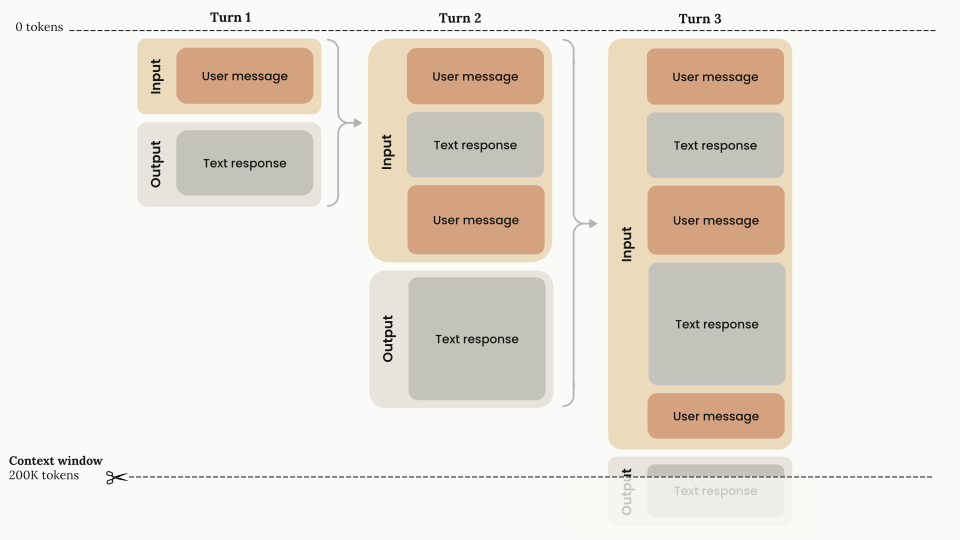
2121</Frame>
2222
23*1 Chat interfaces such as [claude.ai](https://claude.ai/) can also manage the context window on a rolling "first in, first out" basis.*
23*1 Chat interfaces such as [claude.ai](https://claude.ai/) can also manage the context window on a rolling “first in, first out” basis.*
2424
2525* **Progressive token accumulation:** As the conversation advances through turns, each user message and assistant response accumulates within the context window, and previous turns are preserved completely.
2626
from line 37
3737
3838Claude Fable 5.1, Claude Mythos 5.1, Claude Fable 5, Claude Mythos 5, Claude Opus 5.5, Claude Opus 5, Claude Opus 4.8, Claude Opus 4.7, Claude Opus 4.6, Claude Sonnet 5.5, Claude Sonnet 5, Claude Sonnet 4.6, Claude Haiku 5.5, and [Claude Mythos Preview](https://anthropic.com/glasswing) have a 1M-token context window. A single request to any of them can generate up to 128k output tokens (`max_tokens`). Other Claude models, including Claude Sonnet 4.5 (deprecated), have a 200k-token context window.
3939
40For every model with a 1M-token context window, 1M is the default: you don't need a beta header, and long-context requests are billed at [standard pricing](https://platform.claude.com/docs/en/about-claude/pricing#long-context-pricing), except on Claude Haiku 5.5, where prompts over 100,000 tokens cost more.
40For every model with a 1M-token context window, 1M is the default: you don’t need a beta header, and long-context requests are billed at [standard pricing](https://platform.claude.com/docs/en/about-claude/pricing#long-context-pricing), except on Claude Haiku 5.5, where prompts over 100,000 tokens cost more.
4141
4242A single request can include up to 600 images or PDF pages (100 for models with a 200k-token context window). If you send many images or large documents, you might reach [request size limits](https://platform.claude.com/docs/en/api/overview#request-size-limits) before the token limit.
4343
from line 57
5757 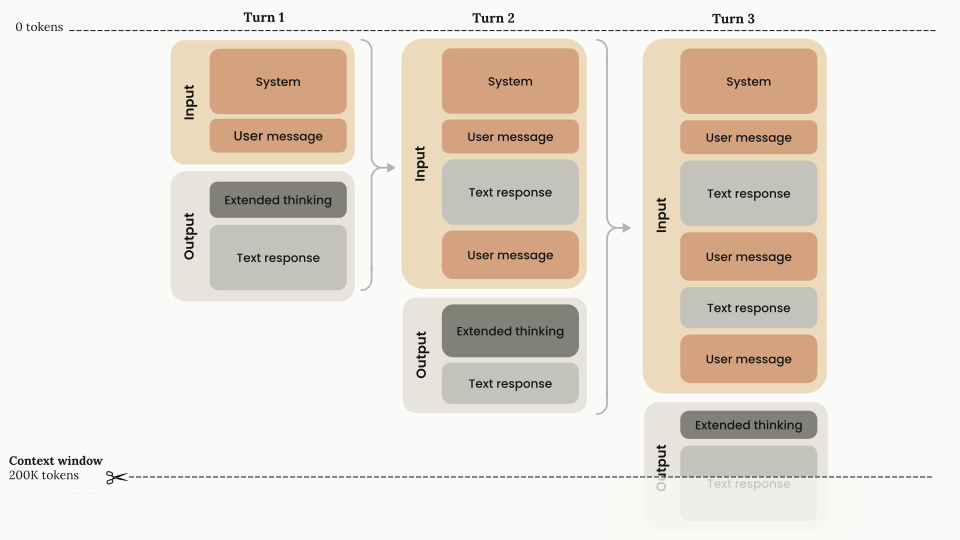
5858</Frame>
5959
60* **Stripping thinking blocks:** On models that strip previous thinking blocks, thinking blocks (shown in dark gray) are generated during each turn's output phase but are not carried forward as input tokens for subsequent turns. You do not need to strip the thinking blocks yourself: if you pass them back, the Claude API strips them automatically.
61* **Billing:** Thinking tokens are billed as output tokens once, when they are generated. On models that keep previous thinking blocks, the kept blocks are then part of later requests' input and are billed as input tokens, like the rest of the conversation history.
60* **Stripping thinking blocks:** On models that strip previous thinking blocks, thinking blocks (shown in dark gray) are generated during each turn’s output phase but are not carried forward as input tokens for subsequent turns. You do not need to strip the thinking blocks yourself: if you pass them back, the Claude API strips them automatically.
61* **Billing:** Thinking tokens are billed as output tokens once, when they are generated. On models that keep previous thinking blocks, the kept blocks are then part of later requests’ input and are billed as input tokens, like the rest of the conversation history.
6262
6363<Note>
6464 You can read more about the context window and thinking in the [Thinking](https://platform.claude.com/docs/en/build-with-claude/thinking) guide.
from line 107
107107
108108## Context awareness
109109
110Claude Sonnet 5, Claude Sonnet 4.6, Claude Sonnet 4.5 (deprecated), and Claude Haiku 4.5 have **context awareness:** these models track their remaining context window (their "token budget") throughout a conversation. This lets the model manage long-running tasks against the space that remains rather than guess how many tokens are left. Context awareness is automatic: there is nothing for you to enable, and you never send the tags shown in this section yourself. The API injects them.
110Claude Sonnet 5, Claude Sonnet 4.6, Claude Sonnet 4.5 (deprecated), and Claude Haiku 4.5 have **context awareness:** these models track their remaining context window (their “token budget”) throughout a conversation. This lets the model manage long-running tasks against the space that remains rather than guess how many tokens are left. Context awareness is automatic: there is nothing for you to enable, and you never send the tags shown in this section yourself. The API injects them.
111111
112112### How it works
113113
from line 127
127127
128128Image tokens are included in these budgets.
129129
130Claude Opus 4.7 and later Opus models, Claude Sonnet 5.5, Claude Fable 5.1, Claude Mythos 5.1, Claude Fable 5, Claude Mythos 5, and Claude Haiku 5.5 don't receive these injected tags. On these models, you can give the model an explicit budget with [task budgets](https://platform.claude.com/docs/en/build-with-claude/task-budgets), which are in beta.
130Claude Opus 4.7 and later Opus models, Claude Sonnet 5.5, Claude Fable 5.1, Claude Mythos 5.1, Claude Fable 5, Claude Mythos 5, and Claude Haiku 5.5 don’t receive these injected tags. On these models, you can give the model an explicit budget with [task budgets](https://platform.claude.com/docs/en/build-with-claude/task-budgets), which are in beta.
131131
132132<Tip>
133 For agents that span multiple sessions, design your state artifacts so that context recovery is fast when a new session starts. The [memory tool's multisession pattern](https://platform.claude.com/docs/en/agents-and-tools/tool-use/memory-tool#multisession-software-development-pattern) walks through a concrete approach. See also [Effective harnesses for long-running agents](https://www.anthropic.com/engineering/effective-harnesses-for-long-running-agents).
133 For agents that span multiple sessions, design your state artifacts so that context recovery is fast when a new session starts. The [memory tool’s multisession pattern](https://platform.claude.com/docs/en/agents-and-tools/tool-use/memory-tool#multisession-software-development-pattern) walks through a concrete approach. See also [Effective harnesses for long-running agents](https://www.anthropic.com/engineering/effective-harnesses-for-long-running-agents).
134134</Tip>
135135
136136For prompting guidance on using context awareness, see [Prompting best practices](https://platform.claude.com/docs/en/build-with-claude/prompt-engineering/claude-prompting-best-practices#context-awareness-and-multiwindow-workflows).
from line 148
148148
149149## Context window overflow behavior
150150
151If the input alone already exceeds the model's context window, the API returns a 400 `invalid_request_error` ("prompt is too long") on every model.
151If the input alone already exceeds the model’s context window, the API returns a 400 `invalid_request_error` (“prompt is too long”) on every model.
152152
153153On Claude 4.5 models and newer, if input tokens plus `max_tokens` exceeds the context window size, the API accepts the request. If generation then reaches the context window limit, it stops with `stop_reason: "model_context_window_exceeded"`. On earlier models, the API returns a [validation error](https://platform.claude.com/docs/en/api/errors) instead. To opt in to the `model_context_window_exceeded` behavior on those models, use the `model-context-window-exceeded-2025-08-26` beta header. See [Stop reasons and fallback](https://platform.claude.com/docs/en/build-with-claude/handling-stop-reasons) for details.
154154