
compaction-threshold changedbuild-with-claude/compaction-threshold
Nearest release: v2.1.280, published 20 hours after this site recorded the change. Shown because the two are within 24 hours of each other. Nothing here says the release caused the edit.
## Compatibility ## How compaction works ## Basic usage ## Parameters ### Trigger configuration ### Custom summarization instructions ### Pausing after compaction #### Enforcing a total token budget ## Working with compaction blocks ### Passing compaction blocks back ### Streaming ### Prompt caching #### Maximizing cache hits with system prompts ## Understanding usage ## Combining with other features ### Server tools ### Token counting ## Examples ## Current limitations ## Next steps
The whole hunk
3457 lines, new pageA whole new page. There's nothing to diff it against, so here is what it says.
---
title: Compaction at a token threshold
url: https://platform.claude.com/docs/en/build-with-claude/compaction-threshold
description: Have the API summarize older context automatically, inside an ordinary request, when the conversation reaches a token threshold you set.
---
## Compatibility
- Status: Beta
- [Beta header](https://platform.claude.com/docs/en/api/beta-headers): `compact-2026-01-12`
- [ZDR](https://platform.claude.com/docs/en/manage-claude/api-and-data-retention): eligible (excludes [Covered Models](https://platform.claude.com/docs/en/manage-claude/api-and-data-retention#model-specific-data-retention-requirements))
- Supported models: `claude-fable-5-1`, `claude-mythos-5-1`, `claude-fable-5`, `claude-mythos-5`, `claude-mythos-preview`, `claude-opus-5`, `claude-opus-4-8`, `claude-opus-4-7`, `claude-opus-4-6`, `claude-sonnet-5`, `claude-sonnet-4-6`
- Platforms: Claude API (beta), Claude Platform on AWS (beta), Amazon Bedrock (beta), Google Cloud (beta), Microsoft Foundry (beta)
Threshold compaction is the automatic kind of compaction: you set a token threshold on your ordinary requests, and the API summarizes older context partway through a request once the threshold is reached. It is supported alongside on-demand compaction, where you decide when the summary is written (see [Compaction on demand](https://platform.claude.com/docs/en/build-with-claude/compaction-on-demand)). To choose between them, see [Choose how to compact](https://platform.claude.com/docs/en/build-with-claude/compaction#choose-how-to-compact).
Compaction extends the effective context length for long-running conversations and tasks by automatically summarizing older context when approaching the context window limit. It also keeps the active context small: as a conversation grows, response quality degrades, so compaction replaces older content with a concise summary.
<Tip>
For a deeper look at why long contexts degrade and how compaction helps, see [Effective context engineering](https://www.anthropic.com/engineering/effective-context-engineering-for-ai-agents).
</Tip>
This is ideal for:
* Chat-based, multi-turn conversations where you want users to use one chat for a long period of time
* Task-oriented prompts that require a lot of follow-up work (often tool use) that might exceed the context window
## How compaction works
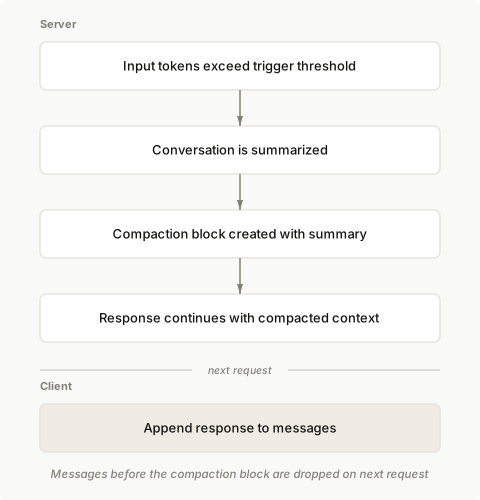
When compaction is enabled, Claude automatically summarizes your conversation when it reaches the configured token threshold. The API:
1. Detects when input tokens reach your specified trigger threshold.
2. Generates a summary of the current conversation.
3. Creates a `compaction` block containing the summary.
4. Continues the response with the compacted context.
On subsequent requests, append the response to your messages. The API automatically drops all content blocks prior to the `compaction` block, continuing the conversation from the summary.
## Basic usage
Enable compaction by adding the `compact_20260112` strategy to `context_management.edits` in your Messages API request.
<CodeGroup>
```bash cURL
curl https://api.anthropic.com/v1/messages \
-H "x-api-key: $ANTHROPIC_API_KEY" \
-H "anthropic-version: 2023-06-01" \
-H "anthropic-beta: compact-2026-01-12" \
-H "content-type: application/json" \
-d '{
"model": "claude-opus-5",
"max_tokens": 4096,
"messages": [
{
"role": "user",
"content": "Help me build a website"
}
],
"context_management": {
"edits": [
{
"type": "compact_20260112"
}
]
}
}'
```
```bash CLI
ant beta:messages create --beta compact-2026-01-12 <<'YAML'
model: claude-opus-5
max_tokens: 4096
messages:
- role: user
content: Help me build a website
context_management:
edits:
- type: compact_20260112
YAML
```
```python Python
client = anthropic.Anthropic()
messages = [{"role": "user", "content": "Help me build a website"}]
response = client.beta.messages.create(
betas=["compact-2026-01-12"],
model="claude-opus-5",
max_tokens=4096,
messages=messages,
context_management={"edits": [{"type": "compact_20260112"}]},
)
# Append the response (including any compaction block) to continue the conversation
messages.append({"role": "assistant", "content": response.content})
```
```typescript TypeScript
const client = new Anthropic();
const messages: Anthropic.Beta.Messages.BetaMessageParam[] = [
{ role: "user", content: "Help me build a website" }
];
const response = await client.beta.messages.create({
betas: ["compact-2026-01-12"],
model: "claude-opus-5",
max_tokens: 4096,
messages,
context_management: {
edits: [
{
type: "compact_20260112"
}
]
}
});
// Append the response (including any compaction block) to continue the conversation
messages.push({
role: "assistant",
content: response.content
});
```
```csharp C#
AnthropicClient client = new();
var messages = new List<BetaMessageParam>
{
new() { Role = Role.User, Content = "Help me build a website" }
};
var parameters = new MessageCreateParams
{
Betas = ["compact-2026-01-12"],
Model = "claude-opus-5",
MaxTokens = 4096,
Messages = messages,
ContextManagement = new BetaContextManagementConfig
{
Edits = [new BetaCompact20260112Edit()]
}
};
var response = await client.Beta.Messages.Create(parameters);
// Append the response (including any compaction block) to continue the conversation
messages.Add(new BetaMessageParam
{
Role = Role.Assistant,
Content = response.Content.Select(block => new BetaContentBlockParam(block.Json)).ToList()
});
Console.WriteLine(response);
```
```go Go
client := anthropic.NewClient()
messages := []anthropic.BetaMessageParam{
anthropic.NewBetaUserMessage(anthropic.NewBetaTextBlock("Help me build a website")),
}
response, err := client.Beta.Messages.New(context.TODO(), anthropic.BetaMessageNewParams{
Model: anthropic.ModelClaudeOpus5,
MaxTokens: 4096,
Messages: messages,
ContextManagement: anthropic.BetaContextManagementConfigParam{
Edits: []anthropic.BetaContextManagementConfigEditUnionParam{
{OfCompact20260112: &anthropic.BetaCompact20260112EditParam{}},
},
},
Betas: []anthropic.AnthropicBeta{"compact-2026-01-12"},
})
if err != nil {
log.Fatal(err)
}
// Append the response (including any compaction block) to continue the conversation
messages = append(messages, response.ToParam())
fmt.Println(response)
```
```java Java
import com.anthropic.models.beta.messages.BetaContextManagementConfig;
import com.anthropic.models.beta.messages.BetaCompact20260112Edit;
// ...
AnthropicClient client = AnthropicOkHttpClient.fromEnv();
MessageCreateParams params = MessageCreateParams.builder()
.addBeta("compact-2026-01-12")
.model("claude-opus-5")
.maxTokens(4096L)
.addUserMessage("Help me build a website")
.contextManagement(BetaContextManagementConfig.builder()
.addEdit(BetaCompact20260112Edit.builder().build())
.build())
.build();
BetaMessage response = client.beta().messages().create(params);
// Append the response (including any compaction block) to continue the conversation
// by including it in the next request's messages
System.out.println(response);
```
```php PHP
$client = new Client();
$messages = [
['role' => 'user', 'content' => 'Help me build a website']
];
$response = $client->beta->messages->create(
maxTokens: 4096,
messages: $messages,
model: 'claude-opus-5',
betas: ['compact-2026-01-12'],
contextManagement: [
'edits' => [
['type' => 'compact_20260112']
]
]
);
// Append the response (including any compaction block) to continue the conversation
$messages[] = ['role' => 'assistant', 'content' => $response->content];
echo json_encode($response, JSON_PRETTY_PRINT), PHP_EOL;
```
```ruby Ruby
client = Anthropic::Client.new
messages = [
{ role: "user", content: "Help me build a website" }
]
response = client.beta.messages.create(
betas: ["compact-2026-01-12"],
model: "claude-opus-5",
max_tokens: 4096,
messages: messages,
context_management: {
edits: [{ type: "compact_20260112" }]
}
)
# Append the response (including any compaction block) to continue the conversation
messages << { role: "assistant", content: response.content }
puts response
```
</CodeGroup>
## Parameters
| Parameter | Type | Default | Description |
| ------------------------ | ------- | ------------------------------------------- | ---------------------------------------------------------------------------------------------------------------------- |
| `type` | string | Required | Must be `"compact_20260112"` |
| `trigger` | object | `{"type": "input_tokens", "value": 150000}` | When to trigger compaction. `input_tokens` is the only supported trigger type. `value` must be at least 50,000 tokens. |
| `pause_after_compaction` | boolean | `false` | Whether to pause after generating the compaction summary |
| `instructions` | string | `null` | Custom summarization prompt. Completely replaces the default prompt when provided. |
### Trigger configuration
Configure when compaction triggers using the `trigger` parameter:
<CodeGroup>
```bash cURL
curl https://api.anthropic.com/v1/messages \
-H "x-api-key: $ANTHROPIC_API_KEY" \
-H "anthropic-version: 2023-06-01" \
-H "anthropic-beta: compact-2026-01-12" \
-H "content-type: application/json" \
-d '{
"model": "claude-opus-5",
"max_tokens": 4096,
"messages": [
{
"role": "user",
"content": "Hello, Claude"
}
],
"context_management": {
"edits": [
{
"type": "compact_20260112",
"trigger": {
"type": "input_tokens",
"value": 150000
}
}
]
}
}'
Cut at 300 lines. The page has the rest.
No line in this hunk matches that.