Follow Discord
Sweep 06 Nov 2026 · 01:32Z Build v2.1.319 537 read Stable v2.1.311 Latest v2.1.318 Next v2.1.319 Feeds RSS JSON llms.txt llms-full.txt Unofficial
One capture · api

One read of Claude Developer Platformapi-20261105T230715Z

124 pages moved out of 886 read.

Pages moved 124 significant first
Pages read 886 in this capture
Captured 23:07 UTC
Corpus hash 3c8e2c2885cd corpus-hash

What this read moved

26-50 of 124, page 2 of 5

This capture is too large to show at once. Changes 26-50 of 124 are below, significant first; the rest are on the following screens.

api/beta/organization/analytics/summaries/list Changed · +3 / -3 lines

from line 122
122122 
123123 - `chat_cowork_unified_daily_active_user_count: optional number or null`
124124 
125 Number of users with activity in Chat and Cowork unified on the requested day. Omitted from the response on deployments that do not offer Chat and Cowork unified.
125 Number of users with activity in Chat and Cowork unified on the requested day. Omitted from the response where Chat and Cowork unified is not available.
126126 
127127 - `chat_cowork_unified_monthly_active_user_count: optional number or null`
128128 
129 Number of users with activity in Chat and Cowork unified in the 28-day rolling window (30 days when the request filters by `rbac_group_id`). Omitted from the response on deployments that do not offer Chat and Cowork unified.
129 Number of users with activity in Chat and Cowork unified in the 28-day rolling window (30 days when the request filters by `rbac_group_id`). Omitted from the response where Chat and Cowork unified is not available.
130130 
131131 - `chat_cowork_unified_weekly_active_user_count: optional number or null`
132132 
133 Number of users with activity in Chat and Cowork unified in the 7-day rolling window. Omitted from the response on deployments that do not offer Chat and Cowork unified.
133 Number of users with activity in Chat and Cowork unified in the 7-day rolling window. Omitted from the response where Chat and Cowork unified is not available.
134134 
135135 - `chat_daily_active_user_count: optional number or null`
136136 

api/beta/organization/analytics/usage Changed · +3 / -3 lines

from line 605
605605 
606606 - `product: string or null`
607607 
608 Product surface that produced the usage or cost. Null unless product is in `group_by[]`; it can also be null on grouped rows whose usage cannot be attributed to a known surface. Values include `chat`, `claude_code`, `cowork`, `office_agent`, `claude_in_chrome`, `claude_design`, `claude_tag`, and `chat_cowork_unified`. `claude_tag` is Claude Tag, the Claude product in Slack. `chat_cowork_unified` is Chat and Cowork unified, Cowork's features inside claude.ai chat: chat and Cowork usage by a member who has it turned on is reported under this value instead of `chat` or `cowork`. It is accepted as a filter only on deployments that offer Chat and Cowork unified. Some unattributed usage is reported as "other".
608 Product surface that produced the usage or cost. Null unless product is in `group_by[]`; it can also be null on grouped rows whose usage cannot be attributed to a known surface. Values include `chat`, `claude_code`, `cowork`, `office_agent`, `claude_in_chrome`, `claude_design`, `claude_tag`, and `chat_cowork_unified`. `claude_tag` is Claude Tag, the Claude product in Slack. `chat_cowork_unified` is Chat and Cowork unified, Cowork's features inside claude.ai chat: chat and Cowork usage by a member who has it turned on is reported under this value instead of `chat` or `cowork`. It is accepted as a filter only where Chat and Cowork unified is available. Some unattributed usage is reported as "other".
609609 
610610 - `rbac_group_id: string or null`
611611 
from line 952
952952 
953953 - `product: string or null`
954954 
955 Product surface that produced the usage or cost. Null unless product is in `group_by[]`; it can also be null on grouped rows whose usage cannot be attributed to a known surface. Values include `chat`, `claude_code`, `cowork`, `office_agent`, `claude_in_chrome`, `claude_design`, `claude_tag`, and `chat_cowork_unified`. `claude_tag` is Claude Tag, the Claude product in Slack. `chat_cowork_unified` is Chat and Cowork unified, Cowork's features inside claude.ai chat: chat and Cowork usage by a member who has it turned on is reported under this value instead of `chat` or `cowork`. It is accepted as a filter only on deployments that offer Chat and Cowork unified. Some unattributed usage is reported as "other".
955 Product surface that produced the usage or cost. Null unless product is in `group_by[]`; it can also be null on grouped rows whose usage cannot be attributed to a known surface. Values include `chat`, `claude_code`, `cowork`, `office_agent`, `claude_in_chrome`, `claude_design`, `claude_tag`, and `chat_cowork_unified`. `claude_tag` is Claude Tag, the Claude product in Slack. `chat_cowork_unified` is Chat and Cowork unified, Cowork's features inside claude.ai chat: chat and Cowork usage by a member who has it turned on is reported under this value instead of `chat` or `cowork`. It is accepted as a filter only where Chat and Cowork unified is available. Some unattributed usage is reported as "other".
956956 
957957 - `rbac_group_id: string or null`
958958 
from line 1212
12121212 
12131213 - `product: string or null`
12141214 
1215 Product surface that produced the usage or cost. Null unless product is in `group_by[]`; it can also be null on grouped rows whose usage cannot be attributed to a known surface. Values include `chat`, `claude_code`, `cowork`, `office_agent`, `claude_in_chrome`, `claude_design`, `claude_tag`, and `chat_cowork_unified`. `claude_tag` is Claude Tag, the Claude product in Slack. `chat_cowork_unified` is Chat and Cowork unified, Cowork's features inside claude.ai chat: chat and Cowork usage by a member who has it turned on is reported under this value instead of `chat` or `cowork`. It is accepted as a filter only on deployments that offer Chat and Cowork unified. Some unattributed usage is reported as "other".
1215 Product surface that produced the usage or cost. Null unless product is in `group_by[]`; it can also be null on grouped rows whose usage cannot be attributed to a known surface. Values include `chat`, `claude_code`, `cowork`, `office_agent`, `claude_in_chrome`, `claude_design`, `claude_tag`, and `chat_cowork_unified`. `claude_tag` is Claude Tag, the Claude product in Slack. `chat_cowork_unified` is Chat and Cowork unified, Cowork's features inside claude.ai chat: chat and Cowork usage by a member who has it turned on is reported under this value instead of `chat` or `cowork`. It is accepted as a filter only where Chat and Cowork unified is available. Some unattributed usage is reported as "other".
12161216 
12171217 - `rbac_group_id: string or null`
12181218 

api/beta/organization/external_keys Changed · +5 / -5 lines

from line 133
133133 
134134 - `geo: string`
135135 
136 Data residency geo. Selects the region that handles this key's encrypt/decrypt roundtrips.
136 Data residency geo. Selects the region this key is used in.
137137 
138138 - `provider_config: BetaAWSExternalKeyConfig or BetaGCPExternalKeyConfig or BetaAzureExternalKeyConfig`
139139 
from line 301
301301 
302302 - `geo: string`
303303 
304 Data residency geo. Selects the region that handles this key's encrypt/decrypt roundtrips.
304 Data residency geo. Selects the region this key is used in.
305305 
306306 - `provider_config: BetaAWSExternalKeyConfig or BetaGCPExternalKeyConfig or BetaAzureExternalKeyConfig`
307307 
from line 469
469469 
470470 - `geo: string`
471471 
472 Data residency geo. Selects the region that handles this key's encrypt/decrypt roundtrips.
472 Data residency geo. Selects the region this key is used in.
473473 
474474 - `provider_config: BetaAWSExternalKeyConfig or BetaGCPExternalKeyConfig or BetaAzureExternalKeyConfig`
475475 
from line 698
698698 
699699 - `geo: string`
700700 
701 Data residency geo. Selects the region that handles this key's encrypt/decrypt roundtrips.
701 Data residency geo. Selects the region this key is used in.
702702 
703703 - `provider_config: BetaAWSExternalKeyConfig or BetaGCPExternalKeyConfig or BetaAzureExternalKeyConfig`
704704 
from line 1023
10231023 
10241024 - `geo: string`
10251025 
1026 Data residency geo. Selects the region that handles this key's encrypt/decrypt roundtrips.
1026 Data residency geo. Selects the region this key is used in.
10271027 
10281028 - `provider_config: BetaAWSExternalKeyConfig or BetaGCPExternalKeyConfig or BetaAzureExternalKeyConfig`
10291029 

api/messages Changed · +9 / -18 lines

This page is larger than the 256 KiB this site keeps, so one side of the diff below stops where the stored text does.

from line 4201
42014201 the thinking-block delimiter tokens.
42024202 
42034203 Reflects the raw reasoning the model produced, not the (possibly shorter)
4204 summarized thinking text returned in the response body. Computed by
4205 re-tokenizing the raw reasoning text, so it may differ from the model's exact
4204 summarized thinking text returned in the response body. It may differ from the model's exact
42064205 generation count by a small number of tokens. Always ≤ `output_tokens`;
42074206 `output_tokens - thinking_tokens` approximates the non-reasoning output.
42084207 
from line 8213
82148213 
82158214 - `content: WebSearchToolResultBlockParamContent`
82168215 
8217 -
8216 - `WebSearchToolResultBlockItem = array of WebSearchResultBloc

api/messages/batches Changed · +4 / -8 lines

This page is larger than the 256 KiB this site keeps, so one side of the diff below stops where the stored text does.

from line 5037
50375037 the thinking-block delimiter tokens.
50385038 
50395039 Reflects the raw reasoning the model produced, not the (possibly shorter)
5040 summarized thinking text returned in the response body. Computed by
5041 re-tokenizing the raw reasoning text, so it may differ from the model's exact
5040 summarized thinking text returned in the response body. It may differ from the model's exact
50425041 generation count by a small number of tokens. Always ≤ `output_tokens`;
50435042 `output_tokens - thinking_tokens` approximates the non-reasoning output.
50445043 
from line 6589
65906589 the thinking-block delimiter tokens.
65916590 
65926591 Reflects the raw reasoning the model produced, not the (possibly shorter)
6593 summarized thinking text returned in the response body. Computed by
6594 re-tokenizing the raw reasoning text, so it may differ from the model's exact
6592 summarized thinking text returned in the response body. It may differ from the model's exact
65956593 generation count by a small number of tokens. Always ≤ `output_tokens`;
65966594 `output_tokens - thinking_tokens` approximates the non-reasoning output.
65976595 
from line 7913
79157913 the thinking-block delimiter tokens.
79167914 
79177915 Reflects the raw reasoning the model produced, not the (possibly shorter)
7918 summarized thinking text returned in the response body. Computed by
7919 re-tokenizing the raw reasoning text, so it may differ from the model's exact
7916 summarized thinking text returned in the response body. It may differ from the model's exact
79207917 generation count by a small number of tokens. Always ≤ `output_tokens`;
79217918 `output_tokens - thinking_tokens` approximates the non-reasoning output.
79227919 
from line 8360
83638360 
83648361 - `ServerToolCaller object`
83658362 
8366 Tool invocation generated by a server
8363 Tool invocation generated by a server-side tool.
8364 
8365 - `type: "code_execution_20250825"`
8366 
8367 - `tool_id: string`
8368 
8369 pattern: ^srvtoolu_[a-zA-Z0-9_]+$
8370 
8371 - `ServerToolCaller20260120 object`
8372 
8373

api/organization Changed · +15 / -15 lines

This page is larger than the 256 KiB this site keeps, so one side of the diff below stops where the stored text does.

from line 824
824824 
825825 - `geo: string`
826826 
827 Data residency geo. Selects the region that handles this key's encrypt/decrypt roundtrips.
827 Data residency geo. Selects the region this key is used in.
828828 
829829 - `provider_config: AWSExternalKeyConfig or GCPExternalKeyConfig or AzureExternalKeyConfig`
830830 
from line 992
992992 
993993 - `geo: string`
994994 
995 Data residency geo. Selects the region that handles this key's encrypt/decrypt roundtrips.
995 Data residency geo. Selects the region this key is used in.
996996 
997997 - `provider_config: AWSExternalKeyConfig or GCPExternalKeyConfig or AzureExternalKeyConfig`
998998 
from line 1160
11601160 
11611161 - `geo: string`
11621162 
1163 Data residency geo. Selects the region that handles this key's encrypt/decrypt roundtrips.
1163 Data residency geo. Selects the region this key is used in.
11641164 
11651165 - `provider_config: AWSExternalKeyConfig or GCPExternalKeyConfig or AzureExternalKeyConfig`
11661166 
from line 1389
13891389 
13901390 - `geo: string`
13911391 
1392 Data residency geo. Selects the region that handles this key's encrypt/decrypt roundtrips.
1392 Data residency geo. Selects the region this key is used in.
13931393 
13941394 - `provider_config: AWSExternalKeyConfig or GCPExternalKeyConfig or AzureExternalKeyConfig`
13951395 
from line 9005
90059005 
90069006 - `chat_cowork_unified_daily_active_user_count: optional number or null`
90079007 
9008 Number of users with activity in Chat and Cowork unified on the requested day. Omitted from the response on deployments that do not offer Chat and Cowork unified.
9008 Number of users with activity in Chat and Cowork unified on the requested day. Omitted from the response where Chat and Cowork unified is not available.
90099009 
90109010 - `chat_cowork_unified_monthly_active_user_count: optional number or null`
90119011 
9012 Number of users with activity in Chat and Cowork unified in the 28-day rolling window (30 days when the request filters by `rbac_group_id`). Omitted from the response on deployments that do not offer Chat and Cowork unified.
9012 Number of users with activity in Chat and Cowork unified in the 28-day rolling window (30 days when the request filters by `rbac_group_id`). Omitted from the response where Chat and Cowork unified is not available.
90139013 
90149014 - `chat_cowork_unified_weekly_active_user_count: optional number or null`
90159015 
9016 Number of users with activity in Chat and Cowork unified in the 7-day rolling window. Omitted from the response on deployments that do not offer Chat and Cowork unified.
9016 Number of users with activity in Chat and Cowork unified in the 7-day rolling window. Omitted from the response where Chat and Cowork unified is not available.
90179017 
90189018 - `chat_daily_active_user_count: optional number or null`
90199019 
from line 9277
92779277 
92789278 - `artifacts_created_count: number`
92799279 
9280 Number of artifacts created in Claude Code sessions: an artifact counts once, on the day a session first saves it. Counted from 2026-08-17; 0 on earlier days. Exact in date-range mode: a creation belongs to exactly one day, so the per-day counts never overlap and their sum over the window is the exact count of distinct c
9280 Number of artifacts created in Claude Code sessions: an artifact counts once, on the day a session first saves it. Counted from 2026-08-17; 0 on earlier days. Exact in date-range mode: a creation belongs to exactly one day, so the per-day counts never overlap and their sum over the window is the exact count of distinct creations in it.
9281 
9282 - `commit_count: number`
9283 
9284 Number of commits made via Claude Code
9285 
9286 - `distinct_session_count: number or null`
9287 
9288

api/organization/analytics Changed · +18 / -18 lines

from line 541
541541 
542542 - `chat_cowork_unified_metrics: optional AnalyticsConnectorChatCoworkUnifiedMetrics or null`
543543 
544 Connector use recorded while members had Chat and Cowork unified (Cowork's features inside claude.ai chat) turned on, split into chat conversations and Cowork sessions. A count is null in date-range mode where it cannot be computed. Omitted from the response on deployments that do not offer Chat and Cowork unified.
544 Connector use recorded while members had Chat and Cowork unified (Cowork's features inside claude.ai chat) turned on, split into chat conversations and Cowork sessions. A count is null in date-range mode where it cannot be computed. Omitted from the response where Chat and Cowork unified is not available.
545545 
546546 - `chat: AnalyticsConnectorChatCoworkUnifiedChatMetrics`
547547 
from line 982
982982 
983983 - `chat_cowork_unified_metrics: optional AnalyticsPluginChatCoworkUnifiedMetrics or null`
984984 
985 Plugin use recorded while members had Chat and Cowork unified (Cowork's features inside claude.ai chat) turned on. A count is null in date-range mode where it cannot be computed. Omitted from the response on deployments that do not offer Chat and Cowork unified.
985 Plugin use recorded while members had Chat and Cowork unified (Cowork's features inside claude.ai chat) turned on. A count is null in date-range mode where it cannot be computed. Omitted from the response where Chat and Cowork unified is not available.
986986 
987987 - `distinct_session_plugin_used_count: number or null`
988988 
from line 1209
12091209 
12101210 - `chat_cowork_unified_daily_active_user_count: optional number or null`
12111211 
1212 Number of users with activity in Chat and Cowork unified on the requested day. Omitted from the response on deployments that do not offer Chat and Cowork unified.
1212 Number of users with activity in Chat and Cowork unified on the requested day. Omitted from the response where Chat and Cowork unified is not available.
12131213 
12141214 - `chat_cowork_unified_monthly_active_user_count: optional number or null`
12151215 
1216 Number of users with activity in Chat and Cowork unified in the 28-day rolling window (30 days when the request filters by `rbac_group_id`). Omitted from the response on deployments that do not offer Chat and Cowork unified.
1216 Number of users with activity in Chat and Cowork unified in the 28-day rolling window (30 days when the request filters by `rbac_group_id`). Omitted from the response where Chat and Cowork unified is not available.
12171217 
12181218 - `chat_cowork_unified_weekly_active_user_count: optional number or null`
12191219 
1220 Number of users with activity in Chat and Cowork unified in the 7-day rolling window. Omitted from the response on deployments that do not offer Chat and Cowork unified.
1220 Number of users with activity in Chat and Cowork unified in the 7-day rolling window. Omitted from the response where Chat and Cowork unified is not available.
12211221 
12221222 - `chat_daily_active_user_count: optional number or null`
12231223 
from line 1381
13811381 
13821382 - `chat_cowork_unified_metrics: optional AnalyticsSkillChatCoworkUnifiedMetrics or null`
13831383 
1384 Skill use recorded while members had Chat and Cowork unified (Cowork's features inside claude.ai chat) turned on, split into chat conversations and Cowork sessions. A count is null in date-range mode where it cannot be computed. Omitted from the response on deployments that do not offer Chat and Cowork unified.
1384 Skill use recorded while members had Chat and Cowork unified (Cowork's features inside claude.ai chat) turned on, split into chat conversations and Cowork sessions. A count is null in date-range mode where it cannot be computed. Omitted from the response where Chat and Cowork unified is not available.
13851385 
13861386 - `chat: AnalyticsSkillChatCoworkUnifiedChatMetrics`
13871387 
from line 1916
19161916 
19171917 - `chat_cowork_unified_metrics: optional AnalyticsChatCoworkUnifiedMetrics or null`
19181918 
1919 Activity recorded while the member had Chat and Cowork unified (Cowork's features inside claude.ai chat) turned on, split into `chat` (chat activity) and `sessions` (Cowork activity). Omitted from the response on deployments that do not offer Chat and Cowork unified.
1919 Activity recorded while the member had Chat and Cowork unified (Cowork's features inside claude.ai chat) turned on, split into `chat` (chat activity) and `sessions` (Cowork activity). Omitted from the response where Chat and Cowork unified is not available.
19201920 
19211921 - `chat: AnalyticsChatCoworkUnifiedChatMetrics`
19221922 
from line 2185
21852185 
21862186 - `chat_cowork_unified_daily_active_user_count: optional number or null`
21872187 
2188 Number of users with activity in Chat and Cowork unified on the requested day. Omitted from the response on deployments that do not offer Chat and Cowork unified.
2188 Number of users with activity in Chat and Cowork unified on the requested day. Omitted from the response where Chat and Cowork unified is not available.
21892189 
21902190 - `chat_cowork_unified_monthly_active_user_count: optional number or null`
21912191 
2192 Number of users with activity in Chat and Cowork unified in the 28-day rolling window (30 days when the request filters by `rbac_group_id`). Omitted from the response on deployments that do not offer Chat and Cowork unified.
2192 Number of users with activity in Chat and Cowork unified in the 28-day rolling window (30 days when the request filters by `rbac_group_id`). Omitted from the response where Chat and Cowork unified is not available.
21932193 
21942194 - `chat_cowork_unified_weekly_active_user_count: optional number or null`
21952195 
2196 Number of users with activity in Chat and Cowork unified in the 7-day rolling window. Omitted from the response on deployments that do not offer Chat and Cowork unified.
2196 Number of users with activity in Chat and Cowork unified in the 7-day rolling window. Omitted from the response where Chat and Cowork unified is not available.
21972197 
21982198 - `chat_daily_active_user_count: optional number or null`
21992199 
from line 2699
26992699 
27002700 - `chat_cowork_unified_metrics: optional AnalyticsChatCoworkUnifiedMetrics or null`
27012701 
2702 Activity recorded while the member had Chat and Cowork unified (Cowork's features inside claude.ai chat) turned on, split into `chat` (chat activity) and `sessions` (Cowork activity). Omitted from the response on deployments that do not offer Chat and Cowork unified.
2702 Activity recorded while the member had Chat and Cowork unified (Cowork's features inside claude.ai chat) turned on, split into `chat` (chat activity) and `sessions` (Cowork activity). Omitted from the response where Chat and Cowork unified is not available.
27032703 
27042704 - `chat: AnalyticsChatCoworkUnifiedChatMetrics`
27052705 
from line 3231
32313231 
32323232- `filter: optional array of string`
32333233 
3234 Filters as `dimension:value`, e.g. `filter[]=rbac_group_id:{id}`. Repeat the param for OR within a dimension and across dimensions for AND. Supported dimensions on this endpoint: `connector_name`, `product`, `rbac_group_id`, `user_id`. Value forms: `connector_name` matches case-insensitively, a display name such as 'GitHub MCP' also matches its normalized stored form ('github'), and for rows whose `connector_name` is an opaque connector id the connector's display name (`connector_display_name`) also matches; `product` is one of `chat_cowork_unified`, `chat`, `claude_code`, `cowork`, or `office_agent`; `rbac_group_id` takes the tagged id (`rbac_group_...`, as emitted in responses and by the spend-limits API) or a bare group UUID, and matches users who held the group at any point during each covered UTC day (time-of-usage attribution); `user_id` takes a tagged user id (`user_...`), as emitted in responses. An unsupported dimension returns 400. At most 100 entries. `chat_cowork_unified` is accepted as a `product` value only on deployments that offer Chat and Cowork unified.
3234 Filters as `dimension:value`, e.g. `filter[]=rbac_group_id:{id}`. Repeat the param for OR within a dimension and across dimensions for AND. Supported dimensions on this endpoint: `connector_name`, `product`, `rbac_group_id`, `user_id`. Value forms: `connector_name` matches case-insensitively, a display name such as 'GitHub MCP' also matches its normalized stored form ('github'), and for rows whose `connector_name` is an opaque connector id the connector's display name (`connector_display_name`) also matches; `product` is one of `chat_cowork_unified`, `chat`, `claude_code`, `cowork`, or `office_agent`; `rbac_group_id` takes the tagged id (`rbac_group_...`, as emitted in responses and by the spend-limits API) or a bare group UUID, and matches users who held the group at any point during each covered UTC day (time-of-usage attribution); `user_id` takes a tagged user id (`user_...`), as emitted in responses. An unsupported dimension returns 400. At most 100 entries. `chat_cowork_unified` is accepted as a `product` value only where Chat and Cowork unified is available.
32353235 
32363236 maxItems: 100
32373237 
from line 3369
33693369 
33703370 - `chat_cowork_unified_metrics: optional AnalyticsConnectorChatCoworkUnifiedMetrics or null`
33713371 
3372 Connector use recorded while members had Chat and Cowork unified (Cowork's features inside claude.ai chat) turned on, split into chat conversations and Cowork sessions. A count is null in date-range mode where it cannot be computed. Omitted from the response on deployments that do not offer Chat and Cowork unified.
3372 Connector use recorded while members had Chat and Cowork unified (Cowork's features inside claude.ai chat) turned on, split into chat conversations and Cowork sessions. A count is null in date-range mode where it cannot be computed. Omitted from the response where Chat and Cowork unified is not available.
33733373 
33743374 - `chat: AnalyticsConnectorChatCoworkUnifiedChatMetrics`
33753375 
from line 3508
35083508 
35093509- `filter: optional array of string`
35103510 
3511 Filters as `dimension:value`, e.g. `filter[]=rbac_group_id:{id}`. Repeat the param for OR within a dimension and across dimensions for AND. Supported dimensions on this endpoint: `plugin_name`, `product`, `rbac_group_id`, `user_id`. Value forms: `plugin_name` matches case-insensitively; `product` is `chat_cowork_unified`, `claude_code`, or `cowork` (the only surfaces with plugin attribution); `rbac_group_id` takes the tagged id (`rbac_group_...`, as emitted in responses and by the spend-limits API) or a bare group UUID, and matches users who held the group at any point during each covered UTC day (time-of-usage attribution); `user_id` takes a tagged user id (`user_...`), as emitted in responses. An unsupported dimension returns 400. At most 100 entries. `chat_cowork_unified` is accepted as a `product` value only on deployments that offer Chat and Cowork unified.
3511 Filters as `dimension:value`, e.g. `filter[]=rbac_group_id:{id}`. Repeat the param for OR within a dimension and across dimensions for AND. Supported dimensions on this endpoint: `plugin_name`, `product`, `rbac_group_id`, `user_id`. Value forms: `plugin_name` matches case-insensitively; `product` is `chat_cowork_unified`, `claude_code`, or `cowork` (the only surfaces with plugin attribution); `rbac_group_id` takes the tagged id (`rbac_group_...`, as emitted in responses and by the spend-limits API) or a bare group UUID, and matches users who held the group at any point during each covered UTC day (time-of-usage attribution); `user_id` takes a tagged user id (`user_...`), as emitted in responses. An unsupported dimension returns 400. At most 100 entries. `chat_cowork_unified` is accepted as a `product` value only where Chat and Cowork unified is available.
35123512 
35133513 maxItems: 100
35143514 
from line 3602
36023602 
36033603 - `chat_cowork_unified_metrics: optional AnalyticsPluginChatCoworkUnifiedMetrics or null`
36043604 
3605 Plugin use recorded while members had Chat and Cowork unified (Cowork's features inside claude.ai chat) turned on. A count is null in date-range mode where it cannot be computed. Omitted from the response on deployments that do not offer Chat and Cowork unified.
3605 Plugin use recorded while members had Chat and Cowork unified (Cowork's features inside claude.ai chat) turned on. A count is null in date-range mode where it cannot be computed. Omitted from the response where Chat and Cowork unified is not available.
36063606 
36073607 - `distinct_session_plugin_used_count: number or null`
36083608 
from line 3697
36973697 
36983698- `filter: optional array of string`
36993699 
3700 Filters as `dimension:value`, e.g. `filter[]=rbac_group_id:{id}`. Repeat the param for OR within a dimension and across dimensions for AND. Supported dimensions on this endpoint: `product`, `rbac_group_id`, `share_status`, `skill_name`, `user_id`. Value forms: `product` is one of `chat_cowork_unified`, `chat`, `claude_code`, `cowork`, or `office_agent`; `rbac_group_id` takes the tagged id (`rbac_group_...`, as emitted in responses and by the spend-limits API) or a bare group UUID, and matches users who held the group at any point during each covered UTC day (time-of-usage attribution); `share_status` is one of `organization`, `private`, or `public`; `skill_name` matches case-insensitively; `user_id` takes a tagged user id (`user_...`), as emitted in responses. An unsupported dimension returns 400. At most 100 entries. `chat_cowork_unified` is accepted as a `product` value only on deployments that offer Chat and Cowork unified.
3700 Filters as `dimension:value`, e.g. `filter[]=rbac_group_id:{id}`. Repeat the param for OR within a dimension and across dimensions for AND. Supported dimensions on this endpoint: `product`, `rbac_group_id`, `share_status`, `skill_name`, `user_id`. Value forms: `product` is one of `chat_cowork_unified`, `chat`, `claude_code`, `cowork`, or `office_agent`; `rbac_group_id` takes the tagged id (`rbac_group_...`, as emitted in responses and by the spend-limits API) or a bare group UUID, and matches users who held the group at any point during each covered UTC day (time-of-usage attribution); `share_status` is one of `organization`, `private`, or `public`; `skill_name` matches case-insensitively; `user_id` takes a tagged user id (`user_...`), as emitted in responses. An unsupported dimension returns 400. At most 100 entries. `chat_cowork_unified` is accepted as a `product` value only where Chat and Cowork unified is available.
37013701 
37023702 maxItems: 100
37033703 
from line 3845
38453845 
38463846 - `chat_cowork_unified_metrics: optional AnalyticsSkillChatCoworkUnifiedMetrics or null`
38473847 
3848 Skill use recorded while members had Chat and Cowork unified (Cowork's features inside claude.ai chat) turned on, split into chat conversations and Cowork sessions. A count is null in date-range mode where it cannot be computed. Omitted from the response on deployments that do not offer Chat and Cowork unified.
3848 Skill use recorded while members had Chat and Cowork unified (Cowork's features inside claude.ai chat) turned on, split into chat conversations and Cowork sessions. A count is null in date-range mode where it cannot be computed. Omitted from the response where Chat and Cowork unified is not available.
38493849 
38503850 - `chat: AnalyticsSkillChatCoworkUnifiedChatMetrics`
38513851 
from line 3973
39733973 
39743974- `filter: optional array of string`
39753975 
3976 Filters as `dimension:value`, e.g. `filter[]=rbac_group_id:{id}`. Repeat the param for OR within a dimension and across dimensions for AND. Supported dimensions on this endpoint: `artifact_type`, `is_shared`, `product`, `rbac_group_id`, `user_id`. Value forms: `artifact_type` is a canonical artifact MIME type (e.g. `text/markdown`) or `other`; `is_shared` is `true` or `false`; `product` is `chat_cowork_unified`, `chat`, `claude_code`, or `cowork` (the surfaces that create artifacts); `rbac_group_id` takes the tagged id (`rbac_group_...`, as emitted in responses and by the spend-limits API) or a bare group UUID, and matches users who held the group at any point during each covered UTC day (time-of-usage attribution); `user_id` takes a tagged user id (`user_...`), as emitted in responses. An unsupported dimension returns 400. At most 100 entries. `chat_cowork_unified` is accepted as a `product` value only on deployments that offer Chat and Cowork unified.
3976 Filters as `dimension:value`, e.g. `filter[]=rbac_group_id:{id}`. Repeat the param for OR within a dimension and across dimensions for AND. Supported dimensions on this endpoint: `artifact_type`, `is_shared`, `product`, `rbac_group_id`, `user_id`. Value forms: `artifact_type` is a canonical artifact MIME type (e.g. `text/markdown`) or `other`; `is_shared` is `true` or `false`; `product` is `chat_cowork_unified`, `chat`, `claude_code`, or `cowork` (the surfaces that create artifacts); `rbac_group_id` takes the tagged id (`rbac_group_...`, as emitted in responses and by the spend-limits API) or a bare group UUID, and matches users who held the group at any point during each covered UTC day (time-of-usage attribution); `user_id` takes a tagged user id (`user_...`), as emitted in responses. An unsupported dimension returns 400. At most 100 entries. `chat_cowork_unified` is accepted as a `product` value only where Chat and Cowork unified is available.
39773977 
39783978 maxItems: 100
39793979 

api/organization/analytics/summaries Changed · +3 / -3 lines

from line 124
124124 
125125 - `chat_cowork_unified_daily_active_user_count: optional number or null`
126126 
127 Number of users with activity in Chat and Cowork unified on the requested day. Omitted from the response on deployments that do not offer Chat and Cowork unified.
127 Number of users with activity in Chat and Cowork unified on the requested day. Omitted from the response where Chat and Cowork unified is not available.
128128 
129129 - `chat_cowork_unified_monthly_active_user_count: optional number or null`
130130 
131 Number of users with activity in Chat and Cowork unified in the 28-day rolling window (30 days when the request filters by `rbac_group_id`). Omitted from the response on deployments that do not offer Chat and Cowork unified.
131 Number of users with activity in Chat and Cowork unified in the 28-day rolling window (30 days when the request filters by `rbac_group_id`). Omitted from the response where Chat and Cowork unified is not available.
132132 
133133 - `chat_cowork_unified_weekly_active_user_count: optional number or null`
134134 
135 Number of users with activity in Chat and Cowork unified in the 7-day rolling window. Omitted from the response on deployments that do not offer Chat and Cowork unified.
135 Number of users with activity in Chat and Cowork unified in the 7-day rolling window. Omitted from the response where Chat and Cowork unified is not available.
136136 
137137 - `chat_daily_active_user_count: optional number or null`
138138 

api/organization/analytics/summaries/list Changed · +3 / -3 lines

from line 122
122122 
123123 - `chat_cowork_unified_daily_active_user_count: optional number or null`
124124 
125 Number of users with activity in Chat and Cowork unified on the requested day. Omitted from the response on deployments that do not offer Chat and Cowork unified.
125 Number of users with activity in Chat and Cowork unified on the requested day. Omitted from the response where Chat and Cowork unified is not available.
126126 
127127 - `chat_cowork_unified_monthly_active_user_count: optional number or null`
128128 
129 Number of users with activity in Chat and Cowork unified in the 28-day rolling window (30 days when the request filters by `rbac_group_id`). Omitted from the response on deployments that do not offer Chat and Cowork unified.
129 Number of users with activity in Chat and Cowork unified in the 28-day rolling window (30 days when the request filters by `rbac_group_id`). Omitted from the response where Chat and Cowork unified is not available.
130130 
131131 - `chat_cowork_unified_weekly_active_user_count: optional number or null`
132132 
133 Number of users with activity in Chat and Cowork unified in the 7-day rolling window. Omitted from the response on deployments that do not offer Chat and Cowork unified.
133 Number of users with activity in Chat and Cowork unified in the 7-day rolling window. Omitted from the response where Chat and Cowork unified is not available.
134134 
135135 - `chat_daily_active_user_count: optional number or null`
136136 

api/organization/external_keys Changed · +5 / -5 lines

from line 133
133133 
134134 - `geo: string`
135135 
136 Data residency geo. Selects the region that handles this key's encrypt/decrypt roundtrips.
136 Data residency geo. Selects the region this key is used in.
137137 
138138 - `provider_config: AWSExternalKeyConfig or GCPExternalKeyConfig or AzureExternalKeyConfig`
139139 
from line 301
301301 
302302 - `geo: string`
303303 
304 Data residency geo. Selects the region that handles this key's encrypt/decrypt roundtrips.
304 Data residency geo. Selects the region this key is used in.
305305 
306306 - `provider_config: AWSExternalKeyConfig or GCPExternalKeyConfig or AzureExternalKeyConfig`
307307 
from line 469
469469 
470470 - `geo: string`
471471 
472 Data residency geo. Selects the region that handles this key's encrypt/decrypt roundtrips.
472 Data residency geo. Selects the region this key is used in.
473473 
474474 - `provider_config: AWSExternalKeyConfig or GCPExternalKeyConfig or AzureExternalKeyConfig`
475475 
from line 698
698698 
699699 - `geo: string`
700700 
701 Data residency geo. Selects the region that handles this key's encrypt/decrypt roundtrips.
701 Data residency geo. Selects the region this key is used in.
702702 
703703 - `provider_config: AWSExternalKeyConfig or GCPExternalKeyConfig or AzureExternalKeyConfig`
704704 
from line 1023
10231023 
10241024 - `geo: string`
10251025 
1026 Data residency geo. Selects the region that handles this key's encrypt/decrypt roundtrips.
1026 Data residency geo. Selects the region this key is used in.
10271027 
10281028 - `provider_config: AWSExternalKeyConfig or GCPExternalKeyConfig or AzureExternalKeyConfig`
10291029 

api/rate-limits Changed · +77 / -88 lines

from line 86
8686 
8787## Rate limits
8888 
89The rate limits for the Messages API are measured in requests per minute (RPM), input tokens per minute (ITPM), and output tokens per minute (OTPM) for each model class. If you exceed any of the rate limits, you will get a [429 error](https://platform.claude.com/docs/en/api/errors) describing which rate limit was exceeded. When the response has a `retry-after` header, wait that many seconds before retrying.
89The rate limits for the Messages API are measured in requests per minute (RPM), input tokens per minute (ITPM), and output tokens per minute (OTPM) for each model class. If you exceed any of the rate limits, you get a [429 error](https://platform.claude.com/docs/en/api/errors) describing which rate limit was exceeded. When the response has a `retry-after` header, wait that many seconds before retrying.
9090 
9191<Note>
9292 You might also encounter 429 errors because of acceleration limits on the API if your organization has a sharp increase in usage. To avoid hitting acceleration limits, increase your traffic gradually and maintain consistent usage patterns.
from line 94
9494 
9595### Cache-aware ITPM
9696 
97Many API providers use a combined “tokens per minute” (TPM) limit that might include all tokens, both cached and uncached, input and output. **For most Claude models, only uncached input tokens count toward your ITPM rate limits.** This is a key advantage that makes the rate limits effectively higher than they might initially appear.
97Many API providers use a combined “tokens per minute” (TPM) limit that might include all tokens, both cached and uncached, input and output. **Claude’s default ITPM rate limits count only uncached input tokens.** This is a key advantage that makes the rate limits effectively higher than they might initially appear.
9898 
9999ITPM rate limits are estimated at the beginning of each request, and the estimate is adjusted during the request to reflect the actual number of input tokens used.
100100 
from line 102
102102 
103103* `input_tokens` (tokens after the last cache breakpoint) ✓ **Count toward ITPM**
104104* `cache_creation_input_tokens` (tokens being written to cache) ✓ **Count toward ITPM**
105* `cache_read_input_tokens` (tokens read from cache) ✗ **Do NOT count toward ITPM** for most models
105* `cache_read_input_tokens` (tokens read from cache) ✗ **Do NOT count toward ITPM**
106106 
107107<Note>
108108 The `input_tokens` field only represents tokens that appear **after your last cache breakpoint**, not all input tokens in your request. To calculate total input tokens:
from line 111
111111 total_input_tokens = cache_read_input_tokens + cache_creation_input_tokens + input_tokens
112112 ```
113113 
114 This means when you have cached content, `input_tokens` will typically be much smaller than your total input. For example, with a 200k-token cached document and a 50-token user question, you’d see `input_tokens: 50` even though the total input is 200,050 tokens.
114 This means when you have cached content, `input_tokens` is typically much smaller than your total input. For example, with a 200k-token cached document and a 50-token user question, you’d see `input_tokens: 50` even though the total input is 200,050 tokens.
115115 
116 For rate limit purposes on most models, only `input_tokens` + `cache_creation_input_tokens` count toward your ITPM limit, making [prompt caching](https://platform.claude.com/docs/en/build-with-claude/prompt-caching) an effective way to increase your effective throughput.
116 For rate limit purposes, only `input_tokens` + `cache_creation_input_tokens` count toward your ITPM limit, making [prompt caching](https://platform.claude.com/docs/en/build-with-claude/prompt-caching) an effective way to increase your throughput.
117117</Note>
118118 
119**Example:** With a 2,000,000 ITPM limit and an 80 percent cache hit rate, you could effectively process 10,000,000 total input tokens per minute (2M uncached + 8M cached), because cached tokens don’t count toward your rate limit.
119**Example:** With a 2,000,000 ITPM limit and an 80 percent cache hit rate, you could effectively process 10,000,000 total input tokens per minute (2M uncached + 8M cached), because cached tokens don’t count toward your rate limit. Those cached tokens are billed at the [cache read rate](https://platform.claude.com/docs/en/build-with-claude/prompt-caching#pricing), a fraction of the base input price.
120120 
121<Note>
122 Claude Haiku 3.5 (marked with footnote 4 in the following rate limit tables) also counts `cache_read_input_tokens` toward ITPM rate limits.
121To get the highest throughput within your rate limits, cache repeated content such as system instructions and prompts, large context documents, tool definitions, and conversation history; see [Prompt caching](https://platform.claude.com/docs/en/build-with-claude/prompt-caching) for guidance. With effective caching, you can substantially increase your actual throughput without raising your rate limits. Monitor your cache hit rate on the [Usage](https://platform.claude.com/usage) page in the Claude Console to tune your caching strategy.
123122 
124 For all other models, cached input tokens do not count toward rate limits and are billed at the [cache read rate](https://platform.claude.com/docs/en/build-with-claude/prompt-caching#pricing), a fraction of the base input price. This means you can achieve significantly higher effective throughput by using [prompt caching](https://platform.claude.com/docs/en/build-with-claude/prompt-caching).
125</Note>
126 
127To get the highest throughput within your rate limits, cache repeated content such as system instructions and prompts, large context documents, tool definitions, and conversation history; see [prompt caching](https://platform.claude.com/docs/en/build-with-claude/prompt-caching) for guidance. With effective caching, you can substantially increase your actual throughput without raising your rate limits. Monitor your cache hit rate on the [Usage](https://platform.claude.com/usage) page in the Claude Console to tune your caching strategy.
128 
129123OTPM rate limits are evaluated in real time as output tokens are produced, counting only the actual tokens generated. The `max_tokens` parameter does not factor into OTPM rate limit calculations, so there is no rate limit downside to setting a higher `max_tokens` value.
130124 
131125Each row in the following tables has its own RPM, ITPM, and OTPM limits. Some rows cover several models that share one limit; see the notes under the tables. You can check your current rate limits and behavior on the [Rate limits](https://platform.claude.com/usage/limits) page in the Claude Console, or read the configured limits and set workspace limits programmatically with the [Rate Limits API](https://platform.claude.com/docs/en/manage-claude/rate-limits-api).
132126 
133127<Note>
134 Rate limits are currently shared across all `inference_geo` values. Requests with `inference_geo: "us"` and `inference_geo: "global"` draw from the same rate limit pool.
128 Rate limits are shared across all `inference_geo` values. Requests with `inference_geo: "us"` and `inference_geo: "global"` draw from the same rate limit pool.
135129</Note>
136130 
137131<Tabs>
138132 <Tab title="Start tier">
139 | Model | Maximum requests per minute (RPM) | Maximum input tokens per minute (ITPM) | Maximum output tokens per minute (OTPM) |
140 | ----------------------------------------------------------------------------------------------------------------------------------------------------------- | --------------------------------- | -------------------------------------- | --------------------------------------- |
141 | Claude Fable 5.x<sup>1</sup> | 4,000 | 500,000 | 100,000 |
142 | Claude Opus 5.5 | 4,000 | 2,000,000 | 400,000 |
143 | Claude Opus 5 | 1,000 | 2,000,000 | 400,000 |
144 | Claude Opus 4.x<sup>2</sup> | 1,000 | 2,000,000 | 400,000 |
145 | Claude Sonnet 5.5 | 4,000 | 2,000,000 | 400,000 |
146 | Claude Sonnet 5 | 1,000 | 2,000,000 | 400,000 |
147 | Claude Sonnet 4.x<sup>3</sup> | 1,000 | 2,000,000 | 400,000 |
148 | Claude Haiku 5.5 | 4,000 | 2,000,000 | 400,000 |
149 | Claude Haiku 4.5 | 1,000 | 2,000,000 | 400,000 |
150 | Claude Haiku 3.5 ([retired, except on Claude Models on Google Cloud (Google managed)](https://platform.claude.com/docs/en/about-claude/model-deprecations)) | 1,000 | 100,000<sup>4</sup> | 20,000 |
133 | Model | Maximum requests per minute (RPM) | Maximum input tokens per minute (ITPM) | Maximum output tokens per minute (OTPM) |
134 | ----------------------------- | --------------------------------- | -------------------------------------- | --------------------------------------- |
135 | Claude Fable 5.x<sup>1</sup> | 4,000 | 500,000 | 100,000 |
136 | Claude Opus 5.5 | 4,000 | 2,000,000 | 400,000 |
137 | Claude Opus 5 | 1,000 | 2,000,000 | 400,000 |
138 | Claude Opus 4.x<sup>2</sup> | 1,000 | 2,000,000 | 400,000 |
139 | Claude Sonnet 5.5 | 4,000 | 2,000,000 | 400,000 |
140 | Claude Sonnet 5 | 1,000 | 2,000,000 | 400,000 |
141 | Claude Sonnet 4.x<sup>3</sup> | 1,000 | 2,000,000 | 400,000 |
142 | Claude Haiku 5.5 | 4,000 | 2,000,000 | 400,000 |
143 | Claude Haiku 4.5 | 1,000 | 2,000,000 | 400,000 |
151144 </Tab>
152145 
153146 <Tab title="Build tier">
154 | Model | Maximum requests per minute (RPM) | Maximum input tokens per minute (ITPM) | Maximum output tokens per minute (OTPM) |
155 | ----------------------------------------------------------------------------------------------------------------------------------------------------------- | --------------------------------- | -------------------------------------- | --------------------------------------- |
156 | Claude Fable 5.x<sup>1</sup> | 10,000 | 1,500,000 | 300,000 |
157 | Claude Opus 5.5 | 10,000 | 5,000,000 | 1,000,000 |
158 | Claude Opus 5 | 5,000 | 5,000,000 | 1,000,000 |
159 | Claude Opus 4.x<sup>2</sup> | 5,000 | 5,000,000 | 1,000,000 |
160 | Claude Sonnet 5.5 | 10,000 | 5,000,000 | 1,000,000 |
161 | Claude Sonnet 5 | 5,000 | 5,000,000 | 1,000,000 |
162 | Claude Sonnet 4.x<sup>3</sup> | 5,000 | 5,000,000 | 1,000,000 |
163 | Claude Haiku 5.5 | 10,000 | 5,000,000 | 1,000,000 |
164 | Claude Haiku 4.5 | 5,000 | 5,000,000 | 1,000,000 |
165 | Claude Haiku 3.5 ([retired, except on Claude Models on Google Cloud (Google managed)](https://platform.claude.com/docs/en/about-claude/model-deprecations)) | 2,000 | 200,000<sup>4</sup> | 40,000 |
147 | Model | Maximum requests per minute (RPM) | Maximum input tokens per minute (ITPM) | Maximum output tokens per minute (OTPM) |
148 | ----------------------------- | --------------------------------- | -------------------------------------- | --------------------------------------- |
149 | Claude Fable 5.x<sup>1</sup> | 10,000 | 1,500,000 | 300,000 |
150 | Claude Opus 5.5 | 10,000 | 5,000,000 | 1,000,000 |
151 | Claude Opus 5 | 5,000 | 5,000,000 | 1,000,000 |
152 | Claude Opus 4.x<sup>2</sup> | 5,000 | 5,000,000 | 1,000,000 |
153 | Claude Sonnet 5.5 | 10,000 | 5,000,000 | 1,000,000 |
154 | Claude Sonnet 5 | 5,000 | 5,000,000 | 1,000,000 |
155 | Claude Sonnet 4.x<sup>3</sup> | 5,000 | 5,000,000 | 1,000,000 |
156 | Claude Haiku 5.5 | 10,000 | 5,000,000 | 1,000,000 |
157 | Claude Haiku 4.5 | 5,000 | 5,000,000 | 1,000,000 |
166158 </Tab>
167159 
168160 <Tab title="Scale tier">
169 | Model | Maximum requests per minute (RPM) | Maximum input tokens per minute (ITPM) | Maximum output tokens per minute (OTPM) |
170 | ----------------------------------------------------------------------------------------------------------------------------------------------------------- | --------------------------------- | -------------------------------------- | --------------------------------------- |
171 | Claude Fable 5.x<sup>1</sup> | 13,000 | 4,000,000 | 800,000 |
172 | Claude Opus 5.5 | 13,000 | 10,000,000 | 2,000,000 |
173 | Claude Opus 5 | 10,000 | 10,000,000 | 2,000,000 |
174 | Claude Opus 4.x<sup>2</sup> | 10,000 | 10,000,000 | 2,000,000 |
175 | Claude Sonnet 5.5 | 13,000 | 10,000,000 | 2,000,000 |
176 | Claude Sonnet 5 | 10,000 | 10,000,000 | 2,000,000 |
177 | Claude Sonnet 4.x<sup>3</sup> | 10,000 | 10,000,000 | 2,000,000 |
178 | Claude Haiku 5.5 | 13,000 | 10,000,000 | 2,000,000 |
179 | Claude Haiku 4.5 | 10,000 | 10,000,000 | 2,000,000 |
180 | Claude Haiku 3.5 ([retired, except on Claude Models on Google Cloud (Google managed)](https://platform.claude.com/docs/en/about-claude/model-deprecations)) | 4,000 | 400,000<sup>4</sup> | 80,000 |
161 | Model | Maximum requests per minute (RPM) | Maximum input tokens per minute (ITPM) | Maximum output tokens per minute (OTPM) |
162 | ----------------------------- | --------------------------------- | -------------------------------------- | --------------------------------------- |
163 | Claude Fable 5.x<sup>1</sup> | 13,000 | 4,000,000 | 800,000 |
164 | Claude Opus 5.5 | 13,000 | 10,000,000 | 2,000,000 |
165 | Claude Opus 5 | 10,000 | 10,000,000 | 2,000,000 |
166 | Claude Opus 4.x<sup>2</sup> | 10,000 | 10,000,000 | 2,000,000 |
167 | Claude Sonnet 5.5 | 13,000 | 10,000,000 | 2,000,000 |
168 | Claude Sonnet 5 | 10,000 | 10,000,000 | 2,000,000 |
169 | Claude Sonnet 4.x<sup>3</sup> | 10,000 | 10,000,000 | 2,000,000 |
170 | Claude Haiku 5.5 | 13,000 | 10,000,000 | 2,000,000 |
171 | Claude Haiku 4.5 | 10,000 | 10,000,000 | 2,000,000 |
181172 </Tab>
182173 
183174 <Tab title="Custom tier">
from line 180
189180 
190181*<sup>2 Opus rate limit is a total limit that applies to combined traffic across Claude Opus 4.8, Opus 4.7, Opus 4.6, and Opus 4.5. Claude Opus 5.5 and Claude Opus 5 each have a separate rate limit and are not part of this combined bucket.</sup>*
191182 
192*<sup>3 Sonnet 4.x rate limit is a total limit that applies to combined traffic across Sonnet 4.6 and Sonnet 4.5 ([deprecated](https://platform.claude.com/docs/en/about-claude/model-deprecations)). Claude Sonnet 5.5 and Claude Sonnet 5 each have a separate rate limit and are not part of this combined bucket.</sup>*
183*<sup>3 Sonnet 4.x rate limit is a total limit that applies to combined traffic across Sonnet 4.6 and Sonnet 4.5 (deprecated; see [Model deprecations](https://platform.claude.com/docs/en/about-claude/model-deprecations)). Claude Sonnet 5.5 and Claude Sonnet 5 each have a separate rate limit and are not part of this combined bucket.</sup>*
193184 
194*<sup>4 Limit counts `cache_read_input_tokens` toward ITPM usage.</sup>*
195 
196185### Message Batches API
197186 
198The Message Batches API has its own set of rate limits, which are shared across all models. These include a requests per minute (RPM) limit to all API endpoints and a limit on the number of batch requests that can be in the processing queue at the same time. A “batch request” here refers to part of a Message Batch. You can create a Message Batch containing thousands of batch requests, each of which counts toward this limit. A batch request is considered part of the processing queue when it has yet to be successfully processed by the model.
187The Message Batches API has its own set of rate limits, which are shared across all models. These include a requests per minute (RPM) limit to all API endpoints and a limit on the number of batch requests that can be in the processing queue at the same time. A “batch request” here refers to part of a Message Batch. You can create a Message Batch containing thousands of batch requests, each of which counts toward this limit. A batch request stays in the processing queue until the model has successfully processed it.
199188 
200189<Tabs>
201190 <Tab title="Start tier">
from line 258
269258 
270259For more about workspaces, see [Workspaces](https://platform.claude.com/docs/en/manage-claude/workspaces).
271260 
272To protect Workspaces in your Organization from potential overuse, you can set custom spend and rate limits for each Workspace.
261To protect workspaces in your organization from potential overuse, you can set custom spend and rate limits for each workspace.
273262 
274Example: If your Organization’s limit is 40,000 input tokens per minute and 8,000 output tokens per minute, you might limit one Workspace to 30,000 input tokens per minute. This protects other Workspaces from potential overuse and ensures a more equitable distribution of resources across your Organization. The remaining unused tokens per minute (or more, if that Workspace doesn’t use the limit) are then available for other Workspaces to use.
263Example: If your organization’s limit is 40,000 input tokens per minute and 8,000 output tokens per minute, you might limit one workspace to 30,000 input tokens per minute. This protects other workspaces from potential overuse and shares resources more evenly across your organization. The other 10,000 input tokens per minute, plus any of the 30,000 that workspace doesn’t use, stay available to other workspaces.
275264 
276265Note:
277266 
278* You can’t set spend limits on the default Workspace.
279* If not set, Workspace limits match the Organization’s limit.
267* You can’t set spend limits on the default workspace.
268* If not set, workspace limits match the organization’s limit.
280269* Workspace limits are set for each limiter type (such as requests per minute, input tokens per minute, or output tokens per minute).
281* Organization-wide limits always apply, even if Workspace limits add up to more.
270* Organization-wide limits always apply, even if workspace limits add up to more.
282271 
283272To read your current organization and workspace rate limits or set workspace rate limits programmatically, use the [Rate Limits API](https://platform.claude.com/docs/en/manage-claude/rate-limits-api).
284273 
285274## Response headers
286275 
287The API response includes headers that show you the rate limit enforced, current usage, and when the limit will be reset.
276The API response includes headers that show you the rate limit enforced, current usage, and when the limit resets.
288277 
289278The following headers are returned:
290279 
291| Header | Description |
292| --------------------------------------------- | -------------------------------------------------------------------------------------------------------------------------------------------------------------------------------------------------------------------------------------------------------------- |
293| `retry-after` | The number of seconds to wait until you can retry the request. Earlier retries will fail. Not every 429 carries it; the spend-cap 429 never does (see [Reaching your spend cap](https://platform.claude.com/docs/en/api/rate-limits#reaching-your-spend-cap)). |
294| `anthropic-ratelimit-requests-limit` | The maximum number of requests allowed within any rate limit period. |
295| `anthropic-ratelimit-requests-remaining` | The number of requests remaining before being rate limited. |
296| `anthropic-ratelimit-requests-reset` | The time when the request rate limit will be fully replenished, provided in RFC 3339 format. |
297| `anthropic-ratelimit-tokens-limit` | The maximum number of tokens allowed within any rate limit period. |
298| `anthropic-ratelimit-tokens-remaining` | The number of tokens remaining (rounded to the nearest thousand) before being rate limited. |
299| `anthropic-ratelimit-tokens-reset` | The time when the token rate limit will be fully replenished, provided in RFC 3339 format. |
300| `anthropic-ratelimit-input-tokens-limit` | The maximum number of input tokens allowed within any rate limit period. |
301| `anthropic-ratelimit-input-tokens-remaining` | The number of input tokens remaining (rounded to the nearest thousand) before being rate limited. |
302| `anthropic-ratelimit-input-tokens-reset` | The time when the input token rate limit will be fully replenished, provided in RFC 3339 format. |
303| `anthropic-ratelimit-output-tokens-limit` | The maximum number of output tokens allowed within any rate limit period. |
304| `anthropic-ratelimit-output-tokens-remaining` | The number of output tokens remaining (rounded to the nearest thousand) before being rate limited. |
305| `anthropic-ratelimit-output-tokens-reset` | The time when the output token rate limit will be fully replenished, provided in RFC 3339 format. |
306| `anthropic-priority-input-tokens-limit` | The maximum number of Priority Tier input tokens allowed within any rate limit period. (Priority Tier only) |
307| `anthropic-priority-input-tokens-remaining` | The number of Priority Tier input tokens remaining (rounded to the nearest thousand) before being rate limited. (Priority Tier only) |
308| `anthropic-priority-input-tokens-reset` | The time when the Priority Tier input token rate limit will be fully replenished, provided in RFC 3339 format. (Priority Tier only) |
309| `anthropic-priority-output-tokens-limit` | The maximum number of Priority Tier output tokens allowed within any rate limit period. (Priority Tier only) |
310| `anthropic-priority-output-tokens-remaining` | The number of Priority Tier output tokens remaining (rounded to the nearest thousand) before being rate limited. (Priority Tier only) |
311| `anthropic-priority-output-tokens-reset` | The time when the Priority Tier output token rate limit will be fully replenished, provided in RFC 3339 format. (Priority Tier only) |
280| Header | Description |
281| --------------------------------------------- | --------------------------------------------------------------------------------------------------------------------------------------------------------------------------------------------------------------------------------------------------------- |
282| `retry-after` | The number of seconds to wait until you can retry the request. Earlier retries fail. Not every 429 carries it; the spend-cap 429 never does (see [Reaching your spend cap](https://platform.claude.com/docs/en/api/rate-limits#reaching-your-spend-cap)). |
283| `anthropic-ratelimit-requests-limit` | The maximum number of requests allowed within any rate limit period. |
284| `anthropic-ratelimit-requests-remaining` | The number of requests remaining before being rate limited. |
285| `anthropic-ratelimit-requests-reset` | The time when the request rate limit is fully replenished, provided in RFC 3339 format. |
286| `anthropic-ratelimit-tokens-limit` | The maximum number of tokens allowed within any rate limit period. |
287| `anthropic-ratelimit-tokens-remaining` | The number of tokens remaining (rounded to the nearest thousand) before being rate limited. |
288| `anthropic-ratelimit-tokens-reset` | The time when the token rate limit is fully replenished, provided in RFC 3339 format. |
289| `anthropic-ratelimit-input-tokens-limit` | The maximum number of input tokens allowed within any rate limit period. |
290| `anthropic-ratelimit-input-tokens-remaining` | The number of input tokens remaining (rounded to the nearest thousand) before being rate limited. |
291| `anthropic-ratelimit-input-tokens-reset` | The time when the input token rate limit is fully replenished, provided in RFC 3339 format. |
292| `anthropic-ratelimit-output-tokens-limit` | The maximum number of output tokens allowed within any rate limit period. |
293| `anthropic-ratelimit-output-tokens-remaining` | The number of output tokens remaining (rounded to the nearest thousand) before being rate limited. |
294| `anthropic-ratelimit-output-tokens-reset` | The time when the output token rate limit is fully replenished, provided in RFC 3339 format. |
295| `anthropic-priority-input-tokens-limit` | The maximum number of Priority Tier input tokens allowed within any rate limit period. (Priority Tier only) |
296| `anthropic-priority-input-tokens-remaining` | The number of Priority Tier input tokens remaining (rounded to the nearest thousand) before being rate limited. (Priority Tier only) |
297| `anthropic-priority-input-tokens-reset` | The time when the Priority Tier input token rate limit is fully replenished, provided in RFC 3339 format. (Priority Tier only) |
298| `anthropic-priority-output-tokens-limit` | The maximum number of Priority Tier output tokens allowed within any rate limit period. (Priority Tier only) |
299| `anthropic-priority-output-tokens-remaining` | The number of Priority Tier output tokens remaining (rounded to the nearest thousand) before being rate limited. (Priority Tier only) |
300| `anthropic-priority-output-tokens-reset` | The time when the Priority Tier output token rate limit is fully replenished, provided in RFC 3339 format. (Priority Tier only) |
312301 
313The `anthropic-ratelimit-tokens-*` headers display the values for the most restrictive limit currently in effect. For instance, if you have exceeded the Workspace per-minute token limit, the headers will contain the Workspace per-minute token rate limit values. If Workspace limits do not apply, the headers will return the total tokens remaining, where total is the sum of input and output tokens. This approach ensures that you have visibility into the most relevant constraint on your current API usage. To see which Workspace a request counted against, read the `anthropic-workspace-id` [response header](https://platform.claude.com/docs/en/api/overview#response-headers), which carries the ID of the Workspace that your API key or access token resolved to.
302The `anthropic-ratelimit-tokens-*` headers display the values for the most restrictive limit currently in effect. For instance, if you have exceeded the workspace per-minute token limit, the headers contain the workspace per-minute token rate limit values. If workspace limits do not apply, the headers return the total tokens remaining, where total is the sum of input and output tokens. To see which workspace a request counted against, read the `anthropic-workspace-id` [response header](https://platform.claude.com/docs/en/api/overview#response-headers), which carries the ID of the workspace that your API key or access token resolved to.
314303 

build-with-claude/claude-in-amazon-bedrock Changed · +8 / -6 lines

from line 4
44description: Access Claude models through Amazon Bedrock with AWS-native authentication, billing, and security boundaries.
55---
66 
7This guide walks you through setting up and making API calls to Claude in Amazon Bedrock. Claude in Amazon Bedrock runs on AWS-managed infrastructure with zero operator access (Anthropic personnel have no access to the inference infrastructure), letting you build sensitive applications entirely inside the AWS security boundary while using the same Messages API shape you use with Anthropic’s first-party API.
7This guide walks you through setting up and making API calls to Claude in Amazon Bedrock. Claude in Amazon Bedrock runs on AWS-managed infrastructure with zero operator access: Anthropic personnel have no access to the inference infrastructure. You can build sensitive applications entirely inside the AWS security boundary, with the same Messages API shape you use with the Claude API.
88 
99<Note>
10 This page covers Claude in Amazon Bedrock, which serves Claude through the Messages API at `/anthropic/v1/messages` on AWS-managed infrastructure. The previous Amazon Bedrock integration (the `InvokeModel` and `Converse` APIs with ARN-versioned model identifiers) remains available and is documented at [Claude on Amazon Bedrock (Opus 4.6 and earlier)](https://platform.claude.com/docs/en/build-with-claude/claude-on-amazon-bedrock-legacy). For an Anthropic-operated alternative on AWS with AWS Marketplace billing and typically same-day feature access, see [Claude Platform on AWS](https://platform.claude.com/docs/en/build-with-claude/claude-platform-on-aws).
10 This page covers Claude in Amazon Bedrock, which serves Claude through the Messages API at `/anthropic/v1/messages` on AWS-managed infrastructure. The `InvokeModel` and `Converse` APIs with ARN-versioned model identifiers are documented at [Claude on Amazon Bedrock (Opus 4.6 and earlier)](https://platform.claude.com/docs/en/build-with-claude/claude-on-amazon-bedrock-legacy). For an Anthropic-operated alternative on AWS with AWS Marketplace billing, see [Claude Platform on AWS](https://platform.claude.com/docs/en/build-with-claude/claude-platform-on-aws).
1111</Note>
1212 
1313## Access
from line 69
6969 
7070## Install an SDK
7171 
72Anthropic’s [client SDKs](https://platform.claude.com/docs/en/cli-sdks-libraries/overview) support Claude in Amazon Bedrock through a Bedrock-specific package or module.
72The [client SDK](https://platform.claude.com/docs/en/cli-sdks-libraries/overview) supports Claude in Amazon Bedrock through a Bedrock-specific package or module.
7373 
7474<Tabs>
7575 <Tab title="Python">
from line 139
139139 
140140## Making your first request
141141 
142The endpoint follows the pattern `https://bedrock-mantle.{region}.api.aws/anthropic/v1/messages`. Unlike the `InvokeModel`-based integration, this endpoint uses standard SSE streaming and the same request body shape as Anthropic’s first-party API.
142The endpoint follows the pattern `https://bedrock-mantle.{region}.api.aws/anthropic/v1/messages`. It uses standard SSE streaming and the same request body shape as the Claude API.
143143 
144The SDK resolves credentials and region using the standard AWS precedence: constructor arguments, then environment variables (`AWS_ACCESS_KEY_ID`, `AWS_SECRET_ACCESS_KEY`, `AWS_SESSION_TOKEN`, `AWS_REGION`), then the AWS config file and credential chain (SSO, assumed roles, ECS task role, IMDS).
144Pass the region when you create the client, or set the `AWS_REGION` environment variable. If you do neither, the Python, TypeScript, C#, Go, PHP, and Ruby SDKs try `AWS_DEFAULT_REGION`. The Java SDK reads the environment only when you call `BedrockMantleBackend.fromEnv()`, which uses the [default AWS Region provider chain](https://docs.aws.amazon.com/sdk-for-java/latest/developer-guide/region-selection.html). That chain also checks your AWS config file and EC2 instance metadata.
145 
146For credentials, the client uses what you pass when you create it. Otherwise, the `AWS_BEARER_TOKEN_BEDROCK` environment variable takes priority over the client’s AWS credential chain, which includes the `AWS_ACCESS_KEY_ID`, `AWS_SECRET_ACCESS_KEY`, and `AWS_SESSION_TOKEN` environment variables.
145147 
146148<Tabs>
147149 <Tab title="cURL">

build-with-claude/claude-platform-on-aws Changed · +27 / -23 lines

from line 7
77Claude Platform on AWS gives you the full Anthropic platform experience, including the Messages API, Agent Skills, code execution, and beta features, accessible through your AWS account. Unlike [Amazon Bedrock](https://platform.claude.com/docs/en/build-with-claude/claude-in-amazon-bedrock), where AWS operates the inference stack, Anthropic operates Claude Platform on AWS. AWS provides the authentication layer (SigV4 or API key), IAM-based access control, and billing integration through AWS Marketplace.
88 
99<Note>
10 The Anthropic SDKs support Claude Platform on AWS.
10 The SDK supports Claude Platform on AWS.
1111</Note>
1212 
1313## How the platform integration works
from line 27
2727| **Who operates the stack** | Anthropic | AWS | AWS |
2828| **API surface** | Claude API (`/v1/{endpoint}`) | Messages API at `/anthropic/v1/messages` | Bedrock Converse / InvokeModel |
2929| **Feature availability** | Typically same-day as Claude API (see [feature limitations](https://platform.claude.com/docs/en/build-with-claude/claude-platform-on-aws#features-not-supported)) | Follows the Amazon Bedrock release schedule | Follows the Amazon Bedrock release schedule |
30| **Agent Skills** | Available | Not available (requires code execution) | Not available |
3130| **Beta features** | Pass through with `anthropic-beta` headers (see [feature limitations](https://platform.claude.com/docs/en/build-with-claude/claude-platform-on-aws#features-not-supported)) | The beta features Amazon Bedrock supports, through the `anthropic-beta` header | The beta features Amazon Bedrock supports, through the `anthropic_beta` field of the InvokeModel request body |
3231| **Authentication** | AWS IAM / SigV4 or API key | AWS IAM / SigV4 | AWS IAM / SigV4 or bearer token |
3332| **Billing** | AWS Marketplace | AWS (native service) | AWS (native service) |
from line 40
4140 
4241[AWS PrivateLink](https://docs.aws.amazon.com/vpc/latest/privatelink/what-is-privatelink.html) is supported for connecting your VPC to the Claude Platform on AWS endpoint (see [Connect through AWS PrivateLink](https://platform.claude.com/docs/en/build-with-claude/claude-platform-on-aws#connect-through-aws-privatelink)).
4342 
44**When to choose Bedrock:** Organizations in regulated industries that require FedRAMP High, IL4, IL5, or HIPAA-ready compliance, or that need AWS to be the sole data processor, should use [Claude in Amazon Bedrock](https://platform.claude.com/docs/en/build-with-claude/claude-in-amazon-bedrock). Bedrock runs entirely on AWS-controlled infrastructure with AWS as the operating party.
43**When to choose Bedrock:** Organizations in regulated industries that require FedRAMP High, IL4, IL5, or HIPAA readiness, or that need AWS to be the sole data processor, should use [Claude in Amazon Bedrock](https://platform.claude.com/docs/en/build-with-claude/claude-in-amazon-bedrock). Bedrock runs entirely on AWS-controlled infrastructure with AWS as the operating party.
4544 
4645**Which offering are you using?** Claude is available through several distinct products:
4746 
from line 135
136135 
137136Ensure you have:
138137 
1391. An active AWS account with a subscription to Claude Platform on AWS (see [Set up your account](https://platform.claude.com/docs/en/build-with-claude/claude-platform-on-aws#set-up-your-account))
1402. The [AWS CLI](https://docs.aws.amazon.com/cli/latest/userguide/cli-chap-welcome.html) installed and configured
1413. **Outbound web identity federation enabled** on your AWS account, a one-time setup step (see [Enable outbound web identity federation](https://platform.claude.com/docs/en/build-with-claude/claude-platform-on-aws#enable-outbound-web-identity-federation))
1424. Your workspace ID (see [Obtain your workspace ID](https://platform.claude.com/docs/en/build-with-claude/claude-platform-on-aws#obtain-your-workspace-id))
1435. IAM permission to call the API: the `aws-external-anthropic:CreateInference` action on your workspace, plus the `sts:GetWebIdentityToken` and `sts:TagGetWebIdentityToken` actions (see [IAM policies](https://platform.claude.com/docs/en/build-with-claude/claude-platform-on-aws#iam-policies))
1446. IAM permission for the `aws-external-anthropic:CallWithBearerToken` action if you authenticate with an API key (see [API key authentication](https://platform.claude.com/docs/en/build-with-claude/claude-platform-on-aws#api-key-authentication))
1381. An active AWS account with a subscription to Claude Platform on AWS (see [Set up your account](https://platform.claude.com/docs/en/build-with-claude/claude-platform-on-aws#set-up-your-account)).
1392. The [AWS CLI](https://docs.aws.amazon.com/cli/latest/userguide/cli-chap-welcome.html) installed and configured.
1403. **Outbound web identity federation enabled** on your AWS account, a one-time setup step (see [Enable outbound web identity federation](https://platform.claude.com/docs/en/build-with-claude/claude-platform-on-aws#enable-outbound-web-identity-federation)).
1414. Your workspace ID (see [Obtain your workspace ID](https://platform.claude.com/docs/en/build-with-claude/claude-platform-on-aws#obtain-your-workspace-id)).
1425. IAM permission to call the API: the `aws-external-anthropic:CreateInference` action on your workspace, plus the `sts:GetWebIdentityToken` and `sts:TagGetWebIdentityToken` actions (see [IAM policies](https://platform.claude.com/docs/en/build-with-claude/claude-platform-on-aws#iam-policies)).
1436. IAM permission for the `aws-external-anthropic:CallWithBearerToken` action if you authenticate with an API key (see [API key authentication](https://platform.claude.com/docs/en/build-with-claude/claude-platform-on-aws#api-key-authentication)).
145144 
146145### Enable outbound web identity federation
147146 
from line 171
172171export AWS_REGION='us-west-2' # Your workspace's AWS region
173172```
174173 
175The region is required. The SDK client raises an error if no region is set. Pass `aws_region` (typescript, php: `awsRegion`; go: `AWSRegion`; java: `.region()`; csharp: `AwsClientOptions.AwsRegion`) when you create the client, or set `AWS_REGION` (or `AWS_DEFAULT_REGION`). All AWS commercial regions are supported.
174Pass `aws_region` (typescript, php: `awsRegion`; go: `AWSRegion`; java: `.region()`; csharp: `AwsClientOptions.AwsRegion`) when you create the client, or set `AWS_REGION`. All AWS commercial regions are supported. For how the client finds a region, see [Region resolution](https://platform.claude.com/docs/en/build-with-claude/claude-platform-on-aws#region-resolution).
176175 
177176## Authentication
178177 
from line 179
180179 
181180### SigV4 authentication
182181 
183SigV4 is the enterprise-native path and integrates with your existing AWS IAM policies, roles, and auditing. Configure AWS credentials using any method supported by the [AWS default credential provider chain](https://docs.aws.amazon.com/sdkref/latest/guide/standardized-credentials.html):
182SigV4 is the enterprise-native path and integrates with your existing AWS IAM policies, roles, and auditing. Configure AWS credentials using a method that the SDK supports. The [AWS default credential provider chain](https://docs.aws.amazon.com/sdkref/latest/guide/standardized-credentials.html) includes:
184183 
185184* Environment variables (`AWS_ACCESS_KEY_ID`, `AWS_SECRET_ACCESS_KEY`, `AWS_SESSION_TOKEN`)
186185* Shared credentials file (`~/.aws/credentials`)
from line 272
273272 
274273### Region resolution
275274 
276The client reads `AWS_REGION` from the environment if you don’t set `aws_region` (typescript, php: `awsRegion`; go: `AWSRegion`; java: `.region()`; csharp: `AwsClientOptions.AwsRegion`), falling back to `AWS_DEFAULT_REGION` for compatibility with the standard AWS SDKs. Region is required and there is no default: `AnthropicAWS` (typescript: `AnthropicAws`; csharp: `AnthropicAwsClient`; go: `anthropicaws.NewClient()`; java: `AwsBackend`; php: `Anthropic\Aws\Client`; ruby: `Anthropic::AWSClient`) raises an error if neither the constructor argument nor an environment variable is set.
275If you don’t set `aws_region` (typescript, php: `awsRegion`; go: `AWSRegion`; java: `.region()`; csharp: `AwsClientOptions.AwsRegion`), the client reads `AWS_REGION` from the environment. The Python, TypeScript, C#, Go, PHP, and Ruby SDKs then try `AWS_DEFAULT_REGION`. The TypeScript SDK then checks your AWS config file. The Java SDK reads the environment only when you call `AwsBackend.fromEnv()`, which uses the [default AWS Region provider chain](https://docs.aws.amazon.com/sdk-for-java/latest/developer-guide/region-selection.html). That chain also checks your AWS config file and EC2 instance metadata.
277276 
277The client needs a region to sign requests with SigV4 and to build the base URL. There is no default, so `AnthropicAWS` (typescript: `AnthropicAws`; csharp: `AnthropicAwsClient`; go: `anthropicaws.NewClient()`; java: `AwsBackend`; php: `Anthropic\Aws\Client`; ruby: `Anthropic::AWSClient`) fails with an error if it needs a region and can’t find one. With an API key and a base URL in the `ANTHROPIC_AWS_BASE_URL` environment variable, it doesn’t need a region.
278 
278279## Install an SDK
279280 
280Anthropic’s [client SDKs](https://platform.claude.com/docs/en/cli-sdks-libraries/overview) support Claude Platform on AWS. Your SDK provides `AnthropicAWS` (typescript: `AnthropicAws`; csharp: `AnthropicAwsClient`; go: `anthropicaws.NewClient()`; java: `AwsBackend`; php: `Anthropic\Aws\Client`; ruby: `Anthropic::AWSClient`), which handles SigV4 signing, region-based base URL construction, and the `anthropic-workspace-id` header.
281The [client SDK](https://platform.claude.com/docs/en/cli-sdks-libraries/overview) supports Claude Platform on AWS and provides `AnthropicAWS` (typescript: `AnthropicAws`; csharp: `AnthropicAwsClient`; go: `anthropicaws.NewClient()`; java: `AwsBackend`; php: `Anthropic\Aws\Client`; ruby: `Anthropic::AWSClient`), which handles SigV4 signing, region-based base URL construction, and the `anthropic-workspace-id` header.
281282 
282283<Tabs>
283284 <Tab title="Python">
from line 513
512513 
513514 ```php PHP
514515 use Anthropic\Aws\Client;
516 use Anthropic\Messages\Model;
515517 
516518 $client = new Client();
517519 
518520 $message = $client->messages->create(
519 model: 'claude-sonnet-5-5',
521 model: Model::CLAUDE_SONNET_5_5,
520522 maxTokens: 1024,
521523 messages: [['role' => 'user', 'content' => 'Hello!']],
522524 );
from line 532
530532 client = Anthropic::AWSClient.new
531533 
532534 message = client.messages.create(
533 model: "claude-sonnet-5-5",
535 model: Anthropic::Model::CLAUDE_SONNET_5_5,
534536 max_tokens: 1024,
535537 messages: [{ role: "user", content: "Hello!" }]
536538 )
from line 541
539541 ```
540542</CodeGroup>
541543 
542The client reads `AWS_REGION` (or `AWS_DEFAULT_REGION`) and `ANTHROPIC_AWS_WORKSPACE_ID` from the environment. You can override either by passing `aws_region` (typescript, php: `awsRegion`; go: `AWSRegion`; java: `.region()`; csharp: `AwsClientOptions.AwsRegion`) or `workspace_id` (typescript, php: `workspaceId`; go: `WorkspaceID`; java: `.workspaceId()`; csharp: `AwsClientOptions.WorkspaceId`) when you create the client. Both region and workspace ID are required. The constructor raises an error if either cannot be resolved.
544The client reads `AWS_REGION` and `ANTHROPIC_AWS_WORKSPACE_ID` from the environment. You can override either by passing `aws_region` (typescript, php: `awsRegion`; go: `AWSRegion`; java: `.region()`; csharp: `AwsClientOptions.AwsRegion`) or `workspace_id` (typescript, php: `workspaceId`; go: `WorkspaceID`; java: `.workspaceId()`; csharp: `AwsClientOptions.WorkspaceId`) when you create the client. The client fails with an error if it can’t find the workspace ID, or if it needs a region and can’t find one.
543545 
544546<Note>
545547 The `x-amz-security-token` header (cURL) is only required for temporary credentials such as IAM roles, SSO, or STS. Omit it when using long-term IAM user credentials. The SDK clients handle this automatically based on the credential source.
from line 596
594596 
595597Sessions and self-hosted workers on Claude Platform on AWS differ from first-party Claude Managed Agents in three ways:
596598 
597* **Autonomous-session reauthentication:** A session can run autonomously, without any [user events](https://platform.claude.com/docs/en/managed-agents/reference#event-types), for up to 6 hours. After 6 hours, the session requires reauthentication before it continues. To reauthenticate, send any user-role event to the session (see [Events and streaming](https://platform.claude.com/docs/en/managed-agents/events-and-streaming)). First-party Claude Managed Agents has no autonomous-session runtime limit.
598* **[Memory stores on self-hosted environments](https://platform.claude.com/docs/en/managed-agents/self-hosted-sandboxes-memory):** A session that runs on a self-hosted environment cannot attach memory stores; a session that includes one is rejected at creation. Sessions on cloud environments attach memory stores as usual. On first-party Claude Managed Agents, sessions on both cloud and self-hosted environments can attach memory stores.
599* **Autonomous-session reauthentication:** A session can run autonomously, without any [user events](https://platform.claude.com/docs/en/managed-agents/reference#event-types), for up to 6 hours. After 6 hours, the session requires reauthentication before it continues. To reauthenticate, send any user-role event to the session (see [Session event stream](https://platform.claude.com/docs/en/managed-agents/events-and-streaming)). First-party Claude Managed Agents has no autonomous-session runtime limit.
600* **[Memory stores in self-hosted sandboxes](https://platform.claude.com/docs/en/managed-agents/self-hosted-sandboxes-memory):** A session that runs on a self-hosted environment cannot attach memory stores; a session that includes one is rejected at creation. Sessions on cloud environments attach memory stores as usual. On first-party Claude Managed Agents, sessions on both cloud and self-hosted environments can attach memory stores.
599601* **[Worker authentication on self-hosted environments](https://platform.claude.com/docs/en/managed-agents/self-hosted-sandboxes#prerequisites):** A worker authenticates with AWS IAM (SigV4) or an [API key generated in the AWS Console](https://platform.claude.com/docs/en/build-with-claude/claude-platform-on-aws#api-key-authentication), not an environment key. Environment keys generated in the Claude Console don’t work with the Claude Platform on AWS endpoint.
600602 
601603### Features not supported
from line 758
756758 
757759 ```php PHP
758760 use Anthropic\Aws\Client;
761 use Anthropic\Messages\Model;
759762 
760763 $client = new Client();
761764 
762765 $message = $client->messages->create(
763 model: 'claude-sonnet-5-5',
766 model: Model::CLAUDE_SONNET_5_5,
764767 maxTokens: 1024,
765768 inferenceGeo: 'us',
766769 messages: [['role' => 'user', 'content' => 'Hello!']],
from line 778
775778 client = Anthropic::AWSClient.new
776779 
777780 message = client.messages.create(
778 model: "claude-sonnet-5-5",
781 model: Anthropic::Model::CLAUDE_SONNET_5_5,
779782 max_tokens: 1024,
780783 inference_geo: "us",
781784 messages: [{ role: "user", content: "Hello!" }]
from line 873
870873 
871874* The models you need raised
872875* Peak input tokens per minute and output tokens per minute for each model (not daily totals)
873* The approximate share of your input that is cached or repeated context (cache reads don’t count toward input-token limits for most models; see [cache-aware ITPM](https://platform.claude.com/docs/en/api/rate-limits#cache-aware-itpm))
876* The approximate share of your input that is cached or repeated context (cache reads don’t count toward input-token limits; see [Cache-aware ITPM](https://platform.claude.com/docs/en/api/rate-limits#cache-aware-itpm))
874877 
875878Usage tiers are fixed steps: each tier pairs rate limits with a [monthly spend cap](https://platform.claude.com/docs/en/build-with-claude/claude-platform-on-aws#spend-limits), and moving to a higher tier raises both. For tier details and per-model limits, see [Rate limits](https://platform.claude.com/docs/en/api/rate-limits).
876879 
from line 1056
10531056 
10541057 ```php PHP
10551058 use Anthropic\Aws\Client;
1059 use Anthropic\Messages\Model;
10561060 
10571061 $client = new Client();
10581062 
10591063 $response = $client->messages->raw->create([
1060 'model' => 'claude-sonnet-5-5',
1064 'model' => Model::CLAUDE_SONNET_5_5,
10611065 'maxTokens' => 1024,
10621066 'messages' => [['role' => 'user', 'content' => 'Hello!']],
10631067 ]);
from line 1089
10851089 end
10861090 
10871091 message = client.messages.create(
1088 model: "claude-sonnet-5-5",
1092 model: Anthropic::Model::CLAUDE_SONNET_5_5,
10891093 max_tokens: 1024,
10901094 messages: [{ role: "user", content: "Hello!" }],
10911095 request_options: { middleware: [read_request_ids] }

build-with-claude/context-editing Changed · +31 / -27 lines

from line 64
6464 
6565The `clear_tool_uses_20250919` strategy clears tool results when conversation context grows beyond your configured threshold. This is particularly useful for agentic workflows with heavy tool use. Older tool results (such as file contents or search results) are no longer needed once Claude has processed them.
6666 
67When activated, the API automatically clears the oldest tool results in chronological order. The API replaces each cleared result with placeholder text indicating to Claude that it was removed. By default, only tool results are cleared. You can optionally clear both tool results and tool calls (the tool use parameters) by setting `clear_tool_inputs` to true.
67When activated, the API automatically clears the oldest tool results in chronological order. The API replaces each cleared result with placeholder text indicating to Claude that it was removed. By default, only tool results are cleared. You can optionally clear both tool results and tool calls (the tool use parameters) by setting `clear_tool_inputs` to `true`.
6868 
6969### Thinking block clearing
7070 
from line 71
7171The `clear_thinking_20251015` strategy manages `thinking` blocks from earlier assistant turns. This strategy gives you control over thinking preservation: you can choose to keep more thinking blocks to maintain reasoning continuity, or clear them more aggressively to save context space.
7272 
7373<Tip>
74 **Default behavior:** The default varies by model class.
74 **Default behavior:** When a request doesn’t include the `clear_thinking_20251015` strategy, the default varies by model class.
7575 
76 | Model class | Keep all prior thinking | Keep only the last turn’s thinking |
77 | ---------------- | --------------------------- | ------------------------------------------ |
78 | Opus | Claude Opus 4.5 and later | Claude Opus 4.1 and earlier |
79 | Sonnet | Claude Sonnet 4.6 and later | Claude Sonnet 4.5 (deprecated) and earlier |
80 | Haiku | Claude Haiku 5.5 and later | Claude Haiku 4.5 and earlier |
81 | Fable and Mythos | All models | (none) |
76 | Model class | Keep all prior thinking | Keep thinking only for the turn in progress |
77 | ---------------- | --------------------------- | ------------------------------------------- |
78 | Opus | Claude Opus 4.5 and later | Claude Opus 4.1 and earlier |
79 | Sonnet | Claude Sonnet 4.6 and later | Claude Sonnet 4.5 (deprecated) and earlier |
80 | Haiku | Claude Haiku 5.5 and later | Claude Haiku 4.5 and earlier |
81 | Fable and Mythos | All models | (none) |
8282 
83 Use this strategy to override the default. If your code runs across multiple model tiers, set `keep` explicitly rather than relying on the per-model default.
83 Use this strategy to override the default. If your code runs across multiple model classes, include this strategy and set `keep` explicitly rather than relying on the per-model default.
8484</Tip>
8585 
8686An assistant conversation turn might include multiple content blocks (for example, when using tools) and multiple thinking blocks (for example, with [interleaved thinking](https://platform.claude.com/docs/en/build-with-claude/thinking#interleaved-thinking)).
from line 278
278278 messages: [
279279 ['role' => 'user', 'content' => 'Search for recent developments in AI']
280280 ],
281 model: 'claude-opus-5-5',
281 model: Model::CLAUDE_OPUS_5_5,
282282 betas: ['context-management-2025-06-27'],
283283 tools: [
284284 ['type' => 'web_search_20250305', 'name' => 'web_search']
from line 630
630630 'content' => 'Create a simple command line calculator app using Python'
631631 ]
632632 ],
633 model: 'claude-opus-5-5',
633 model: Model::CLAUDE_OPUS_5_5,
634634 betas: ['context-management-2025-06-27'],
635635 tools: [
636636 [
from line 673
673673 client = Anthropic::Client.new
674674 
675675 response = client.beta.messages.create(
676 model: "claude-opus-5-5",
676 model: Anthropic::Model::CLAUDE_OPUS_5_5,
677677 max_tokens: 4096,
678678 messages: [
679679 {
from line 944
944944 
945945The `clear_thinking_20251015` strategy supports the following configuration:
946946 
947| Configuration option | Default | Description |
948| -------------------- | -------------- | ----------------------------------------------------------------------------------------------------------------------------------------------------------------------------------------------------------------------------------------------------------------------------------------------------------------------------------------------------------------------- |
949| `keep` | Model-specific | Defines how many recent assistant turns with thinking blocks to preserve. Use `{type: "thinking_turns", value: N}` where N must be > 0 to keep the last N turns, or `"all"` to keep all thinking blocks. Opus 4.5+, Sonnet 4.6+, and Haiku 5.5+: all turns. Fable and Mythos models: all turns. Earlier Opus/Sonnet and Haiku through Claude Haiku 4.5: last turn only. |
947| Configuration option | Default | Description |
948| -------------------- | ------------------------------------ | -------------------------------------------------------------------------------------------------------------------------------------------------------------------------------------------------- |
949| `keep` | `{type: "thinking_turns", value: 1}` | Defines how many recent assistant turns keep their thinking blocks. Use `{type: "thinking_turns", value: N}` where N must be > 0 to keep the last N turns, or `"all"` to keep all thinking blocks. |
950950 
951A request that includes this strategy without `keep` gets `{type: "thinking_turns", value: 1}` on every model, including models whose [per-model default](https://platform.claude.com/docs/en/build-with-claude/context-editing#thinking-block-clearing) keeps all thinking. A request without this strategy gets the per-model default.
952 
953N counts the assistant turn in progress and turns without thinking blocks. A user message that contains only `tool_result` blocks continues the turn in progress. Any other user message starts a new turn. When a request ends with a message that starts a new turn, a value of 1 clears the thinking from every earlier assistant turn.
954 
951955**Example configurations:**
952956 
953Keep thinking blocks from the last 3 assistant turns:
957Keep thinking blocks from the last 3 assistant turns, counting the turn in progress:
954958 
955959<CodeGroup>
956960 ```bash cURL
from line 1669
16651669 'content' => 'Search for the latest developments in quantum error correction and summarize the key breakthroughs.'
16661670 ]
16671671 ],
1668 model: 'claude-opus-5-5',
1672 model: Model::CLAUDE_OPUS_5_5,
16691673 betas: ['context-management-2025-06-27'],
16701674 tools: [
16711675 [
from line 1754
17501754 
17511755## Configuration options for tool result clearing
17521756 
1753| Configuration option | Default | Description |
1754| -------------------- | -------------------- | ----------------------------------------------------------------------------------------------------------------------------------------------------------------------------------------------------------------------------------------------------- |
1755| `trigger` | 100,000 input tokens | Defines when the context editing strategy activates. Once the prompt exceeds this threshold, clearing starts. You can specify this value in either `input_tokens` or `tool_uses`. |
1756| `keep` | 3 tool uses | Defines how many recent tool use/result pairs to keep after clearing occurs. The API removes the oldest tool interactions first, preserving the most recent ones. |
1757| `clear_at_least` | None | Ensures a minimum number of tokens is cleared each time the strategy activates. If the API can’t clear at least the specified amount, the strategy will not be applied. This helps determine if context clearing is worth breaking your prompt cache. |
1758| `exclude_tools` | None | List of tool names whose tool uses and results should never be cleared. Useful for preserving important context. |
1759| `clear_tool_inputs` | `false` | Controls whether the tool call parameters are cleared along with the tool results. By default, only the tool results are cleared while keeping Claude’s original tool calls visible. |
1757| Configuration option | Default | Description |
1758| -------------------- | -------------------- | ---------------------------------------------------------------------------------------------------------------------------------------------------------------------------------------------------------------------------------------------------- |
1759| `trigger` | 100,000 input tokens | Defines when the context editing strategy activates. Once the prompt exceeds this threshold, clearing starts. You can specify this value in either `input_tokens` or `tool_uses`. |
1760| `keep` | 3 tool uses | Defines how many recent tool use/result pairs to keep after clearing occurs. The API removes the oldest tool interactions first, preserving the most recent ones. |
1761| `clear_at_least` | None | Ensures a minimum number of tokens is cleared each time the strategy activates. If the API can’t clear at least the specified amount, the strategy isn’t applied. This helps determine whether context clearing is worth breaking your prompt cache. |
1762| `exclude_tools` | None | List of tool names whose tool uses and results should never be cleared. Useful for preserving important context. |
1763| `clear_tool_inputs` | `false` | Controls whether the tool call parameters are cleared along with the tool results. By default, only the tool results are cleared while keeping Claude’s original tool calls visible. |
17601764 
17611765## Context editing response
17621766 
from line 2044
20402044 messages: [
20412045 ['role' => 'user', 'content' => 'Continue our conversation...']
20422046 ],
2043 model: 'claude-opus-5-5',
2047 model: Model::CLAUDE_OPUS_5_5,
20442048 betas: ['context-management-2025-06-27'],
20452049 contextManagement: [
20462050 'edits' => [

build-with-claude/mid-conversation-effort-example Changed · +64 / -0 lines

from line 21
2121The example is a single file. The constants control the effort level, the fan-out shape, and how often the mode refresher is re-sent. `MAX_CONCURRENT` caps how many subagents run at the same time (the PHP port is sequential and ignores it); `MAX_TOTAL_SUBTASKS` caps how many the model may queue in a single Workflow call. Splitting the two lets the model plan a large backlog without launching it all at once. The `DOC_TEST_MODE` check caps the loops to a single turn when that environment variable is set, so the automated docs harness can validate that the file compiles and completes quickly without running the full orchestration; leave it unset when running the example yourself.
2222 
2323<CodeGroup exclude="shell:cURL, shell:CLI">
24 <CodeGroupItem language="cURL">
25 Set the constants in code.
26 </CodeGroupItem>
27 
28 <CodeGroupItem language="CLI">
29 Set the constants in code.
30 </CodeGroupItem>
31 
2432 ```python Python
2533 import atexit
2634 import concurrent.futures
from line 286
278286The reminders are short on purpose. They flip the mode and point at the tool description, where the heavyweight instructions live. The full text is sent once when the mode turns on, the refresher is re-sent only after several user turns, and the exit notice is sent once when the mode turns off.
279287 
280288<CodeGroup exclude="shell:cURL, shell:CLI">
289 <CodeGroupItem language="cURL">
290 Define the reminders in code.
291 </CodeGroupItem>
292 
293 <CodeGroupItem language="CLI">
294 Define the reminders in code.
295 </CodeGroupItem>
296 
281297 ```python Python
282298 MODE_ENTER = (
283299 "Orchestration mode is on: optimize for the most exhaustive, correct answer rather than "
from line 391
375391The Workflow tool carries the real behavioral contract: the opt-in rule, the standing consent that applies while the mode is on, granularity guidance for sizing the fan-out, and the quality patterns the model can reach for (a verification wave, a completeness critic, multiphase sequencing). Subagents also get a `report_findings` tool so their results come back as structured JSON instead of prose, and the bash tool is the Anthropic-defined `bash_20250124` tool run locally.
376392 
377393<CodeGroup exclude="shell:cURL, shell:CLI">
394 <CodeGroupItem language="cURL">
395 Define the tools in code.
396 </CodeGroupItem>
397 
398 <CodeGroupItem language="CLI">
399 Define the tools in code.
400 </CodeGroupItem>
401 
378402 ```python Python
379403 WORKFLOW_TOOL = {
380404 "name": "Workflow",
from line 896
872896The bash handler runs the requested command with a timeout, captures combined stdout and stderr, and truncates the result so a runaway command can’t flood the context window. Commands run in the directory you launch the example from, so pointing it at a project means starting it there; when `DOC_TEST_MODE` is set, the harness instead gives bash a small throwaway fixture directory that is removed on exit. There is no sandbox here: the command runs with the permissions of the process that launched the example. For clarity this example runs each call in a fresh subshell rather than maintaining the persistent session the `bash_20250124` contract describes; a production agent should back the tool with a long-lived shell so that working directory, environment, and the `restart` action behave as documented.
873897 
874898<CodeGroup exclude="shell:cURL, shell:CLI">
899 <CodeGroupItem language="cURL">
900 Run the requested command in code.
901 </CodeGroupItem>
902 
903 <CodeGroupItem language="CLI">
904 Run the requested command in code.
905 </CodeGroupItem>
906 
875907 ```python Python
876908 # Run bash where the example was launched. In DOC_TEST_MODE the docs harness
877909 # points it at a throwaway fixture directory instead, removed on exit.
from line 1443
14111443Each workflow subtask becomes its own small agent loop with the bash tool, running at the same effort as the main loop. A per-request timeout bounds each API call so a dropped connection degrades one subagent instead of stalling the whole run.
14121444 
14131445<CodeGroup exclude="shell:cURL, shell:CLI">
1446 <CodeGroupItem language="cURL">
1447 The full example needs more logic than a single shell command. Use the [Claude SDK](https://platform.claude.com/docs/en/cli-sdks-libraries/overview) to run it.
1448 </CodeGroupItem>
1449 
1450 <CodeGroupItem language="CLI">
1451 The full example needs more logic than a single shell command. Use the [Claude SDK](https://platform.claude.com/docs/en/cli-sdks-libraries/overview) to run it.
1452 </CodeGroupItem>
1453 
14141454 ```python Python
14151455 def run_subagent(model: str, prompt: str) -> str:
14161456 """One subagent: a small nested agent loop with the bash tool plus report_findings.
from line 1995
19551995A fan-out that spawns dozens of subagents is expensive to restart from the beginning. A small content-addressed journal makes it idempotent: before dispatching a subagent, look up the SHA-256 of its prompt in a local JSON file, and return the recorded result if one exists. Interrupt the run, rerun it, and only the subtasks that never completed are recomputed. The journal deduplicates across runs, not within a single fan-out wave; delete the journal file to start fresh.
19561996 
19571997<CodeGroup exclude="shell:cURL, shell:CLI">
1998 <CodeGroupItem language="cURL">
1999 Read and write the journal in code.
2000 </CodeGroupItem>
2001 
2002 <CodeGroupItem language="CLI">
2003 Read and write the journal in code.
2004 </CodeGroupItem>
2005 
19582006 ```python Python
19592007 _journal_lock = threading.Lock()
19602008 
from line 2294
22462294The fan-out accepts up to `MAX_TOTAL_SUBTASKS` prompts, runs them through the journal with at most `MAX_CONCURRENT` in flight (sequential in the PHP port), and isolates failures so one broken subagent degrades to an error string instead of ending the run. Once the first wave completes, a second wave reuses the same subagent path to attempt to refute each result: every verifier re-derives the claims from the source, defaulting to refuted when uncertain. Both the original result and its verdict are returned to the orchestrator so it can weigh them together.
22472295 
22482296<CodeGroup exclude="shell:cURL, shell:CLI">
2297 <CodeGroupItem language="cURL">
2298 The full example needs more logic than a single shell command. Use the [Claude SDK](https://platform.claude.com/docs/en/cli-sdks-libraries/overview) to run it.
2299 </CodeGroupItem>
2300 
2301 <CodeGroupItem language="CLI">
2302 The full example needs more logic than a single shell command. Use the [Claude SDK](https://platform.claude.com/docs/en/cli-sdks-libraries/overview) to run it.
2303 </CodeGroupItem>
2304 
22492305 ```python Python
22502306 def normalize_subtasks(raw) -> list[str]:
22512307 """Accept the subtasks input in whatever shape the model emits: an array, the array
from line 3838
37823838</Warning>
37833839 
37843840<CodeGroup exclude="shell:cURL, shell:CLI">
3841 <CodeGroupItem language="cURL">
3842 The full example needs more logic than a single shell command. Use the [Claude SDK](https://platform.claude.com/docs/en/cli-sdks-libraries/overview) to run it.
3843 </CodeGroupItem>
3844 
3845 <CodeGroupItem language="CLI">
3846 The full example needs more logic than a single shell command. Use the [Claude SDK](https://platform.claude.com/docs/en/cli-sdks-libraries/overview) to run it.
3847 </CodeGroupItem>
3848 
37853849 ```python Python
37863850 if __name__ == "__main__":
37873851 task = (

build-with-claude/prompt-caching Changed · +225 / -237 lines

The two sides of this change are more than 400 edits apart, too far apart to line up, so this is the differ's own diff of it and the words inside a line are not marked.

from line 39
3939* **Messages API**: Opt in with `cache_control`, at the top level or on blocks.
4040* **Managed Agents**: Always on. Cache entries use a 5-minute lifetime by default, and cache reads and writes show up in the session’s usage.
4141 
42Prompt caching optimizes your API usage by allowing resuming from specific prefixes in your prompts. This significantly reduces processing time and costs for repetitive tasks or prompts with consistent elements.
42Prompt caching optimizes your API usage by letting the API resume from specific prefixes in your prompts. This significantly reduces processing time and costs for repetitive tasks or prompts with consistent elements.
4343 
4444There are two ways to enable prompt caching:
4545 
from line 162
162162 ```java Java
163163 import com.anthropic.models.messages.CacheControlEphemeral;
164164 // ...
165 public class PromptCachingExample {
166 
167 public static void main(String[] args) {
168 AnthropicClient client = AnthropicOkHttpClient.fromEnv();
169 
170 MessageCreateParams params = MessageCreateParams.builder()
171 .model(Model.CLAUDE_OPUS_5_5)
172 .maxTokens(1024)
173 .cacheControl(CacheControlEphemeral.builder().build())
174 .system("You are an AI assistant tasked with analyzing literary works. Your goal is to provide insightful commentary on themes, characters, and writing style.")
175 .addUserMessage("Analyze the major themes in 'Pride and Prejudice'.")
176 .build();
177 
178 Message message = client.messages().create(params);
179 System.out.println(message.usage());
180 }
165 void main() {
166 AnthropicClient client = AnthropicOkHttpClient.fromEnv();
167 
168 MessageCreateParams params = MessageCreateParams.builder()
169 .model(Model.CLAUDE_OPUS_5_5)
170 .maxTokens(1024)
171 .cacheControl(CacheControlEphemeral.builder().build())
172 .system("You are an AI assistant tasked with analyzing literary works. Your goal is to provide insightful commentary on themes, characters, and writing style.")
173 .addUserMessage("Analyze the major themes in 'Pride and Prejudice'.")
174 .build();
175 
176 Message message = client.messages().create(params);
177 IO.println(message.usage());
181178 }
182179 ```
183180 
from line 203
206203 model: Anthropic::Model::CLAUDE_OPUS_5_5,
207204 max_tokens: 1024,
208205 cache_control: {type: "ephemeral"},
209 system: "You are an AI assistant tasked with analyzing literary works. Your goal is to provide insightful commentary on themes, characters, and writing style.",
206 system_: "You are an AI assistant tasked with analyzing literary works. Your goal is to provide insightful commentary on themes, characters, and writing style.",
210207 messages: [
211208 {
212209 role: "user",
from line 254
257254 
258255## Pricing
259256 
260Prompt caching introduces a new pricing structure. The following table shows the price per million tokens for each supported model:
257Prompt caching has its own pricing. The following table shows the price per million tokens for each supported model:
261258 
262259| Model | Base input tokens | 5m cache writes | 1h cache writes | Cache hits and refreshes | Output tokens |
263260| :--------------------------------------------------------------------------------------------------------------------------------------------------------------------- | :---------------- | :-------------- | :-------------- | :----------------------- | :------------ |
from line 278
281278| Claude Haiku 5.5 (for prompts up to 100,000 tokens) | $0.10 / MTok | $0.125 / MTok | $0.20 / MTok | $0.01 / MTok | $0.50 / MTok |
282279| Claude Haiku 5.5 (for prompts over 100,000 tokens) | $0.50 / MTok | $0.625 / MTok | $1 / MTok | $0.05 / MTok | $2.50 / MTok |
283280| Claude Haiku 4.5 | $1 / MTok | $1.25 / MTok | $2 / MTok | $0.10 / MTok | $5 / MTok |
284| Claude Haiku 3.5 ([retired, except on Claude Models on Google Cloud (Google managed)](https://platform.claude.com/docs/en/about-claude/model-deprecations)) | $0.80 / MTok | $1 / MTok | $1.60 / MTok | $0.08 / MTok | $4 / MTok |
285281 
286282*<sup>1 Cache hits and refreshes on Claude Fable 5.1 and Claude Mythos 5.1 are priced at 0.025x the base input price.</sup>*
287283 
from line 292
296292 * Cache write tokens with a 1-hour TTL are 2 times the base input tokens price.
297293 * Cache read tokens are 0.1 times the base input tokens price (see the table footnote for per-model exceptions).
298294 
299 These multipliers stack with other pricing modifiers such as the Batch API discount, [long context pricing](https://platform.claude.com/docs/en/about-claude/pricing#long-context-pricing), and data residency. On a model priced by prompt length, cache reads and cache writes count toward a request’s prompt length. See [Claude pricing](https://platform.claude.com/docs/en/about-claude/pricing) for full details.
295 These multipliers stack with other pricing modifiers such as the Batch API discount, [long context pricing](https://platform.claude.com/docs/en/about-claude/pricing#long-context-pricing), and data residency. On a model priced by prompt length, cache reads and cache writes count toward a request’s prompt length. See [Pricing](https://platform.claude.com/docs/en/about-claude/pricing) for full details.
300296</Note>
301297 
302298***
from line 432
436432 ```java Java
437433 import com.anthropic.models.messages.CacheControlEphemeral;
438434 // ...
439 public class AutomaticCachingExample {
440 
441 public static void main(String[] args) {
442 AnthropicClient client = AnthropicOkHttpClient.fromEnv();
443 
444 MessageCreateParams params = MessageCreateParams.builder()
445 .model(Model.CLAUDE_OPUS_5_5)
446 .maxTokens(1024)
447 .cacheControl(CacheControlEphemeral.builder().build())
448 .system("You are a helpful assistant that remembers our conversation.")
449 .addUserMessage("My name is Alex. I work on machine learning.")
450 .addAssistantMessage("Nice to meet you, Alex! How can I help with your ML work today?")
451 .addUserMessage("What did I say I work on?")
452 .build();
453 
454 Message message = client.messages().create(params);
455 System.out.println(message.usage());
456 }
435 void main() {
436 AnthropicClient client = AnthropicOkHttpClient.fromEnv();
437 
438 MessageCreateParams params = MessageCreateParams.builder()
439 .model(Model.CLAUDE_OPUS_5_5)
440 .maxTokens(1024)
441 .cacheControl(CacheControlEphemeral.builder().build())
442 .system("You are a helpful assistant that remembers our conversation.")
443 .addUserMessage("My name is Alex. I work on machine learning.")
444 .addAssistantMessage("Nice to meet you, Alex! How can I help with your ML work today?")
445 .addUserMessage("What did I say I work on?")
446 .build();
447 
448 Message message = client.messages().create(params);
449 IO.println(message.usage());
457450 }
458451 ```
459452 
from line 477
484477 model: Anthropic::Model::CLAUDE_OPUS_5_5,
485478 max_tokens: 1024,
486479 cache_control: {type: "ephemeral"},
487 system: "You are a helpful assistant that remembers our conversation.",
480 system_: "You are a helpful assistant that remembers our conversation.",
488481 messages: [
489482 {role: "user", content: "My name is Alex. I work on machine learning."},
490483 {role: "assistant", content: "Nice to meet you, Alex! How can I help with your ML work today?"},
from line 604
611604 
612605**Cache breakpoints themselves don’t add any cost.** You are only charged for:
613606 
614* **Cache writes:** When new content is written to the cache (25% more than base input tokens for 5-minute TTL)
615* **Cache reads:** When cached content is used (10% of base input token price, with [per-model exceptions](https://platform.claude.com/docs/en/build-with-claude/prompt-caching#pricing))
607* **Cache writes:** When new content is written to the cache (25 percent more than base input tokens for 5-minute TTL)
608* **Cache reads:** When cached content is used (10 percent of base input token price, with [per-model exceptions](https://platform.claude.com/docs/en/build-with-claude/prompt-caching#pricing))
616609* **Regular input tokens:** For any uncached content
617610 
618611Adding more `cache_control` breakpoints doesn’t increase your costs; you still pay the same amount based on what content is actually cached and read. The breakpoints give you control over what sections can be cached independently.
from line 623
630623* 4,096 tokens for Claude Opus 4.6 and Claude Opus 4.5
631624* 1,024 tokens for Claude Opus 4.8, Claude Sonnet 5, Claude Sonnet 4.6, Claude Sonnet 4.5 ([deprecated](https://platform.claude.com/docs/en/about-claude/model-deprecations)), Claude Opus 4.1 ([retired, except on Claude Models on Google Cloud (Google managed) and Bedrock](https://platform.claude.com/docs/en/about-claude/model-deprecations)), Claude Opus 4 ([retired, except on Claude Models on Google Cloud (Google managed)](https://platform.claude.com/docs/en/about-claude/model-deprecations)), and Claude Sonnet 4 ([retired, except on Claude Models on Google Cloud (Google managed) and Bedrock](https://platform.claude.com/docs/en/about-claude/model-deprecations))
632625* 4,096 tokens for Claude Haiku 4.5
633* 2,048 tokens for Claude Haiku 3.5 ([retired, except on Claude Models on Google Cloud (Google managed)](https://platform.claude.com/docs/en/about-claude/model-deprecations))
634626 
635627These minimums apply on every platform where each model is available.
636628 
from line 686
694686On models that support [mid-conversation tool changes](https://platform.claude.com/docs/en/build-with-claude/mid-conversation-system-messages#mid-conversation-tool-changes), the `inline-tools-2026-09-15` beta header lets you add a tool, or change a tool’s definition, partway through a conversation without editing `tools`. Send the definition in a `tool_addition` block in a mid-conversation system message and leave `tools` exactly as you first sent it. The cached prefix still matches, so only the appended message is processed as new input. The one exception is a `tools` array with no non-deferred tool, where the first tool defined this way costs one full cache miss on that request. See [Define tools in a message](https://platform.claude.com/docs/en/build-with-claude/mid-conversation-system-messages#define-tools-in-a-message-beta).
695687 
696688<Note>
697 On Claude Fable 5.1, [Claude Mythos 5.1](https://platform.claude.com/docs/en/models/mythos-5-1/overview), Claude Fable 5, [Claude Mythos 5](https://platform.claude.com/docs/en/models/mythos-5/overview), Claude Opus 5.5, Claude Opus 4.8, Claude Opus 5, Claude Sonnet 5.5, and Claude Haiku 5.5, you can add a new system instruction partway through a conversation without invalidating the system or message caches. Append a `{"role": "system"}` message to `messages` instead of editing the top-level `system` field, so the cached prefix stays unchanged. This feature is not available on Claude Sonnet 5. Use the top-level `system` field instead. See [Mid-conversation system messages](https://platform.claude.com/docs/en/build-with-claude/mid-conversation-system-messages).
689 On Claude Fable 5.1, [Claude Mythos 5.1](https://platform.claude.com/docs/en/models/mythos-5-1/overview), Claude Fable 5, [Claude Mythos 5](https://platform.claude.com/docs/en/models/mythos-5/overview), Claude Opus 5.5, Claude Opus 4.8, Claude Opus 5, Claude Sonnet 5.5, and Claude Haiku 5.5, you can add a new system instruction partway through a conversation without invalidating the system or message caches. Append a `{"role": "system"}` message to `messages` instead of editing the top-level `system` field, so the cached prefix stays unchanged. This feature is not available on Claude Sonnet 5. Use the top-level `system` field instead. See [Mid-conversation system messages and tool changes](https://platform.claude.com/docs/en/build-with-claude/mid-conversation-system-messages).
698690</Note>
699691 
700692### Tracking cache performance
from line 721
729721 * `input_tokens`: 50
730722 * **Total input tokens processed:** 100,050 tokens
731723 
732 This is important for understanding both costs and rate limits, as `input_tokens` will typically be much smaller than your total input when using caching effectively.
724 This is important for understanding both costs and rate limits, as `input_tokens` is typically much smaller than your total input when using caching effectively.
733725</Note>
734726 
735727### Caching with thinking blocks
from line 805
813805 
814806### Troubleshooting common issues
815807 
816If experiencing unexpected behavior:
808If you experience unexpected behavior:
817809 
818810<Tip>
819811 [Cache diagnostics](https://platform.claude.com/docs/en/build-with-claude/cache-diagnostics) has the API compare consecutive requests and report where the prompt prefix diverged, which automatically handles many of the steps in this list.
from line 860
868860}
869861```
870862 
871Note that the current `cache_creation_input_tokens` field equals the sum of the values in the `cache_creation` object.
863The `cache_creation_input_tokens` field equals the sum of the values in the `cache_creation` object.
872864 
873865If you see `ephemeral_5m_input_tokens` writes you didn’t request while using server tools such as web search, see [Server tool results are cached automatically](https://platform.claude.com/docs/en/agents-and-tools/tool-use/tool-use-with-prompt-caching#server-tool-results-are-cached-automatically).
874866 
875867### When to use the 1-hour cache
876868 
877If you have prompts that are used at a regular cadence (that is, system prompts that are used more frequently than every 5 minutes), continue to use the 5-minute cache, because this will continue to be refreshed at no additional charge.
869If you use a prompt at a regular cadence (for example, a system prompt that you send more often than every 5 minutes), continue to use the 5-minute cache, because it keeps refreshing at no additional charge.
878870 
879871The 1-hour cache is best used in the following scenarios:
880872 
881* When you have prompts that are likely used less frequently than every 5 minutes, but more frequently than every hour. For example, when an agentic side-agent will take longer than 5 minutes, or when storing a long chat conversation with a user and you generally expect that user might not respond in the next 5 minutes.
873* When you have prompts that are likely used less frequently than every 5 minutes, but more frequently than every hour. For example, when an agentic side-agent takes longer than 5 minutes, or when storing a long chat conversation with a user and you generally expect that user might not respond in the next 5 minutes.
882874* When latency is important and your follow-up prompts might be sent beyond 5 minutes.
883875* When you want to improve your rate limit utilization, because cache hits are not deducted against your rate limit.
884876 
from line 884
892884 
893885When mixing TTLs, the Claude API determines three billing locations in your prompt:
894886 
8951. Position `A`: The token count at the last cache hit in your prompt (or 0 if no hits). A hit on an entry cached with a 5-minute TTL doesn’t count if a 1-hour `cache_control` block after it is a cache miss.
8871. Position `A`: The token count at the last cache hit in your prompt (or 0 if no hits).
888 
889 * A hit on an entry cached with a 5-minute TTL doesn’t count if a 1-hour `cache_control` block after it is a cache miss.
890 * A request that reads an entry cached with a 5-minute TTL restarts its 5-minute lifetime, even if the request now sets `"ttl": "1h"`.
891 
8968922. Position `B`: The token count at the last 1-hour `cache_control` block after `A` (or equals `A` if none exist).
893 
8978943. Position `C`: The token count at the last `cache_control` block.
898895 
899896<Note>
from line 903
9069032. 1-hour cache write tokens for `(B - A)`.
9079043. 5-minute cache write tokens for `(C - B)`.
908905 
909Here are three examples. This depicts the input tokens of 3 requests, each of which has different cache hits and cache misses. Each has a different calculated pricing, shown in the colored boxes, as a result.
906Here are three example requests, each with different cache hits and cache misses. Each has a different calculated price, shown in the boxes.
910907 
911908<Frame>
912909 ![Three requests with different cache hits and misses: A, B, and C mark where reads, 1-hour writes, and 5-minute writes end](https://platform.claude.com/docs/images/prompt-cache-mixed-ttl.svg)
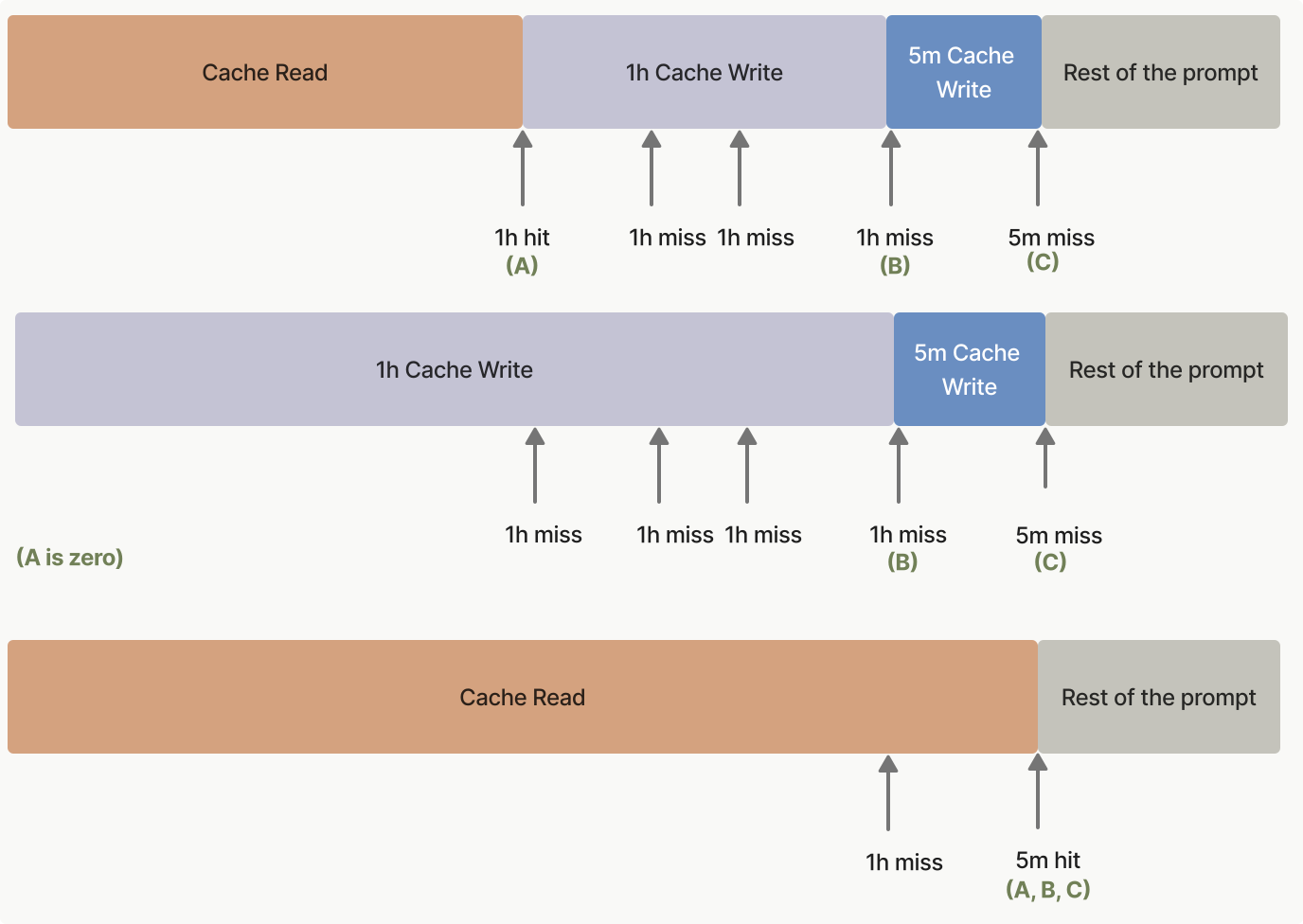
from line 1491
14941491 // Later, when the user submits a message, the system-prompt prefix is already cached.
14951492 $response = $respond('How do I implement a binary search tree?');
14961493 foreach ($response->content as $block) {
1497 if ($block->type === 'text') {
1494 if ($block instanceof \Anthropic\Messages\TextBlock) {
14981495 echo $block->text, PHP_EOL;
14991496 }
15001497 }
from line 1534
15371534 # Later, when the user submits a message, the system-prompt prefix is already cached.
15381535 response = respond(client, "How do I implement a binary search tree?")
15391536 response.content.each do |block|
1540 puts block.text if block.type == :text
1537 puts block.text if block.is_a?(Anthropic::Models::TextBlock)
15411538 end
15421539 ```
15431540</CodeGroup>
from line 1554
15571554 
15581555### Replacing the `max_tokens=1` workaround
15591556 
1560Before `max_tokens: 0` was available, some applications used `max_tokens: 1` warm-up calls to achieve the same effect. The `max_tokens: 0` approach is preferred: no output is produced, so there is no single-token reply to discard, no output tokens are billed, and the intent of the request is unambiguous.
1557Some applications send `max_tokens: 1` requests to warm the cache. Prefer `max_tokens: 0` where the request allows it: no output is produced, so there is no single-token reply to discard, no output tokens are billed, and the intent of the request is unambiguous.
15611558 
15621559***
15631560 
from line 1731
17341731 ```java Java
17351732 import com.anthropic.models.messages.CacheControlEphemeral;
17361733 // ...
1737 public class LegalDocumentAnalysisExample {
1738 
1739 public static void main(String[] args) {
1740 AnthropicClient client = AnthropicOkHttpClient.fromEnv();
1741 
1742 MessageCreateParams params = MessageCreateParams.builder()
1743 .model(Model.CLAUDE_OPUS_5_5)
1744 .maxTokens(1024)
1745 .systemOfTextBlockParams(
1746 List.of(
1747 TextBlockParam.builder()
1748 .text("You are an AI assistant tasked with analyzing legal documents.")
1749 .build(),
1750 TextBlockParam.builder()
1751 .text(
1752 "Here is the full text of a complex legal agreement: [Insert full text of a 50-page legal agreement here]"
1753 )
1754 .cacheControl(CacheControlEphemeral.builder().build())
1755 .build()
1756 )
1734 void main() {
1735 AnthropicClient client = AnthropicOkHttpClient.fromEnv();
1736 
1737 MessageCreateParams params = MessageCreateParams.builder()
1738 .model(Model.CLAUDE_OPUS_5_5)
1739 .maxTokens(1024)
1740 .systemOfTextBlockParams(
1741 List.of(
1742 TextBlockParam.builder()
1743 .text("You are an AI assistant tasked with analyzing legal documents.")
1744 .build(),
1745 TextBlockParam.builder()
1746 .text(
1747 "Here is the full text of a complex legal agreement: [Insert full text of a 50-page legal agreement here]"
1748 )
1749 .cacheControl(CacheControlEphemeral.builder().build())
1750 .build()
17571751 )
1758 .addUserMessage("What are the key terms and conditions in this agreement?")
1759 .build();
1760 
1761 Message message = client.messages().create(params);
1762 System.out.println(message.usage());
1763 }
1752 )
1753 .addUserMessage("What are the key terms and conditions in this agreement?")
1754 .build();
1755 
1756 Message message = client.messages().create(params);
1757 IO.println(message.usage());
17641758 }
17651759 ```
17661760 
from line 1790
17961790 client = Anthropic::Client.new
17971791 
17981792 message = client.messages.create(
1799 model: "claude-opus-5-5",
1793 model: Anthropic::Model::CLAUDE_OPUS_5_5,
18001794 max_tokens: 1024,
1801 system: [
1795 system_: [
18021796 {
18031797 type: "text",
18041798 text: "You are an AI assistant tasked with analyzing legal documents."
from line 2121
21272121 ```java Java
21282122 import com.anthropic.models.messages.CacheControlEphemeral;
21292123 // ...
2130 public class ConversationWithCacheControlExample {
2131 
2132 public static void main(String[] args) {
2133 AnthropicClient client = AnthropicOkHttpClient.fromEnv();
2134 
2135 // Create ephemeral system prompt
2136 TextBlockParam systemPrompt = TextBlockParam.builder()
2137 .text("...long system prompt")
2138 .cacheControl(CacheControlEphemeral.builder().build())
2139 .build();
2140 
2141 // Create message params
2142 MessageCreateParams params = MessageCreateParams.builder()
2143 .model(Model.CLAUDE_OPUS_5_5)
2144 .maxTokens(1024)
2145 .systemOfTextBlockParams(List.of(systemPrompt))
2146 // First user message (without cache control)
2147 .addUserMessage("Hello, can you tell me more about the solar system?")
2148 // Assistant response
2149 .addAssistantMessage(
2150 "Certainly! The solar system is the collection of celestial bodies that orbit our Sun. It consists of eight planets, numerous moons, asteroids, comets, and other objects. The planets, in order from closest to farthest from the Sun, are: Mercury, Venus, Earth, Mars, Jupiter, Saturn, Uranus, and Neptune. Each planet has its own unique characteristics and features. Is there a specific aspect of the solar system you would like to know more about?"
2151 )
2152 // Second user message (with cache control)
2153 .addUserMessageOfContentBlockParams(
2154 List.of(
2155 ContentBlockParam.ofText(TextBlockParam.builder()
2156 .text("Good to know.")
2157 .build()),
2158 ContentBlockParam.ofText(
2159 TextBlockParam.builder()
2160 .text("Tell me more about Mars.")
2161 .cacheControl(CacheControlEphemeral.builder().build())
2162 .build()
2163 )
2124 void main() {
2125 AnthropicClient client = AnthropicOkHttpClient.fromEnv();
2126 
2127 // Create ephemeral system prompt
2128 TextBlockParam systemPrompt = TextBlockParam.builder()
2129 .text("...long system prompt")
2130 .cacheControl(CacheControlEphemeral.builder().build())
2131 .build();
2132 
2133 // Create message params
2134 MessageCreateParams params = MessageCreateParams.builder()
2135 .model(Model.CLAUDE_OPUS_5_5)
2136 .maxTokens(1024)
2137 .systemOfTextBlockParams(List.of(systemPrompt))
2138 // First user message (without cache control)
2139 .addUserMessage("Hello, can you tell me more about the solar system?")
2140 // Assistant response
2141 .addAssistantMessage(
2142 "Certainly! The solar system is the collection of celestial bodies that orbit our Sun. It consists of eight planets, numerous moons, asteroids, comets, and other objects. The planets, in order from closest to farthest from the Sun, are: Mercury, Venus, Earth, Mars, Jupiter, Saturn, Uranus, and Neptune. Each planet has its own unique characteristics and features. Is there a specific aspect of the solar system you would like to know more about?"
2143 )
2144 // Second user message (with cache control)
2145 .addUserMessageOfContentBlockParams(
2146 List.of(
2147 ContentBlockParam.ofText(TextBlockParam.builder()
2148 .text("Good to know.")
2149 .build()),
2150 ContentBlockParam.ofText(
2151 TextBlockParam.builder()
2152 .text("Tell me more about Mars.")
2153 .cacheControl(CacheControlEphemeral.builder().build())
2154 .build()
21642155 )
21652156 )
2166 .build();
2167 
2168 Message message = client.messages().create(params);
2169 System.out.println(message.usage());
2170 }
2157 )
2158 .build();
2159 
2160 Message message = client.messages().create(params);
2161 IO.println(message.usage());
21712162 }
21722163 ```
21732164 
from line 2210
22192210 client = Anthropic::Client.new
22202211 
22212212 message = client.messages.create(
2222 model: "claude-opus-5-5",
2213 model: Anthropic::Model::CLAUDE_OPUS_5_5,
22232214 max_tokens: 1024,
2224 system: [
2215 system_: [
22252216 {
22262217 type: "text",
22272218 text: "...long system prompt",
from line 2252
22612252 
22622253 This example demonstrates how to use prompt caching in a multi-turn conversation.
22632254 
2264 During each turn, the final block of the final message is marked with `cache_control` so the conversation can be incrementally cached. The system automatically looks up and uses the longest previously cached sequence of blocks for follow-up messages. That is, blocks that were previously marked with a `cache_control` block are later not marked with this, but they will still be considered a cache hit (and also a cache refresh!) if they are hit within 5 minutes.
2265 
2266 In addition, note that the `cache_control` parameter is placed on the system message. This is to ensure that if this gets evicted from the cache (after not being used for more than 5 minutes), it will get added back to the cache on the next request.
2255 During each turn, the final block of the final message is marked with `cache_control` so the conversation can be incrementally cached. The system automatically looks up and uses the longest previously cached sequence of blocks for follow-up messages. Blocks that were marked with `cache_control` on an earlier turn aren’t marked again, but a request within 5 minutes still reads them from the cache and refreshes their lifetime.
2256 
2257 The `cache_control` parameter is also on the system message. If the system message is evicted from the cache after more than 5 minutes without use, the next request adds it back.
22672258 
22682259 This approach is useful for maintaining context in ongoing conversations without repeatedly processing the same information.
22692260 
from line 2265
22742265 * `cache_read_input_tokens`: Number of tokens in the conversation up to the previous turn
22752266 </Accordion>
22762267 
2277 <Accordion title="Putting it all together: Multiple cache breakpoints">
2268 <Accordion title="Putting it all together: multiple cache breakpoints">
22782269 <CodeGroup>
22792270 ```bash cURL
22802271 curl https://api.anthropic.com/v1/messages \
from line 2825
28342825 ```java Java
28352826 import com.anthropic.models.messages.CacheControlEphemeral;
28362827 // ...
2837 public class MultipleCacheBreakpointsExample {
2838 
2839 public static void main(String[] args) {
2840 AnthropicClient client = AnthropicOkHttpClient.fromEnv();
2841 
2842 // Search tool schema
2843 InputSchema searchSchema = InputSchema.builder()
2844 .properties(
2845 JsonValue.from(
2846 Map.of("query", Map.of("type", "string", "description", "Search query"))
2847 )
2828 void main() {
2829 AnthropicClient client = AnthropicOkHttpClient.fromEnv();
2830 
2831 // Search tool schema
2832 InputSchema searchSchema = InputSchema.builder()
2833 .properties(
2834 JsonValue.from(
2835 Map.of("query", Map.of("type", "string", "description", "Search query"))
28482836 )
2849 .putAdditionalProperty("required", JsonValue.from(List.of("query")))
2850 .build();
2851 
2852 // Get document tool schema
2853 InputSchema getDocSchema = InputSchema.builder()
2854 .properties(
2855 JsonValue.from(
2856 Map.of("doc_id", Map.of("type", "string", "description", "Document ID"))
2857 )
2837 )
2838 .putAdditionalProperty("required", JsonValue.from(List.of("query")))
2839 .build();
2840 
2841 // Get document tool schema
2842 InputSchema getDocSchema = InputSchema.builder()
2843 .properties(
2844 JsonValue.from(
2845 Map.of("doc_id", Map.of("type", "string", "description", "Document ID"))
28582846 )
2859 .putAdditionalProperty("required", JsonValue.from(List.of("doc_id")))
2860 .build();
2861 
2862 MessageCreateParams params = MessageCreateParams.builder()
2863 .model(Model.CLAUDE_OPUS_5_5)
2864 .maxTokens(1024)
2865 // Tools with cache control on the last one
2866 .addTool(
2867 Tool.builder()
2868 .name("search_documents")
2869 .description("Search through the knowledge base")
2870 .inputSchema(searchSchema)
2871 .build()
2872 )
2873 .addTool(
2874 Tool.builder()
2875 .name("get_document")
2876 .description("Retrieve a specific document by ID")
2877 .inputSchema(getDocSchema)
2847 )
2848 .putAdditionalProperty("required", JsonValue.from(List.of("doc_id")))
2849 .build();
2850 
2851 MessageCreateParams params = MessageCreateParams.builder()
2852 .model(Model.CLAUDE_OPUS_5_5)
2853 .maxTokens(1024)
2854 // Tools with cache control on the last one
2855 .addTool(
2856 Tool.builder()
2857 .name("search_documents")
2858 .description("Search through the knowledge base")
2859 .inputSchema(searchSchema)
2860 .build()
2861 )
2862 .addTool(
2863 Tool.builder()
2864 .name("get_document")
2865 .description("Retrieve a specific document by ID")
2866 .inputSchema(getDocSchema)
2867 .cacheControl(CacheControlEphemeral.builder().build())
2868 .build()
2869 )
2870 // System prompts with cache control on instructions and context separately
2871 .systemOfTextBlockParams(
2872 List.of(
2873 TextBlockParam.builder()
2874 .text(
2875 "You are a helpful research assistant with access to a document knowledge base.\n\n# Instructions\n- Always search for relevant documents before answering\n- Provide citations for your sources\n- Be objective and accurate in your responses\n- If multiple documents contain relevant information, synthesize them\n- Acknowledge when information is not available in the knowledge base"
2876 )
2877 .cacheControl(CacheControlEphemeral.builder().build())
2878 .build(),
2879 TextBlockParam.builder()
2880 .text(
2881 "# Knowledge Base Context\n\nHere are the relevant documents for this conversation:\n\n## Document 1: Solar System Overview\nThe solar system consists of the Sun and all objects that orbit it...\n\n## Document 2: Planetary Characteristics\nEach planet has unique features. Mercury is the smallest planet...\n\n## Document 3: Mars Exploration\nMars has been a target of exploration for decades...\n\n[Additional documents...]"
2882 )
28782883 .cacheControl(CacheControlEphemeral.builder().build())
28792884 .build()
28802885 )
2881 // System prompts with cache control on instructions and context separately
2882 .systemOfTextBlockParams(
2883 List.of(
2886 )
2887 // Conversation history
2888 .addUserMessage("Can you search for information about Mars rovers?")
2889 .addAssistantMessageOfContentBlockParams(
2890 List.of(
2891 ContentBlockParam.ofToolUse(
2892 ToolUseBlockParam.builder()
2893 .id("tool_1")
2894 .name("search_documents")
2895 .input(JsonValue.from(Map.of("query", "Mars rovers")))
2896 .build()
2897 )
2898 )
2899 )
2900 .addUserMessageOfContentBlockParams(
2901 List.of(
2902 ContentBlockParam.ofToolResult(
2903 ToolResultBlockParam.builder()
2904 .toolUseId("tool_1")
2905 .content(
2906 "Found 3 relevant documents: Document 3 (Mars Exploration), Document 7 (Rover Technology), Document 9 (Mission History)"
2907 )
2908 .build()
2909 )
2910 )
2911 )
2912 .addAssistantMessageOfContentBlockParams(
2913 List.of(
2914 ContentBlockParam.ofText(
28842915 TextBlockParam.builder()
28852916 .text(
2886 "You are a helpful research assistant with access to a document knowledge base.\n\n# Instructions\n- Always search for relevant documents before answering\n- Provide citations for your sources\n- Be objective and accurate in your responses\n- If multiple documents contain relevant information, synthesize them\n- Acknowledge when information is not available in the knowledge base"
2917 "I found 3 relevant documents about Mars rovers. Let me get more details from the Mars Exploration document."
28872918 )
2888 .cacheControl(CacheControlEphemeral.builder().build())
2889 .build(),
2919 .build()
2920 )
2921 )
2922 )
2923 .addUserMessageOfContentBlockParams(
2924 List.of(
2925 ContentBlockParam.ofText(
28902926 TextBlockParam.builder()
2891 .text(
2892 "# Knowledge Base Context\n\nHere are the relevant documents for this conversation:\n\n## Document 1: Solar System Overview\nThe solar system consists of the Sun and all objects that orbit it...\n\n## Document 2: Planetary Characteristics\nEach planet has unique features. Mercury is the smallest planet...\n\n## Document 3: Mars Exploration\nMars has been a target of exploration for decades...\n\n[Additional documents...]"
2893 )
2927 .text("Yes, please tell me about the Perseverance rover specifically.")
28942928 .cacheControl(CacheControlEphemeral.builder().build())
28952929 .build()
28962930 )
28972931 )
2898 // Conversation history
2899 .addUserMessage("Can you search for information about Mars rovers?")
2900 .addAssistantMessageOfContentBlockParams(
2901 List.of(
2902 ContentBlockParam.ofToolUse(
2903 ToolUseBlockParam.builder()
2904 .id("tool_1")
2905 .name("search_documents")
2906 .input(JsonValue.from(Map.of("query", "Mars rovers")))
2907 .build()
2908 )
2909 )
2910 )
2911 .addUserMessageOfContentBlockParams(
2912 List.of(
2913 ContentBlockParam.ofToolResult(
2914 ToolResultBlockParam.builder()
2915 .toolUseId("tool_1")
2916 .content(
2917 "Found 3 relevant documents: Document 3 (Mars Exploration), Document 7 (Rover Technology), Document 9 (Mission History)"
2918 )
2919 .build()
2920 )
2921 )
2922 )
2923 .addAssistantMessageOfContentBlockParams(
2924 List.of(
2925 ContentBlockParam.ofText(
2926 TextBlockParam.builder()
2927 .text(
2928 "I found 3 relevant documents about Mars rovers. Let me get more details from the Mars Exploration document."
2929 )
2930 .build()
2931 )
2932 )
2933 )
2934 .addUserMessageOfContentBlockParams(
2935 List.of(
2936 ContentBlockParam.ofText(
2937 TextBlockParam.builder()
2938 .text("Yes, please tell me about the Perseverance rover specifically.")
2939 .cacheControl(CacheControlEphemeral.builder().build())
2940 .build()
2941 )
2942 )
2943 )
2944 .build();
2945 
2946 Message message = client.messages().create(params);
2947 System.out.println(message.usage());
2948 }
2932 )
2933 .build();
2934 
2935 Message message = client.messages().create(params);
2936 IO.println(message.usage());
29492937 }
29502938 ```
29512939 
from line 3041
30533041 client = Anthropic::Client.new
30543042 
30553043 message = client.messages.create(
3056 model: "claude-opus-5-5",
3044 model: Anthropic::Model::CLAUDE_OPUS_5_5,
30573045 max_tokens: 1024,
30583046 tools: [
30593047 {
from line 3074
30863074 cache_control: { type: "ephemeral" }
30873075 }
30883076 ],
3089 system: [
3077 system_: [
30903078 {
30913079 type: "text",
30923080 text: "You are a helpful research assistant with access to a document knowledge base.\n\n# Instructions\n- Always search for relevant documents before answering\n- Provide citations for your sources\n- Be objective and accurate in your responses\n- If multiple documents contain relevant information, synthesize them\n- Acknowledge when information is not available in the knowledge base",
from line 3202
32143202 No, cache breakpoints themselves are free. You only pay for:
32153203 
32163204 * Writing content to cache (25 percent more than base input tokens for 5-minute TTL)
3217 * Reading from cache (a fraction of the base input token price, see [Pricing](https://platform.claude.com/docs/en/build-with-claude/prompt-caching#pricing))
3205 * Reading from cache ([a fraction of the base input token price](https://platform.claude.com/docs/en/build-with-claude/prompt-caching#pricing))
32183206 * Regular input tokens for uncached content
32193207 
32203208 The number of breakpoints doesn’t affect pricing; only the amount of content cached and read matters.
from line 3219
32313219 * `cache_creation_input_tokens`: New tokens being written to cache (at cache breakpoints)
32323220 * `input_tokens`: Tokens **after the last cache breakpoint** that aren’t cached
32333221 
3234 **Important:** `input_tokens` does NOT represent all input tokens, only the portion after your last cache breakpoint. If you have cached content, `input_tokens` will typically be much smaller than your total input.
3235 
3236 **Example:** With a 200k token document cached and a 50 token user question:
3222 **Important:** `input_tokens` does NOT represent all input tokens, only the portion after your last cache breakpoint. If you have cached content, `input_tokens` is typically much smaller than your total input.
3223 
3224 **Example:** With a 200k-token document cached and a 50-token user question:
32373225 
32383226 * `cache_read_input_tokens`: 200,000
32393227 * `cache_creation_input_tokens`: 0
from line 3270
32823270 </Accordion>
32833271 
32843272 <Accordion title="How does prompt caching affect pricing?">
3285 Prompt caching introduces a new pricing structure where 5-minute cache writes cost 25 percent more than base input tokens, 1-hour cache writes cost 2x base input tokens, and cache hits cost a fraction of the base input token price (see [Pricing](https://platform.claude.com/docs/en/build-with-claude/prompt-caching#pricing) for the per-model multiplier).
3273 Prompt caching has its own pricing: 5-minute cache writes cost 25 percent more than base input tokens, 1-hour cache writes cost 2x base input tokens, and cache hits cost [a fraction of the base input token price](https://platform.claude.com/docs/en/build-with-claude/prompt-caching#pricing), with a multiplier for each model.
32863274 </Accordion>
32873275 
32883276 <Accordion title="Can I manually clear the cache?">
from line 3299
33113299 These measures ensure that prompt caching maintains data privacy and security while offering performance benefits.
33123300 </Accordion>
33133301 
3314 <Accordion title="Can I use prompt caching with the Batches API?">
3315 Yes, it is possible to use prompt caching with your [Batches API](https://platform.claude.com/docs/en/build-with-claude/batch-processing) requests. However, because asynchronous batch requests can be processed concurrently and in any order, cache hits are provided on a best-effort basis.
3302 <Accordion title="Can I use prompt caching with the Message Batches API?">
3303 Yes, you can use prompt caching with your [Message Batches API](https://platform.claude.com/docs/en/build-with-claude/batch-processing) requests. However, because asynchronous batch requests can be processed concurrently and in any order, cache hits are provided on a best-effort basis.
33163304 
33173305 The [1-hour cache](https://platform.claude.com/docs/en/build-with-claude/prompt-caching#1-hour-cache-duration) can help improve your cache hits. The most cost-effective way of using it is the following:
33183306 
from line 3312
33243312 </Accordion>
33253313 
33263314 <Accordion title="Why am I seeing the error `AttributeError: 'Beta' object has no attribute 'prompt_caching'` in Python?">
3327 This error typically appears when you have upgraded your SDK or you are using outdated code examples. Prompt caching no longer requires the beta prefix. Instead of:
3315 This error typically appears when you have upgraded your SDK or you are using outdated code examples. Prompt caching is available on `client.messages`, without the beta prefix. Instead of:
33283316 
33293317 <CodeGroup exclude="shell:cURL, shell:CLI, typescript, csharp, go, java, php, ruby">
33303318 ```python Python
from line 3330
33423330 </Accordion>
33433331 
33443332 <Accordion title="Why am I seeing ‘TypeError: Cannot read properties of undefined (reading ‘messages’)’?">
3345 This error typically appears when you have upgraded your SDK or you are using outdated code examples. Prompt caching no longer requires the beta prefix. Instead of:
3333 This error typically appears when you have upgraded your SDK or you are using outdated code examples. Prompt caching is available on `client.messages`, without the beta prefix. Instead of:
33463334 
33473335 ```typescript TypeScript
33483336 client.beta.promptCaching.messages.create(/* ... */);
33493337 

build-with-claude/thinking Changed · +3 / -4 lines

from line 552
552552* On Claude Opus 4.6, Claude Sonnet 4.6, and earlier models, the first few lines of thinking output are more verbose, providing detailed reasoning that’s particularly helpful for prompt engineering purposes. [Claude Mythos Preview](https://anthropic.com/glasswing) summarizes from the first token, so its thinking blocks do not show this verbose preamble.
553553* Summarization preserves the key ideas of Claude’s thinking process with minimal added latency, so summaries can stream as they arrive.
554554* Summarization is processed by a different model from the one you target in your requests. The thinking model does not receive the summarized output.
555* As Anthropic seeks to improve the thinking feature, summarization behavior is subject to change.
556555 
557556<Note>
558557 In rare cases where you need access to full thinking output, [contact Anthropic sales](mailto:[email protected]).
559558</Note>
560559 
561To see the model’s reasoning, read the `thinking` blocks rather than prompting for reasoning in the response text. On Claude Fable 5.1, Claude Opus 5.5, Claude Opus 5, Claude Sonnet 5.5, and Claude Fable 5, a request that attempts to elicit the model’s internal reasoning as part of the response text may be refused with `stop_details.category: "reasoning_extraction"`. See [Refusal categories](https://platform.claude.com/docs/en/build-with-claude/refusals-and-fallback#refusal-response) for the field reference and [Keep reasoning in thinking blocks](https://platform.claude.com/docs/en/build-with-claude/refusals-and-fallback#keep-reasoning-in-thinking-blocks) for what to ask for instead.
560To see the model’s reasoning, read the `thinking` blocks rather than prompting for reasoning in the response text. On Claude Fable 5.1, Claude Opus 5.5, Claude Opus 5, Claude Sonnet 5.5, and Claude Fable 5, a request that attempts to elicit the model’s internal reasoning as part of the response text might be refused with `stop_details.category: "reasoning_extraction"`. See [What a refusal looks like](https://platform.claude.com/docs/en/build-with-claude/refusals-and-fallback#refusal-response) for the field reference and [Keep reasoning in thinking blocks](https://platform.claude.com/docs/en/build-with-claude/refusals-and-fallback#keep-reasoning-in-thinking-blocks) for what to ask for instead.
562561 
563562### Streaming thinking
564563 
from line 1082
10831082* A progress-update block can come back with an empty `thinking` field under any `display` value. Render nothing for an empty block. Under `"updates"` it looks the same as an empty reasoning block and needs no separate handling.
10841083* When a response stops on `max_tokens`, `model_context_window_exceeded`, or `stop_sequence` soon after a tool call or tool result, its last block can be a progress-update block standing in for the work the model hadn’t completed. Under `"updates"` and `"summarized"` its text is exactly `This part of the response was interrupted before it finished.` and you can show it like any other update. Under `"omitted"` it’s empty. To continue, pass the assistant turn back unchanged and append a new `user` message (with a `tool_result` for each `tool_use` block in that turn).
10851084* When [streaming](https://platform.claude.com/docs/en/build-with-claude/thinking#streaming-thinking), expect a pause of several seconds before a progress-update block opens. See the `"updates"` trace in [Streaming thinking](https://platform.claude.com/docs/en/build-with-claude/thinking#streaming-thinking).
1086* These models write fewer progress updates at higher [effort](https://platform.claude.com/docs/en/build-with-claude/effort) and in long tool chains. If your interface depends on them, see [Ask for user-facing progress updates](https://platform.claude.com/docs/en/build-with-claude/prompt-engineering/prompting-claude-fable-5-1#ask-for-user-facing-progress-updates) or, for Claude Opus 5.5, [User-facing progress updates](https://platform.claude.com/docs/en/build-with-claude/prompt-engineering/prompting-claude-opus-5-5#user-facing-progress-updates). For Claude Sonnet 5.5, see [User-facing progress updates](https://platform.claude.com/docs/en/build-with-claude/prompt-engineering/prompting-claude-sonnet-5-5#user-facing-progress-updates).
1085* These models write fewer progress updates at higher [effort](https://platform.claude.com/docs/en/build-with-claude/effort) and in long tool chains. If your interface depends on them, see [Ask for user-facing progress updates](https://platform.claude.com/docs/en/build-with-claude/prompt-engineering/prompting-claude-fable-5-1#ask-for-user-facing-progress-updates). For Claude Opus 5.5 and Claude Sonnet 5.5, see User-facing progress updates in [Prompting Claude Opus 5.5](https://platform.claude.com/docs/en/build-with-claude/prompt-engineering/prompting-claude-opus-5-5#user-facing-progress-updates) or [Prompting Claude Sonnet 5.5](https://platform.claude.com/docs/en/build-with-claude/prompt-engineering/prompting-claude-sonnet-5-5#user-facing-progress-updates).
10871086 
10881087### Thinking block preservation by model
10891088 
from line 1089
10901089Whether thinking blocks from previous assistant turns stay in context by default depends on the model:
10911090 
10921091* **Keep all prior turns:** Claude Opus 4.5 and later Opus models, Claude Sonnet 4.6 and later Sonnet models, Claude Haiku 5.5, Claude Fable 5.1, Claude Mythos 5.1, Claude Fable 5, Claude Mythos 5, and Claude Mythos Preview.
1093* **Keep the last turn only:** earlier Opus and Sonnet models, and all Haiku models through Claude Haiku 4.5. When you pass older thinking blocks back, the API strips them automatically. You don’t need to remove them yourself.
1092* **Keep only the turn in progress (last-turn-only models):** earlier Opus and Sonnet models, and all Haiku models through Claude Haiku 4.5. When you pass older thinking blocks back, the API strips them automatically. You don’t need to remove them yourself.
10941093 
10951094Preservation brings two benefits:
10961095 

cli-sdks-libraries/sdks/python Changed · +11 / -11 lines

from line 272
272272 print(message)
273273```
274274 
275On every iteration, an API request is made. If the response includes a call to one of the given tools, the tool is automatically called, and the result is returned directly to the model in the next iteration.
275On every iteration, the runner sends an API request. If the response includes a call to one of the given tools, the runner calls the tool and returns the result to the model in the next iteration.
276276 
277277To run the browser use tool or the computer use tool with this SDK, see [Browser and computer use with the SDK toolsets](https://platform.claude.com/docs/en/agents-and-tools/tool-use/browser-use-sdk).
278278 
from line 349
349349 
350350## Handling errors
351351 
352When the library is unable to connect to the API, or if the API returns a non-success status code (that is, a 4xx or 5xx response), a subclass of `APIError` is raised:
352The SDK raises a subclass of `APIError` when it can’t connect to the API or when the API returns a 4xx or 5xx status code:
353353 
354354```python
355355import anthropic
from line 369
369369 print("The server could not be reached")
370370 print(e.__cause__) # an underlying Exception, likely raised within httpx2
371371except anthropic.RateLimitError as e:
372 print("A 429 status code was received; we should back off a bit.")
372 print("A 429 status code was received; wait before retrying.")
373373except anthropic.APIStatusError as e:
374374 print("Another non-200-range status code was received")
375375 print(e.status_code)
from line 411
411411 
412412## Retries
413413 
414Certain errors are automatically retried 2 times by default, with a short exponential backoff. Connection errors (for example, because of a network connectivity problem), 408 Request Timeout, 409 Conflict, 429 Rate Limit, and >=500 Internal errors are all retried by default.
414By default, the SDK retries certain errors twice, with a short exponential backoff. It retries connection errors (for example, a network problem), 408 Request Timeout, 409 Conflict, 429 Rate Limit, and >=500 Internal errors.
415415 
416416You can use the `max_retries` option to configure or disable this:
417417 
from line 455
455455)
456456```
457457 
458On timeout, the SDK throws an `APITimeoutError`.
458On timeout, the SDK raises an `APITimeoutError`.
459459 
460460Note that requests that time out are [retried twice by default](https://platform.claude.com/docs/en/cli-sdks-libraries/sdks/python#retries).
461461 
from line 467
467467 
468468Avoid setting a large `max_tokens` value without using streaming. Some networks might drop idle connections after a certain period of time, which can cause the request to fail or [time out](https://platform.claude.com/docs/en/cli-sdks-libraries/sdks/python#timeouts) without receiving a response from Anthropic.
469469 
470The SDK will throw a `ValueError` if a non-streaming request is expected to take longer than approximately 10 minutes. Passing `stream=True` or overriding the `timeout` option at the client or request level disables this error.
470The SDK raises a `ValueError` if a non-streaming request is expected to take longer than approximately 10 minutes. Passing `stream=True` or overriding the `timeout` option at the client or request level disables this error.
471471 
472472An expected request latency longer than the [timeout](https://platform.claude.com/docs/en/cli-sdks-libraries/sdks/python#timeouts) for a non-streaming request will result in the client ending the connection and retrying without receiving a response.
473473 
from line 510
510510 f"will fetch next page using these details: {first_page.next_page_info()}"
511511 )
512512 next_page = await first_page.get_next_page()
513 print(f"number of items we just fetched: {len(next_page.data)}")
513 print(f"number of items on the next page: {len(next_page.data)}")
514514 
515515# Remove `await` for non-async usage.
516516```
from line 595
595595 
596596### Accessing raw response data (for example, headers)
597597 
598The “raw” `Response` returned by `httpx2` can be accessed through the `.with_raw_response` property on the client. This is useful for accessing response headers or other metadata:
598To access the raw HTTP response, call a method through the `.with_raw_response` property of a resource or of the client. This is useful for accessing response headers or other metadata:
599599 
600600```python
601601client = Anthropic()
from line 613
613613print(message.content)
614614```
615615 
616These methods return an `APIResponse` object. On the async client they return an `AsyncAPIResponse`, and you must await `.parse()`, `.read()`, `.text()`, and `.json()`.
616These methods return an `APIResponse` object, whose `.http_response` attribute holds the `httpx2.Response`. On the async client they return an `AsyncAPIResponse`, and you must await `.parse()`, `.read()`, `.text()`, and `.json()`.
617617 
618618### Streaming response body
619619 
from line 722
722722 
723723## Beta features
724724 
725Beta features are available before general release to get early feedback and test new functionality. You can check the availability of all of Claude’s capabilities and tools in the [Features overview](https://platform.claude.com/docs/en/build-with-claude/overview).
725Beta features let you try new functionality and give early feedback. You can check the availability of all of Claude’s capabilities and tools in the [Features overview](https://platform.claude.com/docs/en/build-with-claude/overview).
726726 
727727You can access most beta API features through the `beta` property of the client. To enable a particular beta feature, you need to add the appropriate [beta header](https://platform.claude.com/docs/en/api/beta-headers) to the `betas` field when creating a message.
728728 
from line 790
790790 
791791* [GitHub repository](https://github.com/anthropics/anthropic-sdk-python)
792792* [API reference](https://platform.claude.com/docs/en/api/overview)
793* [Streaming Messages](https://platform.claude.com/docs/en/build-with-claude/streaming)
793* [Streaming messages](https://platform.claude.com/docs/en/build-with-claude/streaming)
794794* [Tool use with Claude](https://platform.claude.com/docs/en/agents-and-tools/tool-use/overview)
795795 

get-started Changed · +4 / -4 lines

from line 47
4747 </Tab>
4848 
4949 <Tab title="go install">
50 You can also install the CLI from source using `go install`. Requires Go 1.25 or later.
50 You can also install the CLI from source with `go install`, which requires Go 1.26.10 or later.
5151 
5252 ```bash
5353 go install github.com/anthropics/anthropic-cli/v2/cmd/ant@latest
5454 ```
5555 
56 The binary is placed in `$(go env GOPATH)/bin`. Add it to your `PATH` if it isn’t already:
56 `go install` places the binary in `$(go env GOPATH)/bin`. Add that directory to your `PATH` if it isn’t already there:
5757 
5858 ```bash
5959 export PATH="$PATH:$(go env GOPATH)/bin"
from line 194
194194 </Tab>
195195 
196196 <Tab title="go install">
197 You can also install the CLI from source using `go install`. Requires Go 1.25 or later.
197 You can also install the CLI from source with `go install`, which requires Go 1.26.10 or later.
198198 
199199 ```bash
200200 go install github.com/anthropics/anthropic-cli/v2/cmd/ant@latest
201201 ```
202202 
203 The binary is placed in `$(go env GOPATH)/bin`. Add it to your `PATH` if it isn’t already:
203 `go install` places the binary in `$(go env GOPATH)/bin`. Add that directory to your `PATH` if it isn’t already there:
204204 
205205 ```bash
206206 export PATH="$PATH:$(go env GOPATH)/bin"

manage-claude/admin-api Changed · +44 / -12 lines

from line 31
3131 
3232An Admin API key covers most endpoints. The service-account, federation-issuer, and federation-rule endpoints accept only an `org:admin` OAuth token. Send a personal key or service account key in the `x-api-key` header, as you would an Admin API key. The following examples call the [organization info endpoint](https://platform.claude.com/docs/en/manage-claude/admin-api#accessing-organization-info) with an OAuth token and with an Admin API key.
3333 
34In Python, TypeScript, C#, Go, Java, PHP, and Ruby, the SDK exposes the endpoints on this page under `client.organization` (csharp, go: `client.Organization`; java: `client.organization()`; php: `$client->organization`), and the `ant` CLI under `ant organization`. The examples on this page use the default client, which reads an Admin API key from `ANTHROPIC_API_KEY` or an OAuth bearer token from `ANTHROPIC_AUTH_TOKEN`. SDK list methods in Python, TypeScript, C#, Go, and Java return an iterator that fetches more pages on demand, so `limit` sets the page size, not the total. The PHP, Ruby, and curl examples return one page. In the CLI, `--limit` caps the results on the member, invite, workspace, workspace-member, and API-key lists. For each endpoint’s parameters and responses, see the [Admin API reference](https://platform.claude.com/docs/en/api/organization).
34The SDK exposes the endpoints on this page under `client.organization` (csharp, go: `client.Organization`; java: `client.organization()`; php: `$client->organization`), and the `ant` CLI under `ant organization`. The examples on this page use the default client, which reads an Admin API key from `ANTHROPIC_API_KEY` or an OAuth bearer token from `ANTHROPIC_AUTH_TOKEN`. The comments in each list example say whether it fetches more pages or reads only the first. For each endpoint’s parameters and responses, see the [Admin API reference](https://platform.claude.com/docs/en/api/organization).
3535 
3636### OAuth bearer token
3737 
from line 42
4242export ANTHROPIC_AUTH_TOKEN=$(ant auth print-credentials --profile admin --access-token)
4343```
4444 
45Interactive tokens are short-lived. If requests start returning 401, re-run the `export` command to refresh the token.
45Interactive tokens are short-lived. If requests start returning 401, rerun the `export` command to refresh the token.
4646 
47The SDK and the `ant` CLI read `ANTHROPIC_AUTH_TOKEN` automatically. Leave `ANTHROPIC_API_KEY` unset in the same shell so they send the bearer token. Automated workloads skip the login: they authenticate through workload identity federation, and the SDK and CLI perform the token exchange from the federation environment variables. See [Bootstrap a workload to manage WIF](https://platform.claude.com/docs/en/manage-claude/wif-admin-api#bootstrap-a-workload-to-manage-wif).
47The SDK and the `ant` CLI read `ANTHROPIC_AUTH_TOKEN` automatically. Leave `ANTHROPIC_API_KEY` unset in the same shell so they send the bearer token. Automated workloads skip the login: they authenticate through Workload Identity Federation, and the SDK and CLI perform the token exchange from the federation environment variables. See [Bootstrap a workload to manage WIF](https://platform.claude.com/docs/en/manage-claude/wif-admin-api#bootstrap-a-workload-to-manage-wif).
4848 
4949Call the Admin API with the exported token:
5050 
from line 248
248248 
249249<CodeGroup>
250250 ```bash cURL
251 # Returns one page.
251252 curl "https://api.anthropic.com/v1/organizations/users?limit=10" \
252253 -H "x-api-key: $ANTHROPIC_API_KEY" \
253254 -H "anthropic-version: 2026-10-21"
from line 255
254255 ```
255256 
256257 ```bash CLI
258 # At a terminal, the view fetches more pages as you scroll. When piped or with `--format json`, `--limit` caps the results.
257259 ant organization:users list --limit 10
258260 ```
259261 
from line 264
262264 
263265 users = client.organization.users.list(limit=10)
264266 
265 # Automatically fetches more pages as needed.
267 # Automatically fetches more pages as needed, so `limit` sets the page size, not the total.
266268 for user in users:
267269 print(f"{user.id}: {user.email} ({user.role})")
268270 ```
from line 274
272274 
273275 const users = await client.organization.users.list({ limit: 10 });
274276 
277 // Automatically fetches more pages as needed, so `limit` sets the page size, not the total.
275278 for await (const user of users) {
276279 console.log(`${user.id}: ${user.email} (${user.role})`);
277280 }
from line 285
282285 
283286 var page = await client.Organization.Users.List(new() { Limit = 10 });
284287 
288 // Automatically fetches more pages as needed, so `limit` sets the page size, not the total.
285289 await foreach (var user in page.Paginate())
286290 {
287291 Console.WriteLine($"{user.ID}: {user.Email} ({user.Role.Raw()})");
from line 299
295299 Limit: anthropic.Int(10),
296300 })
297301 
302 // Automatically fetches more pages as needed, so `limit` sets the page size, not the total.
298303 for users.Next() {
299304 user := users.Current()
300305 fmt.Printf("%s: %s (%s)\n", user.ID, user.Email, user.Role)
from line 320
315320 .build();
316321 var users = client.organization().users().list(params);
317322 
323 // Automatically fetches more pages as needed, so `limit` sets the page size, not the total.
318324 for (var user : users.autoPager()) {
319325 IO.println(user.id() + ": " + user.email() + " (" + user.role().asString() + ")");
320326 }
from line 332
326332 
327333 $users = $client->organization->users->list(limit: 10);
328334 
335 // Reads only the first page.
329336 foreach ($users->getItems() as $user) {
330337 echo "{$user->id}: {$user->email} ({$user->role})\n";
331338 }
from line 343
336343 
337344 users = client.organization.users.list(limit: 10)
338345 
346 # Reads only the first page.
339347 users.data.each do |user|
340348 puts "#{user.id}: #{user.email} (#{user.role})"
341349 end
from line 672
664672 ```
665673</CodeGroup>
666674 
667List pending invites:
675List pending, accepted, and expired invites:
668676 
669677<CodeGroup>
670678 ```bash cURL
679 # Returns one page.
671680 curl "https://api.anthropic.com/v1/organizations/invites?limit=10" \
672681 -H "x-api-key: $ANTHROPIC_API_KEY" \
673682 -H "anthropic-version: 2026-10-21"
from line 683
674683 ```
675684 
676685 ```bash CLI
686 # At a terminal, the view fetches more pages as you scroll. When piped or with `--format json`, `--limit` caps the results.
677687 ant organization:invites list --limit 10
678688 ```
679689 
from line 692
682692 
683693 invites = client.organization.invites.list(limit=10)
684694 
685 # Automatically fetches more pages as needed.
695 # Automatically fetches more pages as needed, so `limit` sets the page size, not the total.
686696 for invite in invites:
687697 print(f"{invite.id}: {invite.email} ({invite.status})")
688698 ```
from line 702
692702 
693703 const invites = await client.organization.invites.list({ limit: 10 });
694704 
705 // Automatically fetches more pages as needed, so `limit` sets the page size, not the total.
695706 for await (const invite of invites) {
696707 console.log(`${invite.id}: ${invite.email} (${invite.status})`);
697708 }
from line 713
702713 
703714 var page = await client.Organization.Invites.List(new() { Limit = 10 });
704715 
716 // Automatically fetches more pages as needed, so `limit` sets the page size, not the total.
705717 await foreach (var invite in page.Paginate())
706718 {
707719 Console.WriteLine($"{invite.ID}: {invite.Email} ({invite.Status.Raw()})");
from line 727
715727 Limit: anthropic.Int(10),
716728 })
717729 
730 // Automatically fetches more pages as needed, so `limit` sets the page size, not the total.
718731 for invites.Next() {
719732 invite := invites.Current()
720733 fmt.Printf("%s: %s (%s)\n", invite.ID, invite.Email, invite.Status)
from line 748
735748 .build();
736749 var invites = client.organization().invites().list(params);
737750 
751 // Automatically fetches more pages as needed, so `limit` sets the page size, not the total.
738752 for (var invite : invites.autoPager()) {
739753 IO.println(invite.id() + ": " + invite.email() + " (" + invite.status().asString() + ")");
740754 }
from line 760
746760 
747761 $invites = $client->organization->invites->list(limit: 10);
748762 
763 // Reads only the first page.
749764 foreach ($invites->getItems() as $invite) {
750765 echo "{$invite->id}: {$invite->email} ({$invite->status})\n";
751766 }
from line 771
756771 
757772 invites = client.organization.invites.list(limit: 10)
758773 
774 # Reads only the first page.
759775 invites.data.each do |invite|
760776 puts "#{invite.id}: #{invite.email} (#{invite.status})"
761777 end
from line 865
849865 
850866### Workspace members
851867 
852Manage [user access to specific workspaces](https://platform.claude.com/docs/en/api/organization/workspaces/members/retrieve):
868Manage [user access to specific workspaces](https://platform.claude.com/docs/en/api/organization/workspaces/members/retrieve).
853869 
854870Add a member to a workspace:
855871 
from line 1007
9911007 
9921008<CodeGroup>
9931009 ```bash cURL
1010 # Returns one page.
9941011 curl "https://api.anthropic.com/v1/organizations/workspaces/wrkspc_01JwQvzr7rXLA5AGx3HKfFUJ/members?limit=10" \
9951012 -H "x-api-key: $ANTHROPIC_API_KEY" \
9961013 -H "anthropic-version: 2026-10-21"
from line 1014
9971014 ```
9981015 
9991016 ```bash CLI
1017 # At a terminal, the view fetches more pages as you scroll. When piped or with `--format json`, `--limit` caps the results.
10001018 ant organization:workspaces:members list \
10011019 --workspace-id wrkspc_01JwQvzr7rXLA5AGx3HKfFUJ \
10021020 --limit 10
from line 1027
10091027 "wrkspc_01JwQvzr7rXLA5AGx3HKfFUJ", limit=10
10101028 )
10111029 
1012 # Automatically fetches more pages as needed.
1030 # Automatically fetches more pages as needed, so `limit` sets the page size, not the total.
10131031 for member in members:
10141032 print(f"{member.user_id}: {member.workspace_role}")
10151033 ```
from line 1040
10221040 { limit: 10 }
10231041 );
10241042 
1043 // Automatically fetches more pages as needed, so `limit` sets the page size, not the total.
10251044 for await (const member of members) {
10261045 console.log(`${member.user_id}: ${member.workspace_role}`);
10271046 }
from line 1054
10351054 new() { Limit = 10 }
10361055 );
10371056 
1057 // Automatically fetches more pages as needed, so `limit` sets the page size, not the total.
10381058 await foreach (var member in page.Paginate())
10391059 {
10401060 Console.WriteLine($"{member.UserID}: {member.WorkspaceRole.Raw()}");
from line 1072
10521072 },
10531073 )
10541074 
1075 // Automatically fetches more pages as needed, so `limit` sets the page size, not the total.
10551076 for members.Next() {
10561077 member := members.Current()
10571078 fmt.Printf("%s: %s\n", member.UserID, member.WorkspaceRole)
from line 1094
10731094 var members = client.organization().workspaces().members()
10741095 .list("wrkspc_01JwQvzr7rXLA5AGx3HKfFUJ", params);
10751096 
1097 // Automatically fetches more pages as needed, so `limit` sets the page size, not the total.
10761098 for (var member : members.autoPager()) {
10771099 IO.println(member.userId() + ": " + member.workspaceRole().asString());
10781100 }
from line 1109
10871109 limit: 10,
10881110 );
10891111 
1112 // Reads only the first page.
10901113 foreach ($members->getItems() as $member) {
10911114 echo "{$member->userID}: {$member->workspaceRole}\n";
10921115 }
from line 1121
10981121 workspace_id = "wrkspc_01JwQvzr7rXLA5AGx3HKfFUJ"
10991122 members = client.organization.workspaces.members.list(workspace_id, limit: 10)
11001123 
1124 # Reads only the first page.
11011125 members.data.each do |member|
11021126 puts "#{member.user_id}: #{member.workspace_role}"
11031127 end
from line 1373
13491373 
13501374<CodeGroup>
13511375 ```bash cURL
1376 # Returns one page.
13521377 curl "https://api.anthropic.com/v1/organizations/api_keys?limit=10&status=active&workspace_id=wrkspc_01JwQvzr7rXLA5AGx3HKfFUJ" \
13531378 -H "x-api-key: $ANTHROPIC_API_KEY" \
13541379 -H "anthropic-version: 2026-10-21"
from line 1380
13551380 ```
13561381 
13571382 ```bash CLI
1383 # At a terminal, the view fetches more pages as you scroll. When piped or with `--format json`, `--limit` caps the results.
13581384 ant organization:api-keys list \
13591385 --limit 10 \
13601386 --status active \
from line 1394
13681394 limit=10, status="active", workspace_id="wrkspc_01JwQvzr7rXLA5AGx3HKfFUJ"
13691395 )
13701396 
1371 # Automatically fetches more pages as needed.
1397 # Automatically fetches more pages as needed, so `limit` sets the page size, not the total.
13721398 for api_key in api_keys:
13731399 print(f"{api_key.id}: {api_key.name} ({api_key.status})")
13741400 ```
from line 1408
13821408 workspace_id: "wrkspc_01JwQvzr7rXLA5AGx3HKfFUJ"
13831409 });
13841410 
1411 // Automatically fetches more pages as needed, so `limit` sets the page size, not the total.
13851412 for await (const apiKey of apiKeys) {
13861413 console.log(`${apiKey.id}: ${apiKey.name} (${apiKey.status})`);
13871414 }
from line 1426
13991426 WorkspaceID = "wrkspc_01JwQvzr7rXLA5AGx3HKfFUJ"
14001427 });
14011428 
1429 // Automatically fetches more pages as needed, so `limit` sets the page size, not the total.
14021430 await foreach (var apiKey in page.Paginate())
14031431 {
14041432 Console.WriteLine($"{apiKey.ID}: {apiKey.Name} ({apiKey.Status.Raw()})");
from line 1442
14141442 WorkspaceID: anthropic.String("wrkspc_01JwQvzr7rXLA5AGx3HKfFUJ"),
14151443 })
14161444 
1445 // Automatically fetches more pages as needed, so `limit` sets the page size, not the total.
14171446 for apiKeys.Next() {
14181447 apiKey := apiKeys.Current()
14191448 fmt.Printf("%s: %s (%s)\n", apiKey.ID, apiKey.Name, apiKey.Status)
from line 1465
14361465 .build();
14371466 var apiKeys = client.organization().apiKeys().list(params);
14381467 
1468 // Automatically fetches more pages as needed, so `limit` sets the page size, not the total.
14391469 for (var apiKey : apiKeys.autoPager()) {
14401470 IO.println(apiKey.id() + ": " + apiKey.name() + " (" + apiKey.status().asString() + ")");
14411471 }
from line 1484
14541484 workspaceID: 'wrkspc_01JwQvzr7rXLA5AGx3HKfFUJ',
14551485 );
14561486 
1487 // Reads only the first page.
14571488 foreach ($apiKeys->getItems() as $apiKey) {
14581489 echo "{$apiKey->id}: {$apiKey->name} ({$apiKey->status})\n";
14591490 }
from line 1499
14681499 workspace_id: "wrkspc_01JwQvzr7rXLA5AGx3HKfFUJ"
14691500 )
14701501 
1502 # Reads only the first page.
14711503 api_keys.data.each do |api_key|
14721504 puts "#{api_key.id}: #{api_key.name} (#{api_key.status})"
14731505 end
from line 1772
17401772* Use meaningful names and descriptions for workspaces and API keys
17411773* Handle errors from failed operations
17421774* Regularly audit member roles and permissions
1743* Clean up unused workspaces and expired invites
1775* Archive unused workspaces and delete pending invites you no longer need
17441776* Monitor API key usage, audit each key’s [`expires_at`](https://platform.claude.com/docs/en/manage-claude/authentication#key-expiration), and rotate keys periodically
17451777 
17461778## FAQ
from line 1782
17501782 The Admin API accepts an Admin API key (starting with `sk-ant-admin`), an OAuth bearer token with the `org:admin` scope, or a personal key or service account key that isn’t scoped to a specific workspace. Only organization members with the admin role can provision Admin API keys, and only members with the admin, owner, or primary owner role can obtain `org:admin` tokens. A personal key or service account key has the same permissions as the linked account. See [Authentication](https://platform.claude.com/docs/en/manage-claude/admin-api#authentication).
17511783 </Accordion>
17521784 
1753 <Accordion title="Can I create new API keys through the Admin API?">
1785 <Accordion title="Can the Admin API create API keys?">
17541786 No. You create API keys in the Claude Console. The Admin API can only read, rename, and change the status of existing keys.
17551787 </Accordion>
17561788 

manage-claude/analytics-api Changed · +5 / -5 lines

from line 85
8585 
8686Claude Enterprise Analytics API data is available for dates on or after January 1, 2026.
8787 
88**Engagement and adoption endpoints** (user activity, summaries, projects, skills, connectors) return a per-day snapshot for the date you specify. Data for a given day is typically available by about 13:00–13:30 UTC the following day (a 1-day lag); until then, the most recent available day is usually 2 days before the current UTC date. Data arrives later on days when an upstream data pipeline runs late, and exact freshness varies by query, so rather than assuming a fixed time, check the error response: requesting a date that is not yet available returns a 400 error naming the most recent available day. If data is not available well past the typical lag, it usually indicates a data pipeline failure on Anthropic’s side; contact support if the gap persists.
88**Engagement and adoption endpoints** (user activity, summaries, projects, skills, connectors) return a per-day snapshot for the date you specify. Data for a given day is typically available by about 13:00–13:30 UTC the following day (a 1-day lag). Until then, the most recent available day is usually 2 days before the current UTC date. Data arrives later on days when an upstream data pipeline runs late, and exact freshness varies by query. Rather than assuming a fixed time, check the error response: requesting a date that is not yet available returns a 400 error naming the most recent available day. If data is not available well past the typical lag, it usually indicates a data pipeline failure on Anthropic’s side; contact support if the gap persists.
8989 
9090**Cost and usage endpoints** follow a different freshness model. Data is typically available within 4 hours of the underlying usage but might take up to 24 hours. Values can be revised as late events arrive and reconciliation runs, until about 7 days after the end of the calendar month. For example, values for October 1 can change until about November 7. For invoicing-grade totals, query only months that ended at least 7 days ago.
9191 
9292<Note>
93 Cost and usage responses include a `data_refreshed_at` timestamp. When `ending_at` is omitted (the default is the current time), the response includes a tail of data after `data_refreshed_at` that is incomplete. For stable results across repeated calls, set `ending_at` to a value at or before a previously returned `data_refreshed_at`.
93 Cost and usage responses include a `data_refreshed_at` timestamp. If you omit `ending_at`, it defaults to 31 days after `starting_at` or the current time, whichever is earlier. That range can run past `data_refreshed_at`, and data after that time is incomplete. For stable results across repeated calls, set `ending_at` to a value at or before a previously returned `data_refreshed_at`.
9494</Note>
9595 
9696## How metrics are defined
from line 105
105105 
106106In user activity and in skill, connector, and plugin usage, this usage appears in the `chat_cowork_unified_metrics` object. In activity summaries, it is counted in `chat_cowork_unified_daily_active_user_count`, `chat_cowork_unified_weekly_active_user_count`, and `chat_cowork_unified_monthly_active_user_count`.
107107 
108As more users start using Chat and Cowork unified, usage moves out of your chat and Cowork figures and into these new ones. Usage from days before a user starts using Chat and Cowork unified stays under chat or Cowork. Organization-wide figures, such as total token usage, total cost, and overall active user counts, do not change. Cost and usage reports filtered by product leave Chat and Cowork unified usage out unless `products[]` includes `chat_cowork_unified`.
108When a user starts using Chat and Cowork unified, their usage moves out of your chat and Cowork figures and into the Chat and Cowork unified figures. Usage from days before a user starts using Chat and Cowork unified stays under chat or Cowork. Organization-wide figures, such as total token usage, total cost, and overall active user counts, do not change. Cost and usage reports filtered by product leave Chat and Cowork unified usage out unless `products[]` includes `chat_cowork_unified`.
109109 
110110Some activity from users of Chat and Cowork unified, such as voice mode, can still be reported under chat or Cowork. A user’s activity can also be split between products on the day they start using Chat and Cowork unified. The same is true on the day it is turned off for them. How the activity splits is not guaranteed.
111111 
from line 113
113113 
114114When you filter user activity by project, each day’s project activity is counted in one place only. If a user sent a chat message in Chat and Cowork unified that day, all their project activity is counted in `chat_cowork_unified_metrics.chat`. Otherwise, it is counted in `chat_metrics`.
115115 
116**Per-product metric blocks.** Per-product metric objects (for example, Office Agent or Cowork metrics on a user-activity record) are always present on every record. Organizations without usage of that product see all-zero values rather than `null`. The exception is Chat and Cowork unified: on deployments that do not offer it, its fields are left out of the response.
116**Per-product metric blocks.** Per-product metric objects (for example, Office Agent or Cowork metrics on a user-activity record) are always present on every record. Organizations without usage of that product see zero counts rather than a `null` object. The exception is Chat and Cowork unified: on deployments that do not offer it, its fields are left out of the response. Individual fields inside these objects can be `null`, which means the value is not available. For example, when you filter user activity by project, `distinct_skills_used_count` in `chat_metrics` is `null`. The [Claude Enterprise Analytics API reference](https://platform.claude.com/docs/en/api/beta/organization/analytics) shows which fields can be `null`.
117117 
118118**Connector names.** Connector names are normalized across sources. For example, `Atlassian MCP server`, `mcp-atlassian`, and `atlassian_MCP` all appear as `atlassian` in the connector usage endpoint.
119119 
from line 129
129129 
130130## Versioning
131131 
132Send the `anthropic-version` header on every request; see [API versions](https://platform.claude.com/docs/en/api/versioning) for the available versions.
132Send the `anthropic-version` header on every request; see [Versions](https://platform.claude.com/docs/en/api/versioning) for the available versions.
133133 
134134## Known limitations
135135 

manage-claude/api-and-data-retention Changed · +3 / -3 lines

from line 4
44description: Learn about how Anthropic's APIs and associated features retain data, including information about zero data retention (ZDR) and HIPAA-ready API access.
55---
66 
7This page covers the Claude API (`api.anthropic.com`), Claude Platform on AWS, [Claude in Microsoft Foundry](https://platform.claude.com/docs/en/build-with-claude/claude-in-microsoft-foundry), and [Claude Models on Google Cloud (Anthropic managed)](https://platform.claude.com/docs/en/build-with-claude/claude-models-on-google-cloud/anthropic-managed), where Anthropic is the data processor. On Claude Models on Google Cloud (Google managed) and Amazon Bedrock, the cloud provider is the data processor; refer to those platforms’ data retention and compliance documentation for their equivalent controls.
7This page covers the Claude API (`api.anthropic.com`), Claude Platform on AWS, [Claude Models on Google Cloud (Anthropic managed)](https://platform.claude.com/docs/en/build-with-claude/claude-models-on-google-cloud/anthropic-managed), and [Claude in Microsoft Foundry](https://platform.claude.com/docs/en/build-with-claude/claude-in-microsoft-foundry), where Anthropic is the data processor. On Claude Models on Google Cloud (Google managed) and Amazon Bedrock, the cloud provider is the data processor; refer to those platforms’ data retention and compliance documentation for their equivalent controls.
88 
99Anthropic offers two data handling arrangements for the Claude API: [zero data retention (ZDR)](https://platform.claude.com/docs/en/manage-claude/api-and-data-retention#zero-data-retention-zdr-scope) and [HIPAA readiness](https://platform.claude.com/docs/en/manage-claude/api-and-data-retention#hipaa-readiness). The [feature eligibility table](https://platform.claude.com/docs/en/manage-claude/api-and-data-retention#feature-eligibility) lists which API features each arrangement covers. For Anthropic’s standard retention policies outside these arrangements, see the [commercial data retention policy](https://privacy.claude.com/en/articles/7996866-how-long-do-you-store-my-organization-s-data) and the [consumer data retention policy](https://privacy.claude.com/en/articles/10023548-how-long-do-you-store-my-data).
1010 
from line 16
1616* Only what is technically necessary for the feature to work is retained. Conversation content (your prompts and Claude’s outputs) is not retained by default; the exception is [Covered Models](https://platform.claude.com/docs/en/manage-claude/api-and-data-retention#model-specific-data-retention-requirements), which require 30-day retention.
1717* Retained data is purged on the shortest practical time to live (TTL), and Anthropic aims to give customers control over how long data is retained. What is held, and the retention duration where a specific TTL applies, is documented on each feature’s page.
1818 
19Several retention models sit outside the ZDR and HIPAA arrangements described on this page. Data accessible through the [Compliance API](https://platform.claude.com/docs/en/manage-claude/compliance-api) follows its own retention model. The [Activity Feed](https://platform.claude.com/docs/en/manage-claude/compliance-activity-feed) retains data for 6 years. Chat, file, and project content from claude.ai follows your organization’s retention policy set in [claude.ai > Organization settings > Data and privacy](https://claude.ai/admin-settings/data-privacy-controls), unless a user deletes it sooner. [Local session transcripts](https://platform.claude.com/docs/en/manage-claude/compliance-sessions#retrieve-local-sessions) (from sessions on users’ machines, in apps such as Cowork and Claude Code) are stored for 6 years by default, or for your organization’s custom conversation retention period when a finite one is set (the same claude.ai setting). [Remote session transcripts](https://platform.claude.com/docs/en/manage-claude/compliance-sessions#retrieve-remote-sessions) (Cowork in the cloud) are retained for 6 years, unless a user deletes the session sooner. Claude Tag session transcripts, also remote sessions, have no default retention period; see [Retention and deletion](https://platform.claude.com/docs/en/manage-claude/compliance-sessions#retention-and-deletion). The Compliance API does not capture local sessions for which ZDR is in effect. For organizations with HIPAA readiness enabled, it captures Cowork and Claude Code local sessions only and stores their transcripts for 30 days.
19Several retention models sit outside the ZDR and HIPAA arrangements described on this page. Data accessible through the [Compliance API](https://platform.claude.com/docs/en/manage-claude/compliance-api) follows its own retention model. The [Activity Feed](https://platform.claude.com/docs/en/manage-claude/compliance-activity-feed) retains data for 6 years. Chat, file, and project content from claude.ai follows your organization’s retention policy set in [claude.ai > Organization settings > Data and privacy](https://claude.ai/admin-settings/data-privacy-controls), unless a user deletes it sooner. [Local session transcripts](https://platform.claude.com/docs/en/manage-claude/compliance-sessions#retrieve-local-sessions) come from sessions on users’ machines, in apps such as Cowork and Claude Code. These transcripts are stored for 6 years by default, or for your organization’s custom conversation retention period when a finite one is set (the same claude.ai setting). [Remote session transcripts](https://platform.claude.com/docs/en/manage-claude/compliance-sessions#retrieve-remote-sessions) (Cowork in the cloud and Claude Tag) have no default retention period. See [Retention and deletion](https://platform.claude.com/docs/en/manage-claude/compliance-sessions#retention-and-deletion). The Compliance API does not capture local sessions for which ZDR is in effect. For organizations with HIPAA readiness enabled, it captures Cowork and Claude Code local sessions only and stores their transcripts for 30 days.
2020 
2121## Zero data retention (ZDR)
2222 
from line 244
244244 </Accordion>
245245 
246246 <Accordion title="What happens if I use a feature marked &#x22;No&#x22; under ZDR?">
247 Nothing blocks the request. Features marked “No” for ZDR are fundamentally stateful: the Batch API stores your jobs, the Files API stores your files, and code execution runs in persistent containers. Data for these features is retained per the feature’s documented policy. Using them is a choice to step outside your ZDR arrangement for that specific data.
247 Nothing blocks the request. Features marked “No” for ZDR are fundamentally stateful: the Batch API stores your jobs, the Files API stores your files, and code execution runs in persistent containers. Data for these features is retained according to the feature’s documented policy. Using them is a choice to step outside your ZDR arrangement for that specific data.
248248 </Accordion>
249249 
250250 <Accordion title="Can I request deletion of data from features that are not ZDR-eligible?">

manage-claude/claude-code-analytics-api Changed · +13 / -9 lines

### Can this API return real-time metrics? ### How do you calculate tool acceptance rates? ### Can I get real-time metrics? ### How do I calculate tool acceptance rates?

from line 23
2323</Check>
2424 
2525<Note>
26 **Claude Platform on AWS:** The Claude Code Analytics API is not currently available. View Claude Code usage on the **Usage** page in the Claude Console instead.
26 The Claude Code Analytics API is available on the Claude API. If you’re using Claude Platform on AWS, view Claude Code usage on the **Usage** page in the Claude Console instead.
2727</Note>
2828 
2929<Note>
from line 48
4848 If you’re building an integration, set your User-Agent header to help Anthropic understand usage patterns:
4949 
5050 ```text wrap
51 User-Agent: YourApp/1.0.0 (https://yourapp.com)
51 User-Agent: YourApp/1.0.0 (https://example.com)
5252 ```
5353</Tip>
5454 
from line 59
5959### Key concepts
6060 
6161* **Daily aggregation:** Returns metrics for a single day specified by the `starting_at` parameter
62* **User-level data:** Each record represents one user’s activity for the specified day
62* **Actor-level data:** An actor (a user or API key) can have several records for the specified day, one for each combination of `terminal_type`, `customer_type`, `subscription_type`, and `is_remote` values
6363* **Productivity metrics:** Track sessions, lines of code, commits, pull requests, and tool usage
6464* **Token and cost data:** Monitor usage and estimated costs broken down by Claude model
6565* **Cursor-based pagination:** Handle large datasets with stable pagination using opaque cursors
from line 106
106106 
107107### Available metrics
108108 
109Each response record contains the following metrics for a single user on a single day:
109Each response record contains the following metrics for one combination of dimension values. An actor can have several records for the same day. Add up an actor’s records to get its daily totals.
110110 
111111#### Dimensions
112112 
from line 115
115115* **organization\_id:** Organization UUID
116116* **customer\_type:** Type of customer account (`api` or `subscription`); records cover only usage authenticated against your Claude Console organization
117117* **terminal\_type:** Type of terminal or environment where Claude Code was used (for example, `vscode`, `iTerm.app`, `tmux`)
118* **subscription\_type:** Subscription type reported with the usage (`enterprise` or `team`), or `null` if there is none
119* **is\_remote:** Whether the usage came from remote Claude Code sessions (`true`) or local sessions (`false`)
118120 
119121#### Core metrics
120122 
from line 143
141143* **tokens.input/output:** Input and output token counts for this model
142144* **tokens.cache\_read/cache\_creation:** Cache-related token usage for this model
143145* **estimated\_cost.amount:** Estimated cost in cents USD for this model
144* **estimated\_cost.currency:** Currency code for the cost amount (currently always `USD`)
146* **estimated\_cost.currency:** Currency code for the cost amount (always `USD`)
145147 
146148### Response structure
147149 
from line 156
154156 "date": "2025-09-08T00:00:00Z",
155157 "actor": {
156158 "type": "user_actor",
157 "email_address": "[email protected]"
159 "email_address": "[email protected]"
158160 },
159161 "organization_id": "dc9f6c26-b22c-4831-8d01-0446bada88f1",
160162 "customer_type": "api",
161163 "terminal_type": "vscode",
164 "subscription_type": null,
165 "is_remote": false,
162166 "core_metrics": {
163167 "num_sessions": 5,
164168 "lines_of_code": {
from line 237
233237 
234238Claude Code analytics data typically appears within 1 hour of user activity completion. To ensure consistent pagination results, only data older than 1 hour is included in responses.
235239 
236### Can I get real-time metrics?
240### Can this API return real-time metrics?
237241 
238242No, this API provides daily aggregated metrics only. For real-time monitoring, consider using the [OpenTelemetry integration](https://code.claude.com/docs/en/monitoring-usage).
239243 
from line 266
262266 
263267### Which Claude Code deployments are supported?
264268 
265This API only tracks Claude Code usage on the Claude API. Usage through [Claude in Amazon Bedrock](https://platform.claude.com/docs/en/build-with-claude/claude-in-amazon-bedrock), [Claude in Microsoft Foundry](https://platform.claude.com/docs/en/build-with-claude/claude-in-microsoft-foundry), [Claude Models on Google Cloud](https://platform.claude.com/docs/en/build-with-claude/claude-models-on-google-cloud/overview), or [Claude Platform on AWS](https://platform.claude.com/docs/en/build-with-claude/claude-platform-on-aws) is not included.
269This API only tracks Claude Code usage on the Claude API.
266270 
267271### What does it cost to use this API?
268272 
269273The Claude Code Analytics API is free to use for all organizations with access to the Admin API.
270274 
271### How do I calculate tool acceptance rates?
275### How do you calculate tool acceptance rates?
272276 
273277Tool acceptance rate = `accepted / (accepted + rejected)` for each tool type. For example, if the edit tool shows 45 accepted and 5 rejected, the acceptance rate is 90 percent.
274278 

manage-claude/compliance-integration-patterns Changed · +11 / -11 lines

from line 111
111111 
112112Six retention horizons govern what you can retrieve later:
113113 
114| Data | Retained for | Controlled by |
115| --------------------------------------------------------- | --------------------------------------------------------------------------------------------------------------------------------------------------------------------------------------------- | -------------------------------------------------------------------- |
116| Activity Feed records | 6 years | Anthropic |
117| Chat, file, and project content | Your organization’s claude.ai retention policy, unless a user deletes it sooner | Your organization |
118| Local session transcripts (sessions on users’ machines) | 6 years by default, or your organization’s custom conversation retention period when a finite one is set; 30 days in organizations with HIPAA readiness enabled | Anthropic by default; your organization when it sets a custom period |
119| Cowork remote session transcripts (sessions in the cloud) | 6 years, unless a user deletes the session sooner | Anthropic |
120| Claude Tag session transcripts (sessions in the cloud) | No default period; deleted with their channel or Slack workspace (see [Retention and deletion](https://platform.claude.com/docs/en/manage-claude/compliance-sessions#retention-and-deletion)) | Your organization |
121| Content hard-deleted through the Compliance API | Not retained; deletion is immediate and permanent | The caller of the `DELETE` endpoint |
114| Data | Retained for | Controlled by |
115| ------------------------------------------------------------------------- | --------------------------------------------------------------------------------------------------------------------------------------------------------------------------------------------- | ------------------------------------------------------------------------------------------------------------ |
116| Activity Feed records | 6 years | Anthropic |
117| Chat, file, and project content | Your organization’s claude.ai retention policy, unless a user deletes it sooner | Your organization |
118| Local session transcripts (sessions on users’ machines) | 6 years by default, or your organization’s custom conversation retention period when a finite one is set; 30 days in organizations with HIPAA readiness enabled | Anthropic by default; your organization when it sets a custom period |
119| Remote session transcripts (sessions in the cloud), other than Claude Tag | No default period; see [Retention and deletion](https://platform.claude.com/docs/en/manage-claude/compliance-sessions#retention-and-deletion) | Your users by default; also your organization’s retention policy for sessions that Claude starts from a chat |
120| Claude Tag session transcripts (sessions in the cloud) | No default period; deleted with their channel or Slack workspace (see [Retention and deletion](https://platform.claude.com/docs/en/manage-claude/compliance-sessions#retention-and-deletion)) | Your organization |
121| Content hard-deleted through the Compliance API | Not retained; deletion is immediate and permanent | The caller of the `DELETE` endpoint |
122122 
123123To learn how the rest of the Claude Platform handles retention, see [API and data retention](https://platform.claude.com/docs/en/manage-claude/api-and-data-retention).
124124 
125125Decide between export-and-archive and on-demand API retrieval as follows:
126126 
127* If your legal-hold or audit horizon exceeds 6 years for activity metadata or session transcripts, export Activity Feed pages and session transcripts to your own archive as you ingest them.
127* If your legal-hold or audit horizon exceeds 6 years for activity metadata or local session transcripts, export Activity Feed pages and local session transcripts to your own archive as you ingest them.
128128* If your content-retention policy is shorter than your eDiscovery horizon, export chat and file content before the retention window expires; the Compliance API cannot return content that retention has already removed. The same applies to local session transcripts, which follow your organization’s custom conversation retention period when a finite one is set, even when that period is shorter than 6 years. The local session endpoints stop returning messages older than your organization’s current period as soon as the setting changes, and lengthening the period later does not restore transcripts that have already expired, so export any transcript you must keep beyond it.
129* If you must retain chat content or remote session transcripts after users delete them in claude.ai (for example, under a legal hold), export chat, file, artifact, and remote session content to your own archive as you ingest it; the Compliance API cannot return content that a user has already deleted.
129* If you must retain chat content or remote session transcripts after they are deleted (for example, under a legal hold), export chat, file, artifact, and remote session content to your own archive as you ingest it; the Compliance API cannot return content that has already been deleted.
130130* If you must retain Claude Tag session transcripts, export them to your own archive as you ingest them. Removing a channel, deleting it in Slack, or disconnecting a Slack workspace deletes them, and the Compliance API cannot return them after that.
131131* If a workflow might issue a Compliance API hard-delete (for example, DLP enforcement), retrieve and archive the target content first. There is no recovery window after a hard-delete.
132132 
from line 157
157157* Local session transcript content in an organization whose [customer-managed encryption key](https://platform.claude.com/docs/en/manage-claude/cmek) cannot currently be used. Those requests return [503 Service Unavailable](https://platform.claude.com/docs/en/manage-claude/compliance-errors#local-sessions-temporarily-unavailable), and session metadata is still listed.
158158* Content removed by your organization’s retention policy.
159159* Content of chats that users delete in claude.ai (the chats are still listed, with `deleted_at` populated).
160* Remote sessions that have been deleted (deleted sessions are no longer listed, and the messages endpoint returns 404 for them).
160* Remote sessions that have been deleted (deleted sessions are not listed, and the messages endpoint returns 404 for them).
161161* Content hard-deleted through the Compliance API.
162162 
163163See the [Compliance API FAQ](https://platform.claude.com/docs/en/manage-claude/compliance-faq#data-coverage-and-retention) for more on what the Compliance API does and does not capture.

manage-claude/compliance-sessions Changed · +33 / -33 lines

from line 14
1414 **Prerequisite:** None for listing sessions organization-wide. To filter the remote session list (sessions in the cloud) to specific users, you need user IDs from [List organization users](https://platform.claude.com/docs/en/manage-claude/compliance-org-data#list-organization-users); the local session list has no user filter.
1515</Check>
1616 
17The endpoints on this page expose session transcripts from your Claude Enterprise organizations to compliance reviewers. The transcripts cover the sessions your users run in Claude apps and agents (today: Cowork, Claude Code, Claude Science, Claude for Microsoft 365, the Claude add-ins for Google Docs, Google Sheets, and Google Slides, Claude in Chrome, and Claude Tag). Each session is a single conversation with Claude; its transcript is the sequence of user prompts, assistant responses, and tool calls and results in that conversation. The endpoints support eDiscovery (electronic discovery) exports and data loss prevention (DLP) enforcement.
17The endpoints on this page expose session transcripts from your Claude Enterprise organizations to compliance reviewers. The transcripts cover the sessions your users run in Claude apps and agents (Cowork, Claude Code, Claude Science, Claude for Microsoft 365, the Claude add-ins for Google Docs, Google Sheets, and Google Slides, Claude in Chrome, and Claude Tag). Each session is a single conversation with Claude; its transcript is the sequence of user prompts, assistant responses, and tool calls and results in that conversation. The endpoints support eDiscovery (electronic discovery) exports and data loss prevention (DLP) enforcement.
1818 
1919The Compliance API groups sessions into two endpoint families according to where they run: local session endpoints for sessions on users’ machines, and remote session endpoints for sessions that run in the cloud in Anthropic-managed environments or, for Claude Tag, on a self-hosted runner pool. Both families are read-only, and neither is available to Admin API keys (`sk-ant-admin01-...`): calls authenticated with an Admin API key return [403 Forbidden](https://platform.claude.com/docs/en/manage-claude/compliance-errors#403-forbidden).
2020 
21The following table maps each product, and where it runs, to the endpoint family that returns its sessions and the `product_surface` value that identifies them in responses. Products are added to this table as coverage expands.
21The following table maps each product, and where it runs, to the endpoint family that returns its sessions and the `product_surface` value that identifies them in responses.
2222 
2323| Product and where it runs | Endpoint family | `product_surface` |
2424| --------------------------------------------------------------------------------------------------------------------------------------------------------------------------- | ---------------------------------------------------------------- | --------------------------------------------------------------------------------------------------- |
from line 36
3636Capture of local sessions is tied to the Compliance API being enabled for your organization and applies while users are signed in with their Claude Enterprise account. The session endpoints do not return the following:
3737 
3838* Claude Code sessions authenticated with a Claude Console API key, or run through a third-party cloud platform such as Amazon Bedrock, Google Cloud, or Microsoft Foundry.
39* [Claude Code cloud sessions](https://code.claude.com/docs/en/claude-code-on-the-web) (including Claude Code cloud scheduled tasks, formerly routines), which run on cloud infrastructure instead of the user’s machine. These cloud sessions are not remote sessions, even though both run in the cloud; the remote session endpoints return Cowork and Claude Tag sessions only.
39* [Claude Code cloud sessions](https://code.claude.com/docs/en/claude-code-on-the-web) (including [Claude Code cloud scheduled tasks](https://code.claude.com/docs/en/routines)), which run on cloud infrastructure instead of the user’s machine. These cloud sessions are not remote sessions, even though both run in the cloud; the remote session endpoints return Cowork and Claude Tag sessions only.
4040* Local sessions from products other than Cowork and Claude Code in organizations with [HIPAA readiness](https://platform.claude.com/docs/en/manage-claude/api-and-data-retention#hipaa-readiness) enabled. In those organizations, the local session endpoints return Cowork and Claude Code sessions only, and captured session content is stored for 30 days.
4141* Local sessions for which [zero data retention (ZDR)](https://platform.claude.com/docs/en/manage-claude/api-and-data-retention#zero-data-retention-zdr-scope) is in effect. These sessions are excluded from list results, and the retrieve and messages endpoints return 404 for them.
4242 
4343Anthropic recommends the Compliance API for retrieving session content. The following table compares [local sessions](https://platform.claude.com/docs/en/manage-claude/compliance-sessions#retrieve-local-sessions) and [remote sessions](https://platform.claude.com/docs/en/manage-claude/compliance-sessions#retrieve-remote-sessions) with the OpenTelemetry-based alternatives available for Cowork and Claude Code, [Cowork’s OpenTelemetry logging](https://support.claude.com/en/articles/14477985-monitor-claude-cowork-activity-with-opentelemetry) and [Claude Code monitoring](https://code.claude.com/docs/en/monitoring-usage).
4444 
45| | Local sessions (on users’ machines) | Remote sessions (in the cloud) | OpenTelemetry logging |
46| --------------------------------------------------------- | ---------------------------------------------------------------------------------------------------------------------------------------------------------------------------------- | --------------------------------------------------------------------------------------------------------------------------------------------------------------------------------------------------------------------------------------- | ------------------------------------------------------------------------------------------------------------- |
47| Delivery | Pull: query and export over HTTPS | Pull: query and export over HTTPS | Push: streamed to your OTLP collector |
48| Setup | Works with your existing Compliance Access Key | Works with your existing Compliance Access Key | Admin configures an OTLP endpoint and content-capture settings |
49| Infrastructure | Anthropic-hosted | Anthropic-hosted | You run the collector and storage |
50| ID prefix | `clls_` | `cse_` | N/A |
51| `product_surface` values | `cowork`, `claude_code`, `claude_science`, `claude_in_chrome`, and values starting with `office_agents` | `cowork_remote`, `claude_tag` | N/A |
52| Retention | 6 years by default, or your organization’s custom conversation retention period when a finite one is set; 30 days in organizations with HIPAA readiness enabled; held by Anthropic | Cowork: 6 years, unless a user deletes the session sooner. Claude Tag: no default period; see [Retention and deletion](https://platform.claude.com/docs/en/manage-claude/compliance-sessions#retention-and-deletion). Held by Anthropic | Your infrastructure, your policies |
53| User prompts and assistant responses | Yes | Yes | Yes, subject to content-capture settings |
54| Tool inputs | Truncated to 10,000 bytes per input by default; up to about 1 MiB on request | Truncated to 10,000 bytes per input by default; up to about 1 MiB on request | Truncated summaries |
55| Tool result content | Each text entry truncated to 10,000 bytes by default; up to about 1 MiB on request | Each text entry truncated to 10,000 bytes by default; up to about 1 MiB on request | Metadata such as size and success; Claude Code can also capture content with an optional, size-capped setting |
56| File contents | Yes, through transcript tool calls (text only; other content appears as a placeholder) | Yes, through transcript tool calls (text only; other content is omitted) | File paths; Claude Code can also capture contents with an optional, size-capped setting |
57| Host and device metadata (terminal type, workspace paths) | No | No | Yes |
58| Token usage and cost | No; available through the [Claude Enterprise Analytics API](https://platform.claude.com/docs/en/manage-claude/analytics-api#get-access-to-the-claude-enterprise-analytics-api) | No; available through the [Claude Enterprise Analytics API](https://platform.claude.com/docs/en/manage-claude/analytics-api#get-access-to-the-claude-enterprise-analytics-api) | Yes |
45| | Local sessions (on users’ machines) | Remote sessions (in the cloud) | OpenTelemetry logging |
46| --------------------------------------------------------- | ---------------------------------------------------------------------------------------------------------------------------------------------------------------------------------- | ------------------------------------------------------------------------------------------------------------------------------------------------------------------------------ | ------------------------------------------------------------------------------------------------------------- |
47| Delivery | Pull: query and export over HTTPS | Pull: query and export over HTTPS | Push: streamed to your OTLP collector |
48| Setup | Works with your existing Compliance Access Key | Works with your existing Compliance Access Key | Admin configures an OTLP endpoint and content-capture settings |
49| Infrastructure | Anthropic-hosted | Anthropic-hosted | You run the collector and storage |
50| ID prefix | `clls_` | `cse_` | N/A |
51| `product_surface` values | `cowork`, `claude_code`, `claude_science`, `claude_in_chrome`, and values starting with `office_agents` | `cowork_remote`, `claude_tag` | N/A |
52| Retention | 6 years by default, or your organization’s custom conversation retention period when a finite one is set; 30 days in organizations with HIPAA readiness enabled; held by Anthropic | No default period; see [Retention and deletion](https://platform.claude.com/docs/en/manage-claude/compliance-sessions#retention-and-deletion); held by Anthropic | Your infrastructure, your policies |
53| User prompts and assistant responses | Yes | Yes | Yes, subject to content-capture settings |
54| Tool inputs | Truncated to 10,000 bytes per input by default; up to about 1 MiB on request | Truncated to 10,000 bytes per input by default; up to about 1 MiB on request | Truncated summaries |
55| Tool result content | Each text entry truncated to 10,000 bytes by default; up to about 1 MiB on request | Each text entry truncated to 10,000 bytes by default; up to about 1 MiB on request | Metadata such as size and success; Claude Code can also capture content with an optional, size-capped setting |
56| File contents | Yes, through transcript tool calls (text only; other content appears as a placeholder) | Yes, through transcript tool calls (text only; other content is omitted) | File paths; Claude Code can also capture contents with an optional, size-capped setting |
57| Host and device metadata (terminal type, workspace paths) | No | No | Yes |
58| Token usage and cost | No; available through the [Claude Enterprise Analytics API](https://platform.claude.com/docs/en/manage-claude/analytics-api#get-access-to-the-claude-enterprise-analytics-api) | No; available through the [Claude Enterprise Analytics API](https://platform.claude.com/docs/en/manage-claude/analytics-api#get-access-to-the-claude-enterprise-analytics-api) | Yes |
5959 
6060## Sessions on users’ machines (local sessions)
6161 
62Local sessions run on users’ machines while they are signed in with their Claude Enterprise account, today in the following products:
62Local sessions run on users’ machines while they are signed in with their Claude Enterprise account, in the following products:
6363 
6464* Cowork in Claude Desktop
6565* Claude Code (in the terminal, in Claude Desktop, or in an IDE extension)
from line 125
125125 
126126For Claude for Microsoft 365 and the Claude add-ins for Google Docs, Google Sheets, and Google Slides, deleting a conversation in the add-in occurs only on the client, so it is not reflected in the API: local sessions have no `deleted_at` field, and the session stays listed until retention removes it.
127127 
128Local sessions carry an `updated_at` but no `status`: a local session has no server-side lifecycle status, and its visibility is governed by retention instead. A local session is captured as the series of Claude API calls (inference calls) that the client makes during the session, and retention applies to each captured call individually. `created_at` is the timestamp of the session’s earliest retained call and `updated_at` the timestamp of its last, both UTC. As older calls age past the retention period, `created_at` advances accordingly, and once every call in a session has aged out, the session is no longer returned; `updated_at` tracks the most recent call and is unaffected until then. Because `created_at` can shift between runs, deduplicate on `id` when you re-walk the list over time. To keep transcripts current as sessions gain messages, poll with the `updated_at.gte` filter, overlapping consecutive windows. On the list endpoint `updated_at` is a lower bound: for a session still active at a page boundary or the upper end of a `created_at` window, it can momentarily lag the session’s true last activity, and a new call only becomes queryable after the short processing delay noted earlier. Because of that lag, set each run’s `updated_at.gte` a few minutes before your previous run’s start time, not to the previous run’s time exactly. A bound set to the exact previous time silently and permanently drops a session whose final call was still indexing at that moment, because once the bound advances past that call no later run returns it. Deduplicate the returned sessions on `id`, re-fetch their transcripts, and deduplicate messages on `id`. Retrieving a session, or its messages, always reflects the exact latest retained call, so a periodic reconciliation pass over an older window is a more thorough alternative to widening the overlap.
128Local sessions carry an `updated_at` but no `status`: a local session has no server-side lifecycle status, and its visibility is governed by retention instead. A local session is captured as the series of Claude API calls (inference calls) that the client makes during the session, and retention applies to each captured call individually. `created_at` is the timestamp of the session’s earliest retained call and `updated_at` the timestamp of its last, both UTC. As older calls age past the retention period, `created_at` advances accordingly, and once every call in a session has aged out, the session is not returned; `updated_at` tracks the most recent call and is unaffected until then. Because `created_at` can shift between runs, deduplicate on `id` when you re-walk the list over time. To keep transcripts current as sessions gain messages, poll with the `updated_at.gte` filter, overlapping consecutive windows. On the list endpoint `updated_at` is a lower bound: for a session still active at a page boundary or the upper end of a `created_at` window, it can momentarily lag the session’s true last activity, and a new call only becomes queryable after the short processing delay noted earlier. Because of that lag, set each run’s `updated_at.gte` a few minutes before your previous run’s start time, not to the previous run’s time exactly. A bound set to the exact previous time silently and permanently drops a session whose final call was still indexing at that moment, because once the bound advances past that call no later run returns it. Deduplicate the returned sessions on `id`, re-fetch their transcripts, and deduplicate messages on `id`. Retrieving a session, or its messages, always reflects the exact latest retained call, so a periodic reconciliation pass over an older window is a more thorough alternative to widening the overlap.
129129 
130The list is built from session activity metadata, so it can include sessions whose transcript content was not captured, for example sessions that ran before capture started for your organization (as far back as your retention period allows); the transcript of such a session returns each message with its content marked unavailable (see [Retrieve a local session transcript](https://platform.claude.com/docs/en/manage-claude/compliance-sessions#retrieve-a-local-session-transcript)).
130The list includes only sessions with at least one captured call. A session that ended before capture started for your organization is not listed. For a session already running at that point, `created_at` is the time of its first captured call. Some messages in a listed session can still be marked as unavailable, for example because Anthropic’s data-handling policies withhold their content (see [Retrieve a local session transcript](https://platform.claude.com/docs/en/manage-claude/compliance-sessions#retrieve-a-local-session-transcript)).
131131 
132Captured local session content is stored for 6 years from capture by default. If the organization that ran the session has set a finite custom conversation retention period in [claude.ai > Organization settings > Data and privacy](https://claude.ai/admin-settings/data-privacy-controls), that period applies instead, whether it is shorter or longer than the default; when the organization has more than one custom retention period configured, the shortest applies. A change to that setting takes effect in two different ways: the endpoints stop returning activity older than the organization’s current period as soon as the setting changes, whereas each captured message is stored for the period that was in effect when it was captured, so lengthening the period later does not restore content that has already expired. In organizations with [HIPAA readiness](https://platform.claude.com/docs/en/manage-claude/api-and-data-retention#hipaa-readiness) enabled, captured local session content is stored for 30 days from capture, or for the organization’s custom conversation retention period when that is shorter; the 6-year default does not apply.
132Captured local session content is stored for 6 years from capture by default. If the organization that ran the session has set a finite custom conversation retention period in [claude.ai > Organization settings > Data and privacy](https://claude.ai/admin-settings/data-privacy-controls), that period applies instead, whether it is shorter or longer than the default. Only a period set for chats or for all data applies; periods set for projects or artifacts do not affect local sessions. A change to that period takes effect in two different ways: the endpoints stop returning activity older than the organization’s current period as soon as the setting changes, whereas each captured message is stored for the period that was in effect when it was captured, so lengthening the period later does not restore content that has already expired. In organizations with [HIPAA readiness](https://platform.claude.com/docs/en/manage-claude/api-and-data-retention#hipaa-readiness) enabled, captured local session content is stored for 30 days from capture, or for the organization’s custom conversation retention period when that is shorter; the 6-year default does not apply.
133133 
134134To fetch one session’s metadata directly, pass its ID to `GET /v1/compliance/apps/sessions/local/{session_id}`. The response is the same session object the list endpoint returns, with no envelope and no transcript content. A malformed session ID returns [400 Bad Request](https://platform.claude.com/docs/en/manage-claude/compliance-errors#400-bad-request). A single [404 Not Found](https://platform.claude.com/docs/en/manage-claude/compliance-errors#404-not-found) covers four cases that the response does not distinguish:
135135 
from line 152
152152 
153153The value comes from the session’s most recent activity, so it can change over time. The API started recording the Google values on October 5, 2026. A Google add-in session whose most recent activity occurred on or before that date can show `office_agents`. If the user works in that session again, it switches to the matching Google value.
154154 
155New values appear as these endpoints cover more products.
156 
157155<Note>
158156 **Build forward-compatible handlers.** Pass through unrecognized `product_surface` values, and ignore fields your handler does not expect, so your integration keeps working as new product surfaces ship.
159157</Note>
from line 161
163161The messages endpoint returns the session’s transcript, reconstructed from the captured Claude API calls: user prompts, assistant text, tool calls, and the text portions of tool results, all returned as they were sent apart from size truncation. Nothing masks URLs, credentials, or personal data in that content, so treat transcripts as sensitive. The transcript omits or replaces the following:
164162 
165163* Thinking blocks are never included.
166* The request’s system prompt is never returned. A marker message reading `[system prompt content not shown]` stands in for it (normally once for each session; a session with no captured content carries no marker).
164* The request’s system prompt is never returned. A marker message reading `[system prompt content not shown]` stands in for it (normally once for each session; a session with no available content carries no marker).
167165* Tool definitions and MCP server configuration are not part of the transcript.
168166* Images, PDFs, and other binary or structured blocks are not returned. Each appears as a `text` block reading `[<block type> content not shown]` (for example, `[image content not shown]`) with `truncated` set to `true`. Non-text items inside a tool result, such as [web search](https://platform.claude.com/docs/en/agents-and-tools/tool-use/web-search-tool) results or the output of the [code execution tool](https://platform.claude.com/docs/en/agents-and-tools/tool-use/code-execution-tool), are replaced by one `[N non-text item(s) not shown]` entry, and the tool result block’s `truncated` is `true`. The matching tool call, with the search query or the code in its `input`, is still returned.
169167* Citation metadata on `text` blocks, such as the source citations on an answer that draws on web search results, is omitted. The text itself is returned, and the block carries `truncated` set to `true`.
from line 306
308306 
309307Marker and client-asserted messages start with a bracketed explanatory `text` block flagged `truncated: true`, for example `[system prompt content not shown]`. Treat these records as present but unavailable or unverified rather than missing, and tolerate unrecognized `provenance` types and reasons.
310308 
311Two parameters cap how many bytes of each tool block are returned: `tool_use_input_max_bytes` and `tool_result_max_bytes`, both defaulting to 10,000 bytes. Pass `-1` for the server maximum (about 1 MiB for each string); `0` returns [400 Bad Request](https://platform.claude.com/docs/en/manage-claude/compliance-errors#400-bad-request), and values above the maximum are clamped to it. A string cut off by either cap is cut on a character boundary and has an in-band suffix appended (for example, `…[truncated; pass tool_result_max_bytes=-1 for the server max]`), and its block carries `"truncated": true`. A truncated `tool_use` `input` is therefore no longer valid JSON, so parse tool inputs only from untruncated blocks (or raise the cap and refetch). Blocks of type `text` are always capped at the same server maximum of about 1 MiB; no parameter raises it, and a `text` block at the bound also carries `"truncated": true`.
309Two parameters cap how many bytes of each tool block are returned: `tool_use_input_max_bytes` and `tool_result_max_bytes`, both defaulting to 10,000 bytes. Pass `-1` for the server maximum (about 1 MiB for each string); `0` returns [400 Bad Request](https://platform.claude.com/docs/en/manage-claude/compliance-errors#400-bad-request), and values above the maximum are clamped to it. A string cut off by either cap is cut on a character boundary and has an in-band suffix appended (for example, `…[truncated; pass tool_result_max_bytes=-1 for the server max]`), and its block carries `"truncated": true`. A truncated `tool_use` `input` is therefore not valid JSON, so parse tool inputs only from untruncated blocks (or raise the cap and refetch). Blocks of type `text` are always capped at the same server maximum of about 1 MiB; no parameter raises it, and a `text` block at the bound also carries `"truncated": true`.
312310 
313311Claude Science calls connectors (MCP servers) from code that it runs through its `repl` tool, not as separately named tools, so no block in a Claude Science transcript is named after a connector. Each connector call appears in the code inside a `repl` `tool_use` block’s `input` (for example, a `host.mcp("<server>", "<tool>", ...)` call), and connector output appears in the matching `tool_result` only where that code printed it. Cowork and Claude Code sessions differ: they call each connector tool under its own `mcp__<server>__<tool>` name, which is the `name` of the `tool_use` block. To monitor connector use in Claude Science sessions, parse the `input` string and match on the code it contains rather than on a tool name. Pass `tool_use_input_max_bytes=-1` for these sessions so that a long code input is returned up to the server maximum instead of being cut at the 10,000-byte default before the connector call appears.
314312 
from line 449
451449 
452450Each message carries a `role` (`user` or `assistant`) and a `content` array of `text`, `tool_use`, and `tool_result` blocks. Message `created_at` values are commit timestamps: consecutive messages can share a timestamp or slightly invert, so preserve the returned order rather than re-sorting by `created_at`. On agent-owned sessions, `sent_by_user_id` records the user who sent a given user message when one is attributable; it is `null` otherwise, including on all assistant messages. When a message’s content cannot be returned at all (for example, it exceeds size bounds), the message carries `content_unavailable` set to `true`.
453451 
454Two parameters cap how many bytes of each tool block are returned: `tool_use_input_max_bytes` and `tool_result_max_bytes`, both defaulting to 10,000 bytes. Pass `-1` for the server maximum (about 1 MiB for each string); `0` returns [400 Bad Request](https://platform.claude.com/docs/en/manage-claude/compliance-errors#400-bad-request). A block cut off by either cap carries `"truncated": true`, and a truncated `tool_use` input is no longer valid JSON, so parse tool inputs only from untruncated blocks (or raise the cap and refetch).
452Two parameters cap how many bytes of each tool block are returned: `tool_use_input_max_bytes` and `tool_result_max_bytes`, both defaulting to 10,000 bytes. Pass `-1` for the server maximum (about 1 MiB for each string); `0` returns [400 Bad Request](https://platform.claude.com/docs/en/manage-claude/compliance-errors#400-bad-request). A block cut off by either cap carries `"truncated": true`, and a truncated `tool_use` input is not valid JSON, so parse tool inputs only from untruncated blocks (or raise the cap and refetch).
455453 
456454The messages endpoint returns [404 Not Found](https://platform.claude.com/docs/en/manage-claude/compliance-errors#404-not-found) for `pending` sessions, sessions that do not exist or have been deleted, and sessions in organizations your key cannot read.
457455 
458456## Retention and deletion
459457 
460The session endpoints are read-only; local and remote sessions cannot be deleted through the Compliance API. Local session transcripts are retained for 6 years by default, or your organization’s custom conversation retention period when a finite one is set, or 30 days in organizations with HIPAA readiness enabled, as described under [Sessions on users’ machines](https://platform.claude.com/docs/en/manage-claude/compliance-sessions#retrieve-local-sessions). Cowork remote session transcripts are retained for 6 years, unless a user deletes the session sooner.
458The session endpoints are read-only; local and remote sessions cannot be deleted through them. Local session transcripts are retained for 6 years by default, or your organization’s custom conversation retention period when a finite one is set, or 30 days in organizations with HIPAA readiness enabled, as described under [Sessions on users’ machines](https://platform.claude.com/docs/en/manage-claude/compliance-sessions#retrieve-local-sessions).
461459 
462Claude Tag session transcripts have no default retention period. They are deleted when [the channel is removed from Claude Tag](https://platform.claude.com/docs/en/manage-claude/claude-tag-api#remove-a-channel), when the channel is deleted in Slack, when the Slack workspace or Enterprise Grid is disconnected, and when the Slack app is uninstalled from a workspace. Removing the org-wide installation from an Enterprise Grid does not delete them.
460Remote session transcripts (such as Cowork in the cloud) have no default retention period. Sessions in the cloud that Claude starts from a chat are deleted with the chat, including when your organization’s custom conversation retention period deletes it.
463461 
464The remote session endpoints no longer return a session once it is deleted, and its transcript is not recoverable through the Compliance API, which holds no separate copy. Export any Claude Tag transcript you must keep before you remove a channel or disconnect a workspace. To learn how these periods sit alongside Anthropic’s other retention arrangements, see [API and data retention](https://platform.claude.com/docs/en/manage-claude/api-and-data-retention).
462Claude Tag session transcripts also have no default retention period. They are deleted when [the channel is removed from Claude Tag](https://platform.claude.com/docs/en/manage-claude/claude-tag-api#remove-a-channel), when the channel is deleted in Slack, when the Slack workspace or Enterprise Grid is disconnected, and when the Slack app is uninstalled from a workspace. Removing the organization-wide installation from an Enterprise Grid does not delete them. Export any Claude Tag transcript you must keep before you remove a channel or disconnect a workspace.
463 
464The remote session endpoints do not return a session after it is deleted, and its transcript is not recoverable through the Compliance API. To learn how session retention sits alongside Anthropic’s other retention arrangements, see [API and data retention](https://platform.claude.com/docs/en/manage-claude/api-and-data-retention).
465465 
466466## Next steps
467467 
Feedback