
One read of Claude Developer Platformapi-20261021T030709Z
273 pages moved out of 808 read.
What this read moved
51-75 of 273, page 3 of 11This capture is too large to show at once. Changes 51-75 of 273 are below, significant first; the rest are on the following screens.
api/beta/vaults Changed · +26 / -0 lines
api/beta/vaults/credentials Changed · +14 / -0 lines
api/beta/webhooks Changed · +89 / -1 lines
### Beta Webhook User Profile Enforcement Action Opened Event Data ### Beta Webhook User Profile Enforcement Action Resolved Event Data
api/compliance/activities Changed · +4 / -4 lines
This page is larger than the 256 KiB this site keeps, so one side of the diff below stops where the stored text does.
Nothing in the body moved in this read. What changed is above.
api/messages Changed · +224 / -0 lines
This page is larger than the 256 KiB this site keeps, so one side of the diff below stops where the stored text does.
api/messages/batches Changed · +112 / -0 lines
This page is larger than the 256 KiB this site keeps, so one side of the diff below stops where the stored text does.
api/messages/batches/results Changed · +28 / -0 lines
api/messages/create Changed · +28 / -0 lines
api/organization Changed · +273 / -1 lines
### Set Workspace Rate Limits
api/organization/workspaces Changed · +272 / -0 lines
### Set Workspace Rate Limits
api/organization/workspaces/rate_limits Changed · +328 / -0 lines
## Set Workspace Rate Limits ### Body parameters ### Workspace Rate Limit Type ### Workspace Rate Limit Update Value
api/organization/workspaces/rate_limits/update New page · 276 lines, new page
# Set Workspace Rate Limits ## Path parameters ## Headers ## Body parameters ## Returns ## Example ### Response (200)
A whole new page. There's nothing to diff it against, so here is what it says.
---
title: Set Workspace Rate Limits
url: https://platform.claude.com/docs/en/api/organization/workspaces/rate_limits/update
---

# Set Workspace Rate Limits

**POST** `/v1/organizations/workspaces/{workspace_id}/rate_limits/{rate_limit_id}`

Set or clear rate-limit overrides for one rate-limit group in a workspace.

Only the limiter types named in `limits` change: an integer `value` sets
that type's override and `null` clears it. Types not named keep their
current value. A value above the organization's own limit is stored, but
the organization limit still applies, so the lower of the two is
enforced.

Returns the targeted group's entry with this request applied, in the shape
`GET /v1/organizations/workspaces/{workspace_id}/rate_limits` returns.
Changes take effect within about an hour.

## Path parameters

- `workspace_id: string`

  The ID of the workspace.

- `rate_limit_id: string`

  The `id` of the organization's rate-limit entry to set overrides for.

## Headers

- `"anthropic-version": optional string`

  The version of the Claude API you want to use.

  Read more about versioning and our version history [here](https://platform.claude.com/docs/en/api/versioning?sdk_languages=http).

## Body parameters

- `limits: array of WorkspaceRateLimitUpdateValue`

  Limits to set or clear. Unspecified limit types are unchanged.

  minItems: 1, maxItems: 16

  - `type: WorkspaceRateLimitType`

    Rate limiter type.

    - `"fast_itpmca"`

    - `"fast_otpm"`

    - `"input_tokens_per_minute"`

    - `"input_tokens_per_minute_cache_aware"`

    - `"output_tokens_per_minute"`

    - `"requests_per_minute"`

    - `"tokens_per_day"`

    - `"tokens_per_minute"`

    - `"tool_uses_per_second"`

  - `value: number or null`

    New limit value. Set to null to clear the workspace override and fall back to the organization limit.

    minimum: 0, maximum: 9007199254740991

## Returns

- `WorkspaceRateLimit object`

  - `type: "workspace_rate_limit"`

    Object type. Always `workspace_rate_limit` for workspace rate-limit entries.

    default: workspace_rate_limit

  - `group: OrganizationRateLimitModelGroup or OrganizationRateLimitBatchGroup or OrganizationRateLimitTokenCountGroup or 3 more`

    The rate-limit group this entry's limits apply to. Its `type` equals `group_type`.

    - `OrganizationRateLimitModelGroup object`

      - `type: "model_group"`

        Always `model_group`: a family of models.

        default: model_group

      - `id: string`

        Opaque identifier of the rate-limit group (for example, `rlg_01VPTCmyiu5ZLsWkcxYG2pY8`). It is the same in every organization and never changes, unlike the entry's own identifier, which differs per organization.

      - `display_name: string`

        Human-readable name of the model group (for example, `Claude Sonnet 4.x`). For display only; it may change.

    - `OrganizationRateLimitBatchGroup object`

      - `type: "batch"`

        Always `batch`: the Message Batches API.

        default: batch

      - `id: string`

        Opaque identifier of the rate-limit group (for example, `rlg_01VPTCmyiu5ZLsWkcxYG2pY8`). It is the same in every organization and never changes, unlike the entry's own identifier, which differs per organization.

    - `OrganizationRateLimitTokenCountGroup object`

      - `type: "token_count"`

        Always `token_count`: the Token Count API.

        default: token_count

      - `id: string`

        Opaque identifier of the rate-limit group (for example, `rlg_01VPTCmyiu5ZLsWkcxYG2pY8`). It is the same in every organization and never changes, unlike the entry's own identifier, which differs per organization.

    - `OrganizationRateLimitFilesGroup object`

      - `type: "files"`

        Always `files`: the Files API.

        default: files

      - `id: string`

        Opaque identifier of the rate-limit group (for example, `rlg_01VPTCmyiu5ZLsWkcxYG2pY8`). It is the same in every organization and never changes, unlike the entry's own identifier, which differs per organization.

    - `OrganizationRateLimitSkillsGroup object`

      - `type: "skills"`

        Always `skills`: the Skills API.

        default: skills

      - `id: string`

        Opaque identifier of the rate-limit group (for example, `rlg_01VPTCmyiu5ZLsWkcxYG2pY8`). It is the same in every organization and never changes, unlike the entry's own identifier, which differs per organization.

    - `OrganizationRateLimitWebSearchGroup object`

      - `type: "web_search"`

        Always `web_search`: the Messages API web search tool.

        default: web_search

      - `id: string`

        Opaque identifier of the rate-limit group (for example, `rlg_01VPTCmyiu5ZLsWkcxYG2pY8`). It is the same in every organization and never changes, unlike the entry's own identifier, which differs per organization.

  - `limits: array of WorkspaceRateLimitValue`

    The workspace's limiter values for this group. By default only the limiter types with a workspace-level override are listed. With `include_inherited` set to `true`, the limiter types the workspace inherits from the organization are listed too, each marked by `source`.

    - `type: string`

      The limiter type (for example, `requests_per_minute` or `input_tokens_per_minute`).

    - `org_limit: number or null`

      The organization-level value for the same limiter type, for reference. `null` when the organization has no limit configured for this limiter type.

    - `source: WorkspaceRateLimitWorkspaceSource or WorkspaceRateLimitOrganizationSource`

      Where `value` comes from. `organization` values are listed only when `include_inherited` is `true`, and then `value` equals `org_limit`.

      - `WorkspaceRateLimitWorkspaceSource object`

        - `type: "workspace"`

          Always `workspace`: a workspace-level override is stored.

          default: workspace

      - `WorkspaceRateLimitOrganizationSource object`

        - `type: "organization"`

          Always `organization`: no workspace-level override is stored, so the organization's value applies.

          default: organization

    - `value: number`

      The workspace's value for this limiter type: the workspace-level override when `source.type` is `workspace`, otherwise the organization's value.

  - `models: array of string or null`

    Model names this entry's limits apply to, including aliases. `null` when `group_type` is not `"model_group"`.

  - `rate_limit_id: string`

    The `id` of the organization's RateLimit entry this entry applies to.

  - `workspace_id: string`

    ID of the Workspace this entry applies to.

  - `group_type: "batch" or "files" or "model_group" or 3 more`

    **Deprecated**: Use `group.type` instead. `group_type` is still returned and always equals `group.type`.

    Deprecated: use `group.type` instead. The kind of rate-limit group this entry represents. `model_group` entries apply to a family of models (listed in `models`); other values apply to an API-surface category and have `models` set to `null`. Always equal to `group.type`.

    - `"batch"`

    - `"files"`

    - `"model_group"`

    - `"skills"`

    - `"token_count"`

    - `"web_search"`

## Example

```bash
curl https://api.anthropic.com/v1/organizations/workspaces/$WORKSPACE_ID/rate_limits/$RATE_LIMIT_ID \
    -H 'Content-Type: application/json' \
    -H 'anthropic-version: 2023-06-01' \
    -H "X-Api-Key: $ANTHROPIC_API_KEY" \
    -d '{
          "limits": [
            {
              "type": "fast_itpmca",
              "value": 0
            }
          ]
        }'
```

### Response (200)

```json
{
  "group": {
    "id": "id",
    "display_name": "display_name",
    "type": "model_group"
  },
  "group_type": "batch",
  "limits": [
    {
      "org_limit": 0,
      "source": {
        "type": "workspace"
      },
      "type": "type",
      "value": 0
    }
  ],
  "models": [
    "string"
  ],
  "rate_limit_id": "rate_limit_id",
  "type": "workspace_rate_limit",
  "workspace_id": "workspace_id"
}
```
manage-claude/organization-webhooks New page · 413 lines, new page
## Before you begin ## Event types ### Before your first event ### What an event contains ## Endpoint fields ## Deliveries ## Manage endpoints ## Errors
A whole new page. There's nothing to diff it against, so here is what it says.
---
title: Organization webhooks
url: https://platform.claude.com/docs/en/manage-claude/organization-webhooks
description: Register webhook endpoints for events about enforcement actions on your organization's user profiles.
featureMetadata:
  status: beta
  betaHeader: webhooks-2026-10-07
  supportedPlatforms:
    Claude API: beta
---

An organization webhook endpoint receives an event when Anthropic restricts or bans one of your organization's [user profiles](https://platform.claude.com/docs/en/manage-claude/user-profiles), and when the restriction or ban ends. You manage it with the Admin API under `/v1/organizations/webhooks`.

<Note>
  Event delivery isn't live: Anthropic doesn't send the two events, so an endpoint you register receives nothing. You can register endpoints and build your handler from the event format on this page.
</Note>

Any member of your organization can list and view organization webhook endpoints with the API, but only members with the admin, owner, or primary owner role can create, change, or delete them, or replace their signing secret.

## Before you begin

You need the following:

* An organization on the Claude API that has organization webhooks turned on and doesn't have [HIPAA readiness](https://platform.claude.com/docs/en/manage-claude/api-and-data-retention#hipaa-readiness) enabled. To request access, contact your Anthropic account team.

* One of these credentials:

  * An [Admin API key](https://platform.claude.com/docs/en/manage-claude/admin-api-keys).
  * An [OAuth bearer token](https://platform.claude.com/docs/en/manage-claude/admin-api#oauth-bearer-token) with the `org:admin` scope.
  * A [personal or service account key](https://platform.claude.com/docs/en/manage-claude/authentication#key-types) that isn't scoped to a workspace.

## Event types

Organization webhook endpoints accept two event types. Both are about enforcement actions on user profiles. An enforcement action is a restriction or a ban that Anthropic places on the end customer a profile represents.

| Event                                      | Trigger                                                                             |
| ------------------------------------------ | ----------------------------------------------------------------------------------- |
| `user_profile.enforcement_action_opened`   | Anthropic opens an enforcement action on a user profile.                            |
| `user_profile.enforcement_action_resolved` | An enforcement action ends. Anthropic resolves it, or its `expires_at` time passes. |

Deleting a profile ends its open actions without a `user_profile.enforcement_action_resolved` event.

### Before your first event

Your profiles won't have the `enforcement_status` and `enforcement_actions` fields until enforcement actions are on for your organization. Until then, and in any request whose `anthropic-beta` header has `user-profiles-2026-09-04` or an earlier value, responses leave the fields out and the `enforcement_status[]` list filter returns a `400`. To get the fields, remove that value from your requests.

If an enforcement action opened before Anthropic turned on enforcement actions and event delivery for your organization, or before you registered your endpoint, you don't get a `user_profile.enforcement_action_opened` event for it. The action still appears on the profile. To find these actions, [list your profiles](https://platform.claude.com/docs/en/api/user_profiles/list) with `enforcement_status[]=restricted` and `enforcement_status[]=banned`. A response might return fewer profiles than `limit`, or none, before the list ends, so keep requesting pages until `next_page` is `null`.

### What an event contains

Events carry IDs, not the action or the profile. `data.id` is the profile's ID, and `data.enforcement_action_id` is the action's ID, which starts with `enac_`:

```json
{
  "type": "event",
  "id": "whe_4f2a9c1e7b3d5a8f0e6c2b9d1a7f3e5c",
  "created_at": "2026-10-15T17:02:41Z",
  "data": {
    "type": "user_profile.enforcement_action_opened",
    "id": "uprof_011CZkZCu8hGbp5mYRQgUmz9",
    "enforcement_action_id": "enac_011CZkZEq4TnWb7xLfRgPm2v",
    "organization_id": "org_011CZkZBj9RsYd3wNcHvKq6t"
  }
}
```

To see what changed, [retrieve the profile](https://platform.claude.com/docs/en/api/user_profiles/retrieve) with `GET /v1/user_profiles/{id}` (python, ruby: `client.user_profiles.retrieve()`; typescript: `client.userProfiles.retrieve()`; go: `client.UserProfiles.Get()`; java: `client.userProfiles().retrieve()`; csharp: `client.UserProfiles.Retrieve()`; php: `$client->userProfiles->retrieve()`; cli: `ant user-profiles retrieve`), using `data.id`. Its `enforcement_actions` list shows its open actions. Each action has a `type` (`restriction` or `ban`), an `id`, a `reason`, an `opened_at` time, and an `expires_at` time or `null`. `enforcement_status` summarizes them: `banned` while a ban is open, `restricted` while any other action is open, and `unrestricted` when none is. Treat any other value as `restricted`.

Anthropic sends an event only after the profile shows the change, so the profile you retrieve shows that change or a later one. Events might arrive late or out of order, so use the profile's current state, not the order events arrive in. After `user_profile.enforcement_action_resolved`, the resolved action is no longer in the list. A `404` means the profile was deleted.

## Endpoint fields

An organization webhook endpoint has these fields:

| Field             | Type             | Description                                                                                                                                                                               |
| ----------------- | ---------------- | ----------------------------------------------------------------------------------------------------------------------------------------------------------------------------------------- |
| `id`              | string           | The endpoint's ID, which starts with `wep_`. Set by Anthropic.                                                                                                                            |
| `url`             | string           | Where Anthropic sends events. Must be HTTPS on port 443, with a public domain name, not an IP address. Two enabled organization webhook endpoints in your organization can't share a URL. |
| `enabled_events`  | array of strings | The [event types](https://platform.claude.com/docs/en/manage-claude/organization-webhooks#event-types) this endpoint receives. A create request must list at least one.                   |
| `name`            | string           | An optional label for your own use.                                                                                                                                                       |
| `description`     | string           | An optional description for your own use.                                                                                                                                                 |
| `state`           | string           | `enabled` or `disabled`.                                                                                                                                                                  |
| `disabled_reason` | string           | Why Anthropic disabled the endpoint. Empty otherwise.                                                                                                                                     |
| `created_at`      | string           | When the endpoint was created. Set by Anthropic.                                                                                                                                          |
| `updated_at`      | string           | When the endpoint last changed. Set by Anthropic.                                                                                                                                         |
| `signing_secret`  | string           | A `whsec_`-prefixed secret, created with the endpoint. Only the responses that create the endpoint or replace the secret include it, so store it securely.                                |

```json
{
  "id": "wep_011CZkZDf8HnUq2mTxRbVn4s",
  "url": "https://example.com/anthropic-webhooks",
  "name": "Enforcement actions",
  "description": "",
  "enabled_events": [
    "user_profile.enforcement_action_opened",
    "user_profile.enforcement_action_resolved"
  ],
  "state": "enabled",
  "disabled_reason": "",
  "created_at": "2026-10-20T19:00:00Z",
  "updated_at": "2026-10-20T19:00:00Z"
}
```

An organization can have up to 32 organization webhook endpoints. Disabled webhook endpoints still count toward this total.

## Deliveries

Deliveries follow the [Standard Webhooks](https://www.standardwebhooks.com/) specification. Each one carries the `webhook-id`, `webhook-timestamp`, and `webhook-signature` headers. Before you trust an event, verify its signature with the endpoint's signing secret, using any Standard Webhooks library.

Return any `2xx` status within 5 seconds, and do slow work afterward. Any other response, or no response, counts as a failed attempt.

* **Duplicates:** An endpoint might receive the same event more than once, with the same event `id` (the same value as the `webhook-id` header). Deduplicate on it.

* **Retries:** If a delivery fails, Anthropic retries it a few times over the next few minutes. If every attempt fails, Anthropic drops the event. To catch up, list your profiles by enforcement status, as in [Before your first event](https://platform.claude.com/docs/en/manage-claude/organization-webhooks#before-your-first-event).

* **Automatic disabling:** Anthropic disables an endpoint when:

  * It returns a redirect (`3xx`).
  * Its URL resolves to a non-public IP address.
  * Its deliveries keep failing.

  Anthropic skips events for a disabled endpoint and doesn't send them later.

## Manage endpoints

With the Admin API, you can make these requests:

| Task                                                                            | Request                                                                                                                                                                           |
| ------------------------------------------------------------------------------- | --------------------------------------------------------------------------------------------------------------------------------------------------------------------------------- |
| List your organization's endpoints                                              | [`GET /v1/organizations/webhooks`](https://platform.claude.com/docs/en/api/beta/organization/webhooks/list)                                                                       |
| Create an endpoint                                                              | [`POST /v1/organizations/webhooks`](https://platform.claude.com/docs/en/api/beta/organization/webhooks/create)                                                                    |
| Get one endpoint                                                                | [`GET /v1/organizations/webhooks/{webhook_endpoint_id}`](https://platform.claude.com/docs/en/api/beta/organization/webhooks/retrieve)                                             |
| Update an endpoint's `url`, `name`, `description`, `enabled_events`, or `state` | [`POST /v1/organizations/webhooks/{webhook_endpoint_id}`](https://platform.claude.com/docs/en/api/beta/organization/webhooks/update)                                              |
| Delete an endpoint                                                              | [`DELETE /v1/organizations/webhooks/{webhook_endpoint_id}`](https://platform.claude.com/docs/en/api/beta/organization/webhooks/delete)                                            |
| Replace the signing secret                                                      | [`POST /v1/organizations/webhooks/{webhook_endpoint_id}/regenerate_signing_secret`](https://platform.claude.com/docs/en/api/beta/organization/webhooks/regenerate_signing_secret) |

In an update, `enabled_events` replaces the endpoint's whole list of event types. An empty list doesn't clear the list: the endpoint keeps the event types it had. To stop deliveries, send `"state": "disabled"` or delete the endpoint.

To turn an endpoint back on, including after Anthropic disabled it, send `"state": "enabled"` in an update request.

When you replace the signing secret, the old secret stops working at once. Deliveries from then on, including retries of earlier events, are signed with the new secret, so update your receiver right away.

Send the `anthropic-beta: webhooks-2026-10-07` header with every request. The SDK and the CLI send it for you. This example lists your organization's endpoints, using an Admin API key from `ANTHROPIC_API_KEY`.

<CodeGroup>
  ```bash cURL
  curl "https://api.anthropic.com/v1/organizations/webhooks" \
    -H "x-api-key: $ANTHROPIC_API_KEY" \
    -H "anthropic-version: 2023-06-01" \
    -H "anthropic-beta: webhooks-2026-10-07"
  ```

  ```bash CLI
  ant beta:organization:webhooks list
  ```

  ```python Python
  client = anthropic.Anthropic()

  endpoints = client.beta.organization.webhooks.list()

  for endpoint in endpoints:
      print(f"{endpoint.id}: {endpoint.url} ({endpoint.state})")
  ```

  ```typescript TypeScript
  const client = new Anthropic();

  const endpoints = await client.beta.organization.webhooks.list();

  for await (const endpoint of endpoints) {
    console.log(`${endpoint.id}: ${endpoint.url} (${endpoint.state})`);
  }
  ```

  ```csharp C#
  AnthropicClient client = new();

  var page = await client.Beta.Organization.Webhooks.List();

  await foreach (var endpoint in page.Paginate())
  {
      Console.WriteLine($"{endpoint.ID}: {endpoint.Url} ({endpoint.State.Raw()})");
  }
  ```

  ```go Go
  client := anthropic.NewClient()

  endpoints := client.Beta.Organization.Webhooks.ListAutoPaging(context.Background(), anthropic.BetaOrganizationWebhookListParams{})

  for endpoints.Next() {
  	endpoint := endpoints.Current()
  	fmt.Printf("%s: %s (%s)\n", endpoint.ID, endpoint.URL, endpoint.State)
  }
  if err := endpoints.Err(); err != nil {
  	log.Fatal(err)
  }
  ```

  ```java Java
  AnthropicClient client = AnthropicOkHttpClient.fromEnv();

  var endpoints = client.beta().organization().webhooks().list();

  for (var endpoint : endpoints.autoPager()) {
      IO.println(endpoint.id() + ": " + endpoint.url() + " (" + endpoint.state().asString() + ")");
  }
  ```

  ```php PHP
  $client = new Client();

  $endpoints = $client->beta->organization->webhooks->list();

  foreach ($endpoints->pagingEachItem() as $endpoint) {
      echo "{$endpoint->id}: {$endpoint->url} ({$endpoint->state})\n";
  }
  ```

  ```ruby Ruby
  client = Anthropic::Client.new

  endpoints = client.beta.organization.webhooks.list

  endpoints.auto_paging_each do |endpoint|
    puts "#{endpoint.id}: #{endpoint.url} (#{endpoint.state})"
  end
  ```
</CodeGroup>

With no endpoints, the API returns an empty list:

```json
{
  "data": [],
  "has_more": false
}
```

A list returns up to 20 endpoints by default. Set `limit` to get up to 100. If `has_more` is `true`, pass the response's `last_id` as `after_id` to get the next page.

This example creates an endpoint that receives both event types:

<CodeGroup>
  ```bash cURL
  curl "https://api.anthropic.com/v1/organizations/webhooks" \
    -H "x-api-key: $ANTHROPIC_API_KEY" \
    -H "anthropic-version: 2023-06-01" \
    -H "anthropic-beta: webhooks-2026-10-07" \
    -H "content-type: application/json" \
    -d '{
      "url": "https://example.com/anthropic-webhooks",
      "name": "Enforcement actions",
      "enabled_events": [
        "user_profile.enforcement_action_opened",
        "user_profile.enforcement_action_resolved"
      ]
    }'
  ```

  ```bash CLI
  ant beta:organization:webhooks create \
    --url https://example.com/anthropic-webhooks \
    --name "Enforcement actions" \
    --enabled-event user_profile.enforcement_action_opened \
    --enabled-event user_profile.enforcement_action_resolved
  ```

  ```python Python
  client = anthropic.Anthropic()

  endpoint = client.beta.organization.webhooks.create(
      url="https://example.com/anthropic-webhooks",
      name="Enforcement actions",
      enabled_events=[
          "user_profile.enforcement_action_opened",
          "user_profile.enforcement_action_resolved",
      ],
  )

  print(endpoint.id)
  ```

  ```typescript TypeScript
  const client = new Anthropic();

  const endpoint = await client.beta.organization.webhooks.create({
    url: "https://example.com/anthropic-webhooks",
    name: "Enforcement actions",
    enabled_events: [
      "user_profile.enforcement_action_opened",
      "user_profile.enforcement_action_resolved"
    ]
  });

  console.log(endpoint.id);
  ```
Cut at 300 lines. The page has the rest.
manage-claude/user-profiles New page · 652 lines, new page
## Decide who gets a profile ## What a profile contains and how Anthropic uses it ## Before you begin ## Create a profile for each end customer ### What to tell Anthropic about an end customer ## Attribute each request ### Attribute requests on Amazon Bedrock and Google Cloud ### Identify individual users within a company ## Keep profiles current ### Update a profile ### Delete a profile ## Next steps
A whole new page. There's nothing to diff it against, so here is what it says.
---
title: User profiles for end-customer attribution
url: https://platform.claude.com/docs/en/manage-claude/user-profiles
description: Attribute API requests to the end customers your platform serves, so a safety enforcement action can apply to one profile instead of your whole organization.
---

User profiles ("profiles") tell Anthropic which of your end customers each API request is for. A safety enforcement action, such as a hold or a block, can then apply to one end customer instead of your whole organization. When it does, the rest of your traffic is unaffected.

If you operate a platform or gateway, or resell API access, the requests you send for your end customers arrive under your organization. Anthropic runs automated safety classifiers over API traffic. Without a profile on the request, one end customer can trigger an enforcement action that applies to your whole organization.

You register each end customer once with `POST /v1/user_profiles` and store the `uprof_` ID it returns. Then you send that ID in the `anthropic-user-profile-id` header on every request you make on that end customer's behalf.

Profiles aren't billable and don't affect pricing.

## Decide who gets a profile

What a profile stands for depends on how you sell Claude: a person who uses your product, or a company you resell API access to. These two cases cover most platforms. The profile's `access_type` field says which one applies.

| Who the traffic is for                                       | Profile                                                                                                                                                                                                | `access_type`                                                     |
| ------------------------------------------------------------ | ------------------------------------------------------------------------------------------------------------------------------------------------------------------------------------------------------ | ----------------------------------------------------------------- |
| A signed-up user of your product                             | One for each user, created when they sign up.                                                                                                                                                          | `application` (the default, set when you leave `access_type` out) |
| A company you resell API access to, for example as a gateway | One for each company, not for each person within it.                                                                                                                                                   | `passthrough` (not the default, so you have to send it)           |
| Your own organization                                        | None. Anthropic counts a request with no profile ID as your own usage. Keep that usage in a [separate organization](https://platform.claude.com/docs/en/manage-claude/user-profiles#before-you-begin). | Not applicable                                                    |
| A workspace in your organization                             | No separate profile. A profile belongs to your organization, and its ID works on requests through any workspace in it.                                                                                 | Not applicable                                                    |

## What a profile contains and how Anthropic uses it

A profile contains only what you send about the end customer, plus any [program status](https://platform.claude.com/docs/en/manage-claude/user-profiles-verification-portal#after-the-end-customer-links-the-profile) that Anthropic sets. It doesn't contain conversation content. Anthropic uses the details you send to attribute requests, to monitor for abuse, for enforcement of the [Usage Policy](https://www.anthropic.com/legal/aup), and to enable application and access to trusted access programs. Anthropic doesn't verify the details.

Anthropic processes profiles in accordance with the [Privacy Policy](https://www.anthropic.com/legal/privacy).

## Before you begin

You create and manage profiles in one of the following:

* An organization on the Claude API.
* An organization on [Claude Platform on AWS](https://platform.claude.com/docs/en/build-with-claude/claude-platform-on-aws). The calling principal needs the [user profile IAM actions](https://platform.claude.com/docs/en/api/claude-platform-on-aws-iam-actions#user-profiles).
* A [Microsoft Foundry](https://platform.claude.com/docs/en/build-with-claude/claude-in-microsoft-foundry) deployment [hosted on Anthropic](https://platform.claude.com/docs/en/build-with-claude/claude-in-microsoft-foundry#hosting-options), not one hosted on Azure. You don't need an organization on the Claude API or Claude Platform on AWS. Use your Foundry endpoint, with the same base URL and authentication that you use for inference.

Amazon Bedrock and Google Cloud don't have the `/v1/user_profiles` endpoints. If your inference runs there, create your profiles in an organization on the Claude API or Claude Platform on AWS. On Amazon Bedrock, profiles work only with [Claude in Amazon Bedrock](https://platform.claude.com/docs/en/build-with-claude/claude-in-amazon-bedrock). See [Attribute requests on Amazon Bedrock and Google Cloud](https://platform.claude.com/docs/en/manage-claude/user-profiles#attribute-requests-on-amazon-bedrock-and-google-cloud).

Keep the traffic you send for your end customers in one organization and your own internal usage in another. Profiles belong to an organization, not a workspace, so separate workspaces in one organization aren't enough. Only the organization for end-customer traffic needs user profiles. To create another organization on the Claude API, see the "How to create a new organization" section of [Creating and managing Workspaces in the Claude Console](https://support.claude.com/en/articles/9796807) in the Claude Help Center.

The examples call the Claude API with an API key. You don't need an [Admin API key](https://platform.claude.com/docs/en/manage-claude/admin-api-keys). On Claude Platform on AWS, use its base URL and authentication.

## Create a profile for each end customer

Create one profile for each end customer whose traffic you send to Claude. Create it once, in your customer-onboarding flow. `POST /v1/user_profiles` isn't idempotent, so every call creates a new profile, even when `reference_id` matches an existing one. If you already have end customers without profiles, see the guidance on registering an existing customer base later in this section.

The following example registers a company that buys API access through a gateway, so it sets `access_type` to `passthrough`. For an `application` profile, leave out `access_type`, and describe one end user in `name` and `external_user_details` instead of a company. [Decide who gets a profile](https://platform.claude.com/docs/en/manage-claude/user-profiles#decide-who-gets-a-profile) compares the two access types.

<CodeGroup>
  ```bash cURL
  curl https://api.anthropic.com/v1/user_profiles \
    -H "x-api-key: $ANTHROPIC_API_KEY" \
    -H "anthropic-version: 2023-06-01" \
    -H "content-type: application/json" \
    -d '{
      "name": "Acme Analytics, Inc.",
      "access_type": "passthrough",
      "external_user_details": {
        "reference_id": "cust-8f2a1c",
        "country": "US"
      }
    }'
  ```

  ```bash CLI
  ant user-profiles create \
    --name "Acme Analytics, Inc." \
    --access-type passthrough \
    --external-user-details '{reference_id: cust-8f2a1c, country: US}'
  ```

  ```python Python
  client = anthropic.Anthropic()

  profile = client.user_profiles.create(
      name="Acme Analytics, Inc.",
      access_type="passthrough",
      external_user_details={"reference_id": "cust-8f2a1c", "country": "US"},
  )

  print(profile.id)
  ```

  ```typescript TypeScript
  const client = new Anthropic();

  const profile = await client.userProfiles.create({
    name: "Acme Analytics, Inc.",
    access_type: "passthrough",
    external_user_details: { reference_id: "cust-8f2a1c", country: "US" }
  });

  console.log(profile.id);
  ```

  ```csharp C#
  AnthropicClient client = new();

  var profile = await client.UserProfiles.Create(new()
  {
      Name = "Acme Analytics, Inc.",
      AccessType = UserProfileAccessType.Passthrough,
      ExternalUserDetails = new()
      {
          ReferenceID = "cust-8f2a1c",
          Country = "US"
      }
  });

  Console.WriteLine(profile.ID);
  ```

  ```go Go
  client := anthropic.NewClient()

  profile, err := client.UserProfiles.New(context.Background(), anthropic.UserProfileNewParams{
  	Name:       anthropic.String("Acme Analytics, Inc."),
  	AccessType: anthropic.UserProfileAccessTypePassthrough,
  	ExternalUserDetails: anthropic.UserProfileExternalUserDetailsParams{
  		ReferenceID: anthropic.String("cust-8f2a1c"),
  		Country:     anthropic.String("US"),
  	},
  })
  if err != nil {
  	log.Fatal(err)
  }

  fmt.Println(profile.ID)
  ```

  ```java Java
  import com.anthropic.models.userprofiles.UserProfileAccessType;
  import com.anthropic.models.userprofiles.UserProfileCreateParams;
  import com.anthropic.models.userprofiles.UserProfileExternalUserDetailsParams;

  void main() {
      AnthropicClient client = AnthropicOkHttpClient.fromEnv();

      var params = UserProfileCreateParams.builder()
          .name("Acme Analytics, Inc.")
          .accessType(UserProfileAccessType.PASSTHROUGH)
          .externalUserDetails(UserProfileExternalUserDetailsParams.builder()
              .referenceId("cust-8f2a1c")
              .country("US")
              .build())
          .build();
      var profile = client.userProfiles().create(params);

      IO.println(profile.id());
  }
  ```

  ```php PHP
  $client = new Client();

  $profile = $client->userProfiles->create(
      name: 'Acme Analytics, Inc.',
      accessType: 'passthrough',
      externalUserDetails: ['referenceID' => 'cust-8f2a1c', 'country' => 'US'],
  );

  echo $profile->id, PHP_EOL;
  ```

  ```ruby Ruby
  client = Anthropic::Client.new

  profile = client.user_profiles.create(
    name: "Acme Analytics, Inc.",
    access_type: :passthrough,
    external_user_details: { reference_id: "cust-8f2a1c", country: "US" }
  )

  puts profile.id
  ```
</CodeGroup>

The response is the new profile:

```json
{
  "type": "user_profile",
  "id": "uprof_011CZkZCu8hGbp5mYRQgUmz9",
  "name": "Acme Analytics, Inc.",
  "access_type": "passthrough",
  "external_user_details": {
    "reference_id": "cust-8f2a1c",
    "onboarded_at": null,
    "account_status": null,
    "entity_type": null,
    "country": "US",
    "name_hash": null,
    "email_hash": null
  },
  "metadata": {},
  "programs": {
    "cyber": null,
    "efs": null
  },
  "created_at": "2026-03-15T10:00:00Z",
  "updated_at": "2026-03-15T10:00:00Z"
}
```

Store the `id` on your customer record, and have your service instances read it from there instead of creating their own profile. You retrieve, update, and delete a profile by that `id`. The `programs` field is read-only, and attribution doesn't use it. It holds the end customer's status in each program that Anthropic runs. For what its values mean, see [which programs apply to a profile](https://platform.claude.com/docs/en/manage-claude/user-profiles-verification-portal#after-the-end-customer-links-the-profile).

There's no cap on the number of profiles in an organization, but profile creation is rate limited. Before you register an existing customer base in bulk, contact your Anthropic account team.

### What to tell Anthropic about an end customer

Every field is optional. You can send `name`, `metadata`, and these fields in `external_user_details`: `entity_type`, `country`, `reference_id`, `onboarded_at`, `account_status`, `name_hash`, and `email_hash`. The [Create a profile](https://platform.claude.com/docs/en/api/user_profiles/create) reference describes each field, with its type, format, and length limit.

Follow these rules when you set the fields:

* **Unknown values:** If you don't know a value, leave it out instead of sending a placeholder. You can replace a value in `external_user_details` later, but you can't clear it.
* **Company names:** For a `passthrough` profile, send the company's legal name in `name` if you know it.
* **Country:** In `country`, send the end customer's country, not yours.
* **Your own ID:** In `reference_id`, send your own stable identifier for the end customer. It doesn't have to be unique.
* **Names and email addresses you can't share:** Leave out `name` and send `external_user_details.name_hash` instead. For the email address, send `external_user_details.email_hash`. A profile has no field for the address itself.
* **Hashes:** Compute the hashes yourself, with a function you choose. They show Anthropic which of your profiles share a name or an email address. Use the same function and the same case and whitespace normalization for every profile, because only values computed the same way match.

## Attribute each request

Send the profile ID in the `anthropic-user-profile-id` header on every request you make on the end customer's behalf. The SDKs and the CLI have an argument that sends the header for you: `user_profile_id` (java: `userProfileId`; php: `userProfileID`; csharp, go: `UserProfileID`; cli: `--user-profile-id`).

<CodeGroup>
  ```bash cURL
  curl https://api.anthropic.com/v1/messages \
    -H "x-api-key: $ANTHROPIC_API_KEY" \
    -H "anthropic-version: 2023-06-01" \
    -H "anthropic-user-profile-id: uprof_011CZkZCu8hGbp5mYRQgUmz9" \
    -H "content-type: application/json" \
    -d '{
      "model": "claude-opus-5-5",
      "max_tokens": 1024,
      "messages": [
        {"role": "user", "content": "Hello, Claude"}
      ]
    }'
  ```

  ```bash CLI
  ant messages create \
    --model claude-opus-5-5 \
    --max-tokens 1024 \
    --message '{role: user, content: "Hello, Claude"}' \
    --user-profile-id uprof_011CZkZCu8hGbp5mYRQgUmz9
  ```

  ```python Python
  client = anthropic.Anthropic()

  message = client.messages.create(
      model="claude-opus-5-5",
      max_tokens=1024,
      messages=[{"role": "user", "content": "Hello, Claude"}],
      user_profile_id="uprof_011CZkZCu8hGbp5mYRQgUmz9",
  )

  print(message)
  ```

  ```typescript TypeScript
  const client = new Anthropic();

  const message = await client.messages.create({
    model: "claude-opus-5-5",
    max_tokens: 1024,
    messages: [{ role: "user", content: "Hello, Claude" }],
    user_profile_id: "uprof_011CZkZCu8hGbp5mYRQgUmz9"
  });

  console.log(message);
  ```

  ```csharp C#
  AnthropicClient client = new();

  var parameters = new MessageCreateParams
  {
      Model = Model.ClaudeOpus5_5,
      MaxTokens = 1024,
      Messages = [new() { Role = Role.User, Content = "Hello, Claude" }],
      UserProfileID = "uprof_011CZkZCu8hGbp5mYRQgUmz9"
  };
  var message = await client.Messages.Create(parameters);

  Console.WriteLine(message);
  ```

  ```go Go
  client := anthropic.NewClient()

  message, err := client.Messages.New(context.Background(), anthropic.MessageNewParams{
  	Model:     anthropic.ModelClaudeOpus5_5,
  	MaxTokens: 1024,
  	Messages: []anthropic.MessageParam{
Cut at 300 lines. The page has the rest.
manage-claude/user-profiles-verification-portal New page · 201 lines, new page
## Create the link ## What the end customer sees ## After the end customer links the profile ## Next steps
A whole new page. There's nothing to diff it against, so here is what it says.
---
title: Send an end customer a link to the Verification Portal
url: https://platform.claude.com/docs/en/manage-claude/user-profiles-verification-portal
description: Create an enrollment link for a user profile, see what your end customer does in the Verification Portal, and check which programs apply to the profile afterward.
---
Anthropic runs programs that an organization can apply to in the Verification Portal. For an end customer's approvals to apply when they use Claude through your platform, the end customer links their user profile to their own Anthropic organization in the portal. You start the process: create an enrollment link for the profile and give it to the end customer.
A user profile tells Anthropic which of your end customers each API request is for. You create one for each end customer and send its `uprof_` ID on every request you make for them. The profile must exist before you can create a link for it. To create one, see [User profiles for end-customer attribution](https://platform.claude.com/docs/en/manage-claude/user-profiles).
You can skip this page if you need only attribution, or if creating enrollment links isn't enabled for your organization.
## Create the link
To create an enrollment link for a profile, call `POST /v1/user_profiles/{id}/action_urls` with the profile's ID in the path. In the request body, set `action.type` to `enroll_end_user`.
The call returns a `404` if creating enrollment links isn't enabled for your organization. That's the same status as for a profile ID it can't find, so check the ID first.
<CodeGroup>
```bash cURL
curl https://api.anthropic.com/v1/user_profiles/uprof_011CZkZCu8hGbp5mYRQgUmz9/action_urls \
-H "x-api-key: $ANTHROPIC_API_KEY" \
-H "anthropic-version: 2023-06-01" \
-H "content-type: application/json" \
-d '{"action": {"type": "enroll_end_user"}}'
```
```bash CLI
ant user-profiles:action-urls create \
--user-profile-id uprof_011CZkZCu8hGbp5mYRQgUmz9 \
--action '{type: enroll_end_user}'
```
```python Python
client = anthropic.Anthropic()
action_url = client.user_profiles.action_urls.create(
"uprof_011CZkZCu8hGbp5mYRQgUmz9",
action={"type": "enroll_end_user"},
)
print(action_url.url)
```
```typescript TypeScript
const client = new Anthropic();
const actionURL = await client.userProfiles.actionURLs.create(
"uprof_011CZkZCu8hGbp5mYRQgUmz9",
{ action: { type: "enroll_end_user" } }
);
console.log(actionURL.url);
```
```csharp C#
using Anthropic.Models.UserProfiles.ActionUrls;
AnthropicClient client = new();
var actionUrl = await client.UserProfiles.ActionUrls.Create(
"uprof_011CZkZCu8hGbp5mYRQgUmz9",
new() { Action = new UserProfileEnrollEndUserAction() }
);
Console.WriteLine(actionUrl.Url);
```
```go Go
client := anthropic.NewClient()
actionURL, err := client.UserProfiles.ActionURLs.New(
context.Background(),
"uprof_011CZkZCu8hGbp5mYRQgUmz9",
anthropic.UserProfileActionURLNewParams{
Action: anthropic.UserProfileActionUnionParam{
OfEnrollEndUser: &anthropic.UserProfileEnrollEndUserActionParam{},
},
},
)
if err != nil {
log.Fatal(err)
}
fmt.Println(actionURL.URL)
```
```java Java
import com.anthropic.models.userprofiles.actionurls.ActionUrlCreateParams;
import com.anthropic.models.userprofiles.actionurls.UserProfileEnrollEndUserAction;
void main() {
AnthropicClient client = AnthropicOkHttpClient.fromEnv();
var params = ActionUrlCreateParams.builder()
.userProfileId("uprof_011CZkZCu8hGbp5mYRQgUmz9")
.action(UserProfileEnrollEndUserAction.builder().build())
.build();
var actionUrl = client.userProfiles().actionUrls().create(params);
IO.println(actionUrl.url());
}
```
```php PHP
$client = new Client();
$actionURL = $client->userProfiles->actionURLs->create(
'uprof_011CZkZCu8hGbp5mYRQgUmz9',
action: ['type' => 'enroll_end_user'],
);
echo $actionURL->url, PHP_EOL;
```
```ruby Ruby
client = Anthropic::Client.new
action_url = client.user_profiles.action_urls.create(
"uprof_011CZkZCu8hGbp5mYRQgUmz9",
action: { type: :enroll_end_user }
)
puts action_url.url
```
</CodeGroup>
The response contains the link and the time it stops working:
```json
{
"type": "user_profile_action_url",
"url": "https://portal.anthropic.com/enroll?enrollment_token=...",
"expires_at": "2026-03-15T11:00:00Z"
}
```
The link works until the time in `expires_at`, about an hour after you create it. Create it when the end customer asks for it, for example when they click a button in your product, not ahead of time in an email they might read later. They can open the link more than once until it expires. If it has expired, create a new one: each call returns a fresh link. Creating a new link doesn't cancel earlier ones.
Anyone who has the link can use it until it expires, so give it only to the end customer it's for. Send it to an admin or owner of the end customer's Anthropic organization, because only an admin or owner can link a profile. Don't parse the URL or build one yourself. Its format can change.
If you're using Claude Platform on AWS, create the link with `POST /v1/user_profiles/{id}/enrollment_url` instead, and send the `anthropic-beta: user-profiles-2026-08-18` header. That request takes no body, and the response has the same `url` and `expires_at` fields. In the SDK and the CLI, that call is in the beta namespace: `client.beta.user_profiles.create_enrollment_url()` (typescript: `client.beta.userProfiles.createEnrollmentURL()`; csharp: `client.Beta.UserProfiles.CreateEnrollmentUrl()`; go: `client.Beta.UserProfiles.NewEnrollmentURL()`; java: `client.beta().userProfiles().createEnrollmentUrl()`; php: `$client->beta->userProfiles->createEnrollmentURL()`; cli: `ant beta:user-profiles create-enrollment-url`).
`POST /v1/user_profiles/{id}/action_urls` is not available on Microsoft Foundry.
## What the end customer sees
The link opens Anthropic's Verification Portal at `portal.anthropic.com`. After the end customer logs in, the portal shows them the name of your Anthropic organization and the profile's ID.
<Steps>
<Step title="Log in">
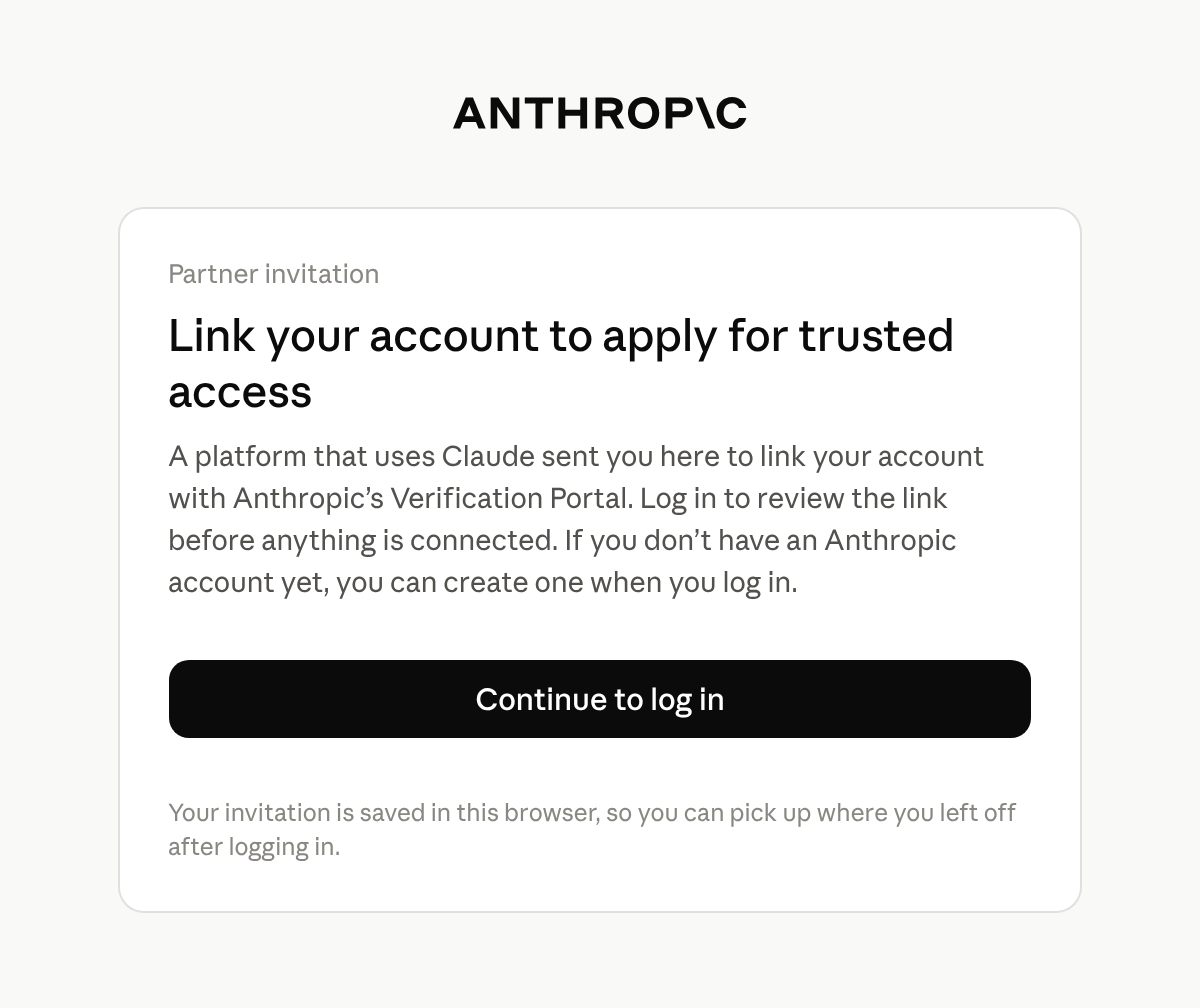
The end customer logs in with an Anthropic account: one they already use for the Claude Console or claude.ai, or a new one that they create at this step. The portal keeps its own login session, separate from the Claude Console and claude.ai. If they belong to more than one organization, they pick the one to link.
<Frame caption="Before logging in, the end customer sees why they were sent to the portal.">
</Frame>
</Step>
<Step title="Link the profile">
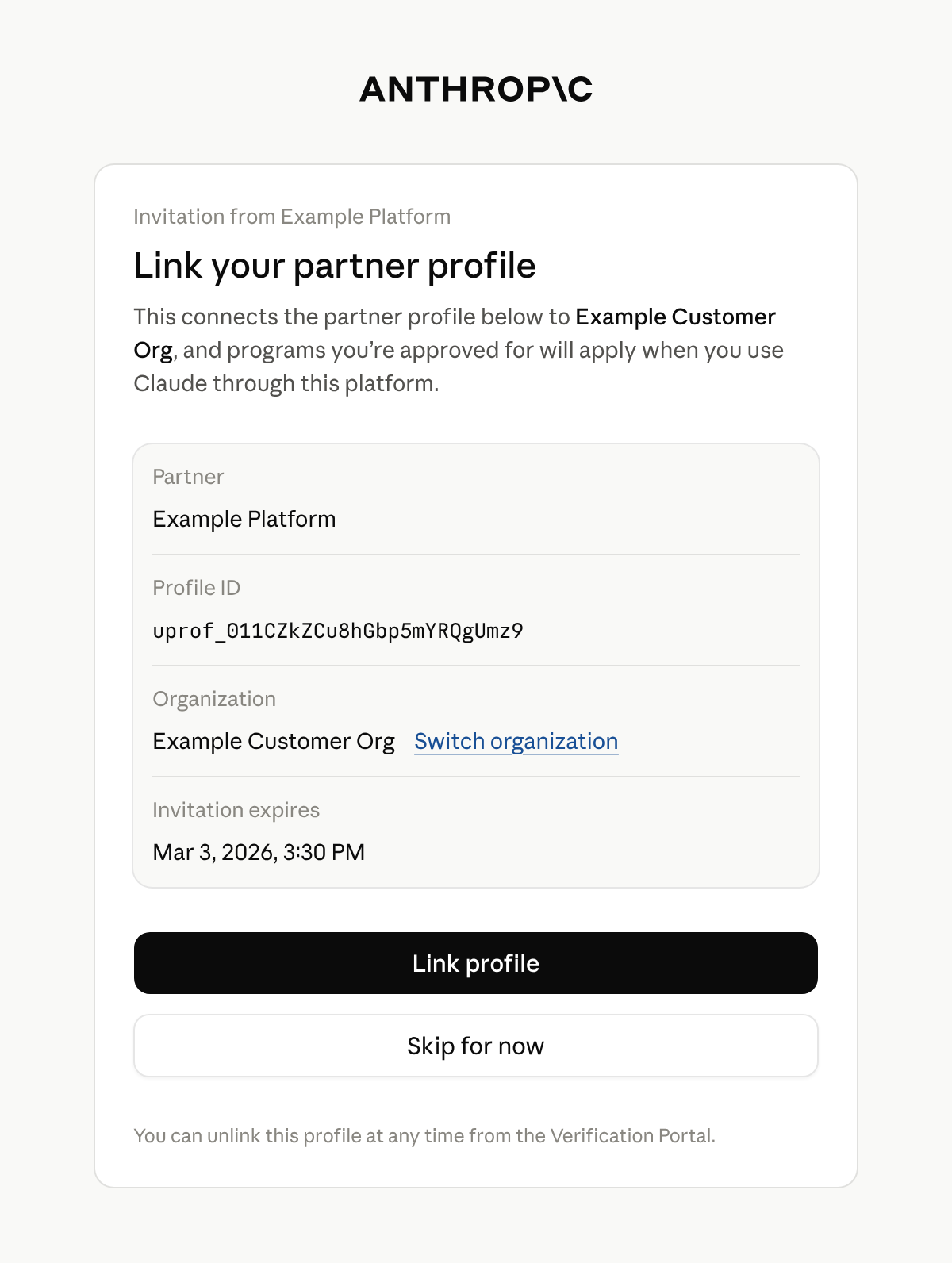
The portal shows a card titled **Link your partner profile**. It names your platform, the profile's ID, the end customer's organization, and when the invitation expires. The end customer selects **Link profile** to accept or **Skip for now** to continue to the portal without linking.
<Frame caption="The end customer confirms which organization the profile links to.">
</Frame>
Only an admin or owner of the organization can link a profile. Anyone else sees **Admin access needed** and can't link the profile. They can switch to an organization where they are an admin or owner. Otherwise, tell the end customer that an admin or owner of their Anthropic organization has to open the link.
</Step>
<Step title="See the confirmation">
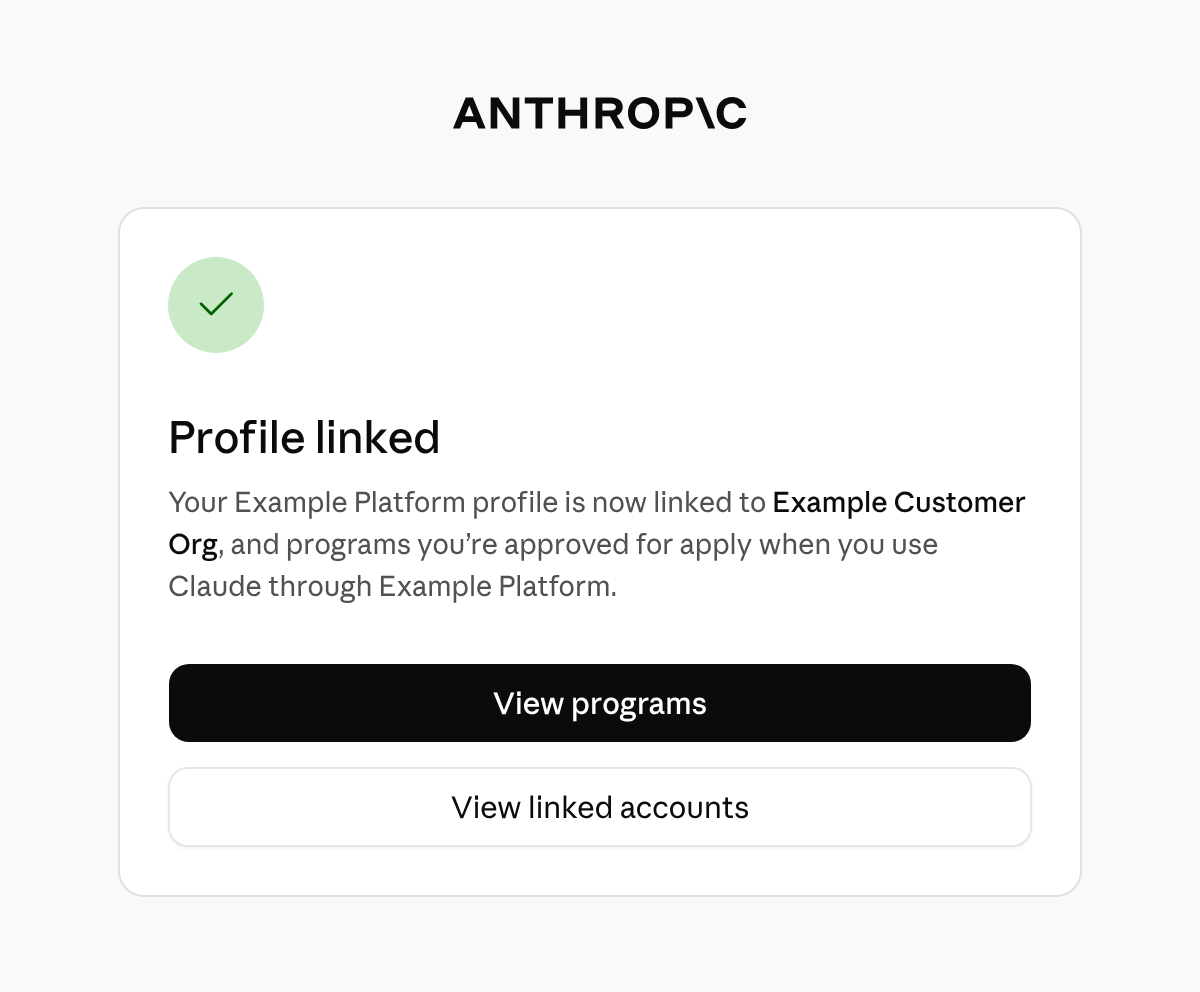
The portal confirms with **Profile linked**. The end customer stays in the portal, where they can view the programs available to their organization and apply for them.
<Frame caption="After linking, the end customer stays in the portal.">
</Frame>
</Step>
</Steps>
If the link has expired by the time an admin or owner opens it and logs in, the portal shows **This invitation has expired** and tells them to ask you for a new one.
A profile links to one organization. If it's already linked to a different one, the portal says **This partner profile is already linked to a different organization** and doesn't link it. An admin or owner of the organization it's linked to can unlink it under **Linked accounts** in the portal. After that, create a new link and send it to the end customer.
## After the end customer links the profile
The portal doesn't send the end customer back to your product, and Anthropic doesn't notify you. Tell the end customer in your own interface to return when they have finished.
Linking doesn't approve anything by itself. It connects the profile to the end customer's organization, so that programs the organization is approved for apply to requests that carry the profile's ID. The profile has no field that says it is linked.
To see which programs apply to a profile, [retrieve the profile](https://platform.claude.com/docs/en/api/user_profiles/retrieve) and read `programs`. It has a key for each program, such as `cyber` and `efs`, and every profile has every key. Each key is one of the following:
* `null`: Anthropic has no status to report for that program. Every key is `null` if Anthropic hasn't enabled programs for your organization.
* An object: Its `status` is `active` when Anthropic has approved the end customer for the program, otherwise `pending` or `rejected`.
The end customer can see the linked profile under **Linked accounts** in the portal.
If your inference runs on Claude in Amazon Bedrock or Google Cloud, you have to link your own accounts too. Programs apply to requests from an AWS account or Google Cloud project only after you link it to the Anthropic organization that creates your profiles. See [Attribute requests on Amazon Bedrock and Google Cloud](https://platform.claude.com/docs/en/manage-claude/user-profiles#attribute-requests-on-amazon-bedrock-and-google-cloud).
## Next steps
For each field that a retrieved profile contains, see the [Retrieve a profile](https://platform.claude.com/docs/en/api/user_profiles/retrieve) reference.
To create profiles, send their IDs on your requests, and keep them current, see [User profiles for end-customer attribution](https://platform.claude.com/docs/en/manage-claude/user-profiles).