Follow Discord
Sweep 10 Nov 2026 · 02:18Z Build v2.1.322 539 read Stable v2.1.311 Latest v2.1.322 Next v2.1.322 Feeds RSS JSON llms.txt llms-full.txt Unofficial
One capture · mcp

One read of Model Context Protocolmcp-20261108T013707Z

2 pages moved out of 359 read.

Pages moved 2 significant first
Pages read 359 in this capture
Captured 01:37 UTC
Corpus hash a2f69370ea65 corpus-hash

What this read moved

1-2 of 2

docs/2026-07-28/tutorials/security/authorization Changed · +632 / -968 lines

## Client Registration Approaches ### Client ID Metadata Documents ### Pre-registration ### Dynamic Client Registration ## Choosing an Authorization Server ### Opaque Tokens ### Deploying Beyond Localhost ## Testing the Server ### Keycloak Setup ### MCP Server Setup ## Testing the MCP Server

The two sides of this change are more than 400 edits apart, too far apart to line up, so this is the differ's own diff of it and the words inside a line are not marked.

from line 2
22 
33> Learn how to implement secure authorization for MCP servers using OAuth 2.1 to protect sensitive resources and operations
44 
5Authorization in the Model Context Protocol (MCP) secures access to sensitive resources and operations exposed by MCP servers. If your MCP server handles user data or administrative actions, authorization ensures only permitted users can access its endpoints.
6 
7MCP uses standardized authorization flows to build trust between MCP clients and MCP servers. Its design doesn't focus on one specific authorization or identity system, but rather follows the conventions outlined for [OAuth 2.1](https://datatracker.ietf.org/doc/html/draft-ietf-oauth-v2-1-13). For detailed information, see the [Authorization specification](https://modelcontextprotocol.io/specification/latest/basic/authorization.md).
5Authorization in the Model Context Protocol (MCP) secures access to sensitive resources and operations exposed by MCP servers. If your MCP server handles user data or administrative actions, authorization lets only permitted users reach its endpoints.
6 
7MCP authorization follows [OAuth 2.1](https://datatracker.ietf.org/doc/html/draft-ietf-oauth-v2-1-13) and works with any authorization or identity system that meets its requirements. This guide explains the flow, then shows how to protect a small server. The full requirements are in the [Authorization specification](https://modelcontextprotocol.io/specification/2026-07-28/basic/authorization.md).
88 
99## When Should You Use Authorization?
1010 
11While authorization for MCP servers is **optional**, it is strongly recommended when:
12 
13* Your server accesses user-specific data (emails, documents, databases)
11Authorization is **optional** for MCP servers. It is strongly recommended when:
12 
13* Your server works with user-specific data such as emails, documents, or databases
1414* You need to audit who performed which actions
1515* Your server grants access to its APIs that require user consent
1616* You're building for enterprise environments with strict access controls
17* You want to implement rate limiting or usage tracking per user
17* You want to rate-limit or track usage per user
1818 
1919> [!TIP]
2020>
2121> **Authorization for Local MCP Servers**
2222>
23> For MCP servers using the [STDIO transport](https://modelcontextprotocol.io/specification/latest/basic/transports.md#stdio), you can use environment-based credentials or credentials provided by third-party libraries embedded directly in the MCP server instead. Because a STDIO-built MCP server runs locally, it has access to a range of flexible options when it comes to acquiring user credentials that may or may not rely on in-browser authentication and authorization flows.
24>
25> OAuth flows, in turn, are designed for HTTP-based transports where the MCP server is remotely-hosted and the client uses OAuth to establish that a user is authorized to access said remote server.
23> The OAuth flow in this guide is for HTTP-based transports. Servers that use the [stdio transport](https://modelcontextprotocol.io/specification/2026-07-28/basic/transports/stdio.md) should retrieve credentials from the environment instead. They run locally, so they can also use credentials from libraries embedded in the server.
2624 
2725## The Authorization Flow: Step by Step
2826 
29Let's walk through what happens when a client wants to connect to your protected MCP server:
30 
31**1. Initial Handshake**
32 
33When your MCP client first tries to connect, your server responds with a `401 Unauthorized` and tells the client where to find authorization information, captured in a [Protected Resource Metadata (PRM) document](https://datatracker.ietf.org/doc/html/rfc9728). The document is hosted by the MCP server, follows a predictable path pattern, and is provided to the client in the `resource_metadata` parameter within the `WWW-Authenticate` header.
27Three parties take part. Your **MCP server** is an OAuth resource server. In this role it validates access tokens and doesn't issue them. The **MCP client** is an OAuth client acting on behalf of a user. The **authorization server** authenticates the user and issues tokens for your MCP server. It can be a separate service or be hosted together with the MCP server.
28 
29```mermaid theme={null}
30sequenceDiagram
31 participant B as Browser
32 participant C as MCP Client
33 participant M as MCP Server
34 participant A as Authorization Server
35 
36 C->>M: MCP request without a token
37 M-->>C: 401 with WWW-Authenticate
38 C->>M: GET Protected Resource Metadata
39 M-->>C: authorization_servers, scopes_supported
40 C->>A: GET authorization server metadata
41 A-->>C: Endpoints and capabilities
42 Note over C,A: Client identifies itself:<br/>pre-registered ID, metadata document, or DCR
43 Note over C: Record the issuer
44 C->>B: Open authorization URL<br/>(PKCE challenge, resource, scope)
45 B->>A: User logs in and consents
46 A-->>B: Redirect with code and iss
47 B->>C: Authorization code
48 Note over C: Validate iss
49 C->>A: Code, PKCE verifier, resource
50 A-->>C: Access token for this MCP server
51 C->>M: MCP request with the token
52 M-->>C: MCP response
53```
54 
55**1. Initial Request**
56 
57When a client sends a request without a valid token, your server responds with `401 Unauthorized`. The `WWW-Authenticate` header can point to the [Protected Resource Metadata (PRM)](https://datatracker.ietf.org/doc/html/rfc9728) document. It should also name the scopes needed to access the resource.
3458 
3559```http theme={null}
3660HTTP/1.1 401 Unauthorized
37WWW-Authenticate: Bearer realm="mcp",
38 resource_metadata="https://your-server.com/.well-known/oauth-protected-resource"
39```
40 
41This tells the client that authorization is required for the MCP server and where to get the necessary information to kickstart the authorization flow.
61WWW-Authenticate: Bearer resource_metadata="https://your-server.com/.well-known/oauth-protected-resource/mcp",
62 scope="mcp:tools"
63```
64 
65The client should request the scopes named in the challenge. If the challenge names none, it should request everything in the PRM document's `scopes_supported`. If that is missing too, it leaves out the `scope` parameter. See [Scope Selection Strategy](https://modelcontextprotocol.io/specification/2026-07-28/basic/authorization.md#scope-selection-strategy).
66 
67A server must include the `resource_metadata` pointer or serve the PRM document at a well-known URI. It can do both. When the pointer is missing, the client first tries `/.well-known/oauth-protected-resource` followed by the path of the MCP endpoint. It then tries the same URL without the path. See [Protected Resource Metadata Discovery Requirements](https://modelcontextprotocol.io/specification/2026-07-28/basic/authorization/authorization-server-discovery.md#protected-resource-metadata-discovery-requirements).
4268 
4369**2. Protected Resource Metadata Discovery**
4470 
45With the URI pointer to the PRM document, the client will fetch the metadata to learn about the authorization server, supported scopes, and other resource information. The data is typically encapsulated in a JSON blob, similar to the one below.
71The client fetches the PRM document to learn which authorization servers the MCP server trusts. `authorization_servers` must contain at least one entry.
4672 
4773```json theme={null}
4874{
4975 "resource": "https://your-server.com/mcp",
5076 "authorization_servers": ["https://auth.your-server.com"],
51 "scopes_supported": ["mcp:tools", "mcp:resources"]
77 "scopes_supported": ["mcp:tools"]
5278}
5379```
5480 
55You can see a more comprehensive example in [RFC 9728 Section 3.2](https://datatracker.ietf.org/doc/html/rfc9728#name-protected-resource-metadata-r).
81`resource` identifies your MCP server. Use the exact URL that clients connect to. [RFC 9728 Section 3.3](https://datatracker.ietf.org/doc/html/rfc9728#section-3.3) says clients must not use a document whose `resource` doesn't match.
5682 
5783**3. Authorization Server Discovery**
5884 
59Next, the client discovers what the authorization server can do by fetching its metadata. If the PRM document lists more than one authorization server, the client can decide which one to use.
60 
61With an authorization server selected, the client will then construct a standard metadata URI and issue a request to the [OpenID Connect (OIDC) Discovery](https://openid.net/specs/openid-connect-discovery-1_0.html) or [OAuth 2.0 Auth Server Metadata](https://datatracker.ietf.org/doc/html/rfc8414) endpoints (depending on authorization server support)
62and retrieve another set of metadata properties that will allow it to know the endpoints it needs to complete the authorization flow.
85The client picks an authorization server and fetches its metadata. The metadata can be at an [OAuth 2.0 Authorization Server Metadata](https://datatracker.ietf.org/doc/html/rfc8414) or an [OpenID Connect Discovery](https://openid.net/specs/openid-connect-discovery-1_0.html) URL. Clients must support both and try the URLs in the [order the specification defines](https://modelcontextprotocol.io/specification/2026-07-28/basic/authorization/authorization-server-discovery.md#authorization-server-metadata-discovery).
6386 
6487```json theme={null}
6588{
6689 "issuer": "https://auth.your-server.com",
6790 "authorization_endpoint": "https://auth.your-server.com/authorize",
6891 "token_endpoint": "https://auth.your-server.com/token",
69 "registration_endpoint": "https://auth.your-server.com/register"
92 "jwks_uri": "https://auth.your-server.com/jwks",
93 "response_types_supported": ["code"],
94 "grant_types_supported": ["authorization_code", "refresh_token"],
95 "token_endpoint_auth_methods_supported": ["none"],
96 "code_challenge_methods_supported": ["S256"],
97 "client_id_metadata_document_supported": true,
98 "authorization_response_iss_parameter_supported": true
7099}
71100```
72101 
102The client must check two of these values:
103 
104* `issuer` must be identical to the issuer identifier used to build the metadata URL. If it isn't, the client must not use the document.
105* `code_challenge_methods_supported` must be present. If it's absent, the client must refuse to proceed, because the authorization server doesn't support PKCE.
106 
73107**4. Client Registration**
74108 
75With all the metadata out of the way, the client now needs to make sure that it's registered with the authorization server. This can be done in two ways.
76 
77First, the client can be **pre-registered** with a given authorization server, in which case it can have embedded client registration information that it uses to complete the authorization flow.
78 
79Alternatively, the client can use **Dynamic Client Registration** (DCR) to dynamically register itself with the authorization server. The latter scenario requires the authorization server to support DCR. If the authorization server does support DCR, the client will send a request to the `registration_endpoint` with its information:
80 
81```json theme={null}
82{
83 "client_name": "My MCP Client",
84 "redirect_uris": ["http://localhost:3000/callback"],
85 "grant_types": ["authorization_code", "refresh_token"],
86 "response_types": ["code"]
87}
88```
89 
90If the registration succeeds, the authorization server will return a JSON blob with client registration information.
91 
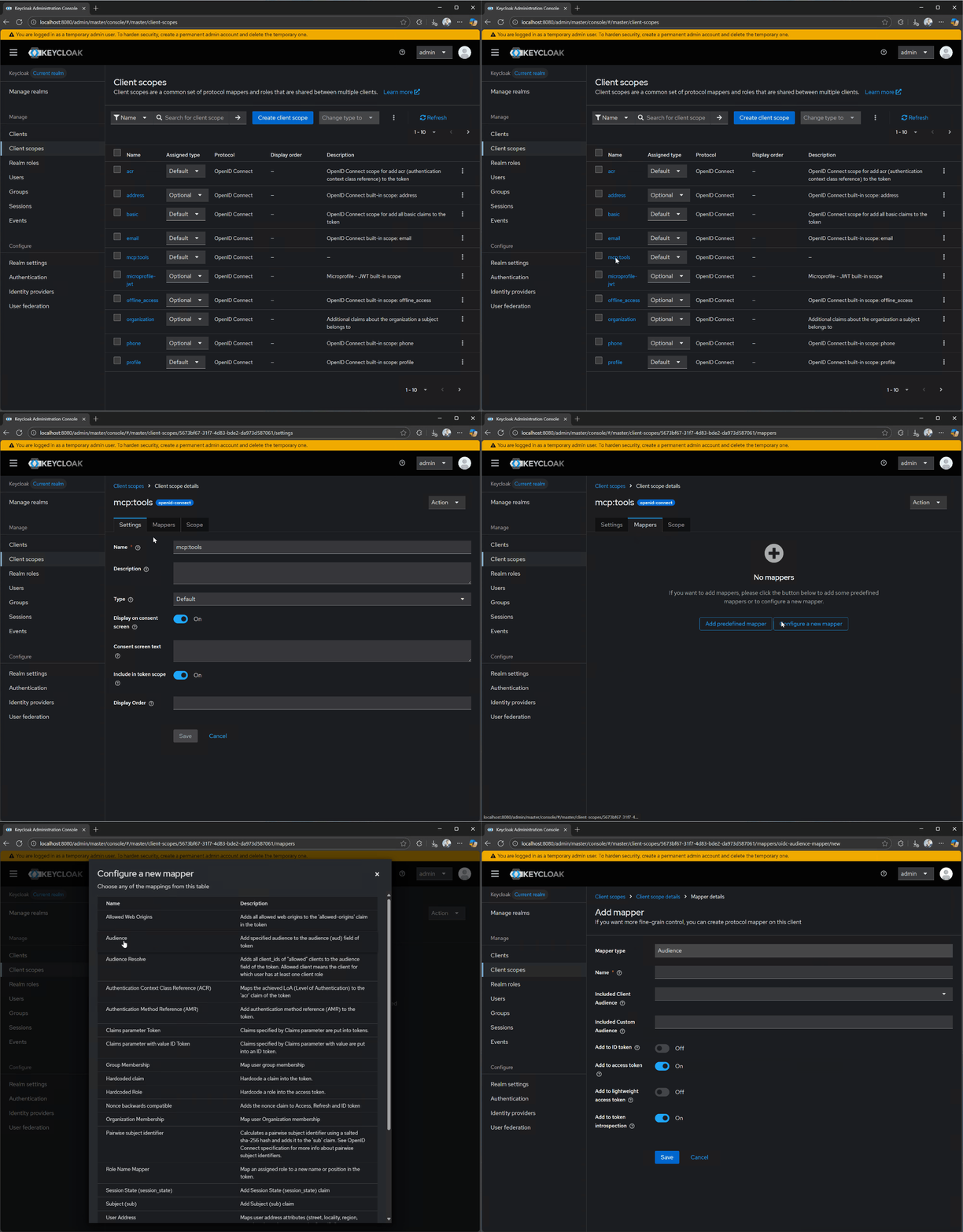
92> [!TIP]
93>
94> **No DCR or Pre-Registration**
95>
96> In case an MCP client connects to an MCP server that doesn't use an authorization server that supports DCR and the client is not pre-registered with said authorization server, it's the responsibility of the client developer to provide an affordance for the end-user to enter client information manually.
109The client needs a client ID that the authorization server accepts. The
110options are summarized in [Client Registration
111Approaches](#client-registration-approaches).
97112 
98113**5. User Authorization**
99114 
100The client will now need to open a browser to the `/authorize` endpoint, where the user can log in and grant the required permissions. The authorization server will then redirect back to the client with an authorization code that the client exchanges for tokens:
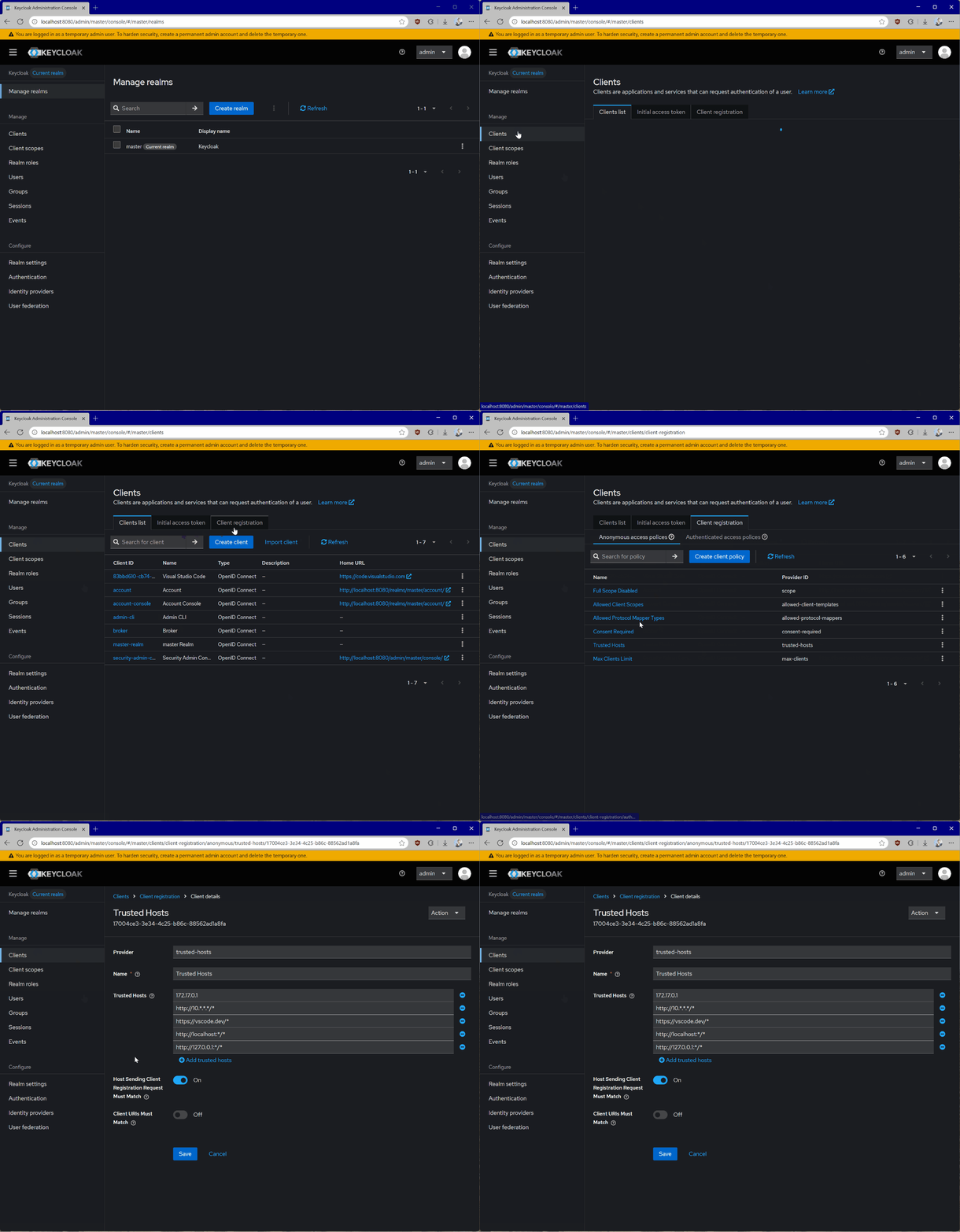
115The client opens a browser at the `authorization_endpoint`. The request includes a [PKCE](https://datatracker.ietf.org/doc/html/draft-ietf-oauth-v2-1-13#section-7.5.2) `code_challenge` and the `resource` parameter ([RFC 8707](https://datatracker.ietf.org/doc/html/rfc8707)), set to the MCP server's URL:
116 
117```http theme={null}
118GET /authorize?response_type=code
119 &client_id=https%3A%2F%2Fapp.example.com%2Foauth%2Fclient-metadata.json
120 &redirect_uri=http%3A%2F%2F127.0.0.1%3A8090%2Fcallback
121 &scope=mcp%3Atools
122 &resource=https%3A%2F%2Fyour-server.com%2Fmcp
123 &code_challenge=E9Melhoa2OwvFrEMTJguCHaoeK1t8URWbuGJSstw-cM
124 &code_challenge_method=S256
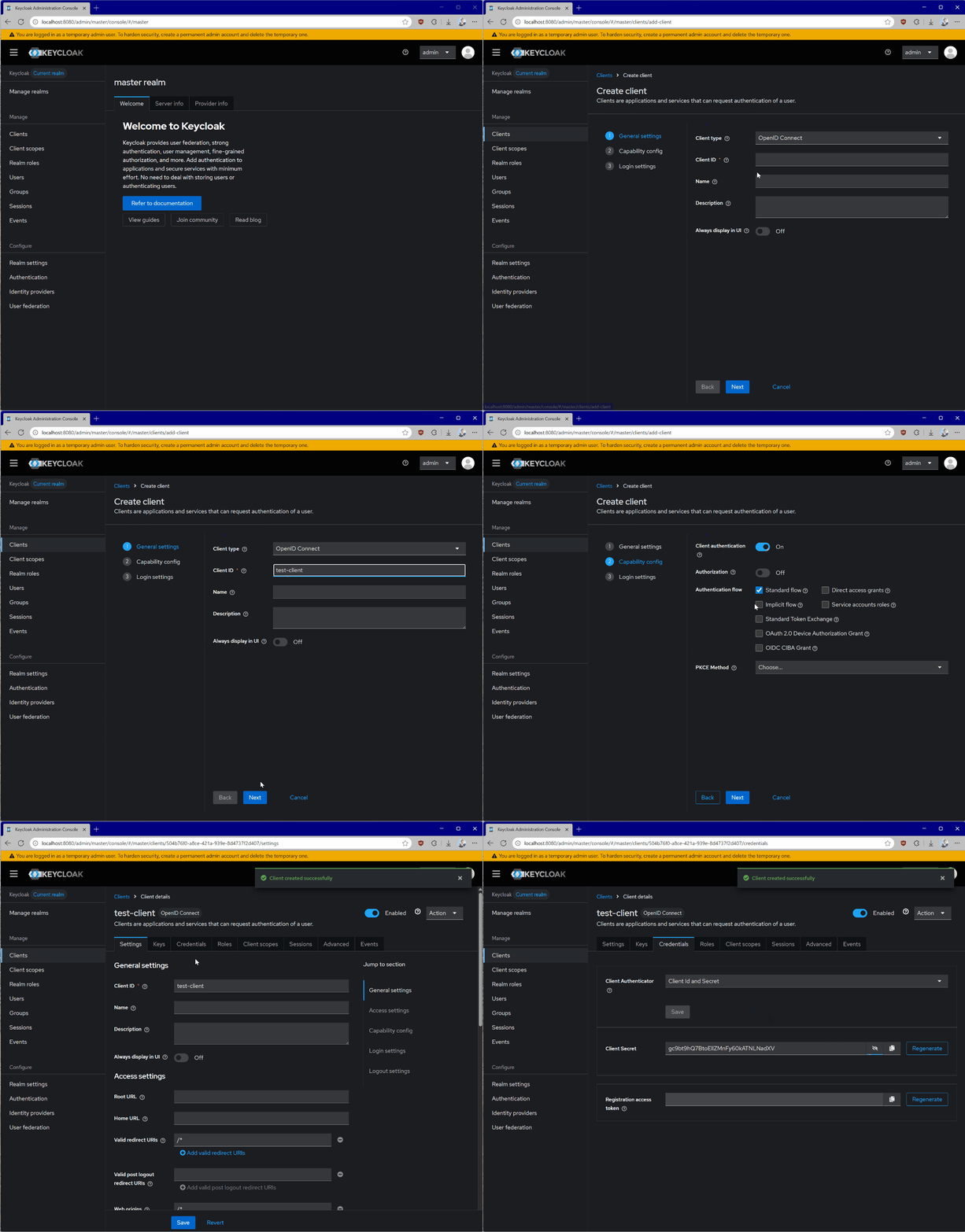
125 &state=af0ifjsldkj HTTP/1.1
126Host: auth.your-server.com
127```
128 
129The line breaks in this example are only there to make it easier to read.
130 
131After the user logs in and consents, the authorization server redirects back to the client with a `code` and the `state`. If it supports [RFC 9207](https://datatracker.ietf.org/doc/html/rfc9207), it also returns `iss`.
132 
133Before it opens the browser, the client must record the `issuer` from the validated metadata. Before it exchanges the code, it must [validate `iss`](https://modelcontextprotocol.io/specification/2026-07-28/basic/authorization#authorization-response-validation) against that issuer, without normalizing either value. If the authorization server advertises support for `iss`, the client must reject a response that leaves it out. The same check applies to error responses. If it fails, the client must not act on the error or display it.
134 
135The client should also discard a response whose `state` is missing or different from the value it sent.
136 
137The client then sends the code, the PKCE verifier, and the same `resource` value to the `token_endpoint`. It receives an access token, and the authorization server can choose to return a refresh token too:
101138 
102139```json theme={null}
103140{
104141 "access_token": "eyJhbGciOiJSUzI1NiIs...",
105 "refresh_token": "def502...",
106142 "token_type": "Bearer",
107 "expires_in": 3600
143 "expires_in": 3600,
144 "scope": "mcp:tools"
108145}
109146```
110147 
111The access token is what the client will use to authenticate requests to the MCP server. This step follows standard [OAuth 2.1 authorization code with PKCE](https://oauth.net/2/grant-types/authorization-code/) conventions.
112 
113148**6. Making Authenticated Requests**
114149 
115Finally, the client can make requests to your MCP server using the access token embedded in the `Authorization` header:
150The client sends the access token in the `Authorization` header of **every** HTTP request, and never in the URL:
116151 
117152```http theme={null}
118GET /mcp HTTP/1.1
153POST /mcp HTTP/1.1
119154Host: your-server.com
120155Authorization: Bearer eyJhbGciOiJSUzI1NiIs...
121```
122 
123The MCP server will need to validate the token and process the request if the token is valid and has the required permissions.
124 
125## Implementation Example
126 
127To get started with a practical implementation, we will use a [Keycloak](https://www.keycloak.org/) authorization server hosted in a Docker container. Keycloak is an open-source authorization server that can be easily deployed locally for testing and experimentation.
128 
129Make sure that you download and install [Docker Desktop](https://www.docker.com/products/docker-desktop/). We will need it to deploy Keycloak on our development machine.
130 
131### Keycloak Setup
132 
133From your terminal application, run the following command to start the Keycloak container:
134 
135```bash theme={null}
136docker run -p 127.0.0.1:8080:8080 -e KC_BOOTSTRAP_ADMIN_USERNAME=admin -e KC_BOOTSTRAP_ADMIN_PASSWORD=admin quay.io/keycloak/keycloak start-dev
137```
138 
139This command will pull the Keycloak container image locally and bootstrap the basic configuration. It will run on port `8080` and have an `admin` user with `admin` password.
140 
141> [!WARNING]
142>
143> **Not for Production**
144>
145> The configuration above may be suitable for testing and experimentation; however, you should never use it in production. Refer to the [Configuring Keycloak for production](https://www.keycloak.org/server/configuration-production) guide for additional details on how to deploy the authorization server for scenarios that require reliability, security, and high availability.
146 
147You will be able to access the Keycloak authorization server from your browser at `http://localhost:8080`.
148 
149![Keycloak admin dashboard authentication dialog.](https://mintcdn.com/mcp/sAd4SGUO-cEUqgzn/images/tutorial-authorization/keycloak-browser.png?fit=max\&auto=format\&n=sAd4SGUO-cEUqgzn\&q=85\&s=cba689d986e113cbe937d732ac0558b6)
150 
151When running with the default configuration, Keycloak will already support many of the capabilities that we need for MCP servers, including Dynamic Client Registration. You can check this by looking at the OIDC configuration, available at:
156Content-Type: application/json
157Accept: application/json, text/event-stream
158MCP-Protocol-Version: 2026-07-28
159Mcp-Method: tools/list
160 
161{
162 "jsonrpc": "2.0",
163 "id": 1,
164 "method": "tools/list",
165 "params": {
166 "_meta": {
167 "io.modelcontextprotocol/protocolVersion": "2026-07-28",
168 "io.modelcontextprotocol/clientInfo": {
169 "name": "ExampleClient",
170 "version": "1.0.0"
171 },
172 "io.modelcontextprotocol/clientCapabilities": {}
173 }
174 }
175}
176```
177 
178Before it processes the request, the MCP server validates the token and checks that the token was issued for this server. An invalid or expired token gets a `401`.
179 
180If the token is valid but lacks a scope, the server should respond with `403 Forbidden` and an `insufficient_scope` challenge:
152181 
153182```http theme={null}
154http://localhost:8080/realms/master/.well-known/openid-configuration
155```
156 
157We will also need to set up Keycloak to support our scopes and allow our host (local machine) to dynamically register clients, as the default policies restrict anonymous dynamic client registration.
158 
159Go to **Client scopes** in the Keycloak dashboard and create a new `mcp:tools` scope. We will use this to access all of the tools on our MCP server.
160 
161![Configuring Keycloak scopes.](https://mintcdn.com/mcp/sAd4SGUO-cEUqgzn/images/tutorial-authorization/keycloak-scopes.png?fit=max\&auto=format\&n=sAd4SGUO-cEUqgzn\&q=85\&s=3cd49dc2e070027609ae495751e0db58)
162 
163After creating the scope, make sure that you assign its type to **Default** and have flipped the **Include in token scope** switch, as this will be needed for token validation.
164 
165Let's now also set up an **audience** for our Keycloak-issued tokens. An audience is important to configure because it embeds the intended destination directly into the issued access token. This helps your MCP server to verify that the token it got was actually meant for it rather than some other API. This is key to help avoid token passthrough scenarios.
166 
167To do this, open your `mcp:tools` client scope and click on **Mappers**, followed by **Configure a new mapper**. Select **Audience**.
168 
169![Configuring an audience for a token in Keycloak.](https://mintcdn.com/mcp/sAd4SGUO-cEUqgzn/images/tutorial-authorization/scope-add-audience.gif?s=6ea9cf20c397f4c79c491c2e39019272)
170 
171For **Name**, use `audience-config`. Add a value for **Included Custom Audience**, set to `http://localhost:3000`. This will be the URI of our test server.
172 
173> [!WARNING]
174>
175> **Not for Production**
176>
177> The audience configuration above is meant for testing. For production scenarios, additional set-up and configuration will be required to ensure that audiences are properly constrained for issued tokens. Specifically, the audience needs to be based on the resource parameter passed from the client, not a fixed value.
178 
179Now, navigate to **Clients**, then **Client registration**, and then **Trusted Hosts**. Disable the **Client URIs Must Match** setting and add the hosts from which you're testing. You can get your current host IP by running the `ifconfig` command on Linux or macOS, or `ipconfig` on Windows. You can see the IP address you need to add by looking at the keycloak logs for a line that looks like `Failed to verify remote host : 192.168.215.1`. Check that the IP address is associated with your host. This may be for a bridge network depending on your docker setup.
180 
181![Setting up client registration details in Keycloak.](https://mintcdn.com/mcp/sAd4SGUO-cEUqgzn/images/tutorial-authorization/keycloak-client.gif?s=b5d40b36a5f1ea1e818821bb8ea77f6b)
182 
183> [!WARNING]
184>
185> **Getting the Host**
186>
187> If you are running Keycloak from a container, you will also be able to see the host IP from the Terminal in the container logs.
188 
189Lastly, we need to register a new client that we can use with the **MCP server itself** to talk to Keycloak for things like [token introspection](https://oauth.net/2/token-introspection/). To do that:
190 
1911. Go to **Clients**.
1922. Click **Create client**.
1933. Give your client a unique **Client ID** and click **Next**.
1944. Enable **Client authentication** and click **Next**.
1955. Click **Save**.
196 
197Worth noting that token introspection is just *one of* the available approaches to validate tokens. This can also be done with the help of standalone libraries, specific to each language and platform.
198 
199When you open the client details, go to **Credentials** and take note of the **Client Secret**.
200 
201![Creating a new client in Keycloak.](https://mintcdn.com/mcp/sAd4SGUO-cEUqgzn/images/tutorial-authorization/keycloak-client-auth.gif?s=7152c41a5746994fd399024bc4659e40)
202 
203> [!WARNING]
204>
205> **Handling Secrets**
206>
207> Never embed client credentials directly in your code. We recommend using environment variables or specialized solutions for secret storage.
208 
209With Keycloak configured, every time the authorization flow is triggered, your MCP server will receive a token like this:
210 
211```text theme={null}
212eyJhbGciOiJSUzI1NiIsInR5cCIgOiAiSldUIiwia2lkIiA6ICI1TjcxMGw1WW5MWk13WGZ1VlJKWGtCS3ZZMzZzb3JnRG5scmlyZ2tlTHlzIn0.eyJleHAiOjE3NTU1NDA4MTcsImlhdCI6MTc1NTU0MDc1NywiYXV0aF90aW1lIjoxNzU1NTM4ODg4LCJqdGkiOiJvbnJ0YWM6YjM0MDgwZmYtODQwNC02ODY3LTgxYmUtMTIzMWI1MDU5M2E4IiwiaXNzIjoiaHR0cDovL2xvY2FsaG9zdDo4MDgwL3JlYWxtcy9tYXN0ZXIiLCJhdWQiOiJodHRwOi8vbG9jYWxob3N0OjMwMDAiLCJzdWIiOiIzM2VkNmM2Yi1jNmUwLTQ5MjgtYTE2MS1mMmY2OWM3YTAzYjkiLCJ0eXAiOiJCZWFyZXIiLCJhenAiOiI3OTc1YTViNi04YjU5LTRhODUtOWNiYS04ZmFlYmRhYjg5NzQiLCJzaWQiOiI4ZjdlYzI3Ni0zNThmLTRjY2MtYjMxMy1kYjA4MjkwZjM3NmYiLCJzY29wZSI6Im1jcDp0b29scyJ9.P5xCRtXORly0R0EXjyqRCUx-z3J4uAOWNAvYtLPXroykZuVCCJ-K1haiQSwbURqfsVOMbL7jiV-sD6miuPzI1tmKOkN_Yct0Vp-azvj7U5rEj7U6tvPfMkg2Uj_jrIX0KOskyU2pVvGZ-5BgqaSvwTEdsGu_V3_E0xDuSBq2uj_wmhqiyTFm5lJ1WkM3Hnxxx1_AAnTj7iOKMFZ4VCwMmk8hhSC7clnDauORc0sutxiJuYUZzxNiNPkmNeQtMCGqWdP1igcbWbrfnNXhJ6NswBOuRbh97_QraET3hl-CNmyS6C72Xc0aOwR_uJ7xVSBTD02OaQ1JA6kjCATz30kGYg
213```
214 
215Decoded, it will look like this:
183HTTP/1.1 403 Forbidden
184WWW-Authenticate: Bearer error="insufficient_scope",
185 scope="mcp:tools",
186 resource_metadata="https://your-server.com/.well-known/oauth-protected-resource/mcp"
187```
188 
189The client should then start a [step-up authorization flow](https://modelcontextprotocol.io/specification/2026-07-28/basic/authorization.md#step-up-authorization-flow). It requests the scopes in the challenge together with the scopes it requested before, and it should limit how often it retries.
190 
191## Client Registration Approaches
192 
193| Approach | When to Use |
194| - | - |
195| **Pre-registration** | The client already has credentials for this authorization server |
196| **Client ID Metadata Documents** | Client and server have no prior relationship (most common) |
197| **Dynamic Client Registration** | Deprecated. For authorization servers that don't support Client ID Metadata Documents |
198 
199A client that supports all three should try them in that order. If none is available, it should ask the user to enter the client information. See [Client Registration](https://modelcontextprotocol.io/specification/2026-07-28/basic/authorization/client-registration.md).
200 
201### Client ID Metadata Documents
202 
203With a [Client ID Metadata Document](https://datatracker.ietf.org/doc/html/draft-ietf-oauth-client-id-metadata-document-00) (CIMD), the client uses an HTTPS URL as its `client_id` and hosts a JSON document there. The authorization server fetches the document and validates it when it receives an authorization request.
216204 
217205```json theme={null}
218206{
219 "alg": "RS256",
220 "typ": "JWT",
221 "kid": "5N710l5YnLZMwXfuVRJXkBKvY36sorgDnlrirgkeLys"
222}.{
223 "exp": 1755540817,
224 "iat": 1755540757,
225 "auth_time": 1755538888,
226 "jti": "onrtac:b34080ff-8404-6867-81be-1231b50593a8",
227 "iss": "http://localhost:8080/realms/master",
228 "aud": "http://localhost:3000",
229 "sub": "33ed6c6b-c6e0-4928-a161-f2f69c7a03b9",
230 "typ": "Bearer",
231 "azp": "7975a5b6-8b59-4a85-9cba-8faebdab8974",
232 "sid": "8f7ec276-358f-4ccc-b313-db08290f376f",
233 "scope": "mcp:tools"
234}.[Signature]
235```
207 "client_id": "https://app.example.com/oauth/client-metadata.json",
208 "client_name": "Example MCP Client",
209 "redirect_uris": ["http://127.0.0.1:8090/callback"],
210 "grant_types": ["authorization_code", "refresh_token"],
211 "response_types": ["code"],
212 "token_endpoint_auth_method": "none"
213}
214```
215 
216The URL must use `https` and contain a path, such as `/oauth/client-metadata.json`. The document must contain at least `client_id`, `client_name`, and `redirect_uris`, and its `client_id` must match the URL exactly.
217 
218Authorization servers advertise support with `"client_id_metadata_document_supported": true`. A client can use the same client ID with every authorization server that supports CIMD. It doesn't need to register again if your MCP server changes authorization servers.
219 
220### Pre-registration
221 
222The client ID is set up in advance, along with credentials if they're needed. They can be built into the client or entered by the user.
223 
224### Dynamic Client Registration
236225 
237226> [!WARNING]
238227>
239> **Embedded Audience**
240>
241> Notice the `aud` claim embedded in the token - it's currently set to be the URI of the test MCP server and it's inferred from the scope that we've previously configured. This will be important in our implementation to validate.
242 
243### MCP Server Setup
244 
245We will now set up our MCP server to use the locally-running Keycloak authorization server. Depending on your programming language preference, you can use one of the supported [MCP SDKs](https://modelcontextprotocol.io/docs/2026-07-28/sdk.md).
246 
247For our testing purposes, we will create an extremely simple MCP server that exposes two tools - one for addition and another for multiplication. The server will require authorization to access these.
228> Dynamic Client Registration (DCR) is deprecated. New implementations should
229> use Client ID Metadata Documents instead. DCR remains available for backwards
230> compatibility with authorization servers that don't support them.
231 
232With [DCR](https://datatracker.ietf.org/doc/html/rfc7591), the client posts its metadata to the authorization server's `registration_endpoint` and receives a client ID. Clients must include an appropriate `application_type`:
233 
234```json theme={null}
235{
236 "client_name": "Example MCP Client",
237 "redirect_uris": ["http://127.0.0.1:8090/callback"],
238 "grant_types": ["authorization_code", "refresh_token"],
239 "response_types": ["code"],
240 "token_endpoint_auth_method": "none",
241 "application_type": "native"
242}
243```
244 
245Pre-registered and DCR credentials belong to the authorization server that issued them. Clients must store them by `issuer` and never use them with another one. See [Authorization Server Binding](https://modelcontextprotocol.io/specification/2026-07-28/basic/authorization/client-registration.md#authorization-server-binding).
246 
247## Choosing an Authorization Server
248 
249Use an existing identity provider or authorization server product. Client registration happens between the client and the authorization server, so your MCP server needs no CIMD or DCR code.
250 
251Check these points before you choose one:
252 
253* **Audience.** Your MCP server must reject tokens that weren't issued for it. The `resource` value from the client should become the token's audience, which is the `aud` claim in a JWT. Some products need a setting for this, or let you configure the audience on a scope instead. Others always use their own identifier. In that case, compare the audience with that identifier, and keep your server's URL as the PRM `resource`. The identifier must belong to this MCP server only, so don't share one application registration between servers.
254* **Metadata.** It must serve metadata through RFC 8414 or OpenID Connect Discovery. The metadata must contain `code_challenge_methods_supported`. Look at the real document, because some products support PKCE but leave this value out, and clients that follow the specification then refuse to connect.
255* **CIMD.** It should support CIMD, which it advertises with `client_id_metadata_document_supported`. In some products you have to enable this, or list the client domains you accept.
256* **Token format.** The examples below need signed JWT access tokens. Otherwise, you need an introspection endpoint.
257* **Public clients.** Many MCP clients have no secret. The authorization server must accept them, and its `token_endpoint_auth_methods_supported` should contain `none`.
258* **Scopes.** Define a scope such as `mcp:tools` and make it available to the clients that will connect. Some products add a prefix to scope names. If yours does, use the full name everywhere the examples use `mcp:tools`. If you define more than one scope, read [Scope Minimization](https://modelcontextprotocol.io/docs/2026-07-28/tutorials/security/security_best_practices.md#scope-minimization), and list only the scopes needed for basic use in `scopes_supported`.
259* **Token lifetime.** Access tokens should be short-lived, because a stolen token works until it expires. The authorization server must rotate refresh tokens for public clients.
260* **Issuer in responses.** It should return `iss` in authorization responses. If it does, it must advertise `authorization_response_iss_parameter_supported`.
261 
262> [!TIP]
263>
264> **Testing Locally**
265>
266> You can run an authorization server on your own machine. For example, [Keycloak](https://www.keycloak.org/securing-apps/mcp-authz-server) has experimental support for CIMD and resource indicators. To enable both, start it with `--features=cimd,resource-indicators`. You then have to create a client policy for CIMD and add your server's URL to its resource indicator allow list.
267 
268## Implementation Example
269 
270The examples below protect an MCP server that has one tool, `add`. Each server runs at `http://localhost:3000/mcp`, requires the `mcp:tools` scope, and accepts JWT access tokens signed with RS256. Before you run one, change these values:
271 
272* `ISSUER` is the exact `issuer` value from your authorization server's metadata.
273* `METADATA_URL` is the URL of that metadata. If the issuer has a path, as in `https://auth.example.com/tenant1`, the RFC 8414 URL is `https://auth.example.com/.well-known/oauth-authorization-server/tenant1`, and the OpenID Connect URL is usually `https://auth.example.com/tenant1/.well-known/openid-configuration`.
274* `RS256` (`RsaSha256` in C#) is the signing algorithm. Change it if your authorization server uses a different one. In Python, the published keys must then have an `alg` value.
275* `mcp:tools` is the required scope.
276* The expected audience is the server URL. Change it if your authorization server puts its own identifier in `aud`. It is the `audience` option in TypeScript and Python, and `ValidAudience` in C#.
277 
278In the C# example, the first two are called `issuer` and `metadataUrl`. The TypeScript and Python examples fetch the metadata at startup, so they exit if the authorization server can't be reached.
248279 
249280> [tab] TypeScript
250281>
251> You can see the complete TypeScript project in the [sample repository](https://github.com/localden/min-ts-mcp-auth).
252>
253> Prior to running the code below, ensure that you have a `.env` file with the following content:
254>
255> ```env theme={null}
256> # Server host/port
257> HOST=localhost
258> PORT=3000
259>
260> # Auth server location
261> AUTH_HOST=localhost
262> AUTH_PORT=8080
263> AUTH_REALM=master
264>
265> # Keycloak OAuth client credentials
266> OAUTH_CLIENT_ID=<YOUR_SERVER_CLIENT_ID>
267> OAUTH_CLIENT_SECRET=<YOUR_SERVER_CLIENT_SECRET>
282> Install the [TypeScript SDK](https://ts.sdk.modelcontextprotocol.io/v2/) packages, a JWT library, and Zod 4:
283>
284> ```bash theme={null}
285> npm install @modelcontextprotocol/server@^2.3.0 @modelcontextprotocol/express@^2.0.2 \
286> @modelcontextprotocol/node express jose zod@4
287> npm install --save-dev tsx @types/express
268288> ```
269289>
270> `OAUTH_CLIENT_ID` and `OAUTH_CLIENT_SECRET` are associated with the MCP server client we created earlier.
271>
272> In addition to implementing the MCP authorization specification, the server below also does token introspection via Keycloak to make sure that the token it receives from the client is valid. It also implements basic logging to allow you to easily diagnose any issues.
290> Set `"type": "module"` in `package.json`, and create `server.ts`:
273291>
274292> ```typescript theme={null}
275> import "dotenv/config";
276> import express from "express";
277> import { randomUUID } from "node:crypto";
278> import { McpServer } from "@modelcontextprotocol/sdk/server/mcp.js";
279> import { StreamableHTTPServerTransport } from "@modelcontextprotocol/sdk/server/streamableHttp.js";
280> import { isInitializeRequest } from "@modelcontextprotocol/sdk/types.js";
281> import { z } from "zod";
282> import cors from "cors";
283293> import {
294> createMcpExpressApp,
295> getOAuthProtectedResourceMetadataUrl,
284296> mcpAuthMetadataRouter,
285> getOAuthProtectedResourceMetadataUrl,
286> } from "@modelcontextprotocol/sdk/server/auth/router.js";
287> import { requireBearerAuth } from "@modelcontextprotocol/sdk/server/auth/middleware/bearerAuth.js";
288> import { OAuthMetadata } from "@modelcontextprotocol/sdk/shared/auth.js";
289> import { checkResourceAllowed } from "@modelcontextprotocol/sdk/shared/auth-utils.js";
290> const CONFIG = {
291> host: process.env.HOST || "localhost",
292> port: Number(process.env.PORT) || 3000,
293> auth: {
294> host: process.env.AUTH_HOST || process.env.HOST || "localhost",
295> port: Number(process.env.AUTH_PORT) || 8080,
296> realm: process.env.AUTH_REALM || "master",
297> clientId: process.env.OAUTH_CLIENT_ID || "mcp-server",
298> clientSecret: process.env.OAUTH_CLIENT_SECRET || "",
299> },
300> };
301>
302> function createOAuthUrls() {
303> const authBaseUrl = new URL(
304> `http://${CONFIG.auth.host}:${CONFIG.auth.port}/realms/${CONFIG.auth.realm}/`,
305> );
306> return {
307> issuer: authBaseUrl.toString(),
308> introspection_endpoint: new URL(
309> "protocol/openid-connect/token/introspect",
310> authBaseUrl,
311> ).toString(),
312> authorization_endpoint: new URL(
313> "protocol/openid-connect/auth",
314> authBaseUrl,
315> ).toString(),
316> token_endpoint: new URL(
317> "protocol/openid-connect/token",
318> authBaseUrl,
319> ).toString(),
320> };
297> requireBearerAuth,
298> } from "@modelcontextprotocol/express";
299> import { toNodeHandler } from "@modelcontextprotocol/node";
300> import {
301> createMcpHandler,
302> McpServer,
303> OAuthError,
304> OAuthErrorCode,
305> } from "@modelcontextprotocol/server";
306> import type { AuthInfo, OAuthMetadata } from "@modelcontextprotocol/server";
307> import { createRemoteJWKSet, errors, jwtVerify } from "jose";
308> import * as z from "zod";
309>
310> // The authorization server's issuer identifier, and where it publishes metadata
311> const ISSUER = "https://auth.example.com";
312> const METADATA_URL =
313> "https://auth.example.com/.well-known/oauth-authorization-server";
314>
315> // The URL clients connect to, which is also the audience of their tokens
316> const MCP_SERVER_URL = new URL("http://localhost:3000/mcp");
317>
318> const metadataResponse = await fetch(METADATA_URL);
319> if (!metadataResponse.ok) {
320> throw new Error(`Metadata request failed: ${metadataResponse.status}`);
321321> }
322>
323> function createRequestLogger() {
324> return (req: any, res: any, next: any) => {
325> const start = Date.now();
326> res.on("finish", () => {
327> const ms = Date.now() - start;
328> console.log(
329> `${req.method} ${req.originalUrl} -> ${res.statusCode} ${ms}ms`,
330> );
322> const oauthMetadata = (await metadataResponse.json()) as OAuthMetadata;
323> if (oauthMetadata.issuer !== ISSUER) {
324> throw new Error(`Unexpected issuer: ${oauthMetadata.issuer}`);
325> }
326> const jwks = createRemoteJWKSet(new URL(String(oauthMetadata.jwks_uri)));
327>
328> // Errors that mean the keys could not be fetched, not that the token is bad
329> const JWKS_OUTAGE = [
330> "ERR_JWKS_TIMEOUT",
331> "ERR_JWKS_INVALID",
332> "ERR_JOSE_GENERIC",
333> ];
334>
335> async function verifyAccessToken(token: string): Promise<AuthInfo> {
336> try {
337> const { payload } = await jwtVerify(token, jwks, {
338> algorithms: ["RS256"],
339> issuer: ISSUER,
340> audience: MCP_SERVER_URL.href,
341> requiredClaims: ["exp"],
342> clockTolerance: 30,
331343> });
332> next();
333> };
334> }
335>
336> const app = express();
337>
338> app.use(
339> express.json({
340> verify: (req: any, _res, buf) => {
341> req.rawBody = buf?.toString() ?? "";
342> },
343> }),
344> );
345>
346> app.use(
347> cors({
348> origin: "*",
349> exposedHeaders: ["Mcp-Session-Id"],
350> }),
351> );
352>
353> app.use(createRequestLogger());
354>
355> const mcpServerUrl = new URL(`http://${CONFIG.host}:${CONFIG.port}`);
356> const oauthUrls = createOAuthUrls();
357>
358> const oauthMetadata: OAuthMetadata = {
359> ...oauthUrls,
360> response_types_supported: ["code"],
361> };
362>
363> const tokenVerifier = {
364> verifyAccessToken: async (token: string) => {
365> const endpoint = oauthMetadata.introspection_endpoint;
366>
367> if (!endpoint) {
368> console.error("[auth] no introspection endpoint in metadata");
369> throw new Error("No token verification endpoint available in metadata");
370> }
371>
372> const params = new URLSearchParams({
373> token: token,
374> client_id: CONFIG.auth.clientId,
375> });
376>
377> if (CONFIG.auth.clientSecret) {
378> params.set("client_secret", CONFIG.auth.clientSecret);
379> }
380>
381> let response: Response;
382> try {
383> response = await fetch(endpoint, {
384> method: "POST",
385> headers: {
386> "Content-Type": "application/x-www-form-urlencoded",
387> },
388> body: params.toString(),
389> });
390> } catch (e) {
391> console.error("[auth] introspection fetch threw", e);
392> throw e;
393> }
394>
395> if (!response.ok) {
396> const txt = await response.text();
397> console.error("[auth] introspection non-OK", { status: response.status });
398>
399> try {
400> const obj = JSON.parse(txt);
401> console.log(JSON.stringify(obj, null, 2));
402> } catch {
403> console.error(txt);
404> }
405> throw new Error(`Invalid or expired token: ${txt}`);
406> }
407>
408> let data: any;
409> try {
410> data = await response.json();
411> } catch (e) {
412> const txt = await response.text();
413> console.error("[auth] failed to parse introspection JSON", {
414> error: String(e),
415> body: txt,
416> });
417> throw e;
418> }
419>
420> if (data.active === false) {
421> throw new Error("Inactive token");
422> }
423>
424> if (!data.aud) {
425> throw new Error("Resource indicator (aud) missing");
426> }
427>
428> const audiences: string[] = Array.isArray(data.aud) ? data.aud : [data.aud];
429> const allowed = audiences.some((a) => {
430> try {
431> return checkResourceAllowed({
432> requestedResource: a,
433> configuredResource: mcpServerUrl,
434> });
435> } catch {
436> // Keycloak tokens include non-URL audiences (e.g. "account", "test-client").
437> // Those are never our resource, so treat them as "no match" instead of crashing.
438> return false;
439> }
440> });
441> if (!allowed) {
442> throw new Error(
443> `None of the provided audiences are allowed. Expected ${mcpServerUrl}, got: ${audiences.join(", ")}`,
444> );
445> }
446344>
447345> return {
448346> token,
449> clientId: data.client_id,
450> scopes: data.scope ? data.scope.split(" ") : [],
451> expiresAt: data.exp,
347> clientId: String(payload.client_id ?? payload.azp ?? ""),
348> scopes: typeof payload.scope === "string" ? payload.scope.split(" ") : [],
349> expiresAt: payload.exp,
350> // jwtVerify has checked that the token's audience is this server
351> resource: MCP_SERVER_URL,
352> extra: { sub: payload.sub },
452353> };
453> },
454> };
354> } catch (error) {
355> // requireBearerAuth answers 401 for an OAuthError with this code, and 500
356> // for any other exception.
357> if (
358> error instanceof errors.JOSEError &&
359> !JWKS_OUTAGE.includes(error.code)
360> ) {
361> throw new OAuthError(OAuthErrorCode.InvalidToken, "Invalid access token");
362> }
363> console.error("Could not verify the token:", error);
364> throw error;
365> }
366> }
367>
368> function createServer() {
369> const server = new McpServer({ name: "math", version: "1.0.0" });
370>
371> server.registerTool(
372> "add",
373> {
374> description: "Add two numbers together",
375> inputSchema: z.object({ a: z.number(), b: z.number() }),
376> },
377> async ({ a, b }) => ({
378> content: [{ type: "text", text: String(a + b) }],
379> }),
380> );
381>
382> return server;
383> }
384>
385> const app = createMcpExpressApp();
386>
455387> app.use(
456388> mcpAuthMetadataRouter({
457389> oauthMetadata,
458> resourceServerUrl: mcpServerUrl,
390> resourceServerUrl: MCP_SERVER_URL,
459391> scopesSupported: ["mcp:tools"],
460> resourceName: "MCP Demo Server",
461392> }),
462393> );
463394>
464> const authMiddleware = requireBearerAuth({
465> verifier: tokenVerifier,
466> requiredScopes: [],
467> resourceMetadataUrl: getOAuthProtectedResourceMetadataUrl(mcpServerUrl),
395> const requireAuth = requireBearerAuth({
396> verifier: { verifyAccessToken },
397> requiredScopes: ["mcp:tools"],
398> expectedResource: MCP_SERVER_URL,
399> resourceMetadataUrl: getOAuthProtectedResourceMetadataUrl(MCP_SERVER_URL),
468400> });
469401>
470> const transports: { [sessionId: string]: StreamableHTTPServerTransport } = {};
471>
472> function createMcpServer() {
473> const server = new McpServer({
474> name: "example-server",
475> version: "1.0.0",
476> });
477>
478> server.registerTool(
479> "add",
480> {
481> title: "Addition Tool",
482> description: "Add two numbers together",
483> inputSchema: {
484> a: z.number().describe("First number to add"),
485> b: z.number().describe("Second number to add"),
486> },
487> },
488> async ({ a, b }) => ({
489> content: [{ type: "text", text: `${a} + ${b} = ${a + b}` }],
490> }),
491> );
492>
493> server.registerTool(
494> "multiply",
495> {
496> title: "Multiplication Tool",
497> description: "Multiply two numbers together",
498> inputSchema: {
499> x: z.number().describe("First number to multiply"),
500> y: z.number().describe("Second number to multiply"),
501> },
502> },
503> async ({ x, y }) => ({
504> content: [{ type: "text", text: `${x} × ${y} = ${x * y}` }],
505> }),
506> );
507>
508> return server;
509> }
510>
511> const mcpPostHandler = async (req: express.Request, res: express.Response) => {
512> const sessionId = req.headers["mcp-session-id"] as string | undefined;
513> let transport: StreamableHTTPServerTransport;
514>
515> if (sessionId && transports[sessionId]) {
516> transport = transports[sessionId];
517> } else if (!sessionId && isInitializeRequest(req.body)) {
518> transport = new StreamableHTTPServerTransport({
519> sessionIdGenerator: () => randomUUID(),
520> onsessioninitialized: (sessionId) => {
521> transports[sessionId] = transport;
522> },
523> });
524>
525> transport.onclose = () => {
526> if (transport.sessionId) {
527> delete transports[transport.sessionId];
528> }
529> };
530>
531> const server = createMcpServer();
532> await server.connect(transport);
533> } else {
534> res.status(400).json({
535> jsonrpc: "2.0",
536> error: {
537> code: -32000,
538> message: "Bad Request: No valid session ID provided",
539> },
540> id: null,
541> });
542> return;
543> }
544>
545> await transport.handleRequest(req, res, req.body);
546> };
547>
548> const handleSessionRequest = async (
549> req: express.Request,
550> res: express.Response,
551> ) => {
552> const sessionId = req.headers["mcp-session-id"] as string | undefined;
553> if (!sessionId || !transports[sessionId]) {
554> res.status(400).send("Invalid or missing session ID");
555> return;
556> }
557>
558> const transport = transports[sessionId];
559> await transport.handleRequest(req, res);
560> };
561>
562> app.post("/", authMiddleware, mcpPostHandler);
563> app.get("/", authMiddleware, handleSessionRequest);
564> app.delete("/", authMiddleware, handleSessionRequest);
565>
566> app.listen(CONFIG.port, CONFIG.host, () => {
567> console.log(`🚀 MCP Server running on ${mcpServerUrl.origin}`);
568> console.log(`📡 MCP endpoint available at ${mcpServerUrl.origin}`);
569> console.log(
570> `🔐 OAuth metadata available at ${getOAuthProtectedResourceMetadataUrl(mcpServerUrl)}`,
571> );
402> const handler = toNodeHandler(createMcpHandler(createServer));
403> app.all("/mcp", requireAuth, (req, res) => void handler(req, res, req.body));
404>
405> app.listen(3000, "127.0.0.1", (error) => {
406> if (error) throw error;
407> console.log(`MCP server listening on ${MCP_SERVER_URL}`);
572408> });
573409> ```
574410>
575> When you run the server, you can add it to your MCP client, such as Visual Studio Code, by providing the MCP server endpoint.
576>
577> For more details about implementing MCP servers in TypeScript, refer to the [TypeScript SDK documentation](https://github.com/modelcontextprotocol/typescript-sdk).
411> * `mcpAuthMetadataRouter` serves the PRM document at `/.well-known/oauth-protected-resource/mcp`. It also mirrors the authorization server metadata for older clients that look for it on the MCP server.
412> * `requireBearerAuth` runs your verifier on every request. It answers a missing or invalid token with a `401` challenge, and a missing scope with a `403` challenge.
413> * `jwtVerify` checks the signature, issuer, audience, and lifetime. Keep its `audience` option, because `expectedResource` doesn't look at the token. `expectedResource` refuses a token if the verifier reports a different resource or none. It requires `@modelcontextprotocol/express` 2.0.2, and earlier versions ignore it.
414> * `createMcpExpressApp` validates the `Host` and `Origin` headers of a server bound to localhost.
415>
416> Run the server:
417>
418> ```bash theme={null}
419> npx tsx server.ts
420> ```
421>
422> To require a scope for a single tool, see [Require authorization](https://ts.sdk.modelcontextprotocol.io/v2/serving/authorization) in the TypeScript SDK documentation.
578423 
579424> [tab] Python
580425>
581> You can see the complete Python project in the [sample repository](https://github.com/modelcontextprotocol/python-sdk/tree/main/examples/servers/simple-auth).
582>
583> To simplify our authorization interaction, in Python scenarios we rely on the `MCPServer` class from the [Python SDK](https://py.sdk.modelcontextprotocol.io/v2/run/authorization/). It publishes the Protected Resource Metadata document, answers unauthenticated requests with a `401` whose `WWW-Authenticate` header points back at that document, and hands every bearer token to a verifier that we supply. Many of the conventions around authorization, like the endpoints and token validation logic, are consistent across languages, but some offer simpler ways of integrating them in production scenarios.
584>
585> Prior to writing the actual server, we need to set up our configuration in `config.py` - the contents are entirely based on your local server setup:
426> Install the [Python SDK](https://py.sdk.modelcontextprotocol.io), HTTPX2, and PyJWT with the `crypto` extra that RS256 needs:
427>
428> ```bash theme={null}
429> pip install "mcp>=2.2" "httpx2>=2.5" "pyjwt[crypto]>=2.14"
430> ```
431>
432> Create `server.py`:
586433>
587434> ```python theme={null}
588> """Configuration settings for the MCP auth server."""
589>
590> import os
591>
592>
593> class Config:
594> """Configuration class that loads from environment variables with sensible defaults."""
595>
596> # Server settings
597> HOST: str = os.getenv("HOST", "localhost")
598> PORT: int = int(os.getenv("PORT", "3000"))
599>
600> # Auth server settings
601> AUTH_HOST: str = os.getenv("AUTH_HOST", "localhost")
602> AUTH_PORT: int = int(os.getenv("AUTH_PORT", "8080"))
603> AUTH_REALM: str = os.getenv("AUTH_REALM", "master")
604>
605> # OAuth client settings
606> OAUTH_CLIENT_ID: str = os.getenv("OAUTH_CLIENT_ID", "test-client")
607> OAUTH_CLIENT_SECRET: str = os.getenv("OAUTH_CLIENT_SECRET", "")
608>
609> # Scope required on every token
610> MCP_SCOPE: str = os.getenv("MCP_SCOPE", "mcp:tools")
611>
612> @property
613> def server_url(self) -> str:
614> """Build the server URL."""
615> return f"http://{self.HOST}:{self.PORT}"
616>
617> @property
618> def auth_base_url(self) -> str:
619> """Build the auth server base URL."""
620> return f"http://{self.AUTH_HOST}:{self.AUTH_PORT}/realms/{self.AUTH_REALM}/"
621>
622>
623> # Global configuration instance
624> config = Config()
435> import asyncio
436>
437> import httpx2
438> import jwt
439>
440> from mcp.server import MCPServer
441> from mcp.server.auth.provider import AccessToken, TokenVerifier
442> from mcp.server.auth.settings import AuthSettings
443>
444> # The authorization server's issuer identifier, and where it publishes metadata
445> ISSUER = "https://auth.example.com"
446> METADATA_URL = "https://auth.example.com/.well-known/oauth-authorization-server"
447>
448> # The URL clients connect to, which is also the audience of their tokens
449> MCP_SERVER_URL = "http://localhost:3000/mcp"
450>
451>
452> class JWTTokenVerifier(TokenVerifier):
453> def __init__(self) -> None:
454> metadata = httpx2.get(METADATA_URL).raise_for_status().json()
455> if metadata["issuer"] != ISSUER:
456> raise RuntimeError(f"Unexpected issuer: {metadata['issuer']}")
457> self.jwks_client = jwt.PyJWKClient(metadata["jwks_uri"], timeout=5)
458>
459> async def verify_token(self, token: str) -> AccessToken | None:
460> try:
461> # PyJWKClient blocks while it fetches keys, so keep it off the event loop
462> signing_key = await asyncio.to_thread(
463> self.jwks_client.get_signing_key_from_jwt, token
464> )
465> claims = jwt.decode(
466> token,
467> signing_key,
468> algorithms=["RS256"],
469> issuer=ISSUER,
470> audience=MCP_SERVER_URL,
471> leeway=30,
472> options={"require": ["exp"]},
473> )
474> except jwt.PyJWKClientConnectionError:
475> # An unreachable JWKS endpoint is an outage, not an invalid token
476> raise
477> except jwt.PyJWTError:
478> return None
479>
480> scope = claims.get("scope")
481>
482> return AccessToken(
483> token=token,
484> client_id=claims.get("client_id") or claims.get("azp") or "",
485> scopes=scope.split() if isinstance(scope, str) else [],
486> expires_at=int(claims["exp"]),
487> # jwt.decode has checked that the token's audience is this server
488> resource=MCP_SERVER_URL,
489> subject=claims.get("sub"),
490> claims=claims,
491> )
492>
493>
494> mcp = MCPServer(
495> "Math",
496> token_verifier=JWTTokenVerifier(),
497> # model_validate keeps ISSUER as it is. AnyHttpUrl(ISSUER) would add a trailing
498> # slash, and the issuer is compared character by character.
499> auth=AuthSettings.model_validate(
500> {
501> "issuer_url": ISSUER,
502> "resource_server_url": MCP_SERVER_URL,
503> "required_scopes": ["mcp:tools"],
504> "validate_token_resource": True,
505> }
506> ),
507> )
508>
509>
510> @mcp.tool()
511> def add(a: float, b: float) -> float:
512> """Add two numbers together."""
513> return a + b
514>
515>
516> if __name__ == "__main__":
517> mcp.run(transport="streamable-http", port=3000)
625518> ```
626519>
627> `OAUTH_CLIENT_ID` and `OAUTH_CLIENT_SECRET` are associated with the MCP server client we created earlier. Set them in your environment before starting the server.
628>
629> The server implementation is as follows:
630>
631> ```python theme={null}
632> import datetime
633> import logging
634> from typing import Any
635> from urllib.parse import urljoin
636>
637> from pydantic import AnyHttpUrl
638>
639> from mcp.server import MCPServer
640> from mcp.server.auth.settings import AuthSettings
641>
642> from .config import config
643> from .token_verifier import IntrospectionTokenVerifier
644>
645> logger = logging.getLogger(__name__)
646>
647>
648> def create_oauth_urls() -> dict[str, str]:
649> """Create OAuth URLs based on configuration (Keycloak-style)."""
650> auth_base_url = config.auth_base_url
651>
652> return {
653> "issuer": auth_base_url,
654> "introspection_endpoint": urljoin(auth_base_url, "protocol/openid-connect/token/introspect"),
655> "authorization_endpoint": urljoin(auth_base_url, "protocol/openid-connect/auth"),
656> "token_endpoint": urljoin(auth_base_url, "protocol/openid-connect/token"),
657> }
658>
659>
660> def create_server() -> MCPServer:
661> """Create and configure the MCP server."""
662>
663> oauth_urls = create_oauth_urls()
664>
665> token_verifier = IntrospectionTokenVerifier(
666> introspection_endpoint=oauth_urls["introspection_endpoint"],
667> server_url=config.server_url,
668> client_id=config.OAUTH_CLIENT_ID,
669> client_secret=config.OAUTH_CLIENT_SECRET,
670> )
671>
672> app = MCPServer(
673> name="MCP Resource Server",
674> instructions="Resource Server that validates tokens via Authorization Server introspection",
675> debug=True,
676> token_verifier=token_verifier,
677> auth=AuthSettings(
678> issuer_url=AnyHttpUrl(oauth_urls["issuer"]),
679> required_scopes=[config.MCP_SCOPE],
680> resource_server_url=AnyHttpUrl(config.server_url),
681> ),
682> )
683>
684> @app.tool()
685> async def add_numbers(a: float, b: float) -> dict[str, Any]:
686> """
687> Add two numbers together.
688> This tool demonstrates basic arithmetic operations with OAuth authentication.
689>
690> Args:
691> a: The first number to add
692> b: The second number to add
693> """
694> result = a + b
695> return {
696> "operation": "addition",
697> "operand_a": a,
698> "operand_b": b,
699> "result": result,
700> "timestamp": datetime.datetime.now().isoformat(),
701> }
702>
703> @app.tool()
704> async def multiply_numbers(x: float, y: float) -> dict[str, Any]:
705> """
706> Multiply two numbers together.
707> This tool demonstrates basic arithmetic operations with OAuth authentication.
708>
709> Args:
710> x: The first number to multiply
711> y: The second number to multiply
712> """
713> result = x * y
714> return {
715> "operation": "multiplication",
716> "operand_x": x,
717> "operand_y": y,
718> "result": result,
719> "timestamp": datetime.datetime.now().isoformat(),
720> }
721>
722> return app
723>
724>
725> def main() -> int:
726> """
727> Run the MCP Resource Server.
728>
729> This server:
730> - Provides RFC 9728 Protected Resource Metadata
731> - Validates tokens via Authorization Server introspection
732> - Serves MCP tools requiring authentication
733>
734> Configuration is loaded from config.py and environment variables.
735> """
736> logging.basicConfig(level=logging.INFO)
737>
738> oauth_urls = create_oauth_urls()
739>
740> try:
741> mcp_server = create_server()
742>
743> logger.info("Starting MCP Server on %s:%s", config.HOST, config.PORT)
744> logger.info("Authorization Server: %s", oauth_urls["issuer"])
745>
746> mcp_server.run(
747> transport="streamable-http",
748> host=config.HOST,
749> port=config.PORT,
750> streamable_http_path="/",
751> )
752> return 0
753>
754> except Exception:
755> logger.exception("Server error")
756> return 1
757>
758>
759> if __name__ == "__main__":
760> exit(main())
520> * The SDK serves the PRM document at `/.well-known/oauth-protected-resource/mcp` and builds it from `AuthSettings`.
521> * Returning `None` from `verify_token` produces a `401` challenge. A token without one of `required_scopes` gets a `403` challenge.
522> * `jwt.decode` checks the signature, issuer, audience, and lifetime. Keep its `audience` argument, because `validate_token_resource` doesn't look at the token. It makes the SDK refuse a token if `AccessToken.resource` isn't `resource_server_url`. It requires version 2.2, and earlier versions ignore it.
523> * The SDK doesn't put `scope` in its challenges. After a `401`, clients find the scopes in `scopes_supported` instead. After a `403`, some clients request only the scopes they already have, so step-up authorization might not get the missing scope.
524>
525> Run the server:
526>
527> ```bash theme={null}
528> python server.py
761529> ```
762530>
763> Lastly, the token verification logic is delegated entirely to `token_verifier.py`, ensuring that we can use the Keycloak introspection endpoint to verify the validity of any credential artifacts.
764>
765> ```python theme={null}
766> """Token verifier implementation using OAuth 2.0 Token Introspection (RFC 7662)."""
767>
768> import logging
769> from typing import Any
770>
771> import httpx2
772>
773> from mcp.server.auth.provider import AccessToken, TokenVerifier
774> from mcp.shared.auth_utils import check_resource_allowed, resource_url_from_server_url
775>
776> logger = logging.getLogger(__name__)
777>
778>
779> class IntrospectionTokenVerifier(TokenVerifier):
780> """Token verifier that uses OAuth 2.0 Token Introspection (RFC 7662)."""
781>
782> def __init__(
783> self,
784> introspection_endpoint: str,
785> server_url: str,
786> client_id: str,
787> client_secret: str,
788> ):
789> self.introspection_endpoint = introspection_endpoint
790> self.server_url = server_url
791> self.client_id = client_id
792> self.client_secret = client_secret
793> self.resource_url = resource_url_from_server_url(server_url)
794>
795> async def verify_token(self, token: str) -> AccessToken | None:
796> """Verify token via introspection endpoint."""
797> if not self.introspection_endpoint.startswith(("https://", "http://localhost", "http://127.0.0.1")):
798> return None
799>
800> timeout = httpx2.Timeout(10.0, connect=5.0)
801> limits = httpx2.Limits(max_connections=10, max_keepalive_connections=5)
802>
803> async with httpx2.AsyncClient(
804> timeout=timeout,
805> limits=limits,
806> verify=True,
807> ) as client:
808> try:
809> form_data = {
810> "token": token,
811> "client_id": self.client_id,
812> }
813> # Only send client_secret when one is configured
814> # Public clients authenticate with client_id alone.
815> if self.client_secret:
816> form_data["client_secret"] = self.client_secret
817> headers = {"Content-Type": "application/x-www-form-urlencoded"}
818>
819> response = await client.post(
820> self.introspection_endpoint,
821> data=form_data,
822> headers=headers,
823> )
824>
825> if response.status_code != 200:
826> return None
827>
828> data = response.json()
829> if not data.get("active", False):
830> return None
831>
832> if not self._validate_resource(data):
833> return None
834>
835> return AccessToken(
836> token=token,
837> client_id=data.get("client_id", "unknown"),
838> scopes=data.get("scope", "").split() if data.get("scope") else [],
839> expires_at=data.get("exp"),
840> # AccessToken.resource is `str | None`. Keycloak returns `aud`
841> # as a *list* here (e.g. ["test-client", "http://localhost:3000",
842> # "account"]); passing that list straight in raises a pydantic
843> # ValidationError that the broad `except` below turns into a
844> # silent 401. We already confirmed this server's resource is a
845> # valid audience in `_validate_resource`, so record that.
846> resource=self.resource_url,
847> subject=data.get("sub"), # RFC 7662 subject (resource owner)
848> claims=data,
849> )
850>
851> except Exception:
852> logger.exception("Token introspection failed")
853> return None
854>
855> def _validate_resource(self, token_data: dict[str, Any]) -> bool:
856> """Validate token was issued for this resource server.
857>
858> Rules:
859> - Reject if 'aud' missing.
860> - Accept if any audience entry matches the derived resource URL.
861> - Supports string or list forms per JWT spec.
862> """
863> if not self.server_url or not self.resource_url:
864> return False
865>
866> aud: list[str] | str | None = token_data.get("aud")
867> if isinstance(aud, list):
868> return any(self._is_valid_resource(a) for a in aud)
869> if isinstance(aud, str):
870> return self._is_valid_resource(aud)
871> return False
872>
873> def _is_valid_resource(self, resource: str) -> bool:
874> """Check if the given resource matches our server."""
875> return check_resource_allowed(requested_resource=self.resource_url, configured_resource=resource)
531> For more details, see [Authorization](https://py.sdk.modelcontextprotocol.io/run/authorization/) in the Python SDK documentation.
532 
533> [tab] C#
534>
535> This example uses the [C# SDK](https://csharp.sdk.modelcontextprotocol.io) and ASP.NET Core's JWT bearer authentication on .NET 10. Create `ProtectedMcpServer.csproj`:
536>
537> ```xml theme={null}
538> <Project Sdk="Microsoft.NET.Sdk.Web">
539>
540> <PropertyGroup>
541> <TargetFramework>net10.0</TargetFramework>
542> <Nullable>enable</Nullable>
543> <ImplicitUsings>enable</ImplicitUsings>
544> </PropertyGroup>
545>
546> <ItemGroup>
547> <PackageReference Include="Microsoft.AspNetCore.Authentication.JwtBearer" Version="10.0.14" />
548> <PackageReference Include="ModelContextProtocol.AspNetCore" Version="2.4.0" />
549> </ItemGroup>
550>
551> </Project>
876552> ```
877553>
878> For more details, see below or the [Python SDK documentation](https://github.com/modelcontextprotocol/python-sdk).
879>
880> **Python MCP Server**
881>
882> In the server's root have a `pyproject.toml` file and a `mcp_server` folder. Put all the Python files in the `mcp_server` folder, and fill the `pyproject.toml` file like:
883>
884> ```toml theme={null}
885> [project]
886> name = "mcp-simple-auth"
887> version = "0.1.0"
888> description = "A simple MCP server demonstrating OAuth authentication"
889> requires-python = ">=3.10"
890> authors = [{ name = "Model Context Protocol a Series of LF Projects, LLC." }]
891> license = { text = "MIT" }
892> dependencies = [
893> "httpx2>=2.5.0",
894> "mcp>=2.0.0rc1",
895> "pydantic>=2.0",
896> ]
897>
898> [project.scripts]
899> mcp-simple-auth-rs = "mcp_server.server:main"
900>
901> [build-system]
902> requires = ["hatchling"]
903> build-backend = "hatchling.build"
904>
905> [tool.hatch.build.targets.wheel]
906> packages = ["mcp_server"]
907>
908> [dependency-groups]
909> dev = ["pyright>=1.1.391", "pytest>=8.3.4", "ruff>=0.8.5"]
910> ```
911>
912> Then run the commands below to start the server.
913>
914> ```bash theme={null}
915> uv sync
916> uv run mcp-simple-auth-rs
917> ```
918 
919> [tab] C#
920>
921> You can see the complete C# project in the [sample repository](https://github.com/localden/min-cs-mcp-auth).
922>
923> To set up authorization in your MCP server using the MCP C# SDK, you can lean on the standard ASP.NET Core builder pattern. Instead of using the introspection endpoint provided by Keycloak, we will use built-in ASP.NET Core capabilities for token validation.
924>
925> In the root of your server folder, create two files, `Program.cs` and `ProtectedMcpServer.csproj`, and a `Tools` folder. Fill `Program.cs` with:
554> Create `Program.cs`:
926555>
927556> ```csharp theme={null}
557> using System.ComponentModel;
928558> using Microsoft.AspNetCore.Authentication.JwtBearer;
929559> using Microsoft.IdentityModel.Tokens;
930> using ModelContextProtocol.AspNetCore.Authentication;
931> using ProtectedMcpServer.Tools;
932> using System.Security.Claims;
560> using ModelContextProtocol.Server;
561>
562> // The authorization server's issuer identifier, and where it publishes metadata
563> var issuer = "https://auth.example.com";
564> var metadataUrl = "https://auth.example.com/.well-known/oauth-authorization-server";
565>
566> // The URL clients connect to, which is also the audience of their tokens
567> var mcpServerUrl = "http://localhost:3000/mcp";
568>
569> var serverOrigin = new Uri(mcpServerUrl).GetLeftPart(UriPartial.Authority);
570> var mcpPath = new Uri(mcpServerUrl).AbsolutePath.TrimEnd('/');
571> var resourceMetadataUrl = $"{serverOrigin}/.well-known/oauth-protected-resource{mcpPath}";
572>
573> // Browser origins and host names that the server doesn't reject
574> string[] allowedOrigins = [serverOrigin];
575> var allowedHosts = "localhost;127.0.0.1;[::1]";
933576>
934577> var builder = WebApplication.CreateBuilder(args);
935>
936> var serverUrl = "http://localhost:3000/";
937> var authorizationServerUrl = "http://localhost:8080/realms/master/";
938>
939> builder.Services.AddAuthentication(options =>
940> {
941> options.DefaultChallengeScheme = McpAuthenticationDefaults.AuthenticationScheme;
942> options.DefaultAuthenticateScheme = JwtBearerDefaults.AuthenticationScheme;
943> })
578> builder.Configuration["AllowedHosts"] = allowedHosts;
579>
580> builder.Services.AddAuthentication(JwtBearerDefaults.AuthenticationScheme)
944581> .AddJwtBearer(options =>
945582> {
946> options.Authority = authorizationServerUrl;
947> var normalizedServerAudience = serverUrl.TrimEnd('/');
583> options.MetadataAddress = metadataUrl;
584> options.BackchannelTimeout = TimeSpan.FromSeconds(5);
585> options.RefreshInterval = TimeSpan.FromSeconds(30);
586> options.MapInboundClaims = false;
948587> options.TokenValidationParameters = new TokenValidationParameters
949588> {
950> ValidIssuer = authorizationServerUrl,
951> ValidAudiences = new[] { normalizedServerAudience, serverUrl },
952> AudienceValidator = (audiences, securityToken, validationParameters) =>
953> {
954> if (audiences == null) return false;
955> foreach (var aud in audiences)
956> {
957> if (string.Equals(aud.TrimEnd('/'), normalizedServerAudience, StringComparison.OrdinalIgnoreCase))
958> {
959> return true;
960> }
961> }
962> return false;
963> }
589> // ValidIssuer alone would also accept the issuer named in the metadata
590> IssuerValidatorUsingConfiguration = (tokenIssuer, _, _, configuration) =>
591> tokenIssuer == issuer && configuration?.Issuer == issuer
592> ? tokenIssuer
593> : throw new SecurityTokenInvalidIssuerException("Unexpected issuer"),
594> ValidAudience = mcpServerUrl,
595> IgnoreTrailingSlashWhenValidatingAudience = false,
596> ClockSkew = TimeSpan.FromSeconds(30),
597> NameClaimType = "sub",
598> ValidAlgorithms = [SecurityAlgorithms.RsaSha256],
964599> };
965>
966> options.RequireHttpsMetadata = false; // Set to true in production
967>
968600> options.Events = new JwtBearerEvents
969601> {
970> OnTokenValidated = context =>
602> // Point clients to the PRM document and name the scope they need
603> OnChallenge = context =>
971604> {
972> var name = context.Principal?.Identity?.Name ?? "unknown";
973> var email = context.Principal?.FindFirstValue("preferred_username") ?? "unknown";
974> Console.WriteLine($"Token validated for: {name} ({email})");
605> context.HandleResponse();
606> var error = context.AuthenticateFailure is null ? "" : "error=\"invalid_token\", ";
607> context.Response.StatusCode = StatusCodes.Status401Unauthorized;
608> context.Response.Headers.WWWAuthenticate =
609> $"Bearer {error}scope=\"mcp:tools\", resource_metadata=\"{resourceMetadataUrl}\"";
975610> return Task.CompletedTask;
976611> },
977> OnAuthenticationFailed = context =>
612> // If the signing keys were never downloaded, this throws and the client gets a 500
613> OnAuthenticationFailed = context => context.Options.ConfigurationManager!
614> .GetConfigurationAsync(context.HttpContext.RequestAborted),
615> // Tell clients which scope they need when a valid token lacks it
616> OnForbidden = context =>
978617> {
979> Console.WriteLine($"Authentication failed: {context.Exception.Message}");
618> context.Response.Headers.WWWAuthenticate =
619> $"Bearer error=\"insufficient_scope\", scope=\"mcp:tools\", resource_metadata=\"{resourceMetadataUrl}\"";
980620> return Task.CompletedTask;
981621> },
982622> };
from line 625
985625> {
986626> options.ResourceMetadata = new()
987627> {
988> Resource = serverUrl,
989> ResourceDocumentation = "https://docs.example.com/api/math",
990> AuthorizationServers = { authorizationServerUrl },
991> ScopesSupported = ["mcp:tools"]
628> Resource = mcpServerUrl,
629> AuthorizationServers = { issuer },
630> ScopesSupported = ["mcp:tools"],
992631> };
993632> });
994633>
995> builder.Services.AddAuthorization();
996>
997> builder.Services.AddHttpContextAccessor();
634> builder.Services.AddAuthorizationBuilder()
635> .AddPolicy("mcp:tools", policy => policy
636> .RequireAuthenticatedUser()
637> .RequireAssertion(context => context.User.FindAll("scope")
638> .SelectMany(claim => claim.Value.Split(' '))
639> .Contains("mcp:tools")));
640>
998641> builder.Services.AddMcpServer()
999> .WithTools<MathTools>()
1000> .WithHttpTransport();
642> .WithHttpTransport()
643> .WithTools<MathTools>();
1001644>
1002645> var app = builder.Build();
646>
647> // Reject browser requests from other origins, which protects against DNS rebinding
648> app.Use(async (context, next) =>
649> {
650> var origin = context.Request.Headers.Origin.ToString();
651> if (origin.Length > 0 && context.Request.Path.StartsWithSegments(mcpPath)
652> && !allowedOrigins.Contains(origin))
653> {
654> context.Response.StatusCode = StatusCodes.Status403Forbidden;
655> return;
656> }
657> await next();
658> });
1003659>
1004660> app.UseAuthentication();
1005661> app.UseAuthorization();
1006662>
1007> app.MapMcp().RequireAuthorization();
1008>
1009> Console.WriteLine($"Starting MCP server with authorization at {serverUrl}");
1010> Console.WriteLine($"Using Keycloak server at {authorizationServerUrl}");
1011> Console.WriteLine($"Protected Resource Metadata URL: {serverUrl}.well-known/oauth-protected-resource");
1012> Console.WriteLine("Exposed Math tools: Add, Multiply");
1013> Console.WriteLine("Press Ctrl+C to stop the server");
1014>
1015> app.Run(serverUrl);
1016> ```
1017>
1018> Fill `ProtectedMcpServer.csproj` with:
1019>
1020> ```xml theme={null}
1021> <Project Sdk="Microsoft.NET.Sdk.Web">
1022>
1023> <PropertyGroup>
1024> <TargetFramework>net9.0</TargetFramework>
1025> <Nullable>enable</Nullable>
1026> <ImplicitUsings>enable</ImplicitUsings>
1027> <!-- Identifier for the local secret store, not a secret itself. -->
1028> <UserSecretsId>local-authorization-mcp-server</UserSecretsId>
1029> </PropertyGroup>
1030>
1031> <ItemGroup>
1032> <PackageReference Include="Microsoft.AspNetCore.Authentication.JwtBearer" Version="9.0.18" />
1033> <PackageReference Include="ModelContextProtocol" Version="2.0.0" />
1034> <PackageReference Include="ModelContextProtocol.AspNetCore" Version="2.0.0" />
1035> </ItemGroup>
1036>
1037> </Project>
1038> ```
1039>
1040> In the `Tools` folder, create `MathTools.cs` and fill it with:
1041>
1042> ```csharp theme={null}
1043> using System.ComponentModel;
1044> using ModelContextProtocol.Server;
1045>
1046> namespace ProtectedMcpServer.Tools;
663> app.MapMcp(mcpPath).RequireAuthorization("mcp:tools");
664>
665> app.Run("http://localhost:3000");
1047666>
1048667> [McpServerToolType]
1049668> public sealed class MathTools
1050669> {
1051670> [McpServerTool, Description("Add two numbers together.")]
1052> public Task<double> Add(
1053> [Description("First operand")] double a,
1054> [Description("Second operand")] double b)
1055> {
1056> return Task.FromResult(a + b);
1057> }
1058>
1059> [McpServerTool, Description("Multiply two numbers together.")]
1060> public Task<double> Multiply(
1061> [Description("First operand")] double a,
1062> [Description("Second operand")] double b)
1063> {
1064> return Task.FromResult(a * b);
1065> }
671> public static double Add(double a, double b) => a + b;
1066672> }
1067673> ```
1068674>
1069> Then from the server's root, run:
675> * `AddMcp` serves the PRM document at `/.well-known/oauth-protected-resource/mcp`.
676> * `AddJwtBearer` downloads the signing keys and validates the signature, issuer, audience, and lifetime. By default it accepts tokens for five minutes after they expire, so the example sets `ClockSkew`. The example sets `MetadataAddress` because the `Authority` option only looks for OpenID Connect Discovery metadata.
677> * The `mcp:tools` policy enforces the scope. `RequireAuthorization()` on its own accepts any valid token.
678> * `OnChallenge` and `OnForbidden` write the `401` and `403` challenges. The SDK's own `401` challenge has no `scope`, and behind a proxy its `resource_metadata` URL can be wrong. It sends no `403` challenge.
679> * JWT bearer authentication only downloads metadata over HTTPS. With any other URL, requests fail with a `500`. If your local authorization server uses plain HTTP, set `options.RequireHttpsMetadata = false` in `AddJwtBearer`. Do this only in development.
680> * `OnAuthenticationFailed` makes the server answer `500` if it has never been able to download the signing keys. Without it, ASP.NET Core answers `401`.
681> * ASP.NET Core downloads the signing keys again every 12 hours, or when it sees an unknown key. It answers `401` for an unknown key until the download is done. By default it does this at most once every five minutes, so a new key can be refused for that long. The example sets `RefreshInterval` to shorten this.
682> * The [transport specification](https://modelcontextprotocol.io/specification/2026-07-28/basic/transports/streamable-http.md) requires servers to validate the `Origin` header. The SDK doesn't do this, so the example does it in middleware.
683>
684> Run the server:
1070685>
1071686> ```bash theme={null}
1072687> dotnet run
1073688> ```
1074689>
1075> For more details, see the [C# SDK documentation](https://github.com/modelcontextprotocol/csharp-sdk).
1076 
1077## Testing the MCP Server
1078 
1079For testing purposes, we will be using [Visual Studio Code](https://code.visualstudio.com), but any client that supports MCP and the new authorization specification will fit.
1080 
1081Press <kbd>Cmd</kbd> + <kbd>Shift</kbd> + <kbd>P</kbd> and select **MCP: Add server...**. Select **HTTP** and enter `http://localhost:3000`. Give the server a unique name to be used inside Visual Studio Code. In `mcp.json` you should now see an entry like this:
1082 
1083```json theme={null}
1084"my-mcp-server-18676652": {
1085 "url": "http://localhost:3000",
1086 "type": "http"
1087}
1088```
1089 
1090On connection, you will be taken to the browser, where you will be prompted to consent to Visual Studio Code having access to the `mcp:tools` scope.
1091 
1092![Keycloak consent form for VS Code.](https://mintcdn.com/mcp/sAd4SGUO-cEUqgzn/images/tutorial-authorization/keycloak-vscode.png?fit=max\&auto=format\&n=sAd4SGUO-cEUqgzn\&q=85\&s=d5183fb7c257993aed1b2246f0bbbb27)
1093 
1094After consenting, you will see the tools listed right above the server entry in `mcp.json`.
1095 
1096![Tools listed in VS Code.](https://mintcdn.com/mcp/sAd4SGUO-cEUqgzn/images/tutorial-authorization/tools-vs-code.png?fit=max\&auto=format\&n=sAd4SGUO-cEUqgzn\&q=85\&s=f7c34d1bf115fe6934e01b4a5a91168b)
1097 
1098You will be able to invoke individual tools with the help of the `#` sign in the chat view.
1099 
1100![Invoking MCP tools in VS Code.](https://mintcdn.com/mcp/sAd4SGUO-cEUqgzn/images/tutorial-authorization/tools-vs-code-invoke.png?fit=max\&auto=format\&n=sAd4SGUO-cEUqgzn\&q=85\&s=76cbef68e48821a3c5467bd20c7e89fe)
690> For per-tool authorization with `[Authorize]`, see [Identity and Role Propagation](https://csharp.sdk.modelcontextprotocol.io/concepts/identity/identity.html) in the C# SDK documentation. A failed `[Authorize]` check on a tool returns a JSON-RPC error and no `403` challenge, so clients can't start step-up authorization from it.
691 
692### Opaque Tokens
693 
694If your authorization server issues opaque tokens, use its [token introspection](https://datatracker.ietf.org/doc/html/rfc7662) endpoint instead of validating a JWT. Its URL is the `introspection_endpoint` value in the metadata.
695 
696The endpoint requires authorization, so your MCP server needs its own credentials at the authorization server. If you use HTTP Basic authentication, form-encode the client ID and secret first. The credentials must be allowed to introspect tokens for this server. If they aren't, the response for a valid token has `active` set to `false`.
697 
698If `active` is `false`, reject the token. If it is `true`, check that `aud` contains the expected audience before you report the resource to the SDK. Check `scope` and `exp` too. These values are optional in the RFC, so make sure your authorization server returns them, and reject a token whose `aud` is missing. If the endpoint can't be reached or returns an error status, even a `401`, treat that as an outage.
699 
700If you cache tokens or results, encrypt the tokens and delete each entry no later than the token expires. Keep your server's credentials in a secret manager.
701 
702In TypeScript and Python, make the call in the verifier. In C#, replace `AddJwtBearer` with an authentication handler that supports introspection.
703 
704### Deploying Beyond Localhost
705 
706Change the server URL to the exact `https` URL that clients connect to. It is used as the PRM `resource` and as the expected audience. If its path isn't `/mcp`, change the route too. It is the `app.all` path in TypeScript and the `streamable_http_path` argument of `mcp.run` in Python. The C# example takes it from the URL. In TypeScript, `new URL()` adds a trailing slash to a URL that has no path, and the token's `aud` then has to include it.
707 
708Clients must reach your server over HTTPS. The examples serve plain HTTP, so put them behind a reverse proxy or load balancer that terminates TLS and keeps the original `Host` header. If it runs on the same machine, keep listening on localhost and change only the accepted hosts and origins.
709 
710The examples listen only on localhost and reject requests with any other `Host` header. Configure the hosts and browser origins you accept:
711 
712* **TypeScript**: Pass `host`, `allowedHosts`, and `allowedOrigins` to `createMcpExpressApp`, and change the address given to `app.listen`. Both lists take host names without a scheme or port. If no browser client connects, pass an empty `allowedOrigins` list, because the SDK doesn't check `Origin` without it. Set `NODE_ENV=production` so that Express doesn't send stack traces to clients.
713* **Python**: Pass `host` and a `TransportSecuritySettings` object as `transport_security` to `mcp.run`. Import the class from `mcp.server.transport_security`, and set its `allowed_hosts` and `allowed_origins`. The SDK checks neither header if you change `host` and leave this out. A host must match the `Host` header exactly, including the port if it has one, and an origin must include its scheme. End an entry with `:*` to accept any port.
714* **C#**: Change the URL given to `app.Run` to the address to listen on, such as `http://0.0.0.0:3000`. Change `allowedOrigins`, whose entries include the scheme, and `allowedHosts`, whose entries have no scheme or port.
715 
716Accepting an origin doesn't enable CORS. Clients that run in a browser also need CORS middleware that answers preflight requests before authentication and exposes the `WWW-Authenticate` header.
717 
718This protocol revision has no sessions, so ignore the `Mcp-Session-Id` header if your server supports only this revision. If it also accepts older clients, never use a session ID as proof of who the caller is. See [Session Hijacking](https://modelcontextprotocol.io/docs/2025-11-25/tutorials/security/security_best_practices.md#session-hijacking) in the 2025-11-25 documentation.
719 
720## Testing the Server
721 
722First check discovery. These requests don't need a token:
723 
724```bash theme={null}
725curl -i -X POST http://localhost:3000/mcp
726curl http://localhost:3000/.well-known/oauth-protected-resource/mcp
727```
728 
729The first command should print a `401` with a `WWW-Authenticate` header. The second should print the PRM document, which contains your server's URL and your issuer.
730 
731Also open your `METADATA_URL` and check that it contains `code_challenge_methods_supported`. Some clients work without it and others refuse to connect.
732 
733Then run the full flow with the [MCP Inspector](https://modelcontextprotocol.io/docs/2026-07-28/tools/inspector/authorization.md), which needs Node.js 22.19 or later. The command below opens a browser for login and calls the tool:
734 
735```bash theme={null}
736npx @modelcontextprotocol/inspector --cli http://localhost:3000/mcp --transport http \
737 --protocol-era modern \
738 --client-metadata-url https://app.example.com/oauth/client-metadata.json \
739 --method tools/call --tool-name add --tool-arg a=2 b=3
740```
741 
742`--protocol-era modern` makes the Inspector use the 2026-07-28 protocol.
743 
744The Inspector's redirect URI is `http://127.0.0.1:6276/oauth/callback`. `--client-metadata-url` is the URL of a metadata document that you host, with this redirect URI in its `redirect_uris`. If your authorization server supports DCR and accepts registration from your machine, you can leave this option out. For a pre-registered client, register the redirect URI and use `--client-id` instead, with `--client-secret` if the client has a secret.
745 
746You can also connect from a client such as [Visual Studio Code](https://code.visualstudio.com). Run **MCP: Add Server** from the Command Palette, choose HTTP, and enter `http://localhost:3000/mcp`.
747 
748> [!NOTE]
749>
750> **Common Issues**
751>
752> * **The authorization server rejects the client ID.** It must be able to fetch the `client_id` URL from its own network. If it has a list of trusted client domains, the list must include the URL's host.
753> * **The metadata document is invalid.** Its `client_id` must be identical to its URL, including any trailing slash. The redirect URI in the request must be in `redirect_uris`. Authorization servers should accept any port for a loopback IP address, but some compare the port too.
754> * **The authorization server rejects the `resource` value.** Register your server's URL exactly as clients send it, including the path and any trailing slash. The error might be `invalid_target`.
755> * **The Inspector prints `auth_required` after a successful login.** Your server refused the new token. The command prints the same message for a `401` and a `403`. To see which one it is, send the token with `curl -i -X POST http://localhost:3000/mcp -H "Content-Type: application/json" -H "Authorization: Bearer <token>"`.
756> * **The Inspector still fails after you fix the configuration.** It keeps tokens and registered clients between runs. Add `--relogin` to discard them.
757> * **Every token gets a `401`.** Decode a test token. `iss` must be exactly the same as `ISSUER`, and `aud` must contain exactly the expected audience, `http://localhost:3000/mcp` in the examples. If the token isn't a JWT, see [Opaque Tokens](#opaque-tokens). Check too that the clocks of the two servers agree.
758> * **Every token gets a `403`.** If the response has an `insufficient_scope` error, the token's `scope` claim doesn't contain `mcp:tools`. Some authorization servers use a claim such as `scp`, or an array instead of a string. Change the code that reads the claim. If the token uses a shorter name than clients request, convert it to the full name there. If there is no such error, the `Host` or `Origin` header might have been refused. For a refused `Host`, the Python SDK answers `421` and ASP.NET Core answers `400`.
759> * **The client refuses to start the flow.** Check that the authorization server metadata has `code_challenge_methods_supported` and that its `issuer` matches the PRM document.
1101760 
1102761## Common Pitfalls and How to Avoid Them
1103762 
1104For comprehensive security guidance, including attack vectors, mitigation strategies, and implementation best practices, make sure to read through [Security Best Practices](https://modelcontextprotocol.io/specification/2026-07-28/basic/security_best_practices.md). A few key issues are called out below.
1105 
1106* **Do not implement token validation or authorization logic by yourself**. Use off-the-shelf, well-tested, and secure libraries for things like token validation or authorization decisions. Doing everything from scratch means that you're more likely to implement things incorrectly unless you are a security expert.
1107* **Use short-lived access tokens**. Depending on the authorization server used, this setting might be customizable. We recommend to not use long-lived tokens - if a malicious actor steals them, they will be able to maintain their access for longer periods.
1108* **Always validate tokens**. Just because your server received a token does not mean that the token is valid or that it's meant for your server. Always verify that what your MCP server is getting from the client matches the required constraints.
1109* **Store tokens in secure, encrypted storage**. In certain scenarios, you might need to cache tokens server-side. If that is the case, ensure that the storage has the right access controls and cannot be easily exfiltrated by malicious parties with access to your server. You should also implement robust cache eviction policies to ensure that your MCP server is not re-using expired or otherwise invalid tokens.
1110* **Enforce HTTPS in production**. Do not accept tokens or redirect callbacks over plain HTTP except for `localhost` during development.
1111* **Least-privilege scopes**. Don't use catch‑all scopes. Split access per tool or capability where possible and verify required scopes per route/tool on the resource server.
1112* **Don't log credentials**. Never log `Authorization` headers, tokens, codes, or secrets. Scrub query strings and headers. Redact sensitive fields in structured logs.
1113* **Separate app vs. resource server credentials**. Don't reuse your MCP server's client secret for end‑user flows. Store all secrets in a proper secret manager, not in source control.
1114* **Return proper challenges**. On 401, include `WWW-Authenticate` with `Bearer`, `realm`, and `resource_metadata` so clients can discover how to authenticate.
1115* **DCR (Dynamic Client Registration) controls**. If enabled, be aware of constraints specific to your organization, such as trusted hosts, required vetting, and audited registrations. Unauthenticated DCR means that anyone can register any client with your authorization server.
1116* **Multi‑tenant/realm mix-ups**. Pin to a single issuer/tenant unless explicitly multi‑tenant. Reject tokens from other realms even if signed by the same authorization server.
1117* **Audience/resource indicator misuse**. Don't configure or accept generic audiences (like `api`) or unrelated resources. Require the audience/resource to match your configured server.
1118* **Error detail leakage**. Return generic messages to clients, but log detailed reasons with correlation IDs internally to aid troubleshooting without exposing internals.
1119* **Session identifier hardening**. Treat `Mcp-Session-Id` as untrusted input; never tie authorization to it. Regenerate on auth changes and validate lifecycle server‑side.
763Read [Security Best Practices](https://modelcontextprotocol.io/docs/2026-07-28/tutorials/security/security_best_practices.md) for attacks and how to prevent them, and [Security Considerations](https://modelcontextprotocol.io/specification/2026-07-28/basic/authorization/security-considerations.md) for the requirements in the specification. These topics matter most in the following cases:
764 
765* **Your server calls other APIs**: It must get a separate token for each of them. See [Token Passthrough](https://modelcontextprotocol.io/docs/2026-07-28/tutorials/security/security_best_practices.md#token-passthrough).
766* **Your server proxies OAuth with one static client ID**: It must get the user's consent for each MCP client. See [Confused Deputy Problem](https://modelcontextprotocol.io/docs/2026-07-28/tutorials/security/security_best_practices.md#confused-deputy-problem).
767* **Your tools return state handles**: See [State Handle Hijacking](https://modelcontextprotocol.io/docs/2026-07-28/tutorials/security/security_best_practices.md#state-handle-hijacking).
768* **You build a client**: See [Mix-Up Attacks](https://modelcontextprotocol.io/docs/2026-07-28/tutorials/security/security_best_practices.md#mix-up-attacks), [OAuth Authorization URL Validation](https://modelcontextprotocol.io/docs/2026-07-28/tutorials/security/security_best_practices.md#oauth-authorization-url-validation), and [Server-Side Request Forgery](https://modelcontextprotocol.io/docs/2026-07-28/tutorials/security/security_best_practices.md#server-side-request-forgery-ssrf).
769 
770The list below covers other common mistakes in a protected server and its authorization server:
771 
772* **Don't write your own token validation**. Use well-tested libraries for signature checks, claims validation, and authorization decisions.
773* **Always validate the audience**. A correctly signed token from your authorization server might be meant for another service. Compare the audience exactly with your server's URL, or with the identifier your authorization server uses for this server only. Don't accept a value that several servers share, such as `api`.
774* **Accept only access tokens**. Never accept an ID token. If your authorization server follows [RFC 9068](https://datatracker.ietf.org/doc/html/rfc9068), check that the token's `typ` header is `at+jwt` or `application/at+jwt`. The examples don't check it, because many authorization servers use another value.
775* **Accept only one issuer**. Reject tokens from other issuers or tenants, unless your server is meant to be multi-tenant.
776* **Return complete challenges**. Where your SDK allows it, include `resource_metadata` and `scope` in `401` and `403` challenges. List every scope the operation needs at once. Leave `offline_access` out of challenges and `scopes_supported`, because your server doesn't need refresh tokens.
777* **Return `5xx` during an outage**. If your server can't reach the JWKS or introspection endpoint, return a `5xx` status, as the TypeScript and Python examples do. The C# example does this only until it has downloaded the keys once. A `401` makes users log in again, and that doesn't fix the problem.
778* **Separate client and server credentials**. Don't use your MCP server's introspection credentials in end-user flows.
779* **Don't log credentials**. Remove `Authorization` headers, tokens, authorization codes, and secrets from your logs. Return generic errors to clients and keep the details in your own logs.
780* **Restrict Dynamic Client Registration**. Anyone can register with an open `registration_endpoint`, so add controls such as trusted hosts and rate limits.
1120781 
1121782## Related Standards and Documentation
1122783 
1123MCP authorization builds on these well-established standards:
784MCP authorization builds on these specifications:
1124785 
1125786* **[OAuth 2.1](https://datatracker.ietf.org/doc/html/draft-ietf-oauth-v2-1-13)**: The core authorization framework
1126* **[RFC 8414](https://datatracker.ietf.org/doc/html/rfc8414)**: Authorization Server Metadata discovery
787* **[RFC 9728](https://datatracker.ietf.org/doc/html/rfc9728)**: Protected Resource Metadata
788* **[RFC 8414](https://datatracker.ietf.org/doc/html/rfc8414)**: Authorization Server Metadata
789* **[OpenID Connect Discovery 1.0](https://openid.net/specs/openid-connect-discovery-1_0.html)**: The alternative to RFC 8414
790* **[RFC 8707](https://datatracker.ietf.org/doc/html/rfc8707)**: Resource Indicators
791* **[RFC 9207](https://datatracker.ietf.org/doc/html/rfc9207)**: Authorization Server Issuer Identification
792* **[OAuth Client ID Metadata Document](https://datatracker.ietf.org/doc/html/draft-ietf-oauth-client-id-metadata-document-00)**: Client IDs that are URLs
1127793* **[RFC 7591](https://datatracker.ietf.org/doc/html/rfc7591)**: Dynamic Client Registration
1128* **[RFC 9728](https://datatracker.ietf.org/doc/html/rfc9728)**: Protected Resource Metadata
1129* **[RFC 8707](https://datatracker.ietf.org/doc/html/rfc8707)**: Resource Indicators
1130 
1131For additional details, refer to:
794* **[RFC 6750](https://datatracker.ietf.org/doc/html/rfc6750)**: Bearer Token Usage
795 
796For more details, see:
1132797 
1133798* [Authorization Specification](https://modelcontextprotocol.io/specification/2026-07-28/basic/authorization.md)
1134* [Security Best Practices](https://modelcontextprotocol.io/specification/2026-07-28/basic/security_best_practices.md)
799* [Security Best Practices](https://modelcontextprotocol.io/docs/2026-07-28/tutorials/security/security_best_practices.md)
800* [Authorization Extensions](https://modelcontextprotocol.io/extensions/auth/overview.md), for machine-to-machine and enterprise-managed authorization
1135801* [Available MCP SDKs](https://modelcontextprotocol.io/docs/2026-07-28/sdk.md)
1136 
1137Understanding these standards will help you implement authorization correctly and troubleshoot issues when they arise.
1138802 

docs/draft/tutorials/security/authorization Changed · +632 / -968 lines

## Client Registration Approaches ### Client ID Metadata Documents ### Pre-registration ### Dynamic Client Registration ## Choosing an Authorization Server ### Opaque Tokens ### Deploying Beyond Localhost ## Testing the Server ### Keycloak Setup ### MCP Server Setup ## Testing the MCP Server

The two sides of this change are more than 400 edits apart, too far apart to line up, so this is the differ's own diff of it and the words inside a line are not marked.

from line 2
22 
33> Learn how to implement secure authorization for MCP servers using OAuth 2.1 to protect sensitive resources and operations
44 
5Authorization in the Model Context Protocol (MCP) secures access to sensitive resources and operations exposed by MCP servers. If your MCP server handles user data or administrative actions, authorization ensures only permitted users can access its endpoints.
6 
7MCP uses standardized authorization flows to build trust between MCP clients and MCP servers. Its design doesn't focus on one specific authorization or identity system, but rather follows the conventions outlined for [OAuth 2.1](https://datatracker.ietf.org/doc/html/draft-ietf-oauth-v2-1-13). For detailed information, see the [Authorization specification](https://modelcontextprotocol.io/specification/latest/basic/authorization.md).
5Authorization in the Model Context Protocol (MCP) secures access to sensitive resources and operations exposed by MCP servers. If your MCP server handles user data or administrative actions, authorization lets only permitted users reach its endpoints.
6 
7MCP authorization follows [OAuth 2.1](https://datatracker.ietf.org/doc/html/draft-ietf-oauth-v2-1-13) and works with any authorization or identity system that meets its requirements. This guide explains the flow, then shows how to protect a small server. The full requirements are in the [Authorization specification](https://modelcontextprotocol.io/specification/draft/basic/authorization.md).
88 
99## When Should You Use Authorization?
1010 
11While authorization for MCP servers is **optional**, it is strongly recommended when:
12 
13* Your server accesses user-specific data (emails, documents, databases)
11Authorization is **optional** for MCP servers. It is strongly recommended when:
12 
13* Your server works with user-specific data such as emails, documents, or databases
1414* You need to audit who performed which actions
1515* Your server grants access to its APIs that require user consent
1616* You're building for enterprise environments with strict access controls
17* You want to implement rate limiting or usage tracking per user
17* You want to rate-limit or track usage per user
1818 
1919> [!TIP]
2020>
2121> **Authorization for Local MCP Servers**
2222>
23> For MCP servers using the [STDIO transport](https://modelcontextprotocol.io/specification/latest/basic/transports.md#stdio), you can use environment-based credentials or credentials provided by third-party libraries embedded directly in the MCP server instead. Because a STDIO-built MCP server runs locally, it has access to a range of flexible options when it comes to acquiring user credentials that may or may not rely on in-browser authentication and authorization flows.
24>
25> OAuth flows, in turn, are designed for HTTP-based transports where the MCP server is remotely-hosted and the client uses OAuth to establish that a user is authorized to access said remote server.
23> The OAuth flow in this guide is for HTTP-based transports. Servers that use the [stdio transport](https://modelcontextprotocol.io/specification/draft/basic/transports/stdio.md) should retrieve credentials from the environment instead. They run locally, so they can also use credentials from libraries embedded in the server.
2624 
2725## The Authorization Flow: Step by Step
2826 
29Let's walk through what happens when a client wants to connect to your protected MCP server:
30 
31**1. Initial Handshake**
32 
33When your MCP client first tries to connect, your server responds with a `401 Unauthorized` and tells the client where to find authorization information, captured in a [Protected Resource Metadata (PRM) document](https://datatracker.ietf.org/doc/html/rfc9728). The document is hosted by the MCP server, follows a predictable path pattern, and is provided to the client in the `resource_metadata` parameter within the `WWW-Authenticate` header.
27Three parties take part. Your **MCP server** is an OAuth resource server. In this role it validates access tokens and doesn't issue them. The **MCP client** is an OAuth client acting on behalf of a user. The **authorization server** authenticates the user and issues tokens for your MCP server. It can be a separate service or be hosted together with the MCP server.
28 
29```mermaid theme={null}
30sequenceDiagram
31 participant B as Browser
32 participant C as MCP Client
33 participant M as MCP Server
34 participant A as Authorization Server
35 
36 C->>M: MCP request without a token
37 M-->>C: 401 with WWW-Authenticate
38 C->>M: GET Protected Resource Metadata
39 M-->>C: authorization_servers, scopes_supported
40 C->>A: GET authorization server metadata
41 A-->>C: Endpoints and capabilities
42 Note over C,A: Client identifies itself:<br/>pre-registered ID, metadata document, or DCR
43 Note over C: Record the issuer
44 C->>B: Open authorization URL<br/>(PKCE challenge, resource, scope)
45 B->>A: User logs in and consents
46 A-->>B: Redirect with code and iss
47 B->>C: Authorization code
48 Note over C: Validate iss
49 C->>A: Code, PKCE verifier, resource
50 A-->>C: Access token for this MCP server
51 C->>M: MCP request with the token
52 M-->>C: MCP response
53```
54 
55**1. Initial Request**
56 
57When a client sends a request without a valid token, your server responds with `401 Unauthorized`. The `WWW-Authenticate` header can point to the [Protected Resource Metadata (PRM)](https://datatracker.ietf.org/doc/html/rfc9728) document. It should also name the scopes needed to access the resource.
3458 
3559```http theme={null}
3660HTTP/1.1 401 Unauthorized
37WWW-Authenticate: Bearer realm="mcp",
38 resource_metadata="https://your-server.com/.well-known/oauth-protected-resource"
39```
40 
41This tells the client that authorization is required for the MCP server and where to get the necessary information to kickstart the authorization flow.
61WWW-Authenticate: Bearer resource_metadata="https://your-server.com/.well-known/oauth-protected-resource/mcp",
62 scope="mcp:tools"
63```
64 
65The client should request the scopes named in the challenge. If the challenge names none, it should request everything in the PRM document's `scopes_supported`. If that is missing too, it leaves out the `scope` parameter. See [Scope Selection Strategy](https://modelcontextprotocol.io/specification/draft/basic/authorization.md#scope-selection-strategy).
66 
67A server must include the `resource_metadata` pointer or serve the PRM document at a well-known URI. It can do both. When the pointer is missing, the client first tries `/.well-known/oauth-protected-resource` followed by the path of the MCP endpoint. It then tries the same URL without the path. See [Protected Resource Metadata Discovery Requirements](https://modelcontextprotocol.io/specification/draft/basic/authorization/authorization-server-discovery.md#protected-resource-metadata-discovery-requirements).
4268 
4369**2. Protected Resource Metadata Discovery**
4470 
45With the URI pointer to the PRM document, the client will fetch the metadata to learn about the authorization server, supported scopes, and other resource information. The data is typically encapsulated in a JSON blob, similar to the one below.
71The client fetches the PRM document to learn which authorization servers the MCP server trusts. `authorization_servers` must contain at least one entry.
4672 
4773```json theme={null}
4874{
4975 "resource": "https://your-server.com/mcp",
5076 "authorization_servers": ["https://auth.your-server.com"],
51 "scopes_supported": ["mcp:tools", "mcp:resources"]
77 "scopes_supported": ["mcp:tools"]
5278}
5379```
5480 
55You can see a more comprehensive example in [RFC 9728 Section 3.2](https://datatracker.ietf.org/doc/html/rfc9728#name-protected-resource-metadata-r).
81`resource` identifies your MCP server. Use the exact URL that clients connect to. [RFC 9728 Section 3.3](https://datatracker.ietf.org/doc/html/rfc9728#section-3.3) says clients must not use a document whose `resource` doesn't match.
5682 
5783**3. Authorization Server Discovery**
5884 
59Next, the client discovers what the authorization server can do by fetching its metadata. If the PRM document lists more than one authorization server, the client can decide which one to use.
60 
61With an authorization server selected, the client will then construct a standard metadata URI and issue a request to the [OpenID Connect (OIDC) Discovery](https://openid.net/specs/openid-connect-discovery-1_0.html) or [OAuth 2.0 Auth Server Metadata](https://datatracker.ietf.org/doc/html/rfc8414) endpoints (depending on authorization server support)
62and retrieve another set of metadata properties that will allow it to know the endpoints it needs to complete the authorization flow.
85The client picks an authorization server and fetches its metadata. The metadata can be at an [OAuth 2.0 Authorization Server Metadata](https://datatracker.ietf.org/doc/html/rfc8414) or an [OpenID Connect Discovery](https://openid.net/specs/openid-connect-discovery-1_0.html) URL. Clients must support both and try the URLs in the [order the specification defines](https://modelcontextprotocol.io/specification/draft/basic/authorization/authorization-server-discovery.md#authorization-server-metadata-discovery).
6386 
6487```json theme={null}
6588{
6689 "issuer": "https://auth.your-server.com",
6790 "authorization_endpoint": "https://auth.your-server.com/authorize",
6891 "token_endpoint": "https://auth.your-server.com/token",
69 "registration_endpoint": "https://auth.your-server.com/register"
92 "jwks_uri": "https://auth.your-server.com/jwks",
93 "response_types_supported": ["code"],
94 "grant_types_supported": ["authorization_code", "refresh_token"],
95 "token_endpoint_auth_methods_supported": ["none"],
96 "code_challenge_methods_supported": ["S256"],
97 "client_id_metadata_document_supported": true,
98 "authorization_response_iss_parameter_supported": true
7099}
71100```
72101 
102The client must check two of these values:
103 
104* `issuer` must be identical to the issuer identifier used to build the metadata URL. If it isn't, the client must not use the document.
105* `code_challenge_methods_supported` must be present. If it's absent, the client must refuse to proceed, because the authorization server doesn't support PKCE.
106 
73107**4. Client Registration**
74108 
75With all the metadata out of the way, the client now needs to make sure that it's registered with the authorization server. This can be done in two ways.
76 
77First, the client can be **pre-registered** with a given authorization server, in which case it can have embedded client registration information that it uses to complete the authorization flow.
78 
79Alternatively, the client can use **Dynamic Client Registration** (DCR) to dynamically register itself with the authorization server. The latter scenario requires the authorization server to support DCR. If the authorization server does support DCR, the client will send a request to the `registration_endpoint` with its information:
80 
81```json theme={null}
82{
83 "client_name": "My MCP Client",
84 "redirect_uris": ["http://localhost:3000/callback"],
85 "grant_types": ["authorization_code", "refresh_token"],
86 "response_types": ["code"]
87}
88```
89 
90If the registration succeeds, the authorization server will return a JSON blob with client registration information.
91 
92> [!TIP]
93>
94> **No DCR or Pre-Registration**
95>
96> In case an MCP client connects to an MCP server that doesn't use an authorization server that supports DCR and the client is not pre-registered with said authorization server, it's the responsibility of the client developer to provide an affordance for the end-user to enter client information manually.
109The client needs a client ID that the authorization server accepts. The
110options are summarized in [Client Registration
111Approaches](#client-registration-approaches).
97112 
98113**5. User Authorization**
99114 
100The client will now need to open a browser to the `/authorize` endpoint, where the user can log in and grant the required permissions. The authorization server will then redirect back to the client with an authorization code that the client exchanges for tokens:
115The client opens a browser at the `authorization_endpoint`. The request includes a [PKCE](https://datatracker.ietf.org/doc/html/draft-ietf-oauth-v2-1-13#section-7.5.2) `code_challenge` and the `resource` parameter ([RFC 8707](https://datatracker.ietf.org/doc/html/rfc8707)), set to the MCP server's URL:
116 
117```http theme={null}
118GET /authorize?response_type=code
119 &client_id=https%3A%2F%2Fapp.example.com%2Foauth%2Fclient-metadata.json
120 &redirect_uri=http%3A%2F%2F127.0.0.1%3A8090%2Fcallback
121 &scope=mcp%3Atools
122 &resource=https%3A%2F%2Fyour-server.com%2Fmcp
123 &code_challenge=E9Melhoa2OwvFrEMTJguCHaoeK1t8URWbuGJSstw-cM
124 &code_challenge_method=S256
125 &state=af0ifjsldkj HTTP/1.1
126Host: auth.your-server.com
127```
128 
129The line breaks in this example are only there to make it easier to read.
130 
131After the user logs in and consents, the authorization server redirects back to the client with a `code` and the `state`. If it supports [RFC 9207](https://datatracker.ietf.org/doc/html/rfc9207), it also returns `iss`.
132 
133Before it opens the browser, the client must record the `issuer` from the validated metadata. Before it exchanges the code, it must [validate `iss`](https://modelcontextprotocol.io/specification/draft/basic/authorization#authorization-response-validation) against that issuer, without normalizing either value. If the authorization server advertises support for `iss`, the client must reject a response that leaves it out. The same check applies to error responses. If it fails, the client must not act on the error or display it.
134 
135The client should also discard a response whose `state` is missing or different from the value it sent.
136 
137The client then sends the code, the PKCE verifier, and the same `resource` value to the `token_endpoint`. It receives an access token, and the authorization server can choose to return a refresh token too:
101138 
102139```json theme={null}
103140{
104141 "access_token": "eyJhbGciOiJSUzI1NiIs...",
105 "refresh_token": "def502...",
106142 "token_type": "Bearer",
107 "expires_in": 3600
143 "expires_in": 3600,
144 "scope": "mcp:tools"
108145}
109146```
110147 
111The access token is what the client will use to authenticate requests to the MCP server. This step follows standard [OAuth 2.1 authorization code with PKCE](https://oauth.net/2/grant-types/authorization-code/) conventions.
112 
113148**6. Making Authenticated Requests**
114149 
115Finally, the client can make requests to your MCP server using the access token embedded in the `Authorization` header:
150The client sends the access token in the `Authorization` header of **every** HTTP request, and never in the URL:
116151 
117152```http theme={null}
118GET /mcp HTTP/1.1
153POST /mcp HTTP/1.1
119154Host: your-server.com
120155Authorization: Bearer eyJhbGciOiJSUzI1NiIs...
121```
122 
123The MCP server will need to validate the token and process the request if the token is valid and has the required permissions.
124 
125## Implementation Example
126 
127To get started with a practical implementation, we will use a [Keycloak](https://www.keycloak.org/) authorization server hosted in a Docker container. Keycloak is an open-source authorization server that can be easily deployed locally for testing and experimentation.
128 
129Make sure that you download and install [Docker Desktop](https://www.docker.com/products/docker-desktop/). We will need it to deploy Keycloak on our development machine.
130 
131### Keycloak Setup
132 
133From your terminal application, run the following command to start the Keycloak container:
134 
135```bash theme={null}
136docker run -p 127.0.0.1:8080:8080 -e KC_BOOTSTRAP_ADMIN_USERNAME=admin -e KC_BOOTSTRAP_ADMIN_PASSWORD=admin quay.io/keycloak/keycloak start-dev
137```
138 
139This command will pull the Keycloak container image locally and bootstrap the basic configuration. It will run on port `8080` and have an `admin` user with `admin` password.
140 
141> [!WARNING]
142>
143> **Not for Production**
144>
145> The configuration above may be suitable for testing and experimentation; however, you should never use it in production. Refer to the [Configuring Keycloak for production](https://www.keycloak.org/server/configuration-production) guide for additional details on how to deploy the authorization server for scenarios that require reliability, security, and high availability.
146 
147You will be able to access the Keycloak authorization server from your browser at `http://localhost:8080`.
148 
149![Keycloak admin dashboard authentication dialog.](https://mintcdn.com/mcp/sAd4SGUO-cEUqgzn/images/tutorial-authorization/keycloak-browser.png?fit=max\&auto=format\&n=sAd4SGUO-cEUqgzn\&q=85\&s=cba689d986e113cbe937d732ac0558b6)
150 
151When running with the default configuration, Keycloak will already support many of the capabilities that we need for MCP servers, including Dynamic Client Registration. You can check this by looking at the OIDC configuration, available at:
156Content-Type: application/json
157Accept: application/json, text/event-stream
158MCP-Protocol-Version: 2026-07-28
159Mcp-Method: tools/list
160 
161{
162 "jsonrpc": "2.0",
163 "id": 1,
164 "method": "tools/list",
165 "params": {
166 "_meta": {
167 "io.modelcontextprotocol/protocolVersion": "2026-07-28",
168 "io.modelcontextprotocol/clientInfo": {
169 "name": "ExampleClient",
170 "version": "1.0.0"
171 },
172 "io.modelcontextprotocol/clientCapabilities": {}
173 }
174 }
175}
176```
177 
178Before it processes the request, the MCP server validates the token and checks that the token was issued for this server. An invalid or expired token gets a `401`.
179 
180If the token is valid but lacks a scope, the server should respond with `403 Forbidden` and an `insufficient_scope` challenge:
152181 
153182```http theme={null}
154http://localhost:8080/realms/master/.well-known/openid-configuration
155```
156 
157We will also need to set up Keycloak to support our scopes and allow our host (local machine) to dynamically register clients, as the default policies restrict anonymous dynamic client registration.
158 
159Go to **Client scopes** in the Keycloak dashboard and create a new `mcp:tools` scope. We will use this to access all of the tools on our MCP server.
160 
161![Configuring Keycloak scopes.](https://mintcdn.com/mcp/sAd4SGUO-cEUqgzn/images/tutorial-authorization/keycloak-scopes.png?fit=max\&auto=format\&n=sAd4SGUO-cEUqgzn\&q=85\&s=3cd49dc2e070027609ae495751e0db58)
162 
163After creating the scope, make sure that you assign its type to **Default** and have flipped the **Include in token scope** switch, as this will be needed for token validation.
164 
165Let's now also set up an **audience** for our Keycloak-issued tokens. An audience is important to configure because it embeds the intended destination directly into the issued access token. This helps your MCP server to verify that the token it got was actually meant for it rather than some other API. This is key to help avoid token passthrough scenarios.
166 
167To do this, open your `mcp:tools` client scope and click on **Mappers**, followed by **Configure a new mapper**. Select **Audience**.
168 
169![Configuring an audience for a token in Keycloak.](https://mintcdn.com/mcp/sAd4SGUO-cEUqgzn/images/tutorial-authorization/scope-add-audience.gif?s=6ea9cf20c397f4c79c491c2e39019272)
170 
171For **Name**, use `audience-config`. Add a value for **Included Custom Audience**, set to `http://localhost:3000`. This will be the URI of our test server.
172 
173> [!WARNING]
174>
175> **Not for Production**
176>
177> The audience configuration above is meant for testing. For production scenarios, additional set-up and configuration will be required to ensure that audiences are properly constrained for issued tokens. Specifically, the audience needs to be based on the resource parameter passed from the client, not a fixed value.
178 
179Now, navigate to **Clients**, then **Client registration**, and then **Trusted Hosts**. Disable the **Client URIs Must Match** setting and add the hosts from which you're testing. You can get your current host IP by running the `ifconfig` command on Linux or macOS, or `ipconfig` on Windows. You can see the IP address you need to add by looking at the keycloak logs for a line that looks like `Failed to verify remote host : 192.168.215.1`. Check that the IP address is associated with your host. This may be for a bridge network depending on your docker setup.
180 
181![Setting up client registration details in Keycloak.](https://mintcdn.com/mcp/sAd4SGUO-cEUqgzn/images/tutorial-authorization/keycloak-client.gif?s=b5d40b36a5f1ea1e818821bb8ea77f6b)
182 
183> [!WARNING]
184>
185> **Getting the Host**
186>
187> If you are running Keycloak from a container, you will also be able to see the host IP from the Terminal in the container logs.
188 
189Lastly, we need to register a new client that we can use with the **MCP server itself** to talk to Keycloak for things like [token introspection](https://oauth.net/2/token-introspection/). To do that:
190 
1911. Go to **Clients**.
1922. Click **Create client**.
1933. Give your client a unique **Client ID** and click **Next**.
1944. Enable **Client authentication** and click **Next**.
1955. Click **Save**.
196 
197Worth noting that token introspection is just *one of* the available approaches to validate tokens. This can also be done with the help of standalone libraries, specific to each language and platform.
198 
199When you open the client details, go to **Credentials** and take note of the **Client Secret**.
200 
201![Creating a new client in Keycloak.](https://mintcdn.com/mcp/sAd4SGUO-cEUqgzn/images/tutorial-authorization/keycloak-client-auth.gif?s=7152c41a5746994fd399024bc4659e40)
202 
203> [!WARNING]
204>
205> **Handling Secrets**
206>
207> Never embed client credentials directly in your code. We recommend using environment variables or specialized solutions for secret storage.
208 
209With Keycloak configured, every time the authorization flow is triggered, your MCP server will receive a token like this:
210 
211```text theme={null}
212eyJhbGciOiJSUzI1NiIsInR5cCIgOiAiSldUIiwia2lkIiA6ICI1TjcxMGw1WW5MWk13WGZ1VlJKWGtCS3ZZMzZzb3JnRG5scmlyZ2tlTHlzIn0.eyJleHAiOjE3NTU1NDA4MTcsImlhdCI6MTc1NTU0MDc1NywiYXV0aF90aW1lIjoxNzU1NTM4ODg4LCJqdGkiOiJvbnJ0YWM6YjM0MDgwZmYtODQwNC02ODY3LTgxYmUtMTIzMWI1MDU5M2E4IiwiaXNzIjoiaHR0cDovL2xvY2FsaG9zdDo4MDgwL3JlYWxtcy9tYXN0ZXIiLCJhdWQiOiJodHRwOi8vbG9jYWxob3N0OjMwMDAiLCJzdWIiOiIzM2VkNmM2Yi1jNmUwLTQ5MjgtYTE2MS1mMmY2OWM3YTAzYjkiLCJ0eXAiOiJCZWFyZXIiLCJhenAiOiI3OTc1YTViNi04YjU5LTRhODUtOWNiYS04ZmFlYmRhYjg5NzQiLCJzaWQiOiI4ZjdlYzI3Ni0zNThmLTRjY2MtYjMxMy1kYjA4MjkwZjM3NmYiLCJzY29wZSI6Im1jcDp0b29scyJ9.P5xCRtXORly0R0EXjyqRCUx-z3J4uAOWNAvYtLPXroykZuVCCJ-K1haiQSwbURqfsVOMbL7jiV-sD6miuPzI1tmKOkN_Yct0Vp-azvj7U5rEj7U6tvPfMkg2Uj_jrIX0KOskyU2pVvGZ-5BgqaSvwTEdsGu_V3_E0xDuSBq2uj_wmhqiyTFm5lJ1WkM3Hnxxx1_AAnTj7iOKMFZ4VCwMmk8hhSC7clnDauORc0sutxiJuYUZzxNiNPkmNeQtMCGqWdP1igcbWbrfnNXhJ6NswBOuRbh97_QraET3hl-CNmyS6C72Xc0aOwR_uJ7xVSBTD02OaQ1JA6kjCATz30kGYg
213```
214 
215Decoded, it will look like this:
183HTTP/1.1 403 Forbidden
184WWW-Authenticate: Bearer error="insufficient_scope",
185 scope="mcp:tools",
186 resource_metadata="https://your-server.com/.well-known/oauth-protected-resource/mcp"
187```
188 
189The client should then start a [step-up authorization flow](https://modelcontextprotocol.io/specification/draft/basic/authorization.md#step-up-authorization-flow). It requests the scopes in the challenge together with the scopes it requested before, and it should limit how often it retries.
190 
191## Client Registration Approaches
192 
193| Approach | When to Use |
194| - | - |
195| **Pre-registration** | The client already has credentials for this authorization server |
196| **Client ID Metadata Documents** | Client and server have no prior relationship (most common) |
197| **Dynamic Client Registration** | Deprecated. For authorization servers that don't support Client ID Metadata Documents |
198 
199A client that supports all three should try them in that order. If none is available, it should ask the user to enter the client information. See [Client Registration](https://modelcontextprotocol.io/specification/draft/basic/authorization/client-registration.md).
200 
201### Client ID Metadata Documents
202 
203With a [Client ID Metadata Document](https://datatracker.ietf.org/doc/html/draft-ietf-oauth-client-id-metadata-document-00) (CIMD), the client uses an HTTPS URL as its `client_id` and hosts a JSON document there. The authorization server fetches the document and validates it when it receives an authorization request.
216204 
217205```json theme={null}
218206{
219 "alg": "RS256",
220 "typ": "JWT",
221 "kid": "5N710l5YnLZMwXfuVRJXkBKvY36sorgDnlrirgkeLys"
222}.{
223 "exp": 1755540817,
224 "iat": 1755540757,
225 "auth_time": 1755538888,
226 "jti": "onrtac:b34080ff-8404-6867-81be-1231b50593a8",
227 "iss": "http://localhost:8080/realms/master",
228 "aud": "http://localhost:3000",
229 "sub": "33ed6c6b-c6e0-4928-a161-f2f69c7a03b9",
230 "typ": "Bearer",
231 "azp": "7975a5b6-8b59-4a85-9cba-8faebdab8974",
232 "sid": "8f7ec276-358f-4ccc-b313-db08290f376f",
233 "scope": "mcp:tools"
234}.[Signature]
235```
207 "client_id": "https://app.example.com/oauth/client-metadata.json",
208 "client_name": "Example MCP Client",
209 "redirect_uris": ["http://127.0.0.1:8090/callback"],
210 "grant_types": ["authorization_code", "refresh_token"],
211 "response_types": ["code"],
212 "token_endpoint_auth_method": "none"
213}
214```
215 
216The URL must use `https` and contain a path, such as `/oauth/client-metadata.json`. The document must contain at least `client_id`, `client_name`, and `redirect_uris`, and its `client_id` must match the URL exactly.
217 
218Authorization servers advertise support with `"client_id_metadata_document_supported": true`. A client can use the same client ID with every authorization server that supports CIMD. It doesn't need to register again if your MCP server changes authorization servers.
219 
220### Pre-registration
221 
222The client ID is set up in advance, along with credentials if they're needed. They can be built into the client or entered by the user.
223 
224### Dynamic Client Registration
236225 
237226> [!WARNING]
238227>
239> **Embedded Audience**
240>
241> Notice the `aud` claim embedded in the token - it's currently set to be the URI of the test MCP server and it's inferred from the scope that we've previously configured. This will be important in our implementation to validate.
242 
243### MCP Server Setup
244 
245We will now set up our MCP server to use the locally-running Keycloak authorization server. Depending on your programming language preference, you can use one of the supported [MCP SDKs](https://modelcontextprotocol.io/docs/draft/sdk.md).
246 
247For our testing purposes, we will create an extremely simple MCP server that exposes two tools - one for addition and another for multiplication. The server will require authorization to access these.
228> Dynamic Client Registration (DCR) is deprecated. New implementations should
229> use Client ID Metadata Documents instead. DCR remains available for backwards
230> compatibility with authorization servers that don't support them.
231 
232With [DCR](https://datatracker.ietf.org/doc/html/rfc7591), the client posts its metadata to the authorization server's `registration_endpoint` and receives a client ID. Clients must include an appropriate `application_type`:
233 
234```json theme={null}
235{
236 "client_name": "Example MCP Client",
237 "redirect_uris": ["http://127.0.0.1:8090/callback"],
238 "grant_types": ["authorization_code", "refresh_token"],
239 "response_types": ["code"],
240 "token_endpoint_auth_method": "none",
241 "application_type": "native"
242}
243```
244 
245Pre-registered and DCR credentials belong to the authorization server that issued them. Clients must store them by `issuer` and never use them with another one. See [Authorization Server Binding](https://modelcontextprotocol.io/specification/draft/basic/authorization/client-registration.md#authorization-server-binding).
246 
247## Choosing an Authorization Server
248 
249Use an existing identity provider or authorization server product. Client registration happens between the client and the authorization server, so your MCP server needs no CIMD or DCR code.
250 
251Check these points before you choose one:
252 
253* **Audience.** Your MCP server must reject tokens that weren't issued for it. The `resource` value from the client should become the token's audience, which is the `aud` claim in a JWT. Some products need a setting for this, or let you configure the audience on a scope instead. Others always use their own identifier. In that case, compare the audience with that identifier, and keep your server's URL as the PRM `resource`. The identifier must belong to this MCP server only, so don't share one application registration between servers.
254* **Metadata.** It must serve metadata through RFC 8414 or OpenID Connect Discovery. The metadata must contain `code_challenge_methods_supported`. Look at the real document, because some products support PKCE but leave this value out, and clients that follow the specification then refuse to connect.
255* **CIMD.** It should support CIMD, which it advertises with `client_id_metadata_document_supported`. In some products you have to enable this, or list the client domains you accept.
256* **Token format.** The examples below need signed JWT access tokens. Otherwise, you need an introspection endpoint.
257* **Public clients.** Many MCP clients have no secret. The authorization server must accept them, and its `token_endpoint_auth_methods_supported` should contain `none`.
258* **Scopes.** Define a scope such as `mcp:tools` and make it available to the clients that will connect. Some products add a prefix to scope names. If yours does, use the full name everywhere the examples use `mcp:tools`. If you define more than one scope, read [Scope Minimization](https://modelcontextprotocol.io/docs/draft/tutorials/security/security_best_practices.md#scope-minimization), and list only the scopes needed for basic use in `scopes_supported`.
259* **Token lifetime.** Access tokens should be short-lived, because a stolen token works until it expires. The authorization server must rotate refresh tokens for public clients.
260* **Issuer in responses.** It should return `iss` in authorization responses. If it does, it must advertise `authorization_response_iss_parameter_supported`.
261 
262> [!TIP]
263>
264> **Testing Locally**
265>
266> You can run an authorization server on your own machine. For example, [Keycloak](https://www.keycloak.org/securing-apps/mcp-authz-server) has experimental support for CIMD and resource indicators. To enable both, start it with `--features=cimd,resource-indicators`. You then have to create a client policy for CIMD and add your server's URL to its resource indicator allow list.
267 
268## Implementation Example
269 
270The examples below protect an MCP server that has one tool, `add`. Each server runs at `http://localhost:3000/mcp`, requires the `mcp:tools` scope, and accepts JWT access tokens signed with RS256. Before you run one, change these values:
271 
272* `ISSUER` is the exact `issuer` value from your authorization server's metadata.
273* `METADATA_URL` is the URL of that metadata. If the issuer has a path, as in `https://auth.example.com/tenant1`, the RFC 8414 URL is `https://auth.example.com/.well-known/oauth-authorization-server/tenant1`, and the OpenID Connect URL is usually `https://auth.example.com/tenant1/.well-known/openid-configuration`.
274* `RS256` (`RsaSha256` in C#) is the signing algorithm. Change it if your authorization server uses a different one. In Python, the published keys must then have an `alg` value.
275* `mcp:tools` is the required scope.
276* The expected audience is the server URL. Change it if your authorization server puts its own identifier in `aud`. It is the `audience` option in TypeScript and Python, and `ValidAudience` in C#.
277 
278In the C# example, the first two are called `issuer` and `metadataUrl`. The TypeScript and Python examples fetch the metadata at startup, so they exit if the authorization server can't be reached.
248279 
249280> [tab] TypeScript
250281>
251> You can see the complete TypeScript project in the [sample repository](https://github.com/localden/min-ts-mcp-auth).
252>
253> Prior to running the code below, ensure that you have a `.env` file with the following content:
254>
255> ```env theme={null}
256> # Server host/port
257> HOST=localhost
258> PORT=3000
259>
260> # Auth server location
261> AUTH_HOST=localhost
262> AUTH_PORT=8080
263> AUTH_REALM=master
264>
265> # Keycloak OAuth client credentials
266> OAUTH_CLIENT_ID=<YOUR_SERVER_CLIENT_ID>
267> OAUTH_CLIENT_SECRET=<YOUR_SERVER_CLIENT_SECRET>
282> Install the [TypeScript SDK](https://ts.sdk.modelcontextprotocol.io/v2/) packages, a JWT library, and Zod 4:
283>
284> ```bash theme={null}
285> npm install @modelcontextprotocol/server@^2.3.0 @modelcontextprotocol/express@^2.0.2 \
286> @modelcontextprotocol/node express jose zod@4
287> npm install --save-dev tsx @types/express
268288> ```
269289>
270> `OAUTH_CLIENT_ID` and `OAUTH_CLIENT_SECRET` are associated with the MCP server client we created earlier.
271>
272> In addition to implementing the MCP authorization specification, the server below also does token introspection via Keycloak to make sure that the token it receives from the client is valid. It also implements basic logging to allow you to easily diagnose any issues.
290> Set `"type": "module"` in `package.json`, and create `server.ts`:
273291>
274292> ```typescript theme={null}
275> import "dotenv/config";
276> import express from "express";
277> import { randomUUID } from "node:crypto";
278> import { McpServer } from "@modelcontextprotocol/sdk/server/mcp.js";
279> import { StreamableHTTPServerTransport } from "@modelcontextprotocol/sdk/server/streamableHttp.js";
280> import { isInitializeRequest } from "@modelcontextprotocol/sdk/types.js";
281> import { z } from "zod";
282> import cors from "cors";
283293> import {
294> createMcpExpressApp,
295> getOAuthProtectedResourceMetadataUrl,
284296> mcpAuthMetadataRouter,
285> getOAuthProtectedResourceMetadataUrl,
286> } from "@modelcontextprotocol/sdk/server/auth/router.js";
287> import { requireBearerAuth } from "@modelcontextprotocol/sdk/server/auth/middleware/bearerAuth.js";
288> import { OAuthMetadata } from "@modelcontextprotocol/sdk/shared/auth.js";
289> import { checkResourceAllowed } from "@modelcontextprotocol/sdk/shared/auth-utils.js";
290> const CONFIG = {
291> host: process.env.HOST || "localhost",
292> port: Number(process.env.PORT) || 3000,
293> auth: {
294> host: process.env.AUTH_HOST || process.env.HOST || "localhost",
295> port: Number(process.env.AUTH_PORT) || 8080,
296> realm: process.env.AUTH_REALM || "master",
297> clientId: process.env.OAUTH_CLIENT_ID || "mcp-server",
298> clientSecret: process.env.OAUTH_CLIENT_SECRET || "",
299> },
300> };
301>
302> function createOAuthUrls() {
303> const authBaseUrl = new URL(
304> `http://${CONFIG.auth.host}:${CONFIG.auth.port}/realms/${CONFIG.auth.realm}/`,
305> );
306> return {
307> issuer: authBaseUrl.toString(),
308> introspection_endpoint: new URL(
309> "protocol/openid-connect/token/introspect",
310> authBaseUrl,
311> ).toString(),
312> authorization_endpoint: new URL(
313> "protocol/openid-connect/auth",
314> authBaseUrl,
315> ).toString(),
316> token_endpoint: new URL(
317> "protocol/openid-connect/token",
318> authBaseUrl,
319> ).toString(),
320> };
297> requireBearerAuth,
298> } from "@modelcontextprotocol/express";
299> import { toNodeHandler } from "@modelcontextprotocol/node";
300> import {
301> createMcpHandler,
302> McpServer,
303> OAuthError,
304> OAuthErrorCode,
305> } from "@modelcontextprotocol/server";
306> import type { AuthInfo, OAuthMetadata } from "@modelcontextprotocol/server";
307> import { createRemoteJWKSet, errors, jwtVerify } from "jose";
308> import * as z from "zod";
309>
310> // The authorization server's issuer identifier, and where it publishes metadata
311> const ISSUER = "https://auth.example.com";
312> const METADATA_URL =
313> "https://auth.example.com/.well-known/oauth-authorization-server";
314>
315> // The URL clients connect to, which is also the audience of their tokens
316> const MCP_SERVER_URL = new URL("http://localhost:3000/mcp");
317>
318> const metadataResponse = await fetch(METADATA_URL);
319> if (!metadataResponse.ok) {
320> throw new Error(`Metadata request failed: ${metadataResponse.status}`);
321321> }
322>
323> function createRequestLogger() {
324> return (req: any, res: any, next: any) => {
325> const start = Date.now();
326> res.on("finish", () => {
327> const ms = Date.now() - start;
328> console.log(
329> `${req.method} ${req.originalUrl} -> ${res.statusCode} ${ms}ms`,
330> );
322> const oauthMetadata = (await metadataResponse.json()) as OAuthMetadata;
323> if (oauthMetadata.issuer !== ISSUER) {
324> throw new Error(`Unexpected issuer: ${oauthMetadata.issuer}`);
325> }
326> const jwks = createRemoteJWKSet(new URL(String(oauthMetadata.jwks_uri)));
327>
328> // Errors that mean the keys could not be fetched, not that the token is bad
329> const JWKS_OUTAGE = [
330> "ERR_JWKS_TIMEOUT",
331> "ERR_JWKS_INVALID",
332> "ERR_JOSE_GENERIC",
333> ];
334>
335> async function verifyAccessToken(token: string): Promise<AuthInfo> {
336> try {
337> const { payload } = await jwtVerify(token, jwks, {
338> algorithms: ["RS256"],
339> issuer: ISSUER,
340> audience: MCP_SERVER_URL.href,
341> requiredClaims: ["exp"],
342> clockTolerance: 30,
331343> });
332> next();
333> };
334> }
335>
336> const app = express();
337>
338> app.use(
339> express.json({
340> verify: (req: any, _res, buf) => {
341> req.rawBody = buf?.toString() ?? "";
342> },
343> }),
344> );
345>
346> app.use(
347> cors({
348> origin: "*",
349> exposedHeaders: ["Mcp-Session-Id"],
350> }),
351> );
352>
353> app.use(createRequestLogger());
354>
355> const mcpServerUrl = new URL(`http://${CONFIG.host}:${CONFIG.port}`);
356> const oauthUrls = createOAuthUrls();
357>
358> const oauthMetadata: OAuthMetadata = {
359> ...oauthUrls,
360> response_types_supported: ["code"],
361> };
362>
363> const tokenVerifier = {
364> verifyAccessToken: async (token: string) => {
365> const endpoint = oauthMetadata.introspection_endpoint;
366>
367> if (!endpoint) {
368> console.error("[auth] no introspection endpoint in metadata");
369> throw new Error("No token verification endpoint available in metadata");
370> }
371>
372> const params = new URLSearchParams({
373> token: token,
374> client_id: CONFIG.auth.clientId,
375> });
376>
377> if (CONFIG.auth.clientSecret) {
378> params.set("client_secret", CONFIG.auth.clientSecret);
379> }
380>
381> let response: Response;
382> try {
383> response = await fetch(endpoint, {
384> method: "POST",
385> headers: {
386> "Content-Type": "application/x-www-form-urlencoded",
387> },
388> body: params.toString(),
389> });
390> } catch (e) {
391> console.error("[auth] introspection fetch threw", e);
392> throw e;
393> }
394>
395> if (!response.ok) {
396> const txt = await response.text();
397> console.error("[auth] introspection non-OK", { status: response.status });
398>
399> try {
400> const obj = JSON.parse(txt);
401> console.log(JSON.stringify(obj, null, 2));
402> } catch {
403> console.error(txt);
404> }
405> throw new Error(`Invalid or expired token: ${txt}`);
406> }
407>
408> let data: any;
409> try {
410> data = await response.json();
411> } catch (e) {
412> const txt = await response.text();
413> console.error("[auth] failed to parse introspection JSON", {
414> error: String(e),
415> body: txt,
416> });
417> throw e;
418> }
419>
420> if (data.active === false) {
421> throw new Error("Inactive token");
422> }
423>
424> if (!data.aud) {
425> throw new Error("Resource indicator (aud) missing");
426> }
427>
428> const audiences: string[] = Array.isArray(data.aud) ? data.aud : [data.aud];
429> const allowed = audiences.some((a) => {
430> try {
431> return checkResourceAllowed({
432> requestedResource: a,
433> configuredResource: mcpServerUrl,
434> });
435> } catch {
436> // Keycloak tokens include non-URL audiences (e.g. "account", "test-client").
437> // Those are never our resource, so treat them as "no match" instead of crashing.
438> return false;
439> }
440> });
441> if (!allowed) {
442> throw new Error(
443> `None of the provided audiences are allowed. Expected ${mcpServerUrl}, got: ${audiences.join(", ")}`,
444> );
445> }
446344>
447345> return {
448346> token,
449> clientId: data.client_id,
450> scopes: data.scope ? data.scope.split(" ") : [],
451> expiresAt: data.exp,
347> clientId: String(payload.client_id ?? payload.azp ?? ""),
348> scopes: typeof payload.scope === "string" ? payload.scope.split(" ") : [],
349> expiresAt: payload.exp,
350> // jwtVerify has checked that the token's audience is this server
351> resource: MCP_SERVER_URL,
352> extra: { sub: payload.sub },
452353> };
453> },
454> };
354> } catch (error) {
355> // requireBearerAuth answers 401 for an OAuthError with this code, and 500
356> // for any other exception.
357> if (
358> error instanceof errors.JOSEError &&
359> !JWKS_OUTAGE.includes(error.code)
360> ) {
361> throw new OAuthError(OAuthErrorCode.InvalidToken, "Invalid access token");
362> }
363> console.error("Could not verify the token:", error);
364> throw error;
365> }
366> }
367>
368> function createServer() {
369> const server = new McpServer({ name: "math", version: "1.0.0" });
370>
371> server.registerTool(
372> "add",
373> {
374> description: "Add two numbers together",
375> inputSchema: z.object({ a: z.number(), b: z.number() }),
376> },
377> async ({ a, b }) => ({
378> content: [{ type: "text", text: String(a + b) }],
379> }),
380> );
381>
382> return server;
383> }
384>
385> const app = createMcpExpressApp();
386>
455387> app.use(
456388> mcpAuthMetadataRouter({
457389> oauthMetadata,
458> resourceServerUrl: mcpServerUrl,
390> resourceServerUrl: MCP_SERVER_URL,
459391> scopesSupported: ["mcp:tools"],
460> resourceName: "MCP Demo Server",
461392> }),
462393> );
463394>
464> const authMiddleware = requireBearerAuth({
465> verifier: tokenVerifier,
466> requiredScopes: [],
467> resourceMetadataUrl: getOAuthProtectedResourceMetadataUrl(mcpServerUrl),
395> const requireAuth = requireBearerAuth({
396> verifier: { verifyAccessToken },
397> requiredScopes: ["mcp:tools"],
398> expectedResource: MCP_SERVER_URL,
399> resourceMetadataUrl: getOAuthProtectedResourceMetadataUrl(MCP_SERVER_URL),
468400> });
469401>
470> const transports: { [sessionId: string]: StreamableHTTPServerTransport } = {};
471>
472> function createMcpServer() {
473> const server = new McpServer({
474> name: "example-server",
475> version: "1.0.0",
476> });
477>
478> server.registerTool(
479> "add",
480> {
481> title: "Addition Tool",
482> description: "Add two numbers together",
483> inputSchema: {
484> a: z.number().describe("First number to add"),
485> b: z.number().describe("Second number to add"),
486> },
487> },
488> async ({ a, b }) => ({
489> content: [{ type: "text", text: `${a} + ${b} = ${a + b}` }],
490> }),
491> );
492>
493> server.registerTool(
494> "multiply",
495> {
496> title: "Multiplication Tool",
497> description: "Multiply two numbers together",
498> inputSchema: {
499> x: z.number().describe("First number to multiply"),
500> y: z.number().describe("Second number to multiply"),
501> },
502> },
503> async ({ x, y }) => ({
504> content: [{ type: "text", text: `${x} × ${y} = ${x * y}` }],
505> }),
506> );
507>
508> return server;
509> }
510>
511> const mcpPostHandler = async (req: express.Request, res: express.Response) => {
512> const sessionId = req.headers["mcp-session-id"] as string | undefined;
513> let transport: StreamableHTTPServerTransport;
514>
515> if (sessionId && transports[sessionId]) {
516> transport = transports[sessionId];
517> } else if (!sessionId && isInitializeRequest(req.body)) {
518> transport = new StreamableHTTPServerTransport({
519> sessionIdGenerator: () => randomUUID(),
520> onsessioninitialized: (sessionId) => {
521> transports[sessionId] = transport;
522> },
523> });
524>
525> transport.onclose = () => {
526> if (transport.sessionId) {
527> delete transports[transport.sessionId];
528> }
529> };
530>
531> const server = createMcpServer();
532> await server.connect(transport);
533> } else {
534> res.status(400).json({
535> jsonrpc: "2.0",
536> error: {
537> code: -32000,
538> message: "Bad Request: No valid session ID provided",
539> },
540> id: null,
541> });
542> return;
543> }
544>
545> await transport.handleRequest(req, res, req.body);
546> };
547>
548> const handleSessionRequest = async (
549> req: express.Request,
550> res: express.Response,
551> ) => {
552> const sessionId = req.headers["mcp-session-id"] as string | undefined;
553> if (!sessionId || !transports[sessionId]) {
554> res.status(400).send("Invalid or missing session ID");
555> return;
556> }
557>
558> const transport = transports[sessionId];
559> await transport.handleRequest(req, res);
560> };
561>
562> app.post("/", authMiddleware, mcpPostHandler);
563> app.get("/", authMiddleware, handleSessionRequest);
564> app.delete("/", authMiddleware, handleSessionRequest);
565>
566> app.listen(CONFIG.port, CONFIG.host, () => {
567> console.log(`🚀 MCP Server running on ${mcpServerUrl.origin}`);
568> console.log(`📡 MCP endpoint available at ${mcpServerUrl.origin}`);
569> console.log(
570> `🔐 OAuth metadata available at ${getOAuthProtectedResourceMetadataUrl(mcpServerUrl)}`,
571> );
402> const handler = toNodeHandler(createMcpHandler(createServer));
403> app.all("/mcp", requireAuth, (req, res) => void handler(req, res, req.body));
404>
405> app.listen(3000, "127.0.0.1", (error) => {
406> if (error) throw error;
407> console.log(`MCP server listening on ${MCP_SERVER_URL}`);
572408> });
573409> ```
574410>
575> When you run the server, you can add it to your MCP client, such as Visual Studio Code, by providing the MCP server endpoint.
576>
577> For more details about implementing MCP servers in TypeScript, refer to the [TypeScript SDK documentation](https://github.com/modelcontextprotocol/typescript-sdk).
411> * `mcpAuthMetadataRouter` serves the PRM document at `/.well-known/oauth-protected-resource/mcp`. It also mirrors the authorization server metadata for older clients that look for it on the MCP server.
412> * `requireBearerAuth` runs your verifier on every request. It answers a missing or invalid token with a `401` challenge, and a missing scope with a `403` challenge.
413> * `jwtVerify` checks the signature, issuer, audience, and lifetime. Keep its `audience` option, because `expectedResource` doesn't look at the token. `expectedResource` refuses a token if the verifier reports a different resource or none. It requires `@modelcontextprotocol/express` 2.0.2, and earlier versions ignore it.
414> * `createMcpExpressApp` validates the `Host` and `Origin` headers of a server bound to localhost.
415>
416> Run the server:
417>
418> ```bash theme={null}
419> npx tsx server.ts
420> ```
421>
422> To require a scope for a single tool, see [Require authorization](https://ts.sdk.modelcontextprotocol.io/v2/serving/authorization) in the TypeScript SDK documentation.
578423 
579424> [tab] Python
580425>
581> You can see the complete Python project in the [sample repository](https://github.com/modelcontextprotocol/python-sdk/tree/main/examples/servers/simple-auth).
582>
583> To simplify our authorization interaction, in Python scenarios we rely on the `MCPServer` class from the [Python SDK](https://py.sdk.modelcontextprotocol.io/v2/run/authorization/). It publishes the Protected Resource Metadata document, answers unauthenticated requests with a `401` whose `WWW-Authenticate` header points back at that document, and hands every bearer token to a verifier that we supply. Many of the conventions around authorization, like the endpoints and token validation logic, are consistent across languages, but some offer simpler ways of integrating them in production scenarios.
584>
585> Prior to writing the actual server, we need to set up our configuration in `config.py` - the contents are entirely based on your local server setup:
426> Install the [Python SDK](https://py.sdk.modelcontextprotocol.io), HTTPX2, and PyJWT with the `crypto` extra that RS256 needs:
427>
428> ```bash theme={null}
429> pip install "mcp>=2.2" "httpx2>=2.5" "pyjwt[crypto]>=2.14"
430> ```
431>
432> Create `server.py`:
586433>
587434> ```python theme={null}
588> """Configuration settings for the MCP auth server."""
589>
590> import os
591>
592>
593> class Config:
594> """Configuration class that loads from environment variables with sensible defaults."""
595>
596> # Server settings
597> HOST: str = os.getenv("HOST", "localhost")
598> PORT: int = int(os.getenv("PORT", "3000"))
599>
600> # Auth server settings
601> AUTH_HOST: str = os.getenv("AUTH_HOST", "localhost")
602> AUTH_PORT: int = int(os.getenv("AUTH_PORT", "8080"))
603> AUTH_REALM: str = os.getenv("AUTH_REALM", "master")
604>
605> # OAuth client settings
606> OAUTH_CLIENT_ID: str = os.getenv("OAUTH_CLIENT_ID", "test-client")
607> OAUTH_CLIENT_SECRET: str = os.getenv("OAUTH_CLIENT_SECRET", "")
608>
609> # Scope required on every token
610> MCP_SCOPE: str = os.getenv("MCP_SCOPE", "mcp:tools")
611>
612> @property
613> def server_url(self) -> str:
614> """Build the server URL."""
615> return f"http://{self.HOST}:{self.PORT}"
616>
617> @property
618> def auth_base_url(self) -> str:
619> """Build the auth server base URL."""
620> return f"http://{self.AUTH_HOST}:{self.AUTH_PORT}/realms/{self.AUTH_REALM}/"
621>
622>
623> # Global configuration instance
624> config = Config()
435> import asyncio
436>
437> import httpx2
438> import jwt
439>
440> from mcp.server import MCPServer
441> from mcp.server.auth.provider import AccessToken, TokenVerifier
442> from mcp.server.auth.settings import AuthSettings
443>
444> # The authorization server's issuer identifier, and where it publishes metadata
445> ISSUER = "https://auth.example.com"
446> METADATA_URL = "https://auth.example.com/.well-known/oauth-authorization-server"
447>
448> # The URL clients connect to, which is also the audience of their tokens
449> MCP_SERVER_URL = "http://localhost:3000/mcp"
450>
451>
452> class JWTTokenVerifier(TokenVerifier):
453> def __init__(self) -> None:
454> metadata = httpx2.get(METADATA_URL).raise_for_status().json()
455> if metadata["issuer"] != ISSUER:
456> raise RuntimeError(f"Unexpected issuer: {metadata['issuer']}")
457> self.jwks_client = jwt.PyJWKClient(metadata["jwks_uri"], timeout=5)
458>
459> async def verify_token(self, token: str) -> AccessToken | None:
460> try:
461> # PyJWKClient blocks while it fetches keys, so keep it off the event loop
462> signing_key = await asyncio.to_thread(
463> self.jwks_client.get_signing_key_from_jwt, token
464> )
465> claims = jwt.decode(
466> token,
467> signing_key,
468> algorithms=["RS256"],
469> issuer=ISSUER,
470> audience=MCP_SERVER_URL,
471> leeway=30,
472> options={"require": ["exp"]},
473> )
474> except jwt.PyJWKClientConnectionError:
475> # An unreachable JWKS endpoint is an outage, not an invalid token
476> raise
477> except jwt.PyJWTError:
478> return None
479>
480> scope = claims.get("scope")
481>
482> return AccessToken(
483> token=token,
484> client_id=claims.get("client_id") or claims.get("azp") or "",
485> scopes=scope.split() if isinstance(scope, str) else [],
486> expires_at=int(claims["exp"]),
487> # jwt.decode has checked that the token's audience is this server
488> resource=MCP_SERVER_URL,
489> subject=claims.get("sub"),
490> claims=claims,
491> )
492>
493>
494> mcp = MCPServer(
495> "Math",
496> token_verifier=JWTTokenVerifier(),
497> # model_validate keeps ISSUER as it is. AnyHttpUrl(ISSUER) would add a trailing
498> # slash, and the issuer is compared character by character.
499> auth=AuthSettings.model_validate(
500> {
501> "issuer_url": ISSUER,
502> "resource_server_url": MCP_SERVER_URL,
503> "required_scopes": ["mcp:tools"],
504> "validate_token_resource": True,
505> }
506> ),
507> )
508>
509>
510> @mcp.tool()
511> def add(a: float, b: float) -> float:
512> """Add two numbers together."""
513> return a + b
514>
515>
516> if __name__ == "__main__":
517> mcp.run(transport="streamable-http", port=3000)
625518> ```
626519>
627> `OAUTH_CLIENT_ID` and `OAUTH_CLIENT_SECRET` are associated with the MCP server client we created earlier. Set them in your environment before starting the server.
628>
629> The server implementation is as follows:
630>
631> ```python theme={null}
632> import datetime
633> import logging
634> from typing import Any
635> from urllib.parse import urljoin
636>
637> from pydantic import AnyHttpUrl
638>
639> from mcp.server import MCPServer
640> from mcp.server.auth.settings import AuthSettings
641>
642> from .config import config
643> from .token_verifier import IntrospectionTokenVerifier
644>
645> logger = logging.getLogger(__name__)
646>
647>
648> def create_oauth_urls() -> dict[str, str]:
649> """Create OAuth URLs based on configuration (Keycloak-style)."""
650> auth_base_url = config.auth_base_url
651>
652> return {
653> "issuer": auth_base_url,
654> "introspection_endpoint": urljoin(auth_base_url, "protocol/openid-connect/token/introspect"),
655> "authorization_endpoint": urljoin(auth_base_url, "protocol/openid-connect/auth"),
656> "token_endpoint": urljoin(auth_base_url, "protocol/openid-connect/token"),
657> }
658>
659>
660> def create_server() -> MCPServer:
661> """Create and configure the MCP server."""
662>
663> oauth_urls = create_oauth_urls()
664>
665> token_verifier = IntrospectionTokenVerifier(
666> introspection_endpoint=oauth_urls["introspection_endpoint"],
667> server_url=config.server_url,
668> client_id=config.OAUTH_CLIENT_ID,
669> client_secret=config.OAUTH_CLIENT_SECRET,
670> )
671>
672> app = MCPServer(
673> name="MCP Resource Server",
674> instructions="Resource Server that validates tokens via Authorization Server introspection",
675> debug=True,
676> token_verifier=token_verifier,
677> auth=AuthSettings(
678> issuer_url=AnyHttpUrl(oauth_urls["issuer"]),
679> required_scopes=[config.MCP_SCOPE],
680> resource_server_url=AnyHttpUrl(config.server_url),
681> ),
682> )
683>
684> @app.tool()
685> async def add_numbers(a: float, b: float) -> dict[str, Any]:
686> """
687> Add two numbers together.
688> This tool demonstrates basic arithmetic operations with OAuth authentication.
689>
690> Args:
691> a: The first number to add
692> b: The second number to add
693> """
694> result = a + b
695> return {
696> "operation": "addition",
697> "operand_a": a,
698> "operand_b": b,
699> "result": result,
700> "timestamp": datetime.datetime.now().isoformat(),
701> }
702>
703> @app.tool()
704> async def multiply_numbers(x: float, y: float) -> dict[str, Any]:
705> """
706> Multiply two numbers together.
707> This tool demonstrates basic arithmetic operations with OAuth authentication.
708>
709> Args:
710> x: The first number to multiply
711> y: The second number to multiply
712> """
713> result = x * y
714> return {
715> "operation": "multiplication",
716> "operand_x": x,
717> "operand_y": y,
718> "result": result,
719> "timestamp": datetime.datetime.now().isoformat(),
720> }
721>
722> return app
723>
724>
725> def main() -> int:
726> """
727> Run the MCP Resource Server.
728>
729> This server:
730> - Provides RFC 9728 Protected Resource Metadata
731> - Validates tokens via Authorization Server introspection
732> - Serves MCP tools requiring authentication
733>
734> Configuration is loaded from config.py and environment variables.
735> """
736> logging.basicConfig(level=logging.INFO)
737>
738> oauth_urls = create_oauth_urls()
739>
740> try:
741> mcp_server = create_server()
742>
743> logger.info("Starting MCP Server on %s:%s", config.HOST, config.PORT)
744> logger.info("Authorization Server: %s", oauth_urls["issuer"])
745>
746> mcp_server.run(
747> transport="streamable-http",
748> host=config.HOST,
749> port=config.PORT,
750> streamable_http_path="/",
751> )
752> return 0
753>
754> except Exception:
755> logger.exception("Server error")
756> return 1
757>
758>
759> if __name__ == "__main__":
760> exit(main())
520> * The SDK serves the PRM document at `/.well-known/oauth-protected-resource/mcp` and builds it from `AuthSettings`.
521> * Returning `None` from `verify_token` produces a `401` challenge. A token without one of `required_scopes` gets a `403` challenge.
522> * `jwt.decode` checks the signature, issuer, audience, and lifetime. Keep its `audience` argument, because `validate_token_resource` doesn't look at the token. It makes the SDK refuse a token if `AccessToken.resource` isn't `resource_server_url`. It requires version 2.2, and earlier versions ignore it.
523> * The SDK doesn't put `scope` in its challenges. After a `401`, clients find the scopes in `scopes_supported` instead. After a `403`, some clients request only the scopes they already have, so step-up authorization might not get the missing scope.
524>
525> Run the server:
526>
527> ```bash theme={null}
528> python server.py
761529> ```
762530>
763> Lastly, the token verification logic is delegated entirely to `token_verifier.py`, ensuring that we can use the Keycloak introspection endpoint to verify the validity of any credential artifacts.
764>
765> ```python theme={null}
766> """Token verifier implementation using OAuth 2.0 Token Introspection (RFC 7662)."""
767>
768> import logging
769> from typing import Any
770>
771> import httpx2
772>
773> from mcp.server.auth.provider import AccessToken, TokenVerifier
774> from mcp.shared.auth_utils import check_resource_allowed, resource_url_from_server_url
775>
776> logger = logging.getLogger(__name__)
777>
778>
779> class IntrospectionTokenVerifier(TokenVerifier):
780> """Token verifier that uses OAuth 2.0 Token Introspection (RFC 7662)."""
781>
782> def __init__(
783> self,
784> introspection_endpoint: str,
785> server_url: str,
786> client_id: str,
787> client_secret: str,
788> ):
789> self.introspection_endpoint = introspection_endpoint
790> self.server_url = server_url
791> self.client_id = client_id
792> self.client_secret = client_secret
793> self.resource_url = resource_url_from_server_url(server_url)
794>
795> async def verify_token(self, token: str) -> AccessToken | None:
796> """Verify token via introspection endpoint."""
797> if not self.introspection_endpoint.startswith(("https://", "http://localhost", "http://127.0.0.1")):
798> return None
799>
800> timeout = httpx2.Timeout(10.0, connect=5.0)
801> limits = httpx2.Limits(max_connections=10, max_keepalive_connections=5)
802>
803> async with httpx2.AsyncClient(
804> timeout=timeout,
805> limits=limits,
806> verify=True,
807> ) as client:
808> try:
809> form_data = {
810> "token": token,
811> "client_id": self.client_id,
812> }
813> # Only send client_secret when one is configured
814> # Public clients authenticate with client_id alone.
815> if self.client_secret:
816> form_data["client_secret"] = self.client_secret
817> headers = {"Content-Type": "application/x-www-form-urlencoded"}
818>
819> response = await client.post(
820> self.introspection_endpoint,
821> data=form_data,
822> headers=headers,
823> )
824>
825> if response.status_code != 200:
826> return None
827>
828> data = response.json()
829> if not data.get("active", False):
830> return None
831>
832> if not self._validate_resource(data):
833> return None
834>
835> return AccessToken(
836> token=token,
837> client_id=data.get("client_id", "unknown"),
838> scopes=data.get("scope", "").split() if data.get("scope") else [],
839> expires_at=data.get("exp"),
840> # AccessToken.resource is `str | None`. Keycloak returns `aud`
841> # as a *list* here (e.g. ["test-client", "http://localhost:3000",
842> # "account"]); passing that list straight in raises a pydantic
843> # ValidationError that the broad `except` below turns into a
844> # silent 401. We already confirmed this server's resource is a
845> # valid audience in `_validate_resource`, so record that.
846> resource=self.resource_url,
847> subject=data.get("sub"), # RFC 7662 subject (resource owner)
848> claims=data,
849> )
850>
851> except Exception:
852> logger.exception("Token introspection failed")
853> return None
854>
855> def _validate_resource(self, token_data: dict[str, Any]) -> bool:
856> """Validate token was issued for this resource server.
857>
858> Rules:
859> - Reject if 'aud' missing.
860> - Accept if any audience entry matches the derived resource URL.
861> - Supports string or list forms per JWT spec.
862> """
863> if not self.server_url or not self.resource_url:
864> return False
865>
866> aud: list[str] | str | None = token_data.get("aud")
867> if isinstance(aud, list):
868> return any(self._is_valid_resource(a) for a in aud)
869> if isinstance(aud, str):
870> return self._is_valid_resource(aud)
871> return False
872>
873> def _is_valid_resource(self, resource: str) -> bool:
874> """Check if the given resource matches our server."""
875> return check_resource_allowed(requested_resource=self.resource_url, configured_resource=resource)
531> For more details, see [Authorization](https://py.sdk.modelcontextprotocol.io/run/authorization/) in the Python SDK documentation.
532 
533> [tab] C#
534>
535> This example uses the [C# SDK](https://csharp.sdk.modelcontextprotocol.io) and ASP.NET Core's JWT bearer authentication on .NET 10. Create `ProtectedMcpServer.csproj`:
536>
537> ```xml theme={null}
538> <Project Sdk="Microsoft.NET.Sdk.Web">
539>
540> <PropertyGroup>
541> <TargetFramework>net10.0</TargetFramework>
542> <Nullable>enable</Nullable>
543> <ImplicitUsings>enable</ImplicitUsings>
544> </PropertyGroup>
545>
546> <ItemGroup>
547> <PackageReference Include="Microsoft.AspNetCore.Authentication.JwtBearer" Version="10.0.14" />
548> <PackageReference Include="ModelContextProtocol.AspNetCore" Version="2.4.0" />
549> </ItemGroup>
550>
551> </Project>
876552> ```
877553>
878> For more details, see below or the [Python SDK documentation](https://github.com/modelcontextprotocol/python-sdk).
879>
880> **Python MCP Server**
881>
882> In the server's root have a `pyproject.toml` file and a `mcp_server` folder. Put all the Python files in the `mcp_server` folder, and fill the `pyproject.toml` file like:
883>
884> ```toml theme={null}
885> [project]
886> name = "mcp-simple-auth"
887> version = "0.1.0"
888> description = "A simple MCP server demonstrating OAuth authentication"
889> requires-python = ">=3.10"
890> authors = [{ name = "Model Context Protocol a Series of LF Projects, LLC." }]
891> license = { text = "MIT" }
892> dependencies = [
893> "httpx2>=2.5.0",
894> "mcp>=2.0.0rc1",
895> "pydantic>=2.0",
896> ]
897>
898> [project.scripts]
899> mcp-simple-auth-rs = "mcp_server.server:main"
900>
901> [build-system]
902> requires = ["hatchling"]
903> build-backend = "hatchling.build"
904>
905> [tool.hatch.build.targets.wheel]
906> packages = ["mcp_server"]
907>
908> [dependency-groups]
909> dev = ["pyright>=1.1.391", "pytest>=8.3.4", "ruff>=0.8.5"]
910> ```
911>
912> Then run the commands below to start the server.
913>
914> ```bash theme={null}
915> uv sync
916> uv run mcp-simple-auth-rs
917> ```
918 
919> [tab] C#
920>
921> You can see the complete C# project in the [sample repository](https://github.com/localden/min-cs-mcp-auth).
922>
923> To set up authorization in your MCP server using the MCP C# SDK, you can lean on the standard ASP.NET Core builder pattern. Instead of using the introspection endpoint provided by Keycloak, we will use built-in ASP.NET Core capabilities for token validation.
924>
925> In the root of your server folder, create two files, `Program.cs` and `ProtectedMcpServer.csproj`, and a `Tools` folder. Fill `Program.cs` with:
554> Create `Program.cs`:
926555>
927556> ```csharp theme={null}
557> using System.ComponentModel;
928558> using Microsoft.AspNetCore.Authentication.JwtBearer;
929559> using Microsoft.IdentityModel.Tokens;
930> using ModelContextProtocol.AspNetCore.Authentication;
931> using ProtectedMcpServer.Tools;
932> using System.Security.Claims;
560> using ModelContextProtocol.Server;
561>
562> // The authorization server's issuer identifier, and where it publishes metadata
563> var issuer = "https://auth.example.com";
564> var metadataUrl = "https://auth.example.com/.well-known/oauth-authorization-server";
565>
566> // The URL clients connect to, which is also the audience of their tokens
567> var mcpServerUrl = "http://localhost:3000/mcp";
568>
569> var serverOrigin = new Uri(mcpServerUrl).GetLeftPart(UriPartial.Authority);
570> var mcpPath = new Uri(mcpServerUrl).AbsolutePath.TrimEnd('/');
571> var resourceMetadataUrl = $"{serverOrigin}/.well-known/oauth-protected-resource{mcpPath}";
572>
573> // Browser origins and host names that the server doesn't reject
574> string[] allowedOrigins = [serverOrigin];
575> var allowedHosts = "localhost;127.0.0.1;[::1]";
933576>
934577> var builder = WebApplication.CreateBuilder(args);
935>
936> var serverUrl = "http://localhost:3000/";
937> var authorizationServerUrl = "http://localhost:8080/realms/master/";
938>
939> builder.Services.AddAuthentication(options =>
940> {
941> options.DefaultChallengeScheme = McpAuthenticationDefaults.AuthenticationScheme;
942> options.DefaultAuthenticateScheme = JwtBearerDefaults.AuthenticationScheme;
943> })
578> builder.Configuration["AllowedHosts"] = allowedHosts;
579>
580> builder.Services.AddAuthentication(JwtBearerDefaults.AuthenticationScheme)
944581> .AddJwtBearer(options =>
945582> {
946> options.Authority = authorizationServerUrl;
947> var normalizedServerAudience = serverUrl.TrimEnd('/');
583> options.MetadataAddress = metadataUrl;
584> options.BackchannelTimeout = TimeSpan.FromSeconds(5);
585> options.RefreshInterval = TimeSpan.FromSeconds(30);
586> options.MapInboundClaims = false;
948587> options.TokenValidationParameters = new TokenValidationParameters
949588> {
950> ValidIssuer = authorizationServerUrl,
951> ValidAudiences = new[] { normalizedServerAudience, serverUrl },
952> AudienceValidator = (audiences, securityToken, validationParameters) =>
953> {
954> if (audiences == null) return false;
955> foreach (var aud in audiences)
956> {
957> if (string.Equals(aud.TrimEnd('/'), normalizedServerAudience, StringComparison.OrdinalIgnoreCase))
958> {
959> return true;
960> }
961> }
962> return false;
963> }
589> // ValidIssuer alone would also accept the issuer named in the metadata
590> IssuerValidatorUsingConfiguration = (tokenIssuer, _, _, configuration) =>
591> tokenIssuer == issuer && configuration?.Issuer == issuer
592> ? tokenIssuer
593> : throw new SecurityTokenInvalidIssuerException("Unexpected issuer"),
594> ValidAudience = mcpServerUrl,
595> IgnoreTrailingSlashWhenValidatingAudience = false,
596> ClockSkew = TimeSpan.FromSeconds(30),
597> NameClaimType = "sub",
598> ValidAlgorithms = [SecurityAlgorithms.RsaSha256],
964599> };
965>
966> options.RequireHttpsMetadata = false; // Set to true in production
967>
968600> options.Events = new JwtBearerEvents
969601> {
970> OnTokenValidated = context =>
602> // Point clients to the PRM document and name the scope they need
603> OnChallenge = context =>
971604> {
972> var name = context.Principal?.Identity?.Name ?? "unknown";
973> var email = context.Principal?.FindFirstValue("preferred_username") ?? "unknown";
974> Console.WriteLine($"Token validated for: {name} ({email})");
605> context.HandleResponse();
606> var error = context.AuthenticateFailure is null ? "" : "error=\"invalid_token\", ";
607> context.Response.StatusCode = StatusCodes.Status401Unauthorized;
608> context.Response.Headers.WWWAuthenticate =
609> $"Bearer {error}scope=\"mcp:tools\", resource_metadata=\"{resourceMetadataUrl}\"";
975610> return Task.CompletedTask;
976611> },
977> OnAuthenticationFailed = context =>
612> // If the signing keys were never downloaded, this throws and the client gets a 500
613> OnAuthenticationFailed = context => context.Options.ConfigurationManager!
614> .GetConfigurationAsync(context.HttpContext.RequestAborted),
615> // Tell clients which scope they need when a valid token lacks it
616> OnForbidden = context =>
978617> {
979> Console.WriteLine($"Authentication failed: {context.Exception.Message}");
618> context.Response.Headers.WWWAuthenticate =
619> $"Bearer error=\"insufficient_scope\", scope=\"mcp:tools\", resource_metadata=\"{resourceMetadataUrl}\"";
980620> return Task.CompletedTask;
981621> },
982622> };
from line 625
985625> {
986626> options.ResourceMetadata = new()
987627> {
988> Resource = serverUrl,
989> ResourceDocumentation = "https://docs.example.com/api/math",
990> AuthorizationServers = { authorizationServerUrl },
991> ScopesSupported = ["mcp:tools"]
628> Resource = mcpServerUrl,
629> AuthorizationServers = { issuer },
630> ScopesSupported = ["mcp:tools"],
992631> };
993632> });
994633>
995> builder.Services.AddAuthorization();
996>
997> builder.Services.AddHttpContextAccessor();
634> builder.Services.AddAuthorizationBuilder()
635> .AddPolicy("mcp:tools", policy => policy
636> .RequireAuthenticatedUser()
637> .RequireAssertion(context => context.User.FindAll("scope")
638> .SelectMany(claim => claim.Value.Split(' '))
639> .Contains("mcp:tools")));
640>
998641> builder.Services.AddMcpServer()
999> .WithTools<MathTools>()
1000> .WithHttpTransport();
642> .WithHttpTransport()
643> .WithTools<MathTools>();
1001644>
1002645> var app = builder.Build();
646>
647> // Reject browser requests from other origins, which protects against DNS rebinding
648> app.Use(async (context, next) =>
649> {
650> var origin = context.Request.Headers.Origin.ToString();
651> if (origin.Length > 0 && context.Request.Path.StartsWithSegments(mcpPath)
652> && !allowedOrigins.Contains(origin))
653> {
654> context.Response.StatusCode = StatusCodes.Status403Forbidden;
655> return;
656> }
657> await next();
658> });
1003659>
1004660> app.UseAuthentication();
1005661> app.UseAuthorization();
1006662>
1007> app.MapMcp().RequireAuthorization();
1008>
1009> Console.WriteLine($"Starting MCP server with authorization at {serverUrl}");
1010> Console.WriteLine($"Using Keycloak server at {authorizationServerUrl}");
1011> Console.WriteLine($"Protected Resource Metadata URL: {serverUrl}.well-known/oauth-protected-resource");
1012> Console.WriteLine("Exposed Math tools: Add, Multiply");
1013> Console.WriteLine("Press Ctrl+C to stop the server");
1014>
1015> app.Run(serverUrl);
1016> ```
1017>
1018> Fill `ProtectedMcpServer.csproj` with:
1019>
1020> ```xml theme={null}
1021> <Project Sdk="Microsoft.NET.Sdk.Web">
1022>
1023> <PropertyGroup>
1024> <TargetFramework>net9.0</TargetFramework>
1025> <Nullable>enable</Nullable>
1026> <ImplicitUsings>enable</ImplicitUsings>
1027> <!-- Identifier for the local secret store, not a secret itself. -->
1028> <UserSecretsId>local-authorization-mcp-server</UserSecretsId>
1029> </PropertyGroup>
1030>
1031> <ItemGroup>
1032> <PackageReference Include="Microsoft.AspNetCore.Authentication.JwtBearer" Version="9.0.18" />
1033> <PackageReference Include="ModelContextProtocol" Version="2.0.0" />
1034> <PackageReference Include="ModelContextProtocol.AspNetCore" Version="2.0.0" />
1035> </ItemGroup>
1036>
1037> </Project>
1038> ```
1039>
1040> In the `Tools` folder, create `MathTools.cs` and fill it with:
1041>
1042> ```csharp theme={null}
1043> using System.ComponentModel;
1044> using ModelContextProtocol.Server;
1045>
1046> namespace ProtectedMcpServer.Tools;
663> app.MapMcp(mcpPath).RequireAuthorization("mcp:tools");
664>
665> app.Run("http://localhost:3000");
1047666>
1048667> [McpServerToolType]
1049668> public sealed class MathTools
1050669> {
1051670> [McpServerTool, Description("Add two numbers together.")]
1052> public Task<double> Add(
1053> [Description("First operand")] double a,
1054> [Description("Second operand")] double b)
1055> {
1056> return Task.FromResult(a + b);
1057> }
1058>
1059> [McpServerTool, Description("Multiply two numbers together.")]
1060> public Task<double> Multiply(
1061> [Description("First operand")] double a,
1062> [Description("Second operand")] double b)
1063> {
1064> return Task.FromResult(a * b);
1065> }
671> public static double Add(double a, double b) => a + b;
1066672> }
1067673> ```
1068674>
1069> Then from the server's root, run:
675> * `AddMcp` serves the PRM document at `/.well-known/oauth-protected-resource/mcp`.
676> * `AddJwtBearer` downloads the signing keys and validates the signature, issuer, audience, and lifetime. By default it accepts tokens for five minutes after they expire, so the example sets `ClockSkew`. The example sets `MetadataAddress` because the `Authority` option only looks for OpenID Connect Discovery metadata.
677> * The `mcp:tools` policy enforces the scope. `RequireAuthorization()` on its own accepts any valid token.
678> * `OnChallenge` and `OnForbidden` write the `401` and `403` challenges. The SDK's own `401` challenge has no `scope`, and behind a proxy its `resource_metadata` URL can be wrong. It sends no `403` challenge.
679> * JWT bearer authentication only downloads metadata over HTTPS. With any other URL, requests fail with a `500`. If your local authorization server uses plain HTTP, set `options.RequireHttpsMetadata = false` in `AddJwtBearer`. Do this only in development.
680> * `OnAuthenticationFailed` makes the server answer `500` if it has never been able to download the signing keys. Without it, ASP.NET Core answers `401`.
681> * ASP.NET Core downloads the signing keys again every 12 hours, or when it sees an unknown key. It answers `401` for an unknown key until the download is done. By default it does this at most once every five minutes, so a new key can be refused for that long. The example sets `RefreshInterval` to shorten this.
682> * The [transport specification](https://modelcontextprotocol.io/specification/draft/basic/transports/streamable-http.md) requires servers to validate the `Origin` header. The SDK doesn't do this, so the example does it in middleware.
683>
684> Run the server:
1070685>
1071686> ```bash theme={null}
1072687> dotnet run
1073688> ```
1074689>
1075> For more details, see the [C# SDK documentation](https://github.com/modelcontextprotocol/csharp-sdk).
1076 
1077## Testing the MCP Server
1078 
1079For testing purposes, we will be using [Visual Studio Code](https://code.visualstudio.com), but any client that supports MCP and the new authorization specification will fit.
1080 
1081Press <kbd>Cmd</kbd> + <kbd>Shift</kbd> + <kbd>P</kbd> and select **MCP: Add server...**. Select **HTTP** and enter `http://localhost:3000`. Give the server a unique name to be used inside Visual Studio Code. In `mcp.json` you should now see an entry like this:
1082 
1083```json theme={null}
1084"my-mcp-server-18676652": {
1085 "url": "http://localhost:3000",
1086 "type": "http"
1087}
1088```
1089 
1090On connection, you will be taken to the browser, where you will be prompted to consent to Visual Studio Code having access to the `mcp:tools` scope.
1091 
1092![Keycloak consent form for VS Code.](https://mintcdn.com/mcp/sAd4SGUO-cEUqgzn/images/tutorial-authorization/keycloak-vscode.png?fit=max\&auto=format\&n=sAd4SGUO-cEUqgzn\&q=85\&s=d5183fb7c257993aed1b2246f0bbbb27)
1093 
1094After consenting, you will see the tools listed right above the server entry in `mcp.json`.
1095 
1096![Tools listed in VS Code.](https://mintcdn.com/mcp/sAd4SGUO-cEUqgzn/images/tutorial-authorization/tools-vs-code.png?fit=max\&auto=format\&n=sAd4SGUO-cEUqgzn\&q=85\&s=f7c34d1bf115fe6934e01b4a5a91168b)
1097 
1098You will be able to invoke individual tools with the help of the `#` sign in the chat view.
1099 
1100![Invoking MCP tools in VS Code.](https://mintcdn.com/mcp/sAd4SGUO-cEUqgzn/images/tutorial-authorization/tools-vs-code-invoke.png?fit=max\&auto=format\&n=sAd4SGUO-cEUqgzn\&q=85\&s=76cbef68e48821a3c5467bd20c7e89fe)
690> For per-tool authorization with `[Authorize]`, see [Identity and Role Propagation](https://csharp.sdk.modelcontextprotocol.io/concepts/identity/identity.html) in the C# SDK documentation. A failed `[Authorize]` check on a tool returns a JSON-RPC error and no `403` challenge, so clients can't start step-up authorization from it.
691 
692### Opaque Tokens
693 
694If your authorization server issues opaque tokens, use its [token introspection](https://datatracker.ietf.org/doc/html/rfc7662) endpoint instead of validating a JWT. Its URL is the `introspection_endpoint` value in the metadata.
695 
696The endpoint requires authorization, so your MCP server needs its own credentials at the authorization server. If you use HTTP Basic authentication, form-encode the client ID and secret first. The credentials must be allowed to introspect tokens for this server. If they aren't, the response for a valid token has `active` set to `false`.
697 
698If `active` is `false`, reject the token. If it is `true`, check that `aud` contains the expected audience before you report the resource to the SDK. Check `scope` and `exp` too. These values are optional in the RFC, so make sure your authorization server returns them, and reject a token whose `aud` is missing. If the endpoint can't be reached or returns an error status, even a `401`, treat that as an outage.
699 
700If you cache tokens or results, encrypt the tokens and delete each entry no later than the token expires. Keep your server's credentials in a secret manager.
701 
702In TypeScript and Python, make the call in the verifier. In C#, replace `AddJwtBearer` with an authentication handler that supports introspection.
703 
704### Deploying Beyond Localhost
705 
706Change the server URL to the exact `https` URL that clients connect to. It is used as the PRM `resource` and as the expected audience. If its path isn't `/mcp`, change the route too. It is the `app.all` path in TypeScript and the `streamable_http_path` argument of `mcp.run` in Python. The C# example takes it from the URL. In TypeScript, `new URL()` adds a trailing slash to a URL that has no path, and the token's `aud` then has to include it.
707 
708Clients must reach your server over HTTPS. The examples serve plain HTTP, so put them behind a reverse proxy or load balancer that terminates TLS and keeps the original `Host` header. If it runs on the same machine, keep listening on localhost and change only the accepted hosts and origins.
709 
710The examples listen only on localhost and reject requests with any other `Host` header. Configure the hosts and browser origins you accept:
711 
712* **TypeScript**: Pass `host`, `allowedHosts`, and `allowedOrigins` to `createMcpExpressApp`, and change the address given to `app.listen`. Both lists take host names without a scheme or port. If no browser client connects, pass an empty `allowedOrigins` list, because the SDK doesn't check `Origin` without it. Set `NODE_ENV=production` so that Express doesn't send stack traces to clients.
713* **Python**: Pass `host` and a `TransportSecuritySettings` object as `transport_security` to `mcp.run`. Import the class from `mcp.server.transport_security`, and set its `allowed_hosts` and `allowed_origins`. The SDK checks neither header if you change `host` and leave this out. A host must match the `Host` header exactly, including the port if it has one, and an origin must include its scheme. End an entry with `:*` to accept any port.
714* **C#**: Change the URL given to `app.Run` to the address to listen on, such as `http://0.0.0.0:3000`. Change `allowedOrigins`, whose entries include the scheme, and `allowedHosts`, whose entries have no scheme or port.
715 
716Accepting an origin doesn't enable CORS. Clients that run in a browser also need CORS middleware that answers preflight requests before authentication and exposes the `WWW-Authenticate` header.
717 
718This protocol revision has no sessions, so ignore the `Mcp-Session-Id` header if your server supports only this revision. If it also accepts older clients, never use a session ID as proof of who the caller is. See [Session Hijacking](https://modelcontextprotocol.io/docs/2025-11-25/tutorials/security/security_best_practices.md#session-hijacking) in the 2025-11-25 documentation.
719 
720## Testing the Server
721 
722First check discovery. These requests don't need a token:
723 
724```bash theme={null}
725curl -i -X POST http://localhost:3000/mcp
726curl http://localhost:3000/.well-known/oauth-protected-resource/mcp
727```
728 
729The first command should print a `401` with a `WWW-Authenticate` header. The second should print the PRM document, which contains your server's URL and your issuer.
730 
731Also open your `METADATA_URL` and check that it contains `code_challenge_methods_supported`. Some clients work without it and others refuse to connect.
732 
733Then run the full flow with the [MCP Inspector](https://modelcontextprotocol.io/docs/draft/tools/inspector/authorization.md), which needs Node.js 22.19 or later. The command below opens a browser for login and calls the tool:
734 
735```bash theme={null}
736npx @modelcontextprotocol/inspector --cli http://localhost:3000/mcp --transport http \
737 --protocol-era modern \
738 --client-metadata-url https://app.example.com/oauth/client-metadata.json \
739 --method tools/call --tool-name add --tool-arg a=2 b=3
740```
741 
742`--protocol-era modern` makes the Inspector use the 2026-07-28 protocol.
743 
744The Inspector's redirect URI is `http://127.0.0.1:6276/oauth/callback`. `--client-metadata-url` is the URL of a metadata document that you host, with this redirect URI in its `redirect_uris`. If your authorization server supports DCR and accepts registration from your machine, you can leave this option out. For a pre-registered client, register the redirect URI and use `--client-id` instead, with `--client-secret` if the client has a secret.
745 
746You can also connect from a client such as [Visual Studio Code](https://code.visualstudio.com). Run **MCP: Add Server** from the Command Palette, choose HTTP, and enter `http://localhost:3000/mcp`.
747 
748> [!NOTE]
749>
750> **Common Issues**
751>
752> * **The authorization server rejects the client ID.** It must be able to fetch the `client_id` URL from its own network. If it has a list of trusted client domains, the list must include the URL's host.
753> * **The metadata document is invalid.** Its `client_id` must be identical to its URL, including any trailing slash. The redirect URI in the request must be in `redirect_uris`. Authorization servers should accept any port for a loopback IP address, but some compare the port too.
754> * **The authorization server rejects the `resource` value.** Register your server's URL exactly as clients send it, including the path and any trailing slash. The error might be `invalid_target`.
755> * **The Inspector prints `auth_required` after a successful login.** Your server refused the new token. The command prints the same message for a `401` and a `403`. To see which one it is, send the token with `curl -i -X POST http://localhost:3000/mcp -H "Content-Type: application/json" -H "Authorization: Bearer <token>"`.
756> * **The Inspector still fails after you fix the configuration.** It keeps tokens and registered clients between runs. Add `--relogin` to discard them.
757> * **Every token gets a `401`.** Decode a test token. `iss` must be exactly the same as `ISSUER`, and `aud` must contain exactly the expected audience, `http://localhost:3000/mcp` in the examples. If the token isn't a JWT, see [Opaque Tokens](#opaque-tokens). Check too that the clocks of the two servers agree.
758> * **Every token gets a `403`.** If the response has an `insufficient_scope` error, the token's `scope` claim doesn't contain `mcp:tools`. Some authorization servers use a claim such as `scp`, or an array instead of a string. Change the code that reads the claim. If the token uses a shorter name than clients request, convert it to the full name there. If there is no such error, the `Host` or `Origin` header might have been refused. For a refused `Host`, the Python SDK answers `421` and ASP.NET Core answers `400`.
759> * **The client refuses to start the flow.** Check that the authorization server metadata has `code_challenge_methods_supported` and that its `issuer` matches the PRM document.
1101760 
1102761## Common Pitfalls and How to Avoid Them
1103762 
1104For comprehensive security guidance, including attack vectors, mitigation strategies, and implementation best practices, make sure to read through [Security Best Practices](https://modelcontextprotocol.io/specification/draft/basic/security_best_practices.md). A few key issues are called out below.
1105 
1106* **Do not implement token validation or authorization logic by yourself**. Use off-the-shelf, well-tested, and secure libraries for things like token validation or authorization decisions. Doing everything from scratch means that you're more likely to implement things incorrectly unless you are a security expert.
1107* **Use short-lived access tokens**. Depending on the authorization server used, this setting might be customizable. We recommend to not use long-lived tokens - if a malicious actor steals them, they will be able to maintain their access for longer periods.
1108* **Always validate tokens**. Just because your server received a token does not mean that the token is valid or that it's meant for your server. Always verify that what your MCP server is getting from the client matches the required constraints.
1109* **Store tokens in secure, encrypted storage**. In certain scenarios, you might need to cache tokens server-side. If that is the case, ensure that the storage has the right access controls and cannot be easily exfiltrated by malicious parties with access to your server. You should also implement robust cache eviction policies to ensure that your MCP server is not re-using expired or otherwise invalid tokens.
1110* **Enforce HTTPS in production**. Do not accept tokens or redirect callbacks over plain HTTP except for `localhost` during development.
1111* **Least-privilege scopes**. Don't use catch‑all scopes. Split access per tool or capability where possible and verify required scopes per route/tool on the resource server.
1112* **Don't log credentials**. Never log `Authorization` headers, tokens, codes, or secrets. Scrub query strings and headers. Redact sensitive fields in structured logs.
1113* **Separate app vs. resource server credentials**. Don't reuse your MCP server's client secret for end‑user flows. Store all secrets in a proper secret manager, not in source control.
1114* **Return proper challenges**. On 401, include `WWW-Authenticate` with `Bearer`, `realm`, and `resource_metadata` so clients can discover how to authenticate.
1115* **DCR (Dynamic Client Registration) controls**. If enabled, be aware of constraints specific to your organization, such as trusted hosts, required vetting, and audited registrations. Unauthenticated DCR means that anyone can register any client with your authorization server.
1116* **Multi‑tenant/realm mix-ups**. Pin to a single issuer/tenant unless explicitly multi‑tenant. Reject tokens from other realms even if signed by the same authorization server.
1117* **Audience/resource indicator misuse**. Don't configure or accept generic audiences (like `api`) or unrelated resources. Require the audience/resource to match your configured server.
1118* **Error detail leakage**. Return generic messages to clients, but log detailed reasons with correlation IDs internally to aid troubleshooting without exposing internals.
1119* **Session identifier hardening**. Treat `Mcp-Session-Id` as untrusted input; never tie authorization to it. Regenerate on auth changes and validate lifecycle server‑side.
763Read [Security Best Practices](https://modelcontextprotocol.io/docs/draft/tutorials/security/security_best_practices.md) for attacks and how to prevent them, and [Security Considerations](https://modelcontextprotocol.io/specification/draft/basic/authorization/security-considerations.md) for the requirements in the specification. These topics matter most in the following cases:
764 
765* **Your server calls other APIs**: It must get a separate token for each of them. See [Token Passthrough](https://modelcontextprotocol.io/docs/draft/tutorials/security/security_best_practices.md#token-passthrough).
766* **Your server proxies OAuth with one static client ID**: It must get the user's consent for each MCP client. See [Confused Deputy Problem](https://modelcontextprotocol.io/docs/draft/tutorials/security/security_best_practices.md#confused-deputy-problem).
767* **Your tools return state handles**: See [State Handle Hijacking](https://modelcontextprotocol.io/docs/draft/tutorials/security/security_best_practices.md#state-handle-hijacking).
768* **You build a client**: See [Mix-Up Attacks](https://modelcontextprotocol.io/docs/draft/tutorials/security/security_best_practices.md#mix-up-attacks), [OAuth Authorization URL Validation](https://modelcontextprotocol.io/docs/draft/tutorials/security/security_best_practices.md#oauth-authorization-url-validation), and [Server-Side Request Forgery](https://modelcontextprotocol.io/docs/draft/tutorials/security/security_best_practices.md#server-side-request-forgery-ssrf).
769 
770The list below covers other common mistakes in a protected server and its authorization server:
771 
772* **Don't write your own token validation**. Use well-tested libraries for signature checks, claims validation, and authorization decisions.
773* **Always validate the audience**. A correctly signed token from your authorization server might be meant for another service. Compare the audience exactly with your server's URL, or with the identifier your authorization server uses for this server only. Don't accept a value that several servers share, such as `api`.
774* **Accept only access tokens**. Never accept an ID token. If your authorization server follows [RFC 9068](https://datatracker.ietf.org/doc/html/rfc9068), check that the token's `typ` header is `at+jwt` or `application/at+jwt`. The examples don't check it, because many authorization servers use another value.
775* **Accept only one issuer**. Reject tokens from other issuers or tenants, unless your server is meant to be multi-tenant.
776* **Return complete challenges**. Where your SDK allows it, include `resource_metadata` and `scope` in `401` and `403` challenges. List every scope the operation needs at once. Leave `offline_access` out of challenges and `scopes_supported`, because your server doesn't need refresh tokens.
777* **Return `5xx` during an outage**. If your server can't reach the JWKS or introspection endpoint, return a `5xx` status, as the TypeScript and Python examples do. The C# example does this only until it has downloaded the keys once. A `401` makes users log in again, and that doesn't fix the problem.
778* **Separate client and server credentials**. Don't use your MCP server's introspection credentials in end-user flows.
779* **Don't log credentials**. Remove `Authorization` headers, tokens, authorization codes, and secrets from your logs. Return generic errors to clients and keep the details in your own logs.
780* **Restrict Dynamic Client Registration**. Anyone can register with an open `registration_endpoint`, so add controls such as trusted hosts and rate limits.
1120781 
1121782## Related Standards and Documentation
1122783 
1123MCP authorization builds on these well-established standards:
784MCP authorization builds on these specifications:
1124785 
1125786* **[OAuth 2.1](https://datatracker.ietf.org/doc/html/draft-ietf-oauth-v2-1-13)**: The core authorization framework
1126* **[RFC 8414](https://datatracker.ietf.org/doc/html/rfc8414)**: Authorization Server Metadata discovery
787* **[RFC 9728](https://datatracker.ietf.org/doc/html/rfc9728)**: Protected Resource Metadata
788* **[RFC 8414](https://datatracker.ietf.org/doc/html/rfc8414)**: Authorization Server Metadata
789* **[OpenID Connect Discovery 1.0](https://openid.net/specs/openid-connect-discovery-1_0.html)**: The alternative to RFC 8414
790* **[RFC 8707](https://datatracker.ietf.org/doc/html/rfc8707)**: Resource Indicators
791* **[RFC 9207](https://datatracker.ietf.org/doc/html/rfc9207)**: Authorization Server Issuer Identification
792* **[OAuth Client ID Metadata Document](https://datatracker.ietf.org/doc/html/draft-ietf-oauth-client-id-metadata-document-00)**: Client IDs that are URLs
1127793* **[RFC 7591](https://datatracker.ietf.org/doc/html/rfc7591)**: Dynamic Client Registration
1128* **[RFC 9728](https://datatracker.ietf.org/doc/html/rfc9728)**: Protected Resource Metadata
1129* **[RFC 8707](https://datatracker.ietf.org/doc/html/rfc8707)**: Resource Indicators
1130 
1131For additional details, refer to:
794* **[RFC 6750](https://datatracker.ietf.org/doc/html/rfc6750)**: Bearer Token Usage
795 
796For more details, see:
1132797 
1133798* [Authorization Specification](https://modelcontextprotocol.io/specification/draft/basic/authorization.md)
1134* [Security Best Practices](https://modelcontextprotocol.io/specification/draft/basic/security_best_practices.md)
799* [Security Best Practices](https://modelcontextprotocol.io/docs/draft/tutorials/security/security_best_practices.md)
800* [Authorization Extensions](https://modelcontextprotocol.io/extensions/auth/overview.md), for machine-to-machine and enterprise-managed authorization
1135801* [Available MCP SDKs](https://modelcontextprotocol.io/docs/draft/sdk.md)
1136 
1137Understanding these standards will help you implement authorization correctly and troubleshoot issues when they arise.
1138802 
Feedback