
One read of Claude Developer Platformapi-20261118T153716Z
60 pages moved out of 923 read.
Pages moved
60
significant first
Pages read
923
in this capture
Captured
15:37 UTC
Corpus hash
80e78946625e
corpus-hash
What this read moved
1-25 of 60, page 1 of 3This capture is too large to show at once. Changes 1-25 of 60 are below, significant first; the rest are on the following screens.
about-claude/model-deprecations Changed · +9 / -1 lines
from line 23
2323
2424The dates on this page apply to Anthropic-operated platforms: the Claude API, [Claude Platform on AWS](https://platform.claude.com/docs/en/build-with-claude/claude-platform-on-aws), [Claude Models on Google Cloud (Anthropic managed)](https://platform.claude.com/docs/en/build-with-claude/claude-models-on-google-cloud/anthropic-managed), and [Microsoft Foundry](https://platform.claude.com/docs/en/build-with-claude/claude-in-microsoft-foundry). Partner-operated platforms, Claude Models on Google Cloud (Google managed) and Amazon Bedrock, set their own retirement schedules, so a model’s lifecycle status and dates can differ. See the [Amazon Bedrock (`bedrock-mantle`)](https://platform.claude.com/docs/en/build-with-claude/claude-in-amazon-bedrock#supported-models), [Amazon Bedrock (`bedrock-runtime`)](https://platform.claude.com/docs/en/build-with-claude/claude-on-amazon-bedrock-legacy#api-model-ids), and [Claude Models on Google Cloud (Google managed)](https://platform.claude.com/docs/en/build-with-claude/claude-models-on-google-cloud/google-managed#api-model-ids) model tables.
2525
26[Claude Code](https://code.claude.com/docs/en/overview) uses the Claude API, including when you sign in with a Claude plan, so this page’s dates apply. If Claude Code is set up for another platform or for a gateway, the dates are those of the platform that serves its requests.
27
2628## Migrating to replacements
2729
28Once a model is deprecated, migrate all usage to a suitable replacement before the retirement date. Requests to models past the retirement date will fail.
30Once a model is deprecated, migrate all usage to a suitable replacement before the retirement date. Once the model is retired, requests to it fail.
2931
3032To help measure the performance of replacement models on your tasks, consider thorough testing of your applications with the new models well before the retirement date.
3133
3234For specific instructions on migrating to the latest Claude models, see [Migration guides](https://platform.claude.com/docs/en/about-claude/models/migration-guide).
3335
36If you use Claude Code, update it first, because a newer model can need a newer version of Claude Code. Then, [check which model you’re using](https://code.claude.com/docs/en/model-config#checking-your-current-model), even if you set no model or use a [Claude Code alias](https://code.claude.com/docs/en/model-config#model-aliases) such as `sonnet`. If that model is deprecated or retired, set its [recommended replacement](https://platform.claude.com/docs/en/about-claude/model-deprecations#deprecation-history) as your model. Also, change the old model [everywhere you set a model](https://code.claude.com/docs/en/model-config#setting-your-model), including subagent definitions, and ask your administrator to change any model they set.
37
3438## Notifications
3539
3640Anthropic notifies customers with active deployments for models with upcoming retirements, providing at least 60 days’ notice before model retirement for publicly released models.
from line 109
105109| Retirement date | Deprecated model | Recommended replacement |
106110| ----------------- | ---------------------------- | ----------------------- |
107111| November 30, 2026 | `claude-sonnet-4-5-20250929` | `claude-sonnet-5-5` |
112
113This retirement includes `claude-sonnet-4-5`, the same model’s ID without a date.
114
115If you use Claude Code, see [Overview](https://platform.claude.com/docs/en/about-claude/model-deprecations#overview) for which dates apply and [Migrating to replacements](https://platform.claude.com/docs/en/about-claude/model-deprecations#migrating-to-replacements) for what to change. Once this model is retired, Claude Code on the Claude API shows an error that begins [`There's an issue with the selected model`](https://code.claude.com/docs/en/errors#theres-an-issue-with-the-selected-model). If you set a [fallback model chain](https://code.claude.com/docs/en/model-config#fallback-model-chains), Claude Code switches to the next model in the chain instead. It tries Claude Sonnet 4.5 again on your next message.
108116
109117### 2026-06-05: Claude Opus 4.1 model
110118
about-claude/use-case-guides/ticket-routing Changed · +3 / -3 lines
from line 488
488488
489489 Remember to always include your classification reasoning before your actual intent output. The reasoning should be enclosed in <reasoning> tags and the intent in <intent> tags. Return only the reasoning and the intent.
490490 `
491 // ...
491 // ...
492492 }
493493 ```
494494
from line 831
831831 "context"
832832 "regexp"
833833 "strings"
834 // ...
834 // ...
835835 )
836836
837837 // Create an instance of the Claude API client
from line 1196
11961196 "context"
11971197 "regexp"
11981198 "strings"
1199 // ...
1199 // ...
12001200 )
12011201
12021202 // Create an instance of the Claude API client
agents-and-tools/mcp-connector Changed · +3 / -3 lines
from line 1505
15051505
15061506 ```go Go
15071507 import (
1508 // ...
1508 // ...
15091509
1510 // ...
1510 // ...
15111511 "github.com/anthropics/anthropic-sdk-go/v2/mcp"
15121512 mcpsdk "github.com/modelcontextprotocol/go-sdk/mcp"
15131513 )
agents-and-tools/tool-use/define-tools Changed · +5 / -5 lines
from line 577
577577
578578### Requirements and limitations
579579
580* **Schema validation** - Each example must be valid according to the tool’s `input_schema`. Invalid examples return a 400 error.
581* **Not supported for server-side tools or client toolsets** - Input examples work on user-defined and Anthropic-schema client tools other than the [computer use](https://platform.claude.com/docs/en/agents-and-tools/tool-use/computer-use-tool) and [browser use](https://platform.claude.com/docs/en/agents-and-tools/tool-use/browser-use-tool) toolsets, but not on server tools such as web search or code execution.
582* **Token cost** - Examples add to prompt tokens: \~20–50 tokens for simple examples, \~100–200 tokens for complex nested objects.
580* **Valid examples:** Validate each example against the tool’s `input_schema` yourself. The API usually returns a 400 error for an invalid example. In some cases, such as a schema with a `pattern`, it skips the check and Claude sees the invalid example.
581* **Supported tools:** Input examples work on user-defined tools and some Anthropic-schema client tools. To check which kinds of tools accept them, see the `input_examples` row of the tool reference’s [Tool definition properties](https://platform.claude.com/docs/en/agents-and-tools/tool-use/tool-reference#tool-definition-properties) table.
582* **Token cost:** Each example adds input tokens: about 100 for an example with a few flat values and about 200 for one with nested objects.
583583
584584## Controlling Claude’s output
585585
from line 880
880880 When using [prompt caching](https://platform.claude.com/docs/en/build-with-claude/prompt-caching#what-invalidates-the-cache), changes to the `tool_choice` parameter will invalidate cached message blocks. Tool definitions and system prompts remain cached, but message content must be reprocessed.
881881</Note>
882882
883This diagram illustrates how each option works:
883This diagram shows how the `auto`, `any`, and `tool` options work:
884884
885885<Frame>
886886 
887887</Frame>
888888
889Note that when you have `tool_choice` as `any` or `tool`, the API prefills the assistant message to force a tool to be used. This means that the models will not emit a natural language response or explanation before `tool_use` content blocks, even if explicitly asked to do so.
889When `tool_choice` is `any` or `tool`, the API makes Claude’s response start with a tool call. As a result, Claude doesn’t emit a natural-language response or explanation before `tool_use` content blocks, even if you ask it to.
890890
891891Testing has shown that this should not reduce performance. If you would like the model to provide natural language context or explanations while still requesting that the model use a specific tool, you can use `{"type": "auto"}` for `tool_choice` (the default) and add explicit instructions in a `user` message. For example: `What's the weather like in London? Use the get_weather tool in your response.`
892892
agents-and-tools/tool-use/handle-tool-calls Changed · +24 / -32 lines
from line 4
44description: Parse tool_use blocks, format tool_result responses, and handle errors with is_error.
55---
66
7This page covers the tool-call lifecycle: reading `tool_use` blocks from Claude’s response, formatting `tool_result` blocks in your reply, and signaling errors. For the SDK abstraction that handles this automatically, see [Tool Runner](https://platform.claude.com/docs/en/agents-and-tools/tool-use/tool-runner).
7When Claude’s response contains `tool_use` blocks, your code runs each tool and sends back `tool_result` blocks, including any errors. Write this code yourself when you need custom control over tool execution. Otherwise, use the SDK’s [tool runner](https://platform.claude.com/docs/en/agents-and-tools/tool-use/tool-runner), which runs the tools and sends the results for you.
88
9<Note>
10 **Simpler with Tool Runner:** The manual tool handling described on this page is automatically managed by [Tool Runner](https://platform.claude.com/docs/en/agents-and-tools/tool-use/tool-runner). Use this page when you need custom control over tool execution.
11</Note>
12
139Claude’s response differs based on whether it uses a [client or server tool](https://platform.claude.com/docs/en/agents-and-tools/tool-use/overview#how-tool-use-works).
1410
1511## Handling results from client tools
from line 41
4541 ```
4642</Accordion>
4743
48When you receive a tool use response for a client tool, you should:
44When you receive a tool use response for a client tool, follow these steps:
4945
501. Extract the `name`, `id`, and `input` from the `tool_use` block.
461. For each `tool_use` block, run the tool that the block names, passing in its `input`.
472. In a new request, keep the earlier messages and add the response’s `content` unchanged as an `assistant` message.
483. Add a `user` message with one `tool_result` block for each `tool_use` block in that content, even if the tool failed.
494. Send the request with the same `tools` as the first request. Claude uses the tool results to continue its response.
505. If the next response’s `stop_reason` is also `tool_use`, repeat these steps. For other values, see the [stop reason quick reference](https://platform.claude.com/docs/en/build-with-claude/handling-stop-reasons#quick-reference).
5151
522. Run the actual tool in your code base corresponding to that tool name, passing in the tool `input`.
52For these steps as complete programs, see [Tutorial: Build a tool-using agent](https://platform.claude.com/docs/en/agents-and-tools/tool-use/build-a-tool-using-agent).
5353
543. Continue the conversation by sending a new message with the `role` of `user`, and a `content` block containing the `tool_result` type and the following information:
54Each `tool_result` block has `type` set to `tool_result`, plus these fields:
5555
56 * `tool_use_id`: The `id` of the tool use request this is a result for.
57 * `content` (optional): The result of the tool, as a string (for example, `"content": "15 degrees"`), a list of nested content blocks (for example, `"content": [{"type": "text", "text": "15 degrees"}]`), or a list of document blocks (for example, `"content": [{"type": "document", "source": {"type": "text", "media_type": "text/plain", "data": "15 degrees"}}]`). These content blocks can use the `text`, `image`, `document`, or [`search_result`](https://platform.claude.com/docs/en/build-with-claude/search-results) types.
58 * `is_error` (optional): Set to `true` if the tool execution resulted in an error.
56* `tool_use_id`: The `id` of the `tool_use` block that this result answers.
57* `content` (optional): The result of the tool as a string or a list of content blocks. These content blocks can use the `text`, `image`, `document`, or [`search_result`](https://platform.claude.com/docs/en/build-with-claude/search-results) types.
58* `is_error` (optional): Set to `true` if the tool failed or the call was invalid.
5959
6060For example, a successful tool result looks like this:
6161
from line 180
180180 </Accordion>
181181</AccordionGroup>
182182
183After receiving the tool result, Claude will use that information to continue generating a response to the original user prompt.
184
185183## Handling results from server tools
186184
187185Claude runs the tool internally and incorporates the results directly into its response without requiring additional user interaction.
from line 198
200198
201199## Handling errors with is\_error
202200
203There are a few different types of errors that can occur when using tools with Claude:
201When a client tool fails or a call is invalid, send a `tool_result` block with `is_error` set to `true`. Claude might then call the tool again with a new `tool_use` block, so limit how many retries your loop allows.
204202
205203<AccordionGroup>
206204 <Accordion title="Tool execution error">
from line 218
220218 }
221219 ```
222220
223 Claude will then incorporate this error into its response to the user. For example: “I’m sorry, I was unable to retrieve the current weather because the weather service API is not available. Please try again later.”
221 Claude can then call the tool again or tell the user what happened. For example, Claude might say “I’m sorry, I was unable to retrieve the current weather because the weather service API is not available. Please try again later.”
224222
225223 <Tip>
226224 Write instructive error messages. Instead of generic errors such as `"failed"`, include what went wrong and what Claude should try next (for example, `"Rate limit exceeded. Retry after 60 seconds."`). This gives Claude the context it needs to recover or adapt without guessing.
from line 225
227225 </Tip>
228226 </Accordion>
229227
230 <Accordion title="Invalid tool name">
228 <Accordion title="Invalid tool call">
231229 If Claude’s attempted use of a tool is invalid (for example, missing required parameters), it usually means that there wasn’t enough information for Claude to use the tool correctly. The best approach during development is to try the request again with more-detailed `description` values in your tool definitions.
232230
233 However, you can also continue the conversation forward with a `tool_result` that indicates the error, and Claude will attempt to use the tool again with the missing information filled in:
231 However, you can also continue the conversation with a `tool_result` that indicates the error:
234232
235233 ```json JSON
236234 {
from line 244
246244 }
247245 ```
248246
249 If a tool request is invalid or missing parameters, Claude will retry 2–3 times with corrections before apologizing to the user.
247 Claude can then call the tool again with the missing information filled in.
250248
251249 <Tip>
252250 To eliminate invalid tool calls entirely, use [strict tool use](https://platform.claude.com/docs/en/agents-and-tools/tool-use/strict-tool-use) with `strict: true` on your tool definitions. This guarantees that tool inputs always match your schema exactly, preventing missing parameters and type mismatches.
from line 252
254252 </Accordion>
255253
256254 <Accordion title="Server tool errors">
257 When server tools encounter errors (for example, network issues with web search), Claude will transparently handle these errors and attempt to provide an alternative response or explanation to the user. Unlike client tools, you do not need to handle `is_error` results for server tools.
255 Unlike with client tools, you don’t send `is_error` results for server tools. When a server tool hits an error, such as a network issue during web search, the API returns the error inside the tool’s result block. In most cases, Claude then continues with another approach or an explanation for the user.
258256
259 For web search specifically, possible error codes include:
260
261 * `too_many_requests`: Rate limit exceeded
262 * `invalid_input`: Invalid search query parameter
263 * `max_uses_exceeded`: Maximum web search tool uses exceeded
264 * `query_too_long`: Query exceeds maximum length
265 * `unavailable`: An internal error occurred
257 For web search error codes, see [Web search tool errors](https://platform.claude.com/docs/en/agents-and-tools/tool-use/web-search-tool#errors).
266258 </Accordion>
267259</AccordionGroup>
268260
agents-and-tools/tool-use/server-tools Changed · +3 / -4 lines
from line 23
2323
2424## The server-side loop and pause\_turn
2525
26When using server tools such as web search, the API executes tool calls in a server-side agentic loop. On a long-running turn, the API might pause that loop and return a `pause_turn` stop reason.
26When you use server tools such as web search, the API executes tool calls in a server-side agentic loop. On a long-running turn, the API might pause that loop and return a `pause_turn` stop reason.
2727
2828Here’s how to handle the `pause_turn` stop reason:
2929
from line 262
262262
263263 Message response = client.messages().create(params);
264264
265 if (response.stopReason().isPresent()
266 && response.stopReason().get().equals(StopReason.PAUSE_TURN)) {
265 if (response.stopReason().map(StopReason.PAUSE_TURN::equals).orElse(false)) {
267266 MessageCreateParams continuationParams = MessageCreateParams.builder()
268267 .model(Model.CLAUDE_OPUS_5_5)
269268 .maxTokens(4096L)
from line 1030
10311030
10321031This restricts the tool to direct calls only, bypassing the internal code execution step.
10331032
1034`allowed_callers` controls how a tool can be called: directly by Claude (`"direct"`), from inside a code execution container (for example, `"code_execution_20260120"`), or both. The `_20260209` versions of the web tools default to the code execution caller only; earlier versions default to `["direct"]`. On models that don’t support programmatic tool calling, these versions require `allowed_callers: ["direct"]`; without it the API returns a validation error that says to set it.
1033`allowed_callers` controls how a tool can be called: directly by Claude (`"direct"`), from inside a code execution container (for example, `"code_execution_20260120"`), or both. The `_20260209` versions of the web tools default to the code execution caller only; earlier versions default to `["direct"]`. On [models that don’t support programmatic tool calling](https://platform.claude.com/docs/en/agents-and-tools/tool-use/programmatic-tool-calling#feature-availability), these versions require `allowed_callers: ["direct"]`; without it the API returns a validation error that says to set it.
10351034
10361035<Note>
10371036 Even when web fetch is used in a ZDR-eligible configuration, website publishers might retain any parameters passed to the URL if Claude fetches content from their site.
agents-and-tools/tool-use/troubleshooting-tool-use Changed · +20 / -7 lines
### A server tool call has no result block
from line 4
44description: Fix the most common tool-use errors with symptom-to-fix diagnostic tables.
55---
66
7Symptom-to-fix tables for the most common tool-use errors. Each fix cross-references the page that owns the feature.
7Find the symptom or error you see, and then apply the fix listed for it.
88
99## Claude calls the wrong tool
1010
from line 37
3737
3838## Errors at request time
3939
40| Error | Cause | Fix |
41| ---------------------------------------------------------------------- | ------------------------------------------------------------------------------------------------------------------------------------------------------------------------------------------------------------------------------------------------------------------------------------------------------------------------------------------------------------------------ | ------------------------------------------------------------------------------------------------------------------------------------------------------------------------------------------------------------------------------------------------------------------------------------------------------------------------------------------- |
42| `tool_use ids were found without tool_result blocks immediately after` | Missing `tool_result` for some `tool_use` IDs, or `tool_result` is not the first content block in the user message | Return one `tool_result` for every `tool_use` block in the assistant response. Put `tool_result` blocks before any text. See [Handle tool calls](https://platform.claude.com/docs/en/agents-and-tools/tool-use/handle-tool-calls) and [Parallel tool use](https://platform.claude.com/docs/en/agents-and-tools/tool-use/parallel-tool-use). |
43| `was found without a corresponding <name>_tool_result block` | The previous assistant turn has a `server_tool_use` block with no result block (most often, Claude called it alongside a client tool), and either your next user message ended that turn (for example, with text after the `tool_result` blocks) or the resume request no longer defines that server tool (the message then ends with `but no <name> tool was provided`) | Send a user message containing only the `tool_result` blocks for the client `tool_use` IDs and keep the same `tools` array. See [Stop reasons and fallback](https://platform.claude.com/docs/en/build-with-claude/handling-stop-reasons#tool-use). |
44| `Unsupported regex feature in pattern field: ...` | A `pattern` in a strict tool’s `input_schema` uses a regex feature that strict mode can’t compile, such as a backreference, a lookaround, a word boundary, or a large `{n,m}` range | Simplify the pattern. Anchored patterns with basic quantifiers, character classes, and groups are supported; see [JSON Schema limitations](https://platform.claude.com/docs/en/build-with-claude/structured-outputs#json-schema-limitations). |
45| `All tools have defer_loading: true` | No tools visible to the model | At least one tool must be immediately loaded. The tool search tool itself must never have `defer_loading: true`. |
40The Error column shows part of each message, and `...` stands for text that varies.
41
42| Error | Cause | Fix |
43| ---------------------------------------------------------------------- | ------------------------------------------------------------------------------------------------------------------------------------------------- | ------------------------------------------------------------------------------------------------------------------------------------------------------------------------------------------------------------------------------------------------------------------------------------------------------------------------------------------- |
44| `tool_use ids were found without tool_result blocks immediately after` | Missing `tool_result` for some `tool_use` IDs, or `tool_result` is not the first content block in the user message | Return one `tool_result` for every `tool_use` block in the assistant response. Put `tool_result` blocks before any text. See [Handle tool calls](https://platform.claude.com/docs/en/agents-and-tools/tool-use/handle-tool-calls) and [Parallel tool use](https://platform.claude.com/docs/en/agents-and-tools/tool-use/parallel-tool-use). |
45| `was found without a corresponding ... block` | The follow-up request keeps a waiting server tool from running | See [A server tool call has no result block](https://platform.claude.com/docs/en/agents-and-tools/tool-use/troubleshooting-tool-use#a-server-tool-call-has-no-result-block). |
46| `Unsupported regex feature in pattern field: ...` | A strict tool’s `pattern` uses a regex feature that strict mode can’t compile, such as a backreference, a word boundary, or a large `{n,m}` range | Simplify the pattern. See [JSON Schema limitations](https://platform.claude.com/docs/en/build-with-claude/structured-outputs#json-schema-limitations). |
47| `Invalid regex in pattern field: ...` | A strict tool’s `pattern` has a lookahead, a lookbehind, or a syntax error | Remove any lookahead or lookbehind and fix any syntax errors. See [JSON Schema limitations](https://platform.claude.com/docs/en/build-with-claude/structured-outputs#json-schema-limitations). |
48| `All tools have defer_loading: true` | No tools visible to the model | At least one tool must be immediately loaded. The tool search tool itself must never have `defer_loading: true`. |
49
50### A server tool call has no result block
51
52A [server tool](https://platform.claude.com/docs/en/agents-and-tools/tool-use/server-tools) is still waiting to run when its `server_tool_use` or `mcp_tool_use` block has no result block. The error `was found without a corresponding ... block` means the follow-up request keeps the waiting tool from running. The error message and the previous `stop_reason` show why. Use the first case that matches:
53
54* **The message ends with ``but no `<name>` tool was provided`` or `is not available after the last message`:** Here, `<name>` is the tool’s name, such as `web_search`. The request no longer defines the tool. Send the same `tools` array as before, and the same `mcp_servers` for an MCP tool.
55* **The previous `stop_reason` was `tool_use`:** Your user message had content after the `tool_result` blocks. Send only the `tool_result` blocks, one for each client `tool_use` block.
56* **The previous `stop_reason` was `pause_turn`:** You added a user message. Remove it so that the request ends with the paused response as an `assistant` message.
57
58For the full steps, see [When a server tool is still waiting](https://platform.claude.com/docs/en/build-with-claude/handling-stop-reasons#when-a-server-tool-is-still-waiting) and the [`pause_turn` stop reason](https://platform.claude.com/docs/en/build-with-claude/handling-stop-reasons#pause-turn).
4659
4760## Error: thinking blocks cannot be modified
4861
api/claude-platform-on-aws-iam-actions Changed · +6 / -2 lines
from line 302
302302
303303A Claude Console session covers the whole organization, not one workspace, and some Claude Console pages bypass IAM action checks. On those pages, a principal with either Claude Console role can see the whole organization’s usage, cost, and rate limits, whatever its IAM policies allow. With the Admin role, it can also see request metadata on the **Logs** page. An Admin session can also change settings outside IAM, such as spend limits for the organization and each workspace. Grant `AssumeConsole` only to principals who may see and act on the whole organization. [Claude Console pages available on Claude Platform on AWS](https://platform.claude.com/docs/en/build-with-claude/claude-platform-on-aws#available-pages) shows which pages check IAM actions and which bypass them.
304304
305On the **Rate limits** page, viewing limits bypasses IAM action checks, but **Request higher limits** does not. `ListAccountRateLimitIncreaseRequests` authorizes seeing the button, and `CreateAccountRateLimitIncreaseRequest` authorizes sending a request. The button also needs the Admin role. Both actions are account-scoped. A statement whose `Resource` is a workspace ARN does not grant them; use `Resource: "*"`. They have no public API route, so the tables in [Route-to-action mapping](https://platform.claude.com/docs/en/api/claude-platform-on-aws-iam-actions#route-to-action-mapping) don’t list them. See [Rate limits and quotas](https://platform.claude.com/docs/en/build-with-claude/claude-platform-on-aws#rate-limits-and-quotas).
306
305307## Route-to-action mapping
306308
307The following tables list every route on Claude Platform on AWS and the IAM action required to call it. Each IAM action also authorizes requests that use the `anthropic-beta` header; beta variants of a route do not require a separate IAM action. CloudTrail classifies each action as either a Data event (high-volume, data-plane operations) or a Management event (control-plane operations). Vault and webhook actions are classified as Management events because they hold secrets (vault credentials and webhook signing secrets) and benefit from default-on audit logging. Workspace, external key, telemetry destination, and compliance actions are also classified as Management events because they are organization-scoped control-plane operations. All other actions, including inference, batch, model, file, skill, user profile, usage and cost, and the remaining Claude Managed Agents actions, are classified as Data events.
309The following tables list the public API routes on Claude Platform on AWS and the IAM action required to call each one. Each IAM action also authorizes requests that use the `anthropic-beta` header; beta variants of a route do not require a separate IAM action.
308310
311CloudTrail classifies each action as either a Data event (high-volume, data-plane operations) or a Management event (control-plane operations). It classifies vault and webhook actions as Management events because they hold secrets (vault credentials and webhook signing secrets) and benefit from default-on audit logging. It also classifies workspace, external key, telemetry destination, compliance, and rate limit increase request actions as Management events. These actions are organization-scoped control-plane operations. CloudTrail classifies all other actions as Data events. These include inference, batch, model, file, skill, user profile, usage and cost, and the remaining Claude Managed Agents actions.
312
309313| Method | Route | IAM action | CloudTrail event type |
310314| -------- | ------------------------------------------------------------------------- | ------------------------------------------- | --------------------- |
311315| `POST` | `/v1/messages` | `CreateInference` | Data |
from line 439
435439| `GET` | `/v1/organizations/analytics/usage` | `ListAccountUsage` | Data |
436440| `GET` | `/v1/organizations/analytics/cost` | `ListAccountCost` | Data |
437441
438Routes not in these tables are not available on Claude Platform on AWS. The gateway denies any route not listed here by default.
442Public API routes not in these tables are not available on Claude Platform on AWS. The gateway denies them.
439443
440444<Note>
441445 Workspace, external key, telemetry destination, and Usage and Cost Analytics API routes are the only Admin API routes available on Claude Platform on AWS. You can also create, update, or archive workspaces in the AWS Console or, with the Admin role, in the Claude Console. Encryption keys can also be registered and attached in the Claude Console.
api/rate-limits Changed · +5 / -5 lines
from line 5
55---
66
77<Note>
8 **[Claude Platform on AWS](https://platform.claude.com/docs/en/build-with-claude/claude-platform-on-aws):** The rate limits on this page apply to Claude Platform on AWS, but billing and limit management differ. Billing is through AWS Marketplace (not Anthropic credit purchases). Organizations on Claude Platform on AWS are placed on the Start tier and can move to a higher tier automatically as they build a history of paid AWS Marketplace invoices. To request higher limits, contact your Anthropic account representative or [Anthropic support](https://support.claude.com); the **Request tier increase** flow is not available. Per-workspace rate limit configuration and [fast mode](https://platform.claude.com/docs/en/build-with-claude/fast-mode) are not available on Claude Platform on AWS. For details, see [Rate limits and quotas on Claude Platform on AWS](https://platform.claude.com/docs/en/build-with-claude/claude-platform-on-aws#rate-limits-and-quotas).
8 **[Claude Platform on AWS](https://platform.claude.com/docs/en/build-with-claude/claude-platform-on-aws):** The rate limits on this page apply to Claude Platform on AWS, but billing and limit management differ. Billing is through AWS Marketplace (not Anthropic credit purchases). New organizations on Claude Platform on AWS are placed on the Start tier. They can move to a higher tier automatically as they build a history of paid AWS Marketplace invoices. Per-workspace rate limit configuration and [fast mode](https://platform.claude.com/docs/en/build-with-claude/fast-mode) are not available on Claude Platform on AWS. For details, see [Rate limits and quotas on Claude Platform on AWS](https://platform.claude.com/docs/en/build-with-claude/claude-platform-on-aws#rate-limits-and-quotas).
99</Note>
1010
1111There are two types of limits:
from line 20
2020* Limits are designed to prevent API abuse, while minimizing impact on common customer usage patterns.
2121* Limits are defined by **usage tier**. Organizations are placed on a tier automatically based on usage history and account standing and can move to a higher tier over time as they use the API.
2222* New organizations and organizations with limited usage history may start in the Evaluation tier, with limits below the standard limits shown on this page while account history is established. These starting limits are part of how Anthropic prevents fraud and abuse, and they increase automatically as your organization builds usage history.
23* Limits are set at the organization level. You can see your organization’s tier and current limits on the [Rate limits](https://platform.claude.com/usage/limits) page (`platform.claude.com/usage/limits`) in the [Claude Console](https://platform.claude.com/).
23* Limits are set at the organization level. You can see your organization’s tier and current limits on the [Rate limits](https://platform.claude.com/usage/limits) page (`platform.claude.com/usage/limits`) in the [Claude Console](https://platform.claude.com/). On Claude Models on Google Cloud (Anthropic managed) and Claude Platform on AWS, that page shows **Custom tier** for every organization, whatever its usage tier.
2424* You might hit rate limits over shorter time intervals. For instance, a rate of 60 requests per minute (RPM) might be enforced as 1 request per second. Short bursts of requests can exceed the limit and trigger rate limit errors.
2525* The following limits are the standard limits for each tier. If you need higher limits, see [Requesting higher limits](https://platform.claude.com/docs/en/api/rate-limits#requesting-higher-limits).
2626* The API uses the [token bucket algorithm](https://en.wikipedia.org/wiki/Token_bucket) to do rate limiting. This means that your capacity is continuously replenished up to your maximum limit, rather than being reset at fixed intervals.
from line 175
175175 </Tab>
176176
177177 <Tab title="Custom tier">
178 If you need limits higher than the Scale tier, contact sales through the [Rate limits](https://platform.claude.com/usage/limits) page in the Claude Console.
178 If you need limits higher than the Scale tier, contact sales through the [Rate limits](https://platform.claude.com/usage/limits) page in the Claude Console. On Claude Models on Google Cloud (Anthropic managed) and Claude Platform on AWS, use **Request higher limits** on that page if you see it.
179179 </Tab>
180180</Tabs>
181181
from line 229
229229 </Tab>
230230
231231 <Tab title="Custom tier">
232 If you need limits higher than the Scale tier, contact sales through the [Rate limits](https://platform.claude.com/usage/limits) page in the Claude Console.
232 If you need limits higher than the Scale tier, contact sales through the [Rate limits](https://platform.claude.com/usage/limits) page in the Claude Console. On Claude Models on Google Cloud (Anthropic managed) and Claude Platform on AWS, use **Request higher limits** on that page if you see it.
233233 </Tab>
234234</Tabs>
235235
from line 278
278278To request higher rate limits or a higher monthly spend cap, use **Request tier increase** on the [Rate limits](https://platform.claude.com/usage/limits) page in the Claude Console. Anthropic support can also raise limits; for urgent needs, contact [Anthropic support](https://support.claude.com).
279279
280280<Note>
281 **[Claude Platform on AWS](https://platform.claude.com/docs/en/build-with-claude/claude-platform-on-aws):** The **Request tier increase** flow is not available. Contact your Anthropic account representative or [Anthropic support](https://support.claude.com), and include the models you need raised, your peak input and output tokens per minute for each model, and roughly what share of your input is cached or repeated context. See [Rate limits and quotas on Claude Platform on AWS](https://platform.claude.com/docs/en/build-with-claude/claude-platform-on-aws#rate-limits-and-quotas).
281 **[Claude Platform on AWS](https://platform.claude.com/docs/en/build-with-claude/claude-platform-on-aws):** On the **Rate limits** page, the button for rate limits and the spend cap is **Request higher limits**. To use it, you need the [Admin role](https://platform.claude.com/docs/en/build-with-claude/claude-platform-on-aws#signing-in) in the Claude Console and the `ListAccountRateLimitIncreaseRequests` and `CreateAccountRateLimitIncreaseRequest` IAM actions. For what to include, who can’t use the button, and other ways to ask, see [Rate limits and quotas on Claude Platform on AWS](https://platform.claude.com/docs/en/build-with-claude/claude-platform-on-aws#rate-limits-and-quotas).
282282</Note>
283283
284284## Setting lower limits for workspaces
build-with-claude/citations Changed · +67 / -63 lines
from line 259
259259 .build();
260260
261261 Message message = client.messages().create(params);
262 System.out.println(message);
262 IO.println(message);
263263 ```
264264
265265 ```php PHP
from line 275
275275 'type' => 'document',
276276 'source' => [
277277 'type' => 'text',
278 'media_type' => 'text/plain',
278 'mediaType' => 'text/plain',
279279 'data' => 'The grass is green. The sky is blue.',
280280 ],
281281 'title' => 'My Document',
from line 343
343343
344344## How citations work
345345
346Integrate citations with Claude in these steps:
346Citations work in three stages:
347347
348348<Steps>
349 <Step title="Provide document(s) and enable citations">
349 <Step title="You provide documents and enable citations">
350350 * Include documents in any of the supported formats: [PDFs](https://platform.claude.com/docs/en/build-with-claude/citations#pdf-documents), [plain text](https://platform.claude.com/docs/en/build-with-claude/citations#plain-text-documents), or [custom content](https://platform.claude.com/docs/en/build-with-claude/citations#custom-content-documents) documents.
351 * Set `citations.enabled=true` on each of your documents. Currently, citations must be enabled on all or none of the documents within a request.
352 * Only text citations are currently supported. Image citations are not yet possible.
351 * Set `citations.enabled=true` on each of your documents. A request can’t mix documents that have citations enabled with documents that don’t.
352 * Claude can cite text but not images.
353353 </Step>
354354
355 <Step title="Documents get processed">
355 <Step title="The API processes the documents">
356356 * Document contents are “chunked” to define the minimum granularity of possible citations. For example, sentence chunking lets Claude cite a single sentence or chain together multiple consecutive sentences to cite a paragraph or longer passage.
357357
358 * **For PDFs:** Text is extracted as described in [PDF support](https://platform.claude.com/docs/en/build-with-claude/pdf-support) and content is chunked into sentences. Citing images from PDFs is not currently supported.
359 * **For plain text documents:** Content is chunked into sentences that can be cited from.
360 * **For custom content documents:** Your provided content blocks are used as-is and no further chunking is done.
358 * **For PDFs:** The API extracts text as described in [PDF support](https://platform.claude.com/docs/en/build-with-claude/pdf-support) and chunks it into sentences. Claude can’t cite images in PDFs.
359 * **For plain text documents:** The API chunks the content into sentences.
360 * **For custom content documents:** The API uses your content blocks as they are and does no further chunking.
361361 </Step>
362362
363 <Step title="Claude provides cited response">
364 * Responses might now include multiple text blocks where each text block can contain a claim that Claude is making and a list of citations that support the claim.
363 <Step title="Claude responds with citations">
364 * A response might include multiple text blocks. Each text block can contain a claim that Claude makes and a list of citations that support it.
365365
366 * Citations reference specific locations in source documents. The format of these citations is dependent on the type of document being cited from.
366 * Citations reference specific locations in source documents. A citation’s format depends on the type of document that Claude cites.
367367
368368 * **For PDFs:** Citations include the page number range (1-indexed).
369369 * **For plain text documents:** Citations include the character index range (0-indexed).
from line 374
374374</Steps>
375375
376376<Tip>
377 **Automatic chunking vs custom content**
377 **Automatic chunking versus custom content**
378378
379379 By default, plain text and PDF documents are automatically chunked into sentences. If you need more control over citation granularity (for example, for bullet points or transcripts), use custom content documents instead. See [Document types](https://platform.claude.com/docs/en/build-with-claude/citations#document-types) for more details.
380380
from line 402
402402
403403## Feature compatibility
404404
405Citations work in conjunction with other API features including [prompt caching](https://platform.claude.com/docs/en/build-with-claude/prompt-caching), [token counting](https://platform.claude.com/docs/en/build-with-claude/token-counting), and [batch processing](https://platform.claude.com/docs/en/build-with-claude/batch-processing).
405Citations work with other API features, including [prompt caching](https://platform.claude.com/docs/en/build-with-claude/prompt-caching), [token counting](https://platform.claude.com/docs/en/build-with-claude/token-counting), and [batch processing](https://platform.claude.com/docs/en/build-with-claude/batch-processing).
406406
407407<Warning>
408408 **Citations and structured outputs are incompatible**
from line 473
473473
474474### Using prompt caching with citations
475475
476Citations and prompt caching can be used together effectively.
477
478476The citation blocks generated in responses cannot be cached directly, but the source documents they reference can be cached. To optimize performance, apply `cache_control` to your top-level document content blocks.
479477
480478<CodeGroup>
from line 701
703701 .build();
704702
705703 Message message = client.messages().create(params);
706 System.out.println(message);
704 IO.println(message);
707705 ```
708706
709707 ```php PHP
from line 722
724722 'type' => 'document',
725723 'source' => [
726724 'type' => 'text',
727 'media_type' => 'text/plain',
725 'mediaType' => 'text/plain',
728726 'data' => $longDocument,
729727 ],
730728 'citations' => ['enabled' => true],
731 'cache_control' => ['type' => 'ephemeral'], // Cache the document content
729 'cacheControl' => ['type' => 'ephemeral'], // Cache the document content
732730 ],
733731 [
734732 'type' => 'text',
from line 808
810808
811809<Tabs>
812810 <Tab title="Inline text">
813 The intro example at the top of this page shows a complete plain text request in every SDK. The document block uses a `text` source:
811 For a complete plain text request, see the first example on this page. The document block uses a `text` source:
814812
815813 ```json
816814 {
from line 826
828826 </Tab>
829827
830828 <Tab title="Files API">
831 These examples reference a file uploaded through the [Files API](https://platform.claude.com/docs/en/build-with-claude/files) as a `document` source.
829 In these examples, the `source` of a `document` block references a file uploaded through the [Files API](https://platform.claude.com/docs/en/build-with-claude/files). The file ID in each example is the `id` that the upload returns (see [Uploading a file](https://platform.claude.com/docs/en/build-with-claude/files#uploading-a-file)).
832830
833831 <CodeGroup>
834832 ```bash cURL
from line 1002
10041002 .build();
10051003
10061004 Message citedMessage = client.messages().create(citedParams);
1007 System.out.println(citedMessage);
1005 IO.println(citedMessage);
10081006 ```
10091007
10101008 ```php PHP
from line 1023
10251023 ],
10261024 ],
10271025 ],
1028 model: 'claude-opus-5-5',
1026 model: Model::CLAUDE_OPUS_5_5,
10291027 );
10301028
10311029 echo $citedResponse;
from line 1074
10761074
10771075### PDF documents
10781076
1079PDF documents can be provided as base64-encoded data, as a URL, or by `file_id`. PDF text is extracted and chunked into sentences. As image citations are not yet supported, PDFs that are scans of documents and do not contain extractable text are not citable.
1077You can provide PDF documents as base64-encoded data, as a URL, or by `file_id`. The API extracts their text and chunks it into sentences.
10801078
1079Claude can’t cite images, so it can’t cite a PDF that is a scan of a document and has no extractable text.
1080
10811081<Tabs>
10821082 <Tab title="Base64">
10831083 <CodeGroup>
from line 1088
10881088 -H "content-type: application/json" \
10891089 -H "x-api-key: $ANTHROPIC_API_KEY" \
10901090 -H "anthropic-version: 2026-10-21" \
1091 -d '{
1092 "model": "claude-opus-5-5",
1093 "max_tokens": 1024,
1094 "messages": [
1095 {
1096 "role": "user",
1097 "content": [
1098 {
1099 "type": "document",
1100 "source": {
1101 "type": "base64",
1102 "media_type": "application/pdf",
1103 "data": "'"$PDF_BASE64"'"
1104 },
1105 "title": "Document Title",
1106 "context": "Context about the document that will not be cited from",
1107 "citations": {"enabled": true}
1091 -d @- <<EOF
1092 {
1093 "model": "claude-opus-5-5",
1094 "max_tokens": 1024,
1095 "messages": [
1096 {
1097 "role": "user",
1098 "content": [
1099 {
1100 "type": "document",
1101 "source": {
1102 "type": "base64",
1103 "media_type": "application/pdf",
1104 "data": "$PDF_BASE64"
11081105 },
1109 {
1110 "type": "text",
1111 "text": "Summarize this document."
1112 }
1113 ]
1114 }
1115 ]
1116 }'
1106 "title": "Document Title",
1107 "context": "Context about the document that will not be cited from",
1108 "citations": {"enabled": true}
1109 },
1110 {
1111 "type": "text",
1112 "text": "Summarize this document."
1113 }
1114 ]
1115 }
1116 ]
1117 }
1118 EOF
11171119 ```
11181120
11191121 ```bash CLI
from line 1307
13051307 .build();
13061308
13071309 Message message = client.messages().create(params);
1308 System.out.println(message);
1310 IO.println(message);
13091311 ```
13101312
13111313 ```php PHP
13121314 $client = new Client();
13131315
1314 $pdfBase64 = base64_encode(file_get_contents('/path/to/document.pdf'));
1316 $pdfBytes = file_get_contents('/path/to/document.pdf')
1317 ?: throw new \RuntimeException('Could not read /path/to/document.pdf.');
1318 $pdfBase64 = base64_encode($pdfBytes);
13151319
13161320 $response = $client->messages->create(
13171321 maxTokens: 1024,
from line 1327
13231327 'type' => 'document',
13241328 'source' => [
13251329 'type' => 'base64',
1326 'media_type' => 'application/pdf',
1330 'mediaType' => 'application/pdf',
13271331 'data' => $pdfBase64,
13281332 ],
13291333 'title' => 'Document Title',
from line 1341
13371341 ],
13381342 ],
13391343 ],
1340 model: 'claude-opus-5-5',
1344 model: Model::CLAUDE_OPUS_5_5,
13411345 );
13421346
13431347 echo json_encode($response, JSON_PRETTY_PRINT);
from line 1590
15861590 .build();
15871591
15881592 Message message = client.messages().create(params);
1589 System.out.println(message);
1593 IO.println(message);
15901594 ```
15911595
15921596 ```php PHP
from line 1619
16151619 ],
16161620 ],
16171621 ],
1618 model: 'claude-opus-5-5',
1622 model: Model::CLAUDE_OPUS_5_5,
16191623 );
16201624
16211625 echo json_encode($response, JSON_PRETTY_PRINT);
from line 1629
16251629 client = Anthropic::Client.new
16261630
16271631 response = client.messages.create(
1628 model: "claude-opus-5-5",
1632 model: Anthropic::Model::CLAUDE_OPUS_5_5,
16291633 max_tokens: 1024,
16301634 messages: [
16311635 {
from line 1660
16561660 </Tab>
16571661
16581662 <Tab title="Files API">
1659 These examples reference a file uploaded through the [Files API](https://platform.claude.com/docs/en/build-with-claude/files) as a `document` source.
1663 In these examples, the `source` of a `document` block references a file uploaded through the [Files API](https://platform.claude.com/docs/en/build-with-claude/files). The file ID in each example is the `id` that the upload returns (see [Uploading a file](https://platform.claude.com/docs/en/build-with-claude/files#uploading-a-file)).
16601664
16611665 <CodeGroup>
16621666 ```bash cURL
from line 1836
18321836 .build();
18331837
18341838 Message citedMessage = client.messages().create(citedParams);
1835 System.out.println(citedMessage);
1839 IO.println(citedMessage);
18361840 ```
18371841
18381842 ```php PHP
from line 1857
18531857 ],
18541858 ],
18551859 ],
1856 model: 'claude-opus-5-5',
1860 model: Model::CLAUDE_OPUS_5_5,
18571861 );
18581862
18591863 echo $citedResponse;
from line 1908
19041908
19051909### Custom content documents
19061910
1907Custom content documents give you control over citation granularity. No additional chunking is done and chunks are provided to the model according to the content blocks provided.
1911Custom content documents give you control over citation granularity. In the document’s `source`, `type` is `content`, and the `content` field holds a list of content blocks. The API does no further chunking: each text block that you provide is one chunk, the smallest unit that Claude can cite.
19081912
19091913<CodeGroup>
19101914 ```bash cURL
from line 2146
21422146 .build();
21432147
21442148 Message message = client.messages().create(params);
2145 System.out.println(message);
2149 IO.println(message);
21462150 ```
21472151
21482152 ```php PHP
build-with-claude/claude-in-amazon-bedrock Changed · +78 / -34 lines
#### Block long-term bearer tokens
from line 55
5555
5656### Bearer tokens
5757
58For short-term access without IAM roles (12-hour maximum, least preferred):
58A bearer token lets you call the endpoint without signing requests with AWS credentials. AWS calls this token an Amazon Bedrock API key. AWS recommends signing with temporary AWS credentials whenever possible, so bearer tokens are the least preferred of the three authentication paths. Use a bearer token when your software can’t sign requests.
5959
60Bearer tokens come in two types:
61
62| Aspect | Short-term | Long-term |
63| --------------- | -------------------------------------------------------------------------------------- | ------------------------------------------------------------ |
64| **Lifetime** | Up to 12 hours, or until the AWS session that generated it ends, whichever comes first | Until its expiration date. If it has none, it never expires. |
65| **Permissions** | Those of the IAM identity that generated it | Those of the IAM user that it belongs to |
66| **Notes** | Works only in the AWS region where you generate it | Recommended by AWS only for exploration |
67
68For either type, the IAM identity whose permissions the token carries needs the `bedrock-mantle:CallWithBearerToken` and `bedrock-mantle:CreateInference` permissions.
69
70To use a bearer token:
71
6072<Steps>
61 <Step title="Admin: restrict token types">
62 Block long-term keys by attaching a policy that denies `bedrock:CallWithBearerToken` unless the `bedrock:BearerTokenType` condition matches a short-term token.
73 <Step title="Generate the token">
74 Generate either type in the Amazon Bedrock console. You can also generate a short-term token with one of AWS’s token generator libraries. For instructions, see [API keys](https://docs.aws.amazon.com/bedrock/latest/userguide/api-keys.html) in the Amazon Bedrock User Guide.
6375 </Step>
6476
65 <Step title="Developer: mint a token">
66 Use the `aws-bedrock-token-generator` CLI to mint a bearer token. Pass it in the `x-api-key` header on each request.
77 <Step title="Send the token">
78 How you send the token depends on how you call the endpoint:
79
80 * **With the SDK:** Set the `AWS_BEARER_TOKEN_BEDROCK` environment variable. For how the client finds credentials, see [Making your first request](https://platform.claude.com/docs/en/build-with-claude/claude-in-amazon-bedrock#making-your-first-request).
81 * **With direct HTTP requests:** Instead of signing each request, pass the token in the `x-api-key` header or as `Authorization: Bearer <token>`. Leave out the request-signing parts, such as the `x-amz-security-token` header and cURL’s `--aws-sigv4` and `-u` options.
6782 </Step>
6883</Steps>
6984
85#### Block long-term bearer tokens
86
87An administrator can stop IAM users from calling Amazon Bedrock with long-term tokens. A token works on both Amazon Bedrock endpoints, and each endpoint has its own IAM action and condition key:
88
89| Endpoint | Action to deny | Condition key |
90| ----------------- | ------------------------------------ | -------------------------------- |
91| `bedrock-mantle` | `bedrock-mantle:CallWithBearerToken` | `bedrock-mantle:bearerTokenType` |
92| `bedrock-runtime` | `bedrock:CallWithBearerToken` | `bedrock:bearerTokenType` |
93
94Write a policy with one Deny statement for each endpoint. In each statement, set `Resource` to `*`, and use `StringEquals` to require that the condition key equals `LONG_TERM`.
95
96Where you attach the policy determines which tokens it blocks:
97
98* **One IAM user:** It blocks that user’s tokens. The Amazon Bedrock console creates a new IAM user for each long-term token, so this misses tokens generated there later.
99* **A member account in AWS Organizations:** As a service control policy (SCP), it blocks the tokens of every IAM user in the account, including new users.
100
101The policy blocks using long-term tokens, not generating them. For a sample of this policy and for policies that control generation, see [Control permissions for generating and using Amazon Bedrock API keys](https://docs.aws.amazon.com/bedrock/latest/userguide/api-keys-permissions.html) in the Amazon Bedrock User Guide.
102
70103## Install an SDK
71104
72105The [client SDK](https://platform.claude.com/docs/en/cli-sdks-libraries/overview) supports Claude in Amazon Bedrock through a Bedrock-specific package or module.
from line 163
130163
131164 <Tab title="Ruby">
132165 ```bash
133 # Gemfile
134 gem "anthropic"
135 gem "aws-sdk-core"
166 bundle add anthropic
167 bundle add aws-sdk-core
136168 ```
137169 </Tab>
138170</Tabs>
from line 264
232264
233265 <Tab title="Go">
234266 ```go
235 client, err := bedrock.NewMantleClient(context.Background(), bedrock.MantleClientConfig{
236 AWSRegion: "us-east-1",
237 })
238 if err != nil {
239 panic(err)
240 }
267 import (
268 "context"
269 "fmt"
241270
242 message, err := client.Messages.New(context.Background(), anthropic.MessageNewParams{
243 Model: "anthropic.claude-opus-5-5",
244 MaxTokens: 1024,
245 Messages: []anthropic.MessageParam{
246 anthropic.NewUserMessage(anthropic.NewTextBlock("Hello, Claude")),
247 },
248 })
249 if err != nil {
250 panic(err)
251 }
271 "github.com/anthropics/anthropic-sdk-go/v2"
272 "github.com/anthropics/anthropic-sdk-go/v2/bedrock"
273 )
252274
253 for _, block := range message.Content {
254 if textBlock, ok := block.AsAny().(anthropic.TextBlock); ok {
255 fmt.Println(textBlock.Text)
256 break
275 func main() {
276 client, err := bedrock.NewMantleClient(
277 context.Background(),
278 bedrock.MantleClientConfig{AWSRegion: "us-east-1"},
279 )
280 if err != nil {
281 panic(err)
257282 }
283
284 message, err := client.Messages.New(context.Background(), anthropic.MessageNewParams{
285 Model: "anthropic.claude-opus-5-5",
286 MaxTokens: 1024,
287 Messages: []anthropic.MessageParam{
288 anthropic.NewUserMessage(anthropic.NewTextBlock("Hello, Claude")),
289 },
290 })
291 if err != nil {
292 panic(err)
293 }
294
295 for _, block := range message.Content {
296 if textBlock, ok := block.AsAny().(anthropic.TextBlock); ok {
297 fmt.Println(textBlock.Text)
298 break
299 }
300 }
258301 }
259302 ```
260303 </Tab>
from line 362
319362 messages: [{role: "user", content: "Hello, Claude"}]
320363 )
321364
322 puts message.content.find { it.type == :text }.text
365 text_block = message.content.grep(Anthropic::Models::TextBlock).first
366 puts text_block.text if text_block
323367 ```
324368 </Tab>
325369</Tabs>
from line 466
422466
423467## Data retention
424468
425Data handling for this offering is governed by Amazon Bedrock. For details, see [Data protection in Amazon Bedrock](https://docs.aws.amazon.com/bedrock/latest/userguide/data-protection.html).
469Amazon Bedrock governs data handling for Claude in Amazon Bedrock. For details, see [Data protection in Amazon Bedrock](https://docs.aws.amazon.com/bedrock/latest/userguide/data-protection.html).
426470
427471## Monitoring and logging
428472
build-with-claude/claude-in-microsoft-foundry Changed · +5 / -4 lines
from line 108
108108
109109 <Tab title="Ruby">
110110 ```bash
111 # Gemfile
112 gem "anthropic"
111 bundle add anthropic
113112 ```
113
114 For Entra ID authentication, you pass the client a token provider. The provider in [Microsoft Entra authentication](https://platform.claude.com/docs/en/build-with-claude/claude-in-microsoft-foundry#microsoft-entra-authentication) gets its tokens from the [Azure CLI](https://learn.microsoft.com/en-us/cli/azure/install-azure-cli), so install the Azure CLI to use that provider.
114115 </Tab>
115116</Tabs>
116117
from line 359
358359 messages: [{role: "user", content: "Hello!"}]
359360 )
360361
361 puts message.content.find { it.type == :text }.text
362 message.content.grep(Anthropic::Models::TextBlock).each { |block| puts block.text }
362363 ```
363364</CodeGroup>
364365
from line 604
603604 messages: [{role: "user", content: "Hello!"}]
604605 )
605606
606 puts message.content.find { it.type == :text }.text
607 message.content.grep(Anthropic::Models::TextBlock).each { |block| puts block.text }
607608 ```
608609</CodeGroup>
609610
build-with-claude/claude-models-on-google-cloud/anthropic-managed Changed · +31 / -1 lines
from line 602
602602
603603### Rate limits
604604
605Anthropic manages rate limits for Claude Models on Google Cloud (Anthropic managed). To request higher limits, contact your Anthropic account representative or [contact sales](https://claude.com/contact-sales). For how rate limits are measured and reported, see [Rate limits](https://platform.claude.com/docs/en/api/rate-limits).
605Anthropic manages rate limits for Claude Models on Google Cloud (Anthropic managed). For how rate limits are measured and reported, see [Rate limits](https://platform.claude.com/docs/en/api/rate-limits).
606
607To see your organization’s rate limits, [open the Claude Console](https://platform.claude.com/docs/en/build-with-claude/claude-models-on-google-cloud/anthropic-managed#using-the-claude-console) and go to [Rate limits in the Claude Console](https://platform.claude.com/usage/limits) (`platform.claude.com/usage/limits`). The badge on that page shows **Custom tier** for every organization on Claude Models on Google Cloud (Anthropic managed), whatever its [usage tier](https://platform.claude.com/docs/en/api/rate-limits#about-rate-limits).
608
609To request higher limits, use the form in the Claude Console:
610
6111. On the **Rate limits** page, click **Request higher limits**.
612
613 <Frame caption="The button is at the top right of the Rate limits page.">
614 
615 </Frame>
616
6172. In **What do you need, and why?**, include the following:
618
619 * The models you need raised
620 * Peak input tokens per minute and output tokens per minute for each model (not daily totals)
621 * The approximate share of your input that is cached or repeated context
622
623 If you need a higher [monthly spend cap](https://platform.claude.com/docs/en/api/rate-limits#spend-limits), say so and fill in **Expected monthly spend**.
624
625 <Frame caption="The form, with an example request that names the model, the peak tokens per minute, and the cached share of the input.">
626 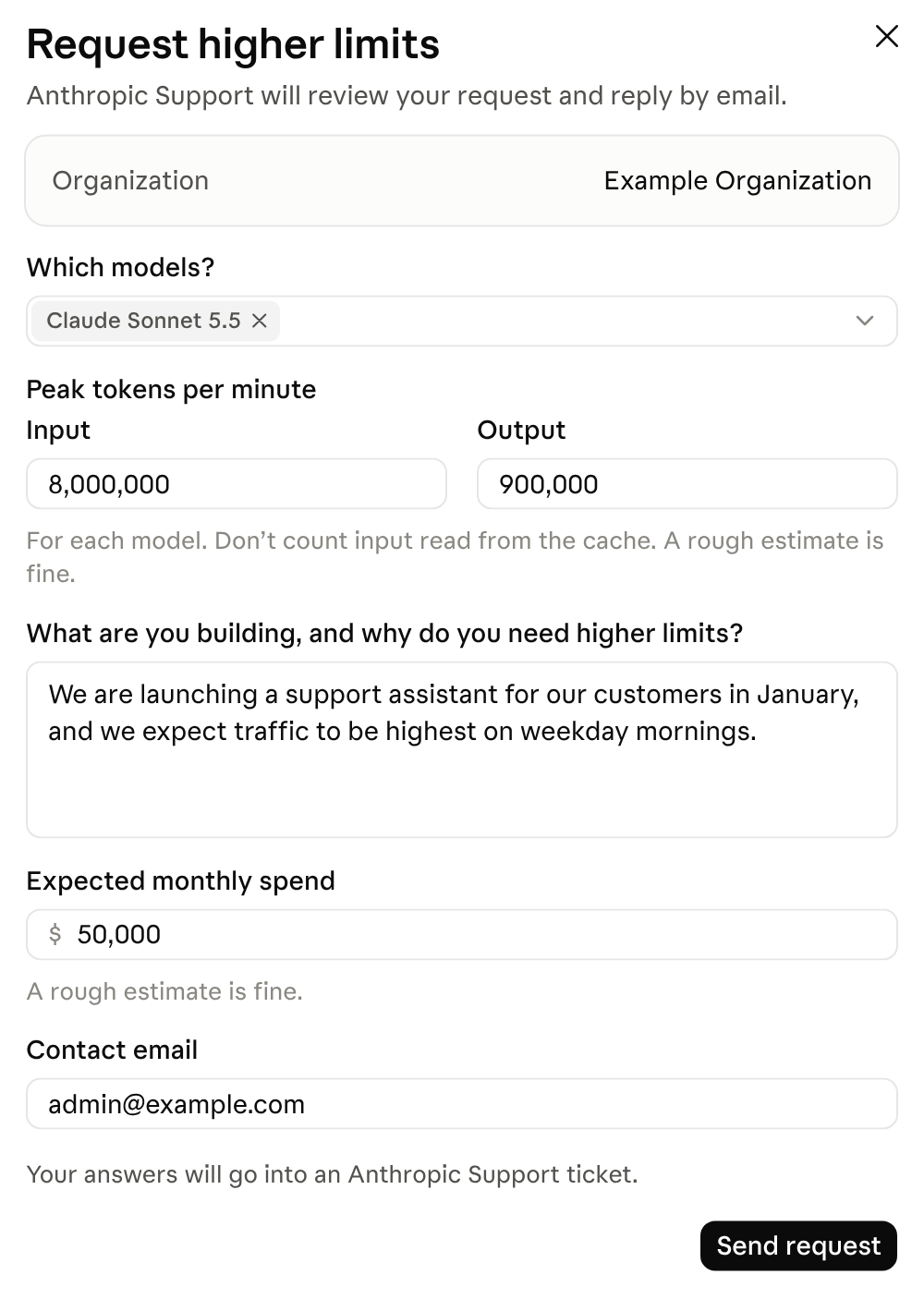
627 </Frame>
628
6293. Enter a contact email address and click **Send request**.
630
631Anthropic Support reviews your request and replies to the contact email address. Your organization can send one request every 24 hours.
632
633If your organization has a Zero Data Retention (ZDR) arrangement or has [customer-managed encryption keys (CMEK) turned on](https://platform.claude.com/docs/en/manage-claude/cmek#availability), it can’t use the form. The page shows **Contact sales**, or the form shows an error when you send the request. Contact your Anthropic account representative or [contact sales](https://claude.com/contact-sales) instead.
634
635Any other organization can also contact its account representative or sales.
606636
607637### Billing
608638
build-with-claude/claude-models-on-google-cloud/google-managed Changed · +35 / -22 lines
from line 1
11---
22title: Claude Models on Google Cloud (Google managed)
33url: https://platform.claude.com/docs/en/build-with-claude/claude-models-on-google-cloud/google-managed
4description: Google operates Claude Models on Google Cloud (Google managed) as part of Google Cloud's Agent Platform. You can call Claude with Anthropic's client SDKs.
4description: Set up Claude Models on Google Cloud (Google managed), which Google operates as part of Google Cloud's Agent Platform. Then, call Claude with the Anthropic SDK or cURL.
55---
66
77[Claude Models on Google Cloud](https://platform.claude.com/docs/en/build-with-claude/claude-models-on-google-cloud/overview) compares the two Google Cloud offerings. It also shows how to tell which one you use.
from line 79
7979
8080 <Tab title="Ruby">
8181 ```bash
82 # Gemfile
83 gem "anthropic"
84 gem "googleauth"
82 bundle add anthropic
83 bundle add googleauth
8584 ```
8685 </Tab>
8786</Tabs>
from line 94
9594A request is nearly identical to a [Messages API](https://platform.claude.com/docs/en/api/messages/create) request. It differs in two main ways:
9695
9796* **Model:** The endpoint URL names the model. In a cURL request, leave `model` out of the body.
98* **Version:** In a cURL request, pass `anthropic_version` in the body, not as a header. Set it to `vertex-2023-10-16`, or to [API version `2026-10-21`](https://platform.claude.com/docs/en/api/migration-2026-10-21).
97* **Version:** In a cURL request, pass `anthropic_version` in the body and not as a header. Set it to `vertex-2023-10-16` or to [API version `2026-10-21`](https://platform.claude.com/docs/en/api/migration-2026-10-21).
9998
99The SDK handles both differences for you. It moves your `model` value into the URL and sets `anthropic_version` to the API version that it uses with the Claude API. For the model IDs to pass, see [API model IDs](https://platform.claude.com/docs/en/build-with-claude/claude-models-on-google-cloud/google-managed#api-model-ids).
100
101In the following examples, the SDK client authenticates with Application Default Credentials. To set up Application Default Credentials, see [Before making API calls](https://platform.claude.com/docs/en/build-with-claude/claude-models-on-google-cloud/google-managed#before-making-api-calls).
102
100103The following examples use the global endpoint. For the other endpoint types, see [Global, multi-region, and regional endpoints](https://platform.claude.com/docs/en/build-with-claude/claude-models-on-google-cloud/google-managed#global-multi-region-and-regional-endpoints).
101104
102105<CodeGroup exclude="shell:CLI">
from line 192
189192 "github.com/anthropics/anthropic-sdk-go/v2"
190193 "github.com/anthropics/anthropic-sdk-go/v2/vertex"
191194 )
192 // ...
193 // Uses default Google Cloud credentials
195
196 func main() {
197 // Uses Application Default Credentials. Arguments: context, region, project ID.
194198 client := anthropic.NewClient(
195199 vertex.WithGoogleAuth(context.Background(), "global", "MY_PROJECT_ID"),
196200 )
from line 210
206210 panic(err)
207211 }
208212 fmt.Printf("%+v\n", message)
213 }
209214 ```
210215
211216 ```java Java
from line 250
245250 ```php PHP
246251 use Anthropic\Messages\Model;
247252 use Anthropic\Messages\TextBlock;
248 use Anthropic\Vertex;
253 use Anthropic\Vertex\Client;
249254
250 $client = Vertex\Client::fromEnvironment(
255 $client = Client::fromEnvironment(
251256 region: 'global',
252257 projectId: 'MY_PROJECT_ID',
253258 );
from line 286
281286 messages: [{ role: "user", content: "Hey Claude!" }]
282287 )
283288
284 puts message.content.find { |block| block.is_a?(Anthropic::Models::TextBlock) }.text
289 message.content.grep(Anthropic::Models::TextBlock).each { |block| puts block.text }
285290 ```
286291</CodeGroup>
287292
from line 410
405410 "github.com/anthropics/anthropic-sdk-go/v2"
406411 "github.com/anthropics/anthropic-sdk-go/v2/vertex"
407412 )
408 // ...
413
414 func main() {
409415 // Multi-region identifier: "us" or "eu"
410416 client := anthropic.NewClient(
411417 vertex.WithGoogleAuth(context.Background(), "us", "MY_PROJECT_ID"),
412418 )
419 // ...
420 }
413421 ```
414422
415423 ```java Java
from line 441
433441 ```
434442
435443 ```php PHP
436 use Anthropic\Vertex;
444 use Anthropic\Vertex\Client;
437445
438 $client = Vertex\Client::fromEnvironment(
446 $client = Client::fromEnvironment(
439447 region: 'us', // Multi-region identifier: "us" or "eu"
440448 projectId: 'MY_PROJECT_ID',
441449 );
from line 607
599607 import (
600608 "context"
601609
602 "github.com/anthropics/anthropic-sdk-go/v2"
603610 "github.com/anthropics/anthropic-sdk-go/v2/googlecloud"
604611 )
605 // ...
612
613 func main() {
606614 client, err := googlecloud.NewClient(context.Background(), googlecloud.ClientConfig{})
607615 if err != nil {
608616 panic(err)
609617 }
618 // ...
619 }
610620 ```
611621
612622 ```java Java
from line 699
689699 "github.com/anthropics/anthropic-sdk-go/v2"
690700 "github.com/anthropics/anthropic-sdk-go/v2/vertex"
691701 )
692 // ...
693 // Uses default Google Cloud credentials
702
703 func main() {
704 // Uses Application Default Credentials. Arguments: context, region, project ID.
694705 client := anthropic.NewClient(
695706 vertex.WithGoogleAuth(context.Background(), "global", "MY_PROJECT_ID"),
696707 )
708 // ...
709 }
697710 ```
698711
699712 ```java Java
from line 729
716729 ```
717730
718731 ```php PHP
719 use Anthropic\Vertex;
732 use Anthropic\Vertex\Client;
720733
721 $client = Vertex\Client::fromEnvironment(
734 $client = Client::fromEnvironment(
722735 region: 'global',
723736 projectId: 'MY_PROJECT_ID',
724737 );
build-with-claude/claude-models-on-google-cloud/overview Changed · +4 / -1 lines
from line 39
3939
4040* **Model IDs:** Claude 4.6 and later models use their Claude API IDs on both offerings. See [Model IDs and versioning](https://platform.claude.com/docs/en/about-claude/models/model-ids-and-versions).
4141
42* **SDKs:** Anthropic’s [client SDKs](https://platform.claude.com/docs/en/cli-sdks-libraries/overview) support both offerings.
42* **SDKs:** Both offerings use the Anthropic SDK for your language. [Which offering are you using?](https://platform.claude.com/docs/en/build-with-claude/claude-models-on-google-cloud/overview#which-offering-are-you-using) names the client that each offering uses. To install the SDK, see each offering’s own section.
43
44 * [SDK for Claude Models on Google Cloud (Anthropic managed)](https://platform.claude.com/docs/en/build-with-claude/claude-models-on-google-cloud/anthropic-managed#install-an-sdk)
45 * [SDK for Claude Models on Google Cloud (Google managed)](https://platform.claude.com/docs/en/build-with-claude/claude-models-on-google-cloud/google-managed#install-an-sdk-for-accessing-vertex-ai)
4346
4447## Moving between the two offerings
4548
build-with-claude/claude-platform-on-aws Changed · +80 / -49 lines
from line 28
2828| **API surface** | Claude API (`/v1/{endpoint}`) | Messages API at `/anthropic/v1/messages` | Bedrock Converse / InvokeModel |
2929| **Feature availability** | Typically same-day as Claude API (see [feature limitations](https://platform.claude.com/docs/en/build-with-claude/claude-platform-on-aws#features-not-supported)) | Follows the Amazon Bedrock release schedule | Follows the Amazon Bedrock release schedule |
3030| **Beta features** | Pass through with `anthropic-beta` headers (see [feature limitations](https://platform.claude.com/docs/en/build-with-claude/claude-platform-on-aws#features-not-supported)) | The beta features Amazon Bedrock supports, through the `anthropic-beta` header | The beta features Amazon Bedrock supports, through the `anthropic_beta` field of the InvokeModel request body |
31| **Authentication** | AWS IAM / SigV4 or API key | AWS IAM / SigV4 | AWS IAM / SigV4 or bearer token |
31| **Authentication** | AWS IAM (SigV4) or [Claude Platform on AWS API key](https://platform.claude.com/docs/en/build-with-claude/claude-platform-on-aws#api-key-authentication) | AWS IAM (SigV4) or Amazon Bedrock API key | AWS IAM (SigV4) or Amazon Bedrock API key |
3232| **Billing** | AWS Marketplace | AWS (native service) | AWS (native service) |
3333| **Base URL** | `aws-external-anthropic.{region}.api.aws` | `bedrock-mantle.{region}.api.aws` | `bedrock-runtime.{region}.amazonaws.com` |
3434| **SDK client** | `AnthropicAWS` (typescript: `AnthropicAws`; csharp: `AnthropicAwsClient`; go: `anthropicaws.NewClient()`; java: `AwsBackend`; php: `Anthropic\Aws\Client`; ruby: `Anthropic::AWSClient`), in beta | `AnthropicBedrockMantle` | `AnthropicBedrock` / Bedrock SDK |
from line 117
117117
118118* **Billing** moves to AWS Marketplace: usage is billed in Claude Consumption Units rather than prepaid credits (see [Billing](https://platform.claude.com/docs/en/build-with-claude/claude-platform-on-aws#billing)). You set spend limits in the Claude Console (see [Spend limits](https://platform.claude.com/docs/en/build-with-claude/claude-platform-on-aws#spend-limits)). During the transition, billing stays separate: the existing organization keeps its current billing.
119119* **Authentication and access** move to AWS: requests authenticate with AWS credentials or with API keys generated in the AWS Console, not the Claude Console (see [Authentication](https://platform.claude.com/docs/en/build-with-claude/claude-platform-on-aws#authentication)). You manage organization membership in AWS IAM, not in the Claude Console (see [Available pages](https://platform.claude.com/docs/en/build-with-claude/claude-platform-on-aws#available-pages)). The Anthropic SDK has a separate client class for Claude Platform on AWS (see [Install an SDK](https://platform.claude.com/docs/en/build-with-claude/claude-platform-on-aws#install-an-sdk)).
120* **Day-to-day API usage** works the way it does on the first-party Claude API, except where noted in the [feature limitations](https://platform.claude.com/docs/en/build-with-claude/claude-platform-on-aws#features-not-supported). Before shifting production traffic, check your rate limits: new organizations are placed on the Start tier, and limit increases go through your Anthropic account representative (see [Rate limits and quotas](https://platform.claude.com/docs/en/build-with-claude/claude-platform-on-aws#rate-limits-and-quotas)).
120* **Day-to-day API usage** works the way it does on the first-party Claude API, except where noted in the [feature limitations](https://platform.claude.com/docs/en/build-with-claude/claude-platform-on-aws#features-not-supported). Before shifting production traffic, check your rate limits. New organizations are placed on the Start tier, and you can request higher limits in the Claude Console (see [Rate limits and quotas](https://platform.claude.com/docs/en/build-with-claude/claude-platform-on-aws#rate-limits-and-quotas)).
121121
122122For Claude Enterprise (claude.ai) organizations, which behave differently, see the [offering comparison](https://platform.claude.com/docs/en/build-with-claude/claude-platform-on-aws#claude-platform-on-aws-vs-amazon-bedrock).
123123
from line 839
839839
840840The **Through AWS gateway** column indicates whether the page reads and writes data through the AWS gateway, where [IAM actions for Claude Platform on AWS](https://platform.claude.com/docs/en/api/claude-platform-on-aws-iam-actions) govern access. Where a page or part of a page doesn’t go through the gateway, its requests reach Anthropic directly and bypass IAM action checks.
841841
842| Page | Available | Through AWS gateway | Notes |
843| --------------------- | ---------------- | -------------------------------------- | ----------------------------------------------------------------------------------------------------------------------------------------------------------------------------------------------------------------------------------------------------------------------------------------------------------------------------------------------------------------------------------------------------------------------------------------------------------------------------------------------------------------------------------------------------------------------------------- |
844| **Usage** | Yes | No | View token usage by model, workspace, and dimension. Data can take a few minutes to appear after a request. |
845| **Cost** | Yes | No | View cost breakdowns by model and workspace. AWS Cost Explorer shows the aggregated [Claude Consumption Unit (CCU)](https://platform.claude.com/docs/en/build-with-claude/claude-platform-on-aws#billing) line item. |
846| **Rate limits** | Yes | No | View rate limits (read-only). Tier increases go through your Anthropic account representative; see [Rate limits and quotas](https://platform.claude.com/docs/en/build-with-claude/claude-platform-on-aws#rate-limits-and-quotas). |
847| **Logs** | Yes (Admin role) | No | View per-request metadata such as time, model, workspace, token counts, and status. Log entries do not include prompts or responses. |
848| **Workspaces** | Yes | Yes (except spend limits) | View per-region workspaces. With the Admin role, you can also create, rename, and archive workspaces. |
849| **Encryption keys** | Yes | Yes | A section of the [Data retention](https://platform.claude.com/settings/privacy#encryption-keys) page (`platform.claude.com/settings/privacy`) in the Claude Console, shown while **Organization** is selected in the dropdown menu at the top of the page. Register AWS KMS keys there (Admin role), as described in [Set up CMEK on Claude Platform on AWS](https://platform.claude.com/docs/en/manage-claude/cmek-claude-platform-on-aws). To attach a registered key to a workspace, select the workspace from that dropdown menu, then select the key under **Encryption key**. |
850| **Files** | Yes | Yes | View and manage uploaded files. |
851| **Skills** | Yes | Yes | View and manage Agent Skills. |
852| **Batches** | Yes | Yes | View and manage batch processing jobs. |
853| **Agents** | Yes | Yes (except the **Observability** tab) | View and manage agent definitions. An agent’s **Observability** tab shows its session analytics. |
854| **Agents overview** | Yes | No (except the list of agents) | View session counts, error rates, and active time for the agents in a workspace. |
855| **Sessions** | Yes | Yes | View agent sessions and event history. |
856| **Environments** | Yes | Yes | View and manage cloud sandbox configurations for sessions. |
857| **Credential vaults** | Yes | Yes | View and manage credential vaults for session authentication. |
858| **Memory stores** | Yes | Yes | View and manage persistent agent memory. |
859| **Webhooks** | Yes | Yes | View and manage webhook endpoints. |
860| **API keys** | No | N/A | Manage API keys in the AWS Console (**Claude Platform on AWS → API keys**). See [API key authentication](https://platform.claude.com/docs/en/build-with-claude/claude-platform-on-aws#api-key-authentication). |
861| **Members** | No | N/A | Not applicable. AWS IAM manages access. |
862| **Spend limits** | Yes | No | View spend limits. With the Admin role, you can also set monthly limits for your organization and its workspaces; see [Spend limits](https://platform.claude.com/docs/en/build-with-claude/claude-platform-on-aws#spend-limits). AWS Marketplace manages invoicing. View cost breakdowns on the **Cost** page. |
863| **Claude Code** | No | N/A | View Claude Code usage on the **Usage** page. |
842| Page | Available | Through AWS gateway | Notes |
843| --------------------- | ---------------- | ------------------------------------------------ | ----------------------------------------------------------------------------------------------------------------------------------------------------------------------------------------------------------------------------------------------------------------------------------------------------------------------------------------------------------------------------------------------------------------------------------------------------------------------------------------------------------------------------------------------------------------------------------- |
844| **Usage** | Yes | No | View token usage by model, workspace, and dimension. Data can take a few minutes to appear after a request. |
845| **Cost** | Yes | No | View cost breakdowns by model and workspace. AWS Cost Explorer shows the aggregated [Claude Consumption Unit (CCU)](https://platform.claude.com/docs/en/build-with-claude/claude-platform-on-aws#billing) line item. |
846| **Rate limits** | Yes | No (except the **Request higher limits** button) | View rate limits. With the Admin role, you can also request higher limits; see [Rate limits and quotas](https://platform.claude.com/docs/en/build-with-claude/claude-platform-on-aws#rate-limits-and-quotas). |
847| **Logs** | Yes (Admin role) | No | View per-request metadata such as time, model, workspace, token counts, and status. Log entries do not include prompts or responses. |
848| **Workspaces** | Yes | Yes (except spend limits) | View per-region workspaces. With the Admin role, you can also create, rename, and archive workspaces. |
849| **Encryption keys** | Yes | Yes | A section of the [Data retention](https://platform.claude.com/settings/privacy#encryption-keys) page (`platform.claude.com/settings/privacy`) in the Claude Console, shown while **Organization** is selected in the dropdown menu at the top of the page. Register AWS KMS keys there (Admin role), as described in [Set up CMEK on Claude Platform on AWS](https://platform.claude.com/docs/en/manage-claude/cmek-claude-platform-on-aws). To attach a registered key to a workspace, select the workspace from that dropdown menu, then select the key under **Encryption key**. |
850| **Files** | Yes | Yes | View and manage uploaded files. |
851| **Skills** | Yes | Yes | View and manage Agent Skills. |
852| **Batches** | Yes | Yes | View and manage batch processing jobs. |
853| **Agents** | Yes | Yes (except the **Observability** tab) | View and manage agent definitions. An agent’s **Observability** tab shows its session analytics. |
854| **Agents overview** | Yes | No (except the list of agents) | View session counts, error rates, and active time for the agents in a workspace. |
855| **Sessions** | Yes | Yes | View agent sessions and event history. |
856| **Environments** | Yes | Yes | View and manage cloud sandbox configurations for sessions. |
857| **Credential vaults** | Yes | Yes | View and manage credential vaults for session authentication. |
858| **Memory stores** | Yes | Yes | View and manage persistent agent memory. |
859| **Webhooks** | Yes | Yes | View and manage webhook endpoints. |
860| **API keys** | No | N/A | Manage API keys in the AWS Console (**Claude Platform on AWS → API keys**). See [API key authentication](https://platform.claude.com/docs/en/build-with-claude/claude-platform-on-aws#api-key-authentication). |
861| **Members** | No | N/A | Not applicable. AWS IAM manages access. |
862| **Spend limits** | Yes | No | View spend limits. With the Admin role, you can also set monthly limits for your organization and its workspaces; see [Spend limits](https://platform.claude.com/docs/en/build-with-claude/claude-platform-on-aws#spend-limits). AWS Marketplace manages invoicing. View cost breakdowns on the **Cost** page. |
863| **Claude Code** | No | N/A | View Claude Code usage on the **Usage** page. |
864864
865865### Switching organizations
866866
from line 868
868868
869869## Rate limits and quotas
870870
871Organizations on Claude Platform on AWS are placed on the Start tier. Anthropic manages rate limits directly, not through AWS quota systems.
871New organizations on Claude Platform on AWS are placed on the Start tier. Anthropic manages rate limits directly, not through AWS quota systems.
872872
873Organizations on Claude Platform on AWS can move to a higher usage tier automatically as they build a history of paid AWS Marketplace invoices. The self-service **Request tier increase** flow in the Claude Console is not available: the **Rate limits** page directs you to your Anthropic account representative instead.
873Usage tiers are fixed steps: each tier pairs rate limits with a [monthly spend cap](https://platform.claude.com/docs/en/build-with-claude/claude-platform-on-aws#spend-limits), and moving to a higher tier raises both. For tier details and per-model limits, see [Rate limits](https://platform.claude.com/docs/en/api/rate-limits).
874874
875To request higher limits, contact your Anthropic account representative or [Anthropic support](https://support.claude.com). Include the following in your request:
875Organizations on Claude Platform on AWS can move to a higher usage tier automatically as they build a history of paid AWS Marketplace invoices. The badge on the **Rate limits** page shows **Custom tier** for every organization on Claude Platform on AWS, whatever its usage tier.
876876
877* The models you need raised
878* Peak input tokens per minute and output tokens per minute for each model (not daily totals)
879* The approximate share of your input that is cached or repeated context (cache reads don’t count toward input-token limits; see [Cache-aware ITPM](https://platform.claude.com/docs/en/api/rate-limits#cache-aware-itpm))
877To request higher limits or a higher tier, use the form in the Claude Console:
880878
881Usage tiers are fixed steps: each tier pairs rate limits with a [monthly spend cap](https://platform.claude.com/docs/en/build-with-claude/claude-platform-on-aws#spend-limits), and moving to a higher tier raises both. For tier details and per-model limits, see [Rate limits](https://platform.claude.com/docs/en/api/rate-limits).
8791. [Sign in to the Claude Console](https://platform.claude.com/docs/en/build-with-claude/claude-platform-on-aws#signing-in) with the Admin role.
882880
8812. Go to [Rate limits in the Claude Console](https://platform.claude.com/usage/limits) (`platform.claude.com/usage/limits`) and click **Request higher limits**.
882
883 <Frame caption="The button is at the top right of the Rate limits page.">
884 
885 </Frame>
886
8873. In **What do you need, and why?**, include the following:
888
889 * The models you need raised
890 * Peak input tokens per minute and output tokens per minute for each model (not daily totals)
891 * The approximate share of your input that is cached or repeated context (cache reads don’t count toward input-token limits; see [Cache-aware ITPM](https://platform.claude.com/docs/en/api/rate-limits#cache-aware-itpm))
892
893 If you need a higher spend cap, say so and fill in **Expected monthly spend**.
894
895 <Frame caption="The form, with an example request that names the model, the peak tokens per minute, and the cached share of the input.">
896 
897 </Frame>
898
8994. Enter a contact email address and click **Send request**.
900
901Anthropic support reviews your request and replies to the contact email address. Your organization can send one request every 24 hours.
902
903**Request higher limits** goes through the [AWS gateway](https://platform.claude.com/docs/en/build-with-claude/claude-platform-on-aws#available-pages), so the IAM principal you sign in with also needs these IAM actions. Both are account-scoped, so grant them with `"Resource": "*"` (see [IAM policies](https://platform.claude.com/docs/en/build-with-claude/claude-platform-on-aws#iam-policies)):
904
905* **See the button:** `aws-external-anthropic:ListAccountRateLimitIncreaseRequests`. Without this action, the page shows **Contact sales** instead, with no error message.
906* **Send a request:** `aws-external-anthropic:CreateAccountRateLimitIncreaseRequest`. Without this action, the form shows an error when you send the request.
907
908The `AnthropicFullAccess` managed policy grants both actions. For a different policy, including the other AWS managed policies, read the policy document: each action needs a statement with `"Resource": "*"` that allows it. A statement for workspace ARNs doesn’t grant them, even with a `List*` or `Create*` wildcard.
909
910If your organization has a Zero Data Retention (ZDR) arrangement or has [customer-managed encryption keys (CMEK) turned on](https://platform.claude.com/docs/en/manage-claude/cmek#availability), it can’t use the form. Even with both IAM actions, the page shows **Contact sales**, or the form shows an error when you send the request. Contact your Anthropic account representative or [Anthropic support](https://support.claude.com) with the same details instead.
911
912Any other organization can also contact its account representative or Anthropic support.
913
883914## Billing
884915
885916Claude Platform on AWS bills through [AWS Marketplace](https://aws.amazon.com/marketplace). Usage is denominated in Claude Consumption Units (CCUs), metered hourly, and invoiced monthly in arrears on your AWS bill. CCUs are not prepaid credits. There is no CCU balance or commitment.
from line 919
888919
889920### Spend limits
890921
891The Start, Build, and Scale usage tiers each carry a monthly spend cap; see the [per-tier spend caps](https://platform.claude.com/docs/en/api/rate-limits#spend-limits) for current values. When your organization’s usage for the calendar month reaches its tier’s cap, API requests fail with HTTP 429 (see the [spend-cap error](https://platform.claude.com/docs/en/api/rate-limits#reaching-your-spend-cap)). Retrying doesn’t succeed until 00:00 UTC on the first day of the next month, or until your organization moves to a higher tier. To raise the cap, or to restore access sooner, request a tier increase through your Anthropic account representative or [Anthropic support](https://support.claude.com) (see [Rate limits and quotas](https://platform.claude.com/docs/en/build-with-claude/claude-platform-on-aws#rate-limits-and-quotas)).
922The Start, Build, and Scale usage tiers each carry a monthly spend cap; see the [per-tier spend caps](https://platform.claude.com/docs/en/api/rate-limits#spend-limits) for current values. When your organization’s usage for the calendar month reaches its tier’s cap, API requests fail with HTTP 429 (see the [spend-cap error](https://platform.claude.com/docs/en/api/rate-limits#reaching-your-spend-cap)). Retrying doesn’t succeed until 00:00 UTC on the first day of the next month, or until your organization moves to a higher tier. To raise the cap, or to restore access sooner, request a higher tier (see [Rate limits and quotas](https://platform.claude.com/docs/en/build-with-claude/claude-platform-on-aws#rate-limits-and-quotas)).
892923
893924With the Admin role, you can also set your own monthly spend limits below the cap, in US dollars at list prices. First, [open the Claude Console](https://platform.claude.com/docs/en/build-with-claude/claude-platform-on-aws#using-the-claude-console) and go to [Spend limits in the Claude Console](https://platform.claude.com/settings/spend-limits) (`platform.claude.com/settings/spend-limits`). A limit needs at least one email recipient. Add one to **Email recipients** under **Organization limit**, which covers both kinds of limit. For a workspace limit, a recipient under **Workspace limits** is enough. Then set the limit:
894925
from line 940
909940
910941## Monitoring and logging
911942
912AWS CloudTrail can capture all requests that go through the AWS gateway, but not Claude Console requests that reach Anthropic directly, such as those from the pages marked **No** in [Available pages](https://platform.claude.com/docs/en/build-with-claude/claude-platform-on-aws#available-pages). Workspace, external key, telemetry destination, compliance, vault, and webhook operations are logged as Management events by default. Inference, batch, file, skill, model, user profile, usage and cost report, and Claude Managed Agents operations (other than vaults and webhooks) are classified as Data events. Data events require explicit data event logging configuration, which incurs additional CloudTrail charges. See the [IAM actions reference](https://platform.claude.com/docs/en/api/claude-platform-on-aws-iam-actions#route-to-action-mapping) for the full event type classification and the [AWS CloudTrail documentation](https://docs.aws.amazon.com/awscloudtrail/latest/userguide/) for configuration details.
943AWS CloudTrail can capture all requests that go through the AWS gateway. It can’t capture Claude Console requests that reach Anthropic directly, such as those from the pages marked **No** under **Through AWS gateway** in [Available pages](https://platform.claude.com/docs/en/build-with-claude/claude-platform-on-aws#available-pages). Workspace, external key, telemetry destination, compliance, vault, webhook, and rate limit increase request operations are logged as Management events by default. Inference, batch, file, skill, model, user profile, usage and cost report, and Claude Managed Agents operations (other than vaults and webhooks) are classified as Data events. Data events require explicit data event logging configuration, which incurs additional CloudTrail charges. See the [IAM actions reference](https://platform.claude.com/docs/en/api/claude-platform-on-aws-iam-actions#route-to-action-mapping) for the full event type classification and the [AWS CloudTrail documentation](https://docs.aws.amazon.com/awscloudtrail/latest/userguide/) for configuration details.
913944
914945### Request IDs
915946
from line 1157
11261157
11271158The migration delta depends on which Bedrock integration you’re coming from. The following table shows both [Claude in Amazon Bedrock (`bedrock-mantle`)](https://platform.claude.com/docs/en/build-with-claude/claude-in-amazon-bedrock) (Messages API at `bedrock-mantle.{region}.api.aws`) and [Claude on Amazon Bedrock (`bedrock-runtime`)](https://platform.claude.com/docs/en/build-with-claude/claude-on-amazon-bedrock-legacy) (the InvokeModel and Converse APIs).
11281159
1129| Aspect | From [Amazon Bedrock (`bedrock-mantle`)](https://platform.claude.com/docs/en/build-with-claude/claude-in-amazon-bedrock) | From [Amazon Bedrock (`bedrock-runtime`)](https://platform.claude.com/docs/en/build-with-claude/claude-on-amazon-bedrock-legacy) | To Claude Platform on AWS |
1130| -------------------------- | ---------------------------------------------------------------------------------------------------------------------------------------------------------------------------------------------------------------------------------------------- | ----------------------------------------------------------------------------------------------------------------------------------------------------------------------------------------------------------------------------------------------------------- | ---------------------------------------------------------------------------------------------------------------------------------------------------------------------------------------------------------------------------------------------------------------------------------------------------------------------------------------------- |
1131| **Base URL** | `bedrock-mantle.{region}.api.aws` | `bedrock-runtime.{region}.amazonaws.com` | `aws-external-anthropic.{region}.api.aws` |
1132| **API format** | Messages API at `/anthropic/v1/messages` | Bedrock Converse / InvokeModel | Claude API (`/v1/{endpoint}`) |
1133| **Model IDs** | anthropic.claude-haiku-4-5 | anthropic.claude-haiku-4-5-20251001-v1:0 (with a `us.` or `global.` inference profile prefix) | claude-haiku-4-5 |
1134| **SDK client** | `AnthropicBedrockMantle` | `AnthropicBedrock` / Bedrock SDK | Platform-specific client (see [Install an SDK](https://platform.claude.com/docs/en/build-with-claude/claude-platform-on-aws#install-an-sdk)), in beta |
1135| **SDK package** | `anthropic[bedrock]` (typescript: `@anthropic-ai/bedrock-sdk`; csharp: `Anthropic.Bedrock`; go: `github.com/anthropics/anthropic-sdk-go/v2/bedrock`; java: `com.anthropic:anthropic-java-bedrock`; php: `anthropic-ai/sdk`; ruby: `anthropic`) | `anthropic[bedrock]` (typescript: `@anthropic-ai/bedrock-sdk`; csharp: `Anthropic.Bedrock`; go: `github.com/anthropics/anthropic-sdk-go/bedrock`; java: `com.anthropic:anthropic-java-bedrock`; php: `anthropic-ai/sdk`; ruby: `anthropic`), or the AWS SDK | `anthropic[aws]` (typescript: `@anthropic-ai/aws-sdk`; csharp: `Anthropic.Aws`; go: `github.com/anthropics/anthropic-sdk-go/v2/aws`; java: `com.anthropic:anthropic-java-aws`; php: `anthropic-ai/sdk`; ruby: `anthropic`) (see [Install an SDK](https://platform.claude.com/docs/en/build-with-claude/claude-platform-on-aws#install-an-sdk)) |
1136| **SigV4 service name** | `bedrock-mantle` | `bedrock` | `aws-external-anthropic` |
1137| **Streaming format** | SSE | AWS EventStream | SSE (same as Claude API) |
1138| **Workspace header** | Not applicable | Not applicable | `anthropic-workspace-id`, required on inference and resource requests |
1139| **Region availability** | See [Amazon Bedrock regions](https://docs.aws.amazon.com/bedrock/latest/userguide/bedrock-regions.html) | See [Amazon Bedrock regions](https://docs.aws.amazon.com/bedrock/latest/userguide/bedrock-regions.html) | All AWS commercial regions |
1140| **Anthropic organization** | None required | None required | New organization created at sign-up. Existing organizations can’t be converted (see [Moving from an existing Anthropic organization](https://platform.claude.com/docs/en/build-with-claude/claude-platform-on-aws#moving-from-an-existing-anthropic-organization)) |
1160| Aspect | From [Amazon Bedrock (`bedrock-mantle`)](https://platform.claude.com/docs/en/build-with-claude/claude-in-amazon-bedrock) | From [Amazon Bedrock (`bedrock-runtime`)](https://platform.claude.com/docs/en/build-with-claude/claude-on-amazon-bedrock-legacy) | To Claude Platform on AWS |
1161| ----------------------------------------------- | ---------------------------------------------------------------------------------------------------------------------------------------------------------------------------------------------------------------------------------------------- | ----------------------------------------------------------------------------------------------------------------------------------------------------------------------------------------------------------------------------------------------------------- | ---------------------------------------------------------------------------------------------------------------------------------------------------------------------------------------------------------------------------------------------------------------------------------------------------------------------------------------------- |
1162| **Base URL** | `bedrock-mantle.{region}.api.aws` | `bedrock-runtime.{region}.amazonaws.com` | `aws-external-anthropic.{region}.api.aws` |
1163| **API format** | Messages API at `/anthropic/v1/messages` | Bedrock Converse / InvokeModel | Claude API (`/v1/{endpoint}`) |
1164| **Model IDs** | anthropic.claude-haiku-4-5 | anthropic.claude-haiku-4-5-20251001-v1:0 (with a `us.` or `global.` inference profile prefix) | claude-haiku-4-5 |
1165| **SDK client** | `AnthropicBedrockMantle` | `AnthropicBedrock` / Bedrock SDK | Platform-specific client (see [Install an SDK](https://platform.claude.com/docs/en/build-with-claude/claude-platform-on-aws#install-an-sdk)), in beta |
1166| **SDK package** | `anthropic[bedrock]` (typescript: `@anthropic-ai/bedrock-sdk`; csharp: `Anthropic.Bedrock`; go: `github.com/anthropics/anthropic-sdk-go/v2/bedrock`; java: `com.anthropic:anthropic-java-bedrock`; php: `anthropic-ai/sdk`; ruby: `anthropic`) | `anthropic[bedrock]` (typescript: `@anthropic-ai/bedrock-sdk`; csharp: `Anthropic.Bedrock`; go: `github.com/anthropics/anthropic-sdk-go/bedrock`; java: `com.anthropic:anthropic-java-bedrock`; php: `anthropic-ai/sdk`; ruby: `anthropic`), or the AWS SDK | `anthropic[aws]` (typescript: `@anthropic-ai/aws-sdk`; csharp: `Anthropic.Aws`; go: `github.com/anthropics/anthropic-sdk-go/v2/aws`; java: `com.anthropic:anthropic-java-aws`; php: `anthropic-ai/sdk`; ruby: `anthropic`) (see [Install an SDK](https://platform.claude.com/docs/en/build-with-claude/claude-platform-on-aws#install-an-sdk)) |
1167| **SigV4 service name and IAM action namespace** | `bedrock-mantle` | `bedrock` | `aws-external-anthropic`, plus two STS actions (see [IAM policies](https://platform.claude.com/docs/en/build-with-claude/claude-platform-on-aws#iam-policies)) |
1168| **API key, if you use one** | Amazon Bedrock API key | Amazon Bedrock API key | A new [Claude Platform on AWS API key](https://platform.claude.com/docs/en/build-with-claude/claude-platform-on-aws#api-key-authentication), plus the IAM permissions to use it |
1169| **Streaming format** | SSE | AWS EventStream | SSE (same as Claude API) |
1170| **Workspace header** | Not applicable | Not applicable | `anthropic-workspace-id`, required on inference and resource requests |
1171| **Region availability** | See [Amazon Bedrock regions](https://docs.aws.amazon.com/bedrock/latest/userguide/bedrock-regions.html) | See [Amazon Bedrock regions](https://docs.aws.amazon.com/bedrock/latest/userguide/bedrock-regions.html) | All AWS commercial regions |
1172| **Anthropic organization** | None required | None required | New organization created at sign-up. Existing organizations can’t be converted (see [Moving from an existing Anthropic organization](https://platform.claude.com/docs/en/build-with-claude/claude-platform-on-aws#moving-from-an-existing-anthropic-organization)) |
11411173
11421174If you’re on Claude in Amazon Bedrock, the request body format is already the Messages API. The changes are the base URL, SigV4 service name, model IDs, and the added `anthropic-workspace-id` header. If you’re on the InvokeModel or Converse API, you’ll also rewrite the request and response shapes to the Messages API format. See [Claude on Amazon Bedrock (`bedrock-runtime`)](https://platform.claude.com/docs/en/build-with-claude/claude-on-amazon-bedrock-legacy) for the request-shape mapping.
11431175
from line 1181
11491181* More Claude API beta features, through the `anthropic-beta` header (see [feature limitations](https://platform.claude.com/docs/en/build-with-claude/claude-platform-on-aws#features-not-supported))
11501182* Claude Console for quota visibility and usage analytics
11511183* Direct Anthropic support
1152* API key authentication as an alternative to SigV4 (see [API key authentication](https://platform.claude.com/docs/en/build-with-claude/claude-platform-on-aws#api-key-authentication))
11531184
11541185### What stays the same
11551186
1156* AWS IAM authentication (SigV4)
1187* AWS IAM with SigV4 as an authentication method
11571188* AWS as the invoicing party. The billing channel changes from native AWS service to AWS Marketplace (see [Commercial considerations](https://platform.claude.com/docs/en/build-with-claude/claude-platform-on-aws#commercial-considerations)).
11581189* AWS commitment retirement
11591190
build-with-claude/files Changed · +93 / -34 lines
from line 88
8888
8989 ```typescript TypeScript
9090 const uploaded = await client.files.upload({
91 file: await toFile(fs.createReadStream("/path/to/document.pdf"), undefined, {
91 file: await toFile(createReadStream("/path/to/document.pdf"), undefined, {
9292 type: "application/pdf"
9393 })
9494 });
from line 142
142142 );
143143
144144 String fileId = file.id();
145 System.out.println(fileId);
145 IO.println(fileId);
146146 ```
147147
148148 ```php PHP
149 $document = fopen('/path/to/document.pdf', 'rb')
150 ?: throw new \RuntimeException('Could not open /path/to/document.pdf.');
151
149152 $file = $client->files->upload(
150 file: FileParam::fromResource(fopen('/path/to/document.pdf', 'rb'), contentType: 'application/pdf'),
153 file: FileParam::fromResource($document, contentType: 'application/pdf'),
151154 );
152155
153156 $fileId = $file->id;
from line 352
349352 .build();
350353
351354 Message message = client.messages().create(params);
352 System.out.println(message);
355 IO.println(message);
353356 ```
354357
355358 ```php PHP
from line 373
370373 ],
371374 ],
372375 ],
373 model: 'claude-opus-5-5',
376 model: Model::CLAUDE_OPUS_5_5,
374377 );
375378
376379 echo $response;
from line 465
462465
463466<CodeGroup>
464467 ```bash cURL
465 # Read the text file
466 # Note: For files with special characters, consider base64 encoding
467 TEXT_CONTENT=$(cat document.txt)
468 # Encode the file's text as a JSON string so that quotes and line breaks are safe
469 TEXT_JSON=$(jq -Rs . document.txt)
468470
469471 curl https://api.anthropic.com/v1/messages \
470472 -H "content-type: application/json" \
from line 480
478480 {
479481 "role": "user",
480482 "content": [
481 {
482 "type": "text",
483 "text": "Here's the document content:\n\n${TEXT_CONTENT}\n\nPlease summarize this document."
484 }
483 {"type": "text", "text": "Here's the document content:"},
484 {"type": "text", "text": ${TEXT_JSON}},
485 {"type": "text", "text": "Please summarize this document."}
485486 ]
486487 }
487488 ]
from line 521
520521 "content": [
521522 {
522523 "type": "text",
523 "text": f"Here's the document content:\n\n{text_content}\n\nPlease summarize this document.",
524 "text": f"""Here's the document content:
525
526 {text_content}
527
528 Please summarize this document.""",
524529 }
525530 ],
526531 }
from line 554
549554 content: [
550555 {
551556 type: "text",
552 text: `Here's the document content:\n\n${textContent}\n\nPlease summarize this document.`
557 text: `Here's the document content:
558
559 ${textContent}
560
561 Please summarize this document.`
553562 }
554563 ]
555564 }
from line 581
572581 MaxTokens = 1024,
573582 Messages = [new UserMessageParam
574583 {
575 Content = $"Here's the document content:\n\n{textContent}\n\nPlease summarize this document."
584 Content = $"""
585 Here's the document content:
586
587 {textContent}
588
589 Please summarize this document.
590 """
576591 }]
577592 };
578593
from line 639
624639 MessageCreateParams params = MessageCreateParams.builder()
625640 .model(Model.CLAUDE_OPUS_5_5)
626641 .maxTokens(1024L)
627 .addUserMessage("Here's the document content:\n\n" + textContent + "\n\nPlease summarize this document.")
642 .addUserMessage(
643 """
644 Here's the document content:
645
646 %s
647
648 Please summarize this document.""".formatted(textContent)
649 )
628650 .build();
629651
630652 Message response = client.messages().create(params);
631653 response.content().stream()
632654 .flatMap(block -> block.text().stream())
633 .forEach(textBlock -> System.out.println(textBlock.text()));
655 .forEach(textBlock -> IO.println(textBlock.text()));
634656 ```
635657
636658 ```php PHP
from line 659
637659 $client = new Client();
638660
639661 // Read the text file
640 $textContent = file_get_contents('document.txt');
662 $textContent = file_get_contents('document.txt')
663 ?: throw new \RuntimeException('Could not read document.txt.');
641664
642665 $message = $client->messages->create(
643666 maxTokens: 1024,
from line 670
647670 'content' => [
648671 [
649672 'type' => 'text',
650 'text' => "Here's the document content:\n\n{$textContent}\n\nPlease summarize this document."
673 'text' => <<<TEXT
674 Here's the document content:
675
676 {$textContent}
677
678 Please summarize this document.
679 TEXT
651680 ]
652681 ]
653682 ]
654683 ],
655 model: 'claude-opus-5-5',
684 model: Model::CLAUDE_OPUS_5_5,
656685 );
657686
658687 foreach ($message->content as $block) {
659 if ($block->type === 'text') {
688 if ($block instanceof \Anthropic\Messages\TextBlock) {
660689 echo $block->text, PHP_EOL;
661690 }
662691 }
from line 706
677706 content: [
678707 {
679708 type: "text",
680 text: "Here's the document content:\n\n#{text_content}\n\nPlease summarize this document."
709 text: <<~TEXT.chomp
710 Here's the document content:
711
712 #{text_content}
713
714 Please summarize this document.
715 TEXT
681716 }
682717 ]
683718 }
from line 720
685720 )
686721
687722 message.content.each do |block|
688 puts block.text if block.type == :text
723 puts block.text if block.is_a?(Anthropic::Models::TextBlock)
689724 end
690725 ```
691726</CodeGroup>
from line 778
743778
744779 ```java Java
745780 import com.anthropic.models.files.FileListPage;
746 // ...
781
747782 void main() {
748783 AnthropicClient client = AnthropicOkHttpClient.fromEnv();
749784
750785 FileListPage files = client.files().list();
751 System.out.println(files);
786 IO.println(files);
752787 }
753788 ```
754789
from line 802
767802 ```
768803</CodeGroup>
769804
770To check a known set of files in one request instead of paging, pass up to 100 file IDs as `ids[]` query parameters. An `ids[]` request always returns a single page (`next_page` is `null`), and any ID that does not resolve to a file in your workspace is silently omitted from `data`; compare the returned IDs against the requested IDs to detect misses. `ids[]` cannot be combined with `page` or `limit`.
805To check a known set of files in one request instead of paging, pass up to 100 file IDs as `ids[]` query parameters. An `ids[]` request differs from a paged list in three ways:
771806
807* You can’t combine `ids[]` with `page` or `limit`.
808* The response is always a single page (`next_page` is `null`).
809* If an ID doesn’t resolve to a file in your workspace, the API leaves that ID out of `data` without returning an error. To find the IDs that the API left out, compare the returned IDs against the requested IDs.
810
772811#### Get file metadata
773812
774813Retrieve information about a specific file:
from line 850
811850 ```java Java
812851 FileMetadata metadata = client.files().retrieveMetadata(fileId);
813852
814 System.out.println(metadata);
853 IO.println(metadata);
815854 ```
816855
817856 ```php PHP
from line 913
874913
875914### Downloading a file
876915
877Download files that were created by [skills](https://platform.claude.com/docs/en/build-with-claude/skills-guide) or the [code execution tool](https://platform.claude.com/docs/en/agents-and-tools/tool-use/code-execution-tool). Files you upload cannot be downloaded. The `file_id` of a generated file appears in the [`bash_code_execution_tool_result` content block](https://platform.claude.com/docs/en/agents-and-tools/tool-use/code-execution-tool#retrieve-generated-files) of the Messages response that created it:
916Download files that [skills](https://platform.claude.com/docs/en/build-with-claude/skills-guide) or the [code execution tool](https://platform.claude.com/docs/en/agents-and-tools/tool-use/code-execution-tool) created. Files you upload cannot be downloaded. The `file_id` of a generated file appears in the [`bash_code_execution_tool_result` content block](https://platform.claude.com/docs/en/agents-and-tools/tool-use/code-execution-tool#retrieve-generated-files) of the Messages response that created the file. Use that `file_id` in the download request:
878917
879918<CodeGroup>
880919 ```bash cURL
from line 934
895934 ```
896935
897936 ```typescript TypeScript
898 const content = await client.files.download(uploaded.id);
937 const content = await client.files.download(fileId);
899938
900 const bytes = Buffer.from(await content.arrayBuffer());
901 await fsp.writeFile("downloaded_file.txt", bytes);
939 await writeFile("downloaded_file.txt", content.body!);
902940 ```
903941
904942 ```csharp C#
from line 983
945983 ```ruby Ruby
946984 file_content = client.files.download(file_id)
947985
948 File.binwrite("downloaded_file.txt", file_content.read)
986 IO.copy_stream(file_content, "downloaded_file.txt")
949987 ```
950988</CodeGroup>
951989
from line 1049
10111049
10121050### SDK beta namespace
10131051
1014Starting with Python SDK 1.2.0, TypeScript SDK 0.122.0, Go SDK 1.68.0, Java SDK 2.59.0, PHP SDK 0.45.0, Ruby SDK 1.67.0, and C# SDK 12.44.0, `client.beta.files` (csharp, go: `client.Beta.Files`; java: `client.beta().files()`; php: `$client->beta->files`) no longer sends `files-api-2025-04-14` and returns the same shapes as `client.files` (csharp, go: `client.Files`; java: `client.files()`; php: `$client->files`), with `Beta`-prefixed type names (in PHP, classes in the `Anthropic\Beta` namespace). It takes beta names through `betas` (csharp, go: `Betas`; java: `.addBeta()`) for Files features that are in beta, such as `scope_id` filtering under a [Managed Agents](https://platform.claude.com/docs/en/managed-agents/files) beta header. Earlier SDK releases are typed to the beta shapes; if you depend on those types, stay on an earlier release until you migrate.
1052The SDK offers the Files API in two namespaces. This page uses the stable namespace, and Files features that are in beta use the beta namespace.
1053
1054Starting with your SDK’s release in the following table, the beta namespace differs from the one in earlier releases in two ways:
1055
1056* It no longer sends `files-api-2025-04-14`.
1057* It returns the same shapes as the stable namespace but under `Beta`-prefixed type names.
1058
1059The table also gives each SDK’s namespace names and where the beta namespace takes `anthropic-beta` values:
1060
1061| SDK | Stable namespace | Beta namespace | Beta namespace changed in | `anthropic-beta` values go in |
1062| ---------- | ---------------- | ---------------------------------------------------- | ------------------------- | ----------------------------- |
1063| Python | `client.files` | `client.beta.files` | 1.2.0 | `betas` |
1064| TypeScript | `client.files` | `client.beta.files` | 0.122.0 | `betas` |
1065| C# | `client.Files` | `client.Beta.Files` | 12.44.0 | `Betas` |
1066| Go | `client.Files` | `client.Beta.Files` | 1.68.0 | `Betas` |
1067| Java | `client.files()` | `client.beta().files()` | 2.59.0 | `.addBeta()` |
1068| PHP | `$client->files` | `$client->beta->files` (classes in `Anthropic\Beta`) | 0.45.0 | `betas` |
1069| Ruby | `client.files` | `client.beta.files` | 1.67.0 | `betas` |
1070
1071For a Files feature that’s in beta, use the beta namespace and pass the feature’s `anthropic-beta` value as the table shows. For example, under a Managed Agents beta header, `scope_id` limits a file list to the files of one session. To use `scope_id`, see [Listing and downloading session files](https://platform.claude.com/docs/en/managed-agents/files#listing-and-downloading-session-files).
1072
1073In releases before your SDK’s release in the table, the beta namespace’s types match the shapes that `files-api-2025-04-14` returns. If you depend on those types, stay on such a release until you migrate off them.
10151074
10161075Requests that carry `anthropic-beta: managed-agents-2026-04-01` without `files-api-2025-04-14` receive the shapes on this page with one compatibility affordance on `GET /v1/files`: `before_id` and `after_id` are still accepted (not combinable with `page` or `ids[]`), and the list response includes `has_more`, `first_id`, and `last_id` alongside `next_page`. Later Managed Agents beta versions receive the plain shape.
10171076
build-with-claude/handling-stop-reasons Changed · +73 / -44 lines
#### When a server tool is still waiting
from line 1381
13811381 ```
13821382
13831383 ```java Java
1384 void main() {
1385 AnthropicClient client = AnthropicOkHttpClient.fromEnv();
1384 AnthropicClient client = AnthropicOkHttpClient.fromEnv();
13861385
1387 Tool weatherTool = Tool.builder()
1388 .name("get_weather")
1389 .description("Get the current weather in a given location")
1390 .inputSchema(Tool.InputSchema.builder()
1391 .properties(JsonValue.from(Map.of(
1392 "location", Map.of("type", "string", "description", "City and state")
1393 )))
1394 .putAdditionalProperty("required", JsonValue.from(List.of("location")))
1395 .build())
1396 .build();
1386 Tool weatherTool = Tool.builder()
1387 .name("get_weather")
1388 .description("Get the current weather in a given location")
1389 .inputSchema(Tool.InputSchema.builder()
1390 .properties(JsonValue.from(Map.of(
1391 "location", Map.of("type", "string", "description", "City and state")
1392 )))
1393 .putAdditionalProperty("required", JsonValue.from(List.of("location")))
1394 .build())
1395 .build();
13971396
1398 Message response = client.messages().create(
1399 MessageCreateParams.builder()
1400 .model(Model.CLAUDE_OPUS_5_5)
1401 .maxTokens(1024L)
1402 .addTool(weatherTool)
1403 .addUserMessage("What is the weather in San Francisco?")
1404 .build()
1405 );
1397 Message response = client.messages().create(
1398 MessageCreateParams.builder()
1399 .model(Model.CLAUDE_OPUS_5_5)
1400 .maxTokens(1024L)
1401 .addTool(weatherTool)
1402 .addUserMessage("What is the weather in San Francisco?")
1403 .build()
1404 );
14061405
1407 if (response.stopReason().map(StopReason.TOOL_USE::equals).orElse(false)) {
1408 // Extract and run the tool
1409 for (ContentBlock block : response.content()) {
1410 block.toolUse().ifPresent(toolUse -> {
1411 // Run toolUse.name() with toolUse.input() and return the result to Claude
1412 });
1413 }
1406 if (response.stopReason().map(StopReason.TOOL_USE::equals).orElse(false)) {
1407 // Extract and run the tool
1408 for (ContentBlock block : response.content()) {
1409 block.toolUse().ifPresent(toolUse -> {
1410 // Run toolUse.name() with toolUse.input() and return the result to Claude
1411 });
14141412 }
1413 }
14151414 ```
14161415
14171416 ```php PHP
from line 1477
14781477 ```
14791478</CodeGroup>
14801479
1481A `tool_use` response can also contain a `server_tool_use` block whose `id` has no matching result block. That server tool call is not complete, and this response does not carry its result. In the common case, Claude calls a [server tool](https://platform.claude.com/docs/en/agents-and-tools/tool-use/server-tools) and one of your client tools in the same group of parallel tool calls: the API returns without running the server tool so that you can run the client tools first. There is no other marker for the state; detect it by checking each `server_tool_use` or `mcp_tool_use` block’s `id` for a matching result block.
1480#### When a server tool is still waiting
14821481
1482Claude can call a [server tool](https://platform.claude.com/docs/en/agents-and-tools/tool-use/server-tools) and a client tool (a tool that your code runs) in the same group of [parallel tool calls](https://platform.claude.com/docs/en/agents-and-tools/tool-use/parallel-tool-use). The API then returns a `tool_use` response without running the server tool so that you can run the client tools first.
1483
1484The waiting call is a `server_tool_use` or `mcp_tool_use` block with no result block. Nothing else in the response marks it. After a server tool runs, its result block, such as `web_search_tool_result`, holds the call’s `id` in its `tool_use_id` field.
1485
14831486<Note>
14841487 With [programmatic tool calling](https://platform.claude.com/docs/en/agents-and-tools/tool-use/programmatic-tool-calling), the same response shape means something different. The client `tool_use` block comes from code that is running in the `code_execution` tool rather than from Claude directly, and its `caller` field names the `code_execution` block that called it. That code has already started: it is paused waiting for your `tool_result` blocks, and sending them resumes the execution instead of starting a deferred tool. The `code_execution` block’s own result block arrives once the code completes, which can take more than one round of tool results. The follow-up user message itself is the same in both cases; with programmatic tool calling, also pass back the `id` from the response’s `container` field, as that page shows.
14851488</Note>
14861489
1490This mixed response has a waiting server tool and a client tool call:
1491
14871492```json A mixed tool_use response
14881493{
14891494 "stop_reason": "tool_use",
from line 1509
15041509}
15051510```
15061511
1507The continuation is a user message of `tool_result` blocks, one for every `tool_use` block in the response (see [Handle tool calls](https://platform.claude.com/docs/en/agents-and-tools/tool-use/handle-tool-calls)), with two extra rules: that message must contain nothing except the `tool_result` blocks, and the request must keep the same `tools` array. A resume request that no longer defines the waiting server tool fails with a 400 whose message ends ``but no `web_search` tool was provided``. The API attaches your results to the still-open assistant turn, runs the deferred server tool (for paused code execution, resumes it), and continues the turn. For a server tool Claude called directly, the next response’s `content` starts with the result block that answers the previous response’s `server_tool_use` `id`.
1512To continue from a mixed response like this one, build a follow-up request:
15081513
15141. Keep the earlier messages and add the response’s `content` unchanged as an `assistant` message.
15152. Add a user message that holds only `tool_result` blocks, one for each client `tool_use` block. A waiting call gets none.
15163. Send the request with the same `tools` array as before so that the waiting server tool is still defined.
1517
1518For the fields of a `tool_result` block, see [Handle tool calls](https://platform.claude.com/docs/en/agents-and-tools/tool-use/handle-tool-calls). The user message in the follow-up request looks like this:
1519
15091520```json The follow-up user message
15101521{
15111522 "role": "user",
from line 1530
15191530}
15201531```
15211532
1522Adding anything after the `tool_result` blocks in that user message, such as text, ends the assistant turn; for a server tool Claude called directly, the request then fails with a 400 `invalid_request_error` that names the unresolved server tool:
1533The API adds your results to Claude’s unfinished turn, runs the waiting server tool, and continues. For a server tool that Claude called directly, the next response’s `content` starts with that tool’s result block.
15231534
1524```text wrap
1525`web_search` tool use with id `srvtoolu_01HxbWnMRmbWyMfUtJKC45rA` was found without a corresponding `web_search_tool_result` block
1526```
1535A loop that follows the preceding steps for every `tool_use` response doesn’t need to detect a waiting server tool. On later requests, keep three separate messages in `messages`, in this order: the first response, your `tool_result` message, and the next response.
15271536
1528Leaving out a `tool_result`, or putting one after other content, fails earlier with the standard `tool_use ids were found without tool_result blocks immediately after` error instead. To give Claude more input, send it as a separate user message after the turn completes.
1537Two cases need one more field in the follow-up request:
15291538
1539* **The response includes a `container`:** Send its ID back (see the code execution tool’s [Container reuse](https://platform.claude.com/docs/en/agents-and-tools/tool-use/code-execution-tool#container-reuse) section).
1540* **The waiting block is an [`mcp_tool_use` block](https://platform.claude.com/docs/en/agents-and-tools/mcp-connector#mcp-tool-use-block):** Send the same `mcp_servers` as before.
1541
1542Each of these mistakes in the follow-up request fails with a 400 `invalid_request_error`. The messages shown are for web search. For other server tools, the names in them differ.
1543
1544| Mistake | The error message includes |
1545| ------------------------------------------------------------------------------------------ | ------------------------------------------------------------------------------ |
1546| `tools` no longer defines the waiting server tool | ``but no `web_search` tool was provided`` |
1547| Text or other content comes after the `tool_result` blocks | ``was found without a corresponding `web_search_tool_result` block`` |
1548| With programmatic tool calling, text or other content comes after the `tool_result` blocks | `only tool_result blocks are allowed` |
1549| Text or other content comes before the `tool_result` blocks | `` `tool_use` ids were found without `tool_result` blocks immediately after `` |
1550| A `tool_result` block is missing | `` `tool_use` ids were found without `tool_result` blocks immediately after `` |
1551
1552Content after the `tool_result` blocks fails because it ends Claude’s turn while the server tool is still waiting. To give Claude more input, continue until a response’s `stop_reason` is neither `tool_use` nor `pause_turn`. Then, send the input as a new user message in the same `messages` list.
1553
15301554### pause\_turn
15311555
15321556Returned when the server-side sampling loop reaches its iteration limit while running [server tools](https://platform.claude.com/docs/en/agents-and-tools/tool-use/server-tools) such as web search. The default limit is 10 iterations for each request.
15331557
1534When this occurs, the response might contain a `server_tool_use` block without a corresponding result block. To let Claude finish processing, continue the conversation by sending the response back as-is. A response that leaves a client `tool_use` block waiting on you never has a `stop_reason` of `pause_turn`: when Claude stops to call your tools, `stop_reason` is [`tool_use`](https://platform.claude.com/docs/en/build-with-claude/handling-stop-reasons#tool-use), and you continue it by sending the client `tool_result` blocks instead of the response itself.
1558When Claude stops to call a tool that you run, the stop reason is [`tool_use`](https://platform.claude.com/docs/en/build-with-claude/handling-stop-reasons#tool-use), never `pause_turn`.
15351559
1560To let Claude complete a paused turn, build a new request:
1561
15621. Keep the earlier messages and add the response’s `content` unchanged as an `assistant` message, including any `server_tool_use` block that has no result block.
15632. Send the request with the same `tools` as before and no user message after the `assistant` message.
1564
1565If the response includes a `container`, also send its ID back so that the turn keeps its files. For details, see the code execution tool’s [Container reuse](https://platform.claude.com/docs/en/agents-and-tools/tool-use/code-execution-tool#container-reuse) section. The following examples use web search and send no container ID:
1566
15361567<CodeGroup>
15371568 ```bash cURL
15381569 # The SDKs handle continuation directly. With cURL, inspect stop_reason
from line 1776
17451776 ```
17461777</CodeGroup>
17471778
1748<Note>
1749 Your application should handle `pause_turn` in any agent loop that uses server tools. Add the assistant’s response to your messages array and make another API request to let Claude continue.
1750</Note>
1779Your application should handle `pause_turn` in any agent loop that uses server tools. For a loop that handles repeated pauses and sends the container ID back, see [Implement retry logic for pause\_turn](https://platform.claude.com/docs/en/build-with-claude/handling-stop-reasons#implement-retry-logic-for-pause-turn).
17511780
17521781### refusal
17531782
build-with-claude/pdf-support Changed · +67 / -58 lines
from line 84
8484
8585### Send your first PDF request
8686
87Start with a simple example using the Messages API. You can provide PDFs to Claude in three ways:
87Start with an example that uses the Messages API. To give Claude a PDF, send it in a [`document` content block](https://platform.claude.com/docs/en/api/messages#document_block_param) with one of three kinds of source. Your platform determines which kinds you can use (see [Availability](https://platform.claude.com/docs/en/build-with-claude/pdf-support#feature-availability)). Among those kinds, choose by where the PDF is, how large it is, and how often you use it:
8888
891. As a URL reference to a PDF hosted online
902. As a base64-encoded PDF in `document` content blocks
913. By a `file_id` from the [Files API](https://platform.claude.com/docs/en/build-with-claude/files)
891. **A PDF hosted online:** Reference it by its URL ([Option 1: URL-based PDF document](https://platform.claude.com/docs/en/build-with-claude/pdf-support#option-1-url-based-pdf-document)).
902. **A PDF on your local system or without a URL:** Send it as base64-encoded data ([Option 2: Base64-encoded PDF document](https://platform.claude.com/docs/en/build-with-claude/pdf-support#option-2-base64-encoded-pdf-document)).
913. **A large PDF or one that you’ll use repeatedly:** Upload it with the [Files API](https://platform.claude.com/docs/en/build-with-claude/files) and reference it by its `file_id` ([Option 3: Files API](https://platform.claude.com/docs/en/build-with-claude/pdf-support#option-3-files-api)).
9292
93<Note>
94 On Claude Models on Google Cloud (Google managed) and Amazon Bedrock, only base64-encoded sources are available. On Microsoft Foundry, the Files API is not supported for deployments hosted on Azure.
95</Note>
96
9793#### Option 1: URL-based PDF document
9894
99The simplest approach is to reference a PDF directly from a URL:
95Reference the PDF by its URL:
10096
10197<CodeGroup>
10298 ```bash cURL
from line 193
197193 ```csharp C#
198194 var client = new AnthropicClient();
199195
200 // Create document block with URL
196 // Create a document block with a URL
201197 var documentParam = new DocumentBlockParam
202198 {
203199 Source = new UrlPdfSource
from line 248
252248 ```java Java
253249 AnthropicClient client = AnthropicOkHttpClient.fromEnv();
254250
255 // Create document block with URL
251 // Create a document block with a URL
256252 DocumentBlockParam documentParam = DocumentBlockParam.builder()
257253 .source(
258254 UrlPdfSource.builder()
from line 276
280276 .build();
281277
282278 Message message = client.messages().create(params);
283 System.out.println(message.content());
279 IO.println(message.content());
284280 ```
285281
286282 ```php PHP
from line 302
306302 ],
307303 ],
308304 ],
309 model: 'claude-opus-5-5',
305 model: Model::CLAUDE_OPUS_5_5,
310306 );
311307
312308 echo $message;
from line 312
316312 anthropic = Anthropic::Client.new
317313
318314 message = anthropic.messages.create(
319 model: "claude-opus-5-5",
315 model: Anthropic::Model::CLAUDE_OPUS_5_5,
320316 max_tokens: 1024,
321317 messages: [
322318 {
from line 359
363359
364360#### Option 2: Base64-encoded PDF document
365361
366If you need to send PDFs from your local system or when a URL isn’t available:
362Send the PDF as base64-encoded data in the request itself. Most of the following examples download a sample PDF and encode it, so they need no local file. To send a local file in those examples, replace the lines that download and encode the PDF with the commented-out lines:
367363
368364<CodeGroup>
369365 ```bash cURL
from line 505
509505 // Method 2: Load from a local file
510506 // var pdfBase64 = Convert.ToBase64String(await File.ReadAllBytesAsync("document.pdf"));
511507
512 // Create document block with base64 data
508 // Create a document block with base64 data
513509 var documentParam = new DocumentBlockParam
514510 {
515511 Source = new Base64PdfSource { Data = pdfBase64 },
from line 546
550546 }
551547 pdfBase64 := base64.StdEncoding.EncodeToString(pdfBytes)
552548
553 // Alternative: Load from a local file (add "os" to the imports)
549 // Alternative: Load from a local file (in the imports, replace "io" and "net/http" with "os")
554550 // pdfBytes, err := os.ReadFile("document.pdf")
555551 // pdfBase64 := base64.StdEncoding.EncodeToString(pdfBytes)
556552
from line 595
599595 // byte[] fileBytes = Files.readAllBytes(Path.of("document.pdf"));
600596 // String pdfBase64 = Base64.getEncoder().encodeToString(fileBytes);
601597
602 // Create document block with base64 data
598 // Create a document block with base64 data
603599 DocumentBlockParam documentParam = DocumentBlockParam.builder()
604600 .source(Base64PdfSource.builder()
605601 .data(pdfBase64)
from line 619
623619 .build();
624620
625621 Message message = client.messages().create(params);
626 System.out.println(message.content());
622 IO.println(message.content());
627623 ```
628624
629625 ```php PHP
from line 627
631627
632628 // First, load and encode the PDF
633629 $pdf_url = 'https://assets.anthropic.com/m/1cd9d098ac3e6467/original/Claude-3-Model-Card-October-Addendum.pdf';
634 $pdf_data = base64_encode(file_get_contents($pdf_url));
630 $pdf_bytes = file_get_contents($pdf_url)
631 ?: throw new \RuntimeException('Could not fetch the PDF.');
632 $pdf_data = base64_encode($pdf_bytes);
635633
636634 // Alternative: Load from a local file
637 // $pdf_data = base64_encode(file_get_contents('document.pdf'));
635 // $pdf_bytes = file_get_contents('document.pdf')
636 // ?: throw new \RuntimeException('Could not read document.pdf.');
637 // $pdf_data = base64_encode($pdf_bytes);
638638
639639 // Send to Claude using base64 encoding
640640 $message = $client->messages->create(
from line 647
647647 'type' => 'document',
648648 'source' => [
649649 'type' => 'base64',
650 'media_type' => 'application/pdf',
650 'mediaType' => 'application/pdf',
651651 'data' => $pdf_data,
652652 ],
653653 ],
from line 658
658658 ],
659659 ],
660660 ],
661 model: 'claude-opus-5-5',
661 model: Model::CLAUDE_OPUS_5_5,
662662 );
663663
664664 echo $message;
from line 669
669669
670670 # First, load and encode the PDF
671671 pdf_url = "https://assets.anthropic.com/m/1cd9d098ac3e6467/original/Claude-3-Model-Card-October-Addendum.pdf"
672 pdf_bytes = URI.open(pdf_url, "rb") { |f| f.read }
672 pdf_bytes = URI.open(pdf_url, "rb", &:read)
673673 pdf_data = [pdf_bytes].pack("m0") # Encode as base64 without newlines
674674
675675 # Alternative: Load from a local file
from line 933
933933 .build();
934934
935935 Message message = client.messages().create(params);
936 System.out.println(message.content());
936 IO.println(message.content());
937937 ```
938938
939939 ```php PHP
from line 942
942942 $client = new Client();
943943
944944 // Upload the PDF file
945 $document = fopen('/path/to/document.pdf', 'rb')
946 ?: throw new \RuntimeException('Could not open /path/to/document.pdf.');
947
945948 $file_upload = $client->files->upload(
946 file: FileParam::fromResource(fopen('/path/to/document.pdf', 'r'), contentType: 'application/pdf'),
949 file: FileParam::fromResource($document, contentType: 'application/pdf'),
947950 );
948951
949952 // Use the uploaded file in a message
from line 970
967970 ],
968971 ],
969972 ],
970 model: 'claude-opus-5-5',
973 model: Model::CLAUDE_OPUS_5_5,
971974 );
972975
973976 echo $message;
from line 980
977980 anthropic = Anthropic::Client.new
978981
979982 # Upload the PDF file
980 file_upload = File.open("/path/to/document.pdf", "rb") do |f|
983 file_upload = File.open("/path/to/document.pdf", "rb") do |pdf_file|
981984 anthropic.files.upload(
982 file: Anthropic::FilePart.new(f, filename: "document.pdf", content_type: "application/pdf")
985 file: Anthropic::FilePart.new(pdf_file, filename: "document.pdf", content_type: "application/pdf")
983986 )
984987 end
985988
from line 1015
10121015<Steps>
10131016 <Step title="The system extracts the contents of the document.">
10141017 * The system converts each page of the document into an image.
1015 * The text from each page is extracted and provided alongside each page’s image.
1018 * The system extracts the text from each page and provides it alongside that page’s image.
10161019 </Step>
10171020
10181021 <Step title="Claude analyzes both the text and images.">
1019 * Documents are provided as a combination of text and images for analysis.
1020 * This allows users to ask for insights on visual elements of a PDF, such as charts, diagrams, and other non-textual content.
1022 * Claude receives each document as a combination of text and images.
1023 * Because Claude receives an image of each page, you can ask for insights on visual elements of a PDF, such as charts, diagrams, and other non-textual content.
10211024 </Step>
10221025
1023 <Step title="Claude responds, referencing the PDF’s contents if relevant.">
1024 Claude can reference both textual and visual content when it responds. You can further improve performance by integrating PDF support with:
1025
1026 * [Use prompt caching](https://platform.claude.com/docs/en/build-with-claude/pdf-support#use-prompt-caching): To improve performance for repeated analysis.
1027 * [Process document batches](https://platform.claude.com/docs/en/build-with-claude/pdf-support#process-document-batches): To process documents at high volume.
1028 * [Tool use](https://platform.claude.com/docs/en/agents-and-tools/tool-use/overview): To extract specific information from documents for use as tool inputs.
1026 <Step title="Claude uses the PDF’s contents in its response if relevant.">
1027 Claude can draw on both textual and visual content in its response.
10291028 </Step>
10301029</Steps>
10311030
from line 1033
10341033The token count of a PDF file depends on the total text extracted from the document and the number of pages:
10351034
10361035* Text token costs: Each page typically uses 1,500–3,000 tokens depending on content density. Standard API pricing applies with no additional PDF fees.
1037* Image token costs: Because each page is converted into an image, the same [image-based cost calculations](https://platform.claude.com/docs/en/build-with-claude/vision#evaluate-image-size) are applied.
1036* Image token costs: Each page’s image uses at most 1,568 visual tokens on every model because the API fits page images within the Standard resolution tier’s limits. For how to count an image’s visual tokens, see [Resolution and token cost](https://platform.claude.com/docs/en/build-with-claude/vision#evaluate-image-size).
10381037
10391038You can use [token counting](https://platform.claude.com/docs/en/build-with-claude/token-counting) to estimate costs for your specific PDFs.
10401039
10411040## Optimize PDF processing
10421041
1042You can combine PDF support with other features:
1043
1044* [Use prompt caching](https://platform.claude.com/docs/en/build-with-claude/pdf-support#use-prompt-caching) to improve performance for repeated analysis.
1045* [Process document batches](https://platform.claude.com/docs/en/build-with-claude/pdf-support#process-document-batches) to handle documents at high volume.
1046* [Use tools](https://platform.claude.com/docs/en/agents-and-tools/tool-use/overview) to have Claude extract specific information from documents for use as tool inputs.
1047
10431048### Improve performance
10441049
10451050Follow these best practices for optimal results:
from line 1307
13021307 .build();
13031308
13041309 Message message = client.messages().create(params);
1305 System.out.println(message);
1310 IO.println(message);
13061311 ```
13071312
13081313 ```php PHP
from line 1315
13101315
13111316 // Load and encode the PDF
13121317 $pdf_url = 'https://assets.anthropic.com/m/1cd9d098ac3e6467/original/Claude-3-Model-Card-October-Addendum.pdf';
1313 $pdf_data = base64_encode(file_get_contents($pdf_url));
1318 $pdf_bytes = file_get_contents($pdf_url)
1319 ?: throw new \RuntimeException('Could not fetch the PDF.');
1320 $pdf_data = base64_encode($pdf_bytes);
13141321
13151322 $message = $client->messages->create(
13161323 maxTokens: 1024,
from line 1329
13221329 'type' => 'document',
13231330 'source' => [
13241331 'type' => 'base64',
1325 'media_type' => 'application/pdf',
1332 'mediaType' => 'application/pdf',
13261333 'data' => $pdf_data,
13271334 ],
1328 'cache_control' => ['type' => 'ephemeral'],
1335 'cacheControl' => ['type' => 'ephemeral'],
13291336 ],
13301337 [
13311338 'type' => 'text',
from line 1341
13341341 ],
13351342 ],
13361343 ],
1337 model: 'claude-opus-5-5',
1344 model: Model::CLAUDE_OPUS_5_5,
13381345 );
13391346
13401347 echo $message;
from line 1352
13451352
13461353 # Load and encode the PDF
13471354 pdf_url = "https://assets.anthropic.com/m/1cd9d098ac3e6467/original/Claude-3-Model-Card-October-Addendum.pdf"
1348 pdf_bytes = URI.open(pdf_url, "rb") { |f| f.read }
1355 pdf_bytes = URI.open(pdf_url, "rb", &:read)
13491356 pdf_data = [pdf_bytes].pack("m0") # Encode as base64 without newlines
13501357
13511358 anthropic = Anthropic::Client.new
from line 1829
18221829 .build();
18231830
18241831 MessageBatch batch = client.messages().batches().create(params);
1825 System.out.println(batch);
1832 IO.println(batch);
18261833 ```
18271834
18281835 ```php PHP
from line 1837
18301837
18311838 // Load and encode the PDF
18321839 $pdf_url = 'https://assets.anthropic.com/m/1cd9d098ac3e6467/original/Claude-3-Model-Card-October-Addendum.pdf';
1833 $pdf_data = base64_encode(file_get_contents($pdf_url));
1840 $pdf_bytes = file_get_contents($pdf_url)
1841 ?: throw new \RuntimeException('Could not fetch the PDF.');
1842 $pdf_data = base64_encode($pdf_bytes);
18341843
18351844 $batch = $client->messages->batches->create(
18361845 requests: [
18371846 [
1838 'custom_id' => 'my-first-request',
1847 'customID' => 'my-first-request',
18391848 'params' => [
1840 'model' => 'claude-opus-5-5',
1841 'max_tokens' => 1024,
1849 'model' => Model::CLAUDE_OPUS_5_5,
1850 'maxTokens' => 1024,
18421851 'messages' => [
18431852 [
18441853 'role' => 'user',
from line 1856
18471856 'type' => 'document',
18481857 'source' => [
18491858 'type' => 'base64',
1850 'media_type' => 'application/pdf',
1859 'mediaType' => 'application/pdf',
18511860 'data' => $pdf_data,
18521861 ],
18531862 ],
from line 1870
18611870 ],
18621871 ],
18631872 [
1864 'custom_id' => 'my-second-request',
1873 'customID' => 'my-second-request',
18651874 'params' => [
1866 'model' => 'claude-opus-5-5',
1867 'max_tokens' => 1024,
1875 'model' => Model::CLAUDE_OPUS_5_5,
1876 'maxTokens' => 1024,
18681877 'messages' => [
18691878 [
18701879 'role' => 'user',
from line 1882
18731882 'type' => 'document',
18741883 'source' => [
18751884 'type' => 'base64',
1876 'media_type' => 'application/pdf',
1885 'mediaType' => 'application/pdf',
18771886 'data' => $pdf_data,
18781887 ],
18791888 ],
from line 1906
18971906
18981907 # Load and encode the PDF
18991908 pdf_url = "https://assets.anthropic.com/m/1cd9d098ac3e6467/original/Claude-3-Model-Card-October-Addendum.pdf"
1900 pdf_bytes = URI.open(pdf_url, "rb") { |f| f.read }
1909 pdf_bytes = URI.open(pdf_url, "rb", &:read)
19011910 pdf_data = [pdf_bytes].pack("m0") # Encode as base64 without newlines
19021911
19031912 anthropic = Anthropic::Client.new
from line 1978
19691978
19701979<CardGroup cols={2}>
19711980 <Card title="Vision" icon="image" href="https://platform.claude.com/docs/en/build-with-claude/vision">
1972 Claude’s vision capabilities allow it to process and analyze images, opening up exciting possibilities for multimodal interaction.
1981 Learn how to count an image’s visual tokens and which limitations PDFs share with other vision tasks.
19731982 </Card>
19741983
19751984 <Card title="Try PDF examples" icon="file" href="https://platform.claude.com/cookbook/multimodal-getting-started-with-vision">
build-with-claude/structured-outputs Changed · +9 / -5 lines
from line 2864
28642864
28652865<Accordion title="Supported features">
28662866 * All basic types: object, array, string, integer, number, boolean, null
2867 * `enum` (strings, numbers, booleans, or nulls only, no complex types). For a capitalization caveat, see [Invalid outputs](https://platform.claude.com/docs/en/build-with-claude/structured-outputs#invalid-outputs).
2868 * `const`
2869 * `anyOf` and `allOf` (with limitations: `allOf` with `$ref` not supported)
2870 * `$ref`, `$def`, and `definitions` (external `$ref` not supported)
2867 * `enum` and `const` (strings, numbers, booleans, or nulls only), with a [capitalization caveat](https://platform.claude.com/docs/en/build-with-claude/structured-outputs#invalid-outputs)
2868 * `anyOf` and `allOf`, except the uses listed under “Not supported”
2869 * `$ref`, `$defs`, and `definitions`
28712870 * `default` property for all supported types
28722871 * `required` and `additionalProperties` (must be set to `false` for objects)
28732872 * String formats: `date-time`, `time`, `date`, `duration`, `email`, `hostname`, `uri`, `ipv4`, `ipv6`, `uuid`
from line 2875
28762875
28772876<Accordion title="Not supported">
28782877 * Recursive schemas
2878 * `oneOf` (use `anyOf` instead)
2879 * `not`
2880 * `anyOf` in the same schema object as keywords such as `type` or `properties` (annotations such as `title` and `description` are fine)
2881 * `allOf` with schemas that conflict (for example, different `type` values)
2882 * `allOf` with two or more schemas when one of them directly contains `$ref`, `anyOf`, or `allOf`
28792883 * Complex types within enums
28802884 * External `$ref` (for example, `'$ref': 'http://...'`)
28812885 * Numerical constraints (such as `minimum`, `maximum`, `multipleOf`)
from line 2898
28942898 * Character classes: `[]`, `.`, `\d`, `\w`, `\s`
28952899 * Groups: `(...)`
28962900
2897 **NOT supported:**
2901 **Not supported:**
28982902
28992903 * Backreferences to groups (for example, `\1`, `\2`)
29002904 * Lookahead/lookbehind assertions (for example, `(?=...)`, `(?!...)`)
build-with-claude/vision Changed · +62 / -53 lines
from line 1
11---
22title: Vision
33url: https://platform.claude.com/docs/en/build-with-claude/vision
4description: Claude's vision capabilities allow it to process and analyze images, opening up exciting possibilities for multimodal interaction.
4description: Send images to Claude through the API and learn which limits and costs apply.
55featureMetadata:
66 status: stable
77 supportedModels:
from line 70
7070
7171<CodeGroup>
7272 ```bash cURL
73 curl -sSo vision-example.jpg https://platform.claude.com/docs/images/vision-example.jpg
74
75 BASE64_IMAGE_DATA=$(base64 vision-example.jpg | tr -d '\n')
76
7377 curl https://api.anthropic.com/v1/messages \
7478 -H "x-api-key: $ANTHROPIC_API_KEY" \
7579 -H "anthropic-version: 2026-10-21" \
from line 156
152156 ```typescript TypeScript
153157 const anthropic = new Anthropic();
154158
159 const imageData =
160 "iVBORw0KGgoAAAANSUhEUgAAAAEAAAABCAIAAACQd1PeAAAADElEQVR4nGP4z8AAAAMBAQDJ/pLvAAAAAElFTkSuQmCC";
161
155162 const message = await anthropic.messages.create({
156163 model: "claude-opus-5-5",
157164 max_tokens: 1024,
from line 170
163170 type: "image",
164171 source: {
165172 type: "base64",
166 media_type: "image/jpeg",
173 media_type: "image/png",
167174 data: imageData // base64-encoded image data as string
168175 }
169176 },
from line 187
180187 ```
181188
182189 ```csharp C#
183 using System.Collections.Generic;
184 using Anthropic;
185 using Anthropic.Models.Messages;
186
187190 AnthropicClient client = new();
188191
189192 string imageData = "iVBORw0KGgoAAAANSUhEUgAAAAEAAAABCAIAAACQd1PeAAAADElEQVR4nGP4z8AAAAMBAQDJ/pLvAAAAAElFTkSuQmCC";
from line 287
284287 'type' => 'image',
285288 'source' => [
286289 'type' => 'base64',
287 'media_type' => 'image/png',
290 'mediaType' => 'image/png',
288291 'data' => $imageData,
289292 ],
290293 ],
from line 433
430433 ```
431434
432435 ```csharp C#
433 using System.Collections.Generic;
434 using Anthropic;
435 using Anthropic.Models.Messages;
436
437436 AnthropicClient client = new();
438437
439438 var message = await client.Messages.Create(new MessageCreateParams
from line 508
509508 .addUserMessageOfContentBlockParams(contentBlockParams)
510509 .build()
511510 );
512 System.out.println(message);
511 IO.println(message);
513512 ```
514513
515514 ```php PHP
from line 572
573572 In multi-turn conversations and agentic workflows, each request resends the full conversation history. If images are base64-encoded, the full image bytes are included in the payload on every turn, which can significantly increase request size and latency as the conversation grows. Uploading images to the Files API and referencing them by `file_id` keeps request payloads small regardless of how many images accumulate in the conversation history.
574573</Tip>
575574
575To follow the examples with the image that they use, first download the [sample image](https://platform.claude.com/docs/images/vision-example.jpg) to your working directory. Each example uploads that file, `vision-example.jpg`, and then references it by the `file_id` that the upload returns:
576
576577<CodeGroup>
577578 ```bash cURL
578579 # First, upload your image to the Files API
from line 703
702703 ```
703704
704705 ```csharp C#
705 using System.Collections.Generic;
706 using Anthropic;
707706 using Anthropic.Core;
708707 using Anthropic.Models.Files;
709708 using Anthropic.Models.Messages;
from line 786
787786 import com.anthropic.core.MultipartField;
788787 import com.anthropic.models.files.FileMetadata;
789788 import com.anthropic.models.files.FileUploadParams;
790 // ...
791 AnthropicClient client = AnthropicOkHttpClient.fromEnv();
789 import com.anthropic.models.messages.*;
790 import java.io.IOException;
791 import java.io.InputStream;
792 import java.nio.file.Files;
793 import java.nio.file.Path;
794 import java.util.List;
792795
793 // Upload the image file
794 FileMetadata file = client.files().upload(
795 FileUploadParams.builder()
796 .file(
797 MultipartField.<InputStream>builder()
798 .value(Files.newInputStream(Path.of("vision-example.jpg")))
799 .filename("vision-example.jpg")
800 .contentType("image/jpeg")
801 .build()
802 )
803 .build()
804 );
796 void main() throws IOException {
797 AnthropicClient client = AnthropicOkHttpClient.fromEnv();
805798
806 // Use the uploaded file in a message
807 ImageBlockParam imageParam = ImageBlockParam.builder()
808 .fileSource(file.id())
809 .build();
799 // Upload the image file
800 FileMetadata file = client.files().upload(
801 FileUploadParams.builder()
802 .file(
803 MultipartField.<InputStream>builder()
804 .value(Files.newInputStream(Path.of("vision-example.jpg")))
805 .filename("vision-example.jpg")
806 .contentType("image/jpeg")
807 .build()
808 )
809 .build()
810 );
810811
811 MessageCreateParams params = MessageCreateParams.builder()
812 .model(Model.CLAUDE_OPUS_5_5)
813 .maxTokens(1024)
814 .addUserMessageOfContentBlockParams(
815 List.of(
816 ContentBlockParam.ofImage(imageParam),
817 ContentBlockParam.ofText(
818 TextBlockParam.builder()
819 .text("Describe this image.")
820 .build()
821 )
812 // Use the uploaded file in a message
813 ImageBlockParam imageParam = ImageBlockParam.builder()
814 .fileSource(file.id())
815 .build();
816
817 MessageCreateParams params = MessageCreateParams.builder()
818 .model(Model.CLAUDE_OPUS_5_5)
819 .maxTokens(1024)
820 .addUserMessageOfContentBlockParams(
821 List.of(
822 ContentBlockParam.ofImage(imageParam),
823 ContentBlockParam.ofText(
824 TextBlockParam.builder()
825 .text("Describe this image.")
826 .build()
822827 )
823828 )
824 .build();
829 )
830 .build();
825831
826 Message message = client.messages().create(params);
827 System.out.println(message.content());
832 Message message = client.messages().create(params);
833 IO.println(message.content());
834 }
828835 ```
829836
830837 ```php PHP
831838 use Anthropic\Core\FileParam;
832 use Anthropic\Messages\Model;
833839
834840 $client = new Client();
835841
836842 // Upload the image file
843 $image = fopen('vision-example.jpg', 'rb')
844 ?: throw new \RuntimeException('Could not open vision-example.jpg.');
845
837846 $fileUpload = $client->files->upload(
838 file: FileParam::fromResource(fopen('vision-example.jpg', 'rb'), contentType: 'image/jpeg'),
847 file: FileParam::fromResource($image, contentType: 'image/jpeg'),
839848 );
840849
841850 // Use the uploaded file in a message
from line 1206
11971206 'type' => 'image',
11981207 'source' => [
11991208 'type' => 'base64',
1200 'media_type' => 'image/png',
1209 'mediaType' => 'image/png',
12011210 'data' => $image1Data,
12021211 ],
12031212 ],
from line 1215
12061215 'type' => 'image',
12071216 'source' => [
12081217 'type' => 'base64',
1209 'media_type' => 'image/png',
1218 'mediaType' => 'image/png',
12101219 'data' => $image2Data,
12111220 ],
12121221 ],
cli-sdks-libraries/cli/authentication Changed · +22 / -11 lines
from line 4
44description: Authenticate the ant CLI with interactive login, API keys, named profiles, and Workload Identity Federation.
55---
66
7The `ant` CLI supports several credential sources. The [Quickstart](https://platform.claude.com/docs/en/cli-sdks-libraries/cli/quickstart#authentication) covers the one-command login (`ant auth login`). This page covers every option in full.
7The `ant` CLI supports several credential sources. The [CLI quickstart](https://platform.claude.com/docs/en/cli-sdks-libraries/cli/quickstart#authentication) covers the one-command login (`ant auth login`). This page covers every option in full.
88
99## Interactive login
1010
from line 19
1919# Bind to a specific workspace and skip the browser picker:
2020ant auth login --workspace-id wrkspc_01...
2121
22# If the named profile you pass with --profile doesn't exist,
23# a new named profile will be created with that name.
22# If the profile that you name with --profile doesn't exist,
23# the login creates it.
2424ant auth login --profile work
2525```
2626
27During the browser flow, you select an organization and then a [workspace](https://platform.claude.com/docs/en/manage-claude/workspaces). The issued token is [scoped to that workspace](https://platform.claude.com/docs/en/manage-claude/workspaces#api-keys-and-resource-scoping), so the CLI can only see resources that belong to it. Pass `--workspace-id` to bind directly and skip the picker. To work in more than one workspace, see [Switch between workspaces](https://platform.claude.com/docs/en/cli-sdks-libraries/cli/authentication#switch-between-workspaces).
27The CLI stores each login under a profile. The first time you log in under a profile, you select a [workspace](https://platform.claude.com/docs/en/manage-claude/workspaces) in the browser. If you belong to more than one Claude Console organization, you select the organization first. The issued token is [scoped to that workspace](https://platform.claude.com/docs/en/manage-claude/workspaces#api-keys-and-resource-scoping), so the CLI can only see resources that belong to it. Pass `--workspace-id` to bind directly to a workspace and skip the workspace picker.
2828
29The profile keeps that organization and workspace for its later logins. To work in another organization or workspace, log in under a new profile (see [Switch between workspaces](https://platform.claude.com/docs/en/cli-sdks-libraries/cli/authentication#switch-between-workspaces)).
30
2931Interactive login is intended for local development and scripting on your own machine. For non-interactive workloads such as CI, servers, and containers, use [Workload Identity Federation](https://platform.claude.com/docs/en/manage-claude/workload-identity-federation) instead.
3032
31Login writes credentials to `credentials/<profile>.json`. The first login for a profile also creates `configs/<profile>.json` and sets it as the active profile. To remove stored credentials, run `ant auth logout`, or `ant auth logout --all` to clear every profile.
33Login writes credentials to `credentials/<profile>.json`. The first login for a profile also creates `configs/<profile>.json`.
3234
35A login that names a profile, with `--profile` or `ANTHROPIC_PROFILE`, makes that profile the [active profile](https://platform.claude.com/docs/en/manage-claude/wif-reference#active-profile). Any command that doesn’t name a profile, a login included, uses the active profile. Until you make another profile active, that’s `default`.
36
37To remove the active profile’s stored credentials, run `ant auth logout`. The profile keeps its organization and workspace. To clear every profile, those settings included, run `ant auth logout --all`.
38
3339## Admin access
3440
35By default, `ant auth login` requests a workspace-scoped token. To manage the resources documented on the [Admin API](https://platform.claude.com/docs/en/manage-claude/admin-api) page, request the `org:admin` scope under a dedicated profile:
41By default, `ant auth login` requests a workspace-scoped token. To manage the resources documented on the [Admin API](https://platform.claude.com/docs/en/manage-claude/admin-api) page, request the `org:admin` scope under a dedicated profile. The login makes that profile active, so the example ends by switching back to your day-to-day profile:
3642
3743```bash CLI
3844ant auth login --profile admin --scope "org:admin"
from line 45
3945
4046# Print a bearer token for Authorization headers:
4147ant auth print-credentials --profile admin --access-token
48
49# Switch back to your day-to-day profile, the one that was active
50# before the login, such as default:
51ant profile activate default
4252```
4353
44The `org:admin` scope is granted only to organization members with the admin, owner, or primary owner role. The issued token has organization-wide access, and any workspace binding on the profile does not constrain it. Keep the admin profile separate from your day-to-day profile so routine commands never run with elevated access.
54Anthropic grants the `org:admin` scope only to users and service accounts with the admin role. The issued token has organization-wide access, and any workspace binding on the profile does not constrain it. Keep the admin profile separate from your day-to-day profile so routine commands never run with elevated access.
4555
4656## API key
4757
from line 126
116126# browser, or pass --workspace-id to skip the picker):
117127# ant auth login --profile other-ws
118128
119# 2. Make it the default for subsequent commands:
120ant profile activate other-ws
129# 2. The login made other-ws active. Switch back to your day-to-day
130# profile, such as default:
131ant profile activate default
121132
122# 3. Or select it for a single command without changing the default:
133# 3. Use other-ws for one command; later commands still use default:
123134ant --profile other-ws models list
124135ANTHROPIC_PROFILE=other-ws ant models list
125136```
from line 153
142153
143154The writable keys for `ant profile set` are `workspace_id`, `base_url`, `organization_id`, `scope`, `client_id`, and `console_url`. Setting `workspace_id` records the target workspace in the profile config but does not rebind credentials that were already issued; run `ant auth login` again under that profile to mint a token for the new workspace.
144155
145For the profile file schema and the federation block, see [Profile configuration file](https://platform.claude.com/docs/en/manage-claude/wif-reference#profile-configuration-file). For Workload Identity Federation, see the [Authentication overview](https://platform.claude.com/docs/en/manage-claude/authentication) and the [WIF reference](https://platform.claude.com/docs/en/manage-claude/wif-reference).
156For the profile file schema and the federation block, see [Profile configuration file](https://platform.claude.com/docs/en/manage-claude/wif-reference#profile-configuration-file). For Workload Identity Federation, see [Authentication](https://platform.claude.com/docs/en/manage-claude/authentication) and the [WIF reference](https://platform.claude.com/docs/en/manage-claude/wif-reference).
146157
147158## Next steps
148159
manage-claude/admin-api Changed · +11 / -5 lines
from line 10
1010
1111The Admin API is available to Claude Console and Claude Enterprise organizations. It isn’t available to organizations on the claude.ai Team plan or to individual Console accounts. An individual Console account must first set up an organization on the [Organization](https://platform.claude.com/settings/organization) page (`platform.claude.com/settings/organization`) in the Claude Console. See [Create an Admin API key](https://platform.claude.com/docs/en/manage-claude/admin-api-keys) for where each organization type creates its key.
1212
13Claude Enterprise (claude.ai) organizations call the Admin API with a scoped API key created in claude.ai. From this page, only the members and invites endpoints apply to them. They can also call the [Usage and Cost Analytics API](https://platform.claude.com/docs/en/manage-claude/usage-cost-analytics-api), which is in beta and takes a key with the `read:analytics` scope. They also get Enterprise-only endpoints: group and custom-role reads, and [spend limits](https://platform.claude.com/docs/en/manage-claude/spend-limits-api). The [Plugins API](https://platform.claude.com/docs/en/manage-claude/plugins-api), also Enterprise-only, is in beta. So is the [Claude Tag API](https://platform.claude.com/docs/en/manage-claude/claude-tag-api). See [User management](https://platform.claude.com/docs/en/manage-claude/user-management).
13Claude Enterprise (claude.ai) organizations call the Admin API with a scoped API key created in claude.ai. From this page, only the members, invites, and [organization info](https://platform.claude.com/docs/en/manage-claude/admin-api#accessing-organization-info) endpoints apply to them. Outside this page, they can also call the following APIs and endpoints:
1414
15* The [Usage and Cost Analytics API](https://platform.claude.com/docs/en/manage-claude/usage-cost-analytics-api), which is in beta, and the legacy [Usage and Cost API](https://platform.claude.com/docs/en/manage-claude/usage-cost-api). Both take a key with the `read:analytics` scope.
16* Enterprise-only endpoints: groups, custom-role reads, and the [Spend Limits API](https://platform.claude.com/docs/en/manage-claude/spend-limits-api).
17* The [Plugins API](https://platform.claude.com/docs/en/manage-claude/plugins-api) and the [Claude Tag API](https://platform.claude.com/docs/en/manage-claude/claude-tag-api), which are Enterprise-only and in beta.
18
19For members, invites, groups, and custom roles, see [User management](https://platform.claude.com/docs/en/manage-claude/user-management).
20
1521On [Claude Platform on AWS](https://platform.claude.com/docs/en/build-with-claude/claude-platform-on-aws), only these Admin API endpoints are available:
1622
1723* The workspace endpoints: create, get, list, update, and archive on `/v1/organizations/workspaces`.
from line 32
2632The Admin API accepts any of these three credentials:
2733
2834* An **Admin API key** (starting with `sk-ant-admin...`) sent in the `x-api-key` header. Only organization members with the admin role can provision one. See [Create an Admin API key](https://platform.claude.com/docs/en/manage-claude/admin-api-keys).
29* An **OAuth bearer token** with the `org:admin` scope sent in the `authorization: Bearer` header. Only members with the admin, owner, or primary owner role can obtain one. See [Obtain an OAuth bearer token](https://platform.claude.com/docs/en/manage-claude/admin-api#oauth-bearer-token).
35* An **OAuth bearer token** with the `org:admin` scope sent in the `authorization: Bearer` header. Only users and service accounts with the admin role can obtain one. See [Obtain an OAuth bearer token](https://platform.claude.com/docs/en/manage-claude/admin-api#oauth-bearer-token).
3036* A **personal key** or **service account key** that isn’t scoped to a specific workspace, sent in the `x-api-key` header. The key has the same permissions as the linked account. See [Key types](https://platform.claude.com/docs/en/manage-claude/authentication#key-types).
3137
3238An Admin API key covers most endpoints. The service-account, federation-issuer, and federation-rule endpoints accept only an `org:admin` OAuth token. Send a personal key or service account key in the `x-api-key` header, as you would an Admin API key. The following examples call the [organization info endpoint](https://platform.claude.com/docs/en/manage-claude/admin-api#accessing-organization-info) with an OAuth token and with an Admin API key.
from line 232
226232
227233## Organization roles and permissions
228234
229There are five organization-level roles. For details, see [API Console roles and permissions](https://support.claude.com/en/articles/10186004-api-console-roles-and-permissions).
235Claude Console organizations have five organization-level roles. For details, see [API Console roles and permissions](https://support.claude.com/en/articles/10186004-api-console-roles-and-permissions).
230236
231237| Role | Permissions |
232238| ------------------ | ------------------------------------------------------------------------------ |
from line 242
236242| billing | Can use playground and manage billing details |
237243| admin | Can do all of the preceding, plus manage users |
238244
239Organization owners and primary owners have all admin permissions and can also manage admins. All references to the admin role on this page also apply to owners and primary owners.
245Claude Enterprise organizations have a different set of roles, including owners and a primary owner. See [Organization roles](https://platform.claude.com/docs/en/manage-claude/user-management#organization-roles).
240246
241247## Key concepts
242248
from line 1785
17791785
17801786<AccordionGroup>
17811787 <Accordion title="What permissions are needed to use the Admin API?">
1782 The Admin API accepts an Admin API key (starting with `sk-ant-admin`), an OAuth bearer token with the `org:admin` scope, or a personal key or service account key that isn’t scoped to a specific workspace. Only organization members with the admin role can provision Admin API keys, and only members with the admin, owner, or primary owner role can obtain `org:admin` tokens. A personal key or service account key has the same permissions as the linked account. See [Authentication](https://platform.claude.com/docs/en/manage-claude/admin-api#authentication).
1788 The Admin API accepts an Admin API key (starting with `sk-ant-admin`), an OAuth bearer token with the `org:admin` scope, or a personal key or service account key that isn’t scoped to a specific workspace. Only organization members with the admin role can provision Admin API keys. Only users and service accounts with the admin role can obtain `org:admin` tokens. A personal key or service account key has the same permissions as the linked account. See [Authentication](https://platform.claude.com/docs/en/manage-claude/admin-api#authentication).
17831789 </Accordion>
17841790
17851791 <Accordion title="Can the Admin API create API keys?">
manage-claude/admin-api-keys Changed · +9 / -9 lines
from line 10
1010
1111The key you need depends on which Claude product your organization uses: Claude Console (Claude Platform) or Claude Enterprise.
1212
13| Organization | Claude Console | Claude Enterprise |
14| ---------------------- | --------------------------------------------------------------------------------------------------------------------------------------------------------------------------------------------------------------------------------------------------------------------------------------------------------------------------------------------------------------------------------------------------------------------------------------------------------------------------------------------------------------------------------------------------------------------------------------------------------------------- | ------------------------------------------------------------------------------------------------------------------------------------------------------------------------------------------------------------------------------------------------------------------------------------------------------------------------------------------------------------------------------------------------------------------------------------------------------------------------------------------------------------------------------------------------------------------------------------------------------------------------------------------------------------------------------------ |
15| **Sign-in address** | `platform.claude.com` | `claude.ai` |
16| **Where to create it** | [Admin keys](https://platform.claude.com/settings/admin-keys) page in the Claude Console | [claude.ai > Organization settings > API](https://claude.ai/admin-settings/api-access) |
17| **Key prefix** | `sk-ant-admin01-...` | `sk-ant-api01-...` |
18| **Who can create it** | Organization members with the **admin** role | **Primary owner:** any scope<br />**Organization owner:** Compliance API scopes only, for their own organization |
19| **Scopes** | None to select: every key has full access to the endpoints that accept it | [Choose scopes](https://platform.claude.com/docs/en/manage-claude/admin-api-keys#choose-scopes-for-a-claude-enterprise-key) when you create the key. The key works only with the APIs your scopes cover |
20| **Works with** | [Admin API](https://platform.claude.com/docs/en/manage-claude/admin-api)<br />[Usage and Cost Analytics API](https://platform.claude.com/docs/en/manage-claude/usage-cost-analytics-api)<br />[Compliance API Activity Feed](https://platform.claude.com/docs/en/manage-claude/compliance-activity-feed)<br />[Usage and Cost API](https://platform.claude.com/docs/en/manage-claude/usage-cost-api) (legacy)<br />[Rate Limits API](https://platform.claude.com/docs/en/manage-claude/rate-limits-api)<br />[Claude Code Analytics API](https://platform.claude.com/docs/en/manage-claude/claude-code-analytics-api) | Admin API [user management](https://platform.claude.com/docs/en/manage-claude/user-management)<br />[Usage and Cost Analytics API](https://platform.claude.com/docs/en/manage-claude/usage-cost-analytics-api)<br />[Compliance API](https://platform.claude.com/docs/en/manage-claude/compliance-api)<br />[Claude Enterprise Analytics API](https://platform.claude.com/docs/en/manage-claude/analytics-api)<br />[Plugins API](https://platform.claude.com/docs/en/manage-claude/plugins-api)<br />[Claude Tag API](https://platform.claude.com/docs/en/manage-claude/claude-tag-api)<br />[Spend Limits API](https://platform.claude.com/docs/en/manage-claude/spend-limits-api) |
13| Organization | Claude Console | Claude Enterprise |
14| ---------------------- | --------------------------------------------------------------------------------------------------------------------------------------------------------------------------------------------------------------------------------------------------------------------------------------------------------------------------------------------------------------------------------------------------------------------------------------------------------------------------------------------------------------------------------------------------------------------------------------------------------------------- | ----------------------------------------------------------------------------------------------------------------------------------------------------------------------------------------------------------------------------------------------------------------------------------------------------------------------------------------------------------------------------------------------------------------------------------------------------------------------------------------------------------------------------------------------------------------------------------------------------------------------------------------------------------------------------------------------------------------------------------------------------------------------------------------- |
15| **Sign-in address** | `platform.claude.com` | `claude.ai` |
16| **Where to create it** | [Admin keys](https://platform.claude.com/settings/admin-keys) page in the Claude Console | [claude.ai > Organization settings > API](https://claude.ai/admin-settings/api-access) |
17| **Key prefix** | `sk-ant-admin01-...` | `sk-ant-api01-...` |
18| **Who can create it** | Organization members with the **admin** role | **Primary owner:** any scope<br />**Organization owner:** Compliance API scopes only, for their own organization |
19| **Scopes** | None to select: every key has full access to the endpoints that accept it | [Choose scopes](https://platform.claude.com/docs/en/manage-claude/admin-api-keys#choose-scopes-for-a-claude-enterprise-key) when you create the key. The key works only with the APIs your scopes cover |
20| **Works with** | [Admin API](https://platform.claude.com/docs/en/manage-claude/admin-api)<br />[Usage and Cost Analytics API](https://platform.claude.com/docs/en/manage-claude/usage-cost-analytics-api)<br />[Compliance API Activity Feed](https://platform.claude.com/docs/en/manage-claude/compliance-activity-feed)<br />[Usage and Cost API](https://platform.claude.com/docs/en/manage-claude/usage-cost-api) (legacy)<br />[Rate Limits API](https://platform.claude.com/docs/en/manage-claude/rate-limits-api)<br />[Claude Code Analytics API](https://platform.claude.com/docs/en/manage-claude/claude-code-analytics-api) | Admin API [user management](https://platform.claude.com/docs/en/manage-claude/user-management)<br />[Usage and Cost Analytics API](https://platform.claude.com/docs/en/manage-claude/usage-cost-analytics-api)<br />[Compliance API](https://platform.claude.com/docs/en/manage-claude/compliance-api)<br />[Usage and Cost API](https://platform.claude.com/docs/en/manage-claude/usage-cost-api) (legacy)<br />[Claude Enterprise Analytics API](https://platform.claude.com/docs/en/manage-claude/analytics-api)<br />[Plugins API](https://platform.claude.com/docs/en/manage-claude/plugins-api)<br />[Claude Tag API](https://platform.claude.com/docs/en/manage-claude/claude-tag-api)<br />[Spend Limits API](https://platform.claude.com/docs/en/manage-claude/spend-limits-api) |
2121
2222Most keys reach only the organization you created them in. Some keys, such as those with Compliance API, group, or audit scopes, can reach further if your company links its organizations under a [parent organization](https://platform.claude.com/docs/en/manage-claude/compliance-api-access#which-key-do-you-need). If your company uses both Claude Console and Claude Enterprise, create one key in each.
2323
from line 75
7575| [Claude Tag API](https://platform.claude.com/docs/en/manage-claude/claude-tag-api): set up and remove channels; change settings; attach and detach Access bundles (to read as well, also select `read:claude_tag`) | `write:claude_tag` |
7676| [Spend Limits API](https://platform.claude.com/docs/en/manage-claude/spend-limits-api): read members’ effective spend limits and increase requests | `read:spend_limits` |
7777| [Spend Limits API](https://platform.claude.com/docs/en/manage-claude/spend-limits-api): set or clear per-user spend limits; approve or deny increase requests | `write:spend_limits` |
78| [Claude Enterprise Analytics API](https://platform.claude.com/docs/en/manage-claude/analytics-api): engagement, adoption, cost, and usage reports; [Usage and Cost Analytics API](https://platform.claude.com/docs/en/manage-claude/usage-cost-analytics-api): token usage and cost reports | `read:analytics` |
78| [Claude Enterprise Analytics API](https://platform.claude.com/docs/en/manage-claude/analytics-api): engagement, adoption, cost, and usage reports; [Usage and Cost Analytics API](https://platform.claude.com/docs/en/manage-claude/usage-cost-analytics-api): token usage and cost reports; [Usage and Cost API](https://platform.claude.com/docs/en/manage-claude/usage-cost-api) (legacy): usage and cost reports | `read:analytics` |
7979| [Compliance API Activity Feed](https://platform.claude.com/docs/en/manage-claude/compliance-activity-feed): organization-wide activity events | `read:compliance_activities` |
8080| [Compliance API chat, file, and project endpoints](https://platform.claude.com/docs/en/manage-claude/compliance-content-data) and [Compliance API session endpoints](https://platform.claude.com/docs/en/manage-claude/compliance-sessions): read chats, files, projects, session transcripts, and [organization users](https://platform.claude.com/docs/en/manage-claude/compliance-org-data#list-organization-users); together with `read:compliance_org_data`, also who made a [Security posture attestation](https://platform.claude.com/docs/en/manage-claude/compliance-security-posture/results-reference#who-attested-and-comments), where the endpoint returns it: a user ID | `read:compliance_user_data` |
8181| [Compliance API chat, file, and project endpoints](https://platform.claude.com/docs/en/manage-claude/compliance-content-data): delete chats, files, and projects | `delete:compliance_user_data` |
manage-claude/analytics-api Changed · +6 / -1 lines
from line 18
1818| **Claude Code Analytics API** | Admin API key | [Admin keys](https://platform.claude.com/settings/admin-keys) page in the Claude Console | Organization admin | Daily Claude Code metrics for each user: sessions, lines of code, commits, pull requests, tool acceptance, and estimated cost by model |
1919| **Claude Enterprise Analytics API** | Analytics API key | [claude.ai > Organization settings > API](https://claude.ai/admin-settings/api-access) | Primary owner | Organization-wide engagement and adoption (user activity, active-user summaries, project, skill, and connector usage), plus cost and usage reports |
2020
21The key types are not interchangeable: an Admin API key cannot call the Claude Enterprise Analytics API, and an Analytics API key cannot call the Admin API. The one exception is the [Usage and Cost Analytics API](https://platform.claude.com/docs/en/manage-claude/usage-cost-analytics-api), which Claude Enterprise organizations call with their Analytics API key. Both product analytics APIs appear under the [Admin API reference](https://platform.claude.com/docs/en/api/beta/organization), but they are separate APIs with separate key types. If your organization uses both the Claude Platform and Claude Enterprise, you can provision both keys and use each API for its own data.
21The two key types differ in what they can call:
22
23* An **Admin API key** (`sk-ant-admin01-...`) cannot call the Claude Enterprise Analytics API.
24* An **Analytics API key** is a key created in claude.ai with the `read:analytics` scope. Besides the Claude Enterprise Analytics API, it works with the [Usage and Cost Analytics API](https://platform.claude.com/docs/en/manage-claude/usage-cost-analytics-api) and the legacy [Usage and Cost API](https://platform.claude.com/docs/en/manage-claude/usage-cost-api). To call Admin API endpoints such as members and invites, a key created in claude.ai needs other scopes (see [Choose scopes for a Claude Enterprise key](https://platform.claude.com/docs/en/manage-claude/admin-api-keys#choose-scopes-for-a-claude-enterprise-key)).
25
26The Claude Code Analytics API and the Claude Enterprise Analytics API both appear under the [Admin API reference](https://platform.claude.com/docs/en/api/beta/organization), but they are separate APIs. If your organization uses both the Claude Platform and Claude Enterprise, you can provision both keys and use each API for its own data.
2227
2328<Note>
2429 Looking for token usage and cost data rather than product analytics? See the [Usage and Cost Analytics API](https://platform.claude.com/docs/en/manage-claude/usage-cost-analytics-api), which serves both Claude Console and Claude Enterprise organizations.