from line 12
1212
1313There are two ways to enable prompt caching:
1414
15* **[Automatic caching](https://platform.claude.com/docs/en/build-with-claude/prompt-caching#automatic-caching)**: Add a single `cache_control` field at the top level of your request. The system automatically applies the cache breakpoint to the last cacheable block and moves it forward as conversations grow. Best for multi-turn conversations where the growing message history should be cached automatically.
16* **[Explicit cache breakpoints](https://platform.claude.com/docs/en/build-with-claude/prompt-caching#explicit-cache-breakpoints)**: Place `cache_control` directly on individual content blocks for fine-grained control over exactly what gets cached.
15* **[Automatic caching](https://platform.claude.com/docs/en/build-with-claude/prompt-caching#automatic-caching):** Add a single `cache_control` field at the top level of your request. The system automatically applies the cache breakpoint to the last cacheable block and moves it forward as conversations grow. Best for multi-turn conversations where the growing message history should be cached automatically.
16* **[Explicit cache breakpoints](https://platform.claude.com/docs/en/build-with-claude/prompt-caching#explicit-cache-breakpoints):** Place `cache_control` directly on individual content blocks for fine-grained control over exactly what gets cached.
1717
1818The simplest way to start is with automatic caching:
1919
from line 196
196196
1971971. The system checks if a prompt prefix, up to a specified cache breakpoint, is already cached from a recent query.
1981982. If found, it uses the cached version, reducing processing time and costs.
1993. Otherwise, it processes the full prompt and caches the prefix once the response begins.
1993. Otherwise, it processes the full prompt and caches the prefix once the response starts.
200200
201201This is especially useful for:
202202
from line 260
260260<Note>
261261 The previous table reflects the following pricing multipliers for prompt caching:
262262
263 * 5-minute cache write tokens are 1.25 times the base input tokens price
264 * 1-hour cache write tokens are 2 times the base input tokens price
265 * Cache read tokens are 0.1 times the base input tokens price (see the table footnote for per-model exceptions)
263 * Cache write tokens with a 5-minute TTL are 1.25 times the base input tokens price.
264 * Cache write tokens with a 1-hour TTL are 2 times the base input tokens price.
265 * Cache read tokens are 0.1 times the base input tokens price (see the table footnote for per-model exceptions).
266266
267 These multipliers stack with other pricing modifiers such as the Batch API discount, [long context pricing](https://platform.claude.com/docs/en/about-claude/pricing#long-context-pricing), and data residency. On a model priced by prompt length, cache reads and cache writes count toward a request's prompt length. See [pricing](https://platform.claude.com/docs/en/about-claude/pricing) for full details.
267 These multipliers stack with other pricing modifiers such as the Batch API discount, [long context pricing](https://platform.claude.com/docs/en/about-claude/pricing#long-context-pricing), and data residency. On a model priced by prompt length, cache reads and cache writes count toward a request's prompt length. See [Claude pricing](https://platform.claude.com/docs/en/about-claude/pricing) for full details.
268268</Note>
269269
270270***
from line 533
533533
534534#### How automatic prefix checking works
535535
536You can use just one cache breakpoint at the end of your static content, and the system will automatically find the longest prefix that a prior request already wrote to the cache. Understanding how this works helps you optimize your caching strategy.
536You can use just one cache breakpoint at the end of your static content, and the system automatically finds the longest prefix that a prior request already wrote to the cache. Understanding how this works helps you optimize your caching strategy.
537537
538538**Three core principles:**
539539
5401. **Cache writes happen only at your breakpoint.** Marking a block with `cache_control` writes exactly one cache entry: a hash of the prefix ending at that block. The system does not write entries for any earlier position. Because the hash is cumulative, covering everything up to and including the breakpoint, changing any block at or before the breakpoint produces a different hash on the next request.
5401. **Cache writes occur only at your breakpoint.** Marking a block with `cache_control` writes exactly one cache entry: a hash of the prefix ending at that block. The system does not write entries for any earlier position. Because the hash is cumulative, covering everything up to and including the breakpoint, changing any block at or before the breakpoint produces a different hash on the next request.
541541
5425422. **Cache reads look backward for entries that prior requests wrote.** On each request the system computes the prefix hash at your breakpoint and checks for a matching cache entry. If none exists, it walks backward one block at a time, checking whether the prefix hash at each earlier position matches something already in the cache. It is looking for prior writes, not for stable content.
543543
5443. **The lookback window is 20 blocks.** The system checks at most 20 positions per breakpoint, counting the breakpoint itself as the first. If the system finds no matching entry in that window, checking stops (or resumes from the next explicit breakpoint, if any). On the Claude API, a run of consecutive `tool_use` blocks counts as one position, and so does a run of consecutive `tool_result` blocks, so a turn with many parallel tool calls doesn't push the previous request's entry out of the window on its own.
5443. **The lookback window is 20 blocks.** The system checks at most 20 positions for each breakpoint, counting the breakpoint itself as the first. If the system finds no matching entry in that window, checking stops (or resumes from the next explicit breakpoint, if any). On the Claude API, a run of consecutive `tool_use` blocks counts as one position, and so does a run of consecutive `tool_result` blocks, so a turn with many parallel tool calls doesn't push the previous request's entry out of the window on its own.
545545
546546**Example: Lookback in a growing conversation**
547547
from line 548
548548You append new blocks each turn and set `cache_control` on the final block of each request:
549549
550550* **Turn 1:** 10 blocks, breakpoint on block 10. No prior cache entries exist. The system writes an entry at block 10.
551* **Turn 2:** 15 blocks, breakpoint on block 15. Block 15 has no entry, so the system walks back to block 10 and finds the turn-1 entry. Cache hit at block 10; the system processes only blocks 11 through 15 fresh and writes a new entry at block 15.
551* **Turn 2:** 15 blocks, breakpoint on block 15. Block 15 has no entry, so the system walks back to block 10 and finds the turn-1 entry. Cache hit at block 10. The system processes only blocks 11 through 15 fresh and writes a new entry at block 15.
552552* **Turn 3:** 35 blocks, breakpoint on block 35. The system checks 20 positions (blocks 35 through 16) and finds nothing. The turn-2 entry at block 15 is one position outside the window, so there is no cache hit. Adding a second breakpoint at block 15 starts a second lookback window there, which finds the turn-2 entry.
553553
554554**Common mistake: Breakpoint on content that changes every request**
from line 558
558558* **Request 1:** Cache write at block 6. The hash includes the timestamp.
559559* **Request 2:** The timestamp differs, so the prefix hash at block 6 differs. The lookback walks through blocks 5, 4, 3, 2, and 1, but the system never wrote an entry at any of those positions. No cache hit. You pay for a fresh cache write on every request and never get a read.
560560
561The lookback does not find stable content behind your breakpoint and cache it. It finds entries that prior requests already wrote, and writes happen only at breakpoints. Move `cache_control` to block 5, the last block that stays the same across requests, and every subsequent request reads the cached prefix. [Automatic caching](https://platform.claude.com/docs/en/build-with-claude/prompt-caching#automatic-caching) hits the same trap: it places the breakpoint on the last cacheable block, which in this structure is the one that changes every request, so use an explicit breakpoint on block 5 instead.
561The lookback does not find stable content behind your breakpoint and cache it. It finds entries that prior requests already wrote, and writes occur only at breakpoints. Move `cache_control` to block 5, the last block that stays the same across requests, and every subsequent request reads the cached prefix. [Automatic caching](https://platform.claude.com/docs/en/build-with-claude/prompt-caching#automatic-caching) has the same problem: it places the breakpoint on the last cacheable block, which in this structure is the one that changes every request, so use an explicit breakpoint on block 5 instead.
562562
563563**Key takeaway:** Place `cache_control` on the last block whose prefix is identical across the requests you want to share a cache. In a growing conversation the final block works as long as each turn adds fewer than 20 blocks: earlier content never changes, so the next request's lookback finds the prior write. For a prompt with a varying suffix (timestamps, per-request context, the incoming message), place the breakpoint at the end of the static prefix, not on the varying block.
564564
from line 601
601601
602602These minimums apply on every platform where each model is available.
603603
604Shorter prompts cannot be cached, even if marked with `cache_control`. Any requests to cache fewer than this number of tokens will be processed without caching, and no error is returned. To verify whether a prompt was cached, check the [response usage fields](https://platform.claude.com/docs/en/build-with-claude/prompt-caching#tracking-cache-performance): if both `cache_creation_input_tokens` and `cache_read_input_tokens` are 0, the prompt was not cached (likely because it did not meet the minimum length requirement).
604Shorter prompts cannot be cached, even if marked with `cache_control`. Any requests to cache fewer than this number of tokens are processed without caching, and no error is returned. To verify whether a prompt was cached, check the [response usage fields](https://platform.claude.com/docs/en/build-with-claude/prompt-caching#tracking-cache-performance): if both `cache_creation_input_tokens` and `cache_read_input_tokens` are 0, the prompt was not cached (likely because it did not meet the minimum length requirement).
605605
606606If your prompt falls just short of the minimum for your model and platform, expanding the cached content to reach the threshold is often worthwhile. Cache reads cost significantly less than uncached input tokens, so reaching the minimum can reduce costs for frequently reused prompts.
607607
from line 609
609609 [Bedrock](https://platform.claude.com/docs/en/build-with-claude/claude-in-amazon-bedrock) is an AWS-operated platform. On Bedrock, see the [Bedrock prompt caching documentation](https://docs.aws.amazon.com/bedrock/latest/userguide/prompt-caching.html) for the per-model minimums, failure behavior, and usage-field names that apply.
610610</Note>
611611
612For concurrent requests, note that a cache entry only becomes available after the first response begins. If you need cache hits for parallel requests, wait for the first response before sending subsequent requests.
612For concurrent requests, note that a cache entry only becomes available after the first response starts. If you need cache hits for parallel requests, wait for the first response before sending subsequent requests.
613613
614614Currently, "ephemeral" is the only supported cache type, which by default has a 5-minute lifetime.
615615
from line 620
620620* Tools: Tool definitions in the `tools` array
621621* System messages: Content blocks in the `system` array
622622* Text messages: Content blocks in the `messages.content` array, for both user and assistant turns
623* Images & Documents: Content blocks in the `messages.content` array, in user turns
623* Images and documents: Content blocks in the `messages.content` array, in user turns
624624* Tool use and tool results: Content blocks in the `messages.content` array, in both user and assistant turns
625625
626626Each of these elements can be cached, either automatically or by marking them with `cache_control`.
from line 627
627627
628628### What cannot be cached
629629
630While most request blocks can be cached, there are some exceptions:
630Although most request blocks can be cached, there are some exceptions:
631631
632632* Thinking blocks cannot be cached directly with `cache_control`. However, thinking blocks CAN be cached alongside other content when they appear in previous assistant turns. When cached this way, they DO count as input tokens when read from cache.
633633
634* Sub-content blocks (like [citations](https://platform.claude.com/docs/en/build-with-claude/citations)) themselves cannot be cached directly. Instead, cache the top-level block.
634* Sub-content blocks (such as [citations](https://platform.claude.com/docs/en/build-with-claude/citations)) themselves cannot be cached directly. Instead, cache the top-level block.
635635
636 In the case of citations, the top-level document content blocks that serve as the source material for citations can be cached. This allows you to use prompt caching with citations effectively by caching the documents that citations will reference.
636 In the case of citations, the top-level document content blocks that serve as the source material for citations can be cached. This allows you to use prompt caching with citations effectively by caching the documents that citations reference.
637637
638638* Empty text blocks cannot be cached.
639639
from line 643
643643
644644As described in [Structuring your prompt](https://platform.claude.com/docs/en/build-with-claude/prompt-caching#structuring-your-prompt), the cache follows the hierarchy: `tools` → `system` → `messages`. Changes at each level invalidate that level and all subsequent levels.
645645
646The following table shows which parts of the cache are invalidated by different types of changes. ✘ indicates that the cache is invalidated, while ✓ indicates that the cache remains valid.
646The following table shows which parts of the cache are invalidated by different types of changes. ✘ indicates that the cache is invalidated, whereas ✓ indicates that the cache remains valid.
647647
648648| What changes | Tools cache | System cache | Messages cache | Impact |
649649| ----------------------------------------------------- | -------------- | -------------- | -------------- | -------------------------------------------------------------------------------------------------------------------------------------------------------------------------------------------------------------------------------------------------------------------------------------------------------------------------------------------------------------------------------------------------------------------------------------------------------------------------------------------------------------------------------------------------------------------------------------------------- |
from line 651
651651| **Web search toggle** | ✓ | ✘ | ✘ | Enabling/disabling web search modifies the system prompt |
652652| **Citations toggle** | ✓ | ✘ | ✘ | Enabling/disabling citations modifies the system prompt |
653653| **Speed setting** | ✓ | ✘ | ✘ | Switching between [`speed: "fast"` and standard speed](https://platform.claude.com/docs/en/build-with-claude/fast-mode) invalidates system and message caches |
654| **Tool choice** | ✓ | ✓ | ✘ | Changes to `tool_choice` parameter only affect message blocks |
654| **Tool choice** | ✓ | ✓ | ✘ | Changes to the `tool_choice` parameter only affect message blocks |
655655| **Images** | ✓ | ✓ | ✘ | Adding/removing images anywhere in the prompt affects message blocks |
656656| **Thinking parameters** | Model-specific | Model-specific | ✘ | The thinking configuration (mode, and `budget_tokens` in extended mode) is rendered into the prompt, so changing it always invalidates message blocks; tool and system caches are also invalidated on models that render the configuration ahead of them. See [Thinking and prompt caching](https://platform.claude.com/docs/en/build-with-claude/thinking#thinking-and-prompt-caching). |
657657| **Effort setting** | Model-specific | Model-specific | ✘ | Changing the [`output_config.effort`](https://platform.claude.com/docs/en/build-with-claude/effort) value always invalidates message blocks, with the same model-specific effect on tool and system caches as thinking parameters. Setting effort explicitly to the model's default is equivalent to omitting it and does not invalidate. On models that support [per-message effort](https://platform.claude.com/docs/en/build-with-claude/effort#change-effort-mid-conversation-beta), an effort change carried in a `role: "system"` message inside `messages` leaves the cached prefix intact. |
658658| **Non-tool results passed to requests with thinking** | ✓ | ✓ | Model-specific | On Opus 4.5+, Sonnet 4.6+, and Haiku 5.5, thinking blocks are preserved by default, so the cache remains valid (✓). On earlier Opus/Sonnet models and Haiku models through Claude Haiku 4.5, all previously-cached thinking blocks are stripped from context, and any messages that follow those thinking blocks are removed from the cache (✘). For more details, see [Caching with thinking blocks](https://platform.claude.com/docs/en/build-with-claude/prompt-caching#caching-with-thinking-blocks). |
659| **Dropped thinking blocks** | ✓ | ✓ | ✘ | When the API drops a Claude Fable 5.1, Claude Mythos 5.1, Claude Opus 5.5, Claude Sonnet 5.5, or Claude Haiku 5.5 thinking block that isn't [preserved](https://platform.claude.com/docs/en/build-with-claude/thinking#preserved-thinking) on that request (for example, one you replay to a model that can't read it), the cached prefix changes from that block's position onward on that request. Blocks the receiving model can read, passed back unchanged, keep the cache intact. |
659| **Dropped thinking blocks** | ✓ | ✓ | ✘ | When the API drops a Claude Fable 5.1, Claude Mythos 5.1, Claude Opus 5.5, Claude Sonnet 5.5, or Claude Haiku 5.5 thinking block that isn't [preserved](https://platform.claude.com/docs/en/build-with-claude/thinking#preserved-thinking) on that request, the cached prefix changes from that block's position onward on that request. Blocks the receiving model can read, passed back unchanged, keep the cache intact. |
660660
661661On models that support [mid-conversation tool changes](https://platform.claude.com/docs/en/build-with-claude/mid-conversation-system-messages#mid-conversation-tool-changes), the `inline-tools-2026-09-15` beta header lets you add a tool, or change a tool's definition, partway through a conversation without editing `tools`. Send the definition in a `tool_addition` block in a mid-conversation system message and leave `tools` exactly as you first sent it. The cached prefix still matches, so only the appended message is processed as new input. The one exception is a `tools` array with no non-deferred tool, where the first tool defined this way costs one full cache miss on that request. See [Define tools in a message](https://platform.claude.com/docs/en/build-with-claude/mid-conversation-system-messages#define-tools-in-a-message-beta).
662662
from line 668
668668
669669Monitor cache performance using these API response fields, within `usage` in the response (or `message_start` event if [streaming](https://platform.claude.com/docs/en/build-with-claude/streaming)):
670670
671* `cache_creation_input_tokens`: Number of tokens written to the cache when creating a new entry.
672* `cache_read_input_tokens`: Number of tokens retrieved from the cache for this request.
673* `input_tokens`: Number of input tokens which were not read from or used to create a cache (that is, tokens after the last cache breakpoint).
671* `cache_creation_input_tokens`: Number of tokens written to the cache when creating a new entry
672* `cache_read_input_tokens`: Number of tokens retrieved from the cache for this request
673* `input_tokens`: Number of input tokens that were not read from or used to create a cache (that is, tokens after the last cache breakpoint)
674674
675675<Note>
676676 **Understanding the token breakdown**
from line 703
703703
704704When using [thinking](https://platform.claude.com/docs/en/build-with-claude/thinking) with prompt caching, thinking blocks have special behavior:
705705
706**Automatic caching alongside other content:** While thinking blocks cannot be explicitly marked with `cache_control`, they get cached as part of the request content when you make subsequent API calls with tool results. This commonly happens during tool use when you pass thinking blocks back to continue the conversation.
706**Automatic caching alongside other content:** Although thinking blocks cannot be explicitly marked with `cache_control`, they get cached as part of the request content when you make subsequent API calls with tool results. This commonly occurs during tool use when you pass thinking blocks back to continue the conversation.
707707
708708**Input token counting:** When thinking blocks are read from cache, they count as input tokens in your usage metrics. This is important for cost calculation and token budgeting.
709709
710710**Cache invalidation patterns:**
711711
712* Cache remains valid when only tool results are provided as user messages
713* On Opus 4.5+, Sonnet 4.6+, and Haiku 5.5, thinking blocks are preserved by default even when non-tool-result user content is added, so the cache remains valid
714* On earlier Opus/Sonnet models and Haiku models through Claude Haiku 4.5, cache gets invalidated when non-tool-result user content is added, causing all previous thinking blocks to be stripped from context
715* This caching behavior occurs even without explicit `cache_control` markers
712* Cache remains valid when only tool results are provided as user messages.
713* On Opus 4.5+, Sonnet 4.6+, and Haiku 5.5, thinking blocks are preserved by default even when non-tool-result user content is added, so the cache remains valid.
714* On earlier Opus/Sonnet models and Haiku models through Claude Haiku 4.5, cache gets invalidated when non-tool-result user content is added, causing all previous thinking blocks to be stripped from context.
715* This caching behavior occurs even without explicit `cache_control` markers.
716716
717717For more details on cache invalidation, see [What invalidates the cache](https://platform.claude.com/docs/en/build-with-claude/prompt-caching#what-invalidates-the-cache).
718718
from line 751
751751
752752* **Organization and workspace isolation:** Caches are isolated between organizations. Different organizations never share caches, even if they use identical prompts. Caches are also isolated per workspace within an organization on the Claude API, Claude Platform on AWS, and Microsoft Foundry; Bedrock and Google Cloud use organization-level isolation only.
753753
754* **Exact matching:** Cache hits require 100% identical prompt segments, including all text and images up to and including the block marked with cache control.
754* **Exact matching:** Cache hits require 100 percent identical prompt segments, including all text and images up to and including the block marked with cache control.
755755
756756* **Output token generation:** Prompt caching has no effect on output token generation. The response you receive is identical to what you would get if prompt caching were not used.
757757
from line 761
761761
762762* Start with [automatic caching](https://platform.claude.com/docs/en/build-with-claude/prompt-caching#automatic-caching) for multi-turn conversations. It handles breakpoint management automatically.
763763* Use [explicit block-level breakpoints](https://platform.claude.com/docs/en/build-with-claude/prompt-caching#explicit-cache-breakpoints) when you need to cache different sections with different change frequencies.
764* Cache stable, reusable content like system instructions, background information, large contexts, or frequent tool definitions.
764* Cache stable, reusable content such as system instructions, background information, large contexts, or frequent tool definitions.
765765* Place cached content at the prompt's beginning for best performance.
766766* Use cache breakpoints strategically to separate different cacheable prefix sections.
767767* Place the breakpoint on the last block that stays identical across requests. For a prompt with a static prefix and a varying suffix (timestamps, per-request context, the incoming message), that is the end of the prefix, not the varying block.
from line 772
772772Tailor your prompt caching strategy to your scenario:
773773
774774* Conversational agents: Reduce cost and latency for extended conversations, especially those with long instructions or uploaded documents.
775* Coding assistants: Improve autocomplete and code base Q\&A by keeping relevant sections or a summarized version of the code base in the prompt.
775* Coding assistants: Improve auto-complete and code base Q\&A by keeping relevant sections or a summarized version of the code base in the prompt.
776776* Large document processing: Incorporate complete long-form material including images in your prompt without increasing response latency.
777* Detailed instruction sets: Share extensive lists of instructions, procedures, and examples to fine-tune Claude's responses. Developers often include an example or two in the prompt, but with prompt caching you can get even better performance by including 20+ diverse examples of high quality answers.
777* Detailed instruction sets: Share extensive lists of instructions, procedures, and examples to fine-tune Claude's responses. Developers often include an example or two in the prompt, but with prompt caching you can get even better performance by including 20+ diverse examples of high-quality answers.
778778* Agentic tool use: Enhance performance for scenarios involving multiple tool calls and iterative code changes, where each step typically requires a new API call.
779* Talk to books, papers, documentation, podcast transcripts, and other longform content: Bring any knowledge base alive by embedding the entire document(s) into the prompt, and letting users ask it questions.
779* Books, papers, documentation, podcast transcripts, and other long-form content: Make any knowledge base interactive by embedding the entire document(s) into the prompt, and letting users ask it questions.
780780
781781### Troubleshooting common issues
782782
from line 786
786786 [Cache diagnostics](https://platform.claude.com/docs/en/build-with-claude/cache-diagnostics) has the API compare consecutive requests and report where the prompt prefix diverged, which automatically handles many of the steps in this list.
787787</Tip>
788788
789* Ensure cached sections are identical across calls. For explicit breakpoints, verify that `cache_control` markers are in the same locations
790* Check that calls are made within the cache lifetime (5 minutes by default)
791* Verify that `tool_choice`, image usage, the thinking configuration, and `output_config.effort` remain consistent between calls
792* Validate that you are caching at least the minimum number of tokens for your model and platform (see [Cache limitations](https://platform.claude.com/docs/en/build-with-claude/prompt-caching#cache-limitations))
793* Confirm your breakpoint is on a block that stays identical across requests. Cache writes happen only at the breakpoint, and if that block changes (timestamps, per-request context, the incoming message), the prefix hash never matches. The lookback does not find stable content behind the breakpoint; it only finds entries that earlier requests wrote at their own breakpoints
794* Verify that the keys in your `tool_use` content blocks have stable ordering as some languages (for example, Swift, Go) randomize key order during JSON conversion, breaking caches
795* Use [cache diagnostics](https://platform.claude.com/docs/en/build-with-claude/cache-diagnostics) to have the API compare consecutive requests and report which part of the prompt diverged
789* Ensure cached sections are identical across calls. For explicit breakpoints, verify that `cache_control` markers are in the same locations.
790* Check that calls are made within the cache lifetime (5 minutes by default).
791* Verify that `tool_choice`, image usage, the thinking configuration, and `output_config.effort` remain consistent between calls.
792* Validate that you are caching at least the minimum number of tokens for your model and platform (see [Cache limitations](https://platform.claude.com/docs/en/build-with-claude/prompt-caching#cache-limitations)).
793* Confirm your breakpoint is on a block that stays identical across requests. Cache writes occur only at the breakpoint, and if that block changes (timestamps, per-request context, the incoming message), the prefix hash never matches. The lookback does not find stable content behind the breakpoint; it only finds entries that earlier requests wrote at their own breakpoints.
794* Verify that the keys in your `tool_use` content blocks have stable ordering as some languages (for example, Swift, Go) randomize key order during JSON conversion, breaking caches.
795* Use [cache diagnostics](https://platform.claude.com/docs/en/build-with-claude/cache-diagnostics) to have the API compare consecutive requests and report which part of the prompt diverged.
796796
797797<Note>
798 Changes to `tool_choice` or the presence/absence of images anywhere in the prompt will invalidate the cache, requiring a new cache entry to be created. For more details on cache invalidation, see [What invalidates the cache](https://platform.claude.com/docs/en/build-with-claude/prompt-caching#what-invalidates-the-cache).
798 Changes to `tool_choice` or the presence/absence of images anywhere in the prompt invalidate the cache, requiring a new cache entry to be created. For more details on cache invalidation, see [What invalidates the cache](https://platform.claude.com/docs/en/build-with-claude/prompt-caching#what-invalidates-the-cache).
799799</Note>
800800
801801***
from line 837
837837
838838Note that the current `cache_creation_input_tokens` field equals the sum of the values in the `cache_creation` object.
839839
840If you see `ephemeral_5m_input_tokens` writes you didn't request while using server tools such as web search, see [Tool use with prompt caching](https://platform.claude.com/docs/en/agents-and-tools/tool-use/tool-use-with-prompt-caching#server-tool-results-are-cached-automatically).
840If you see `ephemeral_5m_input_tokens` writes you didn't request while using server tools such as web search, see [Server tool results are cached automatically](https://platform.claude.com/docs/en/agents-and-tools/tool-use/tool-use-with-prompt-caching#server-tool-results-are-cached-automatically).
841841
842842### When to use the 1-hour cache
843843
from line 845
845845
846846The 1-hour cache is best used in the following scenarios:
847847
848* When you have prompts that are likely used less frequently than 5 minutes, but more frequently than every hour. For example, when an agentic side-agent will take longer than 5 minutes, or when storing a long chat conversation with a user and you generally expect that user may not respond in the next 5 minutes.
849* When latency is important and your follow-up prompts may be sent beyond 5 minutes.
848* When you have prompts that are likely used less frequently than every 5 minutes, but more frequently than every hour. For example, when an agentic side-agent will take longer than 5 minutes, or when storing a long chat conversation with a user and you generally expect that user might not respond in the next 5 minutes.
849* When latency is important and your follow-up prompts might be sent beyond 5 minutes.
850850* When you want to improve your rate limit utilization, because cache hits are not deducted against your rate limit.
851851
852852<Note>
853 The 5-minute and 1-hour cache behave the same with respect to latency. You will generally see improved time-to-first-token for long documents.
853 The 5-minute and 1-hour cache behave the same with respect to latency. You generally see improved time-to-first-token for long documents.
854854</Note>
855855
856856### Mixing different TTLs
from line 867
867867 If `B` or `C` is larger than `A`, it is necessarily a cache miss, because `A` is the highest cache hit.
868868</Note>
869869
870You'll be charged for:
870You are charged for:
871871
8728721. Cache read tokens for `A`.
8738732. 1-hour cache write tokens for `(B - A)`.
from line 876
876876Here are three examples. This depicts the input tokens of 3 requests, each of which has different cache hits and cache misses. Each has a different calculated pricing, shown in the colored boxes, as a result.
877877
878878<Frame>
879 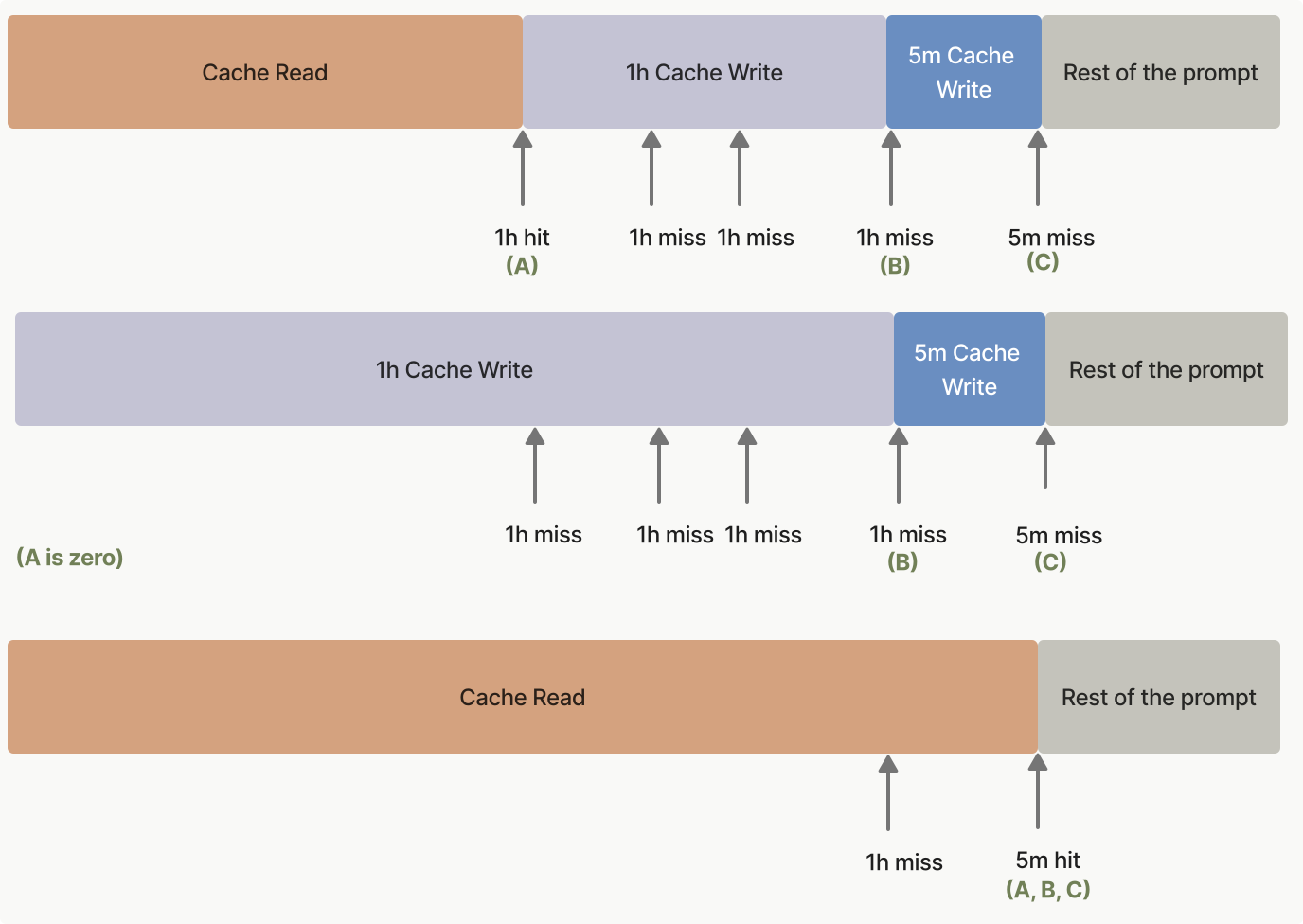
879 
880880</Frame>
881881
882882***
from line 889
889889
890890Set `max_tokens: 0` in your request. The API reads your prompt into the model and writes the cache at any `cache_control` breakpoint, then returns immediately without generating any output. The response has an empty `content` array, `stop_reason: "max_tokens"`, and a fully populated `usage` block.
891891
892Place the `cache_control` breakpoint on the last block that is shared with the follow-up request (typically your system prompt or tool definitions), not on the placeholder user message. Otherwise the cache entry is keyed to the placeholder and the follow-up request won't hit it. Use the same thinking configuration and `output_config.effort` as your follow-up requests too: those values are rendered into the prompt (see [What invalidates the cache](https://platform.claude.com/docs/en/build-with-claude/prompt-caching#what-invalidates-the-cache)), so a pre-warm with a different configuration can write an entry your real traffic never hits. This means using an [explicit cache breakpoint](https://platform.claude.com/docs/en/build-with-claude/prompt-caching#explicit-cache-breakpoints) rather than [automatic caching](https://platform.claude.com/docs/en/build-with-claude/prompt-caching#automatic-caching), since automatic caching places the breakpoint on the last block, which here is the placeholder. The placeholder user message can be any string with non-whitespace content (the examples here use `"warmup"`); its content is read into the model but never answered.
892Place the `cache_control` breakpoint on the last block that is shared with the follow-up request (typically your system prompt or tool definitions), not on the placeholder user message. Otherwise the cache entry is keyed to the placeholder and the follow-up request won't hit it. Use the same thinking configuration and `output_config.effort` as your follow-up requests too: those values are rendered into the prompt (see [What invalidates the cache](https://platform.claude.com/docs/en/build-with-claude/prompt-caching#what-invalidates-the-cache)), so a pre-warm with a different configuration can write an entry your real traffic never hits. This means using an [explicit cache breakpoint](https://platform.claude.com/docs/en/build-with-claude/prompt-caching#explicit-cache-breakpoints) rather than [automatic caching](https://platform.claude.com/docs/en/build-with-claude/prompt-caching#automatic-caching), because automatic caching places the breakpoint on the last block, which here is the placeholder. The placeholder user message can be any string with non-whitespace content (the examples here use `"warmup"`); its content is read into the model but never answered.
893893
894894<Note>
895895 A pre-warm request incurs a **cache write** charge if the prefix is not already cached, the same as any other request. Check `usage.cache_creation_input_tokens` in the response to confirm a write occurred. Zero output tokens are billed.
from line 1127
11271127
11281128### Typical usage pattern
11291129
1130Fire a pre-warm request when your application starts (or on a scheduled interval), then send real user requests after the pre-warm completes:
1130Make a pre-warm request when your application starts (or on a scheduled interval), then send real user requests after the pre-warm completes:
11311131
11321132<CodeGroup>
11331133 ```bash cURL
from line 1513
15131513
15141514### Limitations
15151515
1516A `max_tokens: 0` request is rejected with an `invalid_request_error` if any of the following are set, since each implies output that a zero-token budget cannot produce:
1516A `max_tokens: 0` request is rejected with an `invalid_request_error` if any of the following are set, because each implies output that a zero-token budget cannot produce:
15171517
15181518* `stream: true`
15191519* [Extended thinking](https://platform.claude.com/docs/en/build-with-claude/extended-thinking) (`thinking.type: "enabled"`)
from line 1530
15301530
15311531## Prompt caching examples
15321532
1533To help you get started with prompt caching, the [prompt caching cookbook](https://platform.claude.com/cookbook/misc-prompt-caching) provides detailed examples and best practices.
1533To help you get started with prompt caching, the [prompt caching recipe](https://platform.claude.com/cookbook/misc-prompt-caching) in the Claude Cookbook provides detailed examples and best practices.
15341534
15351535The following code snippets showcase various prompt caching patterns. These examples demonstrate how to implement caching in different scenarios, helping you understand the practical applications of this feature:
15361536
from line 2237
22372237
22382238 When this is set up properly, you should see the following in the usage response of each request:
22392239
2240 * `input_tokens`: Number of tokens in the new user message (will be minimal)
2240 * `input_tokens`: Number of tokens in the new user message (minimal)
22412241 * `cache_creation_input_tokens`: Number of tokens in the new assistant and user turns
22422242 * `cache_read_input_tokens`: Number of tokens in the conversation up to the previous turn
22432243 </Accordion>
from line 3134
31343134
31353135 This approach provides maximum flexibility:
31363136
3137 * If you append a new turn to the conversation without changing earlier content, all four cache segments are reused
3138 * If you update the RAG documents but keep the same tools and instructions, the first two cache segments are reused
3139 * If you change the conversation but keep the same tools, instructions, and documents, the first three segments are reused
3140 * Changes at any breakpoint invalidate that segment and everything after it, while earlier cached segments remain valid
3137 * If you append a new turn to the conversation without changing earlier content, all four cache segments are reused.
3138 * If you update the RAG documents but keep the same tools and instructions, the first two cache segments are reused.
3139 * If you change the conversation but keep the same tools, instructions, and documents, the first three segments are reused.
3140 * Changes at any breakpoint invalidate that segment and everything after it, whereas earlier cached segments remain valid.
31413141
31423142 For the first request:
31433143
from line 3174
31743174
31753175<AccordionGroup>
31763176 <Accordion title="Do I need multiple cache breakpoints or is one at the end sufficient?">
3177 **In most cases, a single cache breakpoint at the end of your static content is sufficient.** Cache writes happen only at the block you mark. Place it on the last block that stays identical across requests, and every subsequent request reads that same entry. If a later block varies per request (a timestamp, the incoming message), keep the breakpoint before it, on the last stable block.
3177 **In most cases, a single cache breakpoint at the end of your static content is sufficient.** Cache writes occur only at the block you mark. Place it on the last block that stays identical across requests, and every subsequent request reads that same entry. If a later block varies with each request (a timestamp, the incoming message), keep the breakpoint before it, on the last stable block.
31783178
31793179 You only need multiple breakpoints if:
31803180
from line 3188
31883188 <Accordion title="Do cache breakpoints add extra cost?">
31893189 No, cache breakpoints themselves are free. You only pay for:
31903190
3191 * Writing content to cache (25% more than base input tokens for 5-minute TTL)
3191 * Writing content to cache (25 percent more than base input tokens for 5-minute TTL)
31923192 * Reading from cache (a fraction of the base input token price, see [Pricing](https://platform.claude.com/docs/en/build-with-claude/prompt-caching#pricing))
31933193 * Regular input tokens for uncached content
31943194
from line 3251
32513251 </Accordion>
32523252
32533253 <Accordion title="Can I use prompt caching with other API features?">
3254 Yes, prompt caching can be used alongside other API features like tool use and vision capabilities. However, changing whether there are images in a prompt or modifying tool use settings will break the cache.
3254 Yes, prompt caching can be used alongside other API features such as tool use and vision capabilities. However, changing whether there are images in a prompt or modifying tool use settings breaks the cache.
32553255
32563256 For more details on cache invalidation, see [What invalidates the cache](https://platform.claude.com/docs/en/build-with-claude/prompt-caching#what-invalidates-the-cache).
32573257 </Accordion>
32583258
32593259 <Accordion title="How does prompt caching affect pricing?">
3260 Prompt caching introduces a new pricing structure where 5-minute cache writes cost 25% more than base input tokens, 1-hour cache writes cost 2x base input tokens, and cache hits cost a fraction of the base input token price (see [Pricing](https://platform.claude.com/docs/en/build-with-claude/prompt-caching#pricing) for the per-model multiplier).
3260 Prompt caching introduces a new pricing structure where 5-minute cache writes cost 25 percent more than base input tokens, 1-hour cache writes cost 2x base input tokens, and cache hits cost a fraction of the base input token price (see [Pricing](https://platform.claude.com/docs/en/build-with-claude/prompt-caching#pricing) for the per-model multiplier).
32613261 </Accordion>
32623262
32633263 <Accordion title="Can I manually clear the cache?">
from line 3289
32893289 <Accordion title="Can I use prompt caching with the Batches API?">
32903290 Yes, it is possible to use prompt caching with your [Batches API](https://platform.claude.com/docs/en/build-with-claude/batch-processing) requests. However, because asynchronous batch requests can be processed concurrently and in any order, cache hits are provided on a best-effort basis.
32913291
3292 The [1-hour cache](https://platform.claude.com/docs/en/build-with-claude/prompt-caching#1-hour-cache-duration) can help improve your cache hits. The most cost effective way of using it is the following:
3292 The [1-hour cache](https://platform.claude.com/docs/en/build-with-claude/prompt-caching#1-hour-cache-duration) can help improve your cache hits. The most cost-effective way of using it is the following:
32933293
32943294 * Gather a set of message requests that have a shared prefix.
32953295 * Send a batch request with a single request that has this shared prefix and a 1-hour cache block. This writes the prefix to the 1-hour cache.
3296 * As soon as this is complete, submit the rest of the requests. You will have to monitor the job to know when it completes.
3296 * As soon as this is complete, submit the rest of the requests. You have to monitor the job to know when it completes.
32973297
32983298 This is typically better than using the 5-minute cache because it's common for batch requests to take between 5 minutes and 1 hour to complete.
32993299 </Accordion>
