Follow Discord
Sweep 22 Oct 2026 · 04:32Z Build v2.1.308 527 read Stable v2.1.308 Latest v2.1.308 Next v2.1.308 Feeds RSS JSON llms.txt llms-full.txt Unofficial
One capture · api

One read of Claude Developer Platformapi-20261016T150712Z

31 pages moved out of 782 read.

Pages moved 31 significant first
Pages read 782 in this capture
Captured 15:07 UTC
Corpus hash cc7424a78673 corpus-hash

What this read moved

1-25 of 31, page 1 of 2

This capture is too large to show at once. Changes 1-25 of 31 are below, significant first; the rest are on the following screens.

agents-and-tools/tool-use/browser-use-sdk Changed · +4 / -1 lines

from line 1014
10141014 } from "@anthropic-ai/sdk/resources/beta";
10151015 
10161016 class MyDesktop extends BetaAbstractComputerToolset20260801 {
1017 constructor(private display: Display, options: BetaComputerToolsetOptions = {}) {
1017 constructor(
1018 private display: Display,
1019 options: BetaComputerToolsetOptions = {}
1020 ) {
10181021 super(options);
10191022 }
10201023 

build-with-claude/claude-platform-on-aws Changed · +21 / -21 lines

from line 552
552552* **Batch processing:** Submit batch requests for high-throughput workloads.
553553* **Prompt caching:** Cache tools, system prompts, and message history to reduce latency and cost. All prompt caching capabilities (5-minute TTL, 1-hour TTL, and automatic caching) are available.
554554* **Files API:** Upload and reference files across requests.
555* **Customer-managed encryption keys (CMEK):** [CMEK](https://platform.claude.com/docs/en/manage-claude/cmek) is available with [AWS KMS](https://platform.claude.com/docs/en/manage-claude/cmek-aws-kms) keys only. Google Cloud KMS and Azure Key Vault keys cannot be registered. The key must be a single-region KMS key in the same AWS account and region as the workspace it is attached to, and its key policy must grant access to the `aws-external-anthropic.amazonaws.com` service principal; see [Set up CMEK on Claude Platform on AWS](https://platform.claude.com/docs/en/manage-claude/cmek-aws-kms#claude-platform-on-aws). Register and attach keys in the [Claude Console](https://platform.claude.com/docs/en/build-with-claude/claude-platform-on-aws#using-the-claude-console); the external key endpoints are also available, authorized through [IAM actions](https://platform.claude.com/docs/en/api/claude-platform-on-aws-iam-actions#encryption-keys). There is no separate validation step: the key is implicitly validated when you attach it to a workspace (the attach call performs an encrypt/decrypt round), so a key policy problem surfaces at attach time rather than at registration.
555* **Customer-managed encryption keys (CMEK):** [CMEK](https://platform.claude.com/docs/en/manage-claude/cmek) is available with [AWS KMS](https://platform.claude.com/docs/en/manage-claude/cmek-aws-kms) keys only. Google Cloud KMS and Azure Key Vault keys cannot be registered. The key must be a single-region KMS key in the same AWS account and region as the workspace it is attached to, and its key policy must grant access to the `aws-external-anthropic.amazonaws.com` service principal; see [Set up CMEK on Claude Platform on AWS](https://platform.claude.com/docs/en/manage-claude/cmek-claude-platform-on-aws). Register and attach keys in the [Claude Console](https://platform.claude.com/docs/en/build-with-claude/claude-platform-on-aws#using-the-claude-console); the external key endpoints are also available, authorized through [IAM actions](https://platform.claude.com/docs/en/api/claude-platform-on-aws-iam-actions#encryption-keys). There is no separate validation step: the key is implicitly validated when you attach it to a workspace (the attach call performs an encrypt/decrypt round), so a key policy problem surfaces at attach time rather than at registration.
556556* **Compliance API:** The [Compliance API](https://platform.claude.com/docs/en/manage-claude/compliance-api) is available. Access is authorized through the AWS IAM [`ListComplianceActivities` action](https://platform.claude.com/docs/en/api/claude-platform-on-aws-iam-actions#compliance).
557557 
558558See the [comparison table](https://platform.claude.com/docs/en/build-with-claude/claude-platform-on-aws#claude-platform-on-aws-vs-amazon-bedrock) for feature-availability differences from Amazon Bedrock.
from line 805
805805 
806806The **Through AWS gateway** column indicates whether the page reads and writes data through the AWS gateway (and is therefore governed by [IAM actions](https://platform.claude.com/docs/en/api/claude-platform-on-aws-iam-actions)). Pages marked **No** read organization-level metadata directly from Anthropic and bypass IAM action checks.
807807 
808| Page | Available | Through AWS gateway | Notes |
809| --------------------- | ------------- | ------------------------- | --------------------------------------------------------------------------------------------------------------------------------------------------------------------------------------------------------------------------------------------------------------------------------------------------------------------------------------------------------------------------------------------------------------------------------------------------------------------------------------------------------------------------------------------- |
810| **Usage** | Yes | No | View token usage by model, workspace, and dimension. Data can take a few minutes to appear after a request. |
811| **Cost** | Yes | No | View cost breakdowns by model and workspace. AWS Cost Explorer shows the aggregated [Claude Consumption Unit (CCU)](https://platform.claude.com/docs/en/build-with-claude/claude-platform-on-aws#billing) line item. |
812| **Rate limits** | Yes | No | View rate limits (read-only). Tier increases go through your Anthropic account representative; see [Rate limits and quotas](https://platform.claude.com/docs/en/build-with-claude/claude-platform-on-aws#rate-limits-and-quotas). |
813| **Workspaces** | Yes | Yes (except spend limits) | View per-region workspaces. With the Admin role, you can also create, rename, and archive workspaces, and set per-workspace [spend limits](https://platform.claude.com/docs/en/build-with-claude/claude-platform-on-aws#spend-limits). |
814| **Encryption keys** | Yes | Yes | A section of the [Data retention](https://platform.claude.com/settings/privacy#encryption-keys) page (`platform.claude.com/settings/privacy`) in the Claude Console, shown while **Organization** is selected in the dropdown menu at the top of the page. Register AWS KMS keys for [CMEK](https://platform.claude.com/docs/en/manage-claude/cmek-aws-kms#claude-platform-on-aws) there (Admin role). To attach a registered key to a workspace, select the workspace from that dropdown menu, then select the key under **Encryption key**. |
815| **Files** | Yes | Yes | View and manage uploaded files. |
816| **Skills** | Yes | Yes | View and manage Agent Skills. |
817| **Batches** | Yes | Yes | View and manage batch processing jobs. |
818| **Agents** | Yes | Yes | View and manage agent definitions. |
819| **Sessions** | Yes | Yes | View agent sessions and event history. |
820| **Environments** | Yes | Yes | View and manage cloud sandbox configurations for sessions. |
821| **Credential vaults** | Yes | Yes | View and manage credential vaults for session authentication. |
822| **Memory stores** | Yes | Yes | View and manage persistent agent memory. |
823| **Webhooks** | Yes | Yes | View and manage webhook endpoints. |
824| **API keys** | No | N/A | Manage API keys in the AWS Console (**Claude Platform on AWS → API keys**). See [API key authentication](https://platform.claude.com/docs/en/build-with-claude/claude-platform-on-aws#api-key-authentication). |
825| **Members** | No | N/A | Not applicable. AWS IAM manages access. |
826| **Billing** | Yes (limited) | No | Set an organization monthly spend limit; see [Spend limits](https://platform.claude.com/docs/en/build-with-claude/claude-platform-on-aws#spend-limits). AWS Marketplace manages invoicing. View cost breakdowns on the Cost page. |
827| **Claude Code** | No | N/A | View Claude Code usage on the Usage page. |
808| Page | Available | Through AWS gateway | Notes |
809| --------------------- | ------------- | ------------------------- | ------------------------------------------------------------------------------------------------------------------------------------------------------------------------------------------------------------------------------------------------------------------------------------------------------------------------------------------------------------------------------------------------------------------------------------------------------------------------------------------------------------------------------------- |
810| **Usage** | Yes | No | View token usage by model, workspace, and dimension. Data can take a few minutes to appear after a request. |
811| **Cost** | Yes | No | View cost breakdowns by model and workspace. AWS Cost Explorer shows the aggregated [Claude Consumption Unit (CCU)](https://platform.claude.com/docs/en/build-with-claude/claude-platform-on-aws#billing) line item. |
812| **Rate limits** | Yes | No | View rate limits (read-only). Tier increases go through your Anthropic account representative; see [Rate limits and quotas](https://platform.claude.com/docs/en/build-with-claude/claude-platform-on-aws#rate-limits-and-quotas). |
813| **Workspaces** | Yes | Yes (except spend limits) | View per-region workspaces. With the Admin role, you can also create, rename, and archive workspaces, and set per-workspace [spend limits](https://platform.claude.com/docs/en/build-with-claude/claude-platform-on-aws#spend-limits). |
814| **Encryption keys** | Yes | Yes | A section of the [Data retention](https://platform.claude.com/settings/privacy#encryption-keys) page (`platform.claude.com/settings/privacy`) in the Claude Console, shown while **Organization** is selected in the dropdown menu at the top of the page. Register AWS KMS keys for [CMEK](https://platform.claude.com/docs/en/manage-claude/cmek-claude-platform-on-aws) there (Admin role). To attach a registered key to a workspace, select the workspace from that dropdown menu, then select the key under **Encryption key**. |
815| **Files** | Yes | Yes | View and manage uploaded files. |
816| **Skills** | Yes | Yes | View and manage Agent Skills. |
817| **Batches** | Yes | Yes | View and manage batch processing jobs. |
818| **Agents** | Yes | Yes | View and manage agent definitions. |
819| **Sessions** | Yes | Yes | View agent sessions and event history. |
820| **Environments** | Yes | Yes | View and manage cloud sandbox configurations for sessions. |
821| **Credential vaults** | Yes | Yes | View and manage credential vaults for session authentication. |
822| **Memory stores** | Yes | Yes | View and manage persistent agent memory. |
823| **Webhooks** | Yes | Yes | View and manage webhook endpoints. |
824| **API keys** | No | N/A | Manage API keys in the AWS Console (**Claude Platform on AWS → API keys**). See [API key authentication](https://platform.claude.com/docs/en/build-with-claude/claude-platform-on-aws#api-key-authentication). |
825| **Members** | No | N/A | Not applicable. AWS IAM manages access. |
826| **Billing** | Yes (limited) | No | Set an organization monthly spend limit; see [Spend limits](https://platform.claude.com/docs/en/build-with-claude/claude-platform-on-aws#spend-limits). AWS Marketplace manages invoicing. View cost breakdowns on the Cost page. |
827| **Claude Code** | No | N/A | View Claude Code usage on the Usage page. |
828828 
829829### Switching organizations
830830 

build-with-claude/compaction-threshold Changed · +28 / -28 lines

from line 158
158158 var parameters = new MessageCreateParams
159159 {
160160 Betas = ["compact-2026-01-12"],
161 Model = "claude-opus-5-5",
161 Model = Model.ClaudeOpus5_5,
162162 MaxTokens = 4096,
163163 Messages = messages,
164164 ContextManagement = new BetaContextManagementConfig
from line 215
215215 
216216 MessageCreateParams params = MessageCreateParams.builder()
217217 .addBeta("compact-2026-01-12")
218 .model("claude-opus-5-5")
218 .model(Model.CLAUDE_OPUS_5_5)
219219 .maxTokens(4096L)
220220 .addUserMessage("Help me build a website")
221221 .contextManagement(BetaContextManagementConfig.builder()
from line 388
388388 
389389 var parameters = new MessageCreateParams
390390 {
391 Model = "claude-opus-5-5",
391 Model = Model.ClaudeOpus5_5,
392392 MaxTokens = 4096,
393393 Betas = ["compact-2026-01-12"],
394394 Messages = messages,
from line 436
436436 AnthropicClient client = AnthropicOkHttpClient.fromEnv();
437437 
438438 MessageCreateParams params = MessageCreateParams.builder()
439 .model("claude-opus-5-5")
439 .model(Model.CLAUDE_OPUS_5_5)
440440 .maxTokens(4096L)
441441 .addBeta("compact-2026-01-12")
442442 .addUserMessage("Hello, Claude")
from line 604
604604 var parameters = new MessageCreateParams
605605 {
606606 Betas = ["compact-2026-01-12"],
607 Model = "claude-opus-5-5",
607 Model = Model.ClaudeOpus5_5,
608608 MaxTokens = 4096,
609609 Messages =
610610 [
from line 659
659659 
660660 MessageCreateParams params = MessageCreateParams.builder()
661661 .addBeta("compact-2026-01-12")
662 .model("claude-opus-5-5")
662 .model(Model.CLAUDE_OPUS_5_5)
663663 .maxTokens(4096L)
664664 .addUserMessage("Help me build a Python web scraper")
665665 .addAssistantMessage("I'll help you build a web scraper...")
from line 863
863863 
864864 var parameters = new MessageCreateParams
865865 {
866 Model = "claude-opus-5-5",
866 Model = Model.ClaudeOpus5_5,
867867 MaxTokens = 4096,
868868 Betas = ["compact-2026-01-12"],
869869 Messages = messages,
from line 888
888888 
889889 parameters = new()
890890 {
891 Model = "claude-opus-5-5",
891 Model = Model.ClaudeOpus5_5,
892892 MaxTokens = 4096,
893893 Betas = ["compact-2026-01-12"],
894894 Messages = messages,
from line 957
957957 AnthropicClient client = AnthropicOkHttpClient.fromEnv();
958958 
959959 MessageCreateParams params = MessageCreateParams.builder()
960 .model("claude-opus-5-5")
960 .model(Model.CLAUDE_OPUS_5_5)
961961 .maxTokens(4096L)
962962 .addBeta("compact-2026-01-12")
963963 .addUserMessage("Help me build a website")
from line 976
976976 // Append the compaction block and continue the request
977977 // by building a new request with the compacted context
978978 MessageCreateParams continueParams = MessageCreateParams.builder()
979 .model("claude-opus-5-5")
979 .model(Model.CLAUDE_OPUS_5_5)
980980 .maxTokens(4096L)
981981 .addBeta("compact-2026-01-12")
982982 .addUserMessage("Help me build a website")
from line 1164
11641164 var response = await client.Beta.Messages.Create(new()
11651165 {
11661166 Betas = ["compact-2026-01-12"],
1167 Model = "claude-opus-5-5",
1167 Model = Model.ClaudeOpus5_5,
11681168 MaxTokens = 4096,
11691169 Messages = messages,
11701170 ContextManagement = new BetaContextManagementConfig
from line 1259
12591259 
12601260 MessageCreateParams params = MessageCreateParams.builder()
12611261 .addBeta("compact-2026-01-12")
1262 .model("claude-opus-5-5")
1262 .model(Model.CLAUDE_OPUS_5_5)
12631263 .maxTokens(4096L)
12641264 .messages(messages)
12651265 .contextManagement(BetaContextManagementConfig.builder()
from line 1528
15281528 var response = await client.Beta.Messages.Create(new()
15291529 {
15301530 Betas = ["compact-2026-01-12"],
1531 Model = "claude-opus-5-5",
1531 Model = Model.ClaudeOpus5_5,
15321532 MaxTokens = 4096,
15331533 Messages = messages,
15341534 ContextManagement = new BetaContextManagementConfig
from line 1548
15481548 var nextResponse = await client.Beta.Messages.Create(new()
15491549 {
15501550 Betas = ["compact-2026-01-12"],
1551 Model = "claude-opus-5-5",
1551 Model = Model.ClaudeOpus5_5,
15521552 MaxTokens = 4096,
15531553 Messages = messages,
15541554 ContextManagement = new BetaContextManagementConfig
from line 1612
16121612 BetaMessage response = client.beta().messages().create(
16131613 MessageCreateParams.builder()
16141614 .addBeta("compact-2026-01-12")
1615 .model("claude-opus-5-5")
1615 .model(Model.CLAUDE_OPUS_5_5)
16161616 .maxTokens(4096L)
16171617 .addUserMessage("Help me build a web scraper")
16181618 .contextManagement(BetaContextManagementConfig.builder()
from line 1625
16251625 BetaMessage nextResponse = client.beta().messages().create(
16261626 MessageCreateParams.builder()
16271627 .addBeta("compact-2026-01-12")
1628 .model("claude-opus-5-5")
1628 .model(Model.CLAUDE_OPUS_5_5)
16291629 .maxTokens(4096L)
16301630 .addUserMessage("Help me build a web scraper")
16311631 .addMessage(response)
from line 1853
18531853 var parameters = new MessageCreateParams
18541854 {
18551855 Betas = ["compact-2026-01-12"],
1856 Model = "claude-opus-5-5",
1856 Model = Model.ClaudeOpus5_5,
18571857 MaxTokens = 4096,
18581858 Messages = messages,
18591859 ContextManagement = new BetaContextManagementConfig
from line 1936
19361936 AnthropicClient client = AnthropicOkHttpClient.fromEnv();
19371937 
19381938 MessageCreateParams params = MessageCreateParams.builder()
1939 .model("claude-opus-5-5")
1939 .model(Model.CLAUDE_OPUS_5_5)
19401940 .maxTokens(4096L)
19411941 .addBeta("compact-2026-01-12")
19421942 .addUserMessage("Hello, Claude")
from line 2187
21872187 var parameters = new MessageCreateParams
21882188 {
21892189 Betas = ["compact-2026-01-12"],
2190 Model = "claude-opus-5-5",
2190 Model = Model.ClaudeOpus5_5,
21912191 MaxTokens = 4096,
21922192 System = new List<BetaTextBlockParam>
21932193 {
from line 2242
22422242 AnthropicClient client = AnthropicOkHttpClient.fromEnv();
22432243 
22442244 MessageCreateParams params = MessageCreateParams.builder()
2245 .model("claude-opus-5-5")
2245 .model(Model.CLAUDE_OPUS_5_5)
22462246 .maxTokens(4096L)
22472247 .addBeta("compact-2026-01-12")
22482248 .systemOfBetaTextBlockParams(List.of(
from line 2455
24552455 
24562456 var countParams = new MessageCountTokensParams
24572457 {
2458 Model = "claude-opus-5-5",
2458 Model = Model.ClaudeOpus5_5,
24592459 Messages = messages,
24602460 ContextManagement = new BetaContextManagementConfig
24612461 {
from line 2500
25002500 AnthropicClient client = AnthropicOkHttpClient.fromEnv();
25012501 
25022502 MessageCountTokensParams params = MessageCountTokensParams.builder()
2503 .model("claude-opus-5-5")
2503 .model(Model.CLAUDE_OPUS_5_5)
25042504 .addUserMessage("Hello, Claude")
25052505 .contextManagement(BetaContextManagementConfig.builder()
25062506 .addEdit(BetaCompact20260112Edit.builder().build())
from line 2700
27002700 var parameters = new MessageCreateParams
27012701 {
27022702 Betas = ["compact-2026-01-12"],
2703 Model = "claude-opus-5-5",
2703 Model = Model.ClaudeOpus5_5,
27042704 MaxTokens = 4096,
27052705 Messages = messages,
27062706 ContextManagement = new BetaContextManagementConfig
from line 2803
28032803 
28042804 MessageCreateParams params = MessageCreateParams.builder()
28052805 .addBeta("compact-2026-01-12")
2806 .model("claude-opus-5-5")
2806 .model(Model.CLAUDE_OPUS_5_5)
28072807 .maxTokens(4096L)
28082808 .messages(messages)
28092809 .contextManagement(BetaContextManagementConfig.builder()
from line 3139
31393139 var response = await client.Beta.Messages.Create(new()
31403140 {
31413141 Betas = ["compact-2026-01-12"],
3142 Model = "claude-opus-5-5",
3142 Model = Model.ClaudeOpus5_5,
31433143 MaxTokens = 4096,
31443144 Messages = messages,
31453145 ContextManagement = new BetaContextManagementConfig
from line 3186
31863186 response = await client.Beta.Messages.Create(new()
31873187 {
31883188 Betas = ["compact-2026-01-12"],
3189 Model = "claude-opus-5-5",
3189 Model = Model.ClaudeOpus5_5,
31903190 MaxTokens = 4096,
31913191 Messages = messagesAfterCompaction,
31923192 ContextManagement = new BetaContextManagementConfig
from line 3328
33283328 
33293329 MessageCreateParams params = MessageCreateParams.builder()
33303330 .addBeta("compact-2026-01-12")
3331 .model("claude-opus-5-5")
3331 .model(Model.CLAUDE_OPUS_5_5)
33323332 .maxTokens(4096L)
33333333 .messages(messages)
33343334 .contextManagement(BetaContextManagementConfig.builder()
from line 3371
33713371 // Continue the request with the compacted context + preserved messages
33723372 MessageCreateParams continueParams = MessageCreateParams.builder()
33733373 .addBeta("compact-2026-01-12")
3374 .model("claude-opus-5-5")
3374 .model(Model.CLAUDE_OPUS_5_5)
33753375 .maxTokens(4096L)
33763376 .messages(messagesAfterCompaction)
33773377 .contextManagement(BetaContextManagementConfig.builder()

build-with-claude/effort Changed · +5 / -3 lines

from line 490
490490 ```csharp C#
491491 using Anthropic.Models.Beta;
492492 using Anthropic.Models.Beta.Messages;
493 using Model = Anthropic.Models.Messages.Model;
493494 
494495 AnthropicClient client = new();
495496 
496497 var response = await client.Beta.Messages.Create(new MessageCreateParams
497498 {
498 Model = "claude-fable-5-1",
499 Model = Model.ClaudeFable5_1,
499500 MaxTokens = 4096,
500501 OutputConfig = new() { Effort = Effort.High },
501502 Messages =
from line 528
527528 client := anthropic.NewClient()
528529 
529530 response, err := client.Beta.Messages.New(context.Background(), anthropic.BetaMessageNewParams{
530 Model: "claude-fable-5-1",
531 Model: anthropic.ModelClaudeFable5_1,
531532 MaxTokens: 4096,
532533 OutputConfig: anthropic.BetaOutputConfigParam{
533534 Effort: anthropic.BetaOutputConfigEffortHigh,
from line 565
564565 import com.anthropic.models.beta.messages.BetaOutputConfig;
565566 import com.anthropic.models.beta.messages.BetaSystemMessageOutputConfig;
566567 import com.anthropic.models.beta.messages.MessageCreateParams;
568 import com.anthropic.models.messages.Model;
567569 
568570 void main() {
569571 AnthropicClient client = AnthropicOkHttpClient.fromEnv();
570572 
571573 MessageCreateParams params = MessageCreateParams.builder()
572 .model("claude-fable-5-1")
574 .model(Model.CLAUDE_FABLE_5_1)
573575 .maxTokens(4096L)
574576 .addBeta(AnthropicBeta.MID_CONVERSATION_OUTPUT_CONFIG_2026_07_01)
575577 .outputConfig(BetaOutputConfig.builder()

build-with-claude/fallback-credit Changed · +4 / -4 lines

from line 247
247247 [
248248 new() { Role = Role.User, Content = "Hello, Claude" },
249249 ];
250 MessageCreateParams Request(string model) => new()
250 MessageCreateParams Request(Model model) => new()
251251 {
252252 Model = model,
253253 MaxTokens = 1024,
from line 254
254254 Messages = requestMessages,
255255 Betas = [beta],
256256 };
257 var response = await client.Beta.Messages.Create(Request("claude-fable-5"));
257 var response = await client.Beta.Messages.Create(Request(Model.ClaudeFable5));
258258 
259259 if (
260260 response.StopReason == BetaStopReason.Refusal
from line 261
261261 && response.StopDetails is { FallbackCreditToken: string token } details
262262 )
263263 {
264 var exactBody = Request("claude-opus-4-8") with { FallbackCreditToken = token };
264 var exactBody = Request(Model.ClaudeOpus4_8) with { FallbackCreditToken = token };
265265 var attempt = exactBody;
266266 // Prefer the continuation shape unless the claim is false
267267 if (details.FallbackHasPrefillClaim is not false)
from line 308
308308 when (!retryError.Message.Contains("redemption temporarily unavailable"))
309309 {
310310 // The token itself was rejected: forfeit it and retry without.
311 response = await client.Beta.Messages.Create(Request("claude-opus-4-8"));
311 response = await client.Beta.Messages.Create(Request(Model.ClaudeOpus4_8));
312312 }
313313 }
314314 }

build-with-claude/fast-mode Changed · +3 / -3 lines

from line 112
112112 
113113 var response = await client.Messages.Create(new MessageCreateParams
114114 {
115 Model = "claude-opus-5-5",
115 Model = Model.ClaudeOpus5_5,
116116 MaxTokens = 4096,
117117 Speed = Speed.Fast,
118118 Messages = [
from line 298
298298 
299299 var response = await client.Messages.Create(new MessageCreateParams
300300 {
301 Model = "claude-opus-5-5",
301 Model = Model.ClaudeOpus5_5,
302302 MaxTokens = 1024,
303303 Speed = Speed.Fast,
304304 Messages = [new() { Role = Role.User, Content = "Hello" }],
from line 547
547547 var message = await CreateMessageWithFastFallback(
548548 new MessageCreateParams
549549 {
550 Model = "claude-opus-5-5",
550 Model = Model.ClaudeOpus5_5,
551551 MaxTokens = 1024,
552552 Messages = [new() { Role = Role.User, Content = "Hello" }],
553553 Speed = Speed.Fast,

build-with-claude/mid-conversation-system-messages Changed · +5 / -3 lines

from line 2210
22102210 ```csharp C#
22112211 using Anthropic.Models.Beta;
22122212 using Anthropic.Models.Beta.Messages;
2213 using Messages = Anthropic.Models.Messages;
22132214 
22142215 AnthropicClient client = new();
22152216 
22162217 var response = await client.Beta.Messages.Create(new MessageCreateParams
22172218 {
2218 Model = "claude-fable-5-1",
2219 Model = Messages::Model.ClaudeFable5_1,
22192220 MaxTokens = 4096,
22202221 Messages =
22212222 [
from line 2245
22442245 client := anthropic.NewClient()
22452246 
22462247 response, err := client.Beta.Messages.New(context.Background(), anthropic.BetaMessageNewParams{
2247 Model: "claude-fable-5-1",
2248 Model: anthropic.ModelClaudeFable5_1,
22482249 MaxTokens: 4096,
22492250 Messages: []anthropic.BetaMessageParam{
22502251 anthropic.NewBetaUserMessage(anthropic.NewBetaTextBlock("Draft a short status update on the database migration for the team channel.")),
from line 2274
22732274 import com.anthropic.models.beta.messages.BetaMessage;
22742275 import com.anthropic.models.beta.messages.BetaMessageParam;
22752276 import com.anthropic.models.beta.messages.MessageCreateParams;
2277 import com.anthropic.models.messages.Model;
22762278 
22772279 void main() {
22782280 AnthropicClient client = AnthropicOkHttpClient.fromEnv();
22792281 
22802282 MessageCreateParams params = MessageCreateParams.builder()
2281 .model("claude-fable-5-1")
2283 .model(Model.CLAUDE_FABLE_5_1)
22822284 .maxTokens(4096L)
22832285 .addBeta(AnthropicBeta.MID_CONVERSATION_SYSTEM_CLEAR_AT_2026_08_21)
22842286 .addUserMessage("Draft a short status update on the database migration for the team channel.")

build-with-claude/preserved-thinking Changed · +16 / -12 lines

from line 239
239239 var response = await client.Beta.Messages.Create(
240240 new()
241241 {
242 Model = "claude-fable-5-1",
242 Model = Model.ClaudeFable5_1,
243243 MaxTokens = 16000,
244244 Thinking = new BetaThinkingConfigAdaptive
245245 {
from line 275
275275 client := anthropic.NewClient()
276276 
277277 response, err := client.Beta.Messages.New(context.TODO(), anthropic.BetaMessageNewParams{
278 Model: "claude-fable-5-1",
278 Model: anthropic.ModelClaudeFable5_1,
279279 MaxTokens: 16000,
280280 Thinking: anthropic.BetaThinkingConfigParamUnion{
281281 OfAdaptive: &anthropic.BetaThinkingConfigAdaptiveParam{
from line 308
308308 import com.anthropic.models.beta.messages.BetaThinkingConfigAdaptive;
309309 import com.anthropic.models.beta.messages.BetaThinkingPrefixMismatchBehavior;
310310 import com.anthropic.models.beta.messages.MessageCreateParams;
311 import com.anthropic.models.messages.Model;
311312 
312313 void main() {
313314 AnthropicClient client = AnthropicOkHttpClient.fromEnv();
314315 
315316 MessageCreateParams params = MessageCreateParams.builder()
316 .model("claude-fable-5-1")
317 .model(Model.CLAUDE_FABLE_5_1)
317318 .maxTokens(16000L)
318319 .addBeta(AnthropicBeta.THINKING_BINDING_CONTROLS_2026_08_01)
319320 .thinking(BetaThinkingConfigAdaptive.builder()
from line 623
622623 var response = await client.Beta.Messages.Create(
623624 new()
624625 {
625 Model = "claude-fable-5-1",
626 Model = Model.ClaudeFable5_1,
626627 MaxTokens = 16000,
627628 Thinking = new BetaThinkingConfigAdaptive
628629 {
from line 660
659660 for _, userTurn := range userTurns {
660661 messages = append(messages, anthropic.NewBetaUserMessage(anthropic.NewBetaTextBlock(userTurn)))
661662 response, err := client.Beta.Messages.New(context.TODO(), anthropic.BetaMessageNewParams{
662 Model: "claude-fable-5-1",
663 Model: anthropic.ModelClaudeFable5_1,
663664 MaxTokens: 16000,
664665 Thinking: anthropic.BetaThinkingConfigParamUnion{
665666 OfAdaptive: &anthropic.BetaThinkingConfigAdaptiveParam{
from line 694
693694 import com.anthropic.models.beta.messages.BetaThinkingConfigAdaptive;
694695 import com.anthropic.models.beta.messages.BetaThinkingPrefixMismatchBehavior;
695696 import com.anthropic.models.beta.messages.MessageCreateParams;
697 import com.anthropic.models.messages.Model;
696698 
697699 void main() {
698700 AnthropicClient client = AnthropicOkHttpClient.fromEnv();
from line 705
703705 
704706 // The builder's message list grows across turns: each assistant turn goes back exactly as returned
705707 MessageCreateParams.Builder conversation = MessageCreateParams.builder()
706 .model("claude-fable-5-1")
708 .model(Model.CLAUDE_FABLE_5_1)
707709 .maxTokens(16000L)
708710 .thinking(BetaThinkingConfigAdaptive.builder()
709711 .blockBinding(BetaThinkingBlockBinding.builder()
from line 1051
10491051 var response = await client.Beta.Messages.Create(
10501052 new()
10511053 {
1052 Model = "claude-fable-5-1",
1054 Model = Model.ClaudeFable5_1,
10531055 MaxTokens = 16000,
10541056 Thinking = new BetaThinkingConfigAdaptive(),
10551057 // Only the last request adds a system prompt, which changes the prefix on purpose
from line 1092
10901092 system = []anthropic.BetaTextBlockParam{{Text: "Answer briefly."}}
10911093 }
10921094 response, err := client.Beta.Messages.New(context.TODO(), anthropic.BetaMessageNewParams{
1093 Model: "claude-fable-5-1",
1095 Model: anthropic.ModelClaudeFable5_1,
10941096 MaxTokens: 16000,
10951097 Thinking: anthropic.BetaThinkingConfigParamUnion{
10961098 OfAdaptive: &anthropic.BetaThinkingConfigAdaptiveParam{},
from line 1128
11261128 import com.anthropic.models.beta.messages.BetaMessage;
11271129 import com.anthropic.models.beta.messages.BetaThinkingConfigAdaptive;
11281130 import com.anthropic.models.beta.messages.MessageCreateParams;
1131 import com.anthropic.models.messages.Model;
11291132 
11301133 void main() {
11311134 AnthropicClient client = AnthropicOkHttpClient.fromEnv();
from line 1140
11371140 
11381141 // The builder's message list grows across turns: each assistant turn goes back exactly as returned
11391142 MessageCreateParams.Builder conversation = MessageCreateParams.builder()
1140 .model("claude-fable-5-1")
1143 .model(Model.CLAUDE_FABLE_5_1)
11411144 .maxTokens(16000L)
11421145 .thinking(BetaThinkingConfigAdaptive.builder().build())
11431146 .addBeta(AnthropicBeta.THINKING_BINDING_CONTROLS_2026_08_01);
from line 1560
15571560 var response = await client.Beta.Messages.Create(
15581561 new()
15591562 {
1560 Model = "claude-fable-5-1",
1563 Model = Model.ClaudeFable5_1,
15611564 MaxTokens = 16000,
15621565 Thinking = new BetaThinkingConfigAdaptive
15631566 {
from line 1582
15791582 
15801583 // compactedMessages: the summary message, then the kept turns as returned
15811584 response, err := client.Beta.Messages.New(context.TODO(), anthropic.BetaMessageNewParams{
1582 Model: "claude-fable-5-1",
1585 Model: anthropic.ModelClaudeFable5_1,
15831586 MaxTokens: 16000,
15841587 Thinking: anthropic.BetaThinkingConfigParamUnion{
15851588 OfAdaptive: &anthropic.BetaThinkingConfigAdaptiveParam{
from line 1608
16051608 import com.anthropic.models.beta.messages.BetaThinkingConfigAdaptive;
16061609 import com.anthropic.models.beta.messages.BetaThinkingPrefixMismatchBehavior;
16071610 import com.anthropic.models.beta.messages.MessageCreateParams;
1611 import com.anthropic.models.messages.Model;
16081612 
16091613 void main() {
16101614 AnthropicClient client = AnthropicOkHttpClient.fromEnv();
from line 1615
16111615 
16121616 // compactedMessages: the summary message, then the kept turns as returned
16131617 MessageCreateParams params = MessageCreateParams.builder()
1614 .model("claude-fable-5-1")
1618 .model(Model.CLAUDE_FABLE_5_1)
16151619 .maxTokens(16000L)
16161620 .thinking(BetaThinkingConfigAdaptive.builder()
16171621 .blockBinding(BetaThinkingBlockBinding.builder()

build-with-claude/prompt-engineering/claude-prompting-best-practices Changed · +3 / -3 lines

from line 668
668668 // Before: extended thinking with a manual budget (older models)
669669 await client.Messages.Create(new MessageCreateParams
670670 {
671 Model = "claude-sonnet-4-5-20250929",
671 Model = Model.ClaudeSonnet4_5_20250929,
672672 MaxTokens = 16000,
673673 Thinking = new ThinkingConfigEnabled(budgetTokens: 10000),
674674 Messages = [new() { Role = Role.User, Content = "..." }]
from line 688
688688 ```go Go
689689 // Before: extended thinking with a manual budget (older models)
690690 client.Messages.New(ctx, anthropic.MessageNewParams{
691 Model: "claude-sonnet-4-5-20250929",
691 Model: anthropic.ModelClaudeSonnet4_5_20250929,
692692 MaxTokens: 16000,
693693 Thinking: anthropic.ThinkingConfigParamUnion{
694694 OfEnabled: &anthropic.ThinkingConfigEnabledParam{BudgetTokens: 10000},
from line 717
717717 ```java Java
718718 // Before: extended thinking with a manual budget (older models)
719719 client.messages().create(MessageCreateParams.builder()
720 .model("claude-sonnet-4-5-20250929")
720 .model(Model.CLAUDE_SONNET_4_5_20250929)
721721 .maxTokens(16000L)
722722 .thinking(ThinkingConfigEnabled.builder().budgetTokens(10000L).build())
723723 .addUserMessage("...")

build-with-claude/prompt-engineering/prompting-claude-fable-5-1 Changed · +5 / -3 lines

from line 265
265265 using System.Text.Json;
266266 using Anthropic;
267267 using Anthropic.Models.Beta.Messages;
268 using Model = Anthropic.Models.Messages.Model;
268269 
269270 AnthropicClient client = new();
270271 
from line 316
315316 {
316317 response = await client.Beta.Messages.Create(new MessageCreateParams
317318 {
318 Model = "claude-fable-5-1",
319 Model = Model.ClaudeFable5_1,
319320 MaxTokens = 16000,
320321 Betas = ["mid-conversation-system-clear-at-2026-08-21"],
321322 Tools = tools,
from line 430
429430 for {
430431 var err error
431432 response, err = client.Beta.Messages.New(ctx, anthropic.BetaMessageNewParams{
432 Model: "claude-fable-5-1",
433 Model: anthropic.ModelClaudeFable5_1,
433434 MaxTokens: 16000,
434435 Betas: []anthropic.AnthropicBeta{"mid-conversation-system-clear-at-2026-08-21"},
435436 Tools: tools,
from line 496
495496 import com.anthropic.models.beta.messages.BetaToolResultBlockParam;
496497 import com.anthropic.models.beta.messages.BetaToolUseBlock;
497498 import com.anthropic.models.beta.messages.MessageCreateParams;
499 import com.anthropic.models.messages.Model;
498500 
499501 static final String BATCH_NUDGE =
500502 "First privately list what you need next; then request every item "
from line 536
534536 BetaMessage response;
535537 while (true) {
536538 response = client.beta().messages().create(MessageCreateParams.builder()
537 .model("claude-fable-5-1")
539 .model(Model.CLAUDE_FABLE_5_1)
538540 .maxTokens(16000)
539541 .addBeta("mid-conversation-system-clear-at-2026-08-21")
540542 .addTool(readFileTool)

build-with-claude/skills-guide Changed · +25 / -25 lines

from line 170
170170 
171171 var parameters = new MessageCreateParams
172172 {
173 Model = "claude-opus-5-5",
173 Model = Model.ClaudeOpus5_5,
174174 MaxTokens = 4096,
175175 Container = new ContainerParams
176176 {
from line 196
196196 client := anthropic.NewClient()
197197 
198198 response, err := client.Messages.New(context.TODO(), anthropic.MessageNewParams{
199 Model: "claude-opus-5-5",
199 Model: anthropic.ModelClaudeOpus5_5,
200200 MaxTokens: 4096,
201201 Container: anthropic.MessageCreateParamsContainerUnion{
202202 OfContainers: &anthropic.ContainerParams{
from line 485
485485 // Step 1: Use a Skill to create a file
486486 var parameters = new MessageCreateParams
487487 {
488 Model = "claude-opus-5-5",
488 Model = Model.ClaudeOpus5_5,
489489 MaxTokens = 4096,
490490 Container = new ContainerParams
491491 {
from line 537
537537 
538538 // Step 1: Use a Skill to create a file
539539 response, err := client.Messages.New(context.TODO(), anthropic.MessageNewParams{
540 Model: "claude-opus-5-5",
540 Model: anthropic.ModelClaudeOpus5_5,
541541 MaxTokens: 4096,
542542 Container: anthropic.MessageCreateParamsContainerUnion{
543543 OfContainers: &anthropic.ContainerParams{
from line 1066
10661066 // First request with a Skill
10671067 var parameters1 = new MessageCreateParams
10681068 {
1069 Model = "claude-opus-5-5",
1069 Model = Model.ClaudeOpus5_5,
10701070 MaxTokens = 4096,
10711071 Container = new ContainerParams
10721072 {
from line 1095
10951095 
10961096 var parameters2 = new MessageCreateParams
10971097 {
1098 Model = "claude-opus-5-5",
1098 Model = Model.ClaudeOpus5_5,
10991099 MaxTokens = 4096,
11001100 Container = new ContainerParams
11011101 {
from line 1127
11271127 client := anthropic.NewClient()
11281128 
11291129 response1, err := client.Messages.New(context.TODO(), anthropic.MessageNewParams{
1130 Model: "claude-opus-5-5",
1130 Model: anthropic.ModelClaudeOpus5_5,
11311131 MaxTokens: 4096,
11321132 Container: anthropic.MessageCreateParamsContainerUnion{
11331133 OfContainers: &anthropic.ContainerParams{
from line 1161
11611161 assistantText := strings.Join(textParts, "\n")
11621162 
11631163 response2, err := client.Messages.New(context.TODO(), anthropic.MessageNewParams{
1164 Model: "claude-opus-5-5",
1164 Model: anthropic.ModelClaudeOpus5_5,
11651165 MaxTokens: 4096,
11661166 Container: anthropic.MessageCreateParamsContainerUnion{
11671167 OfContainers: &anthropic.ContainerParams{
from line 1547
15471547 {
15481548 var parameters = new MessageCreateParams
15491549 {
1550 Model = "claude-opus-5-5",
1550 Model = Model.ClaudeOpus5_5,
15511551 MaxTokens = 4096,
15521552 Container = containerId is null
15531553 ? new ContainerParams
from line 1604
16041604 maxRetries := 10
16051605 
16061606 response, err := client.Messages.New(context.TODO(), anthropic.MessageNewParams{
1607 Model: "claude-opus-5-5",
1607 Model: anthropic.ModelClaudeOpus5_5,
16081608 MaxTokens: 4096,
16091609 Container: anthropic.MessageCreateParamsContainerUnion{
16101610 OfContainers: &anthropic.ContainerParams{
from line 1634
16341634 messages = append(messages, response.ToParam())
16351635 
16361636 response, err = client.Messages.New(context.TODO(), anthropic.MessageNewParams{
1637 Model: "claude-opus-5-5",
1637 Model: anthropic.ModelClaudeOpus5_5,
16381638 MaxTokens: 4096,
16391639 Container: anthropic.MessageCreateParamsContainerUnion{
16401640 OfContainers: &anthropic.ContainerParams{
from line 1960
19601960 
19611961 var parameters = new MessageCreateParams
19621962 {
1963 Model = "claude-opus-5-5",
1963 Model = Model.ClaudeOpus5_5,
19641964 MaxTokens = 4096,
19651965 Container = new ContainerParams
19661966 {
from line 1998
19981998 client := anthropic.NewClient()
19991999 
20002000 response, err := client.Messages.New(context.TODO(), anthropic.MessageNewParams{
2001 Model: "claude-opus-5-5",
2001 Model: anthropic.ModelClaudeOpus5_5,
20022002 MaxTokens: 4096,
20032003 Container: anthropic.MessageCreateParamsContainerUnion{
20042004 OfContainers: &anthropic.ContainerParams{
from line 3005
30053005 // Use specific version
30063006 var specificVersionParams = new MessageCreateParams
30073007 {
3008 Model = "claude-opus-5-5",
3008 Model = Model.ClaudeOpus5_5,
30093009 MaxTokens = 4096,
30103010 Container = new ContainerParams
30113011 {
from line 3029
30293029 // Use latest version
30303030 var latestVersionParams = new MessageCreateParams
30313031 {
3032 Model = "claude-opus-5-5",
3032 Model = Model.ClaudeOpus5_5,
30333033 MaxTokens = 4096,
30343034 Container = new ContainerParams
30353035 {
from line 3082
30823082 
30833083 // Use specific version
30843084 response, err := client.Messages.New(context.TODO(), anthropic.MessageNewParams{
3085 Model: "claude-opus-5-5",
3085 Model: anthropic.ModelClaudeOpus5_5,
30863086 MaxTokens: 4096,
30873087 Container: anthropic.MessageCreateParamsContainerUnion{
30883088 OfContainers: &anthropic.ContainerParams{
from line 3109
31093109 
31103110 // Use latest version
31113111 latestResponse, err := client.Messages.New(context.TODO(), anthropic.MessageNewParams{
3112 Model: "claude-opus-5-5",
3112 Model: anthropic.ModelClaudeOpus5_5,
31133113 MaxTokens: 4096,
31143114 Container: anthropic.MessageCreateParamsContainerUnion{
31153115 OfContainers: &anthropic.ContainerParams{
from line 3583
35833583 // Use with Excel to create financial model
35843584 var parameters = new MessageCreateParams
35853585 {
3586 Model = "claude-opus-5-5",
3586 Model = Model.ClaudeOpus5_5,
35873587 MaxTokens = 4096,
35883588 Container = new ContainerParams
35893589 {
from line 3619
36193619 
36203620 // Use with Excel to create financial model
36213621 response, err := client.Messages.New(context.TODO(), anthropic.MessageNewParams{
3622 Model: "claude-opus-5-5",
3622 Model: anthropic.ModelClaudeOpus5_5,
36233623 MaxTokens: 4096,
36243624 Container: anthropic.MessageCreateParamsContainerUnion{
36253625 OfContainers: &anthropic.ContainerParams{
from line 4217
42174217 // Skills render into the system prompt in a fixed, cache-friendly order
42184218 var parameters1 = new MessageCreateParams
42194219 {
4220 Model = "claude-opus-5-5",
4220 Model = Model.ClaudeOpus5_5,
42214221 MaxTokens = 4096,
42224222 Container = new ContainerParams
42234223 {
from line 4241
42414241 // Different Skill set ([xlsx] vs [xlsx, pptx]) = a different prefix: a cache miss (an identical set is a cache hit)
42424242 var parameters2 = new MessageCreateParams
42434243 {
4244 Model = "claude-opus-5-5",
4244 Model = Model.ClaudeOpus5_5,
42454245 MaxTokens = 4096,
42464246 Container = new ContainerParams
42474247 {
from line 4274
42744274 
42754275 // Skills render into the system prompt in a fixed, cache-friendly order
42764276 response1, err := client.Messages.New(context.TODO(), anthropic.MessageNewParams{
4277 Model: "claude-opus-5-5",
4277 Model: anthropic.ModelClaudeOpus5_5,
42784278 MaxTokens: 4096,
42794279 Container: anthropic.MessageCreateParamsContainerUnion{
42804280 OfContainers: &anthropic.ContainerParams{
from line 4301
43014301 
43024302 // Changing the Skills list ([xlsx] vs [xlsx, pptx]) changes the prefix: a cache miss, while an identical list is a cache hit
43034303 response2, err := client.Messages.New(context.TODO(), anthropic.MessageNewParams{
4304 Model: "claude-opus-5-5",
4304 Model: anthropic.ModelClaudeOpus5_5,
43054305 MaxTokens: 4096,
43064306 Container: anthropic.MessageCreateParamsContainerUnion{
43074307 OfContainers: &anthropic.ContainerParams{
from line 4565
45654565 {
45664566 var parameters = new MessageCreateParams
45674567 {
4568 Model = "claude-opus-5-5",
4568 Model = Model.ClaudeOpus5_5,
45694569 MaxTokens = 4096,
45704570 Container = new ContainerParams
45714571 {
from line 4596
45964596 client := anthropic.NewClient()
45974597 
45984598 response, err := client.Messages.New(context.TODO(), anthropic.MessageNewParams{
4599 Model: "claude-opus-5-5",
4599 Model: anthropic.ModelClaudeOpus5_5,
46004600 MaxTokens: 4096,
46014601 Container: anthropic.MessageCreateParamsContainerUnion{
46024602 OfContainers: &anthropic.ContainerParams{

manage-claude/cmek Changed · +4 / -4 lines

from line 20
2020 Enabling CMEK is permanent. Anthropic keeps no copy of your key, so misconfiguration or key loss can permanently destroy your CMEK-protected data. If you are uncertain about any step, contact your Anthropic representative before applying changes.
2121 
2222 * **Permanent data loss:** If your encryption key is deleted, scheduled for deletion, or has its key material destroyed, Anthropic cannot recover your data.
23 * **Identifier verification is mandatory:** Granting key access to an incorrect or spoofed principal can expose your data to an unauthorized party. Always verify the Anthropic identifier against the published production identities in each configuration guide. On Claude Platform on AWS, that identity is the AWS service principal published in the [AWS KMS guide](https://platform.claude.com/docs/en/manage-claude/cmek-aws-kms#claude-platform-on-aws). Never trust an identifier provided over email, chat, or any onboarding channel.
23 * **Identifier verification is mandatory:** Granting key access to an incorrect or spoofed principal can expose your data to an unauthorized party. Always verify the Anthropic identifier against the published production identities in each configuration guide. On Claude Platform on AWS, that identity is the AWS service principal published in [Set up CMEK on Claude Platform on AWS](https://platform.claude.com/docs/en/manage-claude/cmek-claude-platform-on-aws). Never trust an identifier provided over email, chat, or any onboarding channel.
2424</Warning>
2525 
2626## How it works
from line 31
3131 
3232CMEK configuration events appear in the [Compliance API Activity Feed](https://platform.claude.com/docs/en/manage-claude/compliance-activity-feed). The key operations Anthropic performs against your key (such as wrapping and unwrapping data keys) do not appear in the Compliance API; they appear in your cloud provider's audit logs.
3333 
34Anthropic calls your key management service from its standard public IP range. If you restrict access to your key management service by IP, allow the addresses listed in [IP addresses](https://platform.claude.com/docs/en/api/ip-addresses). On Claude Platform on AWS, don't rely on IP-based restrictions for your key; scope access with the key policy described in the [AWS KMS guide](https://platform.claude.com/docs/en/manage-claude/cmek-aws-kms#claude-platform-on-aws) instead.
34Anthropic calls your key management service from its standard public IP range. If you restrict access to your key management service by IP, allow the addresses listed in [IP addresses](https://platform.claude.com/docs/en/api/ip-addresses). On Claude Platform on AWS, don't rely on IP-based restrictions for your key; scope access with the key policy described in [Set up CMEK on Claude Platform on AWS](https://platform.claude.com/docs/en/manage-claude/cmek-claude-platform-on-aws) instead.
3535 
3636## Prerequisites
3737 
from line 49
4949| Google Cloud | `us-central1`, `us-east5` |
5050| Azure | `northcentralus`, `eastus2` |
5151 
52On [Claude Platform on AWS](https://platform.claude.com/docs/en/build-with-claude/claude-platform-on-aws), CMEK is available with AWS KMS keys only; Google Cloud KMS and Azure Key Vault keys cannot be registered. These region recommendations do not apply there: the key must be a single-region KMS key in the same AWS account and region as the workspace it is attached to, and its key policy must grant access to an AWS service principal rather than Anthropic's IAM role; see [Set up CMEK on Claude Platform on AWS](https://platform.claude.com/docs/en/manage-claude/cmek-aws-kms#claude-platform-on-aws). Register and attach keys in the Claude Console; the external key endpoints are also available on Claude Platform on AWS, authorized through [IAM actions](https://platform.claude.com/docs/en/api/claude-platform-on-aws-iam-actions#encryption-keys). There is no separate validation step: the key is implicitly validated when you attach it to a workspace (the attach call performs an encrypt/decrypt round), so a key policy problem surfaces at attach time rather than at registration.
52On [Claude Platform on AWS](https://platform.claude.com/docs/en/build-with-claude/claude-platform-on-aws), CMEK is available with AWS KMS keys only; Google Cloud KMS and Azure Key Vault keys cannot be registered. These region recommendations do not apply there: the key must be a single-region KMS key in the same AWS account and region as the workspace it is attached to, and its key policy must grant access to an AWS service principal rather than Anthropic's IAM role; see [Set up CMEK on Claude Platform on AWS](https://platform.claude.com/docs/en/manage-claude/cmek-claude-platform-on-aws). Register and attach keys in the Claude Console; the external key endpoints are also available on Claude Platform on AWS, authorized through [IAM actions](https://platform.claude.com/docs/en/api/claude-platform-on-aws-iam-actions#encryption-keys). There is no separate validation step: the key is implicitly validated when you attach it to a workspace (the attach call performs an encrypt/decrypt round), so a key policy problem surfaces at attach time rather than at registration.
5353 
5454## What CMEK protects
5555 
from line 141
141141 
142142## Configure your provider
143143 
144Follow the guide for the key management service you use.
144Follow the guide for the key management service you use. On Claude Platform on AWS, follow [Set up CMEK on Claude Platform on AWS](https://platform.claude.com/docs/en/manage-claude/cmek-claude-platform-on-aws) instead.
145145 
146146<CardGroup cols={3}>
147147 <Card href="https://platform.claude.com/docs/en/manage-claude/cmek-aws-kms" title="AWS KMS">

manage-claude/cmek-aws-kms Changed · +254 / -269 lines

### Prepare the key policy ### Create the key ## Troubleshoot validation ### Expected errors in CloudTrail ## Set up CMEK on Claude Platform on AWS ### Prerequisites ### Create the KMS key ### Register and attach the key

The two sides of this change are more than 400 edits apart, too far apart to line up, so this is the differ's own diff of it and the words inside a line are not marked.

from line 10
1010/claude-api help me configure a customer-managed encryption key with AWS KMS
1111```
1212 
13This guide walks through configuring an [AWS KMS](https://aws.amazon.com/kms/) key as a [customer-managed encryption key (CMEK)](https://platform.claude.com/docs/en/manage-claude/cmek) for your Anthropic organization.
13This guide shows how to use an [AWS KMS](https://aws.amazon.com/kms/) key as a [customer-managed encryption key (CMEK)](https://platform.claude.com/docs/en/manage-claude/cmek) for your Anthropic organization.
1414 
1515<Warning>
1616 Enabling CMEK is permanent. If your KMS key is deleted or disabled, Anthropic cannot recover the data encrypted under it. Review the [warnings and limitations](https://platform.claude.com/docs/en/manage-claude/cmek) before you begin.
1717</Warning>
1818 
1919<Note>
20 **Claude Platform on AWS:** On [Claude Platform on AWS](https://platform.claude.com/docs/en/build-with-claude/claude-platform-on-aws), your key policy grants access to an AWS service principal instead of Anthropic's IAM role, there is no separate validation step, and you register and attach the key in the Claude Console. Follow [Set up CMEK on Claude Platform on AWS](https://platform.claude.com/docs/en/manage-claude/cmek-aws-kms#claude-platform-on-aws) on this page instead of the steps in the next sections.
20 **Claude Platform on AWS:** If your Claude Console sidebar shows **Account managed by AWS**, your organization is on Claude Platform on AWS. Follow [Set up CMEK on Claude Platform on AWS](https://platform.claude.com/docs/en/manage-claude/cmek-claude-platform-on-aws) instead.
2121</Note>
2222 
2323## Prerequisites
2424 
2525* An AWS account with permissions to create KMS keys and set key policies (`kms:CreateKey` and `kms:PutKeyPolicy`).
26* An Anthropic Admin API key for your organization.
27* The [AWS CLI](https://aws.amazon.com/cli/) installed and authenticated.
26* To create the key from the command line, the [AWS CLI](https://aws.amazon.com/cli/) installed and authenticated.
27* To register the key through the API, an Anthropic Admin API key for your organization.
2828 
2929## Amazon Resource Name (ARN) for Anthropic
3030 
31To have Anthropic use your encryption key, you must give Anthropic's IAM role a KMS key it can use for encrypting data. The ARN for Anthropic CMEK is:
31The key policy in this guide gives the following Anthropic IAM role access to your key:
3232 
3333```text wrap
3434arn:aws:iam::915198916910:role/anthropic-cmek-client-us
from line 40
4040 
4141## Encryption key setup
4242 
43<Steps>
44 <Step title="Create the KMS key with a cross-account key policy">
45 <Note>
46 **Claude Platform on AWS:** Skip this step. Your key policy grants access to an AWS service principal, and it has no organization condition. [Set up CMEK on Claude Platform on AWS](https://platform.claude.com/docs/en/manage-claude/cmek-aws-kms#claude-platform-on-aws) gives that policy.
47 </Note>
48 
49 The key policy grants Anthropic's IAM role cross-account access. Three statements are required:
50 
51 1. **Account root admin:** the standard KMS pattern. Your account retains full admin control.
52 2. **Anthropic encrypt and decrypt:** the `kms:Encrypt` and `kms:Decrypt` actions, which Anthropic uses to encrypt and decrypt the data keys that protect your workspace data (envelope encryption).
53 3. **Anthropic describe:** the metadata read Anthropic performs at startup. It is granted separately because `DescribeKey` has no `EncryptionContext` parameter, so an `EncryptionContext` condition on this action would always deny.
54 
55 To find [your AWS account ID](https://docs.aws.amazon.com/IAM/latest/UserGuide/console-account-id.html), run `aws sts get-caller-identity --query Account --output text`.
56 
57 In the policy, replace `<AWS_ACCOUNT_ID>` with your AWS account ID and `<ORGANIZATION_UUID>` with your organization ID. The `StringEquals` condition on `kms:EncryptionContext:anthropic:org_uuid` binds the key to your Anthropic organization, and validation refuses a key without it. To share one key among several Anthropic organizations, list each organization ID in the condition value.
58 
59 <Note>
60 **Finding your organization ID:** Copy the **Organization ID** field on the [Organization](https://platform.claude.com/settings/organization) page (`platform.claude.com/settings/organization`) in the Claude Console, or under **Organization settings > Organization** in claude.ai, or read the `id` field from the [Organization Info](https://platform.claude.com/docs/en/api/organization/retrieve) endpoint. Use the bare UUID, not the `org_`-prefixed ID.
61 </Note>
62 
63 Save the policy as `key-policy.json`. To create the key in the AWS Console instead, paste the policy there, as described later in this step.
64 
65 ```json key-policy.json
43### Prepare the key policy
44 
45Copy this policy into a text editor:
46 
47```json key-policy.json
48{
49 "Version": "2012-10-17",
50 "Statement": [
6651 {
67 "Version": "2012-10-17",
68 "Statement": [
69 {
70 "Sid": "AccountRootAdmin",
71 "Effect": "Allow",
72 "Principal": {
73 "AWS": "arn:aws:iam::<AWS_ACCOUNT_ID>:root"
74 },
75 "Action": "kms:*",
76 "Resource": "*"
77 },
78 {
79 "Sid": "AllowAnthropicCMEKCrypto",
80 "Effect": "Allow",
81 "Principal": {
82 "AWS": "arn:aws:iam::915198916910:role/anthropic-cmek-client-us"
83 },
84 "Action": ["kms:Encrypt", "kms:Decrypt"],
85 "Resource": "*",
86 "Condition": {
87 "StringEquals": {
88 "kms:EncryptionContext:anthropic:org_uuid": ["<ORGANIZATION_UUID>"]
89 }
90 }
91 },
92 {
93 "Sid": "AllowAnthropicCMEKDescribe",
94 "Effect": "Allow",
95 "Principal": {
96 "AWS": "arn:aws:iam::915198916910:role/anthropic-cmek-client-us"
97 },
98 "Action": "kms:DescribeKey",
99 "Resource": "*"
100 }
101 ]
102 }
103 ```
104 
105 <Note>
106 **Optional:** To limit the key to some of your workspaces, use this `AllowAnthropicCMEKCrypto` statement instead of the one in the preceding policy JSON, with one compartment ID for each workspace. Add a workspace's compartment ID before you attach the key to it. For a new workspace, create it without the key, add its compartment ID, and then attach the key.
107 
108 ```json
109 {
110 "Sid": "AllowAnthropicCMEKCrypto",
111 "Effect": "Allow",
112 "Principal": {
113 "AWS": "arn:aws:iam::915198916910:role/anthropic-cmek-client-us"
114 },
115 "Action": ["kms:Encrypt", "kms:Decrypt"],
116 "Resource": "*",
117 "Condition": {
118 "StringEquals": {
119 "kms:EncryptionContext:anthropic:org_uuid": ["<ORGANIZATION_UUID>"]
120 },
121 "StringEqualsIfExists": {
122 "kms:EncryptionContext:anthropic:compartment_uuid": ["<COMPARTMENT_UUID>"]
123 }
52 "Sid": "AccountRootAdmin",
53 "Effect": "Allow",
54 "Principal": {
55 "AWS": "arn:aws:iam::<AWS_ACCOUNT_ID>:root"
56 },
57 "Action": "kms:*",
58 "Resource": "*"
59 },
60 {
61 "Sid": "AllowAnthropicCMEKCrypto",
62 "Effect": "Allow",
63 "Principal": {
64 "AWS": "arn:aws:iam::915198916910:role/anthropic-cmek-client-us"
65 },
66 "Action": ["kms:Encrypt", "kms:Decrypt"],
67 "Resource": "*",
68 "Condition": {
69 "StringEquals": {
70 "kms:EncryptionContext:anthropic:org_uuid": ["<ORGANIZATION_UUID>"]
12471 }
12572 }
126 ```
127 </Note>
73 },
74 {
75 "Sid": "AllowAnthropicCMEKDescribe",
76 "Effect": "Allow",
77 "Principal": {
78 "AWS": "arn:aws:iam::915198916910:role/anthropic-cmek-client-us"
79 },
80 "Action": "kms:DescribeKey",
81 "Resource": "*"
82 }
83 ]
84}
85```
86 
87Replace the two placeholders:
88 
89* **`<AWS_ACCOUNT_ID>`:** your [AWS account ID](https://docs.aws.amazon.com/IAM/latest/UserGuide/console-account-id.html). To print it with the AWS CLI, run `aws sts get-caller-identity --query Account --output text`.
90* **`<ORGANIZATION_UUID>`:** your Anthropic organization ID
91 
92<Note>
93 **Finding your organization ID:** Use the bare UUID, not the `org_`-prefixed ID. Copy it from one of these places:
94 
95 * **Claude Console:** the **Organization ID** field on the [Organization](https://platform.claude.com/settings/organization) page (`platform.claude.com/settings/organization`)
96 * **claude.ai:** the **Organization ID** field under **Organization settings > Organization**
97 * **Admin API:** the `id` field from the [Organization Info](https://platform.claude.com/docs/en/api/organization/retrieve) endpoint
98</Note>
99 
100Don't remove the `kms:EncryptionContext:anthropic:org_uuid` condition, or validation fails. To share one key among several Anthropic organizations, list each organization ID in it. To limit the key to specific workspaces, see the [optional workspace condition](https://platform.claude.com/docs/en/manage-claude/cmek-aws-kms#workspace-condition).
101 
102<Warning>
103 **Keys that already protect data:** If the key is already configured for CMEK, add this fourth statement so that Anthropic can still decrypt the existing data. In its condition, list the [compartment ID](https://platform.claude.com/docs/en/manage-claude/cmek-aws-kms#compartment-id) of every workspace the key is or was attached to.
104 
105 ```json
106 {
107 "Sid": "AllowAnthropicCMEKDecryptExistingData",
108 "Effect": "Allow",
109 "Principal": {
110 "AWS": "arn:aws:iam::915198916910:role/anthropic-cmek-client-us"
111 },
112 "Action": "kms:Decrypt",
113 "Resource": "*",
114 "Condition": {
115 "StringEquals": {
116 "kms:EncryptionContext:anthropic:compartment_uuid": ["<COMPARTMENT_UUID>"]
117 }
118 }
119 }
120 ```
121</Warning>
122 
123### Create the key
124 
125Create the key in a [US region](https://platform.claude.com/docs/en/manage-claude/cmek#availability-and-regions). For the lowest latency, use `us-east-2`.
126 
127<Tabs>
128 <Tab title="AWS Console">
129 <Steps>
130 <Step title="Open the Create key wizard">
131 Open the [AWS KMS console](https://console.aws.amazon.com/kms) and switch to the region for the key. Go to **Customer managed keys** and click **Create key**.
132 </Step>
133 
134 <Step title="Configure key">
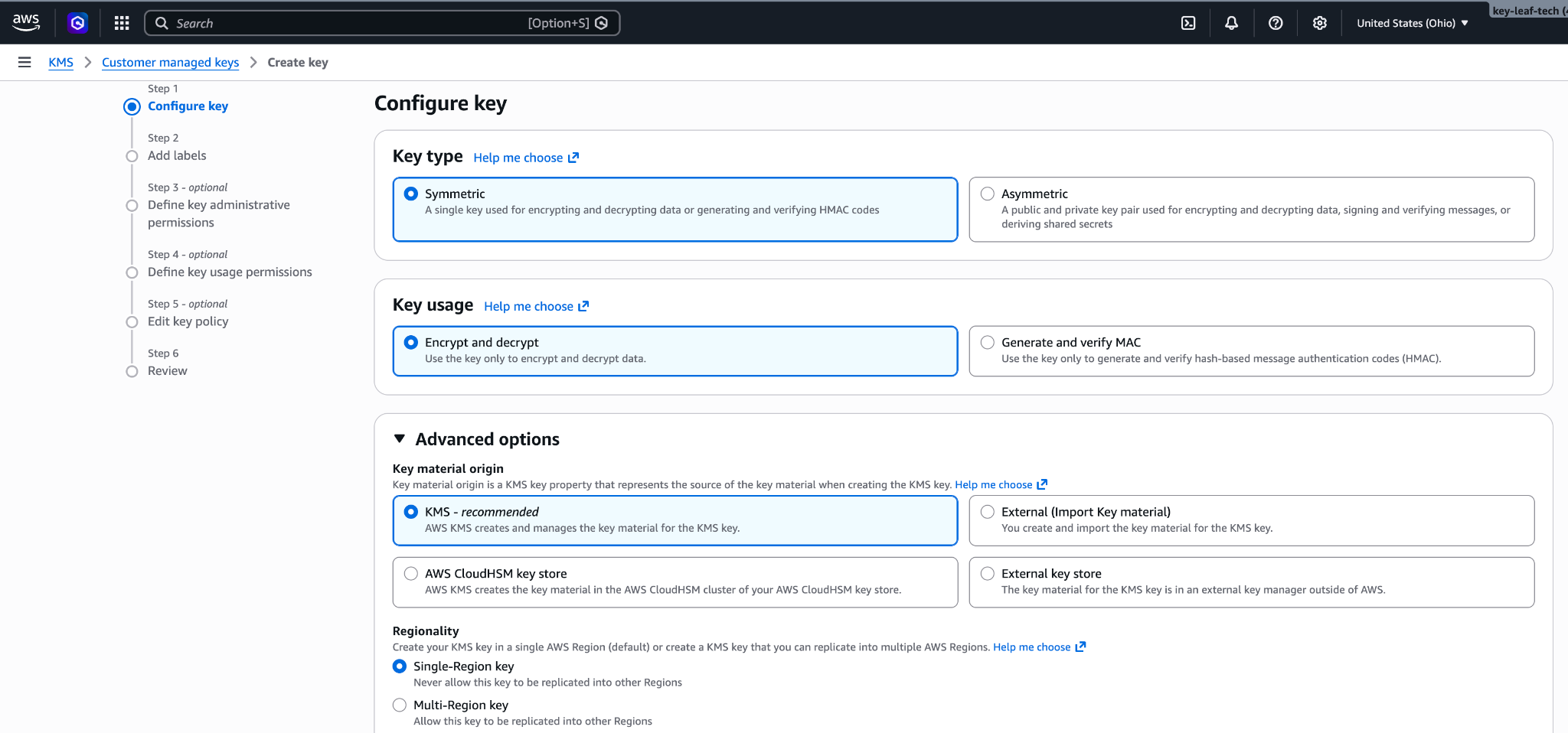
135 Make sure that these options are selected:
136 
137 * **Key type:** Symmetric
138 * **Key usage:** Encrypt and decrypt
139 * **Advanced options > Key material origin:** KMS
140 * **Advanced options > Regionality:** Single-Region key
141 
142 Click **Next**.
143 
144 <Frame caption="Symmetric, encrypt and decrypt, single-Region key.">
145 ![AWS KMS Create key wizard on the Configure key step, with Symmetric key type, Encrypt and decrypt key usage, and Single-Region key selected.](https://platform.claude.com/docs/images/cmek/aws-configure-key.png)
146 </Frame>
147 </Step>
148 
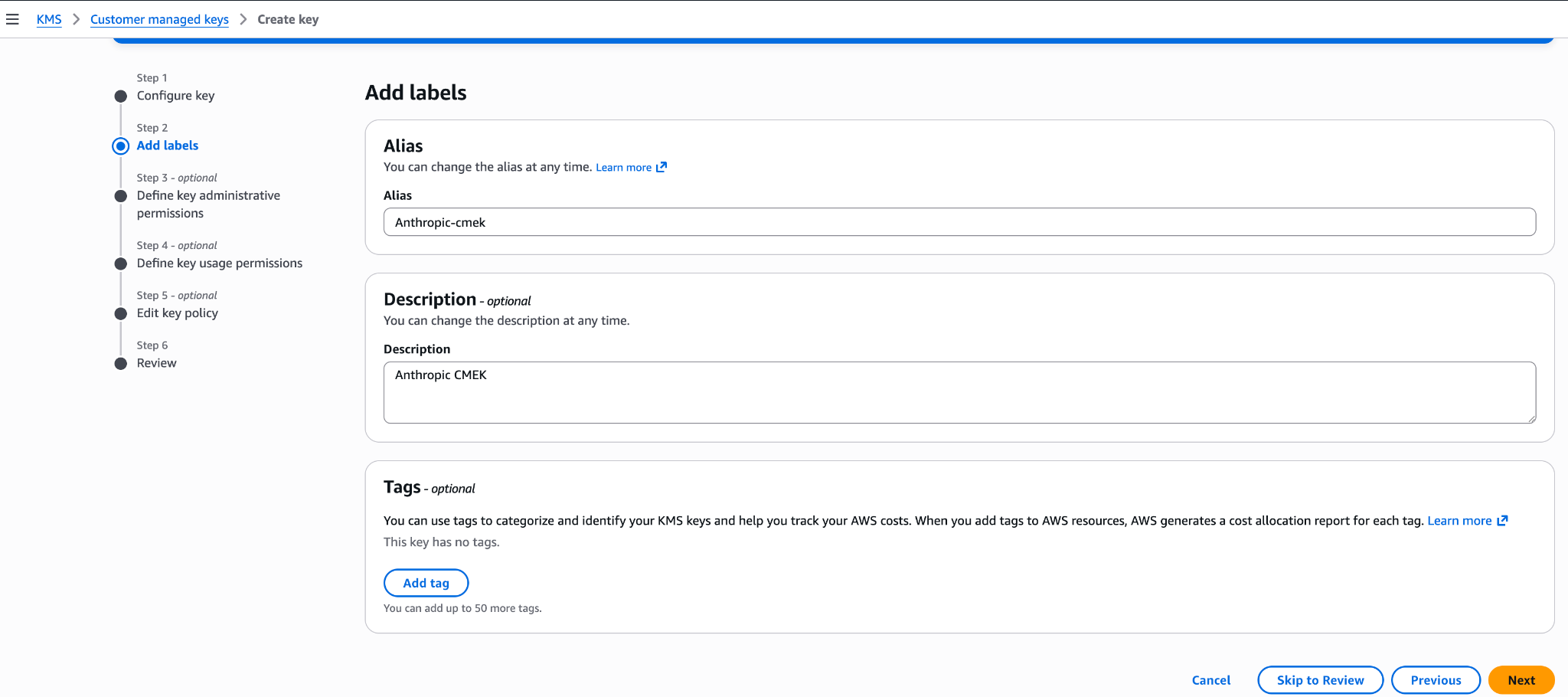
149 <Step title="Add labels">
150 Enter an **Alias** for the key, such as `anthropic-cmek`. Click **Next**.
151 
152 <Frame caption="An alias for the key.">
153 ![AWS KMS Add labels step with an alias of anthropic-cmek and a description of Anthropic CMEK.](https://platform.claude.com/docs/images/cmek/aws-add-labels.png)
154 </Frame>
155 </Step>
156 
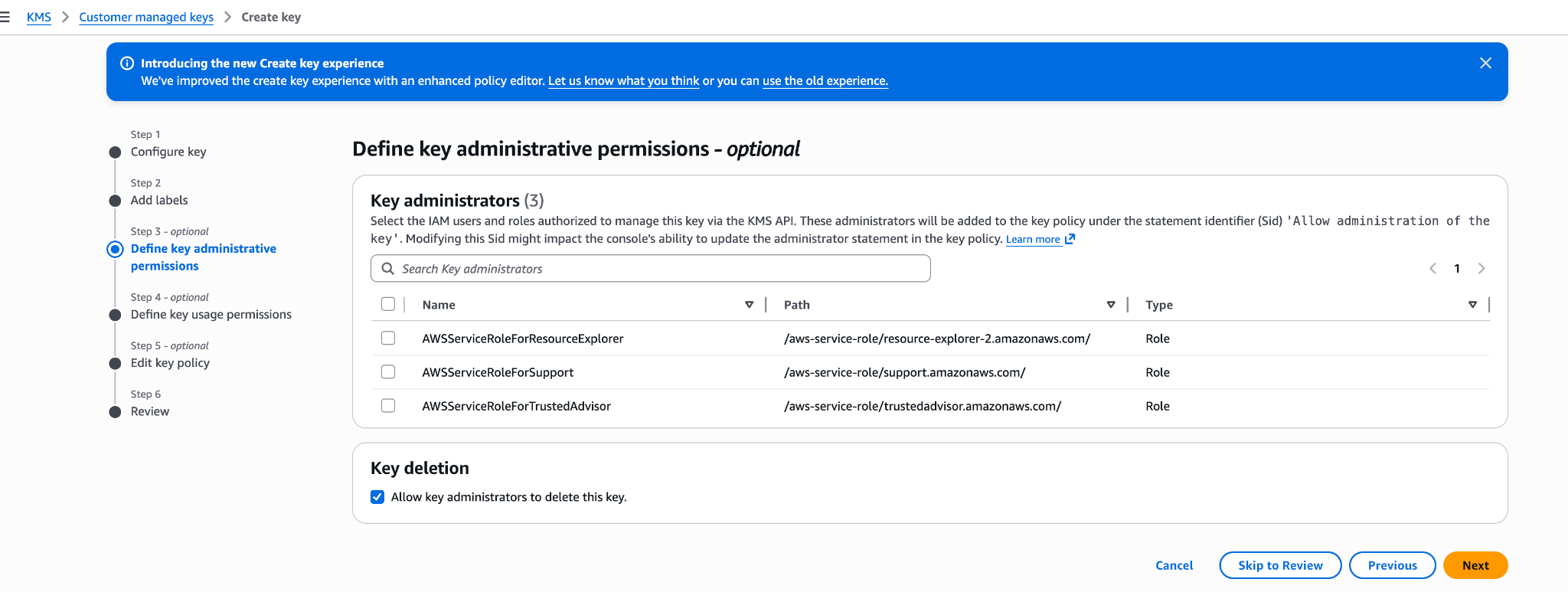
157 <Step title="Define key administrative permissions">
158 Don't select any key administrators. Your key policy already gives your AWS account full admin control. Click **Next**.
159 
160 <Frame caption="Leave key administrators empty.">
161 ![AWS KMS Define key administrative permissions step listing IAM roles that can administer the key.](https://platform.claude.com/docs/images/cmek/aws-admin-permissions.png)
162 </Frame>
163 </Step>
164 
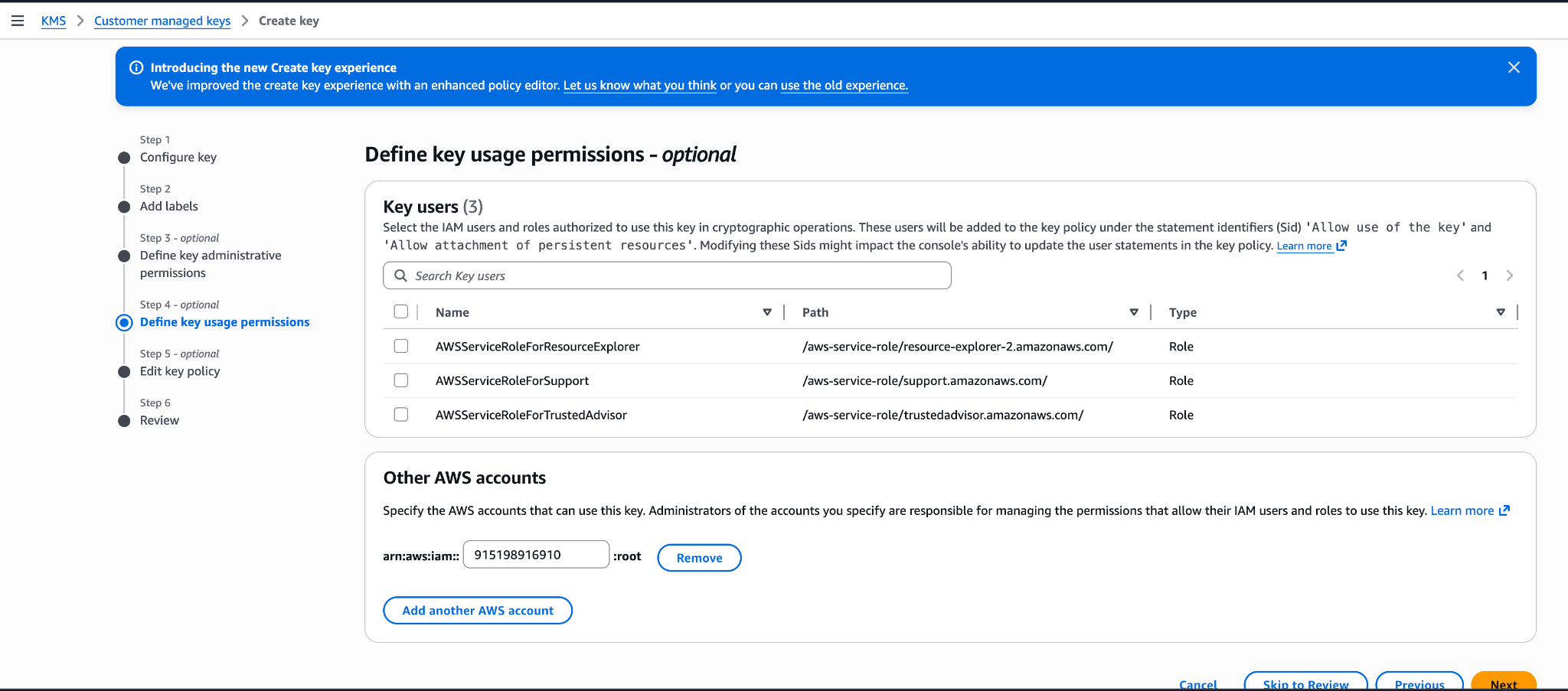
165 <Step title="Define key usage permissions">
166 Don't select any key users, and don't add anything under **Other AWS accounts**. Your key policy already grants the access that's needed. Click **Next**.
167 </Step>
168 
169 <Step title="Edit key policy">
170 Click **Edit**. Replace the whole policy with your key policy, then click **Next**.
171 </Step>
172 
173 <Step title="Review">
174 Click **Finish**.
175 </Step>
176 
177 <Step title="Copy the key ARN">
178 In **Customer managed keys**, open the new key and copy its ARN. You need the ARN to register the key.
179 </Step>
180 </Steps>
181 
182 To replace the key policy on a key that already exists:
183 
184 1. Open the key and click the **Key policy** tab.
185 2. If you see **Switch to policy view**, click it.
186 3. Click **Edit**.
187 4. Replace the JSON with your key policy.
188 5. Click **Save changes**.
189 </Tab>
190 
191 <Tab title="AWS CLI">
192 Save your key policy as `key-policy.json`, then create the key. Replace `<REGION>` with the key's region.
128193 
129194 ```bash
130195 aws kms create-key \
from line 199
134199 --policy file://key-policy.json
135200 ```
136201 
137 Capture `KeyMetadata.Arn` from the output. You need it when you register the key in the next step.
138 
139 <Warning>
140 If the key is already configured for CMEK and protects existing data, you must add a statement that lets Anthropic decrypt that data, in addition to the three statements in the preceding policy. In its condition, list the compartment ID of every workspace the key is or was attached to.
141 
142 ```json
143 {
144 "Sid": "AllowAnthropicCMEKDecryptExistingData",
145 "Effect": "Allow",
146 "Principal": {
147 "AWS": "arn:aws:iam::915198916910:role/anthropic-cmek-client-us"
148 },
149 "Action": "kms:Decrypt",
150 "Resource": "*",
151 "Condition": {
152 "StringEquals": {
153 "kms:EncryptionContext:anthropic:compartment_uuid": ["<COMPARTMENT_UUID>"]
154 }
155 }
202 Copy `KeyMetadata.Arn` from the output. You need it to register the key.
203 </Tab>
204</Tabs>
205 
206<Note>
207 **Optional:** To limit the key to specific workspaces, replace the `AllowAnthropicCMEKCrypto` statement in the key policy with this one. List one compartment ID for each workspace.
208 
209 ```json
210 {
211 "Sid": "AllowAnthropicCMEKCrypto",
212 "Effect": "Allow",
213 "Principal": {
214 "AWS": "arn:aws:iam::915198916910:role/anthropic-cmek-client-us"
215 },
216 "Action": ["kms:Encrypt", "kms:Decrypt"],
217 "Resource": "*",
218 "Condition": {
219 "StringEquals": {
220 "kms:EncryptionContext:anthropic:org_uuid": ["<ORGANIZATION_UUID>"]
221 },
222 "StringEqualsIfExists": {
223 "kms:EncryptionContext:anthropic:compartment_uuid": ["<COMPARTMENT_UUID>"]
156224 }
157 ```
158 </Warning>
159 
160 Anthropic validates the key when you verify it or attach it to a workspace. Each validation adds four access-denied errors to CloudTrail. These are expected. If you need to filter them out, filter on all three of the following values. The first one alone isn't enough, because any caller can set it:
161 
162 * `requestParameters.encryptionContext.associatedData`: `Y21lay12YWxpZGF0aW9u`
163 * `userIdentity.accountId`: `915198916910`
164 * `resources.ARN`: `arn:aws:kms:<REGION>:<AWS_ACCOUNT_ID>:key/<KEY_ID>`
165 
166 <Note>
167 **Finding your compartment ID:** See the **Claude Platform** tab under **Register the key with Anthropic**.
168 </Note>
169 
170 You can also create the key from the AWS Console. Choose a symmetric key with the encrypt and decrypt key usage, a single-region key, and KMS key material origin. The Create-key wizard commits a key policy at its **Review** step: If you add Anthropic's account ID `915198916910` under key usage permissions there, the generated policy grants the whole Anthropic account broader actions (such as `kms:ReEncrypt*` and `kms:GenerateDataKey*`) with no `EncryptionContext` condition, and validation refuses it. To avoid leaving an over-permissive key, finish the wizard with administrative permissions only, then open the key's **Key policy** tab and replace the JSON with the `key-policy.json` policy shown earlier in this step.
171 
172 <Frame caption="Configure key: symmetric, encrypt and decrypt, single-region key.">
173 ![AWS KMS Create key wizard on the Configure key step, with Symmetric key type, Encrypt and decrypt key usage, and Single-Region key selected.](https://platform.claude.com/docs/images/cmek/aws-configure-key.png)

174 </Frame>
175 
176 <Frame caption="Add an alias and description for the key.">
177 ![AWS KMS Add labels step with an alias of anthropic-cmek and a description of Anthropic CMEK.](https://platform.claude.com/docs/images/cmek/aws-add-labels.png)

178 </Frame>
179 
180 <Frame caption="Define key administrative permissions (optional). Your account retains full admin control.">
181 ![AWS KMS Define key administrative permissions step listing IAM roles that can administer the key.](https://platform.claude.com/docs/images/cmek/aws-admin-permissions.png)

182 </Frame>
183 
184 <Frame caption="Do not add Anthropic's account ID here. This wizard step produces an over-permissive policy. Leave usage permissions empty and edit the Key policy JSON after creation (see the preceding key policy).">
185 ![AWS KMS Define key usage permissions step with Anthropic's account ID entered under Other AWS accounts.](https://platform.claude.com/docs/images/cmek/aws-usage-permissions.png)
186 </Frame>
187 </Step>
188</Steps>
225 }
226 }
227 ```
228 
229 Add each workspace's compartment ID before you attach the key to it. For a new workspace:
230 
231 1. Create the workspace without the key.
232 2. Add its compartment ID to the policy.
233 3. Attach the key.
234 
235 **Finding your compartment ID:** In the Claude Console, go to the [Data retention](https://platform.claude.com/settings/privacy) page (`platform.claude.com/settings/privacy`). Select the workspace from the dropdown menu at the top of the page. The ID is under **Encryption key**, in the **Compartment ID** field. You can also read the `compartment_id` field returned by the [Get Workspace](https://platform.claude.com/docs/en/api/organization/workspaces/retrieve) endpoint.
236</Note>
189237 
190238## Register the key with Anthropic
191239 
192How you register the key depends on which product you use.
240Validating the key adds expected access-denied errors to CloudTrail. If you alert on these errors, see [Expected errors in CloudTrail](https://platform.claude.com/docs/en/manage-claude/cmek-aws-kms#expected-errors-in-cloud-trail) first.
193241 
194242<Tabs>
195243 <Tab title="Claude Platform">
196 <Note>
197 **Claude Platform on AWS:** The principal, key policy, and registration flow differ, and there is no separate validation step. Follow [Set up CMEK on Claude Platform on AWS](https://platform.claude.com/docs/en/manage-claude/cmek-aws-kms#claude-platform-on-aws) instead of this tab.
198 </Note>
199 
200 <Note>
201 **Finding your compartment ID:** Each workspace has a compartment ID that scopes its CMEK data. To find it in the Claude Console, go to the [Data retention](https://platform.claude.com/settings/privacy) page (`platform.claude.com/settings/privacy`) and select the workspace from the dropdown menu at the top of the page. The ID is under **Encryption key**, in the **Compartment ID** field. You can also read the `compartment_id` field returned by the [Get Workspace](https://platform.claude.com/docs/en/api/organization/workspaces/retrieve) endpoint.
202 </Note>
203 
204 You can set up the key in the Claude Console or through the Admin API, with the same result.
205 
206244 <Tabs>
207245 <Tab title="Claude Console">
208246 <Steps>
209 <Step title="Register the key with Anthropic">
210 In the Claude Console, go to the [Data retention](https://platform.claude.com/settings/privacy#encryption-keys) page (`platform.claude.com/settings/privacy`). If you don't see **Encryption keys**, select **Organization** from the dropdown menu at the top of the page. Under **Encryption keys**, click **Add key**. Enter a display name, choose **AWS KMS**, and click **Continue**. Paste the key ARN into **KMS key ARN**, and click **Add**.
211 
212 The key details step shows your organization ID. Add it to the [key policy](https://platform.claude.com/docs/en/manage-claude/cmek-aws-kms#key-policy) before you click **Add**.
247 <Step title="Open the encryption key settings">
248 In the Claude Console, go to the [Data retention](https://platform.claude.com/settings/privacy#encryption-keys) page (`platform.claude.com/settings/privacy`). If you don't see **Encryption keys**, select **Organization** from the dropdown menu at the top of the page.
249 </Step>
250 
251 <Step title="Add the key">
252 Under **Encryption keys**, click **Add key**. Enter a **Display name** and select **AWS KMS**. Click **Continue**.
253 </Step>
254 
255 <Step title="Enter the key ARN">
256 The dialog box shows the **Organization ID for the key policy**. Check that your [key policy](https://platform.claude.com/docs/en/manage-claude/cmek-aws-kms#key-policy) contains this ID. Paste the key ARN into **KMS key ARN** and click **Add**.
213257 </Step>
214258 
215259 <Step title="Validate the key">
216 In the **Encryption keys** list, click **Verify** next to the key. **Connected** appears when the check passes. If it fails, a message gives the reason.
260 In the **Encryption keys** list, click **Verify** next to the key. **Connected** appears when the check passes. If it fails, see [Troubleshoot validation](https://platform.claude.com/docs/en/manage-claude/cmek-aws-kms#troubleshoot-validation) for common causes.
217261 </Step>
218262 
219263 <Step title="Attach the key to a workspace">
220 In the Claude Console, go to the [Data retention](https://platform.claude.com/settings/privacy) page (`platform.claude.com/settings/privacy`) and select the workspace from the dropdown menu at the top of the page. Under **Encryption key**, select the key, click **Save**, and confirm. Attaching a key can't be undone. For a workspace that already receives requests, the key can take [up to a day to take effect](https://platform.claude.com/docs/en/manage-claude/cmek#how-it-works).
264 Attaching a key can't be undone. If you can, attach it to a new workspace before that workspace receives any requests. In a workspace that already receives requests, the key can take [up to a day to take effect](https://platform.claude.com/docs/en/manage-claude/cmek#how-it-works).
265 
266 On the Data retention page, select the workspace from the dropdown menu at the top of the page. Under **Encryption key**, select the key and click **Save**.
267 </Step>
268 
269 <Step title="Confirm the change">
270 Select the checkbox to confirm that you have read the CMEK documentation, then click **Confirm**.
221271 </Step>
222272 </Steps>
223273 </Tab>
224274 
225275 <Tab title="API">
226276 <Steps>
227 <Step title="Register the key with Anthropic">
228 Create an external key configuration through the Admin API.
277 <Step title="Create the external key">
278 Replace `<friendly-name>` with a display name and `<key-arn-from-create-key-step>` with the key ARN.
229279 
230280 <CodeGroup>
231281 ```bash cURL
from line 428
378428 ```
379429 </CodeGroup>
380430 
381 The response contains the external key ID:
431 The `id` field of the response contains the external key ID. Copy it for the next two steps:
382432 
383433 ```json
384434 {
from line 440
390440 </Step>
391441 
392442 <Step title="Validate the key">
393 Trigger an encrypt and decrypt round-trip against your key.
443 Replace `ekey_<id>` with the external key ID.
394444 
395445 <CodeGroup>
396446 ```bash cURL
from line 529
479529 { "type": "external_key_validation", "status": "success", "error": null }
480530 ```
481531 
482 If validation fails, common causes are:
483 
484 * **Encryption context mismatch:** If the policy has a `kms:EncryptionContext:anthropic:compartment_uuid` condition, make sure it lists the compartment ID of each workspace the key is attached to. Validation sends the compartment ID of the workspace it checks. An older key whose compartment statement still allows `kms:Encrypt` is validated with the all-zeros value (`00000000-0000-0000-0000-000000000000`) while it isn't attached, so keep that value in its list.
485 * **Resource control policies (RCPs):** If your AWS organization has an RCP that denies KMS operations when `aws:PrincipalOrgID` does not match your org, it blocks Anthropic's cross-account role. The RCP needs a carve-out for this key or for Anthropic's role ARN. Service control policies do not apply here, because they do not evaluate for external principals calling through resource-based policies.
486 * **Access granted through IAM instead of the key policy:** Cross-account KMS access must be granted in the key policy itself, not through an IAM policy in your account. Check with `aws kms get-key-policy --key-id <id> --policy-name default`.
487 * **Region mismatch:** Confirm the key's region is one Anthropic operates in for the geo tier you configured.
532 If validation fails, see [Troubleshoot validation](https://platform.claude.com/docs/en/manage-claude/cmek-aws-kms#troubleshoot-validation).
488533 </Step>
489534 
490535 <Step title="Attach the key to a workspace">
491 Once the key is validated, attach it to a new workspace before you send any requests to that workspace. For a workspace that already receives requests, the key can take [up to a day to take effect](https://platform.claude.com/docs/en/manage-claude/cmek#how-it-works).
536 Attaching a key can't be undone. If you can, attach it to a new workspace before that workspace receives any requests. In a workspace that already receives requests, the key can take [up to a day to take effect](https://platform.claude.com/docs/en/manage-claude/cmek#how-it-works).
537 
538 Replace `<workspace-id>` with the workspace ID and `ekey_<id>` with the external key ID.
492539 
493540 <CodeGroup>
494541 ```bash cURL
from line 654
607654 </Tab>
608655 
609656 <Tab title="Claude Enterprise">
610 In [claude.ai > Organization settings > Data and privacy](https://claude.ai/admin-settings/data-privacy-controls), open **Encryption keys**, then click **Add key**. Choose **AWS** and click **Continue**, then paste the Key ARN from the previous step and click **Add**. Anthropic validates the key with an encrypt and decrypt round-trip. Once it shows as verified, your organization is CMEK-protected from that point forward.
611 
612 The key details step of this flow displays your **Organization ID for the key policy** with a copy button. Substitute that value for `<ORGANIZATION_UUID>` in the key policy. You can open the flow to copy the ID before you create the key.
613 
614 On Claude Enterprise, CMEK applies to the whole organization, so there is no separate workspace attach step, and an organization can have only one key.
657 On Claude Enterprise, CMEK applies to the whole organization, and an organization can have only one key.
658 
659 <Steps>
660 <Step title="Open the encryption key settings">
661 Go to [claude.ai > Organization settings > Data and privacy](https://claude.ai/admin-settings/data-privacy-controls) and find **Encryption keys**.
662 </Step>
663 
664 <Step title="Add the key">
665 Click **Add key**. Enter a **Display name** and select **AWS KMS**. Select the checkbox to confirm that you have read the CMEK documentation, then click **Continue**.
666 </Step>
667 
668 <Step title="Enter the key ARN">
669 The dialog box shows the **Organization ID for the key policy**. Check that your [key policy](https://platform.claude.com/docs/en/manage-claude/cmek-aws-kms#key-policy) contains this ID. Paste the key ARN into **KMS key ARN** and click **Add**.
670 </Step>
671 
672 <Step title="Confirm that validation passed">
673 When the check passes, **Encryption key configured** appears, and your organization is CMEK-protected from then on. If the check fails, see [Troubleshoot validation](https://platform.claude.com/docs/en/manage-claude/cmek-aws-kms#troubleshoot-validation).
674 </Step>
675 </Steps>
615676 </Tab>
616677</Tabs>
617678 
618## Set up CMEK on Claude Platform on AWS
619 
620On [Claude Platform on AWS](https://platform.claude.com/docs/en/build-with-claude/claude-platform-on-aws), CMEK uses AWS KMS keys only, and setup differs from the preceding sections in these ways:
621 
622* **Principal:** Your key policy grants access to the AWS service principal `aws-external-anthropic.amazonaws.com`. Anthropic's IAM role and account ID are not used, so the [ARN for Anthropic](https://platform.claude.com/docs/en/manage-claude/cmek-aws-kms#amazon-resource-name-arn-for-anthropic) does not apply.
623* **Key requirements:** The key must be a symmetric KMS key with encrypt and decrypt usage, single-region, and in the same AWS account and region as the workspace you attach it to. Cross-account keys are not supported: the key must be in the AWS account that hosts your organization. Multi-region keys (key IDs that begin with `mrk-`) and alias ARNs are rejected when you register the key; use the key ARN.
624* **No separate validation step:** Apart from those checks on the key ARN at registration, the key is validated when you attach it to a workspace. The attach call performs an encrypt/decrypt round against the key with that workspace's compartment ID as the encryption context, so a key policy problem surfaces at attach time rather than at registration. An `EncryptionContext` condition therefore needs no all-zeros entry.
625* **Where you manage keys:** Register and attach keys in the Claude Console, signed in through AWS with the Admin role. The external key endpoints are also available on Claude Platform on AWS, authorized through [IAM actions](https://platform.claude.com/docs/en/api/claude-platform-on-aws-iam-actions#encryption-keys); there, a key is identified by its KMS key ARN rather than an `ekey_` ID.
626 
627<Warning>
628 Use only this published service principal name. Never trust an identifier provided over email, chat, or any onboarding channel.
629</Warning>
630 
631### Prerequisites
632 
633* The AWS account that hosts your Claude Platform on AWS organization, with permissions to create KMS keys and set key policies (`kms:CreateKey` and `kms:PutKeyPolicy`).
634* The **Admin** role in the Claude Console for Claude Platform on AWS. See [Using the Claude Console](https://platform.claude.com/docs/en/build-with-claude/claude-platform-on-aws#using-the-claude-console).
635* For the IAM principal you sign in to the Claude Console with: besides `aws-external-anthropic:AssumeConsole`, the [IAM actions](https://platform.claude.com/docs/en/api/claude-platform-on-aws-iam-actions#encryption-keys) for the operations you perform there, because registering, listing, and attaching keys go through the AWS gateway. Registering a key is `RegisterKey` (with `ListKeys` and `GetKey` to view registrations), and attaching one is `UpdateWorkspace` or `CreateWorkspace`. The external key actions (and `CreateWorkspace`) are account-scoped, so grant them on `Resource: "*"`; a policy limited to workspace ARNs does not include them.
636* For the IAM principal that attaches the key to a workspace (the identity you signed in to the Claude Console with): `kms:DescribeKey`, `kms:Encrypt`, and `kms:Decrypt` on the key. Your principal's access to the key is checked when you attach it, in addition to the service principal's.
637* Optional, for the key picker in the Claude Console: `kms:ListKeys` and `kms:DescribeKey` for the principal you sign in with. Without them, paste the key ARN instead.
638 
639### Create the KMS key
640 
641The key policy has three statements: your account's root admin statement; a statement that lets the Claude Platform on AWS service principal encrypt, decrypt, and generate data keys; and a separate statement for `kms:DescribeKey`. The crypto statement carries an optional `EncryptionContext` condition that binds the key to the workspaces you list. `DescribeKey` is granted separately because it has no `EncryptionContext` parameter, so an `EncryptionContext` condition on that action would always deny.
642 
643If you plan to use the optional `EncryptionContext` condition shown here, create the workspace first (without a key), copy its compartment ID, and substitute it for `<compartment-uuid>`. To find the ID in the Claude Console, go to the [Data retention](https://platform.claude.com/settings/privacy) page (`platform.claude.com/settings/privacy`) and select the workspace from the dropdown menu at the top of the page. The ID is under **Encryption key**, in the **Compartment ID** field. You can also read it from the `compartment_id` field returned by the [Get Workspace](https://platform.claude.com/docs/en/api/organization/workspaces/retrieve) endpoint. If you don't plan to use the condition, delete the `Condition` block from that statement.
644 
645```bash
646export YOUR_ACCOUNT=$(aws sts get-caller-identity --query Account --output text)
647 
648aws kms create-key \
649 --region <workspace-region> \
650 --description "Anthropic CMEK (Claude Platform on AWS)" \
651 --key-usage ENCRYPT_DECRYPT \
652 --policy "{
653 \"Version\": \"2012-10-17\",
654 \"Statement\": [
655 {
656 \"Sid\": \"AccountRootAdmin\",
657 \"Effect\": \"Allow\",
658 \"Principal\": {\"AWS\": \"arn:aws:iam::${YOUR_ACCOUNT}:root\"},
659 \"Action\": \"kms:*\",
660 \"Resource\": \"*\"
661 },
662 {
663 \"Sid\": \"AllowClaudePlatformOnAWSCrypto\",
664 \"Effect\": \"Allow\",
665 \"Principal\": {\"Service\": \"aws-external-anthropic.amazonaws.com\"},
666 \"Action\": [\"kms:Encrypt\", \"kms:Decrypt\", \"kms:GenerateDataKey\"],
667 \"Resource\": \"*\",
668 \"Condition\": {
669 \"StringEquals\": {
670 \"kms:EncryptionContext:anthropic:compartment_uuid\": [
671 \"<compartment-uuid>\"
672 ]
673 }
674 }
675 },
676 {
677 \"Sid\": \"AllowClaudePlatformOnAWSDescribe\",
678 \"Effect\": \"Allow\",
679 \"Principal\": {\"Service\": \"aws-external-anthropic.amazonaws.com\"},
680 \"Action\": \"kms:DescribeKey\",
681 \"Resource\": \"*\"
682 }
683 ]
684 }"
685```
686 
687Capture `KeyMetadata.Arn` from the output. You need it when you register the key.
688 
689The `EncryptionContext` condition is optional. Every encrypt, decrypt, and data-key call made for a workspace, including the attach-time check, carries that workspace's compartment ID as `anthropic:compartment_uuid`, so the condition lists the compartment ID of each workspace you attach the key to and needs no all-zeros entry. Adding it binds the key to the workspaces you list at the IAM layer as well. Because a compartment ID exists only once its workspace exists, the order is: create the workspace, put its compartment ID in the condition (at key creation, or later with `kms:PutKeyPolicy`), then attach the key. Before attaching the key to each additional workspace, add that workspace's compartment ID the same way. To start without it, delete the `Condition` block from the `AllowClaudePlatformOnAWSCrypto` statement; if you add it later, include the compartment ID of every workspace the key is already attached to.
690 
691You can further restrict both service-principal statements with an `aws:SourceArn` condition. The service passes the [workspace's ARN](https://platform.claude.com/docs/en/api/claude-platform-on-aws-iam-actions#service-details) (`arn:aws:aws-external-anthropic:<region>:<account-id>:workspace/<workspace-id>`) as the source ARN on every call it makes with your key, so `"ArnLike": {"aws:SourceArn": "arn:aws:aws-external-anthropic:*:<account-id>:workspace/*"}` limits the grant to workspaces in your own AWS account, and a list of full workspace ARNs limits it to those workspaces. This condition is not required; the `EncryptionContext` condition on its own binds the key to the workspaces you list.
692 
693You can also create the key from the AWS Console: choose a symmetric key with the encrypt and decrypt key usage, a single-region key, and KMS key material origin, in the workspace's region. Leave key usage permissions empty in the Create-key wizard, then open the key's **Key policy** tab and replace the JSON with the policy shown here.
694 
695### Register and attach the key
696 
697<Steps>
698 <Step title="Register the key">
699 In the Claude Console, go to the [Data retention](https://platform.claude.com/settings/privacy#encryption-keys) page (`platform.claude.com/settings/privacy`). If you don't see **Encryption keys**, select **Organization** from the dropdown menu at the top of the page. Under **Encryption keys**, click **Add key**. Enter a display name, then choose the key from the key picker or choose **Enter ARN manually** and paste the key ARN, and click **Add**. The key must be in the AWS account that hosts your organization; cross-account keys are not supported. The picker lists the enabled, customer-managed, symmetric, single-region keys in your account in one of your organization's regions; for a key the picker doesn't list, enter the ARN. It lists keys only if the principal you signed in with can call `kms:ListKeys` and `kms:DescribeKey`.
700 </Step>
701 
702 <Step title="Attach the key to a workspace">
703 Attach the key to a new workspace before you send any requests to that workspace. For a workspace that already receives requests, the key can take [up to a day to take effect](https://platform.claude.com/docs/en/manage-claude/cmek#how-it-works). In the Claude Console, go to the [Data retention](https://platform.claude.com/settings/privacy) page (`platform.claude.com/settings/privacy`) and select the workspace from the dropdown menu at the top of the page. Under **Encryption key**, select the key, click **Save**, and confirm. You can also select a key when you create a workspace in the Claude Console, but only if your key policy does not yet name specific workspaces (no `EncryptionContext` condition), because the workspace's compartment ID is assigned at creation. Once attached, a workspace's key can't be changed.
704 
705 This is when the key is validated: the attach call checks your principal's access to the key and performs an encrypt/decrypt round against it with the workspace's compartment ID as the encryption context, so a problem with either the key policy or your principal's permissions surfaces as an error on that call. If the attach fails with a KMS access error, check the following:
706 
707 * The key policy names the `aws-external-anthropic.amazonaws.com` service principal and grants `kms:Encrypt`, `kms:Decrypt`, and `kms:GenerateDataKey`, plus `kms:DescribeKey` in a separate statement that has no `EncryptionContext` condition.
708 * Any `EncryptionContext` condition includes this workspace's compartment ID, and any `aws:SourceArn` condition you added matches this workspace's ARN.
709 * The key is enabled, single-region, and in the same AWS account and region as the workspace.
710 * The principal you are signed in as has `kms:DescribeKey`, `kms:Encrypt`, and `kms:Decrypt` on the key.
711 * No service control policy or resource control policy in your AWS organization prevents the service principal or your principal from using the key.
712 * If the policy looks right and the attach still fails, find the denied `kms:` event in CloudTrail in the key's account (it shows the calling principal and, for cryptographic calls, the encryption context), then correct the condition with `kms:PutKeyPolicy` and retry.
713 </Step>
714</Steps>
679## Troubleshoot validation
680 
681If validation fails, common causes are:
682 
683* **Wrong organization ID:** Make sure the `org_uuid` condition lists your bare organization ID, not the `org_`-prefixed ID.
684* **Encryption context mismatch:** If the policy has a `kms:EncryptionContext:anthropic:compartment_uuid` condition, make sure it lists the [compartment ID](https://platform.claude.com/docs/en/manage-claude/cmek-aws-kms#compartment-id) of each workspace the key is attached to. On an older key, the compartment statement might still allow `kms:Encrypt`. In that case, keep the all-zeros value (`00000000-0000-0000-0000-000000000000`) in the list too.
685* **Resource control policies (RCPs):** Some RCPs deny KMS operations when `aws:PrincipalOrgID` does not match your AWS organization. An RCP like this blocks Anthropic's role. Add an exception to it for this key or for Anthropic's role ARN. Service control policies do not apply here.
686* **Access granted through IAM instead of the key policy:** Grant Anthropic's role access in the key policy itself, not through an IAM policy in your account. To check the key policy, run `aws kms get-key-policy --region <REGION> --key-id <KEY_ARN> --policy-name default`.
687* **Region mismatch:** Confirm that the key is in a US region.
688 
689### Expected errors in CloudTrail
690 
691Anthropic validates the key whenever you verify it, attach it to a workspace, or view it in the Claude Enterprise settings. Each validation adds four access-denied errors to CloudTrail. These errors are expected.
692 
693To filter them out, match all three of these values:
694 
695* `requestParameters.encryptionContext.associatedData`: `Y21lay12YWxpZGF0aW9u`
696* `userIdentity.accountId`: `915198916910`
697* `resources.ARN`: `arn:aws:kms:<REGION>:<AWS_ACCOUNT_ID>:key/<KEY_ID>`
698 
699The first value alone isn't enough, because any caller can set it.
715700 
716701## Terraform
717702 
718For infrastructure-as-code deployments, the same steps map to the `aws` provider with the `aws_kms_key` and `aws_kms_alias` resources.
703To create the key with Terraform, use the `aws_kms_key` and `aws_kms_alias` resources from the `aws` provider.
719704 

manage-claude/cmek-azure-key-vault Changed · +274 / -137 lines

### Create the key and grant access ### Check your vault configuration ## Troubleshoot validation

from line 10
1010/claude-api help me configure a customer-managed encryption key with Azure Key Vault
1111```
1212 
13This guide walks through configuring an Azure Key Vault key as a [customer-managed encryption key (CMEK)](https://platform.claude.com/docs/en/manage-claude/cmek) for your Anthropic organization.
13This guide shows how to use an Azure Key Vault key as a [customer-managed encryption key (CMEK)](https://platform.claude.com/docs/en/manage-claude/cmek) for your Anthropic organization.
1414 
1515<Warning>
1616 Enabling CMEK is permanent. If your Key Vault key is deleted or disabled, Anthropic cannot recover the data encrypted under it. Review the [warnings and limitations](https://platform.claude.com/docs/en/manage-claude/cmek) before you start.
from line 18
1818 
1919## Prerequisites
2020 
21* An Azure Key Vault with **RBAC authorization enabled** (`enableRbacAuthorization: true`) and **public network access allowed**. Anthropic calls your vault over the public data-plane endpoint; private endpoints are not supported.
22* **Purge protection enabled** (`enablePurgeProtection: true`) on the vault. Without it, a deleted key can be permanently purged during the soft-delete retention window, causing irreversible loss of your CMEK-protected data. Purge protection cannot be disabled once enabled.
21* An Azure Key Vault with these settings:
22 
23 * RBAC authorization is enabled (`enableRbacAuthorization: true`).
24 * Public network access is allowed. Private endpoints are not supported.
25 * Purge protection is enabled (`enablePurgeProtection: true`). You can't turn off purge protection after you enable it.
26 * Diagnostic settings route the `AuditEvent` log category to Log Analytics, a storage account, or an event hub. Without them, you have no audit trail of Anthropic's key operations, such as `KeyWrap`, `KeyUnwrap`, and `KeyGet`.
27 
2328* Permissions to create keys in the vault and to assign RBAC roles on it.
29 
2430* Permissions to create service principals in your Entra tenant (`Application Administrator`, `Cloud Application Administrator`, or an equivalent custom role).
25* An Anthropic Admin API key for your organization.
26* The [`az` CLI](https://learn.microsoft.com/en-us/cli/azure/?view=azure-cli-latest) installed and authenticated.
27* **Diagnostic Settings** configured on the vault to route the `AuditEvent` log category to Log Analytics, a storage account, or an event hub. Azure Key Vault does not emit data-plane audit logs (such as `KeyWrap`, `KeyUnwrap`, and `KeyGet`) by default, so without this you get no audit trail for Anthropic's key operations.
2831 
32* The [`az` CLI](https://learn.microsoft.com/en-us/cli/azure/?view=azure-cli-latest) installed and authenticated, or Cloud Shell in the Azure portal. Some steps have no portal equivalent.
33 
34* To register the key through the API, an Anthropic Admin API key for your organization.
35 
2936## Anthropic app information
3037 
31To have Anthropic use your encryption key, you must configure an Anthropic multitenant application ID and display name. Those values are:
38You give the following Anthropic multitenant application access to your key. The application requests no Microsoft Graph permissions.
3239 
3340| Field | Value |
3441| ------------------------------ | -------------------------------------- |
from line 48
4148 
4249## Encryption key setup
4350 
44<Steps>
45 <Step title="Consent to the Anthropic multitenant application">
46 This creates a service principal in your Entra tenant for Anthropic's CMEK client application. The application requests no Microsoft Graph permissions; it exists solely as a federation target for Key Vault data-plane access.
51The key must meet these requirements:
4752 
48 ```bash
49 az ad sp create --id 8635ae1a-3e5d-44e8-a4ed-e0f614466f87
50 ```
53* **Type:** RSA, 3072-bit or larger. For an HSM-backed key, use `RSA-HSM`, which requires a Premium-SKU vault.
54* **Permitted operations:** `wrapKey` and `unwrapKey`. The steps in this guide turn off every other operation, so Anthropic can only read the key and wrap and unwrap with it.
55* **Organization tag:** `anthropic-org-<ORGANIZATION_UUID>` with the value `true`. Replace `<ORGANIZATION_UUID>` with your Anthropic organization ID in lowercase. Validation fails without the tag.
56* **Access:** the `Key Vault Crypto User` role for Anthropic's service principal, assigned on the key.
5157 
52 From the output, capture the `id` field. This is the service principal's object ID in your tenant, which you use when you assign the RBAC role.
58<Note>
59 **Finding your organization ID:** Use the bare UUID, not the `org_`-prefixed ID. Copy it from one of these places:
5360 
54 ```json
55 {
56 "appId": "8635ae1a-3e5d-44e8-a4ed-e0f614466f87",
57 "displayName": "anthropic-cmek-client-us",
58 "id": "<sp-object-id>"
59 }
60 ```
61 * **Claude Console:** the **Organization ID** field on the [Organization](https://platform.claude.com/settings/organization) page (`platform.claude.com/settings/organization`)
62 * **claude.ai:** the **Organization ID** field under **Organization settings > Organization**
63 * **Admin API:** the `id` field from the [Organization Info](https://platform.claude.com/docs/en/api/organization/retrieve) endpoint
64</Note>
6165 
62 If the service principal already exists in your tenant (from a prior attempt or another integration), `az ad sp create` exits with an "already exists" error. Fetch its object ID instead:
66### Create the key and grant access
6367 
64 ```bash
65 az ad sp show --id 8635ae1a-3e5d-44e8-a4ed-e0f614466f87 --query id -o tsv
66 ```
68<Tabs>
69 <Tab title="Azure portal">
70 <Steps>
71 <Step title="Create Anthropic's service principal">
72 Open Cloud Shell from the portal's top navigation bar. Run this command:
6773 
68 This step has no Portal equivalent. If you do not have the Azure CLI installed locally, open Cloud Shell from the Portal's top navigation bar. After the command succeeds, you can find the service principal's object ID in **Microsoft Entra ID > Enterprise applications** by clearing the default application-type filter and searching for `anthropic-cmek-client-us`.
74 ```bash
75 az ad sp create --id 8635ae1a-3e5d-44e8-a4ed-e0f614466f87
76 ```
6977 
70 <Frame caption="Find the service principal's Object ID on its Entra enterprise application overview.">
71 ![Microsoft Entra enterprise application overview for anthropic-cmek-client-us, showing its Application ID and Object ID.](https://platform.claude.com/docs/images/cmek/azure-service-principal.png)
72 </Frame>
73 </Step>
78 If the service principal already exists, continue to the next step.
79 </Step>
7480 
75 <Step title="Create an RSA key in your vault">
76 Azure Key Vault does not support symmetric key wrapping, so the key must be RSA (3072-bit or larger) with `wrapKey` and `unwrapKey` in its allowed operations.
81 <Step title="Confirm the service principal exists">
82 Go to **Microsoft Entra ID > Enterprise applications** and clear the default application-type filter. Search for `anthropic-cmek-client-us`.
7783 
78 The `--tags` option adds the organization tag, `anthropic-org-<ORGANIZATION_UUID>` with the value `true`, where `<ORGANIZATION_UUID>` is your Anthropic organization ID in lowercase. The tag is required for Anthropic to validate the key.
84 <Frame caption="The anthropic-cmek-client-us service principal in Entra enterprise applications.">
85 ![Microsoft Entra enterprise application overview for anthropic-cmek-client-us, showing its Application ID and Object ID.](https://platform.claude.com/docs/images/cmek/azure-service-principal.png)
86 </Frame>
87 </Step>
7988 
80 <Note>
81 **Finding your organization ID:** Copy the **Organization ID** field on the [Organization](https://platform.claude.com/settings/organization) page (`platform.claude.com/settings/organization`) in the Claude Console, or under **Organization settings > Organization** in claude.ai, or read the `id` field from the [Organization Info](https://platform.claude.com/docs/en/api/organization/retrieve) endpoint. Use the bare UUID, not the `org_`-prefixed ID.
82 </Note>
89 <Step title="Open the Create a key page">
90 Open your key vault and select **Keys**. Click **Generate/Import**.
91 </Step>
8392 
84 ```bash
85 az keyvault key create \
86 --vault-name <VAULT_NAME> \
87 --name <KEY_NAME> \
88 --kty RSA --size 3072 \
89 --ops wrapKey unwrapKey \
90 --tags anthropic-org-<ORGANIZATION_UUID>=true
91 ```
93 <Step title="Create an RSA key in your vault">
94 Set these values:
9295 
93 For HSM-backed keys, use `--kty RSA-HSM` (requires a Premium-SKU vault). Software-protected RSA keys are acceptable for this integration.
96 * **Name:** a name for the key
97 * **Key type:** RSA
98 * **RSA key size:** 3072 or larger
9499 
95 From the Portal, open your Key Vault, select **Keys**, then **Generate/Import**. Set the key type to RSA and the size to 3072 or larger. To restrict the key to wrap and unwrap only, open the key version, scroll to **Permitted operations**, and uncheck everything except **Wrap Key** and **Unwrap Key**.
100 Click the link next to **Tags**.
101 </Step>
96102 
97 On the **Create a key** page, also add the organization tag under **Tags**.
103 <Step title="Add the organization tag">
104 Enter these values:
98105 
99 <Frame caption="Create an RSA key sized 3072 or larger, with the tag anthropic-org-<ORGANIZATION_UUID> set to true.">
100 ![Azure Key Vault Create a key page with RSA, 3072 key size, and the anthropic-org tag set to true.](https://platform.claude.com/docs/images/cmek/azure-create-key-tag.png)
101 </Frame>
106 * **Tag Name:** `anthropic-org-<ORGANIZATION_UUID>`
107 * **Tag Value:** `true`
102108 
103 <Frame caption="Restrict permitted operations to Wrap Key and Unwrap Key. The key version shows the organization tag.">
104 ![Azure Key Vault key version with 1 tag and Permitted operations limited to Wrap Key and Unwrap Key.](https://platform.claude.com/docs/images/cmek/azure-permitted-operations-tag.png)
105 </Frame>
109 Click **OK**, then click **Create**.
106110 
107 To share one key among several Anthropic organizations, add one such tag for each organization. A key version can carry at most 15 tags, including your own.
111 <Frame caption="Create an RSA key sized 3072 or larger, with the tag anthropic-org-<ORGANIZATION_UUID> set to true.">
112 ![Azure Key Vault Create a key page with RSA, 3072 key size, and the anthropic-org tag set to true.](https://platform.claude.com/docs/images/cmek/azure-create-key-tag.png)
113 </Frame>
114 </Step>
108115 
109 <Note>
110 To add the tag to a key you already have, open the key's current version in the Portal, select the link next to **Tags**, add the tag, and click **Save**. With the Azure CLI, run `az keyvault key set-attributes --vault-name <VAULT_NAME> --name <KEY_NAME> --tags anthropic-org-<ORGANIZATION_UUID>=true`. Its `--tags` option replaces the version's tags, so also put each tag the version already has in `--tags`, as `name=value`. For a key in a Managed HSM, use `--hsm-name <HSM_NAME>` instead of `--vault-name`.
111 </Note>
112 </Step>
116 <Step title="Limit the permitted operations">
117 Open the new key, then open its current version. Under **Permitted operations**, clear every checkbox except **Wrap Key** and **Unwrap Key**. Click **Save**.
113118 
114 <Step title="Grant the Anthropic service principal access to your key">
115 Assign the `Key Vault Crypto User` role to the service principal from the first step, scoped to the **individual key** rather than the whole vault.
119 <Frame caption="Restrict permitted operations to Wrap Key and Unwrap Key. The key version shows the organization tag.">
120 ![Azure Key Vault key version with 1 tag and Permitted operations limited to Wrap Key and Unwrap Key.](https://platform.claude.com/docs/images/cmek/azure-permitted-operations-tag.png)
121 </Frame>
122 </Step>
116123 
117 ```bash
118 VAULT_ID=$(az keyvault show --name <your-vault-name> --query id -o tsv)
124 <Step title="Open the key's access control">
125 Open the key itself, not the vault. Select its **Access control (IAM)** tab and click **Add > Add role assignment**.
126 </Step>
119127 
120 az role assignment create \
121 --role "Key Vault Crypto User" \
122 --assignee-object-id <sp-object-id> \
123 --assignee-principal-type ServicePrincipal \
124 --scope "${VAULT_ID}/keys/<your-key-name>"
125 ```
128 <Step title="Select the role">
129 On the **Role** tab, select **Key Vault Crypto User**. Click **Next**.
130 </Step>
126131 
127 The built-in `Key Vault Crypto User` role grants key cryptographic operations (encrypt, decrypt, wrap, unwrap, sign, verify) plus key read on its assigned scope. The `--ops wrapKey unwrapKey` restriction you set on the key in the previous step further narrows which of those operations can succeed against this key, so in practice Anthropic can only wrap and unwrap.
132 <Step title="Add Anthropic's service principal">
133 On the **Members** tab, click **Select members**. Search for `anthropic-cmek-client-us` and select it. Click **Select**, then click **Next**.
134 </Step>
128135 
129 From the Portal, open the **key** (not the vault), select its **Access control (IAM)** tab, click **Add > Add role assignment**, select **Key Vault Crypto User**, and assign it to the `anthropic-cmek-client-us` service principal.
136 <Step title="Review and assign">
137 On the **Review + assign** tab, click **Review + assign**.
138 </Step>
139 </Steps>
130140 
131 <Note>
132 **Dedicated vault alternative:** Microsoft recommends a dedicated vault per application with roles assigned at the vault scope. If you provision a vault that holds only this Anthropic CMEK key, you can assign the role at the vault scope instead and the effect is identical. Scope to the individual key when the key lives in a shared vault.
133 </Note>
141 To use a key you already have, follow these steps instead of steps 3 to 6, then continue from step 7:
134142 
135 <Frame caption="Assign Key Vault Crypto User to the Anthropic service principal, scoped to the key.">
136 ![Key Vault IAM role assignments showing anthropic-cmek-client-us assigned the Key Vault Crypto User role.](https://platform.claude.com/docs/images/cmek/azure-role-assignment.png)
137 </Frame>
138 </Step>
143 1. In your key vault, select **Keys** and open the key. Open its current version.
144 2. Click the link next to **Tags**.
145 3. Add the organization tag and click **OK**.
146 4. Under **Permitted operations**, clear every checkbox except **Wrap Key** and **Unwrap Key**.
147 5. Click **Save**.
148 </Tab>
139149 
140 <Step title="Verify your vault configuration">
150 <Tab title="Azure CLI">
151 <Steps>
152 <Step title="Create Anthropic's service principal">
153 ```bash
154 az ad sp create --id 8635ae1a-3e5d-44e8-a4ed-e0f614466f87
155 ```
156 
157 Copy the `id` field from the output.
158 
159 If the command exits with an "already exists" error, get the `id` with this command instead:
160 
161 ```bash
162 az ad sp show --id 8635ae1a-3e5d-44e8-a4ed-e0f614466f87 --query id -o tsv
163 ```
164 </Step>
165 
166 <Step title="Create an RSA key in your vault">
167 ```bash
168 az keyvault key create \
169 --vault-name <your-vault-name> \
170 --name <your-key-name> \
171 --kty RSA --size 3072 \
172 --ops wrapKey unwrapKey \
173 --tags anthropic-org-<ORGANIZATION_UUID>=true
174 ```
175 
176 Replace the placeholders:
177 
178 * **`<your-vault-name>`:** the name of your key vault
179 * **`<your-key-name>`:** a name for the key
180 * **`<ORGANIZATION_UUID>`:** your Anthropic organization ID in lowercase
181 
182 For an HSM-backed key, use `--kty RSA-HSM`.
183 </Step>
184 
185 <Step title="Grant the Anthropic service principal access to your key">
186 ```bash
187 VAULT_ID=$(az keyvault show --name <your-vault-name> --query id -o tsv)
188 
189 az role assignment create \
190 --role "Key Vault Crypto User" \
191 --assignee-object-id <sp-object-id> \
192 --assignee-principal-type ServicePrincipal \
193 --scope "${VAULT_ID}/keys/<your-key-name>"
194 ```
195 
196 Replace the placeholders:
197 
198 * **`<your-vault-name>`:** the name of your key vault
199 * **`<sp-object-id>`:** the `id` value from the first step
200 * **`<your-key-name>`:** the name of the key
201 </Step>
202 </Steps>
203 
204 To use a key you already have, run this command instead of step 2:
205 
141206 ```bash
142 az keyvault show --name <your-vault-name> \
143 --query "{rbac:properties.enableRbacAuthorization, purge:properties.enablePurgeProtection, pub:properties.publicNetworkAccess, net:properties.networkAcls.defaultAction, ipRules:properties.networkAcls.ipRules, uri:properties.vaultUri, tenantId:properties.tenantId}"
207 az keyvault key set-attributes \
208 --vault-name <your-vault-name> \
209 --name <your-key-name> \
210 --ops wrapKey unwrapKey \
211 --tags anthropic-org-<ORGANIZATION_UUID>=true
144212 ```
145213 
146 Confirm that:
214 This replaces the version's existing tags. Add each existing tag to `--tags` as `name=value`.
215 </Tab>
216</Tabs>
147217 
148 * `rbac` is `true`.
149 * `purge` is `true`. If it is `false` or `null`, enable purge protection on the vault before proceeding. Without it, a soft-deleted key can be permanently purged during the retention window, making your CMEK-protected data unrecoverable.
150 * `pub` is `"Enabled"`. If it is `"Disabled"`, Anthropic cannot reach the vault over its public data-plane endpoint and validation fails.
151 * `net` is `"Allow"`, or, if it is `"Deny"`, that `ipRules` include Anthropic's egress ranges (contact Anthropic for the current list).
152 * `uri` is the vault URI you use when you register the key.
153 * `tenantId` is the tenant that governs the vault. Use this value as `tenant_id` when you register the key, not the tenant of your currently-active subscription (the two can differ in cross-tenant setups).
154 </Step>
155</Steps>
218<Note>
219 **Optional:**
156220 
157## Register the key with Anthropic
221 * To share one key among several Anthropic organizations, add one organization tag for each. A key version can carry at most 15 tags, including your own.
222 * If the vault holds only this key, you can assign the role on the vault instead of the key.
223</Note>
158224 
159How you register the key depends on which product you use.
225### Check your vault configuration
160226 
227Run this command with the Azure CLI or in Cloud Shell. Replace `<your-vault-name>` with the name of your key vault.
228 
229```bash
230az keyvault show --name <your-vault-name> \
231 --query "{rbac:properties.enableRbacAuthorization, purge:properties.enablePurgeProtection, pub:properties.publicNetworkAccess, net:properties.networkAcls.defaultAction, ipRules:properties.networkAcls.ipRules, uri:properties.vaultUri, tenantId:properties.tenantId}"
232```
233 
234Confirm these values:
235 
236* `rbac`: `true`
237* `purge`: `true`. If it's `false` or `null`, enable purge protection before you continue.
238* `pub`: `"Enabled"`. If it's `"Disabled"`, turn on public network access.
239* `net`: `"Allow"`, or `"Deny"` with Anthropic's outbound IP ranges in `ipRules`. For the ranges, see [Outbound IP addresses](https://platform.claude.com/docs/en/api/ip-addresses#outbound-ip-addresses).
240 
241Copy these values to register the key:
242 
243* `uri`: the vault URI
244* `tenantId`: the ID of the tenant that governs the vault
245 
246## Register the key with Anthropic
247 
161248<Tabs>
162249 <Tab title="Claude Platform">
163 You can set up the key in the Claude Console or through the Admin API, with the same result.
164 
165250 <Tabs>
166251 <Tab title="Claude Console">
167252 <Steps>
168 <Step title="Register the key with Anthropic">
169 In the Claude Console, go to the [Data retention](https://platform.claude.com/settings/privacy#encryption-keys) page (`platform.claude.com/settings/privacy`). If you don't see **Encryption keys**, select **Organization** from the dropdown menu at the top of the page. Under **Encryption keys**, click **Add key**. Enter a display name, choose **Azure Key Vault**, and click **Continue**. Fill in **Vault URI**, **Key name**, and **Tenant ID**, and click **Add**.
253 <Step title="Open the encryption key settings">
254 In the Claude Console, go to the [Data retention](https://platform.claude.com/settings/privacy#encryption-keys) page (`platform.claude.com/settings/privacy`). If you don't see **Encryption keys**, select **Organization** from the dropdown menu at the top of the page.
255 </Step>
170256 
171 The key details step shows the organization tag. Add it to the key, as [the create step](https://platform.claude.com/docs/en/manage-claude/cmek-azure-key-vault#organization-tag) describes, before you click **Add**.
257 <Step title="Add the key">
258 Under **Encryption keys**, click **Add key**. Enter a **Display name** and select **Azure Key Vault**. Click **Continue**.
172259 </Step>
173260 
261 <Step title="Enter the key details">
262 The dialog box shows an **Organization tag**. Check that your key has this tag. Enter these values:
263 
264 * **Vault URI:** the `uri` value that you copied
265 * **Key name:** the name of the key
266 * **Tenant ID:** the `tenantId` value that you copied
267 
268 Click **Add**.
269 </Step>
270 
174271 <Step title="Validate the key">
175 In the **Encryption keys** list, click **Verify** next to the key. **Connected** appears when the check passes. If it fails, a message gives the reason.
272 In the **Encryption keys** list, click **Verify** next to the key. **Connected** appears when the check passes. If it fails, see [Troubleshoot validation](https://platform.claude.com/docs/en/manage-claude/cmek-azure-key-vault#troubleshoot-validation) for common causes.
176273 </Step>
177274 
178275 <Step title="Attach the key to a workspace">
179 In the Claude Console, go to the [Data retention](https://platform.claude.com/settings/privacy) page (`platform.claude.com/settings/privacy`) and select the workspace from the dropdown menu at the top of the page. Under **Encryption key**, select the key, click **Save**, and confirm. Attaching a key can't be undone. For a workspace that already receives requests, the key can take [up to a day to take effect](https://platform.claude.com/docs/en/manage-claude/cmek#how-it-works).
276 Attaching a key can't be undone. If you can, attach it to a new workspace before that workspace receives any requests. In a workspace that already receives requests, the key can take [up to a day to take effect](https://platform.claude.com/docs/en/manage-claude/cmek#how-it-works).
277 
278 On the Data retention page, select the workspace from the dropdown menu at the top of the page. Under **Encryption key**, select the key and click **Save**.
180279 </Step>
280 
281 <Step title="Confirm the change">
282 Select the checkbox to confirm that you have read the CMEK documentation, then click **Confirm**.
283 </Step>
181284 </Steps>
182285 </Tab>
183286 
184287 <Tab title="API">
185288 <Steps>
186 <Step title="Register the key with Anthropic">
187 Create an external key configuration through the Admin API.
289 <Step title="Create the external key">
290 Replace the placeholders:
188291 
292 * **`<friendly-name>`:** a display name for the key
293 * **`<your-vault-name>`:** the name of your key vault
294 * **`<your-key-name>`:** the name of the key
295 * **`<your-tenant-id>`:** the `tenantId` value that you copied
296 
189297 <CodeGroup>
190298 ```bash cURL
191299 curl -sS "https://api.anthropic.com/v1/organizations/external_keys" \
from line 466
358466 ```
359467 </CodeGroup>
360468 
361 The response contains the external key ID:
469 The `id` field of the response contains the external key ID. Copy it for the next two steps:
362470 
363471 ```json
364472 {
from line 478
370478 </Step>
371479 
372480 <Step title="Validate the key">
373 Trigger an encrypt and decrypt round-trip against your key. This confirms that Anthropic can authenticate to your tenant and perform wrap and unwrap operations.
481 Replace `ekey_<id>` with the external key ID.
374482 
375483 <CodeGroup>
376484 ```bash cURL
from line 566
458566 { "type": "external_key_validation", "status": "success", "error": null }
459567 ```
460568 
461 If validation fails, the `error` field describes the problem. Common causes are:
462 
463 * **RBAC propagation delay:** role assignments can take a few minutes to take effect. Wait and retry.
464 * **Network ACLs blocking Anthropic:** confirm public network access and `ipRules` as described in the verification step.
465 * **Conditional access policies on workload identities:** if your tenant has conditional access policies that target service principals, exclude the Anthropic service principal or add Anthropic's egress ranges to the policy's named locations.
569 If validation fails, the `error` field describes the problem. For common causes, see [Troubleshoot validation](https://platform.claude.com/docs/en/manage-claude/cmek-azure-key-vault#troubleshoot-validation).
466570 </Step>
467571 
468572 <Step title="Attach the key to a workspace">
469 Once the key is validated, attach it to a new workspace before you send any requests to that workspace. For a workspace that already receives requests, the key can take [up to a day to take effect](https://platform.claude.com/docs/en/manage-claude/cmek#how-it-works).
573 Attaching a key can't be undone. If you can, attach it to a new workspace before that workspace receives any requests. In a workspace that already receives requests, the key can take [up to a day to take effect](https://platform.claude.com/docs/en/manage-claude/cmek#how-it-works).
470574 
575 Replace `<workspace-id>` with the workspace ID and `ekey_<id>` with the external key ID.
576 
471577 <CodeGroup>
472578 ```bash cURL
473579 curl -sS -X POST "https://api.anthropic.com/v1/organizations/workspaces/<workspace-id>" \
from line 690
584690 </Tab>
585691 
586692 <Tab title="Claude Enterprise">
587 In [claude.ai > Organization settings > Data and privacy](https://claude.ai/admin-settings/data-privacy-controls), open **Encryption keys**, then click **Add key**. Choose **Azure**, enter the vault URI, key name, and tenant ID from the verification step, and click **Continue**. Anthropic validates the key with an encrypt and decrypt round-trip. Once it shows as verified, your organization is CMEK-protected from that point forward.
693 On Claude Enterprise, CMEK applies to the whole organization, and an organization can have only one key.
588694 
589 On Claude Enterprise, CMEK applies to the whole organization, so there is no separate workspace attach step, and an organization can have only one key.
695 <Steps>
696 <Step title="Open the encryption key settings">
697 Go to [claude.ai > Organization settings > Data and privacy](https://claude.ai/admin-settings/data-privacy-controls) and find **Encryption keys**.
698 </Step>
699 
700 <Step title="Add the key">
701 Click **Add key**. Enter a **Display name** and select **Azure Key Vault**. Select the checkbox to confirm that you have read the CMEK documentation, then click **Continue**.
702 </Step>
703 
704 <Step title="Enter the key details">
705 The dialog box shows an **Organization tag**. Check that your key has this tag. Enter these values:
706 
707 * **Vault URI:** the `uri` value that you copied
708 * **Key name:** the name of the key
709 * **Tenant ID:** the `tenantId` value that you copied
710 
711 Click **Add**.
712 </Step>
713 
714 <Step title="Confirm that validation passed">
715 When the check passes, **Encryption key configured** appears, and your organization is CMEK-protected from then on. If the check fails, see [Troubleshoot validation](https://platform.claude.com/docs/en/manage-claude/cmek-azure-key-vault#troubleshoot-validation).
716 </Step>
717 </Steps>
590718 </Tab>
591719</Tabs>
592720 
721## Troubleshoot validation
722 
723If validation fails, common causes are:
724 
725* **Wrong organization tag:** Make sure the key's current version has the tag `anthropic-org-<ORGANIZATION_UUID>` with the value `true`. The organization ID must be the bare UUID in lowercase.
726* **RBAC propagation delay:** Role assignments can take a few minutes to take effect. Wait and retry.
727* **Network ACLs blocking Anthropic:** Confirm public network access and `ipRules`, as described in [Check your vault configuration](https://platform.claude.com/docs/en/manage-claude/cmek-azure-key-vault#check-your-vault-configuration).
728* **Conditional access policies on workload identities:** If your tenant has conditional access policies that target service principals, exclude the Anthropic service principal. Or add Anthropic's outbound IP ranges to the policy's named locations.
729 
593730## Terraform
594731 
595For infrastructure-as-code deployments, the same steps map to the `azurerm` and `azuread` providers.
732To create the key with Terraform, use the `azurerm` and `azuread` providers.
596733 

manage-claude/cmek-google-cloud-kms Changed · +222 / -131 lines

## Troubleshoot validation

from line 10
1010/claude-api help me configure a customer-managed encryption key with Google Cloud KMS
1111```
1212 
13This guide walks through configuring a Google Cloud KMS key as a [customer-managed encryption key (CMEK)](https://platform.claude.com/docs/en/manage-claude/cmek) for your Anthropic organization.
13This guide shows how to use a Google Cloud KMS key as a [customer-managed encryption key (CMEK)](https://platform.claude.com/docs/en/manage-claude/cmek) for your Anthropic organization.
1414 
1515<Warning>
1616 Enabling CMEK is permanent. If your KMS key is deleted or disabled, Anthropic cannot recover the data encrypted under it. Review the [warnings and limitations](https://platform.claude.com/docs/en/manage-claude/cmek) before you begin.
from line 21
2121* A Google Cloud project with billing enabled.
2222* The Cloud KMS API enabled (`cloudkms.googleapis.com`).
2323* Permissions to create KMS key rings and keys, and to set IAM policy on them (`roles/cloudkms.admin` or equivalent).
24* An Anthropic Admin API key for your organization.
25* The [`gcloud` CLI](https://cloud.google.com/cli) installed and authenticated.
26* Cloud KMS **Data Access audit logs** enabled for the project (IAM & Admin > Audit Logs > Cloud Key Management Service, with `DATA_READ` and `DATA_WRITE`). These are off by default; without them, Anthropic's encrypt and decrypt operations produce no entries in Cloud Logging.
24* Cloud KMS Data Access audit logs (Data Read and Data Write) turned on for the project, so that Cloud Logging records Anthropic's use of your key. They're off by default. To turn them on, see Google's [Enable Data Access audit logs](https://docs.cloud.google.com/logging/docs/audit/configure-data-access).
25* To create the key from the command line, the [`gcloud` CLI](https://cloud.google.com/cli) installed and authenticated.
26* To register the key through the API, an Anthropic Admin API key for your organization.
2727 
2828## Anthropic service account email
2929 
30To have Anthropic use your encryption key, you must give Anthropic's service account a key it can use for encrypting data. The service account email for Anthropic CMEK is:
30In this guide, you give the following Anthropic service account access to your key:
3131 
3232```text wrap
3333anthropic-cmek-client-us@gcp-anthropic-cmek-clients.iam.gserviceaccount.com
from line 38
3838</Warning>
3939 
4040<Note>
41 **Domain restricted sharing:** If your project is under a Google Cloud organization that enforces `constraints/iam.allowedPolicyMemberDomains`, the following IAM bindings are rejected because the Anthropic service account is outside your organization. You need either a project-level carve-out on that constraint, or to add Anthropic's Cloud Identity customer ID (format `C0xxxxxxxx`) to the allowed list. Contact Anthropic for the customer ID if needed.
41 **Domain restricted sharing:** If your Google Cloud organization enforces `constraints/iam.allowedPolicyMemberDomains`, it rejects the IAM bindings for this service account. Add a project-level exception to that constraint, or add Anthropic's Cloud Identity customer ID (format `C0xxxxxxxx`) to the allowed list. Contact Anthropic for the customer ID.
4242</Note>
4343 
4444## Encryption key setup
4545 
46<Steps>
47 <Step title="Create or choose a key ring">
48 Skip this step if you already have a key ring to reuse. Key rings are regional. Choose a single-region US location such as `us-east5` that matches the Anthropic geography you are configuring. Multi-region locations like `us` and `global` are not supported.
46The key must meet these requirements:
4947 
50 ```bash
51 gcloud kms keyrings create <your-keyring-name> \
52 --project=<your-project-id> \
53 --location=<region>
54 ```
55 </Step>
48* **Location:** Use a single-region US location, such as `us-east5`. Multi-region locations such as `us` and `global` aren't supported. See [Availability and regions](https://platform.claude.com/docs/en/manage-claude/cmek#availability-and-regions).
49* **Type:** Use a symmetric key with the `ENCRYPT_DECRYPT` purpose. Anthropic strongly recommends HSM protection.
50* **Organization label:** Add the label `anthropic-org-<ORGANIZATION_UUID>` with the value `true`. Replace `<ORGANIZATION_UUID>` with your Anthropic organization ID in lowercase. Validation fails without this label. To label an existing key, see [Keys you already have](https://platform.claude.com/docs/en/manage-claude/cmek-google-cloud-kms#existing-key-label).
51* **Access:** Give Anthropic's service account the `roles/cloudkms.cryptoKeyEncrypterDecrypter` and `roles/cloudkms.viewer` roles on the key itself.
5652 
57 <Step title="Create the crypto key">
58 Create a symmetric key with the `ENCRYPT_DECRYPT` purpose. Anthropic strongly recommends HSM protection: Cloud KMS HSM keys are FIPS 140-2 Level 3 validated, and the cost delta over software keys is small.
53<Note>
54 **Finding your organization ID:** Use the bare UUID, not the `org_`-prefixed ID. Copy it from one of these places:
5955 
60 The `--labels` option adds the organization label, `anthropic-org-<ORGANIZATION_UUID>` with the value `true`, where `<ORGANIZATION_UUID>` is your Anthropic organization ID in lowercase. The label is required for Anthropic to validate the key.
56 * **Claude Console:** the **Organization ID** field on the [Organization](https://platform.claude.com/settings/organization) page (`platform.claude.com/settings/organization`)
57 * **claude.ai:** the **Organization ID** field under **Organization settings > Organization**
58 * **Admin API:** the `id` field from the [Organization Info](https://platform.claude.com/docs/en/api/organization/retrieve) endpoint
59</Note>
6160 
62 <Note>
63 **Finding your organization ID:** Copy the **Organization ID** field on the [Organization](https://platform.claude.com/settings/organization) page (`platform.claude.com/settings/organization`) in the Claude Console, or under **Organization settings > Organization** in claude.ai, or read the `id` field from the [Organization Info](https://platform.claude.com/docs/en/api/organization/retrieve) endpoint. Use the bare UUID, not the `org_`-prefixed ID.
64 </Note>
61<Tabs>
62 <Tab title="Google Cloud Console">
63 <Steps>
64 <Step title="Create or choose a key ring">
65 In the Google Cloud console, go to the [Key management](https://console.cloud.google.com/security/kms) page. Open a key ring in a single-region US location, such as `us-east5`, or create one.
66 </Step>
6567 
66 ```bash
67 gcloud kms keys create <KEY_NAME> \
68 --project=<PROJECT_ID> \
69 --location=<REGION> \
70 --keyring=<KEYRING_NAME> \
71 --purpose=encryption \
72 --protection-level=hsm \
73 --labels=anthropic-org-<ORGANIZATION_UUID>=true
74 ```
68 <Step title="Configure the key">
69 Click **Create key** and enter a name. Select these options:
7570 
76 For software protection instead, omit `--protection-level=hsm`. Nothing else in this guide changes.
71 * **Protection level:** HSM
72 * **Key material:** Generated key
73 * **Purpose:** Symmetric encrypt/decrypt
74 * **Algorithm:** Google symmetric key
75 </Step>
7776 
78 You can also create the key from the Google Cloud Console. Open the key ring, click **Create key**, select **Generated key**, set the purpose and algorithm to symmetric encrypt and decrypt, and choose **HSM** under protection level.
77 <Step title="Add the organization label">
78 Click **Additional settings**, then **Add label**. Enter the organization label:
7979 
80 <Frame caption="Create an HSM-protected symmetric encrypt/decrypt key with the organization label.">
81 ![Google Cloud KMS Create key page with HSM protection, symmetric encrypt/decrypt, and the anthropic-org label set to true.](https://platform.claude.com/docs/images/cmek/gcp-create-key-label.png)
82 </Frame>
80 * **Key 1:** `anthropic-org-<ORGANIZATION_UUID>`
81 * **Value 1:** `true`
8382 
84 To share one key among several Anthropic organizations, add one such label for each organization. A key can carry at most 64 labels, including your own.
83 Click **Create**.
8584 
86 <Note>
87 To add the label to a key that doesn't have it, run `gcloud kms keys update <KEY_NAME> --project=<PROJECT_ID> --location=<REGION> --keyring=<KEYRING_NAME> --update-labels=anthropic-org-<ORGANIZATION_UUID>=true`. It merges the label with any labels the key already has.
88 </Note>
89 </Step>
85 <Frame caption="An HSM-protected symmetric encrypt/decrypt key with the organization label.">
86 ![Google Cloud KMS Create key page with HSM protection, symmetric encrypt/decrypt, and the anthropic-org label set to true.](https://platform.claude.com/docs/images/cmek/gcp-create-key-label.png)
87 </Frame>
88 </Step>
9089 
91 <Step title="Grant Anthropic's service account access to the key">
92 Two key-level IAM bindings are required. Both are scoped to the single crypto key, not project-wide or keyring-wide.
90 <Step title="Open the key's permissions">
91 On the key ring details page, select the checkbox next to the key. Open the **Permissions** panel and click **Grant access**.
92 </Step>
9393 
94 Encrypt and decrypt, which Anthropic uses to encrypt and decrypt the data keys that protect your workspace data (envelope encryption):
94 <Step title="Grant Anthropic's service account access to the key">
95 Check that **Resource** shows the key, not the key ring or project. Enter these values:
9596 
96 ```bash
97 gcloud kms keys add-iam-policy-binding <your-key-name> \
98 --project=<your-project-id> \
99 --location=<region> \
100 --keyring=<your-keyring-name> \
101 --member="serviceAccount:anthropic-cmek-client-us@gcp-anthropic-cmek-clients.iam.gserviceaccount.com" \
102 --role=roles/cloudkms.cryptoKeyEncrypterDecrypter
103 ```
97 * **New principals:** `anthropic-cmek-client-us@gcp-anthropic-cmek-clients.iam.gserviceaccount.com`
98 * **Role:** Cloud KMS CryptoKey Encrypter/Decrypter
10499 
105 Viewer, for the metadata read (`cryptoKeys.get`) Anthropic performs at startup to validate the key's purpose and algorithm:
100 Click **Add another role** and select **Cloud KMS Viewer**. Click **Save**.
106101 
107 ```bash
108 gcloud kms keys add-iam-policy-binding <your-key-name> \
109 --project=<your-project-id> \
110 --location=<region> \
111 --keyring=<your-keyring-name> \
112 --member="serviceAccount:anthropic-cmek-client-us@gcp-anthropic-cmek-clients.iam.gserviceaccount.com" \
113 --role=roles/cloudkms.viewer
114 ```
102 <Frame caption="Grant the Anthropic service account both roles, scoped to the key.">
103 ![Grant access dialog with the Anthropic service account assigned Cloud KMS CryptoKey Encrypter/Decrypter and Viewer roles.](https://platform.claude.com/docs/images/cmek/gcp-grant-access.png)
104 </Frame>
105 </Step>
115106 
116 From the Console, select the key, open the **Permissions** panel, click **Grant access**, and add the service account with both the Cloud KMS CryptoKey Encrypter/Decrypter and Cloud KMS Viewer roles. Make sure you are on the key's permissions page, not the key ring or project, so the grant is scoped to this key only.
107 <Step title="Copy the full key resource name">
108 On the key ring details page, open the key's **Actions** menu and click **Copy resource name**.
117109 
118 <Frame caption="Grant the Anthropic service account both roles, scoped to the key.">
119 ![Grant access dialog with the Anthropic service account assigned Cloud KMS CryptoKey Encrypter/Decrypter and Viewer roles.](https://platform.claude.com/docs/images/cmek/gcp-grant-access.png)
120 </Frame>
121 </Step>
110 <Frame caption="Copy the key's full resource name from the actions menu.">
111 ![Google Cloud key ring details with the Copy resource name action highlighted in the key's actions menu.](https://platform.claude.com/docs/images/cmek/gcp-copy-resource-name.png)
112 </Frame>
113 </Step>
114 </Steps>
115 </Tab>
122116 
123 <Step title="Note the full key resource name">
124 You pass this to Anthropic when you register the key. The format is:
117 <Tab title="gcloud CLI">
118 In each command, replace these placeholders:
125119 
126 ```text wrap
127 projects/<your-project-id>/locations/<region>/keyRings/<your-keyring-name>/cryptoKeys/<your-key-name>
128 ```
120 * **`<your-project-id>`:** your Google Cloud project ID
121 * **`<region>`:** the key's location, such as `us-east5`
122 * **`<your-keyring-name>`:** the key ring's name
123 * **`<your-key-name>`:** the key's name
124 * **`<ORGANIZATION_UUID>`:** your Anthropic organization ID in lowercase
129125 
130 Retrieve it with:
126 <Steps>
127 <Step title="Create or choose a key ring">
128 Skip this step if you already have a key ring to reuse.
131129 
132 ```bash
133 gcloud kms keys describe <your-key-name> \
134 --project=<your-project-id> \
135 --location=<region> \
136 --keyring=<your-keyring-name> \
137 --format="value(name)"
138 ```
130 ```bash
131 gcloud kms keyrings create <your-keyring-name> \
132 --project=<your-project-id> \
133 --location=<region>
134 ```
135 </Step>
139136 
140 From the Console, open the key's details page and click **Copy resource name**.
137 <Step title="Create the key">
138 ```bash
139 gcloud kms keys create <your-key-name> \
140 --project=<your-project-id> \
141 --location=<region> \
142 --keyring=<your-keyring-name> \
143 --purpose=encryption \
144 --protection-level=hsm \
145 --labels=anthropic-org-<ORGANIZATION_UUID>=true
146 ```
141147 
142 <Frame caption="Copy the key's full resource name from the actions menu.">
143 ![Google Cloud key ring details with the Copy resource name action highlighted in the key's actions menu.](https://platform.claude.com/docs/images/cmek/gcp-copy-resource-name.png)
144 </Frame>
145 </Step>
146</Steps>
148 For software protection, omit `--protection-level=hsm`.
149 </Step>
147150 
148## Register the key with Anthropic
151 <Step title="Grant Anthropic's service account access to the key">
152 Run both commands:
149153 
150How you register the key depends on which product you use.
154 ```bash
155 gcloud kms keys add-iam-policy-binding <your-key-name> \
156 --project=<your-project-id> \
157 --location=<region> \
158 --keyring=<your-keyring-name> \
159 --member="serviceAccount:anthropic-cmek-client-us@gcp-anthropic-cmek-clients.iam.gserviceaccount.com" \
160 --role=roles/cloudkms.cryptoKeyEncrypterDecrypter
161 ```
151162 
163 ```bash
164 gcloud kms keys add-iam-policy-binding <your-key-name> \
165 --project=<your-project-id> \
166 --location=<region> \
167 --keyring=<your-keyring-name> \
168 --member="serviceAccount:anthropic-cmek-client-us@gcp-anthropic-cmek-clients.iam.gserviceaccount.com" \
169 --role=roles/cloudkms.viewer
170 ```
171 </Step>
172 
173 <Step title="Get the full key resource name">
174 ```bash
175 gcloud kms keys describe <your-key-name> \
176 --project=<your-project-id> \
177 --location=<region> \
178 --keyring=<your-keyring-name> \
179 --format="value(name)"
180 ```
181 </Step>
182 </Steps>
183 </Tab>
184</Tabs>
185 
186You register the key with its full resource name, in this format:
187 
188```text wrap
189projects/<your-project-id>/locations/<region>/keyRings/<your-keyring-name>/cryptoKeys/<your-key-name>
190```
191 
192<Note>
193 **Keys you already have:** Add the organization label with this command, in Cloud Shell or with the gcloud CLI:
194 
195 ```bash
196 gcloud kms keys update <your-key-name> \
197 --project=<your-project-id> \
198 --location=<region> \
199 --keyring=<your-keyring-name> \
200 --update-labels=anthropic-org-<ORGANIZATION_UUID>=true
201 ```
202 
203 The placeholders match the parts of the key's full resource name. The command merges the label with any labels the key already has. Then grant access and copy the resource name as the preceding steps describe.
204 
205 To share one key among several Anthropic organizations, add one organization label for each.
206</Note>
207 
208## Register the key with Anthropic
209 
152210<Tabs>
153211 <Tab title="Claude Platform">
154 You can set up the key in the Claude Console or through the Admin API, with the same result.
155 
156212 <Tabs>
157213 <Tab title="Claude Console">
158214 <Steps>
159 <Step title="Register the key with Anthropic">
160 In the Claude Console, go to the [Data retention](https://platform.claude.com/settings/privacy#encryption-keys) page (`platform.claude.com/settings/privacy`). If you don't see **Encryption keys**, select **Organization** from the dropdown menu at the top of the page. Under **Encryption keys**, click **Add key**. Enter a display name, choose **Google Cloud KMS**, and click **Continue**. Paste the full key resource name into **Key resource name**, and click **Add**.
215 <Step title="Open the encryption key settings">
216 In the Claude Console, go to the [Data retention](https://platform.claude.com/settings/privacy#encryption-keys) page (`platform.claude.com/settings/privacy`). If you don't see **Encryption keys**, select **Organization** from the dropdown menu at the top of the page.
217 </Step>
161218 
162 The key details step shows the organization label. Add it to the key, as [the create step](https://platform.claude.com/docs/en/manage-claude/cmek-google-cloud-kms#organization-label) describes, before you click **Add**.
219 <Step title="Add the key">
220 Under **Encryption keys**, click **Add key**. Enter a **Display name** and select **Google Cloud KMS**. Click **Continue**.
163221 </Step>
164222 
223 <Step title="Enter the key resource name">
224 The dialog box shows an **Organization label**. Check that your key has this label. Paste the full key resource name into **Key resource name** and click **Add**.
225 </Step>
226 
165227 <Step title="Validate the key">
166 In the **Encryption keys** list, click **Verify** next to the key. **Connected** appears when the check passes. If it fails, a message gives the reason.
228 In the **Encryption keys** list, click **Verify** next to the key. **Connected** appears when the check passes. If it fails, see [Troubleshoot validation](https://platform.claude.com/docs/en/manage-claude/cmek-google-cloud-kms#troubleshoot-validation) for common causes.
167229 </Step>
168230 
169231 <Step title="Attach the key to a workspace">
170 In the Claude Console, go to the [Data retention](https://platform.claude.com/settings/privacy) page (`platform.claude.com/settings/privacy`) and select the workspace from the dropdown menu at the top of the page. Under **Encryption key**, select the key, click **Save**, and confirm. Attaching a key can't be undone. For a workspace that already receives requests, the key can take [up to a day to take effect](https://platform.claude.com/docs/en/manage-claude/cmek#how-it-works).
232 Attaching a key can't be undone. If you can, attach it to a new workspace before that workspace receives any requests. In a workspace that already receives requests, the key can take [up to a day to take effect](https://platform.claude.com/docs/en/manage-claude/cmek#how-it-works).
233 
234 On the Data retention page, select the workspace from the dropdown menu at the top of the page. Under **Encryption key**, select the key and click **Save**.
171235 </Step>
236 
237 <Step title="Confirm the change">
238 Select the checkbox to confirm that you have read the CMEK documentation, then click **Confirm**.
239 </Step>
172240 </Steps>
173241 </Tab>
174242 
175243 <Tab title="API">
176244 <Steps>
177 <Step title="Register the key with Anthropic">
178 Create an external key configuration through the Admin API, using the resource name from the Note the full key resource name step under Encryption key setup.
245 <Step title="Create the external key">
246 Replace `<friendly-name>` with a display name. Replace the value that starts with `projects/` with the full key resource name.
179247 
180248 <CodeGroup>
181249 ```bash cURL
from line 397
329397 ```
330398 </CodeGroup>
331399 
332 The response contains the external key ID:
400 The `id` field of the response contains the external key ID. Copy it for the next two steps:
333401 
334402 ```json
335403 {
from line 409
341409 </Step>
342410 
343411 <Step title="Validate the key">
344 Trigger an encrypt and decrypt round-trip against your key.
412 Replace `ekey_<id>` with the external key ID.
345413 
346414 <CodeGroup>
347415 ```bash cURL
from line 498
430498 { "type": "external_key_validation", "status": "success", "error": null }
431499 ```
432500 
433 If validation fails, common causes are:
434 
435 * **VPC Service Controls:** if a service perimeter protects Cloud KMS in your project, add Anthropic to an access level on the perimeter (or exclude the key's project) so Anthropic can reach the key.
436 * **Domain restricted sharing:** the `constraints/iam.allowedPolicyMemberDomains` org policy can strip the Anthropic service account binding (see the earlier note). Confirm the binding is present with `gcloud kms keys get-iam-policy <your-key-name> --project=<your-project-id> --location=<region> --keyring=<your-keyring-name>`.
437 * **Disabled or destroyed key version:** confirm the key's primary version is enabled, and not disabled, scheduled for destruction, or destroyed.
501 If validation fails, see [Troubleshoot validation](https://platform.claude.com/docs/en/manage-claude/cmek-google-cloud-kms#troubleshoot-validation).
438502 </Step>
439503 
440504 <Step title="Attach the key to a workspace">
441 Once the key is validated, attach it to a new workspace before you send any requests to that workspace. For a workspace that already receives requests, the key can take [up to a day to take effect](https://platform.claude.com/docs/en/manage-claude/cmek#how-it-works).
505 Attaching a key can't be undone. If you can, attach it to a new workspace before that workspace receives any requests. In a workspace that already receives requests, the key can take [up to a day to take effect](https://platform.claude.com/docs/en/manage-claude/cmek#how-it-works).
442506 
507 Replace `<workspace-id>` with the workspace ID and `ekey_<id>` with the external key ID.
508 
443509 <CodeGroup>
444510 ```bash cURL
445511 curl -sS -X POST "https://api.anthropic.com/v1/organizations/workspaces/<workspace-id>" \
from line 623
557623 </Tab>
558624 
559625 <Tab title="Claude Enterprise">
560 In [claude.ai > Organization settings > Data and privacy](https://claude.ai/admin-settings/data-privacy-controls), open **Encryption keys**, then click **Add key**. Choose **Google Cloud**, paste the full key resource name from the previous step, and click **Continue**. Anthropic validates the key with an encrypt and decrypt round-trip. Once it shows as verified, your organization is CMEK-protected from that point forward.
626 On Claude Enterprise, CMEK applies to the whole organization, and an organization can have only one key.
561627 
562 On Claude Enterprise, CMEK applies to the whole organization, so there is no separate workspace attach step, and an organization can have only one key.
628 <Steps>
629 <Step title="Open the encryption key settings">
630 Go to [claude.ai > Organization settings > Data and privacy](https://claude.ai/admin-settings/data-privacy-controls) and find **Encryption keys**.
631 </Step>
632 
633 <Step title="Add the key">
634 Click **Add key**. Enter a **Display name** and select **Google Cloud KMS**. Select the checkbox to confirm that you have read the CMEK documentation, then click **Continue**.
635 </Step>
636 
637 <Step title="Enter the key resource name">
638 The dialog box shows an **Organization label**. Check that your key has this label. Paste the full key resource name into **Key resource name** and click **Add**.
639 </Step>
640 
641 <Step title="Confirm that validation passed">
642 When the check passes, **Encryption key configured** appears, and your organization is CMEK-protected from then on. If the check fails, see [Troubleshoot validation](https://platform.claude.com/docs/en/manage-claude/cmek-google-cloud-kms#troubleshoot-validation).
643 </Step>
644 </Steps>
563645 </Tab>
564646</Tabs>
565647 
648## Troubleshoot validation
649 
650If validation fails, common causes are:
651 
652* **Wrong organization label:** Make sure the key has the [organization label](https://platform.claude.com/docs/en/manage-claude/cmek-google-cloud-kms#organization-label), with your bare organization ID in lowercase.
653* **VPC Service Controls:** A service perimeter that protects Cloud KMS in your project can block Anthropic. Add Anthropic to an access level on the perimeter, or exclude the key's project from it.
654* **Domain restricted sharing:** The `constraints/iam.allowedPolicyMemberDomains` org policy blocks the binding for Anthropic's service account. To check that the binding is there, run `gcloud kms keys get-iam-policy <your-key-name> --project=<your-project-id> --location=<region> --keyring=<your-keyring-name>`. To allow it, see [Anthropic service account email](https://platform.claude.com/docs/en/manage-claude/cmek-google-cloud-kms#anthropic-service-account-email).
655* **Disabled or destroyed key version:** Confirm that the key's primary version is enabled.
656 
566657## Terraform
567658 
568For infrastructure-as-code deployments, the same steps map to the `google` provider with the `google_kms_key_ring`, `google_kms_crypto_key`, and `google_kms_crypto_key_iam_member` resources.
659To create the key with Terraform, use the `google_kms_key_ring`, `google_kms_crypto_key`, and `google_kms_crypto_key_iam_member` resources from the `google` provider.
569660 

manage-claude/compliance-faq Changed · +3 / -3 lines

from line 69
6969 To retrieve message bodies and file contents, use the chat, message, and file endpoints with a Compliance Access Key carrying `read:compliance_user_data`. The same key and scope retrieve transcripts of sessions on users' machines (such as Cowork and Claude Code sessions) through the [local session endpoints](https://platform.claude.com/docs/en/manage-claude/compliance-sessions#retrieve-local-sessions), and transcripts of Cowork sessions in the cloud through the [remote session endpoints](https://platform.claude.com/docs/en/manage-claude/compliance-sessions#retrieve-remote-sessions). These endpoints serve Claude Enterprise content only; Claude Console workloads, and Claude API workloads authenticated with an API key, expose administrative and resource events through the Activity Feed but do not expose prompt text or model responses through the Compliance API.
7070 </Accordion>
7171 
72 <Accordion title="Do Cowork, Claude Code, Claude Science, Claude for Microsoft 365, and Claude in Chrome sessions appear in the Compliance API?">
73 Yes. Cowork sessions in Claude Desktop that run on users' machines, Claude Code sessions (in the terminal, in Claude Desktop, or in an IDE extension), sessions in the Claude Science desktop app, Claude for Microsoft 365 sessions (in Excel, PowerPoint, Word, and Outlook), and chats in the Claude in Chrome browser extension are captured while users are signed in with their Claude Enterprise account and are available through the [local session endpoints](https://platform.claude.com/docs/en/manage-claude/compliance-sessions#retrieve-local-sessions). Cowork sessions started on claude.ai web or mobile, which run in the cloud in Anthropic-managed environments, are available through the [remote session endpoints](https://platform.claude.com/docs/en/manage-claude/compliance-sessions#retrieve-remote-sessions). Each family has a list endpoint that returns session metadata and a messages endpoint that returns the session transcript (user prompts, assistant responses, and tool calls and results). The local family adds a third endpoint that retrieves one session's metadata. All of these endpoints use your existing Compliance Access Key with `read:compliance_user_data`; no new key or scope is needed.
72 <Accordion title="Do sessions in Cowork, Claude Code, and other Claude apps and add-ins appear in the Compliance API?">
73 Yes. Cowork sessions in Claude Desktop that run on users' machines, Claude Code sessions (in the terminal, in Claude Desktop, or in an IDE extension), sessions in the Claude Science desktop app, Claude for Microsoft 365 sessions (in Excel, PowerPoint, Word, and Outlook), chats in the Claude in Chrome browser extension, and sessions in the Claude add-ins for Google Docs, Google Sheets, and Google Slides are captured while users are signed in with their Claude Enterprise account and are available through the [local session endpoints](https://platform.claude.com/docs/en/manage-claude/compliance-sessions#retrieve-local-sessions). Cowork sessions started on claude.ai web or mobile, which run in the cloud in Anthropic-managed environments, are available through the [remote session endpoints](https://platform.claude.com/docs/en/manage-claude/compliance-sessions#retrieve-remote-sessions). Each family has a list endpoint that returns session metadata and a messages endpoint that returns the session transcript (user prompts, assistant responses, and tool calls and results). The local family adds a third endpoint that retrieves one session's metadata. All of these endpoints use your existing Compliance Access Key with `read:compliance_user_data`; no new key or scope is needed.
7474 
7575 Local sessions are captured as their requests reach the Claude API, so nothing is installed on the device, and on-device activity that never reaches the API is not captured. Claude Code sessions authenticated with a Claude Console API key, Claude Code sessions run through a third-party cloud platform (Amazon Bedrock, Google Cloud, or Microsoft Foundry), and [Claude Code cloud sessions](https://code.claude.com/docs/en/claude-code-on-the-web), which run on cloud infrastructure instead of the user's machine, are not captured. These cloud sessions are not remote sessions, even though both run in the cloud; the remote session endpoints return Cowork sessions only. Each run of a Cowork scheduled task in the cloud is a remote session: the remote session list endpoint returns it as an [agent-owned session](https://platform.claude.com/docs/en/manage-claude/compliance-sessions#retrieve-remote-sessions) (`agent_id` is set, and `started_by_user` identifies the human who initiated the run), and the messages endpoint returns its transcript, but neither returns the task's name or schedule. Claude Code routines that run in the cloud are Claude Code cloud sessions, so the session endpoints do not return them. Organizations with [HIPAA readiness](https://platform.claude.com/docs/en/manage-claude/api-and-data-retention#hipaa-readiness) enabled get local session data for Cowork and Claude Code only, stored for 30 days, and sessions for which [zero data retention (ZDR)](https://platform.claude.com/docs/en/manage-claude/api-and-data-retention#zero-data-retention-zdr-scope) is in effect are excluded.
7676 
77 The local and remote session endpoints are stable for Cowork, Claude Code, and Claude for Microsoft 365 sessions; coverage of Claude Science and Claude in Chrome sessions is in beta.
77 The local and remote session endpoints are stable for Cowork, Claude Code, and Claude for Microsoft 365 sessions. Coverage of sessions in Claude Science, Claude in Chrome, and the Claude add-ins for Google Docs, Google Sheets, and Google Slides is in beta.
7878 </Accordion>
7979 
8080 <Accordion title="What do session transcripts include?">

manage-claude/compliance-sessions Changed · +30 / -13 lines

from line 5
55---
66 
77<Note>
8 The endpoints on this page are available only to Claude Enterprise organizations. The local and remote session endpoints are stable for Cowork, Claude Code, and Claude for Microsoft 365 sessions; coverage of Claude Science and Claude in Chrome sessions is in beta. The endpoints work with the same Compliance Access Key and `read:compliance_user_data` scope as the [chat, file, and project endpoints](https://platform.claude.com/docs/en/manage-claude/compliance-content-data); no new key, scope, setting, or client update is required. See [Set up the Compliance API](https://platform.claude.com/docs/en/manage-claude/compliance-api-access).
8 The endpoints on this page are available only to Claude Enterprise organizations. The local and remote session endpoints are stable for Cowork, Claude Code, and Claude for Microsoft 365 sessions. Coverage of sessions in Claude Science, Claude in Chrome, and the Claude add-ins for Google Docs, Google Sheets, and Google Slides is in beta. The endpoints work with the same Compliance Access Key and `read:compliance_user_data` scope as the [chat, file, and project endpoints](https://platform.claude.com/docs/en/manage-claude/compliance-content-data); no new key, scope, setting, or client update is required. See [Set up the Compliance API](https://platform.claude.com/docs/en/manage-claude/compliance-api-access).
99</Note>
1010 
1111<Check>
from line 14
1414 **Prerequisite:** None for listing sessions organization-wide. To filter the remote session list (sessions in the cloud) to specific users, you need user IDs from [List organization users](https://platform.claude.com/docs/en/manage-claude/compliance-org-data#list-organization-users); the local session list has no user filter.
1515</Check>
1616 
17The endpoints on this page expose transcripts of the sessions your users run in Claude apps and agents (today: Cowork, Claude Code, Claude Science, Claude for Microsoft 365, and Claude in Chrome) from your Claude Enterprise organizations to compliance reviewers. Each session is a single conversation with Claude; its transcript is the sequence of user prompts, assistant responses, and tool calls and results in that conversation. The endpoints support eDiscovery (electronic discovery) exports and data loss prevention (DLP) enforcement.
17The endpoints on this page expose transcripts of the sessions your users run in Claude apps and agents (today: Cowork, Claude Code, Claude Science, Claude for Microsoft 365, Claude in Chrome, and the Claude add-ins for Google Docs, Google Sheets, and Google Slides) from your Claude Enterprise organizations to compliance reviewers. Each session is a single conversation with Claude; its transcript is the sequence of user prompts, assistant responses, and tool calls and results in that conversation. The endpoints support eDiscovery (electronic discovery) exports and data loss prevention (DLP) enforcement.
1818 
1919The Compliance API groups sessions into two endpoint families according to where they run: local session endpoints for sessions on users' machines, and remote session endpoints for sessions that run in the cloud in Anthropic-managed environments. Both families are read-only, and neither is available to Admin API keys (`sk-ant-admin01-...`): calls authenticated with an Admin API key return [403 Forbidden](https://platform.claude.com/docs/en/manage-claude/compliance-errors#403-forbidden).
2020 
2121The following table maps each product, and where it runs, to the endpoint family that returns its sessions and the `product_surface` value that identifies them in responses. Products are added to this table as coverage expands.
2222 
23| Product and where it runs | Endpoint family | `product_surface` |
24| ---------------------------------------------------------------------------------------------------------------------------------------- | ---------------------------------------------------------------- | ---------------------------------------------------------------------------------------------------------------------------------------------------- |
25| Cowork in Claude Desktop, running on the user's machine | Local session endpoints (`/v1/compliance/apps/sessions/local`) | `cowork` |
26| Claude Code in the terminal, in Claude Desktop, or in an IDE extension, running on the user's machine | Local session endpoints | `claude_code` |
27| Claude Science desktop app, running on the user's machine | Local session endpoints | `claude_science` |
28| Claude for Microsoft 365 (the Claude add-ins for Excel, PowerPoint, Word, and Outlook), running in the Microsoft 365 desktop or web apps | Local session endpoints | `office_agents/excel`, `office_agents/powerpoint`, `office_agents/word`, or `office_agents/outlook` (`office_agents` when the app is not identified) |
29| Claude in Chrome (the browser extension's built-in chat), running on the user's machine | Local session endpoints | `claude_in_chrome` |
30| Cowork sessions started on claude.ai web or mobile, running in the cloud in Anthropic-managed environments | Remote session endpoints (`/v1/compliance/apps/sessions/remote`) | `cowork_remote` |
23| Product and where it runs | Endpoint family | `product_surface` |
24| ---------------------------------------------------------------------------------------------------------------------------------------- | ---------------------------------------------------------------- | --------------------------------------------------------------------------------------------------- |
25| Cowork in Claude Desktop, running on the user's machine | Local session endpoints (`/v1/compliance/apps/sessions/local`) | `cowork` |
26| Claude Code in the terminal, in Claude Desktop, or in an IDE extension, running on the user's machine | Local session endpoints | `claude_code` |
27| Claude Science desktop app, running on the user's machine | Local session endpoints | `claude_science` |
28| Claude for Microsoft 365 (the Claude add-ins for Excel, PowerPoint, Word, and Outlook), running in the Microsoft 365 desktop or web apps | Local session endpoints | `office_agents/excel`, `office_agents/powerpoint`, `office_agents/word`, or `office_agents/outlook` |
29| Claude in Chrome (the browser extension's built-in chat), running on the user's machine | Local session endpoints | `claude_in_chrome` |
30| The Claude add-ins for Google Docs, Google Sheets, and Google Slides, running in those Google apps | Local session endpoints | `office_agents/google_docs`, `office_agents/google_sheets`, or `office_agents/google_slides` |
31| Cowork sessions started on claude.ai web or mobile, running in the cloud in Anthropic-managed environments | Remote session endpoints (`/v1/compliance/apps/sessions/remote`) | `cowork_remote` |
3132 
33`office_agents` alone does not say which app the session came from, and it can come from Claude for Microsoft 365 or the Google add-ins. See the `product_surface` description under [Sessions on users' machines](https://platform.claude.com/docs/en/manage-claude/compliance-sessions#retrieve-local-sessions).
34 
3235Capture of local sessions is tied to the Compliance API being enabled for your organization and applies while users are signed in with their Claude Enterprise account. The session endpoints do not return the following:
3336 
3437* Claude Code sessions authenticated with a Claude Console API key, or run through a third-party cloud platform such as Amazon Bedrock, Google Cloud, or Microsoft Foundry.
from line 58
5558 
5659## Sessions on users' machines (local sessions)
5760 
58Local sessions run on users' machines while they are signed in with their Claude Enterprise account: today, Cowork in Claude Desktop, Claude Code (in the terminal, in Claude Desktop, or in an IDE extension), the Claude Science desktop app, Claude for Microsoft 365 (in Excel, PowerPoint, Word, and Outlook), and the Claude in Chrome browser extension.
61Local sessions run on users' machines while they are signed in with their Claude Enterprise account: today, Cowork in Claude Desktop, Claude Code (in the terminal, in Claude Desktop, or in an IDE extension), the Claude Science desktop app, Claude for Microsoft 365 (in Excel, PowerPoint, Word, and Outlook), the Claude in Chrome browser extension, and the Claude add-ins for Google Docs, Google Sheets, and Google Slides.
5962 
6063The Compliance API exposes local sessions through three endpoints: `GET /v1/compliance/apps/sessions/local` lists session metadata, `GET /v1/compliance/apps/sessions/local/{session_id}` retrieves one session's metadata, and `GET /v1/compliance/apps/sessions/local/{session_id}/messages` returns one session's transcript. All three require the `read:compliance_user_data` scope and count only against the shared Compliance API rate limit; they are not subject to the second request budget that applies to the remote session endpoints. See [429 Too Many Requests](https://platform.claude.com/docs/en/manage-claude/compliance-errors#429-too-many-requests). If local sessions are not available to your parent organization, all three endpoints return 404 with the message `Local sessions are not available.` (see [Local session not found](https://platform.claude.com/docs/en/manage-claude/compliance-errors#local-session-not-found)); while session listings or captured content are temporarily unavailable, they return 503 (see [Local sessions temporarily unavailable](https://platform.claude.com/docs/en/manage-claude/compliance-errors#local-sessions-temporarily-unavailable)).
6164 
from line 115
112115 
113116In each session object, `user.id` is always set and survives account deletion; `user.email_address` is `null` when the user's account has been deleted or the user is no longer a member of an organization your key can read. `workspace_id` is `null` when the session was not associated with a workspace. A local session corresponds to one client session ID: starting a new conversation in the client, or clearing its context, begins a new session record. For Claude Science, the list can also include separate sessions for the app's own background work (for example, naming the conversation; on newer app versions also its reviewer and delegation tracks), and on older app versions some of that background work appears as extra messages inside the conversation's own transcript. A Claude Science conversation that continues across some app updates appears as two sessions. These behaviors are expected. Treat `id` values as opaque strings; the format may change without notice.
114117 
115For Claude for Microsoft 365, deleting a conversation in the add-in happens only on the client, so it is not reflected in the API: local sessions have no `deleted_at` field, and the session stays listed until retention removes it.
118For Claude for Microsoft 365 and the Claude add-ins for Google Docs, Google Sheets, and Google Slides, deleting a conversation in the add-in happens only on the client, so it is not reflected in the API: local sessions have no `deleted_at` field, and the session stays listed until retention removes it.
116119 
117120Local sessions carry an `updated_at` but no `status`: a local session has no server-side lifecycle status, and its visibility is governed by retention instead. A local session is captured as the series of Claude API calls (inference calls) that the client makes during the session, and retention applies to each captured call individually. `created_at` is the timestamp of the session's earliest retained call and `updated_at` the timestamp of its last, both UTC. As older calls age past the retention period, `created_at` advances accordingly, and once every call in a session has aged out, the session is no longer returned; `updated_at` tracks the most recent call and is unaffected until then. Because `created_at` can shift between runs, deduplicate on `id` when you re-walk the list over time. To keep transcripts current as sessions gain messages, poll with the `updated_at.gte` filter, overlapping consecutive windows. On the list endpoint `updated_at` is a lower bound: for a session still active at a page boundary or the upper end of a `created_at` window, it can momentarily lag the session's true last activity, and a new call only becomes queryable after the short processing delay noted earlier. Because of that lag, set each run's `updated_at.gte` a few minutes before your previous run's start time, not to the previous run's time exactly. A bound set to the exact previous time silently and permanently drops a session whose final call was still indexing at that moment, because once the bound advances past that call no later run returns it. Deduplicate the returned sessions on `id`, re-fetch their transcripts, and deduplicate messages on `id`. Retrieving a session, or its messages, always reflects the exact latest retained call, so a periodic reconciliation pass over an older window is a more thorough alternative to widening the overlap.
118121 
from line 125
122125 
123126To fetch one session's metadata directly, pass its ID to `GET /v1/compliance/apps/sessions/local/{session_id}`. The response is the same session object the list endpoint returns, with no envelope and no transcript content. A malformed session ID returns [400 Bad Request](https://platform.claude.com/docs/en/manage-claude/compliance-errors#400-bad-request). A single [404 Not Found](https://platform.claude.com/docs/en/manage-claude/compliance-errors#404-not-found) covers four cases that the response does not distinguish: the session is not in an organization your key can read (including sessions under another parent organization), it does not exist, zero data retention is in effect for it, or every call in it has aged past retention.
124127 
125`product_surface` (string or `null`) identifies the product that created the session: `cowork` (Cowork in Claude Desktop on the user's machine), `claude_code` (Claude Code), `claude_science` (Claude Science), `claude_in_chrome` (the Claude in Chrome browser extension's built-in chat), or one of `office_agents/excel`, `office_agents/powerpoint`, `office_agents/word`, and `office_agents/outlook` (Claude for Microsoft 365, by app; `office_agents` alone when the app is not identified). New values appear as coverage expands.
128`product_surface` (string or `null`) tells you which product the session came from. It is `null` if the product was not recorded. Otherwise, it is one of these values:
129 
130* `cowork`: Cowork in Claude Desktop on the user's machine
131* `claude_code`: Claude Code
132* `claude_science`: Claude Science
133* `claude_in_chrome`: the built-in chat in the Claude in Chrome browser extension
134* `office_agents/excel`, `office_agents/powerpoint`, `office_agents/word`, or `office_agents/outlook`: Claude for Microsoft 365 in Excel, PowerPoint, Word, or Outlook
135* `office_agents/google_docs`, `office_agents/google_sheets`, or `office_agents/google_slides`: the Claude add-in for Google Docs, Google Sheets, or Google Slides
136* `office_agents`: Claude for Microsoft 365 or one of the Google add-ins, when the app was not recorded
137 
138If a session shows `office_agents` on its own, nothing else in the response tells you which of these products it came from. Do not assume it is Claude for Microsoft 365.
139 
140The value comes from the session's most recent activity, so it can change over time. The API started recording the Google values on October 5, 2026. A Google add-in session whose most recent activity happened on or before that date can show `office_agents`. If the user works in that session again, it switches to the matching Google value.
141 
142New values appear as these endpoints cover more products.
126143 
127144<Note>
128145 **Build forward-compatible handlers.** Pass through unrecognized `product_surface` values, and ignore fields your handler does not expect, so your integration keeps working as new product surfaces ship.

managed-agents/permission-policies Changed · +3 / -3 lines

from line 128
128128 agent, err := client.Beta.Agents.New(ctx, anthropic.BetaAgentNewParams{
129129 Name: "Coding Assistant",
130130 Model: anthropic.BetaManagedAgentsModelConfigParams{
131 ID: "claude-opus-5-5",
131 ID: anthropic.BetaManagedAgentsModelClaudeOpus5_5,
132132 },
133133 Tools: []anthropic.BetaAgentNewParamsToolUnion{{
134134 OfAgentToolset20260401: &anthropic.BetaManagedAgentsAgentToolset20260401Params{
from line 348
348348 agent, err := client.Beta.Agents.New(ctx, anthropic.BetaAgentNewParams{
349349 Name: "Dev Assistant",
350350 Model: anthropic.BetaManagedAgentsModelConfigParams{
351 ID: "claude-opus-5-5",
351 ID: anthropic.BetaManagedAgentsModelClaudeOpus5_5,
352352 },
353353 MCPServers: []anthropic.BetaManagedAgentsURLMCPServerParams{{
354354 Type: anthropic.BetaManagedAgentsURLMCPServerParamsTypeURL,
from line 856
856856 agent, err := client.Beta.Agents.New(ctx, anthropic.BetaAgentNewParams{
857857 Name: "Ops Agent",
858858 Model: anthropic.BetaManagedAgentsModelConfigParams{
859 ID: "claude-opus-5-5",
859 ID: anthropic.BetaManagedAgentsModelClaudeOpus5_5,
860860 },
861861 MCPServers: []anthropic.BetaManagedAgentsURLMCPServerParams{{
862862 Type: anthropic.BetaManagedAgentsURLMCPServerParamsTypeURL,

managed-agents/tools Changed · +4 / -4 lines

from line 115
115115 var agent = await client.Beta.Agents.Create(new()
116116 {
117117 Name = "Coding Assistant",
118 Model = new("claude-opus-5-5"),
118 Model = BetaManagedAgentsModel.ClaudeOpus5_5,
119119 Tools =
120120 [
121121 new BetaManagedAgentsAgentToolset20260401Params
from line 134
134134 agent, err := client.Beta.Agents.New(ctx, anthropic.BetaAgentNewParams{
135135 Name: "Coding Assistant",
136136 Model: anthropic.BetaManagedAgentsModelConfigParams{
137 ID: "claude-opus-5-5",
137 ID: anthropic.BetaManagedAgentsModelClaudeOpus5_5,
138138 },
139139 Tools: []anthropic.BetaAgentNewParamsToolUnion{{
140140 OfAgentToolset20260401: &anthropic.BetaManagedAgentsAgentToolset20260401Params{
from line 362
362362 var agent = await client.Beta.Agents.Create(new()
363363 {
364364 Name = "Weather Agent",
365 Model = new("claude-opus-5-5"),
365 Model = BetaManagedAgentsModel.ClaudeOpus5_5,
366366 Tools =
367367 [
368368 new BetaManagedAgentsAgentToolset20260401Params
from line 393
393393 agent, err := client.Beta.Agents.New(ctx, anthropic.BetaAgentNewParams{
394394 Name: "Weather Agent",
395395 Model: anthropic.BetaManagedAgentsModelConfigParams{
396 ID: "claude-opus-5-5",
396 ID: anthropic.BetaManagedAgentsModelClaudeOpus5_5,
397397 },
398398 Tools: []anthropic.BetaAgentNewParamsToolUnion{{
399399 OfAgentToolset20260401: &anthropic.BetaManagedAgentsAgentToolset20260401Params{

models/fable-5-1/migration-guide Changed · +16 / -12 lines

from line 422
422422 
423423 var parameters = new MessageCreateParams
424424 {
425 Model = "claude-fable-5-1",
425 Model = Model.ClaudeFable5_1,
426426 MaxTokens = 16000,
427427 Tools = [
428428 new ToolUnion(new Tool()
from line 455
455455 client := anthropic.NewClient()
456456 
457457 response, err := client.Messages.New(context.TODO(), anthropic.MessageNewParams{
458 Model: "claude-fable-5-1",
458 Model: anthropic.ModelClaudeFable5_1,
459459 MaxTokens: 16000,
460460 Tools: []anthropic.ToolUnionParam{
461461 {OfTool: &anthropic.ToolParam{
from line 490
490490 AnthropicClient client = AnthropicOkHttpClient.fromEnv();
491491 
492492 MessageCreateParams params = MessageCreateParams.builder()
493 .model("claude-fable-5-1")
493 .model(Model.CLAUDE_FABLE_5_1)
494494 .maxTokens(16000L)
495495 .addTool(Tool.builder()
496496 .name("record_summary")
from line 725
725725 
726726 var parameters = new MessageCreateParams
727727 {
728 Model = "claude-fable-5-1",
728 Model = Model.ClaudeFable5_1,
729729 MaxTokens = 16000,
730730 System = "You are a customer support assistant for an online electronics store.",
731731 Tools = [
from line 768
768768 client := anthropic.NewClient()
769769 
770770 response, err := client.Messages.New(context.TODO(), anthropic.MessageNewParams{
771 Model: "claude-fable-5-1",
771 Model: anthropic.ModelClaudeFable5_1,
772772 MaxTokens: 16000,
773773 System: []anthropic.TextBlockParam{
774774 {Text: "You are a customer support assistant for an online electronics store."},
from line 816
816816 AnthropicClient client = AnthropicOkHttpClient.fromEnv();
817817 
818818 MessageCreateParams params = MessageCreateParams.builder()
819 .model("claude-fable-5-1")
819 .model(Model.CLAUDE_FABLE_5_1)
820820 .maxTokens(16000L)
821821 .system("You are a customer support assistant for an online electronics store.")
822822 .addTool(Tool.builder()
from line 1030
10301030 ```csharp C#
10311031 using Anthropic.Models.Beta;
10321032 using Anthropic.Models.Beta.Messages;
1033 using Model = Anthropic.Models.Messages.Model;
10331034 
10341035 AnthropicClient client = new();
10351036 
from line 1037
10361037 var response = await client.Beta.Messages.Create(
10371038 new()
10381039 {
1039 Model = "claude-fable-5-1",
1040 Model = Model.ClaudeFable5_1,
10401041 MaxTokens = 16000,
10411042 Thinking = new BetaThinkingConfigAdaptive
10421043 {
from line 1073
10721073 client := anthropic.NewClient()
10731074 
10741075 response, err := client.Beta.Messages.New(context.TODO(), anthropic.BetaMessageNewParams{
1075 Model: "claude-fable-5-1",
1076 Model: anthropic.ModelClaudeFable5_1,
10761077 MaxTokens: 16000,
10771078 Thinking: anthropic.BetaThinkingConfigParamUnion{
10781079 OfAdaptive: &anthropic.BetaThinkingConfigAdaptiveParam{
from line 1106
11051106 import com.anthropic.models.beta.messages.BetaThinkingConfigAdaptive;
11061107 import com.anthropic.models.beta.messages.BetaThinkingPrefixMismatchBehavior;
11071108 import com.anthropic.models.beta.messages.MessageCreateParams;
1109 import com.anthropic.models.messages.Model;
11081110 
11091111 void main() {
11101112 AnthropicClient client = AnthropicOkHttpClient.fromEnv();
11111113 
11121114 MessageCreateParams params = MessageCreateParams.builder()
1113 .model("claude-fable-5-1")
1115 .model(Model.CLAUDE_FABLE_5_1)
11141116 .maxTokens(16000L)
11151117 .addBeta(AnthropicBeta.THINKING_BINDING_CONTROLS_2026_08_01)
11161118 .thinking(BetaThinkingConfigAdaptive.builder()
from line 1338
13361338 ```csharp C#
13371339 using Anthropic.Models.Beta;
13381340 using Anthropic.Models.Beta.Messages;
1341 using Model = Anthropic.Models.Messages.Model;
13391342 
13401343 AnthropicClient client = new();
13411344 
13421345 var response = await client.Beta.Messages.Create(new MessageCreateParams
13431346 {
1344 Model = "claude-fable-5-1",
1347 Model = Model.ClaudeFable5_1,
13451348 MaxTokens = 4096,
13461349 OutputConfig = new() { Effort = Effort.High },
13471350 Messages =
from line 1376
13731376 client := anthropic.NewClient()
13741377 
13751378 response, err := client.Beta.Messages.New(context.Background(), anthropic.BetaMessageNewParams{
1376 Model: "claude-fable-5-1",
1379 Model: anthropic.ModelClaudeFable5_1,
13771380 MaxTokens: 4096,
13781381 OutputConfig: anthropic.BetaOutputConfigParam{
13791382 Effort: anthropic.BetaOutputConfigEffortHigh,
from line 1413
14101413 import com.anthropic.models.beta.messages.BetaOutputConfig;
14111414 import com.anthropic.models.beta.messages.BetaSystemMessageOutputConfig;
14121415 import com.anthropic.models.beta.messages.MessageCreateParams;
1416 import com.anthropic.models.messages.Model;
14131417 
14141418 void main() {
14151419 AnthropicClient client = AnthropicOkHttpClient.fromEnv();
14161420 
14171421 MessageCreateParams params = MessageCreateParams.builder()
1418 .model("claude-fable-5-1")
1422 .model(Model.CLAUDE_FABLE_5_1)
14191423 .maxTokens(4096L)
14201424 .addBeta(AnthropicBeta.MID_CONVERSATION_OUTPUT_CONFIG_2026_07_01)
14211425 .outputConfig(BetaOutputConfig.builder()

models/fable-5-1/whats-new-fable-5-1 Changed · +11 / -9 lines

from line 172
172172 ```csharp C#
173173 using Anthropic.Models.Beta;
174174 using Anthropic.Models.Beta.Messages;
175 using Model = Anthropic.Models.Messages.Model;
175176 
176177 AnthropicClient client = new();
177178 
178179 var response = await client.Beta.Messages.Create(new MessageCreateParams
179180 {
180 Model = "claude-fable-5-1",
181 Model = Model.ClaudeFable5_1,
181182 MaxTokens = 4096,
182183 OutputConfig = new() { Effort = Effort.High },
183184 Messages =
from line 210
209210 client := anthropic.NewClient()
210211 
211212 response, err := client.Beta.Messages.New(context.Background(), anthropic.BetaMessageNewParams{
212 Model: "claude-fable-5-1",
213 Model: anthropic.ModelClaudeFable5_1,
213214 MaxTokens: 4096,
214215 OutputConfig: anthropic.BetaOutputConfigParam{
215216 Effort: anthropic.BetaOutputConfigEffortHigh,
from line 247
246247 import com.anthropic.models.beta.messages.BetaOutputConfig;
247248 import com.anthropic.models.beta.messages.BetaSystemMessageOutputConfig;
248249 import com.anthropic.models.beta.messages.MessageCreateParams;
250 import com.anthropic.models.messages.Model;
249251 
250252 void main() {
251253 AnthropicClient client = AnthropicOkHttpClient.fromEnv();
252254 
253255 MessageCreateParams params = MessageCreateParams.builder()
254 .model("claude-fable-5-1")
256 .model(Model.CLAUDE_FABLE_5_1)
255257 .maxTokens(4096L)
256258 .addBeta(AnthropicBeta.MID_CONVERSATION_OUTPUT_CONFIG_2026_07_01)
257259 .outputConfig(BetaOutputConfig.builder()
from line 448
446448 ```
447449 
448450 ```csharp C#
449 var model = "claude-fable-5"; // Before
450 model = "claude-fable-5-1"; // After
451 var model = Model.ClaudeFable5; // Before
452 model = Model.ClaudeFable5_1; // After
451453 ```
452454 
453455 ```go Go
454 model := "claude-fable-5" // Before
455 model = "claude-fable-5-1" // After
456 model := anthropic.ModelClaudeFable5 // Before
457 model = anthropic.ModelClaudeFable5_1 // After
456458 ```
457459 
458460 ```java Java
459 String model = "claude-fable-5"; // Before
460 model = "claude-fable-5-1"; // After
461 Model model = Model.CLAUDE_FABLE_5; // Before
462 model = Model.CLAUDE_FABLE_5_1; // After
461463 ```
462464 
463465 ```php PHP

models/opus-5-5/migration-guide Changed · +6 / -6 lines

from line 1283
12831283 
12841284 var parameters = new MessageCreateParams
12851285 {
1286 Model = "claude-opus-4-6",
1286 Model = Model.ClaudeOpus4_6,
12871287 MaxTokens = 16000,
12881288 Thinking = new ThinkingConfigEnabled(budgetTokens: 10000),
12891289 Messages = [new() { Role = Role.User, Content = "..." }]
from line 1297
12971297 client := anthropic.NewClient()
12981298 
12991299 response, err := client.Messages.New(context.TODO(), anthropic.MessageNewParams{
1300 Model: "claude-opus-4-6",
1300 Model: anthropic.ModelClaudeOpus4_6,
13011301 MaxTokens: 16000,
13021302 Thinking: anthropic.ThinkingConfigParamOfEnabled(10000),
13031303 Messages: []anthropic.MessageParam{
from line 1314
13141314 AnthropicClient client = AnthropicOkHttpClient.fromEnv();
13151315 
13161316 MessageCreateParams params = MessageCreateParams.builder()
1317 .model("claude-opus-4-6")
1317 .model(Model.CLAUDE_OPUS_4_6)
13181318 .maxTokens(16000L)
13191319 .enabledThinking(10000L)
13201320 .addUserMessage("...")
from line 1420
14201420 
14211421 var parameters = new MessageCreateParams
14221422 {
1423 Model = "claude-opus-5-5",
1423 Model = Model.ClaudeOpus5_5,
14241424 MaxTokens = 16000,
14251425 Thinking = new ThinkingConfigAdaptive(),
14261426 OutputConfig = new OutputConfig { Effort = Effort.High }, // or Max, Xhigh, Medium, Low
from line 1435
14351435 client := anthropic.NewClient()
14361436 
14371437 response, err := client.Messages.New(context.TODO(), anthropic.MessageNewParams{
1438 Model: "claude-opus-5-5",
1438 Model: anthropic.ModelClaudeOpus5_5,
14391439 MaxTokens: 16000,
14401440 Thinking: anthropic.ThinkingConfigParamUnion{
14411441 OfAdaptive: &anthropic.ThinkingConfigAdaptiveParam{},
from line 1457
14571457 AnthropicClient client = AnthropicOkHttpClient.fromEnv();
14581458 
14591459 MessageCreateParams params = MessageCreateParams.builder()
1460 .model("claude-opus-5-5")
1460 .model(Model.CLAUDE_OPUS_5_5)
14611461 .maxTokens(16000L)
14621462 .thinking(ThinkingConfigAdaptive.builder().build())
14631463 .outputConfig(OutputConfig.builder()

models/sonnet-5-5/migration-guide Changed · +6 / -6 lines

from line 975
975975 
976976 var parameters = new MessageCreateParams
977977 {
978 Model = "claude-sonnet-4-6",
978 Model = Model.ClaudeSonnet4_6,
979979 MaxTokens = 16000,
980980 Thinking = new ThinkingConfigEnabled(budgetTokens: 10000),
981981 Messages = [new() { Role = Role.User, Content = "..." }]
from line 989
989989 client := anthropic.NewClient()
990990 
991991 response, err := client.Messages.New(context.TODO(), anthropic.MessageNewParams{
992 Model: "claude-sonnet-4-6",
992 Model: anthropic.ModelClaudeSonnet4_6,
993993 MaxTokens: 16000,
994994 Thinking: anthropic.ThinkingConfigParamOfEnabled(10000),
995995 Messages: []anthropic.MessageParam{
from line 1006
10061006 AnthropicClient client = AnthropicOkHttpClient.fromEnv();
10071007 
10081008 MessageCreateParams params = MessageCreateParams.builder()
1009 .model("claude-sonnet-4-6")
1009 .model(Model.CLAUDE_SONNET_4_6)
10101010 .maxTokens(16000L)
10111011 .enabledThinking(10000L)
10121012 .addUserMessage("...")
from line 1112
11121112 
11131113 var parameters = new MessageCreateParams
11141114 {
1115 Model = "claude-sonnet-5-5",
1115 Model = Model.ClaudeSonnet5_5,
11161116 MaxTokens = 16000,
11171117 Thinking = new ThinkingConfigAdaptive(),
11181118 OutputConfig = new OutputConfig { Effort = Effort.High }, // or Max, Xhigh, Medium, Low
from line 1127
11271127 client := anthropic.NewClient()
11281128 
11291129 response, err := client.Messages.New(context.TODO(), anthropic.MessageNewParams{
1130 Model: "claude-sonnet-5-5",
1130 Model: anthropic.ModelClaudeSonnet5_5,
11311131 MaxTokens: 16000,
11321132 Thinking: anthropic.ThinkingConfigParamUnion{
11331133 OfAdaptive: &anthropic.ThinkingConfigAdaptiveParam{},
from line 1149
11491149 AnthropicClient client = AnthropicOkHttpClient.fromEnv();
11501150 
11511151 MessageCreateParams params = MessageCreateParams.builder()
1152 .model("claude-sonnet-5-5")
1152 .model(Model.CLAUDE_SONNET_5_5)
11531153 .maxTokens(16000L)
11541154 .thinking(ThinkingConfigAdaptive.builder().build())
11551155 .outputConfig(OutputConfig.builder()

api/beta-headers Changed · +1 / -1 lines

from line 82
8282 var message = await client.Beta.Messages.Create(
8383 new MessageCreateParams
8484 {
85 Model = "claude-opus-5-5",
85 Model = Model.ClaudeOpus5_5,
8686 MaxTokens = 1024,
8787 Messages = [new() { Role = Role.User, Content = "Hello, Claude" }],
8888 Betas = ["context-management-2025-06-27"],

api/claude-platform-on-aws-iam-actions Changed · +1 / -1 lines

from line 233
233233| `DisableKey` | `DELETE /v1/organizations/external_keys/{id}` |
234234 
235235<Note>
236 These actions manage your organization's [customer-managed encryption key (CMEK)](https://platform.claude.com/docs/en/manage-claude/cmek-aws-kms#claude-platform-on-aws) registrations, the record of which AWS KMS key ARNs are registered. They do not create, change, or disable the keys in AWS KMS. `DisableKey` removes a registration and is rejected while any workspace still uses the key. `RegisterKey` and `DisableKey` are not matched by `Create*`, `Update*`, or `Delete*` wildcards; deny `RegisterKey`, `UpdateKey`, and `DisableKey` if you need to prevent any change to key registrations. In these routes, `{id}` is the URL-encoded KMS key ARN. Attaching a registered key to a workspace is a workspace operation, authorized by `CreateWorkspace` or `UpdateWorkspace`; the principal that attaches a key also needs `kms:DescribeKey`, `kms:Encrypt`, and `kms:Decrypt` on that key (see the [prerequisites](https://platform.claude.com/docs/en/manage-claude/cmek-aws-kms#claude-platform-on-aws)). External key actions are account-scoped: specifying a workspace ARN on them has no effect; use `Resource: "*"`.
236 These actions manage your organization's [customer-managed encryption key (CMEK)](https://platform.claude.com/docs/en/manage-claude/cmek-claude-platform-on-aws) registrations, the record of which AWS KMS key ARNs are registered. They do not create, change, or disable the keys in AWS KMS. `DisableKey` removes a registration and is rejected while any workspace still uses the key. `RegisterKey` and `DisableKey` are not matched by `Create*`, `Update*`, or `Delete*` wildcards; deny `RegisterKey`, `UpdateKey`, and `DisableKey` if you need to prevent any change to key registrations. In these routes, `{id}` is the URL-encoded KMS key ARN. Attaching a registered key to a workspace is a workspace operation, authorized by `CreateWorkspace` or `UpdateWorkspace`; the principal that attaches a key also needs `kms:DescribeKey`, `kms:Encrypt`, and `kms:Decrypt` on that key (see the [prerequisites](https://platform.claude.com/docs/en/manage-claude/cmek-claude-platform-on-aws#prerequisites)). External key actions are account-scoped: specifying a workspace ARN on them has no effect; use `Resource: "*"`.
237237</Note>
238238 
239239### Compliance
Feedback