
One read of Claude Developer Platformapi-20260923T163745Z
3 pages moved out of 634 read.
Pages moved
3
significant first
Pages read
634
in this capture
Captured
16:37 UTC
Corpus hash
ff34c2fe03cc
full-sweep
What this read moved
1-3 of 3manage-claude/cmek-aws-kms Changed · +117 / -53 lines
from line 40
4040
4141<Steps>
4242 <Step title="Create the KMS key with a cross-account key policy">
43 <Note>
44 **Claude Platform on AWS:** Skip this step. Your key policy grants access to an AWS service principal, and it has no organization condition. [Set up CMEK on Claude Platform on AWS](https://platform.claude.com/docs/en/manage-claude/cmek-aws-kms#claude-platform-on-aws) gives that policy.
45 </Note>
46
4347 The key policy grants Anthropic's IAM role cross-account access. Three statements are required:
4448
4549 1. **Account root admin:** the standard KMS pattern. Your account retains full admin control.
from line 50
4650 2. **Anthropic encrypt and decrypt:** the `kms:Encrypt` and `kms:Decrypt` actions, which Anthropic uses to encrypt and decrypt the data keys that protect your workspace data (envelope encryption).
4751 3. **Anthropic describe:** the metadata read Anthropic performs at startup. It is granted separately because `DescribeKey` has no `EncryptionContext` parameter, so an `EncryptionContext` condition on this action would always deny.
4852
49 ```bash
50 export YOUR_ACCOUNT=$(aws sts get-caller-identity --query Account --output text)
53 To find [your AWS account ID](https://docs.aws.amazon.com/IAM/latest/UserGuide/console-account-id.html), run `aws sts get-caller-identity --query Account --output text`.
5154
52 aws kms create-key \
53 --region <region> \
54 --description "Anthropic CMEK" \
55 --key-usage ENCRYPT_DECRYPT \
56 --policy "{
57 \"Version\": \"2012-10-17\",
58 \"Statement\": [
59 {
60 \"Sid\": \"AccountRootAdmin\",
61 \"Effect\": \"Allow\",
62 \"Principal\": {\"AWS\": \"arn:aws:iam::${YOUR_ACCOUNT}:root\"},
63 \"Action\": \"kms:*\",
64 \"Resource\": \"*\"
55 In the policy, replace `<AWS_ACCOUNT_ID>` with your AWS account ID and `<ORGANIZATION_UUID>` with your organization ID. The `StringEquals` condition on `kms:EncryptionContext:anthropic:org_uuid` binds the key to your Anthropic organization, and validation refuses a key without it. To share one key among several Anthropic organizations, list each organization ID in the condition value.
56
57 <Note>
58 **Finding your organization ID:** Copy the **Organization ID** field under **Settings > Organization** in the Claude Console, or under **Organization settings > Organization** in claude.ai, or read the `id` field from the [Organization Info](https://platform.claude.com/docs/en/api/admin-api/organization/get-me) endpoint. Use the bare UUID, not the `org_`-prefixed ID.
59 </Note>
60
61 Save the policy as `key-policy.json`. To create the key in the AWS Console instead, paste the policy there, as described later in this step.
62
63 ```json key-policy.json
64 {
65 "Version": "2012-10-17",
66 "Statement": [
67 {
68 "Sid": "AccountRootAdmin",
69 "Effect": "Allow",
70 "Principal": {
71 "AWS": "arn:aws:iam::<AWS_ACCOUNT_ID>:root"
6572 },
66 {
67 \"Sid\": \"AllowAnthropicCMEKCrypto\",
68 \"Effect\": \"Allow\",
69 \"Principal\": {\"AWS\": \"arn:aws:iam::915198916910:role/anthropic-cmek-client-us\"},
70 \"Action\": [\"kms:Encrypt\", \"kms:Decrypt\"],
71 \"Resource\": \"*\",
72 \"Condition\": {
73 \"StringEquals\": {
74 \"kms:EncryptionContext:anthropic:compartment_uuid\": [
75 \"00000000-0000-0000-0000-000000000000\",
76 \"<compartment-uuid>\"
77 ]
78 }
73 "Action": "kms:*",
74 "Resource": "*"
75 },
76 {
77 "Sid": "AllowAnthropicCMEKCrypto",
78 "Effect": "Allow",
79 "Principal": {
80 "AWS": "arn:aws:iam::915198916910:role/anthropic-cmek-client-us"
81 },
82 "Action": ["kms:Encrypt", "kms:Decrypt"],
83 "Resource": "*",
84 "Condition": {
85 "StringEquals": {
86 "kms:EncryptionContext:anthropic:org_uuid": ["<ORGANIZATION_UUID>"]
7987 }
88 }
89 },
90 {
91 "Sid": "AllowAnthropicCMEKDescribe",
92 "Effect": "Allow",
93 "Principal": {
94 "AWS": "arn:aws:iam::915198916910:role/anthropic-cmek-client-us"
8095 },
81 {
82 \"Sid\": \"AllowAnthropicCMEKDescribe\",
83 \"Effect\": \"Allow\",
84 \"Principal\": {\"AWS\": \"arn:aws:iam::915198916910:role/anthropic-cmek-client-us\"},
85 \"Action\": \"kms:DescribeKey\",
86 \"Resource\": \"*\"
96 "Action": "kms:DescribeKey",
97 "Resource": "*"
98 }
99 ]
100 }
101 ```
102
103 <Note>
104 **Optional:** To limit the key to some of your workspaces, use this `AllowAnthropicCMEKCrypto` statement instead of the one in the preceding policy JSON, with one compartment ID for each workspace. Add a workspace's compartment ID before you attach the key to it. For a new workspace, create it without the key, add its compartment ID, and then attach the key.
105
106 ```json
107 {
108 "Sid": "AllowAnthropicCMEKCrypto",
109 "Effect": "Allow",
110 "Principal": {
111 "AWS": "arn:aws:iam::915198916910:role/anthropic-cmek-client-us"
112 },
113 "Action": ["kms:Encrypt", "kms:Decrypt"],
114 "Resource": "*",
115 "Condition": {
116 "StringEquals": {
117 "kms:EncryptionContext:anthropic:org_uuid": ["<ORGANIZATION_UUID>"]
118 },
119 "StringEqualsIfExists": {
120 "kms:EncryptionContext:anthropic:compartment_uuid": ["<COMPARTMENT_UUID>"]
87121 }
88 ]
89 }"
122 }
123 }
124 ```
125 </Note>
126
127 ```bash
128 aws kms create-key \
129 --region <REGION> \
130 --description "Anthropic CMEK" \
131 --key-usage ENCRYPT_DECRYPT \
132 --policy file://key-policy.json
90133 ```
91134
92135 Capture `KeyMetadata.Arn` from the output. You need it when you register the key in the next step.
93136
94 The `EncryptionContext` condition is recommended but optional. Anthropic always includes your workspace's compartment ID in the encryption context, so ciphertext is cryptographically bound to that compartment regardless. Adding the condition provides defense-in-depth at the IAM layer. To start without it, omit the `Condition` block from the `AllowAnthropicCMEKCrypto` statement and add it later with `kms:PutKeyPolicy`.
137 <Warning>
138 If the key is already configured for CMEK and protects existing data, you must add a statement that lets Anthropic decrypt that data, in addition to the three statements in the preceding policy. In its condition, list the compartment ID of every workspace the key is or was attached to.
95139
140 ```json
141 {
142 "Sid": "AllowAnthropicCMEKDecryptExistingData",
143 "Effect": "Allow",
144 "Principal": {
145 "AWS": "arn:aws:iam::915198916910:role/anthropic-cmek-client-us"
146 },
147 "Action": "kms:Decrypt",
148 "Resource": "*",
149 "Condition": {
150 "StringEquals": {
151 "kms:EncryptionContext:anthropic:compartment_uuid": ["<COMPARTMENT_UUID>"]
152 }
153 }
154 }
155 ```
156 </Warning>
157
158 Anthropic validates the key when you verify it or attach it to a workspace. Each validation adds four access-denied errors to CloudTrail. These are expected. If you need to filter them out, filter on all three of the following values. The first one alone isn't enough, because any caller can set it:
159
160 * `requestParameters.encryptionContext.associatedData`: `Y21lay12YWxpZGF0aW9u`
161 * `userIdentity.accountId`: `915198916910`
162 * `resources.ARN`: `arn:aws:kms:<REGION>:<AWS_ACCOUNT_ID>:key/<KEY_ID>`
163
96164 <Note>
97 **Finding your compartment ID:** Where to find your compartment ID differs between Claude Platform and Claude Enterprise. See the **Claude Platform** and **Claude Enterprise** tabs under **Register the key with Anthropic**.
165 **Finding your compartment ID:** See the **Claude Platform** tab under **Register the key with Anthropic**.
98166 </Note>
99167
100 You can also create the key from the AWS Console. Choose a symmetric key with the encrypt and decrypt key usage, a single-region key, and KMS key material origin. The Create-key wizard commits a key policy at its **Review** step: If you add Anthropic's account ID `915198916910` under key usage permissions there, the generated policy grants the whole Anthropic account broader actions (such as `kms:ReEncrypt*` and `kms:GenerateDataKey*`) with no `EncryptionContext` condition, and validation would still succeed against it. To avoid leaving an over-permissive key, finish the wizard with administrative permissions only, then open the key's **Key policy** tab and replace the JSON with the role-scoped policy shown earlier (the three statements scoped to the `anthropic-cmek-client-us` role, with the `EncryptionContext` condition).
168 You can also create the key from the AWS Console. Choose a symmetric key with the encrypt and decrypt key usage, a single-region key, and KMS key material origin. The Create-key wizard commits a key policy at its **Review** step: If you add Anthropic's account ID `915198916910` under key usage permissions there, the generated policy grants the whole Anthropic account broader actions (such as `kms:ReEncrypt*` and `kms:GenerateDataKey*`) with no `EncryptionContext` condition, and validation refuses it. To avoid leaving an over-permissive key, finish the wizard with administrative permissions only, then open the key's **Key policy** tab and replace the JSON with the `key-policy.json` policy shown earlier in this step.
101169
102170 <Frame caption="Configure key: symmetric, encrypt and decrypt, single-region key.">
103171 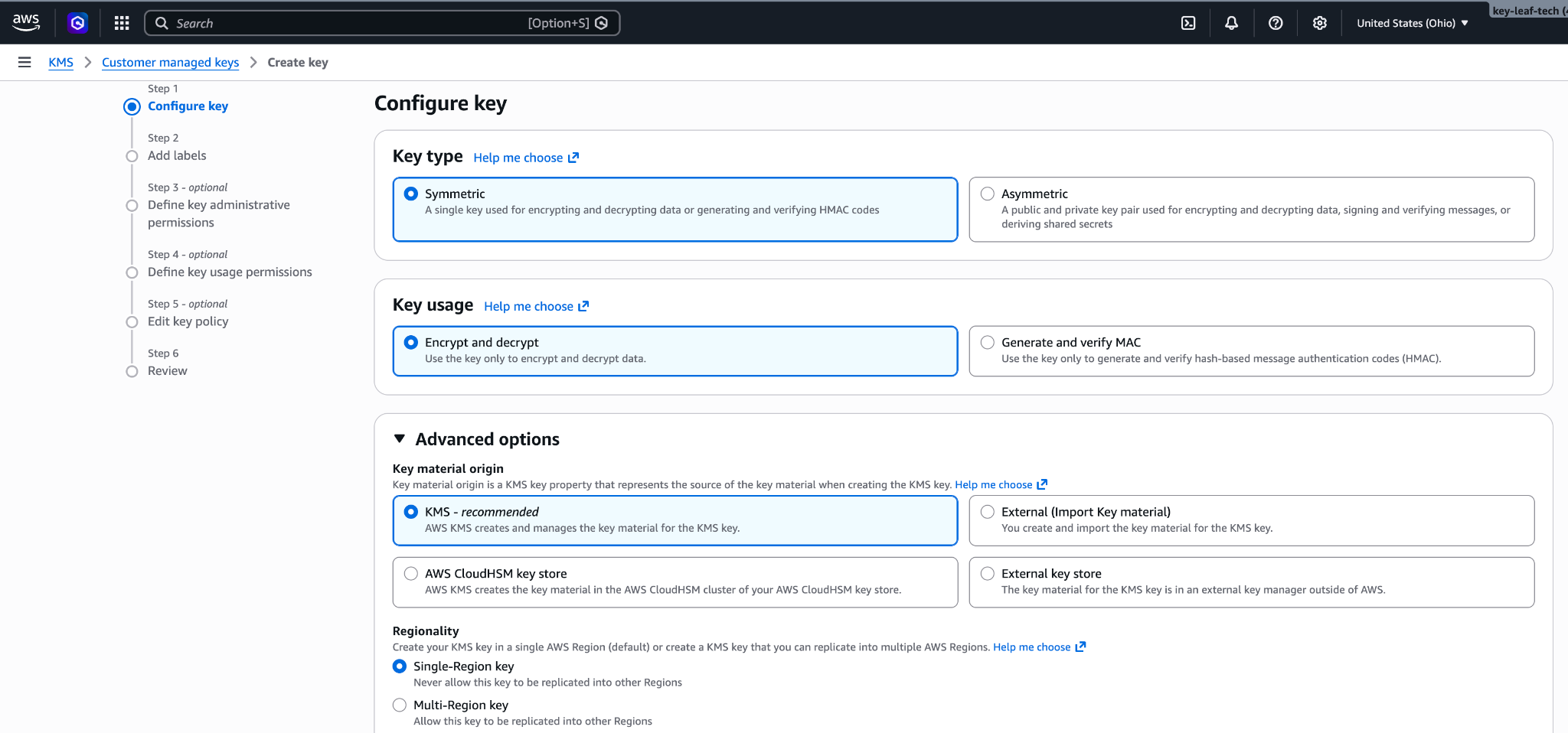
from line 196
128196 </Note>
129197
130198 <Note>
131 **Finding your compartment ID:** Each workspace has a compartment ID that scopes its CMEK data. To find it in the Claude Console, go to [Manage > Security](https://platform.claude.com/settings/workspaces/default/security-compliance) and select the workspace in the workspace picker at the top of the sidebar. The ID is under **Encryption key**, in the **Compartment ID** field. You can also read the `compartment_id` field returned by the [Get Workspace](https://platform.claude.com/docs/en/api/admin-api/workspaces/get-workspace) endpoint. Substitute that value for `<compartment-uuid>` in the preceding key policy.
132
133 Key validation always sends the all-zeros compartment UUID (`00000000-0000-0000-0000-000000000000`) as the encryption context, because validation runs before the key is attached to any workspace. Live traffic sends the compartment ID of each attached workspace.
134
135 Any `EncryptionContext` condition must allow the all-zeros value plus the compartment ID of every workspace the key is attached to. Validation also runs again whenever key setup is re-run, so keep the all-zeros entry in place permanently.
136
137 To attach the key to an additional workspace, add that workspace's compartment ID to the condition with `kms:PutKeyPolicy` before attaching.
199 **Finding your compartment ID:** Each workspace has a compartment ID that scopes its CMEK data. To find it in the Claude Console, go to [Manage > Security](https://platform.claude.com/settings/workspaces/default/security-compliance) and select the workspace in the workspace picker at the top of the sidebar. The ID is under **Encryption key**, in the **Compartment ID** field. You can also read the `compartment_id` field returned by the [Get Workspace](https://platform.claude.com/docs/en/api/admin-api/workspaces/get-workspace) endpoint.
138200 </Note>
139201
140202 You can set up the key in the Claude Console or through the Admin API, with the same result.
from line 206
144206 <Steps>
145207 <Step title="Register the key with Anthropic">
146208 In the Claude Console, open **Settings > Encryption keys** and click **Add key**. Enter a display name, choose **AWS KMS**, and click **Continue**. Paste the key ARN into **KMS key ARN**, and click **Add**.
209
210 The key details step shows your organization ID. Add it to the [key policy](https://platform.claude.com/docs/en/manage-claude/cmek-aws-kms#key-policy) before you click **Add**.
147211 </Step>
148212
149213 <Step title="Validate the key">
from line 479
415479
416480 If validation fails, common causes are:
417481
418 * **Encryption context mismatch:** Validation fails while data traffic works (or the reverse) with an opaque `AccessDeniedException` when a `kms:EncryptionContext:anthropic:compartment_uuid` condition allows only one of the two values Anthropic sends. Validation sends the all-zeros UUID (`00000000-0000-0000-0000-000000000000`); live traffic sends the attached workspace's compartment ID. Confirm the condition lists both. To rule the condition out entirely, temporarily remove the `Condition` block from the `AllowAnthropicCMEKCrypto` statement and re-validate.
482 * **Encryption context mismatch:** If the policy has a `kms:EncryptionContext:anthropic:compartment_uuid` condition, make sure it lists the compartment ID of each workspace the key is attached to. Validation sends the compartment ID of the workspace it checks. An older key whose compartment statement still allows `kms:Encrypt` is validated with the all-zeros value (`00000000-0000-0000-0000-000000000000`) while it isn't attached, so keep that value in its list.
419483 * **Resource control policies (RCPs):** If your AWS organization has an RCP that denies KMS operations when `aws:PrincipalOrgID` does not match your org, it blocks Anthropic's cross-account role. The RCP needs a carve-out for this key or for Anthropic's role ARN. Service control policies do not apply here, because they do not evaluate for external principals calling through resource-based policies.
420484 * **Access granted through IAM instead of the key policy:** Cross-account KMS access must be granted in the key policy itself, not through an IAM policy in your account. Check with `aws kms get-key-policy --key-id <id> --policy-name default`.
421485 * **Region mismatch:** Confirm the key's region is one Anthropic operates in for the geo tier you configured.
from line 607
543607 <Tab title="Claude Enterprise">
544608 In [claude.ai > Organization settings > Data and privacy](https://claude.ai/admin-settings/data-privacy-controls), open **Encryption keys**, then click **Add key**. Choose **AWS** and click **Continue**, then paste the Key ARN from the previous step and click **Add**. Anthropic validates the key with an encrypt and decrypt round-trip. Once it shows as verified, your organization is CMEK-protected from that point forward.
545609
546 The key details step of this flow displays your organization's **Compartment ID** with a copy button. Substitute that value for `<compartment-uuid>` in the key policy (see the Create the KMS key step under Encryption key setup); you can open the flow to copy the ID before you create the key. After setup, the ID remains visible on the key under **Encryption keys**.
610 The key details step of this flow displays your **Organization ID for the key policy** with a copy button. Substitute that value for `<ORGANIZATION_UUID>` in the key policy. You can open the flow to copy the ID before you create the key.
547611
548612 On Claude Enterprise, CMEK applies to the whole organization, so there is no separate workspace attach step, and an organization can have only one key.
549613 </Tab>
from line 619
555619
556620* **Principal:** Your key policy grants access to the AWS service principal `aws-external-anthropic.amazonaws.com`. Anthropic's IAM role and account ID are not used, so the [ARN for Anthropic](https://platform.claude.com/docs/en/manage-claude/cmek-aws-kms#amazon-resource-name-arn-for-anthropic) does not apply.
557621* **Key requirements:** The key must be a symmetric KMS key with encrypt and decrypt usage, single-region, and in the same AWS account and region as the workspace you attach it to. Cross-account keys are not supported: the key must be in the AWS account that hosts your organization. Multi-region keys (key IDs that begin with `mrk-`) and alias ARNs are rejected when you register the key; use the key ARN.
558* **No separate validation step:** Apart from those checks on the key ARN at registration, the key is validated when you attach it to a workspace. The attach call performs an encrypt/decrypt round against the key with that workspace's compartment ID as the encryption context, so a key policy problem surfaces at attach time rather than at registration. Unlike the Claude Platform policy earlier on this page, an `EncryptionContext` condition therefore needs no all-zeros entry.
622* **No separate validation step:** Apart from those checks on the key ARN at registration, the key is validated when you attach it to a workspace. The attach call performs an encrypt/decrypt round against the key with that workspace's compartment ID as the encryption context, so a key policy problem surfaces at attach time rather than at registration. An `EncryptionContext` condition therefore needs no all-zeros entry.
559623* **Where you manage keys:** Register and attach keys in the Claude Console, signed in through AWS with the Admin role. The external key endpoints are also available on Claude Platform on AWS, authorized through [IAM actions](https://platform.claude.com/docs/en/api/claude-platform-on-aws-iam-actions#encryption-keys); there, a key is identified by its KMS key ARN rather than an `ekey_` ID.
560624
561625<Warning>
manage-claude/cmek-azure-key-vault Changed · +24 / -7 lines
from line 73
7373 <Step title="Create an RSA key in your vault">
7474 Azure Key Vault does not support symmetric key wrapping, so the key must be RSA (3072-bit or larger) with `wrapKey` and `unwrapKey` in its allowed operations.
7575
76 The `--tags` option adds the organization tag, `anthropic-org-<ORGANIZATION_UUID>` with the value `true`, where `<ORGANIZATION_UUID>` is your Anthropic organization ID in lowercase. The tag is required for Anthropic to validate the key.
77
78 <Note>
79 **Finding your organization ID:** Copy the **Organization ID** field under **Settings > Organization** in the Claude Console, or under **Organization settings > Organization** in claude.ai, or read the `id` field from the [Organization Info](https://platform.claude.com/docs/en/api/admin-api/organization/get-me) endpoint. Use the bare UUID, not the `org_`-prefixed ID.
80 </Note>
81
7682 ```bash
7783 az keyvault key create \
78 --vault-name <your-vault-name> \
79 --name <your-key-name> \
84 --vault-name <VAULT_NAME> \
85 --name <KEY_NAME> \
8086 --kty RSA --size 3072 \
81 --ops wrapKey unwrapKey
87 --ops wrapKey unwrapKey \
88 --tags anthropic-org-<ORGANIZATION_UUID>=true
8289 ```
8390
8491 For HSM-backed keys, use `--kty RSA-HSM` (requires a Premium-SKU vault). Software-protected RSA keys are acceptable for this integration.
from line 92
8592
8693 From the Portal, open your Key Vault, select **Keys**, then **Generate/Import**. Set the key type to RSA and the size to 3072 or larger. To restrict the key to wrap and unwrap only, open the key version, scroll to **Permitted operations**, and uncheck everything except **Wrap Key** and **Unwrap Key**.
8794
88 <Frame caption="Create an RSA key sized 3072 or larger.">
89 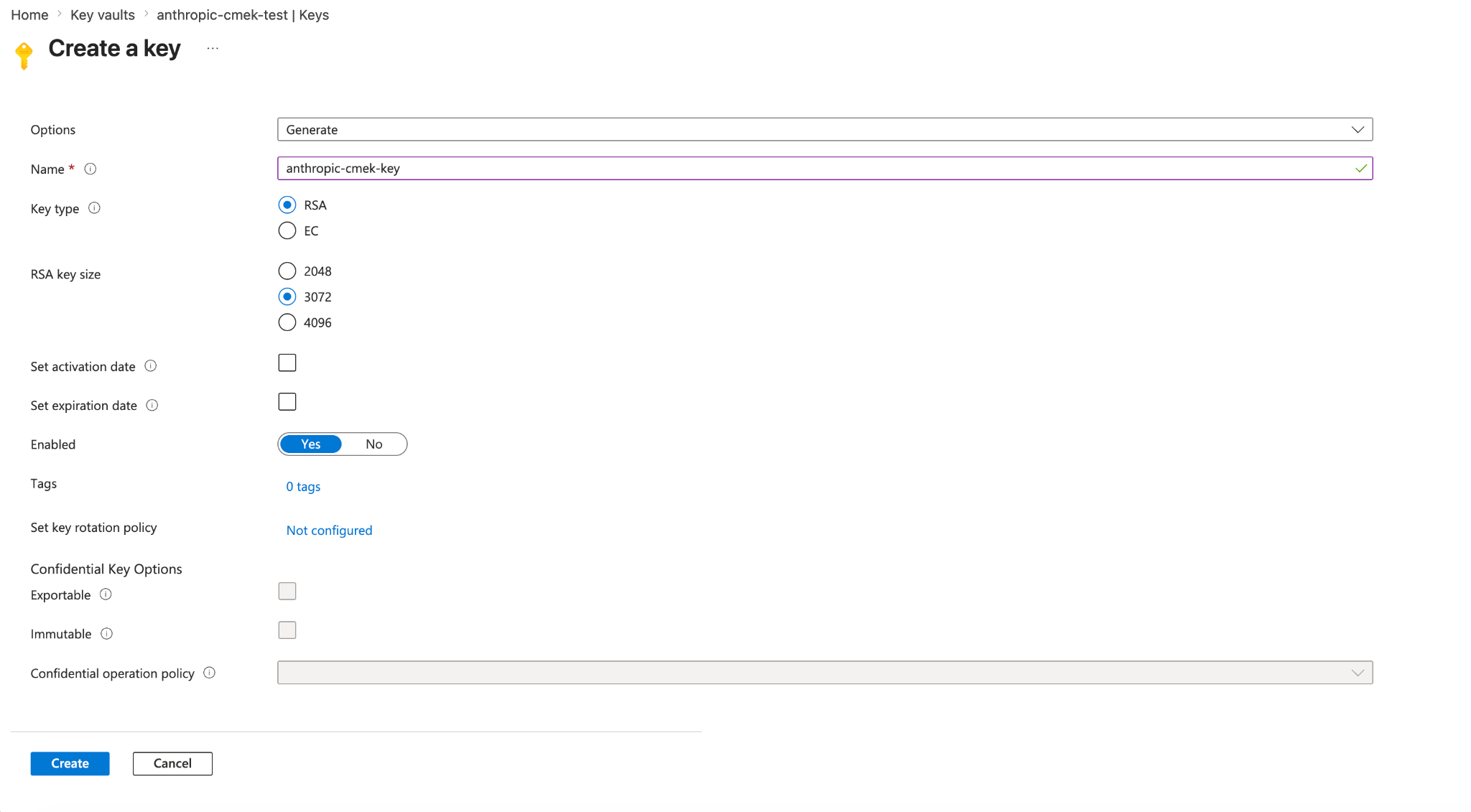
95 On the **Create a key** page, also add the organization tag under **Tags**.
96
97 <Frame caption="Create an RSA key sized 3072 or larger, with the tag anthropic-org-<ORGANIZATION_UUID> set to true.">
98 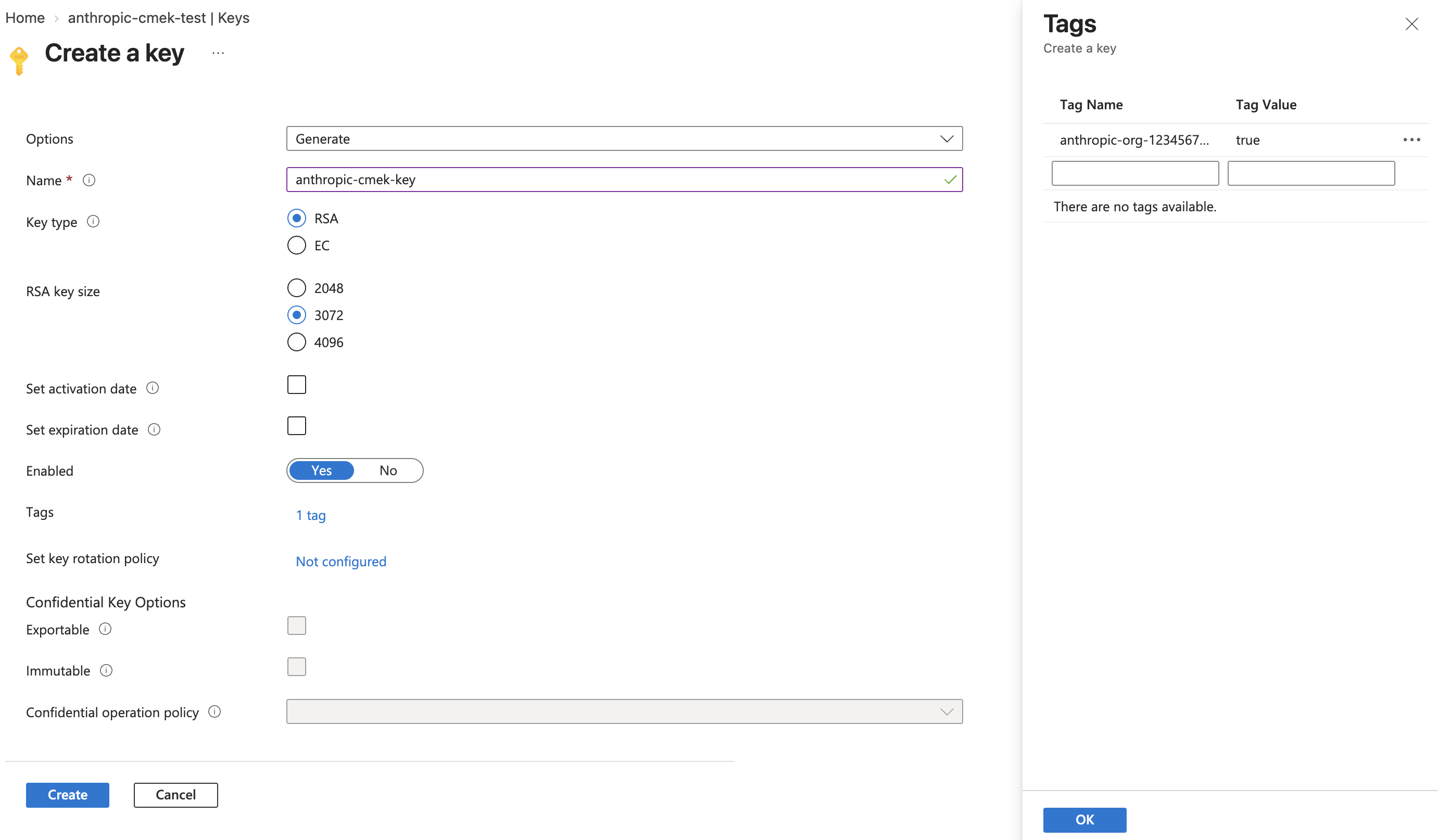
9099 </Frame>
91100
92 <Frame caption="Restrict permitted operations to Wrap Key and Unwrap Key.">
93 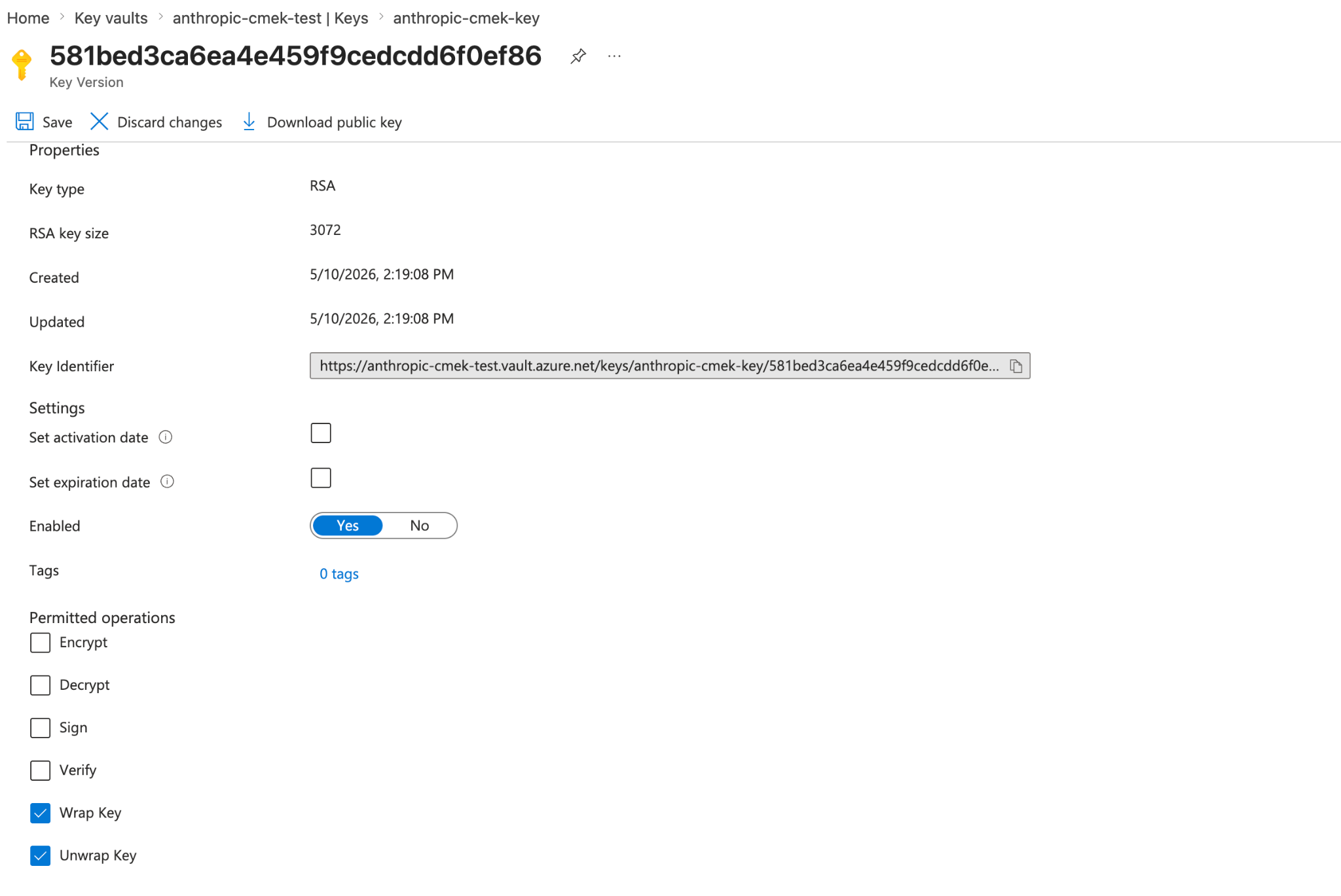
101 <Frame caption="Restrict permitted operations to Wrap Key and Unwrap Key. The key version shows the organization tag.">
102 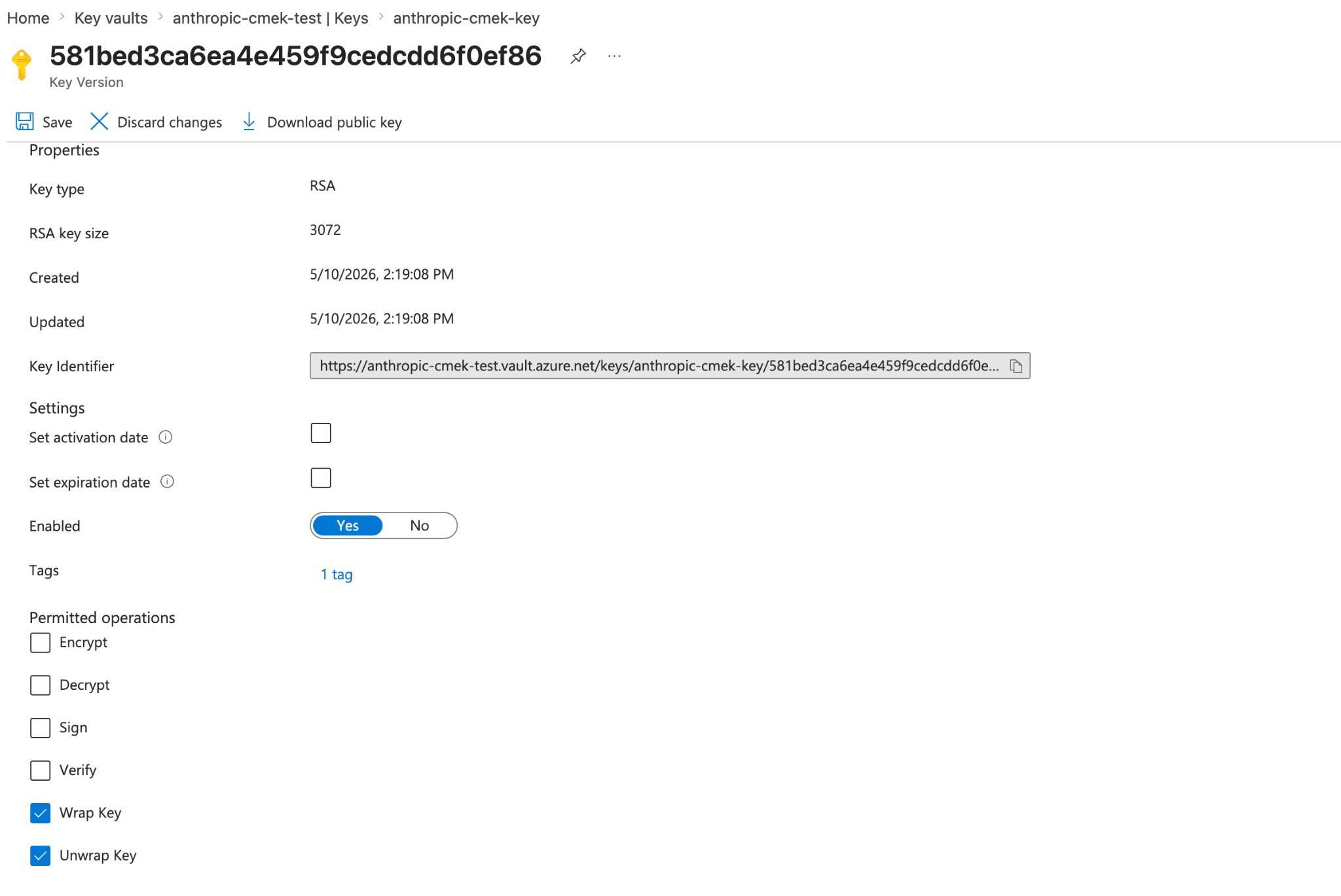
94103 </Frame>
104
105 To share one key among several Anthropic organizations, add one such tag for each organization. A key version can carry at most 15 tags, including your own.
106
107 <Note>
108 To add the tag to a key you already have, open the key's current version in the Portal, select the link next to **Tags**, add the tag, and click **Save**. With the Azure CLI, run `az keyvault key set-attributes --vault-name <VAULT_NAME> --name <KEY_NAME> --tags anthropic-org-<ORGANIZATION_UUID>=true`. Its `--tags` option replaces the version's tags, so also put each tag the version already has in `--tags`, as `name=value`. For a key in a Managed HSM, use `--hsm-name <HSM_NAME>` instead of `--vault-name`.
109 </Note>
95110 </Step>
96111
97112 <Step title="Grant the Anthropic service principal access to your key">
from line 165
150165 <Steps>
151166 <Step title="Register the key with Anthropic">
152167 In the Claude Console, open **Settings > Encryption keys** and click **Add key**. Enter a display name, choose **Azure Key Vault**, and click **Continue**. Fill in **Vault URI**, **Key name**, and **Tenant ID**, and click **Add**.
168
169 The key details step shows the organization tag. Add it to the key, as [the create step](https://platform.claude.com/docs/en/manage-claude/cmek-azure-key-vault#organization-tag) describes, before you click **Add**.
153170 </Step>
154171
155172 <Step title="Validate the key">
manage-claude/cmek-google-cloud-kms Changed · +22 / -7 lines
from line 55
5555 <Step title="Create the crypto key">
5656 Create a symmetric key with the `ENCRYPT_DECRYPT` purpose. Anthropic strongly recommends HSM protection: Cloud KMS HSM keys are FIPS 140-2 Level 3 validated, and the cost delta over software keys is small.
5757
58 The `--labels` option adds the organization label, `anthropic-org-<ORGANIZATION_UUID>` with the value `true`, where `<ORGANIZATION_UUID>` is your Anthropic organization ID in lowercase. The label is required for Anthropic to validate the key.
59
60 <Note>
61 **Finding your organization ID:** Copy the **Organization ID** field under **Settings > Organization** in the Claude Console, or under **Organization settings > Organization** in claude.ai, or read the `id` field from the [Organization Info](https://platform.claude.com/docs/en/api/admin-api/organization/get-me) endpoint. Use the bare UUID, not the `org_`-prefixed ID.
62 </Note>
63
5864 ```bash
59 gcloud kms keys create <your-key-name> \
60 --project=<your-project-id> \
61 --location=<region> \
62 --keyring=<your-keyring-name> \
65 gcloud kms keys create <KEY_NAME> \
66 --project=<PROJECT_ID> \
67 --location=<REGION> \
68 --keyring=<KEYRING_NAME> \
6369 --purpose=encryption \
64 --protection-level=hsm
70 --protection-level=hsm \
71 --labels=anthropic-org-<ORGANIZATION_UUID>=true
6572 ```
6673
6774 For software protection instead, omit `--protection-level=hsm`. Nothing else in this guide changes.
from line 75
6875
6976 You can also create the key from the Google Cloud Console. Open the key ring, click **Create key**, select **Generated key**, set the purpose and algorithm to symmetric encrypt and decrypt, and choose **HSM** under protection level.
7077
71 <Frame caption="Create an HSM-protected symmetric encrypt/decrypt key.">
72 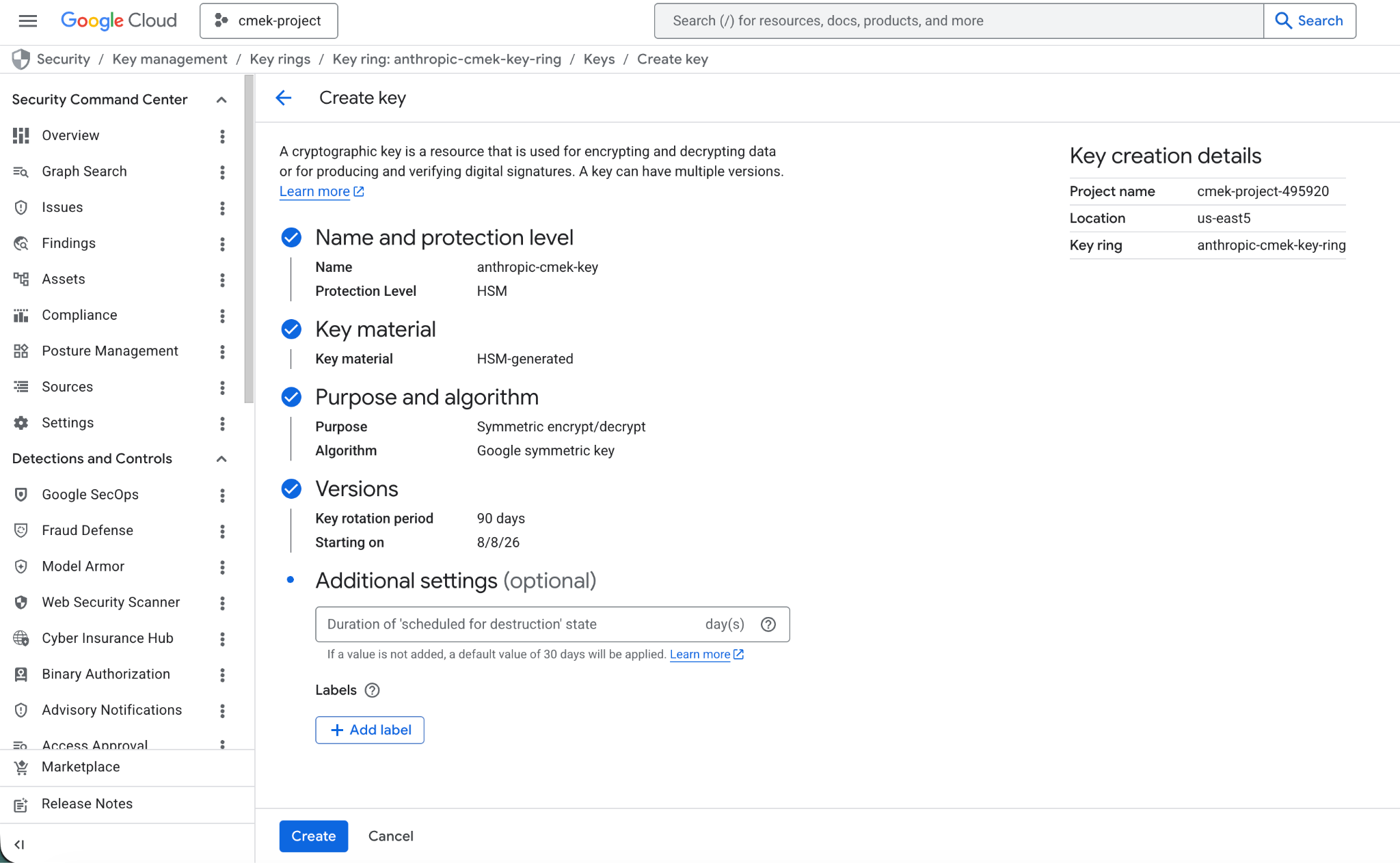
78 <Frame caption="Create an HSM-protected symmetric encrypt/decrypt key with the organization label.">
79 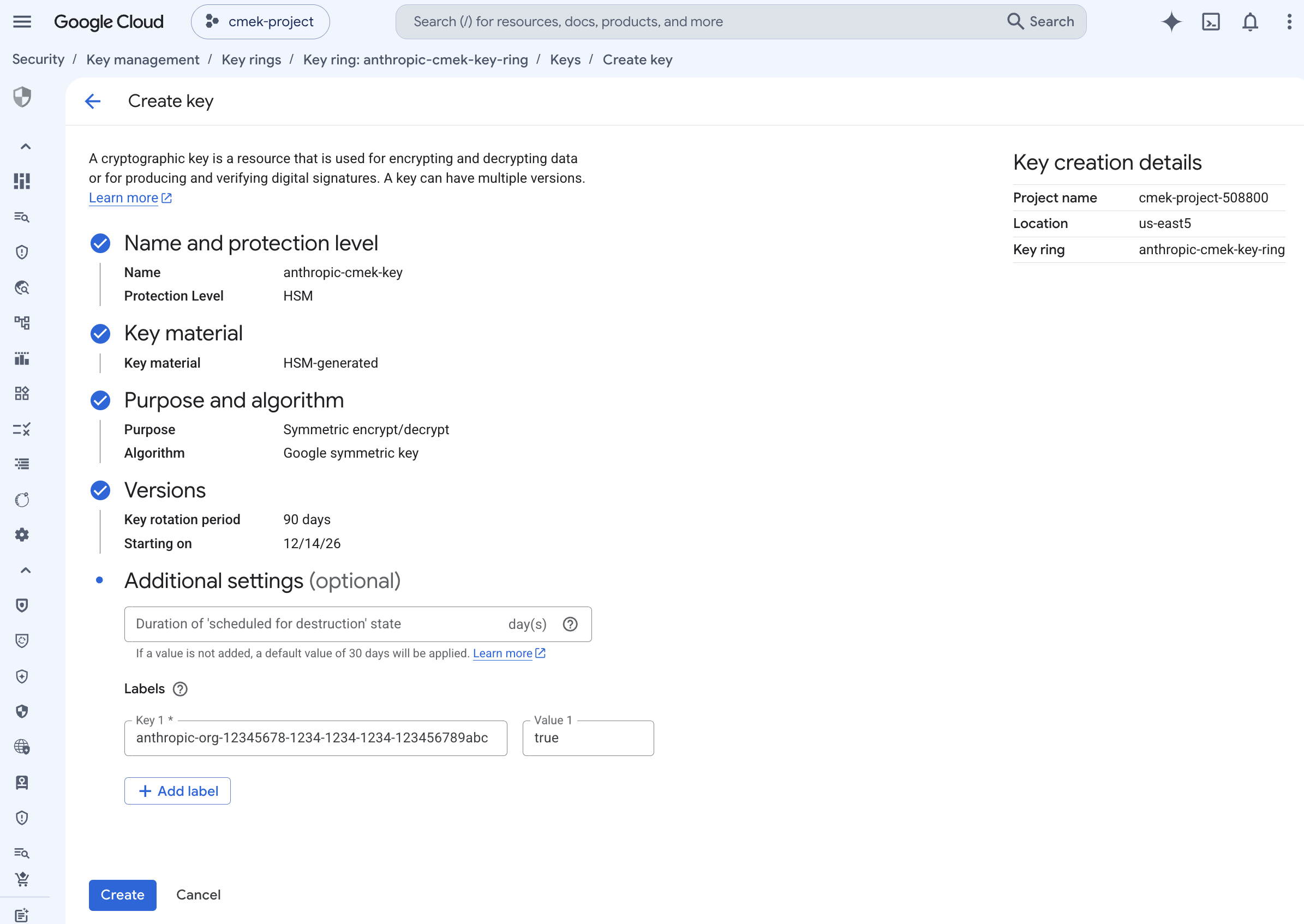
7380 </Frame>
81
82 To share one key among several Anthropic organizations, add one such label for each organization. A key can carry at most 64 labels, including your own.
83
84 <Note>
85 To add the label to a key that doesn't have it, run `gcloud kms keys update <KEY_NAME> --project=<PROJECT_ID> --location=<REGION> --keyring=<KEYRING_NAME> --update-labels=anthropic-org-<ORGANIZATION_UUID>=true`. It merges the label with any labels the key already has.
86 </Note>
7487 </Step>
7588
7689 <Step title="Grant Anthropic's service account access to the key">
from line 156
143156 <Steps>
144157 <Step title="Register the key with Anthropic">
145158 In the Claude Console, open **Settings > Encryption keys** and click **Add key**. Enter a display name, choose **Google Cloud KMS**, and click **Continue**. Paste the full key resource name into **Key resource name**, and click **Add**.
159
160 The key details step shows the organization label. Add it to the key, as [the create step](https://platform.claude.com/docs/en/manage-claude/cmek-google-cloud-kms#organization-label) describes, before you click **Add**.
146161 </Step>
147162
148163 <Step title="Validate the key">