Sweep 22 Sep 2026 · 17:19Z Build v2.1.280 501 read Stable v2.1.267 Latest v2.1.280 Next v2.1.280 Feeds RSS JSON llms.txt Unofficial
One capture · api

One read of Claude Developer Platform

239 pages moved out of 634 read.

api-20260921T193708Z

Pages moved 239 significant first
Pages read 634 in this capture
Captured 19:37 UTC
Corpus hash ed3e8d750400 corpus-hash

What this read moved

126–150 of 239

This capture is too large to show at once. Changes 126-150 of 239 are below, significant first; the rest are on the following screens.

api/files Changed · +20 / -0 lines

from line 15
1515 
1616- `"anthropic-workspace-id": optional string`
1717 
18 Optional header to select the Workspace for this request. The value is a Workspace ID (for example, `wrkspc_011CZkZaBF1tNoB5wlCeusgy`).
19 
20 Only needed for credentials that can act on more than one Workspace. A credential that belongs to a specific Workspace may omit it; if sent, it must match that Workspace.
21 
1822### Body parameters (form-data)
1923 
2024- `file: string`
from line 138
134138 
135139- `"anthropic-workspace-id": optional string`
136140 
141 Optional header to select the Workspace for this request. The value is a Workspace ID (for example, `wrkspc_011CZkZaBF1tNoB5wlCeusgy`).
142 
143 Only needed for credentials that can act on more than one Workspace. A credential that belongs to a specific Workspace may omit it; if sent, it must match that Workspace.
144 
137145### Returns
138146 
139147- `data: array of FileMetadata`
from line 244
236244 
237245- `"anthropic-workspace-id": optional string`
238246 
247 Optional header to select the Workspace for this request. The value is a Workspace ID (for example, `wrkspc_011CZkZaBF1tNoB5wlCeusgy`).
248 
249 Only needed for credentials that can act on more than one Workspace. A credential that belongs to a specific Workspace may omit it; if sent, it must match that Workspace.
250 
239251### Example
240252 
241253```bash
from line 272
260272 
261273- `"anthropic-workspace-id": optional string`
262274 
275 Optional header to select the Workspace for this request. The value is a Workspace ID (for example, `wrkspc_011CZkZaBF1tNoB5wlCeusgy`).
276 
277 Only needed for credentials that can act on more than one Workspace. A credential that belongs to a specific Workspace may omit it; if sent, it must match that Workspace.
278 
263279### Returns
264280 
265281- `FileMetadata object`
from line 366
350366### Headers
351367 
352368- `"anthropic-workspace-id": optional string`
369 
370 Optional header to select the Workspace for this request. The value is a Workspace ID (for example, `wrkspc_011CZkZaBF1tNoB5wlCeusgy`).
371 
372 Only needed for credentials that can act on more than one Workspace. A credential that belongs to a specific Workspace may omit it; if sent, it must match that Workspace.
353373 
354374### Returns
355375 

api/messages Changed · +32 / -0 lines

This page is larger than the 256 KiB this site keeps, so one side of the diff below stops where the stored text does.

from line 23
2323 
2424- `"anthropic-workspace-id": optional string`
2525 
26 Optional header to select the Workspace for this request. The value is a Workspace ID (for example, `wrkspc_011CZkZaBF1tNoB5wlCeusgy`).
27 
28 Only needed for credentials that can act on more than one Workspace. A credential that belongs to a specific Workspace may omit it; if sent, it must match that Workspace.
29 
2630### Body parameters
2731 
2832- `max_tokens: number`
from line 4450
44464450 
44474451- `"anthropic-workspace-id": optional string`
44484452 
4453 Optional header to select the Workspace for this request. The value is a Workspace ID (for example, `wrkspc_011CZkZaBF1tNoB5wlCeusgy`).
4454 
4455 Only needed for credentials that can act on more than one Workspace. A credential that belongs to a specific Workspace may omit it; if sent, it must match that Workspace.
4456 
44494457### Body parameters
44504458 
44514459- `messages: array of MessageParam`
from line 8416
84088416 A tab this call's execution opened that remains open at its end —
84098417 the creation delta of the `tabs` inventory, not an event log.
84108418 
8411 Carries only the `tab_id`; the tab's `title` and `url` live on its
8412 `tabs` entry, which must include the same `tab_id`. A tab opened
8413 during a failed call gets no deferred `tab_opened`; it simply appears
8414 in the next result's `tabs` inventory.
8415 
8416 - `type: "tab_opened"`
8417 
8418 - `tab_id: string`
8419 
8420 The `tab_id` of the opened tab, present in `tabs`.
8421 
8422 maxLength: 4096, minLength: 1, pattern: ^[^\x00-\x1f\x7f-\x9f\u2028\u2029]*$
8423 
8424### Browser State Tab Entry
8425 
8426- `BrowserStateTabEntry object`
8427 
8428 One open browser tab reported in a `browser_state` block's `tabs`
8429 inventory.
8430 
8431 `tab_id` is the caller-assigned identifier for
8419 C

api/messages/batches Changed · +24 / -0 lines

from line 23
2323 
2424- `"anthropic-workspace-id": optional string`
2525 
26 Optional header to select the Workspace for this request. The value is a Workspace ID (for example, `wrkspc_011CZkZaBF1tNoB5wlCeusgy`).
27 
28 Only needed for credentials that can act on more than one Workspace. A credential that belongs to a specific Workspace may omit it; if sent, it must match that Workspace.
29 
2630### Body parameters
2731 
2832- `requests: array of object`
from line 3284
32803284 
32813285- `"anthropic-workspace-id": optional string`
32823286 
3287 Optional header to select the Workspace for this request. The value is a Workspace ID (for example, `wrkspc_011CZkZaBF1tNoB5wlCeusgy`).
3288 
3289 Only needed for credentials that can act on more than one Workspace. A credential that belongs to a specific Workspace may omit it; if sent, it must match that Workspace.
3290 
32833291### Returns
32843292 
32853293- `MessageBatch object`
from line 3459
34513459 
34523460- `"anthropic-workspace-id": optional string`
34533461 
3462 Optional header to select the Workspace for this request. The value is a Workspace ID (for example, `wrkspc_011CZkZaBF1tNoB5wlCeusgy`).
3463 
3464 Only needed for credentials that can act on more than one Workspace. A credential that belongs to a specific Workspace may omit it; if sent, it must match that Workspace.
3465 
34543466### Returns
34553467 
34563468- `data: array of MessageBatch`
from line 3643
36313643 
36323644- `"anthropic-workspace-id": optional string`
36333645 
3646 Optional header to select the Workspace for this request. The value is a Workspace ID (for example, `wrkspc_011CZkZaBF1tNoB5wlCeusgy`).
3647 
3648 Only needed for credentials that can act on more than one Workspace. A credential that belongs to a specific Workspace may omit it; if sent, it must match that Workspace.
3649 
36343650### Returns
36353651 
36363652- `MessageBatch object`
from line 3809
37933809 
37943810- `"anthropic-workspace-id": optional string`
37953811 
3812 Optional header to select the Workspace for this request. The value is a Workspace ID (for example, `wrkspc_011CZkZaBF1tNoB5wlCeusgy`).
3813 
3814 Only needed for credentials that can act on more than one Workspace. A credential that belongs to a specific Workspace may omit it; if sent, it must match that Workspace.
3815 
37963816### Returns
37973817 
37983818- `DeletedMessageBatch object`
from line 3866
38463866### Headers
38473867 
38483868- `"anthropic-workspace-id": optional string`
3869 
3870 Optional header to select the Workspace for this request. The value is a Workspace ID (for example, `wrkspc_011CZkZaBF1tNoB5wlCeusgy`).
3871 
3872 Only needed for credentials that can act on more than one Workspace. A credential that belongs to a specific Workspace may omit it; if sent, it must match that Workspace.
38493873 
38503874### Returns
38513875 

api/models Changed · +8 / -0 lines

from line 135
135135 
136136- `"anthropic-workspace-id": optional string`
137137 
138 Optional header to select the Workspace for this request. The value is a Workspace ID (for example, `wrkspc_011CZkZaBF1tNoB5wlCeusgy`).
139 
140 Only needed for credentials that can act on more than one Workspace. A credential that belongs to a specific Workspace may omit it; if sent, it must match that Workspace.
141 
138142### Returns
139143 
140144- `data: array of ModelInfo`
from line 491
487491 - `"compact-2026-09-04"`
488492 
489493- `"anthropic-workspace-id": optional string`
494 
495 Optional header to select the Workspace for this request. The value is a Workspace ID (for example, `wrkspc_011CZkZaBF1tNoB5wlCeusgy`).
496 
497 Only needed for credentials that can act on more than one Workspace. A credential that belongs to a specific Workspace may omit it; if sent, it must match that Workspace.
490498 
491499### Returns
492500 

api/skills Changed · +32 / -0 lines

from line 15
1515 
1616- `"anthropic-workspace-id": optional string`
1717 
18 Optional header to select the Workspace for this request. The value is a Workspace ID (for example, `wrkspc_011CZkZaBF1tNoB5wlCeusgy`).
19 
20 Only needed for credentials that can act on more than one Workspace. A credential that belongs to a specific Workspace may omit it; if sent, it must match that Workspace.
21 
1822### Body parameters (form-data)
1923 
2024- `files: array of string`
from line 164
160164 
161165- `"anthropic-workspace-id": optional string`
162166 
167 Optional header to select the Workspace for this request. The value is a Workspace ID (for example, `wrkspc_011CZkZaBF1tNoB5wlCeusgy`).
168 
169 Only needed for credentials that can act on more than one Workspace. A credential that belongs to a specific Workspace may omit it; if sent, it must match that Workspace.
170 
163171### Returns
164172 
165173- `data: array of Skill`
from line 293
285293 
286294- `"anthropic-workspace-id": optional string`
287295 
296 Optional header to select the Workspace for this request. The value is a Workspace ID (for example, `wrkspc_011CZkZaBF1tNoB5wlCeusgy`).
297 
298 Only needed for credentials that can act on more than one Workspace. A credential that belongs to a specific Workspace may omit it; if sent, it must match that Workspace.
299 
288300### Returns
289301 
290302- `Skill object`
from line 409
397409 
398410- `"anthropic-workspace-id": optional string`
399411 
412 Optional header to select the Workspace for this request. The value is a Workspace ID (for example, `wrkspc_011CZkZaBF1tNoB5wlCeusgy`).
413 
414 Only needed for credentials that can act on more than one Workspace. A credential that belongs to a specific Workspace may omit it; if sent, it must match that Workspace.
415 
400416### Returns
401417 
402418- `DeletedSkill object`
from line 582
566582 
567583- `"anthropic-workspace-id": optional string`
568584 
585 Optional header to select the Workspace for this request. The value is a Workspace ID (for example, `wrkspc_011CZkZaBF1tNoB5wlCeusgy`).
586 
587 Only needed for credentials that can act on more than one Workspace. A credential that belongs to a specific Workspace may omit it; if sent, it must match that Workspace.
588 
569589#### Body parameters (form-data)
570590 
571591- `files: array of string`
from line 691
671691 
672692- `"anthropic-workspace-id": optional string`
673693 
694 Optional header to select the Workspace for this request. The value is a Workspace ID (for example, `wrkspc_011CZkZaBF1tNoB5wlCeusgy`).
695 
696 Only needed for credentials that can act on more than one Workspace. A credential that belongs to a specific Workspace may omit it; if sent, it must match that Workspace.
697 
674698#### Returns
675699 
676700- `data: array of SkillVersion`
from line 795
771795 
772796- `"anthropic-workspace-id": optional string`
773797 
798 Optional header to select the Workspace for this request. The value is a Workspace ID (for example, `wrkspc_011CZkZaBF1tNoB5wlCeusgy`).
799 
800 Only needed for credentials that can act on more than one Workspace. A credential that belongs to a specific Workspace may omit it; if sent, it must match that Workspace.
801 
774802#### Returns
775803 
776804- `SkillVersion object`
from line 885
857885#### Headers
858886 
859887- `"anthropic-workspace-id": optional string`
888 
889 Optional header to select the Workspace for this request. The value is a Workspace ID (for example, `wrkspc_011CZkZaBF1tNoB5wlCeusgy`).
890 
891 Only needed for credentials that can act on more than one Workspace. A credential that belongs to a specific Workspace may omit it; if sent, it must match that Workspace.
860892 
861893#### Returns
862894 

api/skills/versions Changed · +16 / -0 lines

from line 23
2323 
2424- `"anthropic-workspace-id": optional string`
2525 
26 Optional header to select the Workspace for this request. The value is a Workspace ID (for example, `wrkspc_011CZkZaBF1tNoB5wlCeusgy`).
27 
28 Only needed for credentials that can act on more than one Workspace. A credential that belongs to a specific Workspace may omit it; if sent, it must match that Workspace.
29 
2630### Body parameters (form-data)
2731 
2832- `files: array of string`
from line 132
128132 
129133- `"anthropic-workspace-id": optional string`
130134 
135 Optional header to select the Workspace for this request. The value is a Workspace ID (for example, `wrkspc_011CZkZaBF1tNoB5wlCeusgy`).
136 
137 Only needed for credentials that can act on more than one Workspace. A credential that belongs to a specific Workspace may omit it; if sent, it must match that Workspace.
138 
131139### Returns
132140 
133141- `data: array of SkillVersion`
from line 236
228236 
229237- `"anthropic-workspace-id": optional string`
230238 
239 Optional header to select the Workspace for this request. The value is a Workspace ID (for example, `wrkspc_011CZkZaBF1tNoB5wlCeusgy`).
240 
241 Only needed for credentials that can act on more than one Workspace. A credential that belongs to a specific Workspace may omit it; if sent, it must match that Workspace.
242 
231243### Returns
232244 
233245- `SkillVersion object`
from line 326
314326### Headers
315327 
316328- `"anthropic-workspace-id": optional string`
329 
330 Optional header to select the Workspace for this request. The value is a Workspace ID (for example, `wrkspc_011CZkZaBF1tNoB5wlCeusgy`).
331 
332 Only needed for credentials that can act on more than one Workspace. A credential that belongs to a specific Workspace may omit it; if sent, it must match that Workspace.
317333 
318334### Returns
319335 

build-with-claude/compaction-background New page · 529 lines, new page

## Compatibility ## How the swap works while work continues ## Request the summary in the background ## Keep thinking valid while the summary is built

A whole new page. There's nothing to diff it against, so here is what it says.

---
title: Compaction in the background
url: https://platform.claude.com/docs/en/build-with-claude/compaction-background
description: Request an on-demand compaction summary while the conversation continues on its full history, then swap the block in when it arrives.
---

## Compatibility
- Status: Beta
- [Beta header](https://platform.claude.com/docs/en/api/beta-headers): `compact-2026-09-04`
- Supported models: `claude-fable-5-1`, `claude-mythos-5-1`, `claude-fable-5`, `claude-mythos-5`, `claude-mythos-preview`, `claude-opus-5`, `claude-opus-4-8`, `claude-opus-4-7`, `claude-opus-4-6`, `claude-sonnet-5`, `claude-sonnet-4-6`
- Platforms: Claude API (beta), Claude Platform on AWS (beta), Microsoft Foundry (beta); not available on Amazon Bedrock, Google Cloud

Background compaction, often called async compaction, changes two things in the [compaction loop](https://platform.claude.com/docs/en/build-with-claude/compaction-on-demand#compact-in-a-loop): the compaction request runs while the conversation continues on its full history, and the swap waits until the block arrives. [Continue from the summary](https://platform.claude.com/docs/en/build-with-claude/compaction-on-demand#continue-from-the-summary) and [Handle a missing summary or an error](https://platform.claude.com/docs/en/build-with-claude/compaction-on-demand#when-no-summary-comes-back) apply unchanged.

## How the swap works while work continues

The compaction request and the block it returns are the same as in the loop. Your history grows between sending the request and using its result, and the swap must leave that growth in place.

1. Send the [compaction request](https://platform.claude.com/docs/en/build-with-claude/compaction-on-demand#request-a-summary) with your history as it stands, and record how many messages it held.
2. While that request runs, keep the conversation going on the full history. Append each new turn, don't edit anything already in the history, and don't start another compaction request until this one is swapped in or has failed.
3. When the response arrives with `stop_reason` `"compaction"`, drop exactly the messages you sent from the front of your history and put the returned message in their place. Every turn appended since step 1 stays after it.
4. Send the swapped history on the first request after the block arrives, so that thinking produced while the summary was being written stays valid.

For example, if the compaction request held messages 1 to 5 and the conversation gained messages 6 to 8 while it ran, after the swap your history is the block followed by messages 6 to 8.
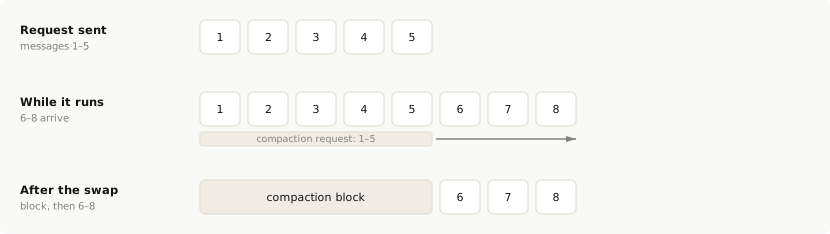
![Background compaction timeline: the compaction request is sent with messages 1 to 5 while the conversation continues on its full history and gains messages 6 to 8; when the block arrives, it replaces messages 1 to 5 at the front of the history, and the history becomes the block followed by messages 6 to 8](https://platform.claude.com/docs/images/compaction-background-timeline.svg)

If the response has any other `stop_reason`, no summary was produced, which counts as a failure in step 2. Keep the full history; [Handle a missing summary or an error](https://platform.claude.com/docs/en/build-with-claude/compaction-on-demand#when-no-summary-comes-back) lists the causes and what to do for each.

## Request the summary in the background

The compaction request counts against your rate limits like any other request, and while it runs your application has two requests open at once. The conversation keeps growing on its full history until the swap, so start the compaction request while the context window still has room for the turns that arrive meanwhile.

The following program is the loop from [Compact in a loop](https://platform.claude.com/docs/en/build-with-claude/compaction-on-demand#compact-in-a-loop) with the compaction request taken off the conversation's path. It has no PHP version, because the example depends on running two requests at once. The highlighted lines show where it differs from the loop, and the following list takes them in the order the program runs them.

<CodeGroup exclude="shell, php">
  ```python Python
  from concurrent.futures import Future, ThreadPoolExecutor

  import anthropic
  from anthropic.types.beta import BetaMessage, BetaMessageParam

  client = anthropic.Anthropic()
  executor = ThreadPoolExecutor(max_workers=1)

  # Set this near your real input budget. It is low here so a short conversation compacts.
  COMPACT_AT_TOKENS = 2500
  SYSTEM = "You help design a recipe app's data model. Keep answers short."

  QUESTIONS = [
      "What are the main entities in the data model?",
      "Which fields should Recipe have?",
      "Which fields should Ingredient have?",
      "Which fields should RecipeIngredient have?",
      "Which fields should Step have?",
      "Which indexes should these tables have?",
      "Which fields should be required?",
      "Which fields should have default values?",
  ]


  def swap_in(history: list[BetaMessageParam], summary: BetaMessage, sent: int) -> None:
      if summary.stop_reason == "compaction":
          # Replace exactly the messages the compaction request held.
          # Later turns stay after the block.
          history[:sent] = [{"role": "assistant", "content": summary.content}]
          print(f"Swapped {sent} messages")


  history: list[BetaMessageParam] = []
  pending: Future[BetaMessage] | None = None
  sent = 0
  for turn, question in enumerate(QUESTIONS, start=1):
      if pending is not None and pending.done():
          swap_in(history, pending.result(), sent)
          pending = None

      history.append({"role": "user", "content": question})
      response = client.beta.messages.create(
          model="claude-opus-5",
          max_tokens=8192,
          system=SYSTEM,
          betas=["compact-2026-09-04"],
          messages=history,
      )
      history.append({"role": "assistant", "content": response.content})

      # The next request sends this reply too, so count it.
      conversation_tokens = response.usage.input_tokens + response.usage.output_tokens
      if (
          conversation_tokens > COMPACT_AT_TOKENS
          and turn < len(QUESTIONS)
          and pending is None
      ):
          sent = len(history)
          pending = executor.submit(
              client.beta.messages.create,
              model="claude-opus-5",
              max_tokens=4096,
              system=SYSTEM,
              betas=["compact-2026-09-04"],
              messages=history.copy(),
              compaction={"type": "summarize"},
          )

  # Swap in a summary that is still on its way before you save
  # or continue the conversation.
  if pending is not None:
      swap_in(history, pending.result(), sent)
  executor.shutdown()
  ```

  ```typescript TypeScript
  const client = new Anthropic();

  // Set this near your real input budget. It is low here so a short conversation compacts.
  const compactAtTokens = 2500;
  const systemPrompt = "You help design a recipe app's data model. Keep answers short.";

  const questions = [
    "What are the main entities in the data model?",
    "Which fields should Recipe have?",
    "Which fields should Ingredient have?",
    "Which fields should RecipeIngredient have?",
    "Which fields should Step have?",
    "Which indexes should these tables have?",
    "Which fields should be required?",
    "Which fields should have default values?"
  ];

  function swapIn(
    history: Anthropic.Beta.Messages.BetaMessageParam[],
    summary: Anthropic.Beta.Messages.BetaMessage,
    sent: number
  ): Anthropic.Beta.Messages.BetaMessageParam[] {
    if (summary.stop_reason !== "compaction") {
      return history;
    }
    console.log(`Swapped ${sent} messages`);
    // Replace exactly the messages the compaction request held. Later turns stay after the block.
    return [{ role: "assistant", content: summary.content }, ...history.slice(sent)];
  }

  let history: Anthropic.Beta.Messages.BetaMessageParam[] = [];
  let pending: Promise<Anthropic.Beta.Messages.BetaMessage> | undefined;
  let settled = false;
  let sent = 0;
  for (const [index, question] of questions.entries()) {
    const turn = index + 1;
    if (pending && settled) {
      history = swapIn(history, await pending, sent);
      pending = undefined;
      settled = false;
    }

    history.push({ role: "user", content: question });
    const response = await client.beta.messages.create({
      model: "claude-opus-5",
      max_tokens: 8192,
      system: systemPrompt,
      betas: ["compact-2026-09-04"],
      messages: history
    });
    history.push({ role: "assistant", content: response.content });

    // The next request sends this reply too, so count it.
    const conversationTokens = response.usage.input_tokens + response.usage.output_tokens;
    if (conversationTokens > compactAtTokens && turn < questions.length && !pending) {
      sent = history.length;
      pending = client.beta.messages.create({
        model: "claude-opus-5",
        max_tokens: 4096,
        system: systemPrompt,
        betas: ["compact-2026-09-04"],
        messages: [...history],
        compaction: { type: "summarize" }
      });
      // Mark the request settled either way. Awaiting it then returns the summary or throws.
      const markSettled = () => {
        settled = true;
      };
      pending.then(markSettled, markSettled);
    }
  }

  // Swap in a summary that is still on its way before you save or continue the conversation.
  if (pending) {
    history = swapIn(history, await pending, sent);
  }
  ```

  ```csharp C#
  using Anthropic.Models.Beta;
  using Anthropic.Models.Beta.Messages;
  using Model = Anthropic.Models.Messages.Model;

  AnthropicClient client = new();

  // Set this near your real input budget. It is low here so a short conversation compacts.
  const int CompactAtTokens = 2500;
  const string SystemPrompt = "You help design a recipe app's data model. Keep answers short.";

  string[] questions =
  [
      "What are the main entities in the data model?",
      "Which fields should Recipe have?",
      "Which fields should Ingredient have?",
      "Which fields should RecipeIngredient have?",
      "Which fields should Step have?",
      "Which indexes should these tables have?",
      "Which fields should be required?",
      "Which fields should have default values?",
  ];

  static List<BetaMessageParam> SwapIn(List<BetaMessageParam> history, BetaMessage summary, int sent)
  {
      if (summary.StopReason != BetaStopReason.Compaction)
      {
          return history;
      }
      Console.WriteLine($"Swapped {sent} messages");
      // Replace exactly the messages the compaction request held. Later turns stay after the block.
      return
      [
          new()
          {
              Role = Role.Assistant,
              Content = summary.Content.Select(block => new BetaContentBlockParam(block.Json)).ToList(),
          },
          .. history[sent..],
      ];
  }

  List<BetaMessageParam> history = [];
  Task<BetaMessage>? pending = null;
  var sent = 0;
  foreach (var (index, question) in questions.Index())
  {
      var turn = index + 1;
      if (pending is { IsCompleted: true })
      {
          history = SwapIn(history, await pending, sent);
          pending = null;
      }

      history.Add(new() { Role = Role.User, Content = question });
      var response = await client.Beta.Messages.Create(new MessageCreateParams
      {
          Model = Model.ClaudeOpus5,
          MaxTokens = 8192,
          System = SystemPrompt,
          Betas = [AnthropicBeta.Compact2026_09_04],
          Messages = history,
      });
      history.Add(new()
      {
          Role = Role.Assistant,
          Content = response.Content.Select(block => new BetaContentBlockParam(block.Json)).ToList(),
      });

      // The next request sends this reply too, so count it.
      var conversationTokens = response.Usage.InputTokens + response.Usage.OutputTokens;
      if (conversationTokens > CompactAtTokens && turn < questions.Length && pending is null)
      {
          sent = history.Count;
          pending = client.Beta.Messages.Create(new MessageCreateParams
          {
              Model = Model.ClaudeOpus5,
              MaxTokens = 4096,
              System = SystemPrompt,
              Betas = [AnthropicBeta.Compact2026_09_04],
              Messages = [.. history],
              Compaction = new BetaCompactionConfig(), // type defaults to "summarize"
          });
      }
  }

  // Swap in a summary that is still on its way before you save or continue the conversation.
  if (pending is not null)
  {
      history = SwapIn(history, await pending, sent);
  }
  ```

  ```go Go
  ctx := context.Background()
  client := anthropic.NewClient()

  // Set this near your real input budget. It is low here so a short conversation compacts.
  const compactAtTokens = 2500
  system := []anthropic.BetaTextBlockParam{{Text: "You help design a recipe app's data model. Keep answers short."}}

  questions := []string{
  	"What are the main entities in the data model?",
  	"Which fields should Recipe have?",
  	"Which fields should Ingredient have?",
  	"Which fields should RecipeIngredient have?",
  	"Which fields should Step have?",
  	"Which indexes should these tables have?",
  	"Which fields should be required?",

Cut at 300 lines. The page has the rest.

build-with-claude/compaction-keep-recent-turns New page · 490 lines, new page

## Compatibility ## Choose which turns to keep ## Compact the older turns and send the rest after the block ## Keep thinking valid in the kept turns

A whole new page. There's nothing to diff it against, so here is what it says.

---
title: Compaction that keeps recent turns
url: https://platform.claude.com/docs/en/build-with-claude/compaction-keep-recent-turns
description: Summarize the older turns of a conversation with on-demand compaction and send the most recent turns after the summary, word for word.
---

## Compatibility
- Status: Beta
- [Beta header](https://platform.claude.com/docs/en/api/beta-headers): `compact-2026-09-04`
- Supported models: `claude-fable-5-1`, `claude-mythos-5-1`, `claude-fable-5`, `claude-mythos-5`, `claude-mythos-preview`, `claude-opus-5`, `claude-opus-4-8`, `claude-opus-4-7`, `claude-opus-4-6`, `claude-sonnet-5`, `claude-sonnet-4-6`
- Platforms: Claude API (beta), Claude Platform on AWS (beta), Microsoft Foundry (beta); not available on Amazon Bedrock, Google Cloud

Keep-tail compaction keeps the last few turns of a conversation word for word after the summary. It changes two things in the [compaction loop](https://platform.claude.com/docs/en/build-with-claude/compaction-on-demand#compact-in-a-loop): which messages go into the compaction request, and what you send after the block. Everything in [Continue from the summary](https://platform.claude.com/docs/en/build-with-claude/compaction-on-demand#continue-from-the-summary) applies unchanged.

## Choose which turns to keep

No parameter sets which turns are kept. You pick a cut point in your history: the messages before it go into the compaction request, and the messages from it on are kept.

Kept turns go back to Claude at full length, so the more you keep, the less room the compaction frees.

Put the cut where no tool call is left open, with each tool call and its result on the same side. If the messages you send end in an `assistant` turn whose tool call has no result yet, the API rejects the compaction request.

## Compact the older turns and send the rest after the block

To keep a tail of recent turns word for word, leave those turns out of the compaction request. The API summarizes every message it is sent, so send only the older turns, then put the block in front of the turns you kept.

Send the kept turns exactly as they are in your history, thinking blocks included. Both requests carry the beta header, as in [Request a summary](https://platform.claude.com/docs/en/build-with-claude/compaction-on-demand#request-a-summary).

In the following example, the history holds two turns, and the cut keeps the second. The compaction request carries the first turn:

```json
{
  "model": "claude-opus-5",
  "max_tokens": 4096,
  "messages": [
    {
      "role": "user",
      "content": "I am building a recipe app. Help me name the main entities in the data model."
    },
    {
      "role": "assistant",
      "content": "Start with Recipe, Ingredient, and Step. Add a RecipeIngredient entry that holds the quantity and unit for each ingredient in a recipe."
    }
  ],
  "compaction": { "type": "summarize" }
}
```

The next request sends the returned block first, then the kept turn exactly as it was, then the new `user` message. [Continue from the summary](https://platform.claude.com/docs/en/build-with-claude/compaction-on-demand#continue-from-the-summary) shows a request that starts with a block.

The following program is the loop from [Compact in a loop](https://platform.claude.com/docs/en/build-with-claude/compaction-on-demand#compact-in-a-loop), changed to keep the last two turns. The highlighted lines show where it differs from the loop.

<CodeGroup exclude="shell">
  ```python Python
  from anthropic.types.beta import BetaMessageParam

  client = anthropic.Anthropic()

  # Set this near your real input budget. It is low here so a short conversation compacts.
  COMPACT_AT_TOKENS = 2500
  SYSTEM = "You help design a recipe app's data model. Keep answers short."
  KEEP_TURNS = 2

  QUESTIONS = [
      "What are the main entities in the data model?",
      "Which fields should Recipe have?",
      "Which fields should Ingredient have?",
      "Which fields should RecipeIngredient have?",
      "Which fields should Step have?",
      "Which indexes should these tables have?",
      "Which fields should be required?",
      "Which fields should have default values?",
  ]

  history: list[BetaMessageParam] = []
  for turn, question in enumerate(QUESTIONS, start=1):
      history.append({"role": "user", "content": question})
      response = client.beta.messages.create(
          model="claude-opus-5",
          max_tokens=8192,
          system=SYSTEM,
          betas=["compact-2026-09-04"],
          messages=history,
      )
      history.append({"role": "assistant", "content": response.content})

      # The next request sends this reply too, so count it.
      conversation_tokens = response.usage.input_tokens + response.usage.output_tokens
      if conversation_tokens > COMPACT_AT_TOKENS and KEEP_TURNS < turn < len(QUESTIONS):
          # A turn is one user message and one assistant reply,
          # so the kept turns start with a user message.
          split = -2 * KEEP_TURNS
          older, recent = history[:split], history[split:]
          summary = client.beta.messages.create(
              model="claude-opus-5",
              max_tokens=4096,
              system=SYSTEM,
              betas=["compact-2026-09-04"],
              messages=older,
              compaction={"type": "summarize"},
          )
          if summary.stop_reason == "compaction":
              history = [{"role": "assistant", "content": summary.content}, *recent]
              print(f"Kept {len(recent) // 2} turns after the block")
  ```

  ```typescript TypeScript
  const client = new Anthropic();

  // Set this near your real input budget. It is low here so a short conversation compacts.
  const compactAtTokens = 2500;
  const systemPrompt = "You help design a recipe app's data model. Keep answers short.";
  const keepTurns = 2;

  const questions = [
    "What are the main entities in the data model?",
    "Which fields should Recipe have?",
    "Which fields should Ingredient have?",
    "Which fields should RecipeIngredient have?",
    "Which fields should Step have?",
    "Which indexes should these tables have?",
    "Which fields should be required?",
    "Which fields should have default values?"
  ];

  let history: Anthropic.Beta.Messages.BetaMessageParam[] = [];
  for (const [index, question] of questions.entries()) {
    const turn = index + 1;
    history.push({ role: "user", content: question });
    const response = await client.beta.messages.create({
      model: "claude-opus-5",
      max_tokens: 8192,
      system: systemPrompt,
      betas: ["compact-2026-09-04"],
      messages: history
    });
    history.push({ role: "assistant", content: response.content });

    // The next request sends this reply too, so count it.
    const conversationTokens = response.usage.input_tokens + response.usage.output_tokens;
    if (conversationTokens > compactAtTokens && turn > keepTurns && turn < questions.length) {
      // A turn is one user message and one assistant reply, so the kept turns start with a user message.
      const older = history.slice(0, -2 * keepTurns);
      const recent = history.slice(-2 * keepTurns);
      const summary = await client.beta.messages.create({
        model: "claude-opus-5",
        max_tokens: 4096,
        system: systemPrompt,
        betas: ["compact-2026-09-04"],
        messages: older,
        compaction: { type: "summarize" }
      });
      if (summary.stop_reason === "compaction") {
        history = [{ role: "assistant", content: summary.content }, ...recent];
        console.log(`Kept ${recent.length / 2} turns after the block`);
      }
    }
  }
  ```

  ```csharp C#
  using Anthropic.Models.Beta;
  using Anthropic.Models.Beta.Messages;
  using Model = Anthropic.Models.Messages.Model;

  AnthropicClient client = new();

  // Set this near your real input budget. It is low here so a short conversation compacts.
  const int CompactAtTokens = 2500;
  const string SystemPrompt = "You help design a recipe app's data model. Keep answers short.";
  const int KeepTurns = 2;

  string[] questions =
  [
      "What are the main entities in the data model?",
      "Which fields should Recipe have?",
      "Which fields should Ingredient have?",
      "Which fields should RecipeIngredient have?",
      "Which fields should Step have?",
      "Which indexes should these tables have?",
      "Which fields should be required?",
      "Which fields should have default values?",
  ];

  List<BetaMessageParam> history = [];
  foreach (var (index, question) in questions.Index())
  {
      var turn = index + 1;
      history.Add(new() { Role = Role.User, Content = question });
      var response = await client.Beta.Messages.Create(new MessageCreateParams
      {
          Model = Model.ClaudeOpus5,
          MaxTokens = 8192,
          System = SystemPrompt,
          Betas = [AnthropicBeta.Compact2026_09_04],
          Messages = history,
      });
      history.Add(new()
      {
          Role = Role.Assistant,
          Content = response.Content.Select(block => new BetaContentBlockParam(block.Json)).ToList(),
      });

      // The next request sends this reply too, so count it.
      var conversationTokens = response.Usage.InputTokens + response.Usage.OutputTokens;
      if (conversationTokens > CompactAtTokens && turn > KeepTurns && turn < questions.Length)
      {
          // A turn is one user message and one assistant reply, so the kept turns start with a user message.
          var older = history[..^(2 * KeepTurns)];
          var recent = history[^(2 * KeepTurns)..];
          var summary = await client.Beta.Messages.Create(new MessageCreateParams
          {
              Model = Model.ClaudeOpus5,
              MaxTokens = 4096,
              System = SystemPrompt,
              Betas = [AnthropicBeta.Compact2026_09_04],
              Messages = older,
              Compaction = new BetaCompactionConfig(), // type defaults to "summarize"
          });
          if (summary.StopReason == BetaStopReason.Compaction)
          {
              history =
              [
                  new()
                  {
                      Role = Role.Assistant,
                      Content = summary.Content.Select(block => new BetaContentBlockParam(block.Json)).ToList(),
                  },
                  .. recent,
              ];
              Console.WriteLine($"Kept {recent.Count / 2} turns after the block");
          }
      }
  }
  ```

  ```go Go
  ctx := context.Background()
  client := anthropic.NewClient()

  // Set this near your real input budget. It is low here so a short conversation compacts.
  const compactAtTokens = 2500
  system := []anthropic.BetaTextBlockParam{{Text: "You help design a recipe app's data model. Keep answers short."}}
  const keepTurns = 2

  questions := []string{
  	"What are the main entities in the data model?",
  	"Which fields should Recipe have?",
  	"Which fields should Ingredient have?",
  	"Which fields should RecipeIngredient have?",
  	"Which fields should Step have?",
  	"Which indexes should these tables have?",
  	"Which fields should be required?",
  	"Which fields should have default values?",
  }

  var history []anthropic.BetaMessageParam
  for i, question := range questions {
  	turn := i + 1
  	history = append(history, anthropic.NewBetaUserMessage(anthropic.NewBetaTextBlock(question)))
  	response, err := client.Beta.Messages.New(ctx, anthropic.BetaMessageNewParams{
  		Model:     anthropic.ModelClaudeOpus5,
  		MaxTokens: 8192,
  		System:    system,
  		Betas:     []anthropic.AnthropicBeta{anthropic.AnthropicBetaCompact2026_09_04},
  		Messages:  history,
  	})
  	if err != nil {
  		log.Fatal(err)
  	}
  	history = append(history, response.ToParam())

  	// The next request sends this reply too, so count it.
  	conversationTokens := response.Usage.InputTokens + response.Usage.OutputTokens
  	if conversationTokens > compactAtTokens && turn > keepTurns && turn < len(questions) {
  		// A turn is one user message and one assistant reply, so the kept turns start with a user message.
  		split := len(history) - 2*keepTurns
  		older, recent := history[:split], history[split:]
  		summary, err := client.Beta.Messages.New(ctx, anthropic.BetaMessageNewParams{
  			Model:     anthropic.ModelClaudeOpus5,
  			MaxTokens: 4096,
  			System:    system,
  			Betas:     []anthropic.AnthropicBeta{anthropic.AnthropicBetaCompact2026_09_04},
  			Messages:  older,
  			Compaction: anthropic.BetaCompactionConfigUnionParam{
  				OfSummarize: &anthropic.BetaSummarizeCompactionParam{},
  			},
  		})
  		if err != nil {
  			log.Fatal(err)
  		}
  		if summary.StopReason == anthropic.BetaStopReasonCompaction {
  			history = slices.Replace(history, 0, split, summary.ToParam())
  			fmt.Printf("Kept %d turns after the block\n", len(recent)/2)
  		}
  	}
  }
  ```

  ```java Java

Cut at 300 lines. The page has the rest.

build-with-claude/compaction-on-demand New page · 821 lines, new page

## Compatibility ## How on-demand compaction works ## Request a summary ## Continue from the summary ### Compact again ## Compact in a loop ### When to compact ## Write your own summarization prompt ## Handle a missing summary or an error ### Errors ## Count compaction usage ## Limits and interactions with other features

A whole new page. There's nothing to diff it against, so here is what it says.

---
title: Compaction on demand
url: https://platform.claude.com/docs/en/build-with-claude/compaction-on-demand
description: Ask Claude to summarize a conversation when your application chooses, then continue from the summary.
---

## Compatibility
- Status: Beta
- [Beta header](https://platform.claude.com/docs/en/api/beta-headers): `compact-2026-09-04`
- Supported models: `claude-fable-5-1`, `claude-mythos-5-1`, `claude-fable-5`, `claude-mythos-5`, `claude-mythos-preview`, `claude-opus-5`, `claude-opus-4-8`, `claude-opus-4-7`, `claude-opus-4-6`, `claude-sonnet-5`, `claude-sonnet-4-6`
- Platforms: Claude API (beta), Claude Platform on AWS (beta), Microsoft Foundry (beta); not available on Amazon Bedrock, Google Cloud

With on-demand compaction, your application decides when a conversation is summarized: you send one request with the `compaction` parameter, and Claude returns a summary in place of a reply.

## How on-demand compaction works

A compaction request is separate from your conversation turns. You send the conversation as it stands with the `compaction` parameter, and the response contains a single `compaction` block. The block holds the summary as text you can read, and a signature. Send it in future requests exactly as it came.

From then on the block takes the place of the messages it summarizes. It goes first in `messages`, the summarized messages are removed, and your next turn follows it. Claude sees the summary where those messages were.
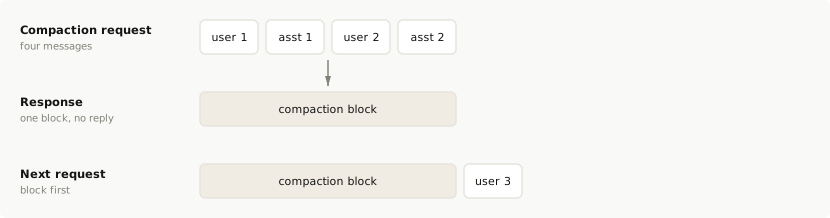
![On-demand compaction: a request that carries four messages and the compaction parameter returns one compaction block and no reply; on the next request the block comes first in messages in place of those four messages, followed by the next user turn](https://platform.claude.com/docs/images/compaction-on-demand-swap.svg)

## Request a summary

Send the `compact-2026-09-04` beta header on the request that asks for the summary and on every later request that carries the signed block. To check whether a model supports on-demand compaction, call the [Models API](https://platform.claude.com/docs/en/api/beta/models/list) with the beta header and read each model's `capabilities.compaction`. You can't combine `compaction` with `context_management` on one request.

Send the conversation as it stands with `"compaction": {"type": "summarize"}`. The API summarizes every message in the request once, generates no reply after it, and returns the block alone with `stop_reason` `"compaction"`. Send the same `system` prompt and `tools` that you use for the rest of the conversation. The summarizer reads them, and if you keep turns after the block on a model with [preserved thinking](https://platform.claude.com/docs/en/build-with-claude/preserved-thinking), the thinking in those turns stays valid only if `system` and `tools` match. The conversation in this example has no `system` prompt or tools, so the request sends neither:

<CodeGroup>
  ```bash cURL
  # max_tokens caps the whole call, including any thinking, so allow several thousand tokens.
  curl https://api.anthropic.com/v1/messages \
    -H "x-api-key: $ANTHROPIC_API_KEY" \
    -H "anthropic-version: 2023-06-01" \
    -H "anthropic-beta: compact-2026-09-04" \
    -H "content-type: application/json" \
    -d '{
      "model": "claude-opus-5",
      "max_tokens": 4096,
      "messages": [
        {"role": "user", "content": "I am building a recipe app. Help me name the main entities in the data model."},
        {"role": "assistant", "content": "Start with Recipe, Ingredient, and Step. Add a RecipeIngredient entry that holds the quantity and unit for each ingredient in a recipe."},
        {"role": "user", "content": "Good. Now suggest field names for Recipe."}
      ],
      "compaction": {"type": "summarize"}
    }'
  ```

  <MultiFileExample language="cli" label="CLI">
    ```bash CLI
    ant beta:messages create --beta compact-2026-09-04 < request.yaml
    ```

    <File filename="request.yaml">
      ```yaml
      model: claude-opus-5
      # max_tokens caps the whole call, including any thinking, so allow several thousand tokens.
      max_tokens: 4096
      messages:
        - role: user
          content: I am building a recipe app. Help me name the main entities in the data model.
        - role: assistant
          content: Start with Recipe, Ingredient, and Step. Add a RecipeIngredient entry that holds the quantity and unit for each ingredient in a recipe.
        - role: user
          content: Good. Now suggest field names for Recipe.
      compaction:
        type: summarize
      ```
    </File>
  </MultiFileExample>

  ```python Python
  from anthropic.types.beta import BetaMessageParam

  client = anthropic.Anthropic()

  history: list[BetaMessageParam] = [
      {
          "role": "user",
          "content": "I am building a recipe app. Help me name the main entities in the data model.",
      },
      {
          "role": "assistant",
          "content": "Start with Recipe, Ingredient, and Step. Add a RecipeIngredient entry that holds the quantity and unit for each ingredient in a recipe.",
      },
      {"role": "user", "content": "Good. Now suggest field names for Recipe."},
  ]

  response = client.beta.messages.create(
      model="claude-opus-5",
      # max_tokens caps the whole call, including any thinking, so allow several thousand tokens.
      max_tokens=4096,
      betas=["compact-2026-09-04"],
      messages=history,
      compaction={"type": "summarize"},
  )
  print(f"Stop reason: {response.stop_reason}")
  ```

  ```typescript TypeScript
  const client = new Anthropic();

  const history: Anthropic.Beta.Messages.BetaMessageParam[] = [
    {
      role: "user",
      content: "I am building a recipe app. Help me name the main entities in the data model."
    },
    {
      role: "assistant",
      content:
        "Start with Recipe, Ingredient, and Step. Add a RecipeIngredient entry that holds the quantity and unit for each ingredient in a recipe."
    },
    { role: "user", content: "Good. Now suggest field names for Recipe." }
  ];

  const response = await client.beta.messages.create({
    model: "claude-opus-5",
    // max_tokens caps the whole call, including any thinking, so allow several thousand tokens.
    max_tokens: 4096,
    betas: ["compact-2026-09-04"],
    messages: history,
    compaction: { type: "summarize" }
  });
  console.log(`Stop reason: ${response.stop_reason}`);
  ```

  ```csharp C#
  using Anthropic.Models.Beta;
  using Anthropic.Models.Beta.Messages;
  using Model = Anthropic.Models.Messages.Model;

  AnthropicClient client = new();

  List<BetaMessageParam> history =
  [
      new()
      {
          Role = Role.User,
          Content = "I am building a recipe app. Help me name the main entities in the data model.",
      },
      new()
      {
          Role = Role.Assistant,
          Content = "Start with Recipe, Ingredient, and Step. Add a RecipeIngredient entry that holds the quantity and unit for each ingredient in a recipe.",
      },
      new() { Role = Role.User, Content = "Good. Now suggest field names for Recipe." },
  ];

  var response = await client.Beta.Messages.Create(new MessageCreateParams
  {
      Model = Model.ClaudeOpus5,
      // max_tokens caps the whole call, including any thinking, so allow several thousand tokens.
      MaxTokens = 4096,
      Betas = [AnthropicBeta.Compact2026_09_04],
      Messages = history,
      Compaction = new BetaCompactionConfig(), // type defaults to "summarize"
  });

  Console.WriteLine($"Stop reason: {response.StopReason?.Raw()}");
  ```

  ```go Go
  client := anthropic.NewClient()

  history := []anthropic.BetaMessageParam{
  	anthropic.NewBetaUserMessage(anthropic.NewBetaTextBlock("I am building a recipe app. Help me name the main entities in the data model.")),
  	{
  		Role:    anthropic.BetaMessageParamRoleAssistant,
  		Content: []anthropic.BetaContentBlockParamUnion{anthropic.NewBetaTextBlock("Start with Recipe, Ingredient, and Step. Add a RecipeIngredient entry that holds the quantity and unit for each ingredient in a recipe.")},
  	},
  	anthropic.NewBetaUserMessage(anthropic.NewBetaTextBlock("Good. Now suggest field names for Recipe.")),
  }

  response, err := client.Beta.Messages.New(context.TODO(), anthropic.BetaMessageNewParams{
  	Model: anthropic.ModelClaudeOpus5,
  	// max_tokens caps the whole call, including any thinking, so allow several thousand tokens.
  	MaxTokens: 4096,
  	Betas:     []anthropic.AnthropicBeta{anthropic.AnthropicBetaCompact2026_09_04},
  	Messages:  history,
  	Compaction: anthropic.BetaCompactionConfigUnionParam{
  		OfSummarize: &anthropic.BetaSummarizeCompactionParam{},
  	},
  })
  if err != nil {
  	log.Fatal(err)
  }
  fmt.Println("Stop reason:", response.StopReason)
  ```

  ```java Java
  import com.anthropic.models.beta.AnthropicBeta;
  import com.anthropic.models.beta.messages.BetaCompactionConfig;
  import com.anthropic.models.beta.messages.MessageCreateParams;

  void main() {
      var client = AnthropicOkHttpClient.fromEnv();

      var params = MessageCreateParams.builder()
          .model(Model.CLAUDE_OPUS_5)
          // max_tokens caps the whole call, including any thinking, so allow several thousand tokens.
          .maxTokens(4096)
          .addBeta(AnthropicBeta.COMPACT_2026_09_04)
          .addUserMessage("I am building a recipe app. Help me name the main entities in the data model.")
          .addAssistantMessage("Start with Recipe, Ingredient, and Step. Add a RecipeIngredient entry that holds the quantity and unit for each ingredient in a recipe.")
          .addUserMessage("Good. Now suggest field names for Recipe.")
          .compaction(BetaCompactionConfig.builder().build()) // type defaults to "summarize"
          .build();

      var response = client.beta().messages().create(params);
      response.stopReason().ifPresent(reason -> IO.println("Stop reason: " + reason));
  }
  ```

  ```php PHP
  use Anthropic\Beta\AnthropicBeta;
  use Anthropic\Beta\Messages\BetaCompactionConfig;
  use Anthropic\Beta\Messages\BetaMessageParam;
  use Anthropic\Beta\Messages\BetaMessageParam\Role;

  $client = new Client();

  $history = [
      BetaMessageParam::with(
          role: Role::USER,
          content: 'I am building a recipe app. Help me name the main entities in the data model.',
      ),
      BetaMessageParam::with(
          role: Role::ASSISTANT,
          content: 'Start with Recipe, Ingredient, and Step. Add a RecipeIngredient entry that holds the quantity and unit for each ingredient in a recipe.',
      ),
      BetaMessageParam::with(role: Role::USER, content: 'Good. Now suggest field names for Recipe.'),
  ];

  $response = $client->beta->messages->create(
      model: Model::CLAUDE_OPUS_5,
      // max_tokens caps the whole call, including any thinking, so allow several thousand tokens.
      maxTokens: 4096,
      betas: [AnthropicBeta::COMPACT_2026_09_04],
      messages: $history,
      compaction: BetaCompactionConfig::with(), // type defaults to 'summarize'
  );

  echo "Stop reason: {$response->stopReason}", PHP_EOL;
  ```

  ```ruby Ruby
  client = Anthropic::Client.new

  history = [
    {
      role: "user",
      content: "I am building a recipe app. Help me name the main entities in the data model."
    },
    {
      role: "assistant",
      content: "Start with Recipe, Ingredient, and Step. Add a RecipeIngredient entry that holds the quantity and unit for each ingredient in a recipe."
    },
    { role: "user", content: "Good. Now suggest field names for Recipe." }
  ]

  response = client.beta.messages.create(
    model: Anthropic::Model::CLAUDE_OPUS_5,
    # max_tokens caps the whole call, including any thinking, so allow several thousand tokens.
    max_tokens: 4096,
    betas: [Anthropic::AnthropicBeta::COMPACT_2026_09_04],
    messages: history,
    compaction: { type: "summarize" }
  )
  puts "Stop reason: #{response.stop_reason}"
  ```
</CodeGroup>

```json Response
{
  "id": "msg_013Zva2CMHLNnXjNJJKqJ2EF",
  "type": "message",
  "role": "assistant",
  "model": "claude-opus-5",
  "content": [
    {
      "type": "compaction",
      "content": "Summary of the conversation: the user is designing the data model for a recipe app. The entities agreed so far are Recipe, Ingredient, Step, and RecipeIngredient, which holds the quantity and unit. The user then asked for field names for Recipe.",
      "signature": "EuYBCkQY..."
    }
  ],
  "stop_reason": "compaction",
  "usage": {
    "input_tokens": 0,
    "output_tokens": 0,
    "iterations": [{ "type": "compaction", "input_tokens": 144, "output_tokens": 276 }]
  }
}
```

The summarization call uses the request's model, `system`, `tools`, thinking settings, and `max_tokens`. The summarizer reads the tool definitions but never runs a tool, and the response carries no thinking. `max_tokens` caps the whole call, including any thinking the model does before it writes the summary, so allow several thousand tokens. [Count compaction usage](https://platform.claude.com/docs/en/build-with-claude/compaction-on-demand#understanding-usage) shows how the call is billed.

If the last `assistant` turn ends in a tool call with no result yet, the API rejects the request. Send that turn's tool results first. Also leave out `stop_sequences`, structured-output `output_config.format`, and a `tool_choice` of type `any` or `tool`. They would do nothing on a summarization call, and the API rejects them. The conversation must still fit the model's context window, so compact before you outgrow it, not after.

When you stream the response, the block arrives whole. You get one `content_block_start` event carrying the complete block, then `content_block_stop`, with no `content_block_delta` events. `ping` events can arrive before or between them.

Cut at 300 lines. The page has the rest.

build-with-claude/compaction-thinking-blocks New page · 688 lines, new page

## Compatibility ## Conditions for kept thinking to stay valid ## Compact again without breaking older thinking ## Change the system prompt or tools ## Check that the kept thinking held

A whole new page. There's nothing to diff it against, so here is what it says.

---
title: Compaction and preserved thinking
url: https://platform.claude.com/docs/en/build-with-claude/compaction-thinking-blocks
description: When thinking blocks in turns kept after on-demand compaction stay valid on models with preserved thinking, and how to check.
---

## Compatibility
- Status: Beta
- [Beta header](https://platform.claude.com/docs/en/api/beta-headers): `compact-2026-09-04`
- Supported models: `claude-fable-5-1`, `claude-mythos-5-1`, `claude-fable-5`, `claude-mythos-5`, `claude-mythos-preview`, `claude-opus-5`, `claude-opus-4-8`, `claude-opus-4-7`, `claude-opus-4-6`, `claude-sonnet-5`, `claude-sonnet-4-6`
- Platforms: Claude API (beta), Claude Platform on AWS (beta), Microsoft Foundry (beta); not available on Amazon Bedrock, Google Cloud

Skip this page unless you send thinking blocks back to a model with [preserved thinking](https://platform.claude.com/docs/en/build-with-claude/preserved-thinking) and keep turns after the compaction block. Kept turns are the turns that follow the block: recent turns you left out of the compaction request, as in [Compaction that keeps recent turns](https://platform.claude.com/docs/en/build-with-claude/compaction-keep-recent-turns), or turns that arrived while the summary was being written, as in [Compaction in the background](https://platform.claude.com/docs/en/build-with-claude/compaction-background).

Models with preserved thinking check earlier thinking blocks against the conversation that produced them. A summary replaces part of that conversation, but the check accepts the swap when the API wrote the summary, so the thinking in kept turns can stay valid.

## Conditions for kept thinking to stay valid

The thinking blocks in kept turns stay valid while all of these hold:

* **The compaction request runs on a model with preserved thinking.** This condition covers every compaction request since a thinking block was produced, not only the most recent one. One way to meet it is to send every compaction request to the model the conversation uses.
* **The kept turns directly follow the summarized messages, and you send them unchanged.** Send each kept message exactly as it is in your history. Don't skip or add a message between the last summarized message and the first kept one. The first kept message must also have a different role from the last summarized message, and it can't be a mid-conversation `role: "system"` message. Otherwise, the API merges it into the last summarized message. One way to get the first kept message right is to compact exactly the `messages` of a request you already sent. The kept turns then start with Claude's reply to it.
* **`system` and the `tools` not marked `defer_loading: true` don't change.** They are the same on the compaction request as on the requests that produced the kept thinking, and they stay the same on the requests that follow. [Change the system prompt or tools](https://platform.claude.com/docs/en/build-with-claude/compaction-thinking-blocks#change-the-system-prompt-or-tools) covers how to change them safely.

If a condition doesn't hold, nothing fails when you compact, and the API accepts the block on later requests either way. The failure comes on the first later request that sends the kept thinking where the API enforces the check: a 400 error by default, or dropped thinking blocks if the request sets `thinking.block_binding.prefix_mismatch_behavior` to `"drop_block"`. In the Message Batches API, an item that leaves the field unset drops the blocks instead. [What the API does with an invalid block](https://platform.claude.com/docs/en/build-with-claude/preserved-thinking#mismatch-behavior) describes both outcomes, and [When the API enforces the check](https://platform.claude.com/docs/en/build-with-claude/preserved-thinking#enforcement) says which requests are checked.

## Compact again without breaking older thinking

You can [compact again](https://platform.claude.com/docs/en/build-with-claude/compaction-on-demand#compact-again) and keep turns: the new block covers the old summary and every message that follows it in the compaction request, and any turns you leave out of that request are kept turns of the new block.

The first of the [conditions for kept thinking](https://platform.claude.com/docs/en/build-with-claude/compaction-thinking-blocks#conditions-for-kept-thinking-to-stay-valid) counts every compaction since a thinking block was produced, so a turn that you keep through two compactions needs both to have run on a model with preserved thinking.

Compactions from before a thinking block was produced don't count against it. Thinking produced after a block is in place is bound to that block, and it stays valid through later compactions that meet the conditions.

## Change the system prompt or tools

A later request can use a different `system`, different `tools`, or a different model than the compaction request, and the API still accepts the block. Such a change can invalidate the thinking in the kept turns, but it has no other effect.

To change `system` or `tools` without invalidating any kept thinking, compact the whole conversation first, so no turns are kept. Then change them on the next request.

To add an instruction or change the available tools without touching `system` or `tools`, append the change to `messages`, as described in [Make changes without editing the prefix](https://platform.claude.com/docs/en/build-with-claude/preserved-thinking#replace-prefix-edits).

Mid-conversation system messages inside the summarized turns are summarized too, so their instructions and tool changes stop applying after the swap. To keep one in force, state it again in a `role: "system"` message directly after the first new `user` turn that follows the kept turns. A system message placed between the block and the kept turns breaks their thinking.

## Check that the kept thinking held

The compaction response doesn't say whether the kept thinking holds. The first request after the swap does. To check in your tests:

1. Have a short conversation with thinking on. Use a model on which the API runs the check (see [When the API enforces the check](https://platform.claude.com/docs/en/build-with-claude/preserved-thinking#enforcement)), and use it for every step, because a model that can't read a thinking block drops it with no error.
2. Compact the older turns, and keep at least one turn that holds a thinking block.
3. Send the next request, with the block first, then the kept turn, then a new `user` message, and with `thinking.block_binding.prefix_mismatch_behavior` set to `"error"`.
4. Read the result. A 200 response whose `input_transformations` array is empty means no thinking block failed the check or was dropped. A 400 error that says the block is bound to a different conversation means one did. The message starts with the path of the first block that failed, and [What the API does with an invalid block](https://platform.claude.com/docs/en/build-with-claude/preserved-thinking#mismatch-behavior) shows it in full.

The `prefix_mismatch_behavior` field needs the `thinking-binding-controls-2026-08-01` beta header in addition to [the `compact-2026-09-04` beta header](https://platform.claude.com/docs/en/build-with-claude/compaction-on-demand#request-a-summary). Setting the field also opts the request into the check on accounts where the check isn't on by default.

The following program runs the four steps. It prints how many thinking blocks the kept turn holds and how many entries `input_transformations` has; no entries means the kept thinking held:

<CodeGroup exclude="shell">
  ```python Python
  from anthropic.types.beta import BetaMessageParam, BetaThinkingConfigParam

  client = anthropic.Anthropic()

  # Claude Fable 5.1 is the first model that checks sent-back thinking against the conversation.
  MODEL = "claude-fable-5-1"
  BETAS = ["compact-2026-09-04", "thinking-binding-controls-2026-08-01"]
  SYSTEM = "You help plan a recipe app's release. Keep answers short."
  # With "error", a thinking block that fails the check makes the request fail with a 400.
  THINKING: BetaThinkingConfigParam = {
      "type": "adaptive",
      "block_binding": {"prefix_mismatch_behavior": "error"},
  }

  # 1. Have a short conversation with thinking on.
  history: list[BetaMessageParam] = [
      {"role": "user", "content": "What are the main entities in the app's data model?"}
  ]
  first = client.beta.messages.create(
      model=MODEL,
      max_tokens=8192,
      system=SYSTEM,
      betas=BETAS,
      thinking=THINKING,
      messages=history,
  )
  history += [
      {"role": "assistant", "content": first.content},
      {
          "role": "user",
          "content": "Testing starts on Tuesday, March 3, 2026, takes 10 weekdays, and pauses on March 9 and March 16. On which date does it end?",
      },
  ]
  second = client.beta.messages.create(
      model=MODEL,
      max_tokens=8192,
      system=SYSTEM,
      betas=BETAS,
      thinking=THINKING,
      messages=history,
  )
  history.append({"role": "assistant", "content": second.content})
  thinking_blocks = sum(block.type == "thinking" for block in second.content)
  print(f"Thinking blocks in the kept turn: {thinking_blocks}")

  # 2. Summarize the first turn. The second turn stays out of the request.
  summary = client.beta.messages.create(
      model=MODEL,
      max_tokens=4096,
      system=SYSTEM,
      betas=BETAS,
      thinking=THINKING,
      messages=history[:2],
      compaction={"type": "summarize"},
  )
  if summary.stop_reason != "compaction":
      raise SystemExit(f"No summary: {summary.stop_reason}")

  # 3. Put the block in front of the kept turn and ask the next question.
  history = [
      {"role": "assistant", "content": summary.content},
      *history[2:],
      {"role": "user", "content": "Which day should the release go out?"},
  ]
  third = client.beta.messages.create(
      model=MODEL,
      max_tokens=8192,
      system=SYSTEM,
      betas=BETAS,
      thinking=THINKING,
      messages=history,
  )

  # 4. A 200 with no dropped blocks means the kept thinking held.
  print(f"Dropped thinking blocks: {len(third.input_transformations)}")
  ```

  ```typescript TypeScript
  const client = new Anthropic();

  // Claude Fable 5.1 is the first model that checks sent-back thinking against the conversation.
  const model: Anthropic.Model = "claude-fable-5-1";
  const betas: Anthropic.Beta.AnthropicBeta[] = [
    "compact-2026-09-04",
    "thinking-binding-controls-2026-08-01"
  ];
  const systemPrompt = "You help plan a recipe app's release. Keep answers short.";
  // With "error", a thinking block that fails the check makes the request fail with a 400.
  const thinking: Anthropic.Beta.Messages.BetaThinkingConfigParam = {
    type: "adaptive",
    block_binding: { prefix_mismatch_behavior: "error" }
  };

  // 1. Have a short conversation with thinking on.
  let history: Anthropic.Beta.Messages.BetaMessageParam[] = [
    { role: "user", content: "What are the main entities in the app's data model?" }
  ];
  const first = await client.beta.messages.create({
    model,
    max_tokens: 8192,
    system: systemPrompt,
    betas,
    thinking,
    messages: history
  });
  history.push(
    { role: "assistant", content: first.content },
    {
      role: "user",
      content:
        "Testing starts on Tuesday, March 3, 2026, takes 10 weekdays, and pauses on March 9 and March 16. On which date does it end?"
    }
  );
  const second = await client.beta.messages.create({
    model,
    max_tokens: 8192,
    system: systemPrompt,
    betas,
    thinking,
    messages: history
  });
  history.push({ role: "assistant", content: second.content });
  const thinkingBlocks = second.content.filter((block) => block.type === "thinking").length;
  console.log(`Thinking blocks in the kept turn: ${thinkingBlocks}`);

  // 2. Summarize the first turn. The second turn stays out of the request.
  const summary = await client.beta.messages.create({
    model,
    max_tokens: 4096,
    system: systemPrompt,
    betas,
    thinking,
    messages: history.slice(0, 2),
    compaction: { type: "summarize" }
  });
  if (summary.stop_reason !== "compaction") {
    throw new Error(`No summary: ${summary.stop_reason}`);
  }

  // 3. Put the block in front of the kept turn and ask the next question.
  history = [
    { role: "assistant", content: summary.content },
    ...history.slice(2),
    { role: "user", content: "Which day should the release go out?" }
  ];
  const third = await client.beta.messages.create({
    model,
    max_tokens: 8192,
    system: systemPrompt,
    betas,
    thinking,
    messages: history
  });

  // 4. A 200 with no dropped blocks means the kept thinking held.
  console.log(`Dropped thinking blocks: ${third.input_transformations?.length ?? 0}`);
  ```

  ```csharp C#
  using Anthropic.Models.Beta;
  using Anthropic.Models.Beta.Messages;
  using Model = Anthropic.Models.Messages.Model;

  AnthropicClient client = new();

  // Claude Fable 5.1 is the first model that checks sent-back thinking against the conversation.
  const Model ModelId = Model.ClaudeFable5_1;
  AnthropicBeta[] betas = [AnthropicBeta.Compact2026_09_04, AnthropicBeta.ThinkingBindingControls2026_08_01];
  const string SystemPrompt = "You help plan a recipe app's release. Keep answers short.";
  // With "error", a thinking block that fails the check makes the request fail with a 400.
  BetaThinkingConfigAdaptive thinking = new()
  {
      BlockBinding = new() { PrefixMismatchBehavior = BetaThinkingPrefixMismatchBehavior.Error },
  };

  // 1. Have a short conversation with thinking on.
  List<BetaMessageParam> history =
  [
      new() { Role = Role.User, Content = "What are the main entities in the app's data model?" },
  ];
  var first = await client.Beta.Messages.Create(new MessageCreateParams
  {
      Model = ModelId,
      MaxTokens = 8192,
      System = SystemPrompt,
      Betas = [.. betas],
      Thinking = thinking,
      Messages = history,
  });
  history.AddRange(
  [
      new()
      {
          Role = Role.Assistant,
          Content = first.Content.Select(block => new BetaContentBlockParam(block.Json)).ToList(),
      },
      new()
      {
          Role = Role.User,
          Content = "Testing starts on Tuesday, March 3, 2026, takes 10 weekdays, and pauses on March 9 and March 16. On which date does it end?",
      },
  ]);
  var second = await client.Beta.Messages.Create(new MessageCreateParams
  {
      Model = ModelId,
      MaxTokens = 8192,
      System = SystemPrompt,
      Betas = [.. betas],
      Thinking = thinking,
      Messages = history,
  });
  history.Add(new()
  {
      Role = Role.Assistant,
      Content = second.Content.Select(block => new BetaContentBlockParam(block.Json)).ToList(),
  });
  var thinkingBlocks = second.Content.Count(block => block.TryPickThinking(out _));
  Console.WriteLine($"Thinking blocks in the kept turn: {thinkingBlocks}");

  // 2. Summarize the first turn. The second turn stays out of the request.
  var summary = await client.Beta.Messages.Create(new MessageCreateParams
  {
      Model = ModelId,
      MaxTokens = 4096,
      System = SystemPrompt,
      Betas = [.. betas],
      Thinking = thinking,
      Messages = history[..2],
      Compaction = new BetaCompactionConfig(), // type defaults to "summarize"
  });
  if (summary.StopReason != BetaStopReason.Compaction)
  {
      throw new InvalidOperationException($"No summary: {summary.StopReason?.Raw()}");
  }

  // 3. Put the block in front of the kept turn and ask the next question.
  history =
  [
      new()
      {
          Role = Role.Assistant,

Cut at 300 lines. The page has the rest.

build-with-claude/compaction-threshold New page · 3457 lines, new page

## Compatibility ## How compaction works ## Basic usage ## Parameters ### Trigger configuration ### Custom summarization instructions ### Pausing after compaction #### Enforcing a total token budget ## Working with compaction blocks ### Passing compaction blocks back ### Streaming ### Prompt caching #### Maximizing cache hits with system prompts ## Understanding usage ## Combining with other features ### Server tools ### Token counting ## Examples ## Current limitations ## Next steps

A whole new page. There's nothing to diff it against, so here is what it says.

---
title: Compaction at a token threshold
url: https://platform.claude.com/docs/en/build-with-claude/compaction-threshold
description: Have the API summarize older context automatically, inside an ordinary request, when the conversation reaches a token threshold you set.
---

## Compatibility
- Status: Beta
- [Beta header](https://platform.claude.com/docs/en/api/beta-headers): `compact-2026-01-12`
- [ZDR](https://platform.claude.com/docs/en/manage-claude/api-and-data-retention): eligible (excludes [Covered Models](https://platform.claude.com/docs/en/manage-claude/api-and-data-retention#model-specific-data-retention-requirements))
- Supported models: `claude-fable-5-1`, `claude-mythos-5-1`, `claude-fable-5`, `claude-mythos-5`, `claude-mythos-preview`, `claude-opus-5`, `claude-opus-4-8`, `claude-opus-4-7`, `claude-opus-4-6`, `claude-sonnet-5`, `claude-sonnet-4-6`
- Platforms: Claude API (beta), Claude Platform on AWS (beta), Amazon Bedrock (beta), Google Cloud (beta), Microsoft Foundry (beta)

Threshold compaction is the automatic kind of compaction: you set a token threshold on your ordinary requests, and the API summarizes older context partway through a request once the threshold is reached. It is supported alongside on-demand compaction, where you decide when the summary is written (see [Compaction on demand](https://platform.claude.com/docs/en/build-with-claude/compaction-on-demand)). To choose between them, see [Choose how to compact](https://platform.claude.com/docs/en/build-with-claude/compaction#choose-how-to-compact).

Compaction extends the effective context length for long-running conversations and tasks by automatically summarizing older context when approaching the context window limit. It also keeps the active context small: as a conversation grows, response quality degrades, so compaction replaces older content with a concise summary.

<Tip>
  For a deeper look at why long contexts degrade and how compaction helps, see [Effective context engineering](https://www.anthropic.com/engineering/effective-context-engineering-for-ai-agents).
</Tip>

This is ideal for:

* Chat-based, multi-turn conversations where you want users to use one chat for a long period of time
* Task-oriented prompts that require a lot of follow-up work (often tool use) that might exceed the context window

## How compaction works

When compaction is enabled, Claude automatically summarizes your conversation when it reaches the configured token threshold. The API:

1. Detects when input tokens reach your specified trigger threshold.
2. Generates a summary of the current conversation.
3. Creates a `compaction` block containing the summary.
4. Continues the response with the compacted context.

On subsequent requests, append the response to your messages. The API automatically drops all content blocks prior to the `compaction` block, continuing the conversation from the summary.
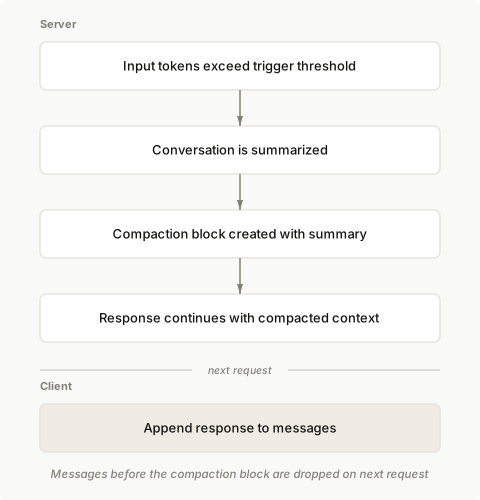
![Compaction flow: when input tokens reach the trigger, Claude writes a summary into a compaction block and continues](https://platform.claude.com/docs/images/compaction-flow.svg)

## Basic usage

Enable compaction by adding the `compact_20260112` strategy to `context_management.edits` in your Messages API request.

<CodeGroup>
  ```bash cURL
  curl https://api.anthropic.com/v1/messages \
    -H "x-api-key: $ANTHROPIC_API_KEY" \
    -H "anthropic-version: 2023-06-01" \
    -H "anthropic-beta: compact-2026-01-12" \
    -H "content-type: application/json" \
    -d '{
      "model": "claude-opus-5",
      "max_tokens": 4096,
      "messages": [
        {
          "role": "user",
          "content": "Help me build a website"
        }
      ],
      "context_management": {
        "edits": [
          {
            "type": "compact_20260112"
          }
        ]
      }
    }'
  ```

  ```bash CLI
  ant beta:messages create --beta compact-2026-01-12 <<'YAML'
  model: claude-opus-5
  max_tokens: 4096
  messages:
    - role: user
      content: Help me build a website
  context_management:
    edits:
      - type: compact_20260112
  YAML
  ```

  ```python Python
  client = anthropic.Anthropic()

  messages = [{"role": "user", "content": "Help me build a website"}]

  response = client.beta.messages.create(
      betas=["compact-2026-01-12"],
      model="claude-opus-5",
      max_tokens=4096,
      messages=messages,
      context_management={"edits": [{"type": "compact_20260112"}]},
  )

  # Append the response (including any compaction block) to continue the conversation
  messages.append({"role": "assistant", "content": response.content})
  ```

  ```typescript TypeScript
  const client = new Anthropic();

  const messages: Anthropic.Beta.Messages.BetaMessageParam[] = [
    { role: "user", content: "Help me build a website" }
  ];

  const response = await client.beta.messages.create({
    betas: ["compact-2026-01-12"],
    model: "claude-opus-5",
    max_tokens: 4096,
    messages,
    context_management: {
      edits: [
        {
          type: "compact_20260112"
        }
      ]
    }
  });

  // Append the response (including any compaction block) to continue the conversation
  messages.push({
    role: "assistant",
    content: response.content
  });
  ```

  ```csharp C#
  AnthropicClient client = new();

  var messages = new List<BetaMessageParam>
  {
      new() { Role = Role.User, Content = "Help me build a website" }
  };

  var parameters = new MessageCreateParams
  {
      Betas = ["compact-2026-01-12"],
      Model = "claude-opus-5",
      MaxTokens = 4096,
      Messages = messages,
      ContextManagement = new BetaContextManagementConfig
      {
          Edits = [new BetaCompact20260112Edit()]
      }
  };

  var response = await client.Beta.Messages.Create(parameters);

  // Append the response (including any compaction block) to continue the conversation
  messages.Add(new BetaMessageParam
  {
      Role = Role.Assistant,
      Content = response.Content.Select(block => new BetaContentBlockParam(block.Json)).ToList()
  });

  Console.WriteLine(response);
  ```

  ```go Go
  client := anthropic.NewClient()

  messages := []anthropic.BetaMessageParam{
  	anthropic.NewBetaUserMessage(anthropic.NewBetaTextBlock("Help me build a website")),
  }

  response, err := client.Beta.Messages.New(context.TODO(), anthropic.BetaMessageNewParams{
  	Model:     anthropic.ModelClaudeOpus5,
  	MaxTokens: 4096,
  	Messages:  messages,
  	ContextManagement: anthropic.BetaContextManagementConfigParam{
  		Edits: []anthropic.BetaContextManagementConfigEditUnionParam{
  			{OfCompact20260112: &anthropic.BetaCompact20260112EditParam{}},
  		},
  	},
  	Betas: []anthropic.AnthropicBeta{"compact-2026-01-12"},
  })
  if err != nil {
  	log.Fatal(err)
  }

  // Append the response (including any compaction block) to continue the conversation
  messages = append(messages, response.ToParam())

  fmt.Println(response)
  ```

  ```java Java
  import com.anthropic.models.beta.messages.BetaContextManagementConfig;
  import com.anthropic.models.beta.messages.BetaCompact20260112Edit;
  // ...
          AnthropicClient client = AnthropicOkHttpClient.fromEnv();

          MessageCreateParams params = MessageCreateParams.builder()
              .addBeta("compact-2026-01-12")
              .model("claude-opus-5")
              .maxTokens(4096L)
              .addUserMessage("Help me build a website")
              .contextManagement(BetaContextManagementConfig.builder()
                  .addEdit(BetaCompact20260112Edit.builder().build())
                  .build())
              .build();

          BetaMessage response = client.beta().messages().create(params);

          // Append the response (including any compaction block) to continue the conversation
          // by including it in the next request's messages
          System.out.println(response);
  ```

  ```php PHP
  $client = new Client();

  $messages = [
      ['role' => 'user', 'content' => 'Help me build a website']
  ];

  $response = $client->beta->messages->create(
      maxTokens: 4096,
      messages: $messages,
      model: 'claude-opus-5',
      betas: ['compact-2026-01-12'],
      contextManagement: [
          'edits' => [
              ['type' => 'compact_20260112']
          ]
      ]
  );

  // Append the response (including any compaction block) to continue the conversation
  $messages[] = ['role' => 'assistant', 'content' => $response->content];

  echo json_encode($response, JSON_PRETTY_PRINT), PHP_EOL;
  ```

  ```ruby Ruby
  client = Anthropic::Client.new

  messages = [
    { role: "user", content: "Help me build a website" }
  ]

  response = client.beta.messages.create(
    betas: ["compact-2026-01-12"],
    model: "claude-opus-5",
    max_tokens: 4096,
    messages: messages,
    context_management: {
      edits: [{ type: "compact_20260112" }]
    }
  )

  # Append the response (including any compaction block) to continue the conversation
  messages << { role: "assistant", content: response.content }

  puts response
  ```
</CodeGroup>

## Parameters

| Parameter                | Type    | Default                                     | Description                                                                                                            |
| ------------------------ | ------- | ------------------------------------------- | ---------------------------------------------------------------------------------------------------------------------- |
| `type`                   | string  | Required                                    | Must be `"compact_20260112"`                                                                                           |
| `trigger`                | object  | `{"type": "input_tokens", "value": 150000}` | When to trigger compaction. `input_tokens` is the only supported trigger type. `value` must be at least 50,000 tokens. |
| `pause_after_compaction` | boolean | `false`                                     | Whether to pause after generating the compaction summary                                                               |
| `instructions`           | string  | `null`                                      | Custom summarization prompt. Completely replaces the default prompt when provided.                                     |

### Trigger configuration

Configure when compaction triggers using the `trigger` parameter:

<CodeGroup>
  ```bash cURL
  curl https://api.anthropic.com/v1/messages \
    -H "x-api-key: $ANTHROPIC_API_KEY" \
    -H "anthropic-version: 2023-06-01" \
    -H "anthropic-beta: compact-2026-01-12" \
    -H "content-type: application/json" \
    -d '{
      "model": "claude-opus-5",
      "max_tokens": 4096,
      "messages": [
        {
          "role": "user",
          "content": "Hello, Claude"
        }
      ],
      "context_management": {
        "edits": [
          {
            "type": "compact_20260112",
            "trigger": {
              "type": "input_tokens",
              "value": 150000
            }
          }
        ]
      }
    }'

Cut at 300 lines. The page has the rest.

build-with-claude/context-editing Changed · +20 / -20 lines

from line 2365
23652365 
23662366 <Tab title="Python">
23672367 <Note>
2368 In v1.0 and later, the Python SDK's tool runner does not support client-side `compaction_control`. Use [server-side compaction](https://platform.claude.com/docs/en/build-with-claude/compaction) instead: it works with the tool runner by passing the `compact_20260112` edit in the request's `context_management` parameter.
2368 In v1.0 and later, the Python SDK's tool runner does not support client-side `compaction_control`. Use [server-side compaction](https://platform.claude.com/docs/en/build-with-claude/compaction-threshold) instead: it works with the tool runner by passing the `compact_20260112` edit in the request's `context_management` parameter.
23692369 </Note>
23702370 </Tab>
23712371 
from line 2389
23892389 
23902390 <Tab title="C#">
23912391 <Note>
2392 The C# SDK includes a tool runner, but it does not support client-side `compaction_control`. Use [server-side compaction](https://platform.claude.com/docs/en/build-with-claude/compaction) instead: it works with the tool runner by passing the `compact_20260112` edit in the request's `context_management` parameter.
2392 The C# SDK includes a tool runner, but it does not support client-side `compaction_control`. Use [server-side compaction](https://platform.claude.com/docs/en/build-with-claude/compaction-threshold) instead: it works with the tool runner by passing the `compact_20260112` edit in the request's `context_management` parameter.
23932393 </Note>
23942394 </Tab>
23952395 
23962396 <Tab title="Go">
23972397 <Note>
2398 The Go SDK includes a tool runner, but it does not support client-side `compaction_control`. Use [server-side compaction](https://platform.claude.com/docs/en/build-with-claude/compaction) instead: it works with the tool runner by passing the `compact_20260112` edit in the request's `context_management` parameter.
2398 The Go SDK includes a tool runner, but it does not support client-side `compaction_control`. Use [server-side compaction](https://platform.claude.com/docs/en/build-with-claude/compaction-threshold) instead: it works with the tool runner by passing the `compact_20260112` edit in the request's `context_management` parameter.
23992399 </Note>
24002400 </Tab>
24012401 
24022402 <Tab title="Java">
24032403 <Note>
2404 The Java SDK includes a tool runner, but it does not support client-side `compaction_control`. Use [server-side compaction](https://platform.claude.com/docs/en/build-with-claude/compaction) instead: it works with the tool runner by passing the `compact_20260112` edit in the request's `context_management` parameter.
2404 The Java SDK includes a tool runner, but it does not support client-side `compaction_control`. Use [server-side compaction](https://platform.claude.com/docs/en/build-with-claude/compaction-threshold) instead: it works with the tool runner by passing the `compact_20260112` edit in the request's `context_management` parameter.
24052405 </Note>
24062406 </Tab>
24072407 
24082408 <Tab title="PHP">
24092409 <Note>
2410 The PHP SDK includes a tool runner, but it does not support client-side `compaction_control`. Use [server-side compaction](https://platform.claude.com/docs/en/build-with-claude/compaction) instead: it works with the tool runner by passing the `compact_20260112` edit in the request's `context_management` parameter.
2410 The PHP SDK includes a tool runner, but it does not support client-side `compaction_control`. Use [server-side compaction](https://platform.claude.com/docs/en/build-with-claude/compaction-threshold) instead: it works with the tool runner by passing the `compact_20260112` edit in the request's `context_management` parameter.
24112411 </Note>
24122412 </Tab>
24132413 
from line 2497
24972497 
24982498 <Tab title="Python">
24992499 <Note>
2500 In v1.0 and later, the Python SDK's tool runner does not support client-side `compaction_control`. Use [server-side compaction](https://platform.claude.com/docs/en/build-with-claude/compaction) instead: it works with the tool runner by passing the `compact_20260112` edit in the request's `context_management` parameter.
2500 In v1.0 and later, the Python SDK's tool runner does not support client-side `compaction_control`. Use [server-side compaction](https://platform.claude.com/docs/en/build-with-claude/compaction-threshold) instead: it works with the tool runner by passing the `compact_20260112` edit in the request's `context_management` parameter.
25012501 </Note>
25022502 </Tab>
25032503 
from line 2522
25222522 
25232523 <Tab title="C#">
25242524 <Note>
2525 The C# SDK includes a tool runner, but it does not support client-side `compaction_control`. Use [server-side compaction](https://platform.claude.com/docs/en/build-with-claude/compaction) instead: it works with the tool runner by passing the `compact_20260112` edit in the request's `context_management` parameter.
2525 The C# SDK includes a tool runner, but it does not support client-side `compaction_control`. Use [server-side compaction](https://platform.claude.com/docs/en/build-with-claude/compaction-threshold) instead: it works with the tool runner by passing the `compact_20260112` edit in the request's `context_management` parameter.
25262526 </Note>
25272527 </Tab>
25282528 
25292529 <Tab title="Go">
25302530 <Note>
2531 The Go SDK includes a tool runner, but it does not support client-side `compaction_control`. Use [server-side compaction](https://platform.claude.com/docs/en/build-with-claude/compaction) instead: it works with the tool runner by passing the `compact_20260112` edit in the request's `context_management` parameter.
2531 The Go SDK includes a tool runner, but it does not support client-side `compaction_control`. Use [server-side compaction](https://platform.claude.com/docs/en/build-with-claude/compaction-threshold) instead: it works with the tool runner by passing the `compact_20260112` edit in the request's `context_management` parameter.
25322532 </Note>
25332533 </Tab>
25342534 
25352535 <Tab title="Java">
25362536 <Note>
2537 The Java SDK includes a tool runner, but it does not support client-side `compaction_control`. Use [server-side compaction](https://platform.claude.com/docs/en/build-with-claude/compaction) instead: it works with the tool runner by passing the `compact_20260112` edit in the request's `context_management` parameter.
2537 The Java SDK includes a tool runner, but it does not support client-side `compaction_control`. Use [server-side compaction](https://platform.claude.com/docs/en/build-with-claude/compaction-threshold) instead: it works with the tool runner by passing the `compact_20260112` edit in the request's `context_management` parameter.
25382538 </Note>
25392539 </Tab>
25402540 
25412541 <Tab title="PHP">
25422542 <Note>
2543 The PHP SDK includes a tool runner, but it does not support client-side `compaction_control`. Use [server-side compaction](https://platform.claude.com/docs/en/build-with-claude/compaction) instead: it works with the tool runner by passing the `compact_20260112` edit in the request's `context_management` parameter.
2543 The PHP SDK includes a tool runner, but it does not support client-side `compaction_control`. Use [server-side compaction](https://platform.claude.com/docs/en/build-with-claude/compaction-threshold) instead: it works with the tool runner by passing the `compact_20260112` edit in the request's `context_management` parameter.
25442544 </Note>
25452545 </Tab>
25462546 
from line 2583
25832583 
25842584 <Tab title="Python">
25852585 <Note>
2586 In v1.0 and later, the Python SDK's tool runner does not support client-side `compaction_control`. Use [server-side compaction](https://platform.claude.com/docs/en/build-with-claude/compaction) instead: it works with the tool runner by passing the `compact_20260112` edit in the request's `context_management` parameter.
2586 In v1.0 and later, the Python SDK's tool runner does not support client-side `compaction_control`. Use [server-side compaction](https://platform.claude.com/docs/en/build-with-claude/compaction-threshold) instead: it works with the tool runner by passing the `compact_20260112` edit in the request's `context_management` parameter.
25872587 </Note>
25882588 </Tab>
25892589 
from line 2611
26112611 
26122612 <Tab title="C#">
26132613 <Note>
2614 The C# SDK includes a tool runner, but it does not support client-side `compaction_control`. Use [server-side compaction](https://platform.claude.com/docs/en/build-with-claude/compaction) instead: it works with the tool runner by passing the `compact_20260112` edit in the request's `context_management` parameter.
2614 The C# SDK includes a tool runner, but it does not support client-side `compaction_control`. Use [server-side compaction](https://platform.claude.com/docs/en/build-with-claude/compaction-threshold) instead: it works with the tool runner by passing the `compact_20260112` edit in the request's `context_management` parameter.
26152615 </Note>
26162616 </Tab>
26172617 
26182618 <Tab title="Go">
26192619 <Note>
2620 The Go SDK includes a tool runner, but it does not support client-side `compaction_control`. Use [server-side compaction](https://platform.claude.com/docs/en/build-with-claude/compaction) instead: it works with the tool runner by passing the `compact_20260112` edit in the request's `context_management` parameter.
2620 The Go SDK includes a tool runner, but it does not support client-side `compaction_control`. Use [server-side compaction](https://platform.claude.com/docs/en/build-with-claude/compaction-threshold) instead: it works with the tool runner by passing the `compact_20260112` edit in the request's `context_management` parameter.
26212621 </Note>
26222622 </Tab>
26232623 
26242624 <Tab title="Java">
26252625 <Note>
2626 The Java SDK includes a tool runner, but it does not support client-side `compaction_control`. Use [server-side compaction](https://platform.claude.com/docs/en/build-with-claude/compaction) instead: it works with the tool runner by passing the `compact_20260112` edit in the request's `context_management` parameter.
2626 The Java SDK includes a tool runner, but it does not support client-side `compaction_control`. Use [server-side compaction](https://platform.claude.com/docs/en/build-with-claude/compaction-threshold) instead: it works with the tool runner by passing the `compact_20260112` edit in the request's `context_management` parameter.
26272627 </Note>
26282628 </Tab>
26292629 
26302630 <Tab title="PHP">
26312631 <Note>
2632 The PHP SDK includes a tool runner, but it does not support client-side `compaction_control`. Use [server-side compaction](https://platform.claude.com/docs/en/build-with-claude/compaction) instead: it works with the tool runner by passing the `compact_20260112` edit in the request's `context_management` parameter.
2632 The PHP SDK includes a tool runner, but it does not support client-side `compaction_control`. Use [server-side compaction](https://platform.claude.com/docs/en/build-with-claude/compaction-threshold) instead: it works with the tool runner by passing the `compact_20260112` edit in the request's `context_management` parameter.
26332633 </Note>
26342634 </Tab>
26352635 
from line 2675
26752675 
26762676 <Tab title="Python">
26772677 <Note>
2678 In v1.0 and later, the Python SDK's tool runner does not support client-side `compaction_control`. Use [server-side compaction](https://platform.claude.com/docs/en/build-with-claude/compaction) instead: it works with the tool runner by passing the `compact_20260112` edit in the request's `context_management` parameter.
2678 In v1.0 and later, the Python SDK's tool runner does not support client-side `compaction_control`. Use [server-side compaction](https://platform.claude.com/docs/en/build-with-claude/compaction-threshold) instead: it works with the tool runner by passing the `compact_20260112` edit in the request's `context_management` parameter.
26792679 </Note>
26802680 </Tab>
26812681 
from line 2708
27082708 
27092709 <Tab title="C#">
27102710 <Note>
2711 The C# SDK includes a tool runner, but it does not support client-side `compaction_control`. Use [server-side compaction](https://platform.claude.com/docs/en/build-with-claude/compaction) instead: it works with the tool runner by passing the `compact_20260112` edit in the request's `context_management` parameter.
2711 The C# SDK includes a tool runner, but it does not support client-side `compaction_control`. Use [server-side compaction](https://platform.claude.com/docs/en/build-with-claude/compaction-threshold) instead: it works with the tool runner by passing the `compact_20260112` edit in the request's `context_management` parameter.
27122712 </Note>
27132713 </Tab>
27142714 
27152715 <Tab title="Go">
27162716 <Note>
2717 The Go SDK includes a tool runner, but it does not support client-side `compaction_control`. Use [server-side compaction](https://platform.claude.com/docs/en/build-with-claude/compaction) instead: it works with the tool runner by passing the `compact_20260112` edit in the request's `context_management` parameter.
2717 The Go SDK includes a tool runner, but it does not support client-side `compaction_control`. Use [server-side compaction](https://platform.claude.com/docs/en/build-with-claude/compaction-threshold) instead: it works with the tool runner by passing the `compact_20260112` edit in the request's `context_management` parameter.
27182718 </Note>
27192719 </Tab>
27202720 
27212721 <Tab title="Java">
27222722 <Note>
2723 The Java SDK includes a tool runner, but it does not support client-side `compaction_control`. Use [server-side compaction](https://platform.claude.com/docs/en/build-with-claude/compaction) instead: it works with the tool runner by passing the `compact_20260112` edit in the request's `context_management` parameter.
2723 The Java SDK includes a tool runner, but it does not support client-side `compaction_control`. Use [server-side compaction](https://platform.claude.com/docs/en/build-with-claude/compaction-threshold) instead: it works with the tool runner by passing the `compact_20260112` edit in the request's `context_management` parameter.
27242724 </Note>
27252725 </Tab>
27262726 
27272727 <Tab title="PHP">
27282728 <Note>
2729 The PHP SDK includes a tool runner, but it does not support client-side `compaction_control`. Use [server-side compaction](https://platform.claude.com/docs/en/build-with-claude/compaction) instead: it works with the tool runner by passing the `compact_20260112` edit in the request's `context_management` parameter.
2729 The PHP SDK includes a tool runner, but it does not support client-side `compaction_control`. Use [server-side compaction](https://platform.claude.com/docs/en/build-with-claude/compaction-threshold) instead: it works with the tool runner by passing the `compact_20260112` edit in the request's `context_management` parameter.
27302730 </Note>
27312731 </Tab>
27322732 

build-with-claude/overview Changed · +8 / -6 lines

from line 20
2020 
2121The Availability column in each of the following tables lists the platforms that offer a feature. A platform listed without a label offers the feature as stable, fully supported, and recommended for production use, with no beta header and with standard API [versioning](https://platform.claude.com/docs/en/api/versioning) guarantees. A label after a platform name marks one of the following classifications on that platform. Not all features pass through every stage, and a feature may enter at any stage or skip stages.
2222 
23| Classification | Description |
24| -------------- | ------------------------------------------------------------------------------------------------------------------------------------------------------------------------------------------------------------------------------------------------------------------------------------------------------------------------------------------------------------------------------------------------------------------------------------------------------------------------------------------------------------------------------------------------------------------------------------------------------------------------------------------------- |
25| **Beta** | Preview features used for gathering feedback and iterating on a less mature use case. Availability may be limited, including through sign-up requirements or waitlists, and may not be publicly announced. Features may change significantly or be discontinued based on feedback. Not guaranteed for ongoing production use. Breaking changes are possible with notice, and some platform-specific limitations may apply. Beta features on the Claude API and [Claude Platform on AWS](https://platform.claude.com/docs/en/build-with-claude/claude-platform-on-aws) have a [beta header](https://platform.claude.com/docs/en/api/beta-headers). |
26| **Deprecated** | Feature is still functional but no longer recommended. A migration path and removal timeline are provided. |
27| **Retired** | Feature is no longer available. |
23| Classification | Description |
24| -------------- | ------------------------------------------------------------------------------------------------------------------------------------------------------------------------------------------------------------------------------------------------------------------------------------------------------------------------------------------------------------------------------------------------------------------------------------------------------------------------------------------------------------------------------------------------------------------------------------------------------------------------------------------------------ |
25| **Beta** | Preview features used for gathering feedback and iterating on a less mature use case. Availability may be limited, including through sign-up requirements or waitlists, and may not be publicly announced. Features may change significantly or be discontinued based on feedback. Not guaranteed for ongoing production use. Breaking changes are possible with notice, and some platform-specific limitations may apply. Most beta features on the Claude API and [Claude Platform on AWS](https://platform.claude.com/docs/en/build-with-claude/claude-platform-on-aws) have a [beta header](https://platform.claude.com/docs/en/api/beta-headers). |
26| **Deprecated** | Feature is still functional but no longer recommended. A migration path and removal timeline are provided. |
27| **Retired** | Feature is no longer available. |
2828 
2929**Platform labels:** Claude API (Anthropic first-party) · [Bedrock](https://platform.claude.com/docs/en/build-with-claude/claude-in-amazon-bedrock) (AWS-operated) · [Claude Platform on AWS](https://platform.claude.com/docs/en/build-with-claude/claude-platform-on-aws) (Anthropic-operated on AWS) · [Google Cloud](https://platform.claude.com/docs/en/build-with-claude/claude-on-vertex-ai) (Google-operated) · [Microsoft Foundry](https://platform.claude.com/docs/en/build-with-claude/claude-in-microsoft-foundry) (Anthropic-operated on Azure)
3030 
from line 82
8282 
8383| Feature | Description | ZDR | Availability |
8484| ------------------------------------------------------------------------------------------------------------------------ | --------------------------------------------------------------------------------------------------------------------------------------------------------------------------------------------------------------------- | ---------------- | ----------------------------------------------------------------------------- |
85| [Agent Skills](https://platform.claude.com/docs/en/agents-and-tools/agent-skills/overview) | Extend Claude's capabilities with Skills. Use pre-built Skills (PowerPoint, Excel, Word, PDF) or create custom Skills with instructions and scripts. Skills use progressive disclosure to efficiently manage context. | Not ZDR eligible | <PlatformAvailability claudeApi claudePlatformAwsBeta azureAiBeta />† |
85| [Agent Skills](https://platform.claude.com/docs/en/agents-and-tools/agent-skills/overview) | Extend Claude's capabilities with Skills. Use pre-built Skills (PowerPoint, Excel, Word, PDF) or create custom Skills with instructions and scripts. Skills use progressive disclosure to efficiently manage context. | Not ZDR eligible | <PlatformAvailability claudeApi claudePlatformAwsBeta azureAiBeta />†‡ |
8686| [Fine-grained tool streaming](https://platform.claude.com/docs/en/agents-and-tools/tool-use/fine-grained-tool-streaming) | Stream tool use parameters without buffering/JSON validation, reducing latency for receiving large parameters. | ZDR eligible | <PlatformAvailability claudeApi claudePlatformAws bedrock vertexAi azureAi /> |
8787| [MCP connector](https://platform.claude.com/docs/en/agents-and-tools/mcp-connector) | Connect to remote [MCP](https://platform.claude.com/docs/en/mcp) servers directly from the Messages API without a separate MCP client. | Not ZDR eligible | <PlatformAvailability claudeApiBeta claudePlatformAwsBeta azureAiBeta /> |
8888| [Programmatic tool calling](https://platform.claude.com/docs/en/agents-and-tools/tool-use/programmatic-tool-calling) | Enable Claude to call your tools programmatically from within code execution containers, reducing latency and token consumption for multi-tool workflows. | Not ZDR eligible | <PlatformAvailability claudeApi claudePlatformAws azureAi />† |
from line 112
112112\* **Structured outputs:** Your prompts and Claude's outputs are not stored. Only JSON schemas are cached, for up to 24 hours since last use. **Web search and web fetch:** ZDR-eligible except when [dynamic filtering](https://platform.claude.com/docs/en/agents-and-tools/tool-use/web-search-tool#dynamic-filtering) is enabled. **Fallback credit and server-side fallback:** The features retain no message content, but they handle refusals from the Claude Fable models, which [are not available under ZDR](https://platform.claude.com/docs/en/manage-claude/api-and-data-retention#model-specific-data-retention-requirements). See [ZDR details](https://platform.claude.com/docs/en/manage-claude/api-and-data-retention#feature-eligibility).
113113 
114114† On Microsoft Foundry, feature availability differs by [hosting option](https://platform.claude.com/docs/en/build-with-claude/claude-in-microsoft-foundry#hosting-options). These features are available on Hosted on Anthropic deployments, and not on Hosted on Azure deployments.
115 
116‡ On Claude Platform on AWS, Agent Skills need no beta header and behave the same as on the Claude API.
115117 

build-with-claude/preserved-thinking Changed · +36 / -47 lines

from line 383
383383 
384384Each row compares two consecutive requests:
385385 
386| Change between requests | Later thinking blocks |
387| -------------------------------------------------------------------------------------------------------------------------------------------------------------------------- | --------------------------------------------------------------------------------------------------------------------------------------------------------------------------------------------------------------------------------------------------------------------------------------------------------------------------------------------------- |
388| Append messages at the end | Valid |
389| Add a tool with `defer_loading: true` that nothing has referenced yet | Valid |
390| Remove `thinking` blocks from the start of the history, from the end, or all of them | Valid (the model loses that reasoning) |
391| Change any request parameter outside `system`, `tools`, and `messages` (`effort`, `max_tokens`, `output_config`, `tool_choice`, `metadata`, `thinking.display`, and so on) | Valid |
392| Add, move, or remove `cache_control` markers | Valid |
393| A rotating signed URL that returns the same bytes | Valid |
394| Server-side compaction or context editing removes or replaces content | Valid (the check compares what you sent, not the server's edited copy) |
395| A cleared [turn-scoped system message](https://platform.claude.com/docs/en/build-with-claude/preserved-thinking#per-turn-reminders) left in place | Valid |
396| Edit, reorder, or delete any earlier `user`, `assistant`, or `system` message | Invalid, except when the signed block from [on-demand compaction](https://platform.claude.com/docs/en/build-with-claude/preserved-thinking#server-side-trimming) replaces the messages it summarizes, under the conditions in [Keep-tail compaction](https://platform.claude.com/docs/en/build-with-claude/preserved-thinking#keep-tail-compaction) |
397| Re-render the context you put in the first user message with a changed value | Invalid for every thinking block |
398| Clear or shorten an earlier `tool_result`, re-encode an earlier image, or change an earlier `tool_use` input | Invalid for every later thinking block |
399| Add a text block to an earlier user turn, or remove one you added last time | Invalid |
400| Change the top-level `system` string or blocks | Invalid |
401| Add, remove, rename, or edit a tool in `tools` | Invalid |
402| Remove a `thinking` block from the middle of the history and keep later ones | Invalid for every later thinking block |
403| Put back a `thinking` block you removed on an earlier request | Invalid for thinking blocks produced while it was gone |
404| An image or document URL that returns different bytes on the next request | Invalid |
405| The same turn-scoped message deleted or reworded on a later request | Invalid |
386| Change between requests | Later thinking blocks |
387| -------------------------------------------------------------------------------------------------------------------------------------------------------------------------- | -------------------------------------------------------------------------------------------------------------------------------------------------------------------------------------------------------------------------------------------------------------------------------------------------------------------------------------------------------- |
388| Append messages at the end | Valid |
389| Add a tool with `defer_loading: true` that nothing has referenced yet | Valid |
390| Remove `thinking` blocks from the start of the history, from the end, or all of them | Valid (the model loses that reasoning) |
391| Change any request parameter outside `system`, `tools`, and `messages` (`effort`, `max_tokens`, `output_config`, `tool_choice`, `metadata`, `thinking.display`, and so on) | Valid |
392| Add, move, or remove `cache_control` markers | Valid |
393| A rotating signed URL that returns the same bytes | Valid |
394| Server-side compaction or context editing removes or replaces content | Valid (the check compares what you sent, not the server's edited copy) |
395| A cleared [turn-scoped system message](https://platform.claude.com/docs/en/build-with-claude/preserved-thinking#per-turn-reminders) left in place | Valid |
396| Edit, reorder, or delete any earlier `user`, `assistant`, or `system` message | Invalid, except when the signed block from [on-demand compaction](https://platform.claude.com/docs/en/build-with-claude/compaction-on-demand) replaces the messages it summarizes, under the [conditions for kept thinking](https://platform.claude.com/docs/en/build-with-claude/compaction-thinking-blocks#conditions-for-kept-thinking-to-stay-valid) |
397| Re-render the context you put in the first user message with a changed value | Invalid for every thinking block |
398| Clear or shorten an earlier `tool_result`, re-encode an earlier image, or change an earlier `tool_use` input | Invalid for every later thinking block |
399| Add a text block to an earlier user turn, or remove one you added last time | Invalid |
400| Change the top-level `system` string or blocks | Invalid |
401| Add, remove, rename, or edit a tool in `tools` | Invalid |
402| Remove a `thinking` block from the middle of the history and keep later ones | Invalid for every later thinking block |
403| Put back a `thinking` block you removed on an earlier request | Invalid for thinking blocks produced while it was gone |
404| An image or document URL that returns different bytes on the next request | Invalid |
405| The same turn-scoped message deleted or reworded on a later request | Invalid |
406406 
407407### Check whether your code edits the prefix
408408 
from line 785
785785 
786786Each common prefix edit has a replacement that gives the model the same information and leaves earlier bytes unchanged, so later thinking stays valid. Find the edit your code makes today in the first column:
787787 
788| Instead of | Use | Beta header |
789| --------------------------------------------------------------------------------------------------------------------- | ---------------------------------------------------------------------------------------------------------------------------------------------------------------------------------------------------------------------------------------------------------------------------------------------------------------------------------------------------------------------------------------------------------------------------------------------------------------------------------------- | ------------------------------------------------------------ |
790| Rebuilding the top-level `system` prompt | A [mid-conversation system message](https://platform.claude.com/docs/en/build-with-claude/preserved-thinking#new-instructions) | None |
791| Re-rendering the context in your first user message (environment, date, memory, project instructions) on each request | Render it once and resend it unchanged. When something changes, [put the new version in the newest turn](https://platform.claude.com/docs/en/build-with-claude/preserved-thinking#changing-context) | None |
792| Clearing or shortening old `tool_result` content, or re-encoding old images, in place | Shorten a tool result or downscale an image before the first time you send it, not after. To clear old results later, [trim context on the server](https://platform.claude.com/docs/en/build-with-claude/preserved-thinking#server-side-trimming) with `clear_tool_uses_20250919` | `context-management-2025-06-27` |
793| Injecting a reminder and deleting it on the next request | A [turn-scoped system message](https://platform.claude.com/docs/en/build-with-claude/preserved-thinking#per-turn-reminders) (`clear_at: "next_user_message"`) | `mid-conversation-system-clear-at-2026-08-21` |
794| Adding or removing entries in `tools` | [`tool_addition` and `tool_removal` blocks](https://platform.claude.com/docs/en/build-with-claude/preserved-thinking#tool-changes) | `mid-conversation-tool-changes-2026-07-01` |
795| Changing top-level `output_config.effort` (restarts the cache, doesn't affect thinking) | A [per-message `output_config`](https://platform.claude.com/docs/en/build-with-claude/preserved-thinking#effort-changes) | `mid-conversation-output-config-2026-07-01` |
796| Dropping or summarizing old turns on the client | [On-demand compaction](https://platform.claude.com/docs/en/build-with-claude/preserved-thinking#server-side-trimming) to keep the recent turns with their thinking, other server-side [compaction or context editing](https://platform.claude.com/docs/en/build-with-claude/preserved-thinking#server-side-trimming), or [client-side compaction](https://platform.claude.com/docs/en/build-with-claude/preserved-thinking#custom-compaction-on-the-client) that keeps no stale thinking | `compact-2026-09-04` (not on Amazon Bedrock or Google Cloud) |
797| An image or document URL whose bytes change between requests | A [`file_id` from the Files API](https://platform.claude.com/docs/en/build-with-claude/preserved-thinking#files-by-id), or base64 | None |
788| Instead of | Use | Beta header |
789| --------------------------------------------------------------------------------------------------------------------- | --------------------------------------------------------------------------------------------------------------------------------------------------------------------------------------------------------------------------------------------------------------------------------------------------------------------------------------------------------------------------------------------------------------------------------------------------------------------- | --------------------------------------------- |
790| Rebuilding the top-level `system` prompt | A [mid-conversation system message](https://platform.claude.com/docs/en/build-with-claude/preserved-thinking#new-instructions) | None |
791| Re-rendering the context in your first user message (environment, date, memory, project instructions) on each request | Render it once and resend it unchanged. When something changes, [put the new version in the newest turn](https://platform.claude.com/docs/en/build-with-claude/preserved-thinking#changing-context) | None |
792| Clearing or shortening old `tool_result` content, or re-encoding old images, in place | Shorten a tool result or downscale an image before the first time you send it, not after. To clear old results later, [trim context on the server](https://platform.claude.com/docs/en/build-with-claude/preserved-thinking#server-side-trimming) with `clear_tool_uses_20250919` | `context-management-2025-06-27` |
793| Injecting a reminder and deleting it on the next request | A [turn-scoped system message](https://platform.claude.com/docs/en/build-with-claude/preserved-thinking#per-turn-reminders) (`clear_at: "next_user_message"`) | `mid-conversation-system-clear-at-2026-08-21` |
794| Adding or removing entries in `tools` | [`tool_addition` and `tool_removal` blocks](https://platform.claude.com/docs/en/build-with-claude/preserved-thinking#tool-changes) | `mid-conversation-tool-changes-2026-07-01` |
795| Changing top-level `output_config.effort` (restarts the cache, doesn't affect thinking) | A [per-message `output_config`](https://platform.claude.com/docs/en/build-with-claude/preserved-thinking#effort-changes) | `mid-conversation-output-config-2026-07-01` |
796| Dropping or summarizing old turns on the client | [On-demand compaction](https://platform.claude.com/docs/en/build-with-claude/compaction-on-demand) to keep the recent turns with their thinking, other server-side [compaction or context editing](https://platform.claude.com/docs/en/build-with-claude/preserved-thinking#server-side-trimming), or [client-side compaction](https://platform.claude.com/docs/en/build-with-claude/preserved-thinking#custom-compaction-on-the-client) that keeps no stale thinking | `compact-2026-09-04` |
797| An image or document URL whose bytes change between requests | A [`file_id` from the Files API](https://platform.claude.com/docs/en/build-with-claude/preserved-thinking#files-by-id), or base64 | None |
798798 
799799All of these assume you [send assistant turns back exactly as returned](https://platform.claude.com/docs/en/build-with-claude/preserved-thinking#append-assistant-turns-exactly-as-returned). Mid-conversation system messages, turn-scoped system messages, and tool changes aren't available on every model: [Mid-conversation system messages and tool changes](https://platform.claude.com/docs/en/build-with-claude/mid-conversation-system-messages) lists the models that accept them. If your code serves several models, keep editing the top-level `system` prompt for the models that don't accept them.
800800 
from line 940
940940 
941941Another common prefix edit is client-side trimming: dropping or summarizing the oldest turns and keeping the recent ones verbatim. The kept turns' thinking blocks were produced while the removed history was still in place, so they fail the check. The server-side equivalents don't count as edits, because the check compares the conversation as you sent it:
942942 
943* [Compaction](https://platform.claude.com/docs/en/build-with-claude/compaction) summarizes older turns into a compaction block when the context approaches a threshold you set, and the checked prefix restarts from that block. Its [`instructions` parameter](https://platform.claude.com/docs/en/build-with-claude/compaction#custom-summarization-instructions) takes your own summarization prompt, such as "preserve every ticker, position size, and stated assumption". [On-demand compaction](https://platform.claude.com/docs/en/build-with-claude/compaction#compact-on-demand-with-the-compaction-parameter) (beta) returns the summary from a separate request, which can [run in the background](https://platform.claude.com/docs/en/build-with-claude/preserved-thinking#background-compaction). Send `"compaction": {"type": "summarize"}` in the request body, and the response carries a single `compaction` block, holding the summary and a signature, instead of a reply. On-demand compaction is available on the Claude API but not on Amazon Bedrock or Google Cloud, and it needs the `compact-2026-09-04` beta header on the summary request and on every later request that carries the block. You send the block in place of the messages it summarizes. The check accepts that swap, so the turns you keep can stay valid with their thinking, under the conditions in [Keep-tail compaction](https://platform.claude.com/docs/en/build-with-claude/preserved-thinking#keep-tail-compaction).
943* [On-demand compaction](https://platform.claude.com/docs/en/build-with-claude/compaction-on-demand) (beta) returns the summary from a separate request, which can [run in the background](https://platform.claude.com/docs/en/build-with-claude/compaction-background), and you send the returned block in place of the messages it summarizes. The check accepts that swap, so the turns you keep can stay valid with their thinking, under the [conditions for kept thinking](https://platform.claude.com/docs/en/build-with-claude/compaction-thinking-blocks#conditions-for-kept-thinking-to-stay-valid). [Request a summary](https://platform.claude.com/docs/en/build-with-claude/compaction-on-demand#request-a-summary) shows the request and names the beta header it needs.
944* [Compaction at a token threshold](https://platform.claude.com/docs/en/build-with-claude/compaction-threshold) summarizes older turns into a compaction block when the context approaches a threshold you set, and the checked prefix restarts from that block. Its [`instructions` parameter](https://platform.claude.com/docs/en/build-with-claude/compaction-threshold#custom-summarization-instructions) takes your own summarization prompt, such as "preserve every ticker, position size, and stated assumption".
944945* [Context editing](https://platform.claude.com/docs/en/build-with-claude/context-editing) clears old tool results or old thinking blocks by rule, oldest first. The strategies are `clear_tool_uses_20250919` and `clear_thinking_20251015`.
945946 
946947### Compact on the client
947948 
948You can still compact on the client. If you write the summary yourself, don't send back a thinking block that was produced before the rewrite. If the API writes it with on-demand compaction, [Keep-tail compaction](https://platform.claude.com/docs/en/build-with-claude/preserved-thinking#keep-tail-compaction) lists when kept thinking stays valid.
949You can still compact on the client. If you write the summary yourself, don't send back a thinking block that was produced before the rewrite. If the API writes it with on-demand compaction, [Conditions for kept thinking to stay valid](https://platform.claude.com/docs/en/build-with-claude/compaction-thinking-blocks#conditions-for-kept-thinking-to-stay-valid) lists when kept thinking stays valid.
949950 
950951#### Simple compaction (recommended)
951952 
from line 969
968969 
969970Keep-tail compaction summarizes the older turns and keeps the most recent turns verbatim, so the model still sees the last few exchanges word for word. If you write the summary yourself, it breaks the rule: the kept assistant turns still carry thinking blocks that were produced when the original turns, not the summary, came before them. Those blocks fail.
970971 
971To keep that thinking, have the API write the summary with [on-demand compaction](https://platform.claude.com/docs/en/build-with-claude/preserved-thinking#server-side-trimming). Send only the older turns in a request with the `compaction` parameter and the `compact-2026-09-04` beta header. Then send the signed block it returns in place of those turns, followed by the kept turns exactly as returned. The kept thinking stays valid while all of these hold:
972To keep that thinking, have the API write the summary with on-demand compaction. [Compaction that keeps recent turns](https://platform.claude.com/docs/en/build-with-claude/compaction-keep-recent-turns) shows how, and [Conditions for kept thinking to stay valid](https://platform.claude.com/docs/en/build-with-claude/compaction-thinking-blocks#conditions-for-kept-thinking-to-stay-valid) lists when the kept thinking stays valid.
972973 
973* The compaction request runs on a model with preserved thinking. The conversation's own model is the simple choice.
974* The kept turns directly follow the summarized messages, and the first kept message isn't one the API would merge into the last summarized one: a message with the same role, or a `role: "system"` message.
975* `system` and your non-deferred `tools` match the compaction request.
976 
977The simplest way to meet the second is to compact exactly the `messages` of a request you already made. Mid-conversation system messages inside the summarized turns are summarized too, so their instructions and tool changes stop applying after the swap. To keep one in force, state it again in a `role: "system"` message directly after the first new `user` turn that follows the kept turns. A system message placed between the block and the kept turns breaks their thinking.
978 
979974The rest of this section covers a summary you write yourself.
980975 
981976![Keep-tail compaction: the history is replaced by a summary of turns 1 and 2 followed by turns 3 to 5 verbatim; the thinking on assistant turns 3 and 4 was produced after the original turns, not the summary, so it fails; the same request sent with prefix\_mismatch\_behavior drop\_block succeeds, the API drops those two blocks and lists them in input\_transformations](https://platform.claude.com/docs/images/preserved-thinking-keep-tail-compaction.svg)
from line 1190
11951190 
11961191#### Background (async) compaction
11971192 
1198Background compaction builds the summary off the critical path while the conversation continues, then swaps it in a few requests later. Have the API write the summary with [on-demand compaction](https://platform.claude.com/docs/en/build-with-claude/preserved-thinking#server-side-trimming):
1193Background compaction builds the summary off the critical path while the conversation continues, then swaps it in a few requests later. To keep the thinking produced in the meantime, have the API write the summary with on-demand compaction: [Compaction in the background](https://platform.claude.com/docs/en/build-with-claude/compaction-background) has the steps, and that thinking stays valid under the same [conditions for kept thinking](https://platform.claude.com/docs/en/build-with-claude/compaction-thinking-blocks#conditions-for-kept-thinking-to-stay-valid) as kept recent turns.
11991194 
12001. Send the conversation so far in a separate request with the `compaction` parameter and the `compact-2026-09-04` beta header.
12012. Keep working on the full history while that request runs.
12023. On the first request after the block arrives, send it in place of the messages the compaction request held, followed by every turn appended since.
1203 
1204The thinking produced while the summary was being built stays valid under the same conditions as in [Keep-tail compaction](https://platform.claude.com/docs/en/build-with-claude/preserved-thinking#keep-tail-compaction).
1205 
12061195A summary you build yourself breaks the rule the same way keep-tail does, with a delay: every assistant turn produced while the summary was being built carries thinking that predates the swap, and it all fails the moment the summary lands. If you use one, treat the swap like keep-tail and send `"drop_block"` from the swap onward, or compact synchronously.
12071196 
12081197#### Patterns that don't work with preserved thinking
from line 1232
12431232 </Accordion>
12441233 
12451234 <Accordion title="I compact by summarizing older turns and keeping recent turns verbatim. Does that still work?">
1246 Yes, if the API writes the summary. [On-demand compaction](https://platform.claude.com/docs/en/build-with-claude/preserved-thinking#server-side-trimming) (beta header `compact-2026-09-04`) summarizes the older turns into a signed block that you send in place of them. The recent turns keep their thinking under the conditions in [Keep-tail compaction](https://platform.claude.com/docs/en/build-with-claude/preserved-thinking#keep-tail-compaction).
1235 Yes, if the API writes the summary. [On-demand compaction](https://platform.claude.com/docs/en/build-with-claude/compaction-on-demand) (beta header `compact-2026-09-04`) summarizes the older turns into a signed block that you send in place of them. The recent turns keep their thinking under the [conditions for kept thinking](https://platform.claude.com/docs/en/build-with-claude/compaction-thinking-blocks#conditions-for-kept-thinking-to-stay-valid).
12471236 
12481237 If you write the summary yourself, the kept turns' thinking fails the check, because those blocks were produced against the history you replaced. Strip `thinking` and `redacted_thinking` blocks from the turns you carry across and keep their `text` and `tool_use` blocks, or send `prefix_mismatch_behavior: "drop_block"` and let the API drop them. Simple compaction leaves no thinking behind to fail and is the recommended approach: one summary message plus the next user turn, with no earlier turns replayed. Server-side [compaction](https://platform.claude.com/docs/en/build-with-claude/compaction) and [context editing](https://platform.claude.com/docs/en/build-with-claude/context-editing) don't count as edits. See [Compact on the client](https://platform.claude.com/docs/en/build-with-claude/preserved-thinking#custom-compaction-on-the-client).
12491238 </Accordion>

build-with-claude/skills-guide Changed · +166 / -83 lines

from line 2162
21622162 
21632163A Skill bundle is a directory containing a `SKILL.md` file at the top level with `name` and `description` YAML frontmatter, plus any supporting scripts or resources. See [Get started with Agent Skills in the API](https://platform.claude.com/docs/en/agents-and-tools/agent-skills/quickstart) to author one, and the **Requirements** list following the examples for the full constraints.
21642164 
2165Upload your custom Skill to make it available in your workspace. You can upload a zip archive or individual file objects. The Python SDK also provides a `files_from_dir` helper that accepts a directory path.
2165Upload your custom Skill to make it available in your workspace. You can upload a zip archive or individual file objects. The Python SDK also provides a `files_from_dir` helper that accepts a directory path, and the CLI's `ant apply` uploads the directory itself.
21662166 
21672167Files are identified by the filename you attach (the `;filename=` suffix in the cURL example and the filename arguments in the SDK examples). For the walkthrough's skill, create a zip with `zip -r financial_skill.zip financial_skill/` and substitute it for the `example_skill.zip` placeholder in the zip-upload options.
21682168 
2169<CodeGroup>
2169<CodeGroup defaultLanguage="CLI">
21702170 ```bash cURL
21712171 curl -X POST "https://api.anthropic.com/v1/skills" \
21722172 -H "x-api-key: $ANTHROPIC_API_KEY" \
from line 2177
21772177 
21782178 <MultiFileExample language="cli" label="CLI">
21792179 ```bash CLI
2180 zip -r financial_skill.zip financial_skill/
2181 ant skills create --file financial_skill.zip
2180 ant apply financial_skill
21822181 ```
21832182 
21842183 <File filename="financial_skill/SKILL.md">
from line 3336
33373336 
33383337### Example: financial modeling
33393338 
3340Combine Excel and custom DCF analysis Skills:
3339Combine Excel and custom DCF analysis Skills. First, create the custom DCF analysis Skill:
33413340 
3342<CodeGroup>
3341<CodeGroup defaultLanguage="CLI">
33433342 ```bash cURL
3344 # Create custom DCF analysis Skill
3345 DCF_SKILL=$(curl -X POST "https://api.anthropic.com/v1/skills" \
3343 curl -X POST "https://api.anthropic.com/v1/skills" \
33463344 -H "x-api-key: $ANTHROPIC_API_KEY" \
33473345 -H "anthropic-version: 2023-06-01" \
3348 -F "files[]=@dcf_skill/SKILL.md;filename=dcf_skill/SKILL.md")
3346 -F "files[]=@dcf_skill/SKILL.md;filename=dcf_skill/SKILL.md"
3347 ```
33493348 
3350 DCF_SKILL_ID=$(echo "$DCF_SKILL" | jq -r '.id')
3349 ```bash CLI
3350 ant apply dcf_skill
3351 ```
33513352 
3352 # Use with Excel to create financial model
3353 ```python Python
3354 from anthropic.lib import files_from_dir
3355 
3356 client = anthropic.Anthropic()
3357 
3358 dcf_skill = client.skills.create(
3359 files=files_from_dir("/path/to/dcf_skill"),
3360 )
3361 print(dcf_skill.id)
3362 ```
3363 
3364 ```typescript TypeScript
3365 import Anthropic, { toFile } from "@anthropic-ai/sdk";
3366 import fs from "node:fs";
3367 
3368 const client = new Anthropic();
3369 
3370 const dcfSkill = await client.skills.create({
3371 files: [await toFile(fs.createReadStream("dcf_skill.zip"), "dcf_skill.zip")]
3372 });
3373 console.log(dcfSkill.id);
3374 ```
3375 
3376 ```csharp C#
3377 using Anthropic.Core;
3378 // ...
3379 AnthropicClient client = new();
3380 
3381 var dcfSkill = await client.Skills.Create(new SkillCreateParams
3382 {
3383 Files =
3384 [
3385 new BinaryContent
3386 {
3387 Stream = File.OpenRead("dcf_skill/SKILL.md"),
3388 FileName = "dcf_skill/SKILL.md",
3389 },
3390 ],
3391 });
3392 Console.WriteLine(dcfSkill.ID);
3393 ```
3394 
3395 ```go Go
3396 client := anthropic.NewClient()
3397 
3398 skillMd, err := os.Open("dcf_skill/SKILL.md")
3399 if err != nil {
3400 log.Fatal(err)
3401 }
3402 defer skillMd.Close()
3403 
3404 dcfSkill, err := client.Skills.New(context.TODO(), anthropic.SkillNewParams{
3405 Files: []io.Reader{
3406 anthropic.File(skillMd, "dcf_skill/SKILL.md", "text/markdown"),
3407 },
3408 })
3409 if err != nil {
3410 log.Fatal(err)
3411 }
3412 fmt.Println(dcfSkill.ID)
3413 ```
3414 
3415 ```java Java
3416 import com.anthropic.core.MultipartField;
3417 import com.anthropic.models.skills.SkillCreateParams;
3418 import com.anthropic.models.skills.Skill;
3419 // ...
3420 void main() throws Exception {
3421 AnthropicClient client = AnthropicOkHttpClient.fromEnv();
3422 
3423 SkillCreateParams params = SkillCreateParams.builder()
3424 .addFile(MultipartField.<InputStream>builder()
3425 .value(Files.newInputStream(Path.of("dcf_skill/SKILL.md")))
3426 .filename("dcf_skill/SKILL.md")
3427 .contentType("text/markdown")
3428 .build())
3429 .build();
3430 
3431 Skill dcfSkill = client.skills().create(params);
3432 System.out.println(dcfSkill.id());
3433 }
3434 ```
3435 
3436 ```php PHP
3437 use Anthropic\Core\FileParam;
3438 
3439 $client = new Client();
3440 
3441 $dcfSkill = $client->skills->create(
3442 files: [
3443 FileParam::fromResource(
3444 fopen('dcf_skill/SKILL.md', 'r'),
3445 filename: 'dcf_skill/SKILL.md',
3446 contentType: 'text/markdown',
3447 ),
3448 ],
3449 );
3450 echo "{$dcfSkill->id}\n";
3451 ```
3452 
3453 ```ruby Ruby
3454 client = Anthropic::Client.new
3455 
3456 dcf_skill = client.skills.create(
3457 files: [
3458 Anthropic::FilePart.new(
3459 Pathname("dcf_skill/SKILL.md"),
3460 filename: "dcf_skill/SKILL.md",
3461 content_type: "text/markdown"
3462 )
3463 ]
3464 )
3465 puts dcf_skill.id
3466 ```
3467</CodeGroup>
3468 
3469Then use it with the Excel Skill to create a financial model. Pass the ID of the Skill you created as the custom Skill's `skill_id`:
3470 
3471<CodeGroup>
3472 ```bash cURL
33533473 curl https://api.anthropic.com/v1/messages \
33543474 -H "x-api-key: $ANTHROPIC_API_KEY" \
33553475 -H "anthropic-version: 2023-06-01" \
33563476 -H "content-type: application/json" \
3357 -d "{
3358 \"model\": \"claude-opus-5\",
3359 \"max_tokens\": 4096,
3360 \"container\": {
3361 \"skills\": [
3477 -d '{
3478 "model": "claude-opus-5",
3479 "max_tokens": 4096,
3480 "container": {
3481 "skills": [
33623482 {
3363 \"type\": \"anthropic\",
3364 \"skill_id\": \"xlsx\",
3365 \"version\": \"latest\"
3483 "type": "anthropic",
3484 "skill_id": "xlsx",
3485 "version": "latest"
33663486 },
33673487 {
3368 \"type\": \"custom\",
3369 \"skill_id\": \"$DCF_SKILL_ID\",
3370 \"version\": \"latest\"
3488 "type": "custom",
3489 "skill_id": "skill_01AbCdEfGhIjKlMnOpQrStUv",
3490 "version": "latest"
33713491 }
33723492 ]
33733493 },
3374 \"messages\": [{
3375 \"role\": \"user\",
3376 \"content\": \"Build a DCF valuation model for a SaaS company\"
3494 "messages": [{
3495 "role": "user",
3496 "content": "Build a DCF valuation model for a SaaS company"
33773497 }],
3378 \"tools\": [{
3379 \"type\": \"code_execution_20250825\",
3380 \"name\": \"code_execution\"
3498 "tools": [{
3499 "type": "code_execution_20250825",
3500 "name": "code_execution"
33813501 }]
3382 }"
3502 }'
33833503 ```
33843504 
33853505 ```bash CLI
3386 # Create custom DCF analysis Skill
3387 DCF_SKILL_ID=$(ant skills create \
3388 --file dcf_skill.zip \
3389 --transform id \
3390 --raw-output)
3391 
3392 # Use with Excel to create financial model
3393 ant messages create <<YAML
3506 ant messages create <<'YAML'
33943507 model: claude-opus-5
33953508 max_tokens: 4096
33963509 container:
from line 3512
33993512 skill_id: xlsx
34003513 version: latest
34013514 - type: custom
3402 skill_id: $DCF_SKILL_ID
3515 skill_id: skill_01AbCdEfGhIjKlMnOpQrStUv
34033516 version: latest
34043517 messages:
34053518 - role: user
from line 3524
34113524 ```
34123525 
34133526 ```python Python
3414 from anthropic.lib import files_from_dir
3415 
34163527 client = anthropic.Anthropic()
34173528 
3418 # Create custom DCF analysis Skill
3529 # Custom DCF analysis Skill (ID obtained from Skills API create response)
3530 dcf_skill_id = "skill_01AbCdEfGhIjKlMnOpQrStUv"
34193531 
3420 dcf_skill = client.skills.create(
3421 files=files_from_dir("/path/to/dcf_skill"),
3422 )
3423 
34243532 # Use with Excel to create financial model
34253533 response = client.messages.create(
34263534 model="claude-opus-5",
from line 3536
34283536 container={
34293537 "skills": [
34303538 {"type": "anthropic", "skill_id": "xlsx", "version": "latest"},
3431 {"type": "custom", "skill_id": dcf_skill.id, "version": "latest"},
3539 {"type": "custom", "skill_id": dcf_skill_id, "version": "latest"},
34323540 ]
34333541 },
34343542 messages=[
from line 3551
34433551 ```
34443552 
34453553 ```typescript TypeScript
3446 import Anthropic, { toFile } from "@anthropic-ai/sdk";
3447 import fs from "node:fs";
3448 
34493554 const client = new Anthropic();
34503555 
3451 // Create custom DCF analysis Skill
3452 const dcfSkill = await client.skills.create({
3453 files: [await toFile(fs.createReadStream("dcf_skill.zip"), "dcf_skill.zip")]
3454 });
3556 // Custom DCF analysis Skill (ID obtained from Skills API create response)
3557 const dcfSkillId = "skill_01AbCdEfGhIjKlMnOpQrStUv";
34553558 
34563559 // Use with Excel to create financial model
34573560 const response = await client.messages.create({
from line 3563
34603563 container: {
34613564 skills: [
34623565 { type: "anthropic", skill_id: "xlsx", version: "latest" },
3463 { type: "custom", skill_id: dcfSkill.id, version: "latest" }
3566 { type: "custom", skill_id: dcfSkillId, version: "latest" }
34643567 ]
34653568 },
34663569 messages: [
from line 3578
34753578 ```
34763579 
34773580 ```csharp C#
3478 using Anthropic.Core;
3479 // ...
34803581 AnthropicClient client = new();
34813582 
3482 // Create custom DCF analysis Skill
3483 var dcfSkill = await client.Skills.Create(new SkillCreateParams
3484 {
3485 Files =
3486 [
3487 new BinaryContent
3488 {
3489 Stream = File.OpenRead("dcf_skill/SKILL.md"),
3490 FileName = "dcf_skill/SKILL.md",
3491 },
3492 ],
3493 });
3583 // Custom DCF analysis Skill (ID obtained from Skills API create response)
3584 var dcfSkillId = "skill_01AbCdEfGhIjKlMnOpQrStUv";
34943585 
34953586 // Use with Excel to create financial model
34963587 var parameters = new MessageCreateParams
from line 3601
35103601 new SkillParams
35113602 {
35123603 Type = SkillParamsType.Custom,
3513 SkillID = dcfSkill.ID,
3604 SkillID = dcfSkillId,
35143605 Version = "latest",
35153606 },
35163607 ],
from line 3720
36293720 ```ruby Ruby
36303721 client = Anthropic::Client.new
36313722 
3632 # Create custom DCF analysis Skill
3633 dcf_skill = client.skills.create(
3634 files: [
3635 Anthropic::FilePart.new(
3636 Pathname("dcf_skill/SKILL.md"),
3637 filename: "dcf_skill/SKILL.md",
3638 content_type: "text/markdown"
3639 )
3640 ]
3641 )
3723 # Custom DCF analysis Skill (ID obtained from Skills API create response)
3724 dcf_skill_id = "skill_01AbCdEfGhIjKlMnOpQrStUv"
36423725 
36433726 # Use with Excel to create financial model
36443727 response = client.messages.create(
from line 3730
36473730 container: {
36483731 skills: [
36493732 { type: "anthropic", skill_id: "xlsx", version: "latest" },
3650 { type: "custom", skill_id: dcf_skill.id, version: "latest" }
3733 { type: "custom", skill_id: dcf_skill_id, version: "latest" }
36513734 ]
36523735 },
36533736 messages: [

manage-claude/cmek Changed · +3 / -2 lines

from line 62
6262 
6363**Claude Enterprise**
6464 
65* Chat content, including skills, plugins, and artifacts.
65* Chat content, including skills and plugins.
6666* Chat attachments and project attachments.
6767* Claude Code on the CLI, including message content.
6868* Cowork in Claude Desktop.
from line 88
8888* Chat search is disabled because chat titles and content are encrypted under your key. Members cannot search past chats, and the **Search and reference chats** toggle stays off, so Claude cannot search them either.
8989* [Project knowledge search](https://support.claude.com/en/articles/11473015-retrieval-augmented-generation-rag-for-projects) (retrieval-augmented generation, or RAG) is disabled. Project knowledge loads directly into each conversation's context instead of being indexed and searched. As a result, a project can use substantially less knowledge than it could without CMEK. Knowledge beyond what can be loaded is left out of the conversation.
9090* Claude Code on the web (including routines) and Claude in Slack are unavailable: new sessions cannot be started and Claude in Slack declines requests, even if an admin turns these products on. Claude Code Desktop remains available for local sessions but is off unless an admin turns it on under [claude.ai > Organization settings > Claude Code](https://claude.ai/admin-settings/claude-code).
91* In conversations and the **Artifacts** tab, Claude Design, Claude Slides, and Claude Docs are unavailable, and admins cannot turn them on. Claude Code cannot [publish artifacts](https://code.claude.com/docs/en/artifacts#availability).
9192* Certain analytics are degraded: admin analytics for claude.ai skills and connectors (under claude.ai/analytics/usage and through the [Claude Enterprise Analytics API](https://platform.claude.com/docs/en/manage-claude/analytics-api)), Claude smart reports (under claude.ai/analytics/insights), and Claude Code contribution metrics (under claude.ai/analytics/claude-code).
9293* Organization data exports and audit log exports, both under [claude.ai > Organization settings > Data and privacy](https://claude.ai/admin-settings/data-privacy-controls), are disabled.
9394* Response ratings (thumbs up and thumbs down on Claude's responses) are disabled.
from line 106
105106 
106107**Claude Enterprise**
107108 
108* Beta and research preview features might not be covered by CMEK and can break in CMEK organizations, for example, Claude Security and Claude Design.
109* Beta and research preview features might not be covered by CMEK and can break in CMEK organizations, for example, Claude Security and the Claude Design app at claude.ai/design.
109110* [Personal preferences - Instructions for Claude section](https://claude.ai/new#settings/account) and Cowork Global instructions. These are set at the account level and shared across all of a user's organizations.
110111 
111112On both products, account data for users in your organization (such as names, email addresses, and profile pictures) is not encrypted under your key.

manage-claude/user-management Changed · +34 / -28 lines

from line 14
1414 
1515The Admin API is a single set of endpoints under `https://api.anthropic.com/v1/organizations/`. Claude Console and Claude Enterprise organizations authenticate with [different keys](https://platform.claude.com/docs/en/manage-claude/admin-api-keys) and each have access to a different subset of the endpoints:
1616 
17| Endpoints | Claude Console (Claude Platform) | Claude Enterprise (claude.ai) |
18| --------------------------------------------------------------------------------------------------------------------------------------------------------------------------------------------------------------------------------------------------------------------------------------------------------------------------------------------------------------------------------------------------------------------------------------------------------- | ------------------------------------------------------------------------------------------------- | -------------------------------- |
19| [Members](https://platform.claude.com/docs/en/manage-claude/user-management#members) and [invites](https://platform.claude.com/docs/en/manage-claude/user-management#invites) | Available; see the [Admin API guide](https://platform.claude.com/docs/en/manage-claude/admin-api) | Available (this page) |
20| [Groups](https://platform.claude.com/docs/en/manage-claude/user-management#groups) | Not available | Available (this page) |
21| [Custom roles](https://platform.claude.com/docs/en/manage-claude/user-management#custom-roles) | Not available | Available, read-only (this page) |
22| [Spend limits](https://platform.claude.com/docs/en/manage-claude/spend-limits-api) | Not available | Available |
23| [Workspaces](https://platform.claude.com/docs/en/manage-claude/workspaces), [API keys](https://platform.claude.com/docs/en/manage-claude/admin-api#api-keys), [usage and cost reports](https://platform.claude.com/docs/en/manage-claude/usage-cost-api), [rate limits](https://platform.claude.com/docs/en/manage-claude/rate-limits-api), and the other endpoints in the [Admin API guide](https://platform.claude.com/docs/en/manage-claude/admin-api) | Available | Not available |
17| Endpoints | Claude Console (Claude Platform) | Claude Enterprise (claude.ai) |
18| ------------------------------------------------------------------------------------------------------------------------------------------------------------------------------------------------------------------------------------------------------------------------------------------------------------------------------------------------------------- | --------------------------------------------------------------------------------------------------------- | -------------------------------------------------------------------------------------------------------------------------------------------------------------------------- |
19| [Members](https://platform.claude.com/docs/en/manage-claude/user-management#members) and [invites](https://platform.claude.com/docs/en/manage-claude/user-management#invites) | Available; see the [Admin API guide](https://platform.claude.com/docs/en/manage-claude/admin-api) | Available (this page) |
20| [Groups](https://platform.claude.com/docs/en/manage-claude/user-management#groups) | Not available | Available (this page) |
21| [Custom roles](https://platform.claude.com/docs/en/manage-claude/user-management#custom-roles) | Not available | Available, read-only (this page) |
22| [Spend limits](https://platform.claude.com/docs/en/manage-claude/spend-limits-api) | Not available | Available |
23| Usage and cost reports | Available; see the [Usage and Cost API](https://platform.claude.com/docs/en/manage-claude/usage-cost-api) | Available through the [Claude Enterprise Analytics API](https://platform.claude.com/docs/en/manage-claude/analytics-api#get-access-to-the-claude-enterprise-analytics-api) |
24| [Workspaces](https://platform.claude.com/docs/en/manage-claude/workspaces), [API keys](https://platform.claude.com/docs/en/manage-claude/admin-api#api-keys), [rate limits](https://platform.claude.com/docs/en/manage-claude/rate-limits-api), and the other endpoints in the [Admin API guide](https://platform.claude.com/docs/en/manage-claude/admin-api) | Available | Not available |
2425 
2526Members and invites are the same endpoints for both organization types; this page documents their Claude Enterprise behavior, including the Claude Enterprise [organization roles](https://platform.claude.com/docs/en/manage-claude/user-management#organization-roles). The group and custom-role endpoints exist only for Claude Enterprise.
2627 
from line 35
3435 
3536This page covers five resources:
3637 
37| Resource | Endpoints | Use for |
38| ----------------- | ------------------------------------------------------------------------------------------------------------------------------------------------------------------------------------------------------------------------- | ---------------------------------------------------------------------------------------------------------- |
39| **Members** | `GET /v1/organizations/users` `GET /v1/organizations/users/{user_id}` `POST /v1/organizations/users/{user_id}` `DELETE /v1/organizations/users/{user_id}` | List the organization's members or look one up by email; change a member's role; remove a member. |
40| **Invites** | `POST /v1/organizations/invites` `GET /v1/organizations/invites` `GET /v1/organizations/invites/{invite_id}` `DELETE /v1/organizations/invites/{invite_id}` | Invite a person to the organization, track the invitation's status, and withdraw it before it is accepted. |
41| **Groups** | `GET /v1/organizations/rbac_groups` `GET /v1/organizations/rbac_groups/{group_id}` `POST /v1/organizations/rbac_groups` `POST /v1/organizations/rbac_groups/{group_id}` `DELETE /v1/organizations/rbac_groups/{group_id}` | Read your enterprise's groups and the custom roles attached to each; create, rename, and delete groups. |
42| **Group members** | `GET /v1/organizations/rbac_groups/{group_id}/members` `POST /v1/organizations/rbac_groups/{group_id}/members` `DELETE /v1/organizations/rbac_groups/{group_id}/members/{user_id}` | Read a group's members; add and remove members. |
43| **Custom roles** | `GET /v1/organizations/rbac_roles` `GET /v1/organizations/rbac_roles/{role_id}` `GET /v1/organizations/rbac_roles/{role_id}/permissions` | Read your organization's custom roles and the permissions each role grants. |
38| Resource | Endpoints | Use for |
39| ----------------- | ---------------------------------------------------------------------------------------------------------------------------------------------------------------------------------------------------------------------------------------- | ---------------------------------------------------------------------------------------------------------- |
40| **Members** | `GET /v1/organizations/users` `GET /v1/organizations/users/{user_id}` `POST /v1/organizations/users/{user_id}` `DELETE /v1/organizations/users/{user_id}` | List the organization's members or look one up by email; change a member's role; remove a member. |
41| **Invites** | `POST /v1/organizations/invites` `GET /v1/organizations/invites` `GET /v1/organizations/invites/{invite_id}` `DELETE /v1/organizations/invites/{invite_id}` | Invite a person to the organization, track the invitation's status, and withdraw it before it is accepted. |
42| **Groups** | `GET /v1/organizations/rbac_groups` `GET /v1/organizations/rbac_groups/{rbac_group_id}` `POST /v1/organizations/rbac_groups` `POST /v1/organizations/rbac_groups/{rbac_group_id}` `DELETE /v1/organizations/rbac_groups/{rbac_group_id}` | Read your enterprise's groups and the custom roles attached to each; create, rename, and delete groups. |
43| **Group members** | `GET /v1/organizations/rbac_groups/{rbac_group_id}/members` `POST /v1/organizations/rbac_groups/{rbac_group_id}/members` `DELETE /v1/organizations/rbac_groups/{rbac_group_id}/members/{user_id}` | Read a group's members; add and remove members. |
44| **Custom roles** | `GET /v1/organizations/rbac_roles` `GET /v1/organizations/rbac_roles/{rbac_role_id}` `GET /v1/organizations/rbac_roles/{rbac_role_id}/permissions` | Read your organization's custom roles and the permissions each role grants. |
4445 
4546Custom roles and their group attachments are managed in [claude.ai organization settings](https://claude.ai/admin-settings); the API reads them but cannot change them.
4647 
from line 97
9697 
9798### Groups and roles
9899 
99Groups connect members to custom roles (role-based access control, the `rbac` in the endpoint paths and scope names). Groups are owned by your enterprise as a whole (the parent organization together with every organization under it) rather than by a single organization, so the group scopes (`read:rbac_groups` and `write:rbac_groups`) require a key created for all linked organizations. Each group carries a `source_type`: `direct` for groups created in claude.ai, `scim` for groups provisioned by your identity provider. A group's `roles` field lists the IDs of the custom roles attached to it; resolve them to names and permissions with the [custom role endpoints](https://platform.claude.com/docs/en/manage-claude/user-management#custom-roles), noting that the role catalog is per-organization while groups are enterprise-wide, so fetching a role that belongs to a different organization of your enterprise returns 404 for your key. The field is `null` (rather than `[]`) when role data was temporarily unavailable, so retry to distinguish a degraded read from a group with no roles.
100Groups connect members to custom roles (role-based access control, the `rbac` in the endpoint paths and scope names). Groups are owned by your enterprise as a whole (the parent organization together with every organization under it) rather than by a single organization, so the group scopes (`read:rbac_groups` and `write:rbac_groups`) require a key created for all linked organizations. Each group carries a `source_type`: `direct` for groups created in claude.ai, `scim` for groups provisioned by your identity provider. A group's `role_ids` field lists the IDs of the custom roles attached to it; resolve them to names and permissions with the [custom role endpoints](https://platform.claude.com/docs/en/manage-claude/user-management#custom-roles), noting that the role catalog is per-organization while groups are enterprise-wide, so fetching a role that belongs to a different organization of your enterprise returns 404 for your key. The field is `null` (rather than `[]`) when role data was temporarily unavailable, so retry to distinguish a degraded read from a group with no roles. Two deprecated fields are still returned: `roles` on groups, always equal to `role_ids`, and `group_id` on group members, always equal to `rbac_group_id`.
100101 
101102## Versioning
102103 
from line 272
271272 "id": "rbac_group_01UvWxYzAbCdEfGhIjKlMn",
272273 "name": "Engineering",
273274 "source_type": "direct",
275 "role_ids": ["rbac_role_01CdEfGhIjKlMnOpQrStUv"],
274276 "roles": ["rbac_role_01CdEfGhIjKlMnOpQrStUv"],
275277 "created_at": "2026-03-18T10:01:42Z",
276278 "updated_at": "2026-05-02T08:55:09Z"
from line 285
283285 
284286### Get a group
285287 
286`GET /v1/organizations/rbac_groups/{group_id}` returns one group by ID. Requires the `read:rbac_groups` scope.
288`GET /v1/organizations/rbac_groups/{rbac_group_id}` returns one group by ID. Requires the `read:rbac_groups` scope.
287289 
288290For complete parameter details and response schemas, see [Get group](https://platform.claude.com/docs/en/api/admin/rbac_groups/retrieve) in the API reference.
289291 
from line 315
313315 "id": "rbac_group_01UvWxYzAbCdEfGhIjKlMn",
314316 "name": "Engineering",
315317 "source_type": "direct",
318 "role_ids": [],
316319 "roles": [],
317320 "created_at": "2026-07-09T18:00:00Z",
318321 "updated_at": "2026-07-09T18:00:00Z"
from line 324
321324 
322325### Rename a group
323326 
324`POST /v1/organizations/rbac_groups/{group_id}` updates the group. `name` is the only field this endpoint can change. Requires the `write:rbac_groups` scope.
327`POST /v1/organizations/rbac_groups/{rbac_group_id}` updates the group. `name` is the only field this endpoint can change. Requires the `write:rbac_groups` scope.
325328 
326329For complete parameter details and response schemas, see [Update group](https://platform.claude.com/docs/en/api/admin/rbac_groups/update) in the API reference.
327330 
from line 338
335338 
336339### Delete a group
337340 
338`DELETE /v1/organizations/rbac_groups/{group_id}` deletes the group. Its members remain members of their organizations, but they lose the permissions of its attached roles, and a group [spend limit](https://platform.claude.com/docs/en/manage-claude/spend-limits-api), if one existed, stops applying to them. Requires the `write:rbac_groups` scope.
341`DELETE /v1/organizations/rbac_groups/{rbac_group_id}` deletes the group. Its members remain members of their organizations, but they lose the permissions of its attached roles, and a group [spend limit](https://platform.claude.com/docs/en/manage-claude/spend-limits-api), if one existed, stops applying to them. Requires the `write:rbac_groups` scope.
339342 
340343For complete parameter details and response schemas, see [Delete group](https://platform.claude.com/docs/en/api/admin/rbac_groups/delete) in the API reference.
341344 
from line 357
354357 
355358### List a group's members
356359 
357`GET /v1/organizations/rbac_groups/{group_id}/members` returns the group's members (each with their `user_id` and email), oldest first. Only current members of your enterprise's organizations are returned, so a page might contain fewer than `limit` entries while `has_more` is `true`. Requires the `read:rbac_groups` scope.
360`GET /v1/organizations/rbac_groups/{rbac_group_id}/members` returns the group's members (each with their `user_id` and email), oldest first. Only current members of your enterprise's organizations are returned, so a page might contain fewer than `limit` entries while `has_more` is `true`. Requires the `read:rbac_groups` scope.
358361 
359362For complete parameter details and response schemas, see [List group members](https://platform.claude.com/docs/en/api/admin/rbac_groups/members/list) in the API reference.
360363 
from line 372
369372 "data": [
370373 {
371374 "type": "rbac_group_member",
375 "rbac_group_id": "rbac_group_01UvWxYzAbCdEfGhIjKlMn",
372376 "group_id": "rbac_group_01UvWxYzAbCdEfGhIjKlMn",
373377 "user_id": "user_01AbCdEfGhIjKlMnOpQrSt",
374378 "email": "[email protected]",
from line 386
382386 
383387### Add a member to a group
384388 
385`POST /v1/organizations/rbac_groups/{group_id}/members` adds an organization member to the group by `user_id`. The user must already be a member of one of your enterprise's organizations (the request returns 404 otherwise), and adding someone who is already in the group returns 400. For `scim` groups, membership is managed in your identity provider and this request returns 400. To assign groups to a person who has not joined yet, use `rbac_group_ids` on [invite creation](https://platform.claude.com/docs/en/manage-claude/user-management#create-an-invite) instead. Requires the `write:rbac_groups` scope.
389`POST /v1/organizations/rbac_groups/{rbac_group_id}/members` adds an organization member to the group by `user_id`. The user must already be a member of one of your enterprise's organizations (the request returns 404 otherwise), and adding someone who is already in the group returns 400. For `scim` groups, membership is managed in your identity provider and this request returns 400. To assign groups to a person who has not joined yet, use `rbac_group_ids` on [invite creation](https://platform.claude.com/docs/en/manage-claude/user-management#create-an-invite) instead. Requires the `write:rbac_groups` scope.
386390 
387391For complete parameter details and response schemas, see [Add group member](https://platform.claude.com/docs/en/api/admin/rbac_groups/members/create) in the API reference.
388392 
from line 401
397401```json
398402{
399403 "type": "rbac_group_member",
404 "rbac_group_id": "rbac_group_01UvWxYzAbCdEfGhIjKlMn",
400405 "group_id": "rbac_group_01UvWxYzAbCdEfGhIjKlMn",
401406 "user_id": "user_01AbCdEfGhIjKlMnOpQrSt",
402407 "email": "[email protected]",
from line 411
406411 
407412### Remove a member from a group
408413 
409`DELETE /v1/organizations/rbac_groups/{group_id}/members/{user_id}` removes the member from the group; they remain a member of their organization. The request returns 404 if the user is not a member of the group, and 400 for `scim` groups, whose membership is managed in your identity provider. Requires the `write:rbac_groups` scope.
414`DELETE /v1/organizations/rbac_groups/{rbac_group_id}/members/{user_id}` removes the member from the group; they remain a member of their organization. The request returns 404 if the user is not a member of the group, and 400 for `scim` groups, whose membership is managed in your identity provider. Requires the `write:rbac_groups` scope.
410415 
411416For complete parameter details and response schemas, see [Remove group member](https://platform.claude.com/docs/en/api/admin/rbac_groups/members/delete) in the API reference.
412417 
from line 423
418423 
419424```json
420425{
426 "rbac_group_id": "rbac_group_01UvWxYzAbCdEfGhIjKlMn",
421427 "group_id": "rbac_group_01UvWxYzAbCdEfGhIjKlMn",
422428 "user_id": "user_01AbCdEfGhIjKlMnOpQrSt",
423429 "type": "rbac_group_member_deleted"
from line 464
458464 
459465### Get a role
460466 
461`GET /v1/organizations/rbac_roles/{role_id}` returns one role by ID. Requires the `read:members` scope.
467`GET /v1/organizations/rbac_roles/{rbac_role_id}` returns one role by ID. Requires the `read:members` scope.
462468 
463469For complete parameter details and response schemas, see [Get role](https://platform.claude.com/docs/en/api/admin/rbac_roles/retrieve) in the API reference.
464470 
from line 476
470476 
471477### List a role's permissions
472478 
473`GET /v1/organizations/rbac_roles/{role_id}/permissions` returns the role's permissions. Each permission pairs a `resource` (what it applies to: the organization's product features, a connector tool, a connector OAuth scope, one connector, or every connector) with an `action` (what it grants on that resource). Rows for features not enabled for your organization are omitted, so a page might contain fewer than `limit` rows while `has_more` is `true`. Requires the `read:members` scope.
479`GET /v1/organizations/rbac_roles/{rbac_role_id}/permissions` returns the role's permissions. Each permission pairs a `resource` (what it applies to: the organization's product features, a connector tool, a connector OAuth scope, one connector, or every connector) with an `action` (what it grants on that resource). Rows for features not enabled for your organization are omitted, so a page might contain fewer than `limit` rows while `has_more` is `true`. Requires the `read:members` scope.
474480 
475481Two `action` values need special care: an `organization` permission whose action is `capability_access_all` (every product feature) or `capability_access_all_ga` (every stable product feature, that is, every feature not labeled beta or research preview) is a blanket grant (one that covers neither model access nor the `permission_`-prefixed admin-panel permissions) and is listed as that single row rather than expanded. When you tally what a role grants, treat a blanket row as covering everything its variant describes, not just the features named in other rows.
476482 
from line 532
526532 
527533### Audit group membership
528534 
5291. List groups and record each group's `id`, `name`, and `roles`.
5351. List groups and record each group's `id`, `name`, and `role_ids`.
530536 
5312. For each group that carries sensitive roles, page through `GET /v1/organizations/rbac_groups/{group_id}/members` and compare the member emails against your identity provider's roster.
5372. For each group that carries sensitive roles, page through `GET /v1/organizations/rbac_groups/{rbac_group_id}/members` and compare the member emails against your identity provider's roster.
532538 
5333. Remove members who should no longer be in the group with `DELETE /v1/organizations/rbac_groups/{group_id}/members/{user_id}`. For `scim` groups, make the change in your identity provider instead.
5393. Remove members who should no longer be in the group with `DELETE /v1/organizations/rbac_groups/{rbac_group_id}/members/{user_id}`. For `scim` groups, make the change in your identity provider instead.
534540 
535541For a workflow that combines group membership with a temporary spend limit raise, see [Temporarily raise a member's spend limit during an incident](https://platform.claude.com/docs/en/manage-claude/spend-limits-api#temporarily-raise-a-members-spend-limit-during-an-incident) on the Spend Limits API page.
536542 

managed-agents/memory Changed · +13 / -6 lines

from line 28
2828 
2929Give the store a `name` and a `description`. The description is passed to the agent, telling it what the store contains.
3030 
31<CodeGroup>
31<CodeGroup defaultLanguage="CLI">
3232 ```bash cURL
3333 curl -s https://api.anthropic.com/v1/memory_stores \
3434 -H "x-api-key: $ANTHROPIC_API_KEY" \
from line 38
3838 -d '{"name": "User Preferences", "description": "Per-user preferences and project context."}'
3939 ```
4040 
41 ```bash CLI
42 ant beta:memory-stores create \
43 --name "User Preferences" \
44 --description "Per-user preferences and project context."
45 ```
41 <MultiFileExample language="cli" label="CLI">
42 ```bash CLI
43 ant apply memory_store.yaml
44 ```
45 
46 <File filename="memory_store.yaml">
47 ```yaml
48 name: User Preferences
49 description: Per-user preferences and project context.
50 ```
51 </File>
52 </MultiFileExample>
4653 
4754 ```python Python
4855 store = client.beta.memory_stores.create(

managed-agents/permission-policies Changed · +24 / -16 lines

from line 475
475475 
476476Use the `configs` array to override the default for individual tools. The `name` values for the agent toolset are listed in [Available tools](https://platform.claude.com/docs/en/managed-agents/tools#available-tools). This example allows the full agent toolset by default but requires confirmation before any bash command runs:
477477 
478<CodeGroup>
478<CodeGroup defaultLanguage="CLI">
479479 ```bash cURL
480480 tools='[
481481 {
from line 493
493493 ]'
494494 ```
495495 
496 ```bash CLI
497 ant beta:agents create <<'YAML'
498 name: Coding Assistant
499 model: claude-opus-5
500 tools:
501 - type: agent_toolset_20260401
502 default_config:
503 permission_policy:
504 type: always_allow
505 configs:
506 - name: bash
507 permission_policy:
508 type: always_ask
509 YAML
510 ```
496 <MultiFileExample language="cli" label="CLI">
497 ```bash CLI
498 ant apply agent.md
499 ```
500 
501 <File filename="agent.md">
502 ```markdown
503 ---
504 name: Coding Assistant
505 model: claude-opus-5
506 tools:
507 - type: agent_toolset_20260401
508 default_config:
509 permission_policy:
510 type: always_allow
511 configs:
512 - name: bash
513 permission_policy:
514 type: always_ask
515 ---
516 ```
517 </File>
518 </MultiFileExample>
511519 
512520 ```python Python
513521 tools = [

managed-agents/scheduled-deployments Changed · +27 / -18 lines

from line 17
1717When creating a deployment, you pass the [session configurations](https://platform.claude.com/docs/en/managed-agents/sessions) required for execution, in addition to a `schedule`.
1818 
1919* Deployments require [agent configuration](https://platform.claude.com/docs/en/managed-agents/agent-setup) and [environment configuration](https://platform.claude.com/docs/en/managed-agents/environments), and optionally accept [files](https://platform.claude.com/docs/en/managed-agents/files), [GitHub](https://platform.claude.com/docs/en/managed-agents/github), [memory stores](https://platform.claude.com/docs/en/managed-agents/memory), and [vaults](https://platform.claude.com/docs/en/managed-agents/vaults). A deployment that targets a [self-hosted environment](https://platform.claude.com/docs/en/managed-agents/self-hosted-sandboxes#use-memory-stores) can attach memory stores; `file` and `github_repository` resources require a cloud environment. The Claude Console deployment form does not currently offer memory stores for self-hosted environments; attach them through the API or an SDK instead.
20* Deployments also require at least one initial event, a `user.message` or `user.define_outcome`, that starts each session's work.
20* Deployments also require at least one initial event, a `user.message` or `user.define_outcome`, that starts each session's work. In a deployment file for `ant apply`, the text below the frontmatter becomes that `user.message`.
2121* In the `schedule`, you define a cron `expression` and a `timezone`. Maximum granularity supported is at the minute level.
2222 
23<CodeGroup>
23<CodeGroup defaultLanguage="CLI">
2424 ```bash cURL
2525 curl --fail-with-body -sS "https://api.anthropic.com/v1/deployments?beta=true" \
2626 -H "x-api-key: $ANTHROPIC_API_KEY" \
from line 44
4444 EOF
4545 ```
4646 
47 ```bash CLI
48 ant beta:deployments create <<YAML
49 name: Weekly compliance scan
50 agent: $AGENT_ID
51 environment_id: $ENVIRONMENT_ID
52 initial_events:
53 - type: user.message
54 content:
55 - type: text
56 text: Run the weekly compliance scan.
57 schedule:
58 type: cron
59 expression: "0 20 * * 5"
60 timezone: America/New_York
61 YAML
62 ```
47 <MultiFileExample language="cli" label="CLI">
48 ```bash CLI
49 ant apply deployment.md
50 ```
6351 
52 <File filename="deployment.md">
53 ```markdown
54 ---
55 name: Weekly compliance scan
56 agent: agent_011CYm1BLqPXpQRk5khsSXrs
57 environment_id: env_01595EKxaaTTGwwY3kyXdtbs
58 schedule:
59 type: cron
60 expression: "0 20 * * 5"
61 timezone: America/New_York
62 ---
63 
64 Run the weekly compliance scan.
65 ```
66 </File>
67 </MultiFileExample>
68 
6469 ```python Python
6570 deployment = client.beta.deployments.create(
6671 name="Weekly compliance scan",
from line 221
216221 }
217222 )
218223 ```
224 
225 <ForLanguage tab="CLI">
226 [`ant apply`](https://platform.claude.com/docs/en/cli-sdks-libraries/cli/apply) prints the new deployment's ID and records it in `claude-lock.json`. To see the deployment object, run `ant beta:deployments retrieve`.
227 </ForLanguage>
219228</CodeGroup>
220229 
221230The response includes a deployment object with a populated `schedule.upcoming_runs_at` with the next upcoming fire times, to confirm your schedule was set correctly.

managed-agents/tools Changed · +53 / -33 lines

from line 35
3535 
3636Config entries for `web_search` and `web_fetch` also accept domain filters and other web settings; see [Restrict web search and web fetch domains](https://platform.claude.com/docs/en/managed-agents/tools#restrict-web-search-and-web-fetch-domains).
3737 
38<CodeGroup>
38<CodeGroup defaultLanguage="CLI">
3939 ```bash cURL
4040 agent=$(curl -fsSL https://api.anthropic.com/v1/agents \
4141 -H "x-api-key: $ANTHROPIC_API_KEY" \
from line 59
5959 )
6060 ```
6161 
62 ```bash CLI
63 ant beta:agents create <<'YAML'
64 name: Coding Assistant
65 model: claude-opus-5
66 tools:
67 - type: agent_toolset_20260401
68 configs:
69 - name: web_fetch
70 enabled: false
71 YAML
72 ```
62 <MultiFileExample language="cli" label="CLI">
63 ```bash CLI
64 ant apply agent.md
65 ```
7366 
67 <File filename="agent.md">
68 ```markdown
69 ---
70 name: Coding Assistant
71 model: claude-opus-5
72 tools:
73 - type: agent_toolset_20260401
74 configs:
75 - name: web_fetch
76 enabled: false
77 ---
78 ```
79 </File>
80 </MultiFileExample>
81 
7482 ```python Python
7583 agent = client.beta.agents.create(
7684 name="Coding Assistant",
from line 266
258266 
259267The following request creates an agent with this toolset and prints the `configs` array from the response:
260268 
261<CodeGroup>
269<CodeGroup defaultLanguage="CLI">
262270 ```bash cURL
263271 agent=$(curl -fsSL https://api.anthropic.com/v1/agents \
264272 -H "x-api-key: $ANTHROPIC_API_KEY" \
from line 306
298306 jq '.tools[0].configs' <<< "$agent"
299307 ```
300308 
301 ```bash CLI
302 ant beta:agents create --transform tools.0.configs <<'YAML'
303 name: Research Agent
304 model: claude-opus-5
305 tools:
306 - type: agent_toolset_20260401
307 configs:
308 - type: web_search
309 name: web_search
310 allowed_domains: [docs.example.com, arxiv.org]
311 user_location:
312 type: approximate
313 country: US
314 timezone: America/Los_Angeles
315 - type: web_fetch
316 name: web_fetch
317 blocked_domains: [ads.example.com]
318 max_content_tokens: 50000
319 YAML
320 ```
309 <MultiFileExample language="cli" label="CLI">
310 ```bash CLI
311 ant apply agent.md
312 ```
321313 
314 <File filename="agent.md">
315 ```markdown
316 ---
317 name: Research Agent
318 model: claude-opus-5
319 tools:
320 - type: agent_toolset_20260401
321 configs:
322 - type: web_search
323 name: web_search
324 allowed_domains: [docs.example.com, arxiv.org]
325 user_location:
326 type: approximate
327 country: US
328 timezone: America/Los_Angeles
329 - type: web_fetch
330 name: web_fetch
331 blocked_domains: [ads.example.com]
332 max_content_tokens: 50000
333 ---
334 ```
335 </File>
336 </MultiFileExample>
337 
322338 ```python Python
323339 client = Anthropic()
324340 
from line 607
591607 puts JSON.pretty_generate(toolset.configs.map(&:to_h))
592608 end
593609 ```
610 
611 <ForLanguage tab="CLI">
612 [`ant apply`](https://platform.claude.com/docs/en/cli-sdks-libraries/cli/apply) creates the agent and prints its ID, not the `configs` array.
613 </ForLanguage>
594614</CodeGroup>
595615 
596616In the Claude Console, set allowed or blocked domains from the `web_search` and `web_fetch` rows of the **Built-in tools** card on the agent form; set `max_content_tokens` and `user_location` in the **Raw** view of the agent's configuration.

models/fable-5-1/migration-guide Changed · +3 / -3 lines

from line 1236
12361236 
12371237 To check an existing integration:
12381238 
1239 1. Capture the exact request bodies it sends over a few normal turns, including a compaction or a tool change if your product has them. For each pair of consecutive requests, compare the `system` prompt, the `tools` array, and the shared prefix of `messages`. They should be byte-identical up to the newly appended turns. An expected exception is a request that swaps in a signed `compaction` block from [on-demand compaction](https://platform.claude.com/docs/en/build-with-claude/compaction#compact-on-demand-with-the-compaction-parameter): the block replaces the messages it summarizes at the front of `messages`, and everything after it should still match.
1239 1. Capture the exact request bodies it sends over a few normal turns, including a compaction or a tool change if your product has them. For each pair of consecutive requests, compare the `system` prompt, the `tools` array, and the shared prefix of `messages`. They should be byte-identical up to the newly appended turns. An expected exception is a request that swaps in a signed `compaction` block from [on-demand compaction](https://platform.claude.com/docs/en/build-with-claude/compaction-on-demand): the block replaces the messages it summarizes at the front of `messages`, and everything after it should still match.
12401240 2. Run a normal multi-turn session against `claude-fable-5-1` with the `thinking-binding-controls-2026-08-01` beta header and `prefix_mismatch_behavior: "drop_block"`, and log `input_transformations` on every response. An empty array on every turn means the history is intact. An entry with `reason: "prefix_binding_mismatch"` means something before the block at `path` changed since the previous request. An entry with `reason: "model_binding_mismatch"` means the conversation switched models, which isn't a bug in your code. This works from any account, because setting the field opts the request into enforcement. In CI, set `"error"` instead so an edit fails the run.
12411241 3. Choose a production setting. Leave the default `"error"` if a prefix mismatch can only mean a bug in your code, or set `"drop_block"` to drop the affected blocks instead of failing, and monitor the 400s or the `input_transformations` entries either way.
12421242 
from line 1541
15411541 
154215424. **Start at `high` effort and sweep:** The [effort parameter](https://platform.claude.com/docs/en/build-with-claude/effort) default is `high`, and all five levels are supported. Keep the Claude Fable 5 guidance: `high` for most work, and `medium` as a cost control worth testing. Claude Fable 5.1's gains over Claude Fable 5 are largest at `xhigh` and `max`, but those levels also add thinking time and time-to-first-response, so step up to them for the most capability-sensitive tasks and where your evals show the gain. Run a fresh sweep on your own evals rather than carrying over a setting tuned for Claude Fable 5. See [Recommended effort levels for Claude Fable 5.1](https://platform.claude.com/docs/en/build-with-claude/effort#recommended-effort-levels-for-claude-fable-5-1).
15431543 
15445. **Trim context on the server, or compact in a shape that carries no stale thinking:** If your code truncates or summarizes older turns on the client, the simplest fix is to move that work to server-side [compaction](https://platform.claude.com/docs/en/build-with-claude/compaction) or [context editing](https://platform.claude.com/docs/en/build-with-claude/context-editing). Neither counts as an edit, because the [history check](https://platform.claude.com/docs/en/models/fable-5-1/migration-guide#fable-5-1-preserved-thinking) compares the conversation as you sent it, so nothing they remove invalidates later thinking blocks, and compaction's [`instructions` parameter](https://platform.claude.com/docs/en/build-with-claude/compaction#custom-summarization-instructions) accepts your own summarization prompt. If you keep recent turns verbatim behind the summary, or summarize in the background while the conversation continues, use [on-demand compaction](https://platform.claude.com/docs/en/build-with-claude/compaction#compact-on-demand-with-the-compaction-parameter) (beta header `compact-2026-09-04`, on the Claude API) rather than a client-written summary. The API writes a signed summary block that you put in place of the messages it summarizes. The thinking blocks in the turns you keep can stay valid, under the conditions that section lists. If you keep compaction on the client, pick one of three shapes:
15445. **Trim context on the server, or compact in a shape that carries no stale thinking:** If your code truncates or summarizes older turns on the client, the simplest fix is to move that work to server-side [compaction](https://platform.claude.com/docs/en/build-with-claude/compaction) or [context editing](https://platform.claude.com/docs/en/build-with-claude/context-editing). Neither counts as an edit, because the [history check](https://platform.claude.com/docs/en/models/fable-5-1/migration-guide#fable-5-1-preserved-thinking) compares the conversation as you sent it, so nothing they remove invalidates later thinking blocks, and compaction's [`instructions` parameter](https://platform.claude.com/docs/en/build-with-claude/compaction-threshold#custom-summarization-instructions) accepts your own summarization prompt. If you keep recent turns verbatim behind the summary, or summarize in the background while the conversation continues, use [on-demand compaction](https://platform.claude.com/docs/en/build-with-claude/compaction-on-demand) (beta header `compact-2026-09-04`) rather than a client-written summary. The API writes a signed summary block that you put in place of the messages it summarizes. The thinking blocks in the turns you keep can stay valid, under the conditions in [Compaction and preserved thinking](https://platform.claude.com/docs/en/build-with-claude/compaction-thinking-blocks#conditions-for-kept-thinking-to-stay-valid). If you keep compaction on the client, pick one of three shapes:
15451545 
15461546 * **Simple compaction (recommended):** replace the whole history with one summary message plus the new user turn and replay nothing else. No thinking blocks are carried over, so nothing fails. Claude models are trained on long-horizon tasks with this scheme, and it performs comparably to more elaborate ones for most workloads.
15471547 * **Keep-tail compaction:** if you keep the most recent turns verbatim behind a summary, strip the `thinking` and `redacted_thinking` blocks from those turns (text and tool calls can stay), or set `prefix_mismatch_behavior: "drop_block"`. Their thinking was produced against the full history and fails behind the summary otherwise.
15481548 * **Background compaction:** if you build the summary off the critical path and swap it in later, every turn produced in the meantime carries thinking that predates the swap. Send `"drop_block"` on every request that still carries thinking blocks produced before the swap (or strip those blocks yourself; `input_transformations` on the first response after the swap lists exactly which ones), or compact synchronously.
15491549 
1550 Don't snip individual turns out of the middle of the transcript: that invalidates every later thinking block and no client-side shape avoids it. Use a [mid-conversation system message](https://platform.claude.com/docs/en/build-with-claude/mid-conversation-system-messages) for the instruction change you were making, or server-side [context editing](https://platform.claude.com/docs/en/build-with-claude/context-editing) for selective removal. See [Passing compaction blocks back](https://platform.claude.com/docs/en/build-with-claude/compaction#passing-compaction-blocks-back).
1550 Don't snip individual turns out of the middle of the transcript: that invalidates every later thinking block and no client-side shape avoids it. Use a [mid-conversation system message](https://platform.claude.com/docs/en/build-with-claude/mid-conversation-system-messages) for the instruction change you were making, or server-side [context editing](https://platform.claude.com/docs/en/build-with-claude/context-editing) for selective removal. See [Passing compaction blocks back](https://platform.claude.com/docs/en/build-with-claude/compaction-threshold#passing-compaction-blocks-back).
15511551 
15521552### Migration checklist
15531553 

about-claude/models/optimizing-for-cost-and-intelligence Changed · +2 / -2 lines

from line 134
134134Most agent requests carry tokens that never influence the answer. Trimming them rarely costs output quality, although not every lever here saved money when measured. Two places to look:
135135 
136136* **Input trimming.** [Dynamic filtering](https://platform.claude.com/docs/en/agents-and-tools/tool-use/web-fetch-tool#dynamic-filtering) in the web fetch tool keeps boilerplate out of fetched pages, [image resizing](https://platform.claude.com/docs/en/build-with-claude/vision#evaluate-image-size) right-sizes vision inputs, and [tool search with deferred loading](https://platform.claude.com/docs/en/agents-and-tools/tool-use/tool-search-tool) loads tool definitions only when needed (measured later in this section). [Programmatic tool calling](https://platform.claude.com/docs/en/agents-and-tools/tool-use/programmatic-tool-calling) lets Claude run several tool calls from code so only the filtered result enters the context; its documentation reports 24% fewer input tokens on agentic search benchmarks, with a higher score. [Manage tool context](https://platform.claude.com/docs/en/agents-and-tools/tool-use/manage-tool-context) compares tool search, programmatic tool calling, prompt caching, and context editing.
137* **Context lifecycle.** [Context editing](https://platform.claude.com/docs/en/build-with-claude/context-editing) clears stale tool results, and [automatic compaction](https://platform.claude.com/docs/en/build-with-claude/compaction) with its threshold stops long loops from carrying their whole history forward.
137* **Context lifecycle.** [Context editing](https://platform.claude.com/docs/en/build-with-claude/context-editing) clears stale tool results, and [automatic compaction](https://platform.claude.com/docs/en/build-with-claude/compaction-threshold) with its threshold stops long loops from carrying their whole history forward.
138138 
139139The levers interact with the cache and each other, so judge them by net effect, and use [cache diagnostics](https://platform.claude.com/docs/en/build-with-claude/cache-diagnostics) to confirm your cached prefix survives each change. Anthropic measured them on an issue-triage agent working through 20 real bug reports with screenshots from a public repository, and on a longer variant of the same job with 2.6 times the tokens. With caching on, input trimming (image resizing and tool search) took a further 26% off the short run and 21% off the long one.
140140 
from line 690
690690 ```
691691</CodeGroup>
692692 
693In agent loops the cache-read term is usually the largest of the five; if not, check that caching is engaged. When the [advisor tool](https://platform.claude.com/docs/en/agents-and-tools/tool-use/advisor-tool#usage-and-billing) or [compaction](https://platform.claude.com/docs/en/build-with-claude/compaction#understanding-usage) is enabled, some tokens are reported only in `usage.iterations` and not in the top-level totals, so sum over `usage.iterations` instead, pricing `advisor_message` entries at the advisor model's rates.
693In agent loops the cache-read term is usually the largest of the five; if not, check that caching is engaged. When the [advisor tool](https://platform.claude.com/docs/en/agents-and-tools/tool-use/advisor-tool#usage-and-billing) or [compaction](https://platform.claude.com/docs/en/build-with-claude/compaction-threshold#understanding-usage) is enabled, some tokens are reported only in `usage.iterations` and not in the top-level totals, so sum over `usage.iterations` instead, pricing `advisor_message` entries at the advisor model's rates.
694694 
695695The following table lists the levers in the order to try them:
696696 

agents-and-tools/tool-use/computer-use-tool Changed · +1 / -1 lines

from line 20
2020<Note>
2121 Computer use is available on the Claude API and [Google Cloud](https://platform.claude.com/docs/en/build-with-claude/claude-on-vertex-ai) as the `computer_toolset_20260801` toolset; see [Compatibility](https://platform.claude.com/docs/en/agents-and-tools/tool-use/computer-use-tool#compatibility) for the supported models.
2222 
23 Existing `computer_20251124` integrations keep working, and earlier tool versions remain available in beta for models and platforms that don't support the toolset. See [Migrate from `computer_20251124`](https://platform.claude.com/docs/en/agents-and-tools/tool-use/computer-use-tool#migrate-from-computer-20251124) to upgrade, or [Earlier tool versions](https://platform.claude.com/docs/en/agents-and-tools/tool-use/computer-use-tool#earlier-tool-versions) for the beta headers.
23 Existing `computer_20251124` integrations keep working on the models listed for it under [Earlier tool versions](https://platform.claude.com/docs/en/agents-and-tools/tool-use/computer-use-tool#earlier-tool-versions), and earlier tool versions remain available in beta for models and platforms that don't support the toolset. See [Migrate from `computer_20251124`](https://platform.claude.com/docs/en/agents-and-tools/tool-use/computer-use-tool#migrate-from-computer-20251124) to upgrade, or [Earlier tool versions](https://platform.claude.com/docs/en/agents-and-tools/tool-use/computer-use-tool#earlier-tool-versions) for the beta headers.
2424</Note>
2525 
2626## Security considerations

agents-and-tools/tool-use/tool-reference Changed · +1 / -1 lines

from line 40
4040* **Model-keyed:** `text_editor_20250728` is for Claude 4 and later models and `text_editor_20250124` is for earlier models. The version you use depends on the model you target.
4141* **Variant, not version:** `tool_search_tool_regex_20251119` and `tool_search_tool_bm25_20251119` are two search algorithms released together. Neither supersedes the other.
4242* **Legacy:** `code_execution_20250522` supports only Python. `code_execution_20250825` adds Bash and file operations.
43* **Successor:** `computer_toolset_20260801` is the stable successor to the beta `computer_20251124` and `computer_20250124` versions, which remain available for existing integrations and for models that don't support the toolset ([Earlier tool versions](https://platform.claude.com/docs/en/agents-and-tools/tool-use/computer-use-tool#earlier-tool-versions)). `browser_toolset_20260801` is the first version of the browser use tool. Both are [client toolsets](https://platform.claude.com/docs/en/agents-and-tools/tool-use/tool-reference#client-toolsets).
43* **Successor:** `computer_toolset_20260801` is the stable successor to the beta `computer_20251124` and `computer_20250124` versions, which remain available on the models listed for them under [Earlier tool versions](https://platform.claude.com/docs/en/agents-and-tools/tool-use/computer-use-tool#earlier-tool-versions). `browser_toolset_20260801` is the first version of the browser use tool. Both are [client toolsets](https://platform.claude.com/docs/en/agents-and-tools/tool-use/tool-reference#client-toolsets).
4444 
4545The `mcp_toolset` type is not date-versioned; versioning is carried in the `anthropic-beta` header instead.
4646