
One read of Claude Developer Platformapi-20260828T000723Z
127 pages moved out of 688 read.
Pages moved
127
significant first
Pages read
688
in this capture
Captured
00:07 UTC
Corpus hash
f8f8bcbeab53
corpus-hash
What this read moved
1-25 of 127, page 1 of 6This capture is too large to show at once. Changes 1-25 of 127 are below, significant first; the rest are on the following screens.
about-claude/models/optimizing-for-cost-and-intelligence Changed · +88 / -51 lines
#### Why caching comes first #### Pick the cache duration #### Turn on caching #### What breaks the cache
from line 20
2020| Your situation | Do this | Where |
2121| ------------------------------------------------ | ----------------------------------------------------------------------------------------------------------------------------------------------------------------------------------- | ----------------------------------------------------------------------------------------------------------------------------------------------------------------------------------------------------------------------------------------------------------------------------------------- |
2222| Any workload, any model | Turn on prompt caching and trim unneeded tokens; both are free | [Cache repeated context](https://platform.claude.com/docs/en/about-claude/models/optimizing-for-cost-and-intelligence#cache-repeated-context) · [Trim tokens](https://platform.claude.com/docs/en/about-claude/models/optimizing-for-cost-and-intelligence#trim-input-and-context-tokens) |
23| A person waits between turns | Use the 1-hour cache duration; it is cheaper once about 1 turn in 20 follows a pause between 5 minutes and an hour and few gaps run over an hour | [Pick the cache duration](https://platform.claude.com/docs/en/about-claude/models/optimizing-for-cost-and-intelligence#pick-the-cache-duration) |
2324| Costs are too high; quality is fine | Sweep effort down on your current model | [Tune effort](https://platform.claude.com/docs/en/about-claude/models/optimizing-for-cost-and-intelligence#tune-effort) |
2425| You are not on the latest model | Upgrade; the current model solves more, usually at lower cost per solved task | [Upgrade the model](https://platform.claude.com/docs/en/about-claude/models/optimizing-for-cost-and-intelligence#upgrade-the-model) |
2526| You are choosing or switching models | Compare on cost per completed task, not per token | [Compare models](https://platform.claude.com/docs/en/about-claude/models/optimizing-for-cost-and-intelligence#compare-models-on-cost-per-task) |
from line 39
3839
3940### Cache repeated context
4041
42#### Why caching comes first
43
4144Turn on [prompt caching](https://platform.claude.com/docs/en/build-with-claude/prompt-caching) before any other lever, because every turn of an agentic task resends the entire growing conversation: system prompt, tool definitions, and every prior turn. A 40-turn task sends its first turn 40 times, so task cost grows with roughly the square of turn count. Caching does not stop the resending, but each resend costs about a tenth as much and processes faster: the prefix is billed at the [cache-read rate](https://platform.claude.com/docs/en/build-with-claude/prompt-caching#pricing), a tenth of the input price, and each turn pays the 1.25x cache-write rate only for what is new.
4245
4346Across Anthropic's measured runs, cache reads are routinely the largest single component of task cost, making caching worth more than most model-choice decisions. Anthropic priced WideSearch[1](https://platform.claude.com/docs/en/about-claude/models/optimizing-for-cost-and-intelligence#refs) and DeepResearch Bench II[7](https://platform.claude.com/docs/en/about-claude/models/optimizing-for-cost-and-intelligence#refs) runs with and without caching:
from line 47
4447
4548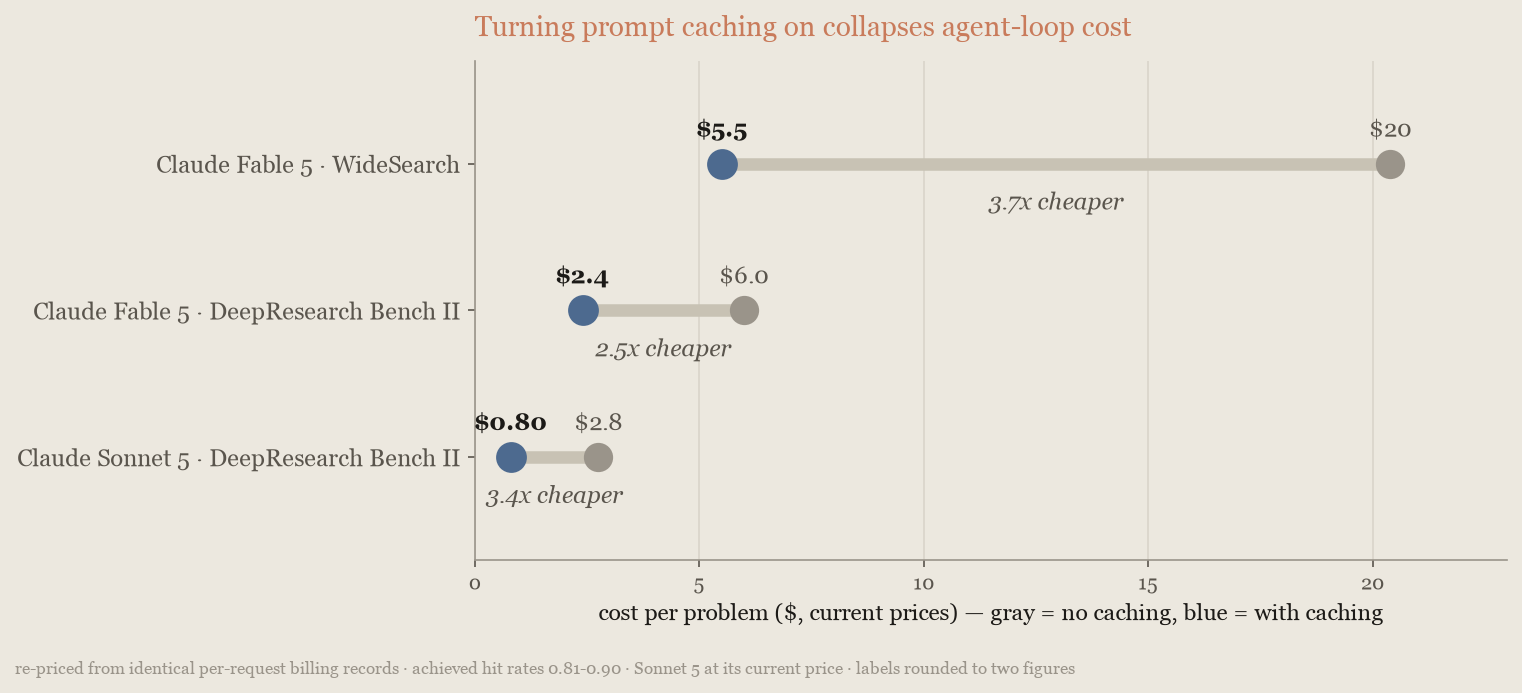
4649
47The cache's default lifetime is 5 minutes and an agent loop's turns are seconds apart, so the discount applies to most tokens on every turn; the charted runs achieved 81% to 90% hit rates. The saving varies with episode depth, because shorter loops re-read less, but caching stayed the largest single lever on every model and benchmark measured.
50The cache's default lifetime is 5 minutes and an agent loop's turns are seconds apart, so the discount applies to most tokens on every turn. The caching chart's runs achieved 81% to 90% hit rates. The saving varies with episode depth, because shorter loops re-read less, but caching stayed the largest single lever on every model and benchmark measured.
4851
49If your loop waits on humans between turns, use the [1-hour cache duration](https://platform.claude.com/docs/en/build-with-claude/prompt-caching#1-hour-cache-duration). It costs more to write (2x the input price instead of 1.25x) but pays for itself on the first prevented miss, because a miss resends the whole prefix at full price and writes it again.
52#### Pick the cache duration
5053
54If your loop waits on a person between turns, use the [1-hour cache duration](https://platform.claude.com/docs/en/build-with-claude/prompt-caching#1-hour-cache-duration). It costs more to write (2x the input price instead of 1.25x). A miss on either duration bills the whole prefix at the write price instead of the read price, so the longer duration pays off once a few turns per session follow a pause between 5 minutes and an hour.
55
56To decide, count the gaps between consecutive requests in a conversation:
57
58* More than about 1 gap in 20 falls between 5 minutes and an hour, and gaps over an hour are rare: use the 1-hour duration.
59* Turns arrive seconds apart: stay on the 5-minute default. With no pauses, it cost 15% less than the 1-hour setting on Claude Sonnet 5 and 11% less on Claude Opus 5.
60* Gaps over an hour are common: stay on the default. A gap over an hour expires both durations, and the 1-hour setting then re-writes the prefix at 2x the input price instead of 1.25x, so it loses on each of those gaps. It pays off only when, beyond the 1-in-20 share, gaps between 5 minutes and an hour are at least about two-thirds as frequent as gaps over an hour (each in-band gap saves about 1.15x the prefix; each gap over an hour costs about 0.75x).
61
62Anthropic measured the 20-issue triage job from [Trim input and context tokens](https://platform.claude.com/docs/en/about-claude/models/optimizing-for-cost-and-intelligence#trim-input-and-context-tokens) with pauses inserted before some turns to simulate a person's delay[16](https://platform.claude.com/docs/en/about-claude/models/optimizing-for-cost-and-intelligence#refs). On both models measured, Claude Sonnet 5 and Claude Opus 5, the 1-hour cache became the cheaper setting once about 3% of turns followed a pause, about 1 turn in 30. The 1-in-20 rule is set above that crossover to leave a margin. With a pause before every turn, the 5-minute setting cost $4.13 per 20-issue session compared with $0.70 for the 1-hour setting on Claude Sonnet 5, and $13.41 compared with $2.70 on Claude Opus 5. Every current model uses the same cache multipliers, so the crossover is in the same range on the other models; the exact share depends on how much of a session the model re-reads. Accuracy stayed within run-to-run noise in every cell. The turn after a pause kept its warm-cache latency on the 1-hour setting. The following chart plots cost per session against the share of paused turns on Claude Sonnet 5:
63
64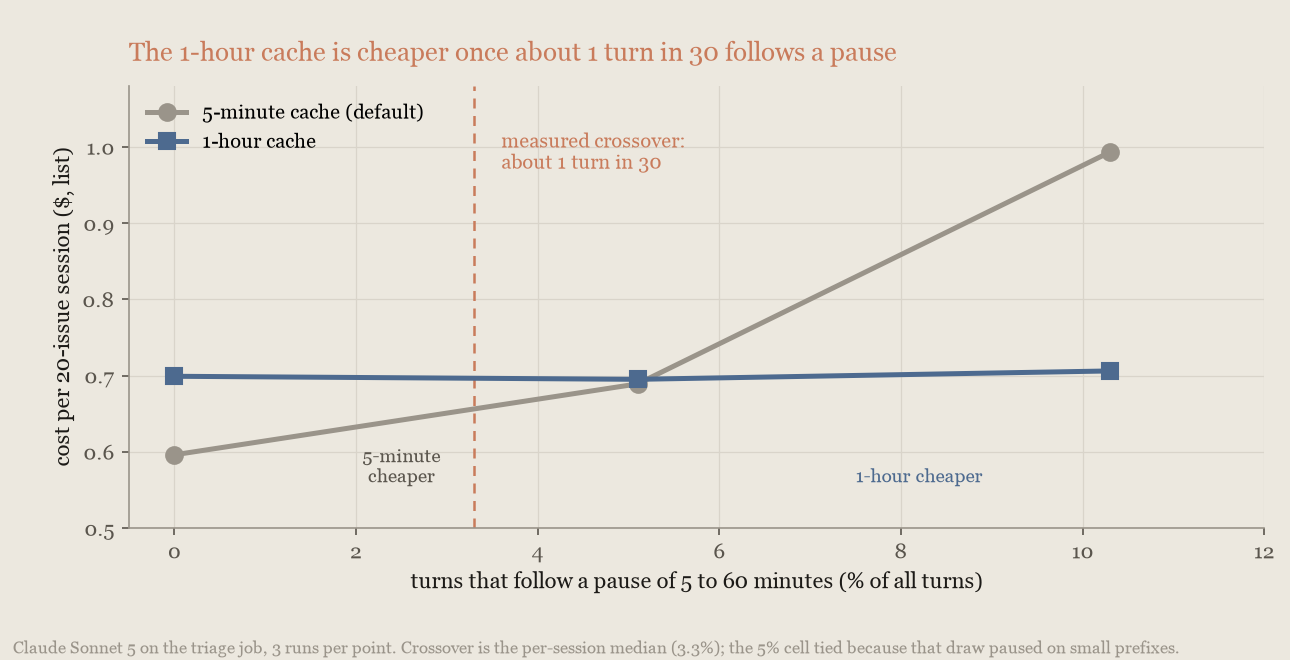
65
66Anthropic also measured extra requests that keep the 5-minute cache warm. They saved nothing measurable over the 1-hour duration at any share of paused turns and cost more with a pause before every turn, so use the duration instead.
67
68#### Turn on caching
69
5170Setup takes little work. [Automatic caching](https://platform.claude.com/docs/en/build-with-claude/prompt-caching#automatic-caching) places breakpoints for you; otherwise, the [Claude API skill](https://platform.claude.com/docs/en/agents-and-tools/agent-skills/claude-api-skill) that ships with Claude Code can add caching to an existing integration from one prompt. The following excerpt shows the skill adding it to the harness that produced these measurements:
5271
5372```text wrap
from line 90
7190
7291Those breakpoint placements follow the standard pattern in [Explicit cache breakpoints](https://platform.claude.com/docs/en/build-with-claude/prompt-caching#explicit-cache-breakpoints).
7392
93#### What breaks the cache
94
7495Four things can break your cache during a task. Anything that changes per request, such as a timestamp or a queue position, placed ahead of the stable prefix turns every request into a full cache write: on the triage run in [Trim input and context tokens](https://platform.claude.com/docs/en/about-claude/models/optimizing-for-cost-and-intelligence#trim-input-and-context-tokens), a 25-token status line at the front of the system prompt cost $4.24 per run instead of $0.59, more than running with caching off. Keep per-request text in the newest user turn. Changing [`effort`](https://platform.claude.com/docs/en/build-with-claude/effort) between requests invalidates the cached prefix, so change it only where you would re-cache anyway, such as at a [compaction](https://platform.claude.com/docs/en/build-with-claude/compaction) boundary. Changing a [task budget](https://platform.claude.com/docs/en/build-with-claude/task-budgets) partway through does the same, so set it once, on the first request. Every [context editing](https://platform.claude.com/docs/en/build-with-claude/context-editing#context-editing-and-prompt-caching) pass invalidates the prefix from the point it clears and the next request pays to re-cache everything after it, so clear in a few large batches rather than many small ones. Make the last three changes at natural breaks, then confirm cache reads have not dropped; if they have, [cache diagnostics](https://platform.claude.com/docs/en/build-with-claude/cache-diagnostics) shows where the prefix diverged.
7596
7697### Trim input and context tokens
from line 409
388409
389410## Measure on your own workload
390411
391The numbers on this page are from July and August 2026, at the list prices of the time, and will drift as models and prices change. Your escalation rate, how cleanly tasks split, and transcript length move them too. The method stays the same:
412The numbers on this page reflect list prices at the time of measurement and drift as models and prices change. Your escalation rate, how cleanly tasks split, and transcript length move them too. The method stays the same:
392413
3931. Pull a few tasks from production logs, weighted like real traffic, and [write outcome checks](https://platform.claude.com/docs/en/test-and-evaluate/develop-tests) for each: tests pass, ticket closed, row count correct. Record cost per task beside the score: price the four token counts in each response's `usage` at their own rates, summed across the task's requests (the [Usage and Cost API](https://platform.claude.com/docs/en/manage-claude/usage-cost-api) reports the aggregate).
4141. Pull a few tasks from production logs, weighted like real traffic, and [write outcome checks](https://platform.claude.com/docs/en/test-and-evaluate/develop-tests) for each: tests pass, ticket closed, row count correct. Record cost per task beside the score: price the five priced token counts in each response's `usage` at their own rates, summed across the task's requests (the [Usage and Cost API](https://platform.claude.com/docs/en/manage-claude/usage-cost-api) reports the aggregate). The 1-hour cache write bills at 2x the input price, and the 5-minute write at 1.25x.
3944152. Baseline the model tiers across effort levels, not only the default, and plot score against spend. A multi-model configuration must beat the single model's whole curve.
3954163. If the curve shows a gap effort can't close, add the multi-model strategy that fits and re-run the suite.
3964174. Run the winner in shadow on a traffic slice before cutover, then keep the suite running.
from line 437
416437 cost=$(jq -r --argjson in_price "$INPUT_PER_MTOK" --argjson out_price "$OUTPUT_PER_MTOK" '
417438 .usage
418439 | (.input_tokens * $in_price
419 + (.cache_creation_input_tokens // 0) * $in_price * 1.25 # 5-minute cache write
420 + (.cache_read_input_tokens // 0) * $in_price * 0.10 # cache read
440 + (.cache_creation.ephemeral_1h_input_tokens // 0) * $in_price * 2.00 # 1-hour cache write
441 + (.cache_creation.ephemeral_5m_input_tokens // 0) * $in_price * 1.25 # 5-minute cache write
442 + (.cache_read_input_tokens // 0) * $in_price * 0.10 # cache read
421443 + .output_tokens * $out_price) / 1e6
422444 ' <<<"$response")
423445 printf 'Request cost: $%.6f\n' "$cost"
from line 458
436458
437459 COST=$(jq -r --argjson in_price "$INPUT_PER_MTOK" --argjson out_price "$OUTPUT_PER_MTOK" '
438460 (.input_tokens * $in_price
439 + (.cache_creation_input_tokens // 0) * $in_price * 1.25 # 5-minute cache write
440 + (.cache_read_input_tokens // 0) * $in_price * 0.10 # cache read
461 + (.cache_creation.ephemeral_1h_input_tokens // 0) * $in_price * 2.00 # 1-hour cache write
462 + (.cache_creation.ephemeral_5m_input_tokens // 0) * $in_price * 1.25 # 5-minute cache write
463 + (.cache_read_input_tokens // 0) * $in_price * 0.10 # cache read
441464 + .output_tokens * $out_price) / 1e6
442465 ' <<<"$USAGE")
443466 printf 'Request cost: $%.6f\n' "$COST"
from line 478
455478 messages=[{"role": "user", "content": "Hello, Claude"}],
456479 )
457480 usage = response.usage
481 cache_writes = usage.cache_creation
482 writes_1h = cache_writes.ephemeral_1h_input_tokens if cache_writes else 0
483 writes_5m = cache_writes.ephemeral_5m_input_tokens if cache_writes else 0
458484 cost = (
459485 usage.input_tokens * INPUT_PER_MTOK
460 # Cache writes bill at 1.25x the input price (5-minute cache); cache reads at 0.1x.
461 + (usage.cache_creation_input_tokens or 0) * INPUT_PER_MTOK * 1.25
486 # 1-hour cache writes bill at 2x the input price, 5-minute at 1.25x; reads at 0.1x.
487 + writes_1h * INPUT_PER_MTOK * 2.0
488 + writes_5m * INPUT_PER_MTOK * 1.25
462489 + (usage.cache_read_input_tokens or 0) * INPUT_PER_MTOK * 0.10
463490 + usage.output_tokens * OUTPUT_PER_MTOK
464491 ) / 1_000_000
from line 506
479506 const usage = response.usage;
480507 const cost =
481508 (usage.input_tokens * INPUT_PER_MTOK +
482 (usage.cache_creation_input_tokens ?? 0) * INPUT_PER_MTOK * 1.25 + // 5-minute cache write
509 (usage.cache_creation?.ephemeral_1h_input_tokens ?? 0) * INPUT_PER_MTOK * 2 + // 1-hour cache write
510 (usage.cache_creation?.ephemeral_5m_input_tokens ?? 0) * INPUT_PER_MTOK * 1.25 + // 5-minute cache write
483511 (usage.cache_read_input_tokens ?? 0) * INPUT_PER_MTOK * 0.1 + // cache read
484512 usage.output_tokens * OUTPUT_PER_MTOK) /
485513 1_000_000;
from line 532
504532 double cost =
505533 (
506534 usage.InputTokens * InputPerMtok
507 + (usage.CacheCreationInputTokens ?? 0) * InputPerMtok * 1.25 // 5-minute cache write
535 + (usage.CacheCreation?.Ephemeral1hInputTokens ?? 0) * InputPerMtok * 2.00 // 1-hour cache write
536 + (usage.CacheCreation?.Ephemeral5mInputTokens ?? 0) * InputPerMtok * 1.25 // 5-minute cache write
508537 + (usage.CacheReadInputTokens ?? 0) * InputPerMtok * 0.10 // cache read
509538 + usage.OutputTokens * OutputPerMtok
510539 ) / 1_000_000;
from line 563
534563
535564 usage := response.Usage
536565 cost := (float64(usage.InputTokens)*inputPerMTok +
537 float64(usage.CacheCreationInputTokens)*inputPerMTok*1.25 + // 5-minute cache write
566 float64(usage.CacheCreation.Ephemeral1hInputTokens)*inputPerMTok*2.00 + // 1-hour cache write
567 float64(usage.CacheCreation.Ephemeral5mInputTokens)*inputPerMTok*1.25 + // 5-minute cache write
538568 float64(usage.CacheReadInputTokens)*inputPerMTok*0.10 + // cache read
539569 float64(usage.OutputTokens)*outputPerMTok) / 1_000_000
540570 fmt.Printf("Request cost: $%.6f\n", cost)
from line 585
555585 .build());
556586
557587 Usage usage = response.usage();
588 long writes1h = usage.cacheCreation().map(CacheCreation::ephemeral1hInputTokens).orElse(0L);
589 long writes5m = usage.cacheCreation().map(CacheCreation::ephemeral5mInputTokens).orElse(0L);
558590 double cost = (usage.inputTokens() * INPUT_PER_MTOK
559 + usage.cacheCreationInputTokens().orElse(0L) * INPUT_PER_MTOK * 1.25 // 5-minute cache write
591 + writes1h * INPUT_PER_MTOK * 2.00 // 1-hour cache write
592 + writes5m * INPUT_PER_MTOK * 1.25 // 5-minute cache write
560593 + usage.cacheReadInputTokens().orElse(0L) * INPUT_PER_MTOK * 0.10 // cache read
561594 + usage.outputTokens() * OUTPUT_PER_MTOK) / 1_000_000;
562595 IO.println("Request cost: $%.6f".formatted(cost));
from line 610
577610 $usage = $response->usage;
578611 $cost = (
579612 $usage->inputTokens * INPUT_PER_MTOK
580 + ($usage->cacheCreationInputTokens ?? 0) * INPUT_PER_MTOK * 1.25 // 5-minute cache write
613 + ($usage->cacheCreation?->ephemeral1hInputTokens ?? 0) * INPUT_PER_MTOK * 2.00 // 1-hour cache write
614 + ($usage->cacheCreation?->ephemeral5mInputTokens ?? 0) * INPUT_PER_MTOK * 1.25 // 5-minute cache write
581615 + ($usage->cacheReadInputTokens ?? 0) * INPUT_PER_MTOK * 0.10 // cache read
582616 + $usage->outputTokens * OUTPUT_PER_MTOK
583617 ) / 1_000_000;
from line 632
598632 usage = response.usage
599633 cost = (
600634 usage.input_tokens * INPUT_PER_MTOK +
601 usage.cache_creation_input_tokens.to_i * INPUT_PER_MTOK * 1.25 + # 5-minute cache write
635 usage.cache_creation&.ephemeral_1h_input_tokens.to_i * INPUT_PER_MTOK * 2.00 + # 1-hour cache write
636 usage.cache_creation&.ephemeral_5m_input_tokens.to_i * INPUT_PER_MTOK * 1.25 + # 5-minute cache write
602637 usage.cache_read_input_tokens.to_i * INPUT_PER_MTOK * 0.10 + # cache read
603638 usage.output_tokens * OUTPUT_PER_MTOK
604639 ) / 1_000_000
from line 641
606641 ```
607642</CodeGroup>
608643
609In agent loops the cache-read term is usually the largest of the four; if not, check that caching is engaged. When the [advisor tool](https://platform.claude.com/docs/en/agents-and-tools/tool-use/advisor-tool#usage-and-billing) or [compaction](https://platform.claude.com/docs/en/build-with-claude/compaction#understanding-usage) is enabled, some tokens are reported only in `usage.iterations` and not in the top-level totals, so sum over `usage.iterations` instead, pricing `advisor_message` entries at the advisor model's rates.
644In agent loops the cache-read term is usually the largest of the five; if not, check that caching is engaged. When the [advisor tool](https://platform.claude.com/docs/en/agents-and-tools/tool-use/advisor-tool#usage-and-billing) or [compaction](https://platform.claude.com/docs/en/build-with-claude/compaction#understanding-usage) is enabled, some tokens are reported only in `usage.iterations` and not in the top-level totals, so sum over `usage.iterations` instead, pricing `advisor_message` entries at the advisor model's rates.
610645
611646The following table lists the levers in the order to try them:
612647
613| Lever | Saving in these runs | Quality cost | Latency | Where |
614| ------------------------------------------- | --------------------------------------------------------------------------------------------------------------------------------------------------------- | ------------------------------------------------------ | ------------------------------- | ------------------------------------------------------------------------------------------------------------------------------------------------------------------------------- |
615| Prompt caching | Cost cut by a factor of 2.5 to 3.7 on agent loops; 83% on the triage run | None | Faster | [Cache repeated context](https://platform.claude.com/docs/en/about-claude/models/optimizing-for-cost-and-intelligence#cache-repeated-context) |
616| Input trimming | A further 5 percentage points on the triage run | None | Neutral | [Trim input and context tokens](https://platform.claude.com/docs/en/about-claude/models/optimizing-for-cost-and-intelligence#trim-input-and-context-tokens) |
617| Prune stale tool results at task boundaries | 39% on the long triage run (compaction 32%); nothing on short loops | None measured | Neutral | [Trim input and context tokens](https://platform.claude.com/docs/en/about-claude/models/optimizing-for-cost-and-intelligence#trim-input-and-context-tokens) |
618| Tool search | 45% with 500 tool definitions attached; 20% with a GitHub MCP server | None | Neutral | [Trim input and context tokens](https://platform.claude.com/docs/en/about-claude/models/optimizing-for-cost-and-intelligence#trim-input-and-context-tokens) |
619| Data files through code execution | 92% on a 25-question data task | A gain, 25 of 25 instead of 6 of 25 | Faster | [Trim input and context tokens](https://platform.claude.com/docs/en/about-claude/models/optimizing-for-cost-and-intelligence#trim-input-and-context-tokens) |
620| Batch API | 50% | None | Results within 24 hours | [Batch work that can wait](https://platform.claude.com/docs/en/about-claude/models/optimizing-for-cost-and-intelligence#batch-work-that-can-wait) |
621| Prompt audit against the current model | 14% on both migrations measured | None; a gain on one | Faster (fewer tool rounds) | [Audit prompts against the current model](https://platform.claude.com/docs/en/about-claude/models/optimizing-for-cost-and-intelligence#audit-prompts-against-the-current-model) |
622| Upgrade the model | Opus 4.7 to Opus 5: about 12% less per solved task, 11 more points; Sonnet 4.6 to Sonnet 5: 14% less, 5 more points | A gain | Neutral | [Upgrade the model](https://platform.claude.com/docs/en/about-claude/models/optimizing-for-cost-and-intelligence#upgrade-the-model) |
623| Lower effort | Knowledge work: `medium` 15% to 30%, `low` a third to a half; long coding: `medium` about half, `low` about three quarters | 1 to 3 points on knowledge work, 2 to 8 on long coding | Faster | [Tune effort](https://platform.claude.com/docs/en/about-claude/models/optimizing-for-cost-and-intelligence#tune-effort) |
624| Re-run failures | About half, at the same pass rate | None | Two runs on the tasks that fail | [Re-run failures at higher effort](https://platform.claude.com/docs/en/about-claude/models/optimizing-for-cost-and-intelligence#re-run-failures-at-higher-effort) |
625| Task budget | 18% to 47% | 3 to 4 points | Faster | [Set budgets and output caps](https://platform.claude.com/docs/en/about-claude/models/optimizing-for-cost-and-intelligence#set-budgets-and-output-caps) |
626| Ask for shorter answers | 39% of output tokens, 14% of cost on the triage run | None | Faster | [Set budgets and output caps](https://platform.claude.com/docs/en/about-claude/models/optimizing-for-cost-and-intelligence#set-budgets-and-output-caps) |
627| Raising `max_tokens` | None per solved task, but more tasks solved | Gains of 2 to 18 points | Neutral | [Set budgets and output caps](https://platform.claude.com/docs/en/about-claude/models/optimizing-for-cost-and-intelligence#set-budgets-and-output-caps) |
628| Advisor | Depends on the capability gap and the consult rate; the chart-reading pairing scored above both models' effort curves, the coding pairing only marginally | Small gains | About two extra calls per task | [Advisor strategy](https://platform.claude.com/docs/en/about-claude/models/optimizing-for-cost-and-intelligence#advisor-strategy-escalate-hard-decisions) |
629| Orchestrator | More than 60% below the frontier model beyond one context window; about half on routine tails | 2 to 6 points below the frontier model | Much faster on large inputs | [Orchestrator strategy](https://platform.claude.com/docs/en/about-claude/models/optimizing-for-cost-and-intelligence#orchestrator-strategy-delegate-bulk-work) |
648| Lever | Saving in these runs | Quality cost | Latency | Where |
649| ------------------------------------------- | -------------------------------------------------------------------------------------------------------------------------------------------------------------------------------------------------------------------------------- | ------------------------------------------------------ | ------------------------------- | ------------------------------------------------------------------------------------------------------------------------------------------------------------------------------- |
650| Prompt caching | Cost cut by a factor of 2.5 to 3.7 on agent loops; 83% on the triage run | None | Faster | [Cache repeated context](https://platform.claude.com/docs/en/about-claude/models/optimizing-for-cost-and-intelligence#cache-repeated-context) |
651| 1-hour cache duration | Cheaper than the 5-minute default once about 1 turn in 20 follows a pause between 5 minutes and an hour and few gaps run over an hour; with no pauses the default cost 15% less on Claude Sonnet 5 and 11% less on Claude Opus 5 | None | Stays warm after a pause | [Pick the cache duration](https://platform.claude.com/docs/en/about-claude/models/optimizing-for-cost-and-intelligence#pick-the-cache-duration) |
652| Input trimming | A further 5 percentage points on the triage run | None | Neutral | [Trim input and context tokens](https://platform.claude.com/docs/en/about-claude/models/optimizing-for-cost-and-intelligence#trim-input-and-context-tokens) |
653| Prune stale tool results at task boundaries | 39% on the long triage run (compaction 32%); nothing on short loops | None measured | Neutral | [Trim input and context tokens](https://platform.claude.com/docs/en/about-claude/models/optimizing-for-cost-and-intelligence#trim-input-and-context-tokens) |
654| Tool search | 45% with 500 tool definitions attached; 20% with a GitHub MCP server | None | Neutral | [Trim input and context tokens](https://platform.claude.com/docs/en/about-claude/models/optimizing-for-cost-and-intelligence#trim-input-and-context-tokens) |
655| Data files through code execution | 92% on a 25-question data task | A gain, 25 of 25 instead of 6 of 25 | Faster | [Trim input and context tokens](https://platform.claude.com/docs/en/about-claude/models/optimizing-for-cost-and-intelligence#trim-input-and-context-tokens) |
656| Batch API | 50% | None | Results within 24 hours | [Batch work that can wait](https://platform.claude.com/docs/en/about-claude/models/optimizing-for-cost-and-intelligence#batch-work-that-can-wait) |
657| Prompt audit against the current model | 14% on both migrations measured | None; a gain on one | Faster (fewer tool rounds) | [Audit prompts against the current model](https://platform.claude.com/docs/en/about-claude/models/optimizing-for-cost-and-intelligence#audit-prompts-against-the-current-model) |
658| Upgrade the model | Opus 4.7 to Opus 5: about 12% less per solved task, 11 more points; Sonnet 4.6 to Sonnet 5: 14% less, 5 more points | A gain | Neutral | [Upgrade the model](https://platform.claude.com/docs/en/about-claude/models/optimizing-for-cost-and-intelligence#upgrade-the-model) |
659| Lower effort | Knowledge work: `medium` 15% to 30%, `low` a third to a half; long coding: `medium` about half, `low` about three quarters | 1 to 3 points on knowledge work, 2 to 8 on long coding | Faster | [Tune effort](https://platform.claude.com/docs/en/about-claude/models/optimizing-for-cost-and-intelligence#tune-effort) |
660| Re-run failures | About half, at the same pass rate | None | Two runs on the tasks that fail | [Re-run failures at higher effort](https://platform.claude.com/docs/en/about-claude/models/optimizing-for-cost-and-intelligence#re-run-failures-at-higher-effort) |
661| Task budget | 18% to 47% | 3 to 4 points | Faster | [Set budgets and output caps](https://platform.claude.com/docs/en/about-claude/models/optimizing-for-cost-and-intelligence#set-budgets-and-output-caps) |
662| Ask for shorter answers | 39% of output tokens, 14% of cost on the triage run | None | Faster | [Set budgets and output caps](https://platform.claude.com/docs/en/about-claude/models/optimizing-for-cost-and-intelligence#set-budgets-and-output-caps) |
663| Raising `max_tokens` | None per solved task, but more tasks solved | Gains of 2 to 18 points | Neutral | [Set budgets and output caps](https://platform.claude.com/docs/en/about-claude/models/optimizing-for-cost-and-intelligence#set-budgets-and-output-caps) |
664| Advisor | Depends on the capability gap and the consult rate; the chart-reading pairing scored above both models' effort curves, the coding pairing only marginally | Small gains | About two extra calls per task | [Advisor strategy](https://platform.claude.com/docs/en/about-claude/models/optimizing-for-cost-and-intelligence#advisor-strategy-escalate-hard-decisions) |
665| Orchestrator | More than 60% below the frontier model beyond one context window; about half on routine tails | 2 to 6 points below the frontier model | Much faster on large inputs | [Orchestrator strategy](https://platform.claude.com/docs/en/about-claude/models/optimizing-for-cost-and-intelligence#orchestrator-strategy-delegate-bulk-work) |
630666
631667## Benchmarks referenced
632668
633All measurements are Anthropic-internal runs of these benchmarks. Unless noted, costs are USD at August 2026 list prices; Claude Sonnet 5 figures use $2 and $10 per million input and output tokens. Charts labeled "notional USD" price each request's token counts at those rates rather than reporting invoices.
669All measurements are Anthropic-internal runs of these benchmarks. Unless noted, costs are USD at the list prices in effect when each benchmark ran; Claude Sonnet 5 figures use $2 and $10 per million input and output tokens. Charts labeled "notional USD" price each request's token counts at those rates rather than reporting invoices.
634670
6351. **WideSearch:** Wong et al., "WideSearch: Benchmarking Agentic Broad Info-Seeking," arXiv:2508.07999, 2025. Broad web-research tasks graded on a many-row table's completeness and accuracy; 200 problems, 3 runs per configuration. The caching and effort charts come from separate runs, so per-problem costs differ slightly. The cost-concentration chart is a separate 20-problem run, 3 runs per problem, costed from per-request billing records.
6362. **GDPval:** OpenAI, "GDPval: Evaluating AI Model Performance on Real-World Economically Valuable Tasks," 2025. Knowledge-work deliverables graded against task rubrics; a 210-task run of the released gold set, one attempt per task. A Claude model grades, so absolute scores may differ from published results.
6373. **SWE-bench Pro:** Scale AI, "SWE-Bench Pro: Can AI Agents Solve Long-Horizon Software Engineering Tasks?", 2025. A 482-problem subset selected for compatibility with Anthropic's evaluation harness; scores are not comparable to the public leaderboard. Claude Opus 5 at the default effort averages two runs; reduced-effort settings are single runs. Escalation figures come task by task from those runs: `low` first, then the default on its failures, solved 92.5% to 93.6% across run pairings for about $0.70; `medium` first, 93.8% to 94.2% for about $0.95; the default re-run on its own failures, 94.0% for $1.58; everything at the default, 90.9% to 92.5% for $1.39. The Claude Sonnet 5 executor pairings on the advisor chart come from the same August 2026 series on this subset: the Sonnet-plus-Opus pairing was run twice (a run and an exact replication), the low-effort pairing once, and Claude Sonnet 5 alone twice (77.4%, the baseline for both Pro rows); the task-budget figures are one run per budget on the same subset. The Claude Fable 5 figure in [Compare models](https://platform.claude.com/docs/en/about-claude/models/optimizing-for-cost-and-intelligence#compare-models-on-cost-per-task) is a single July 2026 run, also the task-budget chart's unbudgeted baseline; every budgeted run completed all 482 problems without harness errors. The upgrade ladder is one run per model at its shipped defaults (two each for Opus 5 and Sonnet 5), run the same week in one harness and organization.
6384. **BrowseComp:** Wei et al., "BrowseComp: A Simple Yet Challenging Benchmark for Browsing Agents," OpenAI, 2025. Effort figures use a 500-problem cut, one to three runs per setting. The cost-insurance chart uses 10 reliably solved problems from a 26-problem slice, 50 delegated and 70 solo runs ($6.45 compared with $11.99 per run in expectation); delegated figures carry a measurement band of about 20%.
6711. **WideSearch:** Wong et al., "WideSearch: Benchmarking Agentic Broad Info-Seeking," arXiv:2508.07999, 2025. Broad web-research tasks graded on a many-row table's completeness and accuracy; 200 problems, 3 runs per configuration, run August 1 to 2, 2026. The caching chart re-prices the effort chart's default-effort runs from their per-request billing records; per-problem costs differ slightly because the two charts use different cost accounting. The cost-concentration chart is a separate 20-problem run, 3 runs per problem, run August 3 to 4, 2026, costed from per-request billing records.
6722. **GDPval:** OpenAI, "GDPval: Evaluating AI Model Performance on Real-World Economically Valuable Tasks," 2025. Knowledge-work deliverables graded against task rubrics; a 210-task run of the released gold set, one attempt per task, run August 2, 2026. A Claude model grades, so absolute scores may differ from published results.
6733. **SWE-bench Pro:** Scale AI, "SWE-Bench Pro: Can AI Agents Solve Long-Horizon Software Engineering Tasks?", 2025. A 482-problem subset selected for compatibility with Anthropic's evaluation harness; scores are not comparable to the public leaderboard. Claude Opus 5 at the default effort averages two runs; reduced-effort settings are single runs; all ran August 4, 2026, as did the task-budget arms. Escalation figures come task by task from those runs: `low` first, then the default on its failures, solved 92.5% to 93.6% across run pairings for about $0.70; `medium` first, 93.8% to 94.2% for about $0.95; the default re-run on its own failures, 94.0% for $1.58; everything at the default, 90.9% to 92.5% for $1.39. The Claude Sonnet 5 executor pairings on the advisor chart come from the same measurement series on this subset: the Sonnet-plus-Opus pairing was run twice (August 7 and August 8, 2026, a run and an exact replication), the low-effort pairing once (August 8, 2026), and Claude Sonnet 5 alone twice (77.4%, the baseline for both Pro rows); the task-budget figures are one run per budget on the same subset. The Claude Fable 5 figure in [Compare models](https://platform.claude.com/docs/en/about-claude/models/optimizing-for-cost-and-intelligence#compare-models-on-cost-per-task) is a single run from July 2, 2026, also the task-budget chart's unbudgeted baseline; every budgeted run completed all 482 problems without harness errors. The upgrade ladder is one run per model at its shipped defaults (two each for Opus 5 and Sonnet 5), run the same week in one harness and organization.
6744. **BrowseComp:** Wei et al., "BrowseComp: A Simple Yet Challenging Benchmark for Browsing Agents," OpenAI, 2025. Effort figures use a 500-problem cut, one to three runs per setting, run August 3, 2026, with the default point pooling two runs from July 26 to 27, 2026. The cost-insurance chart uses 10 reliably solved problems from a 26-problem slice, 50 delegated runs (August 1 to 2, 2026) and 70 solo runs (50 from August 2 to 3, 2026; 20 archived from July 12 to 13 and August 1, 2026), $6.45 compared with $11.99 per run in expectation; delegated figures carry a measurement band of about 20%.
6396755. **Agent-architecture scaling:** Kim et al., "Towards a Science of Scaling Agent Systems," arXiv:2512.08296, 2025. Independent external study, cited only for the direction of the finding on when delegation does not pay, not for any figure.
6406. **DeepWideSearch:** "DeepWideSearch: Benchmarking Depth and Width in Agentic Information Seeking," arXiv:2510.20168, 2025. The 220 questions span 15 domains, each combining many-row collection with multi-hop retrieval; measured on the benchmark's standing row set, 3 runs per configuration.
6417. **DeepResearch Bench II:** Li et al., "DeepResearch Bench II: Diagnosing Deep Research Agents via Rubrics from Expert Report," arXiv:2601.08536, 2026. Its 132 research tasks across 22 domains are graded against expert-derived binary rubrics; measured on a 50-task subset stratified across all themes, one attempt per task, 3 runs, scored on tasks no configuration refused. Claude Opus 4.6 judges under the benchmark's rubric protocol; the original uses a different judge, and an Anthropic judge may favor the house style. The runs predate Claude Opus 5, hence its absence from the [Compare models](https://platform.claude.com/docs/en/about-claude/models/optimizing-for-cost-and-intelligence#compare-models-on-cost-per-task) chart. The Sonnet 5 cost differs slightly between the caching chart (inference cost, with and without caching) and that chart (all-in cost, caching on); both come from the same runs.
6428. **Corpus defect sweep:** Anthropic-internal, for work larger than one context window: a 21.6-million-token corpus from 14 public Python package sources with 130 planted defects and deterministic grading; protocol fixed before the runs and internally reviewed; three runs per configuration. Every configuration ran on Claude Managed Agents. The charted team configuration is an August 2026 run in which the Claude Fable 5 coordinator ran the whole sweep inside the platform at its documented limit of 25 concurrent Claude Sonnet 5 workers; its three episodes scored F1 0.842, 0.805, and 0.810 for $263, $299, and $261. The solo configurations are July 2026 runs on the same corpus build. Absolute F1 is specific to this corpus build, not comparable across benchmarks; configuration comparisons are like for like.
6439. **GPQA Diamond:** Rein et al., "GPQA: A Graduate-Level Google-Proof Q\&A Benchmark," 2023. The 198-question Diamond subset, measured August 2026, two runs per configuration, model-graded against reference answers, advisor tokens metered per request. A platform safety check refused two biology questions on the Sonnet and Opus executors; excluding them changes no comparison by more than one point.
64410. **DeepSWE:** Datacurve, "DeepSWE: Measuring Frontier Coding Agents on Original, Long-Horizon Engineering Tasks," arXiv:2607.07946, 2026. Measured August 2026: 113 original tasks across five languages with program-based verifiers. Pairings are two runs each with advisor tokens metered per request, and used a client-side advisor loop rather than the advisor tool, with identical accounting. Single-model effort sweeps are single runs priced from token counts, a cache-aware approximation. Costs per task are run totals divided by 113.
64511. **Internal agentic-coding benchmark:** Anthropic-internal: 370 repository tasks graded by the repositories' own tests. The API figures (Opus 5 alone, Fable 5 alone, and the pairing) were measured August 2026 at the default effort with a 128,000-token output cap, one run per configuration: five attempts per task at the default settings and for the pairing, one at `low` and `medium`; the pairing averaged about two advisor consultations per attempt; costs are per attempt. The Claude Code figures are July 2026 runs of the same tasks, one run per configuration, costs approximate.
64612. **Internal repository-task benchmark (cap measurement):** A separate Anthropic-internal set of about 130 repository tasks, run August 2026 with a plain API agent loop, one attempt per task. The 16,384-token figures average two runs per model; the 64,000-token figures are single runs (124 tasks scored for Opus 5; 108 for Claude Fable 5, the environment having skipped the rest before the model ran). About half the Fable attempts the 16,384 cap had ended solved at 64,000; a further Fable run at 128,000 scored 56.1%, within noise of the 64,000 run. The SWE-bench Pro cap figures are one Claude Fable 5 run per cap at the default effort on a 100-problem subset stratified from reference 3's 482-problem set, not comparable to its scores. The chart's per-turn distributions come from the Opus run at 64,000 and the Fable run at 128,000, so neither is cut off by its own cap.
64713. **Chartography:** Surge AI, "Chartography," 2026. The complete released 100-question set, measured August 2026 with Anthropic's implementation on Claude Managed Agents (standard cloud sandbox; advisor configurations use the Managed Agents advisor). Claude Sonnet 4.6 grades instead of the reference judge and the benchmark runs with tools, so scores compare across configurations here but not to the published leaderboard. Two runs per configuration, pooled; run-to-run spreads were 4 to 10 points. Costs exclude sandbox time, which added under 1%. The consult-rate comparison comes from rerunning the same configurations on the Messages API with a container tool set.
6766. **DeepWideSearch:** "DeepWideSearch: Benchmarking Depth and Width in Agentic Information Seeking," arXiv:2510.20168, 2025. The 220 questions span 15 domains, each combining many-row collection with multi-hop retrieval; measured on the benchmark's standing row set, 3 runs per configuration, run August 2, 2026 (the single-worker team point ran July 26 to 27, 2026).
6777. **DeepResearch Bench II:** Li et al., "DeepResearch Bench II: Diagnosing Deep Research Agents via Rubrics from Expert Report," arXiv:2601.08536, 2026. Its 132 research tasks across 22 domains are graded against expert-derived binary rubrics; measured on a 50-task subset stratified across all themes, one attempt per task, 3 runs (August 2 to 3, 2026), scored on tasks no configuration refused. Claude Opus 4.6 judges under the benchmark's rubric protocol; the original uses a different judge, and an Anthropic judge may favor the house style. Anthropic did not run Claude Opus 5 on this benchmark, so it is absent from the [Compare models](https://platform.claude.com/docs/en/about-claude/models/optimizing-for-cost-and-intelligence#compare-models-on-cost-per-task) chart. The Sonnet 5 cost differs slightly between the caching chart (inference cost, with and without caching) and that chart (all-in cost, caching on); both come from the same runs.
6788. **Corpus defect sweep:** Anthropic-internal, for work larger than one context window: a 21.6-million-token corpus from 14 public Python package sources with 130 planted defects and deterministic grading; protocol fixed before the runs and internally reviewed; three runs per configuration. Every configuration ran on Claude Managed Agents. The charted team configuration is an August 13, 2026, run in which the Claude Fable 5 coordinator ran the whole sweep inside the platform at its documented limit of 25 concurrent Claude Sonnet 5 workers; its three episodes scored F1 0.842, 0.805, and 0.810 for $263, $299, and $261. The solo configurations ran August 3 to 4, 2026, on the same corpus build. Absolute F1 is specific to this corpus build, not comparable across benchmarks; configuration comparisons are like for like.
6799. **GPQA Diamond:** Rein et al., "GPQA: A Graduate-Level Google-Proof Q\&A Benchmark," 2023. The 198-question Diamond subset, two runs per configuration, run August 7, 2026, model-graded against reference answers, advisor tokens metered per request. A platform safety check refused two biology questions on the Sonnet and Opus executors; excluding them changes no comparison by more than one point.
68010. **DeepSWE:** Datacurve, "DeepSWE: Measuring Frontier Coding Agents on Original, Long-Horizon Engineering Tasks," arXiv:2607.07946, 2026. The set has 113 original tasks across five languages with program-based verifiers. Pairings are two runs each, run August 7, 2026, with advisor tokens metered per request, and used a client-side advisor loop rather than the advisor tool, with identical accounting. Single-model effort sweeps are single runs priced from token counts, a cache-aware approximation. Costs per task are run totals divided by 113.
68111. **Internal agentic-coding benchmark:** Anthropic-internal: 370 repository tasks graded by the repositories' own tests. The API figures (Opus 5 alone, Fable 5 alone, and the pairing) were measured August 9 to 10, 2026, at the default effort with a 128,000-token output cap, one run per configuration: five attempts per task at the default settings and for the pairing, one at `low` and `medium`; the pairing averaged about two advisor consultations per attempt; costs are per attempt. The Claude Code figures are runs of the same tasks from July 8 to 23, 2026, one run per configuration, costs approximate.
68212. **Internal repository-task benchmark (cap measurement):** A separate Anthropic-internal set of about 130 repository tasks, run August 8 to 10, 2026, with a plain API agent loop, one attempt per task. The 16,384-token figures average two runs per model; the 64,000-token figures are single runs (124 tasks scored for Opus 5; 108 for Claude Fable 5, the environment having skipped the rest before the model ran). About half the Fable attempts the 16,384 cap had ended solved at 64,000; a further Fable run at 128,000 scored 56.1%, within noise of the 64,000 run. The SWE-bench Pro cap figures are one Claude Fable 5 run per cap (August 10, 2026) at the default effort on a 100-problem subset stratified from reference 3's 482-problem set, not comparable to its scores. The chart's per-turn distributions come from the Opus run at 64,000 and the Fable run at 128,000, so neither is cut off by its own cap.
68313. **Chartography:** Surge AI, "Chartography," 2026. The complete released 100-question set, measured August 8 to 10, 2026, with Anthropic's implementation on Claude Managed Agents (standard cloud sandbox; advisor configurations use the Managed Agents advisor). Claude Sonnet 4.6 grades instead of the reference judge and the benchmark runs with tools, so scores compare across configurations here but not to the published leaderboard. Two runs per configuration, pooled; run-to-run spreads were 4 to 10 points. Costs exclude sandbox time, which added under 1%. The consult-rate comparison comes from rerunning the same configurations on the Messages API with a container tool set, August 10 to 11, 2026.
64868414. **Support-desk prompt-audit evaluation:** An Anthropic-constructed set of 44 support tickets with deterministic grading, run August 2026 under six system prompts, each adding to the same clean prompt one pattern common in prompts written for Claude Opus 4.8 and Claude Sonnet 4.6. Each chart point is one of three cases (older model, newer model on the same prompt, newer model after the audit) averaged over the six prompts and 44 tickets. The Opus 5 accuracy gain has a 95% confidence interval of 3 to 8 points; the Sonnet accuracy differences are within noise.
64915. **Data-file question set:** An Anthropic-constructed set of 25 aggregate questions over a 1,862-row slice of a public liquor-sales CSV, with ground truth computed by pandas and exact-match grading, run August 2026 on Claude Sonnet 5 and Claude Opus 5 with thinking disabled (the in-context arm cannot complete at the default), a 4,000-token output cap, and no prompt caching, three runs per configuration. The file arm uploads the CSV through the Files API and uses the `code_execution_20260120` tool.
68515. **Data-file question set:** An Anthropic-constructed set of 25 aggregate questions over a 1,862-row slice of a public liquor-sales CSV, with ground truth computed by pandas and exact-match grading, run on Claude Sonnet 5 and Claude Opus 5 with thinking disabled (the in-context arm cannot complete at the default), a 4,000-token output cap, and no prompt caching, three runs per configuration, run August 19, 2026. The file arm uploads the CSV through the Files API and uses the `code_execution_20260120` tool.
68616. **Cache duration measurement:** The 20-issue triage job from [Trim input and context tokens](https://platform.claude.com/docs/en/about-claude/models/optimizing-for-cost-and-intelligence#trim-input-and-context-tokens), run August 23, 2026, on Claude Sonnet 5 and Claude Opus 5 on the Messages API with the same harness, the Claude Opus 5 cells with `max_tokens` raised to 4,096, with pauses inserted before a randomly chosen share of turns (none, 5%, 10%, and every turn at 6 minutes on all 20 issues on both models, plus every turn at 2 minutes on Claude Sonnet 5; 20-minute pauses on a 5-issue subset on both models; 45-minute pauses on a 5-issue subset on Claude Sonnet 5 only). Three runs per cell, cost computed from each response's `usage` fields on a customer-billed organization at list prices, accuracy against the same gold labels. The crossover is about 3.3% of turns on both models: the median of each session's break-even share, computed by the cost model from that session's turn-by-turn context sizes, over all 45 Claude Sonnet 5 and 36 Claude Opus 5 twenty-issue sessions in the analysis (every pause schedule run on the full job, under all three cache settings, three runs each; the 5-issue cells are not in it). The 5% cell tied on Claude Sonnet 5 because that draw's pauses fell on small prefixes. The page's 1-in-20 rule sits above the measured crossover. Anthropic measured keep-alive requests that refresh the 5-minute cache as a comparator only. They matched the 1-hour setting at best and cost more with a pause before every turn, so do not use them.
650687
651688## Next steps
652689
api/admin Changed · +795 / -367 lines
This page is larger than the 256 KiB this site keeps, so one side of the diff below stops where the stored text does.
The two sides of this change are more than 400 edits apart, too far apart to line up, so this is the differ's own diff of it and the words inside a line are not marked.
from line 54
5454
5555**POST** `/v1/organizations/invites`
5656
57For Claude Enterprise organizations, this endpoint's availability is in beta.
57Invite a user to join the organization by email.
5858
5959On plans that draw members from a finite pool of purchased seats, the invite automatically consumes a seat from the lowest tier with availability; there is no seat-tier parameter. When no seat is free the request fails with a 400 error rather than purchasing a seat.
6060
from line 70
7070
7171 Role for the invited User.
7272
73 The accepted values depend on the organization type. Console and API organizations accept `user`, `developer`, `billing`, and `claude_code_user`; `admin` cannot be assigned through the API. Claude Enterprise organizations (beta) accept `user` and `managed`.
73 The accepted values depend on the organization type. Console and API organizations accept `user`, `developer`, `billing`, and `claude_code_user`; `admin` cannot be assigned through the API. Claude Enterprise organizations accept `user` and `managed`.
7474
7575 - `"billing"`
7676
from line 84
8484
8585- `rbac_group_ids: optional array of string`
8686
87 RBAC group IDs to assign to the User when the Invite is accepted. A non-empty array is accepted only for a Claude Enterprise organization with RBAC groups (beta), and requires the key to carry the `write:rbac_groups` scope.
87 RBAC group IDs to assign to the User when the Invite is accepted. A non-empty array is accepted only for a Claude Enterprise organization with RBAC groups, and requires the key to carry the `write:rbac_groups` scope.
8888
8989 maxItems: 100
9090
from line 120
120120
121121 - `rbac_group_ids: array of string`
122122
123 RBAC group IDs recorded on the Invite (beta, Claude Enterprise organizations), to be assigned to the User when the Invite is accepted. `[]` when none.
123 RBAC group IDs recorded on the Invite (Claude Enterprise organizations), to be assigned to the User when the Invite is accepted. `[]` when none.
124124
125125 - `role: "admin" or "billing" or "claude_code_user" or 6 more`
126126
from line 199
199199
200200**GET** `/v1/organizations/invites/{invite_id}`
201201
202For Claude Enterprise organizations, this endpoint's availability is in beta.
202Retrieve an invite by ID.
203203
204204#### Path parameters
205205
from line 239
239239
240240 - `rbac_group_ids: array of string`
241241
242 RBAC group IDs recorded on the Invite (beta, Claude Enterprise organizations), to be assigned to the User when the Invite is accepted. `[]` when none.
242 RBAC group IDs recorded on the Invite (Claude Enterprise organizations), to be assigned to the User when the Invite is accepted. `[]` when none.
243243
244244 - `role: "admin" or "billing" or "claude_code_user" or 6 more`
245245
from line 313
313313
314314**GET** `/v1/organizations/invites`
315315
316For Claude Enterprise organizations, this endpoint's availability is in beta.
316List the organization's invites.
317317
318318#### Query parameters
319319
from line 343
343343
344344 Filter to items whose `role` equals one of the supplied values. Repeatable; values are OR'ed together.
345345
346 Accepted values depend on the organization type: Console and API organizations accept `user`, `developer`, `billing`, `admin`, and `claude_code_user`; Claude Enterprise organizations (beta) accept `user`, `owner`, `primary_owner`, `membership_admin`, and `managed`.
346 Accepted values depend on the organization type: Console and API organizations accept `user`, `developer`, `billing`, `admin`, and `claude_code_user`; Claude Enterprise organizations accept `user`, `owner`, `primary_owner`, `membership_admin`, and `managed`.
347347
348348- `statuses: optional array of "accepted" or "expired" or "pending"`
349349
from line 387
387387
388388 - `rbac_group_ids: array of string`
389389
390 RBAC group IDs recorded on the Invite (beta, Claude Enterprise organizations), to be assigned to the User when the Invite is accepted. `[]` when none.
390 RBAC group IDs recorded on the Invite (Claude Enterprise organizations), to be assigned to the User when the Invite is accepted. `[]` when none.
391391
392392 - `role: "admin" or "billing" or "claude_code_user" or 6 more`
393393
from line 480
480480
481481**DELETE** `/v1/organizations/invites/{invite_id}`
482482
483For Claude Enterprise organizations, this endpoint's availability is in beta.
483Delete a pending invite.
484484
485485#### Path parameters
486486
from line 526
526526
527527**GET** `/v1/organizations/users/{user_id}`
528528
529For Claude Enterprise organizations, this endpoint's availability is in beta.
529Retrieve a member of the organization by user ID.
530530
531531#### Path parameters
532532
from line 611
611611
612612**GET** `/v1/organizations/users`
613613
614For Claude Enterprise organizations, this endpoint's availability is in beta.
614List the organization's members.
615615
616616#### Query parameters
617617
from line 641
641641
642642 Filter to items whose `role` equals one of the supplied values. Repeatable; values are OR'ed together.
643643
644 Accepted values depend on the organization type: Console and API organizations accept `user`, `developer`, `billing`, `admin`, and `claude_code_user`; Claude Enterprise organizations (beta) accept `user`, `owner`, `primary_owner`, `membership_admin`, and `managed`.
644 Accepted values depend on the organization type: Console and API organizations accept `user`, `developer`, `billing`, `admin`, and `claude_code_user`; Claude Enterprise organizations accept `user`, `owner`, `primary_owner`, `membership_admin`, and `managed`.
645645
646646#### Returns
647647
from line 739
739739
740740**POST** `/v1/organizations/users/{user_id}`
741741
742For Claude Enterprise organizations, this endpoint's availability is in beta.
742Update a member's organization role.
743743
744744#### Path parameters
745745
from line 753
753753
754754 New role for the User.
755755
756 The accepted values depend on the organization type. Console and API organizations accept `user`, `developer`, `billing`, and `claude_code_user`; `admin` cannot be assigned through the API. Claude Enterprise organizations (beta) accept `user` and `managed`.
756 The accepted values depend on the organization type. Console and API organizations accept `user`, `developer`, `billing`, and `claude_code_user`; `admin` cannot be assigned through the API. Claude Enterprise organizations accept `user` and `managed`.
757757
758758 - `"billing"`
759759
from line 846
846846
847847**DELETE** `/v1/organizations/users/{user_id}`
848848
849For Claude Enterprise organizations, this endpoint's availability is in beta.
849Remove a member from the organization.
850850
851851#### Path parameters
852852
from line 894
894894
895895List RBAC Groups in the Claude Enterprise tenant.
896896
897The RBAC Groups API is in beta and available to Claude Enterprise organizations only. Requests must send the `ce-user-management-2026-07-13` value in the `anthropic-beta` header.
897The RBAC Groups API is available to Claude Enterprise organizations only.
898898
899899#### Query parameters
900900
from line 909
909909- `page: optional string`
910910
911911 Optionally set to the `next_page` token from the previous response.
912
913#### Headers
914
915- `"anthropic-beta": optional array of string`
916
917 Optional header to specify the beta version(s) you want to use.
918
919 To use multiple betas, use a comma separated list like `beta1,beta2` or specify the header multiple times for each beta.
920912
921913#### Returns
922914
from line 998
1006998
1007999Retrieve an RBAC Group by ID.
10081000
1009The RBAC Groups API is in beta and available to Claude Enterprise organizations only. Requests must send the `ce-user-management-2026-07-13` value in the `anthropic-beta` header.
1001The RBAC Groups API is available to Claude Enterprise organizations only.
10101002
10111003#### Path parameters
10121004
10131005- `group_id: string`
10141006
10151007 ID of the RBAC Group.
1016
1017#### Headers
1018
1019- `"anthropic-beta": optional array of string`
1020
1021 Optional header to specify the beta version(s) you want to use.
1022
1023 To use multiple betas, use a comma separated list like `beta1,beta2` or specify the header multiple times for each beta.
10241008
10251009#### Returns
10261010
from line 1080
10961080
10971081Create an RBAC Group in the Claude Enterprise tenant. Groups created via the API have source type `"direct"`.
10981082
1099The RBAC Groups API is in beta and available to Claude Enterprise organizations only. Requests must send the `ce-user-management-2026-07-13` value in the `anthropic-beta` header.
1100
1101#### Headers
1102
1103- `"anthropic-beta": optional array of string`
1104
1105 Optional header to specify the beta version(s) you want to use.
1106
1107 To use multiple betas, use a comma separated list like `beta1,beta2` or specify the header multiple times for each beta.
1083The RBAC Groups API is available to Claude Enterprise organizations only.
11081084
11091085#### Body parameters
11101086
from line 1168
11921168
11931169Update an RBAC Group's name. Groups provisioned by an identity provider (source type `"scim"`) cannot be modified via the API.
11941170
1195The RBAC Groups API is in beta and available to Claude Enterprise organizations only. Requests must send the `ce-user-management-2026-07-13` value in the `anthropic-beta` header.
1171The RBAC Groups API is available to Claude Enterprise organizations only.
11961172
11971173#### Path parameters
11981174
11991175- `group_id: string`
12001176
12011177 ID of the RBAC Group.
1202
1203#### Headers
1204
1205- `"anthropic-beta": optional array of string`
1206
1207 Optional header to specify the beta version(s) you want to use.
1208
1209 To use multiple betas, use a comma separated list like `beta1,beta2` or specify the header multiple times for each beta.
12101178
12111179#### Body parameters
12121180
from line 1262
12941262
12951263Delete an RBAC Group. Groups provisioned by an identity provider (source type `"scim"`) cannot be deleted via the API.
12961264
1297The RBAC Groups API is in beta and available to Claude Enterprise organizations only. Requests must send the `ce-user-management-2026-07-13` value in the `anthropic-beta` header.
1265The RBAC Groups API is available to Claude Enterprise organizations only.
12981266
12991267#### Path parameters
13001268
13011269- `group_id: string`
13021270
13031271 ID of the RBAC Group.
1304
1305#### Headers
1306
1307- `"anthropic-beta": optional array of string`
1308
1309 Optional header to specify the beta version(s) you want to use.
1310
1311 To use multiple betas, use a comma separated list like `beta1,beta2` or specify the header multiple times for each beta.
13121272
13131273#### Returns
13141274
from line 1312
13521312
13531313List members of an RBAC Group.
13541314
1355The RBAC Groups API is in beta and available to Claude Enterprise organizations only. Requests must send the `ce-user-management-2026-07-13` value in the `anthropic-beta` header.
1315The RBAC Groups API is available to Claude Enterprise organizations only.
13561316
13571317#### Path parameters
13581318
from line 1333
13731333- `page: optional string`
13741334
13751335 Optionally set to the `next_page` token from the previous response.
1376
1377#### Headers
1378
1379- `"anthropic-beta": optional array of string`
1380
1381 Optional header to specify the beta version(s) you want to use.
1382
1383 To use multiple betas, use a comma separated list like `beta1,beta2` or specify the header multiple times for each beta.
13841336
13851337#### Returns
13861338
from line 1404
14521404
14531405Add a User to an RBAC Group. Membership of groups provisioned by an identity provider (source type `"scim"`) cannot be modified via the API.
14541406
1455The RBAC Groups API is in beta and available to Claude Enterprise organizations only. Requests must send the `ce-user-management-2026-07-13` value in the `anthropic-beta` header.
1407The RBAC Groups API is available to Claude Enterprise organizations only.
14561408
14571409#### Path parameters
14581410
14591411- `group_id: string`
14601412
14611413 ID of the RBAC Group.
1462
1463#### Headers
1464
1465- `"anthropic-beta": optional array of string`
1466
1467 Optional header to specify the beta version(s) you want to use.
1468
1469 To use multiple betas, use a comma separated list like `beta1,beta2` or specify the header multiple times for each beta.
14701414
14711415#### Body parameters
14721416
from line 1478
15341478
15351479Remove a User from an RBAC Group. Membership of groups provisioned by an identity provider (source type `"scim"`) cannot be modified via the API.
15361480
1537The RBAC Groups API is in beta and available to Claude Enterprise organizations only. Requests must send the `ce-user-management-2026-07-13` value in the `anthropic-beta` header.
1481The RBAC Groups API is available to Claude Enterprise organizations only.
15381482
15391483#### Path parameters
15401484
from line 1489
15451489- `user_id: string`
15461490
15471491 ID of the User.
1548
1549#### Headers
1550
1551- `"anthropic-beta": optional array of string`
1552
1553 Optional header to specify the beta version(s) you want to use.
1554
1555 To use multiple betas, use a comma separated list like `beta1,beta2` or specify the header multiple times for each beta.
15561492
15571493#### Returns
15581494
from line 1535
15991535
16001536List RBAC Roles in the organization.
16011537
1602The RBAC Roles API is in beta and available to Claude Enterprise organizations only. Requests must send the `ce-user-management-2026-07-13` value in the `anthropic-beta` header.
1538The RBAC Roles API is available to Claude Enterprise organizations only.
16031539
16041540#### Query parameters
16051541
from line 1550
16141550- `page: optional string`
16151551
16161552 Optionally set to the `next_page` token from the previous response.
1617
1618#### Headers
1619
1620- `"anthropic-beta": optional array of string`
1621
1622 Optional header to specify the beta version(s) you want to use.
1623
1624 To use multiple betas, use a comma separated list like `beta1,beta2` or specify the header multiple times for each beta.
16251553
16261554#### Returns
16271555
from line 1624
16961624
16971625Retrieve an RBAC Role by ID.
16981626
1699The RBAC Roles API is in beta and available to Claude Enterprise organizations only. Requests must send the `ce-user-management-2026-07-13` value in the `anthropic-beta` header.
1627The RBAC Roles API is available to Claude Enterprise organizations only.
17001628
17011629#### Path parameters
17021630
17031631- `role_id: string`
17041632
17051633 ID of the RBAC Role.
1706
1707#### Headers
1708
1709- `"anthropic-beta": optional array of string`
1710
1711 Optional header to specify the beta version(s) you want to use.
1712
1713 To use multiple betas, use a comma separated list like `beta1,beta2` or specify the header multiple times for each beta.
17141634
17151635#### Returns
17161636
from line 1692
17721692
17731693List the permissions an RBAC Role grants.
17741694
1775The RBAC Roles API is in beta and available to Claude Enterprise organizations only. Requests must send the `ce-user-management-2026-07-13` value in the `anthropic-beta` header.
1695The RBAC Roles API is available to Claude Enterprise organizations only.
17761696
17771697#### Path parameters
17781698
from line 1713
17931713- `page: optional string`
17941714
17951715 Optionally set to the `next_page` token from the previous response.
1796
1797#### Headers
1798
1799- `"anthropic-beta": optional array of string`
1800
1801 Optional header to specify the beta version(s) you want to use.
1802
1803 To use multiple betas, use a comma separated list like `beta1,beta2` or specify the header multiple times for each beta.
18041716
18051717#### Returns
18061718
from line 1889
19771889
19781890- `data_residency: optional object or null`
19791891
1980 Data residency configuration for the workspace. If omitted, defaults to workspace_geo=`"us"`, allowed_inference_geos=`"unrestricted"`, and default_inference_geo=`"global"`.
1892 Data residency configuration for the workspace. If omitted, defaults to `workspace_geo: "us"`, `allowed_inference_geos: "unrestricted"`, and `default_inference_geo: "global"`.
19811893
19821894 - `allowed_inference_geos: optional array of "global" or "us" or "unrestricted" or null`
19831895
from line 1905
19931905
19941906 - `default_inference_geo: optional "global" or "us" or null`
19951907
1996 Default inference geo applied when requests omit the parameter. Defaults to 'global' if omitted. Must be a member of allowed_inference_geos unless allowed_inference_geos is `"unrestricted"`.
1908 Default inference geo applied when requests omit the parameter. Defaults to 'global' if omitted. Must be a member of `allowed_inference_geos` unless `allowed_inference_geos` is `"unrestricted"`.
19971909
19981910 - `"global"`
19991911
from line 2362
24502362
24512363 - `default_inference_geo: optional "global" or "us" or null`
24522364
2453 Default inference geo applied when requests omit the parameter. Must be a member of allowed_inference_geos unless allowed_inference_geos is `"unrestricted"`.
2365 Default inference geo applied when requests omit the parameter. Must be a member of `allowed_inference_geos` unless `allowed_inference_geos` is `"unrestricted"`.
24542366
24552367 - `"global"`
24562368
from line 2651
27392651
27402652- `workspace_role: "workspace_admin" or "workspace_developer" or "workspace_restricted_developer" or "workspace_user"`
27412653
2742 Role of the new Workspace Member. Cannot be "workspace_billing".
2654 Role of the new Workspace Member. Cannot be `workspace_billing`.
27432655
27442656 - `"workspace_admin"`
27452657
from line 3224
33123224
33133225- `implicit: boolean or null`
33143226
3315 True when this is the implicit default-workspace membership every service account has when no explicit membership exists. Implicit memberships have role workspace_user and cannot be removed.
3227 True when this is the implicit default-workspace membership every service account has when no explicit membership exists. Implicit memberships have role `workspace_user` and cannot be removed.
33163228
33173229- `service_account_id: string`
33183230
from line 3317
34053317
34063318- `implicit: boolean or null`
34073319
3408 True when this is the implicit default-workspace membership every service account has when no explicit membership exists. Implicit memberships have role workspace_user and cannot be removed.
3320 True when this is the implicit default-workspace membership every service account has when no explicit membership exists. Implicit memberships have role `workspace_user` and cannot be removed.
34093321
34103322- `service_account_id: string`
34113323
from line 3415
35033415
35043416 - `implicit: boolean or null`
35053417
3506 True when this is the implicit default-workspace membership every service account has when no explicit membership exists. Implicit memberships have role workspace_user and cannot be removed.
3418 True when this is the implicit default-workspace membership every service account has when no explicit membership exists. Implicit memberships have role `workspace_user` and cannot be removed.
35073419
35083420 - `service_account_id: string`
35093421
from line 3527
36153527
36163528- `implicit: boolean or null`
36173529
3618 True when this is the implicit default-workspace membership every service account has when no explicit membership exists. Implicit memberships have role workspace_user and cannot be removed.
3530 True when this is the implicit default-workspace membership every service account has when no explicit membership exists. Implicit memberships have role `workspace_user` and cannot be removed.
36193531
36203532- `service_account_id: string`
36213533
from line 3682
37703682
37713683 ID of the actor that created the object.
37723684
3773 - `type: string`
3685 - `type: "service_account" or "user"`
37743686
37753687 Type of the actor that created the object.
37763688
3689 - `"service_account"`
3690
3691 - `"user"`
3692
37773693 - `expires_at: string or null`
37783694
37793695 RFC 3339 datetime string indicating when the API Key expires, or `null` if it never expires.
from line 3704
37883704
37893705 Partially redacted hint for the API key.
37903706
3791 - `principal: object or null`
3792
3793 The ID and type of the principal the API key acts as, or `null` if the key is not bound to a principal.
3794
3795 - `id: string`
3796
3797 ID of the principal the API key acts as: a User ID (`user_...`) when the type is `user`, or a Service Account ID (`svac_...`) when the type is `service_account`.
3798
3799 - `type: "service_account" or "user"`
3800
3801 Type of the principal the API key acts as.
3802
3803 - `"service_account"`
3804
3805 - `"user"`
3707 - `principal: object or object or null`
3708
3709 The principal the API key acts as (a User or a Service Account), or `null` if the API key is not bound to a principal.
3710
3711 - `UserActor object`
3712
3713 - `type: "user_actor"`
3714
3715 Principal type. Always `"user_actor"` for a User.
3716
3717 default: user_actor
3718
3719 - `user_id: string`
3720
3721 ID of the User the API key acts as.
3722
3723 - `ServiceAccountActor object`
3724
3725 - `service_account_id: string`
3726
3727 ID of the Service Account the API key acts as.
3728
3729 - `type: "service_account_actor"`
3730
3731 Principal type. Always `"service_account_actor"` for a Service Account.
3732
3733 default: service_account_actor
3734
3735 - `scope: object or object`
3736
3737 Where the API key belongs: its Workspace (`{"type": "workspace", "workspace_id": "wrkspc_..."}`, with the Workspace's real ID even when it is the organization's default Workspace), or the organization (`{"type": "organization"}`) for a principal-bound API key that has no Workspace.
3738
3739 - `Organization object`
3740
3741 - `type: "organization"`
3742
3743 Scope type. Always `"organization"`: the API key has no Workspace. Only a principal-bound API key can have this scope.
3744
3745 default: organization
3746
3747 - `Workspace object`
3748
3749 - `type: "workspace"`
3750
3751 Scope type. Always `"workspace"`: the API key belongs to one Workspace.
3752
3753 default: workspace
3754
3755 - `workspace_id: string`
3756
3757 ID of the Workspace the API key belongs to. Unlike the deprecated top-level `workspace_id`, this is the Workspace's real ID even for the organization's default Workspace.
38063758
38073759 - `status: "active" or "archived" or "expired" or "inactive"`
38083760
from line 3778
38263778
38273779 - `workspace_id: string or null`
38283780
3829 ID of the Workspace associated with the API key, or `null` if the API key belongs to the default Workspace.
3781 **Deprecated**: Use `scope` instead. `workspace_id` is `null` both for an API key in the default Workspace and for a principal-bound API key that has no Workspace.
3782
3783 Deprecated: use `scope` instead. ID of the Workspace associated with the API key, or `null` if the API key belongs to the default Workspace. Also `null` for a principal-bound API key that has no Workspace; `scope` tells the two apart.
38303784
38313785#### Example
38323786
from line 3804
38503804 "name": "Developer Key",
38513805 "partial_key_hint": "sk-ant-api03-R2D...igAA",
38523806 "principal": {
3853 "id": "user_01WCz1FkmYMm4gnmykNKUu3Q",
3854 "type": "user"
3807 "type": "user_actor",
3808 "user_id": "user_01WCz1FkmYMm4gnmykNKUu3Q"
3809 },
3810 "scope": {
3811 "type": "workspace",
3812 "workspace_id": "wrkspc_01JwQvzr7rXLA5AGx3HKfFUJ"
38553813 },
38563814 "status": "active",
38573815 "type": "api_key",
from line 3885
39273885
39283886 ID of the actor that created the object.
39293887
3930 - `type: string`
3888 - `type: "service_account" or "user"`
39313889
39323890 Type of the actor that created the object.
39333891
3892 - `"service_account"`
3893
3894 - `"user"`
3895
39343896 - `expires_at: string or null`
39353897
39363898 RFC 3339 datetime string indicating when the API Key expires, or `null` if it never expires.
from line 3907
39453907
39463908 Partially redacted hint for the API key.
39473909
3948 - `principal: object or null`
3949
3950 The ID and type of the principal the API key acts as, or `null` if the key is not bound to a principal.
3951
3952 - `id: string`
3953
3954 ID of the principal the API key acts as: a User ID (`user_...`) when the type is `user`, or a Service Account ID (`svac_...`) when the type is `service_account`.
3955
3956 - `type: "service_account" or "user"`
3957
3958 Type of the principal the API key acts as.
3959
3960 - `"service_account"`
3961
3962 - `"user"`
3910 - `principal: object or object or null`
3911
3912 The principal the API key acts as (a User or a Service Account), or `null` if the API key is not bound to a principal.
3913
3914 - `UserActor object`
3915
3916 - `type: "user_actor"`
3917
3918 Principal type. Always `"user_actor"` for a User.
3919
3920 default: user_actor
3921
3922 - `user_id: string`
3923
3924 ID of the User the API key acts as.
3925
3926 - `ServiceAccountActor object`
3927
3928 - `service_account_id: string`
3929
3930 ID of the Service Account the API key acts as.
3931
3932 - `type: "service_account_actor"`
3933
3934 Principal type. Always `"service_account_actor"` for a Service Account.
3935
3936 default: service_account_actor
3937
3938 - `scope: object or object`
3939
3940 Where the API key belongs: its Workspace (`{"type": "workspace", "workspace_id": "wrkspc_..."}`, with the Workspace's real ID even when it is the organization's default Workspace), or the organization (`{"type": "organization"}`) for a principal-bound API key that has no Workspace.
3941
3942 - `Organization object`
3943
3944 - `type: "organization"`
3945
3946 Scope type. Always `"organization"`: the API key has no Workspace. Only a principal-bound API key can have this scope.
3947
3948 default: organization
3949
3950 - `Workspace object`
3951
3952 - `type: "workspace"`
3953
3954 Scope type. Always `"workspace"`: the API key belongs to one Workspace.
3955
3956 default: workspace
3957
3958 - `workspace_id: string`
3959
3960 ID of the Workspace the API key belongs to. Unlike the deprecated top-level `workspace_id`, this is the Workspace's real ID even for the organization's default Workspace.
39633961
39643962 - `status: "active" or "archived" or "expired" or "inactive"`
39653963
from line 3981
39833981
39843982 - `workspace_id: string or null`
39853983
3986 ID of the Workspace associated with the API key, or `null` if the API key belongs to the default Workspace.
3984 **Deprecated**: Use `scope` instead. `workspace_id` is `null` both for an API key in the default Workspace and for a principal-bound API key that has no Workspace.
3985
3986 Deprecated: use `scope` instead. ID of the Workspace associated with the API key, or `null` if the API key belongs to the default Workspace. Also `null` for a principal-bound API key that has no Workspace; `scope` tells the two apart.
39873987
39883988- `first_id: string or null`
39893989
from line 4021
40214021 "name": "Developer Key",
40224022 "partial_key_hint": "sk-ant-api03-R2D...igAA",
40234023 "principal": {
4024 "id": "user_01WCz1FkmYMm4gnmykNKUu3Q",
4025 "type": "user"
4024 "type": "user_actor",
4025 "user_id": "user_01WCz1FkmYMm4gnmykNKUu3Q"
4026 },
4027 "scope": {
4028 "type": "workspace",
4029 "workspace_id": "wrkspc_01JwQvzr7rXLA5AGx3HKfFUJ"
40264030 },
40274031 "status": "active",
40284032 "type": "api_key",
from line 4093
40894093
40904094 ID of the actor that created the object.
40914095
4092 - `type: string`
4096 - `type: "service_account" or "user"`
40934097
40944098 Type of the actor that created the object.
40954099
4100 - `"service_account"`
4101
4102 - `"user"`
4103
40964104 - `expires_at: string or null`
40974105
40984106 RFC 3339 datetime string indicating when the API Key expires, or `null` if it never expires.
from line 4115
41074115
41084116 Partially redacted hint for the API key.
41094117
4110 - `principal: object or null`
4111
4112 The ID and type of the principal the API key acts as, or `null` if the key is not bound to a principal.
4113
4114 - `id: string`
4115
4116 ID of the principal the API key acts as: a User ID (`user_...`) when the type is `user`, or a Service Account ID (`svac_...`) when the type is `service_account`.
4117
4118 - `type: "service_account" or "user"`
4119
4120 Type of the principal the API key acts as.
4121
4122 - `"service_account"`
4123
4124 - `"user"`
4118 - `principal: object or object or null`
4119
4120 The principal the API key acts as (a User or a Service Account), or `null` if the API key is not bound to a principal.
4121
4122 - `UserActor object`
4123
4124 - `type: "user_actor"`
4125
4126 Principal type. Always `"user_actor"` for a User.
4127
4128 default: user_actor
4129
4130 - `user_id: string`
4131
4132 ID of the User the API key acts as.
4133
4134 - `ServiceAccountActor object`
4135
4136 - `service_account_id: string`
4137
4138 ID of the Service Account the API key acts as.
4139
4140 - `type: "service_account_actor"`
4141
4142 Principal type. Always `"service_account_actor"` for a Service Account.
4143
4144 default: service_account_actor
4145
4146 - `scope: object or object`
4147
4148 Where the API key belongs: its Workspace (`{"type": "workspace", "workspace_id": "wrkspc_..."}`, with the Workspace's real ID even when it is the organization's default Workspace), or the organization (`{"type": "organization"}`) for a principal-bound API key that has no Workspace.
4149
4150 - `Organization object`
4151
4152 - `type: "organization"`
4153
4154 Scope type. Always `"organization"`: the API key has no Workspace. Only a principal-bound API key can have this scope.
4155
4156 default: organization
4157
4158 - `Workspace object`
4159
4160 - `type: "workspace"`
4161
4162 Scope type. Always `"workspace"`: the API key belongs to one Workspace.
4163
4164 default: workspace
4165
4166 - `workspace_id: string`
4167
4168 ID of the Workspace the API key belongs to. Unlike the deprecated top-level `workspace_id`, this is the Workspace's real ID even for the organization's default Workspace.
41254169
41264170 - `status: "active" or "archived" or "expired" or "inactive"`
41274171
from line 4189
41454189
41464190 - `workspace_id: string or null`
41474191
4148 ID of the Workspace associated with the API key, or `null` if the API key belongs to the default Workspace.
4192 **Deprecated**: Use `scope` instead. `workspace_id` is `null` both for an API key in the default Workspace and for a principal-bound API key that has no Workspace.
4193
4194 Deprecated: use `scope` instead. ID of the Workspace associated with the API key, or `null` if the API key belongs to the default Workspace. Also `null` for a principal-bound API key that has no Workspace; `scope` tells the two apart.
41494195
41504196#### Example
41514197
from line 4217
41714217 "name": "Developer Key",
41724218 "partial_key_hint": "sk-ant-api03-R2D...igAA",
41734219 "principal": {
4174 "id": "user_01WCz1FkmYMm4gnmykNKUu3Q",
4175 "type": "user"
4220 "type": "user_actor",
4221 "user_id": "user_01WCz1FkmYMm4gnmykNKUu3Q"
4222 },
4223 "scope": {
4224 "type": "workspace",
4225 "workspace_id": "wrkspc_01JwQvzr7rXLA5AGx3HKfFUJ"
41764226 },
41774227 "status": "active",
41784228 "type": "api_key",
from line 4256
42064256
42074257 - `region: optional string or null`
42084258
4209 AWS region. Derived from kms_arn if omitted.
4259 AWS region. Derived from `kms_arn` if omitted.
42104260
42114261 - `role_arn: optional string or null`
42124262
from line 4288
42384288
42394289 - `vault_uri: string`
42404290
4241 Key Vault data-plane URI — https://<vault-name>.vault.azure.net or https://<hsm-name>.managedhsm.azure.net.
4291 Key Vault data-plane URI — `https://{vault-name}.vault.azure.net` or `https://{hsm-name}.managedhsm.azure.net`.
42424292
42434293 - `client_id: optional string or null`
42444294
from line 4354
43044354
43054355 - `region: optional string or null`
43064356
4307 AWS region. Derived from kms_arn if omitted.
4357 AWS region. Derived from `kms_arn` if omitted.
43084358
43094359 - `role_arn: optional string or null`
43104360
from line 4384
43344384
43354385 - `vault_uri: string`
43364386
4337 Key Vault data-plane URI — https://<vault-name>.vault.azure.net or https://<hsm-name>.managedhsm.azure.net.
4387 Key Vault data-plane URI — `https://{vault-name}.vault.azure.net` or `https://{hsm-name}.managedhsm.azure.net`.
43384388
43394389 - `client_id: optional string or null`
43404390
from line 4508
44584508
44594509 - `region: optional string or null`
44604510
4461 AWS region. Derived from kms_arn if omitted.
4511 AWS region. Derived from `kms_arn` if omitted.
44624512
44634513 - `role_arn: optional string or null`
44644514
from line 4538
44884538
44894539 - `vault_uri: string`
44904540
4491 Key Vault data-plane URI — https://<vault-name>.vault.azure.net or https://<hsm-name>.managedhsm.azure.net.
4541 Key Vault data-plane URI — `https://{vault-name}.vault.azure.net` or `https://{hsm-name}.managedhsm.azure.net`.
44924542
44934543 - `client_id: optional string or null`
44944544
from line 4655
46054655
46064656 - `region: optional string or null`
46074657
4608 AWS region. Derived from kms_arn if omitted.
4658 AWS region. Derived from `kms_arn` if omitted.
46094659
46104660 - `role_arn: optional string or null`
46114661
from line 4685
46354685
46364686 - `vault_uri: string`
46374687
4638 Key Vault data-plane URI — https://<vault-name>.vault.azure.net or https://<hsm-name>.managedhsm.azure.net.
4688 Key Vault data-plane URI — `https://{vault-name}.vault.azure.net` or `https://{hsm-name}.managedhsm.azure.net`.
46394689
46404690 - `client_id: optional string or null`
46414691
from line 4775
47254775
47264776 - `region: optional string or null`
47274777
4728 AWS region. Derived from kms_arn if omitted.
4778 AWS region. Derived from `kms_arn` if omitted.
47294779
47304780 - `role_arn: optional string or null`
47314781
from line 4807
47574807
47584808 - `vault_uri: string`
47594809
4760 Key Vault data-plane URI — https://<vault-name>.vault.azure.net or https://<hsm-name>.managedhsm.azure.net.
4810 Key Vault data-plane URI — `https://{vault-name}.vault.azure.net` or `https://{hsm-name}.managedhsm.azure.net`.
47614811
47624812 - `client_id: optional string or null`
47634813
from line 4863
48134863
48144864 - `region: optional string or null`
48154865
4816 AWS region. Derived from kms_arn if omitted.
4866 AWS region. Derived from `kms_arn` if omitted.
48174867
48184868 - `role_arn: optional string or null`
48194869
from line 4893
48434893
48444894 - `vault_uri: string`
48454895
4846 Key Vault data-plane URI — https://<vault-name>.vault.azure.net or https://<hsm-name>.managedhsm.azure.net.
4896 Key Vault data-plane URI — `https://{vault-name}.vault.azure.net` or `https://{hsm-name}.managedhsm.azure.net`.
48474897
48484898 - `client_id: optional string or null`
48494899
from line 5325
52755325 "cache_read_input_tokens": 200,
52765326 "context_window": "0-200k",
52775327 "inference_geo": "global",
5278 "model": "claude-opus-4-6",
5328 "model": "claude-opus-5",
52795329 "output_tokens": 500,
52805330 "server_tool_use": {
52815331 "web_search_requests": 10
from line 5357
53075357
53085358 UTC date in YYYY-MM-DD format. Returns metrics for this single day only.
53095359
5310 pattern: ^\d{4}-\d{2}-\d{2}$
5360 pattern: ^\d{4}-\d{2}-\d{2}$, format: date
53115361
53125362- `limit: optional number`
53135363
from line 5561
55115561 "amount": 186,
55125562 "currency": "USD"
55135563 },
5514 "model": "claude-opus-4-8",
5564 "model": "claude-opus-5",
55155565 "tokens": {
55165566 "cache_creation": 2340,
55175567 "cache_read": 8790,
from line 5678
56285678
56295679 End of the time bucket (exclusive) in RFC 3339 format.
56305680
5681 format: date-time
5682
56315683 - `results: array of object`
56325684
56335685 List of cost items for this time bucket. There may be multiple items if one or more `group_by[]` parameters are specified.
from line 5760
57085760 - `starting_at: string`
57095761
57105762 Start of the time bucket (inclusive) in RFC 3339 format.
5763
5764 format: date-time
57115765
57125766 - `has_more: boolean`
57135767
from line 5792
57385792 "context_window": "0-200k",
57395793 "cost_type": "tokens",
57405794 "currency": "USD",
5741 "description": "Claude Sonnet 4 Usage - Input Tokens",
5795 "description": "Claude Opus 5 Usage - Input Tokens",
57425796 "inference_geo": "global",
5743 "model": "claude-opus-4-6",
5797 "model": "claude-opus-5",
57445798 "service_tier": "standard",
57455799 "token_type": "uncached_input_tokens",
57465800 "workspace_id": "wrkspc_01JwQvzr7rXLA5AGx3HKfFUJ"
from line 5816
57625816
57635817Get organization-wide activity summaries for a date range.
57645818
5765Returns one entry per day in [starting_date, ending_date). Data is
5766typically available with a 1-day lag and may be revised by a few percent
5767over the following days: when ending_date is omitted it defaults to the
5768most recent available day + 1, so the last entry covers the most recent
5769available day. The series can be scoped to an RBAC group via
5770filter[]=rbac_group_id:<id>. Available to organizations on a Claude
5771Enterprise plan. Requires an API key with the `read:analytics` scope.
5819Returns one entry per day from `starting_date` (inclusive) to `ending_date`
5820(exclusive). Data is typically available with a 1-day lag and may be
5821revised by a few percent over the following days: when `ending_date` is
5822omitted it defaults to the most recent available day + 1, so the last
5823entry covers the most recent available day. The series can be scoped to
5824an RBAC group via `filter[]=rbac_group_id:{id}`. Available to
5825organizations on a Claude Enterprise plan. Requires an API key with the
5826`read:analytics` scope.
57725827
57735828#### Query parameters
57745829
from line 5841
57865841
57875842- `filter: optional array of string`
57885843
5789 Filters as 'dimension:value'. Only rbac_group_id is supported (e.g. filter[]=rbac_group_id:<id>); repeat the param to OR across groups. Scopes the whole day series to members of the matching group(s), re-aggregated from member-level activity — org-wide seat/invite fields and the adoption rates derived from them are null on scoped rows. rbac_group_id accepts the tagged id (rbac_group_..., as emitted in responses and by the spend-limits API) or a bare group UUID, and matches users who held the group at any point during each UTC day (time-of-usage attribution). At most 100 entries.
5844 Filters as `dimension:value`. Only `rbac_group_id` is supported (e.g. `filter[]=rbac_group_id:{id}`); repeat the param to OR across groups. Scopes the whole day series to members of the matching group(s), re-aggregated from member-level activity — org-wide seat/invite fields and the adoption rates derived from them are null on scoped rows. `rbac_group_id` accepts the tagged id (`rbac_group_...`, as emitted in responses and by the spend-limits API) or a bare group UUID, and matches users who held the group at any point during each UTC day (time-of-usage attribution). At most 100 entries.
57905845
57915846 maxItems: 100
57925847
from line 5879
58245879
58255880 - `ending_at: string`
58265881
5827 End time in UTC of aggregation period (e.g. 2026-01-16T00:00:00Z)
5882 End of the aggregation period (exclusive), UTC midnight in RFC 3339 format (e.g. `2026-01-16T00:00:00Z`).
5883
5884 format: date-time
58285885
58295886 - `monthly_active_user_count: number`
58305887
from line 5897
58405897
58415898 - `starting_at: string`
58425899
5843 Start time in UTC of aggregation period (e.g. 2026-01-15T00:00:00Z)
5900 Start of the aggregation period (inclusive), UTC midnight in RFC 3339 format (e.g. `2026-01-15T00:00:00Z`).
5901
5902 format: date-time
58445903
58455904 - `weekly_active_user_count: number`
58465905
from line 5993
59345993 "cowork_weekly_active_user_count": 0,
59355994 "daily_active_user_count": 0,
59365995 "daily_adoption_rate": 0,
5937 "ending_at": "ending_at",
5996 "ending_at": "2019-12-27T18:11:19.117Z",
59385997 "monthly_active_user_count": 0,
59395998 "monthly_adoption_rate": 0,
59405999 "pending_invite_count": 0,
5941 "starting_at": "starting_at",
6000 "starting_at": "2019-12-27T18:11:19.117Z",
59426001 "weekly_active_user_count": 0,
59436002 "weekly_adoption_rate": 0,
59446003 "chat_daily_active_user_count": 0,
from line 6104
60456104
60466105- `limit: optional number`
60476106
6048 Maximum number of time buckets per page. Defaults and caps vary by bucket_width (1d: default 7, max 31; 1h: default 24, max 168; 1m: default 60, max 256).
6107 Maximum number of time buckets per page. Defaults and caps vary by `bucket_width` (`1d`: default 7, max 31; `1h`: default 24, max 168; `1m`: default 60, max 256).
60496108
60506109 minimum: 1
60516110
from line 6118
60596118
60606119 Opaque cursor from a previous response's `next_page` field.
60616120
6062- `products: optional array of string`
6063
6064 Product surfaces to include. Defaults to all products. Use `group_by[]=product` to break out per-product values. Values include "chat", "claude_code", "cowork", "office_agent", "claude_in_chrome", "claude_design", and "claude-in-slack". "claude-in-slack" (with hyphens) is Claude Tag, the Claude product in Slack. A similarly spelled legacy value (underscores instead of hyphens) identifies the retiring v1 Slack chat bot and appears only for organizations that used it.
6121- `products: optional array of "chat" or "claude-tag" or "claude_code" or 4 more`
6122
6123 Product surfaces to include. Defaults to all products. Use `group_by[]=product` to break out per-product values.
60656124
60666125 maxItems: 100
60676126
6127 - `"chat"`
6128
6129 - `"claude-tag"`
6130
6131 - `"claude_code"`
6132
6133 - `"claude_design"`
6134
6135 - `"claude_in_chrome"`
6136
6137 - `"cowork"`
6138
6139 - `"office_agent"`
6140
60686141- `rbac_group_ids: optional array of string`
60696142
60706143 Filter to usage attributed to specific RBAC groups. Accepts tagged RBAC group IDs (`rbac_group_...`) or bare group UUIDs. A row matches when the user belonged to any of the listed groups on the (UTC) day the usage occurred; usage with no group attribution never matches.
from line 6218
61456218
61466219 - `model: string or null`
61476220
6148 Model that produced the usage or cost, as a model name in the form the `models[]` filter accepts (for example, `claude-opus-4-6`). Null unless `model` is in `group_by[]`; it can also be null on grouped rows whose usage or cost is not attributed to a specific model, such as code execution.
6221 Model that produced the usage or cost, as a model name in the form the `models[]` filter accepts (for example, `claude-opus-5`). Null unless `model` is in `group_by[]`; it can also be null on grouped rows whose usage or cost is not attributed to a specific model, such as code execution.
61496222
61506223 - `output_tokens: number`
61516224
from line 6226
61536226
61546227 - `product: string or null`
61556228
6156 Product surface that produced the usage or cost. Null unless product is in `group_by[]`; it can also be null on grouped rows whose usage cannot be attributed to a known surface. Values include "chat", "claude_code", "cowork", "office_agent", "claude_in_chrome", "claude_design", and "claude-in-slack". "claude-in-slack" (with hyphens) is Claude Tag, the Claude product in Slack. A similarly spelled legacy value (underscores instead of hyphens) identifies the retiring v1 Slack chat bot and appears only for organizations that used it. Some unattributed usage is reported as "other".
6229 Product surface that produced the usage or cost. Null unless product is in `group_by[]`; it can also be null on grouped rows whose usage cannot be attributed to a known surface. Values include `chat`, `claude_code`, `cowork`, `office_agent`, `claude_in_chrome`, `claude_design`, and `claude-tag`. `claude-tag` is Claude Tag, the Claude product in Slack. Some unattributed usage is reported as "other".
61576230
61586231 - `rbac_group_id: string or null`
61596232
6160 RBAC group (team) the usage is attributed to, in the public tagged `rbac_group_...` spelling — the same spelling the activity resources use for this key, so the same team has ONE id across resources and it round-trips as an `rbac_group_ids[]` filter value. Populated only when `rbac_group_id` is in `group_by[]`. Any-membership semantics: a user in several groups contributes their full usage to each of those groups' rows, so the named-group rows overlap and their sum can exceed the org total. A null value is the single unassigned row: users in no group on that (UTC) day. For the true org total, run the same query with no group_by.
6233 RBAC group (team) the usage is attributed to, in the public tagged `rbac_group_...` spelling — the same spelling the activity resources use for this key, so the same team has one id across resources and it round-trips as an `rbac_group_ids[]` filter value. Populated only when `rbac_group_id` is in `group_by[]`. Any-membership semantics: a user in several groups contributes their full usage to each of those groups' rows, so the named-group rows overlap and their sum can exceed the org total. A null value is the single unassigned row: users in no group on that (UTC) day. For the true org total, run the same query without `group_by[]`.
61616234
61626235 - `requests: number or null`
61636236
from line 6308
62356308 "cache_read_input_tokens": 0,
62366309 "context_window": "0-200k",
62376310 "inference_geo": "global",
6238 "model": "claude-opus-4-6",
6311 "model": "claude-opus-5",
62396312 "output_tokens": 0,
62406313 "product": "chat",
62416314 "rbac_group_id": "rbac_group_012rppKaSVsmTo6NqRDXQXNF",
from line 6457
63846457
63856458 Opaque cursor from a previous response's `next_page` field.
63866459
6387- `products: optional array of string`
6388
6389 Product surfaces to include. Defaults to all products. Values include "chat", "claude_code", "cowork", "office_agent", "claude_in_chrome", "claude_design", and "claude-in-slack". "claude-in-slack" (with hyphens) is Claude Tag, the Claude product in Slack. A similarly spelled legacy value (underscores instead of hyphens) identifies the retiring v1 Slack chat bot and appears only for organizations that used it.
6460- `products: optional array of "chat" or "claude-tag" or "claude_code" or 4 more`
6461
6462 Product surfaces to include. Defaults to all products.
63906463
63916464 maxItems: 100
63926465
6466 - `"chat"`
6467
6468 - `"claude-tag"`
6469
6470 - `"claude_code"`
6471
6472 - `"claude_design"`
6473
6474 - `"claude_in_chrome"`
6475
6476 - `"cowork"`
6477
6478 - `"office_agent"`
6479
63936480- `rbac_group_ids: optional array of string`
63946481
63956482 Filter to usage attributed to specific RBAC groups. Accepts tagged RBAC group IDs (`rbac_group_...`) or bare group UUIDs. A row matches when the user belonged to any of the listed groups on the (UTC) day the usage occurred; usage with no group attribution never matches.
from line 6519
64326519
64336520 - `deleted: boolean`
64346521
6435 True when the user is no longer a member of the organization or its associated organizations: either their membership was removed (for example, deprovisioned via your identity provider) or the account itself has been deleted. The flag reflects organization membership, not account status. `name` and `email` stay populated for removed members; `name` is `"Deleted User"` and `email` null when the account has been deleted. The `user_id` is still populated for reconciliation.
6522 True when the account has been deleted, or when the user is no longer a member of the organization or its associated organizations (for example, their membership was removed or they were deprovisioned via your identity provider). `email` stays populated for removed users and is null when the account has been deleted. `name` follows the rules described on that field. The `user_id` is still populated for reconciliation.
64366523
64376524 - `email: string or null`
64386525
from line 6527
64406527
64416528 - `name: string or null`
64426529
6443 The user's current name, including for users who are no longer members of the organization or its associated organizations. Null when the user has not set a name. Returns `"Deleted User"` when the account itself has been deleted. Rows for system-minted service accounts render the service name (for example, `"Claude Security"` for usage by Anthropic's security-patching service) or null.
6530 The user's full name. Null when the user has not set a name. Returns `"Deleted User"` when the account itself has been deleted, or when the user is no longer a member of the organization or its associated organizations and the organization has chosen to hide the names of removed users. Otherwise, the name stays populated for removed users. Rows for system-minted service accounts render the service name (for example, `"Claude Security"` for usage by Anthropic's security-patching service) or null.
64446531
64456532 - `type: "user_actor"`
64466533
from line 6577
64906577
64916578 - `model: string or null`
64926579
6493 Model that produced the usage or cost, as a model name in the form the `models[]` filter accepts (for example, `claude-opus-4-6`). Null unless `model` is in `group_by[]`; it can also be null on grouped rows whose usage or cost is not attributed to a specific model, such as code execution.
6580 Model that produced the usage or cost, as a model name in the form the `models[]` filter accepts (for example, `claude-opus-5`). Null unless `model` is in `group_by[]`; it can also be null on grouped rows whose usage or cost is not attributed to a specific model, such as code execution.
64946581
64956582 - `output_tokens: number`
64966583
from line 6585
64986585
64996586 - `product: string or null`
65006587
6501 Product surface that produced the usage or cost. Null unless product is in `group_by[]`; it can also be null on grouped rows whose usage cannot be attributed to a known surface. Values include "chat", "claude_code", "cowork", "office_agent", "claude_in_chrome", "claude_design", and "claude-in-slack". "claude-in-slack" (with hyphens) is Claude Tag, the Claude product in Slack. A similarly spelled legacy value (underscores instead of hyphens) identifies the retiring v1 Slack chat bot and appears only for organizations that used it. Some unattributed usage is reported as "other".
6588 Product surface that produced the usage or cost. Null unless product is in `group_by[]`; it can also be null on grouped rows whose usage cannot be attributed to a known surface. Values include `chat`, `claude_code`, `cowork`, `office_agent`, `claude_in_chrome`, `claude_design`, and `claude-tag`. `claude-tag` is Claude Tag, the Claude product in Slack. Some unattributed usage is reported as "other".
65026589
65036590 - `rbac_group_id: string or null`
65046591
6505 RBAC group (team) the usage is attributed to, in the public tagged `rbac_group_...` spelling — the same spelling the activity resources use for this key, so the same team has ONE id across resources and it round-trips as an `rbac_group_ids[]` filter value. Populated only when `rbac_group_id` is in `group_by[]`. Any-membership semantics: a user in several groups contributes their full usage to each of those groups' rows, so the named-group rows overlap and their sum can exceed the org total. A null value is the single unassigned row: users in no group on that (UTC) day. For the true org total, run the same query with no group_by.
6592 RBAC group (team) the usage is attributed to, in the public tagged `rbac_group_...` spelling — the same spelling the activity resources use for this key, so the same team has one id across resources and it round-trips as an `rbac_group_ids[]` filter value. Populated only when `rbac_group_id` is in `group_by[]`. Any-membership semantics: a user in several groups contributes their full usage to each of those groups' rows, so the named-group rows overlap and their sum can exceed the org total. A null value is the single unassigned row: users in no group on that (UTC) day. For the true org total, run the same query without `group_by[]`.
65066593
65076594 - `requests: number or null`
65086595
from line 6623
65366623
65376624 - `total_tokens: number`
65386625
6539 Total token count across all token types. This is the value the default order_by='total_tokens' sorts on.
6626 Total token count across all token types. This is the value the default `order_by` (`total_tokens`) sorts on.
65406627
65416628 - `uncached_input_tokens: number`
65426629
from line 6676
65896676 "context_window": "0-200k",
65906677 "ending_at": "2019-12-27T18:11:19.117Z",
65916678 "inference_geo": "global",
6592 "model": "claude-opus-4-6",
6679 "model": "claude-opus-5",
65936680 "output_tokens": 891000,
65946681 "product": "chat",
65956682 "rbac_group_id": "rbac_group_012rppKaSVsmTo6NqRDXQXNF",
from line 6785
66986785
66996786- `limit: optional number`
67006787
6701 Maximum number of time buckets per page. Defaults and caps vary by bucket_width (1d: default 7, max 31; 1h: default 24, max 168; 1m: default 60, max 256).
6788 Maximum number of time buckets per page. Defaults and caps vary by `bucket_width` (`1d`: default 7, max 31; `1h`: default 24, max 168; `1m`: default 60, max 256).
67026789
67036790 minimum: 1
67046791
from line 6799
67126799
67136800 Opaque cursor from a previous response's `next_page` field.
67146801
6715- `products: optional array of string`
6716
6717 Product surfaces to include. Defaults to all products. Use `group_by[]=product` to break out per-product values. Values include "chat", "claude_code", "cowork", "office_agent", "claude_in_chrome", "claude_design", and "claude-in-slack". "claude-in-slack" (with hyphens) is Claude Tag, the Claude product in Slack. A similarly spelled legacy value (underscores instead of hyphens) identifies the retiring v1 Slack chat bot and appears only for organizations that used it.
6802- `products: optional array of "chat" or "claude-tag" or "claude_code" or 4 more`
6803
6804 Product surfaces to include. Defaults to all products. Use `group_by[]=product` to break out per-product values.
67186805
67196806 maxItems: 100
67206807
6808 - `"chat"`
6809
6810 - `"claude-tag"`
6811
6812 - `"claude_code"`
6813
6814 - `"claude_design"`
6815
6816 - `"claude_in_chrome"`
6817
6818 - `"cowork"`
6819
6820 - `"office_agent"`
6821
67216822- `rbac_group_ids: optional array of string`
67226823
67236824 Filter to usage attributed to specific RBAC groups. Accepts tagged RBAC group IDs (`rbac_group_...`) or bare group UUIDs. A row matches when the user belonged to any of the listed groups on the (UTC) day the usage occurred; usage with no group attribution never matches.
from line 6907
68066907
68076908 - `model: string or null`
68086909
6809 Model that produced the usage or cost, as a model name in the form the `models[]` filter accepts (for example, `claude-opus-4-6`). Null unless `model` is in `group_by[]`; it can also be null on grouped rows whose usage or cost is not attributed to a specific model, such as code execution.
6910 Model that produced the usage or cost, as a model name in the form the `models[]` filter accepts (for example, `claude-opus-5`). Null unless `model` is in `group_by[]`; it can also be null on grouped rows whose usage or cost is not attributed to a specific model, such as code execution.
68106911
68116912 - `product: string or null`
68126913
6813 Product surface that produced the usage or cost. Null unless product is in `group_by[]`; it can also be null on grouped rows whose usage cannot be attributed to a known surface. Values include "chat", "claude_code", "cowork", "office_agent", "claude_in_chrome", "claude_design", and "claude-in-slack". "claude-in-slack" (with hyphens) is Claude Tag, the Claude product in Slack. A similarly spelled legacy value (underscores instead of hyphens) identifies the retiring v1 Slack chat bot and appears only for organizations that used it. Some unattributed usage is reported as "other".
6914 Product surface that produced the usage or cost. Null unless product is in `group_by[]`; it can also be null on grouped rows whose usage cannot be attributed to a known surface. Values include `chat`, `claude_code`, `cowork`, `office_agent`, `claude_in_chrome`, `claude_design`, and `claude-tag`. `claude-tag` is Claude Tag, the Claude product in Slack. Some unattributed usage is reported as "other".
68146915
68156916 - `rbac_group_id: string or null`
68166917
6817 RBAC group (team) the usage is attributed to, in the public tagged `rbac_group_...` spelling — the same spelling the activity resources use for this key, so the same team has ONE id across resources and it round-trips as an `rbac_group_ids[]` filter value. Populated only when `rbac_group_id` is in `group_by[]`. Any-membership semantics: a user in several groups contributes their full usage to each of those groups' rows, so the named-group rows overlap and their sum can exceed the org total. A null value is the single unassigned row: users in no group on that (UTC) day. For the true org total, run the same query with no group_by.
6918 RBAC group (team) the usage is attributed to, in the public tagged `rbac_group_...` spelling — the same spelling the activity resources use for this key, so the same team has one id across resources and it round-trips as an `rbac_group_ids[]` filter value. Populated only when `rbac_group_id` is in `group_by[]`. Any-membership semantics: a user in several groups contributes their full usage to each of those groups' rows, so the named-group rows overlap and their sum can exceed the org total. A null value is the single unassigned row: users in no group on that (UTC) day. For the true org total, run the same query without `group_by[]`.
68186919
68196920 - `requests: number or null`
68206921
from line 6994
68936994 "currency": "USD",
68946995 "inference_geo": "global",
68956996 "list_amount": "list_amount",
6896 "model": "claude-opus-4-6",
6997 "model": "claude-opus-5",
68976998 "product": "chat",
68986999 "rbac_group_id": "rbac_group_012rppKaSVsmTo6NqRDXQXNF",
68997000 "requests": 0,
from line 7139
70387139
70397140 Opaque cursor from a previous response's `next_page` field.
70407141
7041- `products: optional array of string`
7042
7043 Product surfaces to include. Defaults to all products. Values include "chat", "claude_code", "cowork", "office_agent", "claude_in_chrome", "claude_design", and "claude-in-slack". "claude-in-slack" (with hyphens) is Claude Tag, the Claude product in Slack. A similarly spelled legacy value (underscores instead of hyphens) identifies the retiring v1 Slack chat bot and appears only for organizations that used it.
7142- `products: optional array of "chat" or "claude-tag" or "claude_code" or 4 more`
7143
7144 Product surfaces to include. Defaults to all products.
70447145
70457146 maxItems: 100
70467147
7148 - `"chat"`
7149
7150 - `"claude-tag"`
7151
7152 - `"claude_code"`
7153
7154 - `"claude_design"`
7155
7156 - `"claude_in_chrome"`
7157
7158 - `"cowork"`
7159
7160 - `"office_agent"`
7161
70477162- `rbac_group_ids: optional array of string`
70487163
70497164 Filter to usage attributed to specific RBAC groups. Accepts tagged RBAC group IDs (`rbac_group_...`) or bare group UUIDs. A row matches when the user belonged to any of the listed groups on the (UTC) day the usage occurred; usage with no group attribution never matches.
from line 7201
70867201
70877202 - `deleted: boolean`
70887203
7089 True when the user is no longer a member of the organization or its associated organizations: either their membership was removed (for example, deprovisioned via your identity provider) or the account itself has been deleted. The flag reflects organization membership, not account status. `name` and `email` stay populated for removed members; `name` is `"Deleted User"` and `email` null when the account has been deleted. The `user_id` is still populated for reconciliation.
7204 True when the account has been deleted, or when the user is no longer a member of the organization or its associated organizations (for example, their membership was removed or they were deprovisioned via your identity provider). `email` stays populated for removed users and is null when the account has been deleted. `name` follows the rules described on that field. The `user_id` is still populated for reconciliation.
70907205
70917206 - `email: string or null`
70927207
from line 7209
70947209
70957210 - `name: string or null`
70967211
7097 The user's current name, including for users who are no longer members of the organization or its associated organizations. Null when the user has not set a name. Returns `"Deleted User"` when the account itself has been deleted. Rows for system-minted service accounts render the service name (for example, `"Claude Security"` for usage by Anthropic's security-patching service) or null.
7212 The user's full name. Null when the user has not set a name. Returns `"Deleted User"` when the account itself has been deleted, or when the user is no longer a member of the organization or its associated organizations and the organization has chosen to hide the names of removed users. Otherwise, the name stays populated for removed users. Rows for system-minted service accounts render the service name (for example, `"Claude Security"` for usage by Anthropic's security-patching service) or null.
70987213
70997214 - `type: "user_actor"`
71007215
from line 7267
71527267
71537268 - `model: string or null`
71547269
7155 Model that produced the usage or cost, as a model name in the form the `models[]` filter accepts (for example, `claude-opus-4-6`). Null unless `model` is in `group_by[]`; it can also be null on grouped rows whose usage or cost is not attributed to a specific model, such as code execution.
7270 Model that produced the usage or cost, as a model name in the form the `models[]` filter accepts (for example, `claude-opus-5`). Null unless `model` is in `group_by[]`; it can also be null on grouped rows whose usage or cost is not attributed to a specific model, such as code execution.
71567271
71577272 - `product: string or null`
71587273
7159 Product surface that produced the usage or cost. Null unless product is in `group_by[]`; it can also be null on grouped rows whose usage cannot be attributed to a known surface. Values include "chat", "claude_code", "cowork", "office_agent", "claude_in_chrome", "claude_design", and "claude-in-slack". "claude-in-slack" (with hyphens) is Claude Tag, the Claude product in Slack. A similarly spelled legacy value (underscores instead of hyphens) identifies the retiring v1 Slack chat bot and appears only for organizations that used it. Some unattributed usage is reported as "other".
7274 Product surface that produced the usage or cost. Null unless product is in `group_by[]`; it can also be null on grouped rows whose usage cannot be attributed to a known surface. Values include `chat`, `claude_code`, `cowork`, `office_agent`, `claude_in_chrome`, `claude_design`, and `claude-tag`. `claude-tag` is Claude Tag, the Claude product in Slack. Some unattributed usage is reported as "other".
71607275
71617276 - `rbac_group_id: string or null`
71627277
7163 RBAC group (team) the usage is attributed to, in the public tagged `rbac_group_...` spelling — the same spelling the activity resources use for this key, so the same team has ONE id across resources and it round-trips as an `rbac_group_ids[]` filter value. Populated only when `rbac_group_id` is in `group_by[]`. Any-membership semantics: a user in several groups contributes their full usage to each of those groups' rows, so the named-group rows overlap and their sum can exceed the org total. A null value is the single unassigned row: users in no group on that (UTC) day. For the true org total, run the same query with no group_by.
7278 RBAC group (team) the usage is attributed to, in the public tagged `rbac_group_...` spelling — the same spelling the activity resources use for this key, so the same team has one id across resources and it round-trips as an `rbac_group_ids[]` filter value. Populated only when `rbac_group_id` is in `group_by[]`. Any-membership semantics: a user in several groups contributes their full usage to each of those groups' rows, so the named-group rows overlap and their sum can exceed the org total. A null value is the single unassigned row: users in no group on that (UTC) day. For the true org total, run the same query without `group_by[]`.
71647279
71657280 - `requests: number or null`
71667281
from line 7301
71867301
71877302 - `token_type: "cache_creation.ephemeral_1h_input_tokens" or "cache_creation.ephemeral_5m_input_tokens" or "cache_read_input_tokens" or 2 more or null`
71887303
7189 Token type when cost_type=tokens; null otherwise.
7304 Token type when `cost_type` is `tokens`; null otherwise.
71907305
71917306 - `"cache_creation.ephemeral_1h_input_tokens"`
71927307
from line 7359
72447359 "ending_at": "2019-12-27T18:11:19.117Z",
72457360 "inference_geo": "global",
72467361 "list_amount": "51600.000000",
7247 "model": "claude-opus-4-6",
7362 "model": "claude-opus-5",
72487363 "product": "chat",
72497364 "rbac_group_id": "rbac_group_012rppKaSVsmTo6NqRDXQXNF",
72507365 "requests": 128,
from line 7385
72707385Get per-user activity for a given day, with cursor-based pagination.
72717386
72727387Returns activity metrics for each user in the organization, sorted by email
7273address. Use group_by[] for per-RBAC-group aggregates, or filter[] to
7388address. Use `group_by[]` for per-RBAC-group aggregates, or `filter[]` to
72747389scope results to specific members, groups, or a chat project. Available
72757390to organizations on a Claude Enterprise plan. Requires an API key with
72767391the `read:analytics` scope.
from line 7400
72857400
72867401- `ending_date: optional string`
72877402
7288 UTC date in YYYY-MM-DD format. End of the date range (exclusive); only valid with starting_date. Data is typically available with a 1-day lag (varies by query; the error for a too-recent date names the latest available day), so this can be at most today — which is also the default when omitted, resolved once when the first page is served and reused for the rest of the pagination sequence. At most 366 days after starting_date.
7403 UTC date in YYYY-MM-DD format. End of the date range (exclusive); only valid with `starting_date`. Data is typically available with a 1-day lag (varies by query; the error for a too-recent date names the latest available day), so this can be at most today — which is also the default when omitted, resolved once when the first page is served and reused for the rest of the pagination sequence. At most 366 days after `starting_date`.
72897404
72907405 format: date
72917406
72927407- `filter: optional array of string`
72937408
7294 Filters as 'dimension:value', e.g. filter[]=rbac_group_id:<id>. Repeat the param for OR within a dimension and across dimensions for AND. Supported dimensions on this endpoint: project_id, rbac_group_id, user_id. Value forms: project_id takes a tagged project id (claude_proj_...) and scopes each member's row to their claude.ai chat activity within that project (it cannot be combined with group_by[] or an rbac_group_id filter); rbac_group_id takes the tagged id (rbac_group_..., as emitted in responses and by the spend-limits API) or a bare group UUID, and matches users who held the group at any point during each covered UTC day (time-of-usage attribution); user_id takes a tagged user id (user_...), as emitted in responses. An unsupported dimension returns 400. At most 100 entries.
7409 Filters as `dimension:value`, e.g. `filter[]=rbac_group_id:{id}`. Repeat the param for OR within a dimension and across dimensions for AND. Supported dimensions on this endpoint: `project_id`, `rbac_group_id`, `user_id`. Value forms: `project_id` takes a tagged project id (`claude_proj_...`) and scopes each member's row to their claude.ai chat activity within that project (it cannot be combined with `group_by[]` or an `rbac_group_id` filter); `rbac_group_id` takes the tagged id (`rbac_group_...`, as emitted in responses and by the spend-limits API) or a bare group UUID, and matches users who held the group at any point during each covered UTC day (time-of-usage attribution); `user_id` takes a tagged user id (`user_...`), as emitted in responses. An unsupported dimension returns 400. At most 100 entries.
72957410
72967411 maxItems: 100
72977412
72987413- `group_by: optional array of "rbac_group_id"`
72997414
7300 Dimensions to break results out by (e.g. group_by[]=rbac_group_id). Supported on this endpoint: rbac_group_id. Rows are already per-member, so the one supported grouping aggregates them per RBAC group instead. Grouped rows carry the requested dimension values as additional fields and paginate like ungrouped responses via next_page; an unsupported dimension returns 400. rbac_group_id attributes a user to every group they held at any point during each covered UTC day, so grouped rows are not an exclusive partition and can sum above org-level totals. At most 100 entries.
7415 Dimensions to break results out by (e.g. `group_by[]=rbac_group_id`). Supported on this endpoint: `rbac_group_id`. Rows are already per-member, so the one supported grouping aggregates them per RBAC group instead. Grouped rows carry the requested dimension values as additional fields and paginate like ungrouped responses via `next_page`; an unsupported dimension returns 400. `rbac_group_id` attributes a user to every group they held at any point during each covered UTC day, so grouped rows are not an exclusive partition and can sum above org-level totals. At most 100 entries.
73017416
73027417 maxItems: 100
73037418
from line 7424
73097424
73107425- `order: optional "asc" or "desc"`
73117426
7312 Sort direction: 'asc' or 'desc'. Defaults to 'asc' for the endpoint's sort column and to 'desc' when order_by names a metric (a top-N ranking). Applies to order_by, or to the endpoint's default sort field when order_by is omitted.
7427 Sort direction: `asc` or `desc`. Defaults to `asc` for the endpoint's sort column and to `desc` when `order_by` names a metric (a top-N ranking). Applies to `order_by`, or to the endpoint's default sort field when `order_by` is omitted.
73137428
73147429 - `"asc"`
73157430
from line 7436
73217436
73227437- `page: optional string`
73237438
7324 Opaque cursor from a previous response's next_page field.
7439 Opaque cursor from a previous response's `next_page` field.
73257440
73267441- `starting_date: optional string`
73277442
7328 UTC date in YYYY-MM-DD format. Start of a date range (inclusive). Enables rollup mode: one row per entity aggregated over the whole range — addable counters are summed across days, and a distinct count is never summed where summing could double-count (a field's range value is recomputed exactly over the window, approximate via HLL with typical error under 2%, null, or — for the creation-event counts, whose per-day values cannot overlap — a per-day sum that is itself exact; each field's own description says which). Use either date or starting_date, not both. Data is typically available with a 1-day lag (varies by query; the error for a too-recent date names the latest available day) and may be revised by a few percent over the following days. No earlier than 2026-01-01.
7443 UTC date in YYYY-MM-DD format. Start of a date range (inclusive). Enables rollup mode: one row per entity aggregated over the whole range — addable counters are summed across days, and a distinct count is never summed where summing could double-count (a field's range value is recomputed exactly over the window, approximate via HLL with typical error under 2%, null, or — for the creation-event counts, whose per-day values cannot overlap — a per-day sum that is itself exact; each field's own description says which). Use either `date` or `starting_date`, not both. Data is typically available with a 1-day lag (varies by query; the error for a too-recent date names the latest available day) and may be revised by a few percent over the following days. No earlier than 2026-01-01.
73297444
73307445 format: date
73317446
from line 7512
73977512
73987513 Core Claude Code activity metrics for a single user on a given day.
73997514
7515 - `artifacts_created_count: number`
7516
7517 Number of artifacts created in Claude Code sessions: an artifact counts once, on the day a session first saves it. Counted from 2026-08-17; 0 on earlier days. Exact in date-range mode: a creation belongs to exactly one day, so the per-day counts never overlap and their sum over the window is the exact count of distinct creations in it.
7518
74007519 - `commit_count: number`
74017520
74027521 Number of commits made via Claude Code
from line 7576
74577576
74587577 Number of tool actions completed in Cowork sessions
74597578
7579 - `artifacts_created_count: number`
7580
7581 Number of artifacts created in Cowork sessions: an artifact counts once, on the day a session first saves it. Counted from 2026-08-17; 0 on earlier days. Exact in date-range mode: a creation belongs to exactly one day, so the per-day counts never overlap and their sum over the window is the exact count of distinct creations in it.
7582
74607583 - `connectors_used_count: number`
74617584
74627585 Total number of connector invocations in Cowork sessions
from line 7738
76157738
76167739 - `last_activity_date: optional string or null`
76177740
7618 Most recent UTC day (YYYY-MM-DD) on which the user had any counted activity, within the requested window: equal to the requested date in single-day mode, and to the latest active day in [starting_date, ending_date) in date-range rollup mode — never a day earlier than the window start. On filtered requests (`filter[]`) only days matching the filter count: with `filter[]=rbac_group_id` it is the last day the user was active while a member of that group, consistent with the row's other metrics. Null on grouped (`group_by[]`) rows. Omitted from the response while last-activity reporting is not enabled for this organization.
7741 Most recent UTC day (YYYY-MM-DD) on which the user had any counted activity, within the requested window: equal to the requested `date` in single-day mode, and to the latest active day from `starting_date` (inclusive) to `ending_date` (exclusive) in date-range rollup mode — never a day earlier than the window start. On filtered requests (`filter[]`) only days matching the filter count: with `filter[]=rbac_group_id:{id}` it is the last day the user was active while a member of that group, consistent with the row's other metrics. On grouped (`group_by[]`) rows it is the latest day any member of the group was active (the requested `date` in single-day mode). Omitted from the response while last-activity reporting is not enabled for this organization.
7742
7743 format: date
76197744
76207745 - `rbac_group_id: optional string or null`
76217746
from line 7752
76277752
76287753 - `user: optional AnalyticsUser or null`
76297754
7630 User identifier.
7755 A user in the organization, identified by tagged id and email address.
76317756
76327757 - `id: string`
76337758
from line 7762
76377762
76387763 Email address of the user
76397764
7640 - `type: optional "user"`
7765 - `type: "user"`
76417766
76427767 Object type. Always `user`.
76437768
from line 7802
76777802 },
76787803 "claude_code_metrics": {
76797804 "core_metrics": {
7805 "artifacts_created_count": 0,
76807806 "commit_count": 0,
76817807 "distinct_session_count": 0,
76827808 "lines_of_code": {
from line 7832
77067832 },
77077833 "cowork_metrics": {
77087834 "action_count": 0,
7835 "artifacts_created_count": 0,
77097836 "connectors_used_count": 0,
77107837 "dispatch_turn_count": 0,
77117838 "distinct_connectors_used_count": 0,
from line 7898
77717898 },
77727899 "web_search_count": 0,
77737900 "distinct_user_count": 0,
7774 "last_activity_date": "last_activity_date",
7901 "last_activity_date": "2019-12-27",
77757902 "rbac_group_id": "rbac_group_id",
77767903 "rbac_group_name": "rbac_group_name",
77777904 "user": {
from line 7921
77947921Get per-skill usage for a given day, with cursor-based pagination.
77957922
77967923Returns skill usage metrics for the organization, sorted by skill name.
7797Use group_by[] to break usage out per member, per RBAC group, or per
7798product surface, and filter[] to scope results; the parameter
7924Use `group_by[]` to break usage out per member, per RBAC group, or per
7925product surface, and `filter[]` to scope results; the parameter
77997926descriptions list the supported dimensions. Available to organizations
78007927on a Claude Enterprise plan. Requires an API key with the
78017928`read:analytics` scope.
from line 7937
78107937
78117938- `ending_date: optional string`
78127939
7813 UTC date in YYYY-MM-DD format. End of the date range (exclusive); only valid with starting_date. Data is typically available with a 1-day lag (varies by query; the error for a too-recent date names the latest available day), so this can be at most today — which is also the default when omitted, resolved once when the first page is served and reused for the rest of the pagination sequence. At most 366 days after starting_date.
7940 UTC date in YYYY-MM-DD format. End of the date range (exclusive); only valid with `starting_date`. Data is typically available with a 1-day lag (varies by query; the error for a too-recent date names the latest available day), so this can be at most today — which is also the default when omitted, resolved once when the first page is served and reused for the rest of the pagination sequence. At most 366 days after `starting_date`.
78147941
78157942 format: date
78167943
78177944- `filter: optional array of string`
78187945
7819 Filters as 'dimension:value', e.g. filter[]=rbac_group_id:<id>. Repeat the param for OR within a dimension and across dimensions for AND. Supported dimensions on this endpoint: product, rbac_group_id, share_status, skill_name, user_id. Value forms: product is one of chat, claude_code, cowork, or office_agent; rbac_group_id takes the tagged id (rbac_group_..., as emitted in responses and by the spend-limits API) or a bare group UUID, and matches users who held the group at any point during each covered UTC day (time-of-usage attribution); share_status is one of organization, private, or public; skill_name matches case-insensitively; user_id takes a tagged user id (user_...), as emitted in responses. An unsupported dimension returns 400. At most 100 entries.
7946 Filters as `dimension:value`, e.g. `filter[]=rbac_group_id:{id}`. Repeat the param for OR within a dimension and across dimensions for AND. Supported dimensions on this endpoint: `product`, `rbac_group_id`, `share_status`, `skill_name`, `user_id`. Value forms: `product` is one of `chat`, `claude_code`, `cowork`, or `office_agent`; `rbac_group_id` takes the tagged id (`rbac_group_...`, as emitted in responses and by the spend-limits API) or a bare group UUID, and matches users who held the group at any point during each covered UTC day (time-of-usage attribution); `share_status` is one of `organization`, `private`, or `public`; `skill_name` matches case-insensitively; `user_id` takes a tagged user id (`user_...`), as emitted in responses. An unsupported dimension returns 400. At most 100 entries.
78207947
78217948 maxItems: 100
78227949
78237950- `group_by: optional array of "product" or "rbac_group_id" or "user_id"`
78247951
7825 Dimensions to break results out by (e.g. group_by[]=user_id). Supported on this endpoint: product, rbac_group_id, user_id. Grouped rows carry the requested dimension values as additional fields and paginate like ungrouped responses via next_page; an unsupported dimension returns 400. rbac_group_id attributes a user to every group they held at any point during each covered UTC day, so grouped rows are not an exclusive partition and can sum above org-level totals. At most 100 entries.
7952 Dimensions to break results out by (e.g. `group_by[]=user_id`). Supported on this endpoint: `product`, `rbac_group_id`, `user_id`. Grouped rows carry the requested dimension values as additional fields and paginate like ungrouped responses via `next_page`; an unsupported dimension returns 400. `rbac_group_id` attributes a user to every group they held at any point during each covered UTC day, so grouped rows are not an exclusive partition and can sum above org-level totals. At most 100 entries.
78267953
78277954 maxItems: 100
78287955
from line 7967
78407967
78417968- `order: optional "asc" or "desc"`
78427969
7843 Sort direction: 'asc' or 'desc'. Defaults to 'asc' for the endpoint's sort column and to 'desc' when order_by names a metric (a top-N ranking). Applies to order_by, or to the endpoint's default sort field when order_by is omitted.
7970 Sort direction: `asc` or `desc`. Defaults to `asc` for the endpoint's sort column and to `desc` when `order_by` names a metric (a top-N ranking). Applies to `order_by`, or to the endpoint's default sort field when `order_by` is omitted.
78447971
78457972 - `"asc"`
78467973
from line 7979
78527979
78537980- `page: optional string`
78547981
7855 Opaque cursor from a previous response's next_page field.
7982 Opaque cursor from a previous response's `next_page` field.
78567983
78577984- `starting_date: optional string`
78587985
7859 UTC date in YYYY-MM-DD format. Start of a date range (inclusive). Enables rollup mode: one row per entity aggregated over the whole range — addable counters are summed across days, and a distinct count is never summed where summing could double-count (a field's range value is recomputed exactly over the window, approximate via HLL with typical error under 2%, null, or — for the creation-event counts, whose per-day values cannot overlap — a per-day sum that is itself exact; each field's own description says which). Use either date or starting_date, not both. Data is typically available with a 1-day lag (varies by query; the error for a too-recent date names the latest available day) and may be revised by a few percent over the following days. No earlier than 2026-01-01.
7986 UTC date in YYYY-MM-DD format. Start of a date range (inclusive). Enables rollup mode: one row per entity aggregated over the whole range — addable counters are summed across days, and a distinct count is never summed where summing could double-count (a field's range value is recomputed exactly over the window, approximate via HLL with typical error under 2%, null, or — for the creation-event counts, whose per-day values cannot overlap — a per-day sum that is itself exact; each field's own description says which). Use either `date` or `starting_date`, not both. Data is typically available with a 1-day lag (varies by query; the error for a too-recent date names the latest available day) and may be revised by a few percent over the following days. No earlier than 2026-01-01.
78607987
78617988 format: date
78627989
from line 8053
79268053
79278054 - `attributed_list_price: optional string or null`
79288055
7929 List-price (rate-card) value of the member requests attributed to this skill, as a decimal string in the minor unit of `currency` (cents for USD), from Claude Code, Cowork, and Office Agent request-level attribution — the value of requests that INVOLVED the skill, not the skill's incremental cost. Unlike estimated_overage_spend this reflects usage value regardless of how it was funded — seat-covered usage counts — but it is undiscounted and does NOT tie to billed spend or the organization's spend reporting. claude.ai chat usage carries no request-level attribution and contributes nothing: the field is null on chat product rows and on office_agent product cuts dated before 2026-06-18 (the Office Agent attribution data-start), and on ungrouped rows it covers the Claude Code + Cowork + Office Agent share only (null when no attributable usage exists). Also null under the same conditions as estimated_overage_spend (spend reporting not enabled for this organization, office_agent product cuts before the 2026-06-18 data-start). "0" means attributable usage existed but none was attributed to this skill. Addable across days: date-range rollup mode returns the window's sum. On `group_by[]` and `filter[]` shapes both amounts can total below the ungrouped value for the same skill over the same date or range: spend attributed to a member–skill pair with no counted usage on that day is excluded from those cuts.
8056 List-price (rate-card) value of the member requests attributed to this skill, as a decimal string in the minor unit of `currency` (cents for USD), from Claude Code, Cowork, and Office Agent request-level attribution — the value of requests that involved the skill, not the skill's incremental cost. Unlike `estimated_overage_spend` this reflects usage value regardless of how it was funded — seat-covered usage counts — but it is undiscounted and does not tie to billed spend or the organization's spend reporting. claude.ai chat usage carries no request-level attribution and contributes nothing: the field is null on `chat` product rows and on `office_agent` product cuts dated before 2026-06-18 (the Office Agent attribution data-start), and on ungrouped rows it covers the Claude Code + Cowork + Office Agent share only (null when no attributable usage exists). Also null under the same conditions as `estimated_overage_spend` (spend reporting not enabled for this organization, `office_agent` product cuts before the 2026-06-18 data-start). "0" means attributable usage existed but none was attributed to this skill. Addable across days: date-range rollup mode returns the window's sum. On `group_by[]` and `filter[]` shapes both amounts can total below the ungrouped value for the same skill over the same date or range: spend attributed to a member–skill pair with no counted usage on that day is excluded from those cuts.
79308057
79318058 - `currency: optional "USD" or null`
79328059
7933 Currency for this row's monetary fields (estimated_overage_spend and attributed_list_price), as an uppercase ISO-4217 code. Always "USD" when either amount is populated; null whenever both amounts are null.
8060 Currency for this row's monetary fields (`estimated_overage_spend` and `attributed_list_price`), as an uppercase ISO-4217 code. Always "USD" when either amount is populated; null whenever both amounts are null.
79348061
79358062 - `enable_count: optional number or null`
79368063
7937 Distinct accounts that enabled this skill on the requested day (claude.ai only — the skill analog of plugin install_count). The count is org-wide: null when enable reporting is not enabled for this organization, or when the request scopes to `user_id` / `rbac_group_id` / `product` via `group_by[]` or `filter[]` (an org-wide count would be misleading on per-cut rows). A distinct count, not an event count: summing across days double-counts members who enable the skill on more than one day, so it is also null in date-range rollup mode (starting_date/ending_date).
8064 Distinct accounts that enabled this skill on the requested day (claude.ai only — the skill analog of plugin `install_count`). The count is org-wide: null when enable reporting is not enabled for this organization, or when the request scopes to `user_id` / `rbac_group_id` / `product` via `group_by[]` or `filter[]` (an org-wide count would be misleading on per-cut rows). A distinct count, not an event count: summing across days double-counts members who enable the skill on more than one day, so it is also null in date-range rollup mode (`starting_date`/`ending_date`).
79388065
79398066 - `estimated_overage_spend: optional string or null`
79408067
7941 Estimated OVERAGE spend attributed to this skill, as a decimal string in the minor unit of `currency` (cents for USD; "1250" is $12.50, fractional cents possible) — an allocation of each member's daily post-discount, pre-credit metered overage spend (the same cost basis as the organization's spend reporting and the Cost & Usage API, so per-skill figures are directly comparable; spend with no skill attribution — including any member-day without skill invocations — is not represented, so skill rows sum to at most those totals) across the skills the member used. Overage only: usage covered by included seat allowances bills nothing and allocates $0 here — see attributed_list_price for the funding-independent usage-value companion. Claude Code, Cowork, and Office Agent spend use request-level skill attribution; claude.ai chat spend is approximated proportionally to skill-invoking messages. An estimate, not a billing number — and the cost of the requests/messages that INVOLVED the skill, not the skill's incremental cost (the same request would still have cost something without the skill active). "0" means no overage spend was attributed; null when spend reporting is not enabled for this organization, on office_agent product cuts dated before 2026-06-18 (the Office Agent attribution data-start). Addable across days: date-range rollup mode (starting_date/ending_date) returns the window's sum. With `group_by[]=user_id` each row carries the user's own attributed spend. On `group_by[]` and `filter[]` shapes both amounts can total below the ungrouped value for the same skill over the same date or range: spend attributed to a member–skill pair with no counted usage on that day is excluded from those cuts.
8068 Estimated overage spend attributed to this skill, as a decimal string in the minor unit of `currency` (cents for USD; "1250" is $12.50, fractional cents possible) — an allocation of each member's daily post-discount, pre-credit metered overage spend (the same cost basis as the organization's spend reporting and the Cost & Usage API, so per-skill figures are directly comparable; spend with no skill attribution — including any member-day without skill invocations — is not represented, so skill rows sum to at most those totals) across the skills the member used. Overage only: usage covered by included seat allowances bills nothing and allocates $0 here — see `attributed_list_price` for the funding-independent usage-value companion. Claude Code, Cowork, and Office Agent spend use request-level skill attribution; claude.ai chat spend is approximated proportionally to skill-invoking messages. An estimate, not a billing number — and the cost of the requests/messages that involved the skill, not the skill's incremental cost (the same request would still have cost something without the skill active). "0" means no overage spend was attributed; null when spend reporting is not enabled for this organization, on `office_agent` product cuts dated before 2026-06-18 (the Office Agent attribution data-start). Addable across days: date-range rollup mode (`starting_date`/`ending_date`) returns the window's sum. With `group_by[]=user_id` each row carries the user's own attributed spend. On `group_by[]` and `filter[]` shapes both amounts can total below the ungrouped value for the same skill over the same date or range: spend attributed to a member–skill pair with no counted usage on that day is excluded from those cuts.
79428069
79438070 - `invocation_count: optional number or null`
79448071
7945 Total number of times this skill was invoked on the requested day (the skill analog of plugin invocation_count). Unlike distinct_user_count — which answers '\# of users' — this is the true '# of uses'. A skill counts as used only when it is explicitly activated — the model (or the user, via the skill's slash command) invokes it, reading its instructions into context as part of that activation. Skills that are merely installed or listed as available, or whose content reaches the context without an activation (preloaded, hook-injected, or read as a plain file), are not counted. Null when invocation reporting is not enabled for this organization. Sum across a date range for total uses in the window — date-range rollup mode (starting_date/ending_date) returns this sum directly.
8072 Total number of times this skill was invoked on the requested day (the skill analog of plugin `invocation_count`). Unlike `distinct_user_count` — which answers '\# of users' — this is the true '# of uses'. A skill counts as used only when it is explicitly activated — the model (or the user, via the skill's slash command) invokes it, reading its instructions into context as part of that activation. Skills that are merely installed or listed as available, or whose content reaches the context without an activation (preloaded, hook-injected, or read as a plain file), are not counted. Null when invocation reporting is not enabled for this organization. Sum across a date range for total uses in the window — date-range rollup mode (`starting_date`/`ending_date`) returns this sum directly.
79468073
79478074 - `product: optional string or null`
79488075
7949 Product that produced this row's activity: one of chat, claude_code, cowork, or office_agent (the canonical Cost & Usage product naming; an office_agent row's per-surface breakdown is in its office_metrics). On /plugins only cowork and claude_code occur (the only surfaces with plugin attribution); /artifacts and /apps/chat/projects do not support the product dimension (a product `group_by[]` or `filter[]` there is rejected). Present only when the request grouped by product.
8076 Product that produced this row's activity: one of `chat`, `claude_code`, `cowork`, or `office_agent` (the canonical Cost & Usage product naming; an `office_agent` row's per-surface breakdown is in its `office_metrics`). On `/plugins` only `cowork` and `claude_code` occur (the only surfaces with plugin attribution); on `/artifacts` only `chat`, `claude_code`, and `cowork` occur (the surfaces that create artifacts); `/apps/chat/projects` does not support the product dimension (a `product` entry in `group_by[]` or `filter[]` there is rejected). Present only when the request grouped by `product`.
79508077
79518078 - `rbac_group_id: optional string or null`
79528079
from line 8083
79568083
79578084 Resolved RBAC group display name, alongside `rbac_group_id` when name resolution is available. Null if the group has been deleted or its name could not be resolved; `rbac_group_id` remains the stable key.
79588085
7959 - `share_status: optional string or null`
7960
7961 Skill share status (claude.ai only): one of 'private', 'organization', or 'public'. Null for skills used only in Claude Code or Office (no per-skill share-status concept) and when share-status reporting is not yet available for the organization. Filterable via `filter[]=share_status:<value>`.
8086 - `share_status: optional "organization" or "private" or "public" or null`
8087
8088 Skill share status (claude.ai only): one of `private`, `organization`, or `public`. Null for skills used only in Claude Code or Office (no per-skill share-status concept) and when share-status reporting is not yet available for the organization. Filterable via `filter[]=share_status:{value}`.
8089
8090 - `"organization"`
8091
8092 - `"private"`
8093
8094 - `"public"`
79628095
79638096 - `skill_display_name: optional string or null`
79648097
7965 Human-readable display name for rows whose skill_name is an opaque skill id (user/organization skill types — user-defined names are withheld from the analytics pipeline). Only organization-shared skills resolve; the literal 'unknown' bucket row also gets a fixed 'Unknown skill' label. Null for private (user-defined) skills — their names are not disclosed to analytics-key holders — and null when skill_name is already a display name, when the skill was deleted, or when display-name resolution is not enabled for this organization.
8098 Human-readable display name for rows whose `skill_name` is an opaque skill id (user/organization skill types — user-defined names are withheld from the analytics pipeline). Only organization-shared skills resolve; the literal 'unknown' bucket row also gets a fixed 'Unknown skill' label. Null for private (user-defined) skills — their names are not disclosed to analytics-key holders — and null when `skill_name` is already a display name, when the skill was deleted, or when display-name resolution is not enabled for this organization.
79668099
79678100 - `user_id: optional string or null`
79688101
from line 8152
80198152 "product": "product",
80208153 "rbac_group_id": "rbac_group_id",
80218154 "rbac_group_name": "rbac_group_name",
8022 "share_status": "share_status",
8155 "share_status": "organization",
80238156 "skill_display_name": "skill_display_name",
80248157 "user_id": "user_id"
80258158 }
from line 8172
80398172Returns connector usage metrics for the organization, sorted by connector
80408173name. Connector names are normalized from their various sources — for
80418174example, "Atlassian MCP server" and "mcp-atlassian" both appear as
8042"atlassian". Use group_by[] to break usage out per member, per RBAC
8043group, or per product surface, and filter[] to scope results; the
8175"atlassian". Use `group_by[]` to break usage out per member, per RBAC
8176group, or per product surface, and `filter[]` to scope results; the
80448177parameter descriptions list the supported dimensions. Available to
80458178organizations on a Claude Enterprise plan. Requires an API key with the
80468179`read:analytics` scope.
from line 8188
80558188
80568189- `ending_date: optional string`
80578190
8058 UTC date in YYYY-MM-DD format. End of the date range (exclusive); only valid with starting_date. Data is typically available with a 1-day lag (varies by query; the error for a too-recent date names the latest available day), so this can be at most today — which is also the default when omitted, resolved once when the first page is served and reused for the rest of the pagination sequence. At most 366 days after starting_date.
8191 UTC date in YYYY-MM-DD format. End of the date range (exclusive); only valid with `starting_date`. Data is typically available with a 1-day lag (varies by query; the error for a too-recent date names the latest available day), so this can be at most today — which is also the default when omitted, resolved once when the first page is served and reused for the rest of the pagination sequence. At most 366 days after `starting_date`.
80598192
80608193 format: date
80618194
80628195- `filter: optional array of string`
80638196
8064 Filters as 'dimension:value', e.g. filter[]=rbac_group_id:<id>. Repeat the param for OR within a dimension and across dimensions for AND. Supported dimensions on this endpoint: connector_name, product, rbac_group_id, user_id. Value forms: connector_name matches case-insensitively, a display name such as 'GitHub MCP' also matches its normalized stored form ('github'), and for rows whose connector_name is an opaque connector id the connector's display name (connector_display_name) also matches; product is one of chat, claude_code, cowork, or office_agent; rbac_group_id takes the tagged id (rbac_group_..., as emitted in responses and by the spend-limits API) or a bare group UUID, and matches users who held the group at any point during each covered UTC day (time-of-usage attribution); user_id takes a tagged user id (user_...), as emitted in responses. An unsupported dimension returns 400. At most 100 entries.
8197 Filters as `dimension:value`, e.g. `filter[]=rbac_group_id:{id}`. Repeat the param for OR within a dimension and across dimensions for AND. Supported dimensions on this endpoint: `connector_name`, `product`, `rbac_group_id`, `user_id`. Value forms: `connector_name` matches case-insensitively, a display name such as 'GitHub MCP' also matches its normalized stored form ('github'), and for rows whose `connector_name` is an opaque connector id the connector's display name (`connector_display_name`) also matches; `product` is one of `chat`, `claude_code`, `cowork`, or `office_agent`; `rbac_group_id` takes the tagged id (`rbac_group_...`, as emitted in responses and by the spend-limits API) or a bare group UUID, and matches users who held the group at any point during each covered UTC day (time-of-usage attribution); `user_id` takes a tagged user id (`user_...`), as emitted in responses. An unsupported dimension returns 400. At most 100 entries.
80658198
80668199 maxItems: 100
80678200
80688201- `group_by: optional array of "product" or "rbac_group_id" or "user_id"`
80698202
8070 Dimensions to break results out by (e.g. group_by[]=user_id). Supported on this endpoint: product, rbac_group_id, user_id. Grouped rows carry the requested dimension values as additional fields and paginate like ungrouped responses via next_page; an unsupported dimension returns 400. rbac_group_id attributes a user to every group they held at any point during each covered UTC day, so grouped rows are not an exclusive partition and can sum above org-level totals. At most 100 entries.
8203 Dimensions to break results out by (e.g. `group_by[]=user_id`). Supported on this endpoint: `product`, `rbac_group_id`, `user_id`. Grouped rows carry the requested dimension values as additional fields and paginate like ungrouped responses via `next_page`; an unsupported dimension returns 400. `rbac_group_id` attributes a user to every group they held at any point during each covered UTC day, so grouped rows are not an exclusive partition and can sum above org-level totals. At most 100 entries.
80718204
80728205 maxItems: 100
80738206
from line 8218
80858218
80868219- `order: optional "asc" or "desc"`
80878220
8088 Sort direction: 'asc' or 'desc'. Defaults to 'asc' for the endpoint's sort column and to 'desc' when order_by names a metric (a top-N ranking). Applies to order_by, or to the endpoint's default sort field when order_by is omitted.
8221 Sort direction: `asc` or `desc`. Defaults to `asc` for the endpoint's sort column and to `desc` when `order_by` names a metric (a top-N ranking). Applies to `order_by`, or to the endpoint's default sort field when `order_by` is omitted.
80898222
80908223 - `"asc"`
80918224
from line 8230
80978230
80988231- `page: optional string`
80998232
8100 Opaque cursor from a previous response's next_page field.
8233 Opaque cursor from a previous response's `next_page` field.
81018234
81028235- `starting_date: optional string`
81038236
8104 UTC date in YYYY-MM-DD format. Start of a date range (inclusive). Enables rollup mode: one row per entity aggregated over the whole range — addable counters are summed across days, and a distinct count is never summed where summing could double-count (a field's range value is recomputed exactly over the window, approximate via HLL with typical error under 2%, null, or — for the creation-event counts, whose per-day values cannot overlap — a per-day sum that is itself exact; each field's own description says which). Use either date or starting_date, not both. Data is typically available with a 1-day lag (varies by query; the error for a too-recent date names the latest available day) and may be revised by a few percent over the following days. No earlier than 2026-01-01.
8237 UTC date in YYYY-MM-DD format. Start of a date range (inclusive). Enables rollup mode: one row per entity aggregated over the whole range — addable counters are summed across days, and a distinct count is never summed where summing could double-count (a field's range value is recomputed exactly over the window, approximate via HLL with typical error under 2%, null, or — for the creation-event counts, whose per-day values cannot overlap — a per-day sum that is itself exact; each field's own description says which). Use either `date` or `starting_date`, not both. Data is typically available with a 1-day lag (varies by query; the error for a too-recent date names the latest available day) and may be revised by a few percent over the following days. No earlier than 2026-01-01.
81058238
81068239 format: date
81078240
from line 8264
81318264
81328265 - `connector_name: string`
81338266
8134 Name of the connector. Some rows carry an opaque connector id here instead of a readable name; connector_display_name holds the resolved name for those rows.
8267 Name of the connector. Some rows carry an opaque connector id here instead of a readable name; `connector_display_name` holds the resolved name for those rows.
81358268
81368269 - `cowork_metrics: object`
81378270
from line 8304
81718304
81728305 - `connector_display_name: optional string or null`
81738306
8174 Human-readable display name for rows whose connector_name is an opaque connector id rather than a readable name, resolved at request time from the organization's connectors (including connectors that have since been removed). connector_name remains the row's stable key for sorting and pagination, and filter[]=connector_name:<value> also matches these rows by display name. Display names are not unique, and the same connector's claude.ai usage can appear under a separate row with a readable connector_name. Null when connector_name is already a readable name, when the id cannot be resolved to one of the organization's connectors, or when display-name resolution is not enabled for this organization.
8307 Human-readable display name for rows whose `connector_name` is an opaque connector id rather than a readable name, resolved at request time from the organization's connectors (including connectors that have since been removed). `connector_name` remains the row's stable key for sorting and pagination, and `filter[]=connector_name:{value}` also matches these rows by display name. Display names are not unique, and the same connector's claude.ai usage can appear under a separate row with a readable `connector_name`. Null when `connector_name` is already a readable name, when the id cannot be resolved to one of the organization's connectors, or when display-name resolution is not enabled for this organization.
81758308
81768309 - `individual_auth_distinct_user_count: optional number or null`
81778310
8178 Number of distinct users whose use of this connector on the requested day ran on their own individual credential, connected through their own consent flow. Companion bucket to managed_auth_distinct_user_count, which carries the measurement, attribution, and null rules. Users whose requests used no stored credential count in neither bucket.
8311 Number of distinct users whose use of this connector on the requested day ran on their own individual credential, connected through their own consent flow. Companion bucket to `managed_auth_distinct_user_count`, which carries the measurement, attribution, and null rules. Users whose requests used no stored credential count in neither bucket.
81798312
81808313 - `managed_auth_distinct_user_count: optional number or null`
81818314
8182 Number of distinct users whose use of this connector on the requested day ran on Enterprise Managed Auth (an organization-managed credential provisioned through the organization's identity provider), read from the token record each request used. Null, never 0, when managed-auth reporting is not enabled for the organization, the value cannot be attributed to the row, no credentialed requests and no managed-token mint events (a managed credential being provisioned for a user's use of the connector) were observed that day, or the day predates 2026-07-01, the first day the backing data exists (forward-only data, no backfill). When credentialed requests or mint events were observed and attributed, both managed-auth fields populate, reporting 0 for a bucket with no users; the two counts are independent, not a partition — a user whose requests that day used both kinds of credential counts in both. Mint events carry user but not surface attribution, so they count as observed auth activity on user_id and rbac_group_id cuts — attributed to the user the credential was provisioned for — but never on a cut that references product (group or filter). Date-range rollup mode (starting_date/ending_date) computes both fields exactly over the window — distinct users with at least one qualifying day — when the whole window starts on or after 2026-07-01, with the null-versus-0 and mint-event rules applying with the window in place of the day; a range starting earlier reports every managed-auth field as null, never a partial-window value.
8315 Number of distinct users whose use of this connector on the requested day ran on Enterprise Managed Auth (an organization-managed credential provisioned through the organization's identity provider), read from the token record each request used. Null, never 0, when managed-auth reporting is not enabled for the organization, the value cannot be attributed to the row, no credentialed requests and no managed-token mint events (a managed credential being provisioned for a user's use of the connector) were observed that day, or the day predates 2026-07-01, the first day the backing data exists (forward-only data, no backfill). When credentialed requests or mint events were observed and attributed, both managed-auth fields populate, reporting 0 for a bucket with no users; the two counts are independent, not a partition — a user whose requests that day used both kinds of credential counts in both. Mint events carry user but not surface attribution, so they count as observed auth activity on `user_id` and `rbac_group_id` cuts — attributed to the user the credential was provisioned for — but never on a cut that references `product` (group or filter). Date-range rollup mode (`starting_date`/`ending_date`) computes both fields exactly over the window — distinct users with at least one qualifying day — when the whole window starts on or after 2026-07-01, with the null-versus-0 and mint-event rules applying with the window in place of the day; a range starting earlier reports every managed-auth field as null, never a partial-window value.
81838316
81848317 - `product: optional string or null`
81858318
8186 Product that produced this row's activity: one of chat, claude_code, cowork, or office_agent (the canonical Cost & Usage product naming; an office_agent row's per-surface breakdown is in its office_metrics). On /plugins only cowork and claude_code occur (the only surfaces with plugin attribution); /artifacts and /apps/chat/projects do not support the product dimension (a product `group_by[]` or `filter[]` there is rejected). Present only when the request grouped by product.
8319 Product that produced this row's activity: one of `chat`, `claude_code`, `cowork`, or `office_agent` (the canonical Cost & Usage product naming; an `office_agent` row's per-surface breakdown is in its `office_metrics`). On `/plugins` only `cowork` and `claude_code` occur (the only surfaces with plugin attribution); on `/artifacts` only `chat`, `claude_code`, and `cowork` occur (the surfaces that create artifacts); `/apps/chat/projects` does not support the product dimension (a `product` entry in `group_by[]` or `filter[]` there is rejected). Present only when the request grouped by `product`.
81878320
81888321 - `rbac_group_id: optional string or null`
81898322
from line 8328
81958328
81968329 - `read_call_count: optional number or null`
81978330
8198 Number of connector tool calls on the requested day whose trusted read-only annotation marked them read-only. Call count, not distinct users. Every call recorded on a classified surface lands in exactly one of read_call_count, write_call_count, or unclassified_call_count, so the three sum to the day's classified calls. Classification is forward-only per surface: claude.ai from 2026-06-01, Claude Code from 2026-05-30, Claude in Office from 2026-05-29, Cowork from 2026-06-02 (Cowork clients predating annotation forwarding land in unclassified_call_count). Null, never 0, when the value cannot be stated: the read/write split is not enabled for this organization, or the day predates 2026-05-29. For a date-range total, sum the per-day values, but treat a window that extends before 2026-05-29 as null rather than summing only its covered days — date-range rollup mode (starting_date/ending_date) applies both rules server-side.
8331 Number of connector tool calls on the requested day whose trusted read-only annotation marked them read-only. Call count, not distinct users. Every call recorded on a classified surface lands in exactly one of `read_call_count`, `write_call_count`, or `unclassified_call_count`, so the three sum to the day's classified calls. Classification is forward-only per surface: claude.ai from 2026-06-01, Claude Code from 2026-05-30, Claude in Office from 2026-05-29, Cowork from 2026-06-02 (Cowork clients predating annotation forwarding land in `unclassified_call_count`). Null, never 0, when the value cannot be stated: the read/write split is not enabled for this organization, or the day predates 2026-05-29. For a date-range total, sum the per-day values, but treat a window that extends before 2026-05-29 as null rather than summing only its covered days — date-range rollup mode (`starting_date`/`ending_date`) applies both rules server-side.
81998332
82008333 - `unclassified_call_count: optional number or null`
82018334
8202 Number of connector tool calls on the requested day with no trusted read-only annotation — the annotation is optional in the MCP spec and is discarded when connector access controls are active, so unclassified calls are common. This field shows how much of the day's classified activity the read/write split actually covers. Call count, not distinct users. One of the three call-classification buckets; see read_call_count for the per-surface data-start dates, null conditions, and date-range guidance.
8335 Number of connector tool calls on the requested day with no trusted read-only annotation — the annotation is optional in the MCP spec and is discarded when connector access controls are active, so unclassified calls are common. This field shows how much of the day's classified activity the read/write split actually covers. Call count, not distinct users. One of the three call-classification buckets; see `read_call_count` for the per-surface data-start dates, null conditions, and date-range guidance.
82038336
82048337 - `user_id: optional string or null`
82058338
from line 8340
82078340
82088341 - `write_call_count: optional number or null`
82098342
8210 Number of connector tool calls on the requested day whose trusted read-only annotation marked them not read-only. Call count, not distinct users. One of the three call-classification buckets; see read_call_count for the per-surface data-start dates, null conditions, and date-range guidance.
8343 Number of connector tool calls on the requested day whose trusted read-only annotation marked them not read-only. Call count, not distinct users. One of the three call-classification buckets; see `read_call_count` for the per-surface data-start dates, null conditions, and date-range guidance.
82118344
82128345 - `next_page: string or null`
82138346
from line 8410
82778410Get per-project activity for a given day, with cursor-based pagination.
82788411
82798412Returns activity metrics for each project in the organization, sorted by
8280project ID. Use group_by[] to break projects out per member or per RBAC
8281group, and filter[] to scope results; the parameter descriptions list the
8413project ID. Use `group_by[]` to break projects out per member or per RBAC
8414group, and `filter[]` to scope results; the parameter descriptions list the
82828415supported dimensions. Available to organizations on a Claude Enterprise
82838416plan. Requires an API key with the `read:analytics` scope.
82848417
from line 8425
82928425
82938426- `ending_date: optional string`
82948427
8295 UTC date in YYYY-MM-DD format. End of the date range (exclusive); only valid with starting_date. Data is typically available with a 1-day lag (varies by query; the error for a too-recent date names the latest available day), so this can be at most today — which is also the default when omitted, resolved once when the first page is served and reused for the rest of the pagination sequence. At most 366 days after starting_date.
8428 UTC date in YYYY-MM-DD format. End of the date range (exclusive); only valid with `starting_date`. Data is typically available with a 1-day lag (varies by query; the error for a too-recent date names the latest available day), so this can be at most today — which is also the default when omitted, resolved once when the first page is served and reused for the rest of the pagination sequence. At most 366 days after `starting_date`.
82968429
82978430 format: date
82988431
82998432- `filter: optional array of string`
83008433
8301 Filters as 'dimension:value', e.g. filter[]=rbac_group_id:<id>. Repeat the param for OR within a dimension and across dimensions for AND. Supported dimensions on this endpoint: project_id, rbac_group_id, user_id. Value forms: project_id takes a tagged project id (claude_proj_...); rbac_group_id takes the tagged id (rbac_group_..., as emitted in responses and by the spend-limits API) or a bare group UUID, and matches users who held the group at any point during each covered UTC day (time-of-usage attribution); user_id takes a tagged user id (user_...), as emitted in responses. An unsupported dimension returns 400. At most 100 entries.
8434 Filters as `dimension:value`, e.g. `filter[]=rbac_group_id:{id}`. Repeat the param for OR within a dimension and across dimensions for AND. Supported dimensions on this endpoint: `project_id`, `rbac_group_id`, `user_id`. Value forms: `project_id` takes a tagged project id (`claude_proj_...`); `rbac_group_id` takes the tagged id (`rbac_group_...`, as emitted in responses and by the spend-limits API) or a bare group UUID, and matches users who held the group at any point during each covered UTC day (time-of-usage attribution); `user_id` takes a tagged user id (`user_...`), as emitted in responses. An unsupported dimension returns 400. At most 100 entries.
83028435
83038436 maxItems: 100
83048437
83058438- `group_by: optional array of "rbac_group_id" or "user_id"`
83068439
8307 Dimensions to break results out by (e.g. group_by[]=user_id). Supported on this endpoint: rbac_group_id, user_id. Grouped rows carry the requested dimension values as additional fields and paginate like ungrouped responses via next_page; an unsupported dimension returns 400. rbac_group_id attributes a user to every group they held at any point during each covered UTC day, so grouped rows are not an exclusive partition and can sum above org-level totals. At most 100 entries.
8440 Dimensions to break results out by (e.g. `group_by[]=user_id`). Supported on this endpoint: `rbac_group_id`, `user_id`. Grouped rows carry the requested dimension values as additional fields and paginate like ungrouped responses via `next_page`; an unsupported dimension returns 400. `rbac_group_id` attributes a user to every group they held at any point during each covered UTC day, so grouped rows are not an exclusive partition and can sum above org-level totals. At most 100 entries.
83088441
83098442 maxItems: 100
83108443
from line 8453
83208453
83218454- `order: optional "asc" or "desc"`
83228455
8323 Sort direction: 'asc' or 'desc'. Defaults to 'asc' for the endpoint's sort column and to 'desc' when order_by names a metric (a top-N ranking). Applies to order_by, or to the endpoint's default sort field when order_by is omitted.
8456 Sort direction: `asc` or `desc`. Defaults to `asc` for the endpoint's sort column and to `desc` when `order_by` names a metric (a top-N ranking). Applies to `order_by`, or to the endpoint's default sort field when `order_by` is omitted.
83248457
83258458 - `"asc"`
83268459
from line 8465
83328465
83338466- `page: optional string`
83348467
8335 Opaque cursor from a previous response's next_page field.
8468 Opaque cursor from a previous response's `next_page` field.
83368469
83378470- `starting_date: optional string`
83388471
8339 UTC date in YYYY-MM-DD format. Start of a date range (inclusive). Enables rollup mode: one row per entity aggregated over the whole range — addable counters are summed across days, and a distinct count is never summed where summing could double-count (a field's range value is recomputed exactly over the window, approximate via HLL with typical error under 2%, null, or — for the creation-event counts, whose per-day values cannot overlap — a per-day sum that is itself exact; each field's own description says which). Use either date or starting_date, not both. Data is typically available with a 1-day lag (varies by query; the error for a too-recent date names the latest available day) and may be revised by a few percent over the following days. No earlier than 2026-01-01.
8472 UTC date in YYYY-MM-DD format. Start of a date range (inclusive). Enables rollup mode: one row per entity aggregated over the whole range — addable counters are summed across days, and a distinct count is never summed where summing could double-count (a field's range value is recomputed exactly over the window, approximate via HLL with typical error under 2%, null, or — for the creation-event counts, whose per-day values cannot overlap — a per-day sum that is itself exact; each field's own description says which). Use either `date` or `starting_date`, not both. Data is typically available with a 1-day lag (varies by query; the error for a too-recent date names the latest available day) and may be revised by a few percent over the following days. No earlier than 2026-01-01.
83408473
83418474 format: date
83428475
from line 8491
83588491
83598492 - `project_id: string`
83608493
8361 Tagged project identifier (e.g. claude_proj_...)
8494 Tagged project identifier (e.g. `claude_proj_...`)
83628495
83638496 - `project_name: string`
83648497
from line 8499
83668499
83678500 - `created_at: optional string or null`
83688501
8369 Project creation timestamp, RFC 3339. Null if the project was deleted before attribution was recorded.
8502 Project creation timestamp in RFC 3339 format. Null if the project was deleted before attribution was recorded.
8503
8504 format: date-time
83708505
83718506 - `created_by: optional AnalyticsUser or null`
83728507
8373 User identifier.
8508 A user in the organization, identified by tagged id and email address.
83748509
83758510 - `id: string`
83768511
from line 8515
83808515
83818516 Email address of the user
83828517
8383 - `type: optional "user"`
8518 - `type: "user"`
83848519
83858520 Object type. Always `user`.
83868521
from line 8527
83928527
83938528 - `product: optional string or null`
83948529
8395 Product that produced this row's activity: one of chat, claude_code, cowork, or office_agent (the canonical Cost & Usage product naming; an office_agent row's per-surface breakdown is in its office_metrics). On /plugins only cowork and claude_code occur (the only surfaces with plugin attribution); /artifacts and /apps/chat/projects do not support the product dimension (a product `group_by[]` or `filter[]` there is rejected). Present only when the request grouped by product.
8530 Product that produced this row's activity: one of `chat`, `claude_code`, `cowork`, or `office_agent` (the canonical Cost & Usage product naming; an `office_agent` row's per-surface breakdown is in its `office_metrics`). On `/plugins` only `cowork` and `claude_code` occur (the only surfaces with plugin attribution); on `/artifacts` only `chat`, `claude_code`, and `cowork` occur (the surfaces that create artifacts); `/apps/chat/projects` does not support the product dimension (a `product` entry in `group_by[]` or `filter[]` there is rejected). Present only when the request grouped by `product`.
83968531
83978532 - `rbac_group_id: optional string or null`
83988533
from line 8563
84288563 "message_count": 0,
84298564 "project_id": "project_id",
84308565 "project_name": "project_name",
8431 "created_at": "created_at",
8566 "created_at": "2019-12-27T18:11:19.117Z",
84328567 "created_by": {
84338568 "id": "id",
84348569 "email_address": "email_address",
from line 8593
84588593an aggregate bucket, not a plugin: it collects plugin activity, from
84598594either surface, for which the reporting client did not provide a plugin
84608595name — so an organization's own plugins can contribute both to their own
8461named rows and to this bucket. Use group_by[] to break usage out per
8596named rows and to this bucket. Use `group_by[]` to break usage out per
84628597member, per RBAC group, or per product surface (Cowork / Claude Code),
8463and filter[] to scope results; the parameter descriptions list the
8598and `filter[]` to scope results; the parameter descriptions list the
84648599supported dimensions. Requires an API key with the
84658600`read:analytics` scope. `starting_date` / `ending_date` select
8466range-rollup mode like /skills.
8601range-rollup mode like `/skills`.
84678602
84688603#### Query parameters
84698604
from line 8610
84758610
84768611- `ending_date: optional string`
84778612
8478 UTC date in YYYY-MM-DD format. End of the date range (exclusive); only valid with starting_date. Data is typically available with a 1-day lag (varies by query; the error for a too-recent date names the latest available day), so this can be at most today — which is also the default when omitted, resolved once when the first page is served and reused for the rest of the pagination sequence. At most 366 days after starting_date.
8613 UTC date in YYYY-MM-DD format. End of the date range (exclusive); only valid with `starting_date`. Data is typically available with a 1-day lag (varies by query; the error for a too-recent date names the latest available day), so this can be at most today — which is also the default when omitted, resolved once when the first page is served and reused for the rest of the pagination sequence. At most 366 days after `starting_date`.
84798614
84808615 format: date
84818616
84828617- `filter: optional array of string`
84838618
8484 Filters as 'dimension:value', e.g. filter[]=rbac_group_id:<id>. Repeat the param for OR within a dimension and across dimensions for AND. Supported dimensions on this endpoint: plugin_name, product, rbac_group_id, user_id. Value forms: plugin_name matches case-insensitively; product is claude_code or cowork (the only surfaces with plugin attribution); rbac_group_id takes the tagged id (rbac_group_..., as emitted in responses and by the spend-limits API) or a bare group UUID, and matches users who held the group at any point during each covered UTC day (time-of-usage attribution); user_id takes a tagged user id (user_...), as emitted in responses. An unsupported dimension returns 400. At most 100 entries.
8619 Filters as `dimension:value`, e.g. `filter[]=rbac_group_id:{id}`. Repeat the param for OR within a dimension and across dimensions for AND. Supported dimensions on this endpoint: `plugin_name`, `product`, `rbac_group_id`, `user_id`. Value forms: `plugin_name` matches case-insensitively; `product` is `claude_code` or `cowork` (the only surfaces with plugin attribution); `rbac_group_id` takes the tagged id (`rbac_group_...`, as emitted in responses and by the spend-limits API) or a bare group UUID, and matches users who held the group at any point during each covered UTC day (time-of-usage attribution); `user_id` takes a tagged user id (`user_...`), as emitted in responses. An unsupported dimension returns 400. At most 100 entries.
84858620
84868621 maxItems: 100
84878622
84888623- `group_by: optional array of "product" or "rbac_group_id" or "user_id"`
84898624
8490 Dimensions to break results out by (e.g. group_by[]=user_id). Supported on this endpoint: product, rbac_group_id, user_id. On this endpoint product takes the values claude_code or cowork only (the surfaces with plugin attribution). Grouped rows carry the requested dimension values as additional fields and paginate like ungrouped responses via next_page; an unsupported dimension returns 400. rbac_group_id attributes a user to every group they held at any point during each covered UTC day, so grouped rows are not an exclusive partition and can sum above org-level totals. At most 100 entries.
8625 Dimensions to break results out by (e.g. `group_by[]=user_id`). Supported on this endpoint: `product`, `rbac_group_id`, `user_id`. On this endpoint `product` takes the values `claude_code` or `cowork` only (the surfaces with plugin attribution). Grouped rows carry the requested dimension values as additional fields and paginate like ungrouped responses via `next_page`; an unsupported dimension returns 400. `rbac_group_id` attributes a user to every group they held at any point during each covered UTC day, so grouped rows are not an exclusive partition and can sum above org-level totals. At most 100 entries.
84918626
84928627 maxItems: 100
84938628
from line 8640
85058640
85068641- `order: optional "asc" or "desc"`
85078642
8508 Sort direction: 'asc' or 'desc'. Defaults to 'asc' for the endpoint's sort column and to 'desc' when order_by names a metric (a top-N ranking). Applies to order_by, or to the endpoint's default sort field when order_by is omitted.
8643 Sort direction: `asc` or `desc`. Defaults to `asc` for the endpoint's sort column and to `desc` when `order_by` names a metric (a top-N ranking). Applies to `order_by`, or to the endpoint's default sort field when `order_by` is omitted.
85098644
85108645 - `"asc"`
85118646
from line 8652
85178652
85188653- `page: optional string`
85198654
8520 Opaque cursor from a previous response's next_page field.
8655 Opaque cursor from a previous response's `next_page` field.
85218656
85228657- `starting_date: optional string`
85238658
8524 UTC date in YYYY-MM-DD format. Start of a date range (inclusive). Enables rollup mode: one row per entity aggregated over the whole range — addable counters are summed across days, and a distinct count is never summed where summing could double-count (a field's range value is recomputed exactly over the window, approximate via HLL with typical error under 2%, null, or — for the creation-event counts, whose per-day values cannot overlap — a per-day sum that is itself exact; each field's own description says which). Use either date or starting_date, not both. Data is typically available with a 1-day lag (varies by query; the error for a too-recent date names the latest available day) and may be revised by a few percent over the following days. No earlier than 2026-01-01.
8659 UTC date in YYYY-MM-DD format. Start of a date range (inclusive). Enables rollup mode: one row per entity aggregated over the whole range — addable counters are summed across days, and a distinct count is never summed where summing could double-count (a field's range value is recomputed exactly over the window, approximate via HLL with typical error under 2%, null, or — for the creation-event counts, whose per-day values cannot overlap — a per-day sum that is itself exact; each field's own description says which). Use either `date` or `starting_date`, not both. Data is typically available with a 1-day lag (varies by query; the error for a too-recent date names the latest available day) and may be revised by a few percent over the following days. No earlier than 2026-01-01.
85258660
85268661 format: date
85278662
from line 8702
85678702
85688703 - `plugin_id: optional string or null`
85698704
8570 Stable plugin identifier when available (e.g. serena@claude-plugins-official). Null for third-party Claude Code plugins (redacted at the source) and Cowork slash commands that carry only a hashed id.
8705 Stable plugin identifier when available (e.g. `serena@claude-plugins-official`). Null for third-party Claude Code plugins (redacted at the source) and Cowork slash commands that carry only a hashed id.
85718706
85728707 - `product: optional string or null`
85738708
8574 Product that produced this row's activity: one of chat, claude_code, cowork, or office_agent (the canonical Cost & Usage product naming; an office_agent row's per-surface breakdown is in its office_metrics). On /plugins only cowork and claude_code occur (the only surfaces with plugin attribution); /artifacts and /apps/chat/projects do not support the product dimension (a product `group_by[]` or `filter[]` there is rejected). Present only when the request grouped by product.
8709 Product that produced this row's activity: one of `chat`, `claude_code`, `cowork`, or `office_agent` (the canonical Cost & Usage product naming; an `office_agent` row's per-surface breakdown is in its `office_metrics`). On `/plugins` only `cowork` and `claude_code` occur (the only surfaces with plugin attribution); on `/artifacts` only `chat`, `claude_code`, and `cowork` occur (the surfaces that create artifacts); `/apps/chat/projects` does not support the product dimension (a `product` entry in `group_by[]` or `filter[]` there is rejected). Present only when the request grouped by `product`.
85758710
85768711 - `rbac_group_id: optional string or null`
85778712
from line 8767
86328767
86338768Get artifact-creation activity for a given day, broken out by MIME type.
86348769
8635Returns the full (artifact_type, is_shared) cube for the organization;
8770Returns the full (`artifact_type`, `is_shared`) cube for the organization;
86368771`next_page` is null except for grouped queries, which paginate. The cube
8637can be broken out per member or per RBAC group via group_by[], and scoped
8638via filter[]. Requires an API key with the `read:analytics` scope.
8772can be broken out per product, per member, or per RBAC group via
8773`group_by[]`, and scoped via `filter[]`. Requires an API key with the
8774`read:analytics` scope.
86398775
86408776#### Query parameters
86418777
from line 8783
86478783
86488784- `filter: optional array of string`
86498785
8650 Filters as 'dimension:value', e.g. filter[]=rbac_group_id:<id>. Repeat the param for OR within a dimension and across dimensions for AND. Supported dimensions on this endpoint: artifact_type, is_shared, rbac_group_id, user_id. Value forms: artifact_type is a canonical artifact MIME type (e.g. text/markdown) or 'other'; is_shared is 'true' or 'false'; rbac_group_id takes the tagged id (rbac_group_..., as emitted in responses and by the spend-limits API) or a bare group UUID, and matches users who held the group at any point during each covered UTC day (time-of-usage attribution); user_id takes a tagged user id (user_...), as emitted in responses. An unsupported dimension returns 400. At most 100 entries.
8786 Filters as `dimension:value`, e.g. `filter[]=rbac_group_id:{id}`. Repeat the param for OR within a dimension and across dimensions for AND. Supported dimensions on this endpoint: `artifact_type`, `is_shared`, `product`, `rbac_group_id`, `user_id`. Value forms: `artifact_type` is a canonical artifact MIME type (e.g. `text/markdown`) or `other`; `is_shared` is `true` or `false`; `product` is `chat`, `claude_code`, or `cowork` (the surfaces that create artifacts); `rbac_group_id` takes the tagged id (`rbac_group_...`, as emitted in responses and by the spend-limits API) or a bare group UUID, and matches users who held the group at any point during each covered UTC day (time-of-usage attribution); `user_id` takes a tagged user id (`user_...`), as emitted in responses. An unsupported dimension returns 400. At most 100 entries.
86518787
86528788 maxItems: 100
86538789
8654- `group_by: optional array of "rbac_group_id" or "user_id"`
8655
8656 Dimensions to break results out by: user_id and/or rbac_group_id. The ungrouped artifact-type cube is finite and returned in full; grouped queries multiply the cube and paginate via next_page. rbac_group_id attributes a user to every group they held at any point during the requested UTC day, so grouped rows are not an exclusive partition. At most 100 entries.
8790- `group_by: optional array of "product" or "rbac_group_id" or "user_id"`
8791
8792 Dimensions to break results out by: `product`, `user_id` and/or `rbac_group_id`. The ungrouped artifact-type cube is finite and returned in full; grouped queries multiply the cube and paginate via `next_page`. `product` takes the values `chat`, `claude_code`, or `cowork` (the surfaces that create artifacts). `rbac_group_id` attributes a user to every group they held at any point during the requested UTC day, so grouped rows are not an exclusive partition. At most 100 entries.
86578793
86588794 maxItems: 100
86598795
8796 - `"product"`
8797
86608798 - `"rbac_group_id"`
86618799
86628800 - `"user_id"`
86638801
86648802- `limit: optional number`
86658803
8666 Maximum rows to return (1-1000, default 100). The ungrouped artifact-type cube is finite and returned in full; limit is the page size only when group_by[] multiplies the cube.
8804 Maximum rows to return (1-1000, default 100). The ungrouped artifact-type cube is finite and returned in full; `limit` is the page size only when `group_by[]` multiplies the cube.
86678805
86688806 minimum: 1, maximum: 1000
86698807
86708808- `page: optional string`
86718809
8672 Opaque cursor from a previous response's next_page field. Only valid with group_by[] — the ungrouped cube is never paginated.
8810 Opaque cursor from a previous response's `next_page` field. Only valid with `group_by[]` — the ungrouped cube is never paginated.
86738811
86748812#### Returns
86758813
from line 8816
86788816 Response for GET /v1/organizations/analytics/artifacts.
86798817
86808818 `next_page` is null on ungrouped queries — the artifact-type cube is
8681 finite and returned in full. Grouped queries (`group_by[]` on `user_id` /
8682 `rbac_group_id`) multiply the cube and paginate like the other analytics
8683 list endpoints.
8819 finite and returned in full. Grouped queries (`group_by[]` on `product` /
8820 `user_id` / `rbac_group_id`) multiply the cube and paginate like the other
8821 analytics list endpoints.
86848822
86858823 - `data: array of object`
86868824
86878825 - `artifact_type: string`
86888826
8689 Canonical artifact MIME type (e.g. text/markdown, application/vnd.ant.react, image/svg+xml), or 'other'.
8827 Canonical artifact MIME type (e.g. `text/markdown`, `application/vnd.ant.react`, `image/svg+xml`), or `other`. Claude Code and Cowork artifacts report as `text/html`.
86908828
86918829 - `artifacts_created_count: number`
86928830
from line 8836
86988836
86998837 - `is_shared: boolean`
87008838
8701 Whether the artifacts in this bucket have ever been shared.
8839 Whether the artifacts in this bucket have ever been shared (a Claude Code / Cowork artifact is shared once anyone beyond its creator may open it: named members, the whole organization, or anyone with the link).
87028840
87038841 - `published_artifacts_created_count: number`
87048842
8705 Number of those artifacts that have been published
8843 Number of those artifacts that have been published (for Claude Code / Cowork artifacts: open to anyone with the link); never exceeds `artifacts_created_count`
87068844
87078845 - `product: optional string or null`
87088846
8709 Product that produced this row's activity: one of chat, claude_code, cowork, or office_agent (the canonical Cost & Usage product naming; an office_agent row's per-surface breakdown is in its office_metrics). On /plugins only cowork and claude_code occur (the only surfaces with plugin attribution); /artifacts and /apps/chat/projects do not support the product dimension (a product `group_by[]` or `filter[]` there is rejected). Present only when the request grouped by product.
8847 Product that produced this row's activity: one of `chat`, `claude_code`, `cowork`, or `office_agent` (the canonical Cost & Usage product naming; an `office_agent` row's per-surface breakdown is in its `office_metrics`). On `/plugins` only `cowork` and `claude_code` occur (the only surfaces with plugin attribution); on `/artifacts` only `chat`, `claude_code`, and `cowork` occur (the surfaces that create artifacts); `/apps/chat/projects` does not support the product dimension (a `product` entry in `group_by[]` or `filter[]` there is rejected). Present only when the request grouped by `product`.
87108848
87118849 - `rbac_group_id: optional string or null`
87128850
from line 8858
87208858
87218859 Tagged user identifier (e.g. `user_...`). Present only when the request grouped by `user_id`.
87228860
8723 - `next_page: optional string or null`
8861 - `next_page: string or null`
87248862
87258863 Cursor for the next page of a grouped query; always null for the ungrouped artifact-type cube, which is returned in full.
87268864
from line 8911
87738911
87748912- `scope: object`
87758913
8914 Scope selecting a single member of the organization.
8915
87768916 - `type: "user"`
87778917
8918 Scope type. Always `user` for this scope.
8919
87788920 default: user
87798921
87808922 - `user_id: string`
87818923
8924 Tagged ID of the member the spend limit applies to.
8925
87828926- `period: optional "daily" or "monthly" or "weekly"`
87838927
87848928 - `"daily"`
from line 8935
87918935
87928936- `SpendLimit object`
87938937
8938 A configured spend limit: a cap on metered spend for one scope and period.
8939
87948940 - `id: string`
87958941
8942 Unique tagged ID of the spend limit (`spl_...`).
8943
87968944 - `amount: string or null`
87978945
87988946 Limit amount as a non-negative integer decimal string in the minor unit of `currency` (cents for USD): "50000" is $500.00. `null` means no numeric cap is configured at this scope — see the effective report for whether a limit applies.
87998947
88008948 - `created_at: string`
88018949
8950 RFC 3339 datetime at which the spend limit was created.
8951
88028952 format: date-time
88038953
88048954 - `currency: string`
from line 8957
88078957
88088958 - `period: "daily" or "monthly" or "weekly"`
88098959
8960 Length of the window the limit resets over. `amount` caps spend within each period.
8961
88108962 - `"daily"`
88118963
88128964 - `"monthly"`
from line 8967
88158967
88168968 - `scope: object or object or object or 2 more`
88178969
8970 What the limit applies to. A tagged union on `type`; each variant carries the identifier for its scope.
8971
88188972 - `User object`
88198973
8974 Scope selecting a single member of the organization.
8975
88208976 - `type: "user"`
88218977
8978 Scope type. Always `user` for this scope.
8979
88228980 default: user
88238981
88248982 - `user_id: string`
88258983
8984 Tagged ID of the member the spend limit applies to.
8985
88268986 - `SeatTier object`
88278987
88288988 - `seat_tier: string`
from line 9015
88559015
88569016 - `type: "spend_limit"`
88579017
9018 Object type. Always `spend_limit`.
9019
88589020 default: spend_limit
88599021
88609022 - `updated_at: string`
9023
9024 RFC 3339 datetime at which the spend limit was last modified.
88619025
88629026 format: date-time
88639027
from line 9036
88729036 "amount": "50000",
88739037 "scope": {
88749038 "type": "user",
8875 "user_id": "user_id"
9039 "user_id": "user_01WCz1FkmYMm4gnmykNKUu3Q"
88769040 },
88779041 "period": "monthly"
88789042 }'
from line 9053
88899053 "period": "monthly",
88909054 "scope": {
88919055 "type": "user",
8892 "user_id": "user_id"
9056 "user_id": "user_01WCz1FkmYMm4gnmykNKUu3Q"
88939057 },
88949058 "type": "spend_limit",
88959059 "updated_at": "2019-12-27T18:11:19.117Z"
from line 9076
89129076
89139077- `SpendLimit object`
89149078
9079 A configured spend limit: a cap on metered spend for one scope and period.
9080
89159081 - `id: string`
89169082
9083 Unique tagged ID of the spend limit (`spl_...`).
9084
89179085 - `amount: string or null`
89189086
89199087 Limit amount as a non-negative integer decimal string in the minor unit of `currency` (cents for USD): "50000" is $500.00. `null` means no numeric cap is configured at this scope — see the effective report for whether a limit applies.
89209088
89219089 - `created_at: string`
89229090
9091 RFC 3339 datetime at which the spend limit was created.
9092
89239093 format: date-time
89249094
89259095 - `currency: string`
from line 9098
89289098
89299099 - `period: "daily" or "monthly" or "weekly"`
89309100
9101 Length of the window the limit resets over. `amount` caps spend within each period.
9102
89319103 - `"daily"`
89329104
89339105 - `"monthly"`
from line 9108
89369108
89379109 - `scope: object or object or object or 2 more`
89389110
9111 What the limit applies to. A tagged union on `type`; each variant carries the identifier for its scope.
9112
89399113 - `User object`
89409114
9115 Scope selecting a single member of the organization.
9116
89419117 - `type: "user"`
89429118
9119 Scope type. Always `user` for this scope.
9120
89439121 default: user
89449122
89459123 - `user_id: string`
89469124
9125 Tagged ID of the member the spend limit applies to.
9126
89479127 - `SeatTier object`
89489128
89499129 - `seat_tier: string`
from line 9156
89769156
89779157 - `type: "spend_limit"`
89789158
9159 Object type. Always `spend_limit`.
9160
89799161 default: spend_limit
89809162
89819163 - `updated_at: string`
9164
9165 RFC 3339 datetime at which the spend limit was last modified.
89829166
89839167 format: date-time
89849168
from line 9185
90019185 "period": "monthly",
90029186 "scope": {
90039187 "type": "user",
9004 "user_id": "user_id"
9188 "user_id": "user_01WCz1FkmYMm4gnmykNKUu3Q"
90059189 },
90069190 "type": "spend_limit",
90079191 "updated_at": "2019-12-27T18:11:19.117Z"
from line 9248
90649248
90659249- `limit: optional number`
90669250
9251 Maximum number of members per page. A member's period rows never split across pages, so a page may carry more rows than this. Defaults to `20`.
9252
90679253 default: 20, maximum: 1000, minimum: 1
90689254
90699255- `page: optional string`
90709256
9071- `period: optional array of string`
9257 Opaque cursor from a previous response's `next_page` field.
9258
9259- `period: optional array of "daily" or "monthly" or "weekly"`
9260
9261 Restrict the report to these limit periods. Omit to return one row per period each member resolves a spend limit for.
90729262
90739263 maxItems: 3
90749264
9265 - `"daily"`
9266
9267 - `"monthly"`
9268
9269 - `"weekly"`
9270
90759271- `user_ids: optional array of string`
9272
9273 Restrict the report to these members, by tagged user ID (`user_...`). At most 100 entries.
90769274
90779275 maxItems: 100
90789276
from line 9286
90889286
90899287 - `deleted: boolean`
90909288
9289 True only when the underlying account has been deleted.
9290
90919291 default: false
90929292
90939293 - `email_address: string or null`
90949294
9295 The user's email address. Null when the account is unavailable or has been deleted.
9296
90959297 - `name: string or null`
90969298
9299 The user's current display name. Null when the account is unavailable, has been deleted, or has no name set.
9300
90979301 - `type: "user_actor"`
90989302
9303 Actor type. Always `user_actor`.
9304
90999305 default: user_actor
91009306
91019307 - `user_id: string`
91029308
9309 Tagged ID of the user.
9310
91039311 - `amount: string or null`
91049312
91059313 Effective limit amount as a non-negative integer decimal string in the minor unit of `currency` (cents for USD). `null` means no limit applies for this row's `period` — each period resolves independently, so another period may still cap this member.
from line 9318
91109318
91119319 - `period: "daily" or "monthly" or "weekly"`
91129320
9321 Period this row's effective limit and spend are reported for.
9322
91139323 - `"daily"`
91149324
91159325 - `"monthly"`
from line 9332
91229332
91239333 - `scope: object`
91249334
9335 Scope selecting a single member of the organization.
9336
91259337 - `type: "user"`
91269338
9339 Scope type. Always `user` for this scope.
9340
91279341 default: user
91289342
91299343 - `user_id: string`
91309344
9345 Tagged ID of the member the spend limit applies to.
9346
91319347 - `source: object or object or object or 2 more`
91329348
9349 Scope selecting a single member of the organization.
9350
91339351 - `User object`
91349352
9353 Scope selecting a single member of the organization.
9354
91359355 - `type: "user"`
91369356
9357 Scope type. Always `user` for this scope.
9358
91379359 default: user
91389360
91399361 - `user_id: string`
9362
9363 Tagged ID of the member the spend limit applies to.
91409364
91419365 - `SeatTier object`
91429366
from line 9415
91919415 "email_address": "email_address",
91929416 "name": "name",
91939417 "type": "user_actor",
9194 "user_id": "user_id"
9418 "user_id": "user_01WCz1FkmYMm4gnmykNKUu3Q"
91959419 },
91969420 "amount": "50000",
91979421 "currency": "USD",
from line 9423
91999423 "period_to_date_spend": "12050.5",
92009424 "scope": {
92019425 "type": "user",
9202 "user_id": "user_id"
9426 "user_id": "user_01WCz1FkmYMm4gnmykNKUu3Q"
92039427 },
92049428 "source": {
92059429 "type": "user",
9206 "user_id": "user_id"
9430 "user_id": "user_01WCz1FkmYMm4gnmykNKUu3Q"
92079431 },
92089432 "spend_limit_id": "spend_limit_id"
92099433 }
from line 9485
92619485
92629486 - `deleted: boolean`
92639487
9488 True only when the underlying account has been deleted.
9489
92649490 default: false
92659491
92669492 - `email_address: string or null`
92679493
9494 The user's email address. Null when the account is unavailable or has been deleted.
9495
92689496 - `name: string or null`
92699497
9498 The user's current display name. Null when the account is unavailable, has been deleted, or has no name set.
9499
92709500 - `type: "user_actor"`
92719501
9502 Actor type. Always `user_actor`.
9503
92729504 default: user_actor
92739505
92749506 - `user_id: string`
9507
9508 Tagged ID of the user.
92759509
92769510 - `created_at: string`
92779511
from line 9537
93039537
93049538 - `deleted: boolean`
93059539
9540 True only when the underlying account has been deleted.
9541
93069542 default: false
93079543
93089544 - `email_address: string or null`
93099545
9546 The user's email address. Null when the account is unavailable or has been deleted.
9547
93109548 - `name: string or null`
93119549
9550 The user's current display name. Null when the account is unavailable, has been deleted, or has no name set.
9551
93129552 - `type: "user_actor"`
93139553
9554 Actor type. Always `user_actor`.
9555
93149556 default: user_actor
93159557
93169558 - `user_id: string`
93179559
9560 Tagged ID of the user.
9561
93189562 - `ScopedAPIKeyActor object`
93199563
93209564 A scoped Admin API key acting on behalf of the organization.
from line 9571
93279571
93289572 - `spend_summary: SpendSummary or null`
93299573
9330 Per-member effective-limit report row (GET /spend_limits/effective).
9574 Per-member effective-limit report row (`GET /spend_limits/effective`).
93319575
93329576 - `actor: object`
93339577
from line 9581
93379581
93389582 - `deleted: boolean`
93399583
9584 True only when the underlying account has been deleted.
9585
93409586 default: false
93419587
93429588 - `email_address: string or null`
93439589
9590 The user's email address. Null when the account is unavailable or has been deleted.
9591
93449592 - `name: string or null`
93459593
9594 The user's current display name. Null when the account is unavailable, has been deleted, or has no name set.
9595
93469596 - `type: "user_actor"`
93479597
9598 Actor type. Always `user_actor`.
9599
93489600 default: user_actor
93499601
93509602 - `user_id: string`
93519603
9604 Tagged ID of the user.
9605
93529606 - `amount: string or null`
93539607
93549608 Effective limit amount as a non-negative integer decimal string in the minor unit of `currency` (cents for USD). `null` means no limit applies for this row's `period` — each period resolves independently, so another period may still cap this member.
from line 9613
93599613
93609614 - `period: "daily" or "monthly" or "weekly"`
93619615
9616 Period this row's effective limit and spend are reported for.
9617
93629618 - `"daily"`
93639619
93649620 - `"monthly"`
from line 9627
93719627
93729628 - `scope: object`
93739629
9630 Scope selecting a single member of the organization.
9631
93749632 - `type: "user"`
93759633
9634 Scope type. Always `user` for this scope.
9635
93769636 default: user
93779637
93789638 - `user_id: string`
93799639
9640 Tagged ID of the member the spend limit applies to.
9641
93809642 - `source: object or object or object or 2 more`
93819643
9644 Scope selecting a single member of the organization.
9645
93829646 - `User object`
93839647
9648 Scope selecting a single member of the organization.
9649
93849650 - `type: "user"`
93859651
9652 Scope type. Always `user` for this scope.
9653
93869654 default: user
93879655
93889656 - `user_id: string`
9657
9658 Tagged ID of the member the spend limit applies to.
93899659
93909660 - `SeatTier object`
93919661
from line 9723
94539723 "email_address": "email_address",
94549724 "name": "name",
94559725 "type": "user_actor",
9456 "user_id": "user_id"
9726 "user_id": "user_01WCz1FkmYMm4gnmykNKUu3Q"
94579727 },
94589728 "created_at": "2019-12-27T18:11:19.117Z",
94599729 "period": "monthly",
from line 9733
94639733 "email_address": "email_address",
94649734 "name": "name",
94659735 "type": "user_actor",
9466 "user_id": "user_id"
9736 "user_id": "user_01WCz1FkmYMm4gnmykNKUu3Q"
94679737 },
94689738 "spend_summary": {
94699739 "actor": {
from line 9741
94719741 "email_address": "email_address",
94729742 "name": "name",
94739743 "type": "user_actor",
9474 "user_id": "user_id"
9744 "user_id": "user_01WCz1FkmYMm4gnmykNKUu3Q"
94759745 },
94769746 "amount": "50000",
94779747 "currency": "USD",
from line 9749
94799749 "period_to_date_spend": "12050.5",
94809750 "scope": {
94819751 "type": "user",
9482 "user_id": "user_id"
9752 "user_id": "user_01WCz1FkmYMm4gnmykNKUu3Q"
94839753 },
94849754 "source": {
94859755 "type": "user",
9486 "user_id": "user_id"
9756 "user_id": "user_01WCz1FkmYMm4gnmykNKUu3Q"
94879757 },
94889758 "spend_limit_id": "spend_limit_id"
94899759 },
from line 9794
95249794
95259795 - `deleted: boolean`
95269796
9797 True only when the underlying account has been deleted.
9798
95279799 default: false
95289800
95299801 - `email_address: string or null`
95309802
9803 The user's email address. Null when the account is unavailable or has been deleted.
9804
95319805 - `name: string or null`
95329806
9807 The user's current display name. Null when the account is unavailable, has been deleted, or has no name set.
9808
95339809 - `type: "user_actor"`
95349810
9811 Actor type. Always `user_actor`.
9812
95359813 default: user_actor
95369814
95379815 - `user_id: string`
9816
9817 Tagged ID of the user.
95389818
95399819 - `created_at: string`
95409820
from line 9846
95669846
95679847 - `deleted: boolean`
95689848
9849 True only when the underlying account has been deleted.
9850
95699851 default: false
95709852
95719853 - `email_address: string or null`
95729854
9855 The user's email address. Null when the account is unavailable or has been deleted.
9856
95739857 - `name: string or null`
95749858
9859 The user's current display name. Null when the account is unavailable, has been deleted, or has no name set.
9860
95759861 - `type: "user_actor"`
95769862
9863 Actor type. Always `user_actor`.
9864
95779865 default: user_actor
95789866
95799867 - `user_id: string`
95809868
9869 Tagged ID of the user.
9870
95819871 - `ScopedAPIKeyActor object`
95829872
95839873 A scoped Admin API key acting on behalf of the organization.
from line 9880
95909880
95919881 - `spend_summary: SpendSummary or null`
95929882
9593 Per-member effective-limit report row (GET /spend_limits/effective).
9883 Per-member effective-limit report row (`GET /spend_limits/effective`).
95949884
95959885 - `actor: object`
95969886
from line 9890
96009890
96019891 - `deleted: boolean`
96029892
9893 True only when the underlying account has been deleted.
9894
96039895 default: false
96049896
96059897 - `email_address: string or null`
96069898
9899 The user's email address. Null when the account is unavailable or has been deleted.
9900
96079901 - `name: string or null`
96089902
9903 The user's current display name. Null when the account is unavailable, has been deleted, or has no name set.
9904
96099905 - `type: "user_actor"`
96109906
9907 Actor type. Always `user_actor`.
9908
96119909 default: user_actor
96129910
96139911 - `user_id: string`
96149912
9913 Tagged ID of the user.
9914
96159915 - `amount: string or null`
96169916
96179917 Effective limit amount as a non-negative integer decimal string in the minor unit of `currency` (cents for USD). `null` means no limit applies for this row's `period` — each period resolves independently, so another period may still cap this member.
from line 9922
96229922
96239923 - `period: "daily" or "monthly" or "weekly"`
96249924
9925 Period this row's effective limit and spend are reported for.
9926
96259927 - `"daily"`
96269928
96279929 - `"monthly"`
from line 9936
96349936
96359937 - `scope: object`
96369938
9939 Scope selecting a single member of the organization.
9940
96379941 - `type: "user"`
96389942
9943 Scope type. Always `user` for this scope.
9944
96399945 default: user
96409946
96419947 - `user_id: string`
96429948
9949 Tagged ID of the member the spend limit applies to.
9950
96439951 - `source: object or object or object or 2 more`
96449952
9953 Scope selecting a single member of the organization.
9954
96459955 - `User object`
96469956
9957 Scope selecting a single member of the organization.
9958
96479959 - `type: "user"`
96489960
9961 Scope type. Always `user` for this scope.
9962
96499963 default: user
96509964
96519965 - `user_id: string`
9966
9967 Tagged ID of the member the spend limit applies to.
96529968
96539969 - `SeatTier object`
96549970
from line 10028
971210028 "email_address": "email_address",
971310029 "name": "name",
971410030 "type": "user_actor",
9715 "user_id": "user_id"
10031 "user_id": "user_01WCz1FkmYMm4gnmykNKUu3Q"
971610032 },
971710033 "created_at": "2019-12-27T18:11:19.117Z",
971810034 "period": "monthly",
from line 10038
972210038 "email_address": "email_address",
972310039 "name": "name",
972410040 "type": "user_actor",
9725 "user_id": "user_id"
10041 "user_id": "user_01WCz1FkmYMm4gnmykNKUu3Q"
972610042 },
972710043 "spend_summary": {
972810044 "actor": {
from line 10046
973010046 "email_address": "email_address",
973110047 "name": "name",
973210048 "type": "user_actor",
9733 "user_id": "user_id"
10049 "user_id": "user_01WCz1FkmYMm4gnmykNKUu3Q"
973410050 },
973510051 "amount": "50000",
973610052 "currency": "USD",
from line 10054
973810054 "period_to_date_spend": "12050.5",
973910055 "scope": {
974010056 "type": "user",
9741 "user_id": "user_id"
10057 "user_id": "user_01WCz1FkmYMm4gnmykNKUu3Q"
974210058 },
974310059 "source": {
974410060 "type": "user",
9745 "user_id": "user_id"
10061 "user_id": "user_01WCz1FkmYMm4gnmykNKUu3Q"
974610062 },
974710063 "spend_limit_id": "spend_limit_id"
974810064 },
from line 10112
979610112
979710113 - `deleted: boolean`
979810114
10115 True only when the underlying account has been deleted.
10116
979910117 default: false
980010118
980110119 - `email_address: string or null`
980210120
10121 The user's email address. Null when the account is unavailable or has been deleted.
10122
980310123 - `name: string or null`
980410124
10125 The user's current display name. Null when the account is unavailable, has been deleted, or has no name set.
10126
980510127 - `type: "user_actor"`
980610128
10129 Actor type. Always `user_actor`.
10130
980710131 default: user_actor
980810132
980910133 - `user_id: string`
10134
10135 Tagged ID of the user.
981010136
981110137- `created_at: string`
981210138
from line 10164
983810164
983910165 - `deleted: boolean`
984010166
10167 True only when the underlying account has been deleted.
10168
984110169 default: false
984210170
984310171 - `email_address: string or null`
984410172
10173 The user's email address. Null when the account is unavailable or has been deleted.
10174
984510175 - `name: string or null`
984610176
10177 The user's current display name. Null when the account is unavailable, has been deleted, or has no name set.
10178
984710179 - `type: "user_actor"`
984810180
10181 Actor type. Always `user_actor`.
10182
984910183 default: user_actor
985010184
985110185 - `user_id: string`
985210186
10187 Tagged ID of the user.
10188
985310189 - `ScopedAPIKeyActor object`
985410190
985510191 A scoped Admin API key acting on behalf of the organization.
from line 10198
986210198
986310199- `spend_limit: SpendLimit`
986410200
10201 A configured spend limit: a cap on metered spend for one scope and period.
10202
986510203 - `id: string`
986610204
10205 Unique tagged ID of the spend limit (`spl_...`).
10206
986710207 - `amount: string or null`
986810208
986910209 Limit amount as a non-negative integer decimal string in the minor unit of `currency` (cents for USD): "50000" is $500.00. `null` means no numeric cap is configured at this scope — see the effective report for whether a limit applies.
987010210
987110211 - `created_at: string`
987210212
10213 RFC 3339 datetime at which the spend limit was created.
10214
987310215 format: date-time
987410216
987510217 - `currency: string`
from line 10220
987810220
987910221 - `period: "daily" or "monthly" or "weekly"`
988010222
10223 Length of the window the limit resets over. `amount` caps spend within each period.
10224
988110225 - `"daily"`
988210226
988310227 - `"monthly"`
from line 10230
988610230
988710231 - `scope: object or object or object or 2 more`
988810232
10233 What the limit applies to. A tagged union on `type`; each variant carries the identifier for its scope.
10234
988910235 - `User object`
989010236
10237 Scope selecting a single member of the organization.
10238
989110239 - `type: "user"`
989210240
10241 Scope type. Always `user` for this scope.
10242
989310243 default: user
989410244
989510245 - `user_id: string`
989610246
10247 Tagged ID of the member the spend limit applies to.
10248
989710249 - `SeatTier object`
989810250
989910251 - `seat_tier: string`
from line 10278
992610278
992710279 - `type: "spend_limit"`
992810280
10281 Object type. Always `spend_limit`.
10282
992910283 default: spend_limit
993010284
993110285 - `updated_at: string`
993210286
10287 RFC 3339 datetime at which the spend limit was last modified.
10288
993310289 format: date-time
993410290
993510291- `spend_summary: SpendSummary or null`
993610292
9937 Per-member effective-limit report row (GET /spend_limits/effective).
10293 Per-member effective-limit report row (`GET /spend_limits/effective`).
993810294
993910295 - `actor: object`
994010296
from line 10300
994410300
994510301 - `deleted: boolean`
994610302
10303 True only when the underlying account has been deleted.
10304
994710305 default: false
994810306
994910307 - `email_address: string or null`
995010308
10309 The user's email address. Null when the account is unavailable or has been deleted.
10310
995110311 - `name: string or null`
995210312
10313 The user's current display name. Null when the account is unavailable, has been deleted, or has no name set.
10314
995310315 - `type: "user_actor"`
995410316
10317 Actor type. Always `user_actor`.
10318
995510319 default: user_actor
995610320
995710321 - `user_id: string`
995810322
10323 Tagged ID of the user.
10324
995910325 - `amount: string or null`
996010326
996110327 Effective limit amount as a non-negative integer decimal string in the minor unit of `currency` (cents for USD). `null` means no limit applies for this row's `period` — each period resolves independently, so another period may still cap this member.
from line 10332
996610332
996710333 - `period: "daily" or "monthly" or "weekly"`
996810334
10335 Period this row's effective limit and spend are reported for.
10336
996910337 - `"daily"`
997010338
997110339 - `"monthly"`
from line 10346
997810346
997910347 - `scope: object`
998010348
10349 Scope selecting a single member of the organization.
10350
998110351 - `type: "user"`
998210352
10353 Scope type. Always `user` for this scope.
10354
998310355 default: user
998410356
998510357 - `user_id: string`
998610358
10359 Tagged ID of the member the spend limit applies to.
10360
998710361 - `source: object or object or object or 2 more`
998810362
10363 Scope selecting a single member of the organization.
10364
998910365 - `User object`
999010366
10367 Scope selecting a single member of the organization.
10368
999110369 - `type: "user"`
999210370
10371 Scope type. Always `user` for this scope.
10372
999310373 default: user
999410374
999510375 - `user_id: string`
10376
10377 Tagged ID of the member the spend limit applies to.
999610378
999710379 - `SeatTier object`
999810380
from line 10443
1006110443 "email_address": "email_address",
1006210444 "name": "name",
1006310445 "type": "user_actor",
10064 "user_id": "user_id"
10446 "user_id": "user_01WCz1FkmYMm4gnmykNKUu3Q"
1006510447 },
1006610448 "created_at": "2019-12-27T18:11:19.117Z",
1006710449 "period": "monthly",
from line 10453
1007110453 "email_address": "email_address",
1007210454 "name": "name",
1007310455 "type": "user_actor",
10074 "user_id": "user_id"
10456 "user_id": "user_01WCz1FkmYMm4gnmykNKUu3Q"
1007510457 },
1007610458 "spend_limit": {
1007710459 "id": "id",
from line 10463
1008110463 "period": "monthly",
1008210464 "scope": {
1008310465 "type": "user",
10084 "user_id": "user_id"
10466 "user_id": "user_01WCz1FkmYMm4gnmykNKUu3Q"
1008510467 },
1008610468 "type": "spend_limit",
1008710469 "updated_at": "2019-12-27T18:11:19.117Z"
from line 10474
1009210474 "email_address": "email_address",
1009310475 "name": "name",
1009410476 "type": "user_actor",
10095 "user_id": "user_id"
10477 "user_id": "user_01WCz1FkmYMm4gnmykNKUu3Q"
1009610478 },
1009710479 "amount": "50000",
1009810480 "currency": "USD",
from line 10482
1010010482 "period_to_date_spend": "12050.5",
1010110483 "scope": {
1010210484 "type": "user",
10103 "user_id": "user_id"
10485 "user_id": "user_01WCz1FkmYMm4gnmykNKUu3Q"
1010410486 },
1010510487 "source": {
1010610488 "type": "user",
10107 "user_id": "user_id"
10489 "user_id": "user_01WCz1FkmYMm4gnmykNKUu3Q"
1010810490 },
1010910491 "spend_limit_id": "spend_limit_id"
1011010492 },
from line 10528
1014610528
1014710529 - `deleted: boolean`
1014810530
10531 True only when the underlying account has been deleted.
10532
1014910533 default: false
1015010534
1015110535 - `email_address: string or null`
1015210536
10537 The user's email address. Null when the account is unavailable or has been deleted.
10538
1015310539 - `name: string or null`
1015410540
10541 The user's current display name. Null when the account is unavailable, has been deleted, or has no name set.
10542
1015510543 - `type: "user_actor"`
1015610544
10545 Actor type. Always `user_actor`.
10546
1015710547 default: user_actor
1015810548
1015910549 - `user_id: string`
10550
10551 Tagged ID of the user.
1016010552
1016110553 - `created_at: string`
1016210554
from line 10580
1018810580
1018910581 - `deleted: boolean`
1019010582
10583 True only when the underlying account has been deleted.
10584
1019110585 default: false
1019210586
1019310587 - `email_address: string or null`
1019410588
10589 The user's email address. Null when the account is unavailable or has been deleted.
10590
1019510591 - `name: string or null`
1019610592
10593 The user's current display name. Null when the account is unavailable, has been deleted, or has no name set.
10594
1019710595 - `type: "user_actor"`
1019810596
10597 Actor type. Always `user_actor`.
10598
1019910599 default: user_actor
1020010600
1020110601 - `user_id: string`
1020210602
10603 Tagged ID of the user.
10604
1020310605 - `ScopedAPIKeyActor object`
1020410606
1020510607 A scoped Admin API key acting on behalf of the organization.
from line 10614
1021210614
1021310615 - `spend_summary: SpendSummary or null`
1021410616
10215 Per-member effective-limit report row (GET /spend_limits/effective).
10617 Per-member effective-limit report row (`GET /spend_limits/effective`).
1021610618
1021710619 - `actor: object`
1021810620
from line 10624
1022210624
1022310625 - `deleted: boolean`
1022410626
10627 True only when the underlying account has been deleted.
10628
1022510629 default: false
1022610630
1022710631 - `email_address: string or null`
1022810632
10633 The user's email address. Null when the account is unavailable or has been deleted.
10634
1022910635 - `name: string or null`
1023010636
10637 The user's current display name. Null when the account is unavailable, has been deleted, or has no name set.
10638
1023110639 - `type: "user_actor"`
1023210640
10641 Actor type. Always `user_actor`.
10642
1023310643 default: user_actor
1023410644
1023510645 - `user_id: string`
1023610646
10647 Tagged ID of the user.
10648
1023710649 - `amount: string or null`
1023810650
1023910651 Effective limit amount as a non-negative integer decimal string in the minor unit of `currency` (cents for USD). `null` means no limit applies for this row's `period` — each period resolves independently, so another period may still cap this member.
from line 10656
1024410656
1024510657 - `period: "daily" or "monthly" or "weekly"`
1024610658
10659 Period this row's effective limit and spend are reported for.
10660
1024710661 - `"daily"`
1024810662
1024910663 - `"monthly"`
from line 10670
1025610670
1025710671 - `scope: object`
1025810672
10673 Scope selecting a single member of the organization.
10674
1025910675 - `type: "user"`
1026010676
10677 Scope type. Always `user` for this scope.
10678
1026110679 default: user
1026210680
1026310681 - `user_id: string`
1026410682
10683 Tagged ID of the member the spend limit applies to.
10684
1026510685 - `source: object or object or object or 2 more`
1026610686
10687 Scope selecting a single member of the organization.
10688
1026710689 - `User object`
1026810690
10691 Scope selecting a single member of the organization.
10692
1026910693 - `type: "user"`
1027010694
10695 Scope type. Always `user` for this scope.
10696
1027110697 default: user
1027210698
1027310699 - `user_id: string`
10700
10701 Tagged ID of the member the spend limit applies to.
1027410702
1027510703 - `SeatTier object`
1027610704
from line 10764
1033610764 "email_address": "email_address",
1033710765 "name": "name",
1033810766 "type": "user_actor",
10339 "user_id": "user_id"
10767 "user_id": "user_01WCz1FkmYMm4gnmykNKUu3Q"
1034010768 },
1034110769 "created_at": "2019-12-27T18:11:19.117Z",
1034210770 "period": "monthly",
from line 10774
1034610774 "email_address": "email_address",
1034710775 "name": "name",
1034810776 "type": "user_actor",
10349 "user_id": "user_id"
10777 "user_id": "user_01WCz1FkmYMm4gnmykNKUu3Q"
1035010778 },
1035110779 "spend_summary": {
1035210780 "actor": {
from line 10782
1035410782 "email_address": "email_address",
1035510783 "name": "name",
1035610784 "type": "user_actor",
10357 "user_id": "user_id"
10785 "user_id": "user_01WCz1FkmYMm4gnmykNKUu3Q"
1035810786 },
1035910787 "amount": "50000",
1036010788 "currency": "USD",
from line 10790
1036210790 "period_to_date_spend": "12050.5",
1036310791 "scope": {
1036410792 "type": "user",
10365 "user_id": "user_id"
10793 "user_id": "user_01WCz1FkmYMm4gnmykNKUu3Q"
1036610794 },
1036710795 "source": {
1036810796 "type": "user",
10369 "user_id": "user_id"
10797 "user_id": "user_01WCz1FkmYMm4gnmykNKUu3Q"
1037010798 },
1037110799 "spend_limit_id": "spend_limit_id"
1037210800 },
from line 11610
1118211610
1118311611- `implicit: boolean or null`
1118411612
11185 True when this is the implicit default-workspace membership every service account has when no explicit membership exists. Implicit memberships have role workspace_user and cannot be removed.
11613 True when this is the implicit default-workspace membership every service account has when no explicit membership exists. Implicit memberships have role `workspace_user` and cannot be removed.
1118611614
1118711615- `service_account_id: string`
1118811616
from line 11716
1128811716
1128911717 - `implicit: boolean or null`
1129011718
11291 True when this is the implicit default-workspace membership every service account has when no explicit membership exists. Implicit memberships have role workspace_user and cannot be removed.
11719 True when this is the implicit default-workspace membership every service account has when no explicit membership exists. Implicit memberships have role `workspace_user` and cannot be removed.
1129211720
1129311721 - `service_account_id: string`
1129411722
1129511723
api/admin/analytics Changed · +243 / -155 lines
from line 6
66
77Get organization-wide activity summaries for a date range.
88
9Returns one entry per day in [starting_date, ending_date). Data is
10typically available with a 1-day lag and may be revised by a few percent
11over the following days: when ending_date is omitted it defaults to the
12most recent available day + 1, so the last entry covers the most recent
13available day. The series can be scoped to an RBAC group via
14filter[]=rbac_group_id:<id>. Available to organizations on a Claude
15Enterprise plan. Requires an API key with the `read:analytics` scope.
9Returns one entry per day from `starting_date` (inclusive) to `ending_date`
10(exclusive). Data is typically available with a 1-day lag and may be
11revised by a few percent over the following days: when `ending_date` is
12omitted it defaults to the most recent available day + 1, so the last
13entry covers the most recent available day. The series can be scoped to
14an RBAC group via `filter[]=rbac_group_id:{id}`. Available to
15organizations on a Claude Enterprise plan. Requires an API key with the
16`read:analytics` scope.
1617
1718### Query parameters
1819
from line 31
3031
3132- `filter: optional array of string`
3233
33 Filters as 'dimension:value'. Only rbac_group_id is supported (e.g. filter[]=rbac_group_id:<id>); repeat the param to OR across groups. Scopes the whole day series to members of the matching group(s), re-aggregated from member-level activity — org-wide seat/invite fields and the adoption rates derived from them are null on scoped rows. rbac_group_id accepts the tagged id (rbac_group_..., as emitted in responses and by the spend-limits API) or a bare group UUID, and matches users who held the group at any point during each UTC day (time-of-usage attribution). At most 100 entries.
34 Filters as `dimension:value`. Only `rbac_group_id` is supported (e.g. `filter[]=rbac_group_id:{id}`); repeat the param to OR across groups. Scopes the whole day series to members of the matching group(s), re-aggregated from member-level activity — org-wide seat/invite fields and the adoption rates derived from them are null on scoped rows. `rbac_group_id` accepts the tagged id (`rbac_group_...`, as emitted in responses and by the spend-limits API) or a bare group UUID, and matches users who held the group at any point during each UTC day (time-of-usage attribution). At most 100 entries.
3435
3536 maxItems: 100
3637
from line 69
6869
6970 - `ending_at: string`
7071
71 End time in UTC of aggregation period (e.g. 2026-01-16T00:00:00Z)
72 End of the aggregation period (exclusive), UTC midnight in RFC 3339 format (e.g. `2026-01-16T00:00:00Z`).
7273
74 format: date-time
75
7376 - `monthly_active_user_count: number`
7477
7578 Number of users with token consumption in the 30-day rolling window
from line 87
8487
8588 - `starting_at: string`
8689
87 Start time in UTC of aggregation period (e.g. 2026-01-15T00:00:00Z)
90 Start of the aggregation period (inclusive), UTC midnight in RFC 3339 format (e.g. `2026-01-15T00:00:00Z`).
8891
92 format: date-time
93
8994 - `weekly_active_user_count: number`
9095
9196 Number of users with token consumption in the 7-day rolling window
from line 183
178183 "cowork_weekly_active_user_count": 0,
179184 "daily_active_user_count": 0,
180185 "daily_adoption_rate": 0,
181 "ending_at": "ending_at",
186 "ending_at": "2019-12-27T18:11:19.117Z",
182187 "monthly_active_user_count": 0,
183188 "monthly_adoption_rate": 0,
184189 "pending_invite_count": 0,
185 "starting_at": "starting_at",
190 "starting_at": "2019-12-27T18:11:19.117Z",
186191 "weekly_active_user_count": 0,
187192 "weekly_adoption_rate": 0,
188193 "chat_daily_active_user_count": 0,
from line 247
242247
243248 - `ending_at: string`
244249
245 End time in UTC of aggregation period (e.g. 2026-01-16T00:00:00Z)
250 End of the aggregation period (exclusive), UTC midnight in RFC 3339 format (e.g. `2026-01-16T00:00:00Z`).
246251
252 format: date-time
253
247254 - `monthly_active_user_count: number`
248255
249256 Number of users with token consumption in the 30-day rolling window
from line 265
258265
259266 - `starting_at: string`
260267
261 Start time in UTC of aggregation period (e.g. 2026-01-15T00:00:00Z)
268 Start of the aggregation period (inclusive), UTC midnight in RFC 3339 format (e.g. `2026-01-15T00:00:00Z`).
262269
270 format: date-time
271
263272 - `weekly_active_user_count: number`
264273
265274 Number of users with token consumption in the 7-day rolling window
from line 345
336345
337346- `AnalyticsUser object`
338347
339 User identifier.
348 A user in the organization, identified by tagged id and email address.
340349
341350 - `id: string`
342351
from line 355
346355
347356 Email address of the user
348357
349 - `type: optional "user"`
358 - `type: "user"`
350359
351360 Object type. Always `user`.
352361
from line 367
358367
359368 - `deleted: boolean`
360369
361 True when the user is no longer a member of the organization or its associated organizations: either their membership was removed (for example, deprovisioned via your identity provider) or the account itself has been deleted. The flag reflects organization membership, not account status. `name` and `email` stay populated for removed members; `name` is `"Deleted User"` and `email` null when the account has been deleted. The `user_id` is still populated for reconciliation.
370 True when the account has been deleted, or when the user is no longer a member of the organization or its associated organizations (for example, their membership was removed or they were deprovisioned via your identity provider). `email` stays populated for removed users and is null when the account has been deleted. `name` follows the rules described on that field. The `user_id` is still populated for reconciliation.
362371
363372 - `email: string or null`
364373
from line 375
366375
367376 - `name: string or null`
368377
369 The user's current name, including for users who are no longer members of the organization or its associated organizations. Null when the user has not set a name. Returns `"Deleted User"` when the account itself has been deleted. Rows for system-minted service accounts render the service name (for example, `"Claude Security"` for usage by Anthropic's security-patching service) or null.
378 The user's full name. Null when the user has not set a name. Returns `"Deleted User"` when the account itself has been deleted, or when the user is no longer a member of the organization or its associated organizations and the organization has chosen to hide the names of removed users. Otherwise, the name stays populated for removed users. Rows for system-minted service accounts render the service name (for example, `"Claude Security"` for usage by Anthropic's security-patching service) or null.
370379
371380 - `type: "user_actor"`
372381
from line 532
523532
524533- `limit: optional number`
525534
526 Maximum number of time buckets per page. Defaults and caps vary by bucket_width (1d: default 7, max 31; 1h: default 24, max 168; 1m: default 60, max 256).
535 Maximum number of time buckets per page. Defaults and caps vary by `bucket_width` (`1d`: default 7, max 31; `1h`: default 24, max 168; `1m`: default 60, max 256).
527536
528537 minimum: 1
529538
from line 546
537546
538547 Opaque cursor from a previous response's `next_page` field.
539548
540- `products: optional array of string`
549- `products: optional array of "chat" or "claude-tag" or "claude_code" or 4 more`
541550
542 Product surfaces to include. Defaults to all products. Use `group_by[]=product` to break out per-product values. Values include "chat", "claude_code", "cowork", "office_agent", "claude_in_chrome", "claude_design", and "claude-in-slack". "claude-in-slack" (with hyphens) is Claude Tag, the Claude product in Slack. A similarly spelled legacy value (underscores instead of hyphens) identifies the retiring v1 Slack chat bot and appears only for organizations that used it.
551 Product surfaces to include. Defaults to all products. Use `group_by[]=product` to break out per-product values.
543552
544553 maxItems: 100
545554
555 - `"chat"`
556
557 - `"claude-tag"`
558
559 - `"claude_code"`
560
561 - `"claude_design"`
562
563 - `"claude_in_chrome"`
564
565 - `"cowork"`
566
567 - `"office_agent"`
568
546569- `rbac_group_ids: optional array of string`
547570
548571 Filter to usage attributed to specific RBAC groups. Accepts tagged RBAC group IDs (`rbac_group_...`) or bare group UUIDs. A row matches when the user belonged to any of the listed groups on the (UTC) day the usage occurred; usage with no group attribution never matches.
from line 646
623646
624647 - `model: string or null`
625648
626 Model that produced the usage or cost, as a model name in the form the `models[]` filter accepts (for example, `claude-opus-4-6`). Null unless `model` is in `group_by[]`; it can also be null on grouped rows whose usage or cost is not attributed to a specific model, such as code execution.
649 Model that produced the usage or cost, as a model name in the form the `models[]` filter accepts (for example, `claude-opus-5`). Null unless `model` is in `group_by[]`; it can also be null on grouped rows whose usage or cost is not attributed to a specific model, such as code execution.
627650
628651 - `output_tokens: number`
629652
from line 654
631654
632655 - `product: string or null`
633656
634 Product surface that produced the usage or cost. Null unless product is in `group_by[]`; it can also be null on grouped rows whose usage cannot be attributed to a known surface. Values include "chat", "claude_code", "cowork", "office_agent", "claude_in_chrome", "claude_design", and "claude-in-slack". "claude-in-slack" (with hyphens) is Claude Tag, the Claude product in Slack. A similarly spelled legacy value (underscores instead of hyphens) identifies the retiring v1 Slack chat bot and appears only for organizations that used it. Some unattributed usage is reported as "other".
657 Product surface that produced the usage or cost. Null unless product is in `group_by[]`; it can also be null on grouped rows whose usage cannot be attributed to a known surface. Values include `chat`, `claude_code`, `cowork`, `office_agent`, `claude_in_chrome`, `claude_design`, and `claude-tag`. `claude-tag` is Claude Tag, the Claude product in Slack. Some unattributed usage is reported as "other".
635658
636659 - `rbac_group_id: string or null`
637660
638 RBAC group (team) the usage is attributed to, in the public tagged `rbac_group_...` spelling — the same spelling the activity resources use for this key, so the same team has ONE id across resources and it round-trips as an `rbac_group_ids[]` filter value. Populated only when `rbac_group_id` is in `group_by[]`. Any-membership semantics: a user in several groups contributes their full usage to each of those groups' rows, so the named-group rows overlap and their sum can exceed the org total. A null value is the single unassigned row: users in no group on that (UTC) day. For the true org total, run the same query with no group_by.
661 RBAC group (team) the usage is attributed to, in the public tagged `rbac_group_...` spelling — the same spelling the activity resources use for this key, so the same team has one id across resources and it round-trips as an `rbac_group_ids[]` filter value. Populated only when `rbac_group_id` is in `group_by[]`. Any-membership semantics: a user in several groups contributes their full usage to each of those groups' rows, so the named-group rows overlap and their sum can exceed the org total. A null value is the single unassigned row: users in no group on that (UTC) day. For the true org total, run the same query without `group_by[]`.
639662
640663 - `requests: number or null`
641664
from line 736
713736 "cache_read_input_tokens": 0,
714737 "context_window": "0-200k",
715738 "inference_geo": "global",
716 "model": "claude-opus-4-6",
739 "model": "claude-opus-5",
717740 "output_tokens": 0,
718741 "product": "chat",
719742 "rbac_group_id": "rbac_group_012rppKaSVsmTo6NqRDXQXNF",
from line 885
862885
863886 Opaque cursor from a previous response's `next_page` field.
864887
865- `products: optional array of string`
888- `products: optional array of "chat" or "claude-tag" or "claude_code" or 4 more`
866889
867 Product surfaces to include. Defaults to all products. Values include "chat", "claude_code", "cowork", "office_agent", "claude_in_chrome", "claude_design", and "claude-in-slack". "claude-in-slack" (with hyphens) is Claude Tag, the Claude product in Slack. A similarly spelled legacy value (underscores instead of hyphens) identifies the retiring v1 Slack chat bot and appears only for organizations that used it.
890 Product surfaces to include. Defaults to all products.
868891
869892 maxItems: 100
870893
894 - `"chat"`
895
896 - `"claude-tag"`
897
898 - `"claude_code"`
899
900 - `"claude_design"`
901
902 - `"claude_in_chrome"`
903
904 - `"cowork"`
905
906 - `"office_agent"`
907
871908- `rbac_group_ids: optional array of string`
872909
873910 Filter to usage attributed to specific RBAC groups. Accepts tagged RBAC group IDs (`rbac_group_...`) or bare group UUIDs. A row matches when the user belonged to any of the listed groups on the (UTC) day the usage occurred; usage with no group attribution never matches.
from line 947
910947
911948 - `deleted: boolean`
912949
913 True when the user is no longer a member of the organization or its associated organizations: either their membership was removed (for example, deprovisioned via your identity provider) or the account itself has been deleted. The flag reflects organization membership, not account status. `name` and `email` stay populated for removed members; `name` is `"Deleted User"` and `email` null when the account has been deleted. The `user_id` is still populated for reconciliation.
950 True when the account has been deleted, or when the user is no longer a member of the organization or its associated organizations (for example, their membership was removed or they were deprovisioned via your identity provider). `email` stays populated for removed users and is null when the account has been deleted. `name` follows the rules described on that field. The `user_id` is still populated for reconciliation.
914951
915952 - `email: string or null`
916953
from line 955
918955
919956 - `name: string or null`
920957
921 The user's current name, including for users who are no longer members of the organization or its associated organizations. Null when the user has not set a name. Returns `"Deleted User"` when the account itself has been deleted. Rows for system-minted service accounts render the service name (for example, `"Claude Security"` for usage by Anthropic's security-patching service) or null.
958 The user's full name. Null when the user has not set a name. Returns `"Deleted User"` when the account itself has been deleted, or when the user is no longer a member of the organization or its associated organizations and the organization has chosen to hide the names of removed users. Otherwise, the name stays populated for removed users. Rows for system-minted service accounts render the service name (for example, `"Claude Security"` for usage by Anthropic's security-patching service) or null.
922959
923960 - `type: "user_actor"`
924961
from line 1005
9681005
9691006 - `model: string or null`
9701007
971 Model that produced the usage or cost, as a model name in the form the `models[]` filter accepts (for example, `claude-opus-4-6`). Null unless `model` is in `group_by[]`; it can also be null on grouped rows whose usage or cost is not attributed to a specific model, such as code execution.
1008 Model that produced the usage or cost, as a model name in the form the `models[]` filter accepts (for example, `claude-opus-5`). Null unless `model` is in `group_by[]`; it can also be null on grouped rows whose usage or cost is not attributed to a specific model, such as code execution.
9721009
9731010 - `output_tokens: number`
9741011
from line 1013
9761013
9771014 - `product: string or null`
9781015
979 Product surface that produced the usage or cost. Null unless product is in `group_by[]`; it can also be null on grouped rows whose usage cannot be attributed to a known surface. Values include "chat", "claude_code", "cowork", "office_agent", "claude_in_chrome", "claude_design", and "claude-in-slack". "claude-in-slack" (with hyphens) is Claude Tag, the Claude product in Slack. A similarly spelled legacy value (underscores instead of hyphens) identifies the retiring v1 Slack chat bot and appears only for organizations that used it. Some unattributed usage is reported as "other".
1016 Product surface that produced the usage or cost. Null unless product is in `group_by[]`; it can also be null on grouped rows whose usage cannot be attributed to a known surface. Values include `chat`, `claude_code`, `cowork`, `office_agent`, `claude_in_chrome`, `claude_design`, and `claude-tag`. `claude-tag` is Claude Tag, the Claude product in Slack. Some unattributed usage is reported as "other".
9801017
9811018 - `rbac_group_id: string or null`
9821019
983 RBAC group (team) the usage is attributed to, in the public tagged `rbac_group_...` spelling — the same spelling the activity resources use for this key, so the same team has ONE id across resources and it round-trips as an `rbac_group_ids[]` filter value. Populated only when `rbac_group_id` is in `group_by[]`. Any-membership semantics: a user in several groups contributes their full usage to each of those groups' rows, so the named-group rows overlap and their sum can exceed the org total. A null value is the single unassigned row: users in no group on that (UTC) day. For the true org total, run the same query with no group_by.
1020 RBAC group (team) the usage is attributed to, in the public tagged `rbac_group_...` spelling — the same spelling the activity resources use for this key, so the same team has one id across resources and it round-trips as an `rbac_group_ids[]` filter value. Populated only when `rbac_group_id` is in `group_by[]`. Any-membership semantics: a user in several groups contributes their full usage to each of those groups' rows, so the named-group rows overlap and their sum can exceed the org total. A null value is the single unassigned row: users in no group on that (UTC) day. For the true org total, run the same query without `group_by[]`.
9841021
9851022 - `requests: number or null`
9861023
from line 1051
10141051
10151052 - `total_tokens: number`
10161053
1017 Total token count across all token types. This is the value the default order_by='total_tokens' sorts on.
1054 Total token count across all token types. This is the value the default `order_by` (`total_tokens`) sorts on.
10181055
10191056 - `uncached_input_tokens: number`
10201057
from line 1104
10671104 "context_window": "0-200k",
10681105 "ending_at": "2019-12-27T18:11:19.117Z",
10691106 "inference_geo": "global",
1070 "model": "claude-opus-4-6",
1107 "model": "claude-opus-5",
10711108 "output_tokens": 891000,
10721109 "product": "chat",
10731110 "rbac_group_id": "rbac_group_012rppKaSVsmTo6NqRDXQXNF",
from line 1213
11761213
11771214- `limit: optional number`
11781215
1179 Maximum number of time buckets per page. Defaults and caps vary by bucket_width (1d: default 7, max 31; 1h: default 24, max 168; 1m: default 60, max 256).
1216 Maximum number of time buckets per page. Defaults and caps vary by `bucket_width` (`1d`: default 7, max 31; `1h`: default 24, max 168; `1m`: default 60, max 256).
11801217
11811218 minimum: 1
11821219
from line 1227
11901227
11911228 Opaque cursor from a previous response's `next_page` field.
11921229
1193- `products: optional array of string`
1230- `products: optional array of "chat" or "claude-tag" or "claude_code" or 4 more`
11941231
1195 Product surfaces to include. Defaults to all products. Use `group_by[]=product` to break out per-product values. Values include "chat", "claude_code", "cowork", "office_agent", "claude_in_chrome", "claude_design", and "claude-in-slack". "claude-in-slack" (with hyphens) is Claude Tag, the Claude product in Slack. A similarly spelled legacy value (underscores instead of hyphens) identifies the retiring v1 Slack chat bot and appears only for organizations that used it.
1232 Product surfaces to include. Defaults to all products. Use `group_by[]=product` to break out per-product values.
11961233
11971234 maxItems: 100
11981235
1236 - `"chat"`
1237
1238 - `"claude-tag"`
1239
1240 - `"claude_code"`
1241
1242 - `"claude_design"`
1243
1244 - `"claude_in_chrome"`
1245
1246 - `"cowork"`
1247
1248 - `"office_agent"`
1249
11991250- `rbac_group_ids: optional array of string`
12001251
12011252 Filter to usage attributed to specific RBAC groups. Accepts tagged RBAC group IDs (`rbac_group_...`) or bare group UUIDs. A row matches when the user belonged to any of the listed groups on the (UTC) day the usage occurred; usage with no group attribution never matches.
from line 1335
12841335
12851336 - `model: string or null`
12861337
1287 Model that produced the usage or cost, as a model name in the form the `models[]` filter accepts (for example, `claude-opus-4-6`). Null unless `model` is in `group_by[]`; it can also be null on grouped rows whose usage or cost is not attributed to a specific model, such as code execution.
1338 Model that produced the usage or cost, as a model name in the form the `models[]` filter accepts (for example, `claude-opus-5`). Null unless `model` is in `group_by[]`; it can also be null on grouped rows whose usage or cost is not attributed to a specific model, such as code execution.
12881339
12891340 - `product: string or null`
12901341
1291 Product surface that produced the usage or cost. Null unless product is in `group_by[]`; it can also be null on grouped rows whose usage cannot be attributed to a known surface. Values include "chat", "claude_code", "cowork", "office_agent", "claude_in_chrome", "claude_design", and "claude-in-slack". "claude-in-slack" (with hyphens) is Claude Tag, the Claude product in Slack. A similarly spelled legacy value (underscores instead of hyphens) identifies the retiring v1 Slack chat bot and appears only for organizations that used it. Some unattributed usage is reported as "other".
1342 Product surface that produced the usage or cost. Null unless product is in `group_by[]`; it can also be null on grouped rows whose usage cannot be attributed to a known surface. Values include `chat`, `claude_code`, `cowork`, `office_agent`, `claude_in_chrome`, `claude_design`, and `claude-tag`. `claude-tag` is Claude Tag, the Claude product in Slack. Some unattributed usage is reported as "other".
12921343
12931344 - `rbac_group_id: string or null`
12941345
1295 RBAC group (team) the usage is attributed to, in the public tagged `rbac_group_...` spelling — the same spelling the activity resources use for this key, so the same team has ONE id across resources and it round-trips as an `rbac_group_ids[]` filter value. Populated only when `rbac_group_id` is in `group_by[]`. Any-membership semantics: a user in several groups contributes their full usage to each of those groups' rows, so the named-group rows overlap and their sum can exceed the org total. A null value is the single unassigned row: users in no group on that (UTC) day. For the true org total, run the same query with no group_by.
1346 RBAC group (team) the usage is attributed to, in the public tagged `rbac_group_...` spelling — the same spelling the activity resources use for this key, so the same team has one id across resources and it round-trips as an `rbac_group_ids[]` filter value. Populated only when `rbac_group_id` is in `group_by[]`. Any-membership semantics: a user in several groups contributes their full usage to each of those groups' rows, so the named-group rows overlap and their sum can exceed the org total. A null value is the single unassigned row: users in no group on that (UTC) day. For the true org total, run the same query without `group_by[]`.
12961347
12971348 - `requests: number or null`
12981349
from line 1422
13711422 "currency": "USD",
13721423 "inference_geo": "global",
13731424 "list_amount": "list_amount",
1374 "model": "claude-opus-4-6",
1425 "model": "claude-opus-5",
13751426 "product": "chat",
13761427 "rbac_group_id": "rbac_group_012rppKaSVsmTo6NqRDXQXNF",
13771428 "requests": 0,
from line 1567
15161567
15171568 Opaque cursor from a previous response's `next_page` field.
15181569
1519- `products: optional array of string`
1570- `products: optional array of "chat" or "claude-tag" or "claude_code" or 4 more`
15201571
1521 Product surfaces to include. Defaults to all products. Values include "chat", "claude_code", "cowork", "office_agent", "claude_in_chrome", "claude_design", and "claude-in-slack". "claude-in-slack" (with hyphens) is Claude Tag, the Claude product in Slack. A similarly spelled legacy value (underscores instead of hyphens) identifies the retiring v1 Slack chat bot and appears only for organizations that used it.
1572 Product surfaces to include. Defaults to all products.
15221573
15231574 maxItems: 100
15241575
1576 - `"chat"`
1577
1578 - `"claude-tag"`
1579
1580 - `"claude_code"`
1581
1582 - `"claude_design"`
1583
1584 - `"claude_in_chrome"`
1585
1586 - `"cowork"`
1587
1588 - `"office_agent"`
1589
15251590- `rbac_group_ids: optional array of string`
15261591
15271592 Filter to usage attributed to specific RBAC groups. Accepts tagged RBAC group IDs (`rbac_group_...`) or bare group UUIDs. A row matches when the user belonged to any of the listed groups on the (UTC) day the usage occurred; usage with no group attribution never matches.
from line 1629
15641629
15651630 - `deleted: boolean`
15661631
1567 True when the user is no longer a member of the organization or its associated organizations: either their membership was removed (for example, deprovisioned via your identity provider) or the account itself has been deleted. The flag reflects organization membership, not account status. `name` and `email` stay populated for removed members; `name` is `"Deleted User"` and `email` null when the account has been deleted. The `user_id` is still populated for reconciliation.
1632 True when the account has been deleted, or when the user is no longer a member of the organization or its associated organizations (for example, their membership was removed or they were deprovisioned via your identity provider). `email` stays populated for removed users and is null when the account has been deleted. `name` follows the rules described on that field. The `user_id` is still populated for reconciliation.
15681633
15691634 - `email: string or null`
15701635
from line 1637
15721637
15731638 - `name: string or null`
15741639
1575 The user's current name, including for users who are no longer members of the organization or its associated organizations. Null when the user has not set a name. Returns `"Deleted User"` when the account itself has been deleted. Rows for system-minted service accounts render the service name (for example, `"Claude Security"` for usage by Anthropic's security-patching service) or null.
1640 The user's full name. Null when the user has not set a name. Returns `"Deleted User"` when the account itself has been deleted, or when the user is no longer a member of the organization or its associated organizations and the organization has chosen to hide the names of removed users. Otherwise, the name stays populated for removed users. Rows for system-minted service accounts render the service name (for example, `"Claude Security"` for usage by Anthropic's security-patching service) or null.
15761641
15771642 - `type: "user_actor"`
15781643
from line 1695
16301695
16311696 - `model: string or null`
16321697
1633 Model that produced the usage or cost, as a model name in the form the `models[]` filter accepts (for example, `claude-opus-4-6`). Null unless `model` is in `group_by[]`; it can also be null on grouped rows whose usage or cost is not attributed to a specific model, such as code execution.
1698 Model that produced the usage or cost, as a model name in the form the `models[]` filter accepts (for example, `claude-opus-5`). Null unless `model` is in `group_by[]`; it can also be null on grouped rows whose usage or cost is not attributed to a specific model, such as code execution.
16341699
16351700 - `product: string or null`
16361701
1637 Product surface that produced the usage or cost. Null unless product is in `group_by[]`; it can also be null on grouped rows whose usage cannot be attributed to a known surface. Values include "chat", "claude_code", "cowork", "office_agent", "claude_in_chrome", "claude_design", and "claude-in-slack". "claude-in-slack" (with hyphens) is Claude Tag, the Claude product in Slack. A similarly spelled legacy value (underscores instead of hyphens) identifies the retiring v1 Slack chat bot and appears only for organizations that used it. Some unattributed usage is reported as "other".
1702 Product surface that produced the usage or cost. Null unless product is in `group_by[]`; it can also be null on grouped rows whose usage cannot be attributed to a known surface. Values include `chat`, `claude_code`, `cowork`, `office_agent`, `claude_in_chrome`, `claude_design`, and `claude-tag`. `claude-tag` is Claude Tag, the Claude product in Slack. Some unattributed usage is reported as "other".
16381703
16391704 - `rbac_group_id: string or null`
16401705
1641 RBAC group (team) the usage is attributed to, in the public tagged `rbac_group_...` spelling — the same spelling the activity resources use for this key, so the same team has ONE id across resources and it round-trips as an `rbac_group_ids[]` filter value. Populated only when `rbac_group_id` is in `group_by[]`. Any-membership semantics: a user in several groups contributes their full usage to each of those groups' rows, so the named-group rows overlap and their sum can exceed the org total. A null value is the single unassigned row: users in no group on that (UTC) day. For the true org total, run the same query with no group_by.
1706 RBAC group (team) the usage is attributed to, in the public tagged `rbac_group_...` spelling — the same spelling the activity resources use for this key, so the same team has one id across resources and it round-trips as an `rbac_group_ids[]` filter value. Populated only when `rbac_group_id` is in `group_by[]`. Any-membership semantics: a user in several groups contributes their full usage to each of those groups' rows, so the named-group rows overlap and their sum can exceed the org total. A null value is the single unassigned row: users in no group on that (UTC) day. For the true org total, run the same query without `group_by[]`.
16421707
16431708 - `requests: number or null`
16441709
from line 1729
16641729
16651730 - `token_type: "cache_creation.ephemeral_1h_input_tokens" or "cache_creation.ephemeral_5m_input_tokens" or "cache_read_input_tokens" or 2 more or null`
16661731
1667 Token type when cost_type=tokens; null otherwise.
1732 Token type when `cost_type` is `tokens`; null otherwise.
16681733
16691734 - `"cache_creation.ephemeral_1h_input_tokens"`
16701735
from line 1787
17221787 "ending_at": "2019-12-27T18:11:19.117Z",
17231788 "inference_geo": "global",
17241789 "list_amount": "51600.000000",
1725 "model": "claude-opus-4-6",
1790 "model": "claude-opus-5",
17261791 "product": "chat",
17271792 "rbac_group_id": "rbac_group_012rppKaSVsmTo6NqRDXQXNF",
17281793 "requests": 128,
from line 1813
17481813Get per-user activity for a given day, with cursor-based pagination.
17491814
17501815Returns activity metrics for each user in the organization, sorted by email
1751address. Use group_by[] for per-RBAC-group aggregates, or filter[] to
1816address. Use `group_by[]` for per-RBAC-group aggregates, or `filter[]` to
17521817scope results to specific members, groups, or a chat project. Available
17531818to organizations on a Claude Enterprise plan. Requires an API key with
17541819the `read:analytics` scope.
from line 1828
17631828
17641829- `ending_date: optional string`
17651830
1766 UTC date in YYYY-MM-DD format. End of the date range (exclusive); only valid with starting_date. Data is typically available with a 1-day lag (varies by query; the error for a too-recent date names the latest available day), so this can be at most today — which is also the default when omitted, resolved once when the first page is served and reused for the rest of the pagination sequence. At most 366 days after starting_date.
1831 UTC date in YYYY-MM-DD format. End of the date range (exclusive); only valid with `starting_date`. Data is typically available with a 1-day lag (varies by query; the error for a too-recent date names the latest available day), so this can be at most today — which is also the default when omitted, resolved once when the first page is served and reused for the rest of the pagination sequence. At most 366 days after `starting_date`.
17671832
17681833 format: date
17691834
17701835- `filter: optional array of string`
17711836
1772 Filters as 'dimension:value', e.g. filter[]=rbac_group_id:<id>. Repeat the param for OR within a dimension and across dimensions for AND. Supported dimensions on this endpoint: project_id, rbac_group_id, user_id. Value forms: project_id takes a tagged project id (claude_proj_...) and scopes each member's row to their claude.ai chat activity within that project (it cannot be combined with group_by[] or an rbac_group_id filter); rbac_group_id takes the tagged id (rbac_group_..., as emitted in responses and by the spend-limits API) or a bare group UUID, and matches users who held the group at any point during each covered UTC day (time-of-usage attribution); user_id takes a tagged user id (user_...), as emitted in responses. An unsupported dimension returns 400. At most 100 entries.
1837 Filters as `dimension:value`, e.g. `filter[]=rbac_group_id:{id}`. Repeat the param for OR within a dimension and across dimensions for AND. Supported dimensions on this endpoint: `project_id`, `rbac_group_id`, `user_id`. Value forms: `project_id` takes a tagged project id (`claude_proj_...`) and scopes each member's row to their claude.ai chat activity within that project (it cannot be combined with `group_by[]` or an `rbac_group_id` filter); `rbac_group_id` takes the tagged id (`rbac_group_...`, as emitted in responses and by the spend-limits API) or a bare group UUID, and matches users who held the group at any point during each covered UTC day (time-of-usage attribution); `user_id` takes a tagged user id (`user_...`), as emitted in responses. An unsupported dimension returns 400. At most 100 entries.
17731838
17741839 maxItems: 100
17751840
17761841- `group_by: optional array of "rbac_group_id"`
17771842
1778 Dimensions to break results out by (e.g. group_by[]=rbac_group_id). Supported on this endpoint: rbac_group_id. Rows are already per-member, so the one supported grouping aggregates them per RBAC group instead. Grouped rows carry the requested dimension values as additional fields and paginate like ungrouped responses via next_page; an unsupported dimension returns 400. rbac_group_id attributes a user to every group they held at any point during each covered UTC day, so grouped rows are not an exclusive partition and can sum above org-level totals. At most 100 entries.
1843 Dimensions to break results out by (e.g. `group_by[]=rbac_group_id`). Supported on this endpoint: `rbac_group_id`. Rows are already per-member, so the one supported grouping aggregates them per RBAC group instead. Grouped rows carry the requested dimension values as additional fields and paginate like ungrouped responses via `next_page`; an unsupported dimension returns 400. `rbac_group_id` attributes a user to every group they held at any point during each covered UTC day, so grouped rows are not an exclusive partition and can sum above org-level totals. At most 100 entries.
17791844
17801845 maxItems: 100
17811846
from line 1852
17871852
17881853- `order: optional "asc" or "desc"`
17891854
1790 Sort direction: 'asc' or 'desc'. Defaults to 'asc' for the endpoint's sort column and to 'desc' when order_by names a metric (a top-N ranking). Applies to order_by, or to the endpoint's default sort field when order_by is omitted.
1855 Sort direction: `asc` or `desc`. Defaults to `asc` for the endpoint's sort column and to `desc` when `order_by` names a metric (a top-N ranking). Applies to `order_by`, or to the endpoint's default sort field when `order_by` is omitted.
17911856
17921857 - `"asc"`
17931858
from line 1864
17991864
18001865- `page: optional string`
18011866
1802 Opaque cursor from a previous response's next_page field.
1867 Opaque cursor from a previous response's `next_page` field.
18031868
18041869- `starting_date: optional string`
18051870
1806 UTC date in YYYY-MM-DD format. Start of a date range (inclusive). Enables rollup mode: one row per entity aggregated over the whole range — addable counters are summed across days, and a distinct count is never summed where summing could double-count (a field's range value is recomputed exactly over the window, approximate via HLL with typical error under 2%, null, or — for the creation-event counts, whose per-day values cannot overlap — a per-day sum that is itself exact; each field's own description says which). Use either date or starting_date, not both. Data is typically available with a 1-day lag (varies by query; the error for a too-recent date names the latest available day) and may be revised by a few percent over the following days. No earlier than 2026-01-01.
1871 UTC date in YYYY-MM-DD format. Start of a date range (inclusive). Enables rollup mode: one row per entity aggregated over the whole range — addable counters are summed across days, and a distinct count is never summed where summing could double-count (a field's range value is recomputed exactly over the window, approximate via HLL with typical error under 2%, null, or — for the creation-event counts, whose per-day values cannot overlap — a per-day sum that is itself exact; each field's own description says which). Use either `date` or `starting_date`, not both. Data is typically available with a 1-day lag (varies by query; the error for a too-recent date names the latest available day) and may be revised by a few percent over the following days. No earlier than 2026-01-01.
18071872
18081873 format: date
18091874
from line 1940
18751940
18761941 Core Claude Code activity metrics for a single user on a given day.
18771942
1943 - `artifacts_created_count: number`
1944
1945 Number of artifacts created in Claude Code sessions: an artifact counts once, on the day a session first saves it. Counted from 2026-08-17; 0 on earlier days. Exact in date-range mode: a creation belongs to exactly one day, so the per-day counts never overlap and their sum over the window is the exact count of distinct creations in it.
1946
18781947 - `commit_count: number`
18791948
18801949 Number of commits made via Claude Code
from line 2004
19352004
19362005 Number of tool actions completed in Cowork sessions
19372006
2007 - `artifacts_created_count: number`
2008
2009 Number of artifacts created in Cowork sessions: an artifact counts once, on the day a session first saves it. Counted from 2026-08-17; 0 on earlier days. Exact in date-range mode: a creation belongs to exactly one day, so the per-day counts never overlap and their sum over the window is the exact count of distinct creations in it.
2010
19382011 - `connectors_used_count: number`
19392012
19402013 Total number of connector invocations in Cowork sessions
from line 2166
20932166
20942167 - `last_activity_date: optional string or null`
20952168
2096 Most recent UTC day (YYYY-MM-DD) on which the user had any counted activity, within the requested window: equal to the requested date in single-day mode, and to the latest active day in [starting_date, ending_date) in date-range rollup mode — never a day earlier than the window start. On filtered requests (`filter[]`) only days matching the filter count: with `filter[]=rbac_group_id` it is the last day the user was active while a member of that group, consistent with the row's other metrics. Null on grouped (`group_by[]`) rows. Omitted from the response while last-activity reporting is not enabled for this organization.
2169 Most recent UTC day (YYYY-MM-DD) on which the user had any counted activity, within the requested window: equal to the requested `date` in single-day mode, and to the latest active day from `starting_date` (inclusive) to `ending_date` (exclusive) in date-range rollup mode — never a day earlier than the window start. On filtered requests (`filter[]`) only days matching the filter count: with `filter[]=rbac_group_id:{id}` it is the last day the user was active while a member of that group, consistent with the row's other metrics. On grouped (`group_by[]`) rows it is the latest day any member of the group was active (the requested `date` in single-day mode). Omitted from the response while last-activity reporting is not enabled for this organization.
20972170
2171 format: date
2172
20982173 - `rbac_group_id: optional string or null`
20992174
21002175 Tagged RBAC group identifier (`rbac_group_...`), matching the spend-limits API spelling. Present only when the request grouped by `rbac_group_id`.
from line 2180
21052180
21062181 - `user: optional AnalyticsUser or null`
21072182
2108 User identifier.
2183 A user in the organization, identified by tagged id and email address.
21092184
21102185 - `id: string`
21112186
from line 2190
21152190
21162191 Email address of the user
21172192
2118 - `type: optional "user"`
2193 - `type: "user"`
21192194
21202195 Object type. Always `user`.
21212196
from line 2230
21552230 },
21562231 "claude_code_metrics": {
21572232 "core_metrics": {
2233 "artifacts_created_count": 0,
21582234 "commit_count": 0,
21592235 "distinct_session_count": 0,
21602236 "lines_of_code": {
from line 2260
21842260 },
21852261 "cowork_metrics": {
21862262 "action_count": 0,
2263 "artifacts_created_count": 0,
21872264 "connectors_used_count": 0,
21882265 "dispatch_turn_count": 0,
21892266 "distinct_connectors_used_count": 0,
from line 2326
22492326 },
22502327 "web_search_count": 0,
22512328 "distinct_user_count": 0,
2252 "last_activity_date": "last_activity_date",
2329 "last_activity_date": "2019-12-27",
22532330 "rbac_group_id": "rbac_group_id",
22542331 "rbac_group_name": "rbac_group_name",
22552332 "user": {
from line 2349
22722349Get per-skill usage for a given day, with cursor-based pagination.
22732350
22742351Returns skill usage metrics for the organization, sorted by skill name.
2275Use group_by[] to break usage out per member, per RBAC group, or per
2276product surface, and filter[] to scope results; the parameter
2352Use `group_by[]` to break usage out per member, per RBAC group, or per
2353product surface, and `filter[]` to scope results; the parameter
22772354descriptions list the supported dimensions. Available to organizations
22782355on a Claude Enterprise plan. Requires an API key with the
22792356`read:analytics` scope.
from line 2365
22882365
22892366- `ending_date: optional string`
22902367
2291 UTC date in YYYY-MM-DD format. End of the date range (exclusive); only valid with starting_date. Data is typically available with a 1-day lag (varies by query; the error for a too-recent date names the latest available day), so this can be at most today — which is also the default when omitted, resolved once when the first page is served and reused for the rest of the pagination sequence. At most 366 days after starting_date.
2368 UTC date in YYYY-MM-DD format. End of the date range (exclusive); only valid with `starting_date`. Data is typically available with a 1-day lag (varies by query; the error for a too-recent date names the latest available day), so this can be at most today — which is also the default when omitted, resolved once when the first page is served and reused for the rest of the pagination sequence. At most 366 days after `starting_date`.
22922369
22932370 format: date
22942371
22952372- `filter: optional array of string`
22962373
2297 Filters as 'dimension:value', e.g. filter[]=rbac_group_id:<id>. Repeat the param for OR within a dimension and across dimensions for AND. Supported dimensions on this endpoint: product, rbac_group_id, share_status, skill_name, user_id. Value forms: product is one of chat, claude_code, cowork, or office_agent; rbac_group_id takes the tagged id (rbac_group_..., as emitted in responses and by the spend-limits API) or a bare group UUID, and matches users who held the group at any point during each covered UTC day (time-of-usage attribution); share_status is one of organization, private, or public; skill_name matches case-insensitively; user_id takes a tagged user id (user_...), as emitted in responses. An unsupported dimension returns 400. At most 100 entries.
2374 Filters as `dimension:value`, e.g. `filter[]=rbac_group_id:{id}`. Repeat the param for OR within a dimension and across dimensions for AND. Supported dimensions on this endpoint: `product`, `rbac_group_id`, `share_status`, `skill_name`, `user_id`. Value forms: `product` is one of `chat`, `claude_code`, `cowork`, or `office_agent`; `rbac_group_id` takes the tagged id (`rbac_group_...`, as emitted in responses and by the spend-limits API) or a bare group UUID, and matches users who held the group at any point during each covered UTC day (time-of-usage attribution); `share_status` is one of `organization`, `private`, or `public`; `skill_name` matches case-insensitively; `user_id` takes a tagged user id (`user_...`), as emitted in responses. An unsupported dimension returns 400. At most 100 entries.
22982375
22992376 maxItems: 100
23002377
23012378- `group_by: optional array of "product" or "rbac_group_id" or "user_id"`
23022379
2303 Dimensions to break results out by (e.g. group_by[]=user_id). Supported on this endpoint: product, rbac_group_id, user_id. Grouped rows carry the requested dimension values as additional fields and paginate like ungrouped responses via next_page; an unsupported dimension returns 400. rbac_group_id attributes a user to every group they held at any point during each covered UTC day, so grouped rows are not an exclusive partition and can sum above org-level totals. At most 100 entries.
2380 Dimensions to break results out by (e.g. `group_by[]=user_id`). Supported on this endpoint: `product`, `rbac_group_id`, `user_id`. Grouped rows carry the requested dimension values as additional fields and paginate like ungrouped responses via `next_page`; an unsupported dimension returns 400. `rbac_group_id` attributes a user to every group they held at any point during each covered UTC day, so grouped rows are not an exclusive partition and can sum above org-level totals. At most 100 entries.
23042381
23052382 maxItems: 100
23062383
from line 2395
23182395
23192396- `order: optional "asc" or "desc"`
23202397
2321 Sort direction: 'asc' or 'desc'. Defaults to 'asc' for the endpoint's sort column and to 'desc' when order_by names a metric (a top-N ranking). Applies to order_by, or to the endpoint's default sort field when order_by is omitted.
2398 Sort direction: `asc` or `desc`. Defaults to `asc` for the endpoint's sort column and to `desc` when `order_by` names a metric (a top-N ranking). Applies to `order_by`, or to the endpoint's default sort field when `order_by` is omitted.
23222399
23232400 - `"asc"`
23242401
from line 2407
23302407
23312408- `page: optional string`
23322409
2333 Opaque cursor from a previous response's next_page field.
2410 Opaque cursor from a previous response's `next_page` field.
23342411
23352412- `starting_date: optional string`
23362413
2337 UTC date in YYYY-MM-DD format. Start of a date range (inclusive). Enables rollup mode: one row per entity aggregated over the whole range — addable counters are summed across days, and a distinct count is never summed where summing could double-count (a field's range value is recomputed exactly over the window, approximate via HLL with typical error under 2%, null, or — for the creation-event counts, whose per-day values cannot overlap — a per-day sum that is itself exact; each field's own description says which). Use either date or starting_date, not both. Data is typically available with a 1-day lag (varies by query; the error for a too-recent date names the latest available day) and may be revised by a few percent over the following days. No earlier than 2026-01-01.
2414 UTC date in YYYY-MM-DD format. Start of a date range (inclusive). Enables rollup mode: one row per entity aggregated over the whole range — addable counters are summed across days, and a distinct count is never summed where summing could double-count (a field's range value is recomputed exactly over the window, approximate via HLL with typical error under 2%, null, or — for the creation-event counts, whose per-day values cannot overlap — a per-day sum that is itself exact; each field's own description says which). Use either `date` or `starting_date`, not both. Data is typically available with a 1-day lag (varies by query; the error for a too-recent date names the latest available day) and may be revised by a few percent over the following days. No earlier than 2026-01-01.
23382415
23392416 format: date
23402417
from line 2481
24042481
24052482 - `attributed_list_price: optional string or null`
24062483
2407 List-price (rate-card) value of the member requests attributed to this skill, as a decimal string in the minor unit of `currency` (cents for USD), from Claude Code, Cowork, and Office Agent request-level attribution — the value of requests that INVOLVED the skill, not the skill's incremental cost. Unlike estimated_overage_spend this reflects usage value regardless of how it was funded — seat-covered usage counts — but it is undiscounted and does NOT tie to billed spend or the organization's spend reporting. claude.ai chat usage carries no request-level attribution and contributes nothing: the field is null on chat product rows and on office_agent product cuts dated before 2026-06-18 (the Office Agent attribution data-start), and on ungrouped rows it covers the Claude Code + Cowork + Office Agent share only (null when no attributable usage exists). Also null under the same conditions as estimated_overage_spend (spend reporting not enabled for this organization, office_agent product cuts before the 2026-06-18 data-start). "0" means attributable usage existed but none was attributed to this skill. Addable across days: date-range rollup mode returns the window's sum. On `group_by[]` and `filter[]` shapes both amounts can total below the ungrouped value for the same skill over the same date or range: spend attributed to a member–skill pair with no counted usage on that day is excluded from those cuts.
2484 List-price (rate-card) value of the member requests attributed to this skill, as a decimal string in the minor unit of `currency` (cents for USD), from Claude Code, Cowork, and Office Agent request-level attribution — the value of requests that involved the skill, not the skill's incremental cost. Unlike `estimated_overage_spend` this reflects usage value regardless of how it was funded — seat-covered usage counts — but it is undiscounted and does not tie to billed spend or the organization's spend reporting. claude.ai chat usage carries no request-level attribution and contributes nothing: the field is null on `chat` product rows and on `office_agent` product cuts dated before 2026-06-18 (the Office Agent attribution data-start), and on ungrouped rows it covers the Claude Code + Cowork + Office Agent share only (null when no attributable usage exists). Also null under the same conditions as `estimated_overage_spend` (spend reporting not enabled for this organization, `office_agent` product cuts before the 2026-06-18 data-start). "0" means attributable usage existed but none was attributed to this skill. Addable across days: date-range rollup mode returns the window's sum. On `group_by[]` and `filter[]` shapes both amounts can total below the ungrouped value for the same skill over the same date or range: spend attributed to a member–skill pair with no counted usage on that day is excluded from those cuts.
24082485
24092486 - `currency: optional "USD" or null`
24102487
2411 Currency for this row's monetary fields (estimated_overage_spend and attributed_list_price), as an uppercase ISO-4217 code. Always "USD" when either amount is populated; null whenever both amounts are null.
2488 Currency for this row's monetary fields (`estimated_overage_spend` and `attributed_list_price`), as an uppercase ISO-4217 code. Always "USD" when either amount is populated; null whenever both amounts are null.
24122489
24132490 - `enable_count: optional number or null`
24142491
2415 Distinct accounts that enabled this skill on the requested day (claude.ai only — the skill analog of plugin install_count). The count is org-wide: null when enable reporting is not enabled for this organization, or when the request scopes to `user_id` / `rbac_group_id` / `product` via `group_by[]` or `filter[]` (an org-wide count would be misleading on per-cut rows). A distinct count, not an event count: summing across days double-counts members who enable the skill on more than one day, so it is also null in date-range rollup mode (starting_date/ending_date).
2492 Distinct accounts that enabled this skill on the requested day (claude.ai only — the skill analog of plugin `install_count`). The count is org-wide: null when enable reporting is not enabled for this organization, or when the request scopes to `user_id` / `rbac_group_id` / `product` via `group_by[]` or `filter[]` (an org-wide count would be misleading on per-cut rows). A distinct count, not an event count: summing across days double-counts members who enable the skill on more than one day, so it is also null in date-range rollup mode (`starting_date`/`ending_date`).
24162493
24172494 - `estimated_overage_spend: optional string or null`
24182495
2419 Estimated OVERAGE spend attributed to this skill, as a decimal string in the minor unit of `currency` (cents for USD; "1250" is $12.50, fractional cents possible) — an allocation of each member's daily post-discount, pre-credit metered overage spend (the same cost basis as the organization's spend reporting and the Cost & Usage API, so per-skill figures are directly comparable; spend with no skill attribution — including any member-day without skill invocations — is not represented, so skill rows sum to at most those totals) across the skills the member used. Overage only: usage covered by included seat allowances bills nothing and allocates $0 here — see attributed_list_price for the funding-independent usage-value companion. Claude Code, Cowork, and Office Agent spend use request-level skill attribution; claude.ai chat spend is approximated proportionally to skill-invoking messages. An estimate, not a billing number — and the cost of the requests/messages that INVOLVED the skill, not the skill's incremental cost (the same request would still have cost something without the skill active). "0" means no overage spend was attributed; null when spend reporting is not enabled for this organization, on office_agent product cuts dated before 2026-06-18 (the Office Agent attribution data-start). Addable across days: date-range rollup mode (starting_date/ending_date) returns the window's sum. With `group_by[]=user_id` each row carries the user's own attributed spend. On `group_by[]` and `filter[]` shapes both amounts can total below the ungrouped value for the same skill over the same date or range: spend attributed to a member–skill pair with no counted usage on that day is excluded from those cuts.
2496 Estimated overage spend attributed to this skill, as a decimal string in the minor unit of `currency` (cents for USD; "1250" is $12.50, fractional cents possible) — an allocation of each member's daily post-discount, pre-credit metered overage spend (the same cost basis as the organization's spend reporting and the Cost & Usage API, so per-skill figures are directly comparable; spend with no skill attribution — including any member-day without skill invocations — is not represented, so skill rows sum to at most those totals) across the skills the member used. Overage only: usage covered by included seat allowances bills nothing and allocates $0 here — see `attributed_list_price` for the funding-independent usage-value companion. Claude Code, Cowork, and Office Agent spend use request-level skill attribution; claude.ai chat spend is approximated proportionally to skill-invoking messages. An estimate, not a billing number — and the cost of the requests/messages that involved the skill, not the skill's incremental cost (the same request would still have cost something without the skill active). "0" means no overage spend was attributed; null when spend reporting is not enabled for this organization, on `office_agent` product cuts dated before 2026-06-18 (the Office Agent attribution data-start). Addable across days: date-range rollup mode (`starting_date`/`ending_date`) returns the window's sum. With `group_by[]=user_id` each row carries the user's own attributed spend. On `group_by[]` and `filter[]` shapes both amounts can total below the ungrouped value for the same skill over the same date or range: spend attributed to a member–skill pair with no counted usage on that day is excluded from those cuts.
24202497
24212498 - `invocation_count: optional number or null`
24222499
2423 Total number of times this skill was invoked on the requested day (the skill analog of plugin invocation_count). Unlike distinct_user_count — which answers '\# of users' — this is the true '# of uses'. A skill counts as used only when it is explicitly activated — the model (or the user, via the skill's slash command) invokes it, reading its instructions into context as part of that activation. Skills that are merely installed or listed as available, or whose content reaches the context without an activation (preloaded, hook-injected, or read as a plain file), are not counted. Null when invocation reporting is not enabled for this organization. Sum across a date range for total uses in the window — date-range rollup mode (starting_date/ending_date) returns this sum directly.
2500 Total number of times this skill was invoked on the requested day (the skill analog of plugin `invocation_count`). Unlike `distinct_user_count` — which answers '\# of users' — this is the true '# of uses'. A skill counts as used only when it is explicitly activated — the model (or the user, via the skill's slash command) invokes it, reading its instructions into context as part of that activation. Skills that are merely installed or listed as available, or whose content reaches the context without an activation (preloaded, hook-injected, or read as a plain file), are not counted. Null when invocation reporting is not enabled for this organization. Sum across a date range for total uses in the window — date-range rollup mode (`starting_date`/`ending_date`) returns this sum directly.
24242501
24252502 - `product: optional string or null`
24262503
2427 Product that produced this row's activity: one of chat, claude_code, cowork, or office_agent (the canonical Cost & Usage product naming; an office_agent row's per-surface breakdown is in its office_metrics). On /plugins only cowork and claude_code occur (the only surfaces with plugin attribution); /artifacts and /apps/chat/projects do not support the product dimension (a product `group_by[]` or `filter[]` there is rejected). Present only when the request grouped by product.
2504 Product that produced this row's activity: one of `chat`, `claude_code`, `cowork`, or `office_agent` (the canonical Cost & Usage product naming; an `office_agent` row's per-surface breakdown is in its `office_metrics`). On `/plugins` only `cowork` and `claude_code` occur (the only surfaces with plugin attribution); on `/artifacts` only `chat`, `claude_code`, and `cowork` occur (the surfaces that create artifacts); `/apps/chat/projects` does not support the product dimension (a `product` entry in `group_by[]` or `filter[]` there is rejected). Present only when the request grouped by `product`.
24282505
24292506 - `rbac_group_id: optional string or null`
24302507
from line 2511
24342511
24352512 Resolved RBAC group display name, alongside `rbac_group_id` when name resolution is available. Null if the group has been deleted or its name could not be resolved; `rbac_group_id` remains the stable key.
24362513
2437 - `share_status: optional string or null`
2514 - `share_status: optional "organization" or "private" or "public" or null`
24382515
2439 Skill share status (claude.ai only): one of 'private', 'organization', or 'public'. Null for skills used only in Claude Code or Office (no per-skill share-status concept) and when share-status reporting is not yet available for the organization. Filterable via `filter[]=share_status:<value>`.
2516 Skill share status (claude.ai only): one of `private`, `organization`, or `public`. Null for skills used only in Claude Code or Office (no per-skill share-status concept) and when share-status reporting is not yet available for the organization. Filterable via `filter[]=share_status:{value}`.
24402517
2518 - `"organization"`
2519
2520 - `"private"`
2521
2522 - `"public"`
2523
24412524 - `skill_display_name: optional string or null`
24422525
2443 Human-readable display name for rows whose skill_name is an opaque skill id (user/organization skill types — user-defined names are withheld from the analytics pipeline). Only organization-shared skills resolve; the literal 'unknown' bucket row also gets a fixed 'Unknown skill' label. Null for private (user-defined) skills — their names are not disclosed to analytics-key holders — and null when skill_name is already a display name, when the skill was deleted, or when display-name resolution is not enabled for this organization.
2526 Human-readable display name for rows whose `skill_name` is an opaque skill id (user/organization skill types — user-defined names are withheld from the analytics pipeline). Only organization-shared skills resolve; the literal 'unknown' bucket row also gets a fixed 'Unknown skill' label. Null for private (user-defined) skills — their names are not disclosed to analytics-key holders — and null when `skill_name` is already a display name, when the skill was deleted, or when display-name resolution is not enabled for this organization.
24442527
24452528 - `user_id: optional string or null`
24462529
from line 2580
24972580 "product": "product",
24982581 "rbac_group_id": "rbac_group_id",
24992582 "rbac_group_name": "rbac_group_name",
2500 "share_status": "share_status",
2583 "share_status": "organization",
25012584 "skill_display_name": "skill_display_name",
25022585 "user_id": "user_id"
25032586 }
from line 2600
25172600Returns connector usage metrics for the organization, sorted by connector
25182601name. Connector names are normalized from their various sources — for
25192602example, "Atlassian MCP server" and "mcp-atlassian" both appear as
2520"atlassian". Use group_by[] to break usage out per member, per RBAC
2521group, or per product surface, and filter[] to scope results; the
2603"atlassian". Use `group_by[]` to break usage out per member, per RBAC
2604group, or per product surface, and `filter[]` to scope results; the
25222605parameter descriptions list the supported dimensions. Available to
25232606organizations on a Claude Enterprise plan. Requires an API key with the
25242607`read:analytics` scope.
from line 2616
25332616
25342617- `ending_date: optional string`
25352618
2536 UTC date in YYYY-MM-DD format. End of the date range (exclusive); only valid with starting_date. Data is typically available with a 1-day lag (varies by query; the error for a too-recent date names the latest available day), so this can be at most today — which is also the default when omitted, resolved once when the first page is served and reused for the rest of the pagination sequence. At most 366 days after starting_date.
2619 UTC date in YYYY-MM-DD format. End of the date range (exclusive); only valid with `starting_date`. Data is typically available with a 1-day lag (varies by query; the error for a too-recent date names the latest available day), so this can be at most today — which is also the default when omitted, resolved once when the first page is served and reused for the rest of the pagination sequence. At most 366 days after `starting_date`.
25372620
25382621 format: date
25392622
25402623- `filter: optional array of string`
25412624
2542 Filters as 'dimension:value', e.g. filter[]=rbac_group_id:<id>. Repeat the param for OR within a dimension and across dimensions for AND. Supported dimensions on this endpoint: connector_name, product, rbac_group_id, user_id. Value forms: connector_name matches case-insensitively, a display name such as 'GitHub MCP' also matches its normalized stored form ('github'), and for rows whose connector_name is an opaque connector id the connector's display name (connector_display_name) also matches; product is one of chat, claude_code, cowork, or office_agent; rbac_group_id takes the tagged id (rbac_group_..., as emitted in responses and by the spend-limits API) or a bare group UUID, and matches users who held the group at any point during each covered UTC day (time-of-usage attribution); user_id takes a tagged user id (user_...), as emitted in responses. An unsupported dimension returns 400. At most 100 entries.
2625 Filters as `dimension:value`, e.g. `filter[]=rbac_group_id:{id}`. Repeat the param for OR within a dimension and across dimensions for AND. Supported dimensions on this endpoint: `connector_name`, `product`, `rbac_group_id`, `user_id`. Value forms: `connector_name` matches case-insensitively, a display name such as 'GitHub MCP' also matches its normalized stored form ('github'), and for rows whose `connector_name` is an opaque connector id the connector's display name (`connector_display_name`) also matches; `product` is one of `chat`, `claude_code`, `cowork`, or `office_agent`; `rbac_group_id` takes the tagged id (`rbac_group_...`, as emitted in responses and by the spend-limits API) or a bare group UUID, and matches users who held the group at any point during each covered UTC day (time-of-usage attribution); `user_id` takes a tagged user id (`user_...`), as emitted in responses. An unsupported dimension returns 400. At most 100 entries.
25432626
25442627 maxItems: 100
25452628
25462629- `group_by: optional array of "product" or "rbac_group_id" or "user_id"`
25472630
2548 Dimensions to break results out by (e.g. group_by[]=user_id). Supported on this endpoint: product, rbac_group_id, user_id. Grouped rows carry the requested dimension values as additional fields and paginate like ungrouped responses via next_page; an unsupported dimension returns 400. rbac_group_id attributes a user to every group they held at any point during each covered UTC day, so grouped rows are not an exclusive partition and can sum above org-level totals. At most 100 entries.
2631 Dimensions to break results out by (e.g. `group_by[]=user_id`). Supported on this endpoint: `product`, `rbac_group_id`, `user_id`. Grouped rows carry the requested dimension values as additional fields and paginate like ungrouped responses via `next_page`; an unsupported dimension returns 400. `rbac_group_id` attributes a user to every group they held at any point during each covered UTC day, so grouped rows are not an exclusive partition and can sum above org-level totals. At most 100 entries.
25492632
25502633 maxItems: 100
25512634
from line 2646
25632646
25642647- `order: optional "asc" or "desc"`
25652648
2566 Sort direction: 'asc' or 'desc'. Defaults to 'asc' for the endpoint's sort column and to 'desc' when order_by names a metric (a top-N ranking). Applies to order_by, or to the endpoint's default sort field when order_by is omitted.
2649 Sort direction: `asc` or `desc`. Defaults to `asc` for the endpoint's sort column and to `desc` when `order_by` names a metric (a top-N ranking). Applies to `order_by`, or to the endpoint's default sort field when `order_by` is omitted.
25672650
25682651 - `"asc"`
25692652
from line 2658
25752658
25762659- `page: optional string`
25772660
2578 Opaque cursor from a previous response's next_page field.
2661 Opaque cursor from a previous response's `next_page` field.
25792662
25802663- `starting_date: optional string`
25812664
2582 UTC date in YYYY-MM-DD format. Start of a date range (inclusive). Enables rollup mode: one row per entity aggregated over the whole range — addable counters are summed across days, and a distinct count is never summed where summing could double-count (a field's range value is recomputed exactly over the window, approximate via HLL with typical error under 2%, null, or — for the creation-event counts, whose per-day values cannot overlap — a per-day sum that is itself exact; each field's own description says which). Use either date or starting_date, not both. Data is typically available with a 1-day lag (varies by query; the error for a too-recent date names the latest available day) and may be revised by a few percent over the following days. No earlier than 2026-01-01.
2665 UTC date in YYYY-MM-DD format. Start of a date range (inclusive). Enables rollup mode: one row per entity aggregated over the whole range — addable counters are summed across days, and a distinct count is never summed where summing could double-count (a field's range value is recomputed exactly over the window, approximate via HLL with typical error under 2%, null, or — for the creation-event counts, whose per-day values cannot overlap — a per-day sum that is itself exact; each field's own description says which). Use either `date` or `starting_date`, not both. Data is typically available with a 1-day lag (varies by query; the error for a too-recent date names the latest available day) and may be revised by a few percent over the following days. No earlier than 2026-01-01.
25832666
25842667 format: date
25852668
from line 2692
26092692
26102693 - `connector_name: string`
26112694
2612 Name of the connector. Some rows carry an opaque connector id here instead of a readable name; connector_display_name holds the resolved name for those rows.
2695 Name of the connector. Some rows carry an opaque connector id here instead of a readable name; `connector_display_name` holds the resolved name for those rows.
26132696
26142697 - `cowork_metrics: object`
26152698
from line 2732
26492732
26502733 - `connector_display_name: optional string or null`
26512734
2652 Human-readable display name for rows whose connector_name is an opaque connector id rather than a readable name, resolved at request time from the organization's connectors (including connectors that have since been removed). connector_name remains the row's stable key for sorting and pagination, and filter[]=connector_name:<value> also matches these rows by display name. Display names are not unique, and the same connector's claude.ai usage can appear under a separate row with a readable connector_name. Null when connector_name is already a readable name, when the id cannot be resolved to one of the organization's connectors, or when display-name resolution is not enabled for this organization.
2735 Human-readable display name for rows whose `connector_name` is an opaque connector id rather than a readable name, resolved at request time from the organization's connectors (including connectors that have since been removed). `connector_name` remains the row's stable key for sorting and pagination, and `filter[]=connector_name:{value}` also matches these rows by display name. Display names are not unique, and the same connector's claude.ai usage can appear under a separate row with a readable `connector_name`. Null when `connector_name` is already a readable name, when the id cannot be resolved to one of the organization's connectors, or when display-name resolution is not enabled for this organization.
26532736
26542737 - `individual_auth_distinct_user_count: optional number or null`
26552738
2656 Number of distinct users whose use of this connector on the requested day ran on their own individual credential, connected through their own consent flow. Companion bucket to managed_auth_distinct_user_count, which carries the measurement, attribution, and null rules. Users whose requests used no stored credential count in neither bucket.
2739 Number of distinct users whose use of this connector on the requested day ran on their own individual credential, connected through their own consent flow. Companion bucket to `managed_auth_distinct_user_count`, which carries the measurement, attribution, and null rules. Users whose requests used no stored credential count in neither bucket.
26572740
26582741 - `managed_auth_distinct_user_count: optional number or null`
26592742
2660 Number of distinct users whose use of this connector on the requested day ran on Enterprise Managed Auth (an organization-managed credential provisioned through the organization's identity provider), read from the token record each request used. Null, never 0, when managed-auth reporting is not enabled for the organization, the value cannot be attributed to the row, no credentialed requests and no managed-token mint events (a managed credential being provisioned for a user's use of the connector) were observed that day, or the day predates 2026-07-01, the first day the backing data exists (forward-only data, no backfill). When credentialed requests or mint events were observed and attributed, both managed-auth fields populate, reporting 0 for a bucket with no users; the two counts are independent, not a partition — a user whose requests that day used both kinds of credential counts in both. Mint events carry user but not surface attribution, so they count as observed auth activity on user_id and rbac_group_id cuts — attributed to the user the credential was provisioned for — but never on a cut that references product (group or filter). Date-range rollup mode (starting_date/ending_date) computes both fields exactly over the window — distinct users with at least one qualifying day — when the whole window starts on or after 2026-07-01, with the null-versus-0 and mint-event rules applying with the window in place of the day; a range starting earlier reports every managed-auth field as null, never a partial-window value.
2743 Number of distinct users whose use of this connector on the requested day ran on Enterprise Managed Auth (an organization-managed credential provisioned through the organization's identity provider), read from the token record each request used. Null, never 0, when managed-auth reporting is not enabled for the organization, the value cannot be attributed to the row, no credentialed requests and no managed-token mint events (a managed credential being provisioned for a user's use of the connector) were observed that day, or the day predates 2026-07-01, the first day the backing data exists (forward-only data, no backfill). When credentialed requests or mint events were observed and attributed, both managed-auth fields populate, reporting 0 for a bucket with no users; the two counts are independent, not a partition — a user whose requests that day used both kinds of credential counts in both. Mint events carry user but not surface attribution, so they count as observed auth activity on `user_id` and `rbac_group_id` cuts — attributed to the user the credential was provisioned for — but never on a cut that references `product` (group or filter). Date-range rollup mode (`starting_date`/`ending_date`) computes both fields exactly over the window — distinct users with at least one qualifying day — when the whole window starts on or after 2026-07-01, with the null-versus-0 and mint-event rules applying with the window in place of the day; a range starting earlier reports every managed-auth field as null, never a partial-window value.
26612744
26622745 - `product: optional string or null`
26632746
2664 Product that produced this row's activity: one of chat, claude_code, cowork, or office_agent (the canonical Cost & Usage product naming; an office_agent row's per-surface breakdown is in its office_metrics). On /plugins only cowork and claude_code occur (the only surfaces with plugin attribution); /artifacts and /apps/chat/projects do not support the product dimension (a product `group_by[]` or `filter[]` there is rejected). Present only when the request grouped by product.
2747 Product that produced this row's activity: one of `chat`, `claude_code`, `cowork`, or `office_agent` (the canonical Cost & Usage product naming; an `office_agent` row's per-surface breakdown is in its `office_metrics`). On `/plugins` only `cowork` and `claude_code` occur (the only surfaces with plugin attribution); on `/artifacts` only `chat`, `claude_code`, and `cowork` occur (the surfaces that create artifacts); `/apps/chat/projects` does not support the product dimension (a `product` entry in `group_by[]` or `filter[]` there is rejected). Present only when the request grouped by `product`.
26652748
26662749 - `rbac_group_id: optional string or null`
26672750
from line 2756
26732756
26742757 - `read_call_count: optional number or null`
26752758
2676 Number of connector tool calls on the requested day whose trusted read-only annotation marked them read-only. Call count, not distinct users. Every call recorded on a classified surface lands in exactly one of read_call_count, write_call_count, or unclassified_call_count, so the three sum to the day's classified calls. Classification is forward-only per surface: claude.ai from 2026-06-01, Claude Code from 2026-05-30, Claude in Office from 2026-05-29, Cowork from 2026-06-02 (Cowork clients predating annotation forwarding land in unclassified_call_count). Null, never 0, when the value cannot be stated: the read/write split is not enabled for this organization, or the day predates 2026-05-29. For a date-range total, sum the per-day values, but treat a window that extends before 2026-05-29 as null rather than summing only its covered days — date-range rollup mode (starting_date/ending_date) applies both rules server-side.
2759 Number of connector tool calls on the requested day whose trusted read-only annotation marked them read-only. Call count, not distinct users. Every call recorded on a classified surface lands in exactly one of `read_call_count`, `write_call_count`, or `unclassified_call_count`, so the three sum to the day's classified calls. Classification is forward-only per surface: claude.ai from 2026-06-01, Claude Code from 2026-05-30, Claude in Office from 2026-05-29, Cowork from 2026-06-02 (Cowork clients predating annotation forwarding land in `unclassified_call_count`). Null, never 0, when the value cannot be stated: the read/write split is not enabled for this organization, or the day predates 2026-05-29. For a date-range total, sum the per-day values, but treat a window that extends before 2026-05-29 as null rather than summing only its covered days — date-range rollup mode (`starting_date`/`ending_date`) applies both rules server-side.
26772760
26782761 - `unclassified_call_count: optional number or null`
26792762
2680 Number of connector tool calls on the requested day with no trusted read-only annotation — the annotation is optional in the MCP spec and is discarded when connector access controls are active, so unclassified calls are common. This field shows how much of the day's classified activity the read/write split actually covers. Call count, not distinct users. One of the three call-classification buckets; see read_call_count for the per-surface data-start dates, null conditions, and date-range guidance.
2763 Number of connector tool calls on the requested day with no trusted read-only annotation — the annotation is optional in the MCP spec and is discarded when connector access controls are active, so unclassified calls are common. This field shows how much of the day's classified activity the read/write split actually covers. Call count, not distinct users. One of the three call-classification buckets; see `read_call_count` for the per-surface data-start dates, null conditions, and date-range guidance.
26812764
26822765 - `user_id: optional string or null`
26832766
from line 2768
26852768
26862769 - `write_call_count: optional number or null`
26872770
2688 Number of connector tool calls on the requested day whose trusted read-only annotation marked them not read-only. Call count, not distinct users. One of the three call-classification buckets; see read_call_count for the per-surface data-start dates, null conditions, and date-range guidance.
2771 Number of connector tool calls on the requested day whose trusted read-only annotation marked them not read-only. Call count, not distinct users. One of the three call-classification buckets; see `read_call_count` for the per-surface data-start dates, null conditions, and date-range guidance.
26892772
26902773 - `next_page: string or null`
26912774
from line 2838
27552838Get per-project activity for a given day, with cursor-based pagination.
27562839
27572840Returns activity metrics for each project in the organization, sorted by
2758project ID. Use group_by[] to break projects out per member or per RBAC
2759group, and filter[] to scope results; the parameter descriptions list the
2841project ID. Use `group_by[]` to break projects out per member or per RBAC
2842group, and `filter[]` to scope results; the parameter descriptions list the
27602843supported dimensions. Available to organizations on a Claude Enterprise
27612844plan. Requires an API key with the `read:analytics` scope.
27622845
from line 2853
27702853
27712854- `ending_date: optional string`
27722855
2773 UTC date in YYYY-MM-DD format. End of the date range (exclusive); only valid with starting_date. Data is typically available with a 1-day lag (varies by query; the error for a too-recent date names the latest available day), so this can be at most today — which is also the default when omitted, resolved once when the first page is served and reused for the rest of the pagination sequence. At most 366 days after starting_date.
2856 UTC date in YYYY-MM-DD format. End of the date range (exclusive); only valid with `starting_date`. Data is typically available with a 1-day lag (varies by query; the error for a too-recent date names the latest available day), so this can be at most today — which is also the default when omitted, resolved once when the first page is served and reused for the rest of the pagination sequence. At most 366 days after `starting_date`.
27742857
27752858 format: date
27762859
27772860- `filter: optional array of string`
27782861
2779 Filters as 'dimension:value', e.g. filter[]=rbac_group_id:<id>. Repeat the param for OR within a dimension and across dimensions for AND. Supported dimensions on this endpoint: project_id, rbac_group_id, user_id. Value forms: project_id takes a tagged project id (claude_proj_...); rbac_group_id takes the tagged id (rbac_group_..., as emitted in responses and by the spend-limits API) or a bare group UUID, and matches users who held the group at any point during each covered UTC day (time-of-usage attribution); user_id takes a tagged user id (user_...), as emitted in responses. An unsupported dimension returns 400. At most 100 entries.
2862 Filters as `dimension:value`, e.g. `filter[]=rbac_group_id:{id}`. Repeat the param for OR within a dimension and across dimensions for AND. Supported dimensions on this endpoint: `project_id`, `rbac_group_id`, `user_id`. Value forms: `project_id` takes a tagged project id (`claude_proj_...`); `rbac_group_id` takes the tagged id (`rbac_group_...`, as emitted in responses and by the spend-limits API) or a bare group UUID, and matches users who held the group at any point during each covered UTC day (time-of-usage attribution); `user_id` takes a tagged user id (`user_...`), as emitted in responses. An unsupported dimension returns 400. At most 100 entries.
27802863
27812864 maxItems: 100
27822865
27832866- `group_by: optional array of "rbac_group_id" or "user_id"`
27842867
2785 Dimensions to break results out by (e.g. group_by[]=user_id). Supported on this endpoint: rbac_group_id, user_id. Grouped rows carry the requested dimension values as additional fields and paginate like ungrouped responses via next_page; an unsupported dimension returns 400. rbac_group_id attributes a user to every group they held at any point during each covered UTC day, so grouped rows are not an exclusive partition and can sum above org-level totals. At most 100 entries.
2868 Dimensions to break results out by (e.g. `group_by[]=user_id`). Supported on this endpoint: `rbac_group_id`, `user_id`. Grouped rows carry the requested dimension values as additional fields and paginate like ungrouped responses via `next_page`; an unsupported dimension returns 400. `rbac_group_id` attributes a user to every group they held at any point during each covered UTC day, so grouped rows are not an exclusive partition and can sum above org-level totals. At most 100 entries.
27862869
27872870 maxItems: 100
27882871
from line 2881
27982881
27992882- `order: optional "asc" or "desc"`
28002883
2801 Sort direction: 'asc' or 'desc'. Defaults to 'asc' for the endpoint's sort column and to 'desc' when order_by names a metric (a top-N ranking). Applies to order_by, or to the endpoint's default sort field when order_by is omitted.
2884 Sort direction: `asc` or `desc`. Defaults to `asc` for the endpoint's sort column and to `desc` when `order_by` names a metric (a top-N ranking). Applies to `order_by`, or to the endpoint's default sort field when `order_by` is omitted.
28022885
28032886 - `"asc"`
28042887
from line 2893
28102893
28112894- `page: optional string`
28122895
2813 Opaque cursor from a previous response's next_page field.
2896 Opaque cursor from a previous response's `next_page` field.
28142897
28152898- `starting_date: optional string`
28162899
2817 UTC date in YYYY-MM-DD format. Start of a date range (inclusive). Enables rollup mode: one row per entity aggregated over the whole range — addable counters are summed across days, and a distinct count is never summed where summing could double-count (a field's range value is recomputed exactly over the window, approximate via HLL with typical error under 2%, null, or — for the creation-event counts, whose per-day values cannot overlap — a per-day sum that is itself exact; each field's own description says which). Use either date or starting_date, not both. Data is typically available with a 1-day lag (varies by query; the error for a too-recent date names the latest available day) and may be revised by a few percent over the following days. No earlier than 2026-01-01.
2900 UTC date in YYYY-MM-DD format. Start of a date range (inclusive). Enables rollup mode: one row per entity aggregated over the whole range — addable counters are summed across days, and a distinct count is never summed where summing could double-count (a field's range value is recomputed exactly over the window, approximate via HLL with typical error under 2%, null, or — for the creation-event counts, whose per-day values cannot overlap — a per-day sum that is itself exact; each field's own description says which). Use either `date` or `starting_date`, not both. Data is typically available with a 1-day lag (varies by query; the error for a too-recent date names the latest available day) and may be revised by a few percent over the following days. No earlier than 2026-01-01.
28182901
28192902 format: date
28202903
from line 2919
28362919
28372920 - `project_id: string`
28382921
2839 Tagged project identifier (e.g. claude_proj_...)
2922 Tagged project identifier (e.g. `claude_proj_...`)
28402923
28412924 - `project_name: string`
28422925
from line 2927
28442927
28452928 - `created_at: optional string or null`
28462929
2847 Project creation timestamp, RFC 3339. Null if the project was deleted before attribution was recorded.
2930 Project creation timestamp in RFC 3339 format. Null if the project was deleted before attribution was recorded.
28482931
2932 format: date-time
2933
28492934 - `created_by: optional AnalyticsUser or null`
28502935
2851 User identifier.
2936 A user in the organization, identified by tagged id and email address.
28522937
28532938 - `id: string`
28542939
from line 2943
28582943
28592944 Email address of the user
28602945
2861 - `type: optional "user"`
2946 - `type: "user"`
28622947
28632948 Object type. Always `user`.
28642949
from line 2955
28702955
28712956 - `product: optional string or null`
28722957
2873 Product that produced this row's activity: one of chat, claude_code, cowork, or office_agent (the canonical Cost & Usage product naming; an office_agent row's per-surface breakdown is in its office_metrics). On /plugins only cowork and claude_code occur (the only surfaces with plugin attribution); /artifacts and /apps/chat/projects do not support the product dimension (a product `group_by[]` or `filter[]` there is rejected). Present only when the request grouped by product.
2958 Product that produced this row's activity: one of `chat`, `claude_code`, `cowork`, or `office_agent` (the canonical Cost & Usage product naming; an `office_agent` row's per-surface breakdown is in its `office_metrics`). On `/plugins` only `cowork` and `claude_code` occur (the only surfaces with plugin attribution); on `/artifacts` only `chat`, `claude_code`, and `cowork` occur (the surfaces that create artifacts); `/apps/chat/projects` does not support the product dimension (a `product` entry in `group_by[]` or `filter[]` there is rejected). Present only when the request grouped by `product`.
28742959
28752960 - `rbac_group_id: optional string or null`
28762961
from line 2991
29062991 "message_count": 0,
29072992 "project_id": "project_id",
29082993 "project_name": "project_name",
2909 "created_at": "created_at",
2994 "created_at": "2019-12-27T18:11:19.117Z",
29102995 "created_by": {
29112996 "id": "id",
29122997 "email_address": "email_address",
from line 3021
29363021an aggregate bucket, not a plugin: it collects plugin activity, from
29373022either surface, for which the reporting client did not provide a plugin
29383023name — so an organization's own plugins can contribute both to their own
2939named rows and to this bucket. Use group_by[] to break usage out per
3024named rows and to this bucket. Use `group_by[]` to break usage out per
29403025member, per RBAC group, or per product surface (Cowork / Claude Code),
2941and filter[] to scope results; the parameter descriptions list the
3026and `filter[]` to scope results; the parameter descriptions list the
29423027supported dimensions. Requires an API key with the
29433028`read:analytics` scope. `starting_date` / `ending_date` select
2944range-rollup mode like /skills.
3029range-rollup mode like `/skills`.
29453030
29463031#### Query parameters
29473032
from line 3038
29533038
29543039- `ending_date: optional string`
29553040
2956 UTC date in YYYY-MM-DD format. End of the date range (exclusive); only valid with starting_date. Data is typically available with a 1-day lag (varies by query; the error for a too-recent date names the latest available day), so this can be at most today — which is also the default when omitted, resolved once when the first page is served and reused for the rest of the pagination sequence. At most 366 days after starting_date.
3041 UTC date in YYYY-MM-DD format. End of the date range (exclusive); only valid with `starting_date`. Data is typically available with a 1-day lag (varies by query; the error for a too-recent date names the latest available day), so this can be at most today — which is also the default when omitted, resolved once when the first page is served and reused for the rest of the pagination sequence. At most 366 days after `starting_date`.
29573042
29583043 format: date
29593044
29603045- `filter: optional array of string`
29613046
2962 Filters as 'dimension:value', e.g. filter[]=rbac_group_id:<id>. Repeat the param for OR within a dimension and across dimensions for AND. Supported dimensions on this endpoint: plugin_name, product, rbac_group_id, user_id. Value forms: plugin_name matches case-insensitively; product is claude_code or cowork (the only surfaces with plugin attribution); rbac_group_id takes the tagged id (rbac_group_..., as emitted in responses and by the spend-limits API) or a bare group UUID, and matches users who held the group at any point during each covered UTC day (time-of-usage attribution); user_id takes a tagged user id (user_...), as emitted in responses. An unsupported dimension returns 400. At most 100 entries.
3047 Filters as `dimension:value`, e.g. `filter[]=rbac_group_id:{id}`. Repeat the param for OR within a dimension and across dimensions for AND. Supported dimensions on this endpoint: `plugin_name`, `product`, `rbac_group_id`, `user_id`. Value forms: `plugin_name` matches case-insensitively; `product` is `claude_code` or `cowork` (the only surfaces with plugin attribution); `rbac_group_id` takes the tagged id (`rbac_group_...`, as emitted in responses and by the spend-limits API) or a bare group UUID, and matches users who held the group at any point during each covered UTC day (time-of-usage attribution); `user_id` takes a tagged user id (`user_...`), as emitted in responses. An unsupported dimension returns 400. At most 100 entries.
29633048
29643049 maxItems: 100
29653050
29663051- `group_by: optional array of "product" or "rbac_group_id" or "user_id"`
29673052
2968 Dimensions to break results out by (e.g. group_by[]=user_id). Supported on this endpoint: product, rbac_group_id, user_id. On this endpoint product takes the values claude_code or cowork only (the surfaces with plugin attribution). Grouped rows carry the requested dimension values as additional fields and paginate like ungrouped responses via next_page; an unsupported dimension returns 400. rbac_group_id attributes a user to every group they held at any point during each covered UTC day, so grouped rows are not an exclusive partition and can sum above org-level totals. At most 100 entries.
3053 Dimensions to break results out by (e.g. `group_by[]=user_id`). Supported on this endpoint: `product`, `rbac_group_id`, `user_id`. On this endpoint `product` takes the values `claude_code` or `cowork` only (the surfaces with plugin attribution). Grouped rows carry the requested dimension values as additional fields and paginate like ungrouped responses via `next_page`; an unsupported dimension returns 400. `rbac_group_id` attributes a user to every group they held at any point during each covered UTC day, so grouped rows are not an exclusive partition and can sum above org-level totals. At most 100 entries.
29693054
29703055 maxItems: 100
29713056
from line 3068
29833068
29843069- `order: optional "asc" or "desc"`
29853070
2986 Sort direction: 'asc' or 'desc'. Defaults to 'asc' for the endpoint's sort column and to 'desc' when order_by names a metric (a top-N ranking). Applies to order_by, or to the endpoint's default sort field when order_by is omitted.
3071 Sort direction: `asc` or `desc`. Defaults to `asc` for the endpoint's sort column and to `desc` when `order_by` names a metric (a top-N ranking). Applies to `order_by`, or to the endpoint's default sort field when `order_by` is omitted.
29873072
29883073 - `"asc"`
29893074
from line 3080
29953080
29963081- `page: optional string`
29973082
2998 Opaque cursor from a previous response's next_page field.
3083 Opaque cursor from a previous response's `next_page` field.
29993084
30003085- `starting_date: optional string`
30013086
3002 UTC date in YYYY-MM-DD format. Start of a date range (inclusive). Enables rollup mode: one row per entity aggregated over the whole range — addable counters are summed across days, and a distinct count is never summed where summing could double-count (a field's range value is recomputed exactly over the window, approximate via HLL with typical error under 2%, null, or — for the creation-event counts, whose per-day values cannot overlap — a per-day sum that is itself exact; each field's own description says which). Use either date or starting_date, not both. Data is typically available with a 1-day lag (varies by query; the error for a too-recent date names the latest available day) and may be revised by a few percent over the following days. No earlier than 2026-01-01.
3087 UTC date in YYYY-MM-DD format. Start of a date range (inclusive). Enables rollup mode: one row per entity aggregated over the whole range — addable counters are summed across days, and a distinct count is never summed where summing could double-count (a field's range value is recomputed exactly over the window, approximate via HLL with typical error under 2%, null, or — for the creation-event counts, whose per-day values cannot overlap — a per-day sum that is itself exact; each field's own description says which). Use either `date` or `starting_date`, not both. Data is typically available with a 1-day lag (varies by query; the error for a too-recent date names the latest available day) and may be revised by a few percent over the following days. No earlier than 2026-01-01.
30033088
30043089 format: date
30053090
from line 3130
30453130
30463131 - `plugin_id: optional string or null`
30473132
3048 Stable plugin identifier when available (e.g. serena@claude-plugins-official). Null for third-party Claude Code plugins (redacted at the source) and Cowork slash commands that carry only a hashed id.
3133 Stable plugin identifier when available (e.g. `serena@claude-plugins-official`). Null for third-party Claude Code plugins (redacted at the source) and Cowork slash commands that carry only a hashed id.
30493134
30503135 - `product: optional string or null`
30513136
3052 Product that produced this row's activity: one of chat, claude_code, cowork, or office_agent (the canonical Cost & Usage product naming; an office_agent row's per-surface breakdown is in its office_metrics). On /plugins only cowork and claude_code occur (the only surfaces with plugin attribution); /artifacts and /apps/chat/projects do not support the product dimension (a product `group_by[]` or `filter[]` there is rejected). Present only when the request grouped by product.
3137 Product that produced this row's activity: one of `chat`, `claude_code`, `cowork`, or `office_agent` (the canonical Cost & Usage product naming; an `office_agent` row's per-surface breakdown is in its `office_metrics`). On `/plugins` only `cowork` and `claude_code` occur (the only surfaces with plugin attribution); on `/artifacts` only `chat`, `claude_code`, and `cowork` occur (the surfaces that create artifacts); `/apps/chat/projects` does not support the product dimension (a `product` entry in `group_by[]` or `filter[]` there is rejected). Present only when the request grouped by `product`.
30533138
30543139 - `rbac_group_id: optional string or null`
30553140
from line 3195
31103195
31113196Get artifact-creation activity for a given day, broken out by MIME type.
31123197
3113Returns the full (artifact_type, is_shared) cube for the organization;
3198Returns the full (`artifact_type`, `is_shared`) cube for the organization;
31143199`next_page` is null except for grouped queries, which paginate. The cube
3115can be broken out per member or per RBAC group via group_by[], and scoped
3116via filter[]. Requires an API key with the `read:analytics` scope.
3200can be broken out per product, per member, or per RBAC group via
3201`group_by[]`, and scoped via `filter[]`. Requires an API key with the
3202`read:analytics` scope.
31173203
31183204#### Query parameters
31193205
from line 3211
31253211
31263212- `filter: optional array of string`
31273213
3128 Filters as 'dimension:value', e.g. filter[]=rbac_group_id:<id>. Repeat the param for OR within a dimension and across dimensions for AND. Supported dimensions on this endpoint: artifact_type, is_shared, rbac_group_id, user_id. Value forms: artifact_type is a canonical artifact MIME type (e.g. text/markdown) or 'other'; is_shared is 'true' or 'false'; rbac_group_id takes the tagged id (rbac_group_..., as emitted in responses and by the spend-limits API) or a bare group UUID, and matches users who held the group at any point during each covered UTC day (time-of-usage attribution); user_id takes a tagged user id (user_...), as emitted in responses. An unsupported dimension returns 400. At most 100 entries.
3214 Filters as `dimension:value`, e.g. `filter[]=rbac_group_id:{id}`. Repeat the param for OR within a dimension and across dimensions for AND. Supported dimensions on this endpoint: `artifact_type`, `is_shared`, `product`, `rbac_group_id`, `user_id`. Value forms: `artifact_type` is a canonical artifact MIME type (e.g. `text/markdown`) or `other`; `is_shared` is `true` or `false`; `product` is `chat`, `claude_code`, or `cowork` (the surfaces that create artifacts); `rbac_group_id` takes the tagged id (`rbac_group_...`, as emitted in responses and by the spend-limits API) or a bare group UUID, and matches users who held the group at any point during each covered UTC day (time-of-usage attribution); `user_id` takes a tagged user id (`user_...`), as emitted in responses. An unsupported dimension returns 400. At most 100 entries.
31293215
31303216 maxItems: 100
31313217
3132- `group_by: optional array of "rbac_group_id" or "user_id"`
3218- `group_by: optional array of "product" or "rbac_group_id" or "user_id"`
31333219
3134 Dimensions to break results out by: user_id and/or rbac_group_id. The ungrouped artifact-type cube is finite and returned in full; grouped queries multiply the cube and paginate via next_page. rbac_group_id attributes a user to every group they held at any point during the requested UTC day, so grouped rows are not an exclusive partition. At most 100 entries.
3220 Dimensions to break results out by: `product`, `user_id` and/or `rbac_group_id`. The ungrouped artifact-type cube is finite and returned in full; grouped queries multiply the cube and paginate via `next_page`. `product` takes the values `chat`, `claude_code`, or `cowork` (the surfaces that create artifacts). `rbac_group_id` attributes a user to every group they held at any point during the requested UTC day, so grouped rows are not an exclusive partition. At most 100 entries.
31353221
31363222 maxItems: 100
31373223
3224 - `"product"`
3225
31383226 - `"rbac_group_id"`
31393227
31403228 - `"user_id"`
from line 3229
31413229
31423230- `limit: optional number`
31433231
3144 Maximum rows to return (1-1000, default 100). The ungrouped artifact-type cube is finite and returned in full; limit is the page size only when group_by[] multiplies the cube.
3232 Maximum rows to return (1-1000, default 100). The ungrouped artifact-type cube is finite and returned in full; `limit` is the page size only when `group_by[]` multiplies the cube.
31453233
31463234 minimum: 1, maximum: 1000
31473235
31483236- `page: optional string`
31493237
3150 Opaque cursor from a previous response's next_page field. Only valid with group_by[] — the ungrouped cube is never paginated.
3238 Opaque cursor from a previous response's `next_page` field. Only valid with `group_by[]` — the ungrouped cube is never paginated.
31513239
31523240#### Returns
31533241
from line 3244
31563244 Response for GET /v1/organizations/analytics/artifacts.
31573245
31583246 `next_page` is null on ungrouped queries — the artifact-type cube is
3159 finite and returned in full. Grouped queries (`group_by[]` on `user_id` /
3160 `rbac_group_id`) multiply the cube and paginate like the other analytics
3161 list endpoints.
3247 finite and returned in full. Grouped queries (`group_by[]` on `product` /
3248 `user_id` / `rbac_group_id`) multiply the cube and paginate like the other
3249 analytics list endpoints.
31623250
31633251 - `data: array of object`
31643252
31653253 - `artifact_type: string`
31663254
3167 Canonical artifact MIME type (e.g. text/markdown, application/vnd.ant.react, image/svg+xml), or 'other'.
3255 Canonical artifact MIME type (e.g. `text/markdown`, `application/vnd.ant.react`, `image/svg+xml`), or `other`. Claude Code and Cowork artifacts report as `text/html`.
31683256
31693257 - `artifacts_created_count: number`
31703258
from line 3264
31763264
31773265 - `is_shared: boolean`
31783266
3179 Whether the artifacts in this bucket have ever been shared.
3267 Whether the artifacts in this bucket have ever been shared (a Claude Code / Cowork artifact is shared once anyone beyond its creator may open it: named members, the whole organization, or anyone with the link).
31803268
31813269 - `published_artifacts_created_count: number`
31823270
3183 Number of those artifacts that have been published
3271 Number of those artifacts that have been published (for Claude Code / Cowork artifacts: open to anyone with the link); never exceeds `artifacts_created_count`
31843272
31853273 - `product: optional string or null`
31863274
3187 Product that produced this row's activity: one of chat, claude_code, cowork, or office_agent (the canonical Cost & Usage product naming; an office_agent row's per-surface breakdown is in its office_metrics). On /plugins only cowork and claude_code occur (the only surfaces with plugin attribution); /artifacts and /apps/chat/projects do not support the product dimension (a product `group_by[]` or `filter[]` there is rejected). Present only when the request grouped by product.
3275 Product that produced this row's activity: one of `chat`, `claude_code`, `cowork`, or `office_agent` (the canonical Cost & Usage product naming; an `office_agent` row's per-surface breakdown is in its `office_metrics`). On `/plugins` only `cowork` and `claude_code` occur (the only surfaces with plugin attribution); on `/artifacts` only `chat`, `claude_code`, and `cowork` occur (the surfaces that create artifacts); `/apps/chat/projects` does not support the product dimension (a `product` entry in `group_by[]` or `filter[]` there is rejected). Present only when the request grouped by `product`.
31883276
31893277 - `rbac_group_id: optional string or null`
31903278
from line 3286
31983286
31993287 Tagged user identifier (e.g. `user_...`). Present only when the request grouped by `user_id`.
32003288
3201 - `next_page: optional string or null`
3289 - `next_page: string or null`
32023290
32033291 Cursor for the next page of a grouped query; always null for the ungrouped artifact-type cube, which is returned in full.
32043292
api/admin/analytics/artifacts Changed · +27 / -24 lines
from line 6
66
77Get artifact-creation activity for a given day, broken out by MIME type.
88
9Returns the full (artifact_type, is_shared) cube for the organization;
9Returns the full (`artifact_type`, `is_shared`) cube for the organization;
1010`next_page` is null except for grouped queries, which paginate. The cube
11can be broken out per member or per RBAC group via group_by[], and scoped
12via filter[]. Requires an API key with the `read:analytics` scope.
11can be broken out per product, per member, or per RBAC group via
12`group_by[]`, and scoped via `filter[]`. Requires an API key with the
13`read:analytics` scope.
1314
1415### Query parameters
1516
from line 22
2122
2223- `filter: optional array of string`
2324
24 Filters as 'dimension:value', e.g. filter[]=rbac_group_id:<id>. Repeat the param for OR within a dimension and across dimensions for AND. Supported dimensions on this endpoint: artifact_type, is_shared, rbac_group_id, user_id. Value forms: artifact_type is a canonical artifact MIME type (e.g. text/markdown) or 'other'; is_shared is 'true' or 'false'; rbac_group_id takes the tagged id (rbac_group_..., as emitted in responses and by the spend-limits API) or a bare group UUID, and matches users who held the group at any point during each covered UTC day (time-of-usage attribution); user_id takes a tagged user id (user_...), as emitted in responses. An unsupported dimension returns 400. At most 100 entries.
25 Filters as `dimension:value`, e.g. `filter[]=rbac_group_id:{id}`. Repeat the param for OR within a dimension and across dimensions for AND. Supported dimensions on this endpoint: `artifact_type`, `is_shared`, `product`, `rbac_group_id`, `user_id`. Value forms: `artifact_type` is a canonical artifact MIME type (e.g. `text/markdown`) or `other`; `is_shared` is `true` or `false`; `product` is `chat`, `claude_code`, or `cowork` (the surfaces that create artifacts); `rbac_group_id` takes the tagged id (`rbac_group_...`, as emitted in responses and by the spend-limits API) or a bare group UUID, and matches users who held the group at any point during each covered UTC day (time-of-usage attribution); `user_id` takes a tagged user id (`user_...`), as emitted in responses. An unsupported dimension returns 400. At most 100 entries.
2526
2627 maxItems: 100
2728
28- `group_by: optional array of "rbac_group_id" or "user_id"`
29- `group_by: optional array of "product" or "rbac_group_id" or "user_id"`
2930
30 Dimensions to break results out by: user_id and/or rbac_group_id. The ungrouped artifact-type cube is finite and returned in full; grouped queries multiply the cube and paginate via next_page. rbac_group_id attributes a user to every group they held at any point during the requested UTC day, so grouped rows are not an exclusive partition. At most 100 entries.
31 Dimensions to break results out by: `product`, `user_id` and/or `rbac_group_id`. The ungrouped artifact-type cube is finite and returned in full; grouped queries multiply the cube and paginate via `next_page`. `product` takes the values `chat`, `claude_code`, or `cowork` (the surfaces that create artifacts). `rbac_group_id` attributes a user to every group they held at any point during the requested UTC day, so grouped rows are not an exclusive partition. At most 100 entries.
3132
3233 maxItems: 100
3334
35 - `"product"`
36
3437 - `"rbac_group_id"`
3538
3639 - `"user_id"`
from line 40
3740
3841- `limit: optional number`
3942
40 Maximum rows to return (1-1000, default 100). The ungrouped artifact-type cube is finite and returned in full; limit is the page size only when group_by[] multiplies the cube.
43 Maximum rows to return (1-1000, default 100). The ungrouped artifact-type cube is finite and returned in full; `limit` is the page size only when `group_by[]` multiplies the cube.
4144
4245 minimum: 1, maximum: 1000
4346
4447- `page: optional string`
4548
46 Opaque cursor from a previous response's next_page field. Only valid with group_by[] — the ungrouped cube is never paginated.
49 Opaque cursor from a previous response's `next_page` field. Only valid with `group_by[]` — the ungrouped cube is never paginated.
4750
4851### Returns
4952
from line 55
5255 Response for GET /v1/organizations/analytics/artifacts.
5356
5457 `next_page` is null on ungrouped queries — the artifact-type cube is
55 finite and returned in full. Grouped queries (`group_by[]` on `user_id` /
56 `rbac_group_id`) multiply the cube and paginate like the other analytics
57 list endpoints.
58 finite and returned in full. Grouped queries (`group_by[]` on `product` /
59 `user_id` / `rbac_group_id`) multiply the cube and paginate like the other
60 analytics list endpoints.
5861
5962 - `data: array of object`
6063
6164 - `artifact_type: string`
6265
63 Canonical artifact MIME type (e.g. text/markdown, application/vnd.ant.react, image/svg+xml), or 'other'.
66 Canonical artifact MIME type (e.g. `text/markdown`, `application/vnd.ant.react`, `image/svg+xml`), or `other`. Claude Code and Cowork artifacts report as `text/html`.
6467
6568 - `artifacts_created_count: number`
6669
from line 75
7275
7376 - `is_shared: boolean`
7477
75 Whether the artifacts in this bucket have ever been shared.
78 Whether the artifacts in this bucket have ever been shared (a Claude Code / Cowork artifact is shared once anyone beyond its creator may open it: named members, the whole organization, or anyone with the link).
7679
7780 - `published_artifacts_created_count: number`
7881
79 Number of those artifacts that have been published
82 Number of those artifacts that have been published (for Claude Code / Cowork artifacts: open to anyone with the link); never exceeds `artifacts_created_count`
8083
8184 - `product: optional string or null`
8285
83 Product that produced this row's activity: one of chat, claude_code, cowork, or office_agent (the canonical Cost & Usage product naming; an office_agent row's per-surface breakdown is in its office_metrics). On /plugins only cowork and claude_code occur (the only surfaces with plugin attribution); /artifacts and /apps/chat/projects do not support the product dimension (a product `group_by[]` or `filter[]` there is rejected). Present only when the request grouped by product.
86 Product that produced this row's activity: one of `chat`, `claude_code`, `cowork`, or `office_agent` (the canonical Cost & Usage product naming; an `office_agent` row's per-surface breakdown is in its `office_metrics`). On `/plugins` only `cowork` and `claude_code` occur (the only surfaces with plugin attribution); on `/artifacts` only `chat`, `claude_code`, and `cowork` occur (the surfaces that create artifacts); `/apps/chat/projects` does not support the product dimension (a `product` entry in `group_by[]` or `filter[]` there is rejected). Present only when the request grouped by `product`.
8487
8588 - `rbac_group_id: optional string or null`
8689
from line 97
9497
9598 Tagged user identifier (e.g. `user_...`). Present only when the request grouped by `user_id`.
9699
97 - `next_page: optional string or null`
100 - `next_page: string or null`
98101
99102 Cursor for the next page of a grouped query; always null for the ungrouped artifact-type cube, which is returned in full.
100103
from line 139
136139 Response for GET /v1/organizations/analytics/artifacts.
137140
138141 `next_page` is null on ungrouped queries — the artifact-type cube is
139 finite and returned in full. Grouped queries (`group_by[]` on `user_id` /
140 `rbac_group_id`) multiply the cube and paginate like the other analytics
141 list endpoints.
142 finite and returned in full. Grouped queries (`group_by[]` on `product` /
143 `user_id` / `rbac_group_id`) multiply the cube and paginate like the other
144 analytics list endpoints.
142145
143146 - `data: array of object`
144147
145148 - `artifact_type: string`
146149
147 Canonical artifact MIME type (e.g. text/markdown, application/vnd.ant.react, image/svg+xml), or 'other'.
150 Canonical artifact MIME type (e.g. `text/markdown`, `application/vnd.ant.react`, `image/svg+xml`), or `other`. Claude Code and Cowork artifacts report as `text/html`.
148151
149152 - `artifacts_created_count: number`
150153
from line 159
156159
157160 - `is_shared: boolean`
158161
159 Whether the artifacts in this bucket have ever been shared.
162 Whether the artifacts in this bucket have ever been shared (a Claude Code / Cowork artifact is shared once anyone beyond its creator may open it: named members, the whole organization, or anyone with the link).
160163
161164 - `published_artifacts_created_count: number`
162165
163 Number of those artifacts that have been published
166 Number of those artifacts that have been published (for Claude Code / Cowork artifacts: open to anyone with the link); never exceeds `artifacts_created_count`
164167
165168 - `product: optional string or null`
166169
167 Product that produced this row's activity: one of chat, claude_code, cowork, or office_agent (the canonical Cost & Usage product naming; an office_agent row's per-surface breakdown is in its office_metrics). On /plugins only cowork and claude_code occur (the only surfaces with plugin attribution); /artifacts and /apps/chat/projects do not support the product dimension (a product `group_by[]` or `filter[]` there is rejected). Present only when the request grouped by product.
170 Product that produced this row's activity: one of `chat`, `claude_code`, `cowork`, or `office_agent` (the canonical Cost & Usage product naming; an `office_agent` row's per-surface breakdown is in its `office_metrics`). On `/plugins` only `cowork` and `claude_code` occur (the only surfaces with plugin attribution); on `/artifacts` only `chat`, `claude_code`, and `cowork` occur (the surfaces that create artifacts); `/apps/chat/projects` does not support the product dimension (a `product` entry in `group_by[]` or `filter[]` there is rejected). Present only when the request grouped by `product`.
168171
169172 - `rbac_group_id: optional string or null`
170173
from line 181
178181
179182 Tagged user identifier (e.g. `user_...`). Present only when the request grouped by `user_id`.
180183
181 - `next_page: optional string or null`
184 - `next_page: string or null`
182185
183186 Cursor for the next page of a grouped query; always null for the ungrouped artifact-type cube, which is returned in full.
184187
api/admin/analytics/artifacts/list Changed · +19 / -16 lines
from line 4
44
55Get artifact-creation activity for a given day, broken out by MIME type.
66
7Returns the full (artifact_type, is_shared) cube for the organization;
7Returns the full (`artifact_type`, `is_shared`) cube for the organization;
88`next_page` is null except for grouped queries, which paginate. The cube
9can be broken out per member or per RBAC group via group_by[], and scoped
10via filter[]. Requires an API key with the `read:analytics` scope.
9can be broken out per product, per member, or per RBAC group via
10`group_by[]`, and scoped via `filter[]`. Requires an API key with the
11`read:analytics` scope.
1112
1213## Query parameters
1314
from line 20
1920
2021- `filter: optional array of string`
2122
22 Filters as 'dimension:value', e.g. filter[]=rbac_group_id:<id>. Repeat the param for OR within a dimension and across dimensions for AND. Supported dimensions on this endpoint: artifact_type, is_shared, rbac_group_id, user_id. Value forms: artifact_type is a canonical artifact MIME type (e.g. text/markdown) or 'other'; is_shared is 'true' or 'false'; rbac_group_id takes the tagged id (rbac_group_..., as emitted in responses and by the spend-limits API) or a bare group UUID, and matches users who held the group at any point during each covered UTC day (time-of-usage attribution); user_id takes a tagged user id (user_...), as emitted in responses. An unsupported dimension returns 400. At most 100 entries.
23 Filters as `dimension:value`, e.g. `filter[]=rbac_group_id:{id}`. Repeat the param for OR within a dimension and across dimensions for AND. Supported dimensions on this endpoint: `artifact_type`, `is_shared`, `product`, `rbac_group_id`, `user_id`. Value forms: `artifact_type` is a canonical artifact MIME type (e.g. `text/markdown`) or `other`; `is_shared` is `true` or `false`; `product` is `chat`, `claude_code`, or `cowork` (the surfaces that create artifacts); `rbac_group_id` takes the tagged id (`rbac_group_...`, as emitted in responses and by the spend-limits API) or a bare group UUID, and matches users who held the group at any point during each covered UTC day (time-of-usage attribution); `user_id` takes a tagged user id (`user_...`), as emitted in responses. An unsupported dimension returns 400. At most 100 entries.
2324
2425 maxItems: 100
2526
26- `group_by: optional array of "rbac_group_id" or "user_id"`
27- `group_by: optional array of "product" or "rbac_group_id" or "user_id"`
2728
28 Dimensions to break results out by: user_id and/or rbac_group_id. The ungrouped artifact-type cube is finite and returned in full; grouped queries multiply the cube and paginate via next_page. rbac_group_id attributes a user to every group they held at any point during the requested UTC day, so grouped rows are not an exclusive partition. At most 100 entries.
29 Dimensions to break results out by: `product`, `user_id` and/or `rbac_group_id`. The ungrouped artifact-type cube is finite and returned in full; grouped queries multiply the cube and paginate via `next_page`. `product` takes the values `chat`, `claude_code`, or `cowork` (the surfaces that create artifacts). `rbac_group_id` attributes a user to every group they held at any point during the requested UTC day, so grouped rows are not an exclusive partition. At most 100 entries.
2930
3031 maxItems: 100
3132
33 - `"product"`
34
3235 - `"rbac_group_id"`
3336
3437 - `"user_id"`
from line 38
3538
3639- `limit: optional number`
3740
38 Maximum rows to return (1-1000, default 100). The ungrouped artifact-type cube is finite and returned in full; limit is the page size only when group_by[] multiplies the cube.
41 Maximum rows to return (1-1000, default 100). The ungrouped artifact-type cube is finite and returned in full; `limit` is the page size only when `group_by[]` multiplies the cube.
3942
4043 minimum: 1, maximum: 1000
4144
4245- `page: optional string`
4346
44 Opaque cursor from a previous response's next_page field. Only valid with group_by[] — the ungrouped cube is never paginated.
47 Opaque cursor from a previous response's `next_page` field. Only valid with `group_by[]` — the ungrouped cube is never paginated.
4548
4649## Returns
4750
from line 53
5053 Response for GET /v1/organizations/analytics/artifacts.
5154
5255 `next_page` is null on ungrouped queries — the artifact-type cube is
53 finite and returned in full. Grouped queries (`group_by[]` on `user_id` /
54 `rbac_group_id`) multiply the cube and paginate like the other analytics
55 list endpoints.
56 finite and returned in full. Grouped queries (`group_by[]` on `product` /
57 `user_id` / `rbac_group_id`) multiply the cube and paginate like the other
58 analytics list endpoints.
5659
5760 - `data: array of object`
5861
5962 - `artifact_type: string`
6063
61 Canonical artifact MIME type (e.g. text/markdown, application/vnd.ant.react, image/svg+xml), or 'other'.
64 Canonical artifact MIME type (e.g. `text/markdown`, `application/vnd.ant.react`, `image/svg+xml`), or `other`. Claude Code and Cowork artifacts report as `text/html`.
6265
6366 - `artifacts_created_count: number`
6467
from line 73
7073
7174 - `is_shared: boolean`
7275
73 Whether the artifacts in this bucket have ever been shared.
76 Whether the artifacts in this bucket have ever been shared (a Claude Code / Cowork artifact is shared once anyone beyond its creator may open it: named members, the whole organization, or anyone with the link).
7477
7578 - `published_artifacts_created_count: number`
7679
77 Number of those artifacts that have been published
80 Number of those artifacts that have been published (for Claude Code / Cowork artifacts: open to anyone with the link); never exceeds `artifacts_created_count`
7881
7982 - `product: optional string or null`
8083
81 Product that produced this row's activity: one of chat, claude_code, cowork, or office_agent (the canonical Cost & Usage product naming; an office_agent row's per-surface breakdown is in its office_metrics). On /plugins only cowork and claude_code occur (the only surfaces with plugin attribution); /artifacts and /apps/chat/projects do not support the product dimension (a product `group_by[]` or `filter[]` there is rejected). Present only when the request grouped by product.
84 Product that produced this row's activity: one of `chat`, `claude_code`, `cowork`, or `office_agent` (the canonical Cost & Usage product naming; an `office_agent` row's per-surface breakdown is in its `office_metrics`). On `/plugins` only `cowork` and `claude_code` occur (the only surfaces with plugin attribution); on `/artifacts` only `chat`, `claude_code`, and `cowork` occur (the surfaces that create artifacts); `/apps/chat/projects` does not support the product dimension (a `product` entry in `group_by[]` or `filter[]` there is rejected). Present only when the request grouped by `product`.
8285
8386 - `rbac_group_id: optional string or null`
8487
from line 95
9295
9396 Tagged user identifier (e.g. `user_...`). Present only when the request grouped by `user_id`.
9497
95 - `next_page: optional string or null`
98 - `next_page: string or null`
9699
97100 Cursor for the next page of a grouped query; always null for the ungrouped artifact-type cube, which is returned in full.
98101
api/admin/analytics/chat_projects Changed · +23 / -19 lines
from line 7
77Get per-project activity for a given day, with cursor-based pagination.
88
99Returns activity metrics for each project in the organization, sorted by
10project ID. Use group_by[] to break projects out per member or per RBAC
11group, and filter[] to scope results; the parameter descriptions list the
10project ID. Use `group_by[]` to break projects out per member or per RBAC
11group, and `filter[]` to scope results; the parameter descriptions list the
1212supported dimensions. Available to organizations on a Claude Enterprise
1313plan. Requires an API key with the `read:analytics` scope.
1414
from line 22
2222
2323- `ending_date: optional string`
2424
25 UTC date in YYYY-MM-DD format. End of the date range (exclusive); only valid with starting_date. Data is typically available with a 1-day lag (varies by query; the error for a too-recent date names the latest available day), so this can be at most today — which is also the default when omitted, resolved once when the first page is served and reused for the rest of the pagination sequence. At most 366 days after starting_date.
25 UTC date in YYYY-MM-DD format. End of the date range (exclusive); only valid with `starting_date`. Data is typically available with a 1-day lag (varies by query; the error for a too-recent date names the latest available day), so this can be at most today — which is also the default when omitted, resolved once when the first page is served and reused for the rest of the pagination sequence. At most 366 days after `starting_date`.
2626
2727 format: date
2828
2929- `filter: optional array of string`
3030
31 Filters as 'dimension:value', e.g. filter[]=rbac_group_id:<id>. Repeat the param for OR within a dimension and across dimensions for AND. Supported dimensions on this endpoint: project_id, rbac_group_id, user_id. Value forms: project_id takes a tagged project id (claude_proj_...); rbac_group_id takes the tagged id (rbac_group_..., as emitted in responses and by the spend-limits API) or a bare group UUID, and matches users who held the group at any point during each covered UTC day (time-of-usage attribution); user_id takes a tagged user id (user_...), as emitted in responses. An unsupported dimension returns 400. At most 100 entries.
31 Filters as `dimension:value`, e.g. `filter[]=rbac_group_id:{id}`. Repeat the param for OR within a dimension and across dimensions for AND. Supported dimensions on this endpoint: `project_id`, `rbac_group_id`, `user_id`. Value forms: `project_id` takes a tagged project id (`claude_proj_...`); `rbac_group_id` takes the tagged id (`rbac_group_...`, as emitted in responses and by the spend-limits API) or a bare group UUID, and matches users who held the group at any point during each covered UTC day (time-of-usage attribution); `user_id` takes a tagged user id (`user_...`), as emitted in responses. An unsupported dimension returns 400. At most 100 entries.
3232
3333 maxItems: 100
3434
3535- `group_by: optional array of "rbac_group_id" or "user_id"`
3636
37 Dimensions to break results out by (e.g. group_by[]=user_id). Supported on this endpoint: rbac_group_id, user_id. Grouped rows carry the requested dimension values as additional fields and paginate like ungrouped responses via next_page; an unsupported dimension returns 400. rbac_group_id attributes a user to every group they held at any point during each covered UTC day, so grouped rows are not an exclusive partition and can sum above org-level totals. At most 100 entries.
37 Dimensions to break results out by (e.g. `group_by[]=user_id`). Supported on this endpoint: `rbac_group_id`, `user_id`. Grouped rows carry the requested dimension values as additional fields and paginate like ungrouped responses via `next_page`; an unsupported dimension returns 400. `rbac_group_id` attributes a user to every group they held at any point during each covered UTC day, so grouped rows are not an exclusive partition and can sum above org-level totals. At most 100 entries.
3838
3939 maxItems: 100
4040
from line 50
5050
5151- `order: optional "asc" or "desc"`
5252
53 Sort direction: 'asc' or 'desc'. Defaults to 'asc' for the endpoint's sort column and to 'desc' when order_by names a metric (a top-N ranking). Applies to order_by, or to the endpoint's default sort field when order_by is omitted.
53 Sort direction: `asc` or `desc`. Defaults to `asc` for the endpoint's sort column and to `desc` when `order_by` names a metric (a top-N ranking). Applies to `order_by`, or to the endpoint's default sort field when `order_by` is omitted.
5454
5555 - `"asc"`
5656
from line 62
6262
6363- `page: optional string`
6464
65 Opaque cursor from a previous response's next_page field.
65 Opaque cursor from a previous response's `next_page` field.
6666
6767- `starting_date: optional string`
6868
69 UTC date in YYYY-MM-DD format. Start of a date range (inclusive). Enables rollup mode: one row per entity aggregated over the whole range — addable counters are summed across days, and a distinct count is never summed where summing could double-count (a field's range value is recomputed exactly over the window, approximate via HLL with typical error under 2%, null, or — for the creation-event counts, whose per-day values cannot overlap — a per-day sum that is itself exact; each field's own description says which). Use either date or starting_date, not both. Data is typically available with a 1-day lag (varies by query; the error for a too-recent date names the latest available day) and may be revised by a few percent over the following days. No earlier than 2026-01-01.
69 UTC date in YYYY-MM-DD format. Start of a date range (inclusive). Enables rollup mode: one row per entity aggregated over the whole range — addable counters are summed across days, and a distinct count is never summed where summing could double-count (a field's range value is recomputed exactly over the window, approximate via HLL with typical error under 2%, null, or — for the creation-event counts, whose per-day values cannot overlap — a per-day sum that is itself exact; each field's own description says which). Use either `date` or `starting_date`, not both. Data is typically available with a 1-day lag (varies by query; the error for a too-recent date names the latest available day) and may be revised by a few percent over the following days. No earlier than 2026-01-01.
7070
7171 format: date
7272
from line 88
8888
8989 - `project_id: string`
9090
91 Tagged project identifier (e.g. claude_proj_...)
91 Tagged project identifier (e.g. `claude_proj_...`)
9292
9393 - `project_name: string`
9494
from line 96
9696
9797 - `created_at: optional string or null`
9898
99 Project creation timestamp, RFC 3339. Null if the project was deleted before attribution was recorded.
99 Project creation timestamp in RFC 3339 format. Null if the project was deleted before attribution was recorded.
100100
101 format: date-time
102
101103 - `created_by: optional AnalyticsUser or null`
102104
103 User identifier.
105 A user in the organization, identified by tagged id and email address.
104106
105107 - `id: string`
106108
from line 112
110112
111113 Email address of the user
112114
113 - `type: optional "user"`
115 - `type: "user"`
114116
115117 Object type. Always `user`.
116118
from line 124
122124
123125 - `product: optional string or null`
124126
125 Product that produced this row's activity: one of chat, claude_code, cowork, or office_agent (the canonical Cost & Usage product naming; an office_agent row's per-surface breakdown is in its office_metrics). On /plugins only cowork and claude_code occur (the only surfaces with plugin attribution); /artifacts and /apps/chat/projects do not support the product dimension (a product `group_by[]` or `filter[]` there is rejected). Present only when the request grouped by product.
127 Product that produced this row's activity: one of `chat`, `claude_code`, `cowork`, or `office_agent` (the canonical Cost & Usage product naming; an `office_agent` row's per-surface breakdown is in its `office_metrics`). On `/plugins` only `cowork` and `claude_code` occur (the only surfaces with plugin attribution); on `/artifacts` only `chat`, `claude_code`, and `cowork` occur (the surfaces that create artifacts); `/apps/chat/projects` does not support the product dimension (a `product` entry in `group_by[]` or `filter[]` there is rejected). Present only when the request grouped by `product`.
126128
127129 - `rbac_group_id: optional string or null`
128130
from line 160
158160 "message_count": 0,
159161 "project_id": "project_id",
160162 "project_name": "project_name",
161 "created_at": "created_at",
163 "created_at": "2019-12-27T18:11:19.117Z",
162164 "created_by": {
163165 "id": "id",
164166 "email_address": "email_address",
from line 197
195197
196198 - `project_id: string`
197199
198 Tagged project identifier (e.g. claude_proj_...)
200 Tagged project identifier (e.g. `claude_proj_...`)
199201
200202 - `project_name: string`
201203
from line 205
203205
204206 - `created_at: optional string or null`
205207
206 Project creation timestamp, RFC 3339. Null if the project was deleted before attribution was recorded.
208 Project creation timestamp in RFC 3339 format. Null if the project was deleted before attribution was recorded.
207209
210 format: date-time
211
208212 - `created_by: optional AnalyticsUser or null`
209213
210 User identifier.
214 A user in the organization, identified by tagged id and email address.
211215
212216 - `id: string`
213217
from line 221
217221
218222 Email address of the user
219223
220 - `type: optional "user"`
224 - `type: "user"`
221225
222226 Object type. Always `user`.
223227
from line 233
229233
230234 - `product: optional string or null`
231235
232 Product that produced this row's activity: one of chat, claude_code, cowork, or office_agent (the canonical Cost & Usage product naming; an office_agent row's per-surface breakdown is in its office_metrics). On /plugins only cowork and claude_code occur (the only surfaces with plugin attribution); /artifacts and /apps/chat/projects do not support the product dimension (a product `group_by[]` or `filter[]` there is rejected). Present only when the request grouped by product.
236 Product that produced this row's activity: one of `chat`, `claude_code`, `cowork`, or `office_agent` (the canonical Cost & Usage product naming; an `office_agent` row's per-surface breakdown is in its `office_metrics`). On `/plugins` only `cowork` and `claude_code` occur (the only surfaces with plugin attribution); on `/artifacts` only `chat`, `claude_code`, and `cowork` occur (the surfaces that create artifacts); `/apps/chat/projects` does not support the product dimension (a `product` entry in `group_by[]` or `filter[]` there is rejected). Present only when the request grouped by `product`.
233237
234238 - `rbac_group_id: optional string or null`
235239
api/admin/analytics/chat_projects/list Changed · +16 / -14 lines
from line 5
55Get per-project activity for a given day, with cursor-based pagination.
66
77Returns activity metrics for each project in the organization, sorted by
8project ID. Use group_by[] to break projects out per member or per RBAC
9group, and filter[] to scope results; the parameter descriptions list the
8project ID. Use `group_by[]` to break projects out per member or per RBAC
9group, and `filter[]` to scope results; the parameter descriptions list the
1010supported dimensions. Available to organizations on a Claude Enterprise
1111plan. Requires an API key with the `read:analytics` scope.
1212
from line 20
2020
2121- `ending_date: optional string`
2222
23 UTC date in YYYY-MM-DD format. End of the date range (exclusive); only valid with starting_date. Data is typically available with a 1-day lag (varies by query; the error for a too-recent date names the latest available day), so this can be at most today — which is also the default when omitted, resolved once when the first page is served and reused for the rest of the pagination sequence. At most 366 days after starting_date.
23 UTC date in YYYY-MM-DD format. End of the date range (exclusive); only valid with `starting_date`. Data is typically available with a 1-day lag (varies by query; the error for a too-recent date names the latest available day), so this can be at most today — which is also the default when omitted, resolved once when the first page is served and reused for the rest of the pagination sequence. At most 366 days after `starting_date`.
2424
2525 format: date
2626
2727- `filter: optional array of string`
2828
29 Filters as 'dimension:value', e.g. filter[]=rbac_group_id:<id>. Repeat the param for OR within a dimension and across dimensions for AND. Supported dimensions on this endpoint: project_id, rbac_group_id, user_id. Value forms: project_id takes a tagged project id (claude_proj_...); rbac_group_id takes the tagged id (rbac_group_..., as emitted in responses and by the spend-limits API) or a bare group UUID, and matches users who held the group at any point during each covered UTC day (time-of-usage attribution); user_id takes a tagged user id (user_...), as emitted in responses. An unsupported dimension returns 400. At most 100 entries.
29 Filters as `dimension:value`, e.g. `filter[]=rbac_group_id:{id}`. Repeat the param for OR within a dimension and across dimensions for AND. Supported dimensions on this endpoint: `project_id`, `rbac_group_id`, `user_id`. Value forms: `project_id` takes a tagged project id (`claude_proj_...`); `rbac_group_id` takes the tagged id (`rbac_group_...`, as emitted in responses and by the spend-limits API) or a bare group UUID, and matches users who held the group at any point during each covered UTC day (time-of-usage attribution); `user_id` takes a tagged user id (`user_...`), as emitted in responses. An unsupported dimension returns 400. At most 100 entries.
3030
3131 maxItems: 100
3232
3333- `group_by: optional array of "rbac_group_id" or "user_id"`
3434
35 Dimensions to break results out by (e.g. group_by[]=user_id). Supported on this endpoint: rbac_group_id, user_id. Grouped rows carry the requested dimension values as additional fields and paginate like ungrouped responses via next_page; an unsupported dimension returns 400. rbac_group_id attributes a user to every group they held at any point during each covered UTC day, so grouped rows are not an exclusive partition and can sum above org-level totals. At most 100 entries.
35 Dimensions to break results out by (e.g. `group_by[]=user_id`). Supported on this endpoint: `rbac_group_id`, `user_id`. Grouped rows carry the requested dimension values as additional fields and paginate like ungrouped responses via `next_page`; an unsupported dimension returns 400. `rbac_group_id` attributes a user to every group they held at any point during each covered UTC day, so grouped rows are not an exclusive partition and can sum above org-level totals. At most 100 entries.
3636
3737 maxItems: 100
3838
from line 48
4848
4949- `order: optional "asc" or "desc"`
5050
51 Sort direction: 'asc' or 'desc'. Defaults to 'asc' for the endpoint's sort column and to 'desc' when order_by names a metric (a top-N ranking). Applies to order_by, or to the endpoint's default sort field when order_by is omitted.
51 Sort direction: `asc` or `desc`. Defaults to `asc` for the endpoint's sort column and to `desc` when `order_by` names a metric (a top-N ranking). Applies to `order_by`, or to the endpoint's default sort field when `order_by` is omitted.
5252
5353 - `"asc"`
5454
from line 60
6060
6161- `page: optional string`
6262
63 Opaque cursor from a previous response's next_page field.
63 Opaque cursor from a previous response's `next_page` field.
6464
6565- `starting_date: optional string`
6666
67 UTC date in YYYY-MM-DD format. Start of a date range (inclusive). Enables rollup mode: one row per entity aggregated over the whole range — addable counters are summed across days, and a distinct count is never summed where summing could double-count (a field's range value is recomputed exactly over the window, approximate via HLL with typical error under 2%, null, or — for the creation-event counts, whose per-day values cannot overlap — a per-day sum that is itself exact; each field's own description says which). Use either date or starting_date, not both. Data is typically available with a 1-day lag (varies by query; the error for a too-recent date names the latest available day) and may be revised by a few percent over the following days. No earlier than 2026-01-01.
67 UTC date in YYYY-MM-DD format. Start of a date range (inclusive). Enables rollup mode: one row per entity aggregated over the whole range — addable counters are summed across days, and a distinct count is never summed where summing could double-count (a field's range value is recomputed exactly over the window, approximate via HLL with typical error under 2%, null, or — for the creation-event counts, whose per-day values cannot overlap — a per-day sum that is itself exact; each field's own description says which). Use either `date` or `starting_date`, not both. Data is typically available with a 1-day lag (varies by query; the error for a too-recent date names the latest available day) and may be revised by a few percent over the following days. No earlier than 2026-01-01.
6868
6969 format: date
7070
from line 86
8686
8787 - `project_id: string`
8888
89 Tagged project identifier (e.g. claude_proj_...)
89 Tagged project identifier (e.g. `claude_proj_...`)
9090
9191 - `project_name: string`
9292
from line 94
9494
9595 - `created_at: optional string or null`
9696
97 Project creation timestamp, RFC 3339. Null if the project was deleted before attribution was recorded.
97 Project creation timestamp in RFC 3339 format. Null if the project was deleted before attribution was recorded.
9898
99 format: date-time
100
99101 - `created_by: optional AnalyticsUser or null`
100102
101 User identifier.
103 A user in the organization, identified by tagged id and email address.
102104
103105 - `id: string`
104106
from line 110
108110
109111 Email address of the user
110112
111 - `type: optional "user"`
113 - `type: "user"`
112114
113115 Object type. Always `user`.
114116
from line 122
120122
121123 - `product: optional string or null`
122124
123 Product that produced this row's activity: one of chat, claude_code, cowork, or office_agent (the canonical Cost & Usage product naming; an office_agent row's per-surface breakdown is in its office_metrics). On /plugins only cowork and claude_code occur (the only surfaces with plugin attribution); /artifacts and /apps/chat/projects do not support the product dimension (a product `group_by[]` or `filter[]` there is rejected). Present only when the request grouped by product.
125 Product that produced this row's activity: one of `chat`, `claude_code`, `cowork`, or `office_agent` (the canonical Cost & Usage product naming; an `office_agent` row's per-surface breakdown is in its `office_metrics`). On `/plugins` only `cowork` and `claude_code` occur (the only surfaces with plugin attribution); on `/artifacts` only `chat`, `claude_code`, and `cowork` occur (the surfaces that create artifacts); `/apps/chat/projects` does not support the product dimension (a `product` entry in `group_by[]` or `filter[]` there is rejected). Present only when the request grouped by `product`.
124126
125127 - `rbac_group_id: optional string or null`
126128
from line 158
156158 "message_count": 0,
157159 "project_id": "project_id",
158160 "project_name": "project_name",
159 "created_at": "created_at",
161 "created_at": "2019-12-27T18:11:19.117Z",
160162 "created_by": {
161163 "id": "id",
162164 "email_address": "email_address",
api/admin/analytics/connectors Changed · +24 / -24 lines
from line 9
99Returns connector usage metrics for the organization, sorted by connector
1010name. Connector names are normalized from their various sources — for
1111example, "Atlassian MCP server" and "mcp-atlassian" both appear as
12"atlassian". Use group_by[] to break usage out per member, per RBAC
13group, or per product surface, and filter[] to scope results; the
12"atlassian". Use `group_by[]` to break usage out per member, per RBAC
13group, or per product surface, and `filter[]` to scope results; the
1414parameter descriptions list the supported dimensions. Available to
1515organizations on a Claude Enterprise plan. Requires an API key with the
1616`read:analytics` scope.
from line 25
2525
2626- `ending_date: optional string`
2727
28 UTC date in YYYY-MM-DD format. End of the date range (exclusive); only valid with starting_date. Data is typically available with a 1-day lag (varies by query; the error for a too-recent date names the latest available day), so this can be at most today — which is also the default when omitted, resolved once when the first page is served and reused for the rest of the pagination sequence. At most 366 days after starting_date.
28 UTC date in YYYY-MM-DD format. End of the date range (exclusive); only valid with `starting_date`. Data is typically available with a 1-day lag (varies by query; the error for a too-recent date names the latest available day), so this can be at most today — which is also the default when omitted, resolved once when the first page is served and reused for the rest of the pagination sequence. At most 366 days after `starting_date`.
2929
3030 format: date
3131
3232- `filter: optional array of string`
3333
34 Filters as 'dimension:value', e.g. filter[]=rbac_group_id:<id>. Repeat the param for OR within a dimension and across dimensions for AND. Supported dimensions on this endpoint: connector_name, product, rbac_group_id, user_id. Value forms: connector_name matches case-insensitively, a display name such as 'GitHub MCP' also matches its normalized stored form ('github'), and for rows whose connector_name is an opaque connector id the connector's display name (connector_display_name) also matches; product is one of chat, claude_code, cowork, or office_agent; rbac_group_id takes the tagged id (rbac_group_..., as emitted in responses and by the spend-limits API) or a bare group UUID, and matches users who held the group at any point during each covered UTC day (time-of-usage attribution); user_id takes a tagged user id (user_...), as emitted in responses. An unsupported dimension returns 400. At most 100 entries.
34 Filters as `dimension:value`, e.g. `filter[]=rbac_group_id:{id}`. Repeat the param for OR within a dimension and across dimensions for AND. Supported dimensions on this endpoint: `connector_name`, `product`, `rbac_group_id`, `user_id`. Value forms: `connector_name` matches case-insensitively, a display name such as 'GitHub MCP' also matches its normalized stored form ('github'), and for rows whose `connector_name` is an opaque connector id the connector's display name (`connector_display_name`) also matches; `product` is one of `chat`, `claude_code`, `cowork`, or `office_agent`; `rbac_group_id` takes the tagged id (`rbac_group_...`, as emitted in responses and by the spend-limits API) or a bare group UUID, and matches users who held the group at any point during each covered UTC day (time-of-usage attribution); `user_id` takes a tagged user id (`user_...`), as emitted in responses. An unsupported dimension returns 400. At most 100 entries.
3535
3636 maxItems: 100
3737
3838- `group_by: optional array of "product" or "rbac_group_id" or "user_id"`
3939
40 Dimensions to break results out by (e.g. group_by[]=user_id). Supported on this endpoint: product, rbac_group_id, user_id. Grouped rows carry the requested dimension values as additional fields and paginate like ungrouped responses via next_page; an unsupported dimension returns 400. rbac_group_id attributes a user to every group they held at any point during each covered UTC day, so grouped rows are not an exclusive partition and can sum above org-level totals. At most 100 entries.
40 Dimensions to break results out by (e.g. `group_by[]=user_id`). Supported on this endpoint: `product`, `rbac_group_id`, `user_id`. Grouped rows carry the requested dimension values as additional fields and paginate like ungrouped responses via `next_page`; an unsupported dimension returns 400. `rbac_group_id` attributes a user to every group they held at any point during each covered UTC day, so grouped rows are not an exclusive partition and can sum above org-level totals. At most 100 entries.
4141
4242 maxItems: 100
4343
from line 55
5555
5656- `order: optional "asc" or "desc"`
5757
58 Sort direction: 'asc' or 'desc'. Defaults to 'asc' for the endpoint's sort column and to 'desc' when order_by names a metric (a top-N ranking). Applies to order_by, or to the endpoint's default sort field when order_by is omitted.
58 Sort direction: `asc` or `desc`. Defaults to `asc` for the endpoint's sort column and to `desc` when `order_by` names a metric (a top-N ranking). Applies to `order_by`, or to the endpoint's default sort field when `order_by` is omitted.
5959
6060 - `"asc"`
6161
from line 67
6767
6868- `page: optional string`
6969
70 Opaque cursor from a previous response's next_page field.
70 Opaque cursor from a previous response's `next_page` field.
7171
7272- `starting_date: optional string`
7373
74 UTC date in YYYY-MM-DD format. Start of a date range (inclusive). Enables rollup mode: one row per entity aggregated over the whole range — addable counters are summed across days, and a distinct count is never summed where summing could double-count (a field's range value is recomputed exactly over the window, approximate via HLL with typical error under 2%, null, or — for the creation-event counts, whose per-day values cannot overlap — a per-day sum that is itself exact; each field's own description says which). Use either date or starting_date, not both. Data is typically available with a 1-day lag (varies by query; the error for a too-recent date names the latest available day) and may be revised by a few percent over the following days. No earlier than 2026-01-01.
74 UTC date in YYYY-MM-DD format. Start of a date range (inclusive). Enables rollup mode: one row per entity aggregated over the whole range — addable counters are summed across days, and a distinct count is never summed where summing could double-count (a field's range value is recomputed exactly over the window, approximate via HLL with typical error under 2%, null, or — for the creation-event counts, whose per-day values cannot overlap — a per-day sum that is itself exact; each field's own description says which). Use either `date` or `starting_date`, not both. Data is typically available with a 1-day lag (varies by query; the error for a too-recent date names the latest available day) and may be revised by a few percent over the following days. No earlier than 2026-01-01.
7575
7676 format: date
7777
from line 101
101101
102102 - `connector_name: string`
103103
104 Name of the connector. Some rows carry an opaque connector id here instead of a readable name; connector_display_name holds the resolved name for those rows.
104 Name of the connector. Some rows carry an opaque connector id here instead of a readable name; `connector_display_name` holds the resolved name for those rows.
105105
106106 - `cowork_metrics: object`
107107
from line 141
141141
142142 - `connector_display_name: optional string or null`
143143
144 Human-readable display name for rows whose connector_name is an opaque connector id rather than a readable name, resolved at request time from the organization's connectors (including connectors that have since been removed). connector_name remains the row's stable key for sorting and pagination, and filter[]=connector_name:<value> also matches these rows by display name. Display names are not unique, and the same connector's claude.ai usage can appear under a separate row with a readable connector_name. Null when connector_name is already a readable name, when the id cannot be resolved to one of the organization's connectors, or when display-name resolution is not enabled for this organization.
144 Human-readable display name for rows whose `connector_name` is an opaque connector id rather than a readable name, resolved at request time from the organization's connectors (including connectors that have since been removed). `connector_name` remains the row's stable key for sorting and pagination, and `filter[]=connector_name:{value}` also matches these rows by display name. Display names are not unique, and the same connector's claude.ai usage can appear under a separate row with a readable `connector_name`. Null when `connector_name` is already a readable name, when the id cannot be resolved to one of the organization's connectors, or when display-name resolution is not enabled for this organization.
145145
146146 - `individual_auth_distinct_user_count: optional number or null`
147147
148 Number of distinct users whose use of this connector on the requested day ran on their own individual credential, connected through their own consent flow. Companion bucket to managed_auth_distinct_user_count, which carries the measurement, attribution, and null rules. Users whose requests used no stored credential count in neither bucket.
148 Number of distinct users whose use of this connector on the requested day ran on their own individual credential, connected through their own consent flow. Companion bucket to `managed_auth_distinct_user_count`, which carries the measurement, attribution, and null rules. Users whose requests used no stored credential count in neither bucket.
149149
150150 - `managed_auth_distinct_user_count: optional number or null`
151151
152 Number of distinct users whose use of this connector on the requested day ran on Enterprise Managed Auth (an organization-managed credential provisioned through the organization's identity provider), read from the token record each request used. Null, never 0, when managed-auth reporting is not enabled for the organization, the value cannot be attributed to the row, no credentialed requests and no managed-token mint events (a managed credential being provisioned for a user's use of the connector) were observed that day, or the day predates 2026-07-01, the first day the backing data exists (forward-only data, no backfill). When credentialed requests or mint events were observed and attributed, both managed-auth fields populate, reporting 0 for a bucket with no users; the two counts are independent, not a partition — a user whose requests that day used both kinds of credential counts in both. Mint events carry user but not surface attribution, so they count as observed auth activity on user_id and rbac_group_id cuts — attributed to the user the credential was provisioned for — but never on a cut that references product (group or filter). Date-range rollup mode (starting_date/ending_date) computes both fields exactly over the window — distinct users with at least one qualifying day — when the whole window starts on or after 2026-07-01, with the null-versus-0 and mint-event rules applying with the window in place of the day; a range starting earlier reports every managed-auth field as null, never a partial-window value.
152 Number of distinct users whose use of this connector on the requested day ran on Enterprise Managed Auth (an organization-managed credential provisioned through the organization's identity provider), read from the token record each request used. Null, never 0, when managed-auth reporting is not enabled for the organization, the value cannot be attributed to the row, no credentialed requests and no managed-token mint events (a managed credential being provisioned for a user's use of the connector) were observed that day, or the day predates 2026-07-01, the first day the backing data exists (forward-only data, no backfill). When credentialed requests or mint events were observed and attributed, both managed-auth fields populate, reporting 0 for a bucket with no users; the two counts are independent, not a partition — a user whose requests that day used both kinds of credential counts in both. Mint events carry user but not surface attribution, so they count as observed auth activity on `user_id` and `rbac_group_id` cuts — attributed to the user the credential was provisioned for — but never on a cut that references `product` (group or filter). Date-range rollup mode (`starting_date`/`ending_date`) computes both fields exactly over the window — distinct users with at least one qualifying day — when the whole window starts on or after 2026-07-01, with the null-versus-0 and mint-event rules applying with the window in place of the day; a range starting earlier reports every managed-auth field as null, never a partial-window value.
153153
154154 - `product: optional string or null`
155155
156 Product that produced this row's activity: one of chat, claude_code, cowork, or office_agent (the canonical Cost & Usage product naming; an office_agent row's per-surface breakdown is in its office_metrics). On /plugins only cowork and claude_code occur (the only surfaces with plugin attribution); /artifacts and /apps/chat/projects do not support the product dimension (a product `group_by[]` or `filter[]` there is rejected). Present only when the request grouped by product.
156 Product that produced this row's activity: one of `chat`, `claude_code`, `cowork`, or `office_agent` (the canonical Cost & Usage product naming; an `office_agent` row's per-surface breakdown is in its `office_metrics`). On `/plugins` only `cowork` and `claude_code` occur (the only surfaces with plugin attribution); on `/artifacts` only `chat`, `claude_code`, and `cowork` occur (the surfaces that create artifacts); `/apps/chat/projects` does not support the product dimension (a `product` entry in `group_by[]` or `filter[]` there is rejected). Present only when the request grouped by `product`.
157157
158158 - `rbac_group_id: optional string or null`
159159
from line 165
165165
166166 - `read_call_count: optional number or null`
167167
168 Number of connector tool calls on the requested day whose trusted read-only annotation marked them read-only. Call count, not distinct users. Every call recorded on a classified surface lands in exactly one of read_call_count, write_call_count, or unclassified_call_count, so the three sum to the day's classified calls. Classification is forward-only per surface: claude.ai from 2026-06-01, Claude Code from 2026-05-30, Claude in Office from 2026-05-29, Cowork from 2026-06-02 (Cowork clients predating annotation forwarding land in unclassified_call_count). Null, never 0, when the value cannot be stated: the read/write split is not enabled for this organization, or the day predates 2026-05-29. For a date-range total, sum the per-day values, but treat a window that extends before 2026-05-29 as null rather than summing only its covered days — date-range rollup mode (starting_date/ending_date) applies both rules server-side.
168 Number of connector tool calls on the requested day whose trusted read-only annotation marked them read-only. Call count, not distinct users. Every call recorded on a classified surface lands in exactly one of `read_call_count`, `write_call_count`, or `unclassified_call_count`, so the three sum to the day's classified calls. Classification is forward-only per surface: claude.ai from 2026-06-01, Claude Code from 2026-05-30, Claude in Office from 2026-05-29, Cowork from 2026-06-02 (Cowork clients predating annotation forwarding land in `unclassified_call_count`). Null, never 0, when the value cannot be stated: the read/write split is not enabled for this organization, or the day predates 2026-05-29. For a date-range total, sum the per-day values, but treat a window that extends before 2026-05-29 as null rather than summing only its covered days — date-range rollup mode (`starting_date`/`ending_date`) applies both rules server-side.
169169
170170 - `unclassified_call_count: optional number or null`
171171
172 Number of connector tool calls on the requested day with no trusted read-only annotation — the annotation is optional in the MCP spec and is discarded when connector access controls are active, so unclassified calls are common. This field shows how much of the day's classified activity the read/write split actually covers. Call count, not distinct users. One of the three call-classification buckets; see read_call_count for the per-surface data-start dates, null conditions, and date-range guidance.
172 Number of connector tool calls on the requested day with no trusted read-only annotation — the annotation is optional in the MCP spec and is discarded when connector access controls are active, so unclassified calls are common. This field shows how much of the day's classified activity the read/write split actually covers. Call count, not distinct users. One of the three call-classification buckets; see `read_call_count` for the per-surface data-start dates, null conditions, and date-range guidance.
173173
174174 - `user_id: optional string or null`
175175
from line 177
177177
178178 - `write_call_count: optional number or null`
179179
180 Number of connector tool calls on the requested day whose trusted read-only annotation marked them not read-only. Call count, not distinct users. One of the three call-classification buckets; see read_call_count for the per-surface data-start dates, null conditions, and date-range guidance.
180 Number of connector tool calls on the requested day whose trusted read-only annotation marked them not read-only. Call count, not distinct users. One of the three call-classification buckets; see `read_call_count` for the per-surface data-start dates, null conditions, and date-range guidance.
181181
182182 - `next_page: string or null`
183183
from line 266
266266
267267 - `connector_name: string`
268268
269 Name of the connector. Some rows carry an opaque connector id here instead of a readable name; connector_display_name holds the resolved name for those rows.
269 Name of the connector. Some rows carry an opaque connector id here instead of a readable name; `connector_display_name` holds the resolved name for those rows.
270270
271271 - `cowork_metrics: object`
272272
from line 306
306306
307307 - `connector_display_name: optional string or null`
308308
309 Human-readable display name for rows whose connector_name is an opaque connector id rather than a readable name, resolved at request time from the organization's connectors (including connectors that have since been removed). connector_name remains the row's stable key for sorting and pagination, and filter[]=connector_name:<value> also matches these rows by display name. Display names are not unique, and the same connector's claude.ai usage can appear under a separate row with a readable connector_name. Null when connector_name is already a readable name, when the id cannot be resolved to one of the organization's connectors, or when display-name resolution is not enabled for this organization.
309 Human-readable display name for rows whose `connector_name` is an opaque connector id rather than a readable name, resolved at request time from the organization's connectors (including connectors that have since been removed). `connector_name` remains the row's stable key for sorting and pagination, and `filter[]=connector_name:{value}` also matches these rows by display name. Display names are not unique, and the same connector's claude.ai usage can appear under a separate row with a readable `connector_name`. Null when `connector_name` is already a readable name, when the id cannot be resolved to one of the organization's connectors, or when display-name resolution is not enabled for this organization.
310310
311311 - `individual_auth_distinct_user_count: optional number or null`
312312
313 Number of distinct users whose use of this connector on the requested day ran on their own individual credential, connected through their own consent flow. Companion bucket to managed_auth_distinct_user_count, which carries the measurement, attribution, and null rules. Users whose requests used no stored credential count in neither bucket.
313 Number of distinct users whose use of this connector on the requested day ran on their own individual credential, connected through their own consent flow. Companion bucket to `managed_auth_distinct_user_count`, which carries the measurement, attribution, and null rules. Users whose requests used no stored credential count in neither bucket.
314314
315315 - `managed_auth_distinct_user_count: optional number or null`
316316
317 Number of distinct users whose use of this connector on the requested day ran on Enterprise Managed Auth (an organization-managed credential provisioned through the organization's identity provider), read from the token record each request used. Null, never 0, when managed-auth reporting is not enabled for the organization, the value cannot be attributed to the row, no credentialed requests and no managed-token mint events (a managed credential being provisioned for a user's use of the connector) were observed that day, or the day predates 2026-07-01, the first day the backing data exists (forward-only data, no backfill). When credentialed requests or mint events were observed and attributed, both managed-auth fields populate, reporting 0 for a bucket with no users; the two counts are independent, not a partition — a user whose requests that day used both kinds of credential counts in both. Mint events carry user but not surface attribution, so they count as observed auth activity on user_id and rbac_group_id cuts — attributed to the user the credential was provisioned for — but never on a cut that references product (group or filter). Date-range rollup mode (starting_date/ending_date) computes both fields exactly over the window — distinct users with at least one qualifying day — when the whole window starts on or after 2026-07-01, with the null-versus-0 and mint-event rules applying with the window in place of the day; a range starting earlier reports every managed-auth field as null, never a partial-window value.
317 Number of distinct users whose use of this connector on the requested day ran on Enterprise Managed Auth (an organization-managed credential provisioned through the organization's identity provider), read from the token record each request used. Null, never 0, when managed-auth reporting is not enabled for the organization, the value cannot be attributed to the row, no credentialed requests and no managed-token mint events (a managed credential being provisioned for a user's use of the connector) were observed that day, or the day predates 2026-07-01, the first day the backing data exists (forward-only data, no backfill). When credentialed requests or mint events were observed and attributed, both managed-auth fields populate, reporting 0 for a bucket with no users; the two counts are independent, not a partition — a user whose requests that day used both kinds of credential counts in both. Mint events carry user but not surface attribution, so they count as observed auth activity on `user_id` and `rbac_group_id` cuts — attributed to the user the credential was provisioned for — but never on a cut that references `product` (group or filter). Date-range rollup mode (`starting_date`/`ending_date`) computes both fields exactly over the window — distinct users with at least one qualifying day — when the whole window starts on or after 2026-07-01, with the null-versus-0 and mint-event rules applying with the window in place of the day; a range starting earlier reports every managed-auth field as null, never a partial-window value.
318318
319319 - `product: optional string or null`
320320
321 Product that produced this row's activity: one of chat, claude_code, cowork, or office_agent (the canonical Cost & Usage product naming; an office_agent row's per-surface breakdown is in its office_metrics). On /plugins only cowork and claude_code occur (the only surfaces with plugin attribution); /artifacts and /apps/chat/projects do not support the product dimension (a product `group_by[]` or `filter[]` there is rejected). Present only when the request grouped by product.
321 Product that produced this row's activity: one of `chat`, `claude_code`, `cowork`, or `office_agent` (the canonical Cost & Usage product naming; an `office_agent` row's per-surface breakdown is in its `office_metrics`). On `/plugins` only `cowork` and `claude_code` occur (the only surfaces with plugin attribution); on `/artifacts` only `chat`, `claude_code`, and `cowork` occur (the surfaces that create artifacts); `/apps/chat/projects` does not support the product dimension (a `product` entry in `group_by[]` or `filter[]` there is rejected). Present only when the request grouped by `product`.
322322
323323 - `rbac_group_id: optional string or null`
324324
from line 330
330330
331331 - `read_call_count: optional number or null`
332332
333 Number of connector tool calls on the requested day whose trusted read-only annotation marked them read-only. Call count, not distinct users. Every call recorded on a classified surface lands in exactly one of read_call_count, write_call_count, or unclassified_call_count, so the three sum to the day's classified calls. Classification is forward-only per surface: claude.ai from 2026-06-01, Claude Code from 2026-05-30, Claude in Office from 2026-05-29, Cowork from 2026-06-02 (Cowork clients predating annotation forwarding land in unclassified_call_count). Null, never 0, when the value cannot be stated: the read/write split is not enabled for this organization, or the day predates 2026-05-29. For a date-range total, sum the per-day values, but treat a window that extends before 2026-05-29 as null rather than summing only its covered days — date-range rollup mode (starting_date/ending_date) applies both rules server-side.
333 Number of connector tool calls on the requested day whose trusted read-only annotation marked them read-only. Call count, not distinct users. Every call recorded on a classified surface lands in exactly one of `read_call_count`, `write_call_count`, or `unclassified_call_count`, so the three sum to the day's classified calls. Classification is forward-only per surface: claude.ai from 2026-06-01, Claude Code from 2026-05-30, Claude in Office from 2026-05-29, Cowork from 2026-06-02 (Cowork clients predating annotation forwarding land in `unclassified_call_count`). Null, never 0, when the value cannot be stated: the read/write split is not enabled for this organization, or the day predates 2026-05-29. For a date-range total, sum the per-day values, but treat a window that extends before 2026-05-29 as null rather than summing only its covered days — date-range rollup mode (`starting_date`/`ending_date`) applies both rules server-side.
334334
335335 - `unclassified_call_count: optional number or null`
336336
337 Number of connector tool calls on the requested day with no trusted read-only annotation — the annotation is optional in the MCP spec and is discarded when connector access controls are active, so unclassified calls are common. This field shows how much of the day's classified activity the read/write split actually covers. Call count, not distinct users. One of the three call-classification buckets; see read_call_count for the per-surface data-start dates, null conditions, and date-range guidance.
337 Number of connector tool calls on the requested day with no trusted read-only annotation — the annotation is optional in the MCP spec and is discarded when connector access controls are active, so unclassified calls are common. This field shows how much of the day's classified activity the read/write split actually covers. Call count, not distinct users. One of the three call-classification buckets; see `read_call_count` for the per-surface data-start dates, null conditions, and date-range guidance.
338338
339339 - `user_id: optional string or null`
340340
from line 342
342342
343343 - `write_call_count: optional number or null`
344344
345 Number of connector tool calls on the requested day whose trusted read-only annotation marked them not read-only. Call count, not distinct users. One of the three call-classification buckets; see read_call_count for the per-surface data-start dates, null conditions, and date-range guidance.
345 Number of connector tool calls on the requested day whose trusted read-only annotation marked them not read-only. Call count, not distinct users. One of the three call-classification buckets; see `read_call_count` for the per-surface data-start dates, null conditions, and date-range guidance.
346346
347347 - `next_page: string or null`
348348
api/admin/analytics/connectors/list Changed · +16 / -16 lines
from line 7
77Returns connector usage metrics for the organization, sorted by connector
88name. Connector names are normalized from their various sources — for
99example, "Atlassian MCP server" and "mcp-atlassian" both appear as
10"atlassian". Use group_by[] to break usage out per member, per RBAC
11group, or per product surface, and filter[] to scope results; the
10"atlassian". Use `group_by[]` to break usage out per member, per RBAC
11group, or per product surface, and `filter[]` to scope results; the
1212parameter descriptions list the supported dimensions. Available to
1313organizations on a Claude Enterprise plan. Requires an API key with the
1414`read:analytics` scope.
from line 23
2323
2424- `ending_date: optional string`
2525
26 UTC date in YYYY-MM-DD format. End of the date range (exclusive); only valid with starting_date. Data is typically available with a 1-day lag (varies by query; the error for a too-recent date names the latest available day), so this can be at most today — which is also the default when omitted, resolved once when the first page is served and reused for the rest of the pagination sequence. At most 366 days after starting_date.
26 UTC date in YYYY-MM-DD format. End of the date range (exclusive); only valid with `starting_date`. Data is typically available with a 1-day lag (varies by query; the error for a too-recent date names the latest available day), so this can be at most today — which is also the default when omitted, resolved once when the first page is served and reused for the rest of the pagination sequence. At most 366 days after `starting_date`.
2727
2828 format: date
2929
3030- `filter: optional array of string`
3131
32 Filters as 'dimension:value', e.g. filter[]=rbac_group_id:<id>. Repeat the param for OR within a dimension and across dimensions for AND. Supported dimensions on this endpoint: connector_name, product, rbac_group_id, user_id. Value forms: connector_name matches case-insensitively, a display name such as 'GitHub MCP' also matches its normalized stored form ('github'), and for rows whose connector_name is an opaque connector id the connector's display name (connector_display_name) also matches; product is one of chat, claude_code, cowork, or office_agent; rbac_group_id takes the tagged id (rbac_group_..., as emitted in responses and by the spend-limits API) or a bare group UUID, and matches users who held the group at any point during each covered UTC day (time-of-usage attribution); user_id takes a tagged user id (user_...), as emitted in responses. An unsupported dimension returns 400. At most 100 entries.
32 Filters as `dimension:value`, e.g. `filter[]=rbac_group_id:{id}`. Repeat the param for OR within a dimension and across dimensions for AND. Supported dimensions on this endpoint: `connector_name`, `product`, `rbac_group_id`, `user_id`. Value forms: `connector_name` matches case-insensitively, a display name such as 'GitHub MCP' also matches its normalized stored form ('github'), and for rows whose `connector_name` is an opaque connector id the connector's display name (`connector_display_name`) also matches; `product` is one of `chat`, `claude_code`, `cowork`, or `office_agent`; `rbac_group_id` takes the tagged id (`rbac_group_...`, as emitted in responses and by the spend-limits API) or a bare group UUID, and matches users who held the group at any point during each covered UTC day (time-of-usage attribution); `user_id` takes a tagged user id (`user_...`), as emitted in responses. An unsupported dimension returns 400. At most 100 entries.
3333
3434 maxItems: 100
3535
3636- `group_by: optional array of "product" or "rbac_group_id" or "user_id"`
3737
38 Dimensions to break results out by (e.g. group_by[]=user_id). Supported on this endpoint: product, rbac_group_id, user_id. Grouped rows carry the requested dimension values as additional fields and paginate like ungrouped responses via next_page; an unsupported dimension returns 400. rbac_group_id attributes a user to every group they held at any point during each covered UTC day, so grouped rows are not an exclusive partition and can sum above org-level totals. At most 100 entries.
38 Dimensions to break results out by (e.g. `group_by[]=user_id`). Supported on this endpoint: `product`, `rbac_group_id`, `user_id`. Grouped rows carry the requested dimension values as additional fields and paginate like ungrouped responses via `next_page`; an unsupported dimension returns 400. `rbac_group_id` attributes a user to every group they held at any point during each covered UTC day, so grouped rows are not an exclusive partition and can sum above org-level totals. At most 100 entries.
3939
4040 maxItems: 100
4141
from line 53
5353
5454- `order: optional "asc" or "desc"`
5555
56 Sort direction: 'asc' or 'desc'. Defaults to 'asc' for the endpoint's sort column and to 'desc' when order_by names a metric (a top-N ranking). Applies to order_by, or to the endpoint's default sort field when order_by is omitted.
56 Sort direction: `asc` or `desc`. Defaults to `asc` for the endpoint's sort column and to `desc` when `order_by` names a metric (a top-N ranking). Applies to `order_by`, or to the endpoint's default sort field when `order_by` is omitted.
5757
5858 - `"asc"`
5959
from line 65
6565
6666- `page: optional string`
6767
68 Opaque cursor from a previous response's next_page field.
68 Opaque cursor from a previous response's `next_page` field.
6969
7070- `starting_date: optional string`
7171
72 UTC date in YYYY-MM-DD format. Start of a date range (inclusive). Enables rollup mode: one row per entity aggregated over the whole range — addable counters are summed across days, and a distinct count is never summed where summing could double-count (a field's range value is recomputed exactly over the window, approximate via HLL with typical error under 2%, null, or — for the creation-event counts, whose per-day values cannot overlap — a per-day sum that is itself exact; each field's own description says which). Use either date or starting_date, not both. Data is typically available with a 1-day lag (varies by query; the error for a too-recent date names the latest available day) and may be revised by a few percent over the following days. No earlier than 2026-01-01.
72 UTC date in YYYY-MM-DD format. Start of a date range (inclusive). Enables rollup mode: one row per entity aggregated over the whole range — addable counters are summed across days, and a distinct count is never summed where summing could double-count (a field's range value is recomputed exactly over the window, approximate via HLL with typical error under 2%, null, or — for the creation-event counts, whose per-day values cannot overlap — a per-day sum that is itself exact; each field's own description says which). Use either `date` or `starting_date`, not both. Data is typically available with a 1-day lag (varies by query; the error for a too-recent date names the latest available day) and may be revised by a few percent over the following days. No earlier than 2026-01-01.
7373
7474 format: date
7575
from line 99
9999
100100 - `connector_name: string`
101101
102 Name of the connector. Some rows carry an opaque connector id here instead of a readable name; connector_display_name holds the resolved name for those rows.
102 Name of the connector. Some rows carry an opaque connector id here instead of a readable name; `connector_display_name` holds the resolved name for those rows.
103103
104104 - `cowork_metrics: object`
105105
from line 139
139139
140140 - `connector_display_name: optional string or null`
141141
142 Human-readable display name for rows whose connector_name is an opaque connector id rather than a readable name, resolved at request time from the organization's connectors (including connectors that have since been removed). connector_name remains the row's stable key for sorting and pagination, and filter[]=connector_name:<value> also matches these rows by display name. Display names are not unique, and the same connector's claude.ai usage can appear under a separate row with a readable connector_name. Null when connector_name is already a readable name, when the id cannot be resolved to one of the organization's connectors, or when display-name resolution is not enabled for this organization.
142 Human-readable display name for rows whose `connector_name` is an opaque connector id rather than a readable name, resolved at request time from the organization's connectors (including connectors that have since been removed). `connector_name` remains the row's stable key for sorting and pagination, and `filter[]=connector_name:{value}` also matches these rows by display name. Display names are not unique, and the same connector's claude.ai usage can appear under a separate row with a readable `connector_name`. Null when `connector_name` is already a readable name, when the id cannot be resolved to one of the organization's connectors, or when display-name resolution is not enabled for this organization.
143143
144144 - `individual_auth_distinct_user_count: optional number or null`
145145
146 Number of distinct users whose use of this connector on the requested day ran on their own individual credential, connected through their own consent flow. Companion bucket to managed_auth_distinct_user_count, which carries the measurement, attribution, and null rules. Users whose requests used no stored credential count in neither bucket.
146 Number of distinct users whose use of this connector on the requested day ran on their own individual credential, connected through their own consent flow. Companion bucket to `managed_auth_distinct_user_count`, which carries the measurement, attribution, and null rules. Users whose requests used no stored credential count in neither bucket.
147147
148148 - `managed_auth_distinct_user_count: optional number or null`
149149
150 Number of distinct users whose use of this connector on the requested day ran on Enterprise Managed Auth (an organization-managed credential provisioned through the organization's identity provider), read from the token record each request used. Null, never 0, when managed-auth reporting is not enabled for the organization, the value cannot be attributed to the row, no credentialed requests and no managed-token mint events (a managed credential being provisioned for a user's use of the connector) were observed that day, or the day predates 2026-07-01, the first day the backing data exists (forward-only data, no backfill). When credentialed requests or mint events were observed and attributed, both managed-auth fields populate, reporting 0 for a bucket with no users; the two counts are independent, not a partition — a user whose requests that day used both kinds of credential counts in both. Mint events carry user but not surface attribution, so they count as observed auth activity on user_id and rbac_group_id cuts — attributed to the user the credential was provisioned for — but never on a cut that references product (group or filter). Date-range rollup mode (starting_date/ending_date) computes both fields exactly over the window — distinct users with at least one qualifying day — when the whole window starts on or after 2026-07-01, with the null-versus-0 and mint-event rules applying with the window in place of the day; a range starting earlier reports every managed-auth field as null, never a partial-window value.
150 Number of distinct users whose use of this connector on the requested day ran on Enterprise Managed Auth (an organization-managed credential provisioned through the organization's identity provider), read from the token record each request used. Null, never 0, when managed-auth reporting is not enabled for the organization, the value cannot be attributed to the row, no credentialed requests and no managed-token mint events (a managed credential being provisioned for a user's use of the connector) were observed that day, or the day predates 2026-07-01, the first day the backing data exists (forward-only data, no backfill). When credentialed requests or mint events were observed and attributed, both managed-auth fields populate, reporting 0 for a bucket with no users; the two counts are independent, not a partition — a user whose requests that day used both kinds of credential counts in both. Mint events carry user but not surface attribution, so they count as observed auth activity on `user_id` and `rbac_group_id` cuts — attributed to the user the credential was provisioned for — but never on a cut that references `product` (group or filter). Date-range rollup mode (`starting_date`/`ending_date`) computes both fields exactly over the window — distinct users with at least one qualifying day — when the whole window starts on or after 2026-07-01, with the null-versus-0 and mint-event rules applying with the window in place of the day; a range starting earlier reports every managed-auth field as null, never a partial-window value.
151151
152152 - `product: optional string or null`
153153
154 Product that produced this row's activity: one of chat, claude_code, cowork, or office_agent (the canonical Cost & Usage product naming; an office_agent row's per-surface breakdown is in its office_metrics). On /plugins only cowork and claude_code occur (the only surfaces with plugin attribution); /artifacts and /apps/chat/projects do not support the product dimension (a product `group_by[]` or `filter[]` there is rejected). Present only when the request grouped by product.
154 Product that produced this row's activity: one of `chat`, `claude_code`, `cowork`, or `office_agent` (the canonical Cost & Usage product naming; an `office_agent` row's per-surface breakdown is in its `office_metrics`). On `/plugins` only `cowork` and `claude_code` occur (the only surfaces with plugin attribution); on `/artifacts` only `chat`, `claude_code`, and `cowork` occur (the surfaces that create artifacts); `/apps/chat/projects` does not support the product dimension (a `product` entry in `group_by[]` or `filter[]` there is rejected). Present only when the request grouped by `product`.
155155
156156 - `rbac_group_id: optional string or null`
157157
from line 163
163163
164164 - `read_call_count: optional number or null`
165165
166 Number of connector tool calls on the requested day whose trusted read-only annotation marked them read-only. Call count, not distinct users. Every call recorded on a classified surface lands in exactly one of read_call_count, write_call_count, or unclassified_call_count, so the three sum to the day's classified calls. Classification is forward-only per surface: claude.ai from 2026-06-01, Claude Code from 2026-05-30, Claude in Office from 2026-05-29, Cowork from 2026-06-02 (Cowork clients predating annotation forwarding land in unclassified_call_count). Null, never 0, when the value cannot be stated: the read/write split is not enabled for this organization, or the day predates 2026-05-29. For a date-range total, sum the per-day values, but treat a window that extends before 2026-05-29 as null rather than summing only its covered days — date-range rollup mode (starting_date/ending_date) applies both rules server-side.
166 Number of connector tool calls on the requested day whose trusted read-only annotation marked them read-only. Call count, not distinct users. Every call recorded on a classified surface lands in exactly one of `read_call_count`, `write_call_count`, or `unclassified_call_count`, so the three sum to the day's classified calls. Classification is forward-only per surface: claude.ai from 2026-06-01, Claude Code from 2026-05-30, Claude in Office from 2026-05-29, Cowork from 2026-06-02 (Cowork clients predating annotation forwarding land in `unclassified_call_count`). Null, never 0, when the value cannot be stated: the read/write split is not enabled for this organization, or the day predates 2026-05-29. For a date-range total, sum the per-day values, but treat a window that extends before 2026-05-29 as null rather than summing only its covered days — date-range rollup mode (`starting_date`/`ending_date`) applies both rules server-side.
167167
168168 - `unclassified_call_count: optional number or null`
169169
170 Number of connector tool calls on the requested day with no trusted read-only annotation — the annotation is optional in the MCP spec and is discarded when connector access controls are active, so unclassified calls are common. This field shows how much of the day's classified activity the read/write split actually covers. Call count, not distinct users. One of the three call-classification buckets; see read_call_count for the per-surface data-start dates, null conditions, and date-range guidance.
170 Number of connector tool calls on the requested day with no trusted read-only annotation — the annotation is optional in the MCP spec and is discarded when connector access controls are active, so unclassified calls are common. This field shows how much of the day's classified activity the read/write split actually covers. Call count, not distinct users. One of the three call-classification buckets; see `read_call_count` for the per-surface data-start dates, null conditions, and date-range guidance.
171171
172172 - `user_id: optional string or null`
173173
from line 175
175175
176176 - `write_call_count: optional number or null`
177177
178 Number of connector tool calls on the requested day whose trusted read-only annotation marked them not read-only. Call count, not distinct users. One of the three call-classification buckets; see read_call_count for the per-surface data-start dates, null conditions, and date-range guidance.
178 Number of connector tool calls on the requested day whose trusted read-only annotation marked them not read-only. Call count, not distinct users. One of the three call-classification buckets; see `read_call_count` for the per-surface data-start dates, null conditions, and date-range guidance.
179179
180180 - `next_page: string or null`
181181
api/admin/analytics/cost Changed · +59 / -31 lines
from line 85
8585
8686- `limit: optional number`
8787
88 Maximum number of time buckets per page. Defaults and caps vary by bucket_width (1d: default 7, max 31; 1h: default 24, max 168; 1m: default 60, max 256).
88 Maximum number of time buckets per page. Defaults and caps vary by `bucket_width` (`1d`: default 7, max 31; `1h`: default 24, max 168; `1m`: default 60, max 256).
8989
9090 minimum: 1
9191
from line 99
9999
100100 Opaque cursor from a previous response's `next_page` field.
101101
102- `products: optional array of string`
102- `products: optional array of "chat" or "claude-tag" or "claude_code" or 4 more`
103103
104 Product surfaces to include. Defaults to all products. Use `group_by[]=product` to break out per-product values. Values include "chat", "claude_code", "cowork", "office_agent", "claude_in_chrome", "claude_design", and "claude-in-slack". "claude-in-slack" (with hyphens) is Claude Tag, the Claude product in Slack. A similarly spelled legacy value (underscores instead of hyphens) identifies the retiring v1 Slack chat bot and appears only for organizations that used it.
104 Product surfaces to include. Defaults to all products. Use `group_by[]=product` to break out per-product values.
105105
106106 maxItems: 100
107107
108 - `"chat"`
109
110 - `"claude-tag"`
111
112 - `"claude_code"`
113
114 - `"claude_design"`
115
116 - `"claude_in_chrome"`
117
118 - `"cowork"`
119
120 - `"office_agent"`
121
108122- `rbac_group_ids: optional array of string`
109123
110124 Filter to usage attributed to specific RBAC groups. Accepts tagged RBAC group IDs (`rbac_group_...`) or bare group UUIDs. A row matches when the user belonged to any of the listed groups on the (UTC) day the usage occurred; usage with no group attribution never matches.
from line 207
193207
194208 - `model: string or null`
195209
196 Model that produced the usage or cost, as a model name in the form the `models[]` filter accepts (for example, `claude-opus-4-6`). Null unless `model` is in `group_by[]`; it can also be null on grouped rows whose usage or cost is not attributed to a specific model, such as code execution.
210 Model that produced the usage or cost, as a model name in the form the `models[]` filter accepts (for example, `claude-opus-5`). Null unless `model` is in `group_by[]`; it can also be null on grouped rows whose usage or cost is not attributed to a specific model, such as code execution.
197211
198212 - `product: string or null`
199213
200 Product surface that produced the usage or cost. Null unless product is in `group_by[]`; it can also be null on grouped rows whose usage cannot be attributed to a known surface. Values include "chat", "claude_code", "cowork", "office_agent", "claude_in_chrome", "claude_design", and "claude-in-slack". "claude-in-slack" (with hyphens) is Claude Tag, the Claude product in Slack. A similarly spelled legacy value (underscores instead of hyphens) identifies the retiring v1 Slack chat bot and appears only for organizations that used it. Some unattributed usage is reported as "other".
214 Product surface that produced the usage or cost. Null unless product is in `group_by[]`; it can also be null on grouped rows whose usage cannot be attributed to a known surface. Values include `chat`, `claude_code`, `cowork`, `office_agent`, `claude_in_chrome`, `claude_design`, and `claude-tag`. `claude-tag` is Claude Tag, the Claude product in Slack. Some unattributed usage is reported as "other".
201215
202216 - `rbac_group_id: string or null`
203217
204 RBAC group (team) the usage is attributed to, in the public tagged `rbac_group_...` spelling — the same spelling the activity resources use for this key, so the same team has ONE id across resources and it round-trips as an `rbac_group_ids[]` filter value. Populated only when `rbac_group_id` is in `group_by[]`. Any-membership semantics: a user in several groups contributes their full usage to each of those groups' rows, so the named-group rows overlap and their sum can exceed the org total. A null value is the single unassigned row: users in no group on that (UTC) day. For the true org total, run the same query with no group_by.
218 RBAC group (team) the usage is attributed to, in the public tagged `rbac_group_...` spelling — the same spelling the activity resources use for this key, so the same team has one id across resources and it round-trips as an `rbac_group_ids[]` filter value. Populated only when `rbac_group_id` is in `group_by[]`. Any-membership semantics: a user in several groups contributes their full usage to each of those groups' rows, so the named-group rows overlap and their sum can exceed the org total. A null value is the single unassigned row: users in no group on that (UTC) day. For the true org total, run the same query without `group_by[]`.
205219
206220 - `requests: number or null`
207221
from line 294
280294 "currency": "USD",
281295 "inference_geo": "global",
282296 "list_amount": "list_amount",
283 "model": "claude-opus-4-6",
297 "model": "claude-opus-5",
284298 "product": "chat",
285299 "rbac_group_id": "rbac_group_012rppKaSVsmTo6NqRDXQXNF",
286300 "requests": 0,
from line 439
425439
426440 Opaque cursor from a previous response's `next_page` field.
427441
428- `products: optional array of string`
442- `products: optional array of "chat" or "claude-tag" or "claude_code" or 4 more`
429443
430 Product surfaces to include. Defaults to all products. Values include "chat", "claude_code", "cowork", "office_agent", "claude_in_chrome", "claude_design", and "claude-in-slack". "claude-in-slack" (with hyphens) is Claude Tag, the Claude product in Slack. A similarly spelled legacy value (underscores instead of hyphens) identifies the retiring v1 Slack chat bot and appears only for organizations that used it.
444 Product surfaces to include. Defaults to all products.
431445
432446 maxItems: 100
433447
448 - `"chat"`
449
450 - `"claude-tag"`
451
452 - `"claude_code"`
453
454 - `"claude_design"`
455
456 - `"claude_in_chrome"`
457
458 - `"cowork"`
459
460 - `"office_agent"`
461
434462- `rbac_group_ids: optional array of string`
435463
436464 Filter to usage attributed to specific RBAC groups. Accepts tagged RBAC group IDs (`rbac_group_...`) or bare group UUIDs. A row matches when the user belonged to any of the listed groups on the (UTC) day the usage occurred; usage with no group attribution never matches.
from line 501
473501
474502 - `deleted: boolean`
475503
476 True when the user is no longer a member of the organization or its associated organizations: either their membership was removed (for example, deprovisioned via your identity provider) or the account itself has been deleted. The flag reflects organization membership, not account status. `name` and `email` stay populated for removed members; `name` is `"Deleted User"` and `email` null when the account has been deleted. The `user_id` is still populated for reconciliation.
504 True when the account has been deleted, or when the user is no longer a member of the organization or its associated organizations (for example, their membership was removed or they were deprovisioned via your identity provider). `email` stays populated for removed users and is null when the account has been deleted. `name` follows the rules described on that field. The `user_id` is still populated for reconciliation.
477505
478506 - `email: string or null`
479507
from line 509
481509
482510 - `name: string or null`
483511
484 The user's current name, including for users who are no longer members of the organization or its associated organizations. Null when the user has not set a name. Returns `"Deleted User"` when the account itself has been deleted. Rows for system-minted service accounts render the service name (for example, `"Claude Security"` for usage by Anthropic's security-patching service) or null.
512 The user's full name. Null when the user has not set a name. Returns `"Deleted User"` when the account itself has been deleted, or when the user is no longer a member of the organization or its associated organizations and the organization has chosen to hide the names of removed users. Otherwise, the name stays populated for removed users. Rows for system-minted service accounts render the service name (for example, `"Claude Security"` for usage by Anthropic's security-patching service) or null.
485513
486514 - `type: "user_actor"`
487515
from line 567
539567
540568 - `model: string or null`
541569
542 Model that produced the usage or cost, as a model name in the form the `models[]` filter accepts (for example, `claude-opus-4-6`). Null unless `model` is in `group_by[]`; it can also be null on grouped rows whose usage or cost is not attributed to a specific model, such as code execution.
570 Model that produced the usage or cost, as a model name in the form the `models[]` filter accepts (for example, `claude-opus-5`). Null unless `model` is in `group_by[]`; it can also be null on grouped rows whose usage or cost is not attributed to a specific model, such as code execution.
543571
544572 - `product: string or null`
545573
546 Product surface that produced the usage or cost. Null unless product is in `group_by[]`; it can also be null on grouped rows whose usage cannot be attributed to a known surface. Values include "chat", "claude_code", "cowork", "office_agent", "claude_in_chrome", "claude_design", and "claude-in-slack". "claude-in-slack" (with hyphens) is Claude Tag, the Claude product in Slack. A similarly spelled legacy value (underscores instead of hyphens) identifies the retiring v1 Slack chat bot and appears only for organizations that used it. Some unattributed usage is reported as "other".
574 Product surface that produced the usage or cost. Null unless product is in `group_by[]`; it can also be null on grouped rows whose usage cannot be attributed to a known surface. Values include `chat`, `claude_code`, `cowork`, `office_agent`, `claude_in_chrome`, `claude_design`, and `claude-tag`. `claude-tag` is Claude Tag, the Claude product in Slack. Some unattributed usage is reported as "other".
547575
548576 - `rbac_group_id: string or null`
549577
550 RBAC group (team) the usage is attributed to, in the public tagged `rbac_group_...` spelling — the same spelling the activity resources use for this key, so the same team has ONE id across resources and it round-trips as an `rbac_group_ids[]` filter value. Populated only when `rbac_group_id` is in `group_by[]`. Any-membership semantics: a user in several groups contributes their full usage to each of those groups' rows, so the named-group rows overlap and their sum can exceed the org total. A null value is the single unassigned row: users in no group on that (UTC) day. For the true org total, run the same query with no group_by.
578 RBAC group (team) the usage is attributed to, in the public tagged `rbac_group_...` spelling — the same spelling the activity resources use for this key, so the same team has one id across resources and it round-trips as an `rbac_group_ids[]` filter value. Populated only when `rbac_group_id` is in `group_by[]`. Any-membership semantics: a user in several groups contributes their full usage to each of those groups' rows, so the named-group rows overlap and their sum can exceed the org total. A null value is the single unassigned row: users in no group on that (UTC) day. For the true org total, run the same query without `group_by[]`.
551579
552580 - `requests: number or null`
553581
from line 601
573601
574602 - `token_type: "cache_creation.ephemeral_1h_input_tokens" or "cache_creation.ephemeral_5m_input_tokens" or "cache_read_input_tokens" or 2 more or null`
575603
576 Token type when cost_type=tokens; null otherwise.
604 Token type when `cost_type` is `tokens`; null otherwise.
577605
578606 - `"cache_creation.ephemeral_1h_input_tokens"`
579607
from line 659
631659 "ending_at": "2019-12-27T18:11:19.117Z",
632660 "inference_geo": "global",
633661 "list_amount": "51600.000000",
634 "model": "claude-opus-4-6",
662 "model": "claude-opus-5",
635663 "product": "chat",
636664 "rbac_group_id": "rbac_group_012rppKaSVsmTo6NqRDXQXNF",
637665 "requests": 128,
from line 738
710738
711739 - `model: string or null`
712740
713 Model that produced the usage or cost, as a model name in the form the `models[]` filter accepts (for example, `claude-opus-4-6`). Null unless `model` is in `group_by[]`; it can also be null on grouped rows whose usage or cost is not attributed to a specific model, such as code execution.
741 Model that produced the usage or cost, as a model name in the form the `models[]` filter accepts (for example, `claude-opus-5`). Null unless `model` is in `group_by[]`; it can also be null on grouped rows whose usage or cost is not attributed to a specific model, such as code execution.
714742
715743 - `product: string or null`
716744
717 Product surface that produced the usage or cost. Null unless product is in `group_by[]`; it can also be null on grouped rows whose usage cannot be attributed to a known surface. Values include "chat", "claude_code", "cowork", "office_agent", "claude_in_chrome", "claude_design", and "claude-in-slack". "claude-in-slack" (with hyphens) is Claude Tag, the Claude product in Slack. A similarly spelled legacy value (underscores instead of hyphens) identifies the retiring v1 Slack chat bot and appears only for organizations that used it. Some unattributed usage is reported as "other".
745 Product surface that produced the usage or cost. Null unless product is in `group_by[]`; it can also be null on grouped rows whose usage cannot be attributed to a known surface. Values include `chat`, `claude_code`, `cowork`, `office_agent`, `claude_in_chrome`, `claude_design`, and `claude-tag`. `claude-tag` is Claude Tag, the Claude product in Slack. Some unattributed usage is reported as "other".
718746
719747 - `rbac_group_id: string or null`
720748
721 RBAC group (team) the usage is attributed to, in the public tagged `rbac_group_...` spelling — the same spelling the activity resources use for this key, so the same team has ONE id across resources and it round-trips as an `rbac_group_ids[]` filter value. Populated only when `rbac_group_id` is in `group_by[]`. Any-membership semantics: a user in several groups contributes their full usage to each of those groups' rows, so the named-group rows overlap and their sum can exceed the org total. A null value is the single unassigned row: users in no group on that (UTC) day. For the true org total, run the same query with no group_by.
749 RBAC group (team) the usage is attributed to, in the public tagged `rbac_group_...` spelling — the same spelling the activity resources use for this key, so the same team has one id across resources and it round-trips as an `rbac_group_ids[]` filter value. Populated only when `rbac_group_id` is in `group_by[]`. Any-membership semantics: a user in several groups contributes their full usage to each of those groups' rows, so the named-group rows overlap and their sum can exceed the org total. A null value is the single unassigned row: users in no group on that (UTC) day. For the true org total, run the same query without `group_by[]`.
722750
723751 - `requests: number or null`
724752
from line 816
788816
789817 - `deleted: boolean`
790818
791 True when the user is no longer a member of the organization or its associated organizations: either their membership was removed (for example, deprovisioned via your identity provider) or the account itself has been deleted. The flag reflects organization membership, not account status. `name` and `email` stay populated for removed members; `name` is `"Deleted User"` and `email` null when the account has been deleted. The `user_id` is still populated for reconciliation.
819 True when the account has been deleted, or when the user is no longer a member of the organization or its associated organizations (for example, their membership was removed or they were deprovisioned via your identity provider). `email` stays populated for removed users and is null when the account has been deleted. `name` follows the rules described on that field. The `user_id` is still populated for reconciliation.
792820
793821 - `email: string or null`
794822
from line 824
796824
797825 - `name: string or null`
798826
799 The user's current name, including for users who are no longer members of the organization or its associated organizations. Null when the user has not set a name. Returns `"Deleted User"` when the account itself has been deleted. Rows for system-minted service accounts render the service name (for example, `"Claude Security"` for usage by Anthropic's security-patching service) or null.
827 The user's full name. Null when the user has not set a name. Returns `"Deleted User"` when the account itself has been deleted, or when the user is no longer a member of the organization or its associated organizations and the organization has chosen to hide the names of removed users. Otherwise, the name stays populated for removed users. Rows for system-minted service accounts render the service name (for example, `"Claude Security"` for usage by Anthropic's security-patching service) or null.
800828
801829 - `type: "user_actor"`
802830
from line 882
854882
855883 - `model: string or null`
856884
857 Model that produced the usage or cost, as a model name in the form the `models[]` filter accepts (for example, `claude-opus-4-6`). Null unless `model` is in `group_by[]`; it can also be null on grouped rows whose usage or cost is not attributed to a specific model, such as code execution.
885 Model that produced the usage or cost, as a model name in the form the `models[]` filter accepts (for example, `claude-opus-5`). Null unless `model` is in `group_by[]`; it can also be null on grouped rows whose usage or cost is not attributed to a specific model, such as code execution.
858886
859887 - `product: string or null`
860888
861 Product surface that produced the usage or cost. Null unless product is in `group_by[]`; it can also be null on grouped rows whose usage cannot be attributed to a known surface. Values include "chat", "claude_code", "cowork", "office_agent", "claude_in_chrome", "claude_design", and "claude-in-slack". "claude-in-slack" (with hyphens) is Claude Tag, the Claude product in Slack. A similarly spelled legacy value (underscores instead of hyphens) identifies the retiring v1 Slack chat bot and appears only for organizations that used it. Some unattributed usage is reported as "other".
889 Product surface that produced the usage or cost. Null unless product is in `group_by[]`; it can also be null on grouped rows whose usage cannot be attributed to a known surface. Values include `chat`, `claude_code`, `cowork`, `office_agent`, `claude_in_chrome`, `claude_design`, and `claude-tag`. `claude-tag` is Claude Tag, the Claude product in Slack. Some unattributed usage is reported as "other".
862890
863891 - `rbac_group_id: string or null`
864892
865 RBAC group (team) the usage is attributed to, in the public tagged `rbac_group_...` spelling — the same spelling the activity resources use for this key, so the same team has ONE id across resources and it round-trips as an `rbac_group_ids[]` filter value. Populated only when `rbac_group_id` is in `group_by[]`. Any-membership semantics: a user in several groups contributes their full usage to each of those groups' rows, so the named-group rows overlap and their sum can exceed the org total. A null value is the single unassigned row: users in no group on that (UTC) day. For the true org total, run the same query with no group_by.
893 RBAC group (team) the usage is attributed to, in the public tagged `rbac_group_...` spelling — the same spelling the activity resources use for this key, so the same team has one id across resources and it round-trips as an `rbac_group_ids[]` filter value. Populated only when `rbac_group_id` is in `group_by[]`. Any-membership semantics: a user in several groups contributes their full usage to each of those groups' rows, so the named-group rows overlap and their sum can exceed the org total. A null value is the single unassigned row: users in no group on that (UTC) day. For the true org total, run the same query without `group_by[]`.
866894
867895 - `requests: number or null`
868896
from line 916
888916
889917 - `token_type: "cache_creation.ephemeral_1h_input_tokens" or "cache_creation.ephemeral_5m_input_tokens" or "cache_read_input_tokens" or 2 more or null`
890918
891 Token type when cost_type=tokens; null otherwise.
919 Token type when `cost_type` is `tokens`; null otherwise.
892920
893921 - `"cache_creation.ephemeral_1h_input_tokens"`
894922
api/admin/analytics/cost/list Changed · +24 / -10 lines
from line 83
8383
8484- `limit: optional number`
8585
86 Maximum number of time buckets per page. Defaults and caps vary by bucket_width (1d: default 7, max 31; 1h: default 24, max 168; 1m: default 60, max 256).
86 Maximum number of time buckets per page. Defaults and caps vary by `bucket_width` (`1d`: default 7, max 31; `1h`: default 24, max 168; `1m`: default 60, max 256).
8787
8888 minimum: 1
8989
from line 97
9797
9898 Opaque cursor from a previous response's `next_page` field.
9999
100- `products: optional array of string`
100- `products: optional array of "chat" or "claude-tag" or "claude_code" or 4 more`
101101
102 Product surfaces to include. Defaults to all products. Use `group_by[]=product` to break out per-product values. Values include "chat", "claude_code", "cowork", "office_agent", "claude_in_chrome", "claude_design", and "claude-in-slack". "claude-in-slack" (with hyphens) is Claude Tag, the Claude product in Slack. A similarly spelled legacy value (underscores instead of hyphens) identifies the retiring v1 Slack chat bot and appears only for organizations that used it.
102 Product surfaces to include. Defaults to all products. Use `group_by[]=product` to break out per-product values.
103103
104104 maxItems: 100
105105
106 - `"chat"`
107
108 - `"claude-tag"`
109
110 - `"claude_code"`
111
112 - `"claude_design"`
113
114 - `"claude_in_chrome"`
115
116 - `"cowork"`
117
118 - `"office_agent"`
119
106120- `rbac_group_ids: optional array of string`
107121
108122 Filter to usage attributed to specific RBAC groups. Accepts tagged RBAC group IDs (`rbac_group_...`) or bare group UUIDs. A row matches when the user belonged to any of the listed groups on the (UTC) day the usage occurred; usage with no group attribution never matches.
from line 205
191205
192206 - `model: string or null`
193207
194 Model that produced the usage or cost, as a model name in the form the `models[]` filter accepts (for example, `claude-opus-4-6`). Null unless `model` is in `group_by[]`; it can also be null on grouped rows whose usage or cost is not attributed to a specific model, such as code execution.
208 Model that produced the usage or cost, as a model name in the form the `models[]` filter accepts (for example, `claude-opus-5`). Null unless `model` is in `group_by[]`; it can also be null on grouped rows whose usage or cost is not attributed to a specific model, such as code execution.
195209
196210 - `product: string or null`
197211
198 Product surface that produced the usage or cost. Null unless product is in `group_by[]`; it can also be null on grouped rows whose usage cannot be attributed to a known surface. Values include "chat", "claude_code", "cowork", "office_agent", "claude_in_chrome", "claude_design", and "claude-in-slack". "claude-in-slack" (with hyphens) is Claude Tag, the Claude product in Slack. A similarly spelled legacy value (underscores instead of hyphens) identifies the retiring v1 Slack chat bot and appears only for organizations that used it. Some unattributed usage is reported as "other".
212 Product surface that produced the usage or cost. Null unless product is in `group_by[]`; it can also be null on grouped rows whose usage cannot be attributed to a known surface. Values include `chat`, `claude_code`, `cowork`, `office_agent`, `claude_in_chrome`, `claude_design`, and `claude-tag`. `claude-tag` is Claude Tag, the Claude product in Slack. Some unattributed usage is reported as "other".
199213
200214 - `rbac_group_id: string or null`
201215
202 RBAC group (team) the usage is attributed to, in the public tagged `rbac_group_...` spelling — the same spelling the activity resources use for this key, so the same team has ONE id across resources and it round-trips as an `rbac_group_ids[]` filter value. Populated only when `rbac_group_id` is in `group_by[]`. Any-membership semantics: a user in several groups contributes their full usage to each of those groups' rows, so the named-group rows overlap and their sum can exceed the org total. A null value is the single unassigned row: users in no group on that (UTC) day. For the true org total, run the same query with no group_by.
216 RBAC group (team) the usage is attributed to, in the public tagged `rbac_group_...` spelling — the same spelling the activity resources use for this key, so the same team has one id across resources and it round-trips as an `rbac_group_ids[]` filter value. Populated only when `rbac_group_id` is in `group_by[]`. Any-membership semantics: a user in several groups contributes their full usage to each of those groups' rows, so the named-group rows overlap and their sum can exceed the org total. A null value is the single unassigned row: users in no group on that (UTC) day. For the true org total, run the same query without `group_by[]`.
203217
204218 - `requests: number or null`
205219
from line 292
278292 "currency": "USD",
279293 "inference_geo": "global",
280294 "list_amount": "list_amount",
281 "model": "claude-opus-4-6",
295 "model": "claude-opus-5",
282296 "product": "chat",
283297 "rbac_group_id": "rbac_group_012rppKaSVsmTo6NqRDXQXNF",
284298 "requests": 0,
api/admin/analytics/cost/list_by_user Changed · +26 / -12 lines
from line 124
124124
125125 Opaque cursor from a previous response's `next_page` field.
126126
127- `products: optional array of string`
127- `products: optional array of "chat" or "claude-tag" or "claude_code" or 4 more`
128128
129 Product surfaces to include. Defaults to all products. Values include "chat", "claude_code", "cowork", "office_agent", "claude_in_chrome", "claude_design", and "claude-in-slack". "claude-in-slack" (with hyphens) is Claude Tag, the Claude product in Slack. A similarly spelled legacy value (underscores instead of hyphens) identifies the retiring v1 Slack chat bot and appears only for organizations that used it.
129 Product surfaces to include. Defaults to all products.
130130
131131 maxItems: 100
132132
133 - `"chat"`
134
135 - `"claude-tag"`
136
137 - `"claude_code"`
138
139 - `"claude_design"`
140
141 - `"claude_in_chrome"`
142
143 - `"cowork"`
144
145 - `"office_agent"`
146
133147- `rbac_group_ids: optional array of string`
134148
135149 Filter to usage attributed to specific RBAC groups. Accepts tagged RBAC group IDs (`rbac_group_...`) or bare group UUIDs. A row matches when the user belonged to any of the listed groups on the (UTC) day the usage occurred; usage with no group attribution never matches.
from line 186
172186
173187 - `deleted: boolean`
174188
175 True when the user is no longer a member of the organization or its associated organizations: either their membership was removed (for example, deprovisioned via your identity provider) or the account itself has been deleted. The flag reflects organization membership, not account status. `name` and `email` stay populated for removed members; `name` is `"Deleted User"` and `email` null when the account has been deleted. The `user_id` is still populated for reconciliation.
189 True when the account has been deleted, or when the user is no longer a member of the organization or its associated organizations (for example, their membership was removed or they were deprovisioned via your identity provider). `email` stays populated for removed users and is null when the account has been deleted. `name` follows the rules described on that field. The `user_id` is still populated for reconciliation.
176190
177191 - `email: string or null`
178192
from line 194
180194
181195 - `name: string or null`
182196
183 The user's current name, including for users who are no longer members of the organization or its associated organizations. Null when the user has not set a name. Returns `"Deleted User"` when the account itself has been deleted. Rows for system-minted service accounts render the service name (for example, `"Claude Security"` for usage by Anthropic's security-patching service) or null.
197 The user's full name. Null when the user has not set a name. Returns `"Deleted User"` when the account itself has been deleted, or when the user is no longer a member of the organization or its associated organizations and the organization has chosen to hide the names of removed users. Otherwise, the name stays populated for removed users. Rows for system-minted service accounts render the service name (for example, `"Claude Security"` for usage by Anthropic's security-patching service) or null.
184198
185199 - `type: "user_actor"`
186200
from line 252
238252
239253 - `model: string or null`
240254
241 Model that produced the usage or cost, as a model name in the form the `models[]` filter accepts (for example, `claude-opus-4-6`). Null unless `model` is in `group_by[]`; it can also be null on grouped rows whose usage or cost is not attributed to a specific model, such as code execution.
255 Model that produced the usage or cost, as a model name in the form the `models[]` filter accepts (for example, `claude-opus-5`). Null unless `model` is in `group_by[]`; it can also be null on grouped rows whose usage or cost is not attributed to a specific model, such as code execution.
242256
243257 - `product: string or null`
244258
245 Product surface that produced the usage or cost. Null unless product is in `group_by[]`; it can also be null on grouped rows whose usage cannot be attributed to a known surface. Values include "chat", "claude_code", "cowork", "office_agent", "claude_in_chrome", "claude_design", and "claude-in-slack". "claude-in-slack" (with hyphens) is Claude Tag, the Claude product in Slack. A similarly spelled legacy value (underscores instead of hyphens) identifies the retiring v1 Slack chat bot and appears only for organizations that used it. Some unattributed usage is reported as "other".
259 Product surface that produced the usage or cost. Null unless product is in `group_by[]`; it can also be null on grouped rows whose usage cannot be attributed to a known surface. Values include `chat`, `claude_code`, `cowork`, `office_agent`, `claude_in_chrome`, `claude_design`, and `claude-tag`. `claude-tag` is Claude Tag, the Claude product in Slack. Some unattributed usage is reported as "other".
246260
247261 - `rbac_group_id: string or null`
248262
249 RBAC group (team) the usage is attributed to, in the public tagged `rbac_group_...` spelling — the same spelling the activity resources use for this key, so the same team has ONE id across resources and it round-trips as an `rbac_group_ids[]` filter value. Populated only when `rbac_group_id` is in `group_by[]`. Any-membership semantics: a user in several groups contributes their full usage to each of those groups' rows, so the named-group rows overlap and their sum can exceed the org total. A null value is the single unassigned row: users in no group on that (UTC) day. For the true org total, run the same query with no group_by.
263 RBAC group (team) the usage is attributed to, in the public tagged `rbac_group_...` spelling — the same spelling the activity resources use for this key, so the same team has one id across resources and it round-trips as an `rbac_group_ids[]` filter value. Populated only when `rbac_group_id` is in `group_by[]`. Any-membership semantics: a user in several groups contributes their full usage to each of those groups' rows, so the named-group rows overlap and their sum can exceed the org total. A null value is the single unassigned row: users in no group on that (UTC) day. For the true org total, run the same query without `group_by[]`.
250264
251265 - `requests: number or null`
252266
from line 286
272286
273287 - `token_type: "cache_creation.ephemeral_1h_input_tokens" or "cache_creation.ephemeral_5m_input_tokens" or "cache_read_input_tokens" or 2 more or null`
274288
275 Token type when cost_type=tokens; null otherwise.
289 Token type when `cost_type` is `tokens`; null otherwise.
276290
277291 - `"cache_creation.ephemeral_1h_input_tokens"`
278292
from line 344
330344 "ending_at": "2019-12-27T18:11:19.117Z",
331345 "inference_geo": "global",
332346 "list_amount": "51600.000000",
333 "model": "claude-opus-4-6",
347 "model": "claude-opus-5",
334348 "product": "chat",
335349 "rbac_group_id": "rbac_group_012rppKaSVsmTo6NqRDXQXNF",
336350 "requests": 128,
api/admin/analytics/plugins Changed · +13 / -13 lines
from line 11
1111an aggregate bucket, not a plugin: it collects plugin activity, from
1212either surface, for which the reporting client did not provide a plugin
1313name — so an organization's own plugins can contribute both to their own
14named rows and to this bucket. Use group_by[] to break usage out per
14named rows and to this bucket. Use `group_by[]` to break usage out per
1515member, per RBAC group, or per product surface (Cowork / Claude Code),
16and filter[] to scope results; the parameter descriptions list the
16and `filter[]` to scope results; the parameter descriptions list the
1717supported dimensions. Requires an API key with the
1818`read:analytics` scope. `starting_date` / `ending_date` select
19range-rollup mode like /skills.
19range-rollup mode like `/skills`.
2020
2121### Query parameters
2222
from line 28
2828
2929- `ending_date: optional string`
3030
31 UTC date in YYYY-MM-DD format. End of the date range (exclusive); only valid with starting_date. Data is typically available with a 1-day lag (varies by query; the error for a too-recent date names the latest available day), so this can be at most today — which is also the default when omitted, resolved once when the first page is served and reused for the rest of the pagination sequence. At most 366 days after starting_date.
31 UTC date in YYYY-MM-DD format. End of the date range (exclusive); only valid with `starting_date`. Data is typically available with a 1-day lag (varies by query; the error for a too-recent date names the latest available day), so this can be at most today — which is also the default when omitted, resolved once when the first page is served and reused for the rest of the pagination sequence. At most 366 days after `starting_date`.
3232
3333 format: date
3434
3535- `filter: optional array of string`
3636
37 Filters as 'dimension:value', e.g. filter[]=rbac_group_id:<id>. Repeat the param for OR within a dimension and across dimensions for AND. Supported dimensions on this endpoint: plugin_name, product, rbac_group_id, user_id. Value forms: plugin_name matches case-insensitively; product is claude_code or cowork (the only surfaces with plugin attribution); rbac_group_id takes the tagged id (rbac_group_..., as emitted in responses and by the spend-limits API) or a bare group UUID, and matches users who held the group at any point during each covered UTC day (time-of-usage attribution); user_id takes a tagged user id (user_...), as emitted in responses. An unsupported dimension returns 400. At most 100 entries.
37 Filters as `dimension:value`, e.g. `filter[]=rbac_group_id:{id}`. Repeat the param for OR within a dimension and across dimensions for AND. Supported dimensions on this endpoint: `plugin_name`, `product`, `rbac_group_id`, `user_id`. Value forms: `plugin_name` matches case-insensitively; `product` is `claude_code` or `cowork` (the only surfaces with plugin attribution); `rbac_group_id` takes the tagged id (`rbac_group_...`, as emitted in responses and by the spend-limits API) or a bare group UUID, and matches users who held the group at any point during each covered UTC day (time-of-usage attribution); `user_id` takes a tagged user id (`user_...`), as emitted in responses. An unsupported dimension returns 400. At most 100 entries.
3838
3939 maxItems: 100
4040
4141- `group_by: optional array of "product" or "rbac_group_id" or "user_id"`
4242
43 Dimensions to break results out by (e.g. group_by[]=user_id). Supported on this endpoint: product, rbac_group_id, user_id. On this endpoint product takes the values claude_code or cowork only (the surfaces with plugin attribution). Grouped rows carry the requested dimension values as additional fields and paginate like ungrouped responses via next_page; an unsupported dimension returns 400. rbac_group_id attributes a user to every group they held at any point during each covered UTC day, so grouped rows are not an exclusive partition and can sum above org-level totals. At most 100 entries.
43 Dimensions to break results out by (e.g. `group_by[]=user_id`). Supported on this endpoint: `product`, `rbac_group_id`, `user_id`. On this endpoint `product` takes the values `claude_code` or `cowork` only (the surfaces with plugin attribution). Grouped rows carry the requested dimension values as additional fields and paginate like ungrouped responses via `next_page`; an unsupported dimension returns 400. `rbac_group_id` attributes a user to every group they held at any point during each covered UTC day, so grouped rows are not an exclusive partition and can sum above org-level totals. At most 100 entries.
4444
4545 maxItems: 100
4646
from line 58
5858
5959- `order: optional "asc" or "desc"`
6060
61 Sort direction: 'asc' or 'desc'. Defaults to 'asc' for the endpoint's sort column and to 'desc' when order_by names a metric (a top-N ranking). Applies to order_by, or to the endpoint's default sort field when order_by is omitted.
61 Sort direction: `asc` or `desc`. Defaults to `asc` for the endpoint's sort column and to `desc` when `order_by` names a metric (a top-N ranking). Applies to `order_by`, or to the endpoint's default sort field when `order_by` is omitted.
6262
6363 - `"asc"`
6464
from line 70
7070
7171- `page: optional string`
7272
73 Opaque cursor from a previous response's next_page field.
73 Opaque cursor from a previous response's `next_page` field.
7474
7575- `starting_date: optional string`
7676
77 UTC date in YYYY-MM-DD format. Start of a date range (inclusive). Enables rollup mode: one row per entity aggregated over the whole range — addable counters are summed across days, and a distinct count is never summed where summing could double-count (a field's range value is recomputed exactly over the window, approximate via HLL with typical error under 2%, null, or — for the creation-event counts, whose per-day values cannot overlap — a per-day sum that is itself exact; each field's own description says which). Use either date or starting_date, not both. Data is typically available with a 1-day lag (varies by query; the error for a too-recent date names the latest available day) and may be revised by a few percent over the following days. No earlier than 2026-01-01.
77 UTC date in YYYY-MM-DD format. Start of a date range (inclusive). Enables rollup mode: one row per entity aggregated over the whole range — addable counters are summed across days, and a distinct count is never summed where summing could double-count (a field's range value is recomputed exactly over the window, approximate via HLL with typical error under 2%, null, or — for the creation-event counts, whose per-day values cannot overlap — a per-day sum that is itself exact; each field's own description says which). Use either `date` or `starting_date`, not both. Data is typically available with a 1-day lag (varies by query; the error for a too-recent date names the latest available day) and may be revised by a few percent over the following days. No earlier than 2026-01-01.
7878
7979 format: date
8080
from line 120
120120
121121 - `plugin_id: optional string or null`
122122
123 Stable plugin identifier when available (e.g. serena@claude-plugins-official). Null for third-party Claude Code plugins (redacted at the source) and Cowork slash commands that carry only a hashed id.
123 Stable plugin identifier when available (e.g. `serena@claude-plugins-official`). Null for third-party Claude Code plugins (redacted at the source) and Cowork slash commands that carry only a hashed id.
124124
125125 - `product: optional string or null`
126126
127 Product that produced this row's activity: one of chat, claude_code, cowork, or office_agent (the canonical Cost & Usage product naming; an office_agent row's per-surface breakdown is in its office_metrics). On /plugins only cowork and claude_code occur (the only surfaces with plugin attribution); /artifacts and /apps/chat/projects do not support the product dimension (a product `group_by[]` or `filter[]` there is rejected). Present only when the request grouped by product.
127 Product that produced this row's activity: one of `chat`, `claude_code`, `cowork`, or `office_agent` (the canonical Cost & Usage product naming; an `office_agent` row's per-surface breakdown is in its `office_metrics`). On `/plugins` only `cowork` and `claude_code` occur (the only surfaces with plugin attribution); on `/artifacts` only `chat`, `claude_code`, and `cowork` occur (the surfaces that create artifacts); `/apps/chat/projects` does not support the product dimension (a `product` entry in `group_by[]` or `filter[]` there is rejected). Present only when the request grouped by `product`.
128128
129129 - `rbac_group_id: optional string or null`
130130
from line 221
221221
222222 - `plugin_id: optional string or null`
223223
224 Stable plugin identifier when available (e.g. serena@claude-plugins-official). Null for third-party Claude Code plugins (redacted at the source) and Cowork slash commands that carry only a hashed id.
224 Stable plugin identifier when available (e.g. `serena@claude-plugins-official`). Null for third-party Claude Code plugins (redacted at the source) and Cowork slash commands that carry only a hashed id.
225225
226226 - `product: optional string or null`
227227
228 Product that produced this row's activity: one of chat, claude_code, cowork, or office_agent (the canonical Cost & Usage product naming; an office_agent row's per-surface breakdown is in its office_metrics). On /plugins only cowork and claude_code occur (the only surfaces with plugin attribution); /artifacts and /apps/chat/projects do not support the product dimension (a product `group_by[]` or `filter[]` there is rejected). Present only when the request grouped by product.
228 Product that produced this row's activity: one of `chat`, `claude_code`, `cowork`, or `office_agent` (the canonical Cost & Usage product naming; an `office_agent` row's per-surface breakdown is in its `office_metrics`). On `/plugins` only `cowork` and `claude_code` occur (the only surfaces with plugin attribution); on `/artifacts` only `chat`, `claude_code`, and `cowork` occur (the surfaces that create artifacts); `/apps/chat/projects` does not support the product dimension (a `product` entry in `group_by[]` or `filter[]` there is rejected). Present only when the request grouped by `product`.
229229
230230 - `rbac_group_id: optional string or null`
231231
api/admin/analytics/plugins/list Changed · +11 / -11 lines
from line 9
99an aggregate bucket, not a plugin: it collects plugin activity, from
1010either surface, for which the reporting client did not provide a plugin
1111name — so an organization's own plugins can contribute both to their own
12named rows and to this bucket. Use group_by[] to break usage out per
12named rows and to this bucket. Use `group_by[]` to break usage out per
1313member, per RBAC group, or per product surface (Cowork / Claude Code),
14and filter[] to scope results; the parameter descriptions list the
14and `filter[]` to scope results; the parameter descriptions list the
1515supported dimensions. Requires an API key with the
1616`read:analytics` scope. `starting_date` / `ending_date` select
17range-rollup mode like /skills.
17range-rollup mode like `/skills`.
1818
1919## Query parameters
2020
from line 26
2626
2727- `ending_date: optional string`
2828
29 UTC date in YYYY-MM-DD format. End of the date range (exclusive); only valid with starting_date. Data is typically available with a 1-day lag (varies by query; the error for a too-recent date names the latest available day), so this can be at most today — which is also the default when omitted, resolved once when the first page is served and reused for the rest of the pagination sequence. At most 366 days after starting_date.
29 UTC date in YYYY-MM-DD format. End of the date range (exclusive); only valid with `starting_date`. Data is typically available with a 1-day lag (varies by query; the error for a too-recent date names the latest available day), so this can be at most today — which is also the default when omitted, resolved once when the first page is served and reused for the rest of the pagination sequence. At most 366 days after `starting_date`.
3030
3131 format: date
3232
3333- `filter: optional array of string`
3434
35 Filters as 'dimension:value', e.g. filter[]=rbac_group_id:<id>. Repeat the param for OR within a dimension and across dimensions for AND. Supported dimensions on this endpoint: plugin_name, product, rbac_group_id, user_id. Value forms: plugin_name matches case-insensitively; product is claude_code or cowork (the only surfaces with plugin attribution); rbac_group_id takes the tagged id (rbac_group_..., as emitted in responses and by the spend-limits API) or a bare group UUID, and matches users who held the group at any point during each covered UTC day (time-of-usage attribution); user_id takes a tagged user id (user_...), as emitted in responses. An unsupported dimension returns 400. At most 100 entries.
35 Filters as `dimension:value`, e.g. `filter[]=rbac_group_id:{id}`. Repeat the param for OR within a dimension and across dimensions for AND. Supported dimensions on this endpoint: `plugin_name`, `product`, `rbac_group_id`, `user_id`. Value forms: `plugin_name` matches case-insensitively; `product` is `claude_code` or `cowork` (the only surfaces with plugin attribution); `rbac_group_id` takes the tagged id (`rbac_group_...`, as emitted in responses and by the spend-limits API) or a bare group UUID, and matches users who held the group at any point during each covered UTC day (time-of-usage attribution); `user_id` takes a tagged user id (`user_...`), as emitted in responses. An unsupported dimension returns 400. At most 100 entries.
3636
3737 maxItems: 100
3838
3939- `group_by: optional array of "product" or "rbac_group_id" or "user_id"`
4040
41 Dimensions to break results out by (e.g. group_by[]=user_id). Supported on this endpoint: product, rbac_group_id, user_id. On this endpoint product takes the values claude_code or cowork only (the surfaces with plugin attribution). Grouped rows carry the requested dimension values as additional fields and paginate like ungrouped responses via next_page; an unsupported dimension returns 400. rbac_group_id attributes a user to every group they held at any point during each covered UTC day, so grouped rows are not an exclusive partition and can sum above org-level totals. At most 100 entries.
41 Dimensions to break results out by (e.g. `group_by[]=user_id`). Supported on this endpoint: `product`, `rbac_group_id`, `user_id`. On this endpoint `product` takes the values `claude_code` or `cowork` only (the surfaces with plugin attribution). Grouped rows carry the requested dimension values as additional fields and paginate like ungrouped responses via `next_page`; an unsupported dimension returns 400. `rbac_group_id` attributes a user to every group they held at any point during each covered UTC day, so grouped rows are not an exclusive partition and can sum above org-level totals. At most 100 entries.
4242
4343 maxItems: 100
4444
from line 56
5656
5757- `order: optional "asc" or "desc"`
5858
59 Sort direction: 'asc' or 'desc'. Defaults to 'asc' for the endpoint's sort column and to 'desc' when order_by names a metric (a top-N ranking). Applies to order_by, or to the endpoint's default sort field when order_by is omitted.
59 Sort direction: `asc` or `desc`. Defaults to `asc` for the endpoint's sort column and to `desc` when `order_by` names a metric (a top-N ranking). Applies to `order_by`, or to the endpoint's default sort field when `order_by` is omitted.
6060
6161 - `"asc"`
6262
from line 68
6868
6969- `page: optional string`
7070
71 Opaque cursor from a previous response's next_page field.
71 Opaque cursor from a previous response's `next_page` field.
7272
7373- `starting_date: optional string`
7474
75 UTC date in YYYY-MM-DD format. Start of a date range (inclusive). Enables rollup mode: one row per entity aggregated over the whole range — addable counters are summed across days, and a distinct count is never summed where summing could double-count (a field's range value is recomputed exactly over the window, approximate via HLL with typical error under 2%, null, or — for the creation-event counts, whose per-day values cannot overlap — a per-day sum that is itself exact; each field's own description says which). Use either date or starting_date, not both. Data is typically available with a 1-day lag (varies by query; the error for a too-recent date names the latest available day) and may be revised by a few percent over the following days. No earlier than 2026-01-01.
75 UTC date in YYYY-MM-DD format. Start of a date range (inclusive). Enables rollup mode: one row per entity aggregated over the whole range — addable counters are summed across days, and a distinct count is never summed where summing could double-count (a field's range value is recomputed exactly over the window, approximate via HLL with typical error under 2%, null, or — for the creation-event counts, whose per-day values cannot overlap — a per-day sum that is itself exact; each field's own description says which). Use either `date` or `starting_date`, not both. Data is typically available with a 1-day lag (varies by query; the error for a too-recent date names the latest available day) and may be revised by a few percent over the following days. No earlier than 2026-01-01.
7676
7777 format: date
7878
from line 118
118118
119119 - `plugin_id: optional string or null`
120120
121 Stable plugin identifier when available (e.g. serena@claude-plugins-official). Null for third-party Claude Code plugins (redacted at the source) and Cowork slash commands that carry only a hashed id.
121 Stable plugin identifier when available (e.g. `serena@claude-plugins-official`). Null for third-party Claude Code plugins (redacted at the source) and Cowork slash commands that carry only a hashed id.
122122
123123 - `product: optional string or null`
124124
125 Product that produced this row's activity: one of chat, claude_code, cowork, or office_agent (the canonical Cost & Usage product naming; an office_agent row's per-surface breakdown is in its office_metrics). On /plugins only cowork and claude_code occur (the only surfaces with plugin attribution); /artifacts and /apps/chat/projects do not support the product dimension (a product `group_by[]` or `filter[]` there is rejected). Present only when the request grouped by product.
125 Product that produced this row's activity: one of `chat`, `claude_code`, `cowork`, or `office_agent` (the canonical Cost & Usage product naming; an `office_agent` row's per-surface breakdown is in its `office_metrics`). On `/plugins` only `cowork` and `claude_code` occur (the only surfaces with plugin attribution); on `/artifacts` only `chat`, `claude_code`, and `cowork` occur (the surfaces that create artifacts); `/apps/chat/projects` does not support the product dimension (a `product` entry in `group_by[]` or `filter[]` there is rejected). Present only when the request grouped by `product`.
126126
127127 - `rbac_group_id: optional string or null`
128128
api/admin/analytics/retrieve_summaries Changed · +17 / -12 lines
from line 4
44
55Get organization-wide activity summaries for a date range.
66
7Returns one entry per day in [starting_date, ending_date). Data is
8typically available with a 1-day lag and may be revised by a few percent
9over the following days: when ending_date is omitted it defaults to the
10most recent available day + 1, so the last entry covers the most recent
11available day. The series can be scoped to an RBAC group via
12filter[]=rbac_group_id:<id>. Available to organizations on a Claude
13Enterprise plan. Requires an API key with the `read:analytics` scope.
7Returns one entry per day from `starting_date` (inclusive) to `ending_date`
8(exclusive). Data is typically available with a 1-day lag and may be
9revised by a few percent over the following days: when `ending_date` is
10omitted it defaults to the most recent available day + 1, so the last
11entry covers the most recent available day. The series can be scoped to
12an RBAC group via `filter[]=rbac_group_id:{id}`. Available to
13organizations on a Claude Enterprise plan. Requires an API key with the
14`read:analytics` scope.
1415
1516## Query parameters
1617
from line 29
2829
2930- `filter: optional array of string`
3031
31 Filters as 'dimension:value'. Only rbac_group_id is supported (e.g. filter[]=rbac_group_id:<id>); repeat the param to OR across groups. Scopes the whole day series to members of the matching group(s), re-aggregated from member-level activity — org-wide seat/invite fields and the adoption rates derived from them are null on scoped rows. rbac_group_id accepts the tagged id (rbac_group_..., as emitted in responses and by the spend-limits API) or a bare group UUID, and matches users who held the group at any point during each UTC day (time-of-usage attribution). At most 100 entries.
32 Filters as `dimension:value`. Only `rbac_group_id` is supported (e.g. `filter[]=rbac_group_id:{id}`); repeat the param to OR across groups. Scopes the whole day series to members of the matching group(s), re-aggregated from member-level activity — org-wide seat/invite fields and the adoption rates derived from them are null on scoped rows. `rbac_group_id` accepts the tagged id (`rbac_group_...`, as emitted in responses and by the spend-limits API) or a bare group UUID, and matches users who held the group at any point during each UTC day (time-of-usage attribution). At most 100 entries.
3233
3334 maxItems: 100
3435
from line 67
6667
6768 - `ending_at: string`
6869
69 End time in UTC of aggregation period (e.g. 2026-01-16T00:00:00Z)
70 End of the aggregation period (exclusive), UTC midnight in RFC 3339 format (e.g. `2026-01-16T00:00:00Z`).
7071
72 format: date-time
73
7174 - `monthly_active_user_count: number`
7275
7376 Number of users with token consumption in the 30-day rolling window
from line 85
8285
8386 - `starting_at: string`
8487
85 Start time in UTC of aggregation period (e.g. 2026-01-15T00:00:00Z)
88 Start of the aggregation period (inclusive), UTC midnight in RFC 3339 format (e.g. `2026-01-15T00:00:00Z`).
8689
90 format: date-time
91
8792 - `weekly_active_user_count: number`
8893
8994 Number of users with token consumption in the 7-day rolling window
from line 181
176181 "cowork_weekly_active_user_count": 0,
177182 "daily_active_user_count": 0,
178183 "daily_adoption_rate": 0,
179 "ending_at": "ending_at",
184 "ending_at": "2019-12-27T18:11:19.117Z",
180185 "monthly_active_user_count": 0,
181186 "monthly_adoption_rate": 0,
182187 "pending_invite_count": 0,
183 "starting_at": "starting_at",
188 "starting_at": "2019-12-27T18:11:19.117Z",
184189 "weekly_active_user_count": 0,
185190 "weekly_adoption_rate": 0,
186191 "chat_daily_active_user_count": 0,
api/admin/analytics/skills Changed · +41 / -29 lines
from line 7
77Get per-skill usage for a given day, with cursor-based pagination.
88
99Returns skill usage metrics for the organization, sorted by skill name.
10Use group_by[] to break usage out per member, per RBAC group, or per
11product surface, and filter[] to scope results; the parameter
10Use `group_by[]` to break usage out per member, per RBAC group, or per
11product surface, and `filter[]` to scope results; the parameter
1212descriptions list the supported dimensions. Available to organizations
1313on a Claude Enterprise plan. Requires an API key with the
1414`read:analytics` scope.
from line 23
2323
2424- `ending_date: optional string`
2525
26 UTC date in YYYY-MM-DD format. End of the date range (exclusive); only valid with starting_date. Data is typically available with a 1-day lag (varies by query; the error for a too-recent date names the latest available day), so this can be at most today — which is also the default when omitted, resolved once when the first page is served and reused for the rest of the pagination sequence. At most 366 days after starting_date.
26 UTC date in YYYY-MM-DD format. End of the date range (exclusive); only valid with `starting_date`. Data is typically available with a 1-day lag (varies by query; the error for a too-recent date names the latest available day), so this can be at most today — which is also the default when omitted, resolved once when the first page is served and reused for the rest of the pagination sequence. At most 366 days after `starting_date`.
2727
2828 format: date
2929
3030- `filter: optional array of string`
3131
32 Filters as 'dimension:value', e.g. filter[]=rbac_group_id:<id>. Repeat the param for OR within a dimension and across dimensions for AND. Supported dimensions on this endpoint: product, rbac_group_id, share_status, skill_name, user_id. Value forms: product is one of chat, claude_code, cowork, or office_agent; rbac_group_id takes the tagged id (rbac_group_..., as emitted in responses and by the spend-limits API) or a bare group UUID, and matches users who held the group at any point during each covered UTC day (time-of-usage attribution); share_status is one of organization, private, or public; skill_name matches case-insensitively; user_id takes a tagged user id (user_...), as emitted in responses. An unsupported dimension returns 400. At most 100 entries.
32 Filters as `dimension:value`, e.g. `filter[]=rbac_group_id:{id}`. Repeat the param for OR within a dimension and across dimensions for AND. Supported dimensions on this endpoint: `product`, `rbac_group_id`, `share_status`, `skill_name`, `user_id`. Value forms: `product` is one of `chat`, `claude_code`, `cowork`, or `office_agent`; `rbac_group_id` takes the tagged id (`rbac_group_...`, as emitted in responses and by the spend-limits API) or a bare group UUID, and matches users who held the group at any point during each covered UTC day (time-of-usage attribution); `share_status` is one of `organization`, `private`, or `public`; `skill_name` matches case-insensitively; `user_id` takes a tagged user id (`user_...`), as emitted in responses. An unsupported dimension returns 400. At most 100 entries.
3333
3434 maxItems: 100
3535
3636- `group_by: optional array of "product" or "rbac_group_id" or "user_id"`
3737
38 Dimensions to break results out by (e.g. group_by[]=user_id). Supported on this endpoint: product, rbac_group_id, user_id. Grouped rows carry the requested dimension values as additional fields and paginate like ungrouped responses via next_page; an unsupported dimension returns 400. rbac_group_id attributes a user to every group they held at any point during each covered UTC day, so grouped rows are not an exclusive partition and can sum above org-level totals. At most 100 entries.
38 Dimensions to break results out by (e.g. `group_by[]=user_id`). Supported on this endpoint: `product`, `rbac_group_id`, `user_id`. Grouped rows carry the requested dimension values as additional fields and paginate like ungrouped responses via `next_page`; an unsupported dimension returns 400. `rbac_group_id` attributes a user to every group they held at any point during each covered UTC day, so grouped rows are not an exclusive partition and can sum above org-level totals. At most 100 entries.
3939
4040 maxItems: 100
4141
from line 53
5353
5454- `order: optional "asc" or "desc"`
5555
56 Sort direction: 'asc' or 'desc'. Defaults to 'asc' for the endpoint's sort column and to 'desc' when order_by names a metric (a top-N ranking). Applies to order_by, or to the endpoint's default sort field when order_by is omitted.
56 Sort direction: `asc` or `desc`. Defaults to `asc` for the endpoint's sort column and to `desc` when `order_by` names a metric (a top-N ranking). Applies to `order_by`, or to the endpoint's default sort field when `order_by` is omitted.
5757
5858 - `"asc"`
5959
from line 65
6565
6666- `page: optional string`
6767
68 Opaque cursor from a previous response's next_page field.
68 Opaque cursor from a previous response's `next_page` field.
6969
7070- `starting_date: optional string`
7171
72 UTC date in YYYY-MM-DD format. Start of a date range (inclusive). Enables rollup mode: one row per entity aggregated over the whole range — addable counters are summed across days, and a distinct count is never summed where summing could double-count (a field's range value is recomputed exactly over the window, approximate via HLL with typical error under 2%, null, or — for the creation-event counts, whose per-day values cannot overlap — a per-day sum that is itself exact; each field's own description says which). Use either date or starting_date, not both. Data is typically available with a 1-day lag (varies by query; the error for a too-recent date names the latest available day) and may be revised by a few percent over the following days. No earlier than 2026-01-01.
72 UTC date in YYYY-MM-DD format. Start of a date range (inclusive). Enables rollup mode: one row per entity aggregated over the whole range — addable counters are summed across days, and a distinct count is never summed where summing could double-count (a field's range value is recomputed exactly over the window, approximate via HLL with typical error under 2%, null, or — for the creation-event counts, whose per-day values cannot overlap — a per-day sum that is itself exact; each field's own description says which). Use either `date` or `starting_date`, not both. Data is typically available with a 1-day lag (varies by query; the error for a too-recent date names the latest available day) and may be revised by a few percent over the following days. No earlier than 2026-01-01.
7373
7474 format: date
7575
from line 139
139139
140140 - `attributed_list_price: optional string or null`
141141
142 List-price (rate-card) value of the member requests attributed to this skill, as a decimal string in the minor unit of `currency` (cents for USD), from Claude Code, Cowork, and Office Agent request-level attribution — the value of requests that INVOLVED the skill, not the skill's incremental cost. Unlike estimated_overage_spend this reflects usage value regardless of how it was funded — seat-covered usage counts — but it is undiscounted and does NOT tie to billed spend or the organization's spend reporting. claude.ai chat usage carries no request-level attribution and contributes nothing: the field is null on chat product rows and on office_agent product cuts dated before 2026-06-18 (the Office Agent attribution data-start), and on ungrouped rows it covers the Claude Code + Cowork + Office Agent share only (null when no attributable usage exists). Also null under the same conditions as estimated_overage_spend (spend reporting not enabled for this organization, office_agent product cuts before the 2026-06-18 data-start). "0" means attributable usage existed but none was attributed to this skill. Addable across days: date-range rollup mode returns the window's sum. On `group_by[]` and `filter[]` shapes both amounts can total below the ungrouped value for the same skill over the same date or range: spend attributed to a member–skill pair with no counted usage on that day is excluded from those cuts.
142 List-price (rate-card) value of the member requests attributed to this skill, as a decimal string in the minor unit of `currency` (cents for USD), from Claude Code, Cowork, and Office Agent request-level attribution — the value of requests that involved the skill, not the skill's incremental cost. Unlike `estimated_overage_spend` this reflects usage value regardless of how it was funded — seat-covered usage counts — but it is undiscounted and does not tie to billed spend or the organization's spend reporting. claude.ai chat usage carries no request-level attribution and contributes nothing: the field is null on `chat` product rows and on `office_agent` product cuts dated before 2026-06-18 (the Office Agent attribution data-start), and on ungrouped rows it covers the Claude Code + Cowork + Office Agent share only (null when no attributable usage exists). Also null under the same conditions as `estimated_overage_spend` (spend reporting not enabled for this organization, `office_agent` product cuts before the 2026-06-18 data-start). "0" means attributable usage existed but none was attributed to this skill. Addable across days: date-range rollup mode returns the window's sum. On `group_by[]` and `filter[]` shapes both amounts can total below the ungrouped value for the same skill over the same date or range: spend attributed to a member–skill pair with no counted usage on that day is excluded from those cuts.
143143
144144 - `currency: optional "USD" or null`
145145
146 Currency for this row's monetary fields (estimated_overage_spend and attributed_list_price), as an uppercase ISO-4217 code. Always "USD" when either amount is populated; null whenever both amounts are null.
146 Currency for this row's monetary fields (`estimated_overage_spend` and `attributed_list_price`), as an uppercase ISO-4217 code. Always "USD" when either amount is populated; null whenever both amounts are null.
147147
148148 - `enable_count: optional number or null`
149149
150 Distinct accounts that enabled this skill on the requested day (claude.ai only — the skill analog of plugin install_count). The count is org-wide: null when enable reporting is not enabled for this organization, or when the request scopes to `user_id` / `rbac_group_id` / `product` via `group_by[]` or `filter[]` (an org-wide count would be misleading on per-cut rows). A distinct count, not an event count: summing across days double-counts members who enable the skill on more than one day, so it is also null in date-range rollup mode (starting_date/ending_date).
150 Distinct accounts that enabled this skill on the requested day (claude.ai only — the skill analog of plugin `install_count`). The count is org-wide: null when enable reporting is not enabled for this organization, or when the request scopes to `user_id` / `rbac_group_id` / `product` via `group_by[]` or `filter[]` (an org-wide count would be misleading on per-cut rows). A distinct count, not an event count: summing across days double-counts members who enable the skill on more than one day, so it is also null in date-range rollup mode (`starting_date`/`ending_date`).
151151
152152 - `estimated_overage_spend: optional string or null`
153153
154 Estimated OVERAGE spend attributed to this skill, as a decimal string in the minor unit of `currency` (cents for USD; "1250" is $12.50, fractional cents possible) — an allocation of each member's daily post-discount, pre-credit metered overage spend (the same cost basis as the organization's spend reporting and the Cost & Usage API, so per-skill figures are directly comparable; spend with no skill attribution — including any member-day without skill invocations — is not represented, so skill rows sum to at most those totals) across the skills the member used. Overage only: usage covered by included seat allowances bills nothing and allocates $0 here — see attributed_list_price for the funding-independent usage-value companion. Claude Code, Cowork, and Office Agent spend use request-level skill attribution; claude.ai chat spend is approximated proportionally to skill-invoking messages. An estimate, not a billing number — and the cost of the requests/messages that INVOLVED the skill, not the skill's incremental cost (the same request would still have cost something without the skill active). "0" means no overage spend was attributed; null when spend reporting is not enabled for this organization, on office_agent product cuts dated before 2026-06-18 (the Office Agent attribution data-start). Addable across days: date-range rollup mode (starting_date/ending_date) returns the window's sum. With `group_by[]=user_id` each row carries the user's own attributed spend. On `group_by[]` and `filter[]` shapes both amounts can total below the ungrouped value for the same skill over the same date or range: spend attributed to a member–skill pair with no counted usage on that day is excluded from those cuts.
154 Estimated overage spend attributed to this skill, as a decimal string in the minor unit of `currency` (cents for USD; "1250" is $12.50, fractional cents possible) — an allocation of each member's daily post-discount, pre-credit metered overage spend (the same cost basis as the organization's spend reporting and the Cost & Usage API, so per-skill figures are directly comparable; spend with no skill attribution — including any member-day without skill invocations — is not represented, so skill rows sum to at most those totals) across the skills the member used. Overage only: usage covered by included seat allowances bills nothing and allocates $0 here — see `attributed_list_price` for the funding-independent usage-value companion. Claude Code, Cowork, and Office Agent spend use request-level skill attribution; claude.ai chat spend is approximated proportionally to skill-invoking messages. An estimate, not a billing number — and the cost of the requests/messages that involved the skill, not the skill's incremental cost (the same request would still have cost something without the skill active). "0" means no overage spend was attributed; null when spend reporting is not enabled for this organization, on `office_agent` product cuts dated before 2026-06-18 (the Office Agent attribution data-start). Addable across days: date-range rollup mode (`starting_date`/`ending_date`) returns the window's sum. With `group_by[]=user_id` each row carries the user's own attributed spend. On `group_by[]` and `filter[]` shapes both amounts can total below the ungrouped value for the same skill over the same date or range: spend attributed to a member–skill pair with no counted usage on that day is excluded from those cuts.
155155
156156 - `invocation_count: optional number or null`
157157
158 Total number of times this skill was invoked on the requested day (the skill analog of plugin invocation_count). Unlike distinct_user_count — which answers '\# of users' — this is the true '# of uses'. A skill counts as used only when it is explicitly activated — the model (or the user, via the skill's slash command) invokes it, reading its instructions into context as part of that activation. Skills that are merely installed or listed as available, or whose content reaches the context without an activation (preloaded, hook-injected, or read as a plain file), are not counted. Null when invocation reporting is not enabled for this organization. Sum across a date range for total uses in the window — date-range rollup mode (starting_date/ending_date) returns this sum directly.
158 Total number of times this skill was invoked on the requested day (the skill analog of plugin `invocation_count`). Unlike `distinct_user_count` — which answers '\# of users' — this is the true '# of uses'. A skill counts as used only when it is explicitly activated — the model (or the user, via the skill's slash command) invokes it, reading its instructions into context as part of that activation. Skills that are merely installed or listed as available, or whose content reaches the context without an activation (preloaded, hook-injected, or read as a plain file), are not counted. Null when invocation reporting is not enabled for this organization. Sum across a date range for total uses in the window — date-range rollup mode (`starting_date`/`ending_date`) returns this sum directly.
159159
160160 - `product: optional string or null`
161161
162 Product that produced this row's activity: one of chat, claude_code, cowork, or office_agent (the canonical Cost & Usage product naming; an office_agent row's per-surface breakdown is in its office_metrics). On /plugins only cowork and claude_code occur (the only surfaces with plugin attribution); /artifacts and /apps/chat/projects do not support the product dimension (a product `group_by[]` or `filter[]` there is rejected). Present only when the request grouped by product.
162 Product that produced this row's activity: one of `chat`, `claude_code`, `cowork`, or `office_agent` (the canonical Cost & Usage product naming; an `office_agent` row's per-surface breakdown is in its `office_metrics`). On `/plugins` only `cowork` and `claude_code` occur (the only surfaces with plugin attribution); on `/artifacts` only `chat`, `claude_code`, and `cowork` occur (the surfaces that create artifacts); `/apps/chat/projects` does not support the product dimension (a `product` entry in `group_by[]` or `filter[]` there is rejected). Present only when the request grouped by `product`.
163163
164164 - `rbac_group_id: optional string or null`
165165
from line 169
169169
170170 Resolved RBAC group display name, alongside `rbac_group_id` when name resolution is available. Null if the group has been deleted or its name could not be resolved; `rbac_group_id` remains the stable key.
171171
172 - `share_status: optional string or null`
172 - `share_status: optional "organization" or "private" or "public" or null`
173173
174 Skill share status (claude.ai only): one of 'private', 'organization', or 'public'. Null for skills used only in Claude Code or Office (no per-skill share-status concept) and when share-status reporting is not yet available for the organization. Filterable via `filter[]=share_status:<value>`.
174 Skill share status (claude.ai only): one of `private`, `organization`, or `public`. Null for skills used only in Claude Code or Office (no per-skill share-status concept) and when share-status reporting is not yet available for the organization. Filterable via `filter[]=share_status:{value}`.
175175
176 - `"organization"`
177
178 - `"private"`
179
180 - `"public"`
181
176182 - `skill_display_name: optional string or null`
177183
178 Human-readable display name for rows whose skill_name is an opaque skill id (user/organization skill types — user-defined names are withheld from the analytics pipeline). Only organization-shared skills resolve; the literal 'unknown' bucket row also gets a fixed 'Unknown skill' label. Null for private (user-defined) skills — their names are not disclosed to analytics-key holders — and null when skill_name is already a display name, when the skill was deleted, or when display-name resolution is not enabled for this organization.
184 Human-readable display name for rows whose `skill_name` is an opaque skill id (user/organization skill types — user-defined names are withheld from the analytics pipeline). Only organization-shared skills resolve; the literal 'unknown' bucket row also gets a fixed 'Unknown skill' label. Null for private (user-defined) skills — their names are not disclosed to analytics-key holders — and null when `skill_name` is already a display name, when the skill was deleted, or when display-name resolution is not enabled for this organization.
179185
180186 - `user_id: optional string or null`
181187
from line 238
232238 "product": "product",
233239 "rbac_group_id": "rbac_group_id",
234240 "rbac_group_name": "rbac_group_name",
235 "share_status": "share_status",
241 "share_status": "organization",
236242 "skill_display_name": "skill_display_name",
237243 "user_id": "user_id"
238244 }
from line 315
309315
310316 - `attributed_list_price: optional string or null`
311317
312 List-price (rate-card) value of the member requests attributed to this skill, as a decimal string in the minor unit of `currency` (cents for USD), from Claude Code, Cowork, and Office Agent request-level attribution — the value of requests that INVOLVED the skill, not the skill's incremental cost. Unlike estimated_overage_spend this reflects usage value regardless of how it was funded — seat-covered usage counts — but it is undiscounted and does NOT tie to billed spend or the organization's spend reporting. claude.ai chat usage carries no request-level attribution and contributes nothing: the field is null on chat product rows and on office_agent product cuts dated before 2026-06-18 (the Office Agent attribution data-start), and on ungrouped rows it covers the Claude Code + Cowork + Office Agent share only (null when no attributable usage exists). Also null under the same conditions as estimated_overage_spend (spend reporting not enabled for this organization, office_agent product cuts before the 2026-06-18 data-start). "0" means attributable usage existed but none was attributed to this skill. Addable across days: date-range rollup mode returns the window's sum. On `group_by[]` and `filter[]` shapes both amounts can total below the ungrouped value for the same skill over the same date or range: spend attributed to a member–skill pair with no counted usage on that day is excluded from those cuts.
318 List-price (rate-card) value of the member requests attributed to this skill, as a decimal string in the minor unit of `currency` (cents for USD), from Claude Code, Cowork, and Office Agent request-level attribution — the value of requests that involved the skill, not the skill's incremental cost. Unlike `estimated_overage_spend` this reflects usage value regardless of how it was funded — seat-covered usage counts — but it is undiscounted and does not tie to billed spend or the organization's spend reporting. claude.ai chat usage carries no request-level attribution and contributes nothing: the field is null on `chat` product rows and on `office_agent` product cuts dated before 2026-06-18 (the Office Agent attribution data-start), and on ungrouped rows it covers the Claude Code + Cowork + Office Agent share only (null when no attributable usage exists). Also null under the same conditions as `estimated_overage_spend` (spend reporting not enabled for this organization, `office_agent` product cuts before the 2026-06-18 data-start). "0" means attributable usage existed but none was attributed to this skill. Addable across days: date-range rollup mode returns the window's sum. On `group_by[]` and `filter[]` shapes both amounts can total below the ungrouped value for the same skill over the same date or range: spend attributed to a member–skill pair with no counted usage on that day is excluded from those cuts.
313319
314320 - `currency: optional "USD" or null`
315321
316 Currency for this row's monetary fields (estimated_overage_spend and attributed_list_price), as an uppercase ISO-4217 code. Always "USD" when either amount is populated; null whenever both amounts are null.
322 Currency for this row's monetary fields (`estimated_overage_spend` and `attributed_list_price`), as an uppercase ISO-4217 code. Always "USD" when either amount is populated; null whenever both amounts are null.
317323
318324 - `enable_count: optional number or null`
319325
320 Distinct accounts that enabled this skill on the requested day (claude.ai only — the skill analog of plugin install_count). The count is org-wide: null when enable reporting is not enabled for this organization, or when the request scopes to `user_id` / `rbac_group_id` / `product` via `group_by[]` or `filter[]` (an org-wide count would be misleading on per-cut rows). A distinct count, not an event count: summing across days double-counts members who enable the skill on more than one day, so it is also null in date-range rollup mode (starting_date/ending_date).
326 Distinct accounts that enabled this skill on the requested day (claude.ai only — the skill analog of plugin `install_count`). The count is org-wide: null when enable reporting is not enabled for this organization, or when the request scopes to `user_id` / `rbac_group_id` / `product` via `group_by[]` or `filter[]` (an org-wide count would be misleading on per-cut rows). A distinct count, not an event count: summing across days double-counts members who enable the skill on more than one day, so it is also null in date-range rollup mode (`starting_date`/`ending_date`).
321327
322328 - `estimated_overage_spend: optional string or null`
323329
324 Estimated OVERAGE spend attributed to this skill, as a decimal string in the minor unit of `currency` (cents for USD; "1250" is $12.50, fractional cents possible) — an allocation of each member's daily post-discount, pre-credit metered overage spend (the same cost basis as the organization's spend reporting and the Cost & Usage API, so per-skill figures are directly comparable; spend with no skill attribution — including any member-day without skill invocations — is not represented, so skill rows sum to at most those totals) across the skills the member used. Overage only: usage covered by included seat allowances bills nothing and allocates $0 here — see attributed_list_price for the funding-independent usage-value companion. Claude Code, Cowork, and Office Agent spend use request-level skill attribution; claude.ai chat spend is approximated proportionally to skill-invoking messages. An estimate, not a billing number — and the cost of the requests/messages that INVOLVED the skill, not the skill's incremental cost (the same request would still have cost something without the skill active). "0" means no overage spend was attributed; null when spend reporting is not enabled for this organization, on office_agent product cuts dated before 2026-06-18 (the Office Agent attribution data-start). Addable across days: date-range rollup mode (starting_date/ending_date) returns the window's sum. With `group_by[]=user_id` each row carries the user's own attributed spend. On `group_by[]` and `filter[]` shapes both amounts can total below the ungrouped value for the same skill over the same date or range: spend attributed to a member–skill pair with no counted usage on that day is excluded from those cuts.
330 Estimated overage spend attributed to this skill, as a decimal string in the minor unit of `currency` (cents for USD; "1250" is $12.50, fractional cents possible) — an allocation of each member's daily post-discount, pre-credit metered overage spend (the same cost basis as the organization's spend reporting and the Cost & Usage API, so per-skill figures are directly comparable; spend with no skill attribution — including any member-day without skill invocations — is not represented, so skill rows sum to at most those totals) across the skills the member used. Overage only: usage covered by included seat allowances bills nothing and allocates $0 here — see `attributed_list_price` for the funding-independent usage-value companion. Claude Code, Cowork, and Office Agent spend use request-level skill attribution; claude.ai chat spend is approximated proportionally to skill-invoking messages. An estimate, not a billing number — and the cost of the requests/messages that involved the skill, not the skill's incremental cost (the same request would still have cost something without the skill active). "0" means no overage spend was attributed; null when spend reporting is not enabled for this organization, on `office_agent` product cuts dated before 2026-06-18 (the Office Agent attribution data-start). Addable across days: date-range rollup mode (`starting_date`/`ending_date`) returns the window's sum. With `group_by[]=user_id` each row carries the user's own attributed spend. On `group_by[]` and `filter[]` shapes both amounts can total below the ungrouped value for the same skill over the same date or range: spend attributed to a member–skill pair with no counted usage on that day is excluded from those cuts.
325331
326332 - `invocation_count: optional number or null`
327333
328 Total number of times this skill was invoked on the requested day (the skill analog of plugin invocation_count). Unlike distinct_user_count — which answers '\# of users' — this is the true '# of uses'. A skill counts as used only when it is explicitly activated — the model (or the user, via the skill's slash command) invokes it, reading its instructions into context as part of that activation. Skills that are merely installed or listed as available, or whose content reaches the context without an activation (preloaded, hook-injected, or read as a plain file), are not counted. Null when invocation reporting is not enabled for this organization. Sum across a date range for total uses in the window — date-range rollup mode (starting_date/ending_date) returns this sum directly.
334 Total number of times this skill was invoked on the requested day (the skill analog of plugin `invocation_count`). Unlike `distinct_user_count` — which answers '\# of users' — this is the true '# of uses'. A skill counts as used only when it is explicitly activated — the model (or the user, via the skill's slash command) invokes it, reading its instructions into context as part of that activation. Skills that are merely installed or listed as available, or whose content reaches the context without an activation (preloaded, hook-injected, or read as a plain file), are not counted. Null when invocation reporting is not enabled for this organization. Sum across a date range for total uses in the window — date-range rollup mode (`starting_date`/`ending_date`) returns this sum directly.
329335
330336 - `product: optional string or null`
331337
332 Product that produced this row's activity: one of chat, claude_code, cowork, or office_agent (the canonical Cost & Usage product naming; an office_agent row's per-surface breakdown is in its office_metrics). On /plugins only cowork and claude_code occur (the only surfaces with plugin attribution); /artifacts and /apps/chat/projects do not support the product dimension (a product `group_by[]` or `filter[]` there is rejected). Present only when the request grouped by product.
338 Product that produced this row's activity: one of `chat`, `claude_code`, `cowork`, or `office_agent` (the canonical Cost & Usage product naming; an `office_agent` row's per-surface breakdown is in its `office_metrics`). On `/plugins` only `cowork` and `claude_code` occur (the only surfaces with plugin attribution); on `/artifacts` only `chat`, `claude_code`, and `cowork` occur (the surfaces that create artifacts); `/apps/chat/projects` does not support the product dimension (a `product` entry in `group_by[]` or `filter[]` there is rejected). Present only when the request grouped by `product`.
333339
334340 - `rbac_group_id: optional string or null`
335341
from line 345
339345
340346 Resolved RBAC group display name, alongside `rbac_group_id` when name resolution is available. Null if the group has been deleted or its name could not be resolved; `rbac_group_id` remains the stable key.
341347
342 - `share_status: optional string or null`
348 - `share_status: optional "organization" or "private" or "public" or null`
343349
344 Skill share status (claude.ai only): one of 'private', 'organization', or 'public'. Null for skills used only in Claude Code or Office (no per-skill share-status concept) and when share-status reporting is not yet available for the organization. Filterable via `filter[]=share_status:<value>`.
350 Skill share status (claude.ai only): one of `private`, `organization`, or `public`. Null for skills used only in Claude Code or Office (no per-skill share-status concept) and when share-status reporting is not yet available for the organization. Filterable via `filter[]=share_status:{value}`.
345351
352 - `"organization"`
353
354 - `"private"`
355
356 - `"public"`
357
346358 - `skill_display_name: optional string or null`
347359
348 Human-readable display name for rows whose skill_name is an opaque skill id (user/organization skill types — user-defined names are withheld from the analytics pipeline). Only organization-shared skills resolve; the literal 'unknown' bucket row also gets a fixed 'Unknown skill' label. Null for private (user-defined) skills — their names are not disclosed to analytics-key holders — and null when skill_name is already a display name, when the skill was deleted, or when display-name resolution is not enabled for this organization.
360 Human-readable display name for rows whose `skill_name` is an opaque skill id (user/organization skill types — user-defined names are withheld from the analytics pipeline). Only organization-shared skills resolve; the literal 'unknown' bucket row also gets a fixed 'Unknown skill' label. Null for private (user-defined) skills — their names are not disclosed to analytics-key holders — and null when `skill_name` is already a display name, when the skill was deleted, or when display-name resolution is not enabled for this organization.
349361
350362 - `user_id: optional string or null`
351363
api/admin/analytics/skills/list Changed · +25 / -19 lines
from line 5
55Get per-skill usage for a given day, with cursor-based pagination.
66
77Returns skill usage metrics for the organization, sorted by skill name.
8Use group_by[] to break usage out per member, per RBAC group, or per
9product surface, and filter[] to scope results; the parameter
8Use `group_by[]` to break usage out per member, per RBAC group, or per
9product surface, and `filter[]` to scope results; the parameter
1010descriptions list the supported dimensions. Available to organizations
1111on a Claude Enterprise plan. Requires an API key with the
1212`read:analytics` scope.
from line 21
2121
2222- `ending_date: optional string`
2323
24 UTC date in YYYY-MM-DD format. End of the date range (exclusive); only valid with starting_date. Data is typically available with a 1-day lag (varies by query; the error for a too-recent date names the latest available day), so this can be at most today — which is also the default when omitted, resolved once when the first page is served and reused for the rest of the pagination sequence. At most 366 days after starting_date.
24 UTC date in YYYY-MM-DD format. End of the date range (exclusive); only valid with `starting_date`. Data is typically available with a 1-day lag (varies by query; the error for a too-recent date names the latest available day), so this can be at most today — which is also the default when omitted, resolved once when the first page is served and reused for the rest of the pagination sequence. At most 366 days after `starting_date`.
2525
2626 format: date
2727
2828- `filter: optional array of string`
2929
30 Filters as 'dimension:value', e.g. filter[]=rbac_group_id:<id>. Repeat the param for OR within a dimension and across dimensions for AND. Supported dimensions on this endpoint: product, rbac_group_id, share_status, skill_name, user_id. Value forms: product is one of chat, claude_code, cowork, or office_agent; rbac_group_id takes the tagged id (rbac_group_..., as emitted in responses and by the spend-limits API) or a bare group UUID, and matches users who held the group at any point during each covered UTC day (time-of-usage attribution); share_status is one of organization, private, or public; skill_name matches case-insensitively; user_id takes a tagged user id (user_...), as emitted in responses. An unsupported dimension returns 400. At most 100 entries.
30 Filters as `dimension:value`, e.g. `filter[]=rbac_group_id:{id}`. Repeat the param for OR within a dimension and across dimensions for AND. Supported dimensions on this endpoint: `product`, `rbac_group_id`, `share_status`, `skill_name`, `user_id`. Value forms: `product` is one of `chat`, `claude_code`, `cowork`, or `office_agent`; `rbac_group_id` takes the tagged id (`rbac_group_...`, as emitted in responses and by the spend-limits API) or a bare group UUID, and matches users who held the group at any point during each covered UTC day (time-of-usage attribution); `share_status` is one of `organization`, `private`, or `public`; `skill_name` matches case-insensitively; `user_id` takes a tagged user id (`user_...`), as emitted in responses. An unsupported dimension returns 400. At most 100 entries.
3131
3232 maxItems: 100
3333
3434- `group_by: optional array of "product" or "rbac_group_id" or "user_id"`
3535
36 Dimensions to break results out by (e.g. group_by[]=user_id). Supported on this endpoint: product, rbac_group_id, user_id. Grouped rows carry the requested dimension values as additional fields and paginate like ungrouped responses via next_page; an unsupported dimension returns 400. rbac_group_id attributes a user to every group they held at any point during each covered UTC day, so grouped rows are not an exclusive partition and can sum above org-level totals. At most 100 entries.
36 Dimensions to break results out by (e.g. `group_by[]=user_id`). Supported on this endpoint: `product`, `rbac_group_id`, `user_id`. Grouped rows carry the requested dimension values as additional fields and paginate like ungrouped responses via `next_page`; an unsupported dimension returns 400. `rbac_group_id` attributes a user to every group they held at any point during each covered UTC day, so grouped rows are not an exclusive partition and can sum above org-level totals. At most 100 entries.
3737
3838 maxItems: 100
3939
from line 51
5151
5252- `order: optional "asc" or "desc"`
5353
54 Sort direction: 'asc' or 'desc'. Defaults to 'asc' for the endpoint's sort column and to 'desc' when order_by names a metric (a top-N ranking). Applies to order_by, or to the endpoint's default sort field when order_by is omitted.
54 Sort direction: `asc` or `desc`. Defaults to `asc` for the endpoint's sort column and to `desc` when `order_by` names a metric (a top-N ranking). Applies to `order_by`, or to the endpoint's default sort field when `order_by` is omitted.
5555
5656 - `"asc"`
5757
from line 63
6363
6464- `page: optional string`
6565
66 Opaque cursor from a previous response's next_page field.
66 Opaque cursor from a previous response's `next_page` field.
6767
6868- `starting_date: optional string`
6969
70 UTC date in YYYY-MM-DD format. Start of a date range (inclusive). Enables rollup mode: one row per entity aggregated over the whole range — addable counters are summed across days, and a distinct count is never summed where summing could double-count (a field's range value is recomputed exactly over the window, approximate via HLL with typical error under 2%, null, or — for the creation-event counts, whose per-day values cannot overlap — a per-day sum that is itself exact; each field's own description says which). Use either date or starting_date, not both. Data is typically available with a 1-day lag (varies by query; the error for a too-recent date names the latest available day) and may be revised by a few percent over the following days. No earlier than 2026-01-01.
70 UTC date in YYYY-MM-DD format. Start of a date range (inclusive). Enables rollup mode: one row per entity aggregated over the whole range — addable counters are summed across days, and a distinct count is never summed where summing could double-count (a field's range value is recomputed exactly over the window, approximate via HLL with typical error under 2%, null, or — for the creation-event counts, whose per-day values cannot overlap — a per-day sum that is itself exact; each field's own description says which). Use either `date` or `starting_date`, not both. Data is typically available with a 1-day lag (varies by query; the error for a too-recent date names the latest available day) and may be revised by a few percent over the following days. No earlier than 2026-01-01.
7171
7272 format: date
7373
from line 137
137137
138138 - `attributed_list_price: optional string or null`
139139
140 List-price (rate-card) value of the member requests attributed to this skill, as a decimal string in the minor unit of `currency` (cents for USD), from Claude Code, Cowork, and Office Agent request-level attribution — the value of requests that INVOLVED the skill, not the skill's incremental cost. Unlike estimated_overage_spend this reflects usage value regardless of how it was funded — seat-covered usage counts — but it is undiscounted and does NOT tie to billed spend or the organization's spend reporting. claude.ai chat usage carries no request-level attribution and contributes nothing: the field is null on chat product rows and on office_agent product cuts dated before 2026-06-18 (the Office Agent attribution data-start), and on ungrouped rows it covers the Claude Code + Cowork + Office Agent share only (null when no attributable usage exists). Also null under the same conditions as estimated_overage_spend (spend reporting not enabled for this organization, office_agent product cuts before the 2026-06-18 data-start). "0" means attributable usage existed but none was attributed to this skill. Addable across days: date-range rollup mode returns the window's sum. On `group_by[]` and `filter[]` shapes both amounts can total below the ungrouped value for the same skill over the same date or range: spend attributed to a member–skill pair with no counted usage on that day is excluded from those cuts.
140 List-price (rate-card) value of the member requests attributed to this skill, as a decimal string in the minor unit of `currency` (cents for USD), from Claude Code, Cowork, and Office Agent request-level attribution — the value of requests that involved the skill, not the skill's incremental cost. Unlike `estimated_overage_spend` this reflects usage value regardless of how it was funded — seat-covered usage counts — but it is undiscounted and does not tie to billed spend or the organization's spend reporting. claude.ai chat usage carries no request-level attribution and contributes nothing: the field is null on `chat` product rows and on `office_agent` product cuts dated before 2026-06-18 (the Office Agent attribution data-start), and on ungrouped rows it covers the Claude Code + Cowork + Office Agent share only (null when no attributable usage exists). Also null under the same conditions as `estimated_overage_spend` (spend reporting not enabled for this organization, `office_agent` product cuts before the 2026-06-18 data-start). "0" means attributable usage existed but none was attributed to this skill. Addable across days: date-range rollup mode returns the window's sum. On `group_by[]` and `filter[]` shapes both amounts can total below the ungrouped value for the same skill over the same date or range: spend attributed to a member–skill pair with no counted usage on that day is excluded from those cuts.
141141
142142 - `currency: optional "USD" or null`
143143
144 Currency for this row's monetary fields (estimated_overage_spend and attributed_list_price), as an uppercase ISO-4217 code. Always "USD" when either amount is populated; null whenever both amounts are null.
144 Currency for this row's monetary fields (`estimated_overage_spend` and `attributed_list_price`), as an uppercase ISO-4217 code. Always "USD" when either amount is populated; null whenever both amounts are null.
145145
146146 - `enable_count: optional number or null`
147147
148 Distinct accounts that enabled this skill on the requested day (claude.ai only — the skill analog of plugin install_count). The count is org-wide: null when enable reporting is not enabled for this organization, or when the request scopes to `user_id` / `rbac_group_id` / `product` via `group_by[]` or `filter[]` (an org-wide count would be misleading on per-cut rows). A distinct count, not an event count: summing across days double-counts members who enable the skill on more than one day, so it is also null in date-range rollup mode (starting_date/ending_date).
148 Distinct accounts that enabled this skill on the requested day (claude.ai only — the skill analog of plugin `install_count`). The count is org-wide: null when enable reporting is not enabled for this organization, or when the request scopes to `user_id` / `rbac_group_id` / `product` via `group_by[]` or `filter[]` (an org-wide count would be misleading on per-cut rows). A distinct count, not an event count: summing across days double-counts members who enable the skill on more than one day, so it is also null in date-range rollup mode (`starting_date`/`ending_date`).
149149
150150 - `estimated_overage_spend: optional string or null`
151151
152 Estimated OVERAGE spend attributed to this skill, as a decimal string in the minor unit of `currency` (cents for USD; "1250" is $12.50, fractional cents possible) — an allocation of each member's daily post-discount, pre-credit metered overage spend (the same cost basis as the organization's spend reporting and the Cost & Usage API, so per-skill figures are directly comparable; spend with no skill attribution — including any member-day without skill invocations — is not represented, so skill rows sum to at most those totals) across the skills the member used. Overage only: usage covered by included seat allowances bills nothing and allocates $0 here — see attributed_list_price for the funding-independent usage-value companion. Claude Code, Cowork, and Office Agent spend use request-level skill attribution; claude.ai chat spend is approximated proportionally to skill-invoking messages. An estimate, not a billing number — and the cost of the requests/messages that INVOLVED the skill, not the skill's incremental cost (the same request would still have cost something without the skill active). "0" means no overage spend was attributed; null when spend reporting is not enabled for this organization, on office_agent product cuts dated before 2026-06-18 (the Office Agent attribution data-start). Addable across days: date-range rollup mode (starting_date/ending_date) returns the window's sum. With `group_by[]=user_id` each row carries the user's own attributed spend. On `group_by[]` and `filter[]` shapes both amounts can total below the ungrouped value for the same skill over the same date or range: spend attributed to a member–skill pair with no counted usage on that day is excluded from those cuts.
152 Estimated overage spend attributed to this skill, as a decimal string in the minor unit of `currency` (cents for USD; "1250" is $12.50, fractional cents possible) — an allocation of each member's daily post-discount, pre-credit metered overage spend (the same cost basis as the organization's spend reporting and the Cost & Usage API, so per-skill figures are directly comparable; spend with no skill attribution — including any member-day without skill invocations — is not represented, so skill rows sum to at most those totals) across the skills the member used. Overage only: usage covered by included seat allowances bills nothing and allocates $0 here — see `attributed_list_price` for the funding-independent usage-value companion. Claude Code, Cowork, and Office Agent spend use request-level skill attribution; claude.ai chat spend is approximated proportionally to skill-invoking messages. An estimate, not a billing number — and the cost of the requests/messages that involved the skill, not the skill's incremental cost (the same request would still have cost something without the skill active). "0" means no overage spend was attributed; null when spend reporting is not enabled for this organization, on `office_agent` product cuts dated before 2026-06-18 (the Office Agent attribution data-start). Addable across days: date-range rollup mode (`starting_date`/`ending_date`) returns the window's sum. With `group_by[]=user_id` each row carries the user's own attributed spend. On `group_by[]` and `filter[]` shapes both amounts can total below the ungrouped value for the same skill over the same date or range: spend attributed to a member–skill pair with no counted usage on that day is excluded from those cuts.
153153
154154 - `invocation_count: optional number or null`
155155
156 Total number of times this skill was invoked on the requested day (the skill analog of plugin invocation_count). Unlike distinct_user_count — which answers '\# of users' — this is the true '# of uses'. A skill counts as used only when it is explicitly activated — the model (or the user, via the skill's slash command) invokes it, reading its instructions into context as part of that activation. Skills that are merely installed or listed as available, or whose content reaches the context without an activation (preloaded, hook-injected, or read as a plain file), are not counted. Null when invocation reporting is not enabled for this organization. Sum across a date range for total uses in the window — date-range rollup mode (starting_date/ending_date) returns this sum directly.
156 Total number of times this skill was invoked on the requested day (the skill analog of plugin `invocation_count`). Unlike `distinct_user_count` — which answers '\# of users' — this is the true '# of uses'. A skill counts as used only when it is explicitly activated — the model (or the user, via the skill's slash command) invokes it, reading its instructions into context as part of that activation. Skills that are merely installed or listed as available, or whose content reaches the context without an activation (preloaded, hook-injected, or read as a plain file), are not counted. Null when invocation reporting is not enabled for this organization. Sum across a date range for total uses in the window — date-range rollup mode (`starting_date`/`ending_date`) returns this sum directly.
157157
158158 - `product: optional string or null`
159159
160 Product that produced this row's activity: one of chat, claude_code, cowork, or office_agent (the canonical Cost & Usage product naming; an office_agent row's per-surface breakdown is in its office_metrics). On /plugins only cowork and claude_code occur (the only surfaces with plugin attribution); /artifacts and /apps/chat/projects do not support the product dimension (a product `group_by[]` or `filter[]` there is rejected). Present only when the request grouped by product.
160 Product that produced this row's activity: one of `chat`, `claude_code`, `cowork`, or `office_agent` (the canonical Cost & Usage product naming; an `office_agent` row's per-surface breakdown is in its `office_metrics`). On `/plugins` only `cowork` and `claude_code` occur (the only surfaces with plugin attribution); on `/artifacts` only `chat`, `claude_code`, and `cowork` occur (the surfaces that create artifacts); `/apps/chat/projects` does not support the product dimension (a `product` entry in `group_by[]` or `filter[]` there is rejected). Present only when the request grouped by `product`.
161161
162162 - `rbac_group_id: optional string or null`
163163
from line 167
167167
168168 Resolved RBAC group display name, alongside `rbac_group_id` when name resolution is available. Null if the group has been deleted or its name could not be resolved; `rbac_group_id` remains the stable key.
169169
170 - `share_status: optional string or null`
170 - `share_status: optional "organization" or "private" or "public" or null`
171171
172 Skill share status (claude.ai only): one of 'private', 'organization', or 'public'. Null for skills used only in Claude Code or Office (no per-skill share-status concept) and when share-status reporting is not yet available for the organization. Filterable via `filter[]=share_status:<value>`.
172 Skill share status (claude.ai only): one of `private`, `organization`, or `public`. Null for skills used only in Claude Code or Office (no per-skill share-status concept) and when share-status reporting is not yet available for the organization. Filterable via `filter[]=share_status:{value}`.
173173
174 - `"organization"`
175
176 - `"private"`
177
178 - `"public"`
179
174180 - `skill_display_name: optional string or null`
175181
176 Human-readable display name for rows whose skill_name is an opaque skill id (user/organization skill types — user-defined names are withheld from the analytics pipeline). Only organization-shared skills resolve; the literal 'unknown' bucket row also gets a fixed 'Unknown skill' label. Null for private (user-defined) skills — their names are not disclosed to analytics-key holders — and null when skill_name is already a display name, when the skill was deleted, or when display-name resolution is not enabled for this organization.
182 Human-readable display name for rows whose `skill_name` is an opaque skill id (user/organization skill types — user-defined names are withheld from the analytics pipeline). Only organization-shared skills resolve; the literal 'unknown' bucket row also gets a fixed 'Unknown skill' label. Null for private (user-defined) skills — their names are not disclosed to analytics-key holders — and null when `skill_name` is already a display name, when the skill was deleted, or when display-name resolution is not enabled for this organization.
177183
178184 - `user_id: optional string or null`
179185
from line 236
230236 "product": "product",
231237 "rbac_group_id": "rbac_group_id",
232238 "rbac_group_name": "rbac_group_name",
233 "share_status": "share_status",
239 "share_status": "organization",
234240 "skill_display_name": "skill_display_name",
235241 "user_id": "user_id"
236242 }
api/admin/analytics/usage Changed · +59 / -31 lines
from line 81
8181
8282- `limit: optional number`
8383
84 Maximum number of time buckets per page. Defaults and caps vary by bucket_width (1d: default 7, max 31; 1h: default 24, max 168; 1m: default 60, max 256).
84 Maximum number of time buckets per page. Defaults and caps vary by `bucket_width` (`1d`: default 7, max 31; `1h`: default 24, max 168; `1m`: default 60, max 256).
8585
8686 minimum: 1
8787
from line 95
9595
9696 Opaque cursor from a previous response's `next_page` field.
9797
98- `products: optional array of string`
98- `products: optional array of "chat" or "claude-tag" or "claude_code" or 4 more`
9999
100 Product surfaces to include. Defaults to all products. Use `group_by[]=product` to break out per-product values. Values include "chat", "claude_code", "cowork", "office_agent", "claude_in_chrome", "claude_design", and "claude-in-slack". "claude-in-slack" (with hyphens) is Claude Tag, the Claude product in Slack. A similarly spelled legacy value (underscores instead of hyphens) identifies the retiring v1 Slack chat bot and appears only for organizations that used it.
100 Product surfaces to include. Defaults to all products. Use `group_by[]=product` to break out per-product values.
101101
102102 maxItems: 100
103103
104 - `"chat"`
105
106 - `"claude-tag"`
107
108 - `"claude_code"`
109
110 - `"claude_design"`
111
112 - `"claude_in_chrome"`
113
114 - `"cowork"`
115
116 - `"office_agent"`
117
104118- `rbac_group_ids: optional array of string`
105119
106120 Filter to usage attributed to specific RBAC groups. Accepts tagged RBAC group IDs (`rbac_group_...`) or bare group UUIDs. A row matches when the user belonged to any of the listed groups on the (UTC) day the usage occurred; usage with no group attribution never matches.
from line 195
181195
182196 - `model: string or null`
183197
184 Model that produced the usage or cost, as a model name in the form the `models[]` filter accepts (for example, `claude-opus-4-6`). Null unless `model` is in `group_by[]`; it can also be null on grouped rows whose usage or cost is not attributed to a specific model, such as code execution.
198 Model that produced the usage or cost, as a model name in the form the `models[]` filter accepts (for example, `claude-opus-5`). Null unless `model` is in `group_by[]`; it can also be null on grouped rows whose usage or cost is not attributed to a specific model, such as code execution.
185199
186200 - `output_tokens: number`
187201
from line 203
189203
190204 - `product: string or null`
191205
192 Product surface that produced the usage or cost. Null unless product is in `group_by[]`; it can also be null on grouped rows whose usage cannot be attributed to a known surface. Values include "chat", "claude_code", "cowork", "office_agent", "claude_in_chrome", "claude_design", and "claude-in-slack". "claude-in-slack" (with hyphens) is Claude Tag, the Claude product in Slack. A similarly spelled legacy value (underscores instead of hyphens) identifies the retiring v1 Slack chat bot and appears only for organizations that used it. Some unattributed usage is reported as "other".
206 Product surface that produced the usage or cost. Null unless product is in `group_by[]`; it can also be null on grouped rows whose usage cannot be attributed to a known surface. Values include `chat`, `claude_code`, `cowork`, `office_agent`, `claude_in_chrome`, `claude_design`, and `claude-tag`. `claude-tag` is Claude Tag, the Claude product in Slack. Some unattributed usage is reported as "other".
193207
194208 - `rbac_group_id: string or null`
195209
196 RBAC group (team) the usage is attributed to, in the public tagged `rbac_group_...` spelling — the same spelling the activity resources use for this key, so the same team has ONE id across resources and it round-trips as an `rbac_group_ids[]` filter value. Populated only when `rbac_group_id` is in `group_by[]`. Any-membership semantics: a user in several groups contributes their full usage to each of those groups' rows, so the named-group rows overlap and their sum can exceed the org total. A null value is the single unassigned row: users in no group on that (UTC) day. For the true org total, run the same query with no group_by.
210 RBAC group (team) the usage is attributed to, in the public tagged `rbac_group_...` spelling — the same spelling the activity resources use for this key, so the same team has one id across resources and it round-trips as an `rbac_group_ids[]` filter value. Populated only when `rbac_group_id` is in `group_by[]`. Any-membership semantics: a user in several groups contributes their full usage to each of those groups' rows, so the named-group rows overlap and their sum can exceed the org total. A null value is the single unassigned row: users in no group on that (UTC) day. For the true org total, run the same query without `group_by[]`.
197211
198212 - `requests: number or null`
199213
from line 285
271285 "cache_read_input_tokens": 0,
272286 "context_window": "0-200k",
273287 "inference_geo": "global",
274 "model": "claude-opus-4-6",
288 "model": "claude-opus-5",
275289 "output_tokens": 0,
276290 "product": "chat",
277291 "rbac_group_id": "rbac_group_012rppKaSVsmTo6NqRDXQXNF",
from line 434
420434
421435 Opaque cursor from a previous response's `next_page` field.
422436
423- `products: optional array of string`
437- `products: optional array of "chat" or "claude-tag" or "claude_code" or 4 more`
424438
425 Product surfaces to include. Defaults to all products. Values include "chat", "claude_code", "cowork", "office_agent", "claude_in_chrome", "claude_design", and "claude-in-slack". "claude-in-slack" (with hyphens) is Claude Tag, the Claude product in Slack. A similarly spelled legacy value (underscores instead of hyphens) identifies the retiring v1 Slack chat bot and appears only for organizations that used it.
439 Product surfaces to include. Defaults to all products.
426440
427441 maxItems: 100
428442
443 - `"chat"`
444
445 - `"claude-tag"`
446
447 - `"claude_code"`
448
449 - `"claude_design"`
450
451 - `"claude_in_chrome"`
452
453 - `"cowork"`
454
455 - `"office_agent"`
456
429457- `rbac_group_ids: optional array of string`
430458
431459 Filter to usage attributed to specific RBAC groups. Accepts tagged RBAC group IDs (`rbac_group_...`) or bare group UUIDs. A row matches when the user belonged to any of the listed groups on the (UTC) day the usage occurred; usage with no group attribution never matches.
from line 496
468496
469497 - `deleted: boolean`
470498
471 True when the user is no longer a member of the organization or its associated organizations: either their membership was removed (for example, deprovisioned via your identity provider) or the account itself has been deleted. The flag reflects organization membership, not account status. `name` and `email` stay populated for removed members; `name` is `"Deleted User"` and `email` null when the account has been deleted. The `user_id` is still populated for reconciliation.
499 True when the account has been deleted, or when the user is no longer a member of the organization or its associated organizations (for example, their membership was removed or they were deprovisioned via your identity provider). `email` stays populated for removed users and is null when the account has been deleted. `name` follows the rules described on that field. The `user_id` is still populated for reconciliation.
472500
473501 - `email: string or null`
474502
from line 504
476504
477505 - `name: string or null`
478506
479 The user's current name, including for users who are no longer members of the organization or its associated organizations. Null when the user has not set a name. Returns `"Deleted User"` when the account itself has been deleted. Rows for system-minted service accounts render the service name (for example, `"Claude Security"` for usage by Anthropic's security-patching service) or null.
507 The user's full name. Null when the user has not set a name. Returns `"Deleted User"` when the account itself has been deleted, or when the user is no longer a member of the organization or its associated organizations and the organization has chosen to hide the names of removed users. Otherwise, the name stays populated for removed users. Rows for system-minted service accounts render the service name (for example, `"Claude Security"` for usage by Anthropic's security-patching service) or null.
480508
481509 - `type: "user_actor"`
482510
from line 554
526554
527555 - `model: string or null`
528556
529 Model that produced the usage or cost, as a model name in the form the `models[]` filter accepts (for example, `claude-opus-4-6`). Null unless `model` is in `group_by[]`; it can also be null on grouped rows whose usage or cost is not attributed to a specific model, such as code execution.
557 Model that produced the usage or cost, as a model name in the form the `models[]` filter accepts (for example, `claude-opus-5`). Null unless `model` is in `group_by[]`; it can also be null on grouped rows whose usage or cost is not attributed to a specific model, such as code execution.
530558
531559 - `output_tokens: number`
532560
from line 562
534562
535563 - `product: string or null`
536564
537 Product surface that produced the usage or cost. Null unless product is in `group_by[]`; it can also be null on grouped rows whose usage cannot be attributed to a known surface. Values include "chat", "claude_code", "cowork", "office_agent", "claude_in_chrome", "claude_design", and "claude-in-slack". "claude-in-slack" (with hyphens) is Claude Tag, the Claude product in Slack. A similarly spelled legacy value (underscores instead of hyphens) identifies the retiring v1 Slack chat bot and appears only for organizations that used it. Some unattributed usage is reported as "other".
565 Product surface that produced the usage or cost. Null unless product is in `group_by[]`; it can also be null on grouped rows whose usage cannot be attributed to a known surface. Values include `chat`, `claude_code`, `cowork`, `office_agent`, `claude_in_chrome`, `claude_design`, and `claude-tag`. `claude-tag` is Claude Tag, the Claude product in Slack. Some unattributed usage is reported as "other".
538566
539567 - `rbac_group_id: string or null`
540568
541 RBAC group (team) the usage is attributed to, in the public tagged `rbac_group_...` spelling — the same spelling the activity resources use for this key, so the same team has ONE id across resources and it round-trips as an `rbac_group_ids[]` filter value. Populated only when `rbac_group_id` is in `group_by[]`. Any-membership semantics: a user in several groups contributes their full usage to each of those groups' rows, so the named-group rows overlap and their sum can exceed the org total. A null value is the single unassigned row: users in no group on that (UTC) day. For the true org total, run the same query with no group_by.
569 RBAC group (team) the usage is attributed to, in the public tagged `rbac_group_...` spelling — the same spelling the activity resources use for this key, so the same team has one id across resources and it round-trips as an `rbac_group_ids[]` filter value. Populated only when `rbac_group_id` is in `group_by[]`. Any-membership semantics: a user in several groups contributes their full usage to each of those groups' rows, so the named-group rows overlap and their sum can exceed the org total. A null value is the single unassigned row: users in no group on that (UTC) day. For the true org total, run the same query without `group_by[]`.
542570
543571 - `requests: number or null`
544572
from line 600
572600
573601 - `total_tokens: number`
574602
575 Total token count across all token types. This is the value the default order_by='total_tokens' sorts on.
603 Total token count across all token types. This is the value the default `order_by` (`total_tokens`) sorts on.
576604
577605 - `uncached_input_tokens: number`
578606
from line 653
625653 "context_window": "0-200k",
626654 "ending_at": "2019-12-27T18:11:19.117Z",
627655 "inference_geo": "global",
628 "model": "claude-opus-4-6",
656 "model": "claude-opus-5",
629657 "output_tokens": 891000,
630658 "product": "chat",
631659 "rbac_group_id": "rbac_group_012rppKaSVsmTo6NqRDXQXNF",
from line 729
701729
702730 - `model: string or null`
703731
704 Model that produced the usage or cost, as a model name in the form the `models[]` filter accepts (for example, `claude-opus-4-6`). Null unless `model` is in `group_by[]`; it can also be null on grouped rows whose usage or cost is not attributed to a specific model, such as code execution.
732 Model that produced the usage or cost, as a model name in the form the `models[]` filter accepts (for example, `claude-opus-5`). Null unless `model` is in `group_by[]`; it can also be null on grouped rows whose usage or cost is not attributed to a specific model, such as code execution.
705733
706734 - `output_tokens: number`
707735
from line 737
709737
710738 - `product: string or null`
711739
712 Product surface that produced the usage or cost. Null unless product is in `group_by[]`; it can also be null on grouped rows whose usage cannot be attributed to a known surface. Values include "chat", "claude_code", "cowork", "office_agent", "claude_in_chrome", "claude_design", and "claude-in-slack". "claude-in-slack" (with hyphens) is Claude Tag, the Claude product in Slack. A similarly spelled legacy value (underscores instead of hyphens) identifies the retiring v1 Slack chat bot and appears only for organizations that used it. Some unattributed usage is reported as "other".
740 Product surface that produced the usage or cost. Null unless product is in `group_by[]`; it can also be null on grouped rows whose usage cannot be attributed to a known surface. Values include `chat`, `claude_code`, `cowork`, `office_agent`, `claude_in_chrome`, `claude_design`, and `claude-tag`. `claude-tag` is Claude Tag, the Claude product in Slack. Some unattributed usage is reported as "other".
713741
714742 - `rbac_group_id: string or null`
715743
716 RBAC group (team) the usage is attributed to, in the public tagged `rbac_group_...` spelling — the same spelling the activity resources use for this key, so the same team has ONE id across resources and it round-trips as an `rbac_group_ids[]` filter value. Populated only when `rbac_group_id` is in `group_by[]`. Any-membership semantics: a user in several groups contributes their full usage to each of those groups' rows, so the named-group rows overlap and their sum can exceed the org total. A null value is the single unassigned row: users in no group on that (UTC) day. For the true org total, run the same query with no group_by.
744 RBAC group (team) the usage is attributed to, in the public tagged `rbac_group_...` spelling — the same spelling the activity resources use for this key, so the same team has one id across resources and it round-trips as an `rbac_group_ids[]` filter value. Populated only when `rbac_group_id` is in `group_by[]`. Any-membership semantics: a user in several groups contributes their full usage to each of those groups' rows, so the named-group rows overlap and their sum can exceed the org total. A null value is the single unassigned row: users in no group on that (UTC) day. For the true org total, run the same query without `group_by[]`.
717745
718746 - `requests: number or null`
719747
from line 809
781809
782810 - `deleted: boolean`
783811
784 True when the user is no longer a member of the organization or its associated organizations: either their membership was removed (for example, deprovisioned via your identity provider) or the account itself has been deleted. The flag reflects organization membership, not account status. `name` and `email` stay populated for removed members; `name` is `"Deleted User"` and `email` null when the account has been deleted. The `user_id` is still populated for reconciliation.
812 True when the account has been deleted, or when the user is no longer a member of the organization or its associated organizations (for example, their membership was removed or they were deprovisioned via your identity provider). `email` stays populated for removed users and is null when the account has been deleted. `name` follows the rules described on that field. The `user_id` is still populated for reconciliation.
785813
786814 - `email: string or null`
787815
from line 817
789817
790818 - `name: string or null`
791819
792 The user's current name, including for users who are no longer members of the organization or its associated organizations. Null when the user has not set a name. Returns `"Deleted User"` when the account itself has been deleted. Rows for system-minted service accounts render the service name (for example, `"Claude Security"` for usage by Anthropic's security-patching service) or null.
820 The user's full name. Null when the user has not set a name. Returns `"Deleted User"` when the account itself has been deleted, or when the user is no longer a member of the organization or its associated organizations and the organization has chosen to hide the names of removed users. Otherwise, the name stays populated for removed users. Rows for system-minted service accounts render the service name (for example, `"Claude Security"` for usage by Anthropic's security-patching service) or null.
793821
794822 - `type: "user_actor"`
795823
from line 867
839867
840868 - `model: string or null`
841869
842 Model that produced the usage or cost, as a model name in the form the `models[]` filter accepts (for example, `claude-opus-4-6`). Null unless `model` is in `group_by[]`; it can also be null on grouped rows whose usage or cost is not attributed to a specific model, such as code execution.
870 Model that produced the usage or cost, as a model name in the form the `models[]` filter accepts (for example, `claude-opus-5`). Null unless `model` is in `group_by[]`; it can also be null on grouped rows whose usage or cost is not attributed to a specific model, such as code execution.
843871
844872 - `output_tokens: number`
845873
from line 875
847875
848876 - `product: string or null`
849877
850 Product surface that produced the usage or cost. Null unless product is in `group_by[]`; it can also be null on grouped rows whose usage cannot be attributed to a known surface. Values include "chat", "claude_code", "cowork", "office_agent", "claude_in_chrome", "claude_design", and "claude-in-slack". "claude-in-slack" (with hyphens) is Claude Tag, the Claude product in Slack. A similarly spelled legacy value (underscores instead of hyphens) identifies the retiring v1 Slack chat bot and appears only for organizations that used it. Some unattributed usage is reported as "other".
878 Product surface that produced the usage or cost. Null unless product is in `group_by[]`; it can also be null on grouped rows whose usage cannot be attributed to a known surface. Values include `chat`, `claude_code`, `cowork`, `office_agent`, `claude_in_chrome`, `claude_design`, and `claude-tag`. `claude-tag` is Claude Tag, the Claude product in Slack. Some unattributed usage is reported as "other".
851879
852880 - `rbac_group_id: string or null`
853881
854 RBAC group (team) the usage is attributed to, in the public tagged `rbac_group_...` spelling — the same spelling the activity resources use for this key, so the same team has ONE id across resources and it round-trips as an `rbac_group_ids[]` filter value. Populated only when `rbac_group_id` is in `group_by[]`. Any-membership semantics: a user in several groups contributes their full usage to each of those groups' rows, so the named-group rows overlap and their sum can exceed the org total. A null value is the single unassigned row: users in no group on that (UTC) day. For the true org total, run the same query with no group_by.
882 RBAC group (team) the usage is attributed to, in the public tagged `rbac_group_...` spelling — the same spelling the activity resources use for this key, so the same team has one id across resources and it round-trips as an `rbac_group_ids[]` filter value. Populated only when `rbac_group_id` is in `group_by[]`. Any-membership semantics: a user in several groups contributes their full usage to each of those groups' rows, so the named-group rows overlap and their sum can exceed the org total. A null value is the single unassigned row: users in no group on that (UTC) day. For the true org total, run the same query without `group_by[]`.
855883
856884 - `requests: number or null`
857885
from line 913
885913
886914 - `total_tokens: number`
887915
888 Total token count across all token types. This is the value the default order_by='total_tokens' sorts on.
916 Total token count across all token types. This is the value the default `order_by` (`total_tokens`) sorts on.
889917
890918 - `uncached_input_tokens: number`
891919
api/admin/analytics/usage/list Changed · +24 / -10 lines
from line 79
7979
8080- `limit: optional number`
8181
82 Maximum number of time buckets per page. Defaults and caps vary by bucket_width (1d: default 7, max 31; 1h: default 24, max 168; 1m: default 60, max 256).
82 Maximum number of time buckets per page. Defaults and caps vary by `bucket_width` (`1d`: default 7, max 31; `1h`: default 24, max 168; `1m`: default 60, max 256).
8383
8484 minimum: 1
8585
from line 93
9393
9494 Opaque cursor from a previous response's `next_page` field.
9595
96- `products: optional array of string`
96- `products: optional array of "chat" or "claude-tag" or "claude_code" or 4 more`
9797
98 Product surfaces to include. Defaults to all products. Use `group_by[]=product` to break out per-product values. Values include "chat", "claude_code", "cowork", "office_agent", "claude_in_chrome", "claude_design", and "claude-in-slack". "claude-in-slack" (with hyphens) is Claude Tag, the Claude product in Slack. A similarly spelled legacy value (underscores instead of hyphens) identifies the retiring v1 Slack chat bot and appears only for organizations that used it.
98 Product surfaces to include. Defaults to all products. Use `group_by[]=product` to break out per-product values.
9999
100100 maxItems: 100
101101
102 - `"chat"`
103
104 - `"claude-tag"`
105
106 - `"claude_code"`
107
108 - `"claude_design"`
109
110 - `"claude_in_chrome"`
111
112 - `"cowork"`
113
114 - `"office_agent"`
115
102116- `rbac_group_ids: optional array of string`
103117
104118 Filter to usage attributed to specific RBAC groups. Accepts tagged RBAC group IDs (`rbac_group_...`) or bare group UUIDs. A row matches when the user belonged to any of the listed groups on the (UTC) day the usage occurred; usage with no group attribution never matches.
from line 193
179193
180194 - `model: string or null`
181195
182 Model that produced the usage or cost, as a model name in the form the `models[]` filter accepts (for example, `claude-opus-4-6`). Null unless `model` is in `group_by[]`; it can also be null on grouped rows whose usage or cost is not attributed to a specific model, such as code execution.
196 Model that produced the usage or cost, as a model name in the form the `models[]` filter accepts (for example, `claude-opus-5`). Null unless `model` is in `group_by[]`; it can also be null on grouped rows whose usage or cost is not attributed to a specific model, such as code execution.
183197
184198 - `output_tokens: number`
185199
from line 201
187201
188202 - `product: string or null`
189203
190 Product surface that produced the usage or cost. Null unless product is in `group_by[]`; it can also be null on grouped rows whose usage cannot be attributed to a known surface. Values include "chat", "claude_code", "cowork", "office_agent", "claude_in_chrome", "claude_design", and "claude-in-slack". "claude-in-slack" (with hyphens) is Claude Tag, the Claude product in Slack. A similarly spelled legacy value (underscores instead of hyphens) identifies the retiring v1 Slack chat bot and appears only for organizations that used it. Some unattributed usage is reported as "other".
204 Product surface that produced the usage or cost. Null unless product is in `group_by[]`; it can also be null on grouped rows whose usage cannot be attributed to a known surface. Values include `chat`, `claude_code`, `cowork`, `office_agent`, `claude_in_chrome`, `claude_design`, and `claude-tag`. `claude-tag` is Claude Tag, the Claude product in Slack. Some unattributed usage is reported as "other".
191205
192206 - `rbac_group_id: string or null`
193207
194 RBAC group (team) the usage is attributed to, in the public tagged `rbac_group_...` spelling — the same spelling the activity resources use for this key, so the same team has ONE id across resources and it round-trips as an `rbac_group_ids[]` filter value. Populated only when `rbac_group_id` is in `group_by[]`. Any-membership semantics: a user in several groups contributes their full usage to each of those groups' rows, so the named-group rows overlap and their sum can exceed the org total. A null value is the single unassigned row: users in no group on that (UTC) day. For the true org total, run the same query with no group_by.
208 RBAC group (team) the usage is attributed to, in the public tagged `rbac_group_...` spelling — the same spelling the activity resources use for this key, so the same team has one id across resources and it round-trips as an `rbac_group_ids[]` filter value. Populated only when `rbac_group_id` is in `group_by[]`. Any-membership semantics: a user in several groups contributes their full usage to each of those groups' rows, so the named-group rows overlap and their sum can exceed the org total. A null value is the single unassigned row: users in no group on that (UTC) day. For the true org total, run the same query without `group_by[]`.
195209
196210 - `requests: number or null`
197211
from line 283
269283 "cache_read_input_tokens": 0,
270284 "context_window": "0-200k",
271285 "inference_geo": "global",
272 "model": "claude-opus-4-6",
286 "model": "claude-opus-5",
273287 "output_tokens": 0,
274288 "product": "chat",
275289 "rbac_group_id": "rbac_group_012rppKaSVsmTo6NqRDXQXNF",
api/admin/analytics/usage/list_by_user Changed · +26 / -12 lines
from line 124
124124
125125 Opaque cursor from a previous response's `next_page` field.
126126
127- `products: optional array of string`
127- `products: optional array of "chat" or "claude-tag" or "claude_code" or 4 more`
128128
129 Product surfaces to include. Defaults to all products. Values include "chat", "claude_code", "cowork", "office_agent", "claude_in_chrome", "claude_design", and "claude-in-slack". "claude-in-slack" (with hyphens) is Claude Tag, the Claude product in Slack. A similarly spelled legacy value (underscores instead of hyphens) identifies the retiring v1 Slack chat bot and appears only for organizations that used it.
129 Product surfaces to include. Defaults to all products.
130130
131131 maxItems: 100
132132
133 - `"chat"`
134
135 - `"claude-tag"`
136
137 - `"claude_code"`
138
139 - `"claude_design"`
140
141 - `"claude_in_chrome"`
142
143 - `"cowork"`
144
145 - `"office_agent"`
146
133147- `rbac_group_ids: optional array of string`
134148
135149 Filter to usage attributed to specific RBAC groups. Accepts tagged RBAC group IDs (`rbac_group_...`) or bare group UUIDs. A row matches when the user belonged to any of the listed groups on the (UTC) day the usage occurred; usage with no group attribution never matches.
from line 186
172186
173187 - `deleted: boolean`
174188
175 True when the user is no longer a member of the organization or its associated organizations: either their membership was removed (for example, deprovisioned via your identity provider) or the account itself has been deleted. The flag reflects organization membership, not account status. `name` and `email` stay populated for removed members; `name` is `"Deleted User"` and `email` null when the account has been deleted. The `user_id` is still populated for reconciliation.
189 True when the account has been deleted, or when the user is no longer a member of the organization or its associated organizations (for example, their membership was removed or they were deprovisioned via your identity provider). `email` stays populated for removed users and is null when the account has been deleted. `name` follows the rules described on that field. The `user_id` is still populated for reconciliation.
176190
177191 - `email: string or null`
178192
from line 194
180194
181195 - `name: string or null`
182196
183 The user's current name, including for users who are no longer members of the organization or its associated organizations. Null when the user has not set a name. Returns `"Deleted User"` when the account itself has been deleted. Rows for system-minted service accounts render the service name (for example, `"Claude Security"` for usage by Anthropic's security-patching service) or null.
197 The user's full name. Null when the user has not set a name. Returns `"Deleted User"` when the account itself has been deleted, or when the user is no longer a member of the organization or its associated organizations and the organization has chosen to hide the names of removed users. Otherwise, the name stays populated for removed users. Rows for system-minted service accounts render the service name (for example, `"Claude Security"` for usage by Anthropic's security-patching service) or null.
184198
185199 - `type: "user_actor"`
186200
from line 244
230244
231245 - `model: string or null`
232246
233 Model that produced the usage or cost, as a model name in the form the `models[]` filter accepts (for example, `claude-opus-4-6`). Null unless `model` is in `group_by[]`; it can also be null on grouped rows whose usage or cost is not attributed to a specific model, such as code execution.
247 Model that produced the usage or cost, as a model name in the form the `models[]` filter accepts (for example, `claude-opus-5`). Null unless `model` is in `group_by[]`; it can also be null on grouped rows whose usage or cost is not attributed to a specific model, such as code execution.
234248
235249 - `output_tokens: number`
236250
from line 252
238252
239253 - `product: string or null`
240254
241 Product surface that produced the usage or cost. Null unless product is in `group_by[]`; it can also be null on grouped rows whose usage cannot be attributed to a known surface. Values include "chat", "claude_code", "cowork", "office_agent", "claude_in_chrome", "claude_design", and "claude-in-slack". "claude-in-slack" (with hyphens) is Claude Tag, the Claude product in Slack. A similarly spelled legacy value (underscores instead of hyphens) identifies the retiring v1 Slack chat bot and appears only for organizations that used it. Some unattributed usage is reported as "other".
255 Product surface that produced the usage or cost. Null unless product is in `group_by[]`; it can also be null on grouped rows whose usage cannot be attributed to a known surface. Values include `chat`, `claude_code`, `cowork`, `office_agent`, `claude_in_chrome`, `claude_design`, and `claude-tag`. `claude-tag` is Claude Tag, the Claude product in Slack. Some unattributed usage is reported as "other".
242256
243257 - `rbac_group_id: string or null`
244258
245 RBAC group (team) the usage is attributed to, in the public tagged `rbac_group_...` spelling — the same spelling the activity resources use for this key, so the same team has ONE id across resources and it round-trips as an `rbac_group_ids[]` filter value. Populated only when `rbac_group_id` is in `group_by[]`. Any-membership semantics: a user in several groups contributes their full usage to each of those groups' rows, so the named-group rows overlap and their sum can exceed the org total. A null value is the single unassigned row: users in no group on that (UTC) day. For the true org total, run the same query with no group_by.
259 RBAC group (team) the usage is attributed to, in the public tagged `rbac_group_...` spelling — the same spelling the activity resources use for this key, so the same team has one id across resources and it round-trips as an `rbac_group_ids[]` filter value. Populated only when `rbac_group_id` is in `group_by[]`. Any-membership semantics: a user in several groups contributes their full usage to each of those groups' rows, so the named-group rows overlap and their sum can exceed the org total. A null value is the single unassigned row: users in no group on that (UTC) day. For the true org total, run the same query without `group_by[]`.
246260
247261 - `requests: number or null`
248262
from line 290
276290
277291 - `total_tokens: number`
278292
279 Total token count across all token types. This is the value the default order_by='total_tokens' sorts on.
293 Total token count across all token types. This is the value the default `order_by` (`total_tokens`) sorts on.
280294
281295 - `uncached_input_tokens: number`
282296
from line 343
329343 "context_window": "0-200k",
330344 "ending_at": "2019-12-27T18:11:19.117Z",
331345 "inference_geo": "global",
332 "model": "claude-opus-4-6",
346 "model": "claude-opus-5",
333347 "output_tokens": 891000,
334348 "product": "chat",
335349 "rbac_group_id": "rbac_group_012rppKaSVsmTo6NqRDXQXNF",
api/admin/analytics/users Changed · +36 / -14 lines
from line 7
77Get per-user activity for a given day, with cursor-based pagination.
88
99Returns activity metrics for each user in the organization, sorted by email
10address. Use group_by[] for per-RBAC-group aggregates, or filter[] to
10address. Use `group_by[]` for per-RBAC-group aggregates, or `filter[]` to
1111scope results to specific members, groups, or a chat project. Available
1212to organizations on a Claude Enterprise plan. Requires an API key with
1313the `read:analytics` scope.
from line 22
2222
2323- `ending_date: optional string`
2424
25 UTC date in YYYY-MM-DD format. End of the date range (exclusive); only valid with starting_date. Data is typically available with a 1-day lag (varies by query; the error for a too-recent date names the latest available day), so this can be at most today — which is also the default when omitted, resolved once when the first page is served and reused for the rest of the pagination sequence. At most 366 days after starting_date.
25 UTC date in YYYY-MM-DD format. End of the date range (exclusive); only valid with `starting_date`. Data is typically available with a 1-day lag (varies by query; the error for a too-recent date names the latest available day), so this can be at most today — which is also the default when omitted, resolved once when the first page is served and reused for the rest of the pagination sequence. At most 366 days after `starting_date`.
2626
2727 format: date
2828
2929- `filter: optional array of string`
3030
31 Filters as 'dimension:value', e.g. filter[]=rbac_group_id:<id>. Repeat the param for OR within a dimension and across dimensions for AND. Supported dimensions on this endpoint: project_id, rbac_group_id, user_id. Value forms: project_id takes a tagged project id (claude_proj_...) and scopes each member's row to their claude.ai chat activity within that project (it cannot be combined with group_by[] or an rbac_group_id filter); rbac_group_id takes the tagged id (rbac_group_..., as emitted in responses and by the spend-limits API) or a bare group UUID, and matches users who held the group at any point during each covered UTC day (time-of-usage attribution); user_id takes a tagged user id (user_...), as emitted in responses. An unsupported dimension returns 400. At most 100 entries.
31 Filters as `dimension:value`, e.g. `filter[]=rbac_group_id:{id}`. Repeat the param for OR within a dimension and across dimensions for AND. Supported dimensions on this endpoint: `project_id`, `rbac_group_id`, `user_id`. Value forms: `project_id` takes a tagged project id (`claude_proj_...`) and scopes each member's row to their claude.ai chat activity within that project (it cannot be combined with `group_by[]` or an `rbac_group_id` filter); `rbac_group_id` takes the tagged id (`rbac_group_...`, as emitted in responses and by the spend-limits API) or a bare group UUID, and matches users who held the group at any point during each covered UTC day (time-of-usage attribution); `user_id` takes a tagged user id (`user_...`), as emitted in responses. An unsupported dimension returns 400. At most 100 entries.
3232
3333 maxItems: 100
3434
3535- `group_by: optional array of "rbac_group_id"`
3636
37 Dimensions to break results out by (e.g. group_by[]=rbac_group_id). Supported on this endpoint: rbac_group_id. Rows are already per-member, so the one supported grouping aggregates them per RBAC group instead. Grouped rows carry the requested dimension values as additional fields and paginate like ungrouped responses via next_page; an unsupported dimension returns 400. rbac_group_id attributes a user to every group they held at any point during each covered UTC day, so grouped rows are not an exclusive partition and can sum above org-level totals. At most 100 entries.
37 Dimensions to break results out by (e.g. `group_by[]=rbac_group_id`). Supported on this endpoint: `rbac_group_id`. Rows are already per-member, so the one supported grouping aggregates them per RBAC group instead. Grouped rows carry the requested dimension values as additional fields and paginate like ungrouped responses via `next_page`; an unsupported dimension returns 400. `rbac_group_id` attributes a user to every group they held at any point during each covered UTC day, so grouped rows are not an exclusive partition and can sum above org-level totals. At most 100 entries.
3838
3939 maxItems: 100
4040
from line 46
4646
4747- `order: optional "asc" or "desc"`
4848
49 Sort direction: 'asc' or 'desc'. Defaults to 'asc' for the endpoint's sort column and to 'desc' when order_by names a metric (a top-N ranking). Applies to order_by, or to the endpoint's default sort field when order_by is omitted.
49 Sort direction: `asc` or `desc`. Defaults to `asc` for the endpoint's sort column and to `desc` when `order_by` names a metric (a top-N ranking). Applies to `order_by`, or to the endpoint's default sort field when `order_by` is omitted.
5050
5151 - `"asc"`
5252
from line 58
5858
5959- `page: optional string`
6060
61 Opaque cursor from a previous response's next_page field.
61 Opaque cursor from a previous response's `next_page` field.
6262
6363- `starting_date: optional string`
6464
65 UTC date in YYYY-MM-DD format. Start of a date range (inclusive). Enables rollup mode: one row per entity aggregated over the whole range — addable counters are summed across days, and a distinct count is never summed where summing could double-count (a field's range value is recomputed exactly over the window, approximate via HLL with typical error under 2%, null, or — for the creation-event counts, whose per-day values cannot overlap — a per-day sum that is itself exact; each field's own description says which). Use either date or starting_date, not both. Data is typically available with a 1-day lag (varies by query; the error for a too-recent date names the latest available day) and may be revised by a few percent over the following days. No earlier than 2026-01-01.
65 UTC date in YYYY-MM-DD format. Start of a date range (inclusive). Enables rollup mode: one row per entity aggregated over the whole range — addable counters are summed across days, and a distinct count is never summed where summing could double-count (a field's range value is recomputed exactly over the window, approximate via HLL with typical error under 2%, null, or — for the creation-event counts, whose per-day values cannot overlap — a per-day sum that is itself exact; each field's own description says which). Use either `date` or `starting_date`, not both. Data is typically available with a 1-day lag (varies by query; the error for a too-recent date names the latest available day) and may be revised by a few percent over the following days. No earlier than 2026-01-01.
6666
6767 format: date
6868
from line 134
134134
135135 Core Claude Code activity metrics for a single user on a given day.
136136
137 - `artifacts_created_count: number`
138
139 Number of artifacts created in Claude Code sessions: an artifact counts once, on the day a session first saves it. Counted from 2026-08-17; 0 on earlier days. Exact in date-range mode: a creation belongs to exactly one day, so the per-day counts never overlap and their sum over the window is the exact count of distinct creations in it.
140
137141 - `commit_count: number`
138142
139143 Number of commits made via Claude Code
from line 198
194198
195199 Number of tool actions completed in Cowork sessions
196200
201 - `artifacts_created_count: number`
202
203 Number of artifacts created in Cowork sessions: an artifact counts once, on the day a session first saves it. Counted from 2026-08-17; 0 on earlier days. Exact in date-range mode: a creation belongs to exactly one day, so the per-day counts never overlap and their sum over the window is the exact count of distinct creations in it.
204
197205 - `connectors_used_count: number`
198206
199207 Total number of connector invocations in Cowork sessions
from line 360
352360
353361 - `last_activity_date: optional string or null`
354362
355 Most recent UTC day (YYYY-MM-DD) on which the user had any counted activity, within the requested window: equal to the requested date in single-day mode, and to the latest active day in [starting_date, ending_date) in date-range rollup mode — never a day earlier than the window start. On filtered requests (`filter[]`) only days matching the filter count: with `filter[]=rbac_group_id` it is the last day the user was active while a member of that group, consistent with the row's other metrics. Null on grouped (`group_by[]`) rows. Omitted from the response while last-activity reporting is not enabled for this organization.
363 Most recent UTC day (YYYY-MM-DD) on which the user had any counted activity, within the requested window: equal to the requested `date` in single-day mode, and to the latest active day from `starting_date` (inclusive) to `ending_date` (exclusive) in date-range rollup mode — never a day earlier than the window start. On filtered requests (`filter[]`) only days matching the filter count: with `filter[]=rbac_group_id:{id}` it is the last day the user was active while a member of that group, consistent with the row's other metrics. On grouped (`group_by[]`) rows it is the latest day any member of the group was active (the requested `date` in single-day mode). Omitted from the response while last-activity reporting is not enabled for this organization.
356364
365 format: date
366
357367 - `rbac_group_id: optional string or null`
358368
359369 Tagged RBAC group identifier (`rbac_group_...`), matching the spend-limits API spelling. Present only when the request grouped by `rbac_group_id`.
from line 374
364374
365375 - `user: optional AnalyticsUser or null`
366376
367 User identifier.
377 A user in the organization, identified by tagged id and email address.
368378
369379 - `id: string`
370380
from line 384
374384
375385 Email address of the user
376386
377 - `type: optional "user"`
387 - `type: "user"`
378388
379389 Object type. Always `user`.
380390
from line 424
414424 },
415425 "claude_code_metrics": {
416426 "core_metrics": {
427 "artifacts_created_count": 0,
417428 "commit_count": 0,
418429 "distinct_session_count": 0,
419430 "lines_of_code": {
from line 454
443454 },
444455 "cowork_metrics": {
445456 "action_count": 0,
457 "artifacts_created_count": 0,
446458 "connectors_used_count": 0,
447459 "dispatch_turn_count": 0,
448460 "distinct_connectors_used_count": 0,
from line 520
508520 },
509521 "web_search_count": 0,
510522 "distinct_user_count": 0,
511 "last_activity_date": "last_activity_date",
523 "last_activity_date": "2019-12-27",
512524 "rbac_group_id": "rbac_group_id",
513525 "rbac_group_name": "rbac_group_name",
514526 "user": {
from line 604
592604
593605 Core Claude Code activity metrics for a single user on a given day.
594606
607 - `artifacts_created_count: number`
608
609 Number of artifacts created in Claude Code sessions: an artifact counts once, on the day a session first saves it. Counted from 2026-08-17; 0 on earlier days. Exact in date-range mode: a creation belongs to exactly one day, so the per-day counts never overlap and their sum over the window is the exact count of distinct creations in it.
610
595611 - `commit_count: number`
596612
597613 Number of commits made via Claude Code
from line 668
652668
653669 Number of tool actions completed in Cowork sessions
654670
671 - `artifacts_created_count: number`
672
673 Number of artifacts created in Cowork sessions: an artifact counts once, on the day a session first saves it. Counted from 2026-08-17; 0 on earlier days. Exact in date-range mode: a creation belongs to exactly one day, so the per-day counts never overlap and their sum over the window is the exact count of distinct creations in it.
674
655675 - `connectors_used_count: number`
656676
657677 Total number of connector invocations in Cowork sessions
from line 830
810830
811831 - `last_activity_date: optional string or null`
812832
813 Most recent UTC day (YYYY-MM-DD) on which the user had any counted activity, within the requested window: equal to the requested date in single-day mode, and to the latest active day in [starting_date, ending_date) in date-range rollup mode — never a day earlier than the window start. On filtered requests (`filter[]`) only days matching the filter count: with `filter[]=rbac_group_id` it is the last day the user was active while a member of that group, consistent with the row's other metrics. Null on grouped (`group_by[]`) rows. Omitted from the response while last-activity reporting is not enabled for this organization.
833 Most recent UTC day (YYYY-MM-DD) on which the user had any counted activity, within the requested window: equal to the requested `date` in single-day mode, and to the latest active day from `starting_date` (inclusive) to `ending_date` (exclusive) in date-range rollup mode — never a day earlier than the window start. On filtered requests (`filter[]`) only days matching the filter count: with `filter[]=rbac_group_id:{id}` it is the last day the user was active while a member of that group, consistent with the row's other metrics. On grouped (`group_by[]`) rows it is the latest day any member of the group was active (the requested `date` in single-day mode). Omitted from the response while last-activity reporting is not enabled for this organization.
814834
835 format: date
836
815837 - `rbac_group_id: optional string or null`
816838
817839 Tagged RBAC group identifier (`rbac_group_...`), matching the spend-limits API spelling. Present only when the request grouped by `rbac_group_id`.
from line 844
822844
823845 - `user: optional AnalyticsUser or null`
824846
825 User identifier.
847 A user in the organization, identified by tagged id and email address.
826848
827849 - `id: string`
828850
from line 854
832854
833855 Email address of the user
834856
835 - `type: optional "user"`
857 - `type: "user"`
836858
837859 Object type. Always `user`.
838860
api/admin/analytics/users/list Changed · +23 / -11 lines
from line 5
55Get per-user activity for a given day, with cursor-based pagination.
66
77Returns activity metrics for each user in the organization, sorted by email
8address. Use group_by[] for per-RBAC-group aggregates, or filter[] to
8address. Use `group_by[]` for per-RBAC-group aggregates, or `filter[]` to
99scope results to specific members, groups, or a chat project. Available
1010to organizations on a Claude Enterprise plan. Requires an API key with
1111the `read:analytics` scope.
from line 20
2020
2121- `ending_date: optional string`
2222
23 UTC date in YYYY-MM-DD format. End of the date range (exclusive); only valid with starting_date. Data is typically available with a 1-day lag (varies by query; the error for a too-recent date names the latest available day), so this can be at most today — which is also the default when omitted, resolved once when the first page is served and reused for the rest of the pagination sequence. At most 366 days after starting_date.
23 UTC date in YYYY-MM-DD format. End of the date range (exclusive); only valid with `starting_date`. Data is typically available with a 1-day lag (varies by query; the error for a too-recent date names the latest available day), so this can be at most today — which is also the default when omitted, resolved once when the first page is served and reused for the rest of the pagination sequence. At most 366 days after `starting_date`.
2424
2525 format: date
2626
2727- `filter: optional array of string`
2828
29 Filters as 'dimension:value', e.g. filter[]=rbac_group_id:<id>. Repeat the param for OR within a dimension and across dimensions for AND. Supported dimensions on this endpoint: project_id, rbac_group_id, user_id. Value forms: project_id takes a tagged project id (claude_proj_...) and scopes each member's row to their claude.ai chat activity within that project (it cannot be combined with group_by[] or an rbac_group_id filter); rbac_group_id takes the tagged id (rbac_group_..., as emitted in responses and by the spend-limits API) or a bare group UUID, and matches users who held the group at any point during each covered UTC day (time-of-usage attribution); user_id takes a tagged user id (user_...), as emitted in responses. An unsupported dimension returns 400. At most 100 entries.
29 Filters as `dimension:value`, e.g. `filter[]=rbac_group_id:{id}`. Repeat the param for OR within a dimension and across dimensions for AND. Supported dimensions on this endpoint: `project_id`, `rbac_group_id`, `user_id`. Value forms: `project_id` takes a tagged project id (`claude_proj_...`) and scopes each member's row to their claude.ai chat activity within that project (it cannot be combined with `group_by[]` or an `rbac_group_id` filter); `rbac_group_id` takes the tagged id (`rbac_group_...`, as emitted in responses and by the spend-limits API) or a bare group UUID, and matches users who held the group at any point during each covered UTC day (time-of-usage attribution); `user_id` takes a tagged user id (`user_...`), as emitted in responses. An unsupported dimension returns 400. At most 100 entries.
3030
3131 maxItems: 100
3232
3333- `group_by: optional array of "rbac_group_id"`
3434
35 Dimensions to break results out by (e.g. group_by[]=rbac_group_id). Supported on this endpoint: rbac_group_id. Rows are already per-member, so the one supported grouping aggregates them per RBAC group instead. Grouped rows carry the requested dimension values as additional fields and paginate like ungrouped responses via next_page; an unsupported dimension returns 400. rbac_group_id attributes a user to every group they held at any point during each covered UTC day, so grouped rows are not an exclusive partition and can sum above org-level totals. At most 100 entries.
35 Dimensions to break results out by (e.g. `group_by[]=rbac_group_id`). Supported on this endpoint: `rbac_group_id`. Rows are already per-member, so the one supported grouping aggregates them per RBAC group instead. Grouped rows carry the requested dimension values as additional fields and paginate like ungrouped responses via `next_page`; an unsupported dimension returns 400. `rbac_group_id` attributes a user to every group they held at any point during each covered UTC day, so grouped rows are not an exclusive partition and can sum above org-level totals. At most 100 entries.
3636
3737 maxItems: 100
3838
from line 44
4444
4545- `order: optional "asc" or "desc"`
4646
47 Sort direction: 'asc' or 'desc'. Defaults to 'asc' for the endpoint's sort column and to 'desc' when order_by names a metric (a top-N ranking). Applies to order_by, or to the endpoint's default sort field when order_by is omitted.
47 Sort direction: `asc` or `desc`. Defaults to `asc` for the endpoint's sort column and to `desc` when `order_by` names a metric (a top-N ranking). Applies to `order_by`, or to the endpoint's default sort field when `order_by` is omitted.
4848
4949 - `"asc"`
5050
from line 56
5656
5757- `page: optional string`
5858
59 Opaque cursor from a previous response's next_page field.
59 Opaque cursor from a previous response's `next_page` field.
6060
6161- `starting_date: optional string`
6262
63 UTC date in YYYY-MM-DD format. Start of a date range (inclusive). Enables rollup mode: one row per entity aggregated over the whole range — addable counters are summed across days, and a distinct count is never summed where summing could double-count (a field's range value is recomputed exactly over the window, approximate via HLL with typical error under 2%, null, or — for the creation-event counts, whose per-day values cannot overlap — a per-day sum that is itself exact; each field's own description says which). Use either date or starting_date, not both. Data is typically available with a 1-day lag (varies by query; the error for a too-recent date names the latest available day) and may be revised by a few percent over the following days. No earlier than 2026-01-01.
63 UTC date in YYYY-MM-DD format. Start of a date range (inclusive). Enables rollup mode: one row per entity aggregated over the whole range — addable counters are summed across days, and a distinct count is never summed where summing could double-count (a field's range value is recomputed exactly over the window, approximate via HLL with typical error under 2%, null, or — for the creation-event counts, whose per-day values cannot overlap — a per-day sum that is itself exact; each field's own description says which). Use either `date` or `starting_date`, not both. Data is typically available with a 1-day lag (varies by query; the error for a too-recent date names the latest available day) and may be revised by a few percent over the following days. No earlier than 2026-01-01.
6464
6565 format: date
6666
from line 132
132132
133133 Core Claude Code activity metrics for a single user on a given day.
134134
135 - `artifacts_created_count: number`
136
137 Number of artifacts created in Claude Code sessions: an artifact counts once, on the day a session first saves it. Counted from 2026-08-17; 0 on earlier days. Exact in date-range mode: a creation belongs to exactly one day, so the per-day counts never overlap and their sum over the window is the exact count of distinct creations in it.
138
135139 - `commit_count: number`
136140
137141 Number of commits made via Claude Code
from line 196
192196
193197 Number of tool actions completed in Cowork sessions
194198
199 - `artifacts_created_count: number`
200
201 Number of artifacts created in Cowork sessions: an artifact counts once, on the day a session first saves it. Counted from 2026-08-17; 0 on earlier days. Exact in date-range mode: a creation belongs to exactly one day, so the per-day counts never overlap and their sum over the window is the exact count of distinct creations in it.
202
195203 - `connectors_used_count: number`
196204
197205 Total number of connector invocations in Cowork sessions
from line 358
350358
351359 - `last_activity_date: optional string or null`
352360
353 Most recent UTC day (YYYY-MM-DD) on which the user had any counted activity, within the requested window: equal to the requested date in single-day mode, and to the latest active day in [starting_date, ending_date) in date-range rollup mode — never a day earlier than the window start. On filtered requests (`filter[]`) only days matching the filter count: with `filter[]=rbac_group_id` it is the last day the user was active while a member of that group, consistent with the row's other metrics. Null on grouped (`group_by[]`) rows. Omitted from the response while last-activity reporting is not enabled for this organization.
361 Most recent UTC day (YYYY-MM-DD) on which the user had any counted activity, within the requested window: equal to the requested `date` in single-day mode, and to the latest active day from `starting_date` (inclusive) to `ending_date` (exclusive) in date-range rollup mode — never a day earlier than the window start. On filtered requests (`filter[]`) only days matching the filter count: with `filter[]=rbac_group_id:{id}` it is the last day the user was active while a member of that group, consistent with the row's other metrics. On grouped (`group_by[]`) rows it is the latest day any member of the group was active (the requested `date` in single-day mode). Omitted from the response while last-activity reporting is not enabled for this organization.
354362
363 format: date
364
355365 - `rbac_group_id: optional string or null`
356366
357367 Tagged RBAC group identifier (`rbac_group_...`), matching the spend-limits API spelling. Present only when the request grouped by `rbac_group_id`.
from line 372
362372
363373 - `user: optional AnalyticsUser or null`
364374
365 User identifier.
375 A user in the organization, identified by tagged id and email address.
366376
367377 - `id: string`
368378
from line 382
372382
373383 Email address of the user
374384
375 - `type: optional "user"`
385 - `type: "user"`
376386
377387 Object type. Always `user`.
378388
from line 422
412422 },
413423 "claude_code_metrics": {
414424 "core_metrics": {
425 "artifacts_created_count": 0,
415426 "commit_count": 0,
416427 "distinct_session_count": 0,
417428 "lines_of_code": {
from line 452
441452 },
442453 "cowork_metrics": {
443454 "action_count": 0,
455 "artifacts_created_count": 0,
444456 "connectors_used_count": 0,
445457 "dispatch_turn_count": 0,
446458 "distinct_connectors_used_count": 0,
from line 518
506518 },
507519 "web_search_count": 0,
508520 "distinct_user_count": 0,
509 "last_activity_date": "last_activity_date",
521 "last_activity_date": "2019-12-27",
510522 "rbac_group_id": "rbac_group_id",
511523 "rbac_group_name": "rbac_group_name",
512524 "user": {
api/admin/api_keys Changed · +195 / -57 lines
from line 36
3636
3737 ID of the actor that created the object.
3838
39 - `type: string`
39 - `type: "service_account" or "user"`
4040
4141 Type of the actor that created the object.
4242
43 - `"service_account"`
44
45 - `"user"`
46
4347 - `expires_at: string or null`
4448
4549 RFC 3339 datetime string indicating when the API Key expires, or `null` if it never expires.
from line 58
5458
5559 Partially redacted hint for the API key.
5660
57 - `principal: object or null`
61 - `principal: object or object or null`
5862
59 The ID and type of the principal the API key acts as, or `null` if the key is not bound to a principal.
63 The principal the API key acts as (a User or a Service Account), or `null` if the API key is not bound to a principal.
6064
61 - `id: string`
65 - `UserActor object`
6266
63 ID of the principal the API key acts as: a User ID (`user_...`) when the type is `user`, or a Service Account ID (`svac_...`) when the type is `service_account`.
67 - `type: "user_actor"`
6468
65 - `type: "service_account" or "user"`
69 Principal type. Always `"user_actor"` for a User.
6670
67 Type of the principal the API key acts as.
71 default: user_actor
6872
69 - `"service_account"`
73 - `user_id: string`
7074
71 - `"user"`
75 ID of the User the API key acts as.
7276
77 - `ServiceAccountActor object`
78
79 - `service_account_id: string`
80
81 ID of the Service Account the API key acts as.
82
83 - `type: "service_account_actor"`
84
85 Principal type. Always `"service_account_actor"` for a Service Account.
86
87 default: service_account_actor
88
89 - `scope: object or object`
90
91 Where the API key belongs: its Workspace (`{"type": "workspace", "workspace_id": "wrkspc_..."}`, with the Workspace's real ID even when it is the organization's default Workspace), or the organization (`{"type": "organization"}`) for a principal-bound API key that has no Workspace.
92
93 - `Organization object`
94
95 - `type: "organization"`
96
97 Scope type. Always `"organization"`: the API key has no Workspace. Only a principal-bound API key can have this scope.
98
99 default: organization
100
101 - `Workspace object`
102
103 - `type: "workspace"`
104
105 Scope type. Always `"workspace"`: the API key belongs to one Workspace.
106
107 default: workspace
108
109 - `workspace_id: string`
110
111 ID of the Workspace the API key belongs to. Unlike the deprecated top-level `workspace_id`, this is the Workspace's real ID even for the organization's default Workspace.
112
73113 - `status: "active" or "archived" or "expired" or "inactive"`
74114
75115 Status of the API key.
from line 132
92132
93133 - `workspace_id: string or null`
94134
95 ID of the Workspace associated with the API key, or `null` if the API key belongs to the default Workspace.
135 **Deprecated**: Use `scope` instead. `workspace_id` is `null` both for an API key in the default Workspace and for a principal-bound API key that has no Workspace.
96136
137 Deprecated: use `scope` instead. ID of the Workspace associated with the API key, or `null` if the API key belongs to the default Workspace. Also `null` for a principal-bound API key that has no Workspace; `scope` tells the two apart.
138
97139### Example
98140
99141```bash
from line 158
116158 "name": "Developer Key",
117159 "partial_key_hint": "sk-ant-api03-R2D...igAA",
118160 "principal": {
119 "id": "user_01WCz1FkmYMm4gnmykNKUu3Q",
120 "type": "user"
161 "type": "user_actor",
162 "user_id": "user_01WCz1FkmYMm4gnmykNKUu3Q"
121163 },
164 "scope": {
165 "type": "workspace",
166 "workspace_id": "wrkspc_01JwQvzr7rXLA5AGx3HKfFUJ"
167 },
122168 "status": "active",
123169 "type": "api_key",
124170 "workspace_id": "wrkspc_01JwQvzr7rXLA5AGx3HKfFUJ"
from line 239
193239
194240 ID of the actor that created the object.
195241
196 - `type: string`
242 - `type: "service_account" or "user"`
197243
198244 Type of the actor that created the object.
199245
246 - `"service_account"`
247
248 - `"user"`
249
200250 - `expires_at: string or null`
201251
202252 RFC 3339 datetime string indicating when the API Key expires, or `null` if it never expires.
from line 261
211261
212262 Partially redacted hint for the API key.
213263
214 - `principal: object or null`
264 - `principal: object or object or null`
215265
216 The ID and type of the principal the API key acts as, or `null` if the key is not bound to a principal.
266 The principal the API key acts as (a User or a Service Account), or `null` if the API key is not bound to a principal.
217267
218 - `id: string`
268 - `UserActor object`
219269
220 ID of the principal the API key acts as: a User ID (`user_...`) when the type is `user`, or a Service Account ID (`svac_...`) when the type is `service_account`.
270 - `type: "user_actor"`
221271
222 - `type: "service_account" or "user"`
272 Principal type. Always `"user_actor"` for a User.
223273
224 Type of the principal the API key acts as.
274 default: user_actor
225275
226 - `"service_account"`
276 - `user_id: string`
227277
228 - `"user"`
278 ID of the User the API key acts as.
229279
280 - `ServiceAccountActor object`
281
282 - `service_account_id: string`
283
284 ID of the Service Account the API key acts as.
285
286 - `type: "service_account_actor"`
287
288 Principal type. Always `"service_account_actor"` for a Service Account.
289
290 default: service_account_actor
291
292 - `scope: object or object`
293
294 Where the API key belongs: its Workspace (`{"type": "workspace", "workspace_id": "wrkspc_..."}`, with the Workspace's real ID even when it is the organization's default Workspace), or the organization (`{"type": "organization"}`) for a principal-bound API key that has no Workspace.
295
296 - `Organization object`
297
298 - `type: "organization"`
299
300 Scope type. Always `"organization"`: the API key has no Workspace. Only a principal-bound API key can have this scope.
301
302 default: organization
303
304 - `Workspace object`
305
306 - `type: "workspace"`
307
308 Scope type. Always `"workspace"`: the API key belongs to one Workspace.
309
310 default: workspace
311
312 - `workspace_id: string`
313
314 ID of the Workspace the API key belongs to. Unlike the deprecated top-level `workspace_id`, this is the Workspace's real ID even for the organization's default Workspace.
315
230316 - `status: "active" or "archived" or "expired" or "inactive"`
231317
232318 Status of the API key.
from line 335
249335
250336 - `workspace_id: string or null`
251337
252 ID of the Workspace associated with the API key, or `null` if the API key belongs to the default Workspace.
338 **Deprecated**: Use `scope` instead. `workspace_id` is `null` both for an API key in the default Workspace and for a principal-bound API key that has no Workspace.
253339
340 Deprecated: use `scope` instead. ID of the Workspace associated with the API key, or `null` if the API key belongs to the default Workspace. Also `null` for a principal-bound API key that has no Workspace; `scope` tells the two apart.
341
254342- `first_id: string or null`
255343
256344 First ID in the `data` list. Can be used as the `before_id` for the previous page.
from line 375
287375 "name": "Developer Key",
288376 "partial_key_hint": "sk-ant-api03-R2D...igAA",
289377 "principal": {
290 "id": "user_01WCz1FkmYMm4gnmykNKUu3Q",
291 "type": "user"
378 "type": "user_actor",
379 "user_id": "user_01WCz1FkmYMm4gnmykNKUu3Q"
292380 },
381 "scope": {
382 "type": "workspace",
383 "workspace_id": "wrkspc_01JwQvzr7rXLA5AGx3HKfFUJ"
384 },
293385 "status": "active",
294386 "type": "api_key",
295387 "workspace_id": "wrkspc_01JwQvzr7rXLA5AGx3HKfFUJ"
from line 447
355447
356448 ID of the actor that created the object.
357449
358 - `type: string`
450 - `type: "service_account" or "user"`
359451
360452 Type of the actor that created the object.
361453
454 - `"service_account"`
455
456 - `"user"`
457
362458 - `expires_at: string or null`
363459
364460 RFC 3339 datetime string indicating when the API Key expires, or `null` if it never expires.
from line 469
373469
374470 Partially redacted hint for the API key.
375471
376 - `principal: object or null`
472 - `principal: object or object or null`
377473
378 The ID and type of the principal the API key acts as, or `null` if the key is not bound to a principal.
474 The principal the API key acts as (a User or a Service Account), or `null` if the API key is not bound to a principal.
379475
380 - `id: string`
476 - `UserActor object`
381477
382 ID of the principal the API key acts as: a User ID (`user_...`) when the type is `user`, or a Service Account ID (`svac_...`) when the type is `service_account`.
478 - `type: "user_actor"`
383479
384 - `type: "service_account" or "user"`
480 Principal type. Always `"user_actor"` for a User.
385481
386 Type of the principal the API key acts as.
482 default: user_actor
387483
388 - `"service_account"`
484 - `user_id: string`
389485
390 - `"user"`
486 ID of the User the API key acts as.
391487
488 - `ServiceAccountActor object`
489
490 - `service_account_id: string`
491
492 ID of the Service Account the API key acts as.
493
494 - `type: "service_account_actor"`
495
496 Principal type. Always `"service_account_actor"` for a Service Account.
497
498 default: service_account_actor
499
500 - `scope: object or object`
501
502 Where the API key belongs: its Workspace (`{"type": "workspace", "workspace_id": "wrkspc_..."}`, with the Workspace's real ID even when it is the organization's default Workspace), or the organization (`{"type": "organization"}`) for a principal-bound API key that has no Workspace.
503
504 - `Organization object`
505
506 - `type: "organization"`
507
508 Scope type. Always `"organization"`: the API key has no Workspace. Only a principal-bound API key can have this scope.
509
510 default: organization
511
512 - `Workspace object`
513
514 - `type: "workspace"`
515
516 Scope type. Always `"workspace"`: the API key belongs to one Workspace.
517
518 default: workspace
519
520 - `workspace_id: string`
521
522 ID of the Workspace the API key belongs to. Unlike the deprecated top-level `workspace_id`, this is the Workspace's real ID even for the organization's default Workspace.
523
392524 - `status: "active" or "archived" or "expired" or "inactive"`
393525
394526 Status of the API key.
from line 543
411543
412544 - `workspace_id: string or null`
413545
414 ID of the Workspace associated with the API key, or `null` if the API key belongs to the default Workspace.
546 **Deprecated**: Use `scope` instead. `workspace_id` is `null` both for an API key in the default Workspace and for a principal-bound API key that has no Workspace.
415547
548 Deprecated: use `scope` instead. ID of the Workspace associated with the API key, or `null` if the API key belongs to the default Workspace. Also `null` for a principal-bound API key that has no Workspace; `scope` tells the two apart.
549
416550### Example
417551
418552```bash
from line 571
437571 "name": "Developer Key",
438572 "partial_key_hint": "sk-ant-api03-R2D...igAA",
439573 "principal": {
440 "id": "user_01WCz1FkmYMm4gnmykNKUu3Q",
441 "type": "user"
574 "type": "user_actor",
575 "user_id": "user_01WCz1FkmYMm4gnmykNKUu3Q"
576 },
577 "scope": {
578 "type": "workspace",
579 "workspace_id": "wrkspc_01JwQvzr7rXLA5AGx3HKfFUJ"
442580 },
443581 "status": "active",
444582 "type": "api_key",
api/admin/api_keys/list Changed · +65 / -19 lines
from line 66
6666
6767 ID of the actor that created the object.
6868
69 - `type: string`
69 - `type: "service_account" or "user"`
7070
7171 Type of the actor that created the object.
7272
73 - `"service_account"`
74
75 - `"user"`
76
7377 - `expires_at: string or null`
7478
7579 RFC 3339 datetime string indicating when the API Key expires, or `null` if it never expires.
from line 88
8488
8589 Partially redacted hint for the API key.
8690
87 - `principal: object or null`
91 - `principal: object or object or null`
8892
89 The ID and type of the principal the API key acts as, or `null` if the key is not bound to a principal.
93 The principal the API key acts as (a User or a Service Account), or `null` if the API key is not bound to a principal.
9094
91 - `id: string`
95 - `UserActor object`
9296
93 ID of the principal the API key acts as: a User ID (`user_...`) when the type is `user`, or a Service Account ID (`svac_...`) when the type is `service_account`.
97 - `type: "user_actor"`
9498
95 - `type: "service_account" or "user"`
99 Principal type. Always `"user_actor"` for a User.
96100
97 Type of the principal the API key acts as.
101 default: user_actor
98102
99 - `"service_account"`
103 - `user_id: string`
100104
101 - `"user"`
105 ID of the User the API key acts as.
102106
107 - `ServiceAccountActor object`
108
109 - `service_account_id: string`
110
111 ID of the Service Account the API key acts as.
112
113 - `type: "service_account_actor"`
114
115 Principal type. Always `"service_account_actor"` for a Service Account.
116
117 default: service_account_actor
118
119 - `scope: object or object`
120
121 Where the API key belongs: its Workspace (`{"type": "workspace", "workspace_id": "wrkspc_..."}`, with the Workspace's real ID even when it is the organization's default Workspace), or the organization (`{"type": "organization"}`) for a principal-bound API key that has no Workspace.
122
123 - `Organization object`
124
125 - `type: "organization"`
126
127 Scope type. Always `"organization"`: the API key has no Workspace. Only a principal-bound API key can have this scope.
128
129 default: organization
130
131 - `Workspace object`
132
133 - `type: "workspace"`
134
135 Scope type. Always `"workspace"`: the API key belongs to one Workspace.
136
137 default: workspace
138
139 - `workspace_id: string`
140
141 ID of the Workspace the API key belongs to. Unlike the deprecated top-level `workspace_id`, this is the Workspace's real ID even for the organization's default Workspace.
142
103143 - `status: "active" or "archived" or "expired" or "inactive"`
104144
105145 Status of the API key.
from line 162
122162
123163 - `workspace_id: string or null`
124164
125 ID of the Workspace associated with the API key, or `null` if the API key belongs to the default Workspace.
165 **Deprecated**: Use `scope` instead. `workspace_id` is `null` both for an API key in the default Workspace and for a principal-bound API key that has no Workspace.
126166
167 Deprecated: use `scope` instead. ID of the Workspace associated with the API key, or `null` if the API key belongs to the default Workspace. Also `null` for a principal-bound API key that has no Workspace; `scope` tells the two apart.
168
127169- `first_id: string or null`
128170
129171 First ID in the `data` list. Can be used as the `before_id` for the previous page.
from line 202
160202 "name": "Developer Key",
161203 "partial_key_hint": "sk-ant-api03-R2D...igAA",
162204 "principal": {
163 "id": "user_01WCz1FkmYMm4gnmykNKUu3Q",
164 "type": "user"
205 "type": "user_actor",
206 "user_id": "user_01WCz1FkmYMm4gnmykNKUu3Q"
207 },
208 "scope": {
209 "type": "workspace",
210 "workspace_id": "wrkspc_01JwQvzr7rXLA5AGx3HKfFUJ"
165211 },
166212 "status": "active",
167213 "type": "api_key",
api/admin/api_keys/retrieve Changed · +58 / -12 lines
from line 34
3434
3535 ID of the actor that created the object.
3636
37 - `type: string`
37 - `type: "service_account" or "user"`
3838
3939 Type of the actor that created the object.
4040
41 - `"service_account"`
42
43 - `"user"`
44
4145 - `expires_at: string or null`
4246
4347 RFC 3339 datetime string indicating when the API Key expires, or `null` if it never expires.
from line 56
5256
5357 Partially redacted hint for the API key.
5458
55 - `principal: object or null`
59 - `principal: object or object or null`
5660
57 The ID and type of the principal the API key acts as, or `null` if the key is not bound to a principal.
61 The principal the API key acts as (a User or a Service Account), or `null` if the API key is not bound to a principal.
5862
59 - `id: string`
63 - `UserActor object`
6064
61 ID of the principal the API key acts as: a User ID (`user_...`) when the type is `user`, or a Service Account ID (`svac_...`) when the type is `service_account`.
65 - `type: "user_actor"`
6266
63 - `type: "service_account" or "user"`
67 Principal type. Always `"user_actor"` for a User.
6468
65 Type of the principal the API key acts as.
69 default: user_actor
6670
67 - `"service_account"`
71 - `user_id: string`
6872
69 - `"user"`
73 ID of the User the API key acts as.
7074
75 - `ServiceAccountActor object`
76
77 - `service_account_id: string`
78
79 ID of the Service Account the API key acts as.
80
81 - `type: "service_account_actor"`
82
83 Principal type. Always `"service_account_actor"` for a Service Account.
84
85 default: service_account_actor
86
87 - `scope: object or object`
88
89 Where the API key belongs: its Workspace (`{"type": "workspace", "workspace_id": "wrkspc_..."}`, with the Workspace's real ID even when it is the organization's default Workspace), or the organization (`{"type": "organization"}`) for a principal-bound API key that has no Workspace.
90
91 - `Organization object`
92
93 - `type: "organization"`
94
95 Scope type. Always `"organization"`: the API key has no Workspace. Only a principal-bound API key can have this scope.
96
97 default: organization
98
99 - `Workspace object`
100
101 - `type: "workspace"`
102
103 Scope type. Always `"workspace"`: the API key belongs to one Workspace.
104
105 default: workspace
106
107 - `workspace_id: string`
108
109 ID of the Workspace the API key belongs to. Unlike the deprecated top-level `workspace_id`, this is the Workspace's real ID even for the organization's default Workspace.
110
71111 - `status: "active" or "archived" or "expired" or "inactive"`
72112
73113 Status of the API key.
from line 130
90130
91131 - `workspace_id: string or null`
92132
93 ID of the Workspace associated with the API key, or `null` if the API key belongs to the default Workspace.
133 **Deprecated**: Use `scope` instead. `workspace_id` is `null` both for an API key in the default Workspace and for a principal-bound API key that has no Workspace.
94134
135 Deprecated: use `scope` instead. ID of the Workspace associated with the API key, or `null` if the API key belongs to the default Workspace. Also `null` for a principal-bound API key that has no Workspace; `scope` tells the two apart.
136
95137## Example
96138
97139```bash
from line 156
114156 "name": "Developer Key",
115157 "partial_key_hint": "sk-ant-api03-R2D...igAA",
116158 "principal": {
117 "id": "user_01WCz1FkmYMm4gnmykNKUu3Q",
118 "type": "user"
159 "type": "user_actor",
160 "user_id": "user_01WCz1FkmYMm4gnmykNKUu3Q"
161 },
162 "scope": {
163 "type": "workspace",
164 "workspace_id": "wrkspc_01JwQvzr7rXLA5AGx3HKfFUJ"
119165 },
120166 "status": "active",
121167 "type": "api_key",