
One read of Claude Developer Platformapi-20260814T190309Z
11 pages moved out of 566 read.
What this read moved
1-11 of 11about-claude/models/choosing-a-model Changed · +4 / -0 lines
## Combine models
about-claude/models/optimizing-for-cost-and-intelligence New page · 594 lines, new page
## Start here ## Cut spend without losing quality ### Cache repeated context ### Trim input and context tokens ### Batch work that can wait ### Audit prompts against the current model ## Trade cost against intelligence ### Compare models on cost per task ### Tune effort ### Re-run failures at higher effort ### Set budgets and output caps ## Combine models ### Advisor strategy: escalate hard decisions ### Orchestrator strategy: delegate bulk work ### Choose between the strategies ## Measure on your own workload ## Benchmarks referenced ## Next steps
A whole new page. There's nothing to diff it against, so here is what it says.
---
title: Optimizing for cost and intelligence
url: https://platform.claude.com/docs/en/about-claude/models/optimizing-for-cost-and-intelligence
description: Balance cost and intelligence on the Claude Platform, with measured results for prompt caching, effort, model choice, budgets, and multi-model strategies.
---
When a workload moves from prototype to production, cost becomes a first-class design constraint. The most capable model can be too expensive at scale, and the least expensive model can fall short on quality. Managing cost well means understanding how each cost lever affects output quality, because some levers trade against quality and some don't. The Claude Platform gives you direct control over that tradeoff. You choose the model, the effort level, and the architecture for each request, which lets you place a workload almost anywhere on the cost-to-intelligence frontier.
The levers come in two kinds:
* **Free wins** cut spend without touching quality: prompt caching, token hygiene, a prompt audit against the model you are running, [batch processing](https://platform.claude.com/docs/en/build-with-claude/batch-processing) at 50% off for work that can wait up to 24 hours, and [workspace spend limits](https://platform.claude.com/docs/en/api/rate-limits#setting-lower-limits-for-workspaces) as the backstop.
* **Tradeoffs** exchange cost for intelligence: model choice, effort, output caps and task budgets, and multi-model architectures.
Each lever comes with measured results and the rule for when it pays. In Anthropic's measurements, prompt caching was the largest lever by a wide margin: it cut agent-loop cost by a factor of 2.5 to 3.7 on this guide's benchmarks and cut a small triage agent's bill by 83%, or 88% with input trimming added. The multi-model levers are narrower; a second model paid off in two shapes, an advisor and an orchestrator.
## Start here
Match your situation to a row.
| Your situation | Do this | Where |
| ------------------------------------------------ | ----------------------------------------------------------------------------------------------------------------------------------------------------------------------------------- | ----------------------------------------------------------------------------------------------------------------------------------------------------------------------------------------------------------------------------------------------------------------------------------------- |
| Any workload, any model | Turn on prompt caching and trim unneeded tokens; both are free | [Cache repeated context](https://platform.claude.com/docs/en/about-claude/models/optimizing-for-cost-and-intelligence#cache-repeated-context) · [Trim tokens](https://platform.claude.com/docs/en/about-claude/models/optimizing-for-cost-and-intelligence#trim-input-and-context-tokens) |
| Costs are too high; quality is fine | Sweep effort down on your current model | [Tune effort](https://platform.claude.com/docs/en/about-claude/models/optimizing-for-cost-and-intelligence#tune-effort) |
| You are choosing or switching models | Compare on cost per completed task, not per token | [Compare models](https://platform.claude.com/docs/en/about-claude/models/optimizing-for-cost-and-intelligence#compare-models-on-cost-per-task) |
| Quality isn't good enough | If you lowered effort, restore it; otherwise try the next tier up at `low` effort | [Tune effort](https://platform.claude.com/docs/en/about-claude/models/optimizing-for-cost-and-intelligence#tune-effort) · [Compare models](https://platform.claude.com/docs/en/about-claude/models/optimizing-for-cost-and-intelligence#compare-models-on-cost-per-task) |
| Attempts end with `stop_reason: max_tokens` | Raise `max_tokens`; 64,000 covered every turn measured and cost nothing extra per solved task | [Set budgets](https://platform.claude.com/docs/en/about-claude/models/optimizing-for-cost-and-intelligence#set-budgets-and-output-caps) |
| You can check outputs (tests, a verifier) | Run everything at low effort and re-run failures at the default (`high`); on the coding benchmark measured, the pass rate held at about half the cost | [Re-run failures](https://platform.claude.com/docs/en/about-claude/models/optimizing-for-cost-and-intelligence#re-run-failures-at-higher-effort) |
| Agent loops with a few very costly runs | Set a task budget (beta; not currently available on Claude Sonnet 5), a Claude Managed Agents session budget, and a workspace spend limit | [Set budgets](https://platform.claude.com/docs/en/about-claude/models/optimizing-for-cost-and-intelligence#set-budgets-and-output-caps) |
| A lower-cost model stalls only on hard decisions | Add a frontier advisor. It pays off when priced well above the executor and actually consulted, so first price the advisor's model alone at low effort and measure the consult rate | [Advisor strategy](https://platform.claude.com/docs/en/about-claude/models/optimizing-for-cost-and-intelligence#advisor-strategy-escalate-hard-decisions) |
| The work exceeds one context window | Delegate partitions to cheaper workers | [Orchestrator strategy](https://platform.claude.com/docs/en/about-claude/models/optimizing-for-cost-and-intelligence#orchestrator-strategy-delegate-bulk-work) |
These results are Anthropic-internal ([Benchmarks referenced](https://platform.claude.com/docs/en/about-claude/models/optimizing-for-cost-and-intelligence#refs)) and directional, not guarantees, so measure on your own workload with the [four-step method](https://platform.claude.com/docs/en/about-claude/models/optimizing-for-cost-and-intelligence#measure-on-your-own-workload).
## Cut spend without losing quality
Prompt caching, token hygiene, batch processing, and a prompt audit against your current model all lower what you pay without lowering output quality. Two caveats apply: batch processing trades latency for its discount, and context editing, a token-hygiene lever, cost more than it saved in the run measured in this section.
### Cache repeated context
Turn on [prompt caching](https://platform.claude.com/docs/en/build-with-claude/prompt-caching) before any other lever, because every turn of an agentic task resends the entire growing conversation: system prompt, tool definitions, and every prior turn. A 40-turn task sends its first turn 40 times, so task cost grows with roughly the square of turn count. Caching does not stop the resending, but each resend costs about a tenth as much and processes faster: the prefix is billed at the [cache-read rate](https://platform.claude.com/docs/en/build-with-claude/prompt-caching#pricing), a tenth of the input price, and each turn pays the 1.25x cache-write rate only for what is new.
Across Anthropic's measured runs, cache reads are routinely the largest single component of task cost, making caching worth more than most model-choice decisions. Anthropic priced WideSearch[1](https://platform.claude.com/docs/en/about-claude/models/optimizing-for-cost-and-intelligence#refs) and DeepResearch Bench II[7](https://platform.claude.com/docs/en/about-claude/models/optimizing-for-cost-and-intelligence#refs) runs with and without caching:
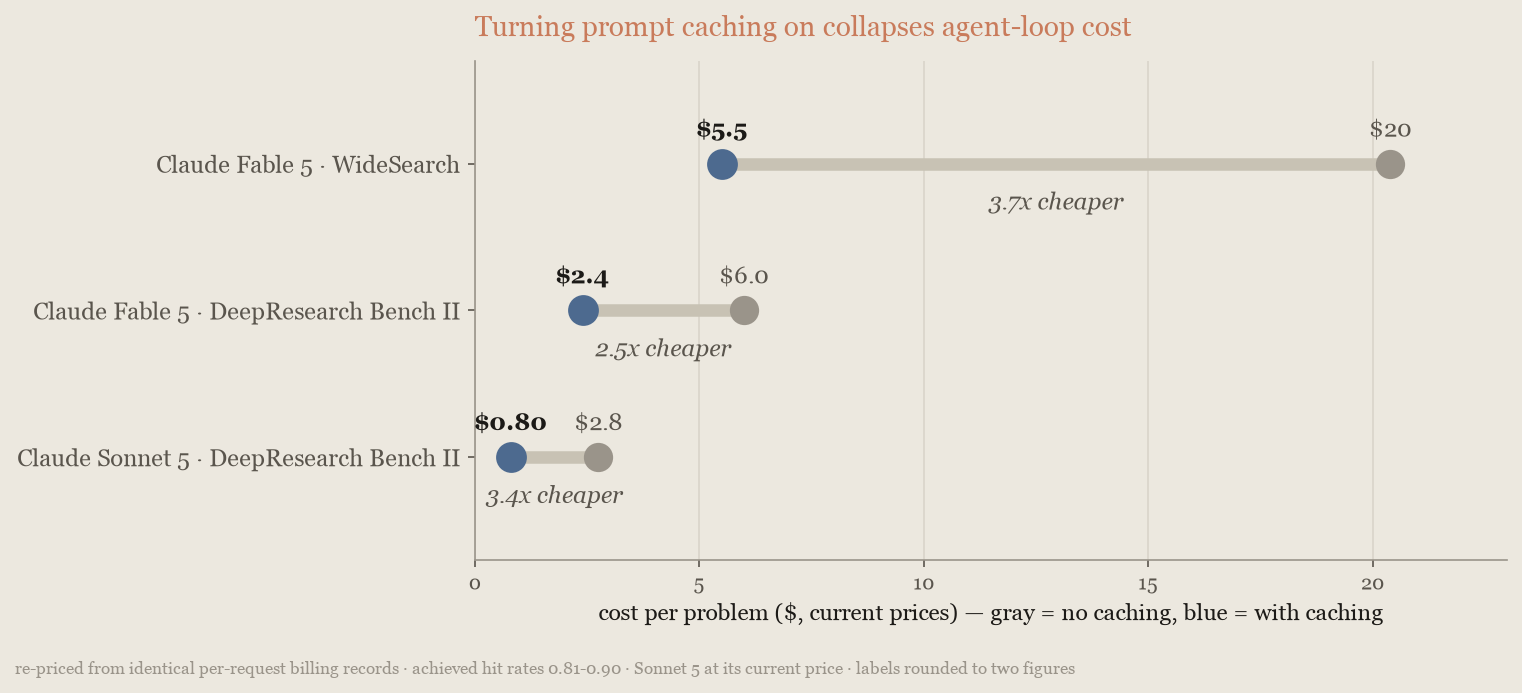
The cache's default lifetime is 5 minutes and an agent loop's turns are seconds apart, so the discount applies to most tokens on every turn; the charted runs achieved 81% to 90% hit rates. The saving varies with episode depth, because shorter loops re-read less, but caching stayed the largest single lever on every model and benchmark measured.
If your loop waits on humans between turns, use the [1-hour cache duration](https://platform.claude.com/docs/en/build-with-claude/prompt-caching#1-hour-cache-duration). It costs more to write (2x the input price instead of 1.25x) but pays for itself on the first prevented miss, because a miss resends the whole prefix at full price and writes it again.
Setup takes little work. [Automatic caching](https://platform.claude.com/docs/en/build-with-claude/prompt-caching#automatic-caching) places breakpoints for you; otherwise, the [Claude API skill](https://platform.claude.com/docs/en/agents-and-tools/agent-skills/claude-api-skill) that ships with Claude Code can add caching to an existing integration from one prompt. The following excerpt shows the skill adding it to the harness that produced these measurements:
```text wrap
$ claude
> add prompt caching to this integration
Done. Prompt caching is now wired into the harness. Two changes:
- build_system() now adds cache_control: {"type": "ephemeral"} to the
system block. Since the API renders tools -> system -> messages, this
one breakpoint caches the entire static prefix -- the full tool array
plus the system prompt.
- apply_moving_cache_breakpoints() strips any stale markers, then marks
the last content block of the two most recent user turns. The older
marker is the read point matching the prefix the previous request
cached; the newer one extends the cache for the next request.
That's 3 breakpoints total, under the limit of 4.
...
```
Those breakpoint placements follow the standard pattern in [Explicit cache breakpoints](https://platform.claude.com/docs/en/build-with-claude/prompt-caching#explicit-cache-breakpoints).
Three settings can break your cache during a task. Changing [`effort`](https://platform.claude.com/docs/en/build-with-claude/effort) between requests invalidates the cached prefix, so change it only where you would re-cache anyway, such as at a [compaction](https://platform.claude.com/docs/en/build-with-claude/compaction) boundary. Changing a [task budget](https://platform.claude.com/docs/en/build-with-claude/task-budgets) partway through does the same, so set it once, on the first request. Every [context editing](https://platform.claude.com/docs/en/build-with-claude/context-editing#context-editing-and-prompt-caching) pass invalidates the prefix from the point it clears and the next request pays to re-cache everything after it, so clear in a few large batches rather than many small ones. Make all three changes at natural breaks, then confirm cache reads have not dropped; if they have, [cache diagnostics](https://platform.claude.com/docs/en/build-with-claude/cache-diagnostics) shows where the prefix diverged.
### Trim input and context tokens
Most agent requests carry tokens that never influence the answer. Trimming them costs nothing in output quality, although not every lever here saved money when measured. Two places to look:
* **Input trimming.** [Dynamic filtering](https://platform.claude.com/docs/en/agents-and-tools/tool-use/web-fetch-tool#dynamic-filtering) in the web fetch tool keeps boilerplate out of fetched pages, [image resizing](https://platform.claude.com/docs/en/build-with-claude/vision#evaluate-image-size) right-sizes vision inputs, and [tool search with deferred loading](https://platform.claude.com/docs/en/agents-and-tools/tool-use/tool-search-tool) loads tool definitions only when needed. [Programmatic tool calling](https://platform.claude.com/docs/en/agents-and-tools/tool-use/programmatic-tool-calling) lets Claude run several tool calls from code so only the filtered result enters the context; its documentation reports 24% fewer input tokens on agentic search benchmarks, with a higher score. [Manage tool context](https://platform.claude.com/docs/en/agents-and-tools/tool-use/manage-tool-context) compares tool search, programmatic tool calling, prompt caching, and context editing.
* **Context lifecycle.** [Context editing](https://platform.claude.com/docs/en/build-with-claude/context-editing) clears stale tool results, and [automatic compaction](https://platform.claude.com/docs/en/build-with-claude/compaction) with its threshold stops long loops from carrying their whole history forward.
The levers interact with the cache and each other, so judge them by net effect, and use [cache diagnostics](https://platform.claude.com/docs/en/build-with-claude/cache-diagnostics) to confirm your cached prefix survives each change. Anthropic turned the levers on one at a time for an issue-triage agent working through 20 real bug reports with screenshots from a public repository (and, for the second panel, a longer variant of the same job):
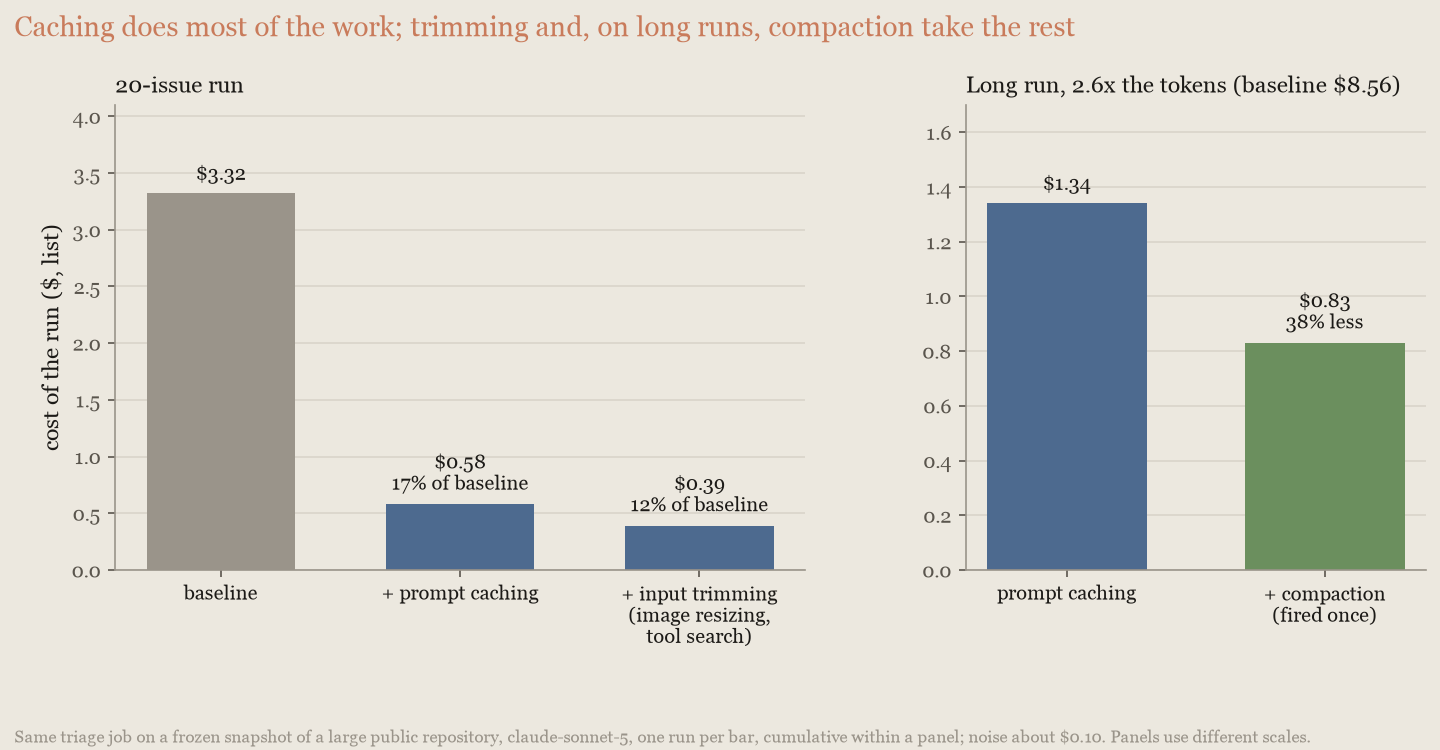
Caching did almost all the work, and trimming took the total to 88%. Each bar is one run, so differences of $0.10 are noise; those shown here are not. Compaction needs a session long enough to trigger it: the 20-issue run never reached the 50,000-token floor once its inputs were trimmed, but on the second panel's longer variant it fired once and cut the bill a further 38%.
Context editing is the one lever here that is not free. Every clearing pass rewrites the cached conversation, which works against prompt caching; in this run, context editing cost more than it saved. Use it to make room in the context window, and [clear in a few large batches](https://platform.claude.com/docs/en/build-with-claude/context-editing#context-editing-and-prompt-caching).
### Batch work that can wait
The [Batch API](https://platform.claude.com/docs/en/build-with-claude/batch-processing) takes 50% off every token of a request, including cached ones, in exchange for results arriving any time within 24 hours. Route every request no one is waiting on through a batch, and keep the interactive path for the rest. Batching is the second-largest free lever after caching for unattended agent work: evaluation runs, backfills, and scheduled jobs such as a recurring run of the issue-triage agent from the [token-trimming measurement](https://platform.claude.com/docs/en/about-claude/models/optimizing-for-cost-and-intelligence#trim-input-and-context-tokens). It combines with everything on this page except interactivity, but is not available for Claude Managed Agents sessions, which are interactive by design (see [Claude Managed Agents pricing](https://platform.claude.com/docs/en/about-claude/pricing#claude-managed-agents-pricing)).
### Audit prompts against the current model
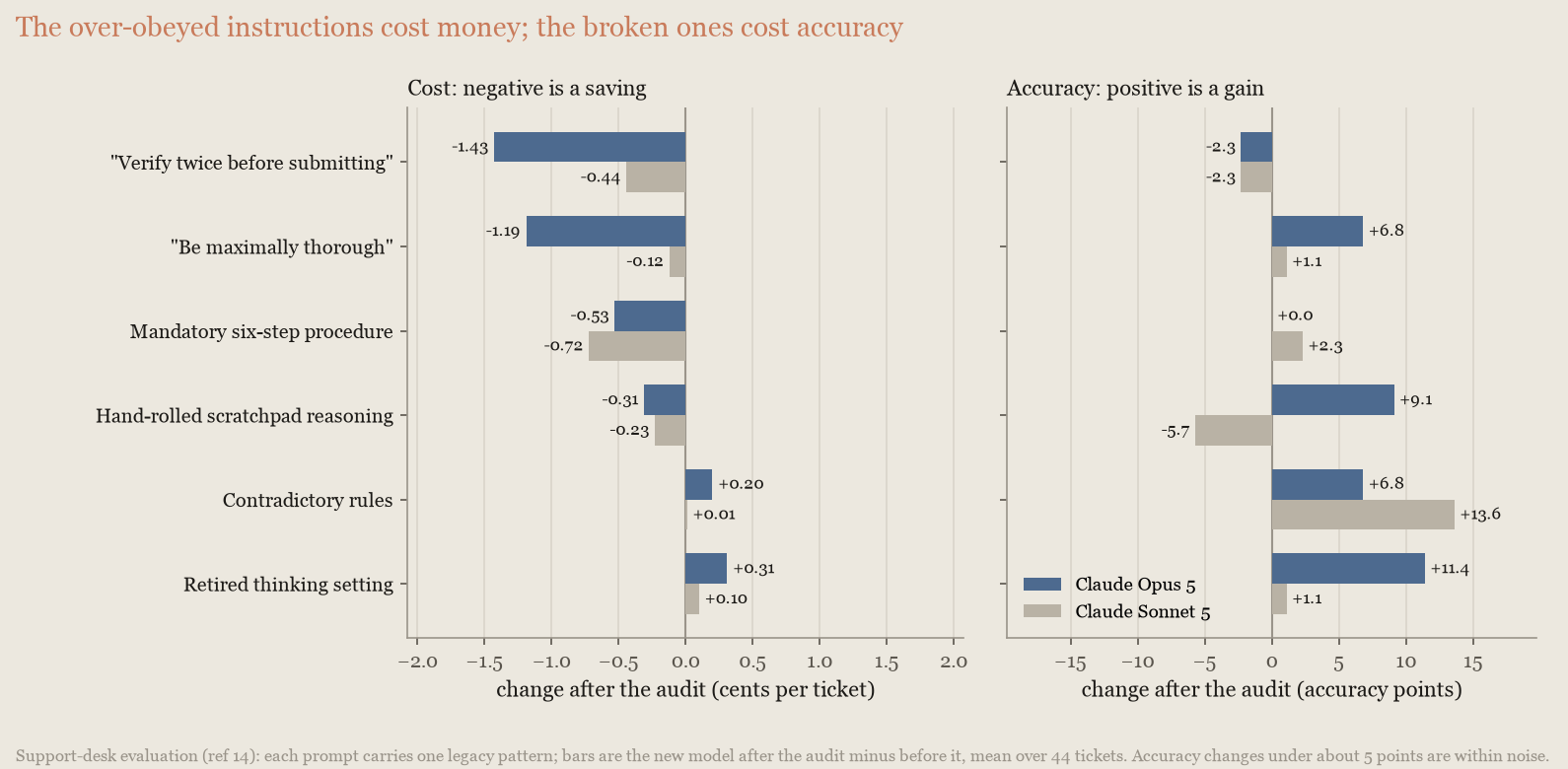
Each model generation responds to prompts differently, so a prompt accumulates text written for a model you no longer use. The usual case is over-specific instruction added to compensate for an older model: "verify twice," "be maximally thorough," a mandatory step-by-step procedure, or a hand-rolled reasoning scratchpad. A newer model follows these to the letter, producing extra tool rounds and extra writing, so the bill goes up with no gain in accuracy. Auditing prompts against the model you run now, and again whenever you change models, is a free win.
The audit is one command. The [Claude API skill](https://platform.claude.com/docs/en/agents-and-tools/agent-skills/claude-api-skill) that ships with Claude Code has a `prompt-audit` command that reads a project's prompts and request code and reports what was written for a different model. This shortened excerpt shows it run against a support-desk prompt and request code containing those patterns:
```text wrap
$ claude
> /claude-api prompt-audit
10 findings. The three that matter most:
1. budget_tokens returns a 400 on Opus 5 (support_agent.py:10). This code
does not run against its own target model. Everything else here is
quality; this one is an outage.
2. The prompt contains two live contradictions. Line 15 says confirm before
every refund, line 17 says process every eligible refund immediately.
Line 19 asks for a complete recap *and* a three-sentence maximum.
3. The reasoning scaffold and the 6-step script fight the model rather than
steer it. <scratchpad> + "reason step by step" is now a request
parameter, not prose; the mandatory 6-step procedure plus "investigate
fully even when the ticket looks simple" forces four tool calls on a
"where's my package" ticket.
...
-After any refund or escalation, verify twice before submitting: re-fetch
-the order, re-check every figure in your reply against the fresh lookup,
-and review the reply a second time for errors.
+Before submitting a refund or an escalation, re-fetch the order and confirm
+every figure in your reply matches the fresh lookup.
```
The command then proposes its edits as a diff (one hunk shown) and lists what it deliberately left alone: the refund window, the tone requirement, and the quality bar. You review a patch, not a rewrite.
The effect is measurable. On a support-desk evaluation[14](https://platform.claude.com/docs/en/about-claude/models/optimizing-for-cost-and-intelligence#refs), prompts written for Claude Opus 4.8 cost 36% more per ticket on Claude Opus 5 for no change in accuracy. Running the audit over the same prompts made Opus 5 both cheaper than the unaudited version (by 14%) and more accurate (97% of tickets, up from 92%, a gain outside the noise). On the Claude Sonnet 4.6 to Claude Sonnet 5 migration, the audit took 14% off at the same accuracy:
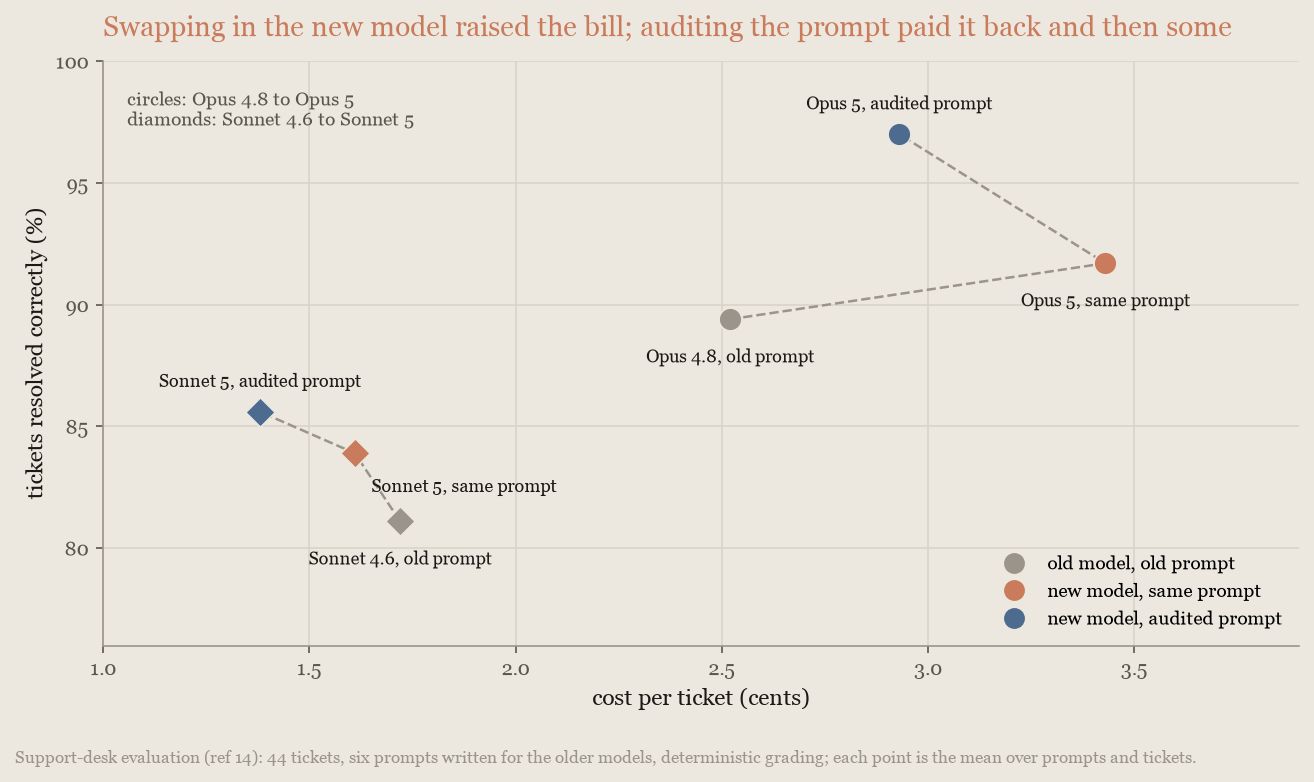
The two kinds of stale text have different costs. Instructions the new model follows too literally cost money: removing "verify twice" cut Opus 5's cost per ticket by a third, and removing "be maximally thorough" almost as much. Text that no longer fits the model costs accuracy instead: a retired thinking setting, contradictory rules, and a hand-rolled scratchpad that conflicts with the model's own thinking each restored 7 to 11 points on Opus 5 when removed:
The same patterns appear in tool descriptions and skills, and are worth removing there too.
## Trade cost against intelligence
These levers set where a single model sits between cost and intelligence: model choice, effort, re-running failures at a higher setting, and the budgets and caps it works within. Start with an effort sweep on your current model ([Tune effort](https://platform.claude.com/docs/en/about-claude/models/optimizing-for-cost-and-intelligence#tune-effort)). From lowest to highest cost and capability, the current models are Claude Haiku 4.5, Claude Sonnet 5, Claude Opus 5, and Claude Fable 5 (the frontier model); [Models overview](https://platform.claude.com/docs/en/about-claude/models/overview) has the full lineup and prices.
### Compare models on cost per task
Price lists are written per token, and per token the frontier model looks expensive: Claude Fable 5's per-token price is several times Claude Sonnet 5's. You pay for completed tasks, though, so compare models on cost per completed task. A more capable model finishes a task with less work: fewer turns, less searching, less re-reading of its own context, and less backtracking. The per-token premium is routinely overwhelmed by doing less of everything.
Anthropic measured this directly on DeepResearch Bench II[7](https://platform.claude.com/docs/en/about-claude/models/optimizing-for-cost-and-intelligence#refs), a research-report benchmark hard enough to separate the models:
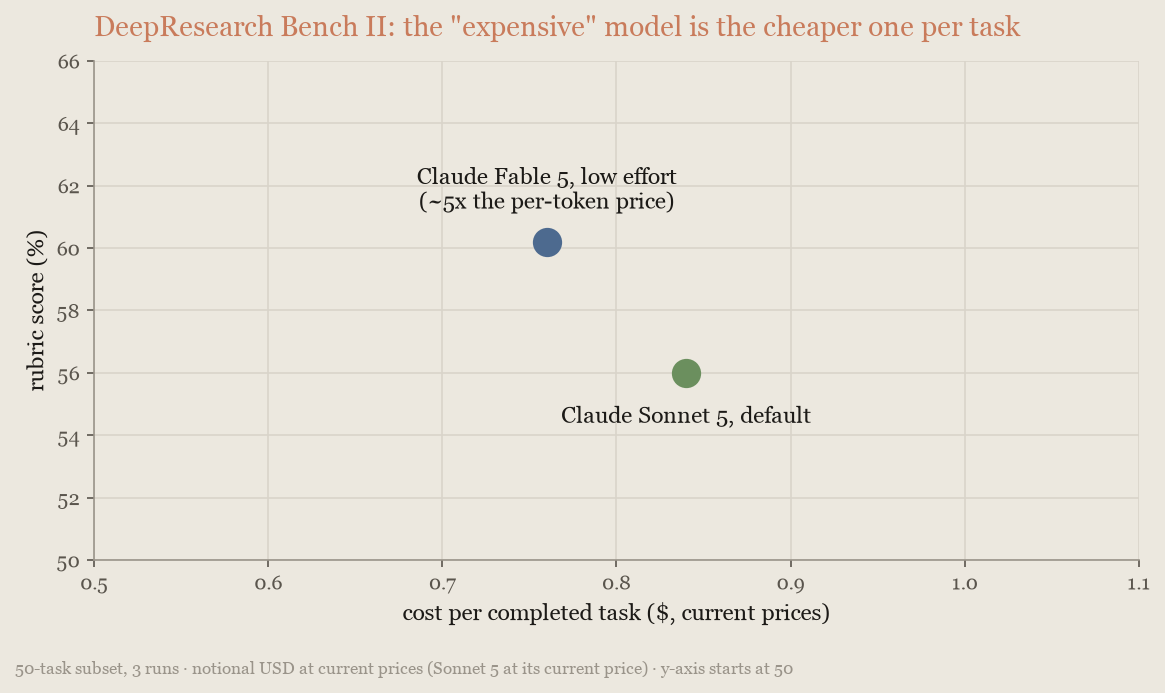
The frontier model at `low` effort was more accurate and about 10% cheaper per task than the mid-tier model, despite the per-token gap. It does not always win, though. On this page's SWE-bench Pro[3](https://platform.claude.com/docs/en/about-claude/models/optimizing-for-cost-and-intelligence#refs) subset, which both models largely saturate and whose scores are not comparable to the public leaderboard, Claude Opus 5 alone matched Claude Fable 5 alone (91.7% compared with 91.3%, inside run-to-run noise) at about 60% of its cost. On harder work, such as the DeepResearch Bench II tasks, Fable's advantage reappears.
For most agent workloads, start with Claude Opus 5: per token it costs half what Fable 5 does and 2.5 times what Sonnet 5 does, and on that coding subset it matched Fable's accuracy. At the other end, Claude Haiku 4.5 answered GPQA Diamond[9](https://platform.claude.com/docs/en/about-claude/models/optimizing-for-cost-and-intelligence#refs) questions at about a tenth of Opus 5's cost per question, with 63% accuracy compared with 92% for Opus, and fell much further behind on long coding tasks. It fits high-volume work with checkable outputs, not long agentic loops.
The ranking flips by workload, and no price list tells you which way. Price every candidate in cost per completed task on your own traffic, including Claude Opus 5 and the frontier model at reduced effort.
Price the tail of your workload, not the median: compare models on the hardest tenth of your tasks, not the typical one. On the typical task every model looks similar and the cheapest looks best, but the bill is decided by the tasks the cheaper model fails, because a failed task still bills its tokens, then the retry, then whatever the failure costs downstream. The tail is also where the money goes even when nothing fails. On a 20-problem WideSearch[1](https://platform.claude.com/docs/en/about-claude/models/optimizing-for-cost-and-intelligence#refs) run, two problems carried 43% of the spend:
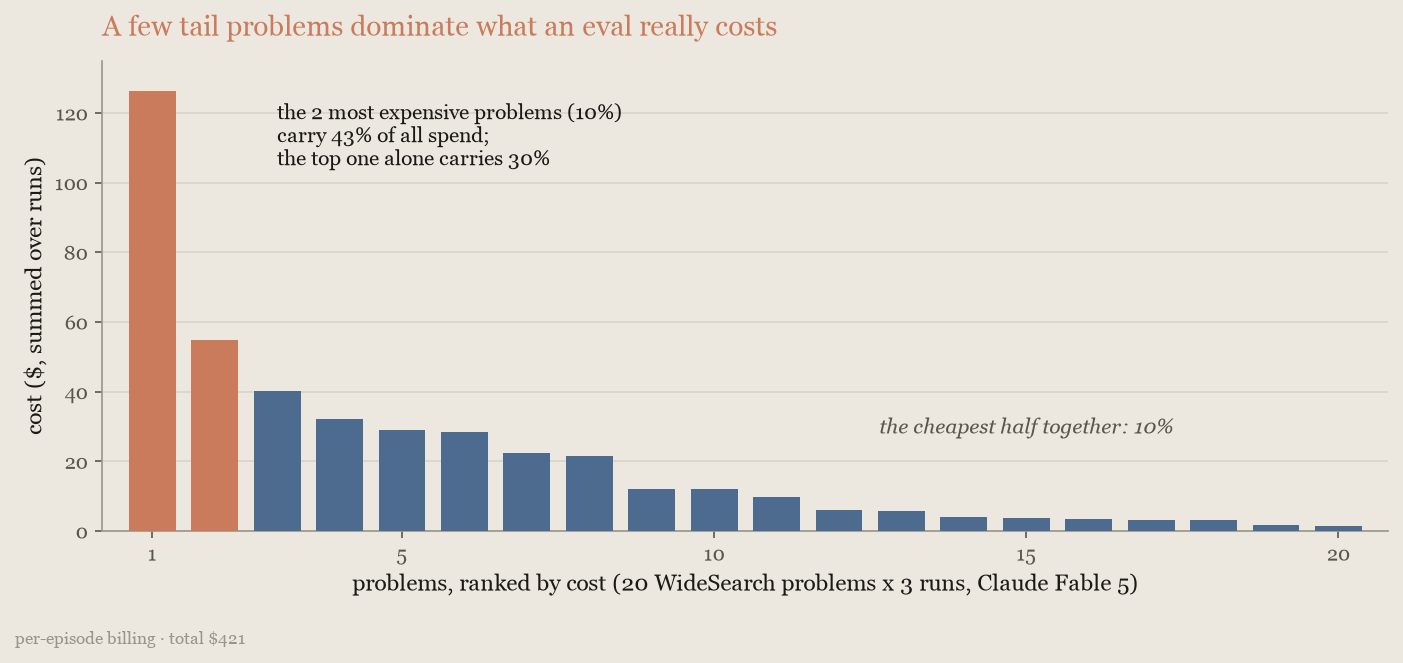
The [multi-model strategies](https://platform.claude.com/docs/en/about-claude/models/optimizing-for-cost-and-intelligence#combine-models) exist to spend frontier intelligence on that tail without paying frontier rates for the rest.
### Tune effort
Effort is the most direct way to tune a model to your task. The `effort` parameter governs how much thinking, tool calling, and self-verification the model does, and the default (`high`) suits demanding tasks. Cost scales with all that activity; accuracy scales only with the part your task needs. Below the model's ceiling, the highest effort levels pay for depth the task never uses.
On the research and knowledge-work benchmarks (WideSearch[1](https://platform.claude.com/docs/en/about-claude/models/optimizing-for-cost-and-intelligence#refs), DeepWideSearch[6](https://platform.claude.com/docs/en/about-claude/models/optimizing-for-cost-and-intelligence#refs), BrowseComp[4](https://platform.claude.com/docs/en/about-claude/models/optimizing-for-cost-and-intelligence#refs), and GDPval[2](https://platform.claude.com/docs/en/about-claude/models/optimizing-for-cost-and-intelligence#refs), all with Claude Fable 5), the curve of accuracy against cost is nearly flat: `low` gave up 1 to 3 points for a third to a half off the cost per task, `medium` matched the default's accuracy at 70% to 85% of its cost, and the default bought nothing measurable over `medium` on any of the four. On DeepWideSearch, `low` also matched an orchestrator with a Claude Sonnet 5 worker at 20% lower cost: lowering effort beat an architecture change.
Lower settings are also faster, which matters when latency is the constraint. In these runs, `low` took 4.5 minutes per problem on DeepWideSearch, compared with 7.9 minutes at the default. On the [corpus benchmark](https://platform.claude.com/docs/en/about-claude/models/optimizing-for-cost-and-intelligence#orchestrator-strategy-delegate-bulk-work), whose input does not fit in any single context window, Fable 5 took 7.9, 9.1, and 11.4 hours per episode at `low`, `medium`, and the default.
Long-horizon coding is the other shape. On SWE-bench Pro[3](https://platform.claude.com/docs/en/about-claude/models/optimizing-for-cost-and-intelligence#refs), Claude Opus 5 gave up about 2 points at `medium` for half the cost and about 8 points at `low` for a quarter of it: a real tradeoff, which [re-running failures at higher effort](https://platform.claude.com/docs/en/about-claude/models/optimizing-for-cost-and-intelligence#re-run-failures-at-higher-effort) turns back into a saving. This chart plots accuracy against cost for the research and knowledge-work benchmarks and for SWE-bench Pro:
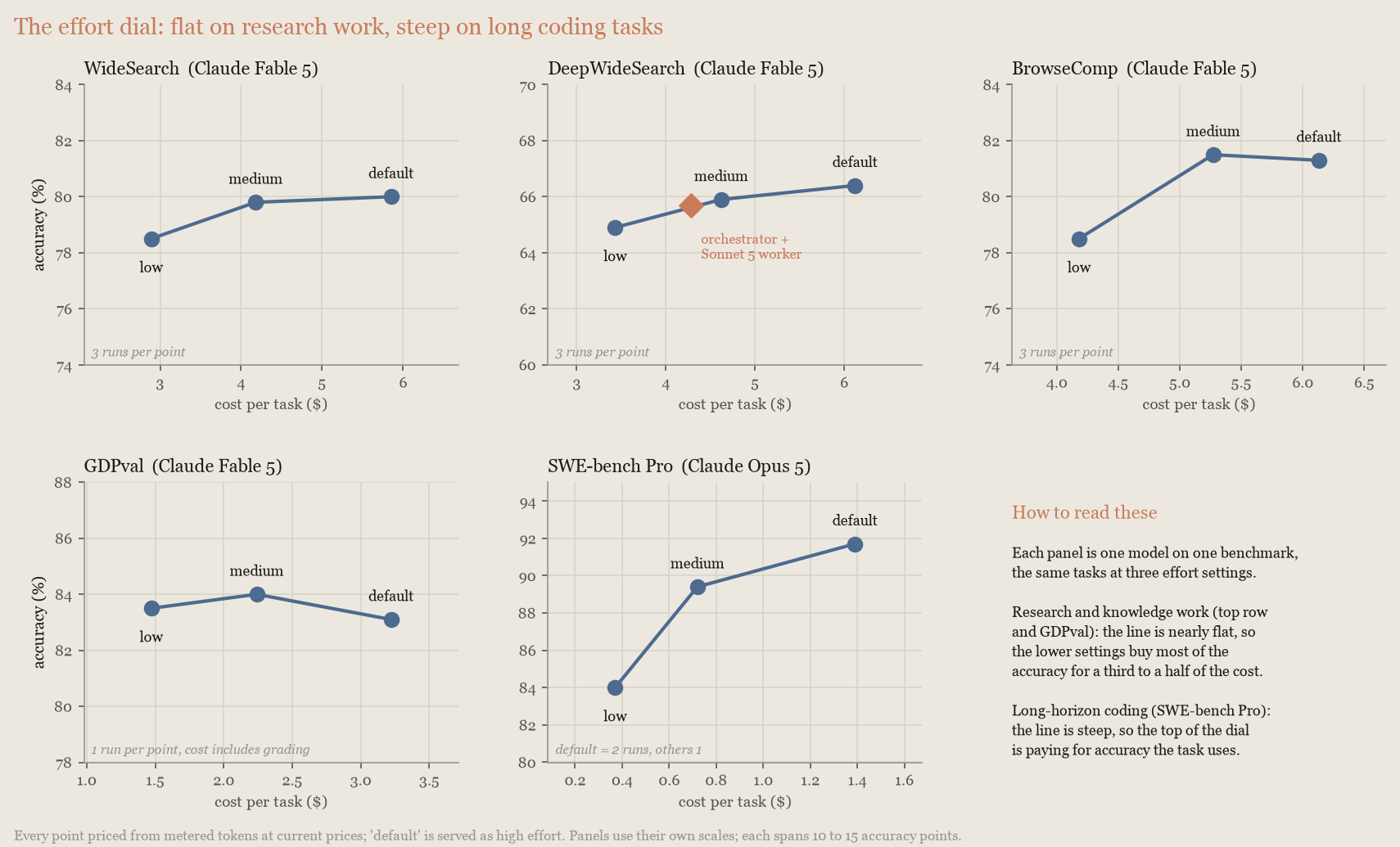
Two consequences follow. First, draw this curve for your own workload before you add a second model: in these internal measurements, a multi-model configuration that looked cheaper than the default single model cost more than that same model at lower effort. Second, this curve is the single-model baseline any multi-model strategy must beat, so [step 2 of measuring on your own workload](https://platform.claude.com/docs/en/about-claude/models/optimizing-for-cost-and-intelligence#measure-on-your-own-workload) baselines across effort levels.
Lower effort does cost accuracy on workloads that reach the model's ceiling, where accuracy genuinely scales with reasoning depth. On DeepResearch Bench II[7](https://platform.claude.com/docs/en/about-claude/models/optimizing-for-cost-and-intelligence#refs), where each report rewards deep reasoning per subtopic, every effort step bought about 2.4 points of rubric score; there is no free cost cut on that curve:
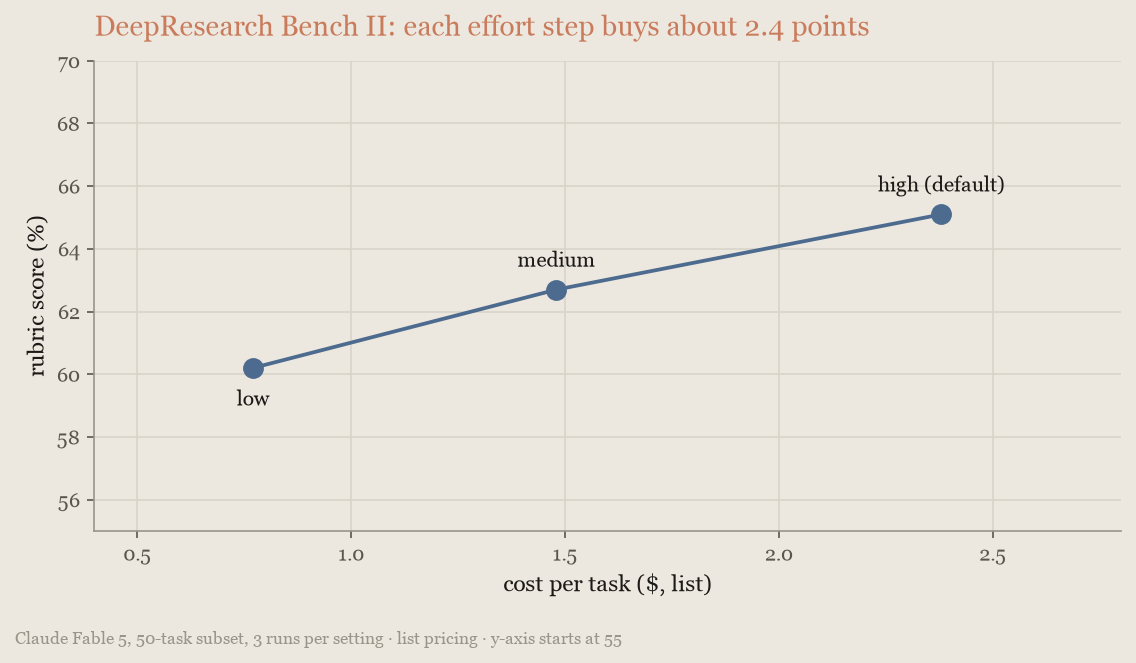
The task description alone does not reveal which kind of workload you have, so sweep two or three effort levels on a sample of your own traffic and read the answer off the curve. Test each level in a separate session: changing effort mid-session invalidates the cache (see [Cache repeated context](https://platform.claude.com/docs/en/about-claude/models/optimizing-for-cost-and-intelligence#cache-repeated-context)) and distorts the comparison. For parameter details, see [Effort](https://platform.claude.com/docs/en/build-with-claude/effort).
### Re-run failures at higher effort
When a task's outcome is checkable, the cheapest policy on the effort curve is not a fixed setting: run every task at a low setting and re-run only the failures at a higher one.
Anthropic computed this policy task by task from the effort runs on the SWE-bench Pro[3](https://platform.claude.com/docs/en/about-claude/models/optimizing-for-cost-and-intelligence#refs) subset in [Tune effort](https://platform.claude.com/docs/en/about-claude/models/optimizing-for-cost-and-intelligence#tune-effort). With Claude Opus 5 at `low`, 16% of tasks failed; with those re-run at the default, about 93% passed for about $0.70 each, against 91.7% for $1.39 running everything at the default: the same pass rate for half the cost, counting the failed cheap attempts. Starting at `medium` instead solved about 94% for about $0.95. Most of the small lift is the second attempt (re-running the default's own failures at the default scores about the same, for more money), so use this policy for the saving, not the lift:
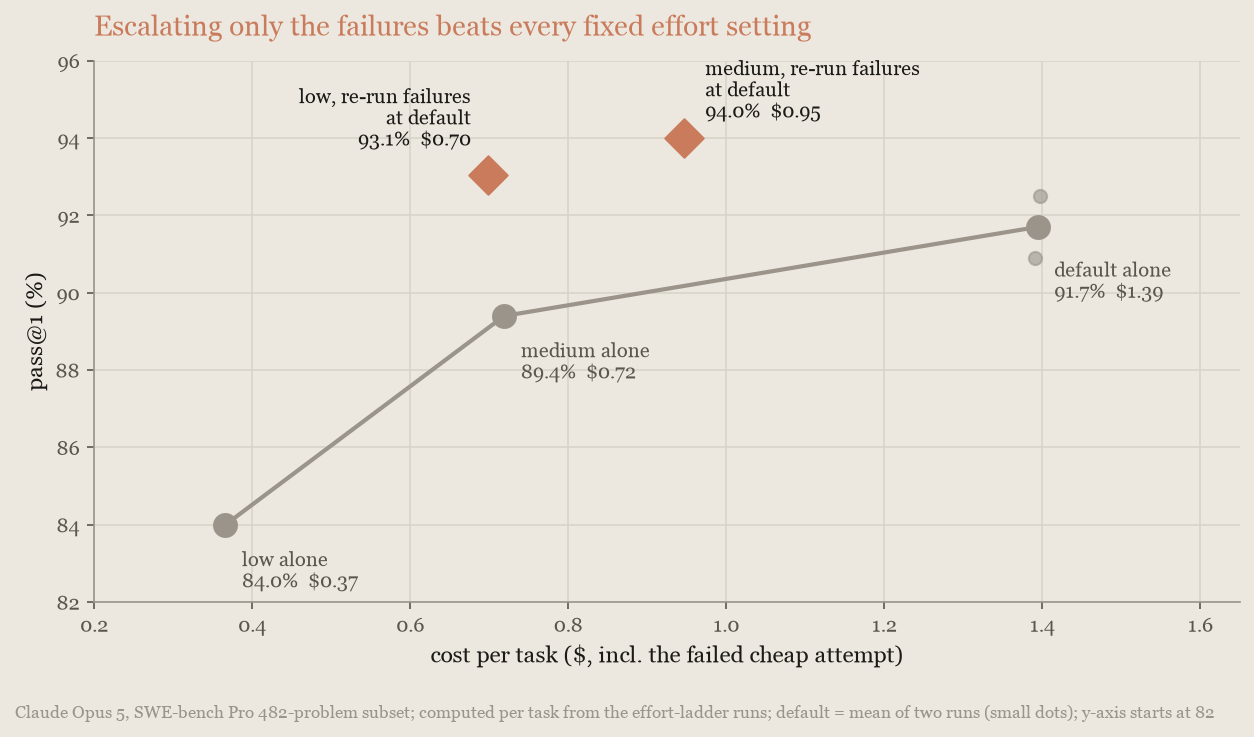
Two conditions apply. First, you need a failure signal (here, the benchmark's own tests); a checker that passes bad work lets those failures through. Second, every first-pass failure takes two runs' worth of wall-clock time, so the saving is paid for in latency on the failures.
### Set budgets and output caps
Most agentic task runs are cheap, but a minority spend many times the median cost on searching, re-verifying, and over-testing. A [task budget](https://platform.claude.com/docs/en/build-with-claude/task-budgets) targets that tail. The model sees a live token countdown for the whole task and self-regulates, trimming low-value searches, skipping redundant verification, and wrapping up instead of spiraling.
Anthropic measured pass rate and cost per task on SWE-bench Pro[3](https://platform.claude.com/docs/en/about-claude/models/optimizing-for-cost-and-intelligence#refs) with Claude Fable 5 as the budget tightened:
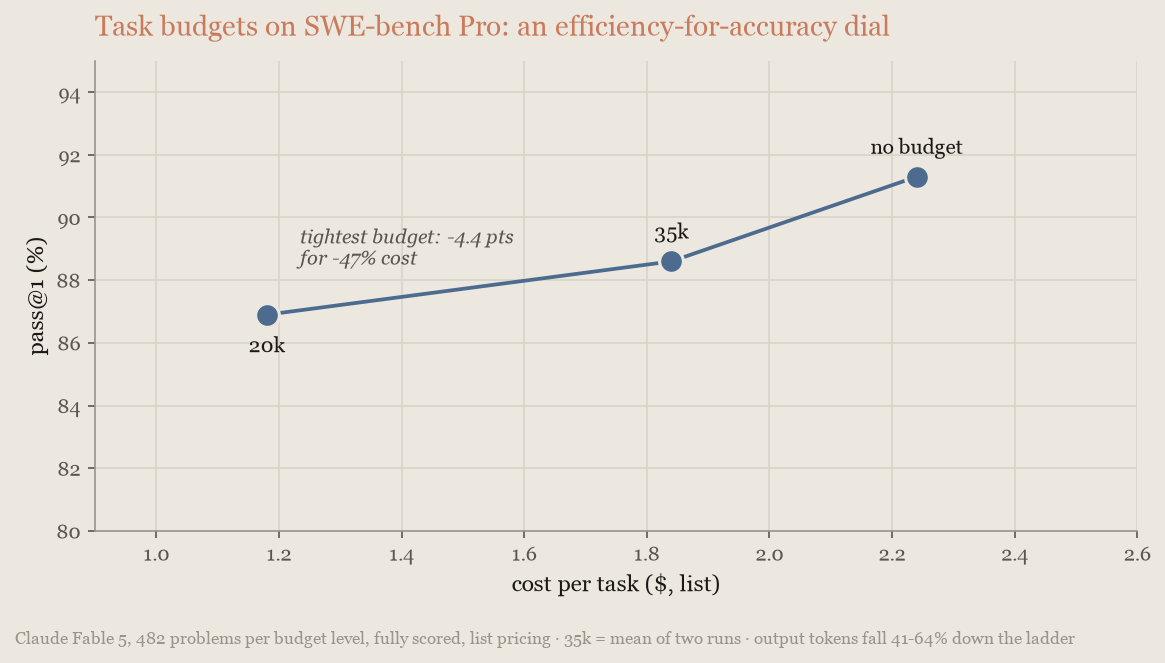
A generous budget gave up about 2.7 points of pass rate for an 18% cost saving, and the tightest allowed budget gave up 4.4 points for a 47% saving. Budgets bought efficiency here, not accuracy.
Three controls do three different jobs. A task budget saves money, because the model sees it. `max_tokens` is a safety cap that saves nothing. On Claude Managed Agents, a session budget is the hard dollar stop behind both. Set all three: a task budget, a high `max_tokens`, and a session cap for the run you never want on a bill, with a [workspace spend limit](https://platform.claude.com/docs/en/api/rate-limits#setting-lower-limits-for-workspaces) as the final backstop.
* **Task budgets** are in beta (beta header `task-budgets-2026-03-13`) on Claude Opus 5, Claude Fable 5, Claude Opus 4.8, and Claude Opus 4.7, but not Claude Sonnet 5; check the [support table](https://platform.claude.com/docs/en/build-with-claude/task-budgets#feature-support) first. Start near your loop's 90th-percentile token usage, then tighten ([Choosing a budget](https://platform.claude.com/docs/en/build-with-claude/task-budgets#choosing-a-budget) shows how to collect that distribution). Budgets below the current 20,000-token floor are rejected, and very tight budgets can produce refusal-like behavior. Set the budget once, on the first request, because a mid-task change [invalidates the cache](https://platform.claude.com/docs/en/about-claude/models/optimizing-for-cost-and-intelligence#cache-repeated-context). The budget is advisory, steering the model rather than stopping it, so verify adherence on your workload.
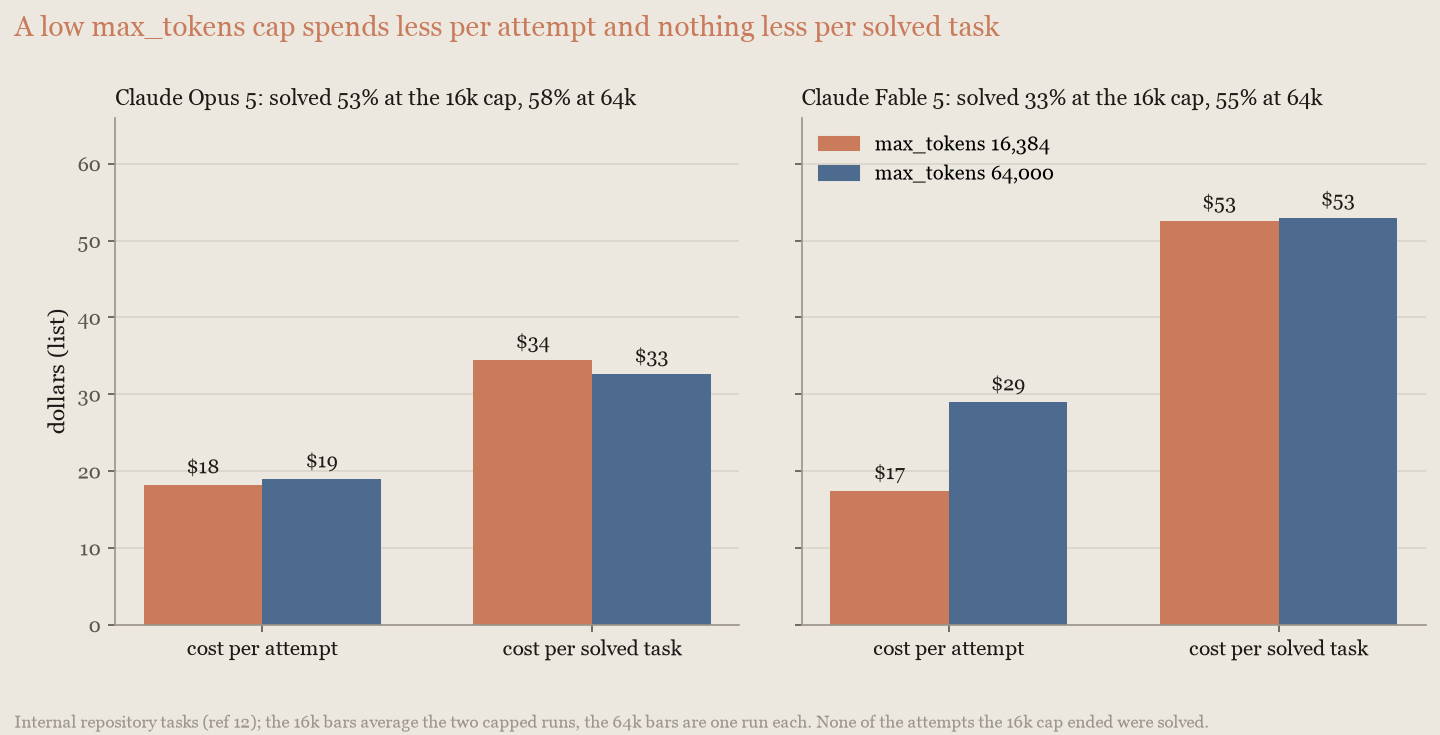
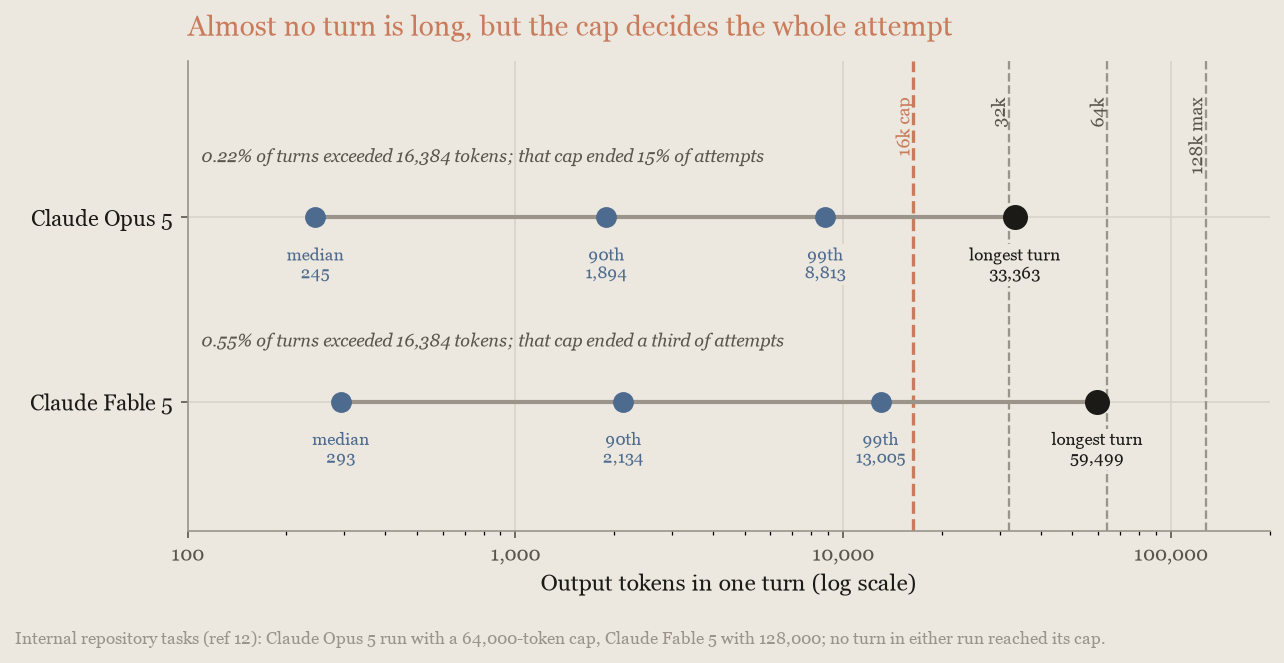
* **`max_tokens`** caps a single response, invisibly to the model, so lowering it does not make the model economize. The turns that needed the room are discarded and still billed. On an internal repository-task benchmark[12](https://platform.claude.com/docs/en/about-claude/models/optimizing-for-cost-and-intelligence#refs), a 16,384-token cap ended 15% of Claude Opus 5's attempts and a third of Claude Fable 5's, none of them solved. Capped runs spent less per attempt but bought proportionally fewer solves, so cost per solved task was the same as at 64,000. At that setting nothing was cut off, and Fable solved 54.6% of tasks instead of 33.3% (on a separate cut of the SWE-bench Pro[3](https://platform.claude.com/docs/en/about-claude/models/optimizing-for-cost-and-intelligence#refs) subset, described in reference 12, 92% instead of 90%). Retrying capped attempts only adds cost: at the same cap they never succeeded, and at a higher one you also pay for the wasted attempt. Set `max_tokens` to 64,000 for agentic work (128,000, the maximum, at `xhigh` or `max` effort), [stream responses](https://platform.claude.com/docs/en/build-with-claude/streaming) that large, treat [`stop_reason: max_tokens`](https://platform.claude.com/docs/en/build-with-claude/handling-stop-reasons#max-tokens) as a failure, and save money with effort and task budgets, which the model can see.
* **Session budgets on Claude Managed Agents** are the hard stop. A [session budget](https://platform.claude.com/docs/en/managed-agents/budgets) is a dollar cap on one session at list rates for tokens, searches, and session time. At the cap, the session pauses with `stop_reason: budget_reached`; raising the budget resumes it. It is platform-enforced, works on any model with a list price (including Claude Sonnet 5), and combines with the advisory task budget. Deployments apply the same field to every run.
The first of two `max_tokens` charts plots cost per attempt and per solved task at each cap:
The second plots per-turn output length against the caps:
## Combine models
Multi-model architectures fit workloads whose task complexity varies enough that different steps are best served by different models. When your traffic mixes routine work that a smaller model handles reliably with harder steps that need frontier capability, splitting the work keeps frontier intelligence where it matters while most tokens bill at smaller-model rates. When a workload lacks that mix, because its difficulty is uniform or it is one dependent chain, a single well-tuned model is usually the better choice. Each strategy section gives the rule for telling the two cases apart.
Two strategies cover most workloads, and they differ in which model holds the main loop:
| Strategy | Control flow | Frontier model's role | Fits | Frontier cost scales with |
| ---------------- | ----------------------------------------------------- | ----------------------------------- | ------------------------------------------------------------------------------------------------------------------------- | ------------------------------------- |
| **Advisor** | Smaller model runs the loop, escalates on demand | Consulted for plans and corrections | Serial work that is hard in spots, such as a coding agent's many turns between a few real decisions | How often the executor gets stuck |
| **Orchestrator** | Frontier model runs the loop, delegates the bulk work | Plans, dispatches, and synthesizes | Work that fans out across genuinely independent files, documents, or cases, especially more than one context window of it | How hard the pieces are to coordinate |
### Advisor strategy: escalate hard decisions
In the advisor strategy, a lower-cost executor model runs the agent loop and performs most turns. When it hits a decision that needs deeper judgment, such as choosing an approach or recovering from a failure, it calls a higher-intelligence advisor model for strategic guidance, then continues. Most tokens are billed at executor rates, and only the occasional consultations at advisor rates.
To use it, add the [advisor tool](https://platform.claude.com/docs/en/agents-and-tools/tool-use/advisor-tool) to your request. This beta feature runs the whole strategy server-side in one `/v1/messages` request: the executor emits a tool call, Anthropic runs the advisor inference, and the executor continues with the advice; you write no orchestration code. On Claude Managed Agents, [give the session an advisor](https://platform.claude.com/docs/en/managed-agents/multiagent-orchestration#give-the-session-an-advisor) by adding an `advisor` entry to the agent's `multiagent` roster; the session's primary thread consults it the same way. Claude Code supports it too; see [escalating hard decisions with the advisor tool](https://code.claude.com/docs/en/advisor).
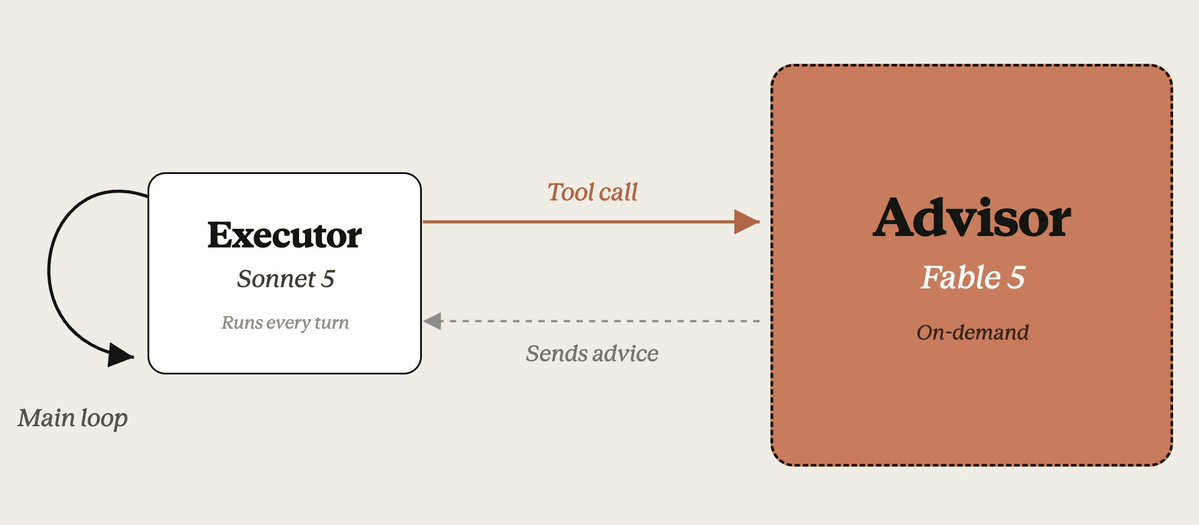
**What sets the payoff.** The advisor sees the task only through the executor's calls, so two things decide how much it helps.
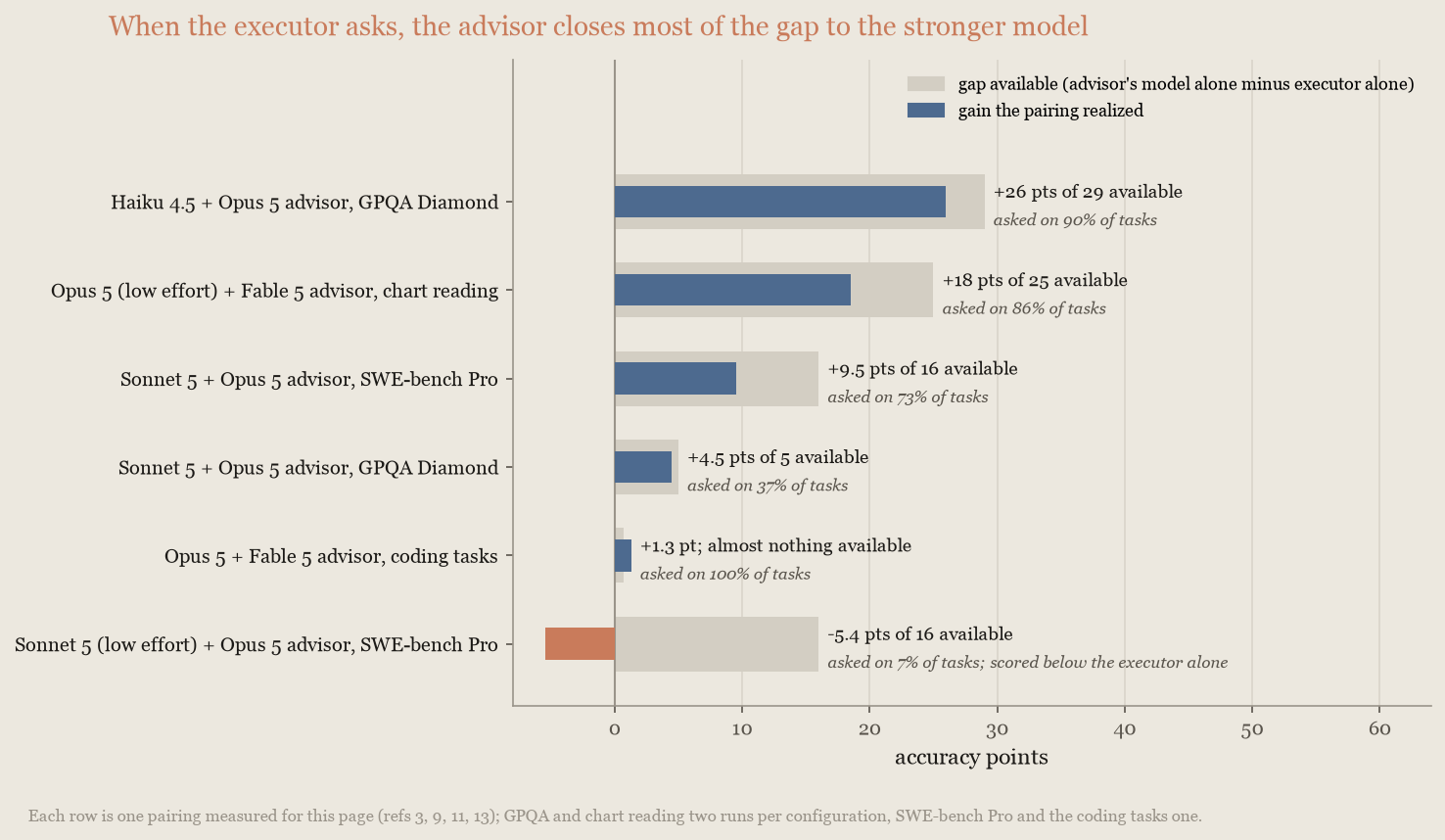
The first is the gap between the models. The advisor can only hand over capability the executor lacks: on GPQA Diamond[9](https://platform.claude.com/docs/en/about-claude/models/optimizing-for-cost-and-intelligence#refs) a Claude Haiku 4.5 executor gained a great deal from a Claude Opus 5 advisor, a Claude Sonnet 5 executor gained a few points, and a frontier executor almost nothing.
The second, and the fragile one, is whether the executor actually asks (the consult rate). An executor at low effort can stop noticing it is stuck: a pairing that consults on most tasks at the default effort can fall to consulting on almost none when effort is lowered, and then scores below the executor alone. The rate also varies by task: on DeepSWE[10](https://platform.claude.com/docs/en/about-claude/models/optimizing-for-cost-and-intelligence#refs) a low-effort Sonnet 5 executor kept asking and gained 23 points; on SWE-bench Pro[3](https://platform.claude.com/docs/en/about-claude/models/optimizing-for-cost-and-intelligence#refs) the same executor stopped. When the executor does ask, it gets most of the way there. Across the pairings in the following chart, the advisor closed 60% to 90% of the gap to the stronger model while that model was paid for only on the consultations, which makes the cost cases possible:
The consult rate responds to prompting. With only the tool's built-in description, executors under-call, especially on coding work, so the [advisor tool documentation](https://platform.claude.com/docs/en/agents-and-tools/tool-use/advisor-tool#prompting-for-coding-and-agent-tasks) gives a system prompt that asks for one call before substantive work and one before finishing, about two to three calls per task. The coding pairing measured next ran at that cadence, about two consultations on every task. That page also covers nudging an under-calling executor and capping calls client-side to bound cost. So watch the consult rate: prompt for it, measure it, and restore the executor's effort if it collapses.
**When it pays on cost.** An advisor saves money when a few short consultations, billed at the advisor's rate, replace running the advisor's model for the whole task. That works best when the advisor's model is priced well above the executor's, so the most cost-effective configuration is a frontier advisor over a mid-tier executor. A pairing can hold its own even at the top of the range, because advice also saves executor tokens: an executor told the right approach explores fewer dead ends, which can cover the consultations.
On an internal agentic-coding benchmark[11](https://platform.claude.com/docs/en/about-claude/models/optimizing-for-cost-and-intelligence#refs), run with a plain API agent, a Claude Opus 5 executor with a Claude Fable 5 advisor was the most accurate configuration measured: 85.7% of attempts solved for $8.40 per attempt. It sits above the line through each model's own effort settings, but only a point or two over the best of them (Opus alone at the default setting, 84.4% for $8.50, and Fable alone at `medium`, 83.4% for $8.20), which a single run does not separate from noise. Fable alone at `medium` effort reaches about the same accuracy as the pairing (83.4% compared with 85.7%) for about the same money ($8.20 compared with $8.40 per attempt):
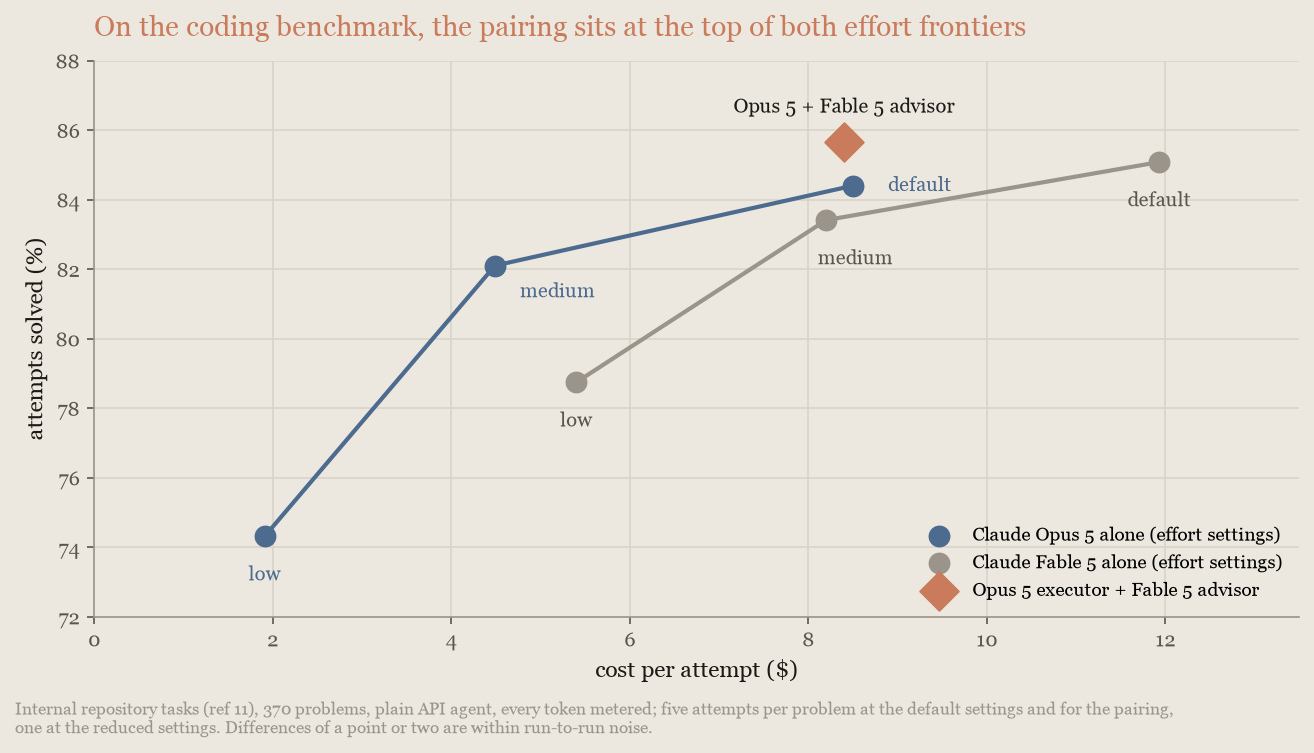
An earlier measurement through [Claude Code's advisor mode](https://code.claude.com/docs/en/advisor) produced the same ordering. Read this result as a shape to test on your workload, not a saving: at the top of the range the advisor buys a little accuracy at the frontier price, and the cost case belongs to pairings with a wider capability gap, such as the following chart-reading case. The latency cost is the consultations themselves: about two extra frontier-model calls per task on this benchmark, each on the task's critical path.
**When it pays instead of raising effort.** Where the capability gap is wider and a workload's accuracy responds to effort, a low-effort executor that consults an advisor can be a cheaper step up than raising the executor's own effort, because the advisor is paid for only on tasks that need it.
On Chartography[13](https://platform.claude.com/docs/en/about-claude/models/optimizing-for-cost-and-intelligence#refs), a public chart-reading benchmark run on [Claude Managed Agents](https://platform.claude.com/docs/en/managed-agents/overview) with its advisor, a Claude Opus 5 executor at `low` effort with a Claude Fable 5 advisor scored 67.5 for $0.60 per task. That is above the line through either model's own effort settings (Opus alone went from 49 to 75 between `low` and `medium` for $0.38 to $0.94), although the executor's own `medium` and default settings still hold the top scores, at 1.6 and 3.3 times the price:
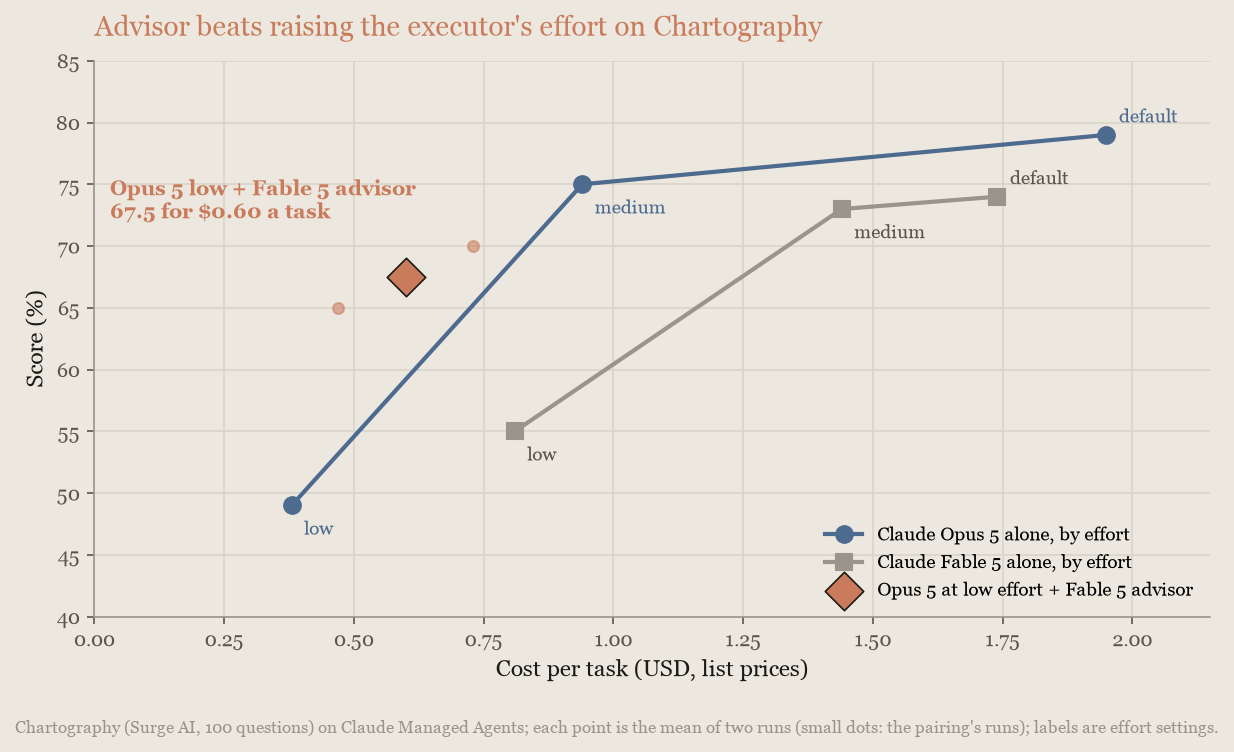
The low-effort executor consulted the advisor on 86% of tasks, the condition the SWE-bench Pro pairing failed to meet. Measure the consult rate in your agent loop before relying on this configuration.
Whatever the pairing, first price the advisor's model alone at low effort; that is the baseline to beat. Recheck at every model release, because releases move both the capability gap and the price ratio.
**When it fits.** The advisor strategy suits workloads where turns are mostly mechanical but an excellent plan matters: coding agents, computer use, and multistep research pipelines. It fits poorly when every turn genuinely needs frontier capability, when there is nothing to plan (single-turn Q\&A), or when your executor is already close to the advisor's capability.
### Orchestrator strategy: delegate bulk work
In the orchestrator strategy, the frontier model holds the loop. It decomposes the task, dispatches subtasks to lower-cost worker models, and merges their results. The orchestrator's own transcript stays short because workers absorb the token-heavy exploration, so most tokens are billed at worker rates while the plan and synthesis still come from the frontier model.
To build one, use [multiagent orchestration](https://platform.claude.com/docs/en/managed-agents/multiagent-orchestration) in Claude Managed Agents: configure a coordinator agent (the orchestrator) and a roster of worker agents, each with its own model. For a complete working example with a Claude Fable 5 coordinator and Claude Sonnet 5 workers, see the Claude Cookbook recipe [Coordinator pattern: big models for planning, small models for execution](https://github.com/anthropics/claude-cookbooks/blob/main/managed_agents/CMA_plan_big_execute_small.ipynb).
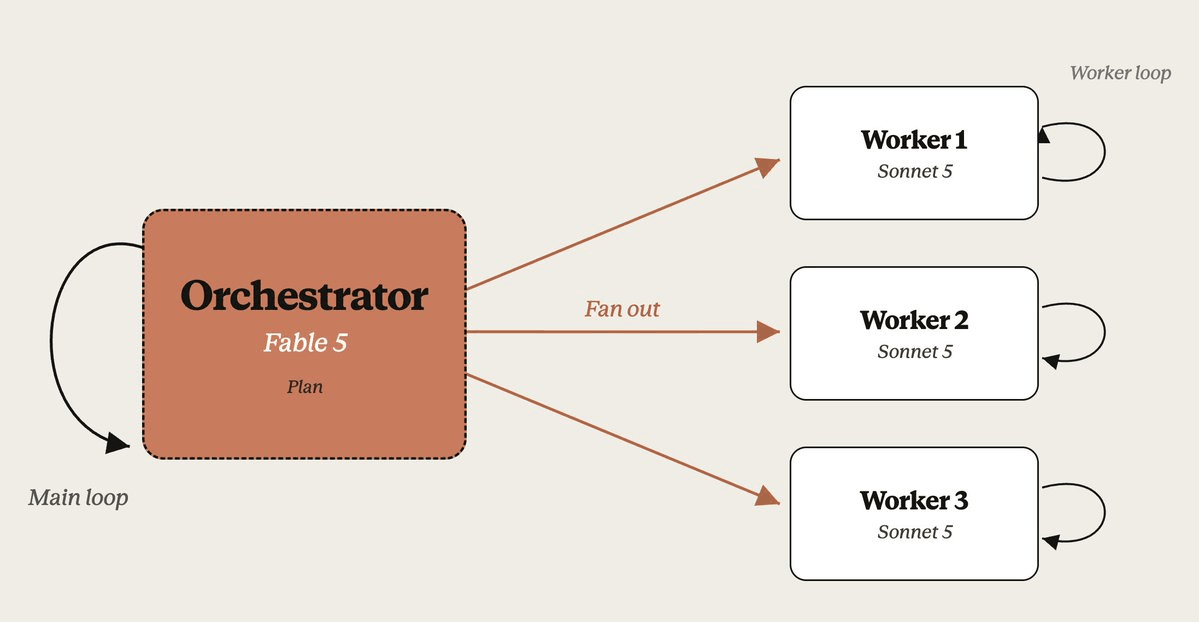
This pattern saves wall-clock time when workers can run in parallel: on the corpus benchmark[8](https://platform.claude.com/docs/en/about-claude/models/optimizing-for-cost-and-intelligence#refs) later in this section, an episode took 1.9 hours with the coordinator compared with 11.4 hours solo. It saved money in only two measured situations. On work a single model could handle alone, the same model at lower effort was cheaper every time.
**Case 1: insurance against the cost tail on routine work.** A frontier model running alone occasionally spirals on a routine problem it would normally solve. Because you cannot tell in advance which those will be, a few such runs dominate the bill. A coordinator that hands routine work to a lower-cost worker caps that tail, because any spiraling now happens at worker rates.
Anthropic measured this on a deliberately easy slice of BrowseComp[4](https://platform.claude.com/docs/en/about-claude/models/optimizing-for-cost-and-intelligence#refs) (10 problems the solo model reliably solves; 50 delegated and 70 solo runs). A Claude Fable 5 coordinator with one Claude Sonnet 5 worker cost a little under half as much as Fable alone on average and about a third as much at the 90th percentile ($12 compared with $33), and the solo model's single most expensive run, at $84, was also wrong:
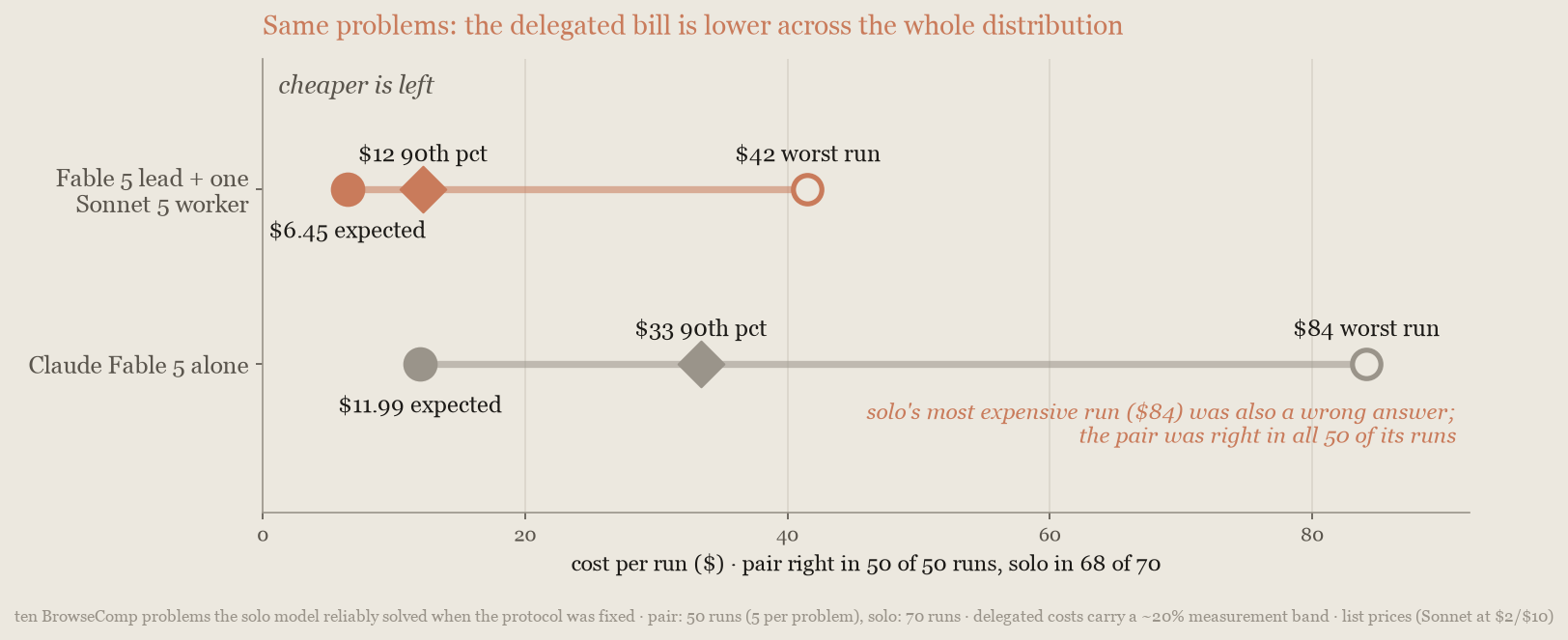
Delegation paid on the routine, normally solvable share of the work, the opposite of the intuition that workers are for hard problems. On the full, harder BrowseComp set, the economics reversed. If your traffic has a long cost tail on routine tasks, this is the orchestrator case to measure first.
**Case 2: work larger than one context window.** A solo model must work through an input that large serially, one context window at a time, paying to re-read its own state on every pass. Workers each read their own partition, in parallel and at worker rates. Reading-heavy work that still fits in one context window is a model-choice problem, not a delegation problem: on reading cost alone, the orchestrator comes out ahead only when no single context can hold the work.
Anthropic built a benchmark for this case[8](https://platform.claude.com/docs/en/about-claude/models/optimizing-for-cost-and-intelligence#refs): a 21.6-million-token corpus of 14 public Python packages with 130 planted defects, too large for any context window. Lowering effort cannot help, because the bill is the corpus read itself: Claude Fable 5 solo cost $720 to $764 per episode at every effort setting, and only its accuracy moved. The coordinator configuration cost 55% less than any of those settings and scored 3 to 7 points below Fable at `medium` or the default, while beating a Claude Sonnet 5 solo baseline outright:
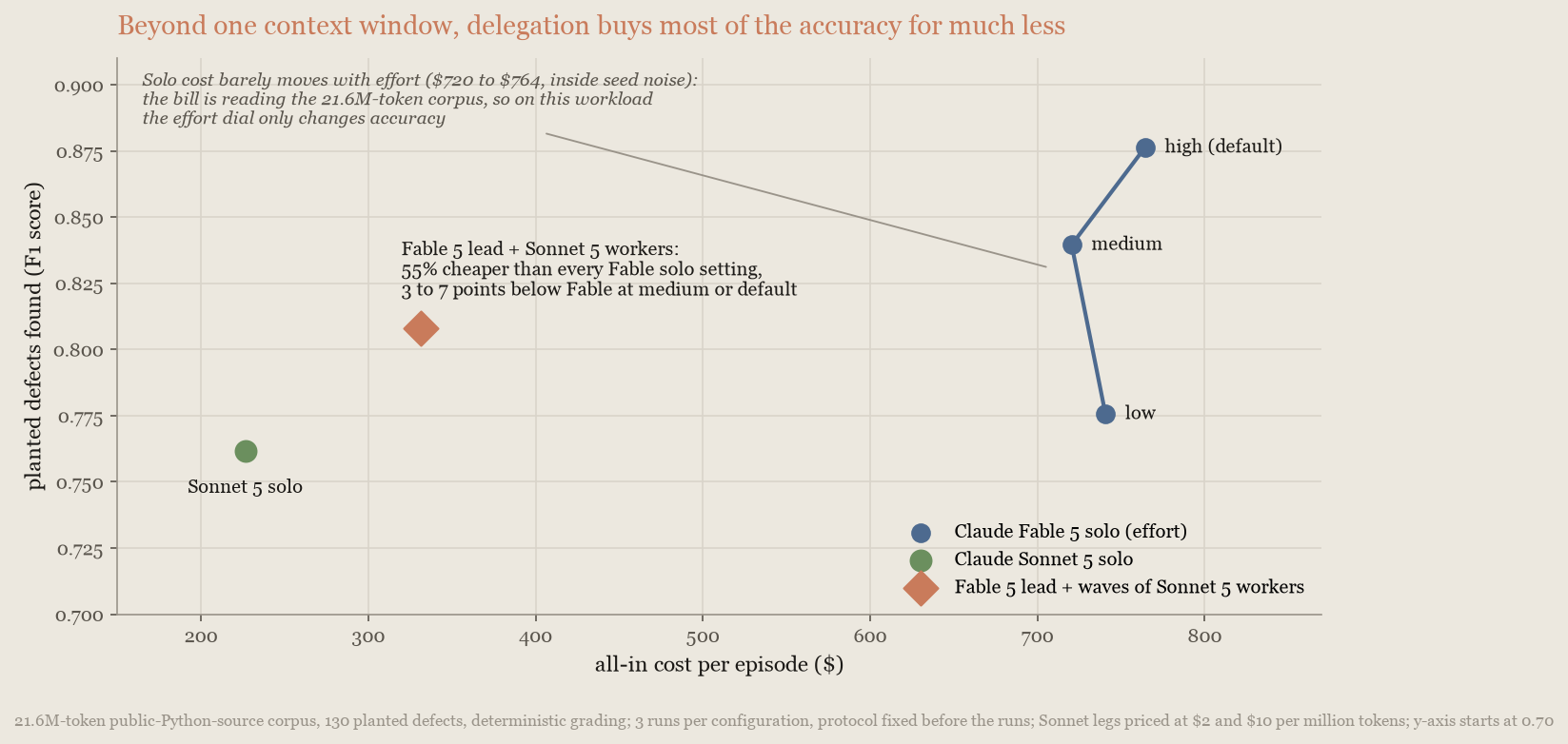
The token accounting shows why. The coordinator configuration read more than the solo model (32 million input tokens compared with 14.5 million) and still cost less, because partitioned reading at worker rates is cheaper than repeated re-reading at frontier rates. Fable 5 at default effort still holds peak accuracy, at 2.3 times the coordinator configuration's cost, so delegation here buys most of the accuracy, not all of it.
**When delegation doesn't pay.** An orchestrator buys something only when there is bulk to hand off: many independent pieces, ideally too many for one context window. When the work is one dependent chain, or fits in a single context, the orchestrator pays for a plan, a handoff, and a merge that a single model gets for free. In every such case measured, the coordinator's model alone at lower effort came out ahead.
BrowseComp[4](https://platform.claude.com/docs/en/about-claude/models/optimizing-for-cost-and-intelligence#refs) shows the boundary inside one benchmark. Delegation paid on the routine slice and lost on the full, harder set, where the frontier model alone reached the coordinator configuration's accuracy at 22% to 30% lower cost. Independent external work reports the same pattern[5](https://platform.claude.com/docs/en/about-claude/models/optimizing-for-cost-and-intelligence#refs). If the work is one chain, fits in one context without a long cost tail, or a single model at lower effort already meets your bar, don't build an orchestrator.
### Choose between the strategies
Most cases come down to one question: does the work split into independent pieces, or is it one answer reached through a chain of dependent steps? The [strategy table](https://platform.claude.com/docs/en/about-claude/models/optimizing-for-cost-and-intelligence#combine-models) maps the two answers to the two strategies.
If you are unsure, don't build anything yet:
1. Sweep effort on your current model first. It is the cheapest experiment on this page, and most workloads end there.
Cut at 300 lines. The page has the rest.
agents-and-tools/agent-skills/best-practices Changed · +34 / -28 lines
agents-and-tools/agent-skills/overview Changed · +7 / -8 lines
agents-and-tools/tool-use/code-execution-tool Changed · +14 / -2 lines
#### How generated files are captured